Opera is one of the few browsers offering a built-in “free VPN” directly in the interface. This zero-cost promise attracts millions of users who want privacy without a monthly subscription. But is it a genuine security tool or just a convenient proxy for casual use?
In this Opera VPN review, we tested the free version’s speed, privacy policy, and unblocking capabilities from Vietnam to see if it is worth your trust.
Key takeaways:
- It is actually a Proxy: It only protects browser traffic via HTTPS/TLS, not your entire device like a true VPN.
- Speed is inconsistent: Our tests showed a massive speed drop on the “Optimal” location, while distant servers were surprisingly faster.
- Privacy nuances: The VPN service itself is audited as “No-logs,” but the browser environment still collects usage data for ads, and the company is owned by a Chinese consortium.
- Great for simple tasks: Ideally suited for quickly reading a blocked news article, but not recommended for banking or torrenting.
- Completely free: There are no data caps, no payment info, and no registration requirements.
Safelyo is reader-supported. When you buy through links on our site, we may earn an affiliate commission to help maintain our operations. This does not affect our independent testing process.
Note: All information and data were recorded on January 10, 2026. Figures and details may vary depending on your location.
1. Opera VPN review: Overview
Opera VPN is a feature integrated directly into the Opera Browser. It stands out because it requires no account and no installation. However, our testing reveals that it lacks the robust security features found in standalone VPN services.
It is important to clarify that our scoring system applies a rigorous, universal standard used for all VPN providers, including premium paid services.
Because Opera VPN is completely free, it naturally lacks the high-speed infrastructure and advanced privacy features of paid competitors, resulting in a lower overall score.
However, if judged solely on its value as a free, zero-commitment tool, it is still a viable option for casual users worth trying. Read the full review below to understand exactly where it falls short and where it shines.
VPN Score:
4.9 / 10
Best Unlimited Free Browser VPN
Opera VPN – Key features
| Feature | Details |
| No-logs policy | Independently Audited (by Deloitte) |
| Streaming Services | Poor (Struggles with major platforms) |
| Gaming Performance | Unplayable (High latency) |
| Torrenting/P2P | No (Browser traffic only) |
| Dedicated IP | No |
| Security Features | HTTPS / TLS 1.3 Encryption |
| VPN Protocols | HTTPS over TLS (Proxy) |
| Simultaneous Connections | Unlimited |
| Platforms & Devices | Windows, Mac, Linux, Android, iOS (Browser-based) |
| Customer support | None (Forums only) |
Opera VPN: Pros & Cons
| Pros | Cons |
| 100% Free with unlimited bandwidth | Technically a Proxy, not a full VPN |
| No registration or email needed | “Optimal” server speed was extremely slow |
| Built-in to the browser (very easy) | High ping makes gaming impossible |
| Good for bypassing simple web blocks | Limited locations (only 3 continents) |
| Privacy concerns due to ownership |
Best for: Casual Web Browsing & Quick Unblocking. Perfect for quickly accessing a blocked website without installation. Not recommended for streaming or sensitive privacy needs.
2. Opera VPN: Speed and performance
Score: 4/10
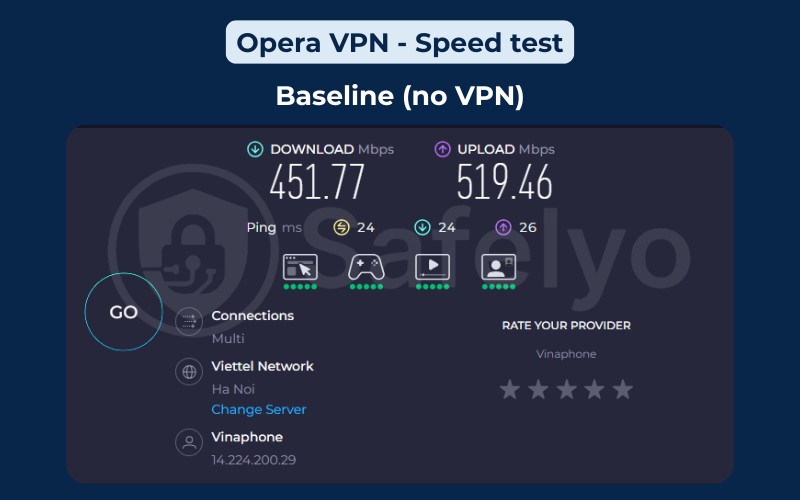
We conducted speed tests using a wired fiber connection in Vietnam. The baseline speed without any VPN was 451.77 Mbps.
| Server | Download (Mbps) | Upload (Mbps) | Ping (ms) | Verdict |
|---|---|---|---|---|
| Baseline (No VPN) | 451.77 | 519.46 | 24 | Standard fiber speed |
| Optimal Location | 6.14 | 92.81 | 261 | 98% Drop |
| Asia Server | 17.39 | 61.78 | 77 | Slow |
| Europe Server | 228.56 | 56.58 | 439 | Surprisingly fast |
| Americas Server | 2.95 | 8.07 | 489 | Unusable |
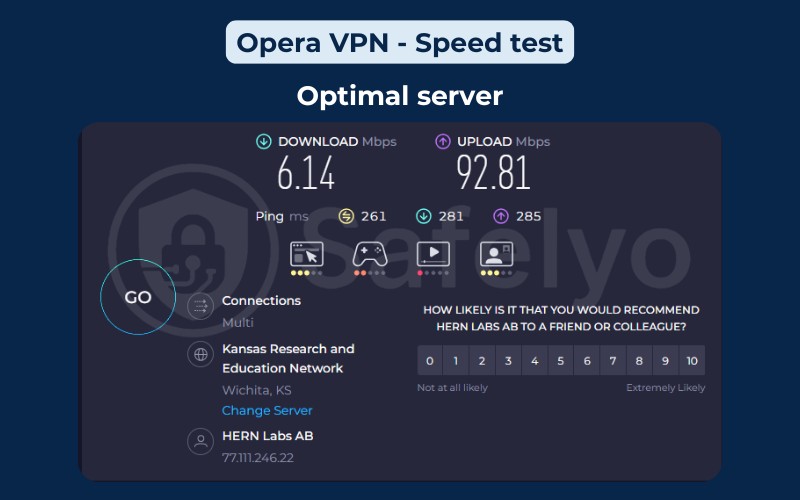
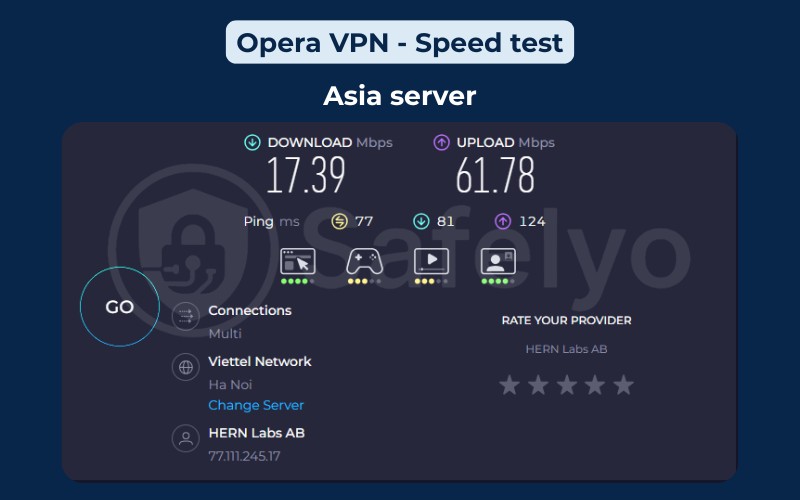
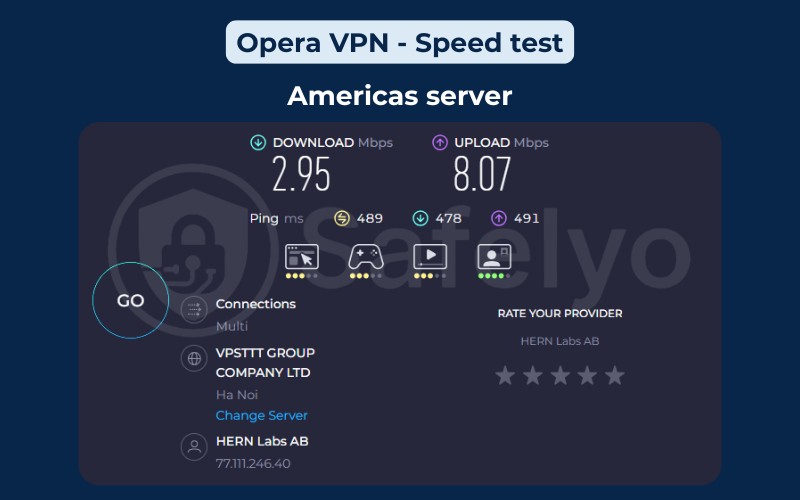
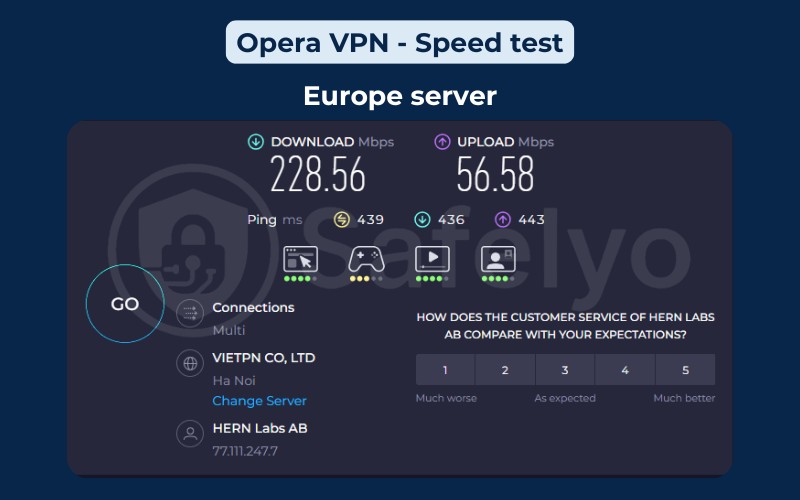
The results from our testing were puzzling, specifically regarding the “Optimal” location.
The “Optimal” setting, which theoretically connects you to the nearest and fastest server (likely Singapore or Vietnam), provided the worst result in our test. Dropping from 451 Mbps to just 6 Mbps makes the internet feel broken; pages loaded slowly, and videos buffered constantly.
In contrast, manually selecting “Europe” delivered a respectable 228 Mbps. This suggests that Opera’s “Optimal” routing algorithm is flawed. If you use this VPN and find it slow, do not trust the automatic setting; try switching regions manually to see if performance improves.
Finally, the latency (ping) increased drastically in all tests. Even the “Optimal” server had a ping of 261 ms, which is ten times higher than our baseline of 24 ms. This massive delay is typical of free proxy servers that are heavily congested with users.
3. Opera VPN: Privacy and security
Score: 6/10
When we analyzed the security architecture for this review, we found a complex mix of solid verification and inherent browser-based limitations.
3.1. Proxy vs. VPN
Opera calls this tool a “VPN“, but technically, it functions as a secure proxy using HTTPS/TLS encryption.
- A true VPN encrypts every piece of data, leaving your device (apps, games,…).
- Opera VPN only encrypts the traffic inside the Opera browser itself. If you open a torrent client or a separate banking app, that traffic remains exposed to your ISP.
You may also be interested in this article: Proxy vs VPN: What’s best for your online privacy?
3.2. Logging and data collection: The audit
Previously, there were concerns regarding data logging for advertising purposes. However, Opera has addressed this by submitting its no-log policy to an independent audit by Deloitte.
The Good (VPN Layer):
Deloitte certified Opera’s “No-logs” claim for the browser VPN. This confirms that when the VPN is active, Opera does not log your browsing activity, originating IP address, or DNS queries within the encrypted tunnel. You can use it with a higher degree of trust regarding traffic anonymity.
The Nuance (Browser Layer):
It is crucial to distinguish the VPN tunnel from the Browser. While the VPN tunnel does not log your traffic, the Opera Browser itself still collects general usage statistics, device IDs, and feature usage data to power its internal analytics and advertising business model.
Your specific VPN traffic is private (audited), but you are still using a browser designed to monetize user engagement.
3.3. Jurisdiction risks
Opera is headquartered in Norway, a member of the “14 Eyes” intelligence-sharing alliance. This means legally, data could be shared with allied nations like the US or UK if a warrant is issued.
Additionally, Opera is owned by Kunlun Tech, a Chinese consortium. While the independent audit provides assurance that no logs exist to be handed over, the ownership structure still makes privacy purists cautious regarding long-term data sovereignty.
| Feature | Opera VPN Status |
|---|---|
| Logging Policy | Audited (Proven by Deloitte) |
| Server Infrastructure | Standard |
| Jurisdiction | Norway (14 Eyes member, Chinese Ownership) |
| Encryption Standard | 256-bit (HTTPS over TLS) |
| Kill Switch | No |
| Advanced Features | None |
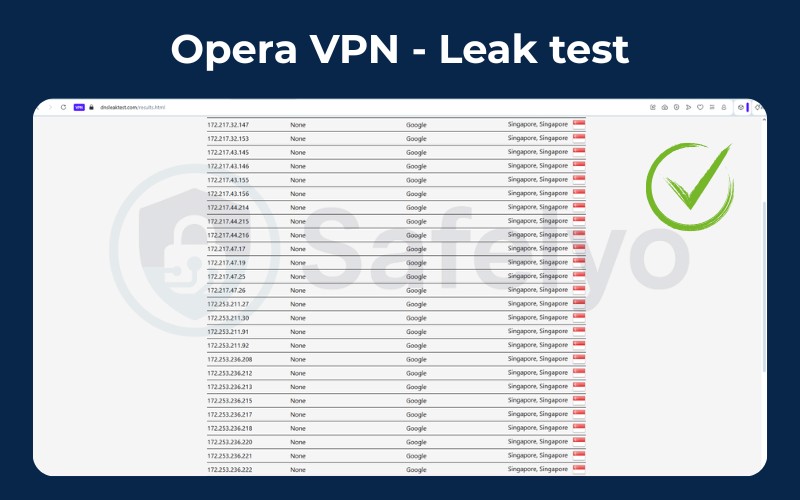
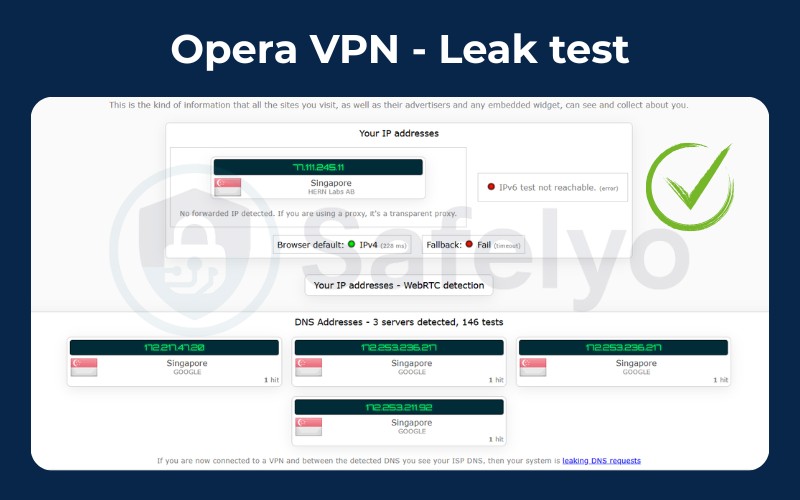
| Leak Test Results | Pass (No IP/DNS Leaks) |
4. Opera VPN: Pricing & plans
Score: 10/10
This is the strongest selling point of the service. Opera VPN is completely free. Unlike most “freemium” VPNs that restrict you to 500MB or 10GB of data, Opera offers unlimited bandwidth.
You do not need to enter a credit card, and you do not even need to create a username. You simply toggle a switch and start browsing. There is no paid tier for this specific browser feature, although Opera does market a separate “Pro” device-wide VPN which we will touch on later.
| Plan | Price | Data Limit |
| Standard Browser VPN | $0.00 | Unlimited |
5. Opera VPN: Server network & locations
Score: 2/10
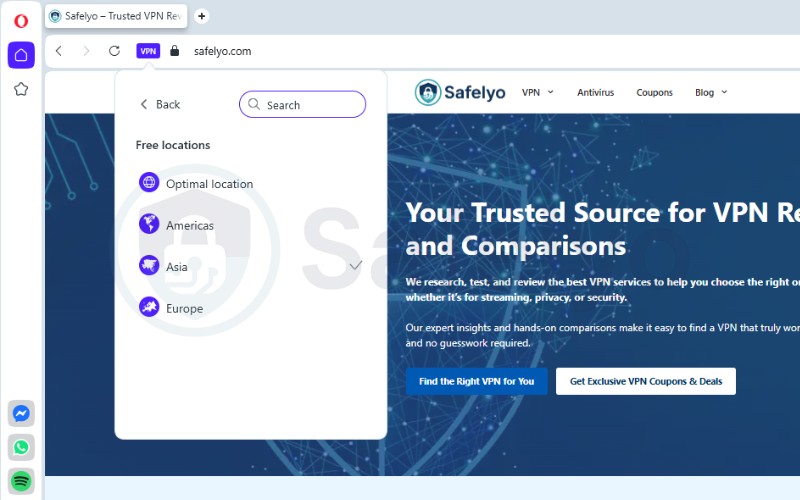
Most top-tier VPNs offer servers in 60 to 100 countries. Opera VPN offers 3 general regions: Americas, Asia, and Europe.
You cannot choose a specific country or city. For example, if you select “Europe,” you cannot control whether you connect to Germany, France, or the Netherlands. These are likely virtual locations, meaning the physical server might not even be in the region it claims to be.
However, considering this is a completely free tool with no data caps, this limitation is standard for the industry.
Most providers reserve granular country selection for their paid plans to manage server costs, so we can’t judge Opera too harshly for this restriction given the price tag of $0.
| Feature | Status |
| Total Regions | 3 |
| City Selection | No |
| Virtual Locations | Yes |
6. Opera VPN: Streaming support
Score: 5/10
If you want to watch foreign movies, Opera VPN is a gamble. Because you cannot select a specific country (e.g., “UK” for BBC or “USA” for Hulu), you are at the mercy of whichever random IP address Opera assigns you in that continent.
| Features | VPN Provider Name: Opera VPN |
| Netflix | No (Unreliable) |
| Hulu | No |
| Disney+ | No |
| BBC iPlayer | No |
| Amazon Prime Video | No |
| Smart DNS | No |
During our tests, we noticed that switching the VPN location did successfully change the Netflix library. For instance, selecting “Americas” gave us a different content catalog compared to “Asia,” proving that the VPN is effectively masking the location.
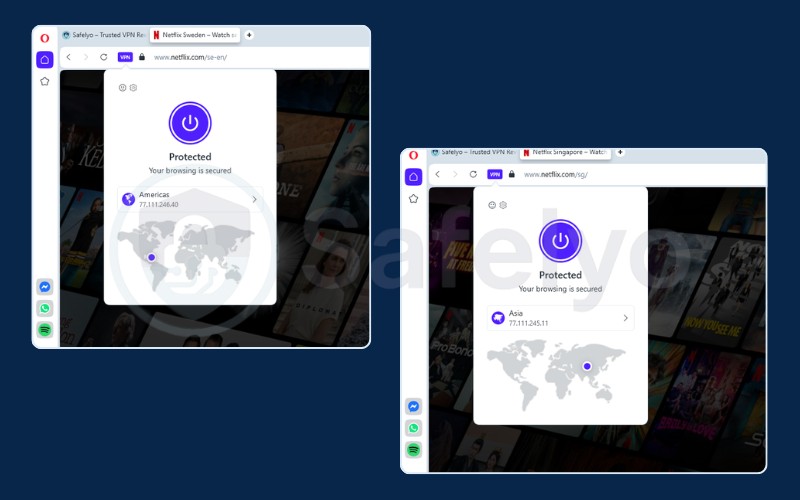
However, this capability is largely meaningless for users wanting specific content. Since you can only select broad regions like “Americas,” you have no control over which country you land in.
You might be aiming for the Netflix US library, but the server could randomly route you through Mexico, Brazil, or Canada, giving you a completely different catalog than the one you wanted. This same limitation makes it impossible to use for strict geo-restricted services like BBC iPlayer, which requires a UK IP address specifically.
To be fair, this is exactly what you should expect from a free service. Unlocking specific regional libraries requires expensive technology and constant IP address rotation to bypass detection.
Since Opera VPN is completely free, it simply is not designed to compete with paid VPNs in the “streaming war”, so these limitations are understandable.
7. Opera VPN: Gaming support
Score: 1/10
Based on our speed data, Opera VPN is unusable for online gaming.
The ping (latency) represents the time it takes for data to travel to the server and back.
- Without VPN: 24 ms.
- With Opera VPN: 261 ms to 489 ms.
A ping over 100 ms usually results in lag. A ping over 200 ms results in “rubber-banding“, where characters teleport around the screen. Since Opera VPN only protects the browser, it would not work for desktop games like Valorant or League of Legends anyway. Even for browser-based games, the delay is too high.
8. Opera VPN: Torrenting and P2P
Score: 0/10
Opera VPN does not support torrenting.
Since it is a browser-based proxy, it has absolutely no effect on external P2P clients like qBittorrent or uTorrent. If you attempt to download a file while Opera VPN is “On,” your torrent client will still broadcast your real IP address to the swarm, leaving you fully exposed.
9. Opera VPN: Apps & user experiences
Score: 9/10
While it lacks features, Opera VPN scores highly here for one reason: Convenience.
There is no installation process. You do not need to download a separate .exe or .apk file.
- Open the Opera Browser.
- Go to Settings.
- Search for “VPN”.
- Toggle Enable VPN.
A small blue “VPN” badge appears in the address bar. You can click this badge to turn it on or off instantly. For non-technical users, this is the easiest “set it and forget it” interface on the market.
10. Opera VPN: Customer support
Score: 2/10
There is practically no customer support for the free version. Since you are not a paying customer, you do not get access to a live chat team or email support.
If you have technical issues, your only options are:
- Searching the public FAQ database.
- Asking questions on the Opera user forums (where you rely on other users for help).
11. Is Opera Browser VPN safe?
This is the most critical question in our Opera VPN review. The answer depends on your definition of “safe.”
Is it safe from hackers on public Wi-Fi?
Yes. If you are at a coffee shop and want to log into a website, Opera VPN encrypts your browser traffic using HTTPS/TLS. This prevents a hacker at the next table from easily sniffing your cookies or activities within the browser.
Is it safe from government tracking?
Not entirely. While the VPN service itself has been audited by Deloitte to confirm it does not log your browsing history, the risk lies in jurisdiction and ownership.
Opera is based in Norway (a 14-Eyes alliance member) and owned by a Chinese consortium (Kunlun Tech). For journalists, activists, or those avoiding state-level surveillance, this ownership structure presents a potential risk that pure privacy tools do not have.
Is it safe from advertisers?
No. While the VPN hides your IP address from the websites you visit, you are still using the Opera Browser, which collects usage statistics and interaction data to power its advertising business. The VPN tunnel is private, but the browser interface you are using is designed to support ads.
12. Opera VPN Pro: A quick look
In addition to the free version, Opera also offers a paid VPN service called Opera VPN Pro.
Unlike the free version, the Pro version:
- Costs between $4 and $8 per month.
- Protects the entire device (System-wide), not just the browser.
- Offers 3,000+ servers in over 30 countries.
- Includes live chat support.
The Pro version essentially resells a white-label VPN service (similar to a standard commercial VPN). If you are willing to pay money, however, established competitors like NordVPN or ExpressVPN generally offer better performance for a similar price.
13. How we tested Opera VPN
We believe in transparency and rigorous testing standards. For this review, we conducted our tests from Vietnam to evaluate performance over long distances (trans-Pacific and cross-continental connections).
Test environment:
- Device: Windows 11 PC.
- Connection: Fiber Optic baseline. We recorded speeds of 451.77 Mbps for downloads and 519.46 Mbps for uploads.
Testing tools:
- Speedtest.net: We used this to measure raw download speeds, upload speeds, and latency.
- ipleak.net & dnsleaktest.com: These tools verified security protocols. We specifically checked for DNS, WebRTC, and IPv6 leaks.
We calculate the final score based on the following weighted categories:
| Category | Weight | Description |
|---|---|---|
| Privacy & security | 30% | Logging policies, encryption, jurisdiction. |
| Speed & performance | 20% | Local/International speed retention. |
| Server network | 10% | Global coverage & ownership. |
| Streaming | 10% | Unblocking Netflix, Disney+. |
| Pricing & value | 10% | Cost analysis & refund policy. |
| Apps & UX | 5% | Ease of use & device support. |
| Gaming | 5% | Latency & stability. |
| Torrenting | 5% | P2P support & safety. |
| Customer support | 5% | Response time & quality. |
For a deeper dive into our process, check out How we test and review VPNs.
14. FAQs about Opera VPN
Is Opera VPN free forever?
Yes. The browser-based VPN is a core feature of the Opera browser and has been free for years. There are no trial periods or credit card requirements.
Does Opera VPN hide from ISP?
It hides the content of your browsing (the websites you visit) from your Internet Service Provider (ISP). However, your ISP can still see that you are connected to an Opera server. Also, remember that it only hides activity inside the Opera browser, not other apps.
Is Opera a Chinese company?
Opera is legally a Norwegian company and operates under European GDPR laws. However, it is owned by a Chinese consortium led by Kunlun Tech. This ownership structure worries some privacy experts regarding potential data access requests from China.
How to use Opera VPN on mobile?
On Android, download the Opera Browser app from the Play Store. Tap the profile icon in the bottom right, find “VPN” in the menu, and toggle it on.
Is the VPN on Opera any good?
It is “good” for casual tasks like bypassing a school firewall to play a browser game or reading a region-locked article. It is “bad” for high-speed streaming, torrenting, or serious privacy protection.
Can Opera VPN be traced?
While it masks your IP address from websites, Opera itself can trace your activity. Additionally, sophisticated network administrators can see you are using a proxy service, even if they cannot see exactly what you are reading.
15. Conclusion
To summarize this Opera VPN review, the tool is a convenient “spare tire.” It is great to have in emergencies when you quickly need to access a blocked website without installing new software.
However, due to the slow speeds on the “Optimal” server, the inability to choose specific countries, and valid concerns regarding data privacy and ownership, it fails as a primary security tool.
We recommend Opera VPN if:
- You need to access a news site blocked by your local network.
- You have zero budget and need immediate protection on public Wi-Fi.
We do NOT recommend Opera VPN if:
- You want to torrent files (it won’t protect you).
- You want to stream Netflix US in 4K (it is too inconsistent).
- You are a whistleblower or activist (the jurisdiction is risky).
For more robust options, you can explore our detailed VPN Reviews to find a service that offers true system-wide encryption and strict no-logs policies tested by Safelyo.