You’ve heard endless warnings about the dangers of phishing, but let’s flip the script. What is anti-phishing, and how do you actually build a solid defense against these sneaky attacks?
Anti-phishing isn’t a single piece of software you install and forget. Modern anti-phishing solutions rely heavily on AI and machine learning to improve detection accuracy and strengthen impersonation protection across various communication channels. It’s better to think of it as a castle protected by multiple layers: The strong technology walls, the smart security rules of the kingdom, and finally, the vigilant guards – that’s you – who make the ultimate decisions.
In this guide, we’ll break down this exact “3-layer defense model.” We’ll cover everything from the automated tools fighting for you behind the scenes to the irreplaceable role you play in keeping your data safe. Together, let’s explore how to build your fortress against phishing scams. An effective anti-phishing strategy doesn’t just react to scams – it anticipates them, combining smart tools, awareness, and continuous learning to outsmart attackers before they strike.
Short on time? Here’s a quick rundown of everything you need to know. Anti-phishing isn’t one single tool, but a smart, multi-layered strategy to keep you safe from online scams.
- Anti-phishing is a layered defense strategy, not a single product. It combines automated technology, security rules, and user awareness to block fraudulent emails, texts, and websites that are designed to steal your information.
- Your first line of defense is automated technology. Tools you already use, like email filters (Gmail’s “dangerous message” warning), web browser protection (“Deceptive site ahead”), and antivirus software, work silently to block most threats before you see them.
- Enable MFA everywhere you can. Even if a scammer steals your password, MFA acts as a second lock on your account, making it nearly impossible for them to get in. This is your single most effective security upgrade.
- You are the final and most important firewall. Technology can fail, so learning to spot red flags is crucial. Always check the sender’s address, hover over links before clicking, and be wary of any message that creates a sense of panic or urgency.
1. What is anti-phishing?
Before we build our anti-phishing fortress, let’s quickly remind ourselves what we’re fighting against. In simple terms, phishing is an online scam. In this scam, an attacker pretends to be a trustworthy entity. This could be your bank, a delivery service, or a tech company. The goal is to trick you into revealing sensitive information. This kind of impersonation is one of the most common forms of social engineering, exploiting human trust rather than system vulnerabilities.
But this scam wears many masks. While traditional phishing often arrives as a generic email (think of a fake “Your Netflix account is on hold” message), it has more dangerous relatives:
- Spear phishing is a targeted attack. In some cases, business email compromise attacks are a sophisticated form of spear phishing, where criminals impersonate executives to trick employees into transferring money or sensitive data. Instead of a wide net, attackers use information they already have about you to craft a personal and convincing message. I’ve seen scary-effective examples of this, like an email that looks like it’s from your boss asking you to process an invoice urgently.
- Smishing is phishing delivered via SMS text messages. That “FedEx: Your package delivery has failed, click here to reschedule” text is a classic example.
- Vishing happens over the phone (voice phishing). A newer trend is quishing, where scammers embed fake QR codes that lead victims to phishing websites – expanding the attack surface even further. This is the infamous “Hello, this is Microsoft support, we’ve detected a virus on your computer” call.
Whether it comes through an email, text, or phone call, the end goal is always the same: To steal your passwords, credit card details, or trick you into installing malware. They all prey on a sense of urgency and trust to make you act without thinking.
2. The 3 layers of anti-phishing protection
To fight a diverse threat like phishing, we need a defense-in-depth strategy. A robust anti-phishing protection framework layers automation, threat intelligence, and domain monitoring to prevent, detect, and respond to malicious activities in real time. A single tool or tactic simply isn’t enough. At Safelyo, we break down a strong anti-phishing posture into three essential layers:
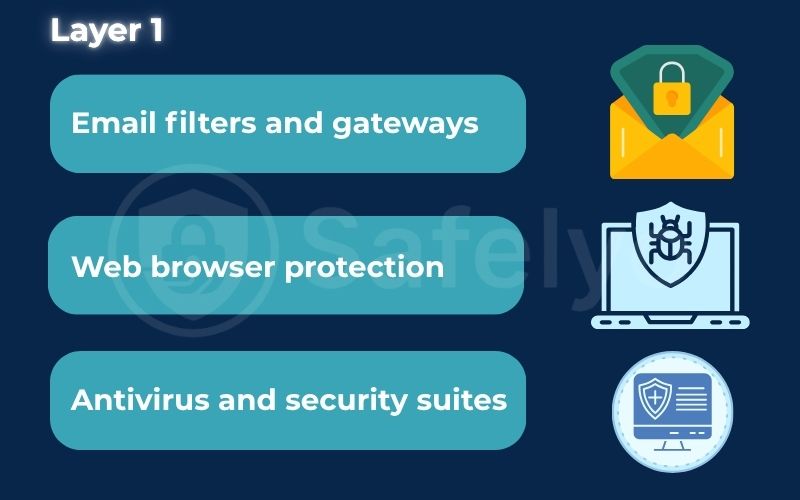
- Layer 1: The technology shield (the tools). This is your automated front line, made up of software and services designed to stop malicious messages and websites before they even reach you.
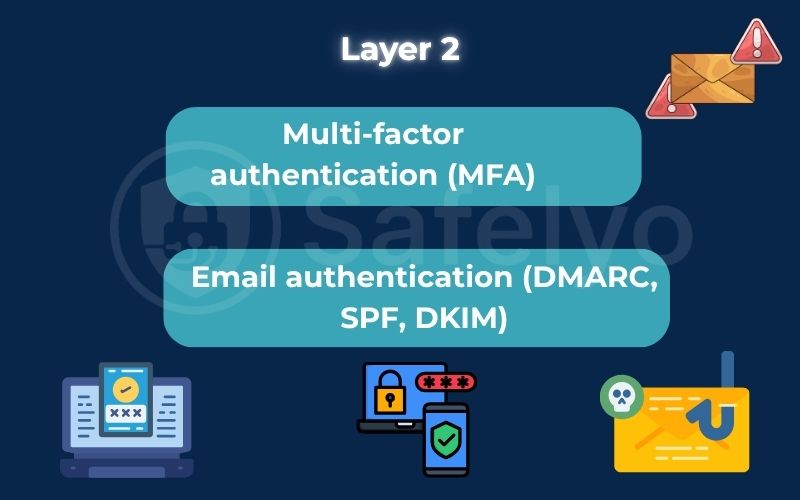
- Layer 2: The process wall (the rules). These are the security standards and verification steps that act as a barrier, making it harder for an attacker to succeed even if they get past the first layer.
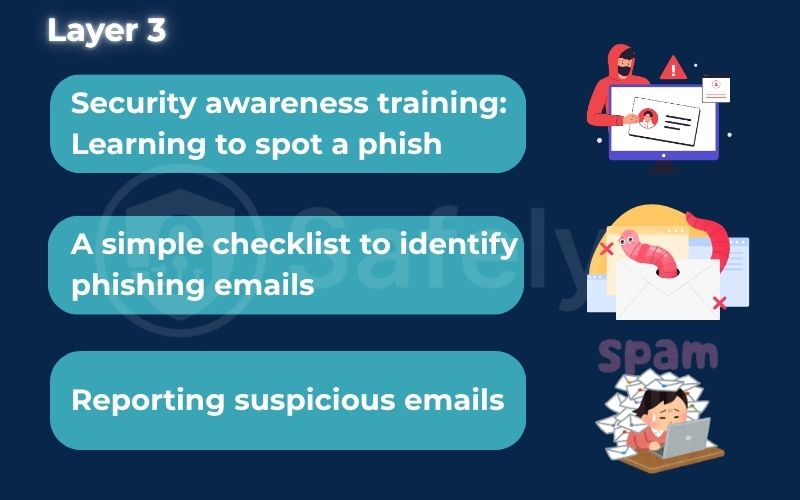
- Layer 3: The human firewall (you). This is the last – and arguably most crucial – line of defense. Technology isn’t perfect, and your informed judgment is often what stands between a scam and your data.
From my experience in cybersecurity, I can tell you that no single layer is foolproof. But when you combine them, they create a truly formidable defense that makes a cybercriminal’s job incredibly difficult.
3. Layer 1: The technology that fights for you
This first layer is your 24/7 automated security detail. It’s made up of the silent guardians that work tirelessly to filter out threats before you’re even aware of them. You don’t have to activate these tools every time you go online; they are the fundamental defenses built into the services you use every day.
3.1. Email filters and gateways
Think of these as the expert gatekeepers for your inbox. Every email that arrives has to show its credentials before being allowed in. Their job is to scan incoming mail for any signs of trouble, and they’re smarter than you might think.
How does anti-phishing work here? These systems use a combination of techniques. Advanced AI-driven behavioral analysis helps improve detection of subtle phishing attempts, especially those designed to bypass traditional filters through lookalike domains or brand impersonation. They check against massive blacklists of known malicious domains and IP addresses. They analyze the sender’s reputation to see if they have a history of sending spam. And they scan the email’s content for suspicious links and classic scam keywords.
A perfect, everyday example is the warning banner you see in Gmail that says, “This message seems dangerous.” That’s the gatekeeper telling you it found something sketchy that you need to be aware of. These intelligent filters continuously refine their detection models using live threat data, allowing them to identify new phishing techniques before they spread widely.
3.2. Web browser protection
Modern web browsers like Chrome, Firefox, and Edge are another critical part of your technology shield. They act as your vigilant guide on the web, warning you before you step onto dangerous ground.
How it works: These browsers maintain constantly updated lists of unsafe websites. When you click a link and attempt to visit a site that’s been flagged for phishing or malware, the browser steps in. It will block the page from loading and display a full-screen, hard-to-ignore warning.
You’ve almost certainly seen this in action: It’s the bright red “Deceptive site ahead” screen from Google Chrome. This feature has personally saved me from a careless click on a suspicious link more times than I can count, especially when I’m tired or distracted. You’ve almost certainly seen this in action: It’s the bright red “Deceptive site ahead” screen from Google Chrome.
This feature has personally saved me from a careless click on a suspicious link more times than I can count, especially when I’m tired or distracted. You’ve almost certainly seen this in action: It’s the bright red “Deceptive site ahead” screen from Google Chrome. This feature has personally saved me from a careless click on a suspicious link more times than I can count, especially when I’m tired or distracted.
3.3. Antivirus and security suites
So, what happens if a malicious link slips past your email filter and you click on it, leading to a harmful download? In enterprise setups, automated takedown systems can also remove malicious URLs or cloned websites identified during threat intelligence scans. This is where your last line of automated defense comes into play. A good antivirus program can be your final hero.
How it works: This is where dedicated anti-phishing software, often bundled within broader security suites, plays a critical role. These anti-phishing tools don’t just look for viruses. They actively scan file downloads in real time. Additionally, they can identify and block malicious attachments. This happens before you even have a chance to open them.
Even the most careful person can make a mistake. I always run a reliable security suite on my devices because it’s the essential safety net that catches you when you fall. Many modern security suites also integrate impersonation protection, using advanced algorithms to detect cloned websites or fraudulent sender identities before they can deceive users.
>> You may also be interested in: What is antivirus? Basic facts you should know in 2026
4. Layer 2: The rules that secure the system
While the technology shield is great at blocking known threats, clever attackers can sometimes design a scam that looks legitimate enough to slip through. This is where the second layer comes in. These aren’t automated tools but rather security processes and standards that act as a checkpoint to verify identity and limit potential damage.
4.1. Multi-factor authentication (MFA)
This is, without a doubt, the single most important process you can enable to protect your accounts.
Think of it this way: A password is like the key to your house. If a thief steals it, they can walk right in. But with MFA, you’ve also installed a security alarm that requires a unique code from your phone to disarm it. Even with your key (password), the thief is stopped at the door because they don’t have your phone (the second factor).
MFA requires a second verification step after you enter your password, such as a code sent to your phone or a tap on an authenticator app. This form of MFA not only strengthens access control but also minimizes damage during a successful attack, serving as an integral part of layered protection. So, even if a phishing scam successfully tricks you into giving up your password, your account remains secure because the attacker doesn’t have that second piece of the puzzle.
As a security expert, if you only do one thing from this guide, enable MFA on all your important accounts. It is your most powerful defense against the consequences of a successful phishing attack. Combining MFA with impersonation protection ensures that even if an attacker mimics a trusted brand or contact, your verification process prevents unauthorized access.
>> Find out:
4.2. Email authentication (DMARC, SPF, DKIM)
Don’t worry about the technical-sounding acronyms. The concept here is actually quite simple and powerful. These are the technical standards that organizations use to prove their emails are legitimate, making it much harder for scammers to impersonate them. These authentication standards include Sender Policy Framework, DomainKeys Identified Mail, and Domain-based Message Authentication, all crucial for email impersonation protection.
The best analogy is that it’s like a digital wax seal on a letter.
When a company like PayPal sends an email, these protocols act as its unique, unbreakable seal. Email providers like Gmail and Outlook see this seal and know the message is authentic. When a phishing email arrives pretending to be from PayPal, it’s missing this official seal. This is a massive red flag for the email provider, which can then confidently block the fake email or send it straight to your spam folder. You may never even see it. Effective authentication mechanisms not only confirm sender legitimacy but also help strengthen overall data integrity and reduce the success rate of targeted phishing attempts.
You don’t need to configure anything as a user. However, it’s important to understand that this behind-the-scenes system plays a crucial role. It helps keep your inbox relatively clean from obvious forgeries. These authentication layers work together as the backbone of modern anti-phishing infrastructure, preventing forged domains and impersonation attempts from ever reaching your inbox.
5. Layer 3: You are the most important defense.
Technology shields and process walls are powerful, but they are not perfect. A cleverly crafted phishing email can sometimes slip past every automated defense. In these moments, the security of your data comes down to one thing: Your ability to recognize a scam. This is the human firewall, and it’s the most intelligent and adaptable defense you have.
5.1. Security awareness training: Learning to spot a phish
I’ve analyzed countless phishing attacks, and the most successful ones are those that bypass technology and target human psychology directly. They use fear, curiosity, or a sense of urgency to make you act impulsively. By recognizing these psychological triggers, you enhance your own impersonation protection, learning to question the authenticity of every message and identity you encounter online.
The good news is that you can train yourself to spot these tricks. Think of the checklist below as your own mini-training session. By turning these checks into a habit, you can learn to spot what the automated systems might miss. Continuous education and awareness programs empower users to recognize impersonation patterns and improve their response to phishing attacks.
5.2. A simple checklist to identify phishing emails
Before you click any link or download any attachment, run through this mental checklist. These are the core of anti-phishing best practices and can save you from a world of trouble.
| The Red Flag | What to look for |
| Sender’s Address | Are there obvious spelling mistakes or awkward grammar? Professional communications are rarely this sloppy, and it’s often the easiest giveaway. |
| Sense of Urgency | Are there obvious spelling mistakes or awkward grammar? Professional communications are rarely this sloppy, and it’s often the easiest giveaway. |
| Suspicious Links | When you hover your mouse over a link (don’t click!), does the URL look different from what the text says? If the email is from your bank but the link points to a strange website, you’ve spotted the phish. |
| Generic Greetings | Does it start with “Dear Valued Customer” instead of your actual name? Most legitimate companies will address you personally. |
| Poor Quality | Are there obvious spelling mistakes or awkward grammar? Professional communications are rarely this sloppy and it’s often the easiest giveaway. |
5.3. Reporting suspicious emails
If an email fails any of the checks above, what should you do? Don’t just delete it. Use the “Report Phishing” or “Report Junk” button in your email client, like Gmail or Outlook. This proactive reporting process is often tied to incident response workflows, where analysts use analytics tools to enhance future detection and protection strategies.
This simple action does more than just remove the email from your inbox. It sends a signal back to the email provider, helping to train their filters to recognize and block similar attacks in the future. By reporting it, you are actively helping to protect other users.
6. FAQs about anti-phishing
What is the difference between anti-phishing and anti-spam?
Think of it this way: every phishing email is a form of spam, but not all spam is a phishing attempt. Anti-spam’s main job is to filter out unwanted commercial messages, like a newsletter you never signed up for. It’s mostly an annoyance. Anti-phishing, however, specifically targets malicious emails that are designed to deceive you and steal your information. It’s a direct security threat.
Is anti-phishing software enough to protect me?
No. This is a common misconception, but no single tool is a silver bullet. This is exactly why we emphasize a layered defense in this guide. The best protection comes from combining technology (like email filters and antivirus software), processes (like enabling MFA), and your own user awareness. When one layer fails, the others are there to back it up.
Can phishing attacks happen on platforms other than email?
Absolutely. While email is the most common method, phishing is a technique, not a platform. It can happen via text messages (smishing), social media direct messages, and even phone calls (vishing). A fake message from “Amazon” on Facebook Messenger with a “problem with your order” link is a common tactic. The same principles of skepticism and verification apply no matter where the message comes from.
7. Conclusion
Over the years, anti-phishing systems have evolved from simple spam filters into adaptive defense networks that blend AI, analytics, and user awareness to reduce risks across digital communication channels. So, what is anti-phishing?
As we’ve seen, it isn’t a single product you can buy, but a complete strategy built on multiple layers of defense. It starts with technology providing the first automated shield to block the majority of threats. Then, processes like MFA create critical barriers that protect you even if your password is stolen. But ultimately, the most powerful layer is you. The informed user serves as the final, intelligent line of defense that no software can replicate.
No technological solution can ever fully replace your own awareness. By combining the powerful tools at your disposal with the knowledge to recognize a threat, you transform yourself from a potential target into a hardened part of the defense. The future of anti-phishing lies in smarter AI systems, stronger authentication standards, and deeper impersonation protection integrated across every layer of digital security.
To sharpen your scam-spotting skills, explore more real-world examples and practical guides in the Antivirus section of Safelyo. Building a culture of awareness, supported by intelligent tools and organizational policies, creates long-term impersonation protection that extends beyond technology alone.