You’ve likely heard the term ‘jailbreak’ and wondered if it could truly give you total control over your iPhone. So, what is jailbreaking, and is that freedom really worth the security trade-off?
In essence, jailbreaking involves using an exploit to achieve privilege escalation. This process removes the software limitations imposed by Apple on its iOS devices. It opens up a world of customization and unapproved applications.
In this guide, we’re taking a balanced, non-judgmental stance. We will break down the tempting rewards, the very serious security risks, and help you answer the critical question for yourself: Is this digital ‘prison break’ for you? Let’s dive in with me and explore both sides of this fascinating coin.
Wondering what jailbreaking is all about? Here’s the essential information you need to know before even considering it. In short, jailbreaking gives you total freedom over your iPhone, but at the cost of its core security and stability. This process typically involves running an exploit to bypass the security measures of iOS.
- Jailbreaking means removing Apple’s application restrictions. It allows you to escape the “walled garden” of iOS to gain administrator access, giving you the power to customize everything and install apps from outside the official App Store. It allows you to break free from the “walled garden” of iOS and gain administrator access. This gives you the ability to customize everything and install apps from outside the official Apple App Store.
- The rewards are all about control and customization. People jailbreak to completely change their iPhone’s appearance, install unauthorized apps (like game emulators), and delete pre-installed Apple software.
- The risks are serious and security-focused. Jailbreaking dismantles Apple’s “sandbox” protection, opening your device to malware and other security risks. It also leads to system crashes, voids your warranty, and can block you from receiving official iOS updates.
- For most users, jailbreaking is not worth the risk. The trade-off between customization and security is too great. The safety and reliability of a standard iPhone are its strongest features and should not be easily discarded.
1. What is jailbreaking?
To understand jailbreaking, you first need to understand how Apple designs its software. It’s a philosophy that shapes your entire experience with an iPhone or iPad.
1.1. Breaking out of Apple’s “walled garden”
Imagine iOS, the operating system on your iPhone, as a beautiful and meticulously planned garden surrounded by high walls. Inside this “walled garden”, everything is safe, curated, and works smoothly together. The head gardener (Apple) has a strict set of rules. You can only plant the seeds (apps) that they’ve personally approved and sell in their official shop (the App Store).
This approach has huge benefits, especially for security and ease of use. But it’s also restrictive.
Jailbreaking, then, is the act of using a software exploit to dig a tunnel under that wall to get outside. Once you’re out, you’re free. You can plant anything you want, rearrange the entire landscape, and explore without limits. However, you’re also no longer protected by those carefully constructed walls.
Technically, the main purpose of jailbreaking is to gain “root access” to the device. This gives you the highest level of administrative permission by applying kernel patches, allowing you to modify the operating system at its very core – something Apple normally forbids.
1.2. Jailbreaking (for iOS) vs. Rooting (for Android)
You’ll often hear these two terms mentioned together, and it’s a common point of confusion. While the spirit is similar, the terms are not interchangeable. Both processes share the same goal: To gain ultimate control over the device. However, they apply to different operating systems and involve completely different technical methods, some of which interact directly with the device’s bootloader.
Here’s a quick visual breakdown:
| Feature | Jailbreaking | Rooting |
| Operating System | Apple iOS (iPhone, iPad) | Google Android |
| Primary Goal | Escape Apple’s software restrictions | Gain full administrator (‘root’) access |
| Default State | A highly restricted, “closed” system | A more “open” system by nature |
| App Sideloading | Not allowed without jailbreaking, which enables sideloading via unofficial package managers. | Allowed by default (with a warning) |
2. Why do people jailbreak their iPhones?
If jailbreaking comes with risks, why do so many people do it? The answer lies in one word: Freedom. For many users, the standard iPhone experience feels too restrictive. Jailbreaking opens the door to a level of device customization and user autonomy that Apple simply doesn’t allow on iOS.
Here are the most compelling reasons people choose to jailbreak:
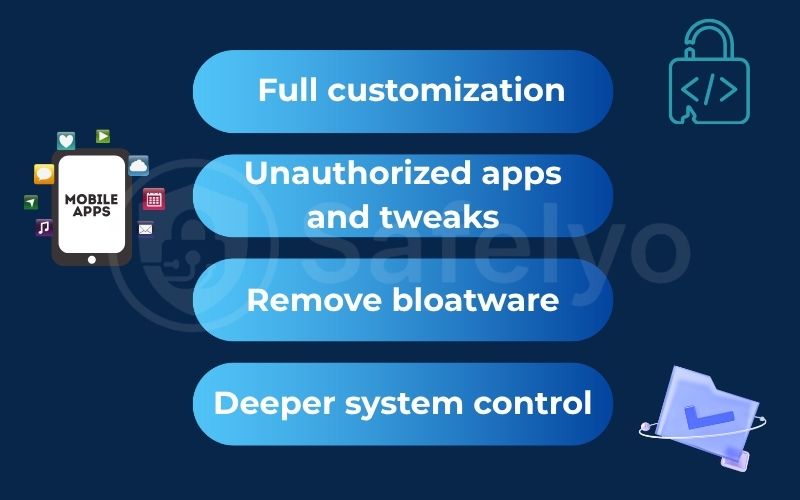
Full customization
This is often the biggest draw. Instead of being stuck with Apple’s design choices, you can change virtually every aspect of the user interface. This includes custom app icons, unique fonts, advanced lock screen widgets, and even completely overhauling the Control Center to add new shortcuts and toggles. I remember the first time I jailbroke an old iPhone; the ability to change the boring grid of icons into a dynamic, personalized layout was a game-changer.
Unauthorized apps and tweaks
Jailbreaking allows you to install apps from sources other than the official App Store. This is typically done through alternative marketplaces like Cydia. This is typically done by sideloading apps through alternative marketplaces like Cydia, which act as package managers for a jailbroken iOS device.
Here, you’ll discover a vast array of apps and “tweaks” that Apple would never approve. This includes retro game emulators, system-wide ad blockers that function in every app, call recording utilities, and tools that allow you to tether your phone’s internet connection for free. Additionally, some users pursue jailbreaking for carrier unlocking or to install copyrighted applications, an act associated with software piracy.
Remove bloatware
Every iPhone comes with a set of pre-installed Apple apps, some of which you might never use (like the Stocks or Compass app). On a standard iPhone, you can’t delete them. A jailbroken phone gives you the power to permanently remove these default apps, freeing up space and decluttering your home screen. However, downloading unauthorized software from these sources increases the risk of both piracy and inadvertently installing malware.
Deeper system control
For tech-savvy users, this is a massive advantage. Jailbreaking provides direct access to the iOS file system, much like you’d have on a desktop computer. This allows for advanced troubleshooting, manual file management, and a much deeper understanding of how the device actually works under the hood.
3. Serious security downsides of jailbreaking
The freedom of a jailbroken iPhone comes at a steep price: your security. By breaking out of Apple’s walled garden, you are intentionally dismantling the very protections that make iOS one of the most secure mobile operating systems in the world. From my perspective as a security expert, these aren’t just theoretical risks; they are practical dangers that can have real-world consequences. Every exploit used to jailbreak an iOS device takes advantage of real security flaws.
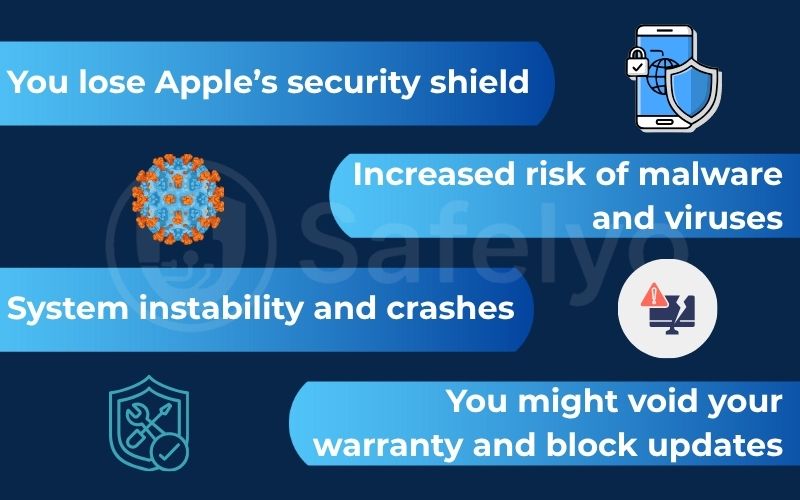
3.1. You lose Apple’s security shield
The single most important security feature in iOS is called the “sandbox.” Think of it as a digital quarantine zone for every app. On a standard iPhone, each app runs inside its own secure box, completely isolated and unable to access the data of other apps or the core system files.
Jailbreaking shatters these sandboxes. The walls between apps are torn down. This means a malicious app you download from an unofficial source could potentially spy on your activity in other apps. It could read your private messages, access your photos, and even capture your login details for your banking app. The fundamental security model of iOS is compromised, leaving it vulnerable to any malicious code that can find an exploit.
3.2. Increased risk of malware and viruses
There’s a reason Apple’s App Store review process is so strict: it’s designed to filter out malware, spyware, and fraudulent apps before they ever reach your phone.
When you install apps from alternative stores like Cydia, that entire vetting process is gone. When you install unauthorized software from alternative stores like Cydia, that entire vetting process from Apple is gone, significantly increasing the risk of malware.
You are placing your trust entirely in the hands of anonymous developers. There is no guarantee that a cool, free customization tweak doesn’t have malicious code hidden inside, silently logging your keystrokes or stealing your contact list. I’ve seen cases where seemingly harmless tweaks turned out to be fronts for data-stealing operations.
3.3. System instability and crashes
Apple’s software is designed as a tightly integrated system where everything works together seamlessly. Jailbreak tweaks and unofficial apps are not part of this plan. They can conflict with the official iOS software or with each other, leading to a host of problems. This often results in frequent app crashes, random reboots, and significantly worse battery life.
3.4. You might void your warranty and block updates
These are two major practical headaches. First, while the legal status of jailbreaking is complex, Apple’s stance is clear: it results in immediate warranty voiding. If something goes wrong with your jailbroken phone, Apple has every right to refuse your repair request.
Second, you lose the ability to update iOS normally. Installing an official update from Apple will almost certainly remove your jailbreak and all your tweaks. Even worse, attempting to update a jailbroken device can sometimes go wrong and “brick” it, turning your expensive iPhone into a completely unresponsive paperweight.
4. A balanced verdict: A quick pros and cons summary
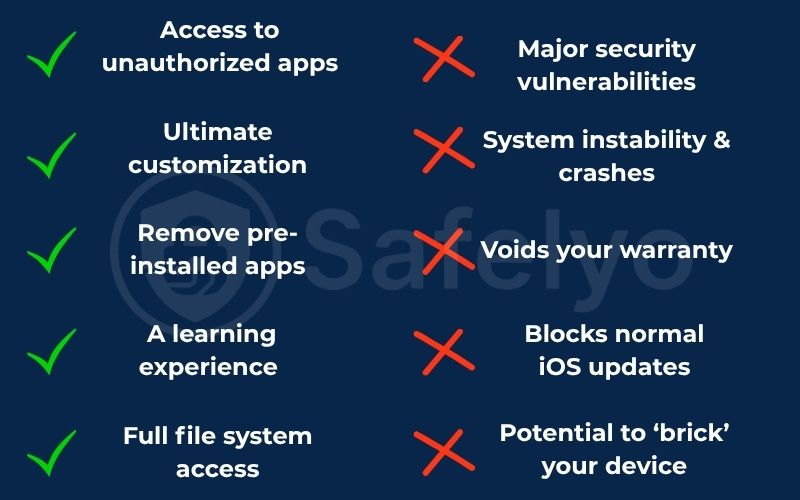
We’ve explored the tempting freedom and the serious dangers. To help you weigh the decision, here is a straightforward summary that pits the rewards of jailbreaking directly against the risks.
PROS
- Ultimate customization allows you to change every aspect of your iPhone’s look and feel.
- Access to unauthorized apps and tweaks from stores like Cydia that aren’t on the App Store.
- Remove pre-installed apps (bloatware) that you don’t use to free up space.
- Full file system access gives you deep, developer-level control over your device.
- A learning experience for tech enthusiasts who want to understand iOS at a deeper level.
CONS
- Major security vulnerabilities are created by running an exploit that breaks the iOS sandbox, exposing your data.
- System instability & crashes due to conflicts between tweaks and the official OS.
- Voids your warranty, meaning Apple can refuse to provide service or repairs.
- Blocks normal iOS updates, and attempting to update can remove the jailbreak. Some official App Store apps (especially banking or streaming apps) may detect the jailbreak and refuse to run.
- Potential to ‘brick’ your device, rendering it completely unusable.
Looking at this side-by-side, it becomes clear that jailbreaking is a significant trade-off. Every benefit gained comes with a corresponding and often severe risk to your device’s security, stability, and support.
5. FAQs about jailbreaking
Still have questions? We’ve answered some of the most common queries about jailbreaking to help you get a clearer picture.
What is jailbreaking?
Jailbreak apps are software applications, such as checkra1n or unc0ver. They are designed to run the necessary exploit for performing the jailbreak process on a specific iOS version and device model.
Is jailbreaking legal?
In the U.S., exemptions to the Digital Millennium Copyright Act (DMCA) make it legal to jailbreak a phone you own for personal use. However, it is a direct violation of Apple’s warranty and terms of service, meaning they can refuse to provide support or repairs for a jailbroken device. However, using a jailbreak to engage in software piracy is still illegal under the Digital Millennium Copyright Act.
What are jailbreak tools?
Jailbreak tools are the software applications, such as checkra1n or unc0ver, that are designed to run the necessary exploit to perform the jailbreak process on a specific iOS version and device model.
What are the different types of jailbreaking?
There are several types, each depending on how the exploit interacts with the device’s bootloader:
- Tethered jailbreak: Requires connecting to a computer every time the device reboots to run the exploit again. Without it, the device won’t boot into a jailbroken state.
- Untethered jailbreak: The ideal type. The exploit is run once, and the device stays jailbroken even after rebooting, no computer needed. An untethered jailbreak is persistent.
- Semi-tethered jailbreak: The device can reboot on its own, but it will lose its jailbroken state. You must re-run an app on the device itself (no computer needed) to re-enable the jailbreak.
- Semi-untethered jailbreak: This term is often used interchangeably with semi-tethered jailbreak. It describes a jailbreak that persists until the device is rebooted.
How can I tell if a phone is jailbroken?
The most obvious sign is the presence of an alternative app store that isn’t from Apple, like “Cydia” or “Sileo”. If you see these apps on an iPhone, it has almost certainly been jailbroken.
Can a jailbreak be removed?
Yes, a jailbreak can be completely removed. The most effective method is to back up your personal data, then perform a full system restore using a computer with iTunes or Finder. This erases the device and reinstalls a fresh, official version of iOS.
6. Conclusion
In the end, the decision to jailbreak comes down to a clear and significant trade-off: are you willing to sacrifice the robust security of your iPhone by running a low-level exploit for ultimate freedom and tailoring? It’s a question of priorities, pitting the appeal of total control against the dangers of a compromised device.
For the vast majority of people, the risks far outweigh the rewards. The security and seamless experience of Apple’s ecosystem are core features of the iPhone. At Safelyo, we believe in empowering you with knowledge to make safe choices. To learn more about keeping your mobile devices secure, explore our other guides in the Antivirus category.