Every device connected to your Wi-Fi network has its own unique IP address. Your phone, laptop, printer, smart TV, and even your smart light bulbs all rely on IP addresses to communicate. But here’s the part most people don’t realize: the address your devices use inside your home is not the same address the rest of the internet sees.
So, what is private IP address?
In this guide, you’ll learn exactly what a private IP address is, how it works, how it differs from a public IP, and why it plays a crucial role in modern networking and online security. We’ll also show you how to find the private IP address on any device you own.
Key Takeaways:
- A private IP address is a local network address assigned by your router to identify devices inside a home or office network.
- Private IP addresses are not visible on the internet and cannot be accessed directly from outside the network.
- Websites only see your public IP, while private IPs are used internally and managed by the router using NAT.
- Common private IP ranges include 10.x.x.x, 172.16–172.31.x.x, and 192.168.x.x, with 192.168.x.x being most common in home networks.
- A private IP improves local security but does not provide online privacy, so a VPN is still required to hide your public IP and encrypt traffic.
1. What is private IP address?
A private IP address is an internal network address used to identify devices within a local network, such as a home or office. It allows devices to communicate with each other while remaining hidden from the public internet and external access.
The easiest way to understand this is to use the hotel analogy. Imagine your entire home network is a large hotel. This hotel has a unique street address so that the postal service can deliver mail. That street address is your public IP address.
Now, inside that hotel, every single room has its own number: Room 101, Room 102, Room 205, and so on. These room numbers are your private IP addresses. They are the unique identifiers for each guest (or device) currently staying in the hotel. Your Wi-Fi router acts as the hotel manager, assigning a room number to each new device that connects to your Local Area Network (or LAN). Typically, this automatic assignment of addresses is handled by a network protocol known as DHCP.
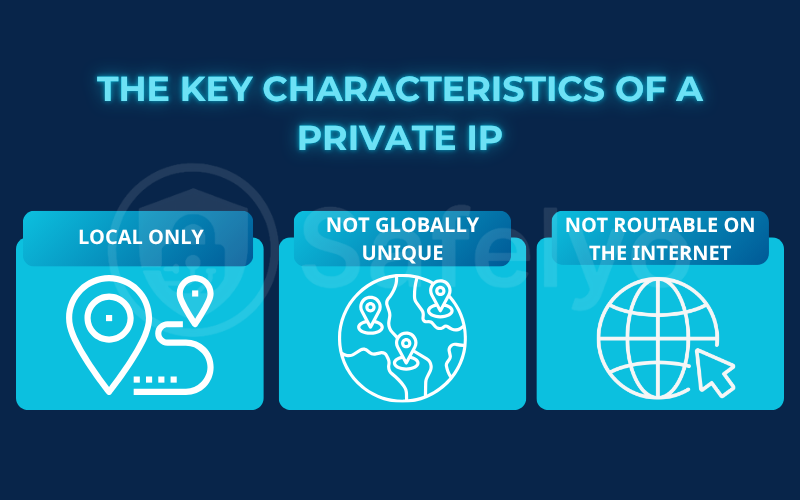
This analogy perfectly illustrates the key characteristics of a private IP:
- It’s local only: The number “101” is only meaningful inside that specific hotel. Similarly, your private IP only has meaning and only works inside your local home network.
- It’s not globally unique: Every hotel in the city can have a “Room 101.” Likewise, your neighbor’s network almost certainly has devices with the exact same private IP addresses as yours.
- It is non-routable on the internet: You can’t send a letter directly to “Room 101” without knowing the hotel’s street address first. In the same way, the public internet cannot connect directly to a private IP address.
2. Private IP vs. Public IP address: What’s the difference?
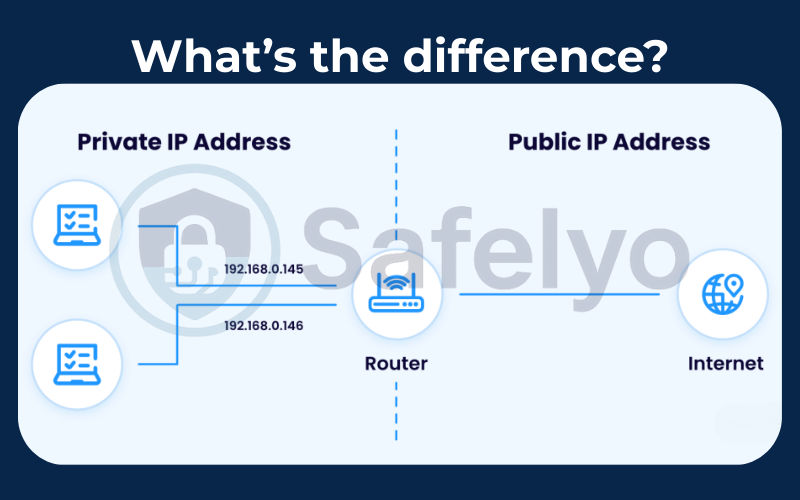
Now that we have the core concepts down, the best way to solidify your understanding is to see the two types of IP addresses directly compared. While they work together, their roles, scopes, and characteristics are completely different.
From my experience, seeing these differences laid out visually is the quickest way for the “aha!” moment to happen for most people.
Here’s a simple table that summarizes everything:
| Feature | Private IP Address | Public IP Address |
|---|---|---|
| Visible to websites | No | Yes |
| Scope | Local (inside your home network) | Global (on the public internet) |
| Analogy | Your specific hotel room number | Your hotel’s main street address |
| Assigned by | Your Router | Your Internet Service Provider (ISP) |
| Uniqueness | Unique only within your own LAN | Globally unique across the internet |
| Example range | 192.168.1.101, 10.0.0.5 | 203.0.113.55, 8.8.8.8 |
| Primary purpose | Internal device communication within a local network | Communication with the rest of the internet |
3. Common private IP address ranges (IPv4 explained)
Not all IP addresses can operate as private IPs. To prevent conflicts on the public internet, the Internet Assigned Numbers Authority officially reserves specific address ranges for internal networks.
These reserved ranges are known as private IPv4 address ranges and are used exclusively within local networks such as homes, offices, and enterprise environments.
3.1. Private IPv4 Address Ranges
| Class | Address Range | Typical Use |
|---|---|---|
| Class A | 10.0.0.0 – 10.255.255.255 | Large enterprise networks |
| Class B | 172.16.0.0 – 172.31.255.255 | Medium-sized organizations |
| Class C | 192.168.0.0 – 192.168.255.255 | Home and small office networks |
Each range is designed to support different network sizes. Class A provides millions of addresses for large-scale infrastructures, while Class B balances flexibility and scale for organizations. Class C is optimized for smaller networks with a limited number of devices.
3.2. Why is 192.168.x.x so common in home networks?
Most consumer routers use 192.168.1.0/24 as their default private network range. This setup offers several practical advantages:
- It supports up to 254 devices, which is more than enough for most homes
- It is widely supported by routers, operating systems, and smart devices
- It simplifies local networking and reduces configuration complexity
Because of this, you’ll often see devices assigned addresses like 192.168.1.1, 192.168.1.10, or 192.168.1.101 in home and small office environments.
3.3. What about private IP addresses in IPv6?
IPv6 introduces a similar concept known as Unique Local Addresses (ULA). ULAs serve the same purpose as private IPv4 addresses but are built for the IPv6 standard, which offers a vastly larger address space.
Like private IPv4 addresses, IPv6 ULAs:
- Are used only within local networks
- Are not routable on the public internet
- Allow internal device communication without external exposure
As IPv6 adoption grows, ULAs are becoming increasingly important for modern network design while maintaining the same privacy and isolation principles found in IPv4 private addressing.
4. Does a private IP address change?
Yes, a private IP address can change, and in most home or office networks, this is completely normal. Whether it changes or stays the same depends on how your network assigns IP addresses.
4.1. DHCP automatically assigns private IP addresses
Most routers use DHCP (Dynamic Host Configuration Protocol) to assign private IP addresses to devices automatically. When your phone, laptop, or smart TV connects to the network, the router temporarily “leases” an available private IP to that device. This process is automatic and requires no user action, which is why most people never notice it happening.
4.2. When does a private IP address change?
A private IP address may change in several common situations:
- Restarting the router, which clears existing IP leases
- Reconnecting to Wi-Fi after being disconnected for a while
- Connecting to a different network, such as switching from home Wi-Fi to a café or office network
- Lease expiration, when the router reassigns IPs to manage the network efficiently
In everyday use, these changes usually have no visible impact unless a specific device relies on a fixed address.
4.3. When should you use a static private IP?
You may want to assign a static private IP address in your local network when consistency matters, such as:
- Network printers that multiple devices need to access
- NAS servers or shared storage systems
- Security cameras or smart home hubs
- Port forwarding setups or local servers
In these cases, a static private IP ensures the device always has the same internal address, preventing connection issues caused by IP changes.
5. How do private and public IPs work together? The role of NAT
So, we have a network of devices with private IPs that can’t be seen by the internet, and a single public IP that can. This raises a logical question: how does my laptop, with its private “room number” IP, actually get information from a website like Google out on the public internet?
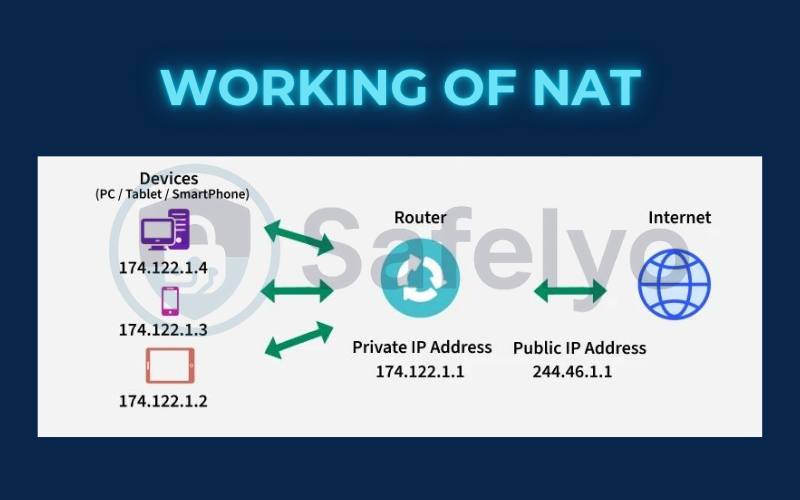
The magic that makes this all possible is a technology called Network Address Translation (NAT). The easiest way to think of NAT is to imagine your router as a highly efficient translator or a corporate switchboard operator.
Here’s how the process works in simple steps:
- The Outgoing Request: Your laptop (192.168.1.101) wants to visit google.com. It sends this request to your router.
- The Translation: The router receives the request. It makes a quick note in its memory log: “Okay, the request for Google came from device 192.168.1.101.” It then swaps out your laptop’s private IP address and replaces it with its own single public IP address before sending the request out to the internet.
- The Return Trip: Google’s servers receive the request and send a response back to your public IP address (the only address it can see).
- The Reverse Translation: Your router receives the response from Google. It checks its memory log and says, “Ah, this response is for that request I sent out on behalf of 192.168.1.101.” It then swaps the public IP back out for your laptop’s private IP and forwards the data directly to your device. This ensures seamless data transfer even when you are accessing remote cloud computing services.
This NAT process happens billions of times a second all over the world. It’s the essential system that enables a single public IP address to serve multiple devices within a local network. This system is a crucial component of how the modern internet operates.
6. Does a private IP address protect your privacy?
A private IP address helps protect devices inside your local network, but it does not provide true online privacy. This is a common misunderstanding, especially for beginners learning how IP addresses work.
Here’s how it actually works:
- A private IP address is not the same as online anonymity: A private IP address only exists within your home or office network. It prevents devices on the public internet from directly accessing your laptop, phone, or smart devices. Once your traffic leaves your router, your private IP is no longer used.
- Websites never see your private IP: When you visit a website, your router uses Network Address Translation (NAT) to replace your private IP with your public IP address. From the website’s perspective, all activity appears to come from that public IP, not your private one.
- Your ISP can still monitor your activity: Even though your devices use private IPs internally, all outbound traffic goes through your internet service provider using your public IP. This allows your ISP to see which websites you connect to and when.
A private IP address improves local network security, but it does not hide your identity, location, or browsing behavior online. If you want real online privacy such as encrypting traffic or masking your public IP, a private IP address alone is not enough.
7. How to find your private IP address on any device
Unlike finding your public IP (where you just ask a website), finding your private IP address requires you to look within your device’s own network settings. The address is local to your device, so that’s where you’ll find it.
Fortunately, it’s a simple process on every major operating system. Here’s a quick guide.
7.1. On Windows 10 & 11
In my experience, the fastest way on Windows is using the Command Prompt.
- Click the Start button and type cmd.
- Select Command Prompt from the results.
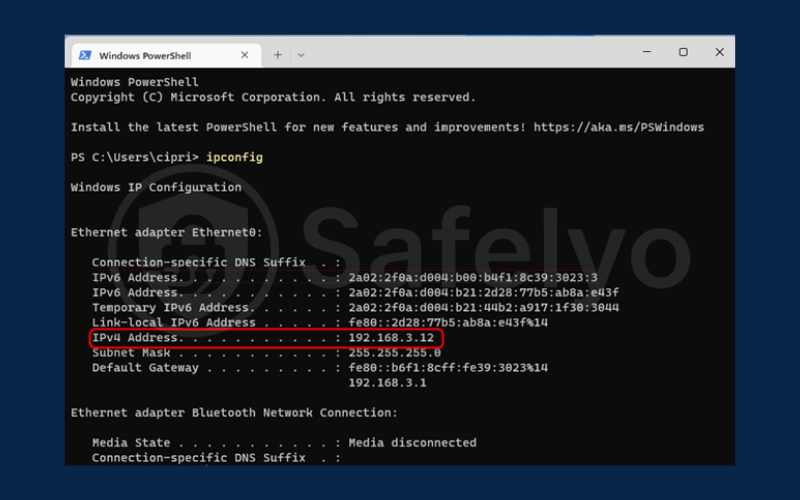
- In the black window that appears, type ipconfig and press Enter.
- Look for the specific adapter connecting you to your local network (like “Wireless LAN adapter Wi-Fi” or “Ethernet adapter”). Your private IP address will be listed next to “IPv4 Address.”
7.2. On macOS
Apple makes this incredibly easy and accessible right from the menu bar.
- While holding down the Option (⌥) key on your keyboard, click the Wi-Fi icon in the top-right corner of your screen.
- A detailed dropdown menu will appear. Your private IP address is listed right there, next to “IP Address.” No need to open any other windows.
7.3. On iPhone/iPad
Finding your IP on an iOS device is just a couple of taps away.
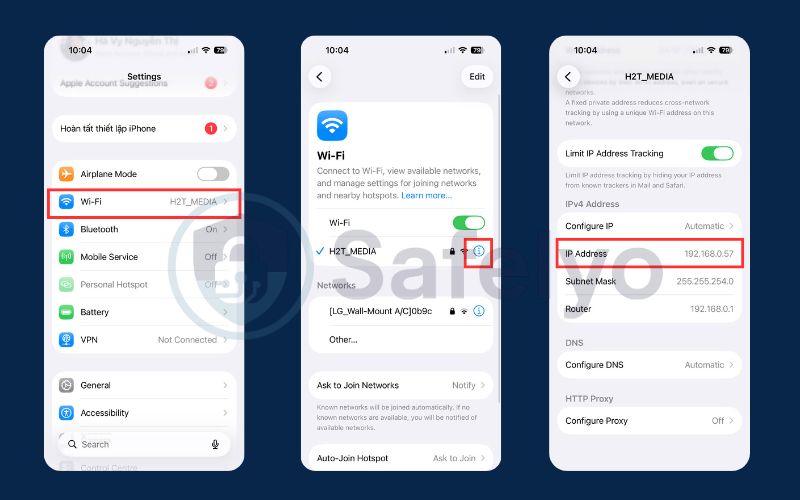
- Open the Settings app.
- Tap on Wi-Fi.
- Tap the small blue “i” icon next to the name of the Wi-Fi network you are currently connected to.
- Your device’s private IP address will be listed under the “IPv4 Address” section.
7.4. On Android
The steps can vary slightly depending on your Android version and phone manufacturer, but the general path is the same.
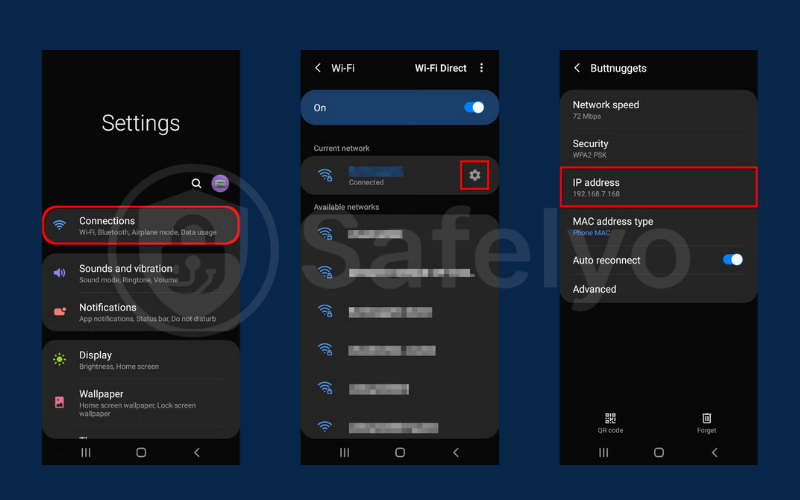
- Open Settings and go to Network & Internet > Wi-Fi.
- Tap on the gear icon or the name of the Wi-Fi network you’re connected to.
- You may need to expand an “Advanced” section. Your private IP address will be listed there.
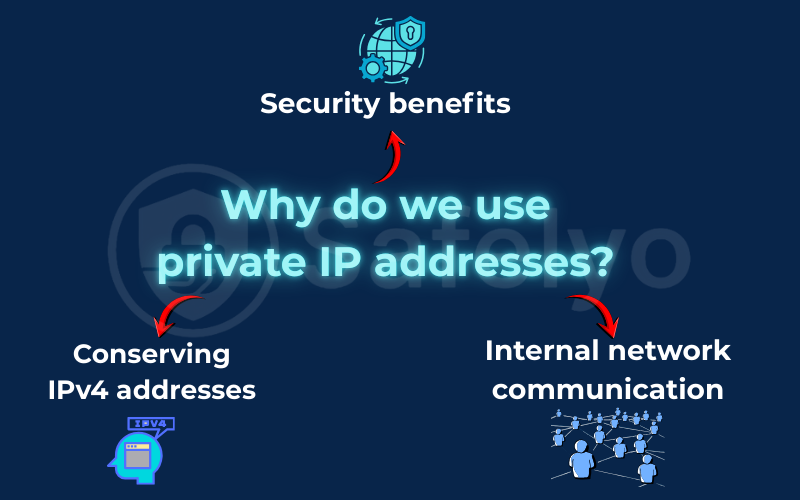
8. Why do we use private IP addresses?
Private IP addresses exist to make modern networks scalable, efficient, and manageable. Almost every home, office, and business network relies on private IPs to connect multiple devices internally without consuming scarce public IP resources or complicating network management.
Instead of giving every device a public-facing address, private IPs allow networks to function smoothly behind a router while still accessing the internet when needed.
8.1. Security benefits
Private IP addresses help reduce exposure by keeping devices inside a local network separated from direct internet access. This design limits how external traffic can reach internal devices and adds a basic layer of protection for everyday hardware.
This is especially important for devices like printers, smart TVs, security cameras, and IoT devices, which often lack advanced security features. By operating on private IPs, these devices can communicate locally without being directly reachable from outside the network.
8.2. Conserving IPv4 addresses
IPv4 provides a limited number of unique public IP addresses, and the global supply has already been exhausted. Private IP addresses solve this problem by allowing the same internal address ranges to be reused across millions of networks worldwide.
With the help of Network Address Translation (NAT), multiple devices using private IPs can share a single public IP address. This approach remains essential today, as IPv4 is still widely used despite the growing adoption of IPv6.
8.3. Internal network communication
Private IP addresses make communication within a local network fast and reliable. Devices can exchange data directly without routing traffic through the internet.
This is critical for common tasks such as file sharing, printing, accessing network storage, or managing smart home systems. Because everything stays inside the local network, connections are typically faster, more stable, and continue to work even if the internet connection is temporarily unavailable.
9. Private IP address vs. localhost (127.0.0.1)
Private IP addresses and localhost are both used in internal networking, but they serve very different purposes. Understanding how they differ helps avoid confusion when setting up networks, troubleshooting connections, or testing applications.
9.1. Comparison between a private IP address and localhost
| Aspect | Private IP Address | Localhost (127.0.0.1) |
|---|---|---|
| Scope | Local network (LAN) | Single device only |
| Purpose | Communication between devices on the same network | Internal communication within one device |
| Reachable from other devices | Yes, on the same network | No |
| Network involvement | Uses the local network | Does not use any network |
| Common examples | 192.168.1.10, 10.0.0.5 | 127.0.0.1 |
| Typical use cases | Printers, file sharing, cameras, NAS | App testing, local servers, development |
| Considered a LAN IP | Yes | No |
| Depends on a router | Yes | No |
9.2. What a private IP address is used for
A private IP address identifies a device within a local network, such as a home Wi-Fi or office network. It allows multiple devices to communicate with each other directly without sending traffic over the internet.
For example, when you print a document to a wireless printer or access a network storage device, your computer connects to that device using its private IP address. This communication stays inside the local network and is usually faster and more reliable than internet-based connections.
In simple terms, a private IP address works like a house number inside a private neighborhood. Devices in the same neighborhood can find each other, but outsiders cannot see or access those addresses.
9.3. What localhost (127.0.0.1) is used for
Localhost, represented by the address 127.0.0.1, always points back to the device you are currently using. Any data sent to this address never leaves the device and never reaches the network.
Localhost is commonly used for testing websites, running local servers, or developing applications. Because it operates entirely on the device itself, it works even when there is no internet connection.
9.4. When to use a private IP address or localhost
You should use a private IP address when you need to connect to another device on the same network, such as a printer, router, camera, or another computer. Private IPs are designed for shared communication within a local environment.
You should use localhost when you are testing or developing software on your own device and do not want other devices to access it. Localhost provides a safe and isolated environment for development and debugging.
Localhost is limited to a single device, while private IP addresses enable communication between multiple devices on the same local network. Knowing the difference makes network configuration, testing, and troubleshooting much easier, especially for users who are new to networking.
10. FAQs about private IP address
Let’s clear up a few more common questions about these essential, behind-the-scenes network addresses.
What is a private IP address?
A private IP address is a unique, local address that your router assigns to each device within your home or office network (like your phone or laptop). It is used for internal communication only and is completely invisible to the public internet.
Why are private IP addresses necessary?
The main reason is the shortage of Internet Protocol Version 4 public addresses. However, using private IPs also provides scalability and flexibility for growing networks. It significantly reduces management complexity and offers cost-effectiveness since you don’t need to purchase a public IP for every single gadget. Additionally, it enhances security by keeping internal devices hidden.
Can a private IP address be traced?
No, not directly from the internet. Because your private IP is hidden behind your router and is not unique globally, an outsider cannot trace an address like 192.168.1.101 and link it specifically to you. Only your public IP address can be traced.
Can two devices on the same network have the same private IP address?
No. Within a single local network (your LAN), every device must have a unique private IP address. If two devices were assigned the same address, it would create an “IP conflict,” and your network would not function correctly.
What are the common private IP address ranges?
The Internet Assigned Numbers Authority (IANA) has reserved specific address ranges for private use to ensure global interoperability. These address ranges are categorized into classes:
- Class A: 10.0.0.0 to 10.255.255.255. The Class A range is typically used for very large networks.
- Class B: 172.16.0.0 to 172.31.255.255. Many medium-sized organizations utilize Class B.
- Class C: 192.168.0.0 to 192.168.255.255. Most home routers default to Class C.
While IPv4 is common, the modern IPv6 standard is gaining traction. IPv6 uses a concept called Unique Local Addresses (ULA) to handle local traffic similar to these legacy address ranges.
Does a private IP address change?
Yes, in most cases it does. Private IP addresses are usually assigned automatically by the router using DHCP, so they can change when you restart the router, reconnect to Wi-Fi, or move to a different network. You can set a static private IP if a device needs a consistent address.
What is the difference between a private IP and a public IP?
A private IP is used only inside a local network, while a public IP is visible on the internet.
Websites and online services see your public IP, not your private IP, which is managed by your router.
Is 192.168.1.1 a private IP address?
Yes, 192.168.1.1 is a private IP address. It is commonly used as the default gateway address for home routers, allowing devices in the local network to access router settings.
Do I need a VPN if I already have a private IP?
Yes, if you want online privacy. A private IP only protects devices inside your local network, but it does not hide your activity from your ISP or websites. A VPN is required to encrypt traffic and mask your public IP address.
11. Conclusion
So, what is private IP address? It’s the elegant, invisible system that allows the billions of devices in home networks and offices to connect to the internet in an organized and efficient way. It’s the “room number” that brings order to the “hotel” of your home network.
At Safelyo, we believe that understanding this difference is a cornerstone of digital literacy and fundamental network security. It helps you grasp how the internet works and, more importantly, why protecting your public IP address with tools like a VPN is so vital for your online privacy. Now that you’ve mastered the private IP, take the next step in our VPN Guides category by reading our guide.