Watching the FA Cup or top British dramas in the US often requires expensive subscriptions to services like Disney+ or cable. Why pay extra when you can watch them for free directly on the BBC?
While the site normally blocks US viewers with a “content not available” error, you can easily bypass this. Here is how to virtually change your location to the UK and watch BBC iPlayer free.
-
Download a VPN with optimized UK servers
Install a trusted VPN app that specializes in unblocking streaming services.
-
Connect to a UK server
Choose a server location in the United Kingdom to change your digital location.
-
Clear your browser cookies and cache
Remove old location data so the BBC website doesn’t detect your real location.
-
Create a free BBC account
Register using a valid UK postcode (no payment required).
-
Log in and start streaming
Open BBC iPlayer and watch your favorite shows freely.
1. How to watch BBC in USA using a VPN
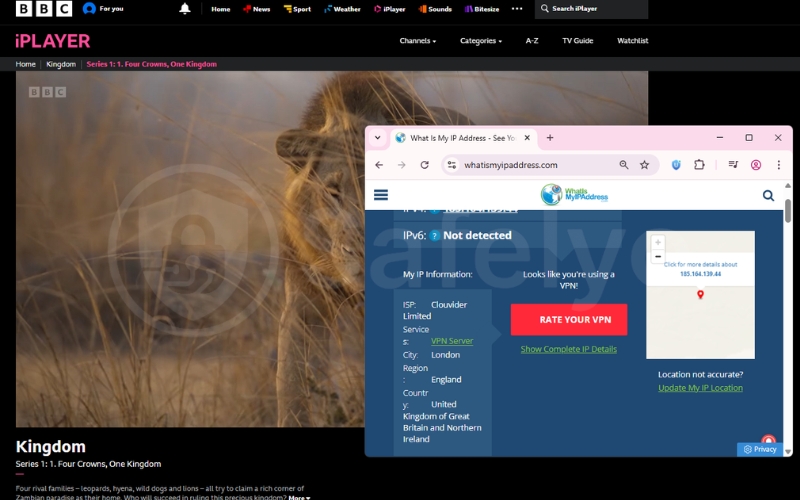
A VPN (Virtual Private Network) acts like a tunnel. It takes your internet connection in the USA and routes it through a server in the UK. When you visit the BBC website, it sees the UK server’s address instead of your own.
Quick Step:
- Open your VPN app.
- Search for “United Kingdom” in the server list.
- Click connect and wait for the green light.
- Open your browser and go to BBC iPlayer.
- Log in and play a video.
1.1. Step 1: Download a VPN with optimized UK servers
Not all VPNs work for this. The BBC is aggressive about blocking VPNs in a constant “cat-and-mouse” game, regularly blacklisting IP addresses associated with data centers.
Industry leaders like ExpressVPN, Surfshark, and NordVPN are generally the most reliable options.
In my recent test, NordVPN’s standard UK servers were surprisingly ineffective; the BBC detected the shared IPs and blocked the stream.
However, when I switched to a Dedicated IP (a static IP reserved just for me), the connection worked perfectly without any error messages. This suggests that for some providers, a standard subscription might not be enough during high-traffic events.
I also tested Urban VPN (a free proxy), which connected instantly, but I strongly advise caution. It operates as a Peer-to-Peer (P2P) network, which can expose your device to significant risks.
I recommend using a Dedicated IP from a reputable provider rather than trading your privacy for a free connection.
Before you decide to use Urban VPN just because it is free, please read our detailed analysis on Is Urban VPN extension safe and our full Urban VPN review to understand the trade-offs you are making.
1.2. Step 2: Connect to a UK server
Once installed, launch the application and look for the server list. While most apps offer a “Quick Connect” button, it is often better to manually select a specific city location.
If available, choose less congested servers like “Manchester,” “Glasgow,” or “Docklands” instead of the default “London” option. Spreading out the traffic helps ensure a stable connection with less buffering during playback.
1.3. Step 3: Clear your browser cookies and cache
This is a critical step that many people miss. Even if your VPN is on, your web browser might still hold “cookies” (small data files) that reveal your previous US location. Clearing your cache ensures you look like a completely new visitor from the UK.
Read more:
1.4. Step 4: Create a BBC account
You cannot watch anything without an account. Unlike Netflix, you do not need a credit card, but you do need to register. I will cover the specific details for this in the next section.
1.5. Step 5: Log in and start streaming
Once connected and registered, simply log in. The error message should disappear, allowing you to stream BBC in USA just as if you were sitting on a couch in Liverpool.
2. Creating a BBC iPlayer account from the US
The registration process is simple, but it does ask for British information.
Quick Step:
- Go to the BBC iPlayer registration page.
- Select “Register with Email.”
- Enter a valid UK postcode (e.g., SW1A 1AA).
- Click “Yes” if asked about a TV License.
- Verify your email address.
2.1. The UK postcode requirement
When you sign up, the form will ask for a UK postcode. The system checks if the code is a real location, but it does not mail you anything.
In the past, I tried using random letters and numbers, but the form rejected them immediately. I found the easiest workaround is to use a UK postcode for BBC iPlayer that belongs to a commercial business, like a hotel or university found on Google Maps.
For example, using the postcode for a random hotel in London works perfectly because it is a valid, recognized address.
2.2. Navigating the “TV License” prompt
After signing up, the player may ask: “Do you have a TV License?” In the UK, this is a tax for watching live TV. There is no verification system for this on the website. Most international viewers simply click “Yes, I have a TV License” to proceed.
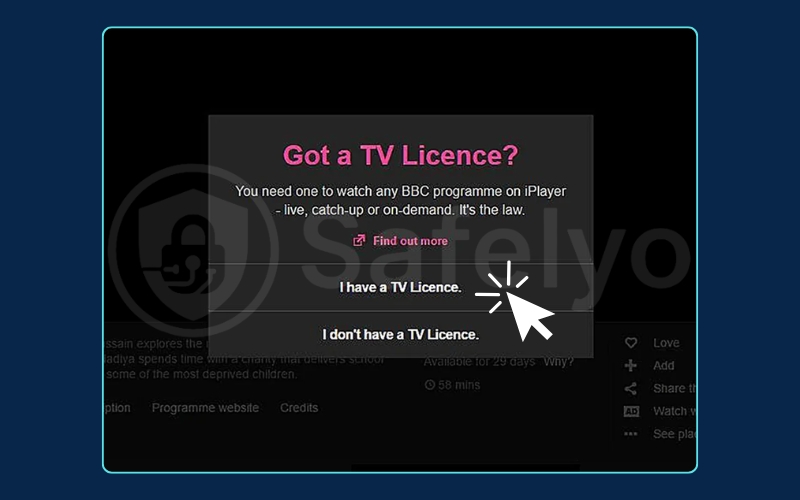
Disclaimer: Clicking “Yes” when you do not have a license is technically a violation of the BBC’s Terms of Service. While the risk of legal action for international viewers is historically low, you proceed at your own risk regarding potential account suspension.
3. How to watch BBC on different devices
Watching on a laptop is easy, but getting the BBC on your TV or phone can be trickier because of app store restrictions.
Quick Step:
- Mobile: Use the browser (Chrome/Safari) instead of the app.
- Fire Stick: Use the “Downloader” app to side-load.
- Smart TV: Use an HDMI cable from your laptop.
3.1. Watching on PC and Mac
This is the most reliable method. You simply use your web browser (Chrome, Firefox, Edge) with the VPN turned on. No special apps are needed other than the VPN client.
3.2. Watching on iPhone and Android
The BBC iPlayer app is only available in the UK Google Play Store and Apple App Store. Changing your app store region is complicated and can mess up your other subscriptions.
The easiest solution is to skip the app entirely. Connect your VPN on your phone, open your mobile web browser, and watch directly from the BBC website.
Note: BBC’s mobile site will detect your phone and force you to open the app. To bypass this, you must enable “Desktop Site” mode.
3.3. Watching on Fire Stick and Smart TVs
Most Smart TVs do not support VPN apps natively. A common workaround is to use an Amazon Fire Stick. You can install a VPN directly onto the Fire Stick, or use the “Downloader” tool to install the Android version of the BBC iPlayer app manually.
4. Why you need a reliable VPN for BBC iPlayer
You might be tempted to use a free proxy, but they rarely work for BBC iPlayer. The BBC uses sophisticated technology to protect its content.
4.1. The “Proxy Detected” error
If you see a BBC iPlayer proxy error, it means the BBC has identified your IP address as belonging to a VPN.
This is common because free VPNs use a small number of IP addresses for thousands of users, making them easy to spot and ban.
Even paid VPNs occasionally get blocked, which is why choosing one with responsive support and many servers is vital.
4.2. Speed and buffering prevention
Streaming video, especially in HD or 4K, requires a lot of data. Premium VPNs offer “unlimited bandwidth,” meaning they won’t slow you down after you watch one movie.
4.3. Security and privacy benefits
Beyond streaming, a VPN encrypts your data. This keeps your browsing habits private from your internet service provider (ISP) and protects you if you are using public Wi-Fi in a coffee shop.
5. Troubleshooting common BBC iPlayer errors
Sometimes, even with a VPN, you might get an error. Here is how to fix the most common ones.
5.1. Fixing “Sorry, BBC iPlayer isn’t available in your region”
This message appears if the site detects your true location. This often happens because your browser is leaking data.
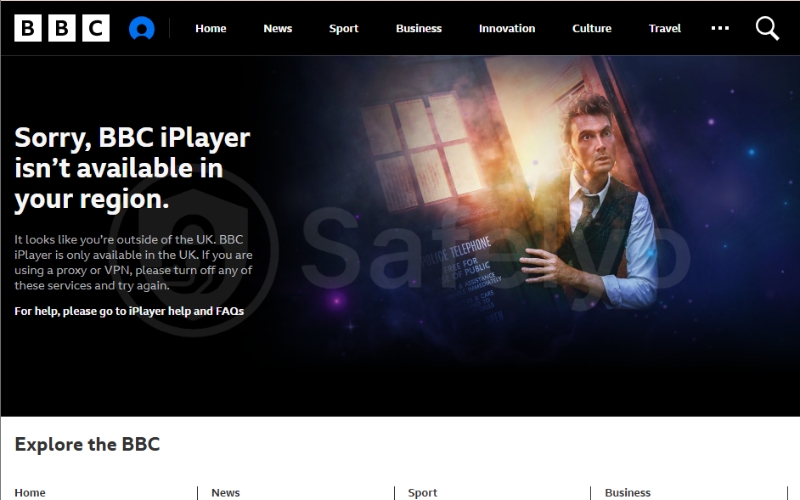
I once spent twenty minutes trying to fix this error while connected to a valid UK server. I realized my browser was holding onto old location data despite the VPN being on.
Opening a fresh “Incognito” (Private) window instantly solved the problem for me because Incognito mode forces the browser to ignore old cookies and cache.
5.2. Fixing error code 02066
This code usually means the specific VPN server you are using has been blocked. The fix is simple: open your VPN app and choose a different UK server location (e.g., switch from London to Glasgow).
5.3. “Content not available” messages
On mobile devices, this can happen if your GPS location disagrees with your VPN IP address. Turn off your phone’s GPS (Location Services) before opening the browser to stream.
5.4. Using Incognito mode
As mentioned earlier, Incognito mode is your best friend. It prevents the BBC site from reading tracking cookies that might reveal you are actually in the US.
6. FAQs about how to watch BBC in USA
Is BBC iPlayer free to watch?
Yes, BBC iPlayer is completely free. There are no monthly subscription fees, unlike Netflix or Hulu. You only need to register an account.
Can I watch BBC iPlayer without a VPN?
No. If you are physically in the USA, the BBC will block your access based on your IP address. You must use a tool to change your virtual location.
Is it illegal to watch BBC in the USA?
It is not illegal to use a VPN to access content in the US. However, it does go against the BBC’s Terms of Service. The worst that typically happens is the BBC blocks the specific IP address you are using.
Which UK postcode should I use for BBC iPlayer?
You can use any valid UK postcode. Popular choices include SW1A 1AA (London) or M1 1AD (Manchester). Just ensure it is a real postal code format.
7. Conclusion
Accessing British TV from America is straightforward once you have the right tools. You do not need to be a tech expert to know how to watch BBC in USA; you just need a way to change your digital location.
Key Takeaways:
- Use a quality VPN: Avoid free proxies; they rarely work.
- Clear your cache: Or use Incognito mode to prevent location leaks.
- Switch servers: If one UK city is blocked, try another.
- Use a valid postcode: Any real UK commercial postcode will work for registration.
Personally, once I set this up, I was able to watch the Wimbledon final live without needing an expensive cable subscription.
If you want to learn more about unlocking global content, check out the Streaming Unlock section at Safelyo.