What is IPsec? It is a suite of protocols that secures network communication by verifying and encrypting data packets. Data sent over the internet is naturally vulnerable to interception or unauthorized modification without these security measures in place.
This guide walks you through the technical definition, mechanics, and practical applications of this security suite.
Key takeaways:
- Definition: A protocol suite used to secure communications over IP networks.
- Core functions: Provides data origin authentication, integrity checks, and optional encryption.
- Layer 3 operation: Works at the network layer to protect all traffic automatically.
- VPN technology: Acts as the primary standard for professional and corporate VPNs.
1. What is IPsec?
IPsec, short for Internet Protocol Security, is a suite of rules designed to protect data as it moves between devices. This collection of protocols works together to create a secure path for information. The technology operates at the network layer, which is the third layer of the OSI model.
Unlike tools that handle all data automatically, IPsec uses a Security Policy Database (SPD) to decide how to treat different types of traffic. Based on these rules, the system performs one of three actions:
- Protect: Secure the data using encryption or integrity checks.
- Bypass: Send the data normally without any security processing.
- Discard: Block the data from being sent or received.
2. How does IPsec work? Step-by-step process
To understand the mechanics, think of IPsec as a security gate. It follows a specific order of operations to ensure unauthorized parties cannot access your information.
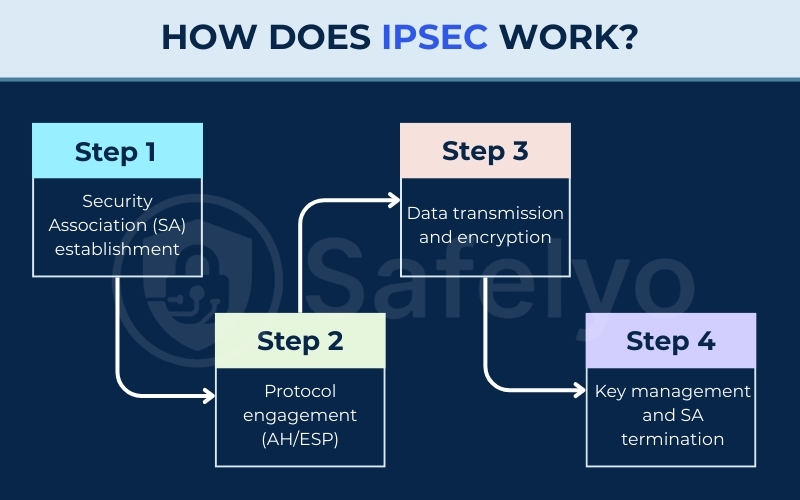
2.1. Step 1 – Security Association (SA) establishment
Before data moves, the two devices must agree on “how to talk.” This is Phase 1 of the Internet Key Exchange (IKE).
In modern environments, IKEv2 is the standard. It is faster than older versions and supports MOBIKE, which helps your connection stay active when switching from Wi-Fi to 4G/5G. They establish a secure management tunnel called a Security Association (SA).
2.2. Step 2 – Protocol engagement (AH/ESP)
Once the management tunnel is ready, the devices negotiate the specific rules for the actual data transfer. They decide whether to use ESP or AH and which encryption keys will protect the real message.
2.3. Step 3 – Data transmission and encryption
The device now prepares the data packets for transit. If encryption is enabled, the original data is scrambled into a coded format.
The system also adds security information to the packet so the receiver can verify it. These protected packets are then sent across the network to the destination.
2.4. Step 4 – Key management and SA termination
After the data arrives and is verified, the connection eventually closes. The system manages the keys used for the session, often rotating them to ensure continued security.
Once the communication is finished, the Security Association is terminated to prevent unauthorized reuse of the connection settings.
3. IPsec protocols explained
IPsec functions as a suite where several sub-protocols work together to perform different security tasks. These protocols manage the verification, encryption, and key exchange for your network traffic.
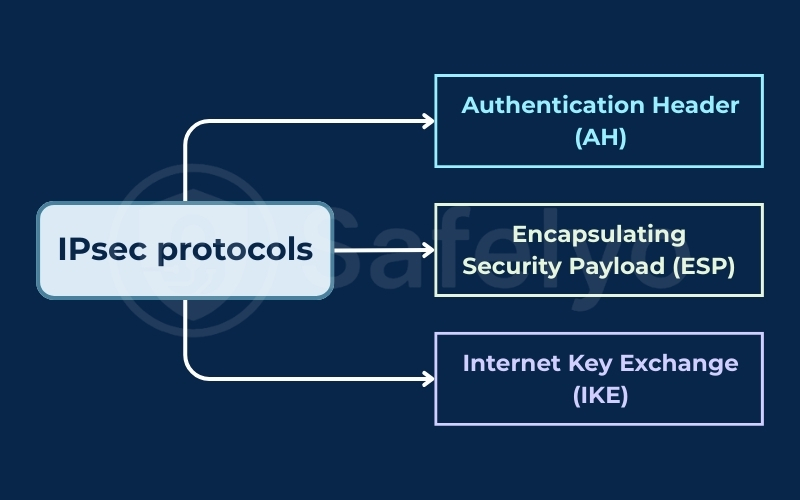
3.1. Authentication Header (AH)
The AH protocol manages the identity of the sender and the accuracy of the information. It provides integrity by hashing the packet, which includes the original IP header. However, AH does not provide encryption, so the data remains readable if it is intercepted.
Due to its design, AH is incompatible with NAT (Network Address Translation). If a packet passes through a standard home router, the connection often fails because the NAT process changes the header and breaks the integrity check.
For this reason, AH is rarely used in real-world deployments today. Even when encryption is not required, modern networks prefer using ESP with NULL encryption instead of AH.
3.2. Encapsulating Security Payload (ESP)
ESP is the primary backbone of modern VPN connections. It provides data origin authentication, integrity checks, and encryption. This protocol can scramble the data payload to ensure confidentiality while also verifying that the message has not been altered.
Unlike AH, ESP works effectively across NAT routers by using UDP encapsulation. This makes it much more flexible for users connecting from home or public networks. Because of this compatibility and its ability to provide full encryption, ESP is the standard choice for securing network traffic in 2025.
3.3. Internet Key Exchange (IKE)
IKE manages the secure exchange of encryption keys before any data begins to move. This process ensures that both devices agree on the security rules and keys safely. This protocol has two main versions:
- IKEv1: The original version. It uses a complex setup process that is now considered slow and outdated.
- IKEv2: The current industry standard and the version most commonly used today. It is faster, more secure, and supports MOBIKE. This feature allows your connection to stay active while you switch between a Wi-Fi network and a 5G signal.
4. IPsec modes: Tunnel mode vs. transport mode
Depending on your network needs, IPsec can package your data in two different ways. Each mode serves a specific purpose for different types of connections.
4.1. Tunnel mode
This is the default mode for a VPN. In tunnel mode, the system encrypts the entire original packet and wraps it in a new IP header. The IP addresses of your internal devices (like a PC or Server) are hidden behind the IP of the VPN Gateway.
4.2. Transport mode
In transport mode, only the data payload is encrypted, and the original IP header is kept. This is typically used for direct connections between two specific servers (Host-to-Host) that already know each other’s IP addresses.
Comparison of IPsec modes:
| Feature | Tunnel mode | Transport mode |
| Data Protected | Entire original packet | Only the payload |
| IP Headers | Hidden and replaced | Original headers stay visible |
| Typical Use | VPNs (Site-to-site) | Host-to-host on local networks |
| Speed | Slightly slower | Faster |
5. What is an IPsec VPN?
An IPsec VPN is a secure communication channel that uses the Internet Protocol security suite to encrypt data sent over a public network. This technology allows devices to exchange information as if they were directly connected to the same private network.
Organizations typically deploy these VPNs in two specific configurations based on their infrastructure needs.
5.1. Site-to-site IPsec VPNs
A site-to-site VPN connects two entire networks, such as a branch office to a main headquarters. A VPN gateway or Next-Generation Firewall (NGFW) at each site handles the encryption.
This allows all devices on either network to communicate without needing their own security software.
5.2. Remote access IPsec VPNs
This connects an individual device (like a laptop) to a corporate network. You typically install a VPN client to initiate the connection. Using IKEv2 allows these connections to remain stable even when switching internet sources.
6. Common IPsec ports
To allow IPsec traffic through a firewall, you must open specific ports and protocol numbers. If these are blocked, the connection will fail.
- UDP Port 500: Used for IKE (Initial negotiation).
- UDP Port 4500: Used for NAT Traversal (When behind a router).
- IP Protocol 50 (ESP): Handles encrypted data.
- IP Protocol 51 (AH): Handles integrity checks (Rarely used in modern VPNs).
7. IPsec vs. SSL VPN: Key differences
While both technologies create secure paths, they operate differently. SSL (or TLS) is the security you use when you see a padlock icon in your browser.
Quick Comparison:
| Feature | IPsec VPN | SSL/TLS VPN |
| Connection Level | Network (Full access) | Application (Specific access) |
| Ease of Use | Needs client software | Uses a web browser |
| Firewall Status | Can be tricky to set up | Works almost anywhere |
| Performance | High for all apps | Optimized for web apps |
Choose IPsec when you need a constant, high-performance connection for your entire computer. Choose an SSL VPN if you only need to access one or two specific work websites from a public device.
8. IPsec advantages and limitations
Every security tool has its strengths and its trade-offs. Knowing these helps you decide if IPsec is the right choice for your specific situation.
Advantages:
- System-wide: It protects every application on your device automatically.
- Highly secure: It uses some of the strongest encryption methods available.
- Speed: Modern hardware is built to handle IPsec very quickly.
- Compatibility: It is a global standard used by almost all major networking brands.
Limitations:
- Complex setup: It requires more technical knowledge to configure correctly.
- Firewall blocks: Some public networks block the ports that IPsec needs.
- Battery use: On mobile devices, the heavy encryption work can use more power.
9. FAQs about What is IPsec
What does IPsec stand for?
It stands for Internet Protocol security, reflecting its role in protecting the standard protocol of the internet.
What is IPsec used for?
It is primarily used to build VPNs, secure business communications, and protect sensitive data packets on public networks.
IPsec vs VPN: what’s the difference?
A VPN is the general idea of a secure tunnel. IPsec is the specific engine and set of rules used to build that tunnel.
What is an IPsec router?
This is a router designed with enough processing power to handle the heavy math required for IPsec encryption without slowing down your network.
What are some IPsec examples in real networks?
Corporate workers connecting to their home office and government agencies sending secure files are both common examples of IPsec in action.
10. Conclusion
By now, you should have a clear answer to What is IPsec. This protocol suite remains one of the most reliable ways to secure network traffic by providing strong encryption and authentication at the network layer.
Whether it is powering a corporate network or protecting your remote work session, it is a vital part of the internet’s security framework.
For more helpful guides on digital safety, explore our Privacy & Security Basics category at Safelyo. We are committed to helping you navigate the complex world of online protection with ease.