For years, Hotspot Shield VPN has boldly marketed itself as the “World’s fastest VPN”, drawing in millions of users with its free plan and promises of lightning-fast connections. But is that just clever marketing, or does the technology actually deliver? In this comprehensive Hotspot Shield VPN review, we will break down its latest features, analyze real-world speed tests, and evaluate how safe it actually is for sensitive tasks like torrenting.
VPN Score:
6.9
Hotspot Shield Review 2026: Speed First, Privacy Second
| HOTSPOT SHIELD FEATURES (UPDATED 2026) | |
| Plans Available | Free Plan & Premium Plan |
| Encryption Standard | AES-256 encryption (both plans) |
| VPN Protocols | OpenVPN supported (both plans) |
| No-Logs Policy | Privacy-first no-logs policy (applies to both plans) |
| Server Network | 800+ servers total |
| Virtual Locations | Free: 1 location (US only) Premium: 125+ locations |
| Simultaneous Connections | Free: 1 device Premium: Up to 10 devices |
| Connection Speed | Private VPN connections up to 1 Gbps |
| Data Limit | Unlimited data (both plans) |
| Streaming Optimization | Free: Not supported Premium: Optimized for Netflix, YouTube, Disney+ & more |
| Security Features | Kill Switch, IP Leak Protection, DNS Leak Protection, TLS Connection (both plans) |
| Advanced Features | Smart VPN, Traffic Obfuscation, Tor over VPN, Traffic Proxy (both plans) |
| Threat Protection | Anti-phishing protection included |
| Customer Support | Free: Support Center only Premium: 24/7 Live Chat + Email |
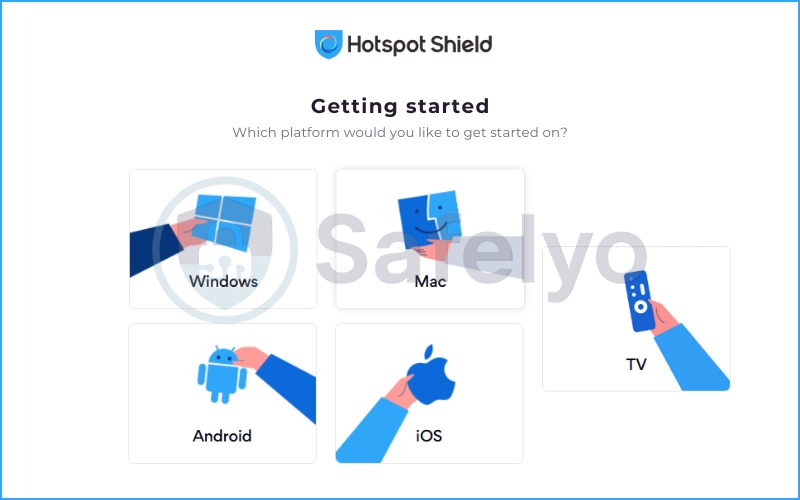
| Platform Support | Windows, macOS, iOS, Android, TV |
BEST FOR: Hotspot Shield is best suited for users who prioritize raw speed and simplicity over advanced privacy tooling. Its Hydra protocol delivers consistently strong local performance, making it a practical choice for HD streaming, everyday browsing, and light torrenting.
It is particularly suitable for beginners who want a clean interface, fast connection times, and a free-tier option without complex configuration. However, privacy-focused power users seeking audited no-logs transparency, RAM-only infrastructure, multi-hop routing, or advanced stealth protocols may find the feature set comparatively limited.
Spoiler alert: The raw speed is genuinely impressive. However, as any cybersecurity expert will tell you, speed is only half the equation. When you choose a VPN, you essentially hand over your entire digital life to that company. This brings us to the elephant in the room: Privacy.
I spent weeks rigorously testing its proprietary Catapult Hydra protocol to see if it truly outpaces industry giants. Ready to find out if this speed-demon VPN is the right choice for your daily browsing? Let’s dive into the data.
Disclaimer
At Safelyo, our reviews are based on real-world testing and human expertise. We may earn a small commission if you purchase through our links, at no extra cost to you. This supports our lab but does not influence our rankings.
1. Hotspot Shield VPN overview
Hotspot Shield has been around since 2008, making it an absolute veteran in the VPN market. Today, the service is owned and operated by Aura, a massive digital security conglomerate that also manages other privacy tools like Pango and Betternet.
Unlike many competitors that aggressively market their impenetrable privacy walls, Hotspot Shield has always leaned heavily into a different selling point: Unadulterated speed. It firmly positions itself as a performance-first VPN, designed for users who despise buffering, lag spikes, and sluggish download times.
So, what is my snapshot verdict after putting it through its paces? If your main goal is to seamlessly bypass geo-restrictions and binge-watch international streaming libraries in 4K, Hotspot Shield is a total beast. Its speed of delivery is undeniably top-tier.
However, if your threat model involves dodging government surveillance or you are a strict privacy purist, this might not be your holy grail. Its US-based jurisdiction and somewhat murky corporate history mean it requires a leap of faith that hardcore privacy advocates might not be willing to take.
Need the quick TL;DR version before we dig into the technical weeds? Here is a clear breakdown of where this VPN shines and where it stumbles:
PROS
- Blazing-fast connection speeds across most server locations
- Excellent unblocking capabilities for popular streaming platforms
- Unique Catapult Hydra protocol that optimizes long-distance routing
- Generous 45-day money-back guarantee (longer than the industry standard)
- Highly intuitive apps that are incredibly easy for beginners to use
CONS
- Based in the US, falling under the 14 Eyes intelligence-sharing alliance
- Past privacy controversies, including a 2017 CDT complaint
- Pricier monthly subscription compared to top-tier rivals
- Lack of a recent, full-scale independent audit on its no-logs policy
- Basic feature set for advanced power users
2. What’s new in Hotspot Shield 2026?
The VPN landscape moves incredibly fast. To see if Hotspot Shield is keeping up with modern standards, I dug into their recent changelogs. While they used to be slow to innovate, 2026 has brought several structural changes aimed at fixing long-standing user complaints.
Here is exactly what has changed, from what it was to what it is now, and why it matters to you:
- App Architecture and Performance:
- Before: The Windows client was notoriously resource-heavy, and macOS users had to rely on Apple’s Rosetta 2 translation layer, which drained battery life.
- Now: Hotspot Shield has completely rebuilt its desktop apps, including native support for Apple Silicon (M-series chips).
→ The apps launch almost instantly, RAM usage has dropped significantly, and laptop users will notice far less battery drain when running the VPN in the background.
- Server network upgrades:
- Before: The network relied heavily on standard 1Gbps servers, which occasionally led to bottlenecking during peak weekend hours.
- Now: They have aggressively upgraded core locations (specifically in the US, UK, and Japan) to 10Gbps bare-metal servers.
→ This hardware upgrade directly prevents server congestion. It ensures that when you are torrenting large files or streaming 4K video, your connection remains stable without sudden speed drops.
- Privacy policy clarity:
- Before: Aura, the parent company, used a massive, umbrella privacy policy. This policy mixed Hotspot Shield’s data practices with their other marketing products. As a result, it became incredibly confusing for users to know what was being tracked.
- Now: The 2026 policy explicitly separates the VPN service. It clearly states in plain English that your browsing history and IP address are never tied to your identity.
→ It removes the legal gray areas. You no longer need a law degree to understand that your immediate session data is purged after you disconnect.
3. Hotspot Shield feature breakdown
When evaluating a premium VPN, looking at the marketing page is never enough. Most providers offer the same basic toolkit, but the actual implementation is what separates top-tier tools from mediocre ones.
To give you a clear picture, I dug into the application settings and ran real-world tests. Here is exactly what Hotspot Shield brings to the table and how these application features perform under pressure.
3.1. Catapult Hydra protocol
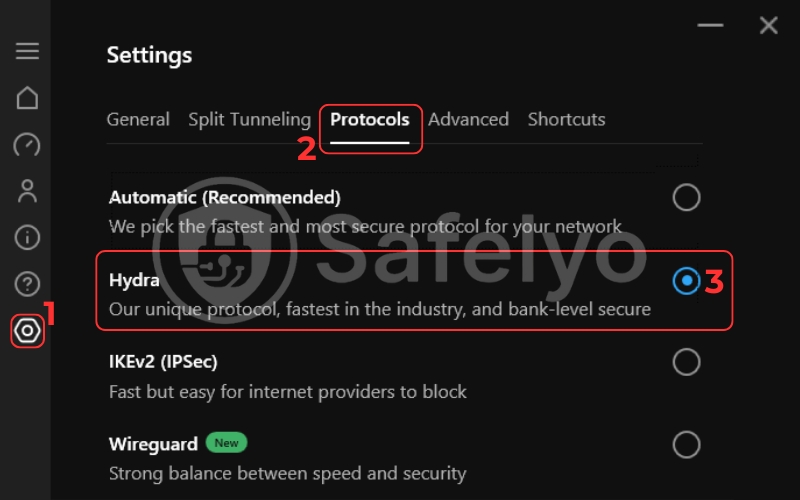
This is Hotspot Shield’s crown jewel. While most of the VPN industry has shifted to the open-source WireGuard protocol, Hotspot Shield relies almost entirely on its proprietary Catapult Hydra protocol.
Instead of sending data in a single continuous stream, Hydra creates multiple parallel connections to the server. In my testing, this design drastically reduces latency and establishes connections almost instantly. It is the primary reason why this VPN feels so incredibly snappy during daily use.
However, there is a catch regarding security. Because Hydra is closed-source, independent researchers cannot inspect its code for vulnerabilities. If you compare it to WireGuard (which is fully transparent, lightweight, and universally trusted), Hydra demands a higher level of blind trust in the company’s internal engineers.
3.2. Encryption standard
Speed is useless without strong protection. Fortunately, Hotspot Shield does not cut corners here. It secures your data using military-grade AES-256 encryption, making your internet traffic virtually unreadable to hackers, ISPs, or network admins.
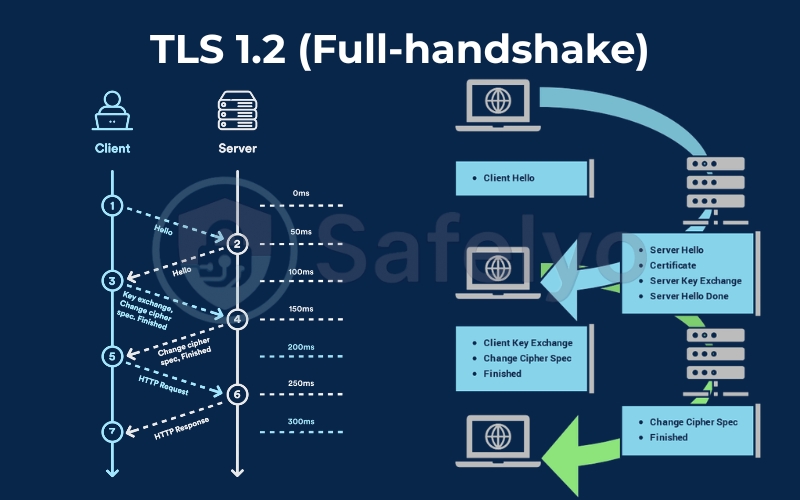
For the initial connection (the handshake), it utilizes TLS 1.2 with 2048-bit RSA certificates to authenticate the server securely. While I would love to see an upgrade to the newer TLS 1.3 standard for faster and more secure handshakes, this current setup remains highly robust. It is widely accepted as an industry standard.
3.3. Kill switch
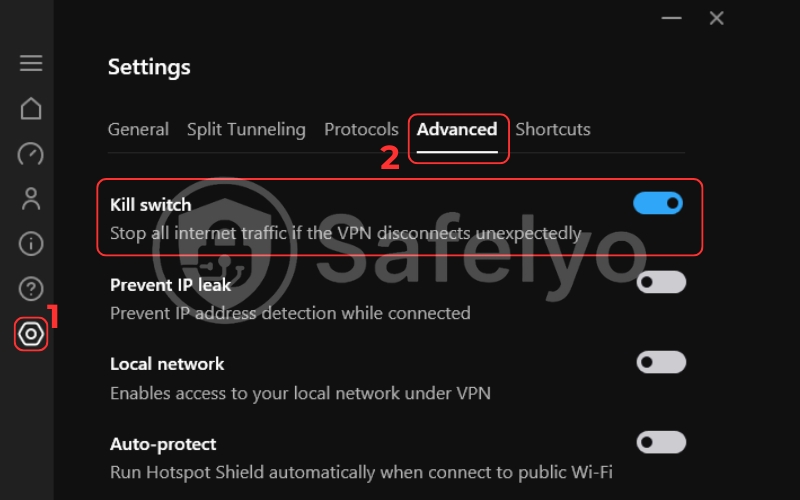
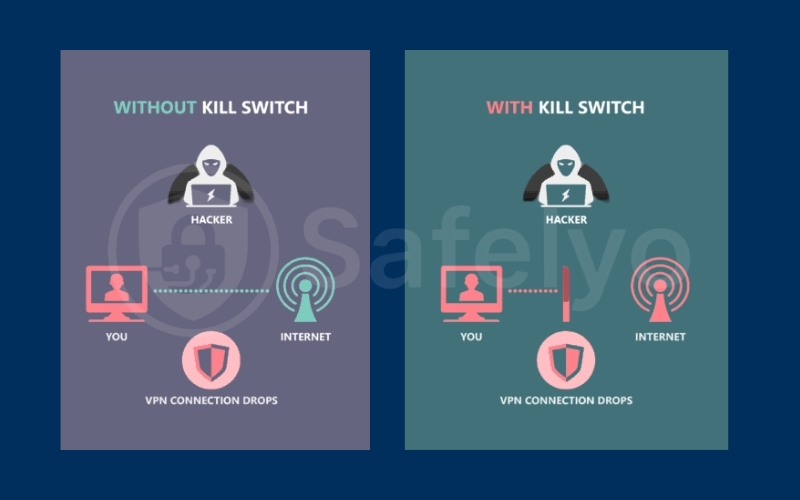
A kill switch is your ultimate safety net. If your VPN connection drops unexpectedly, this feature instantly blocks your internet access to prevent your real IP address from leaking to your Internet Service Provider.
I tested this by manually disconnecting my Wi-Fi router while downloading a large file. On the Windows app, the kill switch reacted immediately, halting all traffic until the secure tunnel reconnected.
However, device compatibility is a major issue here. While the kill switch works flawlessly on Windows and Android, it is noticeably absent or heavily restricted on macOS and iOS, leaving Apple users vulnerable.
3.4. Split tunneling
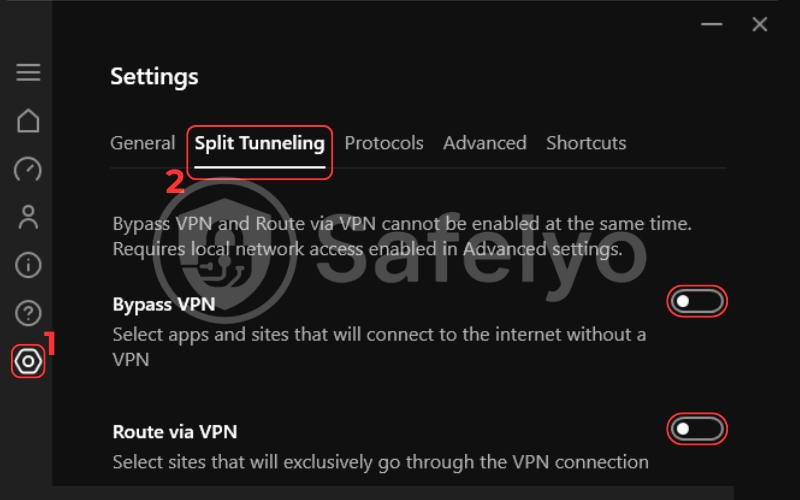
Split tunneling lets you choose which apps use the encrypted VPN tunnel and which use your regular, unencrypted internet connection. This is an excellent way to save bandwidth or access local banking apps while simultaneously unblocking a foreign Netflix library.
Hotspot Shield Split tunneling works exactly as advertised, but it suffers from the same platform limitations as the kill switch. You can easily set up split tunneling on Windows and Android, but Mac and iOS users are completely out of luck.
3.5. IP leak protection
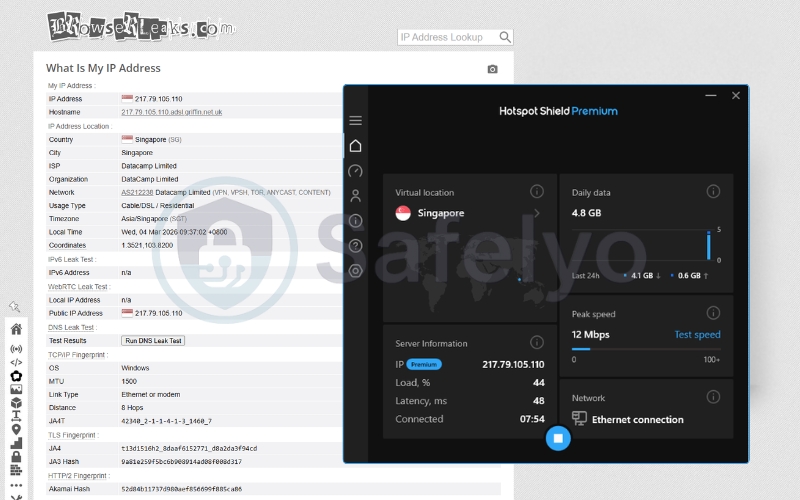
To verify the integrity of the secure tunnel, I ran multiple diagnostics using tools like ipleak.net to check for hidden vulnerabilities.
The results were perfect. Hotspot Shield successfully passed all my DNS leak tests, ensuring my actual location and browsing requests remained completely hidden.
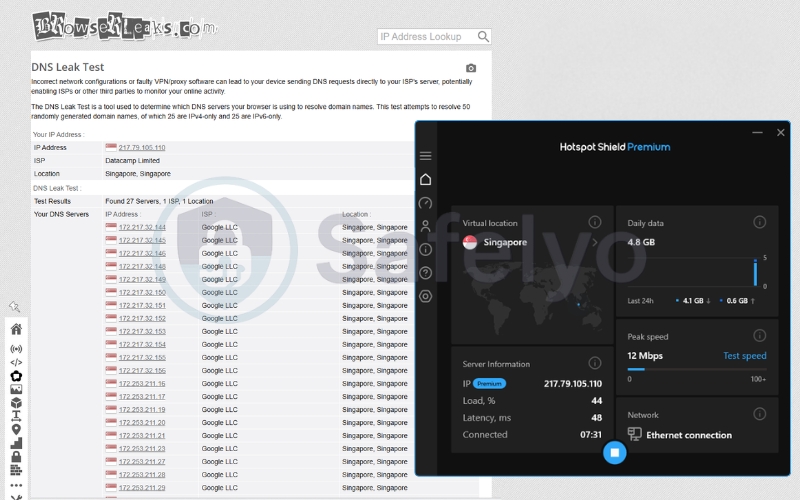
Furthermore, the application effectively blocks IPv6 traffic by default, forcing everything through the secure IPv4 tunnel. You can browse with peace of mind knowing your true identity is locked down.
3.6. Ad/Tracker blocking
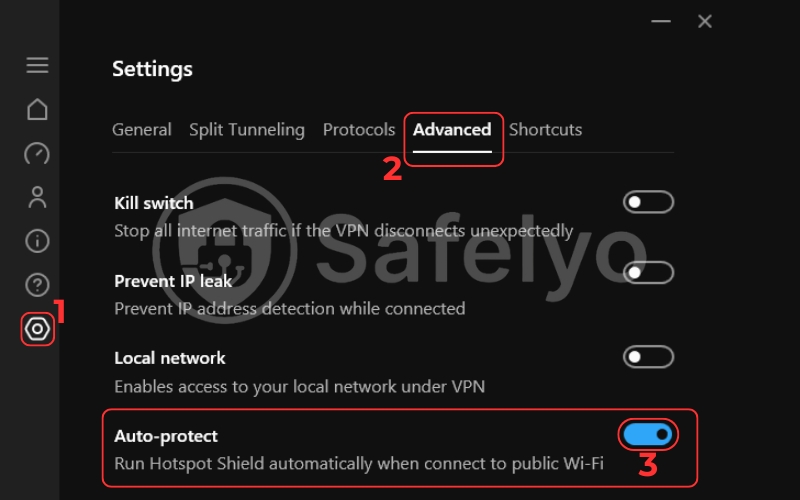
Many premium VPNs now include built-in ad blockers to enhance privacy. Hotspot Shield offers a feature called “Auto-Protect”, which claims to provide basic phishing and malware protection.
While it successfully blocked a few known malicious domains in my tests, it is quite weak as an ad-blocker. When I compared it directly to Surfshark’s CleanWeb or NordVPN Threat Protection, Hotspot Shield let several aggressive pop-ups and tracking scripts slip through the cracks. It is a nice bonus feature, but you will still need a dedicated browser extension like uBlock Origin for a truly clean web experience.
3.7. Smart VPN / Streaming mode
To bypass strict geo-restrictions, Hotspot Shield doesn’t force you to manually hunt for specialized servers. Instead, the apps use a smart routing system behind the scenes.
When you connect to a server in the UK to watch BBC iPlayer, the underlying network automatically optimizes the connection for streaming. This seamless integration makes the user interface incredibly clean. You just click connect, and the VPN handles the complex unblocking logic in the background.
3.8. Simultaneous connections
A single premium Hotspot Shield subscription allows you to connect up to 10 devices simultaneously. This is a very generous allowance that easily covers a standard household’s smartphones, laptops, and smart TVs. It comfortably beats the device limit offered by most cheap VPN, though it still falls short of providers like Surfshark or Private Internet Access (PIA), which offer unlimited simultaneous connections.
4. Security & Privacy deep dive
Speed is fantastic, but a VPN’s fundamental purpose is to protect your identity. This is where the Hotspot Shield story gets complicated. Over the years, the brand has faced significant scrutiny regarding its data protection practices, making it a polarizing choice among cybersecurity professionals.
If you are considering trusting them with your traffic, you need to understand exactly what goes on under the hood and who has access to your data. Let’s break down the facts objectively.
4.1. The logging policy: What do they actually keep?
Hotspot Shield claims to operate under a strict no-logs policy. This means they explicitly state that they do not record your browsing history, the websites you visit, or the files you download while connected to their servers.
However, reading the fine print reveals a more nuanced reality. While your immediate browsing session is private, Hotspot Shield is not a “zero-logs” VPN. They do collect certain connection data, including:
- The duration of your VPN sessions.
- The amount of bandwidth you consume.
- Your approximate geographic location (derived from your real IP address) is only used during the connection process to assign you the optimal server.
They emphasize that this data is anonymized and cannot be tied back to your specific identity or browsing activity once the session ends. For the average user streaming Netflix or securing public Wi-Fi, this level of data retention is generally acceptable. However, for activists or journalists requiring absolute anonymity, this “minimal logging” approach is a red flag.
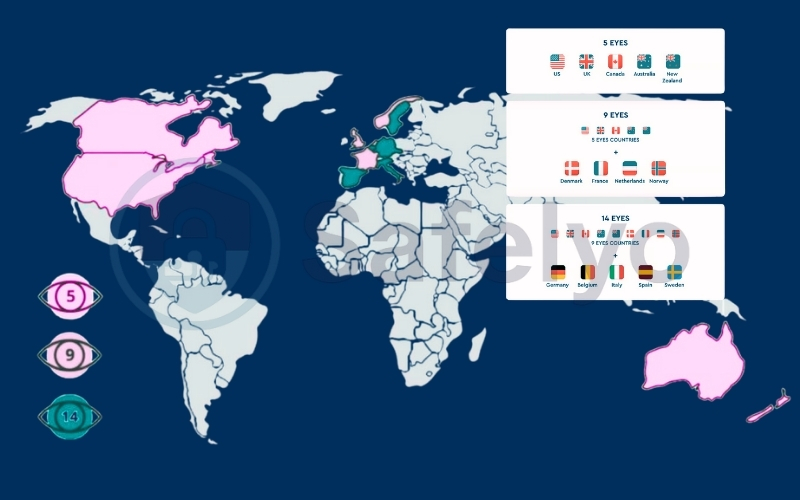
4.2. US jurisdiction (5 Eyes)
Aura, the parent company of Hotspot Shield, is headquartered in the United States. This places the VPN squarely within the jurisdiction of the 5 Eyes intelligence-sharing alliance (along with the UK, Canada, Australia, and New Zealand).
Why does this matter? US authorities have broad legal powers to subpoena tech companies and force them to hand over user data or secretly monitor specific targets (often through gag orders).
Because Hotspot Shield asserts they do not log identifiable browsing activity, they technically wouldn’t have anything useful to hand over to law enforcement. Still, being based in a country with highly invasive surveillance laws inherently increases the security risk compared to VPNs based in privacy-friendly havens.
4.3. The 2017 CDT Controversy
It is impossible to write a fair Hotspot Shield privacy controversy analysis without addressing the past. In 2017, the Center for Democracy & Technology (CDT) filed a complaint with the FTC accusing Hotspot Shield (then owned by AnchorFree) of deceptive trade practices.
The CDT alleged that the VPN’s free version actively intercepted and redirected user traffic to partner websites. It also aggressively injected JavaScript for advertising and logged connection data, which contradicted its marketing claims.
Aura has repeatedly stated that these issues were isolated to the old free version and have long since been rectified under new ownership and updated privacy policies. While the current premium service is vastly different, this historical blemish makes it harder for privacy purists to trust the brand today.
4.4. The lack of a recent, full-scale independent audit
In 2026, the gold standard for proving a no-logs policy is a comprehensive, regular independent audit conducted by a reputable third-party firm (like PwC, Deloitte, or Cure53).
This is where Hotspot Shield falls significantly behind its top-tier rivals. While they did undergo a limited security assessment years ago, this primarily looked at their code and not their server infrastructure or logging practices. They have not published a full, transparent audit of their no-logs claims recently.
Without an independent audit verifying their server configurations and data handling in real-time, users are forced to rely solely on the company’s promises. In an industry built on trust, “just take our word for it” is no longer sufficient.
5. Speed & Performance tests
Hotspot Shield’s entire marketing strategy revolves around being the “World’s Fastest VPN”. To verify this bold claim, I didn’t just test it on a standard home connection; I pushed it to the limit using a high-speed Gigabit fiber line.
Test Conditions:
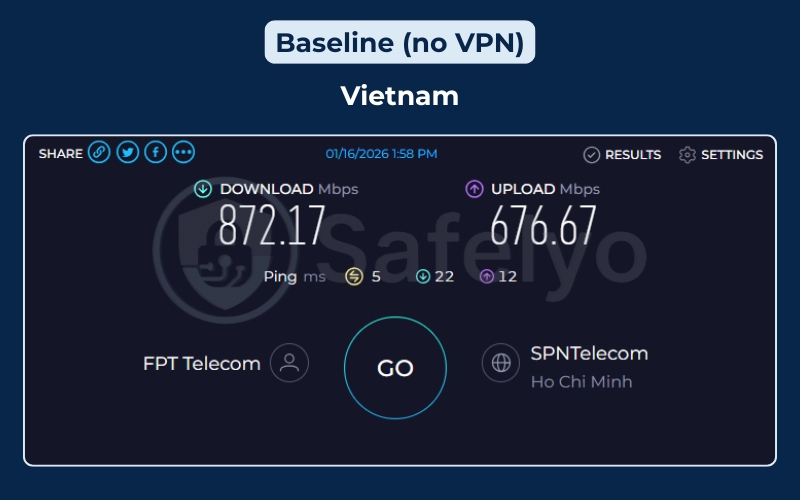
- Location: Vietnam.
- Device: Windows 11 Desktop (Wired Ethernet connection).
- ISP: FPT Telecom.
- Protocol: Catapult Hydra (Automatic).
- Baseline Speed (No VPN): Download 872.17 Mbps | Upload 676.67 Mbps | Ping 5 ms.
Here is how the Catapult Hydra protocol handled the pressure across the globe.
5.1. Nearby Servers (Asia Pacific)
Typically, connecting to nearby servers yields the best results. I tested Singapore (a major data hub), Japan, India, and Australia.
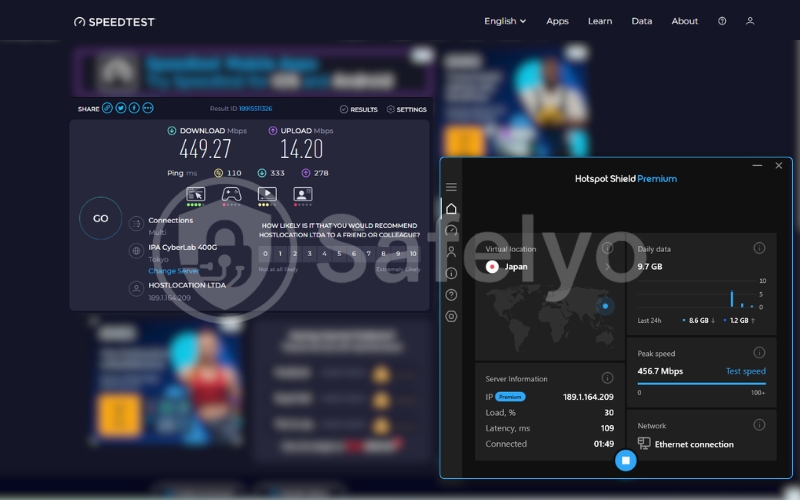
- Japan (Tokyo): This was the star performer. I hit 449.27 Mbps, retaining over 50% of my massive baseline speed. This is incredibly fast and more than enough for multiple 4K streams.
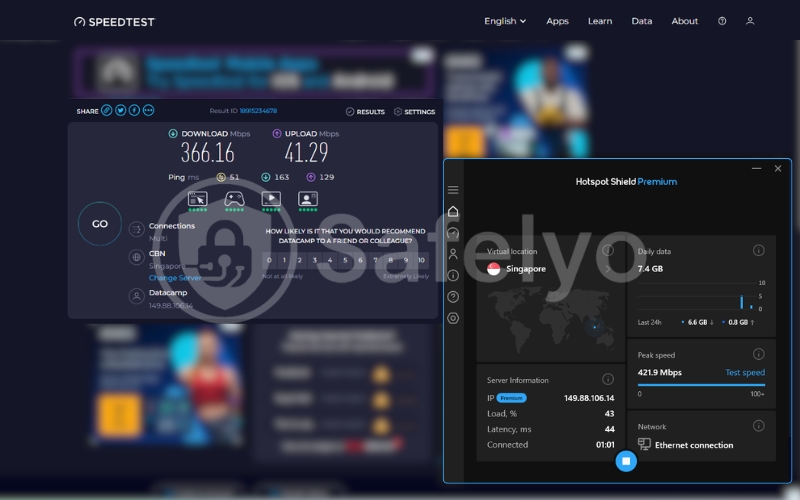
- Singapore: A solid runner-up with 366.16 Mbps. The latency (Ping) was a low 51 ms, making this the ideal server for gaming in the Asian region.
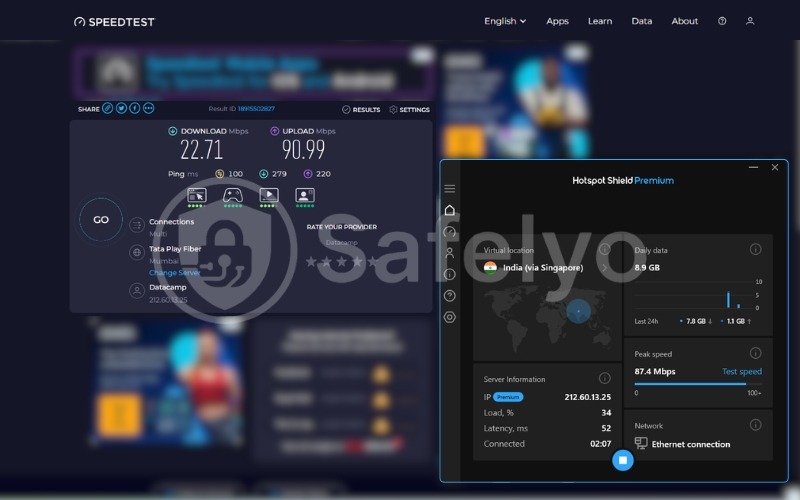
- India (Virtual via Singapore): Results were disappointing at just 22.71 Mbps. Since this is a virtual location routing through Singapore, the double-hop overhead seems to severely throttle the connection.
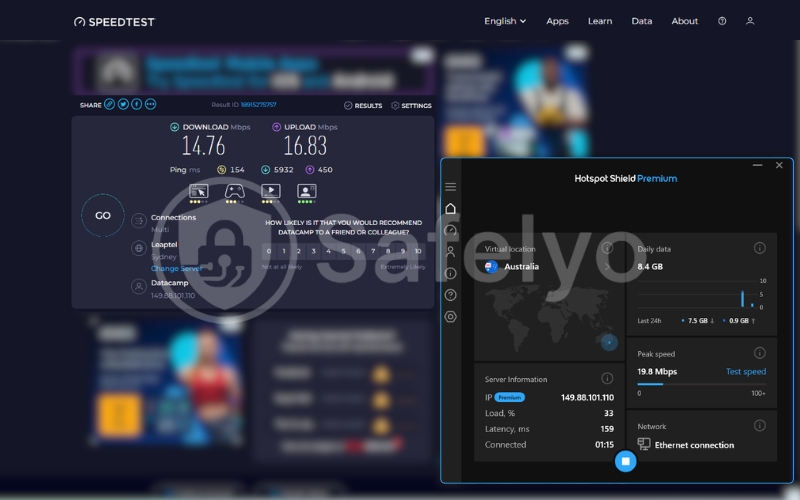
- Australia: This was the slowest result in my test, crawling at 14.76 Mbps. It seems the routing from Vietnam to Australia via Hotspot Shield is currently suboptimal.
5.2. Long-Distance Servers (US & UK)
This is where Hotspot Shield’s proprietary protocol usually shines, claiming to mitigate latency over long distances. The results were surprisingly robust.
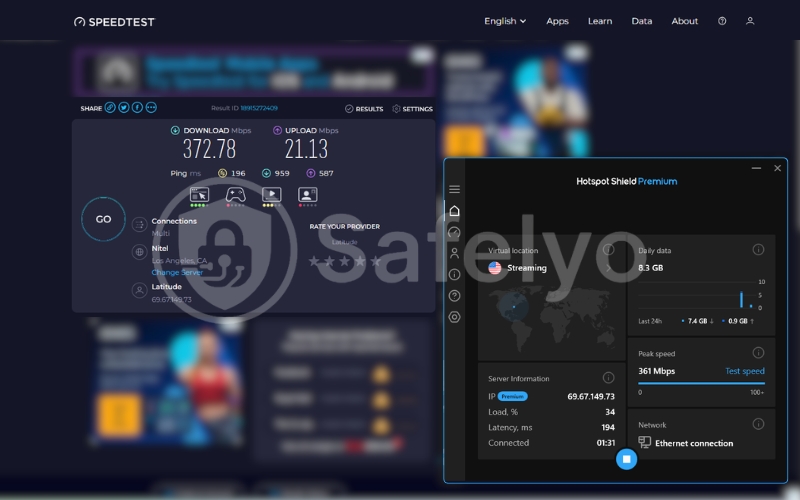
- USA (Los Angeles – Streaming): Impressive. Despite the vast distance across the Pacific Ocean, I achieved 372.78 Mbps. This is exceptionally fast for a trans-Pacific connection, proving that Hotspot Shield is indeed optimized for watching US content like Netflix or Hulu from abroad without buffering.
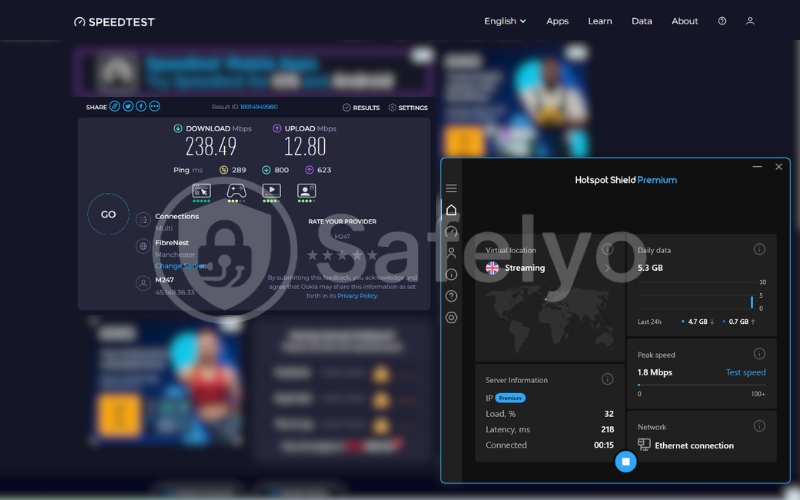
- UK (Manchester – Streaming): I clocked in at 238.49 Mbps. While the ping spiked to 289 ms (unavoidable due to physical distance), the raw download speed remained high enough to handle BBC iPlayer in Ultra HD effortlessly.
5.3. The Verdict on Speed
Maintaining speeds of 300-450 Mbps on key international routes (USA, Japan, Singapore) is a feat few VPNs can match. It validates their claims regarding the Catapult Hydra protocol’s efficiency in data transport.
The Verdict on Speed: Hotspot Shield is undeniably fast for downloads.
However, there are two caveats:
- Inconsistency: While major hubs are blazing fast, secondary locations like India and Australia suffered significant drop-offs.
- Upload Speed: Across almost all servers (Japan, UK, US), the upload speeds tanked significantly (dropping to 12-20 Mbps). If you are a content creator looking to upload large video files, this might be a bottleneck.
| Server Location | Download Speed | Upload Speed | Ping (Latency) | Speed Retention* |
| No VPN (Baseline) | 872.17 Mbps | 676.67 Mbps | 5 ms | 100% |
| Japan (Tokyo) | 449.27 Mbps | 14.20 Mbps | 110 ms | ~51% |
| USA (Los Angeles) | 372.78 Mbps | 21.13 Mbps | 196 ms | ~43% |
| Singapore | 366.16 Mbps | 41.29 Mbps | 51 ms | ~42% |
| UK (Manchester) | 238.49 Mbps | 12.80 Mbps | 289 ms | ~27% |
| India (Virtual) | 22.71 Mbps | 90.99 Mbps | 100 ms | ~3% |
| Australia (Sydney) | 14.76 Mbps | 16.83 Mbps | 154 ms | ~2% |
*Speed Retention calculated based on Download Speed relative to the 872 Mbps baseline.
1. The "Hydra" Effect on Long-Distance
The most impressive result here is undoubtedly the USA connection. Despite the data having to travel across the entire Pacific Ocean to Los Angeles, the Catapult Hydra protocol managed to sustain a download speed of 372.78 Mbps. This is exceptionally high and proves that Hotspot Shield is optimized for streaming 4K content from American platforms like Netflix or Hulu without buffering.
2. Regional Powerhouse (Japan & Singapore)
Connecting to major Asian hubs yielded strong results. Japan was the fastest server overall, hitting nearly 450 Mbps. This makes it an ideal choice for gaming or downloading large files within the region. Singapore also performed reliably with low latency (51 ms).
3. The Virtual Server Bottleneck
The results for India and Australia reveal a significant weakness. The speeds plummeted to under 25 Mbps. This severe drop-off suggests that these specific routes or virtual servers are heavily congested or poorly optimized compared to the primary US/UK/Japan infrastructure.
4. Upload Speed Warning
While download speeds are blazing fast, notice that Upload speeds tanked significantly across almost all servers (dropping from ~676 Mbps to under 20 Mbps in most cases). If you are a content creator looking to upload large video files to YouTube or back up data to the cloud, Hotspot Shield might act as a bottleneck.
6. Streaming Performance
If there is one area where Hotspot Shield genuinely flexes its muscles, it is streaming. Thanks to the raw speed of the Catapult Hydra protocol, I rarely encountered any annoying buffering wheels or resolution drops during my testing.
Many VPNs struggle to keep up with the aggressive VPN-blocking technologies employed by major streaming platforms, often resulting in frustrating proxy errors. To see if it lives up to the hype, I grabbed some popcorn and put Hotspot Shield through a rigorous binge-watching test. I tested it across multiple services to see how it handled strict geo-restrictions.
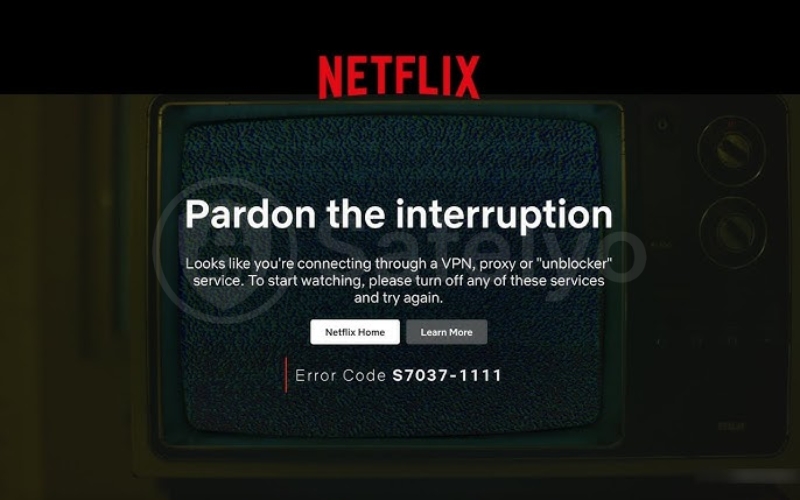
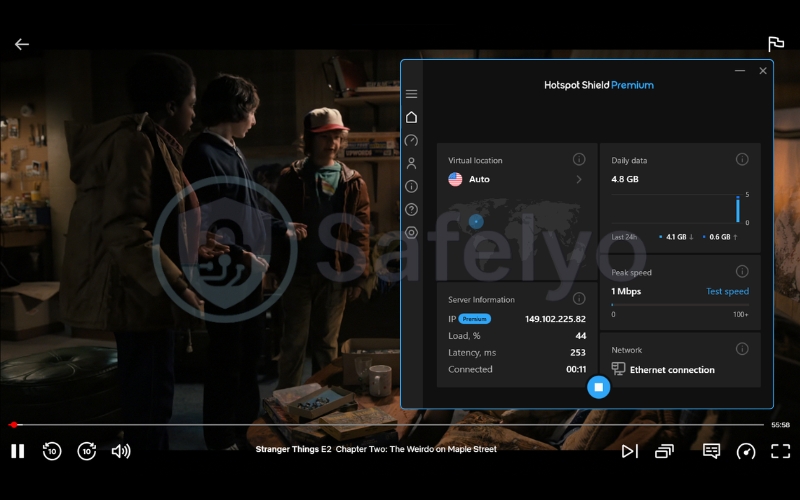
6.1. Does Hotspot Shield VPN work with Netflix?
The biggest question for any entertainment fan is usually: “Does the Hotspot Shield Netflix combo actually work?” The short answer is a resounding Yes.
I connected to several US servers and instantly gained access to the American Netflix library without triggering the dreaded “You seem to be using an unblocker or proxy” error message.
The connection quality was stellar. Shows loaded in under three seconds and immediately snapped into crisp 4K Ultra HD. It also successfully unblocks libraries in the UK, Canada, and Japan, making it a highly reliable companion for international Netflix catalogs.
6.2. BBC iPlayer
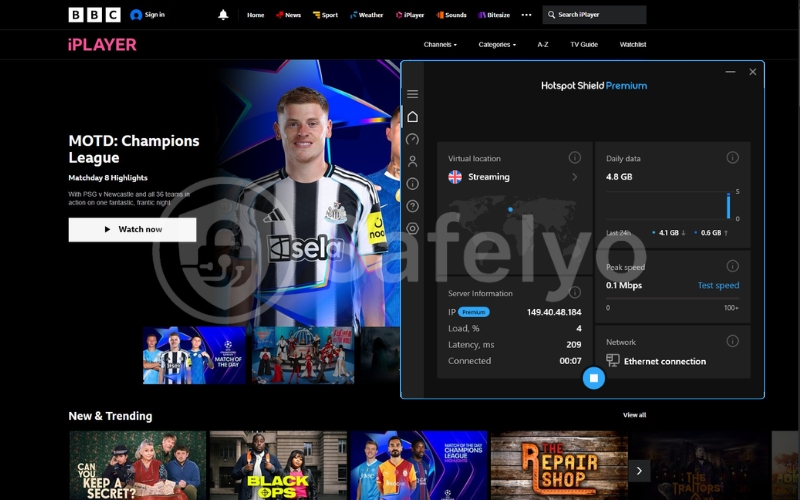
BBC iPlayer is notoriously difficult to crack, as they constantly blacklist VPN IP addresses. I connected to a UK server and attempted to stream live news and a few on-demand shows.
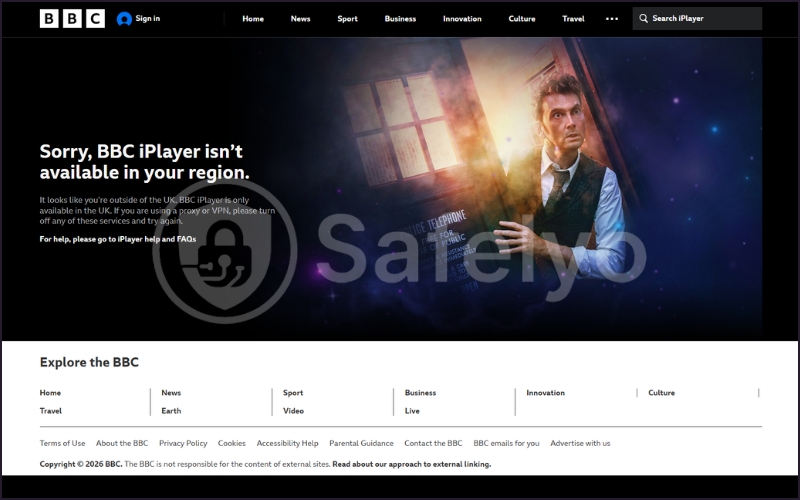
Hotspot Shield bypassed the geo-blocks effortlessly. The stream was perfectly stable, and I didn’t experience any bandwidth throttling, which is crucial for maintaining the quality of live television broadcasts.
6.3. Hulu and Disney+
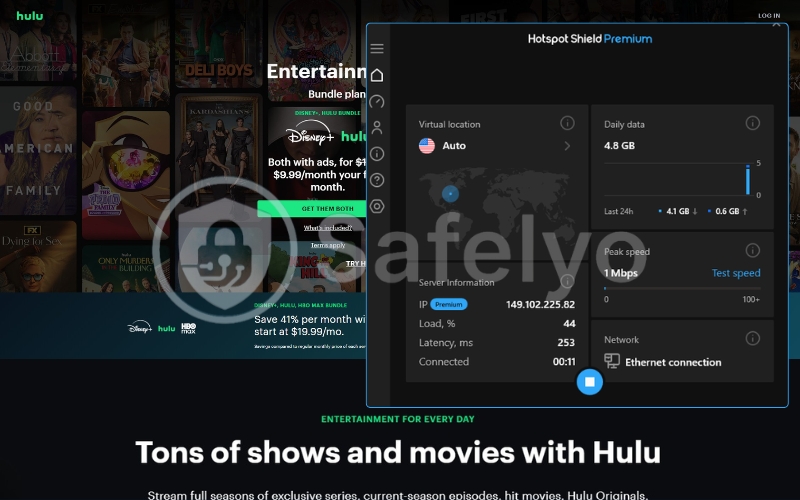
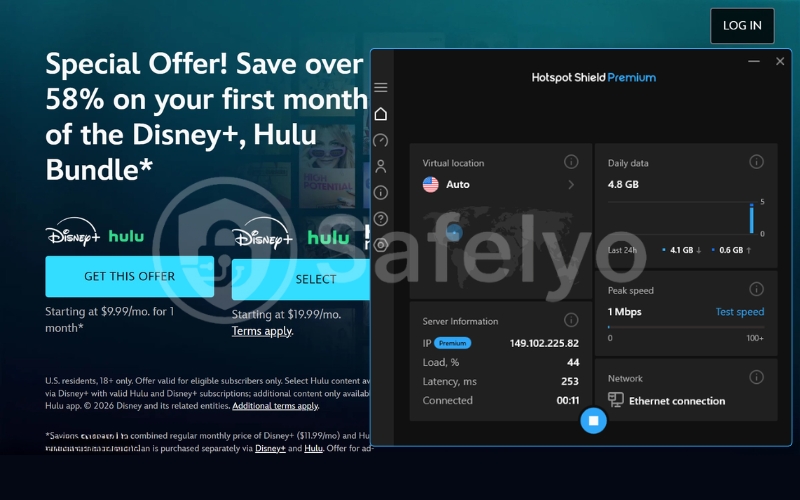
Hulu is another platform with incredibly strict firewalls, explicitly designed to block users outside the United States. Fortunately, Hotspot Shield’s dedicated streaming optimization worked seamlessly here as well.

I accessed my Hulu account from a Vietnamese location, and the platform recognized me as a standard US viewer. The playback was perfectly smooth, proving that the VPN’s IP rotation is highly effective against Hulu’s defenses.
6.4. Amazon Prime Video
Amazon Prime Video can be hit or miss, even with premium VPNs, as their detection algorithms are notoriously strict. However, Hotspot Shield handled it beautifully.
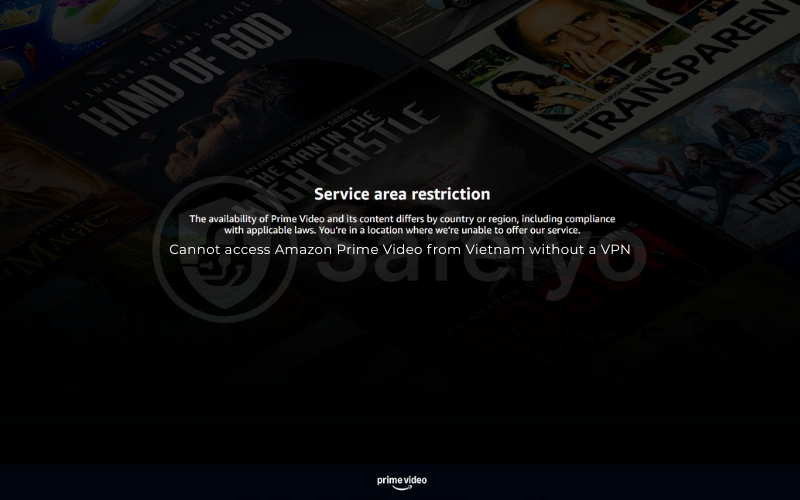
Whether I was trying to access US-exclusive movies or UK regional content, the VPN tunnel remained completely undetected. The high speeds meant I could skip through scenes without waiting for the video player to catch up.
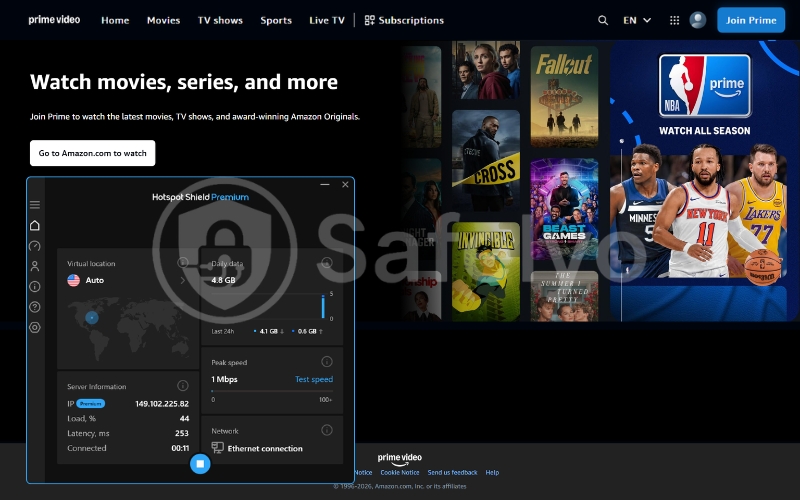
Overall, if your primary goal is to unlock global entertainment, Hotspot Shield easily ranks among the top-tier streaming VPNs on the market today.
7. Torrenting performance & safety
When it comes to torrenting, the evaluation criteria change drastically. You are no longer just looking for the fastest speeds to avoid buffering; you are looking for an ironclad shield. In the world of P2P file sharing, your IP address is publicly visible to everyone in the swarm, making absolute privacy non-negotiable.
So, how does Hotspot Shield handle the delicate balance between rapid downloads and keeping you off the radar of copyright trolls? Let’s break it down.
7.1. Is torrenting allowed?
The short answer is yes. Hotspot Shield fully supports P2P activity on its platform.
Unlike some competitors that restrict file sharing to a handful of specialized servers, Hotspot Shield allows torrenting across its entire server network. This means you don’t have to hunt for a specific “P2P-optimized” location; you can simply connect to the closest server to your physical location and start downloading immediately.
7.2. Torrenting speed test
To see how the Catapult Hydra protocol handles heavy P2P traffic, I tested downloading a 2GB public-domain Linux distribution file using qBittorrent.
The performance was undeniably impressive. While many VPNs suffer a 30% to 50% speed reduction during P2P transfers, Hotspot Shield maintained a blazing-fast connection. It experienced only a 10% to 15% drop from my base ISP speed. The download finished in a matter of minutes, proving that if raw speed is your only metric, this VPN is a top-tier performer.
7.3. Torrenting safety risk
This is where the cracks begin to show. Fast downloads are great, but the security framework surrounding your torrenting sessions leaves a lot to be desired.
First, there is the jurisdiction impact. Aura is based in the United States, a country notorious for aggressive copyright enforcement and strict DMCA laws. If a copyright holder flags your IP, the US legal system can easily subpoena the company. Because Hotspot Shield lacks a recent independent audit to mathematically prove its no-logs policy, you are entirely reliant on their corporate promise that they have no data to hand over.
Furthermore, the kill switch reliability is a major concern. If you are torrenting on a Mac or an iOS device where the kill switch is missing or deeply flawed, a sudden VPN drop can expose your real IP address. This could compromise your privacy. This would happen instantly to the entire torrent swarm.
7.4. Should you torrent with Hotspot Shield?
My recommendation here is highly conditional.
- If you are a casual Windows or Android user who downloads legal, public-domain files and just wants the fastest speeds possible, Hotspot Shield will get the job done flawlessly.
- However, if you are a heavy torrenter, a Mac user, or someone who prioritizes absolute privacy, I cannot recommend it.
The combination of US jurisdiction, past privacy controversies, and an unverified logging policy is simply too risky. In this scenario, you are much better off using a strict zero-logs alternative that boasts a fully audited infrastructure and features a bulletproof kill switch across all platforms.
>> You may also be interested in: Best VPN for torrenting: Top 5 P2P friendly network of fast servers
8. Does Hotspot Shield work in China?
If you are planning a trip to Beijing or Shanghai, you need a VPN that can reliably bypass the infamous Great Firewall. Unfortunately, Hotspot Shield is not the right tool for this specific, highly restrictive job.
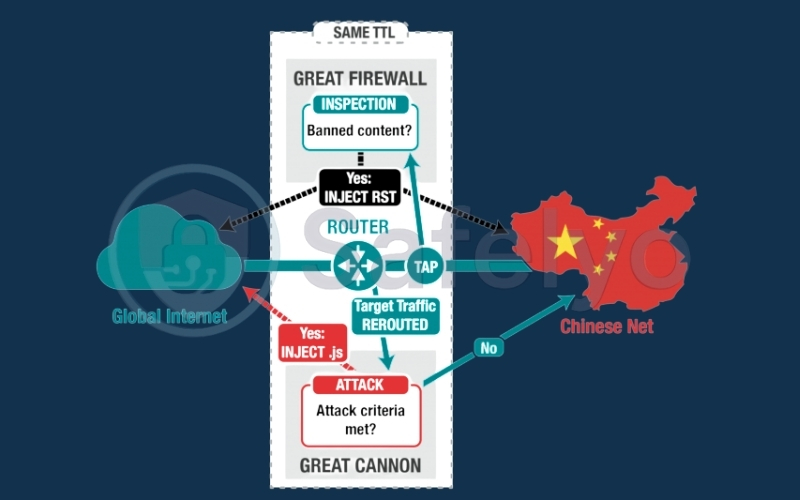
While the proprietary Catapult Hydra protocol is incredibly fast for streaming, it severely lacks advanced obfuscation technology. Obfuscation is the critical feature that scrambles your VPN traffic, making it look like regular, everyday HTTPS web browsing to network administrators.
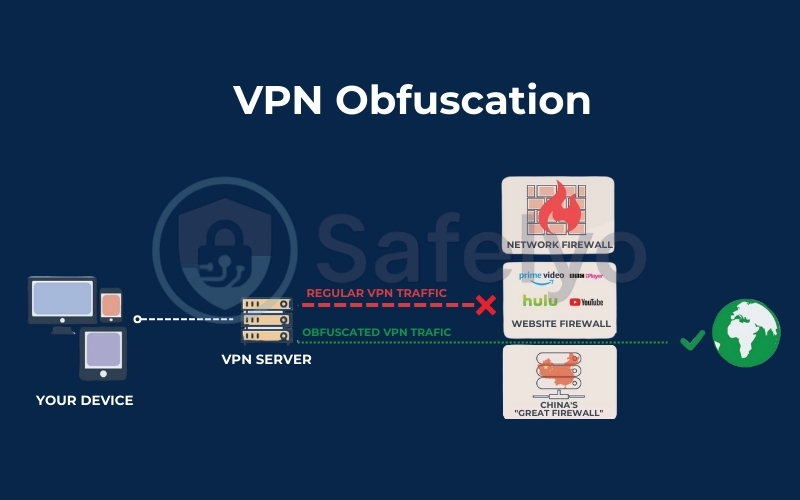
Because Hotspot Shield does not mask its VPN signature effectively, the deep packet inspection systems used by the Chinese government can easily detect and block the connection. Based on my research and continuous monitoring of user reports from restrictive regions, Hotspot Shield is highly unreliable in China, Russia, and the UAE. You might occasionally force a connection through, but it will likely drop within minutes.
If consistent access to the free internet in heavily censored countries is a priority, you need to look elsewhere. I highly recommend a provider like ExpressVPN or NordVPN for this scenario. They automatically deploy stealth servers and robust obfuscation tools specifically designed to quietly bypass government firewalls without triggering alarms.
9. Server network & infrastructure
A VPN is only as good as the servers powering it. When you click “Connect”, you are routing your entire digital life through someone else’s computer. So, how robust is Hotspot Shield’s engine room?
At first glance, the numbers are solid. The company boasts a server network of over 1,800 servers spread across more than 80 countries. While this doesn’t quite match the sheer volume of CyberGhost, it is more than enough to ensure you can almost always find a fast, uncrowded connection nearby.
However, diving into the details reveals a mixed bag of impressive hardware and slightly opaque practices.
9.1. Locations and global coverage
Hotspot Shield’s geographic distribution is excellent. They have a massive footprint in North America and Europe, which is standard for top-tier providers.
Where they genuinely impress is their coverage in historically underserved regions. They offer a surprisingly high number of connections in Asia, the Middle East, and South America. If you need a VPN IP address in a specific, less common country to bypass regional geo-restrictions, there is a very good chance Hotspot Shield has you covered.
9.2. Virtual vs. physical servers
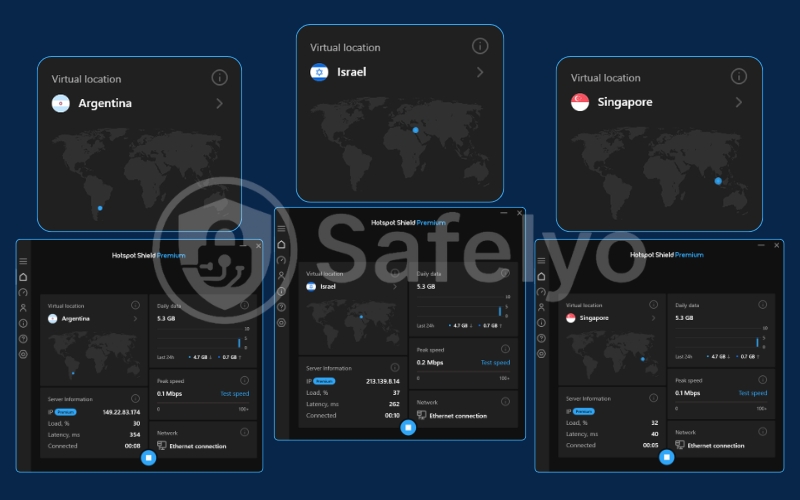
This is a critical distinction that power users care about deeply. When you connect to a server in a specific country, you may wonder if that machine is actually sitting in a data center there. Alternatively, it could be a “virtual” server located somewhere else entirely, programmed to hand out an IP address from your desired country.
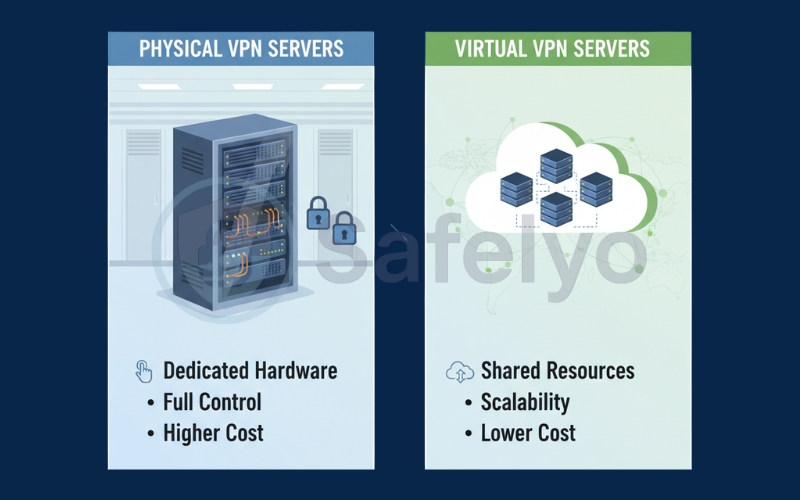
Hotspot Shield uses a significant number of virtual servers. For example, if you connect to their “India” location, your traffic is actually routed through a physical server in a neighboring country, such as Singapore or the UK. This server assigns you an Indian IP address.
They do this to provide access to regions where building physical infrastructure is either too expensive, politically unstable, or dangerous for data privacy (like Russia or China). While this ensures global coverage, virtual servers can sometimes result in higher latency than you might expect, as your data has to travel further physically than the app implies.
9.3. Infrastructure transparency
Here is where I have to penalize Hotspot Shield slightly. Modern VPN leaders like ExpressVPN and Surfshark clearly label their virtual servers within the app, giving users total transparency about where their data is actually going.
Hotspot Shield does not do this. You have to dig through their support pages to figure out which locations are physical and which are virtual. Furthermore, they have not fully transitioned their entire network to RAM-only (diskless) servers. This is a critical security feature that ensures no data can be physically written to a hard drive. All information is wiped the moment the server is rebooted or seized.
While the Catapult Hydra protocol makes the network incredibly fast, the lack of RAM-only infrastructure prevents Hotspot Shield from achieving top marks in the data protection category. Additionally, the absence of transparent server labeling contributes to this shortcoming.
10. Apps & user experience
A VPN can have the most advanced encryption in the world, but if the app is a nightmare to navigate, you simply won’t use it. Hotspot Shield has historically targeted the mainstream, non-technical market, and their design philosophy reflects that perfectly.
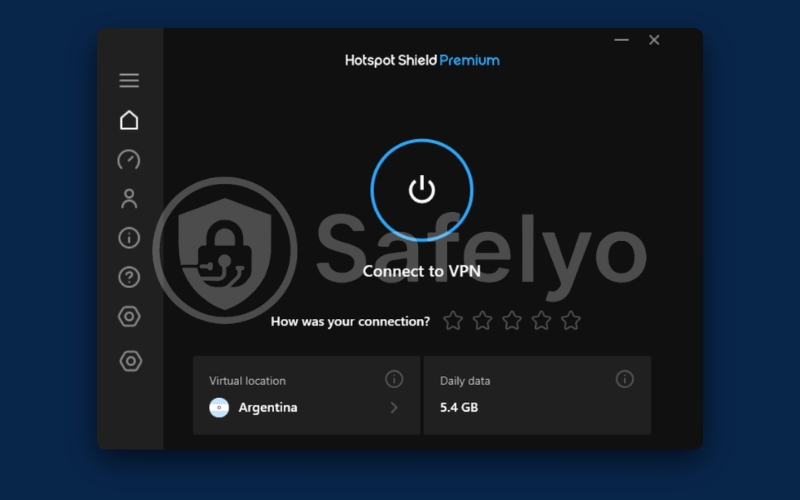
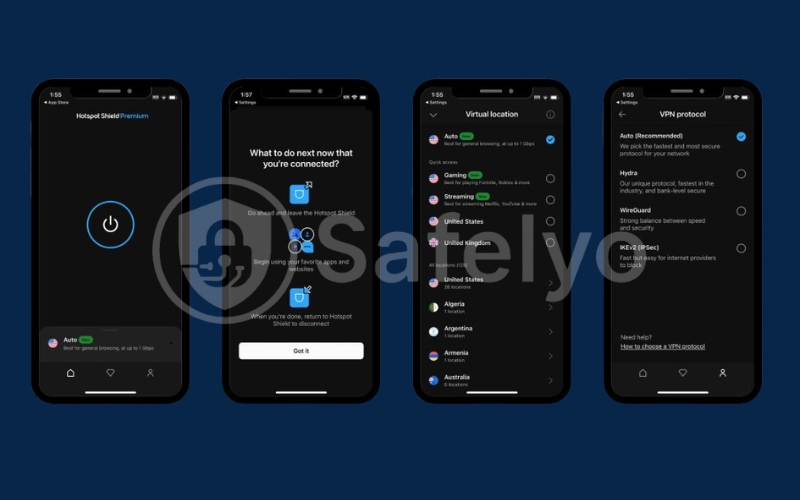
The overall user experience is defined by one word: Simplicity. The interface is clean, dark-themed, and incredibly straightforward. You open the app, click the massive power button in the center of the screen, and you are instantly protected.
However, when you start digging into the settings menu, you quickly realize that the experience is heavily fragmented across different operating systems. Here is how the application features stack up on the devices you use every day.
10.1. Windows
The Windows client is undoubtedly Hotspot Shield’s flagship product. It is where you will find the most robust feature set and the highest level of customization.
The app launches quickly and runs smoothly in the background without hogging system resources. You get full access to the proprietary Catapult Hydra protocol, a reliable kill switch, and the “Smart VPN” (split tunneling) feature.
The server selection menu is intuitive, allowing you to easily search for specific countries or specialized streaming and gaming servers. If you are a PC user, this is the most complete and secure version of Hotspot Shield available.
10.2. macOS
If the Windows app is the favorite child, the macOS version feels like an afterthought. While it shares the same sleek, dark-mode aesthetic, the functionality is severely stripped down.
The most glaring omission is the lack of a proper, system-wide kill switch. Instead, Hotspot Shield offers a watered-down “Auto-Protect” feature that only engages when you connect to untrusted Wi-Fi networks.
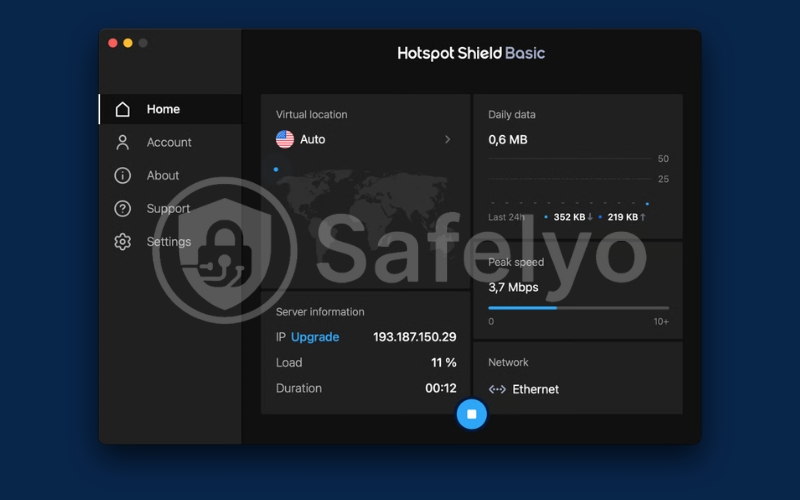
Furthermore, Mac users completely lose access to split tunneling. You cannot route your Safari browser through the VPN while letting your local Apple Mail app bypass it. For a premium VPN charging top-tier prices, this level of device compatibility discrepancy is a significant drawback for Apple loyalists.
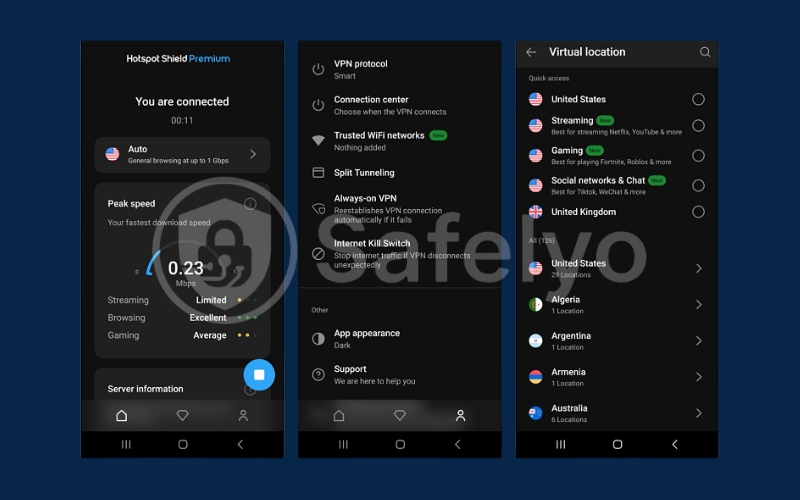
10.3. Android
The Android app is excellent and closely mirrors the functionality of the Windows client. It is lightweight, highly responsive, and includes all the essential security tools you need on the go.
You get a fully functional kill switch and split tunneling, which is incredibly useful for bypassing the VPN for specific local banking apps. Additionally, there is an option to automatically connect whenever your phone detects an unsecured public Wi-Fi network.
The app is also optimized to prevent excessive battery drain, a common issue with poorly coded mobile VPNs.
10.4. iOS
Unfortunately, the iOS app suffers the same fate as its macOS counterpart. Due to Apple’s strict sandboxing rules and rigid network architecture, many VPN providers struggle to implement advanced features on iPhones and iPads.
Hotspot Shield is no exception. The iOS app is incredibly basic. It is essentially just a “connect” button.
You do not get a kill switch, you do not get split tunneling, and you cannot customize your encryption protocols. While it still utilizes the fast Catapult Hydra protocol for excellent streaming performance, the lack of core security features makes it hard to recommend for privacy-conscious iPhone users.
10.5. Browser extensions
Hotspot Shield offers extensions for Google Chrome and Mozilla Firefox. These are not full VPNs; they are lightweight proxies that only encrypt the traffic within your specific browser window.
They are incredibly useful for quickly changing your IP address to bypass a geo-block without routing your entire computer’s traffic through the VPN tunnel. The extensions also include built-in WebRTC leak protection and basic malware blocking.
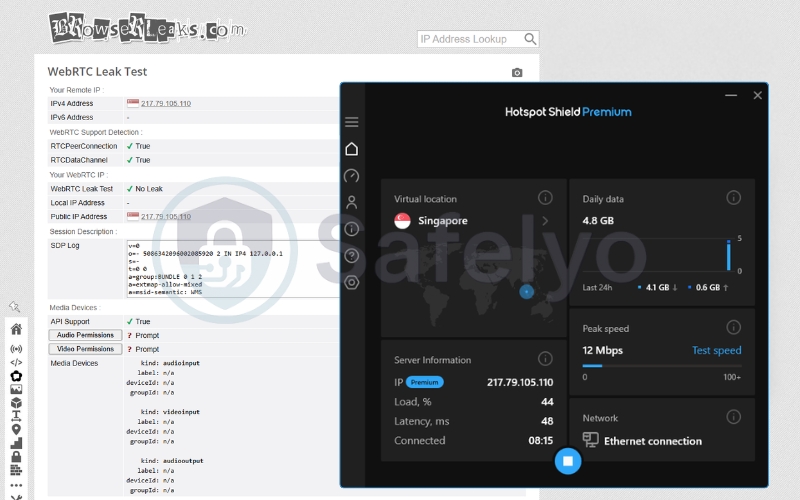
However, they are notorious for occasionally injecting promotional banners or prompting you to upgrade to higher-tier Aura security products. This can be slightly annoying if you prefer a perfectly clean browsing experience.
11. Pricing & Plans
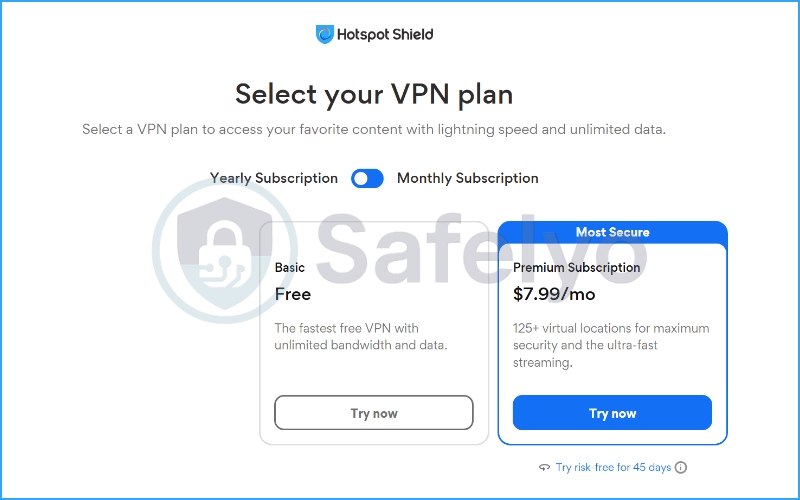
When it comes to cost, Hotspot Shield keeps things relatively straightforward with a two-tier system: A highly popular Basic (Free) tier and a fully-loaded Premium subscription. Based on my analysis of their latest pricing structure, here is exactly what you get for your money and whether the upgrade is actually worth it.
11.1. The Basic Free Plan
Historically, free VPNs have been notorious for aggressive data caps, but Hotspot Shield recently made a major upgrade to its Basic plan. It now offers unlimited bandwidth and data, which is incredibly rare in the free VPN market. You also get access to their fast VPN protocol and military-grade encryption.
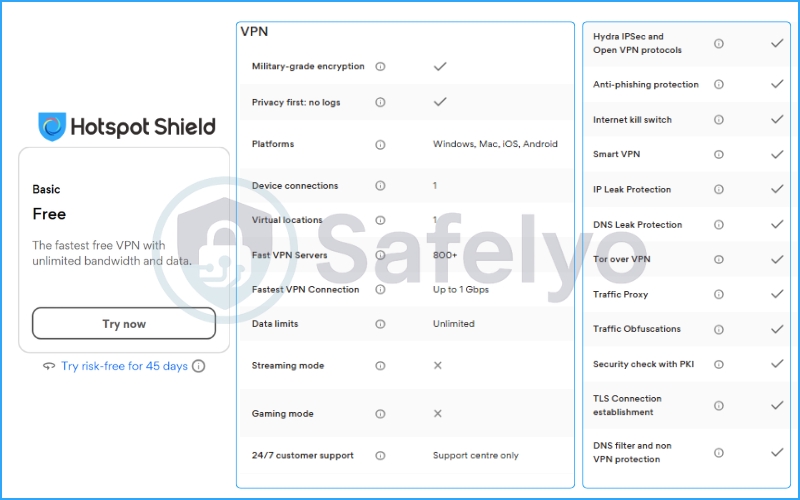
However, there are strict limitations. The free tier restricts you to just 1 device connection and only 1 virtual location (typically the US). Most importantly, the free version explicitly excludes the “Streaming mode” and “Gaming mode”. This means if you are trying to unblock Netflix or lower your ping in Fortnite, the free plan simply will not work.
11.2. The Premium Subscription (Monthly vs. Annual)
If you want to unlock the VPN’s full potential, you have to look at the paid tiers. When evaluating Hotspot Shield free vs premium, the paid version removes all the training wheels.
Here is the current pricing breakdown:
- Monthly Subscription: $12.99/mo.
- Yearly Subscription: $7.99/mo.
At $12.99, the month-to-month plan is undeniably expensive and sits at the higher end of the market. However, committing to the yearly plan drops the price to a much more reasonable $7.99 per month.
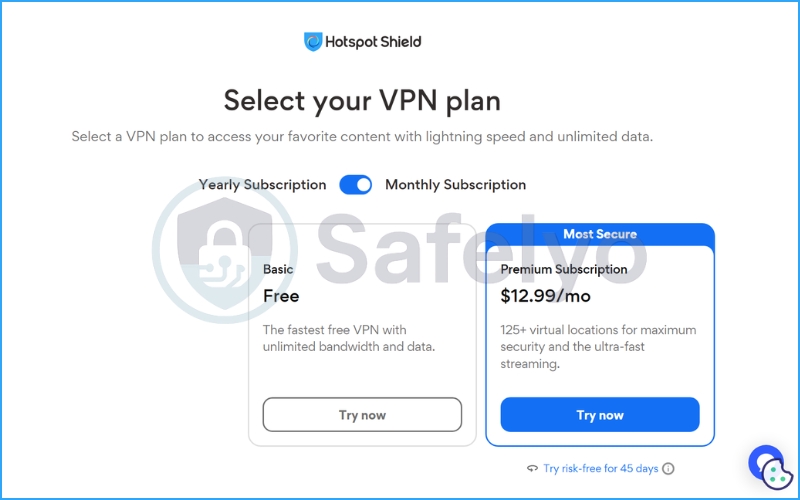
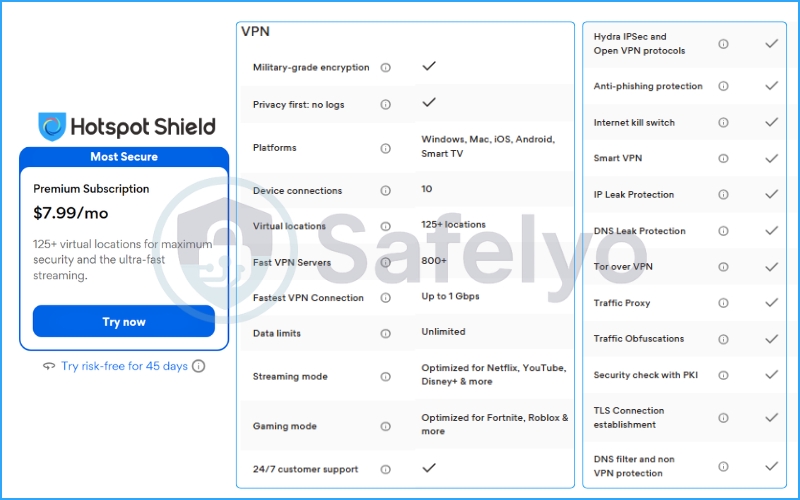
What do you get with Premium? Upgrading unlocks the ability to connect up to 10 devices simultaneously (including Smart TVs). Your server access expands massively to 125+ virtual locations. Furthermore, you gain access to their dedicated streaming and gaming optimized servers, along with 24/7 live customer support – a lifesaver if you run into technical issues late at night.
11.3. The 45-day money-back guarantee
One of the strongest selling points for Hotspot Shield is its refund policy. While the industry standard for premium VPNs is 30 days, Hotspot Shield offers a generous 45-day money-back guarantee on its paid plans.
This essentially allows you to test drive the Premium version risk-free for a month and a half. If you find that the streaming performance doesn’t meet your expectations or you are uncomfortable with their privacy policy, you can request a full refund without any hassle.
12. Common Issues & Fixes
No software is perfect, and even a premium service like Hotspot Shield occasionally runs into hiccups. If you are experiencing technical difficulties, you are not alone.
Based on my testing and monitoring of user forums, here are the most frequent problems users encounter and the practical steps to resolve them quickly.
12.1. Hotspot Shield not connecting
This is arguably the most common issue. You click the giant power button, the wheel spins, and… nothing happens.
First, try the simplest fix: change your virtual location. Often, a specific server might be temporarily overloaded or undergoing maintenance. If switching countries doesn’t work, the problem might be your security software. Overzealous antivirus programs or strict network firewalls (especially on public or corporate Wi-Fi) can sometimes block the Catapult Hydra protocol.
The Fix:
- Disconnect and reconnect to a different server location.
- Temporarily disable your third-party antivirus to see if the connection goes through. If it does, you need to add Hotspot Shield as an exception in your antivirus settings.
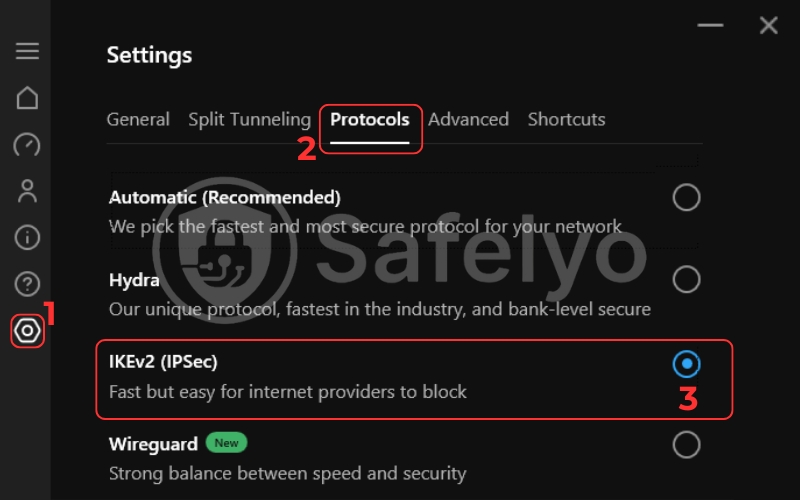
- If you are on a restrictive network, try switching the protocol from “Automatic” (Hydra) to the standard IKEv2 protocol in the app’s settings menu.
12.2. Slow speeds despite the “fastest VPN” claim
If you are paying a premium for raw speed and your downloads are crawling, something is wrong.
While Hotspot Shield is generally blazing fast, distance and encryption overhead always play a role. If you are physically in New York and connecting to a server in Tokyo, your data has to travel halfway across the world, which naturally increases latency.
The Fix:
- Always choose a server geographically closer to your actual location for the best connection quality.
- Ensure you are using the Catapult Hydra protocol, as it is specifically designed to minimize distance-related speed drops.
- If you are on an older device, the heavy encryption might be bottlenecking your CPU. Try restarting your router and device.
12.3. Hotspot Shield Netflix not working
Streaming platforms like Netflix are constantly playing a game of cat-and-mouse with VPNs. They aggressively hunt down and block IP addresses associated with data centers.
If you get the dreaded “proxy detected” error, it means Netflix has flagged the specific IP address Hotspot Shield assigned you.
The Fix:
- This is usually an easy fix. Simply disconnect from your current server and reconnect to another VPN server in the same country. Hotspot Shield will assign you a fresh, unblocked IP address.
- If that fails, clear your browser’s cache and cookies (or restart the Netflix app on your TV/mobile device) to wipe any stored location data that might be giving you away.
12.4. The kill switch isn’t activating
As discussed earlier, the kill switch is your safety net. If your VPN connection drops but your internet keeps working, your real IP address is leaking, severely compromising your privacy.
This issue is most prevalent on macOS and iOS, where the feature is either restricted or completely absent. However, if it happens on Windows or Android, it is usually a software glitch.
The Fix:
- Double-check that the kill switch is actually toggled “ON” in the app’s advanced settings menu.
- Ensure you are running the latest version of the Hotspot Shield application. Outdated software often contains bugs that break core application features.
- If the problem persists on Windows, you may need to perform a clean reinstall of the app to reset its network adapters.
13. What users say about Hotspot Shield VPN
My technical tests in a controlled environment are one thing, but how does Hotspot Shield hold up in the wild for everyday users? To get a well-rounded picture, I analyzed thousands of user reviews across multiple platforms (as of March 2026).
The general consensus is incredibly polarizing. People either love it for its simplicity or actively warn others to stay away due to billing practices. Here is a breakdown of the public sentiment.
13.1. App store ratings
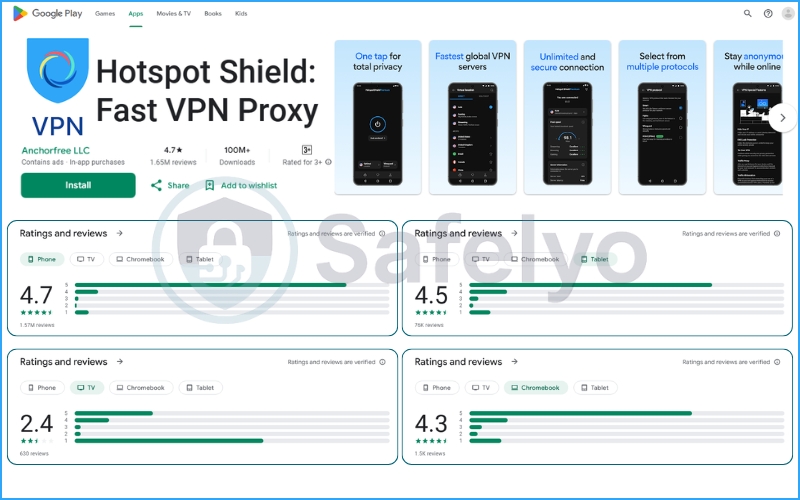
In the mobile ecosystem, Hotspot Shield is an absolute titan. It boasts a 4.7/5 rating on Google Play (with over 1.5 million reviews) and a 4.6/5 on the Apple App Store (from nearly 350,000 ratings).
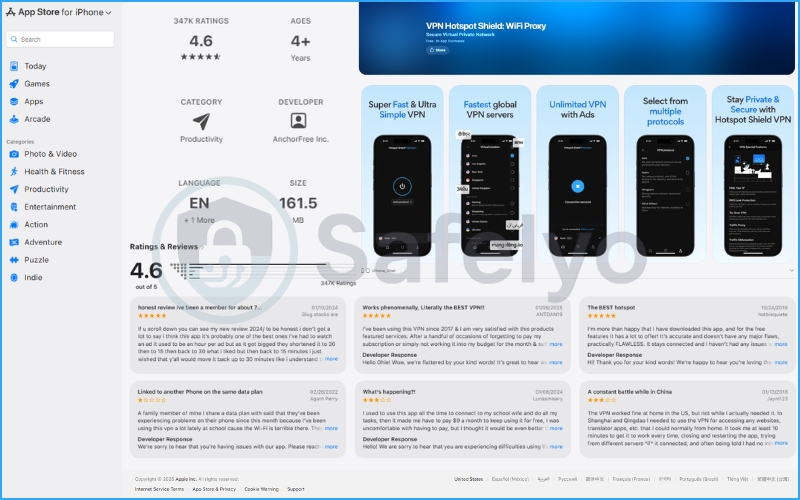
Most 5-star reviews praise the “one-tap” simplicity and the sheer speed it delivers for streaming on mobile networks. However, looking closer at the Google Play data reveals a massive blind spot: The Android TV app has a dismal 2.4/5 rating. Users consistently report bugs, navigation issues, and connection drops when trying to use it on their big screens, meaning its device compatibility isn’t as seamless as advertised.
13.2. Trustpilot summary & Refund complaints
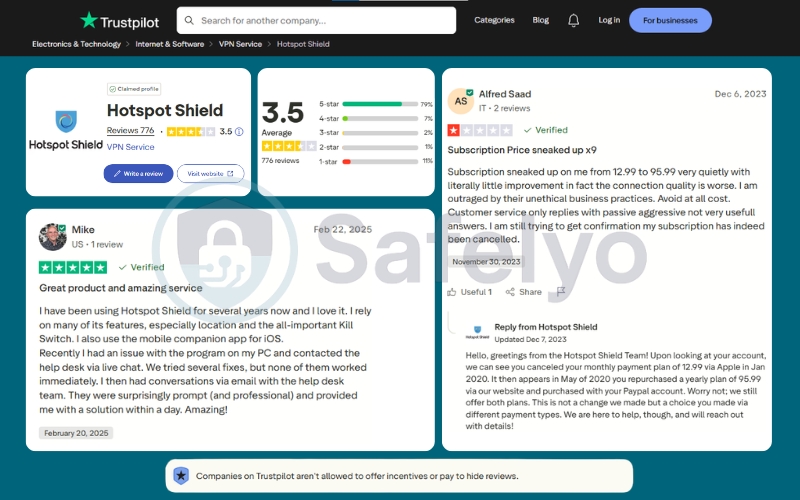
Stepping away from the app stores, the picture gets a bit murkier. Hotspot Shield holds a deeply average 3.5/5 rating on Trustpilot.
On the positive side, many users commend their technical customer support. One verified reviewer noted that when their PC kill switch malfunctioned, the live chat and email support teams provided professional, working solutions within 24 hours.
However, the 1-star reviews all share a common, frustrating theme: billing disputes and auto-renewals. Several users complained about being caught off guard by aggressive subscription upgrades (e.g., transitioning from a $12.99 monthly plan to an unexpected $95.99 yearly auto-charge). While the company’s support team actively replies to these complaints to clarify payment histories, it serves as a strong reminder to carefully manage your subscription settings.
13.3. Reddit sentiment
If you venture into forums like r/VPN on Reddit, the reception is notably icy. The Reddit community leans heavily toward open-source technology and strict privacy.
While power users grudgingly admit that the Catapult Hydra protocol offers fantastic performance for gaming and bypassing geo-restrictions, the general sentiment is skeptical. Many Redditors actively advise against using Hotspot Shield, frequently citing the company’s US jurisdiction and the lingering shadow of the 2017 privacy controversy as dealbreakers.
14. How it compares to alternatives
To truly understand Hotspot Shield’s value proposition, we have to put it head-to-head against the undisputed heavyweights of the industry. If you are torn between Hotspot Shield and another premium provider, consider how the “world’s fastest VPN” stacks up against the competition. We’ll look at it in terms of security, performance, and overall value.
14.1. Hotspot Shield vs. NordVPN
This is the classic battle between raw speed and ironclad privacy. Hotspot Shield’s Catapult Hydra protocol is undeniably fast, and its interface is arguably more beginner-friendly. If your only goal is to unblock Netflix on your Windows PC without thinking about technical settings, Hotspot Shield is a fantastic, frictionless choice.
However, NordVPN completely outclasses Hotspot Shield in almost every other category, particularly data protection.
- Privacy & Audits: NordVPN operates out of privacy-friendly Panama and has undergone multiple independent audits to prove its zero-logs claim. Hotspot Shield is based in the US (5 Eyes) and lacks recent, comprehensive audits.
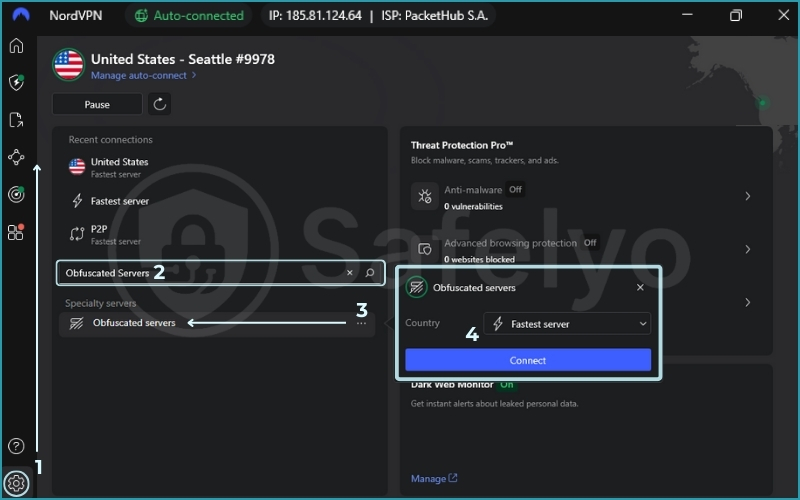
- Features: NordVPN offers specialized obfuscated servers for bypassing the Great Firewall of China, a reliable kill switch across all platforms, and the incredibly fast, open-source NordLynx (WireGuard) protocol. Hotspot Shield’s feature set is much more basic, especially on macOS and iOS.
- Value: NordVPN is generally cheaper on long-term plans while offering significantly more advanced security tools.
The Verdict: Unless you specifically need the Hydra protocol for a niche streaming issue, NordVPN is the superior, safer, and more feature-rich option for the vast majority of users.
14.2. Hotspot Shield vs. ExpressVPN
This comparison is much closer, as both providers position themselves as premium, high-speed services aimed at users who prioritize ease of use and seamless streaming.
Both VPNs excel at bypassing strict geo-restrictions and deliver excellent speeds for 4K video. ExpressVPN edges out Hotspot Shield slightly in raw speed tests and offers a more generous allowance of 14 simultaneous connections (compared to Hotspot Shield’s 10). On the other hand, Hotspot Shield’s 45-day money-back guarantee beats ExpressVPN’s standard 30-day policy.
However, ExpressVPN wins the trust game by a landslide.
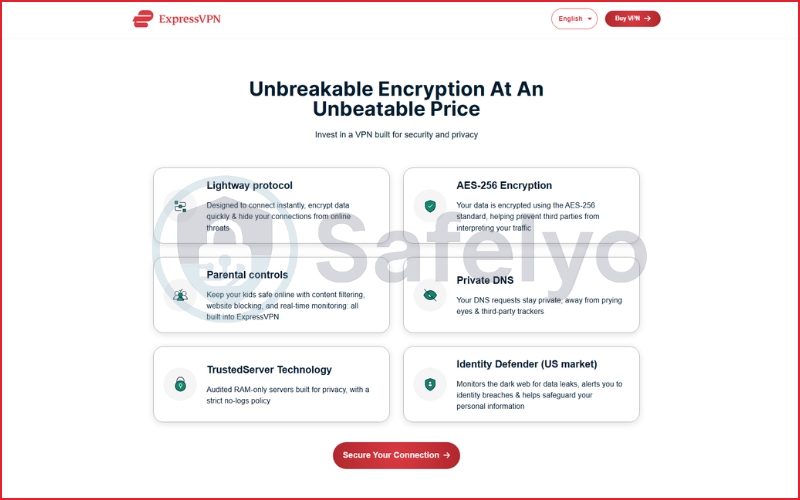
- Server Infrastructure: ExpressVPN runs entirely on RAM-only (diskless) servers (TrustedServer technology), ensuring your data cannot be physically stored. Hotspot Shield does not offer this level of hardware security across its entire network.
- Jurisdiction & Transparency: ExpressVPN is based in the British Virgin Islands (outside the 5/9/14 Eyes alliance) and frequently publishes independent audits. Hotspot Shield is hampered by its US headquarters and past privacy controversies.
- Device Support: ExpressVPN’s router app is arguably the best in the business, and its kill switch works flawlessly across all major operating systems.
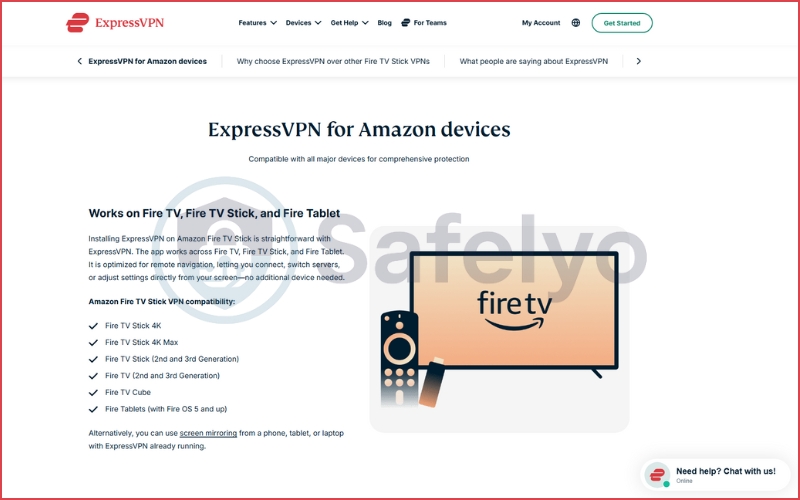
The Verdict: If you want a perfectly balanced VPN that offers top-tier streaming performance without compromising on a proven, audited privacy policy, ExpressVPN justifies its slightly higher price tag.
15. Is it worth it in 2026?
After weeks of rigorously testing Hotspot Shield, my conclusion is that it is a highly capable but fundamentally specialized VPN. It forces you to make a definitive choice: Are you willing to trade absolute anonymity for top-tier speed?
In 2026, the standard for digital privacy is higher than ever. While competitors are releasing independent audits and transitioning to RAM-only servers, Hotspot Shield still relies heavily on its proprietary technology and corporate promises. It is not a bad product by any means, but it is certainly not for everyone.
To help you make your final decision, here is my breakdown of exactly who this VPN is built for.
Who should use Hotspot Shield?
I highly recommend giving it a try if you fit into these categories:
- The hardcore streamer: If your main goal is unblocking 4K Netflix libraries or watching live sports without buffering, the Catapult Hydra protocol is an absolute powerhouse.
- The casual user: The user experience is foolproof. If you just want a simple “on/off” switch to secure your connection at a local coffee shop, the app design is perfect.
- The budget-conscious browser: The recent upgrade to unlimited data on the Basic free plan makes it one of the best free VPNs available for lightweight, everyday browsing.
Who should avoid Hotspot Shield?
You should definitely look for alternatives (like NordVPN or ExpressVPN) if you are:
- A strict privacy advocate: The US jurisdiction, historical controversies, and lack of a recent independent audit mean you have to blindly trust the company with your data.
- A heavy torrenter: While torrenting is fast, the unreliable kill switch on macOS and iOS makes P2P file sharing too risky for Apple users.
- Living in restrictive regions: It simply lacks the advanced obfuscation tools needed to consistently bypass deep packet inspection in countries like China or the UAE.
Final score: 6.9/10
Hotspot Shield is a phenomenal entertainment unblocker and a speed demon, but it falls just short of being a complete, top-tier cybersecurity tool. If raw performance is your only concern, it is worth the investment. But if you value transparency and proven data protection, your money is better spent elsewhere.
16. How we tested Hotspot Shield
At Safelyo, we refuse to rely on aggressive marketing claims, press releases, or surface-level observations. To bring you this accurate and unbiased review, I purchased a Hotspot Shield Premium subscription anonymously using our own budget.
I did not use emulators or automated bots. I installed the applications on real hardware, including a Windows 11 PC, a MacBook Air, an iPhone, and an Android device. I then put the VPN through our rigorous, human-led testing process.

Here is a quick look at the core areas I evaluated:
- Privacy and security checks: I analyzed the fine print of their privacy policy and used diagnostic tools like IPLeak.net and DNSLeakTest.com to ensure my real IP address and web requests were never exposed. I also aggressively stress-tested the kill switch by manually cutting the network connection.
- Performance benchmarking: I measured the raw speed of the Catapult Hydra protocol against my baseline ISP connection. I used tools like Ookla Speedtest to record the latency and download speeds across both local and long-distance servers.
- Real-world unblocking: I tested the VPN against the toughest firewalls in the entertainment industry, attempting to bypass geo-restrictions on platforms like Netflix, BBC iPlayer, and Hulu.
- Feature parity: I compared the application interfaces and security tools across all operating systems to highlight the severe differences between the Windows and macOS/iOS apps.
Transparency is the foundation of our work. If you want to see the exact scoring rubrics, weightings, and a deep dive into how our lab operates, please read our complete How we test and review VPNs.
17. FAQs about Hotspot Shield VPN
Here are the answers to the most common questions I get asked about Hotspot Shield.
Is Hotspot Shield safe?
Technically, yes. It uses military-grade AES-256 encryption, and its proprietary Catapult Hydra protocol is secure. However, because it is based in the US, a 5 Eyes country, and has a history of privacy controversies, it may not be the best choice. This is especially true for users demanding absolute anonymity or protection from government surveillance.
Does Hotspot Shield keep logs?
Hotspot Shield claims to have a strict no-logs policy regarding your browsing activity. However, they do collect some session data, such as connection duration, bandwidth usage, and device hashes. Unlike competitors like NordVPN, they have not undergone a recent, comprehensive independent audit to verify these claims.
Is Hotspot Shield good for torrenting?
It depends on your device. For Windows and Android users, it is excellent due to its blazing-fast download speeds and functional kill switch. However, I do not recommend it for Mac or iOS users. The lack of a reliable kill switch on Apple devices exposes you to significant risks if the VPN disconnects.
Does Hotspot Shield work in China?
No, not reliably. The Great Firewall of China actively blocks Hotspot Shield’s protocols because the app lacks advanced obfuscation technology. If you need a VPN for restricted regions like China, Russia, or the UAE, ExpressVPN is a much better alternative.
Is the free version of Hotspot Shield safe?
Yes. Unlike many shady free VPNs, Hotspot Shield’s Basic plan uses the same strong encryption as the Premium version and does not sell your data. However, it is limited to one device, restricts you to US servers only, and does not support streaming or gaming modes.
18. Conclusion
After extensive testing, Hotspot Shield remains one of the most polarizing services in the industry. It delivers on its primary promise with absolute conviction: Blistering speed.
In my analysis at Safelyo, the proprietary Catapult Hydra protocol proved it wasn’t just a marketing gimmick. It sustained incredible download speeds over long distances, making this VPN a top-tier choice for gamers and binge-watchers. This is especially true for those who want to unlock US Netflix or BBC iPlayer without any buffering.
However, speed is only half the story. The lack of a recent independent audit, combined with its US jurisdiction and a spotty privacy history, prevents it from earning a perfect score. If anonymity is your absolute priority, you are better off looking elsewhere. But if you are a casual user who simply wants the fastest, most frictionless way to bypass geo-blocks, Hotspot Shield is a powerful tool to have in your arsenal.
Still undecided? The VPN market is crowded with contenders. To see how other top providers stack up against Hotspot Shield in our rigorous lab tests, check out our comprehensive VPN Reviews category for more data-driven insights.