Opening your security app only to face a confusing list of technical settings like WireGuard, OpenVPN, or IKEv2 can be highly frustrating. To take control of your internet experience, understanding what are VPN protocols is essential to choosing the right balance between speed and security.
At Safelyo, our network engineers have spent years configuring and speed testing these digital tunnels under strict lab conditions. This guide simplifies the complex terminology, explains how these tools function under the hood, and helps you select the perfect protocol for your daily online activities.
Key Takeaways
- What are VPN protocols? VPN protocols are the core virtual instruction manuals that determine exactly how your private data is encrypted, packaged, and routed between your device and a secure network server.
- WireGuard and NordLynx: These are the modern industry standards for elite speed and mobile battery efficiency, making them perfect for gaming and 4K streaming.
- OpenVPN and NordWhisper: Highly resilient protocols engineered with advanced stealth capabilities to bypass strict school, corporate, or government firewalls.
- PPTP and L2TP: These are completely obsolete, insecure legacy options that you must avoid to prevent data leaks and packet interception.
- PwC and Deloitte Audited: Always choose premium providers whose logging claims have been independently verified by certified public accounting firms to guarantee your privacy.
1. What are VPN protocols?
VPN protocols are a specific set of digital rules that determine exactly how your device connects to a secure server. It acts as a virtual instruction manual dictating the methods used to package and route your internet traffic safely.
Every premium privacy provider relies on these established frameworks to build their security infrastructure. Without this essential guidebook, your sensitive personal data would travel completely exposed across the unpredictable public internet.
You can think of a protocol as choosing a specific delivery service for your digital data. Different protocols offer unique balances of speed and encryption strength, allowing you to customize your connection based on your daily needs.
2. How does a VPN protocol work?
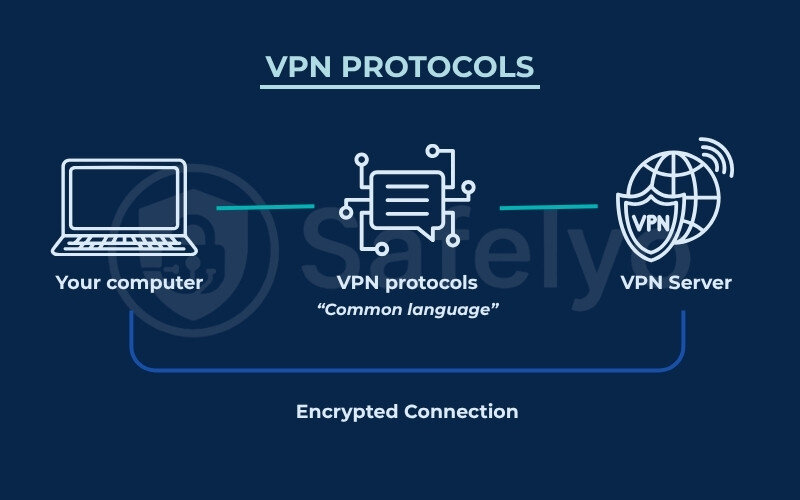
To build a secure connection, the protocol executes a highly specific sequence of technical steps. The journey begins with strict mutual authentication, where your personal device and the remote server verify their identities to block unauthorized access immediately.
Once trust is verified, the protocol scrambles your information, making it completely unreadable to local internet providers. It then wraps these encrypted data packets inside a new digital layer, which safely conceals your original IP address from the public web.
This encapsulated data travels through the secure tunnel until it reaches the provider network. Upon arrival, the server unwraps and decrypts your information before forwarding your request to the final destination website seamlessly without exposing your true location.
3. The 6 most common VPN protocols explained
Security providers offer various connection options within their application settings menus. We break down the six most widely used network tools below so you can understand their unique strengths and hidden security flaws.
3.1. WireGuard: The modern standard for speed and simplicity
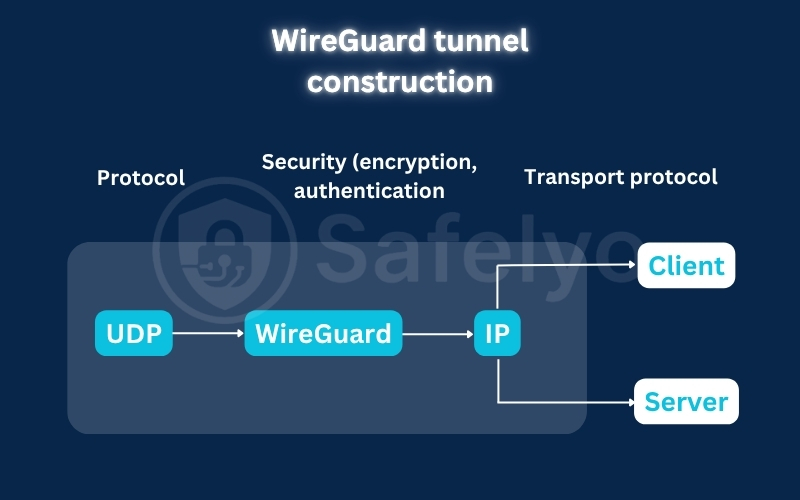
WireGuard is a cutting-edge open-source protocol known for its simplicity and extremely high performance. It relies on a streamlined codebase of just 4,000 lines, making it incredibly easy for security experts to audit and debug.
This lightweight architecture utilizes state-of-the-art cryptography like the ChaCha20 algorithm. This provides lightning-fast encryption while consuming very few system resources, making it the perfect battery-saving choice for mobile devices and cloud services.
Despite its brilliant speed, the original framework assigns static IP addresses through cryptokey routing, which creates a privacy vulnerability. Premium providers solve this by adding custom double network address translation systems and post-quantum security to ensure true no-log functionality.
Pros
Free and open source with a tiny, easily audited codebase
ChaCha20 encryption provides top-tier security and speed
Resource-friendly design extends smartphone battery life
Cons
The original framework logs static IP addresses temporarily
May lack compatibility with older legacy hardware systems
Lacks the advanced configuration options of older tools
3.2. OpenVPN: The versatile and battle-tested veteran
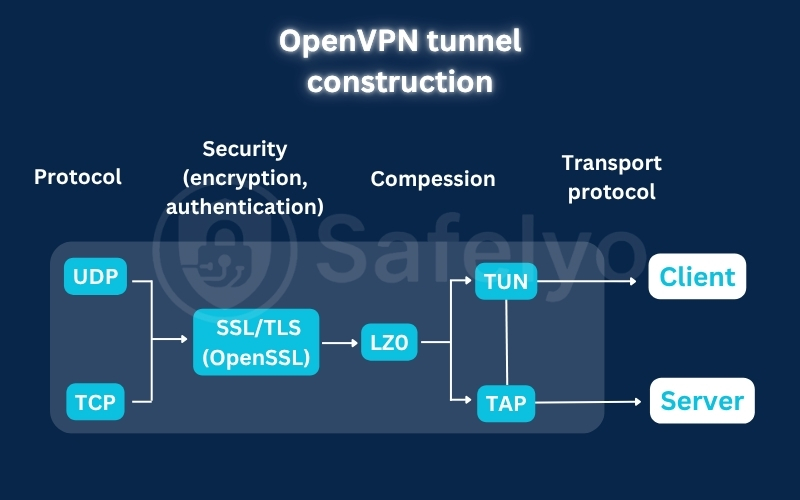
OpenVPN is a highly configurable, open-source protocol favored by enterprise environments for its robust security. Because its entire codebase is open to public auditing, cybersecurity experts highly trust it for deployment in sensitive digital environments.
This versatile protocol operates in two distinct modes depending on your specific network needs. OpenVPN UDP prioritizes fast data transfer for smooth streaming, while OpenVPN TCP focuses on connection reliability and guaranteed data packet delivery.
The TCP configuration is also an excellent tool for bypassing firewalls. When paired with obfuscated servers, it scrambles your traffic to look like regular web browsing, helping activists and journalists penetrate strict government censorship.
However, its heavy cryptographic overhead means it is noticeably slower than WireGuard. Manual setup also requires extensive networking knowledge, as the protocol lacks native, plug-and-play support on some older operating systems.
Pros
Open-source code allows for constant public security audits
Offers a choice between fast UDP and reliable TCP protocols
Easily bypasses strict firewalls using stealth obfuscation
Cons
Slower internet speeds than lightweight protocols like WireGuard
Manual configuration is overly complex for average beginners
Heavy processing requirements consume more mobile battery power
3.3. IKEv2/IPsec: The stable choice for mobile devices
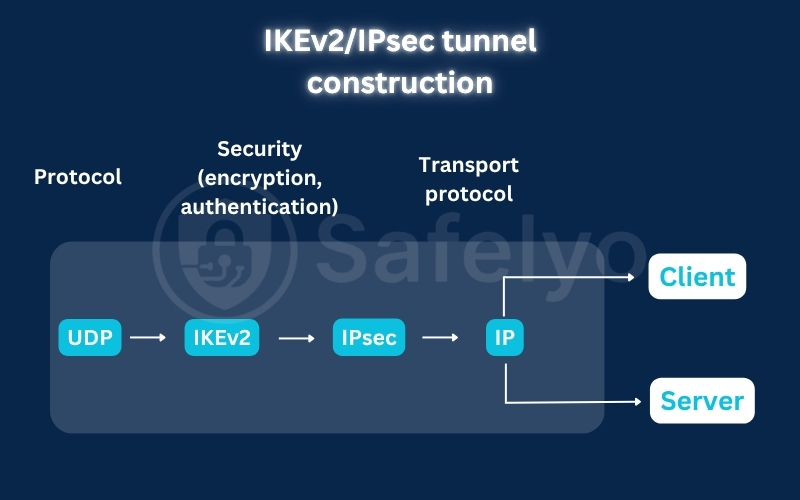
Developed jointly by Microsoft and Cisco, IKEv2/IPsec is widely regarded as the strongest option for mobile devices. Its defining feature is the Mobility and Multi-homing Protocol (MOBIKE), which prevents your VPN connection from dropping when you switch between Wi-Fi and mobile data networks.
As part of the robust IPsec suite, it uses AES-256 encryption and Diffie-Hellman key exchange to establish highly secure, authenticated tunnels. It is exceptionally lightweight, establishing connections almost instantly while consuming minimal network bandwidth during active use.
However, because IKEv2 is partially proprietary, its core codebase is less transparent and harder to publicly audit than fully open-source options like WireGuard. It also lacks native, out-of-the-box support for Linux and is highly complex to configure manually without a dedicated VPN client.
Pros
MOBIKE protocol ensures seamless switching between Wi-Fi and mobile networks
Highly secure framework utilizing AES-256 and Diffie-Hellman key exchange
Built-in NAT traversal helps the connection navigate firewalls effectively
Cons
A partially proprietary codebase makes it less transparent to public audits
Lacks native, out-of-the-box support for Linux operating systems
Highly complex manual setup that requires advanced networking knowledge
3.4. L2TP/IPsec: The widely compatible but slower option
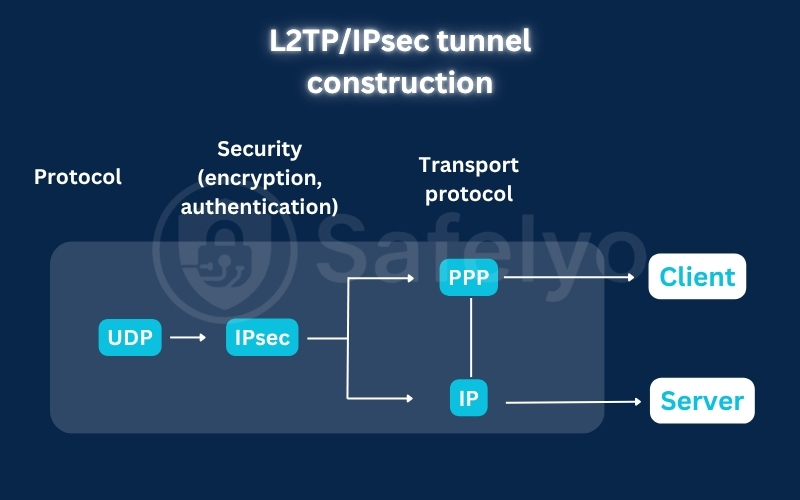
L2TP (Layer 2 Tunneling Protocol) is a legacy standard that provides absolutely no encryption or authentication on its own. To secure your data, it must be paired with the IPsec framework, which encrypts your web traffic with robust AES-256 keys.
The biggest technical drawback of this pairing is its reliance on double data encapsulation. It wraps your data packets twice, once for creating the tunnel and once for encryption, which creates massive processing overhead and severely reduces your internet speed.
Originally developed in the 1990s by Cisco and Microsoft, L2TP/IPsec has no clever stealth features and is easily blocked by network administrators. Furthermore, many cybersecurity experts advise caution due to persistent rumors that the NSA compromised the protocol.
Pros
Highly compatible and widely available on almost all older operating systems
Relatively simple to configure manually on legacy corporate routers
Offers a much higher level of data encryption than obsolete options like PPTP
Cons
Double data encapsulation significantly reduces connection and download speeds
Lacks advanced stealth techniques, making it exceptionally easy for firewalls to block
Zero standalone security, relying entirely on the secondary IPsec protocol
3.5. SSTP: The Microsoft-backed protocol for Windows
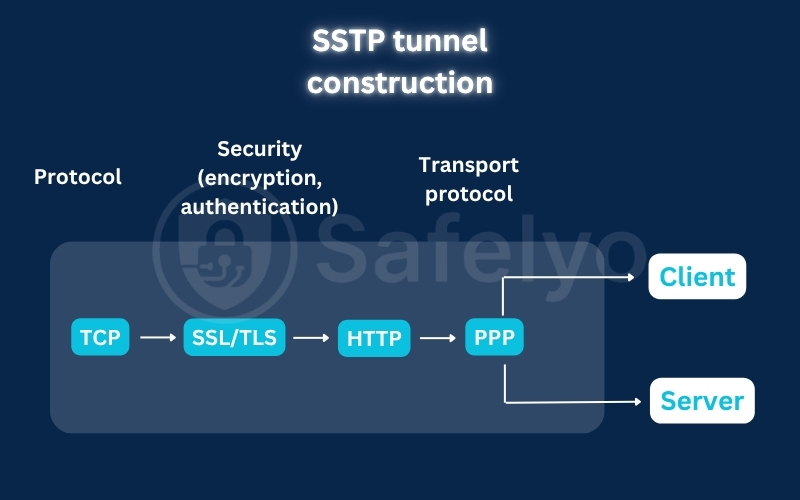
Developed solely by Microsoft and introduced with Windows Vista, SSTP (Secure Socket Tunneling Protocol) is built on SSL/TLS encryption. It operates much like an early, basic tunneling protocol wrapped inside the same secure technology that protects standard HTTPS web pages.
Its greatest technical strength is its reliance on TCP port 443, the universal port for secure web traffic. Because network administrators cannot block this port without disabling the web entirely, SSTP easily penetrates highly restrictive firewalls and school networks.
However, because SSTP is entirely proprietary, its closed-source code cannot be independently audited for hidden backdoors. Additionally, it is primarily optimized for Windows, resulting in poor native cross-platform support and slower speeds compared to modern standards like WireGuard.
Pros
Uses TCP port 443 to easily bypass strict firewalls and network blocks
Supports strong AES-256 encryption and SSL/TLS connection integrity
Natively integrated into the Windows operating system for easy setup
Cons
Proprietary Microsoft ownership prevents independent public security audits
Very poor native support on non-Windows platforms like macOS and iOS
Slower connection speeds and higher latency than modern protocols
3.6. PPTP: The obsolete protocol you must avoid
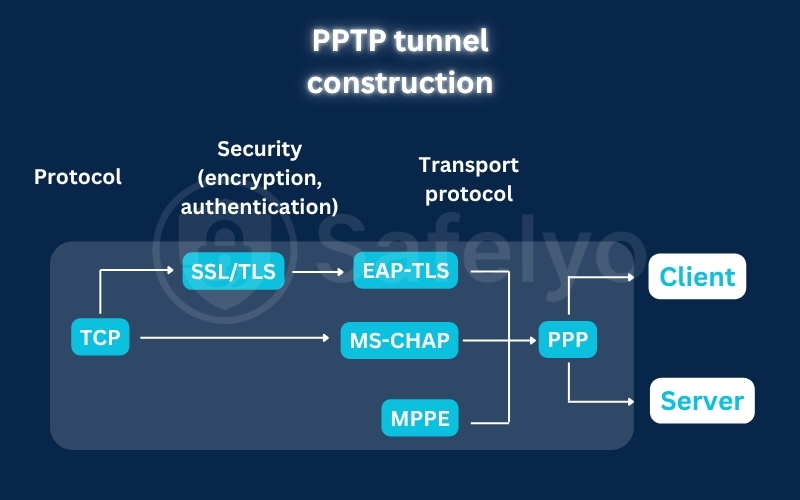
Created in 1999 by Microsoft to secure old dial-up traffic, PPTP (Point-to-Point Tunneling Protocol) is one of the earliest VPN standards. It functions by establishing a basic control channel over TCP and using a GRE tunnel to package data packets.
Because PPTP relies on highly outdated cryptographic tools like MS-CHAP v2 authentication and MPPE encryption, its overhead is incredibly low. This minimal processing requirement makes it fast, but it leaves your data completely exposed to modern cyber threats.
Security researchers have thoroughly compromised this protocol, and intelligence agencies like the NSA routinely decrypt PPTP traffic. Even Microsoft publicly urges users to avoid it entirely, and top-tier providers like NordVPN and ExpressVPN have completely removed support for it.
Pros
Highly compatible and supported natively by almost all legacy operating systems
Extremely fast download speeds due to its minimal encryption overhead
Requires very little device processing power and CPU resources to run
Cons
Outdated MS-CHAP v2 security is easily cracked by modern hackers and the NSA
Highly vulnerable to basic network firewalls and easily blocked by administrators
Completely obsolete for protecting sensitive personal or enterprise data
4. Proprietary VPN protocols: What are they
While standard open-source protocols are highly effective, top-tier VPN providers often want more control over their performance. To achieve this, they develop custom, in-house solutions designed to optimize speed, security, and connection stability specifically for their users.
These in-house engines are developed by modifying existing open-source frameworks or writing entirely new code from scratch. This allows providers to fix security vulnerabilities, bypass strict regional firewalls, and deliver highly optimized performance that standard protocols cannot match.
4.1. Lightway by ExpressVPN
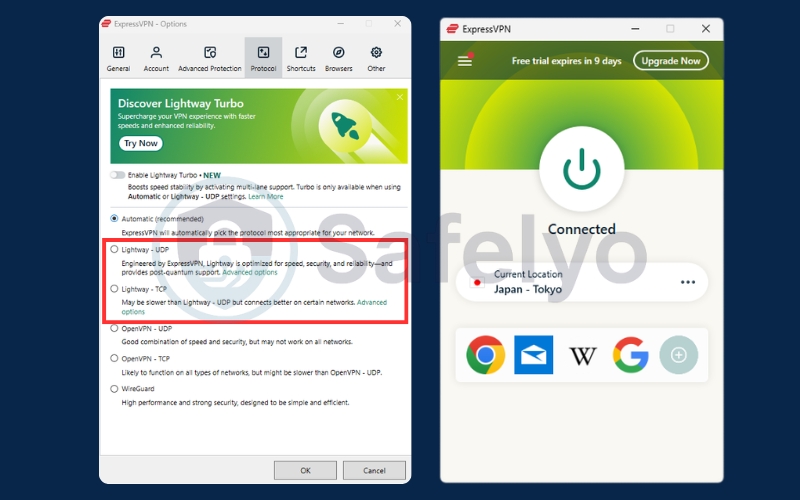
ExpressVPN built Lightway entirely from scratch, optimizing it for modern networks while discarding unnecessary legacy features. It connects in a fraction of a second and can split your traffic across multiple channels using its new Lightway Turbo feature for a massive speed boost.
For security, it uses the highly vetted wolfSSL cryptographic library and includes post-quantum protection by default to defend against future advanced decryption threats. Unlike many proprietary protocols, ExpressVPN released its source code on GitHub under an open-source license for complete public transparency.
Lightway is incredibly lightweight, preserving your mobile battery while maintaining a stable tunnel even when switching networks. It also supports both UDP and TCP modes, ensuring a highly reliable connection even on restrictive networks that block standard UDP ports.
4.2. NordLynx by NordVPN
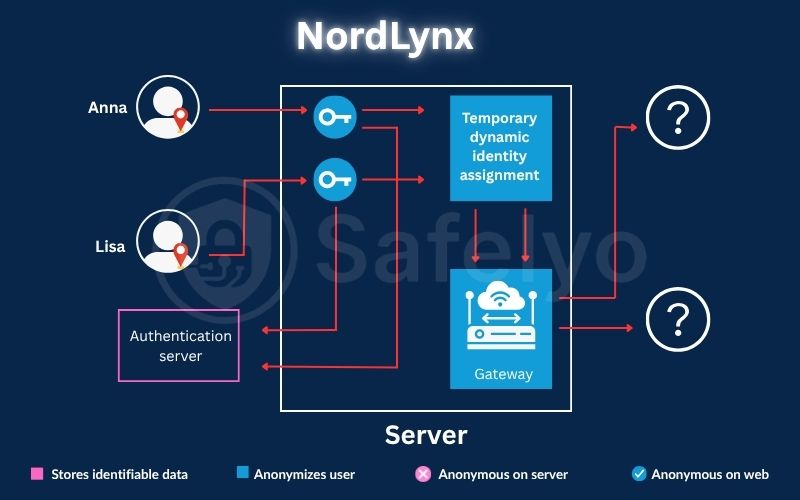
Built directly on the WireGuard framework, NordLynx inherits its exceptionally fast performance and lightweight codebase. To fix WireGuard’s inherent privacy flaws, it implements a custom double NAT system to prevent your real IP address from being logged on the server.
It secures your data using advanced ChaCha20 encryption and Poly1305 authentication, providing robust protection without taxing your device’s processor. This lightweight design ensures minimal battery drain and smooth performance, making it highly effective for mobile use.
The main trade-off is that NordLynx is exclusive to NordVPN’s official apps. You cannot use it on third-party clients, and because their double NAT system is proprietary, independent researchers cannot fully audit that specific privacy-enhancing layer.
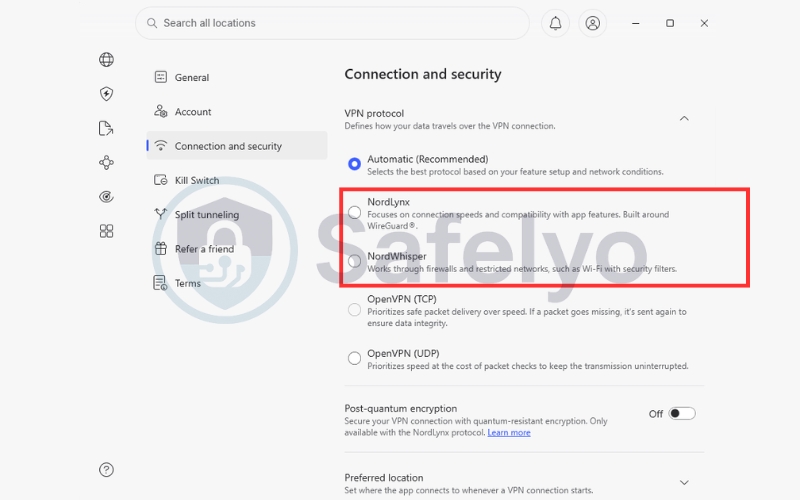
4.3. NordWhisper by NordVPN
NordWhisper is a custom protocol engineered by NordVPN specifically to bypass strict local firewalls and network restrictions. It is built on advanced web tunnel technology, which blends your encrypted traffic with regular, everyday web traffic to prevent firewalls from identifying the VPN signature.
This stealth design is highly secure and is optimized specifically for highly restricted network environments. It is the ideal connection choice for professionals and travelers who need to access blocked communication apps on corporate networks, university Wi-Fi, and public airport hotspots.
However, because it relies on sophisticated web tunneling, NordWhisper can be noticeably slower than NordLynx. It is also exclusive to the NordVPN application, cannot be used with third-party clients, and is incompatible with other advanced features like Meshnet, Dedicated IP, and Onion Over VPN.
4.4. Dausos by Surfshark
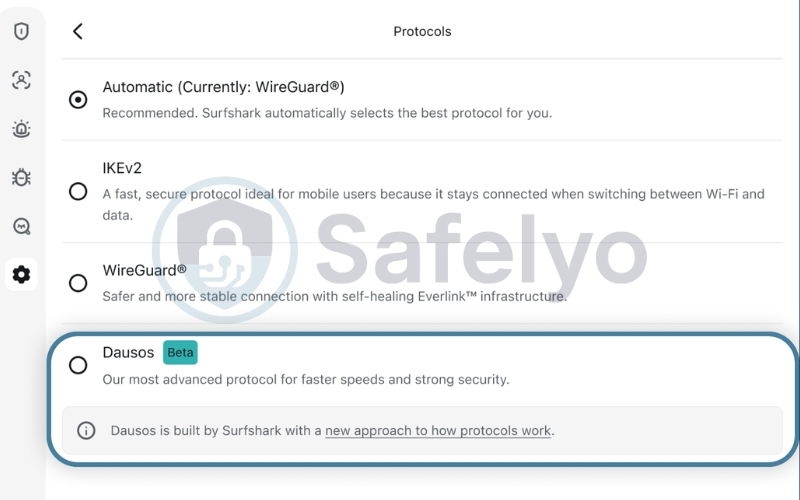
Built completely from scratch, Dausos is Surfshark’s proprietary protocol designed exclusively for consumers rather than adapting old enterprise networks. It is named after the Baltic mythological word for heaven, symbolizing elevation and digital protection.
Unlike traditional protocols that route multiple users through shared tunnels, Dausos assigns each active connection a dedicated, isolated data tunnel. This unique architecture eliminates resource waste and cross-traffic exposure, delivering up to 30% faster connection speeds compared to WireGuard.
For encryption, it utilizes the advanced AEGIS-256X2 algorithm, offering highly efficient cryptographic performance on modern hardware. It also features robust, hybrid post-quantum security by default, verified by independent security audits from Cure53.
The primary limitation of Dausos is its early rollout phase, as it is currently available exclusively on the Surfshark macOS app. Because it is closed-source, independent security researchers cannot publicly audit its underlying custom framework outside of official third-party reports.
5. VPN protocols comparison table
To help you make an informed decision, our experts at Safelyo evaluated each standard and proprietary protocol. The comprehensive comparison table below analyzes these nine technologies across eight critical performance and security metrics.
| Protocol | Speed & Latency | Encryption / Security | Codebase Weight | CPU / Battery Drain | Open Source | Firewall Bypass | Primary Use Case |
|---|---|---|---|---|---|---|---|
| WireGuard | Very Fast | ChaCha20, lightweight encryption | Lightweight | Low | Yes | Poor | Rapid Downloads, Streaming, Gaming |
| OpenVPN | Average to Fast | AES-256 | Heavy | High | Yes | Excellent | Maximum Privacy & Security, Firewall Bypass |
| IKEv2/IPsec | Fast | AES-256 | Medium to Heavy | Medium | Partially | Average | Mobile Network Roaming |
| L2TP/IPsec | Slower | AES-256 (relies on IPsec) | Heavy | High | Yes | Poor | Legacy Device Support |
| SSTP | Average | AES-256 | Heavy | High | No | Excellent (Windows) | Windows Firewall Bypass |
| PPTP | Extremely Fast | MPPE (Vulnerable) | Lightweight | Low | Yes | Poor | Obsolete (Avoid Completely) |
| Lightway | Extremely Fast | wolfSSL, strong security | Lightweight | Low | Yes (GitHub) | Excellent | Mobile Data & Routers |
| NordLynx | Extremely Fast | ChaCha20, strong security | Lightweight | Low | Partially | Poor | Gaming & 4K Streaming |
| NordWhisper | Good (slower via web tunnel) | Strong security & privacy, web tunnel blends traffic | Medium to Heavy | Medium | No (proprietary) | Excellent | Restricted networks: hotels, corporate Wi-Fi, public hotspots |
| Dausos | Extremely Fast | AEGIS 256X2, post quantum | Lightweight | Low | No (proprietary) | Excellent | Restricted networks: hotels, corporate Wi Fi, public hotspots |
This data highlights that while modern protocols like NordLynx and Lightway offer unparalleled speeds, legacy protocols like OpenVPN and newer solutions like NordWhisper remain vital for bypassing strict firewalls. Understanding these tradeoffs allows you to optimize your connection based on your immediate network conditions.
6. How to choose the best VPN protocol for your needs
Selecting the perfect connection method depends heavily on your personal preferences, priorities, and daily internet habits. Because every protocol has unique technical tradeoffs, matching the correct engine to your specific task is essential for optimal performance.
Our security experts have analyzed various online activities to help you customize your settings. Below are the standard configurations recommended for speed, security, gaming, and travel.
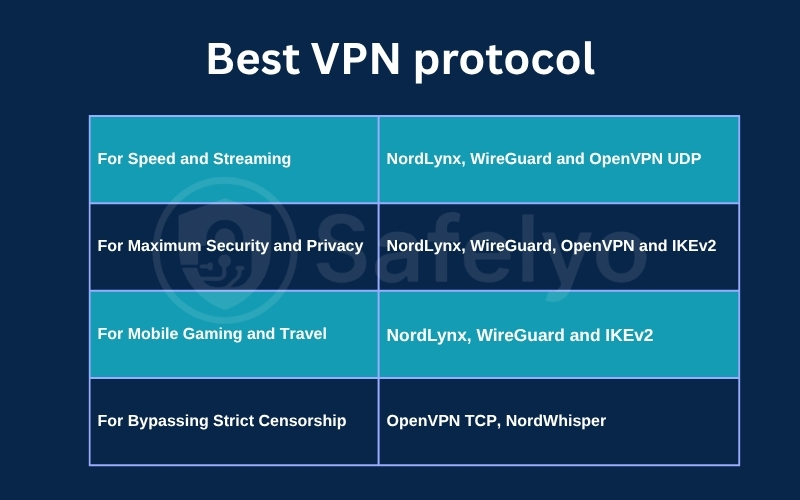
6.1. Best VPN protocol for speed and streaming
For high-bandwidth tasks like streaming and rapid downloads, NordLynx and WireGuard are the undisputed industry leaders. In independent laboratory audits, these modern protocols consistently deliver the highest throughput with minimal buffering.
If these are unavailable on your device, OpenVPN UDP acts as a slightly slower but highly capable alternative. Selecting this protocol ensures your 4K video streams load rapidly without interrupting your viewing experience.
6.2. Best VPN protocol for maximum security and privacy
When configured correctly, almost all modern protocols provide robust security. Your privacy depends less on the specific protocol you select and more on how your VPN provider configures and maintains its server network.
Whether you choose OpenVPN, WireGuard, NordLynx, or IKEv2, look for providers with audited no-log policies. This ensures that your private encryption keys are managed securely and your traffic data is never stored on physical hard drives.
6.3. Best VPN protocol for mobile gaming and travel
Online gaming requires low latency (ping), making NordLynx and WireGuard the premier choices for competitive play. If your connection drops unexpectedly, IKEv2 provides the stable, rapid reconnections you need to stay in the match.
For mobile travelers, IKEv2 remains the strongest option because it reconnects seamlessly when your device switches between Wi-Fi and mobile data. NordLynx and WireGuard are also excellent mobile picks, offering faster speeds with minimal battery consumption.
6.4. Best VPN protocol for bypassing strict censorship
Restrictive networks at school, work, or in censored countries actively block standard VPN traffic. To penetrate these strict firewalls, you must use OpenVPN TCP or specialized stealth protocols like NordWhisper.
OpenVPN TCP routes your secure data through standard web ports, making it look like regular HTTPS browsing. Proprietary protocols like NordWhisper add advanced obfuscation, allowing you to bypass deep packet inspection completely unnoticed.
7. How to change the VPN protocol in your app
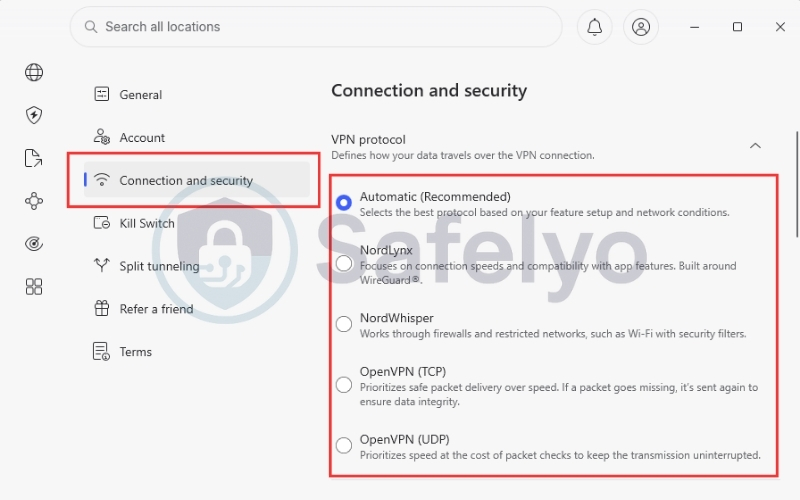
Modifying your connection settings is a simple process that can be done directly inside your VPN client. If you are unsure which option to select, we highly recommend keeping the setting on Automatic so the software can optimize itself dynamically.
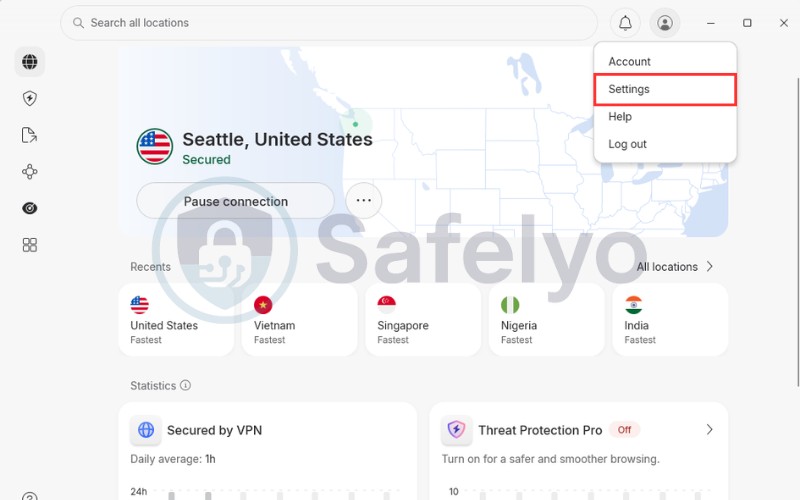
Following these three steps allows you to change your active tunnel type in seconds:
- Step 1: Open your VPN application and click on the Settings or Gear icon, usually located in the corner of the dashboard.
- Step 2: Navigate to the Connection or Protocol tab to view your current default network settings.
- Step 3: Select your desired protocol from the list (such as NordLynx or OpenVPN) and click save to apply the changes instantly.
8. FAQs about what VPN protocols are
Do VPN protocols affect internet speed?
Yes, absolutely. Because each protocol uses a different level of encryption overhead, some are naturally slower than others. Lightweight protocols like WireGuard process data much faster than legacy standards like OpenVPN.
Do VPN protocols drain mobile battery life?
Yes, they do. Heavy protocols like OpenVPN require more CPU processing power to encrypt data, causing your battery to drain much faster. Lightweight options like WireGuard are highly efficient and preserve your mobile battery.
Is WireGuard truly more secure than OpenVPN?
Yes, from a modern cryptographic standpoint. While OpenVPN is robust, WireGuard uses state-of-the-art mathematical algorithms that are much harder to attack. Its smaller codebase also means there are fewer hidden security vulnerabilities.
Can I use multiple VPN protocols at the same time?
No, you cannot. Your application can only build one secure tunnel at a time to route your internet traffic safely. To use a different protocol, you must disconnect your current session and switch settings manually.
Which VPN protocol is best for torrenting and P2P?
WireGuard is the superior choice for torrenting. Its lightweight codebase ensures your download speeds remain as fast as possible, while its rapid reconnection times protect you from accidental IP leaks during sudden network drops.
Can my ISP see which VPN protocol I am using?
Yes, standard ISP monitoring can identify the protocol. Traditional protocols like OpenVPN and WireGuard leave distinct digital signatures on the network. To hide this, you must enable obfuscation features to make your traffic look like standard HTTPS web browsing.
Is OpenVPN outdated?
No, OpenVPN remains highly relevant. Although newer protocols like WireGuard are much faster, OpenVPN is still the industry standard for bypassing strict corporate firewalls and government censorship due to its robust TCP routing capabilities.
What is the main difference between UDP and TCP protocols?
UDP is built for maximum speed, while TCP is built for reliability. UDP transmits data packets quickly without verifying their arrival, while TCP verifies every single packet to ensure no data is lost or corrupted during transit.
9. Conclusion
Understanding what are VPN protocols and how they secure your data is the first step toward optimizing your internet speed and online privacy. While modern choices like WireGuard dominate daily performance benchmarks today, legacy standards like OpenVPN remain the undisputed kings for bypassing strict network firewalls.
Selecting the perfect setup is simple once you know how these secure tunnels operate across your different devices. To explore more advanced configurations, step-by-step tutorials, and expert security reviews, check out our comprehensive VPN Guides category at Safelyo to take full control of your digital life with absolute confidence.