Every secure connection relies on a specific digital gateway to pass through firewalls, known as a VPN port. Correctly configuring these ports gives you the power to fix connection errors, bypass network blocks, and significantly optimize your internet speed.
This guide breaks down the essential port numbers for WireGuard and OpenVPN and shows you exactly how to control them.
Key takeaways:
- Definition: A VPN port is a numbered channel used to tunnel encrypted traffic through a firewall.
- Speed vs. reliability: UDP ports are faster for streaming, while TCP ports are better for bypassing blocks.
- Best options: WireGuard (51820) and OpenVPN (1194/443) are the industry standards.
- Actionable tip: Switching to port 443 can help you unblock restricted networks.
1. What is a VPN port?
A VPN port is a specific virtual communication endpoint, identified by a number ranging from 1 to 65535, that allows VPN tunnels to pass data through networks and firewalls.
Think of an IP address as a building’s street address. The port number is the specific apartment number or door that data enters through.
When you browse the web, your computer automatically directs traffic to port 80 or 443 (for websites). Similarly, VPNs use specific ports to separate their encrypted traffic from all the other noise on the internet. If you try to send VPN traffic through the wrong “door,” the server won’t know what to do with it, and your connection will fail.
2. How do VPN ports work?
To understand what VPN ports do in the background, we need to look at how data travels.
Every piece of data (packet) leaving your device has a “header.” This acts like a shipping label on an envelope. It contains the destination IP address and the port number.
Network firewalls act like security guards checking these labels:
- Open port: If the guard sees a label for a safe port (like 443), they let the packet through.
- Restricted port: If the guard sees a label for a port they don’t recognize or have banned, they block it immediately.
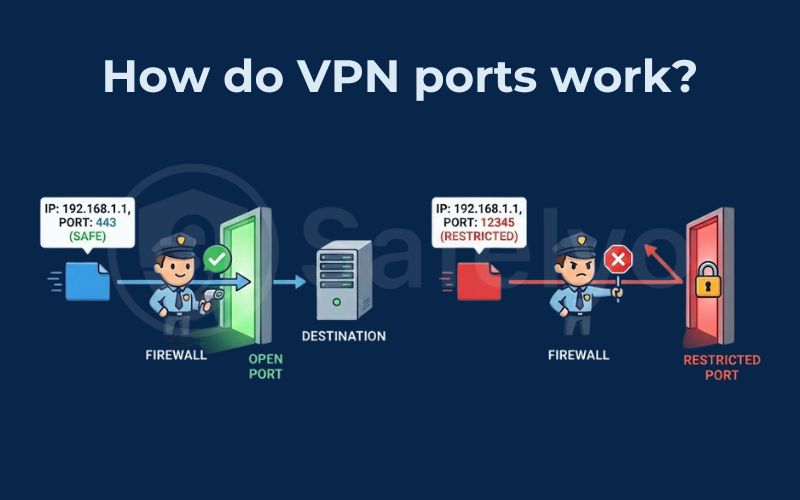
VPNs use a process called encapsulation to bypass these guards. The software takes your original data packet (which might be heading to a blocked site), wraps it inside a new “outer” packet, and stamps it with a specific VPN port number (like 1194) that the firewall is programmed to allow.
This effectively creates a secure “tunnel.” The firewall sees only the outer label (Port 1194) and lets it pass, unaware of the content hidden inside.
3. What are VPN port numbers?
Technically, these are 16-bit integers. While there are over 65,000 possibilities, they are classified into three main ranges:
- Well-known ports (0-1023): These are reserved for essential system services like HTTPS (443) or email (25).
- Registered ports (1024-49151): This is where most user applications, including many VPNs like OpenVPN, operate.
- Dynamic ports (49152-65535): These are used for temporary or private connections and change frequently.
4. Common VPN port number list by protocol
You might be asking, “What port does VPN use?” The answer is that there isn’t just one number. It depends entirely on the VPN protocol (the set of rules used for encryption) you have selected.
Here is the essential VPN port number list you need to know.
4.1. OpenVPN ports (UDP 1194 & TCP 443)
OpenVPN is the most popular and versatile protocol. It primarily uses two ports:
- UDP 1194: This is the standard default for OpenVPN. It runs on UDP (User Datagram Protocol) to ensure maximum speed. In my own tests, leaving the VPN on this default setting almost always results in the lowest latency for gaming.
- TCP 443: This is the “Chameleon” port. Port 443 is the standard port for HTTPS traffic, which includes all secure web browsing like online banking or shopping.
Why use TCP 443?
It is arguably the best VPN port for bypassing censorship. Because practically every website uses port 443, network administrators at schools or offices rarely block it. If they did, they would break the entire internet.
By using this port, your VPN traffic blends in with regular browsing, making it nearly impossible for firewalls to distinguish and block.
4.2. WireGuard port (UDP 51820)
WireGuard is a newer, lighter protocol that has quickly become the industry favorite for speed.
UDP 51820: WireGuard typically defaults to this specific port.
Important note: While WireGuard is incredibly fast, port 51820 is a distinct and obvious number. Some ISPs are known to throttle UDP traffic on non-standard ports like this. If you experience fast speeds that suddenly drop, switching away from this port might solve the issue.
4.3. IKEv2/IPSec ports (UDP 500 & 4500)
This protocol is a standard for mobile devices. It relies on two ports:
- UDP 500: Used to establish the secure tunnel (the initial handshake).
- UDP 4500: Used for “NAT Traversal,” which helps the VPN work when you are behind a router.
I recommend this protocol for mobile users. In my experience, IKEv2 handles network switching much better than others. It can re-establish the connection instantly when I walk out of my house and my phone switches from Wi-Fi to 4G data.
4.4. L2TP/IPSec ports (UDP 1701)
UDP 1701: L2TP typically uses this port combined with the IPSec ports mentioned above.
Warning: This is an older standard. It is slower than WireGuard and is very easily blocked by modern firewalls.
4.5. PPTP port (TCP 1723)
TCP 1723: This is the port for the Point-to-Point Tunneling Protocol.
Security warning: PPTP is obsolete and has known security vulnerabilities. You should strictly avoid using this port unless you have absolutely no other choice for legacy systems.
Summary of protocols and ports:
| VPN Protocol | VPN Port numbers |
| OpenVPN | UDP 1194, TCP 443 |
| WireGuard | UDP 51820 |
| IKEv2/IPSec | UDP 500, UDP 4500 |
| L2TP/IPSec | UDP 1701 |
| PPTP | TCP 1723 |
5. UDP vs TCP ports: Which is better for VPNs?
When configuring your VPN, you will often see options like “OpenVPN TCP” or “OpenVPN UDP.” Understanding the difference between these two transport layers is key to optimizing your connection.
5.1. UDP (User Datagram Protocol)
UDP is built for speed. It sends data packets in a continuous stream without checking if they arrived perfectly.
- Pros: Much faster; ideal for streaming, VoIP, and gaming.
- Cons: Can be less reliable on unstable networks.
5.2. TCP (Transmission Control Protocol)
TCP is built for reliability. It numbers every packet and requires the receiver to confirm they received it. If a packet is lost, TCP sends it again.
- Pros: Extremely reliable; excellent for bypassing strict firewalls (port 443).
- Cons: Slower due to the constant “checking” process.
Which should you choose?
- Use UDP by default for the best performance.
- Use TCP only if you are experiencing disconnections or need to bypass a network block.
6. How to find VPN port number and change it
Most modern VPN apps like NordVPN or ExpressVPN are designed to be user-friendly, so they do not explicitly display port number information on the main dashboard. They usually handle this in the background “Auto” mode.
However, you can find and change it easily if you know where to look. Follow these general steps, which apply to most VPN apps:
- Open your VPN app and go to Settings.
- Look for a tab labeled Connection, Protocol, or Advanced.
- Switch the setting from Automatic to a specific protocol.
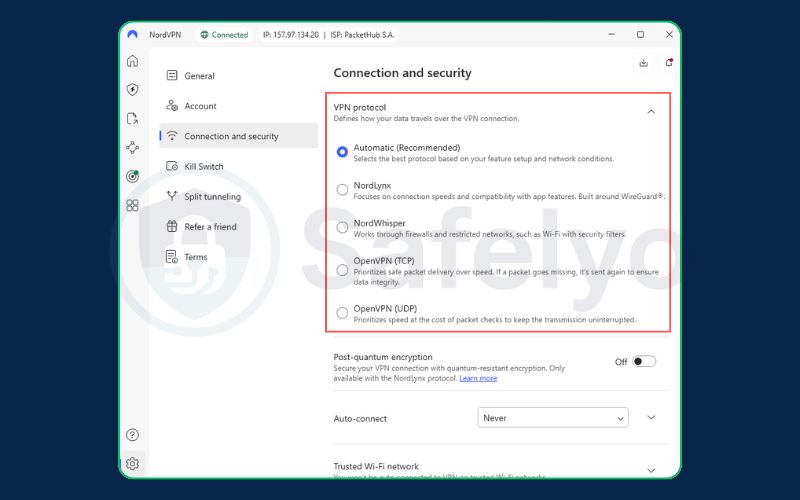
By manually selecting the protocol, you are effectively forcing the app to use a specific port. For instance, selecting OpenVPN TCP usually forces the app to use port 443, while selecting WireGuard will switch it to port 51820.
7. What is port forwarding?
You might also hear about “Port Forwarding.”
Port forwarding is a feature that allows incoming connections from the internet to pass through the VPN and reach your local device. This is primarily used for:
- Torrenting: To improve seeding speeds by allowing peers to connect to you.
- Gaming: To host a game server for friends.
This creates a hole in your security wall, so it should only be used if necessary.
For a deep dive into setup and risks, please read our detailed guide: What is port forwarding?
8. Unsafe ports you should avoid
Not all ports are created equal. Some older ports carry significant security risks because they do not support strong encryption.
- Telnet (Port 23): Used for remote communication but sends everything in plain text.
- FTP (Port 21): Used for file transfers, also unencrypted.
- PPTP (Port 1723): As mentioned earlier, this is easily cracked by hackers.
- HTTP (Port 80): This is standard web traffic, but unlike HTTPS (443), it is unencrypted.
Modern VPN apps will almost never allow you to use these unsafe ports by default. However, if you are manually configuring a VPN on a router or legacy device, ensure you stick to the ports used by WireGuard (51820) and OpenVPN (1194/443). These are rigorously tested and secure.
9. FAQs about VPN port
What port does VPN use?
There is no single answer. Most VPNs use UDP 1194 (OpenVPN) or UDP 51820 (WireGuard) for speed. If those are blocked, they may switch to TCP 443.
Is VPN port 443 safe?
Yes. Port 443 is the standard for HTTPS, which secures all sensitive web traffic like banking. Using a VPN over port 443 is highly secure and excellent for stealth.
How do I find my VPN port number?
You usually cannot see the live port number on a mobile app interface. You can find it by checking your VPN client’s “Connection Logs” in the settings or by looking at which protocol you have selected.
Does a VPN hide my open ports?
Yes. When you connect to a VPN, it generally closes your local ports to the internet. It acts as a shield, preventing hackers from scanning your device for open vulnerabilities.
Is OpenVPN port 443 or 1194?
It can be both. The default configuration is usually UDP 1194. However, it can be configured to run on TCP 443 to help users bypass firewalls.
10. Conclusion
The VPN port acts as the critical gateway for your encrypted tunnel. Selecting the correct port often determines whether you face a blocked connection or enjoy a seamless internet experience.
For most users, sticking to UDP 1194 or UDP 51820 offers the best balance of speed and security. However, if you ever find yourself stuck behind a strict firewall at work or school, remember that switching to TCP 443 is your secret weapon.
You can take control of your connection quality immediately with a simple adjustment. Open your VPN settings right now and check your protocol. If you have been leaving it on “Auto,” try manually selecting WireGuard or OpenVPN UDP to see if you get a speed boost.
For more guides on protecting your data, visit Safelyo to explore our VPN Guides category.