Imagine sending a letter without a return address – you would never get a reply. Your internet connection works the same way. That essential “digital return address” is what we call a Public IP. But what is a public IP address exactly?
In simple terms, it is a globally unique numeric label assigned by your Internet Service Provider (ISP) to your router, allowing your device to communicate with the outside internet. Without it, you couldn’t stream movies, check emails, or load this page.
If you are looking for a quick summary of what a public IP is and why it matters, here are the essential facts:
- What is a public IP?
→ It is the unique “public-facing identifier” assigned by your ISP that allows your router to connect to the internet. - Public vs. Private IP?
→ Public IPs identify your network to the outside world; Private IPs identify specific devices inside your home network. - Does an IP reveal my home address?
→ No. It typically only reveals your general city or region, not your exact physical location. - Does Incognito Mode hide my IP?
→ No. Incognito only stops your browser from saving history; websites and your ISP can still see your public IP. - How can I hide my IP?
→ The most effective way is to use a VPN, which masks your real IP with a secure server address.
However, just like a real home address, leaving it exposed can reveal your location and habits to advertisers and hackers. In this guide, I’ll clear up the confusion between public and private IPs. I will also show you how to check yours in seconds. Additionally, I’ll explain how to control who sees your data, perhaps by using a VPN. Let’s decode your digital identity.
1. What is a public IP address?
To put it simply, a public IP (Internet Protocol) address is the digital “face” your network shows to the world. It is a unique string of numbers that allows your home network to communicate with the rest of the internet. Operating under standard TCP/IP protocols to facilitate data exchange, your public IP ensures that when you click a link, the information finds its way back to your router. This prevents it from going to someone else’s router.
The easiest way to understand this concept is to think of your home network as an apartment building. To receive mail from the post office, the building needs a specific, officially registered street address. This street address is your public IP address. In most home broadband setups, your public IPv4 is unique to your connection at a given time. In CGNAT environments (common on mobile), many users can share one public IPv4.
It allows the rest of the world to find your location on the digital map. Inside that building, you might have many individual apartment units (your phones, laptops, and smart TVs), but the delivery truck (the internet) only concerns itself with that main street address. Without this unique identifier acting as your internet-facing address, websites wouldn’t know where to send the video you just clicked on. They also wouldn’t know where to send the email you are trying to open.
Who assigns it and what it identifies
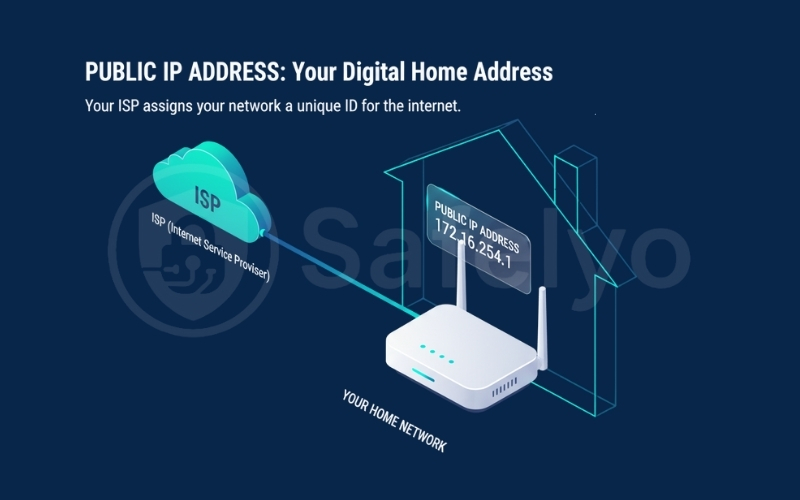
You don’t get to choose this number yourself. Your Internet Service Provider (ISP) automatically assigns a public IP address to your router the moment you connect to their service. It acts as your network’s passport.
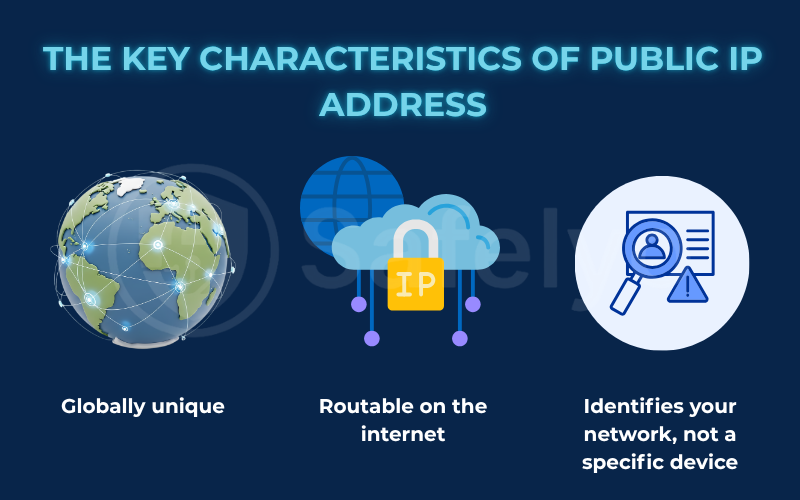
This address is “globally routable,” which is a technical way of saying it is recognized by every other computer on the internet. It effectively bridges the gap between your home and the web. Crucially, a public IP identifies your entire network, not your specific individual device.
Whether you are browsing on your smartphone or gaming on a PC, to the outside world, all that traffic appears to come from that single public IP on your router. Your router stands at the “front door”, holding this ID card and managing traffic for everyone inside.
2. Public IP vs. Private IP: The crucial difference
Now that we know your public IP is your “digital house address”, you might be wondering: “If I have five devices connected to Wi-Fi, do I have five public IP addresses?” The answer is usually no. This is where the confusion between public and private IPs often begins.
To make sure you never mix them up again, here is a simple comparison:
| Feature | Public IP Address | Private IP address |
| Scope | Global (Internet / WAN) | Local (Home Network / LAN) |
| Who assigns it? | Your Internet Service Provider (ISP) | Your Router |
| Uniqueness | Unique worldwide (No two are the same) | Unique only within your local network |
| Visible on Internet? | Yes (Websites see this) | No (Only your devices see this) |
| Purpose | To browse the web and facilitate global communication. | To connect devices inside your home (e.g., printing) |
| Example | 203.0.113.55 (Looks random) | 192.168.1.1 (Standard format) |
2.1. What is a private IP address (local IP)?
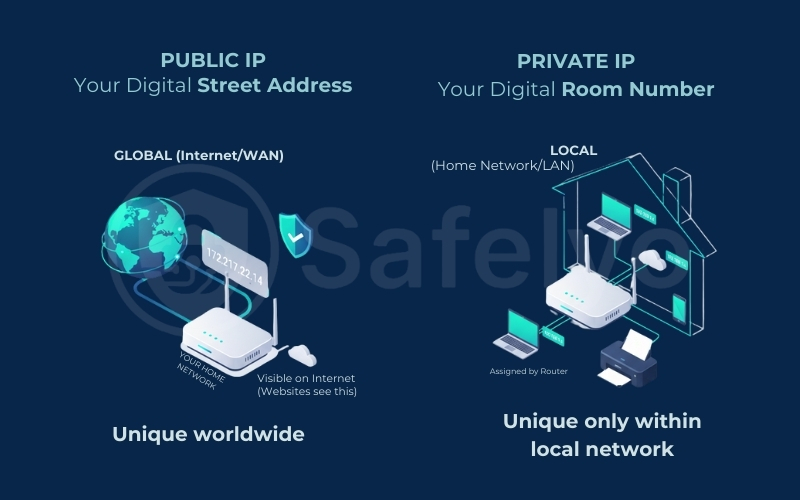
If the public IP is the street address of your apartment building, then the private IP is the specific apartment number (like Room 101 or Room 102).
Your router, not your ISP, assigns a private IP address (also called a local IP). Using a system called DHCP, the main gateway assigns a unique private IP address to every gadget on your local network. This helps identify devices within your own home setup. It hands out these addresses from specific address ranges to your laptop, smartphone, smart TV, and printer so they can talk to each other without getting confused.
This is why you can send a document from your laptop to your wireless printer – they find each other using private IPs. These addresses are hidden from the outside internet. You will likely recognize a private IP address instantly because it almost always starts with the same numbers within reserved address ranges. Since they are only valid inside your “building”, your neighbor could have the exact same private IP (e.g., 192.168.1.5) on their network, and it wouldn’t cause any conflict.
2.2. Why does every device share the same public IP
Here is the reality check: To the outside world (like Google or Netflix), your iPhone, your PC, and your smart fridge all look exactly the same. They all appear to be browsing from the single public IP address assigned to your router.
Think of it this way: When you order a package online, you don’t write “Room 101” on the return address label for the delivery truck. You just write the building’s street address. Your router acts as the building’s concierge. It collects data requests from all your devices (private IPs), stamps them with its single public IP, and sends them out to the internet. When the data comes back, the router remembers which device asked for it and distributes it to the correct “room”.
3. Public IP vs External IP: Are they the same thing?
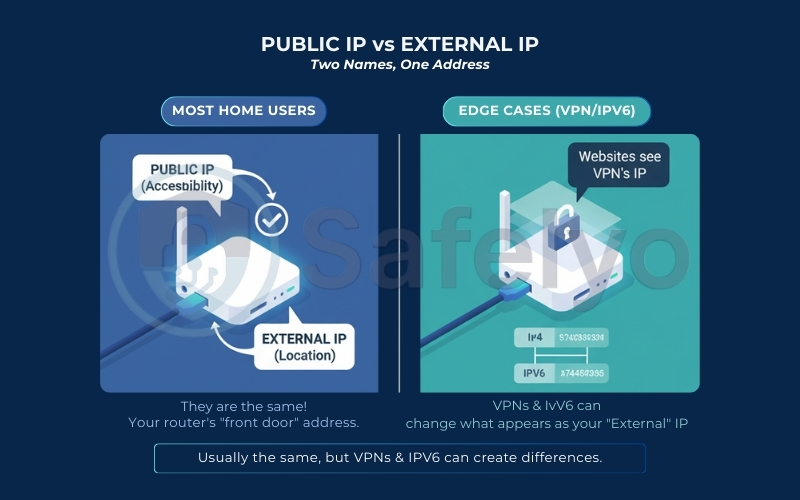
You might often hear the terms “Public IP” and “External IP” used interchangeably, which can be confusing when you are looking at your router settings. The short answer is: Yes, they refer to the same thing, but they are describing it from different perspectives.
When does your Public IP match your External IP?
Here is a quick look at when these two addresses match and when they differ:
| Connection Scenario | Your ISP/WAN IP (router’s real public IP) | What websites see (your external/public-facing IP) | Are they the same? |
| Standard Home Internet | 203.0.113.1 | 203.0.113.1 | Yes (Direct match) |
| Using a VPN | 203.0.113.1 | 185.200.x.x (VPN server IP) | No (Your real IP is hidden) |
| Using a Proxy | 203.0.113.1 | 45.33.x.x (Proxy IP) | No (Masked) |
| Mobile Data (4G / 5G) | 100.64.x.x (Carrier CGNAT internal IP) | 27.123.x.x (Carrier gateway public) | No (CGNAT technology) |
(Note: In most standard home Wi-Fi setups without a VPN, these two will always be identical.)
When “external IP” equals public IP (most home users)
For the vast majority of home internet users, “External IP” is simply another name for your Public IP address. Whether you call it a public or external IP address, it serves the same function of identifying your connection point to the wider web.
Think of it this way: “Public” describes the accessibility of the address, meaning it’s visible to the public internet. Meanwhile, “External” describes its location relative to your home network, meaning it sits on the outside of your router. If you log into your router’s admin panel, you might see a field labeled “WAN IP” or “External IP”. This is the exact same number that appears when you Google “what is my IP”. They are just two different labels for your digital front door.
Edge cases: Why you might see different “public-looking” IPs
However, there are specific situations where the IP address a website detects (what they call your External IP) is different from the Public IP assigned to your router. The most common reason for this is if you are using a VPN or Proxy. When these tools are active, websites see the VPN IP address instead of your true Public IP.
Additionally, modern networks often support both IPv4 (the standard short numbers) and IPv6 (the newer, longer alphanumeric format). If you check your IP on different sites, one might show your IPv4 address while another shows your IPv6 address – both are “public”, but they look completely different.
4. How does a public IP address work in real life?
Understanding how your Public IP interacts with your devices involves a crucial piece of technology that works silently in the background. It is the reason you can watch Netflix on your TV while scrolling Instagram on your phone, all through one internet connection.
4.1. The “front desk” role of your router
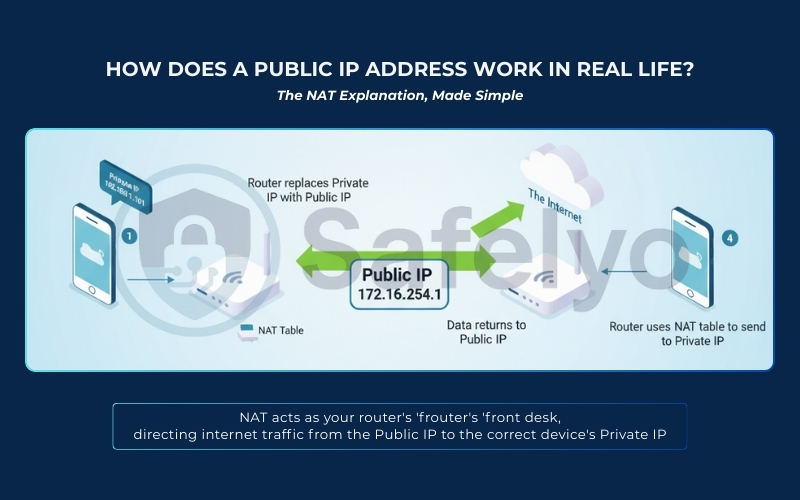
You might be surprised to learn that your smartphone doesn’t actually have a direct line to the internet. Instead, it relies entirely on your router. Think of your router as the front desk receptionist of a busy office building.
When you want to visit a website, your device sends a request to the router using its internal Private IP. The router takes that request, removes the device’s private “room number”, and stamps it with its own Public IP address. It then sends the request out to the internet on your behalf. To the website you are visiting (like Google or Facebook), the visitor isn’t “John’s iPhone” – it is simply your router’s Public IP. The website sends the data back to the router, not directly to your phone.
4.2. NAT in one minute: How traffic reaches the right device
So, when the data comes back from the internet to your router, how does it know which device asked for it? Why doesn’t your email accidentally load on your smart TV? This is where Network Address Translation (NAT) comes in.
NAT is the logbook your router keeps. When your router sends a request out, it makes a quick note: “I just asked YouTube for a video on behalf of the device at 192.168.1.5 (your iPad)”.
When the reply arrives from YouTube at your Public IP, the router checks its NAT logbook. It sees that the iPad asked for it and “translates” the destination from the Public IP back to the iPad’s Private IP. This happens in milliseconds, thousands of times a second.
Without NAT and your Public IP working together, your home network would be chaos, with data packets getting lost at the front door. NAT helps multiple devices share one public IP and reduces direct inbound exposure by default, unless you open ports.
5. Static vs. Dynamic public IP: Which one do you have?
Not all public IP addresses behave the same way. Depending on your internet plan and needs, your “digital address” might be a permanent fixture or a temporary rental.
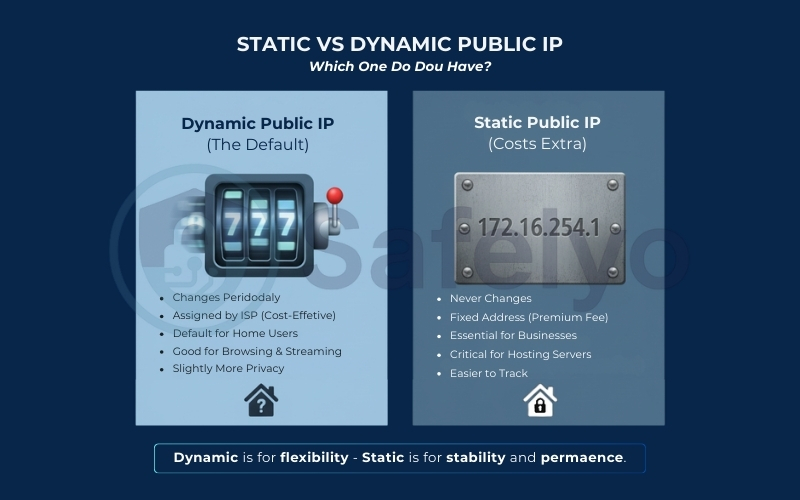
5.1. Dynamic public IP
If you are a typical home internet user, you almost certainly have a Dynamic IP address. This is the standard setting for residential connections because it is cost-effective for ISPs.
Think of a Dynamic IP like a hotel room number. You use it while you are checked in (connected), but once you check out (disconnect or restart your router), the hotel might give that room to someone else. When you return, you get a new room number. ISPs own a large pool of addresses and rotate them among customers.
This rotation happens automatically – sometimes daily, sometimes only when you reboot your modem. The good news is that for browsing, streaming, and gaming, a dynamic IP is perfectly fine and even offers a tiny bit of privacy since your “ID” changes occasionally.
5.2. Static public IP
A Static public IP is exactly what it sounds like: An address that never changes. It is permanently reserved for your specific connection, much like buying a house with a permanent street address rather than renting a hotel room.
Because the world is running out of IPv4 addresses (the standard numeric addresses), ISPs charge a premium monthly fee for this luxury. You usually have to request it specifically. A static IP is essential for users who need to be “found” reliably from the outside world. Having a fixed external IP address ensures that remote connections always find their way to your network without interruption.
For example, if you run a website from your basement, you need stability. If you manage a corporate VPN, you also require a consistent address. Similarly, if you need to whitelist your IP for secure work databases, you cannot afford for your address to change overnight. It provides stability, but it makes you more vulnerable to long-term IP tracking since your digital location is fixed.
Quick self-check: Signs you may have a static IP
How do you know if you are in the minority with a static IP? You likely have one if:
- The Bill: You see a specific line item on your monthly internet bill for “Static IP fee”.
- You run a home server: You host a Minecraft server, a Plex media server, or a personal website.
- Remote Access: You configure port forwarding to access home privacy cameras or your desktop remotely.
- Business Plan: You pay for a “Business Internet” package rather than a residential one.
6. Are public IP addresses traceable?
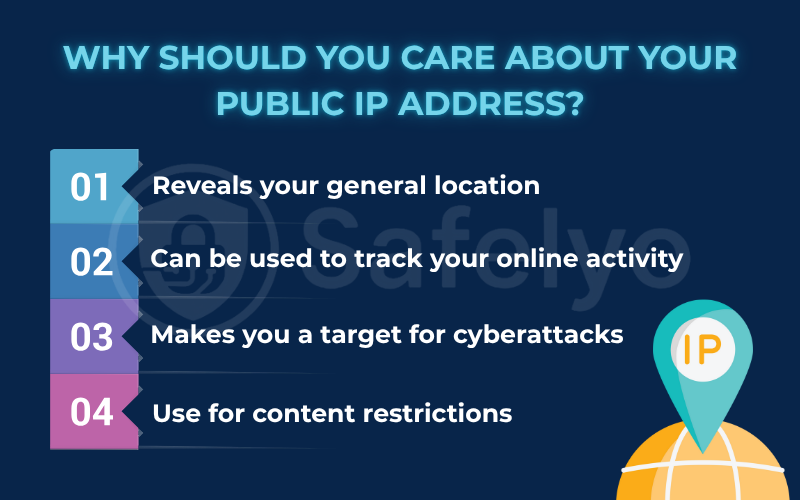
This is the question that worries most people: “If someone has my IP address, can they find me?” The answer is yes, it is traceable, but probably not in the way you see in movies. It’s important to distinguish between what a random stranger can see versus what the authorities can access.
6.1. What your public IP can reveal (and the realistic accuracy)
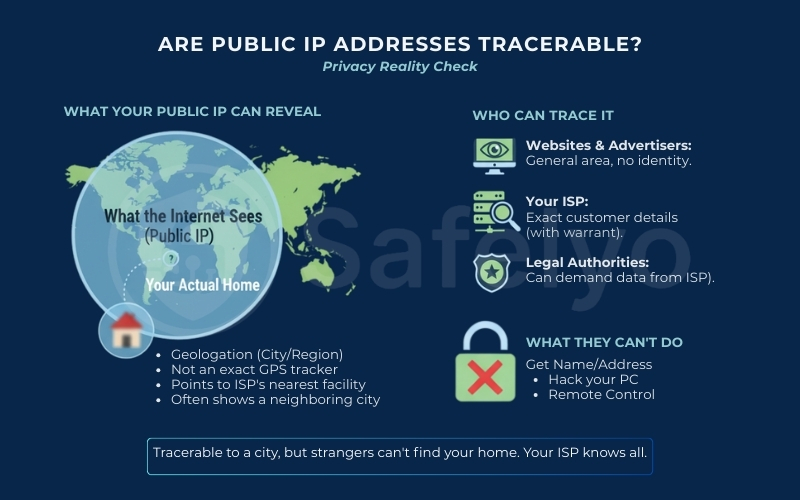
First, let’s bust a myth: Your public IP address is not a GPS tracker. If a random person (like a gamer you beat in a match) gets your IP, they cannot see your exact street address or apartment number.
Instead, an IP address reveals your geolocation. While the geographical location is usually accurate to the city/region, the traceability of an IP stops at the ISP’s node, not your living room. It points to the nearest “node” or facility owned by your Internet Service Provider, not your living room.
- Best-case scenario: It shows your actual city.
- Common scenario: It shows a neighboring city or the major hub where your ISP routes traffic (e.g., you are in New Jersey, but the IP says New York City).
So, while it reveals where you are generally, it doesn’t drop a pin on your front door.
6.2. Who can trace it: Websites, advertisers, your ISP, and authorities
Different entities have different levels of “vision” when it comes to your IP:
- Websites & Advertisers: They use your IP to show you localized content (like weather forecasts) or targeted ads (“Singles in Seattle“). They know your general area but don’t know who you are.
- Your ISP: They hold the master key. Since they assign the IP to your account, they know exactly which customer (name, address, billing info) was using a specific IP at a specific time.
- Legal Authorities: Police or government agencies cannot magically see your name from an IP. However, with a warrant, they can force your ISP to hand over the subscriber details linked to that IP address.
6.3. What people cannot do with only your IP
It is important to sleep soundly knowing what an IP address cannot do. If a hacker or a troll on the internet only has your IP address:
- They cannot remotely control your mouse or keyboard.
- They cannot get your name, phone number, or physical home address.
- They cannot magically hack into your computer to steal files or passwords (unless your device has weak privacy or open ports).
7. What can someone do with your public IP address?
While a stranger cannot find your physical house key just by knowing your public IP, they can still cause digital headaches. Think of exposing your IP like posting your phone number on a public bulletin board: You might get prank calls, annoying telemarketers, or, in rare cases, someone trying to guess your voicemail password.
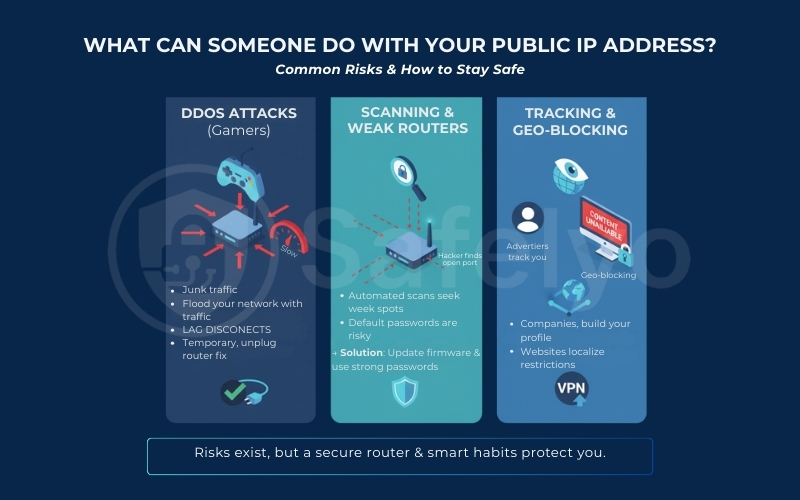
7.1. DDoS attacks (why gamers get hit)
The most aggressive risk is a Distributed Denial of Service (DDoS) attack. This is particularly common in the online gaming community. If you are beating an opponent in a competitive game, a sore loser might find your IP address. This is often visible in peer-to-peer connections. They could then use a tool to flood your network with junk traffic.
This traffic jam overwhelms your router, causing your internet to slow down drastically (“lag”) or disconnect entirely, kicking you out of the game.
The Reality Check: While frustrating, these attacks are temporary. They don’t steal your data; they just break your connection. For most home users with a dynamic IP, simply unplugging your router for 10 minutes to get a new IP address usually stops the attack.
7.2. Scanning and targeting weak routers
Hackers use automated scripts to “scan” thousands of random public IP addresses, looking for vulnerabilities. They are essentially walking down a digital street, jiggling every doorknob to see if one is unlocked.
- The Risk: If your router has open ports, which are digital doors left ajar for specific software, a hacker could exploit this vulnerability. Additionally, if you are using an outdated router with the default password, like “admin/admin,” they could potentially access your network settings.
- The Solution: This sounds scary, but modern routers are quite secure out of the box. As long as you don’t manually open unnecessary ports and you keep your router’s firmware updated, these scans will harmlessly bounce off your firewall like pebbles hitting a steel door. To harden your router further, change the default admin password, disable WPS, and review features like UPnP and port forwarding to ensure you are not exposing services you do not actively use.
7.3. Tracking, profiling, and geo-blocking
The most common annoyance isn’t a hacker, but a corporation. Since your public IP is your digital ID, companies use it to build a profile of your online life.
Geo-blocking: Content providers (like Netflix, BBC iPlayer, or YouTube) look at your IP to decide what you are allowed to watch. If your IP says “Vietnam”, you won’t be able to access content licensed only for the US. This isn’t a privacy threat, but it is a restriction on your freedom to access the open web.
Tracking: Advertisers track your IP across different sites to see what you buy and search for, building a “profile” to serve you targeted ads.
8. How to find your public IP address (2 easy methods)
Finding your public IP address is one of the easiest technical tasks you can perform. You don’t need to install any special software or run complex commands. Here are the two most reliable ways to do it.
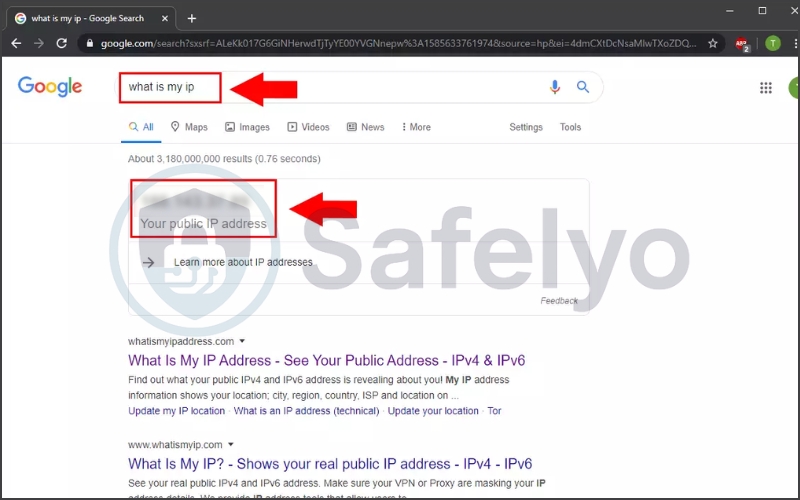
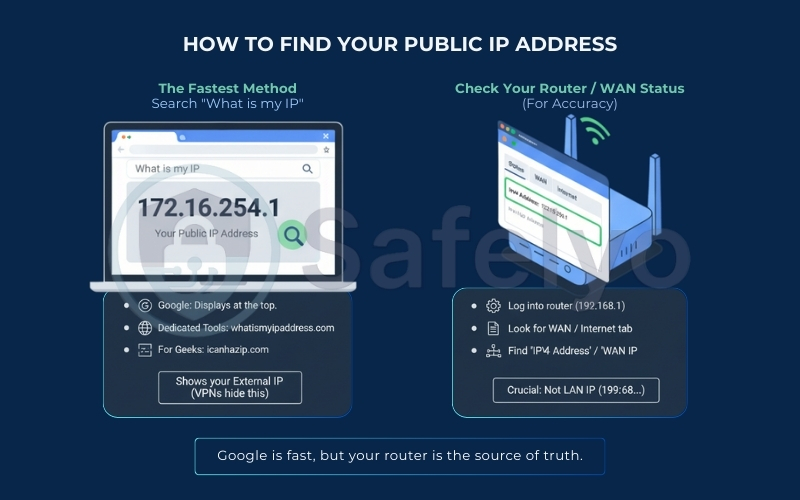
8.1. The fastest method: Search “what is my IP”
The quickest way to see your public IP is to let a website tell you what it sees. Since your browser sends your public IP to every site you visit, many services simply display it back to you.
- Google: Just type “What is my IP” into the Google search bar. Google will display your public IPv4 or IPv6 address at the very top of the results page.
- Dedicated Tools: For more detailed information (like your ISP name or estimated city), you can visit sites like whatismyipaddress.com.
- For a clean text-only result: If you prefer a clean, text-only response without ads, try icanhazip.com.
Remember, this method displays your External IP address, so if you are using a VPN, you will see the VPN’s address, not your actual one.
8.2. Check your router/WAN status (for accuracy)
To confirm your “true” public IP (the one physically assigned to your home), you should check your router directly. This is the most accurate method because it bypasses any browser caches or VPNs running on your computer.
- Log in to your router’s admin panel (usually by typing
192.168.1.1or192.168.0.1into your browser). - Look for a tab labeled Status, WAN, or Internet.
- Find the field labeled “IPv4 Address” or “WAN IP”.
Crucial Note: Ensure you are looking at the WAN section, not the LAN section.
- If the number starts with
192.168.x.xor10.x.x.x, that is your Private IP, not your Public IP. - If the IP here matches what you saw on Google, you have a direct, standard connection.
- If they are different, you might be behind a carrier-grade network (CGNAT) or a proxy.
9. How to protect your public IP address (what works and what doesn’t)
Now that you know your public IP is your public-facing identifier, you might want to keep it private. However, there is a lot of bad advice out there about how to do this. Let’s separate the myths from the effective tools.
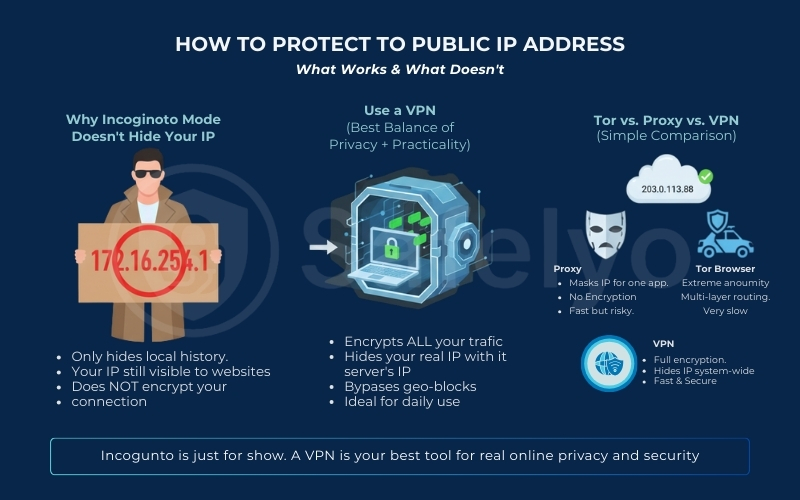
9.1. Why doesn’t incognito mode hide your IP
A common misconception is that opening an Incognito or Private Browsing window makes you invisible. It does not. Incognito mode only prevents your computer from saving your history, cookies, and form data locally. It stops your family members from seeing your browsing history, but it does absolutely nothing to mask your identity online. Your ISP, the websites you visit, and network administrators can still clearly see your Public IP address and everything you are doing.
9.2. Use a VPN (best balance of privacy and practicality)
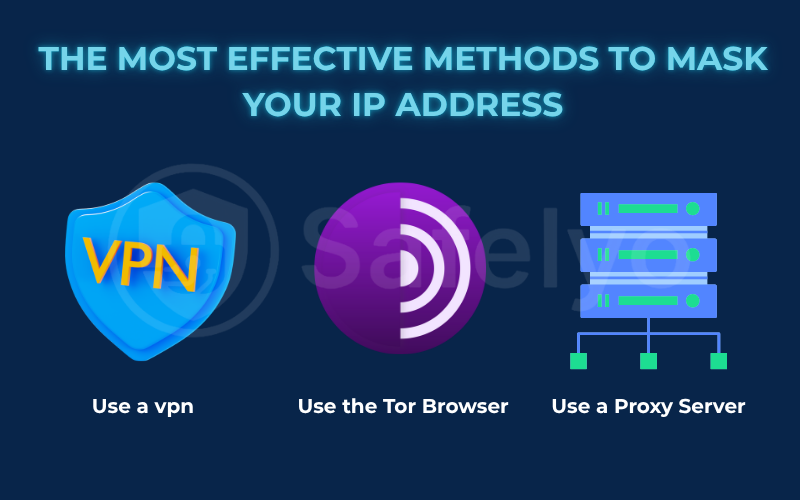
The most effective way to hide your public IP address is to use a Virtual Private Network (VPN). When you switch on a VPN, you are essentially creating a secure, encrypted VPN tunnel between your gadget and a VPN server located somewhere else in the world. Instead of your traffic going directly from your router to the website, it detours through this server first.
- The Result: The website you visit sees the VPN server’s IP address, not your home IP. If you connect to a server in London, the internet thinks you are in London.
- The Benefit: This not only hides your location but also encrypts your data, making it unreadable to your ISP or hackers on public Wi-Fi. This layer of obfuscation significantly enhances your online privacy and strengthens your overall network security against prying eyes.
For most users, a VPN offers the perfect balance of speed, security, and ease of use. If you are new to this technology, check out our guide and explore our top picks for the best VPNs to get started.
9.3. Tor vs. Proxy vs. VPN
Not all privacy tools are created equal. Here is a quick breakdown to help you choose:
- VPN: Like an armored car. It hides your IP and encrypts all internet traffic leaving your gadget. It is the best all-around choice for daily privacy, streaming, and security.
- Proxy: Like a mask. It can hide your IP for a specific app (often just your browser), but it typically does not provide end-to-end protection for your entire device like a VPN does. This makes it fine for simple access or testing, but a poor choice for privacy-sensitive tasks.
- Tor Browser: Like a maze. It bounces your traffic through multiple volunteer computers around the world. It provides extreme anonymity but is often too slow for streaming or daily browsing.
9.4. Quick comparison: Which tool should you choose?
To help you decide which tool fits your needs, here is a breakdown of how they stack up against each other:
| Feature | Proxy | Tor Browser | VPN (Virtual Private Network) |
| Hides Public IP? | Yes | Yes | Yes |
| Data protection | No (Your data is visible) | High (Multi-layered) | High (Strong encryption) |
| Speed | Fast | Very Slow | Fast |
| Scope | Browser only | Tor Browser only | Entire device |
| Best For | Bypassing simple website blocks | Extreme privacy / Whistleblowing | Daily security, streaming & privacy |
Expert Note: For 99% of users, a VPN is the right choice because it protects everything on your gadget – including your banking apps and games – without sacrificing speed as Tor does.
10. Does a VPN hide your public IP address?
The short answer is yes. A VPN is widely considered the most effective tool for masking your public IP address from the outside world. However, while it is powerful, it is important to understand the difference between hiding your location and hiding your identity.
10.1. What websites see when VPN is on
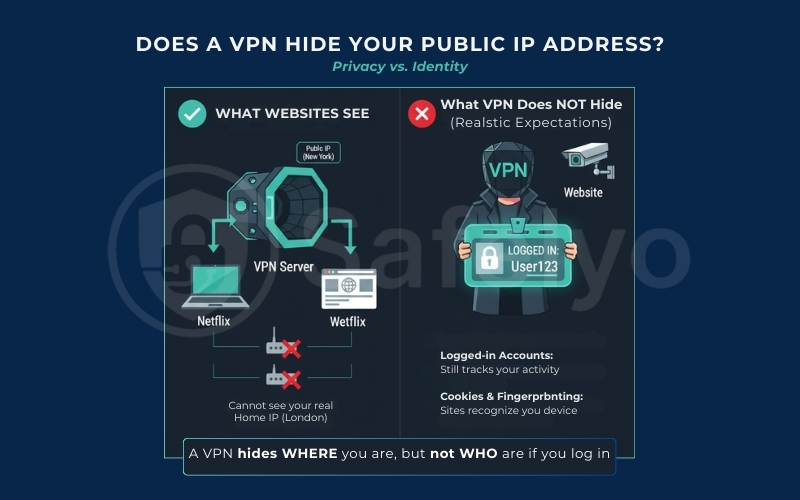
When you switch on a VPN, you are essentially putting on a digital mask. Instead of seeing your router’s true Public IP (which points to your home city), websites and services see the Public IP of the VPN server you have chosen.
For example, if you are sitting in your living room in London and connect to a VPN server in New York, Netflix will see a New York IP address. Similarly, Google will also recognize this New York IP address. Your ISP can still see that you are connected to a VPN server (its IP address). However, it generally cannot see the contents of your traffic or the specific websites you visit inside the encrypted tunnel. This is true as long as the VPN is properly configured and you are not experiencing DNS leaks or using split tunneling.
10.2. What VPN does not hide (realistic expectations)
While a VPN hides where you are, it doesn’t necessarily hide who you are if you interact with websites. It is not an invisibility cloak for your entire digital life.
- Logged-in accounts: If you hide your IP but then log into your Google or Facebook account, those companies still know exactly who you are. They are monitoring your account activity, not just your connection.
- Cookies & fingerprinting: Websites place “cookies” in your browser or use “fingerprinting” (analyzing your screen resolution, operating system, and fonts) to recognize your device, even if your IP address changes every day.
Think of a VPN like wearing a disguise to a store. It stops strangers from recognizing your face (your IP), but if you hand the cashier your credit card (log in), they still know exactly who is buying the groceries.
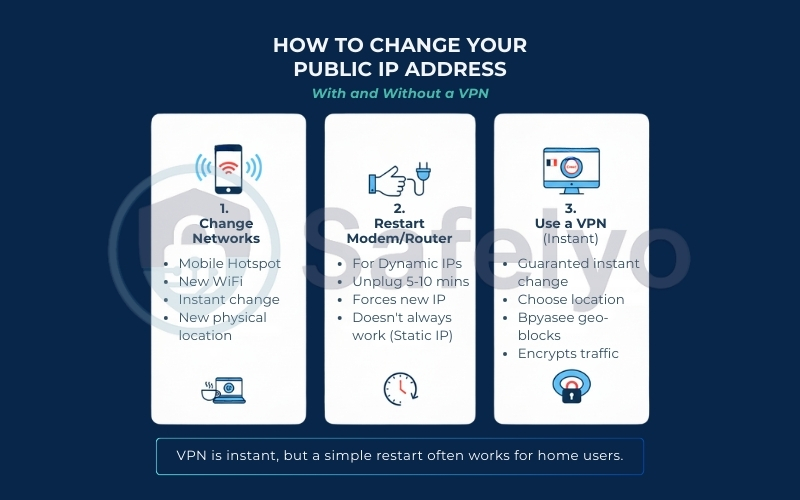
11. How to change your public IP address (with and without a VPN)
There are valid reasons to want a new digital identity. Perhaps you were unfairly banned from a game server. You might want to evade a tracking cookie, or you simply want a fresh start. Changing your public IP address is often easier than you think, and you don’t always need paid software to do it.
11.1. Change networks (mobile hotspot, new Wi-Fi)
The simplest non-technical way to get a different public IP is to physically switch the network you are connecting to. Remember, your IP is assigned to the router, not your computer. If you disconnect your laptop from your home Wi-Fi and connect it to a coffee shop’s Wi-Fi or your smartphone’s 4G/5G Personal Hotspot, your public IP will change instantly. To the internet, you are now browsing from a completely different physical location.
11.2. Restart modem/router (when it works, when it won’t)
If you have a standard residential internet plan, you likely have a Dynamic IP. This means you can often “force” your ISP to give you a new address by resetting your connection.
- How to do it: Unplug your modem and router from the power outlet.
- The trick: Leave it powered off long enough for the DHCP lease to refresh. For some ISPs, 5–10 minutes is enough, but lease times vary -so it may take longer before you are assigned a different public IP.
- When it won’t work: If you turn it back on and the IP is the same, your ISP might have set a very long lease time, such as 24+ hours. Alternatively, you might actually have a Static IP. In that case, this method won’t work regardless of how many times you reboot.
11.3. Use a VPN for an instant IP change
If unplugging cables feels too prehistoric, using a VPN is the modern solution. It is the only method that guarantees an immediate change on demand.
With a VPN app, you simply click a server location (e.g., “France”), and your public IP changes instantly to match that French server. You can switch identities as many times as you like in seconds. This is the preferred method for bypassing geo-blocks because, unlike restarting your router, you get to choose where your new IP is located.
12. FAQs about public IP addresses
Let’s answer a few more common questions to make sure you’re an expert on your internet address.
Can two devices have the same public IP address?
Yes, absolutely. In fact, this is how almost every home network works. If your smartphone, laptop, and smart TV are all connected to the same Wi-Fi router, they all share the single public IP address assigned to that router. To the outside internet, all traffic from these devices looks like it is coming from the same “house”. Your router sorts out the data internally using its unique private IP addresses.
Is my public IP the same as my MAC address?
No, they are completely different. Think of your Public IP as your current location (where you are living right now). It changes if you move houses or switch networks. Your Media Access Control address is like your fingerprint. It is a permanent serial number stamped onto your device’s network card at the factory. While your IP address helps the internet send data to your router, the Media Access Control address helps your router send data to your specific device.
Does restarting the router change my public IP?
It depends. If you have a dynamic IP, which most people do, restarting the router can change your IP. However, this only works if you leave it unplugged long enough for the “lease” to expire. This usually takes about 5 to 10 minutes. However, if your ISP has set a very long lease time (e.g., 24 hours) or if you have a paid static IP, a simple restart will not change your address.
Why is my public IP different from what my router shows? (Advanced)
If the IP address you see on Google differs from the “WAN IP” inside your router settings, one of three things is usually happening:
- You are using a VPN: The website sees the VPN server, while your router sees your real ISP connection.
- CGNAT (Carrier-Grade NAT): Your ISP is short on addresses, so they are grouping your whole neighborhood under one giant public IP. This is common with mobile networks and smaller local ISPs.
- IPv6: You might be looking at your IPv4 address on the router, but the website is detecting your newer IPv6 address.
13. Conclusion
Understanding your public IP address is the first step in taking control of your digital life. It is not something to fear – it is simply the “digital return address” that makes the internet work. Without it, you couldn’t watch videos, send emails, or read this article.
You don’t have to leave that front door wide open. Whether you choose to restart your router for a fresh start or use a trusted VPN to encrypt your traffic and mask your location, the choice is yours.
While you can’t get rid of your public IP address, you can – and should – control who gets to see it. At Safelyo, we believe that using a tool like a VPN is the easiest and most effective way to shield your digital identity. Ready to take back control of your privacy? Explore our expert rankings of the best VPN services to find the ideal tool for protecting your IP address today. Additionally, you can continue your learning journey in our VPN Guides category.