Did you know your online activity in Australia is legally being tracked? Internet service providers are required by law to store your browsing metadata for two full years. This massive data retention policy severely compromises your daily digital privacy.
The easiest way to protect yourself is by using a virtual private network (VPN). This essential tool encrypts your internet connection and keeps your personal data safe from unwanted monitoring.
To help you reclaim your privacy, we have ranked the Best VPN for Australia in 2026. Our guide breaks down real-world test results, local server speeds, and the easiest ways to secure your devices.
| Rank | VPN Name | Best For |
|---|---|---|
| #1 | NordVPN | Best overall performance and security |
| #2 | Surfshark | Best value and unlimited devices |
| #3 | ExpressVPN | Best for consistent network reliability |
| #4 | Proton VPN | Best for open-source transparency |
| #5 | PureVPN | Best budget long-term option |
Safelyo is reader-supported. When you buy through links on our site, we may earn an affiliate commission to help maintain our operations. This does not affect our independent testing process.
Note: The information provided in this guide is for reference purposes and was recorded in February 2026. Please be aware that the listed prices may fluctuate depending on your specific region, seasonal sales, and ongoing promotional offers.
1. How we evaluate and test Australian VPNs
To ensure we provide accurate recommendations, our review team follows a strict and objective testing methodology. We evaluate each service based on Australian server density. We look for consistent availability in major cities like Sydney, Melbourne, and Brisbane.
A proven no-logs policy is another critical factor due to the local Five Eyes jurisdiction. We also test streaming unblocking reliability for essential local services like Stan, Binge, Kayo Sports, ABC iview, SBS On Demand, 9Now, 10 play, and Foxtel Now.
Finally, we consider reliable P2P support as an important factor. We keep in mind the local copyright regulations and ISP tracking practices in the region.
Our practical assessments took place in a controlled test environment. We used a Windows 11 PC equipped with standard testing tools. We utilized Ookla Speedtest for performance metrics and checked for network vulnerabilities using IPLeak.net and dnsleaktest.com. All speed tests were conducted from Vietnam using the WireGuard protocol to establish a clear baseline.
2. Best VPN for Australia in 2026: Top 5 options ranked
The market offers many choices, but a few specific services consistently perform well in objective testing. These five options balance connection speeds, privacy standards, and local server availability to meet your daily networking needs.
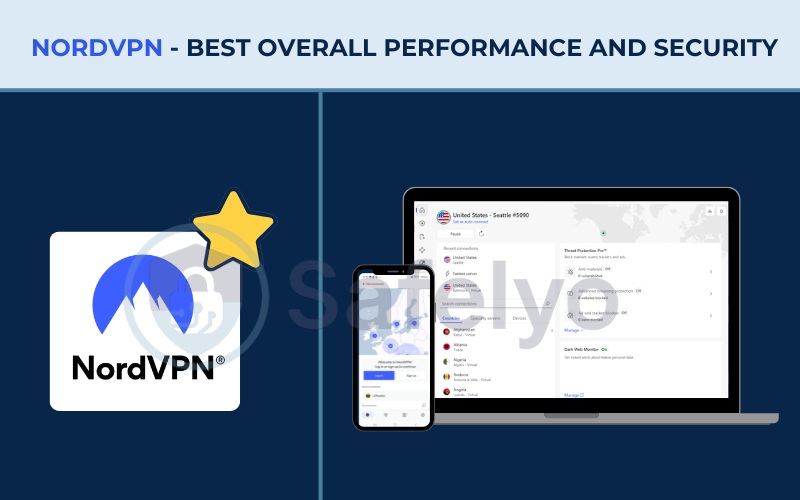
2.1. NordVPN – Best overall performance and security
NordVPN provides a highly balanced mix of speed and security for users in this region. The service operates from a privacy-friendly jurisdiction in Panama. This location keeps it far away from the Five Eyes intelligence sharing alliance.
This foundational privacy is backed by a heavily audited infrastructure. It ensures your browsing habits remain completely confidential. It also maintains a large footprint in major Australian cities, which helps maintain low latency for everyday tasks.
| Feature | Details |
|---|---|
| Starting price | ~$3.39/mo (2-year Basic plan) |
| Servers | 8,900+ global / 5 Australian cities (Adelaide, Brisbane, Melbourne, Perth, Sydney) |
| Jurisdiction | Panama (Safe, outside 5/9/14 Eyes) |
| No-logs policy | Strictly audited |
| Security features | Threat Protection Pro, Double VPN, Post-Quantum Encryption, Kill Switch |
| Streaming support | Unblocks 17+ Netflix regions, Disney+, Hulu, HBO Max, Stan, Binge, Kayo, SBS On Demand, 9Now, 10 play, and Foxtel Now |
| P2P and copyright | Specialized P2P servers available; audited no-logs policy protects against ISP tracking |
| Simultaneous connections | 10 devices |
Server network and daily usability
With servers spread across five major Australian cities, the network infrastructure is highly optimized for local connections. Users do not have to spend time searching for an uncluttered server.
The application connects quickly upon launch. This ensures that local browsing feels natural and responsive without unexpected timeouts or connection drops.
Privacy and security tools
The Threat Protection Pro feature adds a significant layer of practical security for daily use. It actively blocks malicious sites and intrusive ads before they load on your device. This is especially useful against phishing attempts.
Combined with an independently audited no-logs policy, this provides solid assurance against local metadata retention laws and tracking attempts.
Streaming and P2P capabilities
For streaming and file sharing, the service performs exceptionally well. It reliably unblocks popular local platforms like Stan, Binge, and Kayo Sports without triggering proxy detection errors.
Specialized servers are also available to handle peer-to-peer traffic safely. These servers successfully mask your IP address from copyright monitoring groups.
Speed and performance
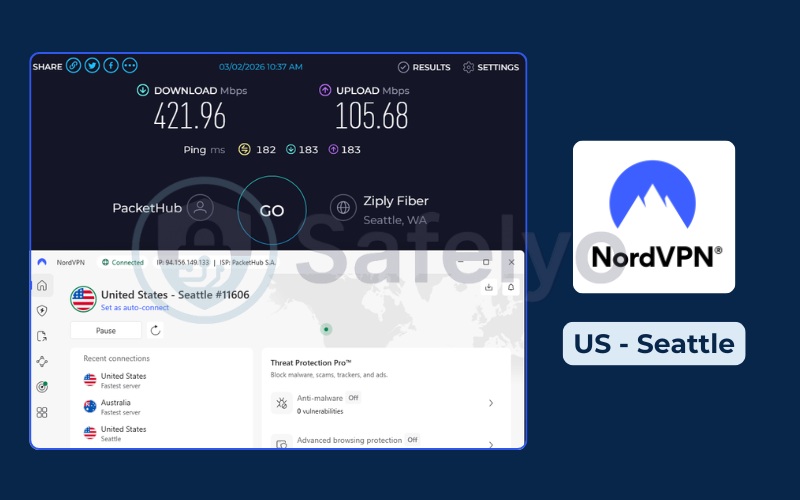
During our assessments using the WireGuard protocol, the service maintained excellent download and upload rates. The speed loss was minimal even when connecting to distant US servers.
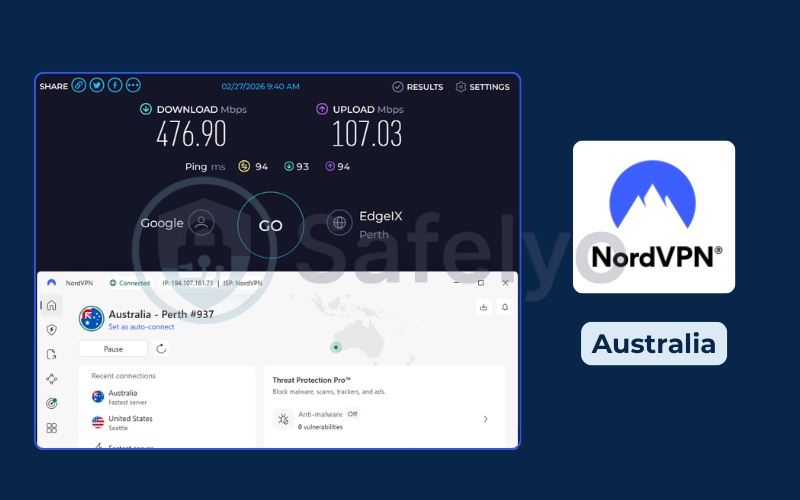
As seen in the test results below, local connections in Australia yielded a low ping of 94 ms. This latency is low enough for smooth 4K streaming, stable video conferencing, and casual online gaming.
| Server Location | Download (Mbps) | Upload (Mbps) | Ping (ms) |
|---|---|---|---|
| US | 421.96 | 105.68 | 182 |
| Australia | 476.90 | 107.03 | 94 |
To help you decide, here is a quick summary of what works well with NordVPN and where it falls a bit short.
| Pros | Cons |
|---|---|
|
|
Best for: Users who want high speeds and reliable unblocking of Australian streaming platforms.
2.2. Surfshark – Best value and unlimited devices
Surfshark stands out as a highly cost-effective solution for households with multiple internet-connected devices. It operates a modern, RAM-only server fleet that ensures no data is permanently written to physical hard drives.
The service balances affordability with strong encryption and consistent access to popular streaming platforms. It also provides a clean, beginner-friendly interface that makes digital privacy accessible to everyone.
| Feature | Details |
|---|---|
| Starting price | ~$1.99/mo (Industry-leading value) |
| Servers | 4,500+ servers in 100 countries (100% RAM-only fleet) / 5 Australian cities |
| Jurisdiction | The Netherlands (9 Eyes, but strictly audited No-logs) |
| No-logs policy | Strictly audited |
| Security features | Alternative ID, CleanWeb 2.0 (Ad/Malware blocker), Dynamic MultiHop, Kill Switch |
| Streaming support | Unblocks Netflix, Disney+, Hulu, HBO Max, Stan, Kayo, Binge, 10 play, 9Now |
| P2P and copyright | Allowed on all servers; strict no-logs policy prevents copyright notice forwarding |
| Simultaneous connections | Unlimited |
Unlimited household coverage
The most notable advantage of this service is its unlimited simultaneous connections policy. You can protect every smartphone, tablet, and computer in your home using a single subscription account.
This makes it an ideal choice for large families or users with an extensive hardware ecosystem who want to keep costs low.
Streaming reliability and stability
The application covers all essential local streaming services without consistently triggering proxy errors. It seamlessly unblocks global libraries on Netflix and Hulu, alongside local options like 9Now or 10 Play.
When users transition between home Wi-Fi and mobile data networks, the connection remains incredibly stable. This seamless switching prevents frustrating drops during mobile browsing or video playback.
Privacy and ad blocking
Privacy is reinforced through an independently audited no-logs policy. This ensures your online footprint remains hidden from internet service providers.
Additionally, the CleanWeb feature effectively blocks annoying advertisements. It also prevents tracking scripts from following your online activities across different websites.
Speed and performance
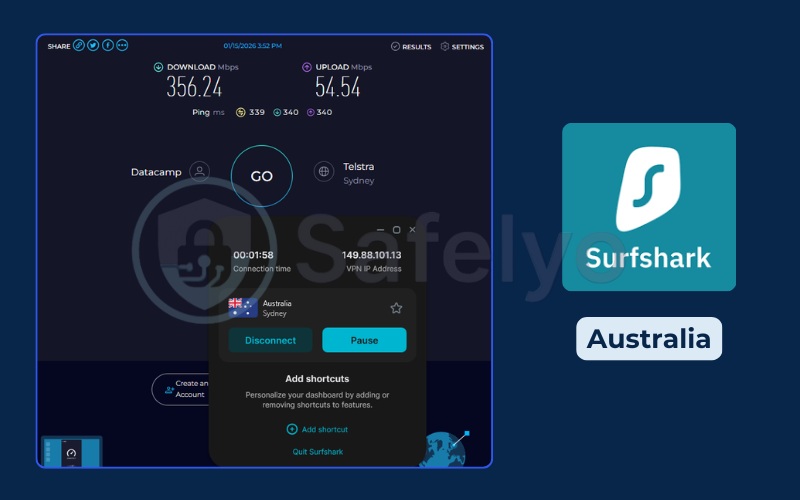
The network delivers reliable bandwidth across both domestic and international connections. While the ping on local servers is higher than some competitors (339 ms in our test), the download speeds remain more than sufficient for high-definition video streaming.
The international routing also handles large file transfers reasonably well. However, competitive gamers might experience noticeable lag.
| Server Location | Download (Mbps) | Upload (Mbps) | Ping (ms) |
|---|---|---|---|
| US | 372.46 | 88.88 | 264 |
| Australia | 356.24 | 54.54 | 339 |
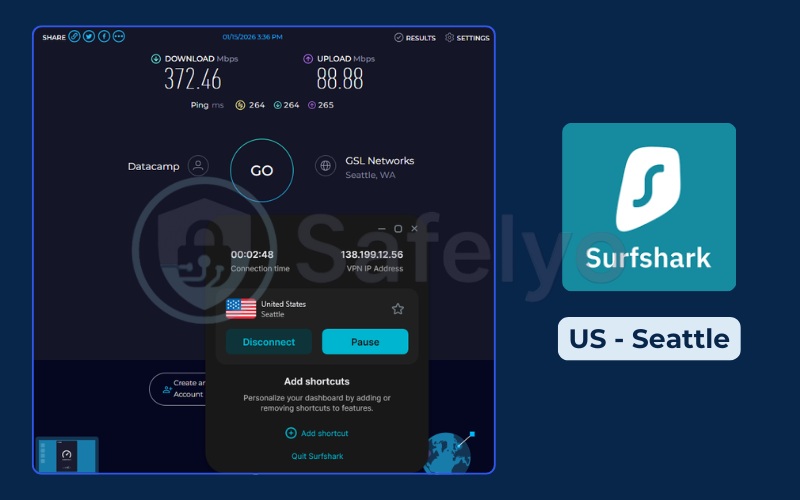
Here is a realistic look at the best parts of Surfshark and a few minor issues to keep in mind.
| Pros | Cons |
|---|---|
|
|
Best for: Budget-conscious users and large households with multiple devices.
2.3. ExpressVPN – Best for consistent network reliability
ExpressVPN is a premium option recognized for its consistent performance and straightforward hardware compatibility. Based in the British Virgin Islands, it operates safely outside of major intelligence-sharing agreements.
The service prioritizes network stability and user-friendly applications across a wide range of operating systems. It is particularly well-known for its robust proprietary protocol and excellent customer support infrastructure.
| Feature | Details |
|---|---|
| Starting price | ~$2.79/mo |
| Servers | 3,000+ in 105 countries / 5 Australian cities |
| Jurisdiction | British Virgin Islands (Safe, outside 5/9/14 Eyes) |
| No-logs policy | Strictly audited |
| Security features | Threat manager, Network lock (Kill switch) |
| Streaming support | Unblocks all major global and Australian streaming sites reliably |
| P2P and copyright | Fully supported across all servers; BVI jurisdiction safely ignores data requests |
| Simultaneous connections | 10 to 14 devices |
Router integration and hardware support
We recognize this software for its reliability on secondary devices. It works exceptionally well on Smart TVs, streaming sticks, and gaming consoles where native privacy applications are often lacking.
The dedicated router application is a major practical benefit. It allows users to secure their entire home network at the source without dealing with complex manual firmware configurations.
Network stability and protocols
The secure connection rarely drops, providing a steady tunnel for continuous browsing. The Lightway protocol ensures fast network handshakes, meaning the application connects almost instantly upon launch.
It effectively unblocks both global and regional streaming libraries. You can switch between regions without requiring frequent manual server adjustments.
Privacy standards and jurisdiction
Privacy standards are rigorous and backed by regular independent audits. It utilizes TrustedServer technology to ensure all servers run purely on volatile RAM.
This guarantees that all user data is wiped completely upon every reboot. Because it is based in the British Virgin Islands, the company is not legally obligated to collect or store user data.
Speed and performance
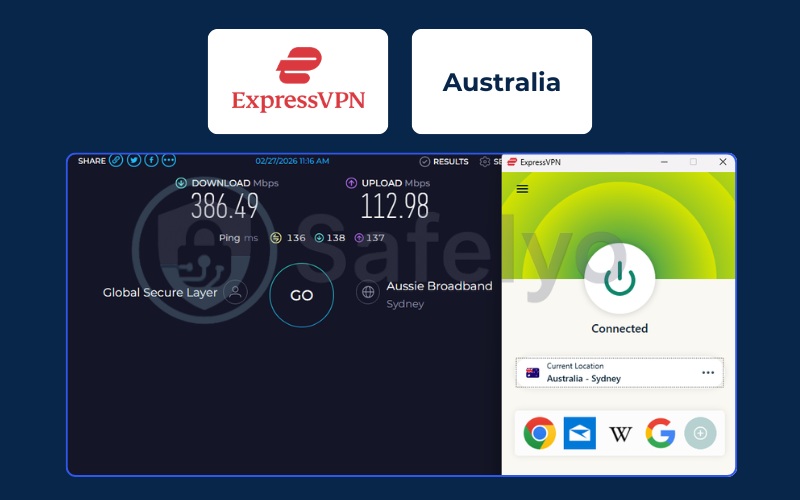
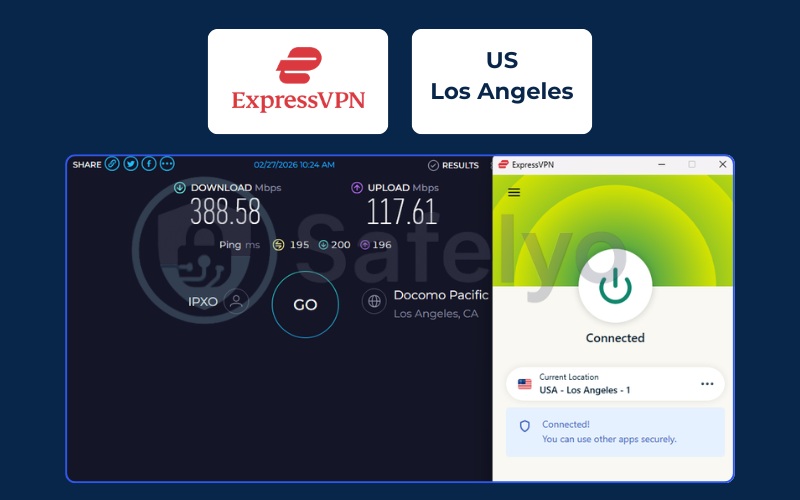
Our testing data shows highly consistent speeds across different continents. The upload speeds are particularly strong, which benefits users who frequently share large files or participate in video conferences.
As shown below, the local ping of 136 ms ensures a smooth and responsive browsing experience for daily tasks. This makes it a highly reliable daily driver.
| Server Location | Download (Mbps) | Upload (Mbps) | Ping (ms) |
|---|---|---|---|
| US | 388.58 | 117.61 | 195 |
| Australia | 386.49 | 112.98 | 136 |
Here is a quick overview of why ExpressVPN stands out, along with a few drawbacks to consider.
| Pros | Cons |
|---|---|
|
|
Best for: Users who want to install a VPN directly on their home router to cover all devices at once.
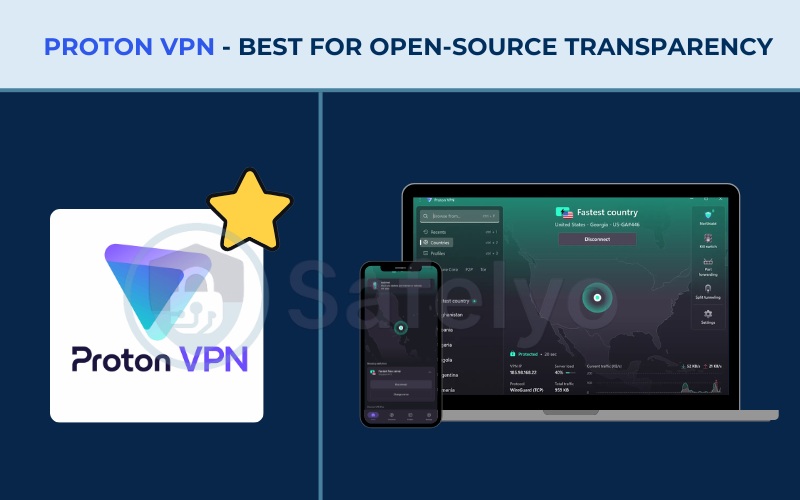
2.4. Proton VPN – Best for open-source transparency
Proton VPN caters directly to users who place maximum priority on data security and operational transparency. Developed by a team of scientists in Switzerland, the service benefits from strong national privacy laws.
It features entirely open-source applications, allowing independent researchers to verify the code for potential vulnerabilities. This rigorous approach makes it a favorite among journalists and privacy advocates.
| Feature | Details |
|---|---|
| Starting price | ~$2.99/mo (Best value 2-year plan) |
| Servers | 18,000+ servers in 129 countries / 5 Australian cities |
| Jurisdiction | Switzerland (Safe, strict privacy laws) |
| No-logs policy | Strictly audited |
| Security features | Secure Core, NetShield, 100% Open Source, Kill Switch |
| Streaming support | Unblocks major sites (Netflix, Disney+); partial local streaming access |
| P2P and copyright | Optimized P2P servers on paid plans; free tier strictly blocks torrenting |
| Simultaneous connections | 10 devices |
Swiss privacy and transparency
The secure Swiss jurisdiction makes this provider highly resilient against foreign intelligence data requests. The commitment to open-source software and regular independent audits provides solid confidence for users handling sensitive information.
Furthermore, the Secure Core feature routes traffic through privacy-friendly countries before reaching the final destination. This adds an extra layer of defense against network surveillance.
Free tier capabilities and limits
The service offers a free tier with unlimited data, which is rare in the cybersecurity industry. This free version is excellent for basic browsing needs and securing public Wi-Fi connections.
However, it is important to note that the free version strictly blocks peer-to-peer traffic and offers limited server access. Upgrading to the premium plan is necessary to unlock optimized servers and better streaming capabilities.
Streaming consistency
While the premium network delivers adequate speeds for daily tasks, it possesses fewer local servers compared to top rivals. This can occasionally result in mixed reliability for local streaming platforms.
Some lesser-known regional services may detect the proxy. They might temporarily block access until you switch to a different server.
Speed and performance
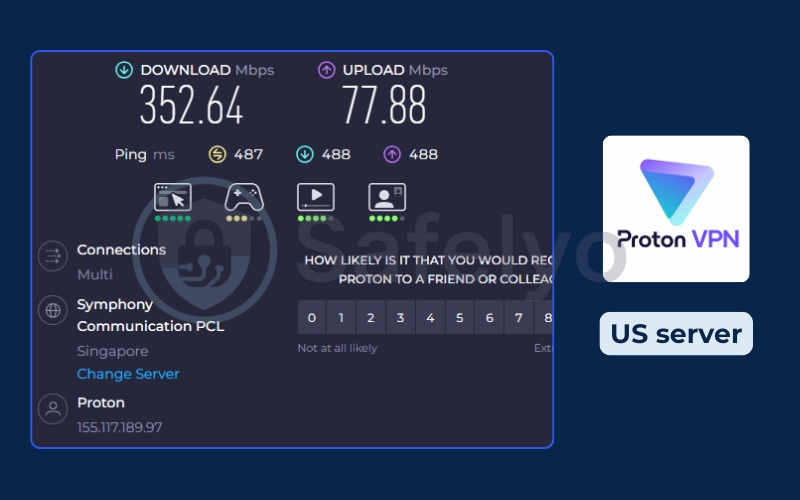
The US server test showed decent download speeds of 352.64 Mbps. However, the ping of 487 ms indicates it might not be ideal for latency-sensitive tasks like competitive gaming or high-frequency trading.
Despite this, it remains an impenetrable fortress for daily web browsing and private file transfers.
| Server Location | Download (Mbps) | Upload (Mbps) | Ping (ms) |
|---|---|---|---|
| US | 352.64 | 77.88 | 487 |
To wrap up, here are the main reasons to choose Proton VPN, plus a few limitations you should know about.
| Pros | Cons |
|---|---|
|
|
Best for: Privacy purists who prioritize data security and open-source software over pure streaming coverage.
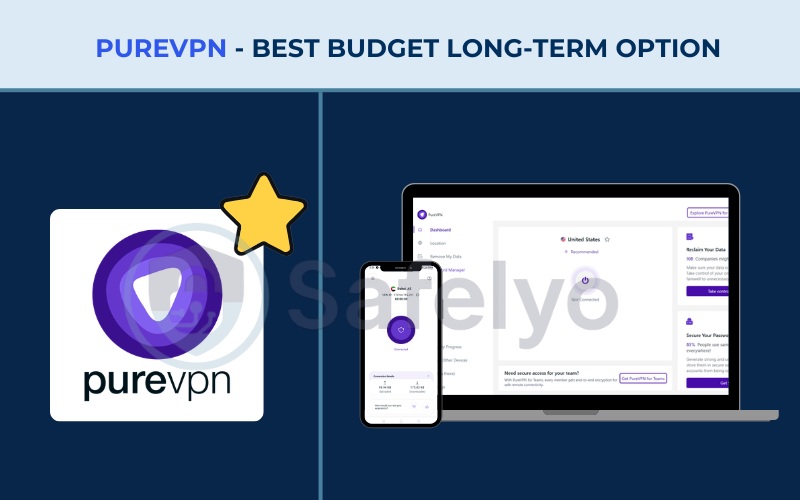
2.5. PureVPN – Best budget long-term option
PureVPN targets the ultra-budget segment by offering premium features at a very low monthly rate on its extended plans. The company maintains an always-on audit policy, which allows an independent firm to inspect its server infrastructure without prior notice.
It provides a vast global network with reliable access to local sites. This makes it an appealing choice for users who want affordable protection without sacrificing core security functions.
| Feature | Details |
|---|---|
| Starting price | ~$1.49/mo (5-Year Plan) |
| Servers | 6,000+ servers in 65+ countries / 4 Australian cities |
| Jurisdiction | British Virgin Islands (Safe, outside 5/9/14 Eyes) |
| No-logs policy | Audited (Always-on KPMG) |
| Security features | Kill switch, Quantum-resistant keys |
| Streaming support | Unblocks Netflix, Disney+, Hulu, Prime, HBO Max, BBC iPlayer |
| P2P and copyright | Supported; always-on audit protects against ISP tracking |
| Simultaneous connections | 10 devices |
Long-term value and continuous audits
The low cost of the five-year plan makes this a highly attractive option for budget-conscious users. It delivers essential security tools, including a reliable kill switch and split tunneling, without requiring a massive upfront investment.
The always-on KPMG audit ensures continuous verification of their strict no-logs claims. This adds an extra layer of trust that many budget providers lack.
Future-proof security technology
To future-proof user data against emerging threats, the service implements quantum-resistant encryption keys. This forward-thinking feature ensures that intercepted data cannot be easily decrypted by advanced computing systems in the future.
It provides long-term peace of mind for users concerned about sophisticated data breaches.
Streaming access and interface design
The streaming capabilities are quite strong, reliably unblocking major international and domestic video libraries. However, the desktop application interface can sometimes feel slightly cluttered compared to more streamlined competitors.
It may require a few extra clicks to navigate the advanced settings menu and find specific features.
Speed and performance
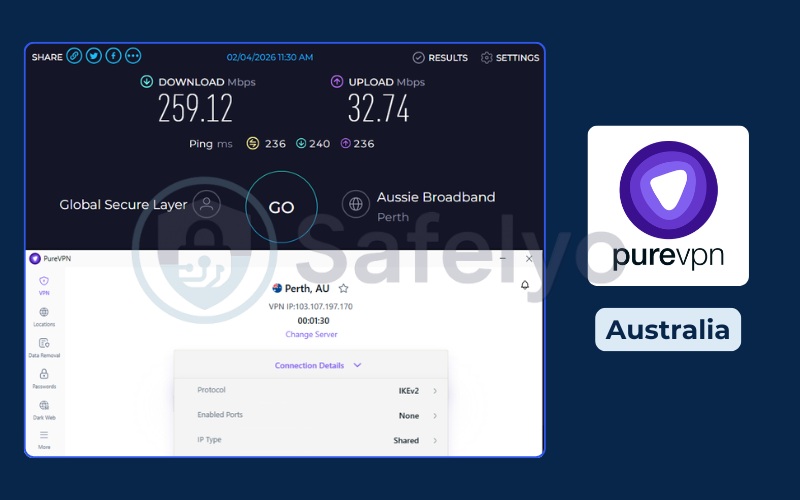
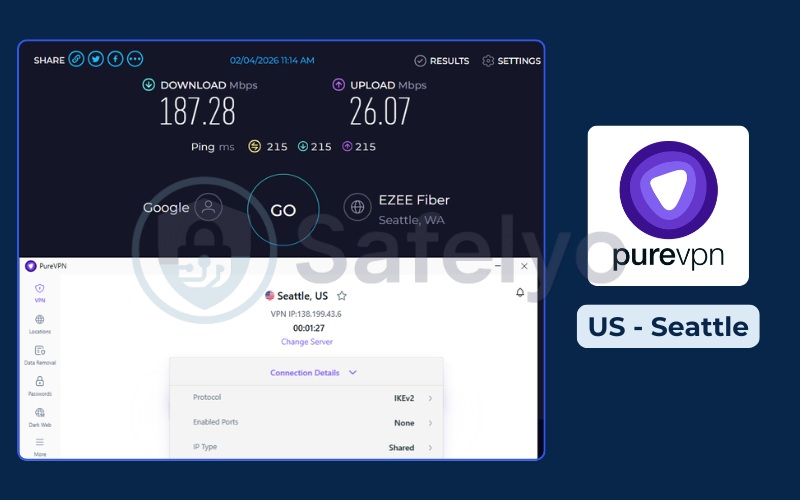
While the download speeds are capable of handling high-definition streaming, the overall performance lags slightly behind the top-tier providers. As indicated in the test results, the ping times on local servers sit at around 236 ms.
Therefore, users who play fast-paced multiplayer games will likely notice latency hits and annoying lag spikes.
| Server Location | Download (Mbps) | Upload (Mbps) | Ping (ms) |
|---|---|---|---|
| US | 187.28 | 26.07 | 215 |
| Australia | 259.12 | 32.74 | 236 |
If you are leaning toward this budget option, here is a straightforward look at its biggest perks and compromises.
| Pros | Cons |
|---|---|
|
|
Best for: Users seeking a cheap long-term premium VPN primarily for streaming, browsing, and downloading.
3. Why you need a VPN in Australia
The digital landscape in this region presents specific privacy challenges for everyday users. Here is a quick summary of the main reasons to consider a VPN:
- Mandatory data retention: Internet providers are required by law to store your connection metadata for up to two years.
- Information sharing: Australia participates in international agreements that allow data exchange with foreign intelligence agencies.
- Copyright enforcement: Courts have the authority to compel internet providers to reveal the identities of users suspected of file sharing.
- Public Wi-Fi risks: Unsecured local networks can leave your personal data vulnerable to interception.
Under current legislation, local internet service providers must collect and store your browsing metadata for two full years. This data can be accessed by various government and law enforcement agencies to review your basic online connections.
Additionally, the country operates as a core member of the Five Eyes alliance. This international intelligence-sharing agreement means that data collected locally can potentially be exchanged with foreign governments under specific legal frameworks.
Using an unencrypted connection also exposes you to strict copyright monitoring. This became evident during the Dallas Buyers Club lawsuit. The case showed that copyright owners can legally request internet providers to reveal the identities of users suspected of file sharing.
Finally, unencrypted public Wi-Fi networks at local cafes and airports present a standard but significant security risk. These open connections leave your personal devices vulnerable to data leaks, making encryption a practical necessity to protect your sensitive information from unauthorized access.
4. Best free VPN for Australia: Are they safe?
Many users search for zero-cost alternatives, but these services often come with significant usage limits. Here is a look at the most reputable free options and their restrictions:
- Proton VPN: Stands out by offering unlimited data. However, it strictly blocks all torrenting traffic and limits your access to only 10 locations (randomly selected).
- TunnelBear: Allows more versatile usage but restricts your bandwidth to a mere 2GB per month.
- Hide.me: Offers a free plan with unlimited data, but it heavily restricts your connection speeds and available server locations.
Free services also rarely unblock Stan, Kayo, or Netflix consistently due to limited server availability.
To ensure your digital safety, you should absolutely avoid dangerous free applications like HolaVPN, SuperVPN, Betternet, and DotVPN. Security researchers have noted instances of these specific companies selling user data or possessing weak security standards.
5. Best VPN for Australia on iPhone and Android
Securing your mobile device is just as critical as protecting your desktop computer. When looking for the best mobile protection, you should focus on applications that do not aggressively drain your battery life.
Here are the top recommendations for mobile users:
- NordVPN: Offers a highly responsive mobile application. It retains the full system-wide Kill Switch found on the desktop version without draining your battery.
- Surfshark: Provides excellent mobile security features. It allows you to protect all your household smartphones under one single account.
- ExpressVPN: Features a beautifully streamlined interface for both iOS and Android. It ensures fast connections on the go with its lightweight Lightway protocol.
The secret to a seamless mobile experience lies in the protocols. Top-tier providers use modern protocols like IKEv2, WireGuard, NordLynx, and Lightway. These are specifically designed to handle network transitions flawlessly. This means you can walk out of your house and switch from Wi-Fi to 4G/5G data seamlessly without the VPN dropping your secure tunnel or exposing your real IP address.
6. Is it legal to use a VPN in Australia?
Yes, utilizing privacy software is completely legal across the country. Citizens have the right to encrypt their personal internet traffic and protect their digital footprint from tracking.
However, you must remember that performing illegal acts while connected remains against the law. Engaging in copyright infringement, cybercrime, or distributing illicit material will always violate legal statutes regardless of your connection type.
Additionally, the legal landscape is evolving. Local authorities occasionally force internet service providers to block access to specific offshore domains to enforce compliance.
7. How to set up a VPN in Australia
Getting your software running requires only a few minutes of your time. Follow these specific instructions based on your preferred hardware platform to get started securely.
7.1. Setting up on PC and Mac
Desktop computers are the easiest devices to secure. Follow these steps to encrypt your daily web browsing.
Quick step:
- Choose a verified provider like NordVPN or Surfshark.
- Purchase a subscription plan via their official website.
- Install the application on your computer.
- Connect to a local server for high speeds or an international server to bypass geo-blocks.
7.2. Setting up on iPhone and Android
Protecting your mobile data is crucial when using public Wi-Fi networks. Follow these steps to secure your smartphone.
Quick step:
- Download the chosen application directly from the App Store or Google Play.
- Log in with your secure account credentials.
- Search for a local city in the server list.
- Tap Connect and ensure the lock icon appears in your status bar.
7.3. Setting up on Wi-Fi Routers
Securing your router protects every device in your home, including gaming consoles and smart televisions. Follow these steps for network-wide encryption.
Quick step:
- Check if your hardware supports client configurations (like ASUS, Netgear, or DD-WRT firmware).
- Download the configuration files from your provider’s website.
- Log in to your router’s admin panel and upload the files in the appropriate section.
- Activate the connection to protect every smart device on your home network simultaneously.
8. FAQs about best VPNs for Australia
Is NordVPN illegal in Australia?
No, it is legal for privacy and security purposes. You can freely use it to encrypt your data and protect your personal information from unauthorized tracking.
What free VPN has Australian servers?
Proton VPN, TunnelBear, and Hide.me offer reliable free tiers with access to local or global servers. However, they impose limits on data usage or peer-to-peer file sharing.
How do I get a VPN for Australia?
You simply need to register an account on a reputable provider’s website. Then, download their official application to your device and click the connect button to establish a secure tunnel.
Is Australia cracking down on VPNs?
While there are legal frameworks that allow the government to monitor tech companies, reputable offshore VPN providers remain outside this jurisdiction. They continue to function normally.
Can Australian police track my VPN?
Your local internet provider can see that you are connected to an encrypted server, and police can request those provider logs. This is why using a service with a strict, audited no-logs policy is necessary. It ensures no browsing history exists for authorities to collect.
9. Conclusion
Finding the best VPN for Australia is a practical necessity to protect your digital footprint against mandatory metadata retention and invasive surveillance.
Choosing NordVPN provides you with the highest overall server density and reliable speeds. Meanwhile, Surfshark offers strong budget-friendly value for unlimited household devices.
Do not wait until your personal browsing data is logged by your internet provider. Finding the Best VPN ultimately comes down to your specific daily requirements. We hope the insights provided by Safelyo help you make a secure decision.