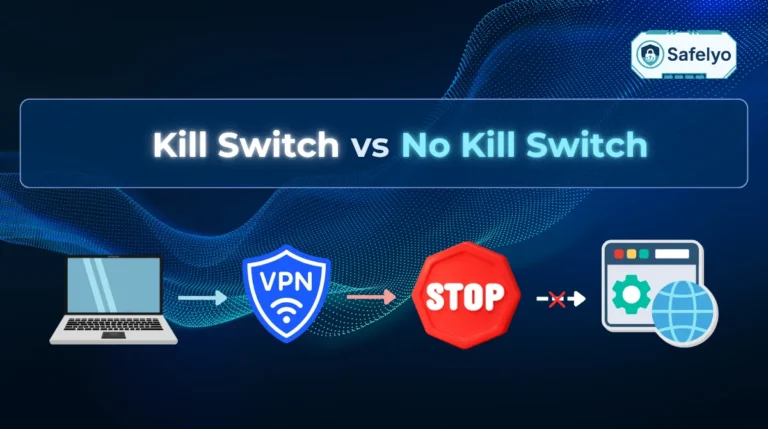
A VPN kill switch is a security tool designed to automatically block your internet access if your VPN connection drops unexpectedly.
Even reliable connections can experience brief interruptions. An unexpected disconnection creates a risk of exposing your real IP address and DNS queries to your internet service provider or anyone sharing your local network.
This article explains the mechanism behind a VPN kill switch, details common triggers for disconnection, compares the different types, and shows how to enable the setting on various devices.
Key takeaways:
- A VPN kill switch acts as a fail-safe mechanism intended to block internet access when the encrypted tunnel fails.
- The kill switch generally operates sequentially through four steps: observe, detect, block, and restore.
- Providers typically offer up to three main configurations, which include system-level, app-level, and advanced (always-on) options.
- Enabling system-level protection is generally recommended for broader device-wide security.
- You can verify the kill switch’s effectiveness by using tools like ipleak.net to check for IP and DNS leaks.
1. What is a VPN kill switch?
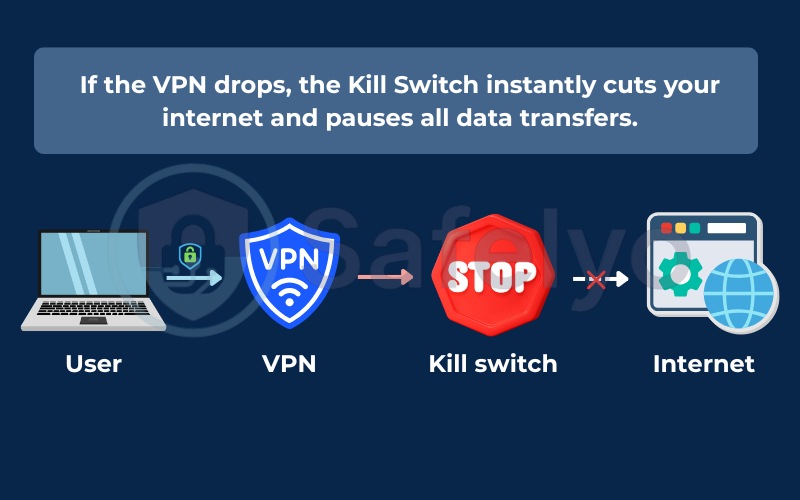
A VPN kill switch is a security mechanism built into many VPN applications that aims to automatically block your device from accessing the internet if your VPN connection drops. The primary function of a kill switch is to act as a fail-safe layer working in the background. Instead of managing how you connect, a kill switch manages what happens when the connection fails, aiming to prevent your real IP address and DNS queries from being exposed to the outside network.
For example, if you are downloading a file on a public Wi-Fi network and your VPN suddenly disconnects, the kill switch is designed to pause your download and cut off your internet. This action helps ensure your unencrypted data does not leak during the time it takes the VPN to attempt a reconnection.
When you use a VPN, your data travels through an encrypted tunnel. If that tunnel breaks, your operating system typically tries to reconnect to the internet using your standard unprotected connection. The VPN kill switch helps prevent this automatic fallback. It enforces routing rules to keep traffic halted until the secure VPN tunnel can be re-established.
2. Common triggers that disconnect your VPN
VPN connections can drop due to various everyday network disruptions. Here are some specific triggers that commonly cause these disconnections:
- Unstable Wi-Fi: Weak wireless signal strength can break the VPN tunnel. Moving between rooms or experiencing router interference might cause momentary drops in connectivity.
- Switching networks: Moving from a home Wi-Fi network to a cellular connection creates a transition gap. During this handoff, your device may lose connection long enough to trigger a VPN drop.
- Server congestion: Heavily loaded VPN servers can experience timeouts. When many people connect to the same node, the server might drop connections to manage the load.
- Software interference: Some antivirus software or system firewalls might mistake VPN protocol packets for suspicious activity and block them, severing the tunnel.
- ISP throttling: Internet service providers (ISPs) sometimes limit bandwidth when they detect heavy VPN traffic, which can cause instability leading to disconnections.
- Device sleep mode: Operating systems often suspend background processes to save battery. When waking a laptop or phone, your VPN application might not reconnect instantly, leaving a brief window of potential exposure.
3. How does a VPN kill switch work?
A VPN kill switch generally operates by monitoring your encrypted connection and controlling the flow of network traffic based on that status. The process typically executes in the background. The operation of a VPN kill switch can often be illustrated through the following four steps:
- Observe: The kill switch monitors the connection status with the VPN server and checks the integrity of the encrypted tunnel.
- Detect: If the secure connection drops, the kill switch aims to recognize the interruption quickly.
- Block: The system applies firewall rules at the network level, attempting to halt data packets entering or leaving the device so that information does not travel over an unencrypted channel.
- Restore: Once the VPN tunnel successfully reconnects, the kill switch is designed to lift the firewall rules, allowing internet traffic to resume.
Operating at the network and firewall level allows the kill switch to govern the operating system’s traffic flow. A system-level kill switch halts network interfaces until the secure connection is verified again.
4. What leaks when your VPN drops
When a VPN connection fails, your device typically reverts to its default unprotected network state, often without displaying an immediate warning. The table below outlines data types that can be exposed during a drop and their potential consequences.
| What Leaks | Why It Matters |
|---|---|
| Real IP address | Can be exposed to websites, ISPs, and network peers. |
| DNS leak | Operating systems may revert to ISP resolvers, logging domain requests. |
| Plaintext | HTTP traffic can transmit unencrypted, potentially readable by ISPs or local network monitors. |
| P2P | Active file transfers might expose your real IP to tracker records and peers. |
| Background data | Apps that auto-reconnect can leak metadata and timestamps. |
5. The three types of VPN kill switch
VPN providers typically offer different types of kill switches, depending on the service. The table below compares three common configurations to help identify the suitable option for different privacy needs.
| Feature | System-Level | Application-Level | Advanced (Always-On) |
|---|---|---|---|
| How it works | Blocks all internet traffic. | Blocks traffic for specific apps. | Blocks internet if VPN is inactive. |
| Protection level | Broad device-wide security. | Selective app protection. | Enforced security policy. |
| Flexibility | Low, all-or-nothing approach. | High, allows custom rules. | Lowest, enforces VPN usage. |
| Activates when | VPN connection drops. | VPN connection drops. | VPN is off or disconnected. |
| Best for | People want broad privacy coverage. | Torrenting specific files. | Remote workers with strict security policies. |
It is important to note that the specific naming conventions and the actual behavior of these features can vary depending on your chosen VPN provider and your device’s operating system.
5.1. System-level kill switch
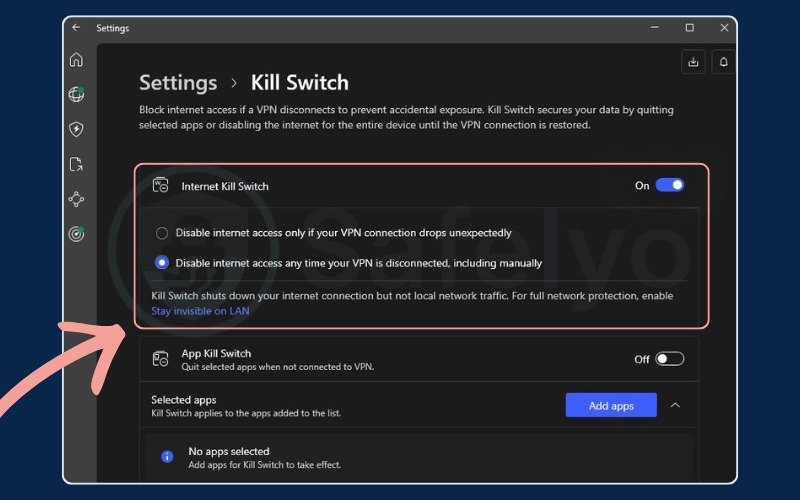
A system-level kill switch aims to block your entire device from accessing the internet when a VPN connection fails, including background processes and system updates. This protocol typically applies to every application on the operating system.
The main trade-off is that all internet activities pause until the VPN reconnects. This configuration is often considered a standard for privacy because it helps mitigate the risk of data exposure across the entire device during unexpected drops.
5.2. Application-level kill switch
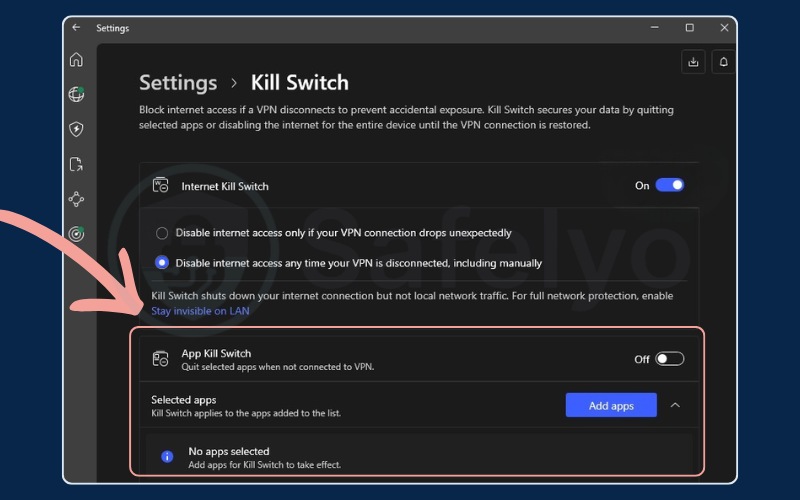
An application-level kill switch allows you to designate specific apps that lose internet access when your VPN disconnects. For example, you can add a torrent client to the protection list, ensuring the client stops downloading if the secure tunnel fails, while your web browser might continue to operate on the regular network.
This type provides more flexibility but relies on accurate configuration. If a sensitive application is not added to the protection list, that specific application could leak data during a network interruption.
5.3. Advanced (always-on) kill switch
A standard kill switch typically activates when a VPN connection drops due to an error or network instability. If you manually click disconnect, your internet often continues functioning normally. An advanced kill switch modifies this behavior by blocking internet access when the VPN is inactive, regardless of the reason.
Even if you manually turn off the VPN, internet access remains blocked until a secure connection is established. Android devices offer a native equivalent through the “Always-On VPN” and “Block connections without VPN” settings. This mode is often used by remote workers or in scenarios where unencrypted traffic is restricted by policy.
6. Pros and cons of a VPN kill switch
Every tool comes with its own set of advantages and drawbacks, and a VPN kill switch is no exception. While a kill switch is designed to maximize your digital privacy, it can occasionally interrupt your workflow. Here are the main pros and cons you should consider before relying on a VPN kill switch.
Pros
Prevention of accidental data leaks
Enhanced security on public Wi-Fi
Automated operation
Cons
Internet interruptions
Local network conflicts
Captive portal interference
6.1. Pros of using a kill switch
Keeping a VPN kill switch active provides several distinct benefits for your daily browsing habits. Here is how a kill switch actively protects you:
- Prevention of accidental data leaks: The primary advantage is automated protection. A kill switch helps ensure your real IP address remains hidden even if the VPN app crashes or the server times out.
- Enhanced security on public Wi-Fi: When using unsecured networks, the kill switch acts as a safety net if the local network connection fluctuates.
- Automated operation: Once enabled, the kill switch operates in the background, providing protection without requiring continuous manual monitoring.
6.2. Cons and limitations of using a kill switch
Despite the clear privacy advantages, relying on a VPN kill switch does introduce some minor inconveniences to your workflow. You should be aware of these potential limitations:
- Internet interruptions: When the kill switch activates, internet traffic halts. This will pause active downloads, drop video calls, and stop background synchronizations until the connection is restored.
- Local network conflicts: A system-level kill switch may block communication with local hardware like network-attached storage or wireless printers. Resolving this usually requires enabling a “local network sharing” or “LAN access” option within the VPN settings.
- Captive portal interference: Public Wi-Fi networks often require authentication through a captive portal. Because the kill switch blocks unencrypted traffic, it can prevent these login pages from loading, often requiring you to temporarily disable the VPN or the kill switch to connect initially.
7. Who needs a VPN kill switch and who does not?
Using a VPN without a kill switch can leave gaps in your privacy coverage during network instability. However, the necessity of this feature largely depends on your specific online activities and personal risk tolerance.
7.1. Who needs a kill switch the most
While anyone can benefit from this fail-safe, certain online activities carry higher risks of exposure. A kill switch is frequently recommended for the following groups:
- Journalists and researchers: Operating in sensitive environments often requires consistent data protection measures against unwanted monitoring.
- P2P and torrenting users: A sudden connection drop can expose a real IP address to peers on the network.
- Remote workers: Handling confidential corporate documents or credentials often requires a continuous encrypted connection as per strict security policies.
- Public Wi-Fi users: Unsecured networks at cafes or airports can present high risks of local packet interception if the VPN disconnects.
- Frequent travelers: Constantly transitioning between different Wi-Fi and mobile networks increases the probability of temporary VPN disconnections.
7.2. Who might not need one
While a kill switch enhances privacy, it is not strictly necessary for every online activity. You might opt to keep it disabled or not worry about it if you fall into the following categories:
- Casual streamers: If your primary goal is accessing geo-blocked content libraries, a connection drop usually just pauses your video. There is typically no severe privacy risk involved.
- Gamers seeking better routing: Players using a VPN to lower ping care more about continuous connectivity. A kill switch dropping the entire internet connection mid-game is often more frustrating than a temporary IP exposure.
- Low-risk home network users: If you are browsing public information on a secure, private home Wi-Fi network, an occasional VPN drop usually does not expose highly sensitive data.
8. Kill switch, split tunneling, and captive portals
Certain VPN configurations can conflict with kill switches, particularly split tunneling and public network logins. Split tunneling allows you to route specific applications outside the VPN tunnel. This can create a conflict with a system-level kill switch designed to block all non-VPN traffic.
On some platforms, split tunneling might need to be disabled to use a system kill switch effectively. However, some providers offer implementations that allow both features to function together, aiming to block protected apps while allowing split-tunneled apps to continue if the VPN drops.
Connecting to a captive portal (common on hotel or airport Wi-Fi) is another consideration. These portals usually require raw HTTP traffic to authenticate before granting full internet access. A kill switch will likely block the captive portal page. The common workaround is to temporarily disable the kill switch to complete the login, then re-enable it once internet access is granted.
9. How to enable a VPN kill switch on your device
Enabling a VPN kill switch varies by operating system and VPN provider, as naming conventions and menu layouts differ. Here are general steps to help locate and activate the setting.
9.1. Windows and macOS
To turn on a VPN kill switch on a Windows or Mac computer, you will usually find the option right inside the main app menu. Follow these steps to secure your connection:
- Open the VPN application.
- Navigate to the Settings, Security, or Preferences menu.
- Locate the Kill Switch option and toggle it ON.
- Select the preferred mode (e.g., standard or advanced) if offered, and apply changes.
Note for macOS: Due to operating system constraints, brief leaks can sometimes occur during manual server switches. Also, certain core Apple services might route DNS requests outside the VPN tunnel, regardless of the kill switch.
9.2. Android
For Android phones and tablets, you get the best results by using the built-in system settings alongside your app. This approach gives you deeper system-level protection. Here is how you can set it up:
- Open the VPN app and locate any internal kill switch settings.
- Navigate to the Android system settings for network and internet.
- Find your active VPN profile and tap the settings icon next to it.
- Toggle the “Always-on VPN” setting on.
- Toggle the “Block connections without VPN” setting on.
Note: This native system-level functionality is generally available on Android 8.0 and newer.
9.3. iOS and iPadOS
Apple mobile devices handle network connections differently, so you only need to flip a switch inside your app. You can enable the kill switch by following this simple process:
- Launch the VPN application.
- Tap the settings icon.
- Locate the security options and enable the kill switch toggle.
Note for iOS: Similar to macOS, certain core Apple services may bypass the VPN tunnel for DNS queries due to OS-level programming. Enabling a strict kill switch might also affect communication with local network devices.
10. How to test if your VPN kill switch is working
We recommend verifying your setup manually to ensure a kill switch functions accurately under real-world conditions. The following five-step process confirms the effectiveness of your VPN kill switch:
- Connect to a VPN server and ensure the kill switch is enabled.
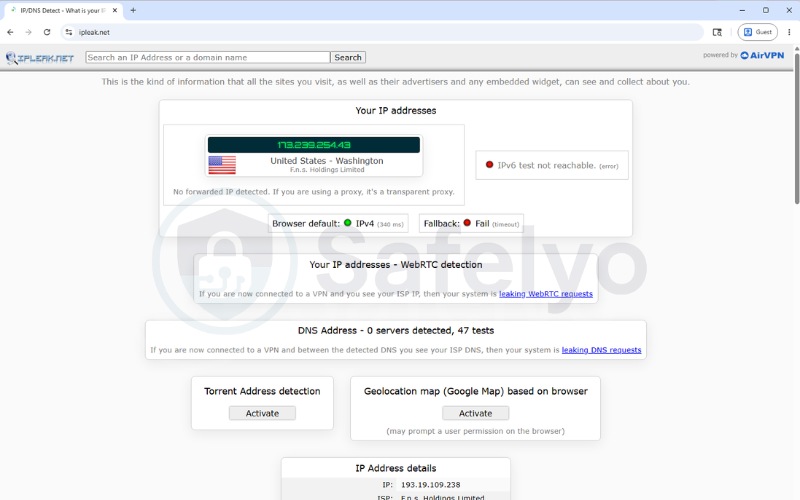
- Open a browser and visit ipleak.net. Confirm it displays the VPN server’s IP address and check the DNS leak section. Keep this tab open.
- Simulate a sudden VPN crash by forcefully closing the VPN application using your system’s Task Manager (Windows) or Activity Monitor (macOS). Do not just click the standard “Disconnect” button inside the app, as that will simply disable the VPN normally.
- With the VPN forcefully closed but your Wi-Fi/Ethernet still actively connected, attempt to refresh the open ipleak.net page or visit a new website.
- The browser must fail to load entirely, displaying a standard “No Internet” error. This confirms the kill switch successfully intervened and blocked all outbound traffic while your device was exposed. Reopen the VPN application and reconnect to restore your internet access.
Once you confirm the block works, keep the kill switch enabled at all times to maintain continuous protection. To ensure your setup remains secure over time, you can follow this quick maintenance checklist:
| Action | Status |
|---|---|
| Enable Kill Switch in Settings | 🗹 |
| Consider System-Level Protection | 🗹 |
| Check DNS section on ipleak.net | 🗹 |
| Perform a Simulated Crash Test | 🗹 |
| Review settings after OS updates | 🗹 |
11. FAQs about VPN kill switch
What is a VPN kill switch?
A VPN kill switch is a tool designed to block device internet traffic if the secure VPN connection drops unexpectedly, helping to prevent your real IP address and data from being exposed.
Should I keep the VPN kill switch on all the time?
For consistent privacy, many users keep it on. The kill switch operates in the background and only interrupts traffic during a connection failure. A common reason to disable it temporarily is when authenticating on a public Wi-Fi captive portal.
Do all VPNs have a kill switch?
Many reputable VPN providers include a kill switch, but some free or basic applications might not offer this feature.
Is a VPN kill switch safe?
A kill switch is a standard security feature. The main trade-off is a temporary loss of internet access while the VPN attempts to reconnect, prioritizing privacy over continuous connectivity.
What is the difference between standard and advanced kill switch?
A standard kill switch typically activates when the VPN drops unexpectedly. An advanced (or always-on) kill switch blocks internet traffic whenever the VPN is inactive, even if you manually disconnected it.
Can the kill switch block my local network devices?
A strict system-level kill switch might restrict access to local printers or network storage. This can usually be resolved by enabling an “Allow LAN access” setting within the VPN app.
Can the police track a VPN?
A kill switch helps prevent accidental data leaks during connection drops but does not guarantee total anonymity. If legal authorities serve a valid request to an ISP or a VPN provider that retains logs, tracing may still be possible.
How do I disable the VPN kill switch?
You can disable it by navigating to the VPN application’s settings and toggling the feature off. Keep in mind that doing so means your real IP could be exposed if the connection drops.
12. Conclusion
Understanding what is a VPN kill switch helps in managing digital privacy, as it is a key feature for maintaining consistent online protection during network fluctuations.
For general browsing, activating a system-level kill switch and verifying the connection can help secure your traffic. Android users can utilize native OS settings, while those with strict security needs might prefer an advanced kill switch. It is good practice to verify these settings periodically, especially after system updates.
To find services that offer these features, you can explore VPN reviews on the Safelyo homepage and check out similar articles in our VPN Guides category.