Are you tired of your internet slowing down every time you secure your connection? Many users experience frustrating buffering and severe battery drain with traditional security tools. If you use NordVPN, you are likely wondering what NordLynx is and why experts claim it solves these exact problems.
At Safelyo, our cybersecurity team rigorously tested this core network technology to see if it truly dominates the market in 2026. This guide breaks down how the engine operates behind the scenes, compares real-world speed benchmarks, and provides fast solutions for common connectivity errors.
Key takeaways
- NordLynx is a proprietary next-generation protocol built specifically for the NordVPN ecosystem.
- It utilises the blazing-fast WireGuard framework while adding a custom Double NAT system to guarantee total anonymity.
- The protocol consists of extremely lightweight code, making it highly efficient for preserving mobile battery life.
- It delivers the fastest download speeds available, perfect for seamless 4K streaming and low-ping gaming.
- While incredibly fast, it relies on UDP ports, making it less effective for bypassing strict government firewalls.
1. What is NordLynx?
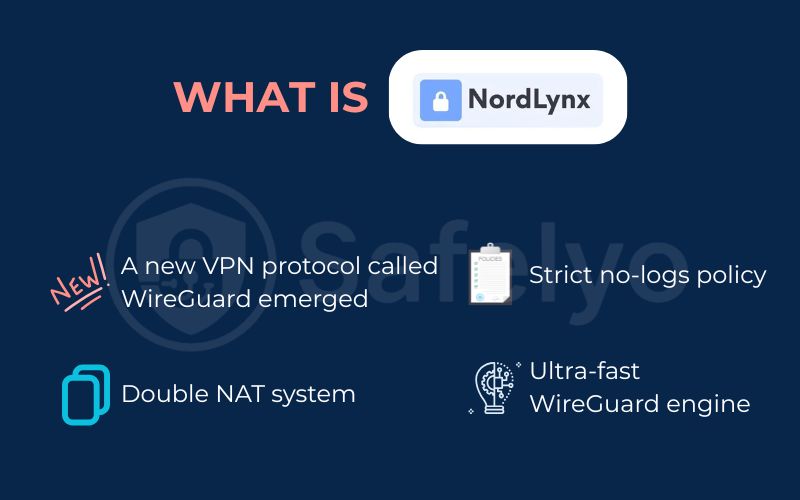
NordLynx is the next-generation VPN protocol developed exclusively by NordVPN to serve as the primary engine for your secure connection. It is built directly upon the high-speed WireGuard framework to deliver performance that legacy standards cannot match.
Unlike older systems, this protocol is incredibly streamlined and features a minimalist code architecture. This design makes the software significantly faster and less resource-intensive on your device hardware. It is specifically engineered to be the most efficient way to maintain a secure tunnel in 2026.
Beyond raw speed, the protocol places a heavy emphasis on modern security standards to protect your daily browsing. A major 2025 update introduced native support for post-quantum encryption, ensuring your personal data remains safe against the future threats of advanced computing.
2. How does NordLynx work?
The process begins the moment you click connect, instantly scrambling your data using the advanced ChaCha20 algorithm for a highly secure journey. Your data is then sent through a lightweight tunnel based on the WireGuard framework, which requires only 4,000 lines of code. This streamlined architecture significantly boosts connection speeds, reduces vulnerability risks, and extends your mobile battery life compared to legacy protocols.
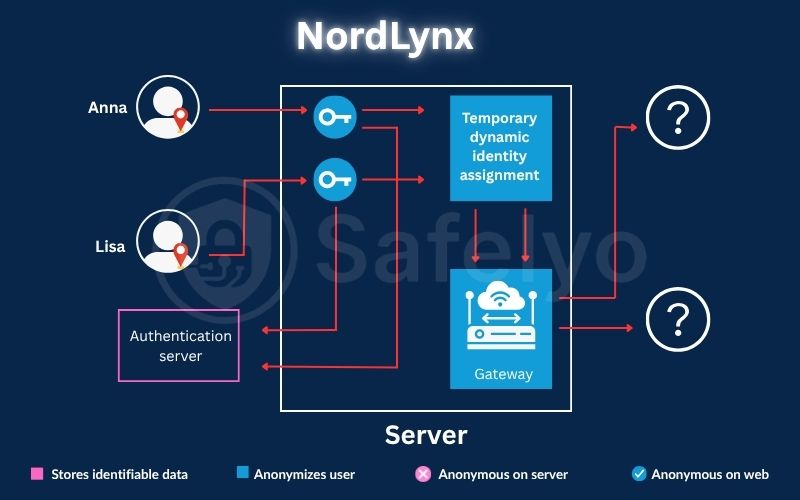
Despite this performance, standard WireGuard requires storing your true IP address on the server to assign a static IP, which poses a massive privacy risk. To maintain a trustworthy zero-logs policy, developers integrated a custom double Network Address Translation (NAT) system. This framework authenticates users through an external secure database rather than sharing their true IP with the VPN server.
This unique system assigns a randomised new IP address for every single session, ensuring no personally identifiable information is ever physically stored. As confirmed by independent PwC audits, this advanced method guarantees maximum internet speeds without compromising your absolute anonymity.
3. Pros and cons of using the NordLynx protocol
Every VPN protocol comes with specific trade-offs regarding speed and hardware compatibility. While this custom engine dominates performance benchmarks, understanding its limitations is vital for power users trying to configure complex home networks.
3.1. Key advantages of NordLynx
The most noticeable benefit is its blazing-fast connection speed, which is often measured in mere milliseconds. Its extremely lightweight codebase requires minimal CPU processing, which significantly reduces mobile battery consumption during extended daily use on your smartphone.
Furthermore, this modern architecture is perfectly optimised for fast cellular networks. It handles sudden network transitions flawlessly, ensuring your secure tunnel does not drop when you switch from your home Wi Fi to mobile data.
3.2. Possible limitations
Despite its incredible performance, this is a proprietary technology locked exclusively to a single software ecosystem. You cannot export this specific configuration to use with other third-party privacy providers or open source client applications.
Additionally, it lacks native support for manual installation on older home routers. If you want to protect your entire household at the router level without using the official application, you will likely have to rely on the older OpenVPN standard.
Pros
Lightning-fast connection times under one second
Lightweight code saves mobile battery life
Seamless switching between Wi Fi and cellular data
High bandwidth perfectly supports 4K streaming
Cons
Locked exclusively to the NordVPN ecosystem
Cannot be manually installed on older routers
Lacks the heavy obfuscation needed for China
4. Protocol showdown: NordLynx vs OpenVPN vs NordWhisper
Choosing the correct security protocol impacts your internet experience. The comparison table below scores the three most popular options across core technical categories to help you select the best tool for your network conditions.
| Feature or Metric | NordLynx (WireGuard) | OpenVPN (UDP/TCP) | NordWhisper |
|---|---|---|---|
| Speed and Streaming | Extremely fast | Average | Good |
| Encryption Cipher | ChaCha20 | AES 256 | AES 256 |
| Codebase Weight | Lightweight | Heavy | Medium to heavy |
| CPU Usage | Low | High | Medium |
| Setup and Configuration | Automatic | Automatic and manual | Automatic |
| Best For | Streaming, gaming, and large files | Router setup, general stability | Restrictive networks |
4.1. Speed and streaming performance
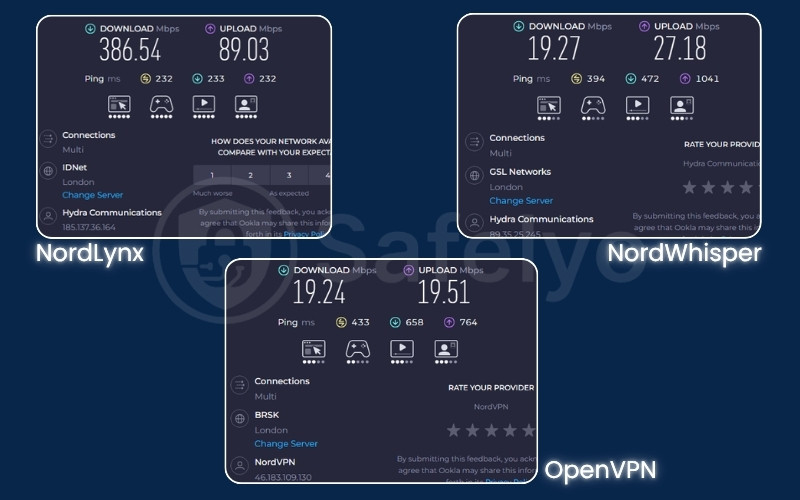
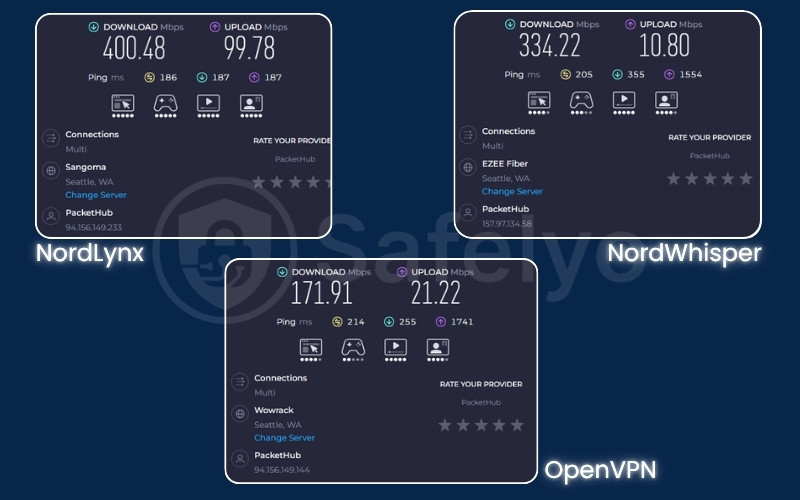
NordLynx is the undisputed king of speed. Because it utilises a remarkably light code base (only 4,000 lines compared to OpenVPN’s 400,000), it processes data much faster than legacy protocols. This bandwidth capacity makes it the best choice for watching 4K resolution without buffering.
4.2. Security and encryption algorithms
OpenVPN is a mature, robust software that supports a great number of strong encryption algorithms, including AES-256. NordLynx utilises the ChaCha20 algorithm, which provides modern cryptographic safety. Meanwhile, NordWhisper is specifically designed to provide a reliable and secure experience in environments with active security filtering.
4.3. Network stability and mobile battery usage
NordLynx features an instant handshake process and incredibly low CPU usage, which helps save your phone battery significantly compared to OpenVPN. It is the best protocol for mobile users who frequently switch between Wi-Fi and cellular data, as it maintains a more stable tunnel during these transitions.
4.4. Bypassing firewalls and censorship blocks
While NordLynx is the fastest, its reliance on UDP can make it vulnerable to aggressive firewalls. If you need to access blocked content at a strict school, hotel, or office network, NordWhisper is the superior choice. It is explicitly designed to overcome restrictive local environments and security filtering found at airports or cafes.
Important Compatibility Note:
Please be aware that NordWhisper is a specialised tool and is currently not compatible with Meshnet, Double IP (DIP), Obfuscated servers, or Onion Over VPN. If you require those specific features, you should switch your protocol back to NordLynx or OpenVPN within your application settings.
5. How to use NordLynx on your devices
The official application is designed to be user-friendly for beginners. While it usually selects the best protocol automatically, you can manually force the app to use this specific engine for maximum speed. Safelyo experts have outlined the simple steps for every major platform below.
5.1. Setup steps for Windows and macOS
Changing the active protocol on your desktop computer only takes a few clicks.
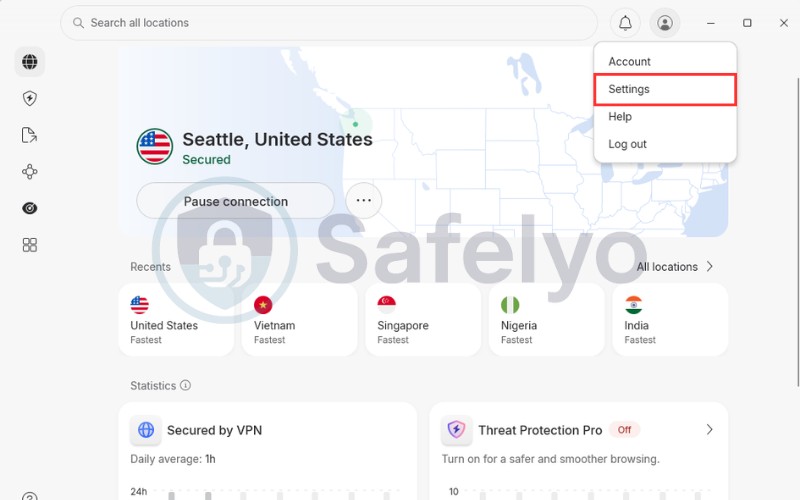
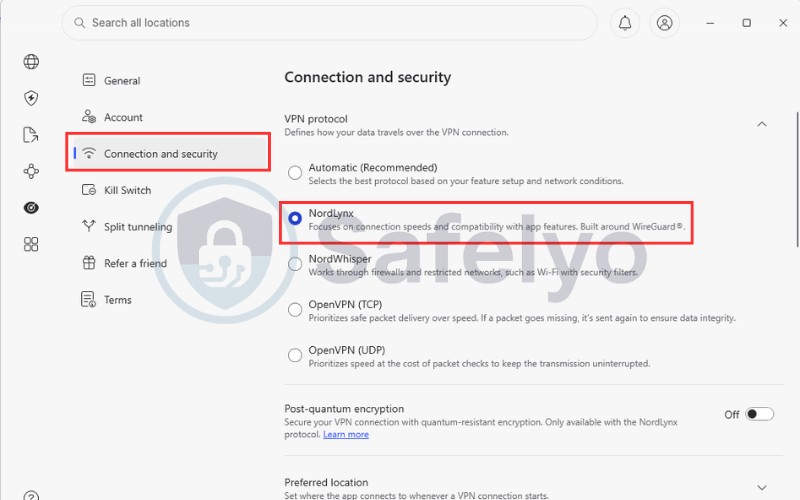
- Step 1: Open your desktop application and click on the Profile icon. Then choose the Settings to access your main settings menu.
- Step 2: Navigate to the Connection and Security tab within this general settings area.
- Step 3: Look for the VPN protocol drop-down list and manually select NordLynx from the available options to lock it in as your permanent default choice.
5.2. Setup steps for Android and iOS
Mobile users can easily switch their protocol to save battery life while travelling.
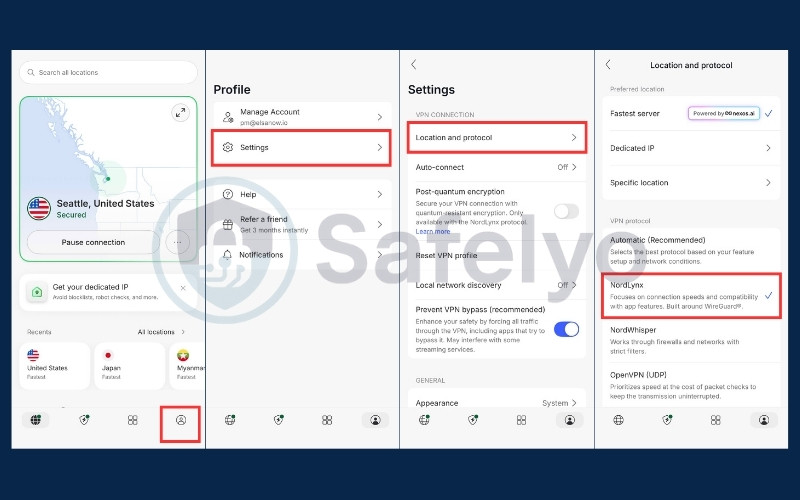
- Step 1: Open the mobile application on your smartphone and tap the profile icon located at the very bottom right of your screen.
- Step 2: Tap the Settings to open your application settings.
- Step 3: Select the Location and Protocol menu and tap on NordLynx to ensure your smartphone always uses this highly efficient connection method on cellular networks.
6. How to fix common NordLynx connection issues
Even with the most stable technology, network conflicts or corrupted system files can occasionally block your access. If you find your connection is dropping or refusing to start, these targeted solutions will help restore your privacy in seconds.
6.1. Fix the failed to reach NordLynx adapter error
This is a frequent glitch on Windows where the virtual network driver becomes corrupted after a system update. The best approach is to uninstall the specific adapter from your Device Manager and restart your computer. The application will automatically reinstall a fresh working driver upon the next startup to resolve the conflict.
6.2. What to do if NordLynx connects but has no internet
If your app shows a green connected status but web pages fail to load, you are likely experiencing a DNS conflict or firewall interference. You should temporarily disable the Threat Protection feature or manually change your DNS server address to a public provider like Cloudflare to force a fresh connection request.
6.3. How to stop NordLynx from constantly disconnecting
If the connection drops every time your screen locks, your phone is likely force-killing the background app to save power. You must navigate to your battery settings and change the permission from Optimised to Unrestricted. Additionally, locking the app in your recent tasks screen prevents the operating system from closing it automatically.
6.4. Why NordLynx fails in heavily censored countries
Because this engine relies on UDP ports, it is very easily blocked by government firewalls that scan specifically for this traffic. If you are in a country with extreme censorship, you should manually select OpenVPN TCP and pair it with Obfuscated Servers. This setup disguises your traffic signature and allows you to penetrate firewalls successfully.
7. FAQs about what NordLynx is
Is NordLynx safe to use?
Yes, it is completely safe to use for all your daily tasks. It utilizes the highly advanced ChaCha20 encryption algorithm, which is widely regarded as being more modern and secure than traditional standards. This encryption ensures that your data remains perfectly protected against any potential interception by third parties.
Is NordLynx a VPN service?
No, it is not a standalone service but rather a proprietary VPN protocol. It acts as the secure transportation engine that runs inside your NordVPN application. While it provides speed and privacy, you still need an active subscription to access the global server network.
What port does NordLynx use?
This protocol typically utilizes UDP port 51820 by default to establish its connection. This specific port is optimized for rapid data transfer, although it can occasionally be blocked by strict firewalls, in which case you should switch to a different protocol or server.
Is NordLynx free?
It is included as a standard feature at no extra cost when you purchase a subscription. You do not need to pay for any additional add-ons to unlock this high-speed protocol, as it is fully integrated into every plan offered by the provider.
Does NordLynx drain the phone battery?
Actually, it does the exact opposite because it is incredibly lightweight. The protocol requires far less CPU power than older standards like OpenVPN, which significantly reduces the energy load on your smartphone and helps extend your battery life throughout the day.
Can I use NordLynx with other VPN providers?
No, this is a proprietary technology developed specifically for one service. However, other privacy providers offer their own versions of WireGuard or Lightway, which utilize the same fundamental framework to achieve similar high-speed results on your devices.
8. Conclusion
Understanding what is NordLynx and how it functions is the key to unlocking elite performance for all your streaming and gaming needs in 2026. By combining the speed of the WireGuard framework with a custom privacy layer and double NAT technology, this protocol provides a level of speed and anonymity that legacy systems simply cannot match.
If you are tired of buffering or connection drops, switching to this high-performance engine is the most effective way to optimise your digital experience. To find the perfect security setup for your devices or to read more in-depth privacy tutorials, explore our comprehensive VPN Guides category at Safelyo. Start your journey today and reclaim your online freedom with absolute confidence.