In 2025, Incognito Mode is no longer enough to keep you safe. Understanding the real benefits of a VPN goes far beyond just privacy. It is about taking back control from ISP tracking and invasive AI data scraping. But is it worth the monthly cost?
If you’re wondering whether a VPN is worth the investment in 2025, here are the fast answers you need:
- Does a VPN save money?
→ Yes. It often pays for itself by unlocking cheaper flights and lower regional subscription prices. - Does it stop ISP tracking?
→ Mostly. A VPN encrypts your traffic, which can limit what your ISP can see and may reduce certain types of throttling (especially app-based throttling). It won’t prevent slowdowns caused by congestion or data caps. - Can it unblock streaming content?
→ Yes. It allows you to change your location to bypass geo-blocks on Netflix, Hulu, and live sports. - Does it slow down the internet speed?
→ Slightly. Expect a minor speed drop (10-20%) and more Captchas, but modern protocols have minimized the lag. - Who needs a VPN the most?
→ Travelers using public Wi-Fi, budget hunters looking for deals, and anyone wanting to protect their data from AI scrapers.
Absolutely, if you know how to use it. I believe a security tool should deliver a return on investment. This guide will prove that a VPN doesn’t just protect your digital life; it can actually pay for itself by unlocking cheaper flights, lower subscription fees, and smarter online shopping deals.
Let’s dive into the real-world advantages that make this investment a no-brainer.
1. How a VPN works
Before diving into the benefits, this 30-second explanation is helpful to understand the engine under the hood.
Imagine your standard internet connection is like sending a postcard through the mail. Anyone handling it – your ISP, a hacker at a coffee shop, or government agencies – can read the message and see exactly where it came from.
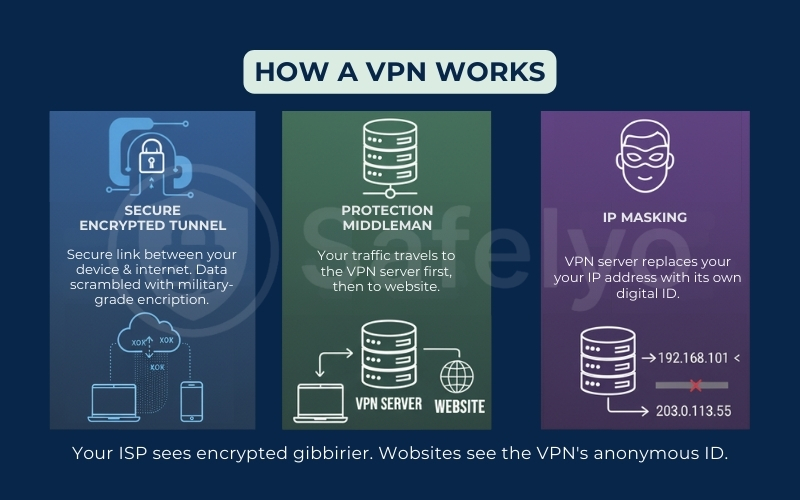
A VPN (Virtual Private Network) puts that postcard inside a secure, steel-armored envelope. Here is the three-step process:
- The encrypted tunnel: When you switch on a VPN, it creates a secure link between your device and the internet. Your data is instantly scrambled using military-grade encryption (like AES-256).
- The middleman: Instead of going directly to a website, your traffic travels to the VPN server first.
- IP masking: The VPN server strips away your IP address (your digital ID card) and replaces it with its own.
The result: Your ISP can no longer see what you are doing (they only see encrypted gibberish), and websites see the VPN server’s IP instead of yours (though tracking via cookies/fingerprinting still applies).
2. Financial benefits: How a VPN pays for itself
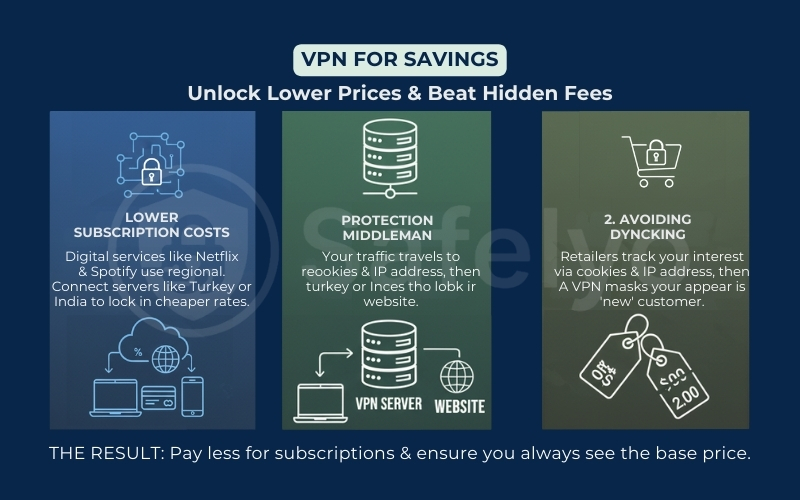
When people ask, “Does VPN save money?“, the answer is surprisingly simple: Yes, if you know how to use it. In fact, a savvy user can often recoup their annual VPN subscription cost in a single purchase.
The secret lies in defeating VPN price discrimination. Online retailers, airlines, and booking sites often adjust their prices based on your location (determined by your IP address) and your browsing history. By masking your identity, a VPN levels the playing field.
Reality check box
(read this before you chase “VPN deals”)
- Results vary: flight and hotel prices change constantly and can differ due to inventory, time of day, and A/B tests – not just location.
- Clear your signals: if you test prices, use a clean browser session (cookies/incognito) in addition to switching VPN locations.
- Payment rules may apply: some subscriptions require a local payment method, billing address, or phone number, and platforms may enforce regional terms.
- Don’t assume it’s “guaranteed savings”: think of a VPN as a tool to test price variation, not a magic coupon.
“Dynamic pricing systems adjust prices based on demand signals, customer behavior, and market conditions rather than a single factor.”
– Harvard Business Review, “The Ethics and Economics of Dynamic Pricing”
2.1. Cheaper flights and hotels
This is the classic “digital nomad” hack. Airlines often charge higher prices to users booking from wealthier countries. By using a VPN to switch your virtual location to the airline’s home country or a region with a lower cost of living, you can sometimes uncover cheaper fares (especially when pricing differs by market).
For example, I have found that booking domestic US flights often costs less when I use a US IP address compared to booking from Europe. The same logic applies to hotels and car rentals. It is not magic; it is just smart geography.
2.2. Lower subscription costs
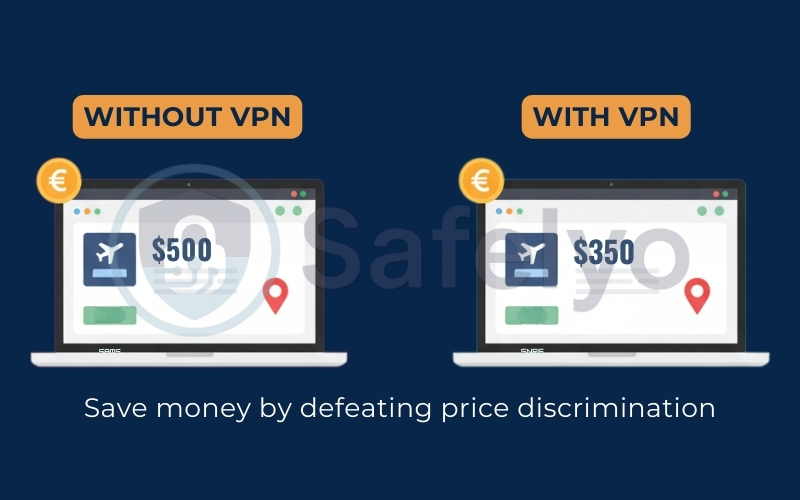
Digital services like YouTube Premium, Netflix, and Spotify use regional pricing to match local purchasing power. This means a subscription in countries like Turkey, Argentina, or India can be a fraction of the price you pay in the US or UK.
By connecting to a server in those regions, you may be able to access lower regional pricing – depending on payment method, billing requirements, and platform enforcement. Just a few dollars saved here can essentially make your VPN “free” to run.
2.3. Avoiding dynamic pricing
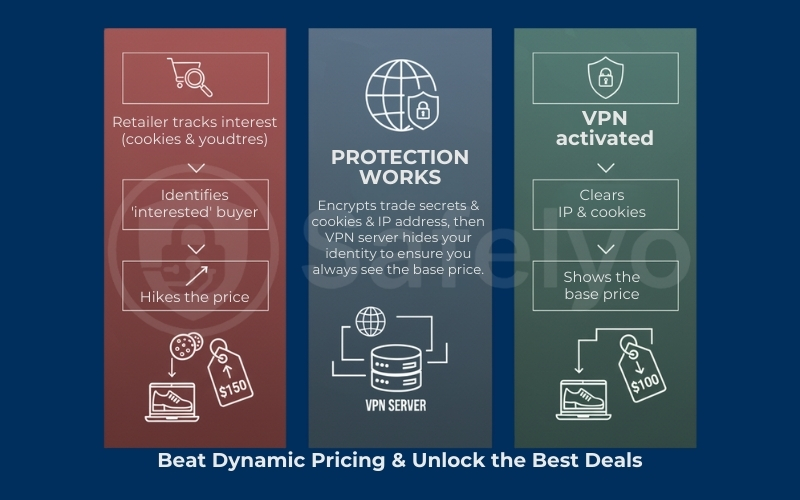
Have you ever checked the price of a pair of shoes, come back an hour later, and found the price has gone up? That is dynamic pricing in action. Retailers track your interest via cookies and your IP address. When they know you are interested, they hike the price.
A VPN can reduce IP-based tracking signals. For best results, combine it with clearing cookies or using a clean session. By switching servers and clearing your cookies, you appear as a “new” customer every time, ensuring you always see the base price rather than the “desperate buyer” price.
>> You may also be interested in:
3. Privacy & Security benefits: Beyond just encryption
While saving money is a fantastic perk, the primary job of a VPN is to keep you safe in an increasingly hostile digital environment. It acts as a shield, ensuring that your private data remains exactly that – private.
3.1. Protection on public Wi-Fi
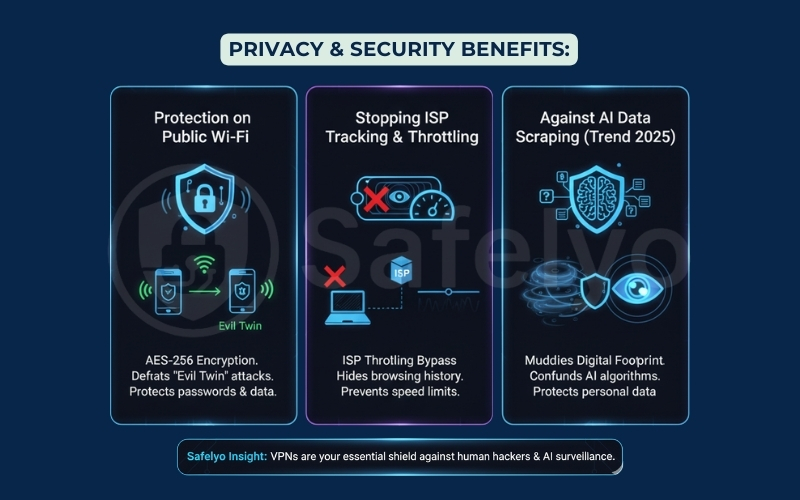
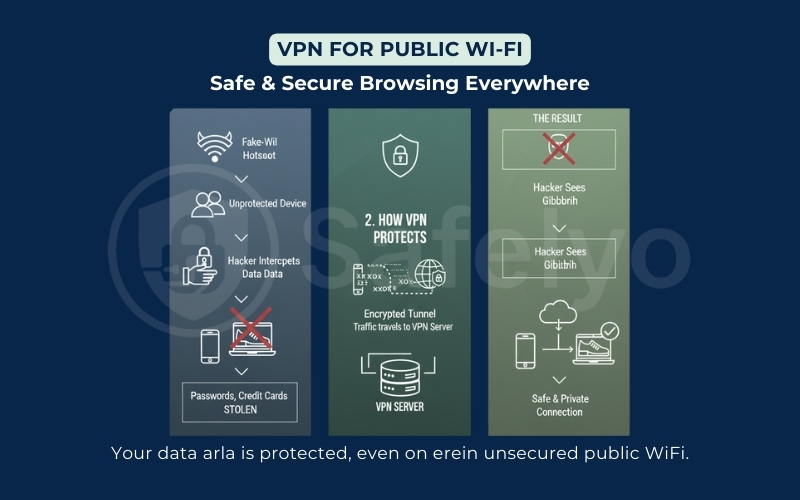
We all love free Wi-Fi at coffee shops and airports, but these are hunting grounds for hackers. A common threat is the “Evil Twin” attack, where cybercriminals set up a fake Wi-Fi hotspot with a name similar to the legitimate one.
If you connect without protection, they can intercept everything you send, from passwords to credit card numbers. Using a VPN for public Wi-Fi prevents this by wrapping your traffic in a tunnel of AES-256 encryption – the same standard used by banks and the military. Even if a hacker intercepts your data, all they will see is indecipherable gibberish.
3.2. Stopping ISP tracking & throttling
Many users ask, “Why use a VPN at home if my network is password-protected?” The uncomfortable truth is that your Internet Service Provider (ISP) sees everything you do.
Depending on your country and local privacy rules, your ISP may collect extensive data about your internet activity and monetize it – either directly or through partners. That’s one of the core reasons a VPN still matters even at home: It limits what your ISP can learn from your traffic. Furthermore, ISPs often monitor your activity to manage network traffic. If they detect heavy bandwidth usage – like streaming in 4K or gaming – they may deliberately slow down your connection.
“Internet service providers collect vast amounts of consumer data, including information about the websites people visit, apps they use, and services they interact with.”
– Federal Trade Commission (FTC), “Internet Service Providers and Privacy”
A VPN can reduce throttling in some cases, especially when throttling is application-based (for example, targeting streaming or specific services). Because your traffic is encrypted, your ISP has less visibility into what you’re doing – making selective throttling harder. However, a VPN won’t help if the slowdown is caused by network congestion, data caps, or if your ISP throttles VPN traffic itself.
“Internet service providers may manage network traffic during periods of congestion or enforce data caps that affect overall connection speeds.”
– FCC, “Understanding Broadband Speed and Data Caps”
>> Read more:
3.3. Protection against AI data scraping
In 2025, the threat landscape has evolved. It is no longer just about human hackers. It is about automated AI scrapers. Large language models and advertising AIs continuously crawl the web to harvest user data for training and profiling.
“If you’re logged into an account, a VPN does not hide your identity from that service.”
– Mozilla Foundation, “Do VPNs Make You Anonymous?”
Automated scrapers and ad-tech systems don’t just rely on human attackers – they rely on scale. A VPN helps by masking your IP address and encrypting the traffic between you and the VPN server, which reduces easy IP-based correlation and limits what your ISP can observe.
“ISPs are in a unique position to see nearly everything their customers do online, and current privacy protections do not fully prevent ISPs from using or sharing that data.”
– Electronic Frontier Foundation (EFF), “Who Has Your Back? ISP Edition”
That said, a VPN is not a complete anti-tracking solution: it doesn’t erase cookies, stop browser fingerprinting, or hide who you are when you’re logged into an account. For stronger protection, pair your VPN with tracker blocking, a privacy-focused browser, and stricter cookie controls.
“A VPN hides your IP address, but it does not stop cookies, browser fingerprinting, or tracking performed when you’re logged into online accounts.”
– WIRED, “What a VPN Can (and Can’t) Do for Your Privacy”
4. Entertainment & Freedom: Content without borders
The internet was designed to be borderless, but copyright laws have built digital walls. If you have ever stared at a “This content is not available in your region” error message, you know the frustration. A VPN effectively tears down these walls, giving you true digital freedom.
4.1. Bypassing geo-blocks
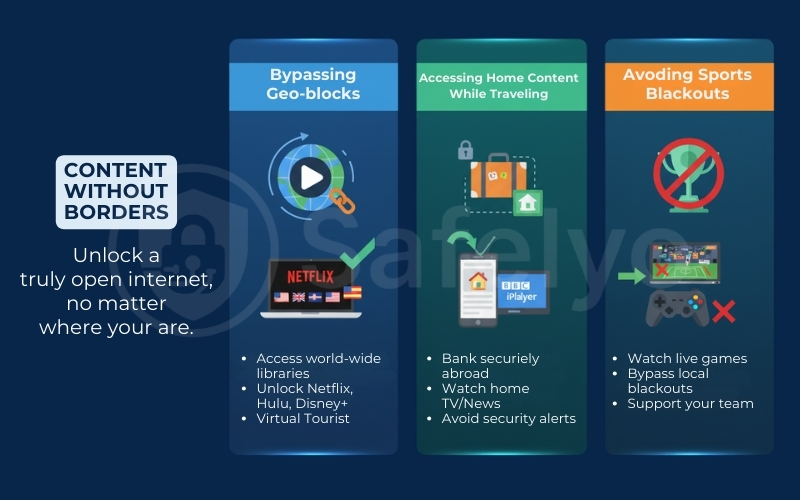
Streaming services like Netflix, Hulu, and Disney+ offer different libraries depending on where you are. Due to licensing agreements, the movie available in the US might be hidden in Europe or Asia.
A VPN allows you to become a “virtual tourist”. By connecting to a server in New York, Tokyo, or London, you can trick these platforms into thinking you are a local, unlocking thousands of exclusive movies and shows that you are already paying for but could not access before.
4.2. Accessing home content while traveling
For travelers and digital nomads, a VPN is an essential survival tool. It is not just about entertainment; it is about utility. Many banking apps and local government portals flag foreign IP addresses as “suspicious” and block access for security reasons.
By connecting to a VPN server back in your home country, you can access your bank account or watch your local news channels (like BBC iPlayer or local national TV) without triggering security alerts or geo-restrictions.
4.3. Avoiding sports blackouts
Nothing is worse for a sports fan than a “blackout”. Often, local broadcasters have exclusive rights to air a game, meaning you cannot watch your favorite team on national streaming platforms if you are located in the city where the game is being played. A VPN solves this instantly by letting you change your location to a neighboring state, bypassing the blackout and letting you stream the game live.
5. Gaming benefits: Better ping & protection
Gamers often worry that a VPN will slow down their connection, but in specific scenarios, the opposite is true. The VPN for gaming benefits go beyond just security. They can actively improve your competitive edge.
5.1. Lower ping and lag reduction
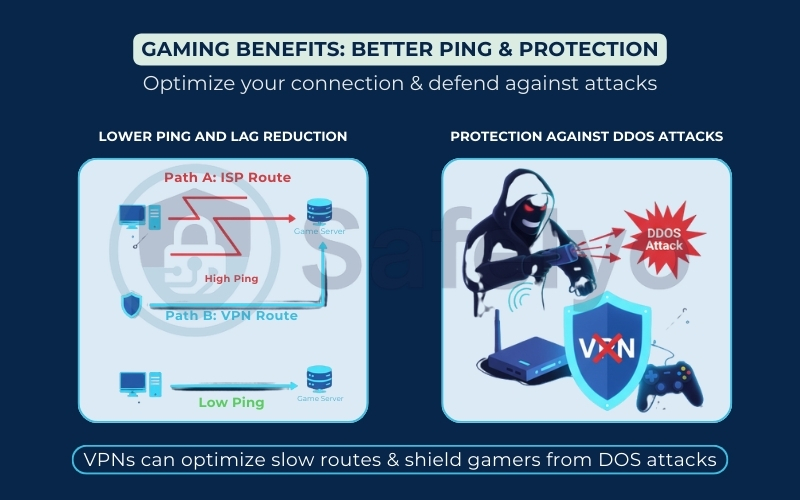
High ping is the enemy of every gamer. Sometimes, your ISP routes your connection through a congested or inefficient path to the game server (like taking a scenic route instead of the highway). Does using a VPN help with ping?
A premium VPN allows you to select a server location closer to the game’s data center. This can force a more direct connection path, potentially lowering your ping and reducing lag spikes. While it won’t fix a bad internet connection, it can optimize a poorly routed one.
5.2. Protection against DDoS attacks
For streamers and competitive players, “salty” opponents are a real threat. If a rival player discovers your IP address, they can launch a DDoS (Distributed Denial of Service) attack to flood your network and disconnect you from the match.
By using a VPN, your actual IP address is hidden behind the server’s IP. If someone tries to attack you, they hit the VPN’s robust firewall instead of your home router, keeping your game running smoothly.
6. VPN benefits for Business & Enterprise
While individuals use VPNs to watch Netflix or save money, businesses use them for a very different reason: Survival. In the era of remote work, a corporate VPN is often the first line of defense against data breaches.
- Secure remote access: With employees working from home or coffee shops, a business VPN acts as a secure gateway. It ensures that staff can access the company’s internal network (Intranet) and sensitive files safely, even from an unsecured public Wi-Fi network.
- Protection against corporate espionage: For traveling executives, sending trade secrets or unencrypted emails over hotel Wi-Fi is a massive risk. A VPN ensures that proprietary data remains readable only to the sender and the receiver, not competitors intercepting the signal.
- Compliance & access control: Many industries (like healthcare or finance) require strict data compliance (GDPR, HIPAA). A business VPN allows IT managers to control exactly who has access to specific resources, ensuring that sensitive client data is never exposed to unauthorized personnel.
>> If you are looking for an enterprise-grade solution, check out our dedicated guide to Best Business VPNs for 2025.
Using a VPN is the first line of defense for business & enterprise
7. The honest truth: Disadvantages of a VPN
At Safelyo, we believe in full transparency. While the benefits are compelling, it is important to weigh the full pros and cons of VPN usage before committing. No technology is perfect, and VPNs do come with a few trade-offs.
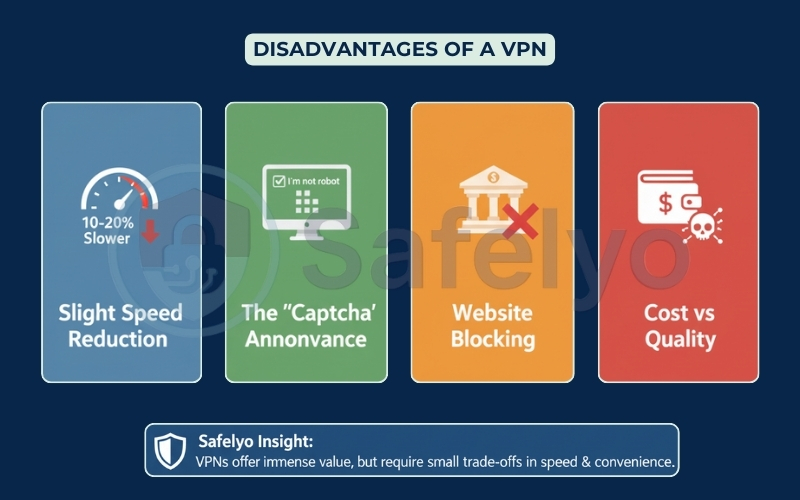
- Slight speed reduction: Security comes at a small price. Because your data has to travel to the VPN server and undergo encryption, you might experience a speed drop of about 10-20%. While premium providers have minimized this, it is physically impossible to eliminate it entirely.
- The “Captcha” annoyance: This is perhaps the most frustrating side effect. Because you share a VPN IP address with thousands of other users, Google and Cloudflare often flag this traffic as “suspicious”. Be prepared to click on traffic lights and crosswalks to prove “I am not a robot” more often than usual.
- Website blocking: Ironically, some security-conscious sites (especially banking portals) may block known VPN IP addresses to prevent fraud. You might find yourself having to temporarily pause your VPN to log into your online banking.
- Cost vs. Quality: A reliable VPN is not free. While “Free VPNs” exist, they are often dangerous traps that track your data to sell to advertisers – defeating the whole purpose. To get true privacy, you have to be willing to pay the price of a cup of coffee each month.
8. Common myths about what a VPN can’t do
To truly master your digital privacy, you need to know where the protection stops. Many providers market their tools as a “magic invisibility cloak”, but at Safelyo, we prefer facts over hype. Here are three critical things a VPN cannot do.
It doesn’t make you 100% anonymous
There is a big difference between privacy and anonymity. A VPN hides your IP address from websites and your activity from your ISP, but it does not make you a ghost.
- The “login” trap: If you turn on a VPN and log into your personal Google or Facebook account, those companies still know exactly who you are.
- The money trail: If you pay for a service with your regular credit card while using a VPN, your identity is attached to that transaction.
- The provider: Ultimately, you are shifting trust from your ISP to the VPN provider. This is why choosing a reputable, verified “No-Logs” provider is non-negotiable.
It doesn’t stop cookies or browser fingerprinting
A VPN handles your network connection, not your browser behavior.
- Cookies: If you don’t clear your browser history, tracking cookies stored on your device can still identify you, even if your IP address has changed.
- Browser fingerprinting: Advertisers use complex scripts to identify you based on your screen resolution, operating system version, and installed fonts. A VPN cannot hide these device specifics.
The Fix: For maximum privacy, pair your VPN with a privacy-focused browser (like Brave) or use “Incognito Mode” to block cookies.
>> You may also be interested in:
It won’t protect you from viruses (it’s not an antivirus software)
A common misconception is that a VPN blocks malware. It does not.
If you click a phishing link in an email or download a malicious file, the VPN will dutifully encrypt that download – securely delivering the virus straight to your computer. While some premium VPNs now include basic “Threat Protection” features, they are no substitute for dedicated Antivirus software.
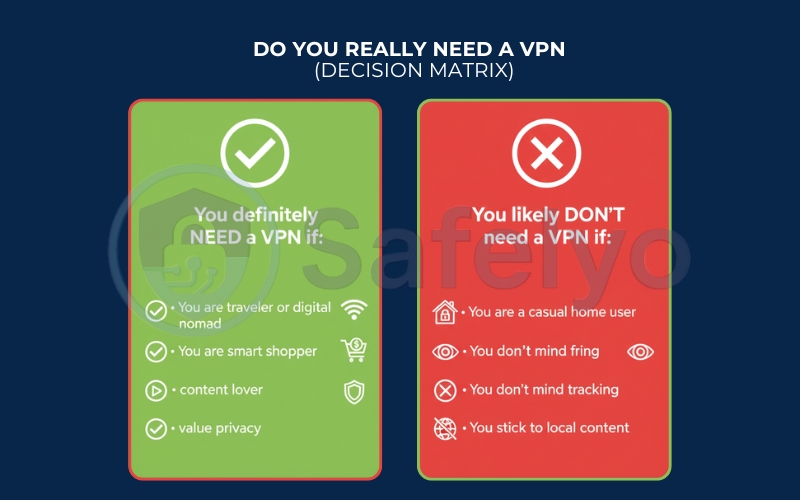
9. Verdict: Do you really need a VPN?
To wrap this up, let’s simplify the decision. A VPN isn’t a magic wand, but for the majority of internet users in 2025, it has become a digital essential. However, it isn’t for everyone.
Here is your quick checklist to decide:
You definitely NEED a VPN if:
- You are a traveler or digital nomad: You frequently connect to public Wi-Fi at cafes, airports, or hotels.
- You are a smart shopper: You want to save money on flights, hotels, and digital subscriptions by changing your virtual location.
- You are a content lover: You want to bypass geo-blocks to stream Netflix, Hulu, or sports events from other countries.
- You value privacy: You don’t want your ISP selling your data or AI models scraping your digital footprint.
You likely DON'T need a VPN if:
- You are a casual home user: You strictly use a secure, wired Ethernet connection at home.
- You don’t mind tracking: You are indifferent to your ISP monitoring your activity or serving you targeted ads.
- You stick to local content: You have no interest in accessing international websites or streaming libraries.
Check the table below to see where you fit in:
| If you are… | Do you need a VPN? | Why? |
| A frequent traveler | YES | To protect your data on public Wi-Fi at airports and cafes. |
| A budget hunter | YES | To find cheaper flights and lower subscription prices by changing locations. |
| A Streamer / Gamer | YES | To unlock global content libraries (Netflix, etc.) and reduce gaming lag. |
| A privacy advocate | YES | To stop your ISP from tracking you and protect against AI data scraping. |
| A casual home user | NO | If you only browse local news on a secure home network and don’t care about tracking. |
The Bottom Line: If you fell into any of the “YES” categories, the small monthly investment will likely pay for itself – both in peace of mind and actual cash savings.
10. FAQs about the benefits of a VPN
Still have questions about maximizing your digital security? Here are the answers to the most common queries regarding the benefits of a VPN in 2025.
Is it worth having a VPN?
Absolutely. Beyond just privacy, the financial ROI makes it worth it. If you use a VPN to save $50 on a flight ticket or $5 a month on a streaming subscription, the tool has effectively paid for itself. It is one of the few security tools that can put money back in your pocket.
Explain the advantages of VPN and how the system works
Think of a VPN as a secure, armored tunnel for your data. When you switch it on, your traffic is encrypted (scrambled) and routed through a remote server. The main advantages are that it hides your real IP address from websites and prevents your ISP or hackers from reading your data stream.
Why is it important to have a VPN on your phone?
Your phone is constantly connecting to random networks – coffee shops, airports, and hotels. Benefits of using a VPN on your phone (whether iPhone or Android) include protecting your passwords and banking apps from “Evil Twin” Wi-Fi attacks and preventing apps from tracking your precise physical location.
Does Netflix allow VPN?
Streaming platforms actively try to detect and block VPN IP ranges to enforce licensing. Netflix actively tries to block VPN IP addresses to enforce licensing agreements. However, premium VPN providers constantly update their server pools to bypass these blocks. This is why the benefits of VPN for streaming rely heavily on choosing a high-quality provider that specializes in unblocking content.
Why pay for a VPN when free ones exist?
Because “free” services often sell your data to advertisers to cover their costs, which defeats the purpose of privacy. Why pay for a VPN? You are paying for a strict “No-Logs” policy, faster speeds, better encryption, and customer support that free versions simply cannot offer.
What are the advantages of implementing a VPN for an enterprise?
For businesses, the advantages of implementing a VPN for an enterprise focus on secure remote work. It allows employees to access the company’s internal network (Intranet) securely from home or while traveling, ensuring that sensitive corporate data is never exposed to the public internet.
Does a VPN drain my battery?
Yes, maintaining a continuous encrypted connection requires processing power, which can drain your battery slightly faster. However, modern lightweight protocols like WireGuard (widely used in 2026) are much more energy-efficient than older protocols, making the impact negligible on modern devices.
Is using a VPN legal?
Yes, using a VPN is perfectly legal in the vast majority of countries (including the US, UK, Canada, and Vietnam). However, using a VPN to commit crimes remains illegal. Note that a few countries with strict internet censorship (like China or Russia) restrict or ban non-approved VPNs, so always check local laws before traveling.
11. Conclusion
In 2025, a Virtual Private Network is no longer just a tool for tech geeks or privacy paranoids. It has evolved into a practical “digital Swiss Army Knife” that balances security, freedom, and financial savings.
If you are ready to take control of your digital footprint, do not just pick the first name you see on Google. Head over to our VPN Guides category to learn more, or check out the review of the Best VPNs for 2025 from Safelyo to find the perfect tool that fits your budget and needs.
Secure your data, save your money, and surf freely.