You use a VPN to protect your personal data on the internet. However, when reports of server breaches and leaked user logs surface, you might naturally wonder: can VPN be hacked? While encryption provides a strong layer of security, software vulnerabilities and configuration errors still occur. Understanding exactly how these systems fail is the first step in securing your devices.
In this guide, we detail the technical methods attackers use to compromise these networks, examine actual security incidents, and show you how to perform a simple self-audit to test your current connection right now.
Key takeaways:
- Premium security applications are highly resistant to direct breaches because they use advanced cryptography.
- Most real-world data leaks happen due to simple user errors, outdated protocols, or malicious free applications.
- You can easily verify your own connection safety right now by running simple online IP and DNS leak tests.
- Choosing a provider with verified RAM-only servers and an audited privacy policy is your best defense against data exposure.
1. Can VPN be hacked? The direct answer
Yes, all VPNs are technically hackable. No technology is entirely flawless. However, the actual risk to your data depends heavily on the service you choose to use.
Free VPNs generally carry a higher risk. Since they do not charge a subscription fee, they often lack the budget for consistent security updates and infrastructure maintenance. Furthermore, some free services have been found to log and share your private data with third-party advertisers to generate revenue.
Premium paid VPNs, conversely, are significantly harder to compromise. Top providers use advanced encryption and strictly managed servers to secure your connection. Breaching a premium encrypted tunnel typically requires substantial computational resources and specialized technical capabilities. Because these attacks are highly complex and resource-intensive, they rarely affect everyday internet users who are simply browsing or streaming at home.
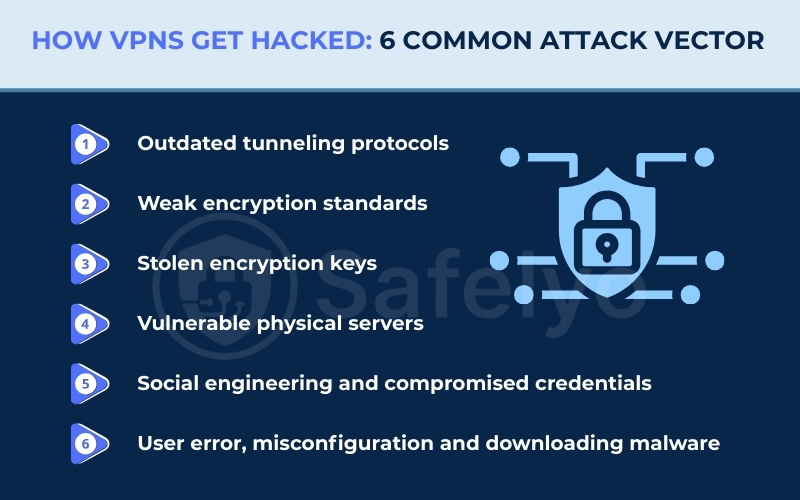
2. How VPNs get hacked: 6 common attack vectors
Understanding how these systems break down helps you protect your own devices. The technology itself relies on complex mathematics and secure servers. Vulnerabilities usually appear in several places along the connection path rather than the encryption itself. Here are the six most common ways a connection becomes compromised.
2.1. Vector 1: Outdated tunneling protocols
A protocol acts as the fundamental instruction manual for how your device communicates with the remote server. When you use older protocols like PPTP, you rely on obsolete authentication methods from the 1990s. Attackers can easily capture the initial handshake data when your device attempts to connect to the network.
Once they have this raw handshake data, attackers use automated dictionary attacks to crack the password offline in a matter of minutes. Secure providers avoid this entirely by relying exclusively on modern cryptographic routing like WireGuard or OpenVPN. These newer options use a significantly smaller, streamlined codebase that leaves very little room for attackers to find a way inside.
2.2. Vector 2: Weak encryption standards
Encryption is the process that scrambles your readable data into unreadable ciphertext. This ensures that anyone intercepting your connection only sees a random string of characters. Older encryption methods, such as DES or basic 128-bit keys, are highly susceptible to brute-force attacks. In these attacks, a hacker uses powerful computers to guess the password millions of times per second.
Modern standards like AES-256 operate entirely differently to prevent this guessing game. AES-256 splits your data into tiny blocks and applies multiple rounds of complex mathematical substitution. The large key size creates a number of possible combinations so exceptionally vast that current supercomputers would need an impractical amount of time to guess the correct sequence.
2.3. Vector 3: Stolen encryption keys
Even the most complex mathematical encryption is effectively neutralized if a hacker manages to steal the digital key used to lock and unlock the data. If a provider uses the same static encryption key for an extended period, an attacker who steals that single key can decrypt weeks or months of your past internet traffic.
This specific vulnerability is exactly why perfect forward secrecy is such a vital defense mechanism for modern privacy tools. This technology automatically negotiates a brand new, unique encryption key for every single session. If a hacker somehow breaches a server and steals today’s temporary key, they remain entirely blocked from reading your data from yesterday or tomorrow.
2.4. Vector 4: Vulnerable physical servers
Sometimes the critical weakness is not found in the software code, but rather in the physical hardware itself. Providers rent or own servers sitting in physical data centers around the world. If a server uses traditional hard disk drives, the operating system inevitably leaves traces of data and potential connection logs on the physical disk.
If law enforcement agencies physically seize that hardware, or if thieves break into the data center, forensic teams can easily copy the storage disks and extract leftover user data. Top-tier providers now run their entire network on specialized RAM-only servers using volatile memory to counter this risk. Because they lack traditional hard drives, any stored session data is cleared the moment the machine is rebooted.
2.5. Vector 5: Social engineering and compromised credentials
Many of the largest enterprise security breaches happen because the underlying cryptography worked exactly as intended, but human vulnerabilities were exploited. Attackers understand that cracking modern encryption is inefficient, so they target the company’s system administrators instead.
They frequently launch highly targeted spear-phishing campaigns against key staff members. By sending convincing fake emails that look like internal corporate communications, they trick employees into logging into fake portals and handing over administrative passwords. Once the attackers secure these high-level credentials, they simply log into the network just like an authorized employee.
2.6. Vector 6: User error, misconfiguration and downloading malware
The encrypted tunnel you rely on is only as secure as your personal computer or smartphone. Your application encrypts data just before it leaves your device, meaning any threat already inside your system will bypass the protection entirely.
If you accidentally install a malicious application with root permissions or fall victim to a phishing scam, you compromise your operating system. A background keylogger will record your passwords before the security application encrypts your network traffic. Furthermore, manual misconfigurations cause significant data leaks. If you manually disable the system kill switch, you actively leave your device exposed to local network monitoring the moment your internet connection briefly drops.
3. Real-world VPN breaches: 10 notable incidents
Looking at historical data provides solid proof of what goes wrong in the real world. Breaches usually stem from server misconfigurations or stolen credentials rather than someone actually breaking the mathematical encryption tunnel itself. Here are ten major incidents that shaped the industry.
3.1. Hundreds of free apps put user data at risk (2025)
In 2025, security firm Zimperium published a detailed report examining over 800 free applications on Android and iOS. The analysis found that a significant portion of these free tools failed to provide adequate privacy measures. This research highlights the ongoing security risks associated with unverified mobile applications. We strongly advise users to only trust free versions provided by reputable, premium companies.
3.2. NordVPN third-party data center breach (2018)
A hacker gained unauthorized access to a server located in Finland back in 2018. A third-party data center operated this specific server, and they left a remote management account unsecured. Fortunately, the breach did not compromise any actual user traffic. However, the data center failed to notify the company until a full year later, highlighting the severe risks of relying on external infrastructure.
3.3. TunnelVision attack reveals protocol vulnerabilities (2024)
Security researchers at Leviathan Security Group identified a novel threat in 2024 known as TunnelVision.
This attack manipulates local network settings using a DHCP trick to create a side channel. This manipulation allows hackers to view unencrypted internet traffic by forcing the device to route data outside the secure tunnel. Premium providers must actively implement network firewalls to block this specific local routing manipulation.
3.4. HideMyAss sparks privacy revolution with LulzSec incident (2011)
A major turning point for the industry occurred in 2011 when HideMyAss complied with a United Kingdom court order. The company handed over connection logs that tied a user to an attempted hack against Sony. This event shocked consumers and pushed the entire industry to adopt strict no-logs policies. HideMyAss acknowledged the backlash and subsequently updated its own privacy policy to stop recording user data.
3.5. Cisco breach highlights the need for multi-factor authentication (2023)
Ransomware groups Akira and LockBit launched a successful brute-force attack against Cisco enterprise servers in 2023. They gained unauthorized access to user credentials by targeting accounts that lacked multi-factor authentication. Cisco quickly issued critical security updates to close numerous vulnerabilities. This event demonstrates that even advanced government-level network tools remain vulnerable to brute-force credential attacks.
3.6. Ivanti Pulse Connect Secure breach hits government devices (2021)
A suspected Chinese hacking collective exploited a zero-day flaw in Ivanti network hardware during 2021. This breach successfully compromised remote access devices used by the United States and European Union governments. The compromised hardware remained completely undetected on the network for several months. The damage was so severe that many government users had to permanently dispose of their affected devices.
3.7. PureVPN CRM exploit shows risks of third-party services (2013)
Hackers exploited a vulnerability in a third-party customer relationship management system used by PureVPN in 2013. This breach leaked the names and email addresses of registered users. The attackers immediately used this stolen contact information to launch targeted phishing scams. The company promised compensation to affected users, but public records do not show if any payouts actually occurred.
3.8. Fortinet repeated credential leaks shake enterprise trust (2020-2025)
Fortinet provides remote access infrastructure for large businesses, but they suffered multiple notable data leaks. A vulnerability in 2020 exposed over 50,000 usernames, passwords, and unmasked IP addresses. Another unpatched flaw in 2021 exposed 500,000 more credentials. Finally, the Belsen Group utilized a zero-day exploit in 2025 to compromise 14,000 devices. Fortinet responded to all incidents with software patches and security warnings.
3.9. Seven simultaneous leaks expose 1.2TB of user data (2020)
Security researchers at VPNMentor discovered a massively compromised server located in Hong Kong in 2020. Seven different free providers shared this single unsecured server. The breach exposed 1.2 terabytes of plaintext data, including private browsing histories, support chats, and real IP addresses. Shockingly, many of these negligent providers still operate freely on major mobile application stores today.
3.10. The Hola botnet scandal (2015)
Over 47 million free users unknowingly became part of a large-scale botnet network in 2015. The parent company routed user bandwidth to its sister application, Luminati, which sold network access to outside buyers. Bad actors purchased this access and launched a distributed denial-of-service attack against the 8chan message board. The company now clearly discloses its peer-to-peer network structure to new users.
4. Signs your VPN is hacked or compromised
It is not always obvious when a security tool fails because hackers prefer to stay hidden to continue harvesting your data. However, your devices and accounts often show subtle warning signs when a breach occurs. You should investigate your connection if you notice strange behavior on your personal devices.
Watch out for these five common indicators of a compromised connection:
- Unfamiliar login alerts: You might receive unexpected account login warnings from unknown locations while your secure application is actively running.
- Frequent, unexplained disconnects: If your secure connection drops constantly despite having stable Wi-Fi, it could indicate that attackers are tampering with the server or overloading the network.
- Targeted phishing emails: You could notice a sudden flood of highly specific scam emails in your private inbox, indicating a recent data leak.
- Browser security warnings: You may see frequent bright red security warnings in your web browser regarding invalid website certificates.
- Severe device slowdowns: You might experience rapid battery drain or sluggish system performance, which often indicates a hidden botnet infection.
5. The real-world impact: What happens to your data if a VPN fails?
When a secure connection drops, the consequences shift from theoretical risks to personal stakes. The moment the connection breaks, your internet service provider immediately sees your true IP address. They resume tracking your browsing history and DNS requests without your knowledge.
If the server itself is compromised on public Wi-Fi, bad actors can intercept your unencrypted internet traffic. They launch man-in-the-middle attacks to inject unwanted ads or redirect you to malicious websites. Data brokers can also collect your newly exposed location habits, allowing attackers to craft highly personalized phishing emails.
Fortunately, your financial data remains mostly secure during a basic tunnel leak. Most modern banking websites use their own secure HTTPS connections. A simple tunnel drop reveals which banking website you visited, but the actual login payload remains entirely secure.
6. How to detect a VPN breach right now
Feeling anxious about your current connection is normal, but you can take immediate steps to verify your safety. It is important to note that these tests do not prove a cybercriminal actively hacked your provider. Instead, they check if your system is actively leaking data due to software errors or misconfigurations. Follow these straightforward steps to audit your current setup.
6.1. Step 1: Run a DNS and IP leak test
You need to establish your baseline connection first to see if your true identity is exposed through an IP leak or if your browsing requests are visible due to a DNS leak. Follow these steps to check:
- Turn off your secure application completely.
- Visit ipleak.net to record your real IP address and internet provider.
- Turn the application back on and connect to a server in a different country.
- Refresh the ipleak.net page.
- Look at the new IP address to ensure there is no IP leak, then scroll down to the “DNS Addresses” section to verify you are safe from a DNS leak. If you still see your original ISP name or your actual physical location anywhere on this page, your connection is actively leaking.
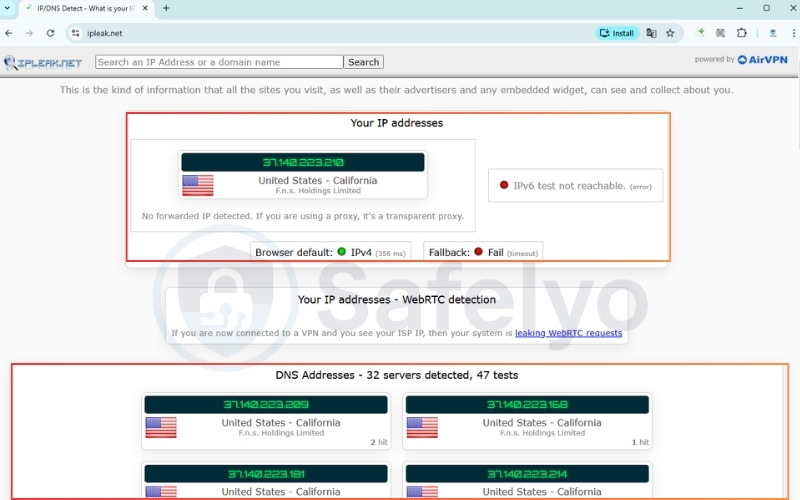
Running this basic check confirms whether your actual location and browsing activity are successfully hidden from your internet service provider (ISP).
Note: You can also use other reliable testing sites like dnsleaktest.com or browserleaks.com to verify these results.
6.2. Step 2: Check for WebRTC leaks
Modern web browsers have built-in communication tools that can sometimes bypass your secure tunnel and reveal your local IP address, resulting in a WebRTC leak. Here is how to test it:
- Keep your secure connection active.
- Open your browser and visit a dedicated WebRTC testing website like browserleaks.com/webrtc
- Look at the local IP address section in the test results.
- Disable the WebRTC feature in your browser settings if your real IP address appears on the screen.
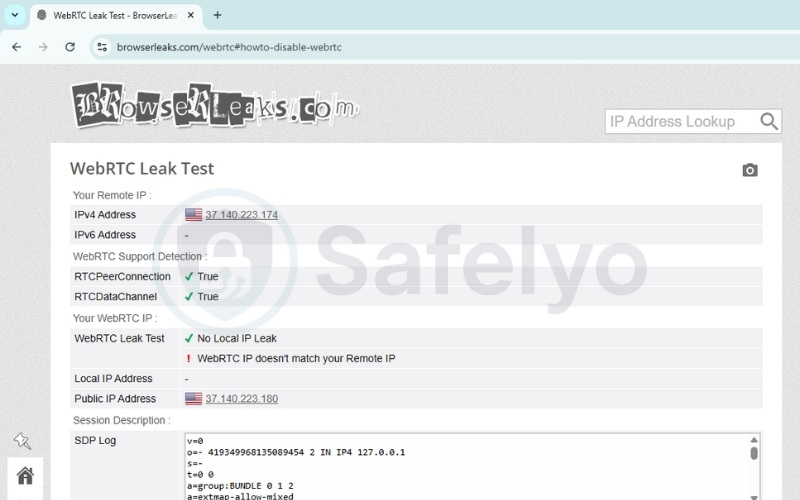
Performing this check guarantees that your web browser isn’t quietly bypassing the secure tunnel and revealing your true identity in the background.
6.3. Step 3: Test your kill switch
A reliable kill switch is your last line of defense against sudden disconnections. Test yours with this method:
- Open your application preferences and ensure the “Kill Switch” or “Network Lock” feature is toggled on.
- Connect to a server and open your web browser. Start downloading a large, safe file to keep the network active.
- While the file is actively downloading, open your computer’s Task Manager (Windows) or Activity Monitor (Mac). Find the background process for your security app and force-close it.
- Immediately look at your active download. If the download halts instantly and your computer loses internet access, your kill switch is protecting you. If the download continues, your defense has failed.
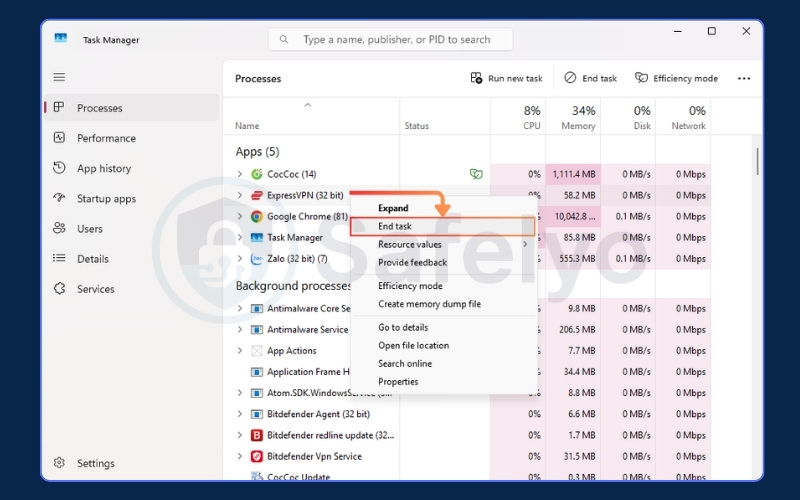
Verifying this safeguard ensures your device won’t accidentally broadcast unencrypted data if your secure connection ever drops unexpectedly.
6.4. Step 4: Immediate steps if your VPN is leaking
If you discover that your connection is exposing your data, you should act quickly to secure your device.
- Open your network settings and disconnect from Wi-Fi immediately.
- Open your browser settings and clear all cache and cookies.
- Open your antivirus software and run a full system scan.
- Go to your sensitive accounts and update the passwords.
- Go to your system settings and uninstall the compromised application.
Taking these immediate precautions stops any active data leaks, clears residual tracking files, and protects your system while you investigate the issue.
7. Jurisdiction risk: Can governments force VPN exposure?
Yes, governments can legally force providers to expose user data, but this depends heavily on the company’s legal jurisdiction. The physical location of a company headquarters plays a massive role in your privacy. Governments operating within certain intelligence alliances (like the Five, Nine, or Fourteen Eyes) can use secret court orders to legally compel local companies to start recording a specific user’s traffic, even if the company normally does not keep logs.
To combat this, you must look for two specific defenses. First, choose a provider based in a privacy-friendly country outside of these alliances, such as Switzerland or Panama, which provides a strong legal shield. Second, select a provider with an independently audited no-logs policy. A government cannot seize historical data that the company never recorded in the first place.
However, authorities could theoretically seize physical servers in a data center to extract active information. This is why servers running entirely on volatile memory (RAM-only) are so important. They cannot store data permanently, leaving nothing to hand over during a physical raid.
8. How to choose a truly secure VPN
Moving from anxiety to confidence requires knowing exactly what to look for in a provider. You need a service that prioritizes verifiable security over flashy marketing claims. To actively defend against the six attack vectors we discussed earlier, here are the mandatory features you should demand:
- Independently audited no-logs policy: Ensure the provider’s privacy claims are independently audited and verified by a major accounting firm.
- RAM-only server infrastructure: The provider must run its entire network on RAM-only (diskless) servers to prevent physical data extraction during physical raids.
- Default system kill switch: Verify that the application includes an active default kill switch to instantly block internet access during connection drops.
- Modern protocols and encryption: Demand WireGuard or OpenVPN protocols paired strictly with strong AES-256 or ChaCha20 encryption standards.
- Session protection: Check if the system automatically offers perfect forward secrecy to rotate your encryption keys regularly.
- Anonymous registration: Protect your true identity by registering with disposable emails and using one-time anonymous payment methods.
To make your shopping experience easier, use this quick scorecard before committing to a purchase:
| Must-Have Feature | Recommended Standard | Your VPN Status |
|---|---|---|
| Logging Policy | Independently Audited | ☐ |
| Servers | RAM-Only (Diskless) | ☐ |
| Data Protection | Default Kill Switch | ☐ |
| Encryption | AES-256 or ChaCha20 | ☐ |
| Protocols | WireGuard or OpenVPN | ☐ |
9. FAQs about can VPN be hacked
People frequently have specific questions about how these security tools operate in daily life. We have gathered the most common concerns to provide clear, straightforward answers.
Why shouldn’t you use a VPN all the time?
Leaving the application running constantly can cause unnecessary performance drops. When you are on a trusted home network, the encryption process naturally slows down your maximum internet speed. It is often better to turn it off for bandwidth-heavy tasks at home, provided you are not doing anything highly sensitive.
Which VPN do hackers use?
Cybercriminals typically avoid commercial services entirely. They prefer complex, privacy-first setups that involve routing traffic through multiple proxy chains or integrating directly with the Tor network. Their goal is absolute anonymity rather than the simple geo-unblocking features that regular consumers want.
Is VPN actually safe?
The safety of the tool depends entirely on the company running it. Premium paid services with audited privacy policies are highly secure and safe for daily use. However, free applications often pose a severe privacy risk by actively harvesting and selling your browsing data.
Can anyone track you if you use a VPN?
While your local network administrator cannot see your traffic, you are not entirely invisible. Your internet service provider knows you are connected to a secure server, even if they cannot see what you are doing. Furthermore, large tech companies can still track you using browser cookies or your logged-in accounts.
How to know if your VPN is hacked?
The fastest way to know is by running active network checks. As we detailed earlier, you should perform an IP and DNS leak test while connected. If your real location or actual internet provider appears on the testing website, your secure tunnel has failed.
Can a VPN hack your phone?
A legitimate premium application will not hack your phone, but malicious free apps certainly can. Some shady free tools request unnecessary device permissions. They log your GPS location data, or actively inject malware into your mobile operating system.
Can a VPN hack your computer?
Yes, desktop computers are vulnerable to malicious software masquerading as security tools. These dangerous applications might install hidden browser extensions, harvest background data, or secretly enroll your computer into a botnet. This is exactly what happened during the infamous Hola scandal we discussed earlier.
10. Conclusion
Answering the question of whether can VPN be hacked requires looking at both the technology and human behavior. While premium services can theoretically face targeted attacks, the average user’s biggest threat comes from relying on low-quality or free applications. A strong tunnel with modern encryption remains your best defense on public networks.
We highly encourage you to run the leak tests we outlined today to verify your current setup. If your connection fails the test, upgrade immediately to an audited, premium provider to keep your data safe.
For more deep dives into protecting your digital footprint, explore our VPN Guides category, and let Safelyo help you secure your online life.