Yes, a VPN can be hacked. While the mathematical encryption protecting your data is incredibly strong, hackers often exploit software vulnerabilities, configuration errors, or stolen passwords to bypass the secure tunnel entirely. If you use a low-quality or free service, your personal data could already be at risk.
In this guide, we detail the technical methods attackers use to compromise these networks, examine actual security incidents, and show you how to perform a simple self-audit to test your current connection right now.
Key takeaways:
- Premium security applications are highly resistant to direct breaches because they use advanced cryptography.
- Most real-world data leaks happen due to simple user errors, outdated protocols, or malicious free applications.
- You can easily verify your own connection safety right now by running simple online IP and DNS leak tests.
- Choosing a provider with verified RAM-only servers and an audited privacy policy is your best defense against data exposure.
- The rise of quantum computing presents a long-term challenge to current encryption models, prompting top providers to adopt post-quantum cryptography.
- Credential stuffing attacks remain one of the most common ways hackers bypass encryption to compromise user accounts directly.
1. Can VPN be hacked? The direct answer
Yes, all VPNs are technically hackable. No technology is entirely flawless. However, the actual risk to your data depends heavily on the service you choose to use. We observe a clear risk spectrum across different service tiers.
Free VPNs carry the highest risk due to a lack of budget for security updates, and many actively log and share user data with third-party advertisers.
Premium paid VPNs present a very low risk because they use advanced encryption and strictly managed infrastructure. Enterprise applications sit in the middle of this spectrum. They possess strong security frameworks but remain prime targets for sophisticated hackers due to the high value of corporate data.
In reality, hackers rarely target mathematical encryption directly. They target the client application, the physical server, and the user accounts instead. For specific guidance on finding a safe provider, refer to our criteria in Section 9: How to choose a truly secure VPN.
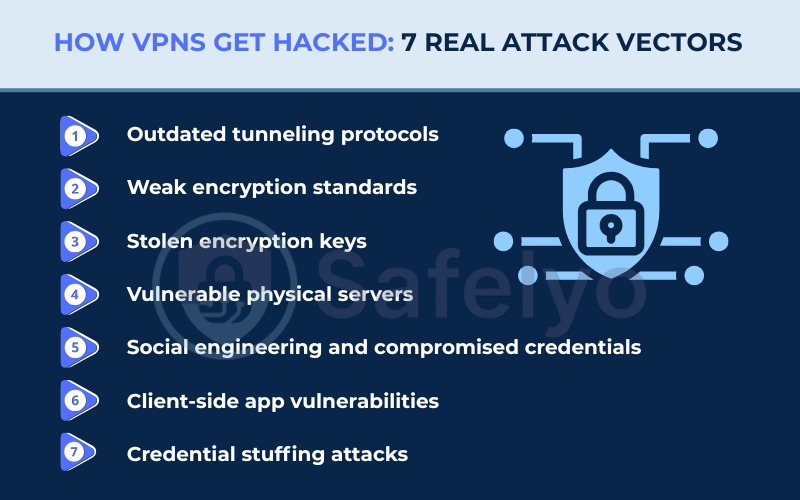
2. How VPNs get hacked: 7 real attack vectors
To understand how these systems break down, we must examine the specific methods cybercriminals use. The technology itself relies on complex mathematics and secure servers, but vulnerabilities usually appear in several places along the connection path.
2.1. Outdated tunneling protocols
A VPN protocol acts as the fundamental instruction manual for how your device communicates with the remote server. Cybercriminals actively exploit systems relying on obsolete authentication methods.
Unsafe VPN protocols you must avoid include:
- PPTP: This protocol relies on authentication methods from the 1990s. Attackers can capture the initial handshake data and use automated dictionary attacks to crack the password offline in minutes. If a provider still lists PPTP in their settings menu in 2026, it is a massive red flag regarding their security competence.
- L2TP/IPSec: This protocol is highly susceptible to network blocking and contains documented security weaknesses under specific configurations.
- SSTP: This option only functions optimally within Windows environments and lacks the transparency of open-source alternatives.
Safe VPN protocols you should look for include:
- WireGuard: This modern option uses a significantly smaller, streamlined codebase that leaves very little room for attackers to find vulnerabilities. The codebase is highly auditable.
- OpenVPN: This open-source standard has been extensively tested by the cybersecurity community and remains highly secure.
- IKEv2/IPSec: This protocol provides excellent stability and fast reconnection speeds, making it ideal for mobile devices.
- NordLynx: NordVPN’s proprietary protocol built on WireGuard, independently audited and meets the highest security standards.
- NordWhisper: NordVPN’s newest protocol (2025), designed to bypass censorship and network restrictions by mimicking regular web traffic.
- Lightway: ExpressVPN’s proprietary protocol, independently audited and designed for fast, secure connections.
- Dausos: Surfshark’s proprietary protocol, featuring post-quantum cryptography and AEGIS-256X2 encryption, currently available on macOS.
Check your application settings immediately to ensure you are actively using one of the secure protocols listed above.
2.2. Weak encryption standards
Encryption scrambles your readable data into unreadable ciphertext. This process ensures anyone intercepting your connection only sees a random string of characters. Relying on an algorithm with a large key size is not enough if the algorithm itself is fundamentally weak.
Weak ciphers that hackers can exploit include:
- RC4: Hackers have completely compromised this cipher using statistical attacks.
- MD5-HMAC: This algorithm suffers from known collision vulnerabilities, making it unsafe for modern data protection.
- 3DES: The cybersecurity industry officially deprecated this standard due to critical security flaws.
Modern standards that ensure data safety include:
- AES-256: Providers typically pair this standard with OpenVPN and IKEv2. The 256-bit key creates a number of possible combinations so vast that current supercomputers cannot perform a brute-force attack successfully.
- ChaCha20-Poly1305: Providers pair this modern cipher with the WireGuard protocol. It operates much more efficiently on older mobile devices lacking hardware acceleration for AES.
In reality, attackers do not attempt to brute-force AES-256. They search for implementation errors instead of attacking the cipher directly. Open your application preferences to confirm your provider uses either AES-256 or ChaCha20-Poly1305.
2.3. Stolen encryption keys
Even the most complex mathematical encryption fails if a hacker steals the digital key used to lock and unlock the data. If a provider uses the same static encryption key for an extended period, an attacker who steals that single key can decrypt weeks or months of your past internet traffic.
This specific vulnerability is exactly why Perfect Forward Secrecy is a vital defense mechanism. This technology automatically negotiates a brand new, unique session key for every single connection phase. Providers maintain strict session key rotation intervals. If a hacker somehow breaches a server and steals today’s temporary key, they remain entirely blocked from reading your data from yesterday or tomorrow.
2.4. Vulnerable physical servers
Sometimes the critical weakness is found in the physical hardware rather than the software code. Providers rent or own servers sitting in physical data centers around the world. If a server uses traditional hard disk drives, the operating system leaves traces of data and potential connection logs on the disk.
If law enforcement agencies physically seize that hardware, forensic teams can extract leftover user data. Top-tier providers now run their entire network on RAM-only servers. Because these machines use volatile memory instead of hard drives, any stored session data clears instantly the moment the machine undergoes a reboot.
For maximum protection, providers combine this hardware with a zero-knowledge architecture. Under this framework, the server simply cannot store any information linking back to a specific user. For example, when Russian authorities seized Private Internet Access servers in 2016, they found absolutely zero usable data because the company utilized a strict zero-log architecture.
2.5. Social engineering and spear-phishing attacks
Many enterprise security breaches happen because human vulnerabilities are exploited. Attackers understand that cracking modern encryption is highly inefficient, so they target the company’s system administrators instead. They launch highly targeted spear-phishing campaigns against key staff members. By sending convincing fake emails that look like internal communications, they trick employees into handing over administrative passwords.
Hackers also execute supply chain attacks by compromising third-party vendors associated with the core provider. For instance, the PureVPN breach in 2013 occurred when hackers exploited a vulnerability in an external customer relationship management system. Similarly, the 2018 NordVPN incident involved an unsecured third-party data center.
As an end user, your best defense is maintaining strict operational security. Never click on unverified links or download unexpected attachments, even when your secure connection is active.
2.6. Client-side app vulnerabilities
The VPN client on your device is simply software, and all software can contain security bugs. Flaws within the client application, such as memory corruption, authentication bypasses, or privilege escalation, give hackers a direct entry point. These flaws allow attackers to intercept your data locally before the application encrypts the network traffic.
Reputable providers actively hunt for these issues and patch them rapidly. For example, in March 2026, security researchers disclosed a privilege escalation vulnerability on the IPVanish macOS application. The vulnerability carried a high CVSS score of 8.8, indicating severe risk. The provider responded excellently by releasing a full security patch within just three days of the disclosure.
Conversely, negligent providers rely on an unsecured update mechanism. If the application updates itself over an unencrypted connection, hackers can intercept the download and inject malware directly into the update file. You must verify if your provider maintains a public changelog, releases frequent security patches, and operates an active bug bounty program to reward independent security researchers.
2.7. Credential stuffing attacks
Credential stuffing represents a highly effective and distinct attack vector. Unlike a brute-force attack that guesses passwords randomly, credential stuffing relies on known information. Hackers purchase massive lists of exposed email addresses and passwords leaked from separate data breaches on gaming forums or social media networks. They then use automated bots to test these exact credentials against various security applications.
This method is extremely successful because many people reuse the same password across multiple online services. Once hackers log into your account using your stolen credentials, they can view your payment history, alter your security settings, or monitor your activity if the provider secretly keeps logs. The 2023 Cisco enterprise breach demonstrated how devastating stolen credentials can be for network security.
To defend your account against credential stuffing, implement these three critical steps:
- Create a completely unique, complex password specifically for your security application.
- Enable Multi-Factor Authentication (MFA) to require a secondary verification code during login.
- Check your email address on verification websites like haveibeenpwned.com to see if your data appears in known database breaches.
3. What happens when a VPN is hacked?
When an attacker successfully breaches a secure connection, the consequences range from minor privacy leaks to severe financial damage. The severity of the outcome depends heavily on whether the attack targets your local device or the provider’s central infrastructure.
Here are the direct consequences of a compromised network connection:
- Data theft: Hackers collect your unencrypted web traffic, browsing history, and DNS requests. They frequently sell this information to data brokers or use it to launch highly targeted phishing campaigns against you.
- Identity theft: Bad actors combine your exposed real IP address, physical location data, and browsing habits to build a comprehensive profile for impersonation.
- Fraud: If your connection drops on an unsecured public network, cybercriminals can intercept your banking details and account passwords, leading directly to financial theft.
- MITM attack: By positioning themselves between your device and the internet, attackers execute Man-in-the-Middle operations. They actively inject malicious advertisements into your browser or redirect you to sophisticated fake login portals.
- Device infection: A fully compromised client application can act as a bridge for attackers to silently install background malware, keyloggers, or ransomware onto your personal device.
Understanding these risks highlights exactly why choosing a robust, audited provider is crucial. A minor tunnel drop poses a moderate risk, but a full provider infrastructure breach exposes you to devastating cyber threats.
4. Real-world VPN breaches: 10 notable incidents
Looking at historical data provides solid proof of what goes wrong in the real world. Breaches usually stem from server misconfigurations or stolen credentials rather than someone actually breaking the mathematical encryption tunnel itself. Here are ten major incidents that shaped the industry.
4.1. Hundreds of free apps put user data at risk (2025)
In 2025, security firm Zimperium published a detailed report examining over 800 free applications on Android and iOS. The analysis found that a significant portion of these free tools failed to provide adequate privacy measures. This research highlights the ongoing security risks associated with unverified mobile applications. We strongly advise users to only trust free versions provided by reputable, premium companies.
4.2. NordVPN third-party data center breach (2018)
A hacker gained unauthorized access to a server located in Finland back in 2018. A third-party data center operated this specific server, and they left a remote management account unsecured. Fortunately, the breach did not compromise any actual user traffic. However, the data center failed to notify the company until a full year later, highlighting the severe risks of relying on external infrastructure.
4.3. TunnelVision attack reveals protocol vulnerabilities (2024)
Security researchers at Leviathan Security Group identified a novel threat in 2024 known as TunnelVision (CVE-2024-3661). This attack exploits DHCP Option 121 to inject a static route directly into the local routing table. This manipulation forces the device to route internet traffic entirely outside the secure tunnel.
To execute this attack, the cybercriminal must control the DHCP server on the same local network, such as a compromised public Wi-Fi hotspot or a corporate network. Once executed, the victim’s traffic travels unencrypted, allowing the attacker to view everything. To stop this threat, premium providers must actively implement network firewall rules that block DHCP Option 121 routing overrides entirely.
4.4. HideMyAss sparks privacy revolution with LulzSec incident (2011)
A major turning point for the industry occurred in 2011 when HideMyAss complied with a United Kingdom court order. The company handed over connection logs that tied a user to an attempted hack against Sony. This event shocked consumers and pushed the entire industry to adopt strict no-logs policies. HideMyAss acknowledged the backlash and subsequently updated its own privacy policy to stop recording user data.
4.5. Cisco breach highlights the need for multi-factor authentication (2023)
Ransomware groups Akira and LockBit launched a successful brute-force attack against Cisco enterprise servers in 2023. They gained unauthorized access to user credentials by targeting accounts that lacked multi-factor authentication. Cisco quickly issued critical security updates to close numerous vulnerabilities. This event demonstrates that even advanced government-level network tools remain vulnerable to brute-force credential attacks.
4.6. Ivanti Pulse Connect Secure breach hits government devices (2021)
A suspected Chinese hacking collective exploited a zero-day flaw in Ivanti network hardware during 2021. This breach successfully compromised remote access devices used by the United States and European Union governments. The compromised hardware remained completely undetected on the network for several months. The damage was so severe that many government users had to permanently dispose of their affected devices.
4.7. PureVPN CRM exploit shows risks of third-party services (2013)
Hackers exploited a vulnerability in a third-party customer relationship management system used by PureVPN in 2013. This breach leaked the names and email addresses of registered users. The attackers immediately used this stolen contact information to launch targeted phishing scams. The company promised compensation to affected users, but public records do not show if any payouts actually occurred.
4.8. Fortinet repeated credential leaks shake enterprise trust (2020-2025)
Fortinet provides remote access infrastructure for large businesses, but they suffered multiple notable data leaks. A vulnerability in 2020 exposed over 50,000 usernames, passwords, and unmasked IP addresses. Another unpatched flaw in 2021 exposed 500,000 more credentials. Finally, the Belsen Group utilized a zero-day exploit in 2025 to compromise 14,000 devices. Fortinet responded to all incidents with software patches and security warnings.
4.9. Seven simultaneous leaks expose 1.2TB of user data (2020)
Security researchers at VPNMentor discovered a massively compromised server located in Hong Kong in 2020. Seven different free providers shared this single unsecured server. The breach exposed 1.2 terabytes of plaintext data, including private browsing histories, support chats, and real IP addresses. Shockingly, many of these negligent providers still operate freely on major mobile application stores today.
4.10. The Hola botnet scandal (2015)
Over 47 million free users unknowingly became part of a large-scale botnet network in 2015. The parent company routed user bandwidth to its sister application, Luminati, which sold network access to outside buyers. Bad actors purchased this access and launched a distributed denial-of-service attack against the 8chan message board. The company now clearly discloses its peer-to-peer network structure to new users.
5. Signs your VPN is hacked or compromised
It is not always obvious when a security tool fails because hackers prefer to stay hidden to continue harvesting your data. Watch out for these seven common indicators of a compromised connection, ranked from the most obvious to the most subtle:
- Browser security warnings: You may see frequent bright red security warnings in your web browser regarding invalid website certificates.
- Frequent, unexplained disconnects: If your secure connection drops constantly despite having stable Wi-Fi, attackers might be tampering with the server.
- Unfamiliar login alerts: You might receive unexpected account login warnings from unknown locations while your secure application is actively running.
- Targeted phishing emails: You could notice a sudden flood of highly specific scam emails in your private inbox, indicating a recent data leak.
- Severe device slowdowns: You might experience rapid battery drain or sluggish system performance, which often indicates a hidden botnet infection.
- Lack of application updates: If the application goes months without any updates and the changelog shows no recent security fixes, the provider is likely failing to maintain active security standards.
- Unwanted system modifications: The sudden appearance of strange browser extensions, unauthorized applications, or altered DNS settings on your device clearly indicates a background infection.
6. The real-world impact: What a VPN cannot protect you from
A VPN is not a magical shield against all digital dangers. To maintain true online safety, you must understand exactly where your protection ends. Let’s explore the risks of sudden connection drops and the specific threats that network encryption simply cannot stop.
6.1. Risks when the tunnel drops
When a secure connection drops, the consequences shift from theoretical risks to personal stakes. The moment the connection breaks, your internet service provider immediately sees your true IP address. They resume tracking your browsing history and DNS requests without your knowledge.
Furthermore, if you connect without an active kill switch, you face a serious threat known as a reconnection leak. During the split-second window when the application attempts to reconnect to the server, your device might broadcast DNS queries openly to the local network.
If the server itself is compromised on public Wi-Fi, bad actors can intercept your unencrypted internet traffic. Data brokers can also collect your newly exposed location habits.
Fortunately, your financial data remains secure during a basic tunnel leak if you are visiting a website with an HTTPS connection. However, if the banking site uses a standard HTTP connection, a Man-in-the-Middle attack can easily capture your login payload.
6.2. Threats a VPN was never designed to stop
A secure tunnel protects your network connection, but it does not protect you from all digital threats. Understanding the specific limitations of your security tools is crucial for maintaining total device safety.
Here are the primary threats that bypass network encryption entirely:
- Malware and viruses: The tunnel does not scan the files you download. If you willingly download an infected software package, the encryption will not stop the virus from executing on your hard drive.
- Active phishing campaigns: The application cannot prevent you from manually typing your password into a sophisticated fake website if you click a malicious email link.
- Cookie tracking and browser fingerprinting: Major technology companies like Meta and Google still track your session cookies and unique browser characteristics to identify you, even when your IP address changes.
- Pre-existing device infections: If a keylogger already exists on your computer, it records your keystrokes long before the client application encrypts the network traffic.
- Human error: Employing weak passwords, sharing your account details, or failing to activate Multi-Factor Authentication are risks that no networking tool can fix.
To achieve genuine online safety, we strongly recommend a layered security approach. You must combine your encrypted network connection with a dedicated antivirus program, a reliable password manager, and strict browsing habits.
7. How to detect a VPN breach right now
Feeling anxious about your current connection is normal, but you can take immediate steps to verify your safety. It is important to note that these tests do not prove a cybercriminal actively hacked your provider. Instead, they check if your system is actively leaking data due to software errors or misconfigurations. Follow these straightforward steps to audit your current setup.
7.1. Step 1: Run a DNS and IP leak test
You need to establish your baseline connection first to see if your true identity is exposed through an IP leak or if your browsing requests are visible due to a DNS leak. Follow these steps to check:
- Turn off your secure application completely.
- Visit ipleak.net to record your real IP address and internet provider.
- Turn the application back on and connect to a server in a different country.
- Refresh the ipleak.net page.
- Look at the new IP address to ensure there is no IP leak, then scroll down to the “DNS Addresses” section to verify you are safe from a DNS leak.
- Check your IPv6 address status. Many applications only hide your IPv4 address and leak your IPv6 address to the local network. You must verify that your IPv6 address is completely hidden or blocked.
- If you still see your original ISP name or your actual physical location anywhere on this page, your connection is actively leaking.
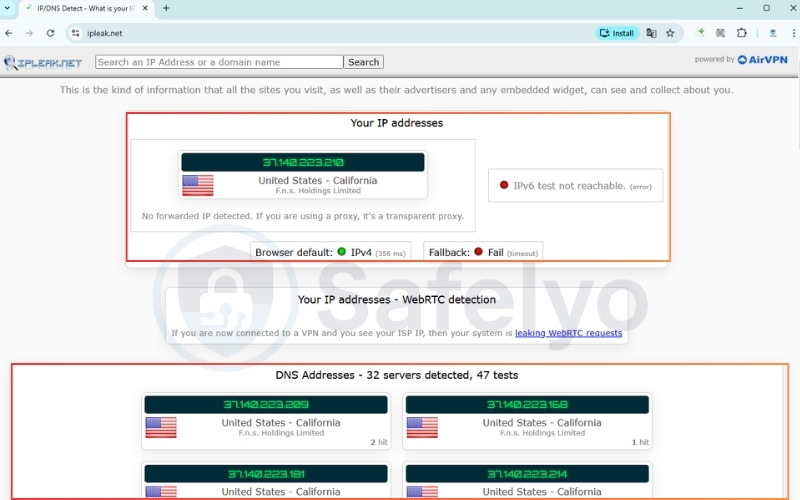
Running this basic check confirms whether your actual location and browsing activity are successfully hidden from your internet service provider (ISP).
Note: You can also use other reliable testing sites like dnsleaktest.com or browserleaks.com to verify these results.
7.2. Step 2: Check for WebRTC leaks
Modern web browsers have built-in communication tools that can sometimes bypass your secure tunnel and reveal your local IP address, resulting in a WebRTC leak. Here is how to test it:
- Keep your secure connection active.
- Open your browser and visit a dedicated WebRTC testing website like browserleaks.com/webrtc
- Look at the local IP address section in the test results.
- Disable the WebRTC feature in your browser settings if your real IP address appears on the screen.
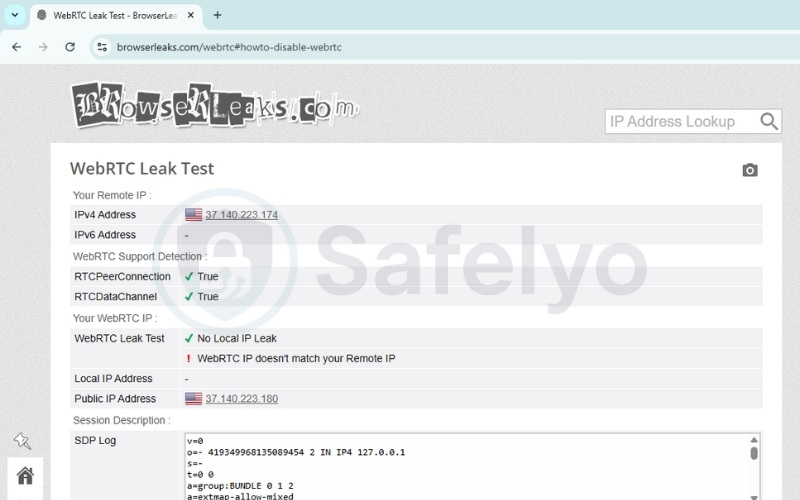
Performing this check guarantees that your web browser isn’t quietly bypassing the secure tunnel and revealing your true identity in the background.
7.3. Step 3: Test your kill switch
A reliable kill switch is your last line of defense against sudden disconnections. Test yours with this method:
- Open your application preferences and ensure the “Kill Switch” or “Network Lock” feature is toggled on.
- Connect to a server and open your web browser. Start downloading a large, safe file to keep the network active.
- While the file is actively downloading, open your computer’s Task Manager (Windows) or Activity Monitor (Mac). Find the background process for your security app and force-close it.
- Immediately look at your active download. If the download halts instantly and your computer loses internet access, your kill switch is protecting you. If the download continues, your defense has failed.
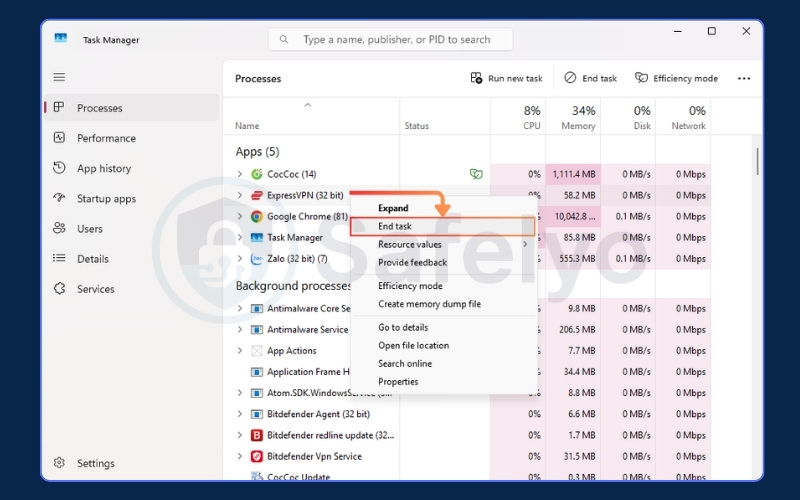
Verifying this safeguard ensures your device won’t accidentally broadcast unencrypted data if your secure connection ever drops unexpectedly.
7.4. Step 4: Immediate steps if your VPN is leaking
If you discover that your connection is exposing your data, you should act quickly to secure your device.
- Open your network settings and disconnect from Wi-Fi immediately.
- Open your browser settings and clear all cache and cookies.
- Open your antivirus software and run a full system scan.
- Go to your sensitive accounts and update the passwords.
- Go to your system settings and uninstall the compromised application.
Taking these immediate precautions stops any active data leaks, clears residual tracking files, and protects your system while you investigate the issue.
8. Jurisdiction risk: Can governments force VPN exposure?
Yes, governments can legally force providers to expose user data, but this depends heavily on the company’s legal jurisdiction. The physical location of a company headquarters plays a massive role in your privacy.
Governments operating within certain intelligence alliances (like the Five, Nine, and Fourteen Eyes) can use secret court orders to legally compel local companies to start recording a specific user’s traffic.
To combat this, you must look for specific privacy defenses. First, choose a provider based in a privacy-friendly country outside of these alliances. Second, select a provider with an independently audited no-logs policy. Finally, look for a transparent warrant canary.
Furthermore, authorities could theoretically seize physical servers in a data center to extract active information. This is why servers running entirely on volatile memory (RAM-only) are so important.
Some premium providers also publish a warrant canary on their website. This is a regular public statement confirming they have not received any secret government subpoenas. If the warrant canary suddenly disappears, users immediately know the company is under legal pressure.
9. How to choose a truly secure VPN: 7-point checklist
Moving from anxiety to confidence requires knowing exactly what to look for in a provider. You need a service that prioritizes verifiable security over flashy marketing claims. Below is a 7-point checklist that is absolutely essential when evaluating any provider:
- Independently audited no-logs policy: Ensure the provider’s privacy claims are independently audited and verified by a major accounting firm.
- RAM-only server infrastructure: The provider must run its entire network on RAM-only servers to prevent data extraction during physical raids.
- Default system kill switch: Verify that the application includes an active default kill switch to instantly block internet access during connection drops.
- Modern protocols and encryption: Demand WireGuard, OpenVPN, or verified proprietary protocols like NordLynx and Lightway. Pair these strictly with AES-256 or ChaCha20 encryption.
- Session protection: Check if the system automatically offers perfect forward secrecy to rotate your encryption keys regularly.
- Anonymous registration: Protect your true identity by registering with disposable emails and using one-time anonymous payment methods.
- Active bug bounty program: The provider must maintain a responsible disclosure program. Companies that pay independent researchers to find bugs are actively securing their software, whereas companies without these programs allow vulnerabilities to fester.
Additionally, you must ensure the service allows you to enable Multi-Factor Authentication on your account portal to prevent credential stuffing attacks. To make your shopping experience easier, use this quick scorecard before committing to a purchase:
| Feature | Recommended Standard | Why It Matters | Your VPN Status |
|---|---|---|---|
| Logging Policy | Independently Audited | Prevents historical data seizure | ☐ |
| Servers | RAM-Only (Diskless) | Clears all data upon reboot | ☐ |
| Data Protection | Default Kill Switch | Stops leaks during disconnects | ☐ |
| Encryption | AES-256 or ChaCha20 | Secures the data tunnel completely | ☐ |
| Protocols | WireGuard, OpenVPN, Proprietary | Determines connection reliability | ☐ |
| Account Security | MFA Support | Prevents credential stuffing attacks | ☐ |
| App Security | Bug Bounty Program | Encourages rapid vulnerability patching | ☐ |
If your current application fails to meet these critical standards, it is time to upgrade. To explore the safest options on the market, check out our comprehensive best VPN for privacy reviews. Be sure to stay informed about deceptive marketing tactics by reading our guide on VPN scams.
10. The future threat: Quantum computing and VPN encryption
Quantum computing has not broken modern network encryption today, but it presents a highly serious challenge for the future. The cybersecurity community is currently preparing for a massive shift in how data is secured.
Currently, the AES-256 encryption standard remains entirely safe. To compromise AES-256 using Grover’s algorithm, a hacker would need a fault-tolerant quantum computer equipped with millions of stable qubits. This technology simply does not exist yet.
Even if a quantum machine successfully executed Grover’s algorithm, it would only reduce the effective key space of AES-256 down to the equivalent of AES-128. Since AES-128 remains practically uncrackable today, AES-256 provides a massive buffer of safety.
The actual immediate threat targets asymmetric cryptography, specifically the RSA and Diffie-Hellman algorithms used during the initial connection handshake. A powerful quantum computer running Shor’s algorithm could easily break these mathematical foundations, allowing an attacker to steal the session keys before the AES tunnel even forms.
To counter this impending risk, the industry is transitioning to post-quantum cryptography (PQC). In 2024, the National Institute of Standards and Technology standardized advanced algorithms like CRYSTALS-Kyber for key encapsulation and CRYSTALS-Dilithium for digital signatures. Several top-tier privacy providers are already integrating these post-quantum algorithms into their networks for testing.
While experts predict a machine capable of breaking RSA might take 10 to 20 years to build, users must worry about the “harvest now, decrypt later” attack strategy. State-sponsored hackers are actively recording and storing encrypted data today.
They plan to hold this locked data in massive storage facilities until a quantum computer becomes available to decrypt it decades from now. If you regularly handle highly sensitive, long-term intelligence, this future threat requires immediate consideration.
11. FAQs about can VPN be hacked
Why shouldn’t you use a VPN all the time?
Leaving the application running constantly can cause unnecessary performance drops. When you are on a trusted home network, the encryption process naturally slows down your maximum internet speed. It is often better to turn it off for bandwidth-heavy tasks at home, provided you are not doing anything highly sensitive.
Which VPN do hackers use?
Cybercriminals typically avoid commercial services entirely. They prefer complex, privacy-first setups that involve routing traffic through multiple proxy chains or integrating directly with the Tor network. Their goal is absolute anonymity rather than the simple geo-unblocking features that regular consumers want.
Is VPN actually safe?
The safety of the tool depends entirely on the company running it. Premium paid services with audited privacy policies are highly secure and safe for daily use. However, free applications often pose a severe privacy risk by actively harvesting and selling your browsing data.
Can anyone track you if you use a VPN?
While your local network administrator cannot see your traffic, you are not entirely invisible. Your internet service provider knows you are connected to a secure server, even if they cannot see what you are doing. Furthermore, large tech companies can still track you using browser cookies or your logged-in accounts.
How to know if your VPN is hacked?
The fastest way to know is by running active network checks. As we detailed earlier, you should perform an IP and DNS leak test while connected. If your real location or actual internet provider appears on the testing website, your secure tunnel has failed.
Can a VPN hack your phone?
A legitimate premium application will not hack your phone, but malicious free apps certainly can. Some shady free tools request unnecessary device permissions. They log your GPS location data, or actively inject malware into your mobile operating system.
Can a VPN hack your computer?
Yes, desktop computers are vulnerable to malicious software masquerading as security tools. These dangerous applications might install hidden browser extensions, harvest background data, or secretly enroll your computer into a botnet. This is exactly what happened during the infamous Hola scandal we discussed earlier.
What should I do if my VPN announces a security vulnerability?
You must update your client application immediately. Read the official security advisory to understand the full scope of the issue. Check the public changelog to see if the vulnerability exposed historical data or only affected unpatched versions.
If you have not done so already, enable Multi-Factor Authentication on your account. A trustworthy provider will always issue a highly detailed and transparent advisory.
Can quantum computers break VPN encryption?
Currently, quantum computers cannot break modern encryption. Standards like AES-256 remain completely safe against any existing machine.
However, a long-term threat exists for asymmetric encryption algorithms like RSA. To prepare for the future, leading providers are already beginning to implement post-quantum cryptography to secure their networks against machines that may emerge 10 to 20 years from now.
12. Conclusion
Answering the question of whether can VPN be hacked requires looking at both the technology and human behavior. While premium services can theoretically face targeted attacks, the average user’s biggest threat comes from relying on low-quality or free applications. A strong tunnel with modern encryption remains your best defense on public networks.
We highly encourage you to run the leak tests we outlined today to verify your current setup. If your connection fails the test, upgrade immediately to an audited, premium provider to keep your data safe.
For more deep dives into protecting your digital footprint, explore our VPN Guides category, and let Safelyo help you secure your online life.