We know the anxiety of seeing a red battery icon while trying to stay secure online. You are likely asking: Does VPN drain battery? The short answer is yes.
However, extensive tests show the extra consumption ranges widely from a tiny 1% to a significant 19%. This depends heavily on whether you use Wi-Fi or mobile data.
Below, we analyze these specific figures and provide 9 essential tips to maximize your battery life without sacrificing security.
Key takeaways:
- Idle on Wi-Fi: Very low impact (approx. 0.25% extra drain).
- Idle on 4G/5G: Moderate impact (approx. 2-3% extra drain).
- Streaming/Active use: High impact, especially on laptops (up to 19% extra drain).
- Protocol matters: WireGuard is significantly more power-efficient than OpenVPN.
- Tips: Using Wi-Fi and modern protocols minimizes the issue.
1. Does VPN drain battery?
The direct answer is yes. A VPN is an app that runs continuously in the background, encrypting every piece of data leaving your device. This process requires energy. However, the impact is not always severe.
Real-world data reveals a clear distinction:
- On Wi-Fi: The extra battery drain is often negligible. You might lose an additional 0.25% to 1% over several hours.
- On 4G/5G or Laptop: The numbers jump significantly. You could see an extra loss of 14% to 19% under heavy load.
A VPN will not “kill” your battery overnight unless you are streaming high-definition video over a mobile network or using outdated encryption protocols.
2. Why does using a VPN drain the battery quicker?
To save power, it helps to understand exactly what the VPN is doing to your battery. There are three main culprits behind the drain.
2.1. Constant encryption processing
Every time you load a webpage or send a message, your phone’s CPU (Central Processing Unit) must solve complex mathematical equations (typically AES-256 encryption).
This is like packing a suitcase inside a locked safe before it leaves your house. Doing this thousands of times per minute keeps the processor awake and consuming power.
This is particularly draining on laptops with large screens, such as the MacBook Pro.
2.2. Background connectivity (Keep-alive)
Even when you are not actively using your phone (Idle mode), the VPN must maintain the secure “tunnel” to the server.
It sends small “ping” packets to say, “I am still here.” A test by NordVPN showed that on a 4G connection, this process drained an extra 3.08% battery over 5 hours, compared to just 0.25% on Wi-Fi.
2.3. Weak signal amplification
This is often the biggest hidden factor. If you use a VPN on a weak 4G or 5G signal, your phone’s modem has to work overtime to maintain that secure tunnel.
It requires much more power to force an encrypted connection through a spotty signal than it does to use a standard Wi-Fi chip.
3. VPN Battery Tests from NordVPN, Surfshark & ExpressVPN
We have aggregated distinct testing data from major providers to highlight the specific impact of network conditions and protocols.
NordVPN reveals that the “Idle Drain” on Wi-Fi is negligible, adding only 0.25% to 0.42% usage over 5 hours. However, using a 4G connection can increase this consumption by up to three times.
Conversely, Surfshark and ExpressVPN focus on active streaming tests, which show a wider variance of 1% to 19% extra battery drain depending on the device.
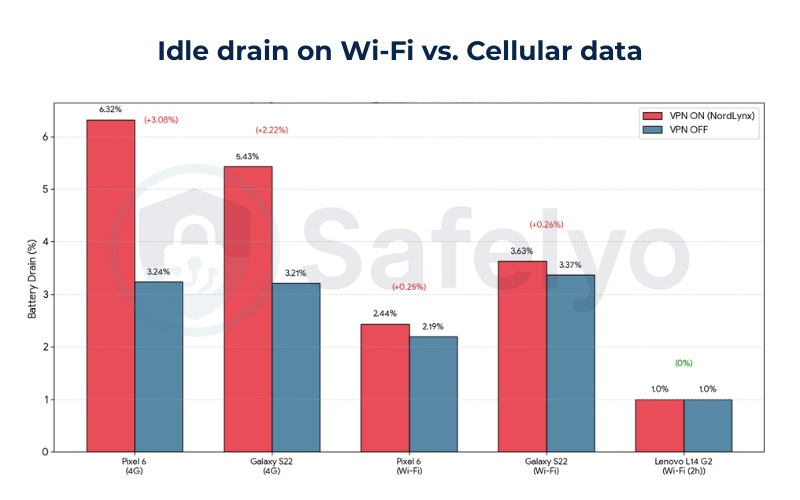
3.1. Test #1: Idle drain on Wi-Fi vs. Cellular data
NordVPN’s 5-hour idle tests on Pixel 6 and Galaxy S22 confirm Wi-Fi VPN drain is minimal (+0.25-0.26%), while 4G adds 2-3% extra due to signal efforts.
| Provider | Device | Network (5h) | Drain VPN ON (NordLynx) | Drain VPN OFF | Extra Drain |
|---|---|---|---|---|---|
| NordVPN | Pixel 6 | 4G | 6.32% | 3.24% | +3.08% |
| NordVPN | Galaxy S22 | 4G | 5.43% | 3.21% | +2.22% |
| NordVPN | Pixel 6 | Wi-Fi | 2.44% | 2.19% | +0.25% |
| NordVPN | Galaxy S22 | Wi-Fi | 3.63% | 3.37% | +0.26% |
| NordVPN | Lenovo L14 G2 | Wi-Fi (2h) | 1% | 1% | 0% |
3.2. Test #2: Streaming drain
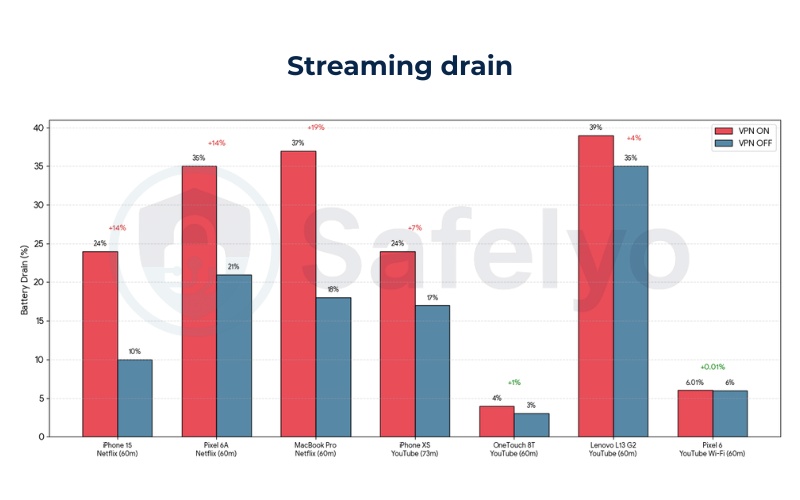
This section aggregates active usage data from three different sources.
ExpressVPN measured battery loss while streaming Netflix for 60 minutes on the iPhone 15, Pixel 6A, and MacBook Pro.
Surfshark and NordVPN conducted similar benchmarking using YouTube playback for durations ranging from 60 to 73 minutes on various Android and iOS smartphones and laptops.
(Note: due to a timing oversight, the Surfshark iPhone test ran for 73 minutes instead of the intended 60.)
| Provider | Device | Task (Time) | Drain VPN ON | Drain VPN OFF | Extra Drain |
|---|---|---|---|---|---|
| ExpressVPN | iPhone 15 | Netflix (60m) | 24% | 10% | +14% |
| ExpressVPN | Pixel 6A | Netflix (60m) | 35% | 21% | +14% |
| ExpressVPN | MacBook Pro | Netflix (60m) | 37% | 18% | +19% |
| Surfshark | iPhone XS | YouTube (73m) | 24% | 17% | +7% |
| Surfshark | OneTouch 8T | YouTube (60m) | 4% | 3% | +1% |
| Surfshark | Lenovo L13 G2 | YouTube (60m) | 39% | 35% | +4% |
| NordVPN | Pixel 6 | YouTube Wi-Fi (60m) | 6.01% | 6% | +0.01% |
3.3. Test #3: Protocol efficiency
The protocol you choose makes a measurable difference. WireGuard (and its variations like NordLynx) is far more energy-efficient than the older OpenVPN protocol.
| Protocol | CPU Usage | Battery Efficiency | Provider Insights |
|---|---|---|---|
| WireGuard / NordLynx | Low | Highest | +0.25% idle drain (NordVPN). Recommended for mobile. |
| OpenVPN TCP | High | Lowest | Up to +2.09% extra drain. Uses heavier encryption processes. |
| OpenVPN UDP | Medium | Medium | +0.23% to 1.77% idle drain depending on network stability. |
4. Does a VPN drain your laptop battery?
Yes. Laptops generally incur a 0% to 19% extra drain when using a VPN. This is often higher than smartphones due to larger screens and more complex hardware operations that run alongside the encryption software.
| Provider | Model | Task | Extra Drain | Notes |
|---|---|---|---|---|
| NordVPN | Lenovo L14 G2 | Idle Wi-Fi (2h) | 0% | Matches no-VPN |
| NordVPN | Lenovo L14 G2 | YouTube Wi-Fi (60m) | ~0-3% | Negligible |
| Surfshark | Lenovo L13 G2 | YouTube (60m) | +4% | 39% vs 35% |
| ExpressVPN | MacBook Pro | Netflix (60m) | +19% | 37% vs 18% |
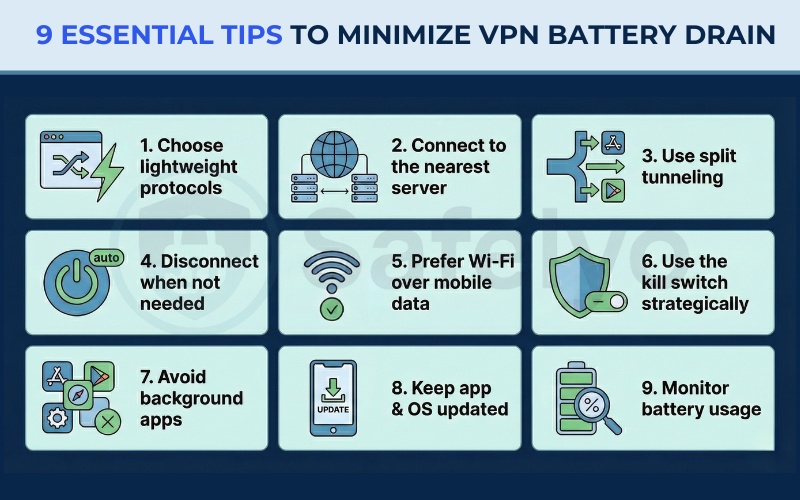
5. 9 Essential tips to minimize VPN battery drain
You do not have to delete your VPN to save battery. Based on the data findings above, here are nine practical adjustments to keep your device running longer.
5.1. Choose lightweight, energy-efficient protocols
Switch your protocol setting to WireGuard (or NordLynx/Lightway depending on your provider) immediately.
The data proves it is superior, causing only +0.25% drain when idle compared to the heavier OpenVPN TCP which can drain up to +2.09%. This is the single most effective change you can make.
5.2. Connect to the nearest VPN server
Physics plays a role here. Reducing the geographical distance between you and the server lowers latency (ping). This reduces the number of times your phone has to re-transmit lost data packets, which in turn saves energy for your modem.
5.3. Use split tunneling to limit VPN use
Most premium VPNs offer a feature called Split Tunneling. You should configure this to only route sensitive apps (like Banking or Email) through the VPN. Let heavy, non-sensitive apps like YouTube or Netflix connect directly. This avoids the massive 14-19% drain associated with streaming through a VPN tunnel.
5.4. Disconnect when VPN protection isn’t necessary
You can automate your security. Set your VPN to “Auto-connect” on untrusted networks but disconnect on your “Trusted Home Wi-Fi.” Your home network usually has a lower threat level, and turning the VPN off there saves precious charge cycles.
5.5. Prefer Wi-Fi over mobile data
This is a critical data point derived from the tests. NordVPN proved that using 4G drains the battery roughly 10 times faster than Wi-Fi (3.08% vs 0.25%). Whenever possible, connect to Wi-Fi to stop your cellular modem from overworking.
5.6. Use the kill switch strategically
While the Kill Switch is a vital security feature, it can be aggressive. If you are in an area with a very weak signal, the Kill Switch may constantly block and unblock your internet as the VPN attempts to reconnect. In safe environments, you might temporarily disable this to prevent your phone from overheating.
5.7. Avoid battery-draining apps running in parallel
Close unused background apps. The more data your phone is trying to sync in the background (like photo backups or social media updates), the more data the VPN has to encrypt. Reducing background data reduces VPN workload.
5.8. Keep your VPN app and OS updated
Developers constantly refine their code. Just as WireGuard is more efficient than OpenVPN due to cleaner code, newer versions of VPN apps often include battery optimizations and bug fixes.
5.9. Monitor your device’s battery usage
Go to your phone settings and check the battery usage by app. If you see the VPN app consuming more than 20% of your total battery, that is likely a software bug rather than standard “overhead.” In this case, reinstalling the app often fixes the issue.
6. Does battery saver mode affect my VPN?
Most phones have a “Low Power Mode” or “Battery Saver.” While helpful, this feature often restricts background data usage.
When your screen turns off, Battery Saver mode might kill the VPN connection to save energy. This could accidentally expose your real IP address.
You should go into your battery settings and “Whitelist” your VPN app to allow unrestricted background use. This ensures your security does not drop when power-saving mode activates.
7. Why security is more important than battery life
It is easy to get frustrated by a draining battery, but we must weigh the cost. Even if a VPN consumes an extra 4% to 19% of your battery (which is roughly 30 to 60 minutes of use), the trade-off is valuable.
7.1. Protection of sensitive data on public Wi-Fi
Public networks at airports or cafes are hunting grounds for hackers. A VPN encrypts your passwords and credit card numbers, making them unreadable to anyone intercepting the signal.
7.2. Online privacy and anonymity
Without a VPN, your Internet Service Provider (ISP) or local network admin can see exactly what websites you visit. The battery cost is the price of keeping your browsing habits private.
7.3. Prevention of hacking and identity theft
The hassle of carrying a portable charger is far less than the nightmare of recovering a stolen identity. The security layer provided by a VPN is essential insurance for your digital life.
8. FAQs about VPN battery life
Does VPN drain battery on iPhone?
Yes. Tests on the iPhone 15 streaming Netflix showed an additional battery drop of about 14% over an hour. However, older models like the iPhone XS showed a smaller impact of around 7% when watching YouTube, though this varies by screen brightness and app efficiency.
Does VPN drain battery on Android (Samsung)?
Yes. On a Galaxy S22 connected to 4G in idle mode, the battery drained an extra 2.22% over 5 hours. When switched to Wi-Fi, this extra drain became negligible.
Does VPN drain battery on laptop?
Yes, laptops see the heaviest impact. Depending on the task, you might see an extra drain ranging from 4% (Lenovo/Surfshark test) up to 19% (MacBook Pro/ExpressVPN test) when streaming video.
Does NordVPN drain battery?
Very little, provided you use it correctly. Tests show that using NordVPN on Wi-Fi with the NordLynx protocol consumes only 0.01% to 0.25% extra battery. It proved to be highly efficient in controlled tests.
9. Conclusion
So, does VPN drain battery? The data confirms it does. You can expect an impact ranging from 1% (on Wi-Fi) to 19% (on a Laptop or 4G).
However, you do not have to sacrifice security for power. By simply switching to Wi-Fi and using the WireGuard protocol, you can bring that extra consumption down to near zero. The protection against data theft and surveillance is well worth the minor energy cost.
Ready to secure your device efficiently? Explore more step-by-step tutorials and setup tips in the VPN Guides category on Safelyo.