Yes, a VPN does drain battery, with the extra consumption ranging from a negligible 1% to a more significant 19% depending on your connection. The impact is minimal on a stable Wi-Fi network, where you might only see a 0.25% extra drop over several hours. However, streaming over a cellular network on a laptop can push that extra drain to 19%.
In this “Does VPN drain battery” guide, we break down real test data, the technical reasons behind the power usage, a detailed protocol comparison, device-specific results, and actionable tips to optimize your battery life.
Key takeaways:
- Sitting idle on Wi-Fi has an almost negligible impact, adding roughly 0.25% extra drain over 5 hours.
- Using a 4G or 5G network causes a higher impact, adding about 2% to 3% extra drain during the same idle period.
- Streaming or active use creates a noticeable impact, especially on laptops where the extra drain can reach up to 19%.
- Selecting the right protocol matters heavily, as WireGuard uses only 1% to 3% extra battery per hour, making it far more efficient than OpenVPN TCP.
- Keep in mind that a VPN consumes significantly less power than turning up your screen brightness or using active GPS tracking.
- Prioritizing Wi-Fi, selecting WireGuard, and enabling split tunneling are the best ways to reduce extra drain to near zero.
Disclaimer: The battery test figures presented are benchmarks and your actual drain will vary based on your specific battery health, hardware age, and network conditions. Additionally, the exact names and paths for the settings menus mentioned in our guides may differ depending on your device manufacturer and operating system version.
1. Does VPN drain battery?
Yes, using a VPN does drain your battery, but the exact impact depends heavily on your network conditions and device.
On a stable Wi-Fi connection, the extra battery consumption is extremely low, often adding just 0.25% to 1% of extra drain over a long period.In contrast, running a VPN over a weak 4G network or streaming high-definition video on a laptop can cause an additional 14% to 19% battery loss.
A VPN will not kill your battery overnight unless you are streaming heavily over a mobile network with an outdated protocol.
2. How much battery does a VPN actually use?
We have aggregated 144 tests from NordVPN, alongside data from ExpressVPN and Surfshark, to see exactly how much power a VPN consumes. The data shows that the difference between Wi-Fi and 4G is the biggest deciding factor for your battery life.
2.1. Idle drain: Wi-Fi vs. cellular data
A comprehensive 144-test methodology by NordVPN tracked devices sitting idle for 5 hours across both Wi-Fi and 4G networks. In this scenario, the phones were not actively browsing or streaming. They were simply maintaining a background connection.
| Provider | Device | Network (5h) | Drain VPN ON (NordLynx) | Drain VPN OFF | Extra Drain |
|---|---|---|---|---|---|
| NordVPN | Pixel 6 | 4G | 6.32% | 3.24% | +3.08% |
| NordVPN | Galaxy S22 | 4G | 5.43% | 3.21% | +2.22% |
| NordVPN | Pixel 6 | Wi-Fi | 2.44% | 2.19% | +0.25% |
| NordVPN | Galaxy S22 | Wi-Fi | 3.63% | 3.37% | +0.26% |
| NordVPN | Lenovo L14 G2 | Wi-Fi (2h) | 1% | 1% | 0% |
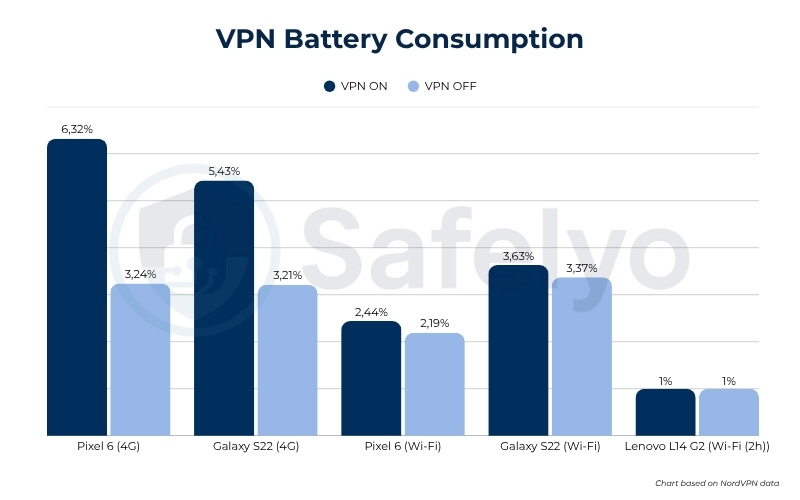
The data reveals a massive performance gap between local and cellular networks. On a Wi-Fi connection, the extra battery drain is statistically insignificant. A 0.25% drain over 5 hours translates to just 0.05% per hour. This high efficiency occurs because Wi-Fi connects to a local router only a few feet away, requiring very little electrical power from the device’s network radio.
In stark contrast, maintaining an idle VPN connection on a 4G network will consume significantly more battery power. Cellular modems must transmit signals to cell towers that are miles away. Even when you are not using your phone, the VPN must send tiny packets of data to keep the secure tunnel alive. On 4G, sending these packets forces the cellular modem to wake up repeatedly, consuming significantly more power.
It is also crucial to note that 5G tests were intentionally excluded from this data set. When a phone constantly switches between 4G and 5G networks, the connection briefly drops. Every time this handoff happens, the VPN must rebuild the encrypted tunnel from scratch. This reconnection loop creates severe battery drops that heavily skew the idle data.
2.2. Streaming and active use drain
Active tasks like streaming video force the VPN to process massive amounts of data. While an idle VPN only encrypts a few kilobytes of background data, streaming high-definition video requires encrypting gigabytes of data on the fly.
ExpressVPN measured battery loss while streaming Netflix for 60 minutes on the iPhone 15, Pixel 6A, and MacBook Pro. Surfshark and NordVPN conducted similar benchmarking using YouTube playback.
| Provider | Device | Task (Time) | VPN ON | VPN OFF | Extra Drain |
|---|---|---|---|---|---|
| ExpressVPN | iPhone 15 | Netflix (60m) | 24% | 10% | +14% |
| ExpressVPN | Pixel 6A | Netflix (60m) | 35% | 21% | +14% |
| ExpressVPN | MacBook Pro | Netflix (60m) | 37% | 18% | +19% |
| Surfshark | iPhone XS | YouTube (73m) | 24% | 17% | +7% |
| Surfshark | OneTouch 8T | YouTube (60m) | 4% | 3% | +1% |
| Surfshark | Lenovo L13 G2 | YouTube (60m) | 39% | 35% | +4% |
| NordVPN | Pixel 6 | YouTube (60m) | 6.01% | 6.00% | +0.01% |
| NordVPN | Galaxy S22 | YouTube (60m) | 6.17% | 6.09% | +0.08% |
| NordVPN | Lenovo L14 G2 | YouTube (60m) | 23.00% | 23.00% | 0.00% |
(Note: Due to a timing oversight, the Surfshark iPhone test ran for 73 minutes instead of the intended 60 minutes. However, the data trend remains consistent.)
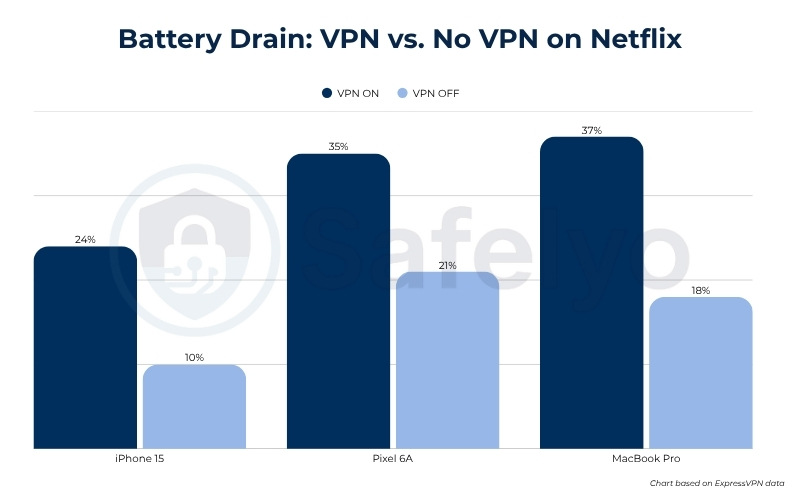
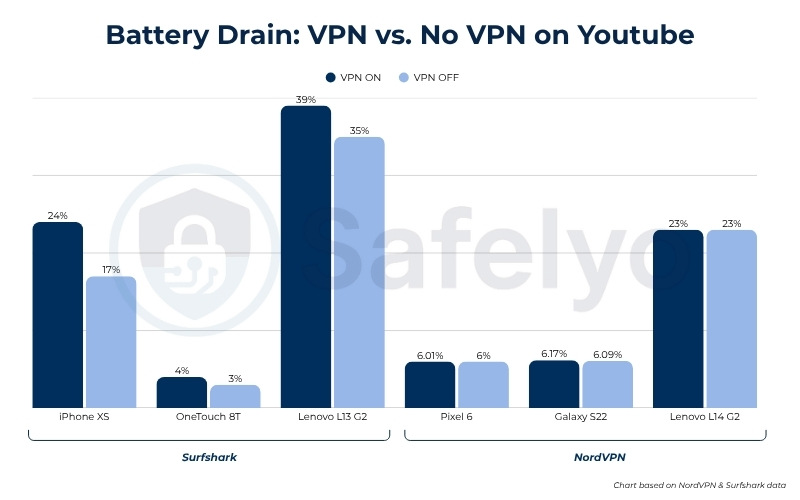
The results from active use vary wildly depending on the physical hardware of the device. The MacBook Pro represents the absolute worst-case scenario with a 19% extra battery drain. This high number is not solely the fault of the VPN. The laptop is simultaneously powering a massive, high-brightness display and utilizing dedicated graphics cards to render the video. Adding heavy encryption processing on top of these tasks pushes the battery consumption to its limit.
On the other end of the spectrum, modern smartphones exhibit incredible efficiency. The Pixel 6 showed an almost unmeasurable 0.01% extra drain when streaming YouTube over Wi-Fi. This highlights how well modern mobile processors handle continuous encryption. Because the Wi-Fi connection is stable, the phone’s CPU can encrypt the video stream without overworking the network modem.
2.3. VPN drain in context: How it compares to other battery killers
Before deciding whether VPN battery drain is a critical problem, we must view it alongside the components that naturally drain a device. Data compiled by Windscribe illustrates how a VPN compares to typical hardware demands.
| Activity | Extra battery per hour | Impact Level |
|---|---|---|
| Screen brightness at max | +20% to 30% | Critical |
| GPS / active navigation | +10% to 15% | High |
| Mobile gaming | +15% to 25% | High |
| Video streaming (no VPN) | +8% to 12% | Moderate |
| Social media scrolling | +5% to 8% | Moderate |
| VPN (WireGuard, nearby server, Wi-Fi) | +1% to 3% | Negligible |
| VPN (OpenVPN TCP, distant server, 4G) | +5% to 10% | Minor |
The core takeaway here is the difference between hardware drain and software drain. Illuminating a screen or running a physical GPS receiver requires raw electrical power. In contrast, a VPN is simply software running mathematical equations in the background.
In the worst-case mobile scenario, a VPN uses less extra battery than turning your screen brightness up by two notches.
Consider a practical real-world scenario. If you stream YouTube for an hour and your battery drops from 100% to 80%, the screen illumination and the network connection consumed 18% of that charge. The VPN only accounted for the remaining 2%. Therefore, if you are worried about your battery life but leave your phone at maximum brightness, you are focusing your optimization efforts on the wrong feature.
3. Why does a VPN drain your battery faster?
A VPN drains your battery through four separate mechanisms. Each one is manageable once you understand exactly what is happening in the background.
3.1. Encryption and CPU overhead
Every time you load a webpage or send a message, your VPN encrypts every data packet using AES-256 encryption. This continuous mathematical process requires your Central Processing Unit (CPU) to stay awake.
Modern devices (iPhone 12 and newer, or Android flagships from 2021 onwards) feature hardware-accelerated encryption. These dedicated chips handle AES tasks with almost zero power drain. Older devices lack this hardware acceleration and must use the main CPU, which burns significantly more battery.
To solve this, the WireGuard protocol uses ChaCha20 encryption, which runs much faster and more efficiently on older hardware.
3.2. Data routing overhead
When you do not use a VPN, your data travels directly from your device to the website server. When you activate a VPN, your data takes a detour.
It must be encrypted, sent to a remote VPN server, decrypted, and then forwarded to its final destination. This detour creates extra data overhead because encrypted packets are slightly larger than plain-text packets. On cellular data, sending these larger packets forces your phone’s radio to stay active slightly longer.
If the VPN server is far away, the increased latency means your device has to wait longer for a response while keeping the network radio fully powered.
3.3. Background keepalive packets
Even when your phone is sitting idle in your pocket, the VPN must maintain the secure tunnel by sending periodic keepalive packets. Data from NordVPN shows that sending these keepalive packets over a 4G connection caused an extra 3.08% drain over 5 hours.
However, WireGuard goes silent entirely when there is no data traffic, allowing your phone’s cellular radio to enter a true sleep mode. In contrast, older protocols like OpenVPN and OpenVPN TCP send keepalive packets constantly, keeping your device awake and draining power even when you are not using the internet.
3.4. Network conditions and signal strength
A weak cellular signal forces your phone’s modem to increase transmission power to maintain a basic internet connection.
Using a VPN on a weak signal creates a compounding drain effect, as the VPN app must constantly work to re-establish the encrypted tunnel every time the connection drops.
Furthermore, 5G switching creates a massive battery drain issue. When your phone constantly bounces between 4G and 5G networks, the VPN has to reconnect through the encrypted tunnel during every handoff.
This cycle consumes heavy CPU and radio power. If you are traveling on a train or in a car, this constant network switching will drain your battery much faster than sitting on a stable Wi-Fi network.
4. Which VPN protocol drains the least battery?
The protocol you select matters more than any other setting for battery life. Certain outdated protocols will treat your battery poorly, while modern ones are built for efficiency.
| Protocol | Extra battery drain (active use) | Idle behavior | Best for |
|---|---|---|---|
| WireGuard / Other modern protocols | +1% to 3% per hour | Silent when idle (radio can sleep) | All mobile devices, especially older ones |
| IKEv2 / IPSec | +2% to 5% per hour | Minimal keepalives | Mobile roaming, switching networks frequently |
| OpenVPN UDP | +5% to 8% per hour | Periodic keepalives | Desktop/laptop, stable connections |
| OpenVPN TCP | +8% to 12% per hour | Frequent keepalives (worst) | Restricted networks only |
Older protocols like OpenVPN (especially OpenVPN TCP) typically require more system resources. They send keepalive packets frequently to maintain the connection, which can prevent your device’s radio from entering a lower power state.
This background activity leads to steady battery consumption, even when you are not actively browsing the internet.
In contrast, modern protocols like WireGuard feature leaner codebases and improved idle management. When there is no active data transfer, WireGuard minimizes background activity, helping your phone conserve power.
If you own a device built after 2021, built-in hardware acceleration usually handles encryption smoothly across most protocols. However, on older devices without dedicated AES chips, WireGuard’s ChaCha20 encryption generally performs more efficiently.
You may also encounter proprietary protocols like NordVPN’s NordLynx, ExpressVPN’s Lightway, or Surfshark’s Dausos. These are built on similar lightweight principles to WireGuard and offer comparable battery-saving efficiency.
5. VPN battery drain by device
Battery drain varies significantly across device types. The main factors are battery capacity, processor efficiency, and how aggressively the operating system manages background processes.
5.1. Does VPN drain battery on iPhone?
Yes, but modern iPhones handle VPNs exceptionally well. Newer iPhones feature built-in hardware acceleration, which heavily reduces the CPU burden when encrypting your data.
Apple’s iOS also manages background power very aggressively, which helps limit idle drain when the device is locked.
However, be cautious with Low Power Mode. The iOS system may kill the VPN process to save juice, leaving your real IP address exposed.
To prevent this, you should set up the native On-Demand VPN feature, which automatically triggers the VPN only when you connect to an untrusted Wi-Fi network.
5.2. Does VPN drain battery on Android?
Yes, but mostly when using cellular networks. A Galaxy S22 sitting idle on 4G consumed an extra 2.22% over 5 hours, but this dropped to just 0.26% on Wi-Fi.
Android allows for deep customization, leading to wide variability in battery performance across different manufacturers. One major Android-specific issue is that aggressive battery optimization can kill the VPN process. The app then restarts continuously, which burns more battery than simply keeping the connection alive. To fix this, navigate to your phone settings, select your VPN app, and set the Battery > Unrestricted path.
Android also offers an Always-on VPN feature for maximum security, but be aware that this prevents the phone radio from fully powering down.
Finally, Android phones from before 2020 lack hardware acceleration and may see an extra drain of 5% to 10% compared to modern flagships.
5.3. Does VPN drain your laptop battery?
Yes. Laptops typically incur an extra drain ranging from 0% all the way to 19% depending on the task and the hardware. Laptops have larger batteries and more powerful processors, so the encryption overhead is often less noticeable during basic tasks.
| Provider | Model | Task | Extra Drain | Notes |
|---|---|---|---|---|
| NordVPN | Lenovo L14 G2 | Idle Wi-Fi (2h) | 0% | Matches no-VPN |
| NordVPN | Lenovo L14 G2 | YouTube Wi-Fi (60m) | ~0-3% | Negligible |
| Surfshark | Lenovo L13 G2 | YouTube (60m) | +4% | 39% vs 35% |
| ExpressVPN | MacBook Pro | Netflix (60m) | +19% | 37% vs 18% |
The significant gap between the Lenovo (0% to 4%) and the MacBook Pro (19%) largely comes down to differing hardware configurations and test environments.
Laptops equipped with high-resolution displays, varying brightness settings, or dedicated graphics cards naturally consume a higher baseline of power.
When heavy encryption software runs concurrently with these power-hungry components, the overall extra drain becomes much more prominent.
Practically speaking, laptops are usually plugged in at home or the office. Lowering your laptop screen brightness by 10% saves significantly more battery than turning the VPN off.
6. What factors amplify VPN battery drain?
VPN battery drain does not happen in isolation. Several external factors determine whether you will see a 1% or a 15% impact.
- Network type and signal quality: Cellular connections drain over 10 times more battery on idle than Wi-Fi. A weak signal multiplies this drain as the modem struggles to keep the encrypted tunnel alive.
- Device age and hardware: Devices older than 2020 usually lack hardware AES acceleration, forcing the main CPU to process encryption. Older batteries also hold a lower maximum charge, making the extra VPN load feel heavier.
- VPN protocol choice: Using OpenVPN TCP is the worst-case scenario, adding an extra 8% to 12% drain per hour. WireGuard is the best case, keeping the extra drain to just 1% to 3% per hour.
- Background app activity: Every app syncing data in the background requires the VPN to encrypt that data. Social media auto-refresh, cloud backups, and location tracking greatly increase the VPN workload.
- Usage intensity: Streaming video and downloading large files drain the battery much faster than casual browsing or letting the device sit idle. Active streaming can multiply the battery impact by ten compared to idle usage.
- VPN app quality: Free VPNs commonly run background tracking scripts and display advertisements. These elements consume dedicated GPU and CPU power on top of the standard encryption overhead.
- Server distance: Connecting to a server further away increases latency. The higher the latency, the longer your cellular radio stays active waiting for data packets, which directly burns battery.
- Battery health: A degraded battery holds less capacity. The baseline VPN overhead remains the same, but it eats up a much larger percentage of your remaining charge.
7. How to minimize VPN battery drain
The right combination of settings can bring VPN battery drain to near zero. Here are the adjustments that make the most measurable difference, ordered by impact.
7.1. Prioritize Wi-Fi over cellular data
NordVPN test data proves that a 4G network drains extra battery over 12 times faster than Wi-Fi (3.08% vs 0.25% idle over 5 hours). Whenever you have access to a reliable Wi-Fi network, connect to it before enabling your VPN.
Wi-Fi provides a much more stable connection, preventing the massive battery drain caused by constant tunnel re-establishment on spotty cellular networks.
7.2. Use WireGuard or a modern protocol
Switching your protocol setting is the single most impactful software change you can make.
Older protocols like OpenVPN TCP require constant background activity to keep the connection alive, which steadily consumes power. In contrast, modern protocols like WireGuard are designed to remain silent when your internet connection is idle.
To apply this change, follow these steps:
- Select WireGuard (or let the app auto-select the modern equivalent).
- Open your VPN app and go to Settings.
- Locate the Protocol options.
7.3. Use split tunneling
Split tunneling allows you to route only specific apps through the secure VPN tunnel while leaving others on your normal network. We recommend routing only the apps that require a VPN connection.
For example, if you are using a VPN solely to unlock geo-restricted content on Netflix, you can configure the settings to only encrypt the Netflix app.
By allowing all your other background apps and daily services to bypass the VPN, you significantly reduce the overall CPU load and save battery.
7.4. Connect to the nearest VPN server
A server physically closer to your location results in lower latency, meaning your phone radio stays active for a shorter duration per data packet. When you connect to a server on the other side of the world, your device has to re-transmit lost data packets more frequently, wasting energy.
Unless you specifically need to spoof your location, always use the “Best Location” or “Nearest Server” feature to save power.
7.5. Enable Auto-Secure or On-Demand VPN
Most top-tier VPN providers include a feature called Auto-Secure, Trusted Networks, or On-Demand VPN.
This feature automatically activates the VPN when you connect to an untrusted public Wi-Fi network like a coffee shop or airport. It then automatically disconnects when you return to your safe home Wi-Fi.
This provides a true convenient solution, costing you zero extra battery at home while guaranteeing full protection in public. On Apple devices, On-Demand VPN is a native feature found right in the iOS profile settings.
7.6. Set up a VPN router
You can install a VPN directly onto a compatible home router. In this setup, the router handles all the heavy encryption and decryption processing.
Your phone, laptop, and tablet simply connect to the Wi-Fi as usual but remain completely protected. The result is exactly zero extra battery drain on your mobile devices.
This is ideal for a home office, though the limitation is that it only protects you while you are at home, and requires a router that supports custom firmware.
Read more: How to set up a VPN on a router
7.7. Close background apps and restrict background refresh
Every app running quietly in the background creates a data stream that the VPN must encrypt, increasing the CPU load. Close any apps you are not actively using.
You should also restrict background app refresh for non-essential applications:
- On iOS: Go to Settings -> General -> Background App Refresh.
- On Android: Go to Settings -> Apps -> [App Name] -> Battery -> Restricted.
7.8. Keep your VPN app and OS updated
Software developers regularly release app updates that include vital battery optimizations and bug fixes. A newer app version will run much more efficiently.
Keeping your device’s operating system updated is equally important, as OS updates frequently improve overall hardware power management.
7.9. Monitor your battery usage by app
Check your phone’s internal battery settings to see exactly what percentage of power the VPN app is consuming.
As a general rule, if the VPN app is responsible for more than 20% of your total battery drain, you are experiencing a software bug rather than normal overhead.
In addition, if you are using a free VPN and notice high battery drain, the app is likely running background tracking scripts or loading ads. Free VPNs drain significantly more battery due to these hidden processes.
8. Does battery saver mode affect your VPN?
Yes, placing your phone in Battery Saver or Low Power Mode restricts background data, which can slow down the VPN reconnect time.
On iOS, Low Power Mode may aggressively kill the VPN process to conserve battery, which accidentally exposes your real IP address. On Android, battery savers restrict background processes, causing the VPN to disconnect repeatedly.
The solution is to whitelist your VPN app so the operating system does not kill it.
Here is how to whitelist the app depending on your device:
- On iOS: Go to Settings -> General -> VPN & Device Management and adjust the profile.
- On Android: Go to Settings -> Apps -> [Your VPN App] -> Battery -> Unrestricted.
Whitelisting the app ensures your security never drops, though it will consume slightly more power than standard battery saver mode allows. We recommend doing this if security is your absolute priority.
9. Is the battery trade-off worth it?
In the worst-case scenario, heavily streaming video with a VPN might cost you roughly 10 to 15 minutes of overall battery life. However, in standard daily use on a Wi-Fi network, the extra drain sits safely under 3% per hour.
To put this in perspective, pushing your screen brightness to maximum or leaving your GPS navigation on consumes drastically more power than any VPN. Sitting idle on a Wi-Fi network with a modern protocol costs almost zero extra battery.
You are essentially trading a tiny fraction of battery life for total digital privacy. The VPN encrypts your internet traffic, hides your real IP address, and blocks network administrators or local hackers from tracking your activity.
Ultimately, the security benefits far outweigh the minor energy cost. If you configure your settings correctly using our tips above, the battery drain becomes virtually invisible during your daily routine.
10. FAQs
Does NordVPN drain battery?
Very little, provided you use it correctly. Tests show that using NordVPN on Wi-Fi with the NordLynx protocol consumes only 0.01% to 0.25% extra battery. It proved to be highly efficient in controlled laboratory tests.
Is it okay to leave a VPN on 24/7?
Yes, leaving your VPN on constantly is the best practice for security. On a Wi-Fi network using the WireGuard protocol, the battery cost is negligible, sitting under 0.26% extra per 5 hours. On cellular data, you will notice a slightly higher drain, but using features like Auto-Secure automatically manages the connection so you do not have to worry about the battery cost.
Is it bad to turn VPN on and off frequently?
Turning your VPN on and off does not damage your battery, but the reconnect process uses a short burst of CPU power. On an unstable network, frequent manual reconnects can actually waste more power than simply leaving the tunnel open. More importantly, toggling it off creates a window of vulnerability where your real IP address is exposed.
Does VPN harm your phone?
No, a VPN does not cause any hardware damage to your phone. It lightly increases the CPU workload, but it will not cause overheating or long-term damage to the battery’s health lifespan. Battery health degradation is caused by charge cycles and heat, not the VPN app itself. The only downside is a slight increase in daily battery consumption and data usage.
11. Conclusion
So, does VPN drain battery? Yes, but for most users sitting on a Wi-Fi network with WireGuard enabled, the extra drain is effectively a non-issue.
The extra drain is statistically invisible against everything else running on your device, such as your screen brightness and GPS location services.
To secure your device with maximum power efficiency, follow these three quick steps:
- Switch your VPN protocol to WireGuard or its modern equivalent.
- Enable Auto-Secure to turn the VPN off on your trusted home network.
- Use split tunneling to let heavy streaming apps bypass the encrypted tunnel.
The minor energy cost is well worth the peace of mind that comes with total digital privacy.
Ready to secure your device efficiently? Explore more step-by-step tutorials and setup tips in the VPN Guides category on Safelyo.