In 2026, accessing the internet in Russia presents significant challenges. Many popular websites, social media apps like Instagram and WhatsApp, and international news sources are blocked due to strict regulations.
Most standard VPNs often struggle to operate because of advanced internet filters specifically designed to detect and block them. Finding a service that maintains a stable connection is a priority for users seeking uninterrupted access to the global web.
This guide highlights the Best VPN for Russia, focusing on providers equipped with the necessary technology to bypass these restrictions effectively while ensuring user privacy and data security.
The "Top 3" recommendations
| Rank | VPN provider | Best for |
|---|---|---|
| #1 | Astrill VPN | Best reliability. High price but bypasses the toughest firewalls. |
| #2 | ExpressVPN | Best for ease of use. Proprietary Lightway protocol for consistent access. |
| #3 | NordVPN | Best all-rounder. Massive network with dedicated obfuscated servers. |
Important note on stability:
Russian censorship is dynamic. A VPN that works perfectly today may face targeted blocking attempts tomorrow. While the providers listed below utilize advanced obfuscation to mitigate these blocks, no service can guarantee 100% uptime indefinitely.
We strongly recommend installing at least two different VPNs before entering the country to ensure redundancy.
Safelyo is reader-supported. When you buy through links on our site, we may earn an affiliate commission to help maintain our operations. This does not affect our independent testing process.
Note: All information and data were recorded on February 1, 2026. Figures and details may vary depending on your location.
1. Key features for bypassing censorship in Russia
Survival in the Russian digital landscape requires more than just standard encryption. Effective VPNs must possess specific capabilities to navigate the “Yarovaya Law” surveillance and Roskomnadzor’s blocking infrastructure.
The most critical metrics for a functional VPN include:
- Obfuscation tech: The VPN must use advanced protocols like Xray, V2Ray, Obfsproxy, or proprietary Stealth technology. This is essential to disguise VPN traffic as regular HTTPS web traffic, preventing network filters from identifying and terminating the connection.
- Resilience: The ability of a provider to rapidly issue new IP addresses or mirror links is crucial for maintaining access when specific servers are blocked.
- Payment ecosystem: Since Visa and Mastercard suspended operations, effective providers must support alternative payment methods like Cryptocurrency or UnionPay.
- Privacy jurisdiction: To ensure user safety, the provider must have a verified, audited no-logs policy, ensuring that no user data exists to be handed over to authorities.
2. Best VPN for Russia: Top 7 services for overcoming blocks
Based on technical specifications and feature sets, these 7 services offer the most robust tools for maintaining connectivity in 2026.
2.1. #1. Astrill VPN – Best reliability (Most resilient option)
In 2026, connectivity is the primary concern for users. Astrill is widely recognized as an industrial-strength tool designed specifically for environments with aggressive network filtering. It is often cited as a reliable solution when other commercial services face disruptions.
| Criteria | Astrill VPN Details |
|---|---|
| Starting price | ~$12.50/mo (Expensive / Premium tier) |
| Servers | Servers in 56 countries (Includes physical Russia servers) |
| Jurisdiction | Liechtenstein (Privacy-friendly / Outside 14-Eyes) |
| Obfuscation method | StealthVPN (Proprietary) & OpenWeb |
| Payment options | Credit Cards, Debit Cards, Bank Wire Transfer, PayPal, Perfect Money, Wechat Pay, AliPay, and Bitcoin |
| Mirror links | Yes (Official mirror sites available for restricted regions) |
| Security features | Smart mode (Split tunneling), App guard, Multi-hop |
| Streaming support | Unblocks all major sites (Primary focus is censorship bypass) |
| Simultaneous connections | 5 Devices |
Resilience against deep packet inspection (DPI)
Astrill differs from typical commercial VPNs by focusing heavily on censorship resistance rather than just streaming or leisure. Its infrastructure is built to handle extreme network restrictions.
The service offers granular control over connection parameters, allowing users to fine-tune settings to bypass sophisticated blocks that standard OpenVPN connections cannot handle.
Protocol power: StealthVPN vs. OpenWeb
The strength of Astrill lies in its proprietary protocols. The OpenWeb protocol is engineered to be incredibly fast and lightweight, making traffic look like regular web browsing for seamless streaming.
Meanwhile, StealthVPN provides a heavier and more robust layer of obfuscation. This dual-protocol approach gives users tactical options: speed for general browsing and maximum stealth for bypassing severe blocks.
However, it is worth noting that many users report that Astrill’s speed and stability can be inconsistent, varying significantly depending on the server and network conditions.
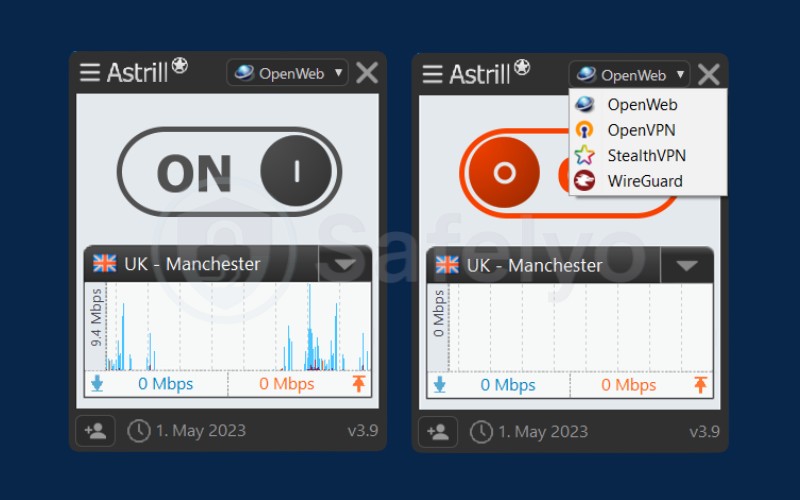
The trade-off: Pricing & interface vs. performance
Astrill prioritizes function over form. The application interface is utilitarian, and the price tag of roughly $30 per month is higher than average. However, for business users and journalists, the value lies in the reliability of the connection. It is a specialized tool for those who cannot afford to be disconnected.
| Pros | Cons |
|---|---|
|
Optimized for restricted network environments |
Very expensive ($30/mo for monthly plan) |
| Has physical servers in Russia | Dated, “ugly” user interface |
| Extremely granular technical controls | No refund policy (All sales final – Warning) |
Best for: Business users, Journalists, and anyone who requires maximum uptime regardless of cost.
2.2. #2. ExpressVPN – Best for ease of use (Lightway protocol)
ExpressVPN is a top recommendation for users who prefer a straightforward experience without needing deep technical knowledge. Its focus on simplicity makes it an accessible choice for bypassing censorship.
| Criteria | ExpressVPN Details |
|---|---|
| Starting price | ~$2.79/mo (Pricey) |
| Servers | 3,000+ in 105 countries (No Russia servers) |
| Jurisdiction | BVI (British Virgin Islands – Safe) |
| Obfuscation method | Automatic / Always-on (Lightway) |
| Payment options | Credit card, direct credit card payment methods, cryptocurrency (via BitPay), and debit cards |
| Mirror links | Extensive mirror site support |
| Security features | Threat manager, Network lock (Kill switch) |
| Streaming support | Unblocks all major sites |
| Simultaneous connections | 10-14 Devices |
Lightway protocol: Automated obfuscation
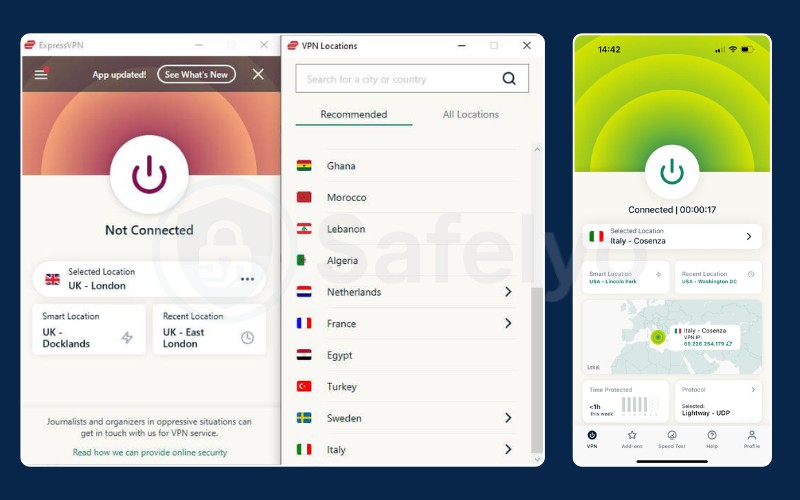
The core advantage of ExpressVPN is its Lightway protocol. Unlike older systems that require manual configuration of obfuscation settings, Lightway is designed to be stealthy by default. It mimics standard traffic noise automatically, allowing non-technical users to connect to the global internet without needing to adjust complex network parameters.
Mirror links: The key to survival
Accessing VPN websites to download software is a common hurdle in restricted regions. ExpressVPN addresses this with a robust “Mirror site” strategy. They frequently update alternative, unblocked URLs (e.g., specific random domains) to ensure users can always access the installer and updates, preventing lockouts.
Performance and stability
ExpressVPN is engineered for connection stability. The service is optimized to establish handshakes quickly even in hostile network environments. This focus on efficiency ensures that once connected, users can stream high-definition content and browse heavy websites with minimal buffering or interruption.
| Pros | Cons |
|---|---|
| Easiest to use (“One-click” interface) | Expensive compared to Surfshark/Nord |
| High reliability via Lightway Turbo protocol | No Russian IP addresses (No virtual or physical servers) |
| Audited no-logs policy (Verified by PwC and KPMG) | Fewer “extra” features (No Double VPN or dedicated IP) |
Best for: Non-tech users who want a simple “one-click” connection.
2.3. #3. NordVPN – Best all-rounder (Speed & price)
NordVPN balances high performance with advanced security features, making it a versatile choice. It offers specialized servers designed explicitly to operate in restricted network environments.

| Criteria | NordVPN Details |
|---|---|
| Starting price | ~$3.39/mo (2-year Basic plan) |
| Servers | 8,900+ (No physical servers in Russia) |
| Jurisdiction | Panama (Safe, outside 5/9/14 Eyes) |
| Obfuscation method | Obfuscated servers (OpenVPN TCP) & NordWhisper |
| Payment options | Credit cards, PayPal, Google/Amazon Pay, Cryptocurrencies (BTC, ETH, XMR) |
| Mirror links | Yes (Downloadable via Tor/Onion and Support mirrors) |
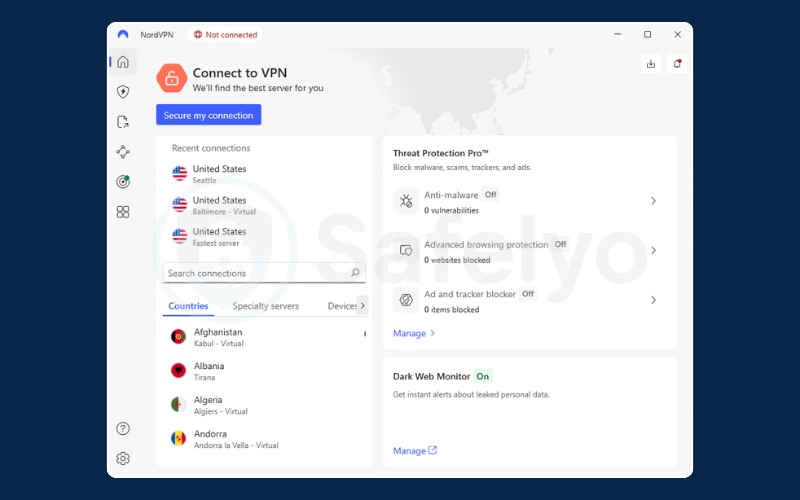
| Security features | Threat Protection Pro, Double VPN, Post-Quantum Encryption |
| Streaming support | Unblocks 17+ Netflix regions, Disney+, Hulu, HBO Max |
| Simultaneous connections | 10 Devices |
Mastering "Obfuscated servers"
NordVPN includes a dedicated feature for high-censorship zones called Obfuscated servers. Users can specifically select this mode in the settings, which forces the app to switch to a specialized OpenVPN TCP mode.
This method effectively hides VPN traffic patterns as HTTPS, helping the connection blend in with normal web activity to avoid detection.
Speed and protocols
The service offers the NordLynx (WireGuard) protocol, which is optimized for speed. This ensures that when a connection is established, users can enjoy fast download speeds and smooth streaming.
In scenarios where maximum stealth is required, the switch to Obfuscated servers ensures connectivity remains the priority, even if it means a slight trade-off in speed.
Meshnet: A unique way to bypass limits
A standout feature is Meshnet. This technology allows users to route their traffic through a friend’s device in another country rather than a public VPN server.
This creates a private, encrypted tunnel that resembles Peer-to-Peer (P2P) traffic, which is significantly harder for automated censorship systems to identify and block compared to standard VPN server traffic.
| Pros | Cons |
|---|---|
| Fastest speeds via NordLynx and 10Gbps RAM-only servers | No physical or virtual servers in Russia |
| Meshnet (Free) allows secure remote device access and file sharing | Strict 10-device connection limit per account |
| 5-time audited no-logs policy (Verified by Deloitte) | Significant price hikes upon subscription renewal |
| Industry-leading Post-Quantum Encryption implementation |
Best for: Travelers and Expats who want a good balance of speed and security.
2.4. #4. Surfshark – Best value & unlimited devices
Surfshark provides a comprehensive set of features at a budget-friendly price point. It effectively navigates restrictive networks using intelligent automation and stealth technologies.

| Starting price | ~$1.99/mo (Industry-leading value) |
| Servers | 4,500+ servers in 100 countries (100% RAM-only fleet) |
| Jurisdiction | The Netherlands (9 Eyes, but strictly audited No-logs) |
| Obfuscation method | NoBorders mode & Camouflage mode |
| Payment options | Credit cards, PayPal, Google/Amazon Pay, Cryptocurrencies |
| Mirror links | Yes (Multiple official mirror sites for censorship bypass) |
| Security features | Alternative ID, CleanWeb 2.0 (Ad/Malware blocker), Dynamic MultiHop |
| Streaming support | Unblocks Netflix, Disney+, Hulu, HBO Max |
| Simultaneous connections | Unlimited |
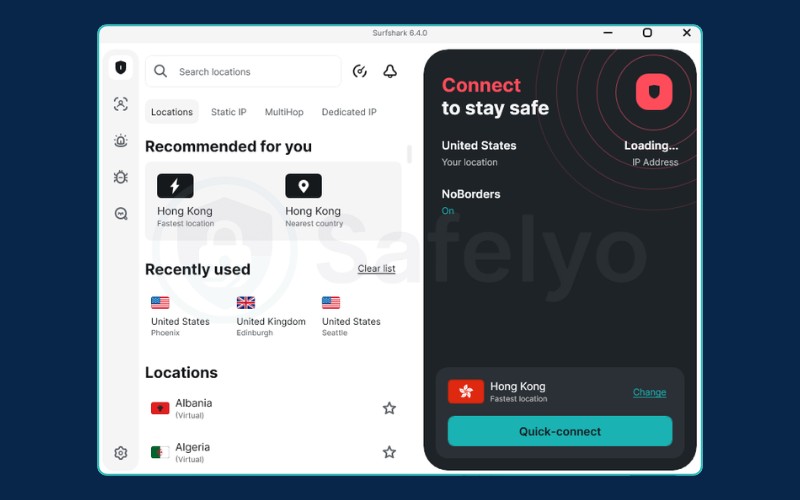
NoBorders mode: Automatic censorship detection
Surfshark features an intelligent NoBorders mode. This feature is designed to detect restrictive network environments automatically. Once activated, it provides users with a curated list of servers specifically configured to work under current restrictions, eliminating the need for manual server hunting.
Camouflage mode: Hiding in plain sight
To ensure privacy, Surfshark utilizes Camouflage mode. This obfuscation technology disguises VPN traffic, ensuring that even the ISP (Internet Service Provider) cannot distinguish VPN usage from regular internet activity. This is essential for preventing connection throttling and avoiding deep packet inspection flags.
Unlimited devices: The family solution
A major advantage of Surfshark is its Unlimited connections policy. This allows a single subscription to cover all devices in a household, including phones, laptops, and tablets. In regions where purchasing software can be difficult due to payment restrictions, this feature offers significant value and convenience for families.
| Pros | Cons |
|---|---|
| Cheapest reliable option (Often starting at ~$1.99/mo) | No physical or virtual servers in Russia since 2022 |
| Unlimited simultaneous devices (Perfect for households) | Speeds can vary on very distant servers (e.g., US to Australia) |
| NoBorders mode activates automatically in restricted networks | Confusing price tiers (Starter, One, One+) |
| Includes Alternative ID to generate fake personas for privacy |
Best for: Families and Budget-conscious users.
2.5. #5. Proton VPN – Best for privacy & security
Proton VPN is highly recommended for users prioritizing privacy and security. It leverages Swiss neutrality and advanced protocols to offer a secure gateway to the open internet.
| Criteria | Proton VPN Details |
|---|---|
| Starting price | ~$2.99/mo (Best value 2-year plan) |
| Servers | 17,500+ servers in 127 countries (Includes Virtual Russia servers) |
| Jurisdiction | Switzerland (Safe, outside 14-Eyes, strict privacy laws) |
| Obfuscation method | Stealth protocol (Custom-built for censorship bypass) |
| Payment options | Credit or debit card, PayPal, Bitcoin, Cash (for maximum anonymity) |
| Mirror links | Yes (Regularly updated mirror sites for restricted regions) |
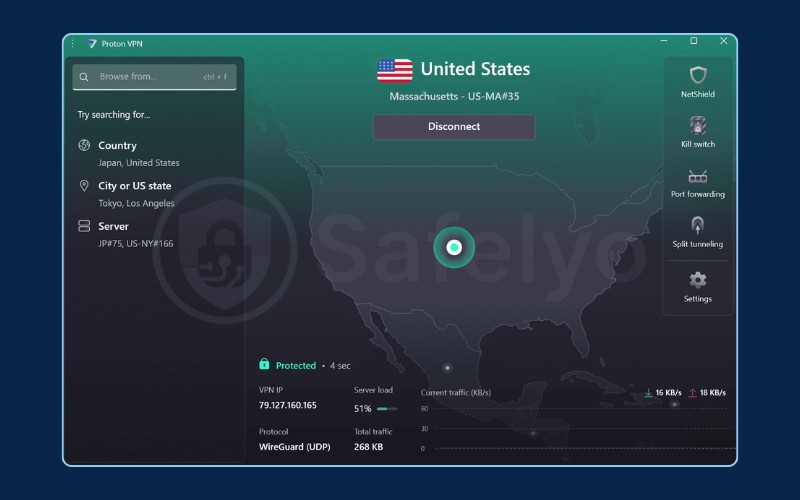
| Security features | Secure Core (Double VPN), NetShield (Adblocker), 100% Open Source |
| Streaming support | Unblocks all major sites (Netflix, Disney+, Hulu, Amazon Prime) |
| Simultaneous connections | 10 Devices |
The "Stealth" protocol architecture
Proton has developed a unique Stealth protocol. This technology encapsulates WireGuard traffic within TLS, making the connection appear identical to a secure HTTPS session used by banking apps or email services. This design is highly effective at evading detection by automated network filters that look for standard VPN signatures.
Secure core & alternative routing
The service includes Alternative routing, a feature that automatically routes connections through third-party infrastructure (like AWS) if the main login servers are unreachable. This ensures users can always log in and connect.
Additionally, Secure core routes traffic through hardened servers in privacy-friendly jurisdictions like Switzerland or Iceland first, providing the highest physical security layer available.
The free plan vs. paid survival
Proton offers a well-known Free plan with unlimited bandwidth. While useful for basic access, free servers often face congestion. The Paid plan is recommended for users in restrictive regions, as it grants access to specialized Stealth servers and faster connections that are refreshed more frequently to maintain availability.
| Pros | Cons |
|---|---|
| Stealth protocol effectively bypasses advanced censorship filters | Expensive renewal prices after the initial promo period |
| Virtual Russia servers allow for safe Russian IP access | Fewer specialized servers for streaming compared to rivals |
| Transparent, 100% Open Source and independently audited apps | |
| Swiss-based jurisdiction with strict data privacy laws |
Best for: Activists and users prioritizing privacy over speed.
2.6. #6. Private Internet Access (PIA) – Best for customization
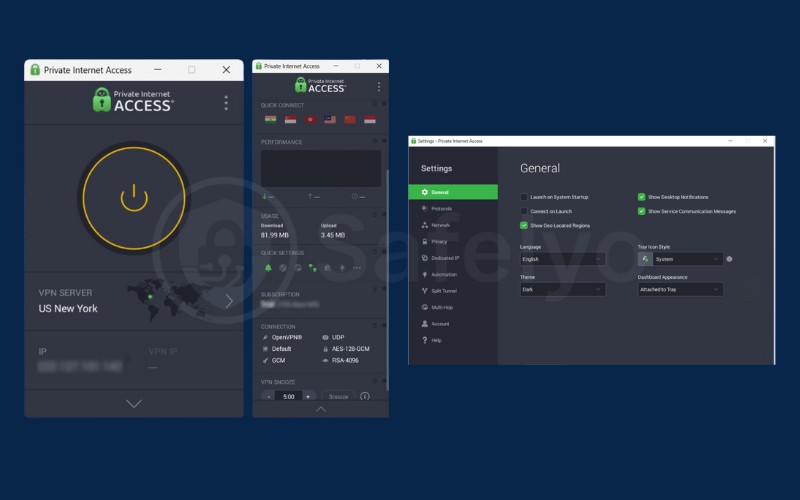
Private Internet Access (PIA) is ideal for technical users who want full control over their connection settings. Its customizable features allow it to adapt to various blocking methods.
| Criteria | PIA VPN Details |
|---|---|
| Starting price | ~$1.98/mo (High-value long-term plans) |
| Servers | 30,000+ (Not officially announced) |
| Jurisdiction | USA (Court-proven no logs; confirmed in multiple legal cases) |
| Obfuscation method | Multi-hop (Shadowsocks/SOCKS5) and OpenVPN obfuscation |
| Payment options | Credit card, PayPal, Amazon, Google/Apple Pay, Crypto, iDeal |
| Mirror links | Yes (Regularly updated mirror domains for restricted regions) |
| Security features | MACE (Ad/Tracker blocker), Advanced Split Tunneling, RAM-only servers |
| Streaming support | Unblocks all major sites (Dedicated streaming-optimized servers) |
| Simultaneous connections | Unlimited (Upgraded from 10 devices in 2024-2025) |
Shadowsocks multi-hop: The geek’s solution
PIA includes a built-in Shadowsocks proxy. Shadowsocks is a protocol originally designed to bypass the Great Firewall of China and is highly effective in other restricted environments.
PIA allows users to route their VPN connection through this proxy, creating a “Multi-hop” obfuscation layer that is notoriously difficult for firewalls to block.
Granular customization (MTU & ports)
The app offers extensive configuration options, including the ability to change the MTU packet size and specify local and remote connection ports. This flexibility is crucial because simply changing a connection port (e.g., from 443 to 8080) or adjusting packet size can often allow traffic to slip past poorly configured filters.
The US jurisdiction concern
While PIA is based in the US, it operates with a strictly verified Court-proven no-logs policy. The service has demonstrated in court multiple times that it does not store user data. For users bypassing censorship, this proven track record ensures that their activity remains private and secure.
| Pros | Cons |
|---|---|
| Includes Shadowsocks & SOCKS5 proxy (Excellent for firewall bypassing) | USA jurisdiction (5-Eyes member, a concern for privacy purists) |
| Unlimited simultaneous devices | Variable speeds on long-distance international servers |
| Proven No-logs policy (Verified multiple times in US court cases) | App interface can feel complex or clunky for beginners |
Best for: Tech-savvy users who want to tweak proxy settings manually.
2.7. #7. PrivateVPN – Best for budget stealth
PrivateVPN offers a straightforward and effective solution for users seeking stealth features at a lower cost.
| Criteria | PrivateVPN Details |
|---|---|
| Starting price | ~$2.00/mo (36-month “Absolute Steal” plan) |
| Servers | 200+ servers in 63 countries (Strategically located network) |
| Jurisdiction | Sweden (14-Eyes member, but with strong local privacy laws) |
| Obfuscation method | Stealth VPN mode (Designed to bypass DPI and China’s GFW) |
| Payment options | Credit/Debit cards, PayPal, Google/Apple Pay, Cryptocurrencies |
| Mirror links | Limited (Available via official support mirrors) |
| Security features | Application Guard, IPv6 leak protection, Port Forwarding |
| Streaming support | Unblocks all major sites |
| Simultaneous connections | 10 Devices |
Stealth VPN mode: Simple but effective
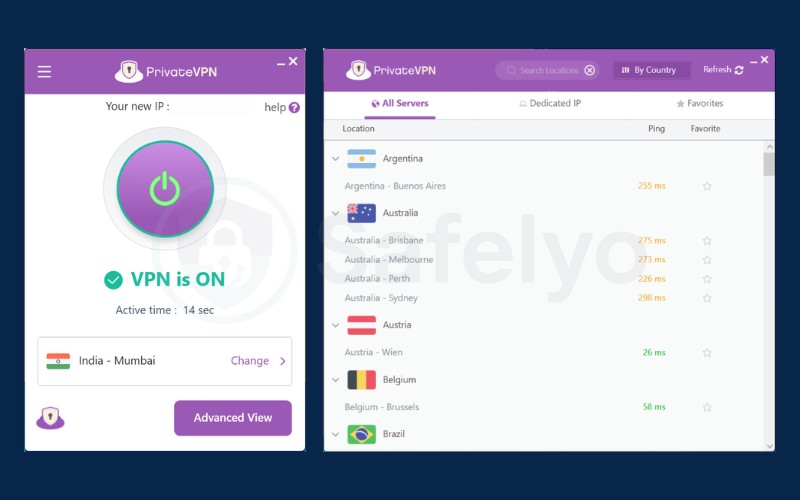
PrivateVPN simplifies obfuscation with a Stealth VPN toggle available directly on the login screen. When enabled, this mode wraps traffic to look like regular HTTPS, making it effective at bypassing standard blocks. Its efficacy is partly due to its smaller size, which often allows it to fly under the radar of mass-blocking lists that target larger providers.
Small network, high quality
Although the server count is smaller compared to giants like NordVPN, PrivateVPN maintains high quality by owning and managing its routers and code directly. This ensures tighter control over performance and security. Connecting to a high-quality server in a nearby location often yields better results than accessing a vast network of rented servers.
Budget friendly survival
PrivateVPN offers excellent value, providing dedicated obfuscation modes at a very competitive price point. It is also effective for streaming, making it a solid choice for a budget-friendly backup VPN to keep installed alongside a primary service.
| Pros | Cons |
|---|---|
| Stealth Mode effectively bypasses Deep Packet Inspection (DPI) on mobile and desktop | Small server network (approx. 200-250+ servers) compared to industry giants |
| One of the most affordable premium VPNs (starting as low as ~$2.00/mo) | Sweden jurisdiction (Part of the 14-Eyes surveillance alliance) |
| Supports Port Forwarding | No physical or virtual Russian IP addresses available |
Best for: Users who need a cheap, stealthy backup VPN.
3. Self-hosted VPNs: Amnezia & Outline (The 2026 solution)
In situations where commercial VPN IP addresses are targeted, Self-hosted solutions provide a robust alternative. These tools allow users to become their own VPN providers, creating a private and unique connection that is not shared with thousands of other users.
The concept involves renting a cheap VPS (Virtual Private Server) from a cloud provider and installing VPN software on it. Since the server is private, it is less likely to be flagged by automated blocking filters.
3.1. Amnezia VPN (Best for DIY)
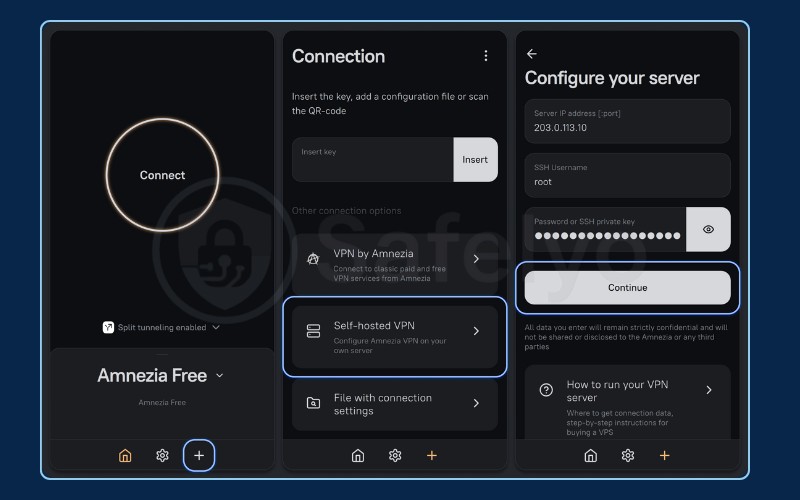
Amnezia is an open-source client that simplifies the process of setting up a self-hosted VPN. It supports advanced protocols like XRay, VLESS, and VMess, which are specifically designed to defeat censorship. These protocols excel at mimicking regular web traffic, making the VPN connection indistinguishable from a standard Google search.
How to use Amnezia:
- Rent a VPS: Purchase a cheap Linux VPS from a hosting provider. You will receive an IP address and a root password.
- Connect the app: Download the Amnezia client (available on GitHub or their site) and open it.
- Enter credentials: Input the IP address, login (usually “root”), and password from your VPS provider into the Amnezia app. Press “Continue” and follow the prompts in the application
- Connect: Once finished, simply click the “Connect” button to establish a private, unblockable VPN connection.
3.2. Outline (Best for sharing)
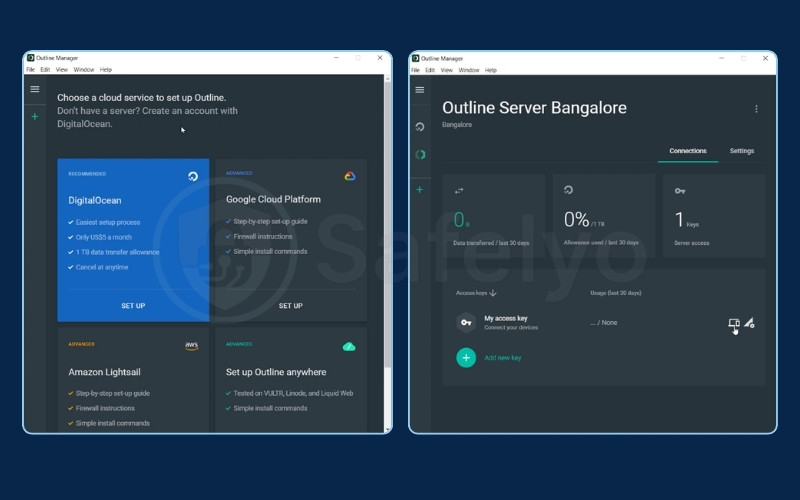
Created by Jigsaw, Outline utilizes the Shadowsocks protocol. It is designed for ease of use and management. Its main strength is the ability to create access “Keys” that can be easily shared with family and friends, allowing a group of people to utilize a single private server.
How to use Outline:
- Download Outline Manager: Install the manager software on a desktop computer.
- Select server: Use the Manager to log in to a VPS provider (or choose DigitalOcean directly within the app).
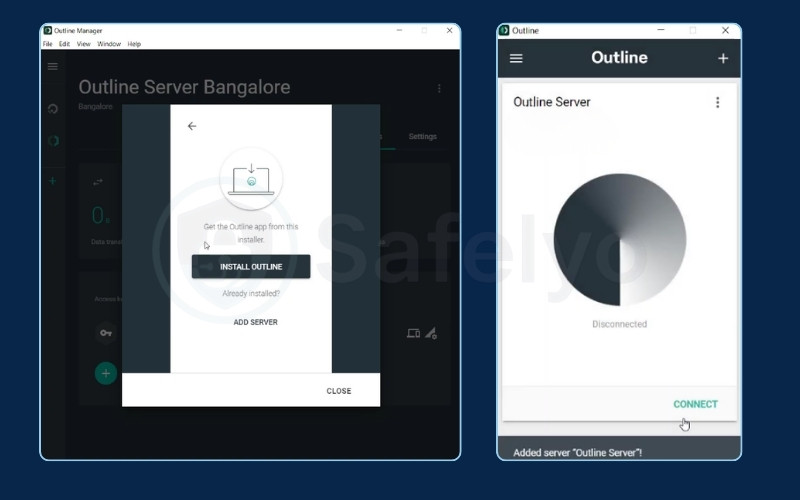
- Install: The Manager handles the installation of the Shadowsocks software on the server automatically.
- Generate keys: Once the server is running, the Manager produces unique “Access keys” (long codes).
- Share & connect: Copy a key and paste it into the “Outline client” app on a phone or laptop to connect instantly.
4. Need a Russian IP? VPNs with Russian servers
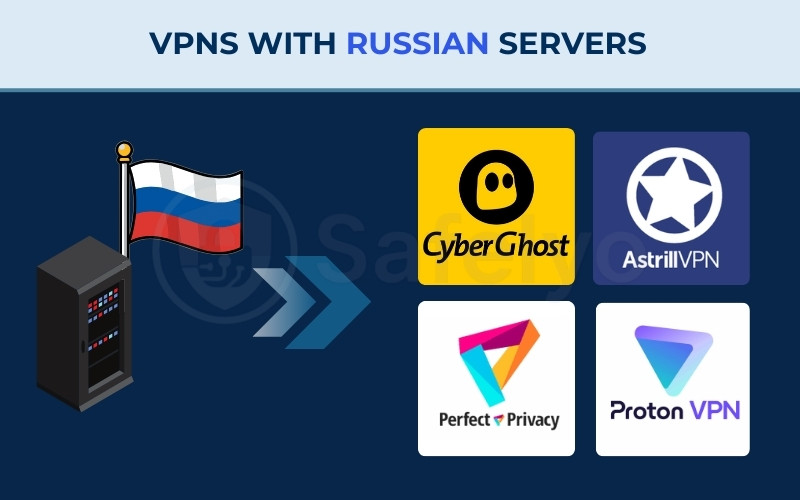
Many major VPNs have removed their physical servers from Russia to avoid compliance with logging laws. However, users outside Russia often need to access Russian banking apps, social networks like VK, or local streaming services. To do this safely, you need a provider that offers a Russian IP address without compromising privacy.
4.1. CyberGhost
CyberGhost offers a safe solution by using Virtual servers. These servers are physically located in privacy-friendly countries like Sweden or Romania but are technically configured to assign Russian IP addresses.
This setup allows users to access Russian content without the risk of the server hardware being physically seized or monitored by local authorities. It is optimized for streaming and offers decent speeds.
4.2. Astrill VPN
For users requiring absolute reliability and low latency, Astrill maintains physical servers in Moscow. Unlike virtual servers, these are physically located inside the country, providing better ping times.
Astrill states that it maintains strict control over its hardware to prevent logging. This is a suitable choice for business users who need a genuine local connection for specific administrative tasks.
4.3. Perfect Privacy
Perfect Privacy is a premium option for privacy enthusiasts. They maintain a high-bandwidth physical server in Moscow running on RAM-only disks.
This infrastructure ensures that data is never written to a hard drive, meaning that even if the server is physically raided, there is no user data to recover. It offers a high level of security for a physical Russian presence.
4.4. Proton VPN
Proton VPN offers servers in St. Petersburg via its Paid/Plus plans. Similar to CyberGhost, these often utilize “Smart routing” (virtual locations) to ensure user safety while providing a Russian IP. This allows reliable access to Russian news sites or government portals from abroad, backed by strong Swiss privacy laws.
5. Best free VPNs for Russia: Are they safe?
Using free VPNs in Russia can be risky. Many free services are unreliable or may compromise user data. We strongly advise against downloading random “Free unlimited VPNs” from app stores.
If a free service is necessary, these three providers are generally considered safer options:
5.1. Proton VPN Free
Proton VPN Free is a solid choice for a free connection. It offers unlimited data bandwidth, which is rare for a free tier, and is protected by Swiss privacy laws.
Crucially, it includes access to the Stealth protocol, giving it a capability to bypass blocks. Limitations include access to only 3 locations (US, Netherlands, Japan), slower speeds due to congestion, and no support for P2P.
5.2. Windscribe Free
Windscribe supports advanced protocols like WStunnel and Stealth on its free plan, making it effective at bypassing censorship. It is highly customizable and user-friendly. The free plan is capped at 10GB of data per month, which is sufficient for browsing news but limited for streaming.
5.3. TunnelBear Free
TunnelBear offers a very easy-to-use interface, making it great for beginners. It features “GhostBear” (obfuscation technology) even on the free plan to help hide VPN traffic.
However, the data limit is extremely restrictive at only 2GB per month, making it suitable primarily for emergency use, such as unblocking a messaging app for quick communication.
Verdict: Use free VPNs only as a backup to download a paid service. For reliable daily access, a paid service is necessary.
6. The 2026 Russian censorship landscape: What changed?
The regulatory environment has evolved with the introduction of Decree 1667. This regulation allows for the expedited blocking of VPN services without a court order.
Additionally, infrastructure upgrades involving AI capabilities allow for more sophisticated traffic analysis. Systems are designed to detect specific “handshakes” of VPN connections and block UDP traffic automatically, making standard VPN connections less effective.
This dynamic environment explains the volatility users experience, where a VPN might work one day and fail the next. Using a VPN with advanced obfuscation capabilities is essential to adapt to these changing conditions.
7. How to pay for a VPN in Russia (Sanctions workaround)
Due to the suspension of Visa and Mastercard operations, international payments are restricted. Here are the viable methods to subscribe to a VPN service:
Method 1: Cryptocurrency
This is the most reliable method. Major providers like NordVPN, Surfshark, and ExpressVPN all accept Bitcoin, USDT, and other cryptocurrencies. It is anonymous and bypasses banking restrictions.
Method 2: UnionPay
Some providers, such as NordVPN, accept Chinese UnionPay cards. These cards are issued by certain Russian banks and can be used for international transactions with supported merchants.
Method 3: Resellers
Users can purchase prepaid license keys from third-party marketplaces (like Plati.ru). This allows payment via local methods, but users should proceed with caution to avoid scams.
8. Mobile guide: Installing VPNs on iPhone & Android in Russia
Mobile app stores frequently remove VPN apps in compliance with local regulations. Here is how to install VPNs if they are unavailable:
iOS Solution:
- Change App Store region: The most effective method is to change the Apple ID region to a different country (e.g., UK or US). This provides access to the full, uncensored App Store.
- TestFlight: Some VPNs offer beta versions via TestFlight. These versions often bypass the main store listings and remain downloadable.
Android Solution:
- Sideloading APK: Do not rely solely on the Play Store. Go directly to the VPN’s official website (using a Mirror link if needed) and download the .apk installation file.
- F-Droid: Use the F-Droid repository to find and install open-source VPNs like Amnezia or CalyxVPN.
9. Troubleshooting: What to do if your VPN stops working
If the connection drops, follow this protocol decision tree to restore access:
- Switch protocol: Start by changing protocol settings in the app. Try WireGuard first. If that fails, switch to OpenVPN TCP. If that fails, enable Stealth or Obfuscated mode.
- Switch server: Avoid popular locations like “USA.” Instead, try connecting to servers in Estonia, Finland, Kazakhstan, or Poland. These are often faster and less targeted.
- Check custom bridges: Contact customer support to ask for custom “Bridges” or specific IP addresses that can be input manually. This is a common solution for Astrill and Tor users.
- Emergency access: If you cannot access the VPN website to download the installer, use the Tor browser (configured with Bridges) to access the site.
10. Is using a VPN legal in Russia? (Risk assessment)
The legal landscape regarding VPNs allows for individual usage for privacy. Using a VPN technology itself is not illegal for individuals. The laws primarily target the VPN providers (forcing them to block access to prohibited sites) and the accessing of specific banned content.
Risk scale:
- Green (Low risk): Using a VPN for general browsing, watching YouTube, or accessing Netflix. This is a common practice.
- Yellow (Medium risk): Accessing Instagram or Facebook. While using the apps for personal reasons is generally tolerated, purchasing ads or sending money to these platforms is strictly illegal.
- Red (High risk): Posting anti-war content, criticizing the military, or donating to opposition groups. This carries severe legal penalties.
Disclaimer: This is not legal advice. Users should proceed with caution and stay informed about local laws.
11. FAQs about the Best VPNs for Russia
Which VPN works best in Russia?
Astrill VPN is currently considered the most effective choice for reliability due to its proprietary StealthVPN protocol, which is designed to bypass deep packet inspection.
For users seeking a simpler interface, ExpressVPN with its Lightway protocol is a robust alternative.
Does NordVPN have servers in Russia?
No, NordVPN does not have physical servers in Russia. The company removed its infrastructure from the country to avoid compliance with local data retention laws. To access Russian content, users should consider CyberGhost or Astrill.
Which free VPN works in Russia?
Proton VPN Free and Windscribe are reliable free options. Proton offers unlimited data and strong privacy, while Windscribe provides advanced stealth protocols.
However, free VPNs are more susceptible to blocking and speed throttling compared to paid services.
Is Tor Browser blocked in Russia?
Yes, the main Tor network nodes are frequently blocked. To use Tor successfully, users must configure “Tor bridges” in the browser’s connection settings. These bridges act as secret gateways to the Tor network.
Can I get a Russian IP with NordVPN?
No, NordVPN does not offer Russian IP addresses. Users needing to access geo-restricted Russian content (like banking apps or Kinopoisk) must use a provider that supports virtual or physical Russian locations, such as CyberGhost.
Why is my VPN not connecting?
Connection failures are often caused by Deep Packet Inspection (DPI) blocking the VPN protocol. To resolve this, switch the protocol to OpenVPN TCP or enable specialized modes like “Stealth”, “Obfuscated”, or “NoBorders”.
How do I pay without a credit card?
Since international cards are suspended, the most reliable payment method is Cryptocurrency (Bitcoin, USDT), which is accepted by most major VPNs. Alternatively, some services accept UnionPay cards or users can buy keys from third-party resellers.
Are VPNs banned in Russia?
The government bans VPN providers that do not comply with censorship laws and technically blocks their connections. However, simply using a VPN as an individual for personal privacy is not currently a criminal offense.
12. Conclusion
Navigating the internet in Russia requires adapting to an evolving digital landscape. Finding the Best VPN for Russia is the first crucial step to regaining access. While blocks are frequent, effective tools remain available. Astrill offers maximum reliability for critical needs, while ExpressVPN provides a solid, user-friendly backup.
For more reliable recommendations, explore our Best VPN category and visit Safelyo for comprehensive digital privacy guides.