Double VPN (also known as multi-hop) is an advanced security feature that routes your internet traffic through two VPN servers instead of one, effectively encrypting your data twice. The feature is suitable for high-risk users but remains completely unnecessary for daily browsing.
This guide breaks down exactly how Double VPN works, the pros and cons, and how to set it up so you can figure out if you actually need a Double VPN.
Key takeaways:
- Double VPN relies on two servers, double encryption, and separated IP handling.
- Advantages include defense against traffic correlation attacks, dual-layer IP masking, and bypassing censorship.
- Disadvantages involve reducing connection speeds and increasing latency.
- Best suited for users handling highly sensitive data or individuals prioritizing maximum privacy on restrictive networks.
- Not necessary for streaming, gaming, or standard daily browsing.
1. What is Double VPN?
Double VPN is a privacy configuration that routes your internet traffic through two or more distinct VPN servers, depending on the provider, subjecting your data to double encryption.
The core purpose of the feature is to separate who you are from what you are accessing, ensuring a clear separation of personal data. Unlike a standard VPN tunnel that masks your connection behind a single layer of security, the dual mechanism adds a secondary shield to prevent any single entity from seeing your full digital footprint.
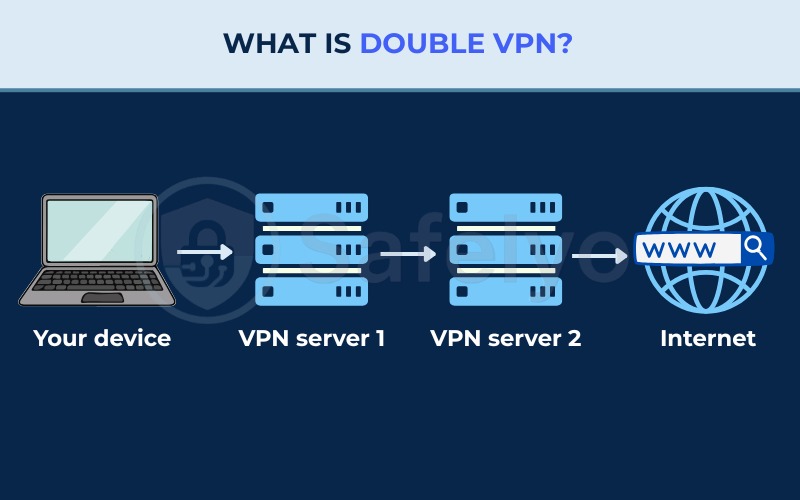
The routing feature is frequently referred to as multi-hop or VPN chaining, depending on the provider. When activating the tool, your traffic first reaches an entry server and then travels to an exit server before reaching the target website.
It is important to note that the exact technical deployment varies, and it does not always mean there are two completely independent encryption layers in the theoretical sense. For instance, Proton VPN’s Secure Core operates as a form of multi-hop, routing your connection from your device through a hardened Secure Core server before forwarding it to the final exit server.
2. How does Double VPN work?
Double VPN works by packaging your data into two cryptographic layers and routing the connection across two geographically separated servers. We will break down exactly how the software handles your data during the routing process.
Though keep in mind that the specific implementation, especially regarding how the dual encryption layers are structured, can differ among providers.
2.1. The encryption layering process
The double encryption process occurs entirely on your device before any data leaves the local system. The VPN application packages your data into two distinct cryptographic envelopes using robust ciphers like AES-256 or ChaCha20.
The sequence follows two distinct layers:
- The VPN application wraps the data in an outer layer of encryption, which is keyed exclusively to the entry node.
- Inside that outer envelope, the application applies an inner layer of encryption, which is keyed exclusively to the exit node.
2.2. The traffic routing path: Entry server and exit server
Your double-encrypted data follows a specific routing path designed to isolate information at each stop.
The entry server is the first point of contact between your device and the VPN network. The exit server is the final node that handles your data before it reaches the target website. Here is a breakdown of what information is visible at each stage of the transit process:
- What the entry server knows and does not know: The entry server receives your real IP address but cannot read your destination. The server decrypts the outer layer and forwards the still-encrypted inner package.
- What the exit server knows and does not know: The exit server only receives the IP address of the entry server. The server decrypts the inner layer and sees your final destination, but the server remains completely blind to your real IP address.
The final website only sees the VPN IP address of the exit server. However, if both the entry and exit servers are monitored by the same authoritative body in a shared jurisdiction, a traffic correlation attack could theoretically still be executed.
3. How to set up Double VPN
Setting up a Double VPN requires locating the dedicated multi-hop feature within your provider’s application settings and selecting your preferred server pair. We have outlined the step-by-step setup processes for three major providers to help you activate the feature correctly.
3.1. On NordVPN (Double VPN)
NordVPN officially labels its multi-hop feature as Double VPN, grouping it under the specialty network category within the application.
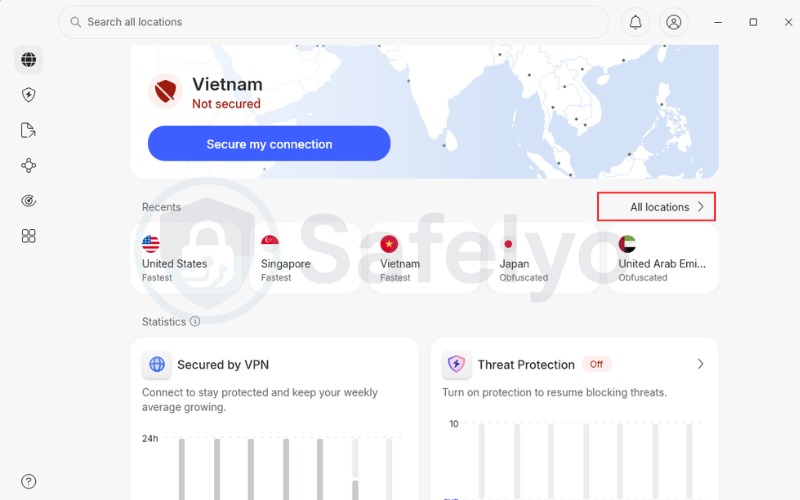
- Open the NordVPN application.
- Click on All locations on the right side of the interface.
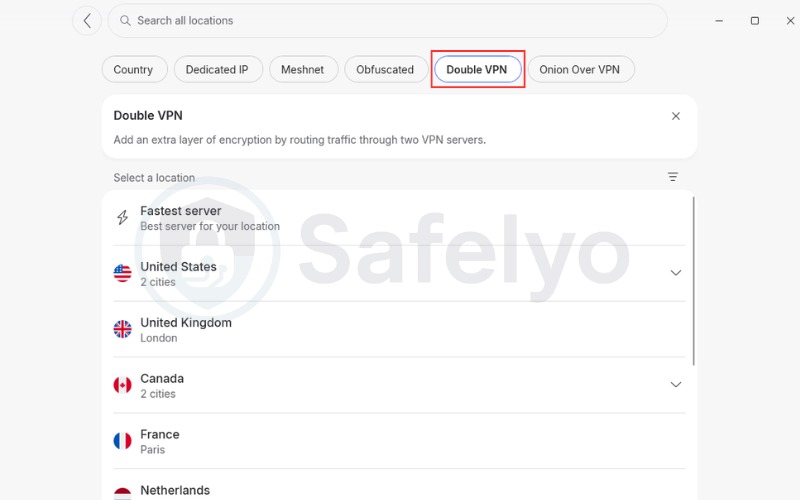
- Select Double VPN.
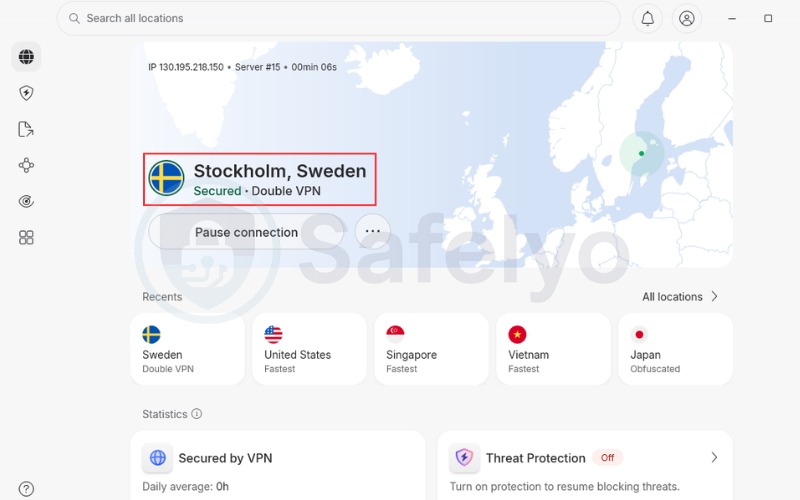
- Choose your desired country pair from the list, or simply select the Fastest server option to connect automatically.
3.2. On Surfshark (MultiHop)
Surfshark brands its two-server connection feature as MultiHop.
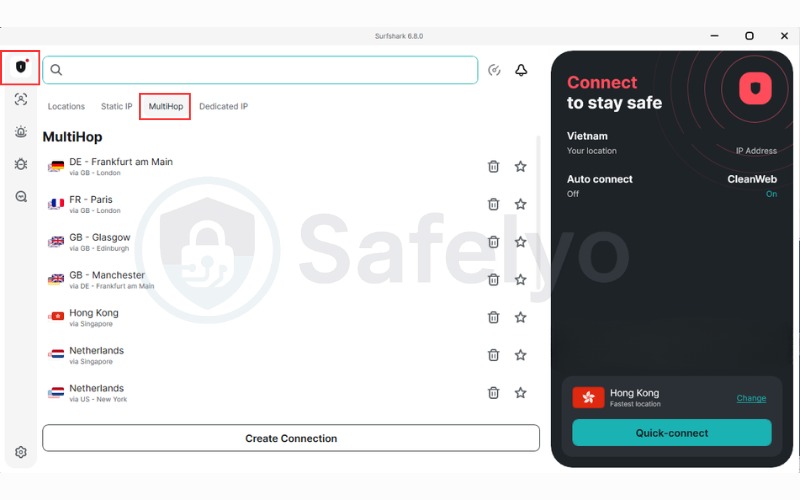
- Open the Surfshark application.
- On the left-hand menu, click on the VPN section.
- Select the MultiHop tab located at the top of the server list to view standard pairs.
- Alternatively, select Create Connection (Dynamic MultiHop) to manually pick your specific entry location and your specific exit location, then click Connect.
3.3. On Proton VPN (Secure Core)
When searching for Double VPN Proton, you will find that Proton VPN offers a secure routing feature named Secure Core.
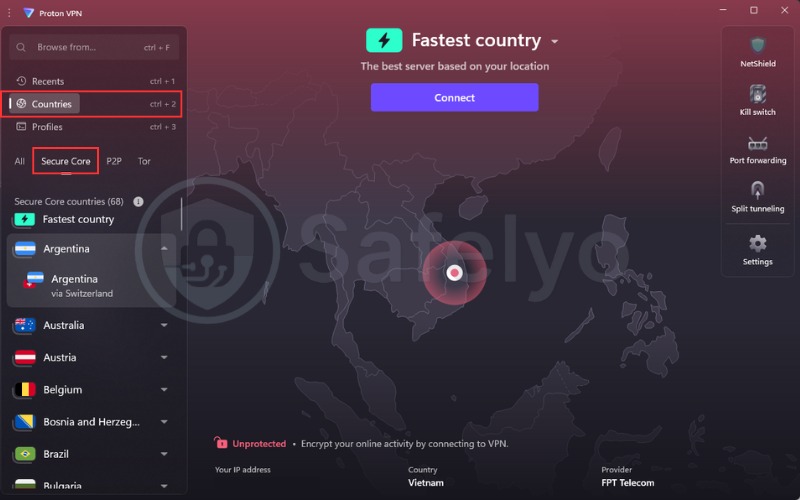
- Open the Proton VPN app and click the Countries tab, then choose the Secure Core filter to display the available regions for this feature.
- Pick a Secure Country, which will act as your visible exit location. By simply clicking the country name, the app will automatically route you through the optimal Secure Core server (located in Iceland, Sweden, or Switzerland).
- For more control, click the downward arrow next to your chosen country to manually select a specific Secure Core server from the expanded dropdown menu. Keep in mind that specific entry options may vary depending on the target country.
4. Double VPN pros and cons
The pros and cons of Double VPN center around a tradeoff between digital privacy and internet performance. We analyze the advantages and disadvantages below to give you an accurate perspective on the protective capabilities and functional limitations.
Pros
Defense against traffic correlation attacks
Double IP masking
Bypassing censorship
Cons
Reduced speed and increased latency
Resource consumption
Limited server availability
4.1. Advantages of Double VPN
The primary benefits revolve around disrupting data tracking methods.
- Defense against traffic correlation attacks: Routing data through two geographically separated servers complicates de-anonymization efforts by breaking the connection path.
- Double IP masking: The feature enforces the separation of personal data, ensuring that no single server holds both your real IP address and your browsing destination.
- Bypassing censorship: Systems like national firewalls typically only see the connection to the initial entry server in a safe region. When combined with obfuscation protocols like Obfsproxy or Shadowsocks, the routing allows users to bypass web blocks successfully.
4.2. Disadvantages of Double VPN
The most notable tradeoff for enhanced privacy is a reduction in overall performance.
- Reduced speed and increased latency: Adding a second server increases the physical distance data must travel, causing visible slowdowns and high latency.
- Resource consumption: The double encryption protocol demands extra bandwidth and processing power, consuming battery life faster on mobile devices.
- Limited server availability: Providers typically restrict the feature to a handful of locations, reducing your geographical choices compared to standard networks.
5. When to use and when to avoid Double VPN
You should use Double VPN only when protecting sensitive data against advanced threats, and avoid the feature during bandwidth-heavy activities like streaming. Making an informed decision requires understanding exactly which scenarios benefit from double encryption.
5.1. When to use Double VPN
Double VPN serves as a specialized tool for protecting sensitive data against targeted threats. We note that for the vast majority of regular internet users, a multi-hop configuration remains unnecessary.
You should use the feature in the following scenarios:
- Handling sensitive communications: Protecting confidential work documents, financial data, or private research from potential interception.
- Maximizing personal privacy: Ensuring an extra layer of anonymity when conducting highly private digital operations or accessing sensitive accounts.
- Using untrusted public networks: Adding a secondary shield when connecting to heavily monitored or unsecured Wi-Fi hotspots where basic encryption might feel insufficient.
- Users in censored regions: Circumventing national firewalls that target standard single-server connections.
5.2. When to avoid Double VPN
If you ever wonder does VPN slow down internet, using a two-server configuration provides a clear example of this tradeoff. We advise against using the Double VPN feature for standard bandwidth-heavy activities.
You should avoid the multi-hop routing feature in the following scenarios:
- Streaming media: High latency causes constant buffering and degrades video quality.
- Online gaming: The dual routing increases ping, resulting in frequent disconnections from game servers.
- Torrenting and P2P activities: Download speeds drop due to the encryption overhead, and few providers optimize multi-hop servers for P2P traffic.
- Daily web browsing: The speed reduction adds frustrating delays to low-risk activities like checking emails.
Pro Tip: Before committing to a Double VPN session, we recommend running a standard speed test on a regular server first. Afterward, connect to the Double VPN server and test again to establish a clear performance baseline.
6. Double VPN vs. multi-hop vs. Onion over VPN
Double VPN and multi-hop represent private network routing, while Onion over VPN relies on a decentralized public network for anonymity. We will clarify these concepts and highlight the differences between private and decentralized routing technologies.
6.1. Double VPN, multi-hop, and VPN chaining: Terminology clarified
The terminology surrounding multi-server routing can be confusing, but the core concepts are straightforward. Double VPN and multi-hop represent the exact same feature marketed under different brand names. VPN chaining serves as the generic technical term for linking multiple servers together.
We advise against attempting manual VPN chaining by running two separate VPN applications simultaneously. Our analysis indicates that a dual-application setup is unstable. The setup frequently causes software conflicts and can lead to data leaks by disrupting the kill switch flow.
| Provider | Feature Name |
| NordVPN | Double VPN |
| Surfshark | MultiHop |
| Proton VPN | Secure Core |
6.2. Double VPN vs. Onion over VPN vs. P2P VPN: Key differences
While all features utilize distinct routing points to handle privacy and data transfers, the underlying network structures and performance metrics differ significantly. Users comparing Double VPN vs Onion over VPN vs P2P will find different use cases for each network type.
| Feature | Double VPN | Onion over VPN | P2P VPN |
|---|---|---|---|
| Network structure | Private centralized network managed by a single provider. | Public decentralized Tor network operated by anonymous volunteers. | Private network specifically optimized for file sharing. |
| Speed performance | Noticeably slower than standard connections but faster than Onion. | Slow, making the network unsuitable for anything beyond basic text rendering. | Optimized for high-speed downloads and large data transfers. |
| Anonymity level | High, relying on trusting the provider’s no-logs policy. | High but carries the inherent risk of malicious exit nodes. | Standard anonymity, sufficient for hiding IP addresses from peer swarms. |
| Encryption order | Data is double-encrypted by the client before transmission. | The VPN application encrypts traffic before the data enters the Tor network. | Standard single encryption to balance security and download speeds. |
For protecting day-to-day privacy and securing sensitive data, we consider a reputable provider’s Double VPN feature to be more practical due to its better speed and reliability over the Tor network.
7. NordVPN vs. Surfshark vs. Proton VPN: Double VPN compared
Choosing the right provider requires evaluating specific multi-server capabilities, encryption depths, and operating locations. We have compiled a technical comparison of the three leading services offering a multi-hop feature.
| Criteria | NordVPN | Surfshark | Proton VPN (Secure Core) |
|---|---|---|---|
| Feature name | Double VPN | MultiHop | Secure Core |
| Encryption type | Double VPN (double-encrypted chain) | MultiHop double VPN routing | Multi-hop routing (Secure Core to exit server) |
| Server customization | Exit server selection only | Fully customizable entry and exit pairs | Pre-configured server pairs |
| Operating jurisdiction | Panama | Netherlands | Switzerland |
Based on our comprehensive NordVPN review, the platform provides a practical choice for beginners who need a straightforward setup process. On the other hand, Surfshark offers valuable utility for advanced users who want full control over their routing paths. Proton VPN is a fitting option for users prioritizing safe jurisdictions and privacy-focused regulations.
8. VPN providers that offer Double VPN
Multi-hop routing requires substantial network infrastructure, meaning not every provider supports the capability. Here is a list of VPN providers that offer the Double VPN feature for your reference:
- NordVPN
- Surfshark
- Proton VPN
- Mullvad
- Hide.me
- Astrill VPN
- Perfect Privacy
- IVPN
- Windscribe
- OVPN
- Private Internet Access (via multi-hop proxy)
9. FAQs about Double VPN
Is Double VPN worth it for the average user?
No. For standard activities like browsing or streaming, the speed reduction outweighs the security benefits. Unless you operate within a high-risk threat model, a standard VPN connection provides enough protection.
Is Double VPN overkill?
Yes, for most everyday internet users. The Double VPN feature addresses a specific threat model that the vast majority of individuals do not face during routine online activities.
Is Double VPN traceable?
The routing is difficult to trace. The separation of personal data ensures no single server holds the complete connection log. However, if both servers fall under the jurisdiction of a single intelligence agency, a traffic correlation attack remains theoretically possible.
Can I create my own Double VPN by using two different VPN apps?
We do not recommend this approach. Running two applications simultaneously is unstable and increases the risk of data leaks by disrupting essential features like the kill switch.
Does a Double VPN make me 100% anonymous?
No technology guarantees complete anonymity. While the Double VPN feature improves privacy, maintaining anonymity depends heavily on the provider’s no-logs policy and avoiding malicious exit nodes entirely.
Can I get a Double VPN free?
No. Most free VPN services do not offer a multi-hop feature because maintaining the infrastructure for double routing is expensive.
10. Conclusion
To summarize what is Double VPN, it operates as a specialized tool engineered for specific threat models rather than a default upgrade for standard browsing. We recognize that while the dual encryption process provides a solid defense mechanism against surveillance, the resulting performance drop renders the feature impractical for casual use.
If your workflow requires elevated security, we recommend starting with Surfshark MultiHop for customization or NordVPN Double VPN for an optimized setup. Always ensure your kill switch is active, and run a speed test before committing to a heavy data transfer.
For more insights on building a secure digital environment, return to the Safelyo homepage or explore our VPN Guides category.