When choosing a VPN country, you are essentially selecting which server location your connection will route through. The country determines the legal environment and content access, while the specific server affects your speed and stability.
In this guide, you will learn:
- How to decide which VPN country to use based on your goals and needs
- A simple step-by-step decision process to narrow down your options
- Regional examples and quick country shortlists for streaming, gaming, and privacy
Let’s start by understanding the key factors that help you make a smarter choice of VPN country and server location.
1. How to decide which VPN country to use
Choosing a VPN country depends on what you want to achieve. It could be privacy, speed, access to streaming content, or security on public Wi-Fi. Each goal changes which country works best for you. Understanding these differences helps you avoid slow connections or blocked websites.
In most VPN apps, countries appear as connection options, but each country contains multiple servers. Your choice involves two levels: deciding which country to connect through and selecting the server inside that country that performs best.
1.1. Key factors: goals, speed, access, and privacy
Before connecting to a VPN server, consider what matters most for your session. The right decision usually comes down to four key factors:
- Goals: Are you streaming, gaming, securing personal data, or accessing blocked websites?
- Speed: Shorter physical distance between your device and the VPN server often means faster performance.
- Access: Some countries offer more open internet access or larger streaming libraries.
- Privacy: Jurisdiction and data protection laws affect how user information is handled.
A practical rule is to choose the closest country that still meets your goal. For example, if you are in Asia and want to access U.S. Netflix, connect to a West Coast server such as Los Angeles. This option provides lower latency compared to East Coast servers.
1.2. Step-by-step decision tree to narrow choices
You can simplify your VPN country selection process by following these steps:
- Identify your goal.
- For streaming, select countries known for large content libraries such as the United States, the United Kingdom, or Japan.
- For privacy, pick countries with strong data protection laws, such as Switzerland, Iceland, or Estonia.
- For speed, choose a nearby region or one with less server congestion.
- For gaming, connect to a country near the game’s hosting server.
- Check server load.
Most VPN apps show live server load percentages. Select a server that operates below 60 percent for stable performance.
- Test latency and speed.
Use built-in VPN speed tests or online tools such as fast.com to compare response times.
- Save your top three options.
Keep a shortlist for different situations, such as streaming, work, or travel.
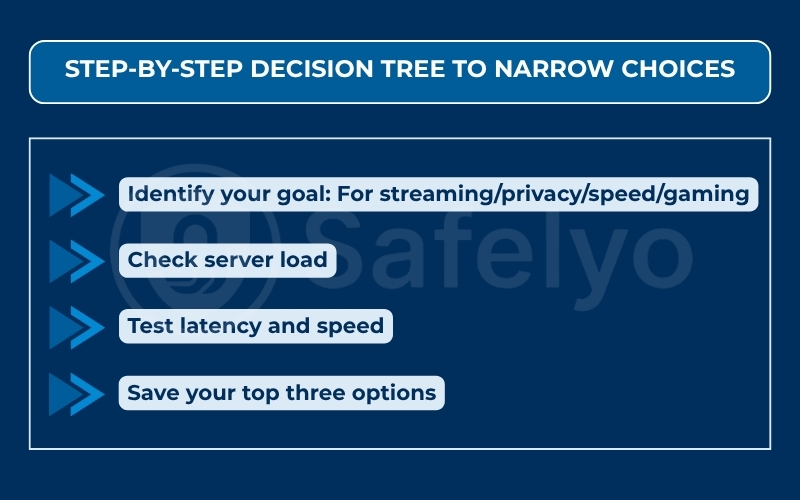
Following this method ensures your connection choice is based on results, not guesswork.
1.3. Regional examples and quick country shortlists
Here are some starting points to help you decide based on different needs:
| Goal | Recommended countries | Notes |
| Streaming | United States, United Kingdom, Canada, Japan | Broadest content libraries and frequent platform updates |
| Privacy-first browsing | Switzerland, Iceland, Finland | Strong data protection laws and limited data retention |
| Fast general use | Nearest country with strong network infrastructure | For example, Singapore in Southeast Asia or the Netherlands in Europe |
| Gaming or low latency | Country closest to the game server | Avoid distant or overloaded regions |
| Bypass censorship while traveling | United States, Germany, Netherlands, Romania | Reliable for unblocking restricted content |
If your VPN app includes Smart Location or auto-connect features, test your chosen servers manually once in a while. Automatic options are convenient but not always the most efficient for your specific goal.
2. Choose by goal: Streaming, privacy, speed, gaming
Different online goals require different VPN country choices. Connecting to a random server may not give you the results you expect. This section explains four common scenarios so you can make informed decisions based on what matters most: content access, privacy protection, stable speed, or low-latency gaming.
2.1. Streaming: Which country unlocks more content fastest?
Streaming platforms like Netflix, Hulu, or BBC iPlayer have region-based content catalogs. Choosing the right VPN country can unlock more titles and maintain smooth playback.
Here is how to decide effectively:
- Start with known content-rich countries.
The United States, the United Kingdom, Canada, and Japan often have the largest streaming libraries. - Match the country to the service.
Hulu performs best with servers located in the United States or in regions where it is officially available through Disney+, such as Australia and New Zealand. - Balance speed and distance.
If you live far from these regions, test different cities within the same country. For instance, a West Coast U.S. server may buffer less for users in Asia.
Tip: Save multiple working servers as favorites because streaming platforms occasionally block specific IP ranges.
2.2. Privacy: Which countries have stronger data protection?
If privacy is your top priority, focus on countries with independent data protection laws and no mandatory data retention policies.
Examples include:
- Switzerland: Known for strict privacy regulations and neutrality.
- Iceland: Offers strong constitutional protection for freedom of speech and information.
- Finland and Sweden: Both enforce strong EU data privacy standards under GDPR.
Avoid connecting to countries involved in large surveillance alliances such as the Five Eyes or Fourteen Eyes if your goal is maximum anonymity.
Also, make sure your VPN provider operates under a no-logs policy that has been verified by a third-party audit. It is even better if the service uses RAM servers and double hop routing for additional privacy protection.
2.3. Speed and stability: How to test and compare latency or throughput?
When speed is your main goal, the closest physical location is not always the fastest. Factors such as routing quality, server load, and peering agreements can affect connection stability.
To find the best-performing country:
- Use built-in VPN speed tests.
Most VPN apps provide latency (ping) and download or upload readings.
- Run multiple tests at different times of day.
Network congestion may vary depending on your region.
- Compare countries instead of just cities.
Sometimes a server in Singapore performs better than one in Malaysia because of stronger peering networks.
- Note your average speed over several sessions.
Keep a simple log to identify which countries maintain stable throughput over time.
For example, a user in Europe might notice that a nearby Netherlands server provides faster and more consistent speeds than one in France even though both are geographically close.
2.4. Gaming and P2P: Which neighboring servers work best?
For gaming or peer-to-peer connections, latency (ping time) is the most critical factor. A lower ping means quicker response and smoother gameplay.
Here is how to optimize it:
- Connect to a server near the game’s host region. If the game server is in Frankfurt, choose Germany or a nearby country such as the Netherlands.
- Avoid distant servers. Long routes increase lag even when bandwidth appears acceptable.
- Check for P2P-friendly servers. Some VPNs label them specifically and they are designed to support torrenting or multiplayer stability.
- Monitor packet loss. Occasional stutters or disconnections usually mean the route is overloaded. Switching to a nearby alternative often fixes it.
If your VPN offers split tunneling, enable it for games only and exclude background applications to keep latency low.
Read more:
3. Legal and jurisdiction factors
Legal frameworks and jurisdiction rules influence how VPN providers handle your data and what kind of protection you actually receive. Even when your traffic is encrypted, the laws governing the country where your VPN company is based can affect your privacy and safety.
Before choosing a VPN country, it helps to understand how these laws differ and what that means for your online activity.
3.1. When laws and data policies matter
Each country follows different standards for data collection, user tracking, and government access to information.
- Data retention laws: Some regions require ISPs or VPN providers to store connection logs for a specific time. This may expose your online activity if requested by authorities.
- Encryption and interception rules: Certain governments have legal powers to compel companies to decrypt data during investigations.
- Transparency requirements: Countries with stronger consumer protection laws often require public audits or independent security reviews, which increases trust.
If privacy is your main goal, always check whether the VPN provider is legally obligated to keep user data under its country’s regulations.
3.2. How jurisdiction affects your privacy
The country where a VPN is incorporated determines which government can request user data. A provider based in a country that is part of intelligence-sharing alliances may be legally forced to hand over information.
For instance:
- Providers under Five Eyes or Fourteen Eyes alliances (for example, the United States or the United Kingdom) may be subject to data-sharing agreements.
- Providers in Switzerland or Panama operate under independent privacy laws that do not align with these surveillance networks.

Even if a VPN claims to have a strict no-logs policy, jurisdiction can still affect how that policy is enforced in real situations. This is why location and legal environment matter as much as technical features.
3.3. Safer choices when traveling or on public Wi-Fi
When you travel or connect through public networks, selecting a VPN server in a privacy-respecting country helps minimize risk.
- Prefer stable, privacy-friendly regions. Connect to servers in countries such as Switzerland, Iceland, or Finland.
- Avoid high-censorship areas. Public Wi-Fi in some countries may block or monitor encrypted connections.
- Test accessibility before traveling. Some VPNs automatically select servers based on local restrictions, which can affect performance.
A simple habit is to bookmark a few reliable countries with good privacy reputations so you can switch quickly whenever you connect from an unfamiliar or unsecured network.
4. Network performance: latency, peering, distance
Network performance is one of the biggest factors that determine how fast and reliable your VPN feels in daily use. Even when a VPN promises unlimited bandwidth, your connection quality still depends on physical distance, internet routing, and the peering agreements between network providers.
Choosing the right server location within a country can make a major difference, especially when you need consistent speed for streaming, gaming, or work calls.
4.1. How server distance impacts speed
Distance between you and the VPN server directly affects latency, which is the time it takes for data to travel back and forth. The farther your device is from the server, the higher the delay.
- Short distance equals lower latency. If you are in Thailand, connecting to a server in Singapore or Japan is typically faster than one in Europe.
- Long routes reduce efficiency. Extra network hops increase both delay and the chance of packet loss.
- Local servers improve stability. When possible, use a nearby country that has a Tier-1 or Tier-2 data center.
If you experience slow performance, test two or three regional servers to see which one provides the most stable connection.
4.2. Choosing between city and country servers
Many VPNs offer multiple cities within the same country, such as New York, Los Angeles, or Miami in the United States. Picking the right one can improve both speed and reliability.
Consider the following:
- Geographic proximity: Choose the city closest to you for lower latency.
- Server load: Select servers with lighter traffic, often shown as a percentage in the VPN app.
- Special use cases: Some cities are optimized for streaming or P2P. Check the provider’s server list for these labels.
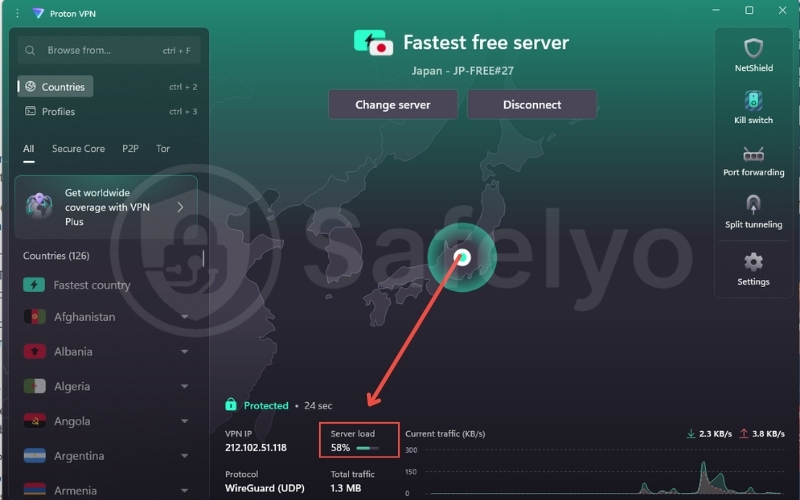
When you find a city that consistently performs well, save it as a favorite. This helps you reconnect faster without retesting every time.
4.3. When to trust Smart Location or auto-connect
Most VPNs include Smart Location or auto-connect features that automatically pick a server for you based on speed, distance, and load. While this is convenient, the algorithm may not always match your specific goal.
Use these settings when:
- You only need general protection or browsing security.
- You are on public Wi-Fi and want the fastest nearby connection.
Avoid relying on auto-connect when:
- You need a specific country for streaming or accessing certain websites.
- You require consistent routing for gaming or work.
5. Special cases: banking, CAPTCHAs, torrents
Some websites and online services respond differently when you use a VPN. Online banking systems may block foreign logins, websites might trigger CAPTCHAs, and torrenting can have legal or speed-related restrictions. Understanding these special cases helps you avoid interruptions and stay safe.
5.1. Preventing banking and payment lockouts
Banks often monitor unusual login patterns to prevent fraud. When you log in from a different country using a VPN, the system may interpret it as suspicious activity.
To reduce the risk of being locked out:
- Use a server in your own country or one nearby when accessing financial accounts.
- Avoid frequent country switches while logged in to the same service.
- Check your bank’s VPN policy on international logins before traveling.
- Enable two-factor authentication (2FA) to verify your identity even if the login is flagged.
If you need to access banking services while abroad, connect to a VPN server in your home region for the most consistent results.
5.2. Avoiding CAPTCHA and website access issues
Many websites use CAPTCHA or temporary blocks when they detect multiple logins from shared IP addresses. VPN servers are often shared among thousands of users, which can trigger these security checks.
Here is how to minimize the problem:
- Switch to a less crowded server. Fewer users on the same IP reduce the chance of being flagged.
- Use a static or dedicated IP if your VPN offers one. This helps avoid being mistaken for automated traffic.
- Clear cookies and cache before retrying a blocked website.
- Contact support if the issue persists, as some providers can whitelist specific sites for smoother access.
If CAPTCHA pages appear frequently, it usually means the IP you are using is temporarily flagged. Switching regions often resolves it immediately.
5.3. Safe countries for torrenting and file sharing
Torrenting is not illegal by itself, but the laws around copyrighted content vary widely by country. Some regions enforce strict penalties, while others allow limited personal-use copying under local exceptions.
Safer approaches include:
- Choose VPN servers in countries with relaxed file-sharing laws. Examples include Switzerland, which permits limited personal-use downloading of certain media types but still bans uploading copyrighted material.
- Ensure your VPN supports P2P traffic. Some providers restrict torrenting to specific servers for better performance and compliance.
- Keep a kill switch enabled. This prevents your real IP address from being exposed if the VPN disconnects.
- Avoid downloading copyrighted material. Stick to open-source, educational, or licensed content.
A good practice is to test your VPN’s P2P servers before large downloads. This confirms that encryption and speed remain consistent during transfers.
6. FAQs about deciding which VPN country to use
This section answers common questions users have when choosing a VPN country. Each answer is short, practical, and based on common real-world VPN usage patterns.
Should I always pick the nearest country?
Not always. While nearby servers usually offer the best speed, the nearest country is not always the best for privacy or streaming. If you need a specific content library or a region with stronger data protection laws, choose that country even if it is slightly farther away.
Which country works best for Netflix or sports?
The United States typically provides the largest Netflix library, while the United Kingdom and Japan also offer wide selections. For sports streaming, pick a country where the broadcaster’s service is officially available. For example, use a U.K. server for BBC iPlayer or a U.S. server for ESPN+.
Do 5, 9, or 14 Eyes countries affect privacy?
Yes. These are intelligence-sharing alliances among countries that can share user data under certain conditions. If privacy is your top priority, consider VPNs based in independent jurisdictions such as Switzerland, Panama, or Iceland. These locations have stronger legal barriers to government surveillance.
What does a virtual VPN location mean?
A virtual VPN location routes your traffic through one country while using a server physically located elsewhere. This is used when a provider does not operate hardware in that region but still wants to offer local access. Virtual servers can work fine for streaming, but they might not be ideal for privacy-sensitive tasks.
Is a static IP safer for online banking?
A static IP is helpful but not always safer by itself. It reduces the risk of account lockouts because your logins come from the same address every time. However, safety still depends on encryption strength and your VPN provider’s data-handling policy.
Does VPN protocol influence speed by country?
Yes. Some VPN protocols perform better depending on distance and server load. For example, WireGuard and Lightway are known for high efficiency on long-distance connections. If you experience slow speeds, try switching protocols in your VPN settings to see which one performs best for your region.
Why does speed drop at certain times of day?
Network congestion can slow down both your local internet and the VPN server. Peak hours in your country or the server’s country often lead to temporary drops in speed. Testing the same server at different times helps identify whether the slowdown is local or global.
7. Conclusion
Think of your VPN setup as a two-step choice. First, choose the country for its laws and access. Then, choose the server for speed and stability. By understanding what each region offers, you can connect smarter and avoid unnecessary frustration.
Key takeaways:
- Choose by goal, not habit. Match your VPN country to your task, such as streaming, privacy, or gaming.
- Consider jurisdiction and data protection laws before connecting.
- Test several nearby servers to find the fastest and most stable options.
- Use Smart Location only when you need quick protection, not specific access.
With the right approach, you can know how to decide which VPN country to use for secure, smooth, and reliable connections every time. For more practical guides on VPNs, cybersecurity, and safe digital habits, explore the Tech How-To Simplified section at Safelyo.