You spot the “Private Relay” feature in your iCloud settings and wonder: “Do I still need to pay for a VPN?”
This is a common question for iPhone and Mac users. On one side, you have a convenient feature built right into the ecosystem.
On the other, you have professional security tools designed for total protection.
This article will compare iCloud Private Relay vs VPN directly to help you decide which is the optimal choice for your needs.
Key takeaways:
- Scope: Private Relay primarily protects Safari, while a VPN secures your entire device.
- Location: Private Relay does not allow you to change your region to unblock content.
- Security: VPNs offer system-wide encryption protocols suitable for high-risk public Wi-Fi.
- Ease of Use: Private Relay requires zero setup, whereas VPNs offer granular control.
- Cost: Private Relay is included with iCloud+; VPNs require a separate subscription.
1. iCloud Private Relay vs VPN
To understand the core differences quickly, review the comparison table below.
| Feature | iCloud Private Relay | Standard VPN |
|---|---|---|
| Protection Scope | Primarily Safari Browser | System-wide (All Apps) |
| Location Control | General Location Only | Specific Countries & Cities |
| Streaming Access | Cannot unblock content | Unblocks Netflix, Hulu, etc. |
| Encryption Level | Strong TLS Encryption | High-level Encryption (e.g., AES-256, ChaCha20) |
| Platform Support | Apple Devices Only | Windows, Android, iOS, Mac |
1.1. Scope of protection (Safari only vs. System-wide)
The most critical difference lies in what data gets protected and where it works.
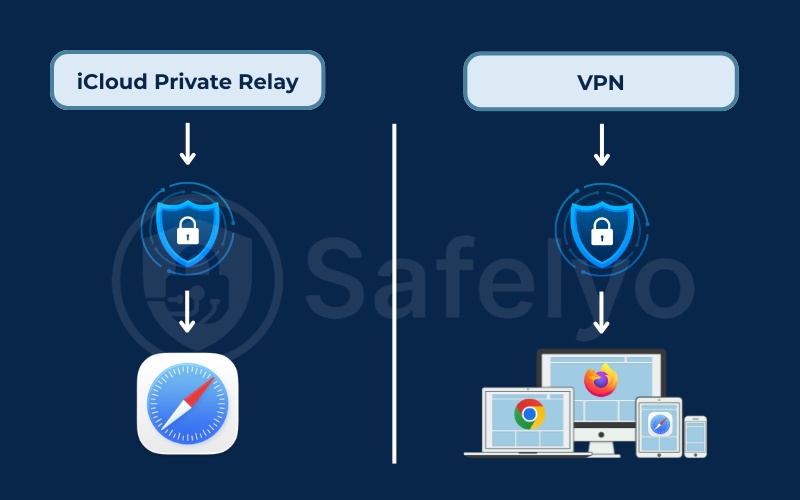
iCloud Private Relay is designed primarily to protect your web browsing within Safari on Apple devices only. While it may cover some specific unencrypted app traffic in the background, the vast majority of your internet activity outside Safari remains exposed.
If you open the Facebook app, check your emails on the Outlook app, or play an online game, your internet traffic uses your real IP address.
A VPN, however, offers cross-platform support (Windows, Android, Mac, iOS) and encrypts “System-wide” traffic. It wraps every piece of data leaving your device in a secure tunnel, protecting all applications essentially.
1.2. Geo-unblocking and streaming (Netflix/Hulu)
Private Relay is designed for privacy, not internet freedom. It only allows you to “Maintain general location,” which keeps your local content relevant (like weather or news). It does not allow you to unblock streaming content.
A VPN enables you to “spoof” your location to specific countries or cities. You can select a server in New York, Tokyo, or London to trick websites into thinking you are physically there. This is essential if you want to unblock geo-restricted libraries on Netflix, Disney+, or BBC iPlayer.
1.3. Encryption and privacy mechanism
Private Relay uses strong TLS encryption combined with a “Dual-hop” architecture. Your traffic is split so that Apple knows your identity but not your activity, while a partner knows your activity but not your identity.
VPNs typically use high-level military-grade encryption (such as AES-256 or the modern ChaCha20 algorithm used in WireGuard) to create an encrypted tunnel. While the VPN provider can technically see the data, trustworthy services strictly adhere to a no-logs policy, ensuring they do not store any record of your online activities.
1.4. Speed and performance
Since Private Relay is built into macOS and iOS, it is highly optimized. It usually runs smoothly in the background with minimal impact on battery life or browsing speed.
VPNs involve a more complex encryption process, which can sometimes slow down your internet speed. However, modern VPNs using the WireGuard protocol have largely eliminated this issue, offering speeds that are nearly identical to a standard connection.
1.5. Price and subscription
Private Relay is technically not free, but it feels like it. It comes bundled with iCloud+ subscriptions. If you already pay for extra iCloud storage, you have it at no extra cost.
A premium VPN is a separate standalone expense, usually costing between $3 to $12 per month, depending on the plan.
2. What is an iCloud Private Relay and how does it work?
iCloud Private Relay is a privacy service built into the iCloud+ subscription that allows you to browse the web in Safari more securely and privately.
Many users assume it functions just like a standard VPN, but the underlying technology and scope of protection are quite different.
2.1. Is iCloud Private Relay a VPN?
The short answer is No.
While both tools hide your IP address and encrypt data, they function on fundamentally different technical levels. iCloud Private Relay is essentially a proxy system designed specifically for the Safari browser.
It lacks the core capabilities of a true Virtual Private Network (VPN). A VPN creates an encrypted tunnel for the entire operating system, securing traffic from every application on your device, not just the web browser.
Furthermore, Private Relay does not use standard tunneling protocols (like OpenVPN or WireGuard) and does not offer the ability to select specific server locations to bypass geographic restrictions.
2.2. How does an iCloud Private Relay work?
The system employs a dual-relay architecture to separate your identity from your browsing data. When you initiate a web request in Safari, your traffic travels through two distinct stops (hops) so that no single entity can see the full picture:
- First Relay (Operated by Apple): Your traffic arrives here first. At this stage, Apple can see your real IP address (who you are) to assign you an approximate region (like your city). But they cannot see the website you are visiting because your DNS requests are encrypted.
- Second Relay (Operated by a Third-Party): Your traffic is then forwarded to a trusted partner provider. This provider decrypts the web address to connect you to the destination (where you are going). Crucially, they only see a temporary anonymous IP address, not your real one.
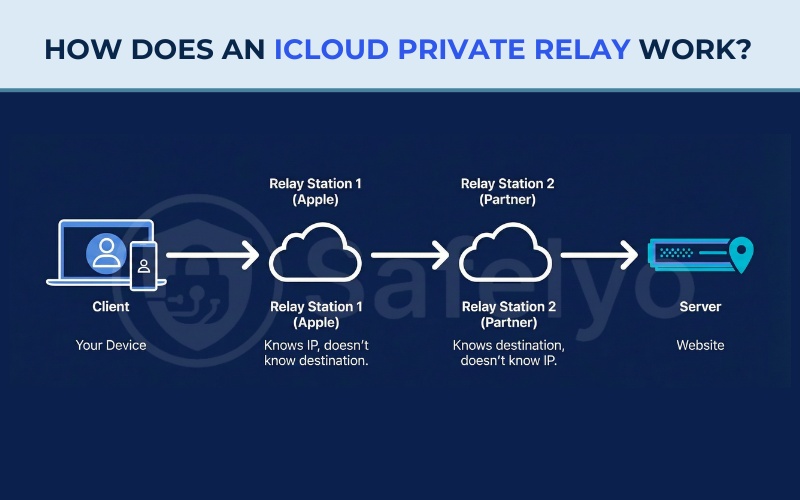
This separation ensures that Apple knows who you are but not what you are browsing. While the partner knows what you are browsing, but not know who you are. The final website simply sees a visitor from a general area, keeping your exact identity and location secure.
3. Advantages and disadvantages of iCloud Private Relay
To decide if this feature is enough for your daily needs, it is important to weigh its strengths and weaknesses carefully.
3.1. Advantages of iCloud Private Relay
This feature offers several benefits for users deeply integrated into the Apple ecosystem:
- Seamless setup: Built directly into the OS, it requires no third-party apps or complex installation.
- Cost-effective: It comes bundled with every iCloud+ subscription, serving as a free bonus for storage subscribers without the extra cost of a separate VPN bill.
- Strong privacy architecture: Apple uses a minimal-log policy and a dual-hop design. This ensures no single entity (not even Apple) can simultaneously see both your identity and your browsing history.
- Optimized performance: As a native feature, it runs efficiently in the background with minimal impact on battery life or internet speed compared to heavier third-party apps.
3.2. Disadvantages of iCloud Private Relay
Despite its convenience, the service has significant limitations compared to a full security tool:
- Safari-only protection: It strictly protects the Safari browser on Apple devices. Traffic from Chrome, Firefox, Windows PCs, or Android phones remains completely exposed.
- Basic feature set: It lacks sophisticated tools found in standard VPNs, such as a kill switch, split tunneling, or custom security protocol selection.
- No geo-spoofing: You cannot choose a specific server location. This makes it impossible to bypass regional content blocks (like Netflix libraries) or spoof your location for deals.
- Availability issues: The feature is unavailable in some countries due to regulations. Additionally, it is frequently blocked by corporate and school firewalls that restrict its encryption method.
4. When to use which? (Usage scenarios)
Choosing between the two depends largely on your specific internet habits and security requirements.
4.1. Stick with iCloud Private Relay if…
Private Relay is sufficient for casual users who prioritize simplicity over advanced features. You should stick with this built-in feature if:
- You strictly use Safari for reading news and general web browsing.
- You do not need to fake your IP address to access content from another country.
- You want a “set it and forget it” privacy solution without managing third-party apps.
4.2. Invest in a paid VPN if…
Certain situations require the robust, system-wide protection that only a dedicated service can provide. It is better to invest in a paid VPN subscription if:
- You use Chrome, Firefox, or standalone apps for sensitive tasks.
- You frequently connect to public Wi-Fi networks at coffee shops or airports and need to secure all data leaving your device.
- You are a movie buff who wants to bypass geographic restrictions to access streaming libraries from other regions.
- You use a mix of devices, including Android phones or Windows computers, and need a unified security solution.
5. Can you use iCloud Private Relay and VPN at the same time?
Using both services simultaneously is generally not recommended.
Technically, Apple is designed to let VPN traffic bypass Private Relay, meaning the VPN should theoretically take priority. However, in real-world usage, having both active frequently triggers routing instability, connection drops, or complete network failure where pages refuse to load.
To avoid this, most reputable VPN apps will automatically disable Private Relay or warn you when they detect it is active. If you turn on your VPN to secure your device, you should manually toggle Private Relay off to ensure a stable and fast connection.
6. How to turn off iCloud Private Relay
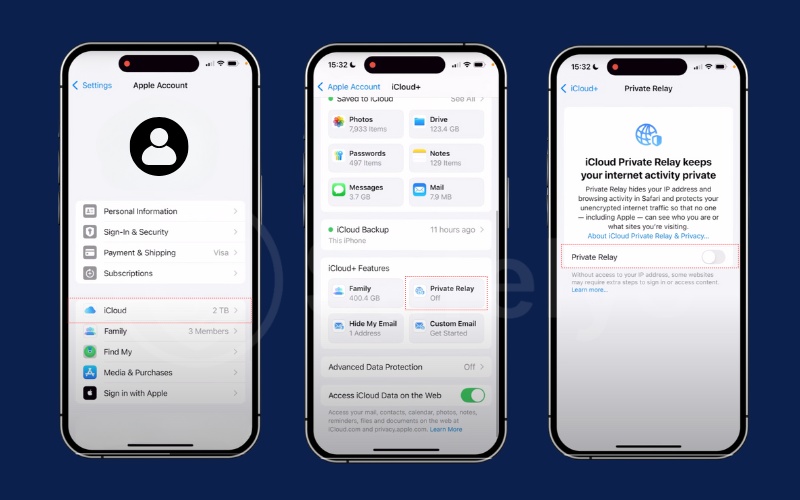
If you decide to use a VPN or experience network connectivity issues, follow these steps to disable the feature.
Quick Step:
- Open Settings (iOS) or System Settings (Mac).
- Tap your Apple ID Name.
- Select iCloud.
- Tap Private Relay and toggle it Off.
7. FAQs about iCloud Private Relay vs VPN
Does iCloud Private Relay hide my IP address?
Yes, but it primarily hides your IP address from websites you visit using Safari. It does not hide your IP from other apps on your phone.
Is iCloud Private Relay free?
No, it is a feature of the paid iCloud+ subscription. However, the basic free iCloud plan does not include it.
Is iCloud Private Relay safe for torrenting?
No. Torrenting usually requires a dedicated P2P client (application). Since Private Relay focuses on protecting Safari, your real IP address would be exposed in the torrent client.
Is iCloud Private Relay better than a VPN?
It depends on your goal. If you want a “set it and forget it” tool for basic privacy while browsing in Safari without installing extra apps, Private Relay is better for convenience and battery life.
However, if you need to protect traffic from all apps, access geo-blocked content, or customize your security settings, a standard VPN is the superior choice.
Should I enable iCloud Private Relay?
Yes, if you already have an iCloud+ subscription. It provides an excellent layer of privacy for your web browsing with zero effort.
However, you might need to temporarily disable it if you experience slow network speeds or if it conflicts with certain workplace or school Wi-Fi networks.
Do I need a VPN if I have an Apple Private Relay?
Yes, if you want complete protection. Private Relay leaves traffic from other apps (like banking, social media, or games) exposed.
A VPN is still necessary if you want to encrypt everything leaving your device, especially when using public Wi-Fi, or if you want to watch streaming content from other countries.
8. Conclusion
iCloud Private Relay vs VPN serve two very different purposes. Private Relay is a privacy tool for Safari users who want to avoid ad trackers without any hassle. A VPN is a comprehensive security tool that protects your entire digital life and offers internet freedom.
If you value the security of your banking data on public networks or want to stream global content without limits, a VPN is still a “Must-have.”
For more guides on protecting your digital life, explore the VPN Guides category on Safelyo.