You just upgraded to iCloud+ and noticed a feature called Private Relay. It hides your IP address and encrypts your web traffic, leading to one obvious question: Is iCloud Private Relay a VPN, and can you finally cancel your paid VPN subscription? The short answer is no. While Apple’s built-in tool is highly convenient for basic browsing, it does not secure your entire device.
This article will compare iCloud Private Relay vs VPN directly to help you decide which is the optimal choice for your networking needs.
Key takeaways:
- Scope: Private Relay primarily protects Safari, while a VPN secures your entire device.
- Location: Private Relay does not allow you to change your region to unblock content.
- Security: VPNs offer system-wide encryption protocols suitable for high-risk public Wi-Fi.
- Ease of Use: Private Relay requires zero setup, whereas VPNs offer granular control.
- Cost: Private Relay is included with iCloud+; VPNs require a separate subscription.
1. iCloud Private Relay vs VPN: The key differences
The core difference between iCloud Private Relay and a VPN lies in the scope of protection and the level of control provided to the user. We have tested both tools extensively to evaluate how they handle daily network traffic. The comparison table below outlines the most critical distinctions you need to know.
| Feature | iCloud Private Relay | Standard VPN |
| Protection Scope | Safari browser and DNS queries | System-wide across all apps |
| Encryption | QUIC protocol and TLS 1.3 | AES-256, ChaCha20, WireGuard |
| Geo-Unblocking | Local region only | Specific countries and cities |
| Compatibility | Apple devices only | Windows, Android, iOS, macOS, Routers |
| Advanced Features | None | Kill switch, split tunneling, ad-blocker |
| Price | Included with iCloud+ | Separate monthly subscription |
1.1. Scope of protection (Safari only vs. System-wide)
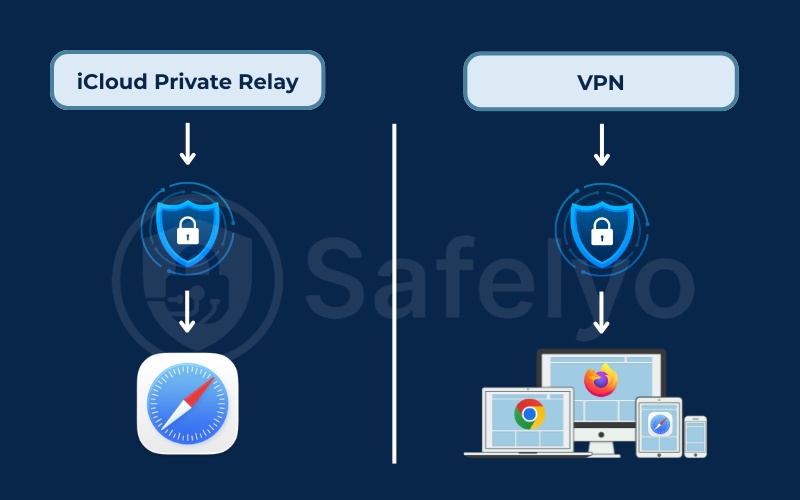
Private Relay primarily protects web browsing traffic within the Safari browser. According to Apple documentation, Private Relay also encrypts DNS queries system-wide and covers a small subset of unencrypted HTTP traffic from other Apple applications.
While this provides a strong baseline of privacy, it creates blind spots. The vast majority of internet activity originating from third-party applications remains completely exposed. If you open a social media app, check emails on a non-Apple client, or play an online game, that specific internet traffic uses your real IP address.
A VPN operates differently by offering system-wide protection. It wraps every piece of data leaving the device in a secure encrypted tunnel. This means a VPN protects all applications, background processes, and alternative web browsers equally.
1.2. Security features and encryption protocols
Both tools utilize highly advanced encryption protocols to secure internet traffic. Private Relay relies on the QUIC protocol combined with TLS 1.3 encryption. These are modern internet security standards designed to maintain high performance while strictly protecting data integrity.
A premium VPN typically uses industry-standard encryption like AES-256 or ChaCha20. VPN providers also deploy robust tunneling protocols such as WireGuard, OpenVPN, Nordlynx or Lightway. While both options offer exceptional encryption, a VPN clearly wins in active security features designed for high-risk network environments.
Based on our testing, premium VPNs provide several critical tools that Private Relay completely lacks:
- Kill switch: Instantly cuts internet access if the secure connection drops, preventing accidental data leaks.
- Split tunneling: Allows users to route specific apps through the encrypted tunnel while letting others use the standard local network.
- Obfuscation: Disguises encrypted traffic as regular web traffic to bypass strict network firewalls.
- Ad-blocker integration: Features like Threat Manager or NetGuard actively block malicious domains and tracking scripts at the server level.
1.3. Geo-unblocking and location masking
A VPN grants total control over your virtual location, whereas Private Relay strictly limits IP address masking to your current physical region. Private Relay provides an anonymous IP address that matches your actual geographical area or country.
This design ensures that local search results and weather reports remain accurate. However, you cannot fake your IP address to appear in another country. If your goal is to access international streaming libraries or bypass regional censorship, Private Relay is completely useless.
A VPN operates a vast network of thousands of global servers. Users can manually select the exact country or city they want to connect to. This feature allows you to bypass strict geo-restrictions and easily access international streaming platforms like Netflix, Hulu, or BBC iPlayer.
1.4. Speed and network performance
Both privacy tools will cause a slight reduction in internet speed due to the heavy processing required for data encryption. Private Relay operates through a fully automated system managed by major infrastructure partners like Cloudflare and Fastly. This ensures stable performance for standard tasks like reading news or scrolling through social media.
A VPN gives users the manual ability to switch servers to optimize speed. If one server becomes congested, you can instantly select a closer or less crowded option. This flexibility gives VPNs a distinct advantage during bandwidth-heavy activities like competitive gaming or downloading large files.
1.5. Platform compatibility
Platform compatibility represents a major restriction for Apple’s built-in tool. Private Relay is permanently locked inside the Apple ecosystem. You must use an iPhone, iPad, or Mac running iOS 15, iPadOS 15, or macOS Monterey and newer versions.
A premium VPN functions flawlessly across multiple platforms. You can install a VPN application on Windows computers, Android smartphones, Linux machines, smart televisions, and even home network routers. This cross-platform flexibility makes a VPN essential for households operating a diverse mix of operating systems.
1.6. Price and subscription models
Private Relay is technically not free, but it feels like it. It comes bundled with iCloud+ subscriptions. If you already pay for extra iCloud storage, you have it at no extra cost.
A premium VPN is a separate standalone expense, usually costing between $3 to $12 per month, depending on the plan.
If you want to evaluate whether a VPN service fits your budget, we highly recommend reading our detailed breakdown of VPN cost.
2. What is an iCloud Private Relay and how does it work?
iCloud Private Relay is a privacy service built into the iCloud+ subscription that allows you to browse the web in Safari more securely and privately.
Many users assume it functions just like a standard VPN, but the underlying technology and scope of protection are quite different.
2.1. The dual-hop architecture explained
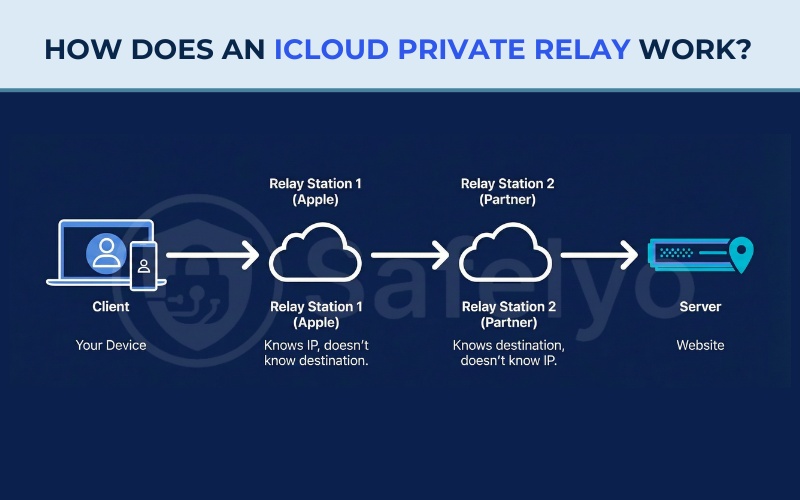
Private Relay operates on a strict Zero Trust philosophy using a dual-hop architecture. When you initiate a web request in Safari, your traffic travels through two distinct checkpoints known as relays. This structure ensures that no single entity can link your true identity to your browsing destination.
- First Relay (Ingress Relay): Apple operates this initial checkpoint. The ingress relay receives your connection and assigns a temporary regional IP address based on your real IP address. Because your specific web requests and DNS queries are heavily encrypted, Apple knows who you are but cannot see the destination website.
- Second Relay (Egress Relay): A trusted third-party partner operates the final checkpoint. The egress relay decrypts the web address to connect you to the target website. The egress partner only sees the temporary regional IP address assigned by Apple. They know exactly where you are going online, but they have no idea who you are.
2.2. Where is iCloud Private Relay unavailable?
Due to strict telecommunications laws and surveillance requirements, Private Relay is completely unavailable in several countries. When traveling to these regions, the feature will automatically disable itself. Our research confirms that the service is currently banned in China, Belarus, Colombia, Egypt, Kazakhstan, Saudi Arabia, South Africa, Turkmenistan, Uganda, the Philippines, and Russia.
Local governments in these nations require Internet Service Providers (ISPs) to monitor user traffic directly. Since Private Relay specifically blocks this type of surveillance, Apple is legally forced to disable the feature. Furthermore, many corporate offices and school networks actively block Private Relay because it circumvents their internal traffic filtering systems.
3. What is a VPN and how does it work?
A VPN works by establishing a secure encrypted tunnel directly between your device and a remote VPN server. Instead of sending data openly across the internet, the VPN software intercepts all incoming and outgoing system traffic. It encrypts this data and routes it to the designated server.
Once the data reaches the remote server, the VPN decrypts the request and forwards it to the final website. This mechanism completely hides your true IP address and masks your physical location. Unlike the dual-hop method, the VPN provider technically handles both your identity and your destination request. This highlights exactly why choosing a highly reputable VPN provider with a strict no-logs policy is absolutely crucial for your data safety.
4. Pros and cons of iCloud Private Relay vs VPN
Evaluating the strengths and weaknesses of each tool helps determine the right fit for your daily routine. We have compiled the most prominent advantages and limitations of both solutions based on our practical testing.
4.1. iCloud Private Relay pros and cons
If you are considering relying solely on Apple’s native feature, you should understand its specific benefits and boundaries. Here is a breakdown of what makes Private Relay appealing and where it falls short.
Pros
Included at no extra cost with any iCloud+ subscription.
Requires zero manual configuration or software installation.
The dual-hop architecture ensures extreme privacy for Safari browsing.
Cons
Does not allow you to change your virtual country or bypass geo-restrictions.
Only protects Safari traffic and DNS queries, leaving other apps exposed.
Blocked in multiple countries and on many corporate Wi-Fi networks.
4.2. VPN pros and cons
A dedicated VPN provides much heavier security, but it requires a bit more active management. Review the points below to see if a premium service aligns with your needs.
Pros
Delivers comprehensive system-wide encryption for every app and browser.
Easily unblocks global streaming libraries like Netflix and Hulu.
Includes advanced security features like an automatic kill switch.
Works seamlessly across multiple devices and operating systems.
Cons
Requires a separate monthly subscription fee.
Can occasionally cause a drop in internet speed depending on server distance.
Requires installing and managing a dedicated third-party application.
5. Real-world scenarios: Which one should you use?
Choosing between these two privacy tools depends heavily on your daily internet habits and the devices you own.
5.1. When to stick with iCloud Private Relay
Apple’s built-in service is perfectly suited for users who prioritize convenience over deep technical control. It delivers excellent basic web privacy without the hassle of installing additional software.
We recommend relying on iCloud Private Relay if:
- You are deeply embedded in the Apple ecosystem and exclusively use Safari for web browsing.
- You dislike managing complex software and want a privacy solution that runs invisibly in the background.
- Your primary goal is simply to prevent advertisers and basic tracking scripts from monitoring your reading habits.
- You rarely travel and have no need to bypass regional content blocks.
5.2. When to invest in a premium VPN
A dedicated VPN is the superior choice for users who demand absolute data security and complete internet freedom. It remains essential for navigating high-risk public networks or bypassing strict geographical restrictions.
We recommend investing in a premium VPN if:
- You frequently connect to unverified public Wi-Fi networks at airports, hotels, and local coffee shops.
- You need to securely access sensitive financial applications or cryptocurrency wallets on public connections.
- You want to watch international streaming content that is blocked in your current physical location.
- You operate a mixed-device household that includes Windows laptops or Android smartphones.
6. Can you use iCloud Private Relay and a VPN at the same time?
No. You cannot use both privacy tools simultaneously. The Apple operating system is specifically designed to prioritize standard VPN software over the native relay network. When you activate a VPN application, the device automatically routes all internet traffic through the VPN tunnel. This action overrides and disables Private Relay for that active session.
If you attempt to force both connections, you will likely experience severe network instability. In our testing, this routing conflict causes web pages in Safari to load endlessly, buffer continuously, or display direct connection errors. To ensure a smooth browsing experience, we highly recommend manually turning off Private Relay before connecting to your chosen VPN server.
7. How to turn iCloud Private Relay on and off
If you experience network connectivity issues or need to prepare your device for a VPN application, managing your settings correctly is essential. Apple makes it straightforward to adjust these preferences across all supported devices.
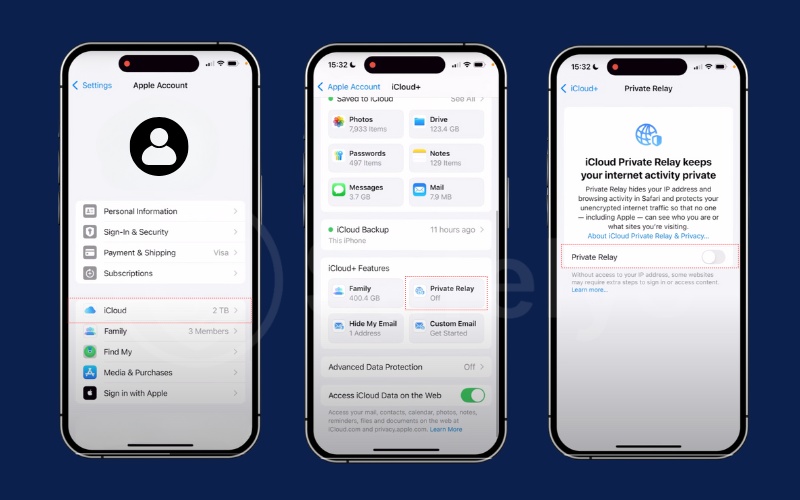
How to manage Private Relay on iPhone and iPad:
- Open the Settings application on your device.
- Tap your Apple ID Name at the top of the menu.
- Select iCloud, then navigate to Private Relay.
- Toggle the switch to the On or Off position.
If enabled, you can tap IP Address Location to choose between Maintain General Location or Use Country and Time Zone for tighter privacy control.
How to manage Private Relay on a Mac:
- Open System Settings from the Apple menu.
- Click your Apple ID Name in the sidebar.
- Select iCloud, then click on Private Relay.
- Turn the feature On or Off using the toggle switch.
Disabling Private Relay for specific Wi-Fi networks:
If your home or office network blocks Private Relay, you do not need to turn it off completely for the entire device. You can disable it just for that single problematic connection. Navigate to your Wi-Fi settings, tap the information icon next to your connected network, and toggle off Limit IP Address Tracking. This allows you to browse normally on a restricted network while keeping Private Relay active for your cellular data.
8. FAQs about iCloud Private Relay vs VPN
Does iCloud Private Relay hide my IP address?
Yes, but it primarily hides the IP address from websites visited using Safari. It does not hide the device’s IP address from other standalone apps on the device.
Is iCloud Private Relay free?
No, it is a feature of the paid iCloud+ subscription. However, the basic free iCloud plan does not include it.
Is iCloud Private Relay safe for torrenting?
No. Torrenting usually requires a dedicated P2P client (application). Since Private Relay focuses on protecting Safari, your real IP address would be exposed in the torrent client.
Is iCloud Private Relay better than a VPN?
It depends on your goal. If you want an automated tool for basic privacy while browsing in Safari without installing extra apps, Private Relay is better for convenience and battery life. However, if you need to protect traffic from all apps, access geo-blocked content, or customize security settings, a standard VPN is the superior choice.
Should I enable iCloud Private Relay?
Yes, if you already have an iCloud+ subscription. It provides an excellent layer of privacy for web browsing with zero effort. However, you might need to temporarily disable it if you experience slow network speeds or if it conflicts with certain workplace or school Wi-Fi networks.
Do I need a VPN if I have an Apple Private Relay?
Yes, if you want complete protection. Private Relay leaves traffic from other apps (like banking, social media, or games) exposed. A VPN is still necessary if you want to encrypt everything leaving your device, especially when using public Wi-Fi, or if you want to watch streaming content from other countries.
Is iCloud Private Relay a VPN?
No. While both tools mask your IP address and encrypt data, iCloud Private Relay is an advanced proxy service designed specifically for the Safari browser. It does not provide the system-wide app encryption, manual server selection, or region-spoofing capabilities that define a traditional Virtual Private Network.
9. Conclusion
iCloud Private Relay vs VPN serve two very different purposes. Private Relay is a highly optimized privacy tool for Safari users who want to avoid trackers without any technical hassle. A VPN operates as a comprehensive security tool that protects your entire digital footprint and provides total internet freedom.
If you value the absolute security of your sensitive data on public networks or want to stream global content without limits, a premium VPN remains a mandatory investment.
For more guides on protecting your digital life, explore the VPN Guides category on Safelyo.