You want to protect your financial data on public Wi-Fi, but you also worry that using a VPN might trigger your bank’s fraud detection system. This is a valid concern. Banks often block suspicious connections to prevent unauthorized access.
Is VPN safe for online banking? The answer is yes. Using a VPN is safe for online banking if you follow specific protocols. It encrypts your data to prevent theft, but you must configure it correctly to avoid account lockouts.
This guide explains the risks and benefits, along with 5 essential rules to help you bank securely without triggering fraud alerts.
Key takeaways
- A VPN encrypts your connection and protects your login credentials from hackers on public networks.
- Banks monitor IP addresses and may freeze accounts if they detect sudden location changes.
- Free VPNs often sell user data and lack the security required for financial transactions.
- Always connect to a server in your home country to maintain a consistent digital location.
- You must use a VPN with a “Kill Switch” to prevent data exposure if the connection drops.
1. Is VPN safe for online banking?
Yes, using a VPN is safe for online banking. Technically, using a VPN adds an extra layer of privacy compared to connecting directly to public networks.
When you connect to the internet normally, your data travels through the local network infrastructure. If you use public Wi-Fi at a cafe or airport, this connection can potentially be monitored by others on the same network.
A VPN addresses this by creating an encrypted tunnel for your internet traffic. It scrambles your data so that it becomes unreadable to outsiders, including network administrators or potential hackers.
However, banks use strict security measures to detect fraud. If you typically log in from London but your VPN routes your connection through a server in Vietnam, the bank views this as suspicious activity. They may freeze your account to protect your funds.
Therefore, a VPN is a useful security tool, but you must use it correctly to avoid triggering automated fraud alerts.
2. What a VPN can and cannot do for your money
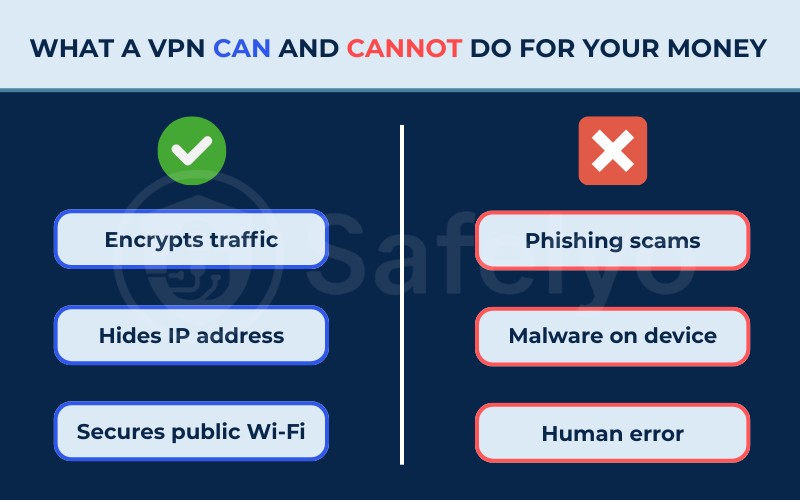
It is important to understand the specific capabilities and limitations of a VPN regarding financial security. Here is a breakdown of what this software actually handles.
2.1. What it CAN do (Benefits)
A VPN provides the following security protections:
- Encrypts traffic: It applies encryption standards like AES-256 to your data. This prevents attackers from intercepting your username and password during transmission.
- Hides IP address: It masks your real IP address. This prevents your Internet Service Provider (ISP) or local network snoops from tracking your banking activity.
- Secures public Wi-Fi: It allows you to use open Wi-Fi networks safely by securing the connection between your device and the bank.
2.2. What it CANNOT protect you from (Limitations)
A VPN cannot protect you against the following threats:
- Fake websites (Phishing): If you enter your password on a fake banking site, the VPN encrypts that data and sends it directly to the scammer. It protects the connection, not the destination.
- Malware on device: If your computer has a virus or keylogger installed, hackers can record your keystrokes before the VPN encrypts the data.
- Human error: It cannot prevent you from authorizing a transfer to a fraudulent recipient.
3. Does the VPN provider see your banking data?
Many users worry that by hiding their data from their ISP, they are simply handing it over to the VPN company instead. This is a valid concern. You need to know exactly what remains hidden and what the VPN provider can technically see.
3.1. Can the VPN see my passwords?
No, the VPN provider cannot see your passwords, credit card numbers, or account balances.
This is because almost all banking websites use their own layer of encryption called HTTPS. Your web browser encrypts this sensitive information on your device before it even enters the VPN tunnel. The VPN provider transmits this data, but because it is already locked by the bank’s encryption, it looks like scrambled code to them.
3.2. Does the VPN collect my connection logs?
Technically, a VPN provider can see your “connection metadata.” This includes:
- Your real IP address.
- The time you connected.
- The domain names of the websites you visit (e.g., they know you visited chase.com, but not which specific page you viewed or what you typed).
This is why choosing a paid provider with a verified no-logs policy is critical. A trustworthy VPN ensures that this data is permanently deleted and never stored on a hard drive. If authorities or hackers requested the data, there would be nothing to hand over.
Read more: The best no-log VPN
3.3. Is my money at risk from the VPN itself?
The risk of a reputable VPN provider stealing your funds is near zero because they cannot break the HTTPS encryption used by banks.
The real risk lies in privacy, not theft. Free or untrustworthy VPNs may track which banking apps you use and sell that behavioral profile to advertisers. Therefore, while your money is safe from theft, your privacy is only guaranteed if you use a paid, reputable service.
4. When should you use a VPN for online banking?
Since banking websites already use HTTPS encryption, you might wonder why a VPN is even necessary.
The answer is “Defense in Depth”. While HTTPS protects the content of your data (like your password), it does not protect the connection itself. On insecure networks, hackers can manipulate the connection before it reaches the bank, or simply track which banks you use. A VPN covers these security gaps.
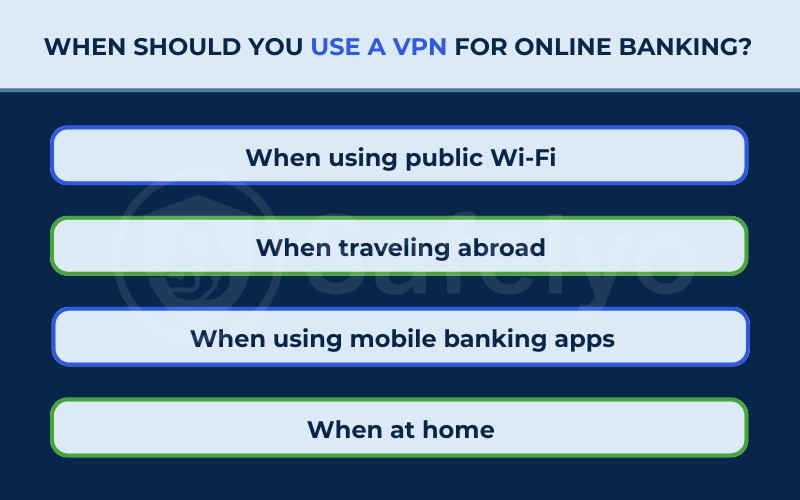
Here are the specific scenarios where a VPN provides essential protection.
4.1. When using public Wi-Fi (Critical)
Public networks are the most dangerous places to bank. According to the Panda Security 2025 Public Wi‑Fi Trend Report, 36% of Americans experienced or suspected a security incident after using these networks.
Hackers often exploit this by setting up fake “Evil Twin” hotspots. Since the same survey notes that only about 20% of users feel “very confident” they can identify a fake network, the risk of connecting to a malicious hotspot is significant.
A VPN prevents this by wrapping your data in a secure tunnel before it leaves your device. Even if the Wi-Fi network is compromised, the hacker sees only unreadable code.
4.2. When traveling abroad
Banks are highly suspicious of foreign IP addresses. If you log in from a different country, your bank’s security system may assume your credentials have been stolen and freeze your account instantly.
In this case, a VPN is not just for security, but for accessibility. By connecting to a VPN server in your home country, you maintain a consistent digital location, allowing you to manage your finances without triggering fraud alerts.
4.3. When using mobile banking apps
While 4G/5G networks are safer than public Wi-Fi, they are not private. Your mobile carrier can see exactly how often you open your banking app and which financial services you use.
A VPN encrypts this traffic, preventing your mobile provider from building a profile of your financial habits or selling that metadata to advertisers.
4.4. When at home (Optional)
At home, your connection is likely safe from hackers, but your privacy is still at risk.
Your ISP can legally track and log every website you visit, including your bank. If you prefer total financial privacy, using a VPN at home prevents your ISP from knowing where you bank or how frequently you manage your accounts.
5. Can banks detect and block VPNs?
Yes, banks can detect VPN usage and may restrict access when a VPN IP address is associated with suspicious or high-risk activity.
Banks identify “Shared IPs” to flag suspicious activity. Commercial VPNs often assign the same IP address to thousands of users to maintain anonymity. If one user engages in fraudulent activity with that IP, the bank places it on a blacklist. When you attempt to log in using that same IP, the bank denies access.
Common consequences of using a blocked IP include:
- CAPTCHA challenges: The system asks you to complete puzzles to prove you are human.
- Identity verification: The bank requires an OTP sent to your phone or email.
- Account freeze: The bank temporarily locks the account until you contact customer service.
6. 5 rules to use VPN safely for online banking
You can use a VPN for banking without issues if you follow these operational rules.
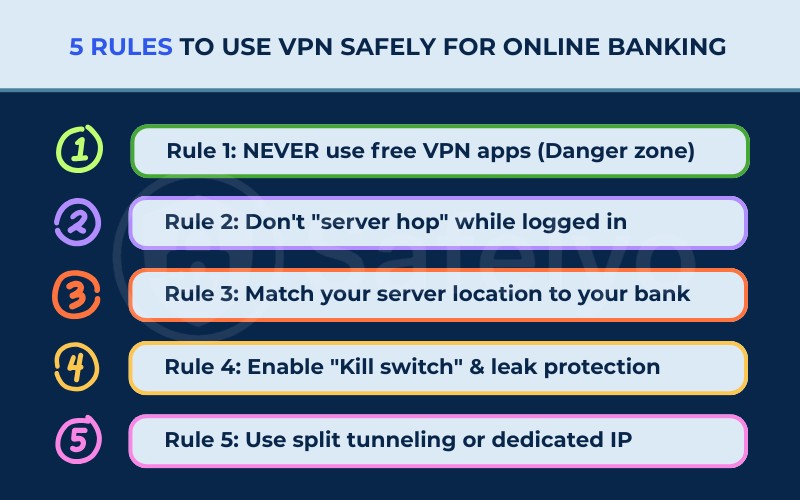
6.1. Rule 1: NEVER use free VPN apps (Danger zone)
This rule is critical because free VPNs often compromise your security instead of enhancing it.
To cover their operating costs, many free providers track your online behavior and sell that data to third-party advertisers.
Furthermore, they generally rely on outdated encryption standards and have limited server networks, meaning their IP addresses are almost always already blacklisted by major banks.
6.2. Rule 2: Don’t “server hop” while logged in
This rule prevents you from creating a pattern of suspicious activity during your session.
You must establish your VPN connection to a secure server before you open your banking website or app.
If you disconnect or switch to a different server while logged in, your IP address changes instantly. This sudden shift signals to the bank that your connection is unstable or potentially hijacked, often leading to an immediate lockout.
6.3. Rule 3: Match your server location to your bank
This rule helps you blend in with normal traffic by mimicking your physical presence.
Banks use geolocation technology to verify where a login request originates. You should manually select a VPN server located in the same country, or ideally the specific city, where you live and bank.
Connecting to a server in your local area significantly reduces the likelihood of triggering CAPTCHA requests or security alerts compared to using a server in a different region.
6.4. Rule 4: Enable “Kill switch” & leak protection
This rule serves as your fail-safe mechanism to prevent accidental exposure.
A “Kill switch” is a feature that automatically cuts off your internet access if the VPN connection drops for any reason.
Without this feature active, your device might default back to your regular, unencrypted internet connection without you noticing. This could expose your real IP address mid-session, which may trigger additional security checks or force you to re-authenticate.
6.5. Rule 5: Use split tunneling or dedicated IP
This rule applies to advanced users who need consistent access without interruptions.
- Dedicated IP: You can purchase a static IP address that belongs only to you. Since no other users share this address, it stays “clean” and is rarely blocked by banking firewalls.
- Split tunneling: This feature allows you to choose which apps use the VPN. You can route your general web browsing through the VPN for privacy. Meanwhile, let your banking app connect directly to the standard internet if the bank blocks VPN traffic.
7. Other ways to improve online banking security
A VPN is only one part of a complete security strategy. You should combine it with the following measures.
- Enable Two-Factor Authentication (2FA): This requires a second form of verification (like a code on your phone) to access your funds.
- Use strong passwords: Create complex, unique passwords for your banking accounts and store them in a secure password manager.
- Update software: Keep your operating system and banking apps updated to patch known security vulnerabilities.
- Monitor statements: Review your transaction history regularly to identify unauthorized charges early.
8. Best VPN for online banking
Here are reliable VPN services that offer features specifically useful for secure banking.
8.1. ExpressVPN
ExpressVPN is a premium service that prioritizes high performance and privacy. It utilizes “TrustedServer” technology, which ensures all data is wiped from the server’s RAM every time it reboots.
Additionally, its servers use obfuscation automatically, which disguises VPN traffic as normal internet traffic to help you access banking sites without detection.
8.2. NordVPN
NordVPN offers a comprehensive security suite that goes beyond simple encryption. It includes “Threat Protection” to block malware and phishing domains before they load.
For banking users, it provides an option to get a Dedicated IP address. This gives you a consistent, unique identity that banks are much less likely to flag as suspicious.
8.3. Surfshark
Surfshark delivers robust security features at a lower price point and allows you to connect an unlimited number of devices.
It features a “Camouflage Mode” designed to bypass strict network firewalls by hiding VPN usage. This makes it an excellent choice for users who need to access their accounts from restrictive networks without spending a lot.
9. FAQs about is VPN safe for online banking
Here are direct answers to common questions regarding VPNs and financial safety.
Is VPN safe for online banking iPhone users?
Yes, using a VPN on an iPhone is safe and recommended. While iOS is secure, it cannot encrypt your internet traffic on public networks without a VPN.
Which banks block VPN access?
Many users report that large banks, such as Chase, Bank of America, and Wells Fargo, may restrict access from known VPN IP addresses as part of their fraud prevention systems.
Is it safe to use credit card with VPN on?
Yes, it is safe. The VPN encrypts the transaction details as they travel to the payment processor, protecting your card number from local network interception.
Should I use a VPN for mobile banking apps?
Yes, you should. Mobile apps transmit data over the internet just like browsers. A VPN encrypts this data to protect it from surveillance or theft on public Wi-Fi.
Why can’t I access my bank on a VPN?
Your bank has likely blacklisted the IP address of the VPN server you are using. You should try switching to a different server location or clearing your browser cache.
10. Conclusion
The answer to “Is VPN safe for online banking?” is yes, provided you use it cautiously. It offers essential encryption that protects your financial data from local network attacks. However, you must manage your location settings to avoid alarming your bank’s fraud detection algorithms.
To ensure a smooth experience, always choose a premium VPN service, connect to a server in your home region, and confirm your security settings are active.
For more VPN tutorials and guides, visit our VPN Guides category or head over to Safelyo.