Growing your business from one office to multiple branches is a huge milestone, but it often triggers a data-sharing nightmare. Emailing files is insecure, and a full cloud migration gets expensive fast. So, how can staff at Branch A access HQ servers as if they were sitting right next to them?
The answer lies in the Site-to-Site VPN – the gold standard for connecting geographically separated networks. Forget the dense engineering jargon found in Cisco or Palo Alto manuals. I’ll explain exactly what is a site-to-site VPN, compare its costs to MPLS, and guide you toward the right hardware or software setup for your SMB. This virtual private network technology is the backbone of a modern network infrastructure, ensuring your branches stay linked regardless of physical distance.
If you are looking for the quick essentials on connecting your business networks, here is everything you need to know at a glance:
- What is a Site-to-Site VPN?
→ It is a permanent “bridge” that connects entire office networks securely, allowing staff to share resources without individual logins. - How does it differ from Remote Access?
→ Remote Access connects a user to a network (WFH); Site-to-Site connects a network to a network (Branch to HQ). - Is it better than MPLS?
→ For SMBs, yes. It is significantly cheaper and faster to deploy than leased lines, though it relies on public internet speeds. - Hardware vs. Software?
→ Modern Software/Cloud VPNs (like WireGuard/Tailscale) are now preferred for SMBs over expensive, complex hardware appliances. - Crucial setup rule?
→ You must ensure connected locations use non-overlapping subnets (e.g., 192.168.1.x vs. 192.168.2.x) to avoid routing conflicts.
Let’s bridge the gap between your offices seamlessly.
1. What is a site-to-site VPN?
At its simplest level, what is a site-to-site VPN? It is a security solution that connects two or more separate Local Area Networks (LANs) to create a single, unified Wide Area Network (WAN). It achieves this entirely over the public Internet, bypassing the need for private leased lines.
Think of it this way: Imagine you have an office in New York and another in London. Physically running a private Ethernet cable across the Atlantic Ocean to connect them would cost millions of dollars. Instead, a Site-to-Site VPN acts as an “invisible cable”. It establishes a secure connection over untrusted public networks, acting as an “invisible cable” that shields your data from prying eyes while cutting through chaotic web traffic.
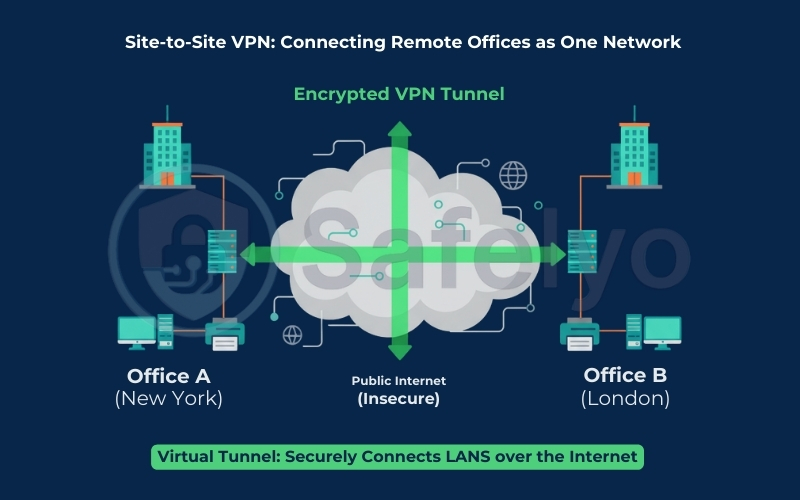
For your employees, this technical wizardry is completely seamless. A marketing manager in the London branch can send a document to a printer in New York. They can also share files or access the internal accounting software at HQ, exactly as if they were sitting in the same room. The VPN effectively tricks your devices into believing they are all plugged into the same local switch, bridging thousands of miles instantly.
2. Site-to-Site VPN vs Client-to-Site VPN
Before we dive deeper, we need to clear up the most common mix-up in the industry. When most people hear “VPN”, they think of an app on their phone used to watch Netflix securely or log in from a coffee shop. That is not what we are talking about here.
Understanding the distinction in the Site-to-Site vs Client-to-Site (Remote Access) debate is critical for choosing the right tool for your business.
2.1. Client-to-Site (Point-to-Site)
Remote Access VPN is also called Client-to-Site or Point-to-Site (P2S) in many vendor docs. Remote Access VPN is a One-to-Site model. Think of this as a Ferry Boat. It picks up individual passengers (users) from various locations (homes, airports, or hotels) and ferries them securely across the internet to the office network.
- How it works: Every single device (laptop, tablet, phone) must have a VPN client app installed. The user has to manually “switch on” the connection.
- Best for: Remote workers (WFH), sales teams on the road, or digital nomads.
2.2. Site-to-Site
In contrast, a Site-to-Site VPN is a Network-to-Network model. Think of this as a Permanent Bridge built between two islands (your office locations).
- How it works: This is configured directly on the Gateway (Router or Firewall) at each location. Once the bridge is built, it stays open 24/7.
- The Magic: Users inside the office don’t need to install any apps or remember passwords. As long as they are plugged into the office network, they can cross the “bridge” to the other branch automatically.
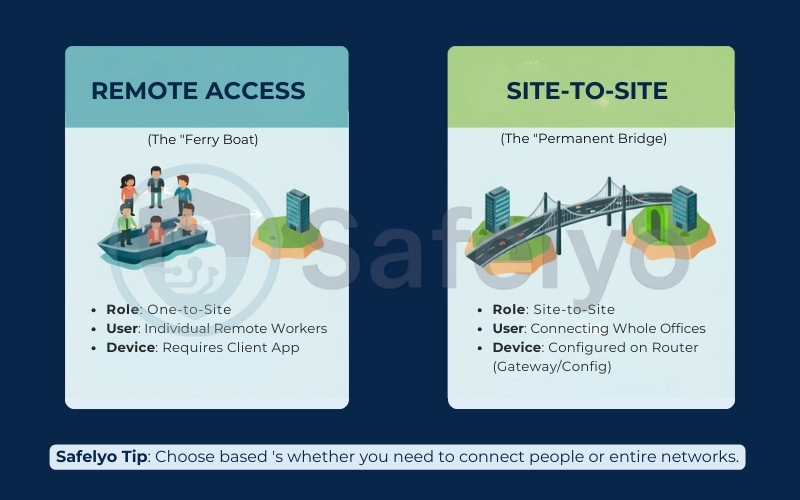
Here is a quick breakdown to help you decide:
| Feature | Remote Access VPN | Site-to-Site VPN |
| Primary Role | Connects a specific user to a network. | Connects an entire network to another network. |
| Target Audience | Individual remote employees (WFH). | Entire branch offices & HQ. |
| User Experience | Active (Requires an app & login). | Passive (Invisible to the user). |
| Setup Complexity | Low (Install app and go). | High (Requires router/firewall config). |
3. How it works: Gateways & Encryption
To understand how a Site-to-Site VPN functions without getting a headache, we need to look at two main players: the Gateways and the Protocol.
What is a Site-to-Site VPN Gateway (and how it differs from a VPN server?)
In the world of business networking, terminology can get confusing. You will often hear the terms “Gateway” and “Server” thrown around, sometimes interchangeably, but they have distinct roles in a Site-to-Site setup.
- The Site-to-Site VPN Gateway:
This is the physical or virtual device that sits at the edge of your network – usually your business router or firewall (like a Cisco Meraki or a cloud-based gateway). Its job is to “terminate” the tunnel. It acts as the border guard for the entire office, encrypting all traffic leaving the building destined for the other branch. It doesn’t serve just one person; it serves the whole LAN. - The difference from a VPN Server:
When people talk about a VPN Server (especially in Remote Access contexts), they usually mean the endpoint that individual user devices (laptops, phones) connect to.- In a Remote Access setup, the server handles hundreds of individual connections from different locations.
- In a Site-to-Site setup, the “server” logic is built directly into the Gateway. The connection is strictly device-to-device (Router A to Router B), not user-to-device.
Think of the VPN Gateway as the main entrance to a secure warehouse. It manages the big trucks (network traffic) coming in and out. A VPN Server for remote users is more like a receptionist checking individual ID badges at the front desk.
>> If you are still fuzzy on the basics of server-side terminology, check out our guide on VPN Server vs VPN Client for a deeper dive.
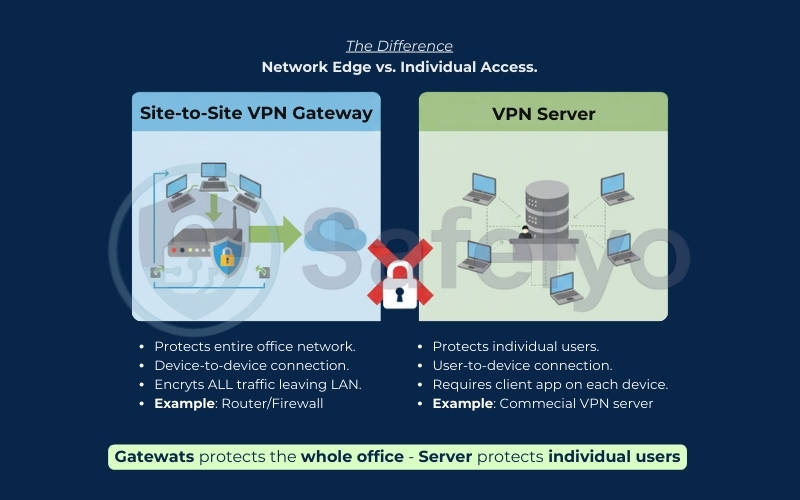
At the edge of each office network sits a device known as a VPN Gateway. This is typically your business router or firewall.
Think of this gateway as a highly secure diplomatic courier. When a user at Branch A sends a file to the HQ server, the gateway intercepts that data before it hits the public internet. It wraps the payload in a layer of strong encryption – turning readable information into indecipherable code.
Once this “digital package” traverses the internet and arrives at the HQ gateway, the process reverses. The receiving gateway verifies the package, strips away the encryption (decrypts), and delivers the clean data to the internal server.
But how do these two routers trust each other? They rely on IPsec (Internet Protocol Security). IPsec is the industry-standard “common language” that devices use to negotiate security keys and build the tunnel. It ensures that even if a hacker intercepts the traffic mid-transit, all they see is gibberish.
To start this process, the devices negotiate a security association and perform a secure key exchange to agree on encryption rules. Then, protocols like the Encapsulating Security Protocol (ESP) or Authentication Header (AH) work to secure the payload. Most gateways use tunnel mode to encrypt the entire IP packet, hiding the original packet headers, whereas transport mode only encrypts the data inside. Finally, the system adds packet trailers to verify integrity before transmission.
For me, the real beauty of this technology lies in the transparent experience. To your employees, none of this exists. They don’t need to log in, launch a client app, or remember complex passwords; they simply access shared drives as if the server were right under their desk.
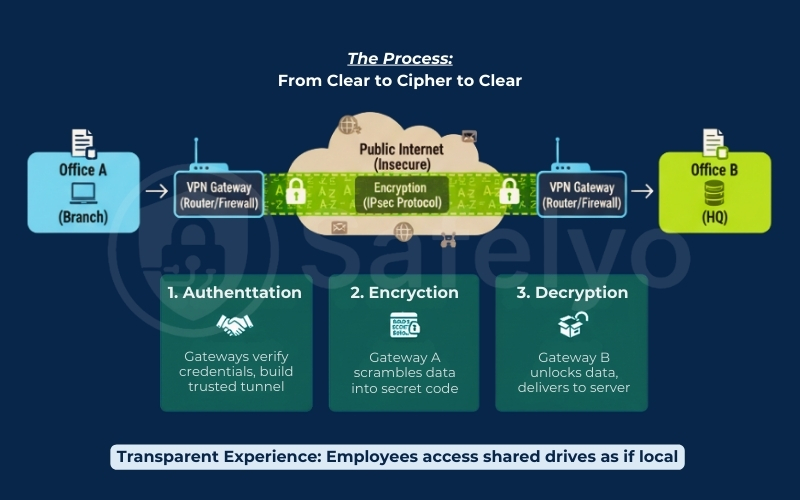
4. Two main site-to-site VPN types: Intranet vs. Extranet
Not all site-to-site connections are created equal. Depending on who you are connecting with, the architecture changes to reflect the level of trust required.
Intranet-based VPN is the most common setup for SMBs. This connects multiple LANs that belong to the same organization – for example, linking your New York HQ with your London sales office. Since both sides belong to you, the connection is generally treated as “trusted”, allowing open access to network resources across locations. It effectively merges separate offices into one large private Intranet.
Extranet-based VPN, on the other hand, is used when connecting your network to an outside party, such as a supplier, partner, or client. Imagine you need a logistics provider to access your inventory database, but you absolutely don’t want them to see your HR files or financial reports. An Extranet VPN builds a secure tunnel but acts like a “guest pass”, strictly limiting access to specific servers or services while keeping the rest of your network locked down.
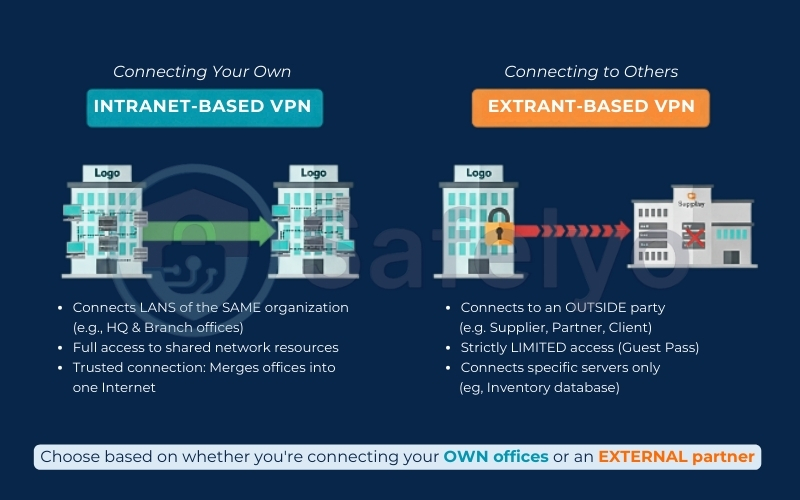
Here is the comparison table of the two main types for a clearer distinction:
| Feature | Intranet-based VPN | Extranet-based VPN |
| Who Connects? | Internal: Connects Branch A to Branch B (Same Company). | External: Connects Company A to Partner B (Different Companies). |
| Trust Level | High: We trust both sides of the connection. | Limited: We treat the other side as semi-trusted “guests”. |
| Access Rights | Open: Usually grants full access to network resources. | Restricted: Firewall rules limit access to specific servers only. |
| Best For | Unifying office networks and sharing internal files. | Supply chain integration or allowing vendor support access. |
5. Site-to-Site VPN example
Theory is great, but to really understand how a site-to-site VPN works, we need to look at a concrete topology. This is the exact “mental model” I use when planning a network for a client.
Let’s imagine a typical SMB scenario with two locations: a Headquarters (HQ) in New York and a Branch Office in Austin.
1. The Setup (The Address Book)
For the VPN to work, each office must live on a different “street” (Subnet). If both offices used the default 192.168.1.x address, the routers would get confused – like trying to deliver mail when two houses have the exact same address.
- Headquarters (HQ) Network: 192.168.10.0/24
- Critical Asset: The Company File Server.
- Server IP: 192.168.10.50
- Branch Office Network: 192.168.20.0/24
- User: A Marketing Manager on their laptop.
- Laptop IP: 192.168.20.15
2. The Action
The Marketing Manager in Austin needs to open a contract saved on the HQ server. They don’t open a VPN app. They simply open File Explorer and type the path: \\192.168.10.50\SharedDocs.
3. The Journey (Under the Hood)
Here is what happens in milliseconds:
- Interception: The Austin Router sees a request going to 192.168.10.x. It knows that the address belongs to HQ.
- Encapsulation: Instead of sending the data out naked onto the public internet, the router wraps the data packet in an encrypted envelope (using protocols like IPsec or WireGuard).
- Transit: The encrypted packet travels through the public internet “tunnel” to New York.
- Delivery: The HQ Router receives the envelope, checks the security keys, decrypts it, and hands the clean request to the File Server at 192.168.10.50.
To the server, it looks like the request came from inside the building. To the user, the file opens instantly. This simple logic of non-overlapping subnets routing through a secure gateway is the foundation of every Site-to-Site VPN example you will encounter.
6. Site-to-Site VPN vs. MPLS: Which is for SMBs?
If you talk to an enterprise sales rep, they might try to sell you on MPLS. But in the MPLS vs VPN debate, context is everything.
MPLS (Multiprotocol Label Switching) is the traditional heavyweight champion of networking. Think of it as leasing a private, dedicated highway between your offices. The Internet Service Provider guarantees specific speeds and almost perfect uptime through strict Service Level Agreements (SLAs). Because the traffic never touches the public internet, latency is incredibly low, and security is absolute. However, this premium performance comes with a massive price tag and installation times that can drag on for months.
Site-to-Site VPN, by comparison, is like driving an armored truck on a public highway. You are using the standard internet connections you likely already have (fiber, cable, or 5G). The downside? You are at the mercy of public internet traffic; if your ISP has a bad day, your connection might jitter.
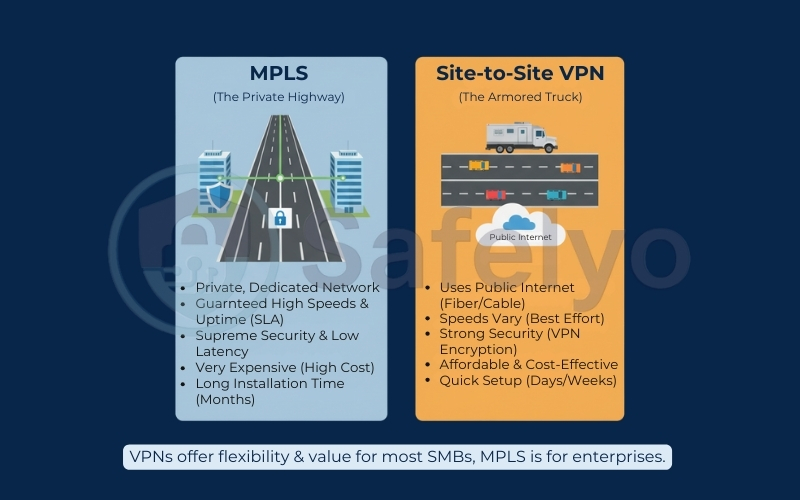
Here is the concise comparison table to summarize the MPLS vs. VPN debate for quick decision-making.
| Feature | MPLS (Traditional) | Site-to-Site VPN (Modern) |
| Cost | High ($) – Expensive leased lines. | Low ($) – Uses existing internet. |
| Infrastructure | Private, dedicated physical circuit. | Virtual tunnel over public Internet. |
| Performance | Guaranteed – Strict SLAs, low latency. | “Best Effort” – Depends on ISP speed. |
| Setup Time | Slow (Weeks or Months). | Fast (Hours or Days). |
| Best For | Enterprise, VoIP, Real-time trading. | SMBs, File sharing, General work. |
The Verdict for SMBs: For 95% of small and medium businesses, VPN cost efficiency wins every time.
- MPLS is often overkill unless you are a bank doing high-frequency trading or a call center running thousands of VoIP lines simultaneously.
- A Site-to-Site VPN offers a “good enough” connection that is secure, flexible, and costs a fraction of the price. Plus, you can set it up in an afternoon rather than waiting six months for a telecom carrier to lay physical cables.
7. Implementation Options: Hardware vs. Software vs. Cloud
Now that you know the theory, how do you actually build this tunnel? In 2025, the market is split between traditional heavy iron and agile software-defined solutions. Here is a quick snapshot to help you orient yourself:
| Feature | Hardware Appliances | Software / Mesh VPNs |
| Examples | Cisco, Fortinet, Palo Alto. | Tailscale, NordLayer, WireGuard. |
| Setup Difficulty | Hard (Requires certified IT pro). | Easy (Click-and-connect). |
| Cost Model | High Upfront (CAPEX) + Licensing. | Monthly Subscription (OPEX). |
| Static IP? | Usually Required. | Often Not Required (NAT Traversal). |
7.1. Hardware Appliances (Traditional)
For decades, this was the only way. You buy dedicated physical boxes – firewalls or routers from giants like Cisco Meraki or Fortinet – and rack them up in your server room.
The Good
They are incredibly robust. Because they have dedicated chips for encryption, they handle massive traffic loads without breaking a sweat.
The Bad
They are rigid and expensive. Configuring them often requires command-line knowledge (CLI), and you usually need to pay for a Static IP address at every location, which can annoy ISPs and drain budgets.
7.2. Software & Mesh VPNs (Modern Trend)
This is where the industry has shifted in 2025. Solutions built on WireGuard (like Tailscale or NetBird) or Cloud SASE platforms (like NordLayer) have democratized Site-to-Site connectivity.
These tools use “Mesh” technology. They don’t care if your office has a dynamic IP or is behind a strict firewall; they punch through automatically. They are perfect for connecting a physical office to a Cloud Server (AWS/Azure) because you just install an agent rather than configuring a virtual router.
Safelyo’s Take: If you have strict compliance, legacy constraints, or need deterministic performance, hardware/MPLS may still be justified.
For most SMBs, a practical starting point is Software or Cloud VPN. It turns a week-long configuration project into a 15-minute task, and you can scale it up or down as your business grows without sitting on depreciating hardware.
8. Performance & security reality check
Let’s be real for a moment. While Site-to-Site VPNs are fantastic, they are not magic; they are subject to the laws of physics and computing.
The Latency & Speed Trade-off
Because every single packet of data must be scrambled (encryption) at the source and unscrambled (decryption) at the destination, there is always a performance penalty. This is called “encryption overhead”.
You must also choose the right transport protocol for your data packets. Most VPNs prefer UDP over TCP for the outer tunnel to avoid the “TCP meltdown” effect, where layering TCP inside TCP causes massive slowdowns. While TCP guarantees delivery, UDP allows for faster data transmission by not waiting for receipt confirmations. Optimizing these network protocols ensures that your connection remains stable even under heavy load.
- What works: It is perfect for accessing databases, intranet portals, or moving Word/Excel documents.
- What doesn’t: I strongly advise against trying to edit 4K video directly from a remote server or engaging in real-time high-frequency trading. The added latency, often tens of milliseconds depending on distance and gateway CPU, will make the experience laggy and frustrating.
The "Open Door" Security Risk
This is the most overlooked risk in VPN setups. Remember, a Site-to-Site VPN connects networks, not just specific users. It effectively extends your LAN.
- The Danger: If a receptionist’s laptop in Branch A gets infected with ransomware, that malware can use the VPN tunnel to “laterally move” into your HQ’s main server. This could bypass your external firewall entirely.
- The Fix: Don’t just open the floodgates. You must implement strict network security measures and firewall rules to control secure access. To protect confidential data, consider adding layers of user authentication or even two-factor authentication for administrative access to the gateways. Only allow traffic on specific ports (like file sharing or SQL) and block everything else. Treat your branch office like a semi-trusted neighbor, not a roommate.
9. 7 basic steps of high-level setup
While every router interface (whether it’s a Ubiquiti, Synology, or a Cloud VPN) looks different, the underlying logic is always the same. Here is the universal roadmap to getting connected:
- Select Your Gateways: Ensure you have compatible devices at both ends. They don’t always need to be the same brand, but they must support the same VPN protocols (usually IKEv2/IPsec or WireGuard).
- Define Non-Overlapping Subnets: This is the #1 mistake beginners make. You cannot connect two networks if they both use 192.168.1.x. You must change one side (e.g., HQ uses 192.168.10.x and Branch uses 192.168.20.x) so the routers know exactly where to send traffic.
- Configure IPsec & Keys: Create a strong Pre-shared Key (PSK). Think of this as a long, complex password that you enter into both routers, so they recognize and trust each other.
- Establish the Tunnel: Input the Public IP address (or DDNS hostname) of the other side into each router’s configuration panel and enable the connection.
- Test Connectivity: Don’t just trust the “Connected” status light. Open a command prompt on a computer at Branch A and try to ping the private IP address of a server at HQ. If it replies, your bridge is open for business.
- Routing / Traffic selectors: Choose policy-based vs route-based; ensure routes exist on both sides.
- Firewall policy: Allow only required ports/services (SMB template: SMB file share/ERP/SQL), block the rest.
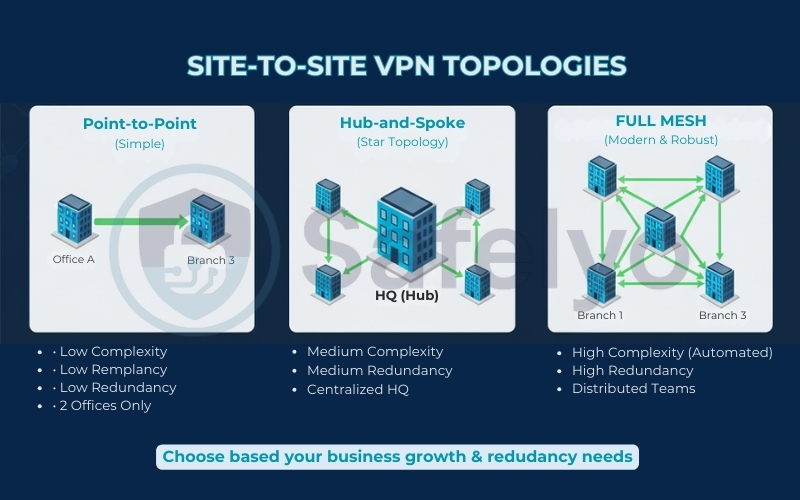
10. Point-to-Point vs. Hub-and-Spoke vs. Full Mesh
As your business grows beyond two offices, the way you connect them (the “topology”) matters just as much as the technology itself. Choosing the right layout affects speed, cost, and reliability.
| Topology | Complexity | Redundancy | Best For |
| Point-to-Point | Low | Low | 2 Offices. |
| Hub-and-Spoke | Medium | Medium | SMBs with multiple branches and centralized HQ resources. |
| Full Mesh | High (or Automated) | High | Distributed teams needing branch-to-branch speed and redundancy. |
1. Point-to-Point (Simple)
This is the basic setup we have discussed so far: Office A connects directly to Office B. It’s simple, cheap, and perfect for businesses with just two locations.
2. Hub-and-Spoke (Star Topology)
This is the classic Multisite VPN architecture. Your Headquarters (HQ) acts as the central “Hub”, and all branch offices (“Spokes”) connect only to HQ.
- Pros: Centralized control; easy to secure.
- Cons: If HQ goes down, the branches can’t talk to each other. Traffic between branches is slower because it must “hairpin” through HQ.
3. Full Mesh (Modern & Robust)
In a Mesh VPN, every branch connects directly to every other branch.
- Pros: Maximum redundancy and speed. If HQ goes offline, Branch A and Branch B stay connected.
- Cons: Historically very complex to configure manually, though modern tools like WireGuard and Tailscale now automate this effortlessly.
11. FAQs about site-to-site VPN
We know that networking terminology can get a bit murky. To help you finalize your decision, here are the direct answers to the most common questions I hear from business owners and IT admins regarding Site-to-Site setups.
What is the difference between VPN and site-to-site VPN?
Think of “VPN” as the umbrella term. When people say “VPN” casually, they usually mean Remote Access VPN (an app on a phone connecting a user to a server). A Site-to-Site VPN is a specific type of VPN that connects an entire network (Router) to another network (Router), with no apps required for individual users.
What is the purpose of a site-to-site VPN?
Its primary purpose is to extend your company’s physical network across the internet securely. It allows geographically separated offices, such as HQ and Branch, to share resources like printers, file servers, and databases as if they were in the same building. This is done without the massive cost of private leased lines.
Does site-to-site VPN require a static IP?
Traditionally, yes – having a Static IP at HQ was mandatory to establish a stable tunnel. However, modern software-defined solutions (like Tailscale or NordLayer) and routers supporting Dynamic DNS (DDNS) can now create stable connections even with standard, dynamic residential IP addresses.
Is it secure for transferring sensitive data?
Absolutely. Standard Site-to-Site VPNs utilize AES-256 encryption – the same military-grade standard used by banks and governments. As long as your pre-shared keys are complex and kept secret, the data traveling through the tunnel is unreadable to hackers or ISPs.
What is a multisite VPN?
While a standard Site-to-Site VPN connects two points (Point-to-Point), a Multisite VPN connects three or more locations. This is often configured in a “Hub-and-Spoke” model (all branches connect to HQ) or a “Mesh” model (every branch connects directly to every other branch) for maximum redundancy.
Is a Mesh VPN better than a traditional site-to-site VPN?
It depends on your scale. P2P VPNs, often used in modern mesh setups, are easier to set up. They are excellent for small teams or for connecting a few servers. Here, P2P refers to peer-to-peer networking topology, not file sharing. However, for a stable, centralized office infrastructure with strict firewall rules and hundreds of users, a traditional gateway-based Site-to-Site VPN is often more manageable and robust.
Can I connect AWS/Azure to my office using this?
Yes, and this is a top use case in 2026. Most major cloud providers (AWS, Azure, Google Cloud) offer native VPN Gateways. You can configure a Site-to-Site VPN to link your on-premise office directly to your Virtual Private Cloud (VPC), creating a seamless Hybrid Cloud environment.
12. Conclusion
A Site-to-Site VPN serves as a critical digital bridge, allowing your business to operate seamlessly across multiple locations at a fraction of the cost of MPLS. Don’t let the technical complexity hold you back. Instead, simply start with your real-world needs: how many branches do you need to connect, and what is your budget available?
Not sure which VPN solution fits your business size? Explore in-depth guides and reviews in the VPN Guides category on Safelyo to find the best business VPN for your needs.