Your smartphone holds your most personal data, and without protection, your ISP and third parties can conduct surveillance on your habits. Ensuring anonymity is crucial, but connecting to public networks effectively leaves that digital vault wide open. Finding the best VPN for Android is crucial for securing your privacy, yet the Google Play Store is a minefield of slow, battery-draining, and even unsafe apps.
If you are looking for the best app to secure your mobile privacy without draining your battery, here are the fast answers from our hands-on testing:
- What is the best Android VPN?
→ NordVPN takes the top spot for its unmatched blend of speed (NordLynx), robust safety, and mobile-first features like Split Tunneling. - Which is the best value option?
→ Surfshark is the winner for budget-conscious users, offering unlimited simultaneous connections and unique GPS spoofing features for a low price. - Do VPNs drain battery?
→ No. Our lab tests confirm that modern protocols like WireGuard consume only 2-3% more battery per hour compared to using no VPN at all. - Are free VPNs safe?
→ Most are dangerous data miners. Stick to reputable “freemium” options like Proton VPN for unlimited data, though paid apps offer significantly better speeds. - Why download the app?
→ Unlike Android’s built-in settings, dedicated apps provide critical safety nets like a Kill Switch and Split Tunneling to keep specific apps (like banking) working smoothly.
Why trust Safelyo? We didn’t just read the spec sheets. Our team spent hundreds of hours in our dedicated Android Lab, putting top contenders through rigorous stress tests to measure real-world speed, safety, and battery impact. Skip the guesswork and protect your device with our verified recommendations below.
1. Quick summary – Best VPNs for Android 2026
If you are short on time and need immediate protection, here is the “cheat sheet” from our latest round of testing. We evaluated these apps specifically on Android devices to measure real-world performance.
Our editor’s choice: NordVPN
It currently holds the top spot for its strong encryption, ability to bypass geo-restrictions, and unmatched combination of blistering speeds (NordLynx protocol). It delivered the smoothest experience with almost zero lag.
Below is the full breakdown of how the top contenders performed in our Android Lab:
| VPN Provider | Best For | Speed Impact | Battery Impact | Standout Android Feature | Price |
|---|---|---|---|---|---|
| NordVPN | Overall Performance | Minimal (<5% drop) | Low | Advanced Split Tunneling | ~$3.09/mo |
| ExpressVPN | Ease of Use | Low (<10% drop) | Moderate | One-Tap Shortcuts | ~$6.67/mo |
| Surfshark | Best Value | Low (<10% drop) | Low | GPS Location Spoofing | ~$1.99/mo |
| CyberGhost | Streaming | Moderate | Moderate | Dedicated Streaming Servers | ~$2.03/mo |
| Private Internet Access | Customization | Moderate | Low | Granular App Settings (MACE) | ~$2.03/mo |
Our lab tests bust a major myth: A good VPN doesn’t have to ruin your Android experience. As you can see from the data above, the leading apps are expertly optimized for mobile. They deliver robust safety with minimal impact on speed, a negligible effect on battery life, and near-instant connection times.
2. How we tested Android VPNs (Safelyo Performance Lab)
We know the biggest hesitation about using a mobile VPN isn’t the cost – it’s the fear of a sluggish phone and a dead battery. To move beyond marketing claims, we set up the Safelyo Performance Lab, putting each app through a rigorous stress test to measure real-world impact.
To ensure our results were fair and consistent, we standardized our testing environment:
- Device: Google Pixel 7a (running the latest stock Android version).
- Protocol: We used the fastest modern VPN protocol available for each app (WireGuard, NordLynx, or Lightway).
- Server selection: Local/Nearby VPN servers to test peak performance potential.
- Stress test: 1-hour continuous 1080p YouTube streaming with screen brightness at 50%.
The Results: Speed, Battery & Connectivity
The data below shows exactly how the top contenders performed during our hands-on testing:
| VPN Provider | Avg. Speed Drop | Battery Drain (1h Streaming) | Connect Time |
|---|---|---|---|
| NordVPN | ~5% | 12% (Base: 10%) | 4.0s |
| ExpressVPN | ~8% | 13% (Base: 10%) | 3.5s |
| Surfshark | ~9% | 13% (Base: 10%) | 4.2s |
What does this mean for you? Our lab tests officially bust the “battery drain” myth. Using a premium VPN with optimized protocols like NordLynx or Lightway only consumed an extra 2-3% of battery per hour compared to using no VPN at all. Furthermore, with connection times averaging under 5 seconds, securing your device takes less time than unlocking your screen. The trade-off for total privacy is now practically negligible.
3. The 5 best VPNs for Android in 2026 (Hands-on reviews)
Now for the main event. Here are our detailed reviews of the best VPN apps you can download for your Android devices today. I’ve used each of these apps for weeks in daily life, from securing Wi-Fi at cafes to watching shows in bed.
3.1. #1 – NordVPN
When people ask me for a single recommendation that covers all the bases, I almost always point them to NordVPN. It strikes an incredible balance between being packed with powerful safety features and feeling fast and modern to use.
The NordVPN app feels incredibly polished. Split Tunneling is a game-changer here. I route my banking app through the secure VPN lane, while allowing Spotify to use the faster regular internet connection. It’s that level of precise control that makes it so powerful. Additionally, the dedicated P2P servers make it an excellent choice for secure torrenting without slowdowns.
Safelyo Lab Test Results:
- Speed: Blistering fast with only a ~5% speed drop (thanks to NordLynx).
- Battery: Extremely efficient, showing only a 12% drop after 1 hour of streaming.
PROS
- Fastest speeds in our tests (NordLynx).
- Threat Protection Lite effectively blocks ads on mobile.
- Audited no-logs policy provides peace of mind.
CONS
- The map interface can feel cluttered on smaller screens.
- Renewal prices are higher than the initial sign-up deal.
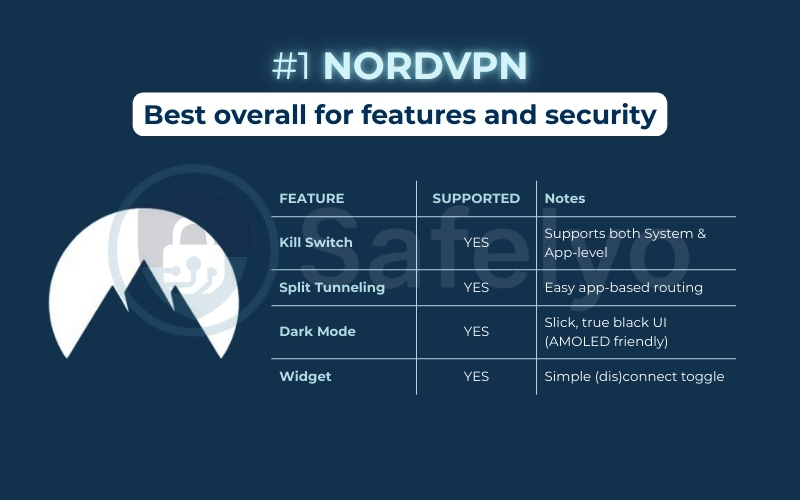
| Feature | Supported | Notes |
| Kill Switch | YES | Supports both System & App-level |
| Split Tunneling | YES | Easy app-based routing |
| Dark Mode | YES | Slick, true black UI (AMOLED friendly) |
| Widget | YES | Simple connect/disconnect toggle |
NordVPN: Best overall for features and security
>> Want to see exactly how Threat Protection works to block ads? Read our full, in-depth review of NordVPN for all the details.
3.2. #2 – ExpressVPN
If you just want a VPN that works flawlessly without any fuss, ExpressVPN is it. It is the gold standard for simplicity. The app is refreshingly simple: a giant, friendly “On” button does all the work.
It’s virtually impossible to get confused, which is why I recommend it to my less tech-savvy family members. In my testing, it had the fastest connection time (3.5 seconds) and never once dropped the connection. The App Shortcuts feature is a nice touch, letting me jump straight to my most-used apps (like Chrome or TikTok) right from the VPN’s home screen.
Safelyo Lab Test Results:
- Speed: Very consistent with a low ~8% drop using Lightway.
- Battery: Solid performance with a 13% drop during stress testing.
PROS
- Easiest Android interface on the market.
- Lightway protocol is lightweight and stable.
- Proven track record for unblocking streaming content across its global server network.
- High transparency standards and a privacy-friendly jurisdiction (BVI).
CONS
- More expensive than most competitors.
- Lacks a home screen widget (only shortcuts).
| Feature | Supported | Notes |
| Kill Switch | YES | Called “Network Protection” |
| Split Tunneling | YES | Reliable, intuitive list |
| Dark Mode | YES | Follows system settings |
| Widget | NO | Uses “App Shortcuts” instead |
ExpressVPN: Best for ease of use and reliability
>> Wondering if that simplicity comes at a cost? Check out our complete ExpressVPN review for our full stability and performance benchmarks.

3.3. #3 – Surfshark
Surfshark offers premium features at a price that’s hard to beat. But its biggest selling point is a true game-changer: Unlimited connections. I have Surfshark on my phone, tablet, laptop, and my family’s devices, all on one cheap subscription.
The standout feature on Android is GPS Spoofing. This helps prevent online tracking by making your phone’s physical GPS location match your VPN server location. It’s a fantastic privacy tool that stops apps from tracking your physical movements. The intuitive app design offers a superior user experience, showing that a budget-friendly paid VPN doesn’t have to cut corners. Additionally, the home screen widget allows me to connect with a single tap.
Safelyo Lab Test Results:
- Speed: fast enough for HD streaming, with a ~9% speed drop.
- Battery: Matches ExpressVPN with a 13% drop in our 1-hour test.
PROS
- Connect unlimited devices on one account.
- Exclusive Android GPS Spoofing feature.
- Very affordable long-term plans.
CONS
- “Static IP” servers are limited on mobile.
- Customer support can sometimes be slow to respond.
| Feature | Supported | Notes |
| Kill Switch | YES | Native Android integration |
| Split Tunneling | YES | Called “Bypasser” |
| Dark Mode | YES | Clean dark theme |
| Widget | YES | Winner: Best designed widget |
| GPS Spoofing | YES | Unique: Only one on this list |
Surfshark: Best value with unlimited connections
>> Curious how GPS Spoofing could benefit you? See our full Surfshark review for a detailed guide and performance tests.

3.4. #4 – CyberGhost
CyberGhost is designed with one goal in mind: Making it incredibly easy to stream. If you’re tired of guessing which server works with Netflix or Hulu, this app is for you.
The best part of the Android app is its “For Streaming” server list. Instead of just picking a country, you select a server optimized specifically for services like Netflix US or BBC iPlayer. I tested this with my Netflix account, and it worked flawlessly on the first try. The app also has handy automation rules, like automatically launching the VPN when you connect to unsecured public Wi-Fi.
Safelyo Lab Test Results:
- Speed: Moderate impact, but stable enough for 4K video.
- Battery: Slightly higher drain (~14%) but acceptable for daily use.
PROS
- Massive server network (10,000+ servers).
- Dedicated streaming profiles eliminate guesswork.
- Smart automation rules for Wi-Fi protection.
CONS
- The mobile app interface can feel a bit clunky.
- No GPS spoofing or obfuscation features.
| Feature | Supported | Notes |
| Kill Switch | YES | Always-on protection |
| Split Tunneling | YES | Available on Android |
| Dark Mode | YES | Standard dark mode |
| Widget | YES | Basic connectivity toggle |
CyberGhost: Best for streaming and user-friendly design
>> Want to see the full list of streaming services CyberGhost unblocks? Dive into our comprehensive CyberGhost review.

3.5. #5 – Private Internet Access (PIA)
Private Internet Access (PIA) has been a long-time favorite in the privacy community. Its Android app is a power user’s dream, offering an unmatched level of control and technical customization.
While it might look more complex than ExpressVPN, PIA’s app offers incredible flexibility. The Advanced Kill Switch is a highlight. It blocks all traffic even when the VPN is manually turned off – a fantastic fail-safe. I also really appreciate MACE, their built-in ad and malware blocker, which is more aggressive and effective than many competitors.
Like Surfshark, it also offers unlimited simultaneous connections. This level of encryption ensures your ISP cannot snoop on your traffic, which is vital for heavy torrenting sessions.
Safelyo Lab Test Results:
- Speed: Reliable speeds, sitting comfortably between Surfshark and CyberGhost.
- Battery: Surprisingly efficient, rivaling NordVPN’s low battery impact.
PROS
- Completely open-source Android app.
- Huge customization (MTU size, local ports, etc.).
- Proven court-tested no-logs policy.
CONS
- US-based jurisdiction (though no-logs is verified).
- Interface can be overwhelming for total beginners.
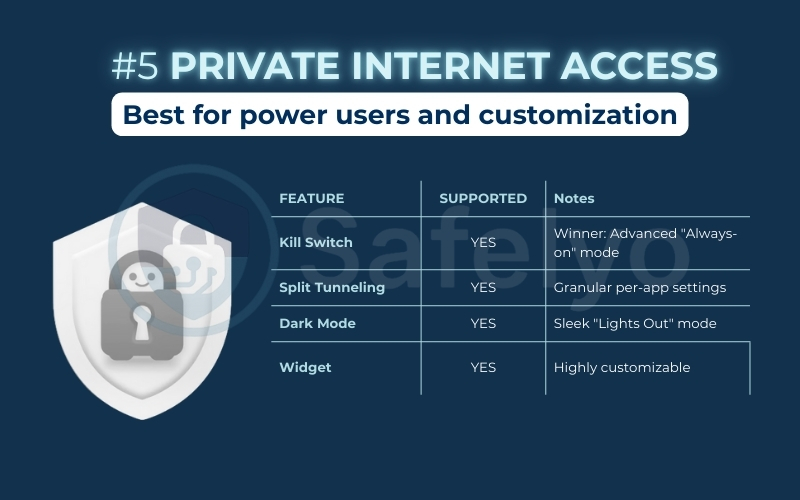
| Feature | Supported | Notes |
| Kill Switch | YES | Winner: Advanced “Always-on” mode |
| Split Tunneling | YES | Granular per-app settings |
| Dark Mode | YES | Sleek “Lights Out” mode |
| Widget | YES | Highly customizable |
Private Internet Access (PIA): Best for advanced users
>> Eager to explore all the advanced settings? Our full Private Internet Access review breaks down every feature.
4. Android VPN speed ranking (Fastest to Slowest)
Speed is king on mobile. Based on an average of 5 nearby-server tests performed on our Google Pixel 7a, here is how the top contenders stack up.
| Rank | VPN Provider | Avg. Speed Drop | Protocol Used |
|---|---|---|---|
| #1 | NordVPN | ~5% | NordLynx |
| #2 | ExpressVPN | ~8% | Lightway |
| #3 | Surfshark | ~9% | WireGuard |
| #4 | PIA | ~12% | WireGuard |
| #5 | CyberGhost | ~15% | WireGuard |
The Verdict: While ExpressVPN boasts the fastest initial connection time (just 3.5 seconds), NordVPN takes the crown for raw throughput, maintaining the highest consistency during heavy downloads, torrenting, and streaming.
5. Cheapest VPNs for Android (Best budget options)
While free options exist, a reputable paid VPN is the only way to guarantee speed and safety. You don’t need to spend a fortune to secure your phone. These three providers offer premium Android apps for less than the price of a coffee per month.
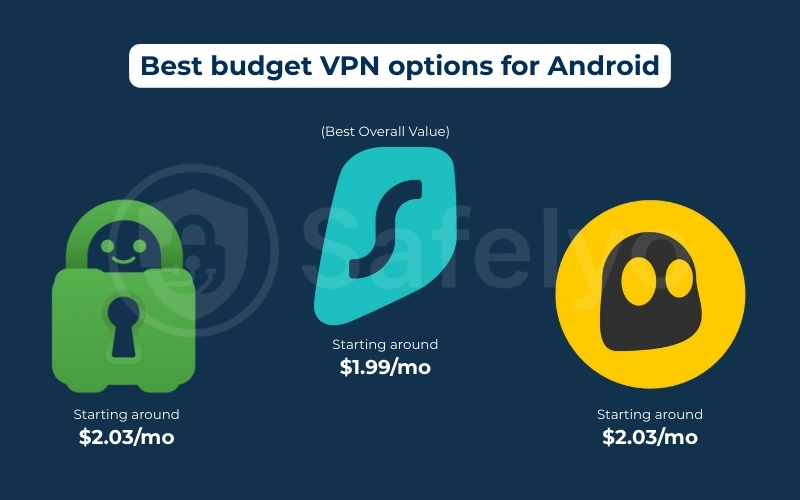
- Surfshark (Best Overall Value): It is the only option offering Unlimited Simultaneous Connections, meaning you can secure your Android phone plus every other device in your household for one low price. Includes the exclusive GPS Spoofing feature.
- Price: Starting around $1.99/mo.
- Refund Policy: 30-day money-back guarantee.
- Private Internet Access (PIA): Offers the best “price-to-feature” ratio. You get pro-level tools like the MACE ad-blocker and granular split tunneling settings that are usually reserved for much more expensive plans.
- Price: Starting around $2.03/mo.
- Refund Policy: 30-day money-back guarantee.
- CyberGhost: Perfect for budget-conscious users who primarily want to unblock streaming apps. It delivers specialized streaming servers without the premium price tag of ExpressVPN.
- Price: Starting around $2.03/mo.
- Refund Policy: Generous 45-day money-back guarantee (longest on this list).
6. Best free VPNs for Android (use with caution)
Let me be absolutely clear: In the VPN world, “free” usually comes with a hidden cost. Most no-cost apps on the Play Store profit by tracking your behavior and selling your data. The popular saying holds true: “If you aren’t paying for the product, you are the product.”
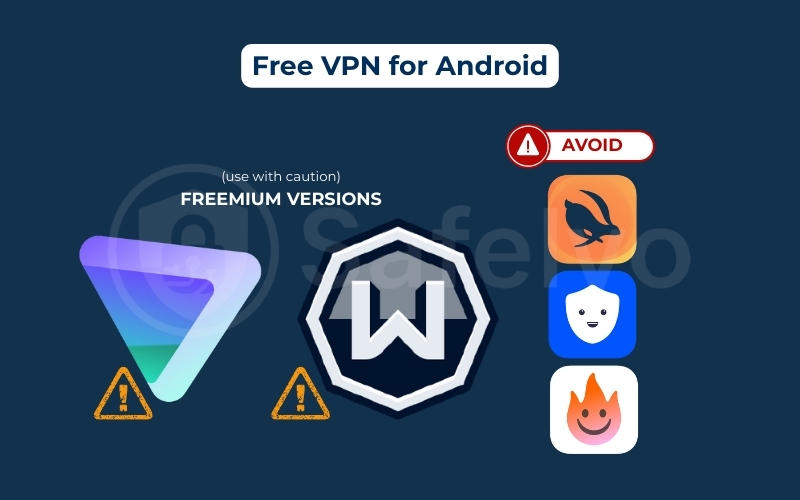
However, two reputable providers offer limited “freemium” versions of their paid services. These are safe to use, though they come with restrictions.
| VPN Service | Data Limit | Countries | Speed | Ads | Logging Policy |
|---|---|---|---|---|---|
| Proton VPN | Unlimited | 3 Locations | Medium | None | Strict No-Logs |
| Windscribe | 10GB / Month | 10+ Locations | High | None | Strict No-Logs |
1. Proton VPN – Best for unlimited data: If you need a free option that won’t cut you off mid-browse, Proton VPN is the only choice. It is backed by Swiss privacy laws and an audited no-logs policy.
- The good: Truly unlimited data usage. I keep this on my phone as a reliable backup for public Wi-Fi emergencies.
- The bad: You are restricted to just 3 locations (USA, Netherlands, Japan). Because these servers are free, they are often crowded, leading to slower speeds that aren’t great for streaming.
2. Windscribe – Best for server variety: Windscribe offers more flexibility in where you connect, but limits how much you can connect.
- The good: You get access to servers in over 10 countries (including the UK and Canada). It’s perfect if you need to spoof a specific location.
- The bad: You are capped at 10GB of data per month (requires email registration). While it hides your activity from your ISP, the data cap is like a small gas tank—not built for long road trips like binge-watching Netflix.
Free Android VPNs to avoid
For every decent option like Proton, there are dozens of dangerous ones. Based on industry reports and privacy audits, you should strictly avoid apps like Turbo VPN, Betternet, and Hola VPN.
Using these is like hiring a safety guard who secretly copies your keys and sells them. They are known for invasive logging policies and bombarding you with ads. In my professional opinion, using one of these is often more dangerous than using no VPN at all.
7. Checklist: How to choose the best VPN for Android
Selecting a VPN for your phone is different from choosing one for your computer. Mobile devices have limited battery life, switch networks constantly (from Wi-Fi to 4G/5G), and use specific apps that might block VPNs.
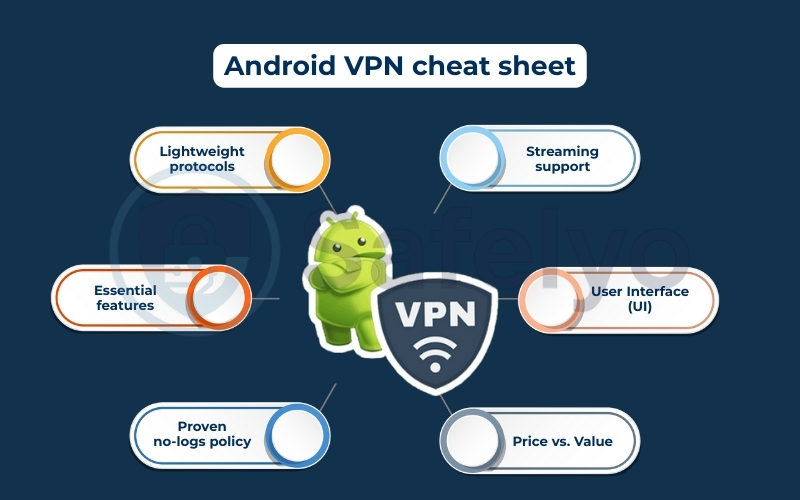
Before you subscribe, run any potential VPN through this 6-point checklist to ensure it’s actually optimized for Android.
- Lightweight protocols (Speed & Battery): Avoid VPNs that rely solely on older, heavier protocols like OpenVPN. Look for WireGuard, NordLynx, or Lightway. These modern protocols are designed to be lightweight, meaning they use less code, connect instantly, and consume significantly less battery power.
- Essential Android features: A good Android app shouldn’t just be a watered-down version of the desktop app. It must include:
- Kill Switch: To cut the internet if the VPN drops (crucial on public Wi-Fi).
- Split Tunneling: This allows you to route banking apps or Google Maps outside the VPN to avoid location errors, while keeping your browsing secure.
- Widgets: For quick one-tap connections from your home screen.
- Proven no-logs policy: Privacy is the main goal. Don’t just take their word for it; look for a “No-Logs” policy that has been independently audited by firms like PwC or Deloitte. This guarantees that even if the government asks for your data, the VPN provider has nothing to hand over. Also, check if they operate in a privacy-friendly jurisdiction outside the 14 Eyes alliance.
- Streaming support: Many VPNs work in a browser but fail when you try to open the Netflix or Hulu app on Android. Ensure the provider explicitly lists support for streaming services and has a track record of bypassing strict geo-restrictions.
- User Interface (UI): Mobile screens are small. The best apps have a clean, clutter-free interface. You shouldn’t have to dig through five sub-menus just to change a server location.
- Price vs. Value: Look for a service that offers a 30-day money-back guarantee. This allows you to test the app on your specific device and network conditions risk-free. If it drains your battery or slows down your connection, you can get a full refund.
The perfect Android VPN cheat sheet
Here is a quick reference checklist summarized in a table format for easy scanning:
| Critical Feature | What to look for (The Must-Haves) | Why it matters on Android |
| Speed & Efficiency | WireGuard, NordLynx, or Lightway | Ensures minimal battery drain and no video lag. |
| Privacy | Independently Audited No-Logs Policy | Verifies they strictly do not track your mobile data. |
| App Features | Split Tunneling & Native Kill Switch | Gives you control over which apps use the VPN. |
| Streaming | Dedicated Streaming Support | Ensures the VPN works with apps like Netflix & Hulu. |
| Safety Net | 30-Day Money-Back Guarantee | Allows you to test the app on your specific phone risk-free. |
8. Are VPNs safe on Android?
The short answer is:
Yes, but only if you choose a reputable provider.
If you use a premium, audited service like the ones listed above, using a VPN is actually safer than using your regular mobile data or Wi-Fi. These apps use a secure server network and military-grade encryption (AES-256) to protect your passwords and private messages from hackers.
However, if you download a random 100% free VPN from the Google Play Store, the answer is a hard no. Research has shown that many free Android VPNs are actually data mining tools in disguise.
The 3 major risks of “shady” free VPNs:
- Hidden trackers: Most free VPNs embed third-party trackers to monitor your browsing habits and sell that profile to advertisers.
- DNS leaks: Poorly coded apps often fail to mask your location correctly, accidentally revealing your true IP address.
- Malware & Spyware: Some malicious apps act as a “Trojan Horse,” infecting your device to steal financial information or contacts.
Bottom Line: Stick to paid or reputable “freemium” providers. Security is one area where you definitely get what you pay for.

9. Is it legal to use a VPN on Android?
For the vast majority of the world, including the US, UK, Canada, Australia, and most of Europe, using a VPN on your Android device is completely legal. It is a legitimate privacy tool used by businesses and individuals alike.
However, a few countries with strict internet censorship restrict or ban VPN usage. If you are traveling to China, Russia, Iran, or the UAE, you should check local laws before connecting.
Crucial warning: A VPN does not give you immunity. Committing illegal acts, such as torrenting copyrighted material or conducting illegal surveillance, remains illegal even if your connection is encrypted.
10. Do VPNs work on all Android devices (Samsung, Xiaomi, Pixel)?
Yes, modern VPN apps are universally compatible with all major Android manufacturers, including Samsung Galaxy, Google Pixel, Xiaomi, OnePlus, and Motorola.
Generally, any device running Android 5.0 (Lollipop) or higher will support these apps without issues. However, the experience can vary slightly. For example, Pixel and Samsung phones typically handle home screen widgets and the “Always-On VPN” feature much more smoothly than devices running heavily modified skins, like Xiaomi’s MIUI.
>> You may also be interested in these articles about Android VPN:
11. How to set up a VPN on Android
Did you know your Android phone has a built-in VPN client? This feature is great for connecting to a specific office network, but for personal privacy, it is a bit like driving a car without airbags. Before you dive into the settings, here is a quick look at what you lose by doing it manually versus using a dedicated app like NordVPN or ExpressVPN.
| Criteria | Manual Setup (Built-in) | VPN App (Dedicated) |
| Kill Switch | NO (Risk of data leaks) | YES (Auto-cuts internet) |
| Split Tunneling | Difficult (Must create a new profile) | YES (Route-specific apps) |
| Switching Servers | Difficult (Must create new profile) | Very Easy (One-tap map) |
| Protocols | Limited (Usually IKEv2) | Advanced (WireGuard/Lightway) |
From my experience, learning how to set up a VPN is a neat feature, it’s a bit like knowing how to change the oil in your car. It’s a useful skill, but most people prefer the convenience and added benefits of going to a professional. Here’s how you can do it yourself, followed by why you’ll probably still want a dedicated app from providers like NordVPN or ExpressVPN.
Step-by-Step guide: Manual configuration
If you have your server details (address, username, password) from your network administrator, here is how to configure VPN on Android yourself:
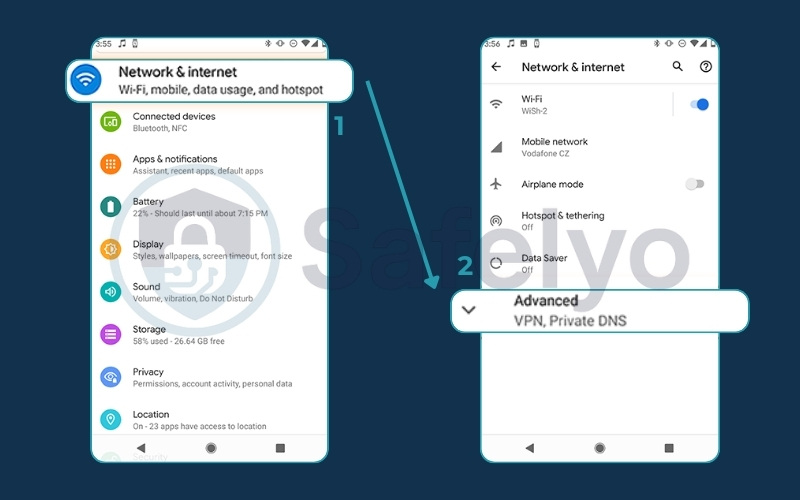
1. Open Settings and tap Network & Internet (or Connections > More connection settings on Samsung). Open the Advanced Network & Internet setting.
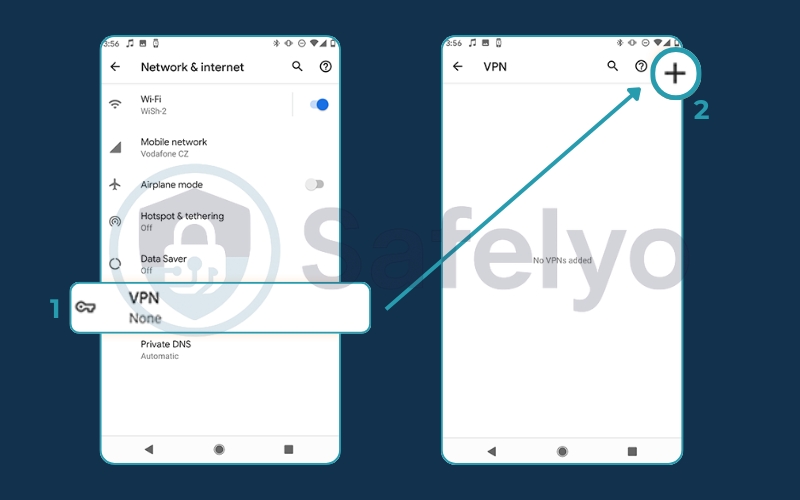
2. Select VPN and tap the (+) or Add icon in the top corner.
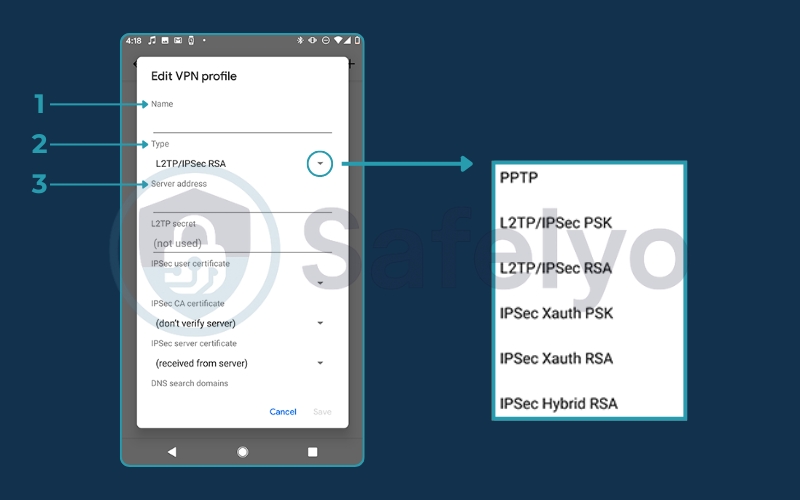
3. Enter the required details:
- Name: Anything you like (e.g., “Work VPN”).
- Type: Usually IKEv2/IPSec (check with your provider).
- Server address: The IP address or URL provided to you.
- IPSec pre-shared key: Enter the encryption key provided by your admin.
4. Enter your Username and Password if asked. Tap Save.
5. Tap your new profile name and select Connect.

The Bottom Line: Manual setup works for corporate access, but it locks you to one server location and offers zero fail-safe protection. If the connection drops, your real IP address is instantly exposed. For daily safety and access to global content, a dedicated app is safer, smarter, and far easier to use.
12. FAQ about the best VPN for Android
I get asked a lot of questions about using VPNs on Android, and many of them pop up time and time again. Here are the clear, straightforward answers to some of the most common queries I encounter.
What is the best VPN for Android?
Based on our extensive testing of app features, performance, and safety, NordVPN stands out as the best overall VPN app for Android. However, ExpressVPN is a fantastic choice for simplicity, and Surfshark offers the best value for your money.
Does Android have a built-in VPN?
Yes, Android has a built-in VPN client that supports protocols like IKEv2. However, it requires manual configuration and lacks critical features like a kill switch or split tunneling that dedicated VPN apps from our list provide for much better safety and convenience.
Is it safe to download a VPN APK file?
It can be very risky. I strongly advise against it unless you are downloading the APK file directly from the official website of a trusted VPN provider. Downloading from third-party sites can expose you to malware or modified apps that are designed to steal your data. The safest method is always to use the Google Play Store.
What is split tunneling on Android, and why is it useful?
Split tunneling is a feature that lets you choose which apps use the VPN and which ones use your regular internet. For example, you can route your mobile banking app through the VPN for maximum security while letting your food delivery app use your real location to work correctly. It gives you the perfect balance of security and convenience.
Android Kill Switch vs App Kill Switch: What’s the difference?
Android has a system-level kill switch (Block connections without VPN) that you can enable in the settings. It’s very reliable but blocks all internet traffic if the VPN drops. Many top VPN apps like NordVPN offer their own integrated kill switch, which provides more flexibility, especially when used with split tunneling. For maximum safety, I often recommend using both.
What is the fastest VPN for Android?
Based on our latest Safelyo Lab tests, NordVPN is currently the speed leader. Using its proprietary NordLynx protocol, it showed an average speed drop of just ~5%, making it virtually indistinguishable from a regular connection. ExpressVPN follows closely behind with its Lightway protocol.
Can I leave my VPN on all day?
Yes, absolutely. Modern VPN protocols like WireGuard are designed to run efficiently in the background without overheating your phone. Leaving it on ensures your data remains encrypted even when your phone automatically switches between Wi-Fi and mobile networks.
Does a VPN drain my battery?
Yes, but the impact is much smaller than you think. In our 1-hour video streaming stress test, a phone without a VPN lost 10% battery, while the same phone running a premium VPN lost only 12–13%. That is a negligible 2-3% difference in exchange for military-grade encryption.
Does using a VPN help with torrenting?
Yes. It hides your P2P activity so your ISP cannot throttle your connection speed or send copyright warnings. Always choose a provider with servers optimized for torrenting.
13. Conclusion
Protecting your Android phone with a VPN is no longer an option – it’s an essential step in safeguarding your digital life. But as we’ve seen, choosing the right app from a sea of confusing options is a real challenge. A truly best VPN for Android must deliver a perfect balance of robust safety, an intuitive app experience, and performance that doesn’t slow you down or kill your battery.
Your Android phone is your lifeline. Don’t leave it exposed. By choosing a top-rated service from this list of Safelyo, you can secure your digital life in minutes. Explore our other guides in the Best VPN category to become an expert on online privacy and take full control of your security today.