On one corner, we have the heavyweight champion, ExpressVPN – famous for unmatched stability but carrying a premium price tag. On the other hand, the challenger Surfshark throws a punch with incredibly low prices and unlimited device connections.
In this 2026 ExpressVPN vs Surfshark comparison, I am tackling the core question that keeps users up at night: Is ExpressVPN really worth paying three times more for superior privacy and streaming capabilities? Or is Surfshark’s “unlimited” value actually the smarter buy for your needs?
If you are stuck choosing between the premium veteran and the budget challenger, here is the quick breakdown you need:
- Is ExpressVPN worth the extra cost?
→ Yes, but only if you need extreme stability, easy router setup, or reliable access in China. - Which VPN is faster?
→ ExpressVPN wins slightly on connection speed and latency thanks to its proprietary Lightway protocol. - Which is better for families?
→ Surfshark takes the lead with truly unlimited simultaneous connections on a single account. - Do they work with Netflix?
→ Yes. ExpressVPN offers smoother 4K playback (Quality), while Surfshark unlocks more regional libraries (Quantity). - The bottom line?
→ Choose Surfshark for the best value and features.
→ Choose ExpressVPN for maximum performance and privacy.
I have put both providers through rigorous speed tests, 4K streaming marathons, and the ultimate firewall challenge in China to give you a definitive answer. Let’s find out if you should save your money or splurge for quality.
1. The verdict: Quick scorecard
If you are short on time, here is the quick breakdown of which VPN wins in each category based on performance and features from my latest testing.
| Category | Winner | Why? |
| Winner Overall | ExpressVPN | Proven stability, faster Lightway protocol connection, and a superior dedicated router app. |
| Winner for Value | Surfshark | Significantly cheaper (starting ~$2/mo) and includes extras like an ad-blocker (CleanWeb). |
| Winner for Families | Surfshark | Unlimited simultaneous connections mean you can share one account with your entire household. |
| Winner for Privacy | ExpressVPN | Verified by a KPMG audit and a real-world track record (Turkey server incident), proving that no data is stored. |
| Winner for Smart Home | ExpressVPN | The Aircove custom router firmware makes protecting smart TVs and IoT devices effortless. |
Disclaimer
At Safelyo, our reviews are based on real-world testing and human expertise. We may earn a small commission if you purchase through our links, at no extra cost to you. This supports our lab but does not influence our rankings.
2. Pricing & real cost over 24 months
The gap between these two has changed dramatically in 2026. Historically, ExpressVPN was the expensive “premium” option, but their new plan structure shows they are now aggressively fighting for budget-conscious users.
According to the latest plan comparison:
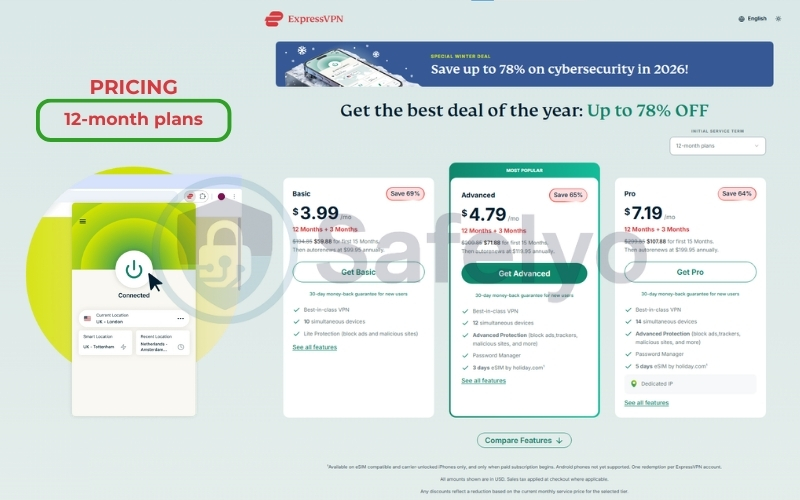
- Surfshark remains the value king with its Starter Plan dropping to an incredible $1.99/mo (on a 24-month deal).
- ExpressVPN has entered the budget ring with its new 2-Year Basic Plan at $2.79/mo.
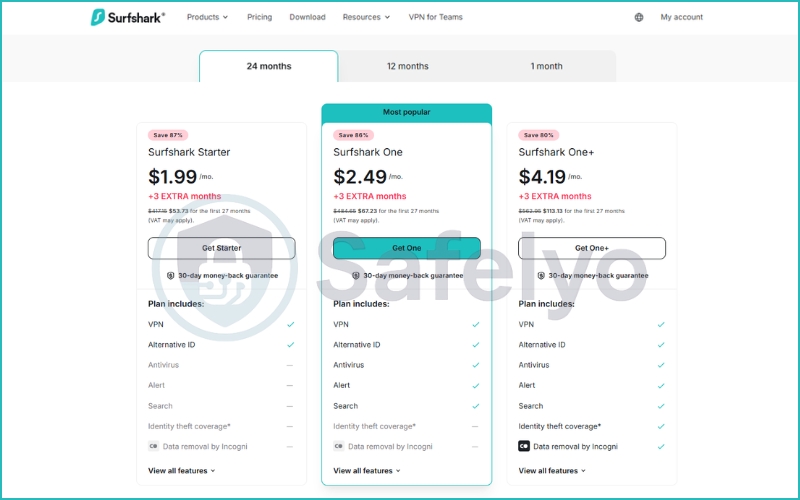
The price gap is closing: Instead of the old “3x difference”, the gap between their entry-level plans is now only about $0.80 per month. However, you need to pay attention to what you get for that price:
- ExpressVPN Basic ($2.79/mo): Strict VPN protection, 10 device limit, and ad blocking.
- Surfshark Starter ($1.99/mo): VPN protection, Unlimited devices, and Alternative ID.
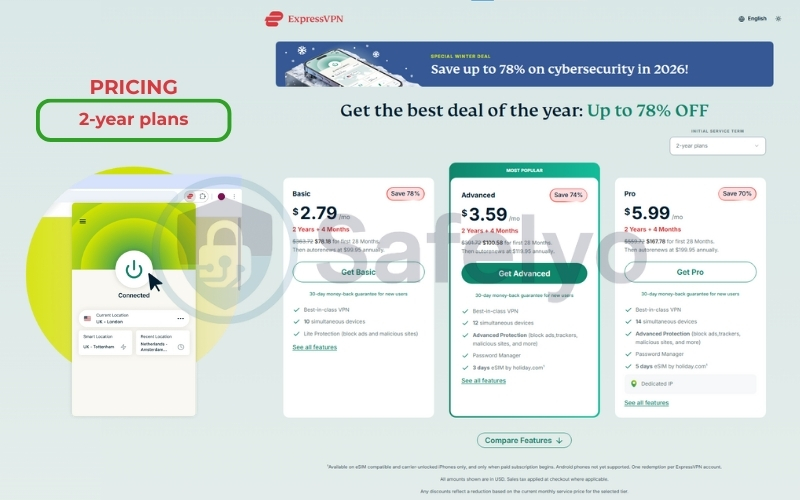
The “renewal shock” factor: This is where the real difference lies. Surfshark’s sub-$2 price is a heavily discounted “introductory offer” for the first 27 months. Upon renewal, the price typically jumps significantly to the standard rate. ExpressVPN’s price list tends to be more consistent, though you are still locking yourself into a long 2-year commitment to get that low $2.79 rate.
Cost Per Device: Even with ExpressVPN increasing its limit to 10 devices on the Basic plan (and up to 14 on Pro), Surfshark still wins the “family math” calculation.
- ExpressVPN: ~$0.28 per device (if you use all 10).
- Surfshark: $0.00 per extra device. Whether you connect 5 devices or 50, the price stays flat.
Bottom line: If you want the absolute lowest monthly bill, Surfshark (1.99/mo) is still the winner. But for less than a dollar more, ExpressVPN (2.79/mo) is now a surprisingly affordable alternative, making the “premium” stability much more accessible than before. Both options include a risk-free 30-day money-back guarantee, allowing you to test the service with confidence.
3. Speed & Latency: Lightway vs. WireGuard
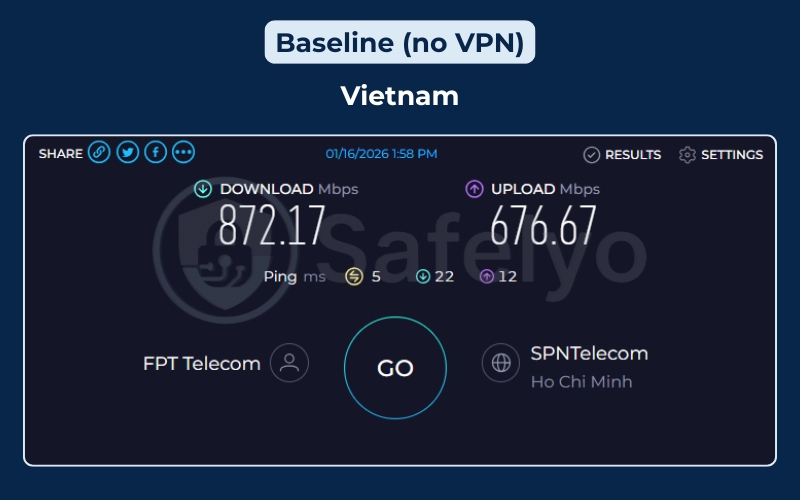
High performance isn’t just about raw downloading power; it’s about consistency and maintaining a stable upload speed. To get a real-world picture, I tested both VPNs from a high-speed baseline in Vietnam (Download: ~872 Mbps / Upload: ~676 Mbps), connecting to key servers in the US (New York), UK (London), Japan (Tokyo), and Australia (Sydney).
3.1. The test results
This is a battle of protocols: ExpressVPN’s proprietary Lightway vs. Surfshark’s industry-standard WireGuard, both designed to handle strong encryption without sacrificing speed.
Here is the raw data from my testing:
The table below illustrates the core difference between the two services during my testing session. While Surfshark achieved incredible top speeds, it also suffered from significant drops in certain locations, making a functional kill switch vital to maintain anonymity. ExpressVPN, while having a slightly lower “top speed”, delivered a smooth experience across the board.
| Server Location | ExpressVPN (Lightway) | Surfshark (WireGuard) | Winner |
|---|---|---|---|
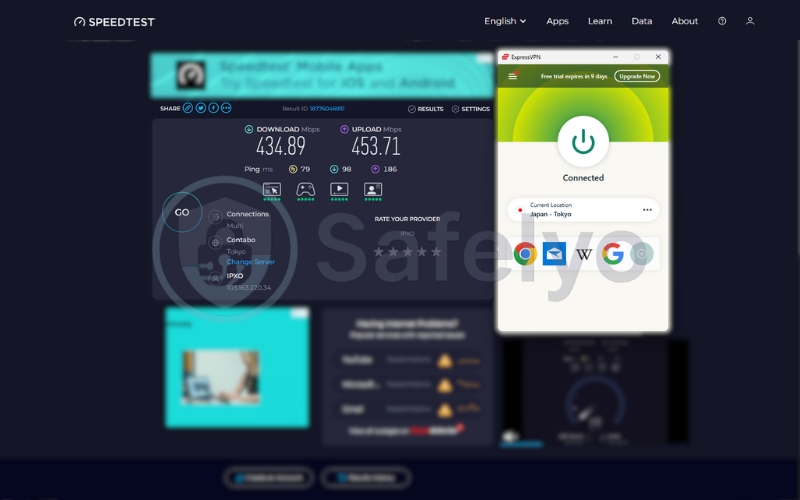
| Japan (Tokyo) | 434.89 Mbps (Ping: 79ms) | 29.49 Mbps (Ping: 74ms) | ExpressVPN (Huge Win) |
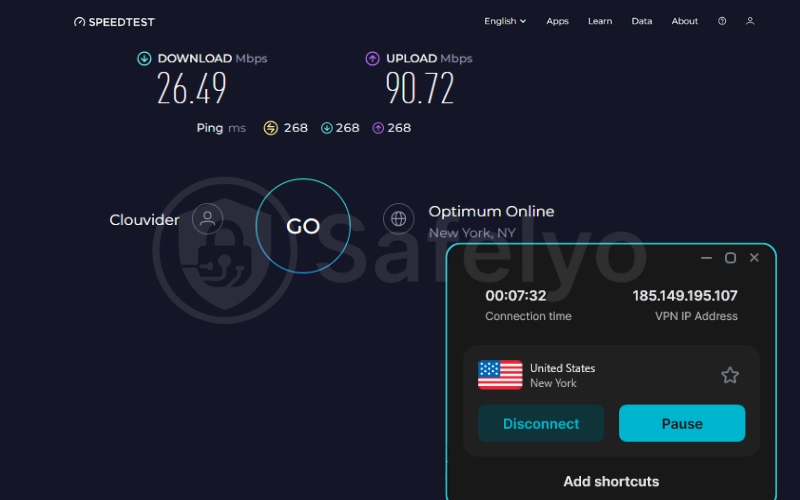
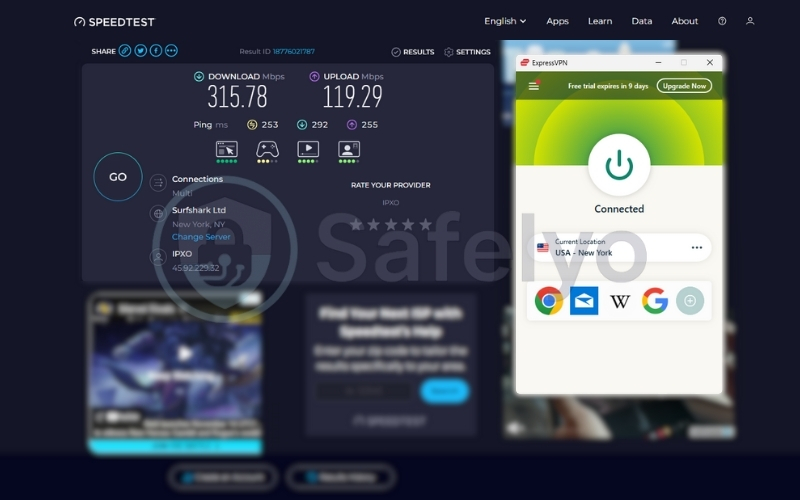
| US (New York) | 315.78 Mbps (Ping: 253ms) | 26.49 Mbps (Ping: 268ms) | ExpressVPN (Huge Win) |
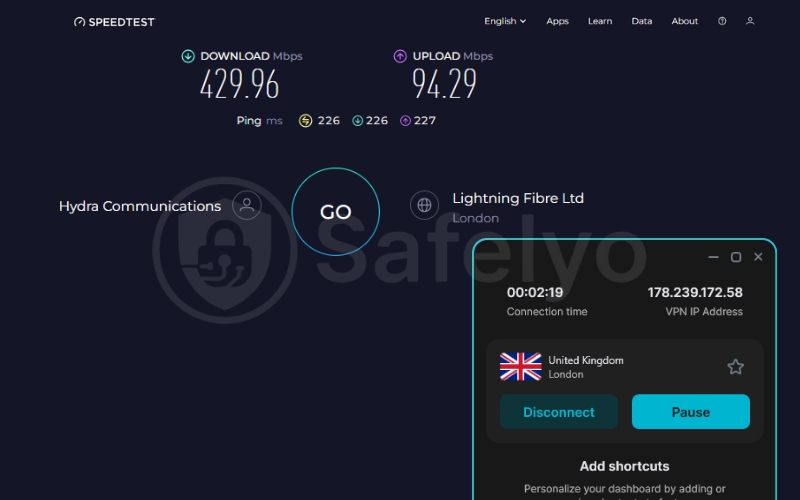
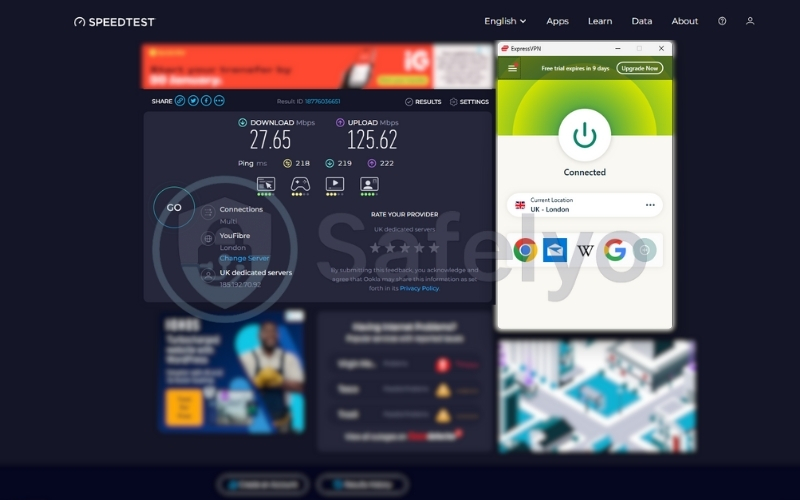
| UK (London) | 27.65 Mbps (Ping: 219ms) | 429.96 Mbps (Ping: 226ms) | Surfshark (Huge Win) |
| Australia (Sydney) | 369.42 Mbps (Ping: 220ms) | 356.24 Mbps (Ping: 339ms) | ExpressVPN (Lower Ping) |
Note: All data and figures are current as of February 04, 2026. Results may differ by user location; our long-distance tests were conducted from Vietnam.
ExpressVPN's Dominance
ExpressVPN demonstrated incredible consistency in the Asia-Pacific and US regions. In Japan, it retained nearly 50% of my original speed (434 Mbps), completely crushing Surfshark, which struggled at just 29 Mbps.
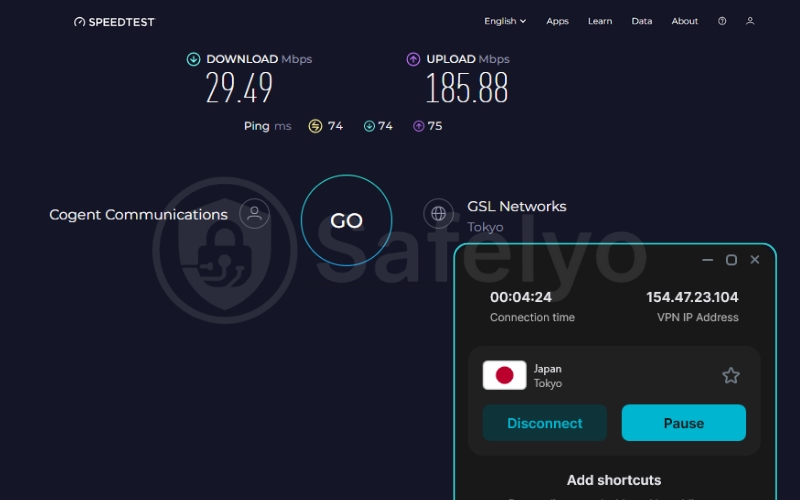
Similarly, in the US, ExpressVPN maintained a solid 315 Mbps, while Surfshark dropped significantly.
Surfshark's Surprise
Surfshark isn’t slow everywhere. In the UK test, it turned the tables completely, hitting a massive 429 Mbps while ExpressVPN lagged behind. This shows that Surfshark can be blazing fast, but it depends heavily on the specific server load at that moment.
Latency (Ping) Mattered
For gamers, ExpressVPN is the safer bet. Look at the Australia result: While download speeds were similar, ExpressVPN’s ping was significantly lower (220ms vs. Surfshark’s 339ms). That 100ms difference is the line between a smooth game and unplayable lag.
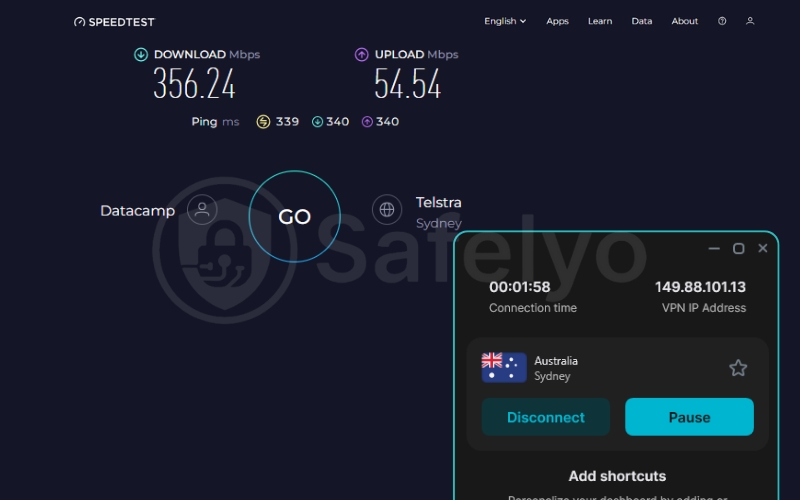
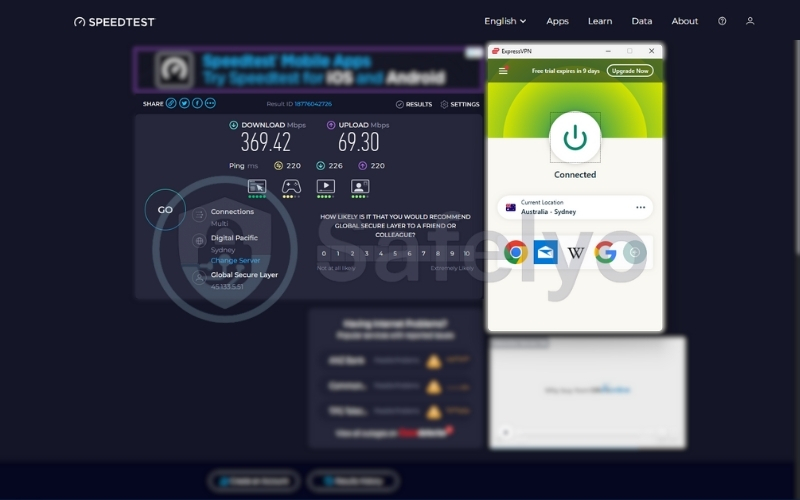
While Surfshark had drops to around 26-29 Mbps on the New York and Tokyo servers during this specific session, ExpressVPN flattened the curve. It rarely dropped below 200 Mbps, ensuring that no matter which server I picked, the experience remained the same.
3.2. Lightway Turbo on Windows – Why ExpressVPN is faster
ExpressVPN recently upgraded its Lightway protocol on Windows with Lightway Turbo, a performance-focused enhancement designed to increase data throughput and reduce connection overhead. Lightway Turbo delivers noticeably higher sustained speeds on Windows devices compared to the standard Lightway implementation.
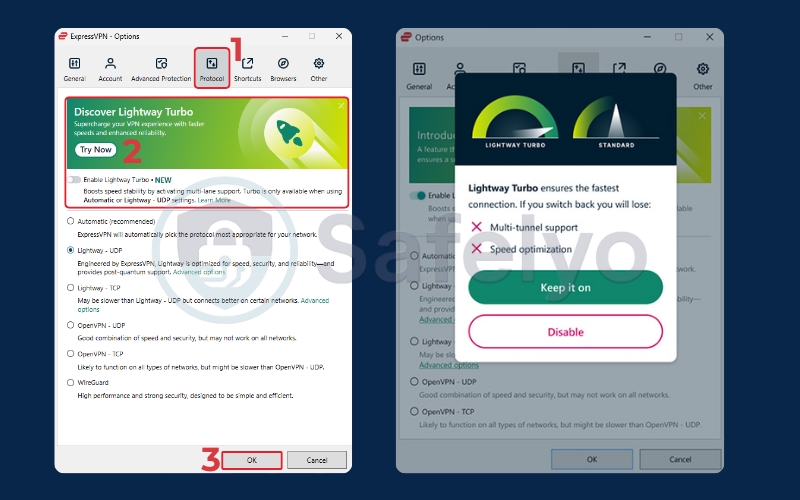
This explains why ExpressVPN consistently outperforms Surfshark on Windows laptops and desktops, especially during high-bandwidth activities like 4K streaming and large file downloads.
| Feature | Lightway Turbo | Lightway (Standard) | WireGuard |
|---|---|---|---|
| Developer | ExpressVPN | ExpressVPN | Open-source community |
| Availability | Windows only | Windows, macOS, iOS, Android | All major platforms |
| Status | Performance-enhanced upgrade | Default Lightway protocol | Industry standard |
| Speed optimization | Very high (Turbo mode) | High | Very high |
| Connection stability | Excellent | Very good | Very good (config-dependent) |
| Connection time | Near-instant | Very fast | Fast |
| Heavy-load performance (4K, large downloads) | Outstanding | Good | Outstanding |
| Resource usage | Low | Low | Very low |
| Security level | High (Lightway core) | High | High |
| Best for | Windows users who want maximum speed and stability | Everyday users | Speed-focused, open-source fans |
Winner: ExpressVPN
ExpressVPN wins this round on overall consistency, high performance, and stability (winning 3 out of 4 locations). Surfshark has high potential speed peaks (as seen in the UK), but proved to be more volatile in my testing.
4. Streaming: Quality vs. Quantity
For many of you, this is the main event. You aren’t buying a VPN for encryption; you are buying it to watch The Office or anime that isn’t available in your region. After spending a weekend binge-watching Netflix, Disney+, and BBC iPlayer with both services, I found a distinct trade-off between viewing quality and library variety.
ExpressVPN: The "press play and forget" experience
If you hate buffering, ExpressVPN is the superior choice. Thanks to the Lightway protocol, my 4K streams on Netflix US and Japan loaded almost instantly. There was no pixelation and no “spinning wheel of death” at the start of the movie.

The real game-changer here is MediaStreamer (their Smart DNS feature). While Surfshark supports Smart DNS, ExpressVPN’s implementation is much smoother for devices that don’t support native VPN apps, like older Samsung Smart TVs or gaming consoles. Plus, ExpressVPN now has a dedicated, native app for Apple TV (tvOS) that is incredibly user-friendly and easy to set up – making it the king of living room entertainment.
Surfshark: The global library hunter
Surfshark shines if you are a “content hunter”. It tends to unlock more “exotic” Netflix libraries that other VPNs struggle with, such as India, Turkey, or Singapore. If you are looking for specific regional content that isn’t on the major US/UK catalogs, Surfshark’s vast list of server locations makes it the best bet for streaming.
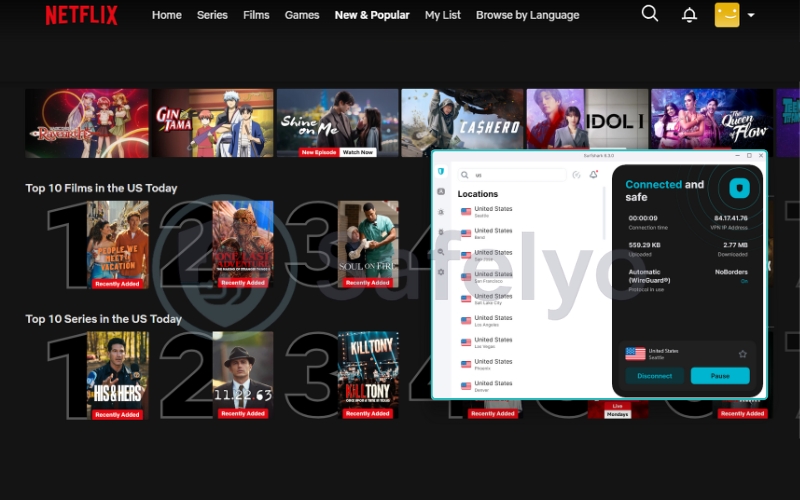
However, it can be a bit “hit or miss”. During my tests, I sometimes had to switch servers two or three times to find one that Netflix hadn’t detected yet. It works, but it requires a bit more patience than the seamless experience of ExpressVPN.
>> Learn about: How to bypass censorship with a VPN? 4 steps to internet freedom
Troubleshooting when you get blocked
Streaming platforms are aggressive against VPNs. If you see the dreaded “Proxy Detected” error on either service, try these steps to bypass the VPN blocker:
- Clear your browser cache/cookies: Location data often lingers there.
- Switch protocols: Change from WireGuard to OpenVPN (or Lightway to OpenVPN).
- Try a different city: If “New York” is blocked, try “New Jersey”.
Winner:
- For Experience (Quality): ExpressVPN. It just works, instantly and smoothly.
- For Variety (Quantity): Surfshark. Better for hunting down specific, obscure international titles.
5. Device Connections: 8 vs. Unlimited (Updated)
For large households or students sharing a dorm, this category often decides the winner immediately.
Surfshark - The "no math" solution
Surfshark wins this round effortlessly with its Unlimited Simultaneous Connections policy. There is no catch. You can install it on your laptop, phone, tablet, your parents’ TV, and even share the login with your friends.
You never have to log out of one device to use another. This broad compatibility, combined with a user-friendly interface, makes managing security across all family gadgets incredibly simple. For a family of four or five, this convenience is unbeatable.
ExpressVPN - The tiered limits
ExpressVPN is more restrictive, though they have improved in 2026. Depending on your plan (Basic, Advanced, or Pro), you are limited to 10, 12, or 14 simultaneous connections. For a single power user or a couple, 10 devices are usually plenty. But for a modern smart home filled with iPads, consoles, and smart appliances, you might hit that ceiling faster than you think.
The "Router Loophole"
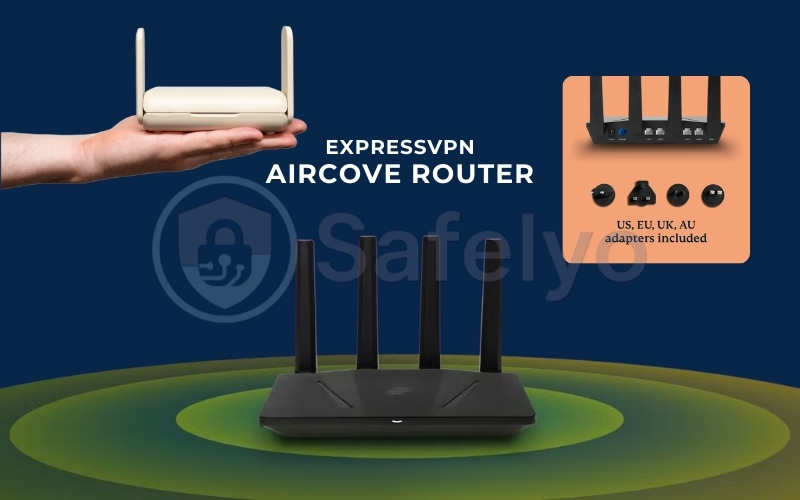
However, there is a clever workaround for ExpressVPN users. If you install ExpressVPN on your router (using their dedicated firmware or Aircove router), the router counts as only one device. Yet, it protects every single gadget connected to your Wi-Fi – effectively giving you “unlimited” protection at home. It’s a bit more setup, but it significantly levels the playing field.
Winner:
- Surfshark (Out of the box)
- ExpressVPN (If you use a Router)
6. The “Router Factor”: AircoveOS vs. Manual Config
This section is usually where “Best Value” VPNs fall apart. If you have ever tried to set up a VPN on a router, you know it is typically a nightmare. This involves downloading configuration files, flashing firmware, and praying you don’t “brick” your device.
ExpressVPN: The Smart Home Game Changer
ExpressVPN is the only provider that treats routers as a first-class citizen. They built their own custom operating system (firmware) that you can install on compatible Asus routers, or you can buy their own hardware, the Aircove.
The interface looks exactly like the app on your phone. But the killer feature is Device Groups.
- The Scenario: You can drag and drop your Apple TV into the “USA – New York” group to watch Netflix. Leave your work laptop in the “No VPN” group for maximum speed. You can also put your smart lights in a “UK” group – all simultaneously on the same router.
- The User Experience: It is visual, intuitive, and makes configuring the VPN on your router take just about 5 minutes.
Surfshark: The Old-School Way
Surfshark supports routers, but it relies on the traditional method. You have to manually download OpenVPN or WireGuard configuration files and upload them to your router’s admin panel. If you want to change the server location, you often have to re-download a new file and upload it again. It works, but learning how to use Surfshark VPN is tedious and definitely not “spouse-friendly”.
Verdict: If you want to protect your entire Smart Home (IoT devices, gaming consoles, smart TVs), ExpressVPN is the only one that makes it easy.
7. Privacy & Jurisdiction: BVI vs. Netherlands
When you peel back the fancy apps, marketing claims, and independent audit reports, you are essentially paying for trust. Who holds your data, and who can force them to give it up?
Jurisdiction: The Safe Haven vs. The Alliance
- ExpressVPN is headquartered in the British Virgin Islands (BVI). This is a privacy haven with no data retention laws and, crucially, it sits outside the 5/9/14 Eyes intelligence-sharing alliance. This jurisdiction supports a strict no-logs policy, ensuring your data protection is reinforced by high-level encryption and robust security standards.
- Surfshark is based in the Netherlands. While the Dutch have strong privacy laws, the country is a member of the Nine Eyes alliance. Theoretically, if intelligence agencies come knocking, Surfshark could be compelled to cooperate under specific EU treaties.

The “battle-tested” proof: Audit reports are great, but real-world raids are better proof.
- ExpressVPN has been “battle-tested”. In a high-profile case involving the assassination of a Russian ambassador in Turkey, authorities seized ExpressVPN’s servers. They found… absolutely nothing. No logs, no connection data. The TrustedServer technology (RAM-only servers) worked exactly as advertised, providing proof far stronger than a standard security audit.
- Surfshark runs a similar diskless (RAM-only) infrastructure called Nexus and has clean audits from Deloitte. However, they have never faced a public, high-stakes government seizure like ExpressVPN has. They have a clean record backed by an independent audit, but regarding jurisdiction, it hasn’t been “proven under fire” in the same way.
Verdict: Both are safe for 99% of users. But if you are a journalist, activist, or just someone who demands maximum privacy assurance, ExpressVPN wins because it has survived the ultimate stress test.
8. Features & Ecosystem: “VPN-only” vs “Bundle”
This category highlights a fundamental difference in philosophy between the two companies. One wants to be your specialized security tool, while the other wants to be your entire cybersecurity suite.
To visualize the difference in “ecosystems”, here is how the two stack up in terms of built-in tools.
| Feature | ExpressVPN (The Specialist) | Surfshark (The Bundle) |
| Ad Blocker | Basic (Threat Manager) | CleanWeb 2.0 (Advanced – blocks ads & trackers) |
| Password Manager | Keys (Included Free) | ID Protection (Paid Add-on) |
| Antivirus | Not available | Surfshark Antivirus (Paid Add-on) |
| Obfuscation | Automatic (On all servers) | Camouflage Mode (Manual/Auto) |
| Dedicated IP | Dynamic IP only | Available (Paid Add-on) |
| Split Tunneling | Yes | Yes (Bypasser) |
8.1. ExpressVPN: The Specialist
ExpressVPN follows the philosophy of “do one thing and do it perfectly”. The app is incredibly lean. You won’t find pop-ups asking you to scan for viruses or check your credit score. It focuses entirely on encryption speed and stability. However, it still includes essential features like a reliable kill switch to prevent accidental data exposure.
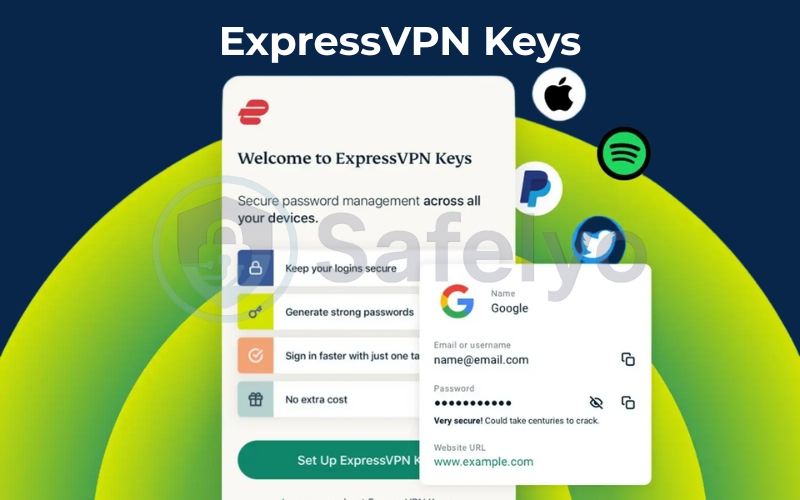
The only major “extra” is ExpressVPN Keys, a password manager included for free in every subscription. It is integrated directly into the app (mobile) or browser extension, making it convenient if you don’t already use something like 1Password. It’s simple, secure, and stays out of your way.
8.2. Surfshark: The Swiss Army Knife
Surfshark takes the “more is more” approach. Even their basic plans include a system-wide kill switch and CleanWeb, which is one of the most aggressive ad and malware blockers I’ve tested. It even blocks ads on Smart TVs if you use their DNS.
Dynamic MultiHop (Double VPN with control)
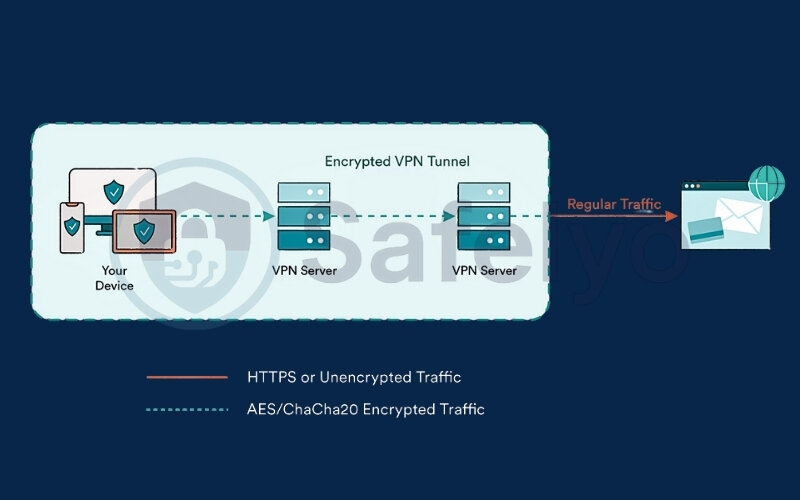
Unlike standard Double VPN setups, Surfshark’s Dynamic MultiHop lets you manually choose both entry and exit servers. This is particularly useful for users who want extra anonymity without sacrificing too much speed – for example, routing traffic through a privacy-friendly entry country while exiting closer to the target service.
IP Rotator (Automatic IP changes without disconnecting)
Surfshark’s IP Rotator periodically changes your IP address while keeping the VPN connection active. This reduces tracking over time and is especially valuable for users who stay connected for long sessions, such as researchers or privacy-focused remote workers.
Alternative ID (Identity protection layer)
Alternative ID generates a separate online identity, including a name and email alias, to reduce exposure when signing up for websites or services. While it’s not a replacement for a full password manager, it adds a practical layer of identity protection that ExpressVPN currently doesn’t offer natively.
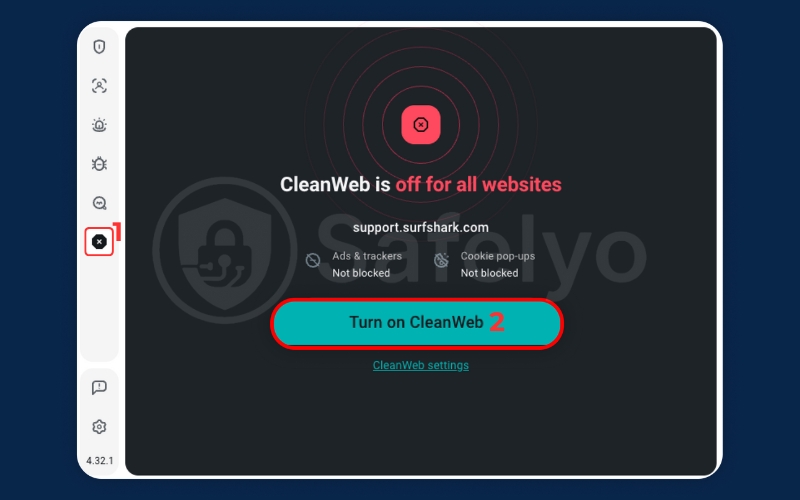
If you upgrade to the Surfshark One or One+ tier, it transforms into a total security suite. You get Antivirus, Alert (real-time data breach monitoring), and Search (a private, ad-free search engine). For a few dollars more, you effectively replace three different subscriptions (VPN, Antivirus, ID Protection) with one app.
These features don’t necessarily make Surfshark “more secure” than ExpressVPN, but they make it more versatile. If you value anonymity tools, identity protection, and customization over raw stability, Surfshark clearly offers more to experiment with.
Winner: Surfshark.
If you want a pure, distraction-free VPN, ExpressVPN is great. But in terms of raw feature count and “bang for your buck”, Surfshark’s ecosystem is undeniable.
9. Torrenting & P2P Support
For users looking to download large files safely, both providers are excellent choices for anonymous torrenting, but they handle P2P traffic differently.
ExpressVPN: Unrestricted freedom
ExpressVPN keeps it incredibly simple: Every single server allows P2P traffic. You don’t need to search for “special” servers or change any settings. You simply connect to the fastest location (like the US or UK) and start your torrent client. Combined with the high speeds of the Lightway protocol and a solid Kill Switch, it offers a seamless and secure experience for torrenting.
Surfshark: Smart detection
Surfshark handles things a bit differently. While not every server is optimized for P2P, they have a clever feature. If you connect to a standard server and launch a torrenting app (like BitTorrent or uTorrent), Surfshark automatically detects the activity and seamlessly switches you to a dedicated P2P server. It takes the guesswork out of the process.
Verdict: Tie
It is a draw. ExpressVPN wins on simplicity since the entire network is open. Surfshark wins on convenience with its auto-switching feature. Both provide the speed and encryption needed to keep your downloads private.
10. China & restricted networks: The ultimate test
For digital nomads and expats, this is the “boss level”. The Great Firewall of China is where most VPNs go to die.
ExpressVPN: The Gold Standard
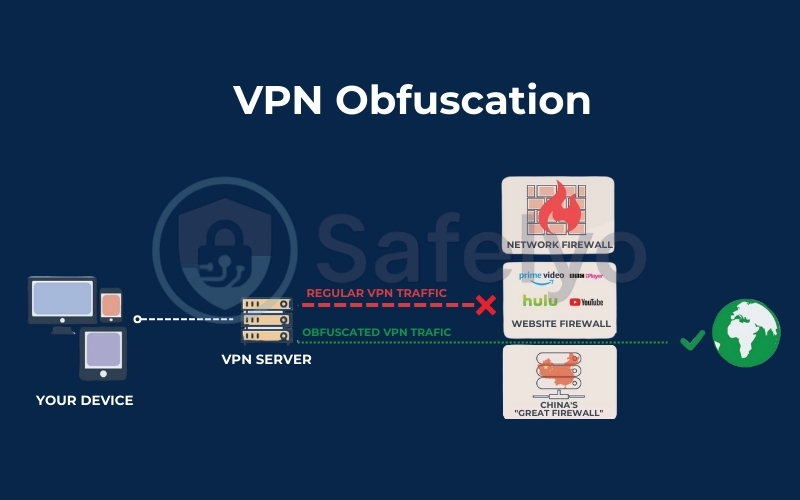
ExpressVPN has held the title of “Best VPN for China” for over years, and in 2026, it is still the reigning champion. The secret sauce is its Automatic Obfuscation, which adds an extra layer of stealth to your existing encryption to bypass deep packet inspection.
Unlike other VPNs, where you have to toggle specific settings, ExpressVPN’s app automatically detects deep packet inspection (DPI) and disguises your VPN traffic as regular web traffic. You don’t need to be a tech wizard; you just press “Connect”, and it usually works – even during heavy censorship crackdowns.
Surfshark: Good, But Not Bulletproof
Surfshark fights back with its NoBorders Mode, which automatically activates when it detects a restricted network. It gives you a curated list of servers designed to bypass blocks.
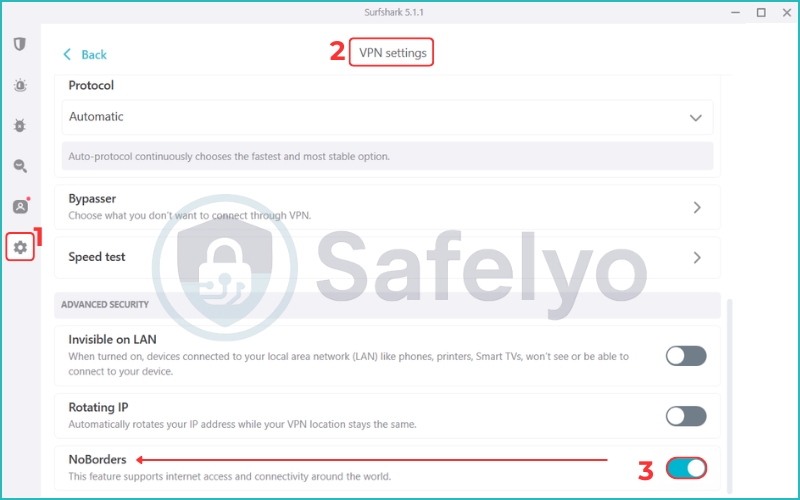
While it works reasonably well, my testing shows it lacks the brute-force consistency of ExpressVPN. You might find yourself reconnecting frequently or facing slower speeds as the VPN protocol fights to stay hidden.
Winner: ExpressVPN.
If you are boarding a plane to Beijing, Dubai, or Tehran, do not gamble. ExpressVPN is the only one I would trust to keep my Gmail and WhatsApp working 24/7.
11. FAQs about the ExpressVPN and Surfshark comparison
Is ExpressVPN faster than Surfshark?
Yes, generally speaking. Thanks to its lightweight Lightway protocol, ExpressVPN connects faster (often in less than a second) and offers slightly lower ping times, which is better for gaming. However, for regular web browsing or streaming, Surfshark’s WireGuard protocol is very fast, and the difference is barely noticeable for the average user.
Can I really share my Surfshark account with friends?
Absolutely. Surfshark’s Unlimited Devices policy is genuine. You can log in on your devices, your family’s tablets, and even give your login to a friend. There are no strict limits on concurrent connections, making it the most generous option on the market.
Does ExpressVPN work well with Netflix?
Yes, it is excellent for Netflix. While it might have fewer server locations than Surfshark, the servers it does have are highly optimized. I found it loaded 4K streams almost instantly with zero buffering, and it consistently unlocks major libraries like the US, UK, and Japan.
12. Conclusion
So, is the price difference worth it?
- Pick Surfshark if: You are budget-conscious, have a large family with dozens of devices, or want a “do-it-all” security suite with built-in ad blocking. It is the undisputed king of value. Plus, their responsive customer support ensures you are never left dealing with technical issues alone.
- Pick ExpressVPN if: You are a frequent traveler, especially to China, and need the easiest way to protect your Smart Home via a router. Alternatively, you may simply demand the most stable, “set-it-and-forget-it” experience money can buy.
Still undecided? You can explore more in-depth analyses in our VPN Comparisons category. At Safelyo, we are committed to helping you find the perfect digital shield.
Ready to choose? Get the best value deal with Surfshark, or invest in premium privacy with ExpressVPN now.