Are you frustrated by geographical blocks restricting your favorite shows but worried a VPN will slow down your internet speed? Understanding what is SmartDNS is the key to unlocking global streaming libraries on devices that do not even support security apps, like your smart TV or gaming console.
In this complete 2026 guide, we will break down exactly how this proxy technology works, compare it against traditional VPNs, and provide step-by-step instructions to set it up flawlessly on any device
Key Takeaways
- The direct answer: SmartDNS is a specialized proxy service that reroutes your device’s domain name queries to bypass geographic blocks on popular streaming networks.
- Uncompromised speed: Because it does not encrypt your data, this technology maintains your maximum baseline internet speed for smooth, buffer-free 4K streaming.
- Broad compatibility: It is highly versatile and works perfectly on hardware that cannot run standard VPN software, including older Smart TVs and gaming consoles.
- Zero privacy protection: It does not hide your public IP address or encrypt your traffic, meaning you must never use it for data protection on public Wi Fi networks.
- The smart alternative: We highly recommend selecting a premium VPN provider that includes this DNS proxy service for free within its standard subscription.
1. What is SmartDNS?
SmartDNS is a specialized technology designed to bypass geographical restrictions by altering how your device handles domain name requests. It acts as an intelligent digital decoy, rerouting only the specific location data needed to trick streaming platforms into believing you are accessing their service from an approved country.
Unlike a Virtual Private Network, this service does not assign you a new IP address or encrypt your overall internet traffic. By skipping heavy encryption protocols, it maintains your original baseline internet speed, making it the perfect tool for buffer-free high-definition video streaming.
Because it does not require dedicated software to run, it is incredibly versatile across different hardware ecosystems. It is primarily used to unblock foreign media catalogs on devices that natively reject VPN applications, such as Smart TVs, gaming consoles, and legacy streaming sticks.
2. How does SmartDNS actually work?
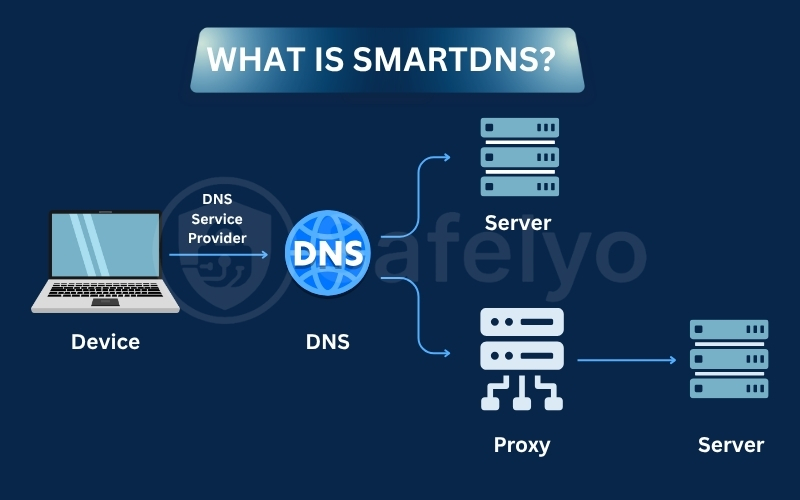
To understand why this tool is so incredibly fast, we need to look under the hood. SmartDNS functions as an intelligent traffic director that intercepts specific connection requests without applying heavy encryption to your entire network.
2.1. The DNS rerouting process
When you visit a website, your device sends a DNS request to find the corresponding IP address. Normally, your local internet provider handles this query, which immediately reveals your true physical location to the destination server.
SmartDNS intelligently intercepts requests destined for geo-restricted streaming platforms. Instead of returning the actual website address, it returns the IP address of a specialized proxy server located in an approved region like the United States.
The streaming platform reads this proxy location and grants you full access to the blocked content. Because only the location data is rerouted while your actual video stream remains unencrypted, your connection speeds stay incredibly fast and buffer-free.
2.2. Why SmartDNS requires IP whitelisting
Unlike standard privacy applications, this technology does not require a traditional username and password to log in. Instead, providers use a strict authentication method known as IP whitelisting to verify that you are an active, paying customer.
You must register your home network’s current public IP address within your provider’s account dashboard. When the SmartDNS server receives a query, it checks this secure database to ensure the request is coming from your authorized home network.
If your home router reboots and assigns you a new dynamic IP address, the service will suddenly stop working. You will need to log back into your account and manually update your whitelisted address to restore your streaming access instantly.
3. SmartDNS vs VPN vs Proxy: What is the difference
While all three tools can help you bypass online restrictions, they utilize entirely different underlying technologies. Understanding these core technical differences is essential for choosing the correct tool for your specific digital goals.
| Feature or Metric | SmartDNS | Proxy Server | Virtual Private Network |
|---|---|---|---|
| Primary Purpose | Bypassing streaming geo-blocks | Basic IP masking and filtering | Total online privacy and security |
| Encryption Level | None | Low to None | Military-grade encryption |
| Speed Impact | None (Fastest option) | Varies greatly (Often slow) | Noticeable but minimal |
| Hides Real IP | No | Yes (Browser traffic only) | Yes (Entire device traffic) |
| Device Support | Works on all smart devices | Mostly browser-based | High via dedicated apps |
3.1. Why SmartDNS is faster than a VPN
Encryption is mathematically heavy and requires significant processing power. Because a VPN scrambles every single byte of data leaving your device, it naturally introduces a computational overhead that can slightly reduce your maximum download speeds.
SmartDNS skips this encryption process entirely. By only rerouting the lightweight location ping, the heavy 4K video data flows directly from the streaming server to your television. This direct connection ensures your network operates at its maximum baseline speed without buffering.
3.2. Why a VPN provides better online security
While SmartDNS is excellent for entertainment, it offers absolutely zero cybersecurity benefits. Your internet service provider and local network administrators can clearly see every website you visit, making it highly dangerous to use on public networks.
A premium VPN creates an impenetrable encrypted tunnel, securing your digital identity from hackers and aggressive ISP tracking. If your primary goal is protecting personal data or masking your browsing history, a full VPN application is the only acceptable solution.
4. 5 scenarios when you should use SmartDNS
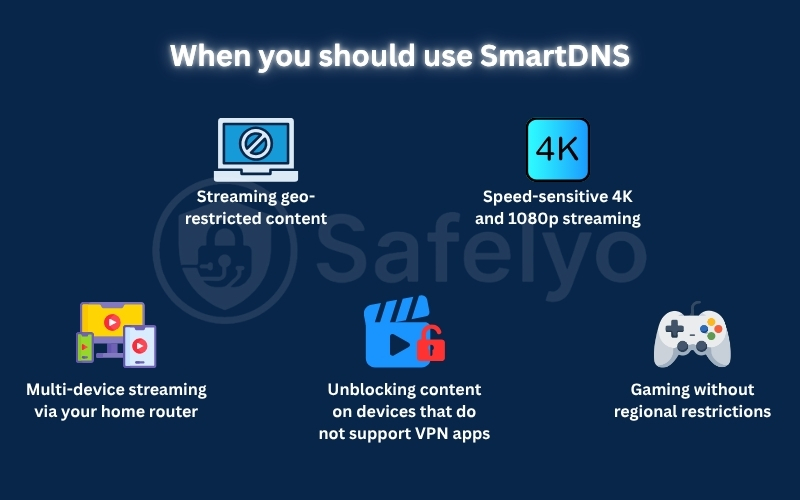
This technology is not a universal security tool, but it excels in specific entertainment scenarios. You should use this proxy method when your primary goal is fast video playback on hardware that cannot run standard privacy applications. We recommend evaluating your exact needs against these five common situations.
4.1. Streaming geo-restricted content
This service is perfectly tailored for users who want to access foreign media catalogs like US Netflix or BBC iPlayer from abroad. It returns a proxy address instead of your real location, which tricks the platform into granting you full access to blocked television shows.
However, major streaming platforms continuously upgrade their blocking methods. If a platform utilizes advanced IP cross-checking to verify your physical address, this DNS routing might fail, making a full VPN application a more reliable alternative for those specific sites.
4.2. Speed-sensitive 4K and 1080p streaming
This technology is the absolute best choice for high-definition video because it bypasses regional blocks without adding heavy encryption. This allows your television to utilize its full internet bandwidth without any artificial throttling from security protocols.
Streaming a show in 4K resolution requires a sustained connection of at least fifteen megabits per second. Because the actual video data travels directly to your screen without passing through an encrypted tunnel, you experience zero buffering delays during playback.
4.3. Unblocking content on devices that do not support VPN apps
You need this DNS solution when you want to unblock content on entertainment devices that lack the operating system capabilities to install native security apps. This includes older Smart TVs, PlayStation consoles, and legacy streaming sticks like the Chromecast.
Activating the service only requires modifying the manual network settings within the basic configuration menu of your hardware. This straightforward process requires no additional processing power or third-party software installation to work flawlessly.
4.4. Multi-device streaming via your home router
Setting up these custom DNS addresses directly on your home wireless router is the fastest way to unblock streaming services for every single screen in your house. Configuring individual devices becomes incredibly tedious for large households with many smart gadgets.
Once configured on the central router, every smartphone, tablet, or television that connects to your wireless network will automatically inherit the new location settings. This allows different family members to access foreign media simultaneously with zero extra setup.
4.5. Gaming without regional restrictions
This proxy service allows you to bypass regional gaming restrictions on consoles without increasing your ping or introducing encryption lag. Gamers frequently travel and still wish to connect to their home region servers to play competitively with their local friends.
It achieves this by routing your initial login and matchmaking requests through a proxy server while the actual rapid gameplay data flows directly. Keep in mind that if the game server strictly requires a localized IP address, this specific method might fail.
5. Popular streaming services supported by SmartDNS
This technology is highly effective at unlocking geographically restricted media catalogs, but it does not universally unblock every website. It only grants access to specific streaming platforms that your chosen provider actively supports and maintains on their proxy servers.
Top-tier providers typically guarantee access to major regional television networks and entertainment hubs. You can expect flawless high-definition playback on popular platforms, including Hulu, Disney+, BBC iPlayer, Max, and Amazon Prime Video, without buffering.
However, it is incredibly important to note that accessing the full global Netflix catalog remains highly unstable via DNS routing alone. The company now employs aggressive IP cross-checking techniques that continuously verify your physical location during video playback.
If the streaming platform detects a mismatch between your proxy request and your real physical IP address, it will block your access immediately. We strongly recommend using a full premium VPN application, rather than a proxy tool, for reliable access to global Netflix libraries.
6. The main security risks and limitations of SmartDNS
While this proxy technology excels at unlocking global entertainment, it completely fails as a cybersecurity tool. Understanding its severe privacy limitations is crucial before configuring it on your primary home devices.
6.1. Lack of encryption and ISP monitoring
The most significant flaw is the absolute absence of data encryption. Because your internet traffic travels in plain text, your internet service provider can easily monitor every domain you visit and log your daily browsing habits.
This vulnerability becomes highly dangerous if you use the service on public networks. Without an encrypted barrier, malicious actors sharing your local connection can intercept your sensitive passwords or execute man-in-the-middle attacks effortlessly.
6.2. Your real IP address remains exposed
This service only alters your domain name requests, leaving your physical IP address completely visible to the public web. Websites, advertisers, and government agencies can still pinpoint your exact real-world location instantly.
Because it cannot mask your digital identity, you cannot use it to bypass strict national firewalls or targeted IP bans. If a streaming platform cross-checks your actual IP against the proxy location, your access will be blocked immediately.
6.3. The severe risks of free SmartDNS providers
We strongly advise against utilizing zero-cost proxy services found randomly online. Maintaining reliable servers requires money, so free providers often survive by secretly logging your activity and selling your profile to data brokers.
Furthermore, malicious free providers frequently engage in dangerous DNS hijacking. They can intentionally redirect your legitimate web requests to fraudulent phishing sites designed to steal your banking credentials or distribute computer malware.
7. Best VPN providers with SmartDNS support
For many users, a standalone SmartDNS subscription may not be necessary. Several leading VPN providers include Smart DNS functionality as part of their plans, allowing you to access streaming services on devices that do not support VPN applications while still benefiting from VPN protection on your computers and mobile devices.
7.1. NordVPN SmartPlay
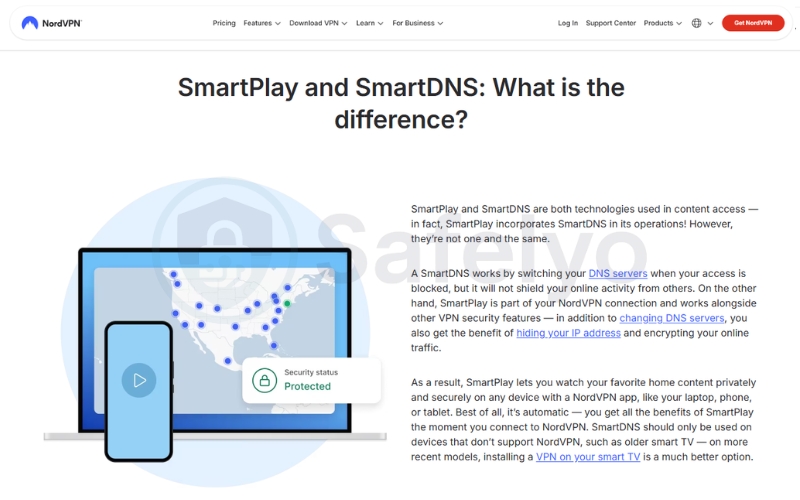
NordVPN is one of the most user-friendly options thanks to its SmartPlay technology, which combines Smart DNS functionality with the VPN service. On supported devices, SmartPlay works automatically in the background, helping users access streaming content without requiring additional configuration.
For devices that cannot run the NordVPN app directly, such as certain smart TVs and streaming devices, users can configure custom DNS settings through their Nord Account dashboard. Alongside its streaming capabilities, NordVPN also offers a large server network and advanced security features, making it a well-rounded solution for both entertainment and privacy.
7.2. ExpressVPN MediaStreamer
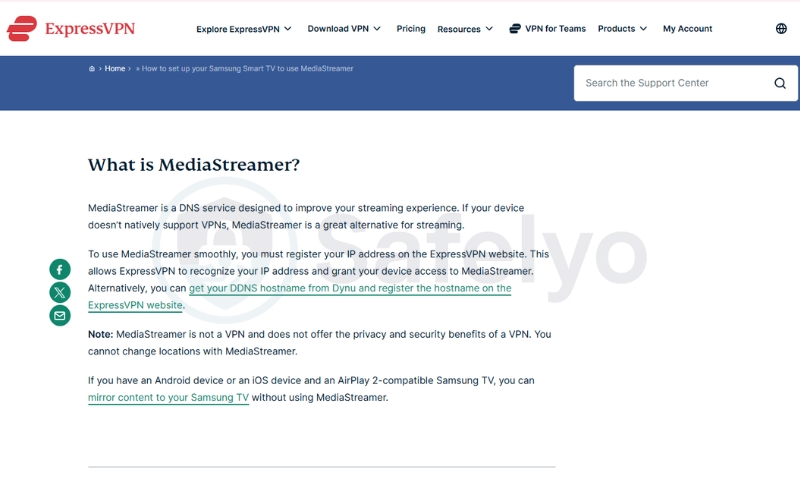
ExpressVPN includes a DNS-based streaming feature called MediaStreamer, designed for devices that do not support native VPN applications. This includes many smart TVs, gaming consoles, and other streaming hardware that may lack built-in VPN compatibility.
Unlike a traditional VPN connection, MediaStreamer does not encrypt internet traffic or hide your IP address. Instead, it uses DNS routing to help compatible devices access supported streaming services. The setup process is relatively simple, and the service is known for its stable performance on a wide range of streaming devices. MediaStreamer is included with every ExpressVPN subscription at no additional cost.
8. How to set up SmartDNS on your devices
Configuring this proxy service requires you to modify the network settings on your hardware manually. You can choose to apply the settings to a single entertainment device or configure your home router to unblock content across your entire household.
8.1. How to configure SmartDNS on a Smart TV or console
Applying the settings to a single console or television is the best way to unblock restricted content without affecting your other devices.
- Step 1: Log into your VPN provider’s account dashboard and register your current public IPv4 address to their authorized whitelist.
- Step 2: Locate the SmartDNS feature within your settings and copy the primary and secondary DNS addresses provided by your service.
- Step 3: Navigate to your television or console’s network settings and select the manual DNS configuration option.
- Step 4: Input the DNS addresses you copied, save the changes, and restart your device to apply the location switch.
8.2. How to set up SmartDNS on your home router
Configuring the DNS on your central router ensures that every single device connected to your Wi-Fi automatically bypasses regional blocks.
- Step 1: Access your router’s administration panel by typing its gateway IP address into a web browser on your computer.
- Step 2: Locate the DNS settings menu, which is typically found under the WAN, Network, or Internet Setup tabs.
- Step 3: Change the DNS assignment method from automatic to manual and enter your provider’s SmartDNS addresses.
- Step 4: Save the new configuration and reboot your router to finalize the network-wide unblocking system.
9. Troubleshooting: What to do if SmartDNS is not working
Even with a correct setup, network changes can occasionally disrupt your proxy connection. Most streaming errors can be resolved in seconds by addressing the two most common technical issues.
- Update your IP address on the provider’s dashboard
The most common cause of a sudden service outage is a change in your public IP address. Because residential internet providers assign dynamic IP addresses, your home network IP will periodically change without your knowledge.
When this occurs, the SmartDNS server stops recognizing your connection because your new address has dropped from their authorized whitelist. To fix this, simply log back into your account dashboard, locate the registered IP section, and update it to your current network address.
- Flush your DNS cache or restart the device
If you have updated your whitelisted IP address but still see regional blocks, your device is likely holding onto old network data. Computers and smart televisions store DNS records in a local cache to speed up web browsing.
If this cache is not cleared, your device will continue trying to connect using outdated location data instead of your new proxy settings. You must flush your DNS cache (using command lines on a PC) or unplug your Smart TV from the wall socket for thirty seconds to force a memory reset.
10. FAQs about SmartDNS
Is SmartDNS legal to use?
Yes, modifying your DNS routing is completely legal and does not violate any general internet laws. However, using this service to access geo-restricted content may violate the specific Terms of Service agreements of individual streaming platforms.
Does SmartDNS hide my IP address?
No, this technology does not alter or mask your physical IP address in any way. Your real IP address remains fully visible to your internet service provider, the government, and every single website you choose to visit.
Can I use a free SmartDNS service?
We strongly advise against using free providers due to severe security risks. Free services often monetize your connection by logging your browsing history or exposing your network to dangerous DNS hijacking attacks.
What is the difference between SmartDNS and Dynamic DNS?
SmartDNS bypasses regional blocks by rerouting DNS queries for media streaming. Dynamic DNS (DDNS) maps a permanent hostname to a constantly changing dynamic IP address, which is necessary for establishing remote access to home networks.
Will SmartDNS work for unblocking Netflix?
While it can occasionally unblock original Netflix shows, the connection remains highly unstable. Netflix utilizes aggressive IP cross-checking, meaning a full VPN connection is much more reliable for accessing global libraries.
Does SmartDNS protect my data on public Wi-Fi?
No, this technology provides absolutely zero encryption. When you connect to open networks at cafes or airports, your passwords and personal files remain completely vulnerable to local hackers unless you use a VPN.
11. Conclusion
Understanding exactly what is SmartDNS reveals how this technology bypasses geo-blocks on devices that lack native app support. By prioritizing raw connection speed over heavy data encryption, it ensures your 4K media playback remains completely smooth and buffer-free. However, your physical IP address remains fully exposed to ISPs.
Since it cannot replace a VPN for privacy, we recommend selecting a premium provider that includes this proxy technology within its standard subscription. To find the best secure bundles and explore more detailed tutorials, visit our comprehensive VPN Guides at Safelyo to take full control of your digital privacy today.