
Surfshark is worth it, safe, and fast. It is our best-value VPN pick for 2026. The service delivers strong security, speeds averaging 420.47 Mbps, and reliable streaming unblocking across major platforms such as Netflix US, BBC iPlayer, Disney+, and Prime Video. At $2.49 per month, its unlimited simultaneous device connections provide cost-effective coverage for multi-device households.
1. Surfshark Overview: Safelyo score, key facts, pros and cons
Surfshark scores 9.1 out of 10 in our 2026 tests. It passed every leak test, runs a no-logs policy verified by a Deloitte audit, and unblocked 28 Netflix regions such as Netflix US, Netflix UK, and Netflix Japan. Its main drawback is the renewal price, which rises 2.6× on Starter (up to 3.0× on One) after the initial two-year term.
VPN Score: 9.1/10 Surfshark VPN - Best for streaming & total privacy Best for: Households, travelers, and unlimited connections.
Attribute
Surfshark
Safelyo rating
9.1/10
Starting price
$2.49/mo (2-year plan + 3 months)
Money-back guarantee
30-day money-back
Free trial / Free plan
7-day free trial (Web, iOS, Android)
Servers and countries
4,500+ servers in 100 countries
Simultaneous connections
Unlimited
Jurisdiction and owner
The Netherlands (Surfshark B.V., Cyberspace group)
No-logs policy
Audited by Deloitte, 2025
Protocols and encryption
WireGuard, OpenVPN, IKEv2, Dausos (macOS); AES-256, ChaCha20, post-quantum
Streaming
Netflix: 28 libraries; BBC iPlayer, ITVX, Disney+, Hulu, Max, Prime Video, Channel 4
Torrenting / P2P
✅ All servers (no port forwarding)
Speed
420.47 Mbps average
Apps & Extensions
Windows, macOS, Linux, Android, iOS, Fire TV, Apple TV, routers; Chrome, Firefox, Edge extensions
Customer support
24/7 live chat, email
To see how each category is weighted and evaluated, read our full methodology on how we test and review VPNs.
Pros
- Unlimited simultaneous connections on all tiers
- Fast download speeds averaging 420+ Mbps
- Reliable streaming access unblocking 28 Netflix regions, BBC iPlayer, Disney+, and Hulu
- Budget-friendly starting price from $2.49/mo backed by a 30-day money-back guarantee
- 4,500+ diskless (RAM-only) servers in 100 countries
- Independently audited no-logs policy by Deloitte
- Advanced built-in tools including CleanWeb ad blocker, MultiHop, and IP Rotator
Cons
- Higher renewal rates (increasing up to 3.0×) after the initial 2-year plan ends
- No port forwarding support for private torrent seeding or custom hosting
- Jurisdiction in the Netherlands (member of the Nine Eyes intelligence alliance)
- Inconsistent performance in heavily censored regions like mainland China
- Smart DNS feature discontinued in 2026
What changed in 2026: Surfshark rolled out Post-Quantum Encryption on WireGuard, launched its proprietary Dausos protocol on macOS, updated CleanWeb 2.0, delivered a complete redesign of its Android TV application, and retired its legacy Smart DNS tool.
2. Is Surfshark worth it? Pricing, renewal, and free trial
Score: 9.0 / 10
Surfshark is worth its $2.49/mo entry price for unlimited device connections, provided you track its higher auto-renewal rates.
2.1. Plans, prices, and renewal cost
Surfshark offers three tiers. Long-term plans require one upfront payment for the full period, and annual renewal rates increase up to 3× once your first term ends.
| Plan | Best For | 2-Year Plan (+3 Months) | 1-Year Plan (+3 Months) | Monthly Plan | Renewal After 2-Year Plan | Increase |
|---|---|---|---|---|---|---|
| Starter | Standard VPN & streaming | $2.49/mo($67.23 total) | $3.39/mo($50.85 total) | $16.45/mo | $79.00/yr | 2.6× |
| One | Antivirus & alert protection | $2.79/mo($75.33 total) | $3.59/mo($53.85 total) | $18.95/mo | $99.00/yr | 3.0× |
| One+ | Data broker removal (Incogni) | $4.49/mo($121.23 total) | $7.49/mo($112.35 total) | $21.85/mo | $119.00/yr | 2.2× |
As of October 2026, prices apply to US customers and reflect current promotional rates recorded via official checkout channels. Amounts do not include applicable state sales tax or local VAT.
- Surfshark Starter: Includes core VPN functionality, CleanWeb 2.0, and Alternative ID. CleanWeb 2.0 blocks ads, trackers, and malware at the DNS level; it stops video ads and pop-ups, but can occasionally break online store checkout pages. Alternative ID creates a masked name and proxy email address that forwards messages to your real inbox, keeping your primary email safe from spam.
- Surfshark One: Adds 24/7 antivirus protection, dark web breach alerts, and a private search engine. Independent AV-Test assessments awarded Surfshark Antivirus a 6.0/6.0 protection score.
- Surfshark One+: Adds Incogni, an automated privacy service that submits removal requests to erase personal records from commercial data broker databases.
Surfshark supports multiple payment options, including credit cards, PayPal, Google Pay, Apple Pay, and cryptocurrency.
2.2. Free trial, refund, and how to cancel
Surfshark provides testing options and refund safeguards for new subscribers to evaluate connection stability before committing long-term:
- 7-Day Free Trial: Available on Android, iOS, and through the official website. You need to enter a payment method, and it converts to a paid subscription unless canceled before day 7.
- 30-Day Money-Back Guarantee: Available across all subscription tiers and standard payment methods.
- How to Turn Off Auto-Renewal: Open Subscription in your Surfshark account and choose Turn off auto-renewal; paid months stay active until the term ends.
3. Is Surfshark safe? Privacy and security
Score: 9.3 / 10
Surfshark is a legitimate VPN matching top industry privacy standards. Headquartered in the Netherlands, the provider operates under Dutch and EU privacy laws without data retention mandates. It backs this legal foundation with strong encryption, verified no-logs compliance, and built-in privacy tools.
3.1. Encryption, protocols, leak tests, and kill switch
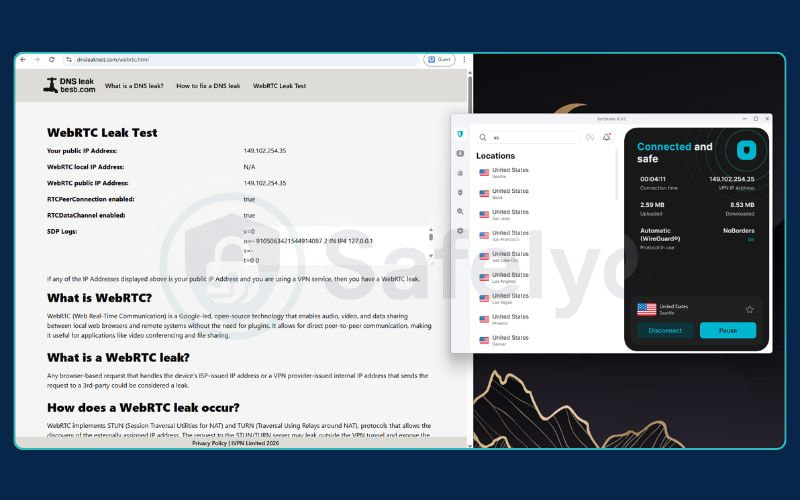
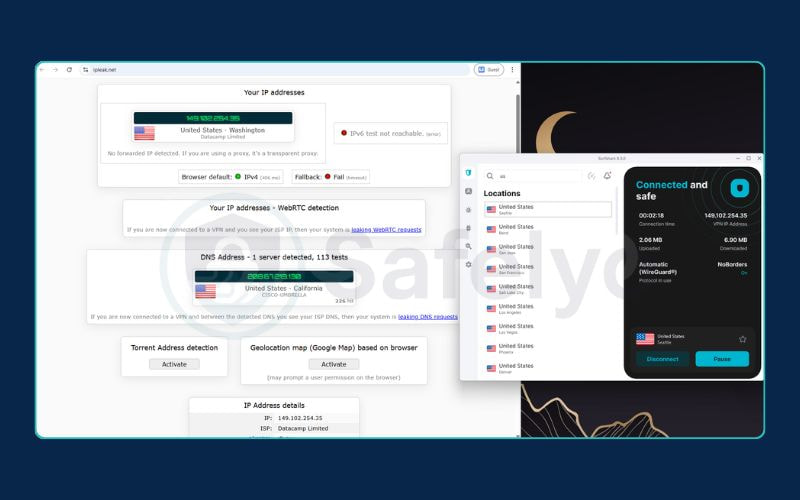
Surfshark uses WireGuard as its main protocol, with OpenVPN and IKEv2 also available. In our leak tests, it showed no IP, DNS, or WebRTC leaks.
| Protocol & Devices | Security & Encryption Details |
|---|---|
| WireGuard (All apps) | ChaCha20 encryption with Post-Quantum (ML-KEM) protection. Default and fastest option. |
| OpenVPN UDP/TCP (All apps) | AES-256-GCM encryption. Supports Camouflage mode to hide VPN use. |
| IKEv2 (Windows, macOS, iOS) | Stable mobile-friendly protocol. |
| Dausos (macOS App Store) | Custom protocol audited by Cure53. |
We ran every leak test on multiple servers across different regions, and Surfshark passed all four:
- DNS Leak Protection: Pass. No leaks detected on ipleak.net or dnsleaktest.com.
- IPv6 Leak Protection: Pass. IPv6 traffic stayed securely inside the tunnel.
- WebRTC Leak Protection: Pass. The real IP remained hidden in all browsers.
- Kill Switch Functionality: Pass. The kill switch shut down traffic immediately when the VPN connection dropped.
3.2. No-logs policy and jurisdiction
Surfshark operates under Surfshark B.V., based in Amsterdam, Netherlands. While the Netherlands is a member of the Nine Eyes intelligence alliance, Dutch law does not enforce mandatory data retention on consumer VPN services.
In 2022, Surfshark merged with Nord Security under the parent holding group Cyberspace. However, both brands operate as separate companies with independent server networks, technical infrastructure, and staff.
The provider maintains a verified no-logs stance, offset by a brief metadata retention window:
| Data Type | Stored by Surfshark? | Retention Period |
|---|---|---|
| Visited domains & search history | No | Never recorded |
| Downloaded content & torrent files | No | Never recorded |
| Incoming/outgoing IP addresses | No | Never recorded |
| User ID & connection timestamps | Yes (Temporary) | Deleted within 15 minutes of disconnection |
| Account email & billing info | Yes | Kept for active account management |
The 15-minute metadata window allows the network to balance concurrent connections and prevent server abuse without logging what users do online.
3.3. Independent audits
Surfshark submits its infrastructure and codebases to regular independent cybersecurity examinations:
| Auditing Firm | Year Completed | Audit Scope | Report Availability |
|---|---|---|---|
| Cure53 | 2018 | Browser extension code security | Publicly available |
| Cure53 | 2021 | Server architecture and infrastructure | Publicly available |
| Deloitte | 2023 | No-logs compliance and operational controls | Accessible to logged-in users |
| MASA | 2023 | Mobile App Security Assessment for Android | Publicly available |
| SecuRing | 2025 | Android application security architecture | Publicly available |
| Deloitte | 2025 | Verification of no-logs policy and servers | Accessible to logged-in users |
| Cure53 | 2026 | Dausos proprietary protocol assessment | Summary publicly available |
The MASA assessment validated that Surfshark’s Android client meets strict mobile application security standards against data leakage.
3.4. Advanced obfuscation and anonymity tools
Surfshark incorporates specialized tools to obscure VPN usage and protect user identities:
- IP Rotator (Nexus): Changes your public IP address every 5 to 10 minutes without disconnecting active downloads or video streams.
- Camouflage Mode (Obfuscation): Masks OpenVPN traffic as standard HTTPS browsing to prevent network operators from detecting VPN protocols.
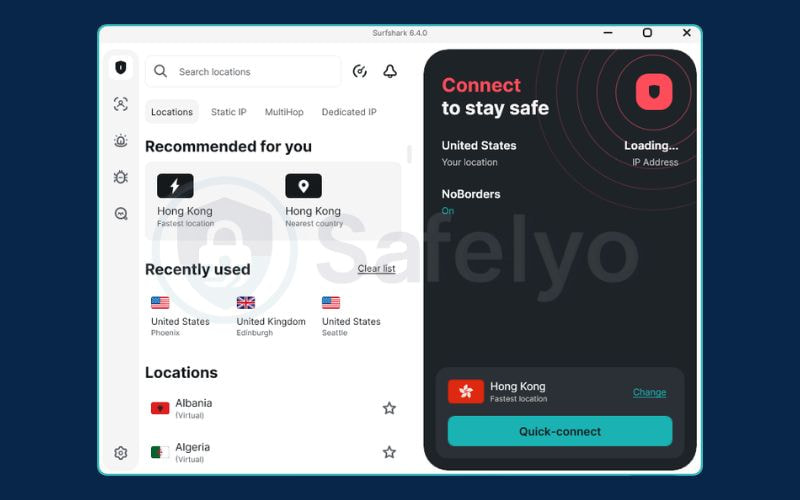
- NoBorders: Automatically activates on restricted Wi-Fi networks to display servers capable of bypassing local firewalls. (Note: Neither Camouflage nor NoBorders reliably circumvents the Great Firewall of China).
4. Surfshark speed test results
Score: 9.3 / 10
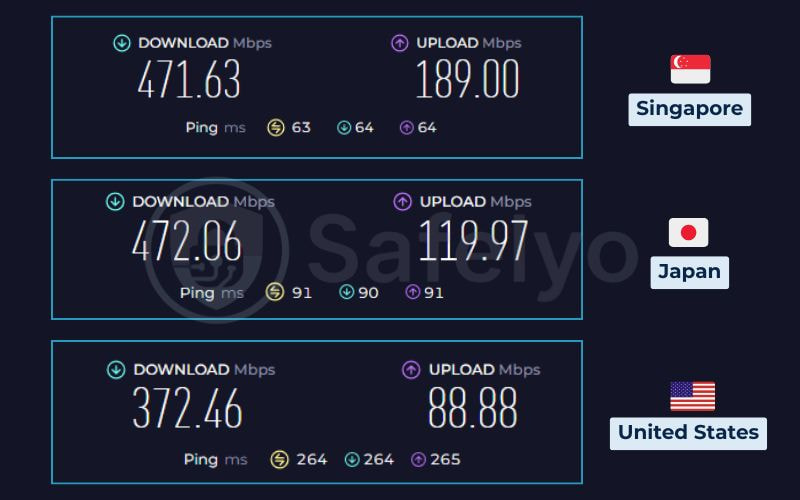
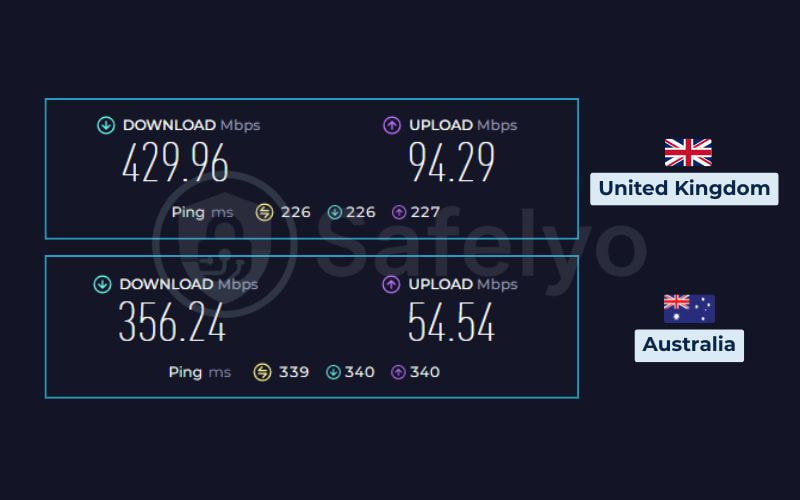
Surfshark is fast, averaging 420.47 Mbps across five locations and keeping 47.2% of our no-VPN speed.
We tested from Vietnam over WireGuard against an 890.15 Mbps baseline. The retention looks modest because our baseline line was nearly 1 Gbps. A 420 Mbps average still covers about 16 simultaneous 4K streams (25 Mbps each).
| Server location | Download (Mbps) | Upload (Mbps) | Ping (ms) | Speed retention (%) |
|---|---|---|---|---|
| No VPN | 890.15 | 469.04 | 3 | 100% |
| Singapore | 471.63 | 189.00 | 63 | 53.0% |
| Japan | 472.06 | 119.97 | 91 | 53.0% |
| Australia | 356.24 | 54.54 | 339 | 40.0% |
| UK (London) | 429.96 | 94.29 | 226 | 48.3% |
| US (Seattle) | 372.46 | 88.88 | 264 | 41.8% |
| Average (5 locations) | 420.47 | 109.34 | 196.6 | 47.2% |
Servers closer to our test location in Vietnam kept the most speed: Japan and Singapore each retained 53.0%, while London, Seattle, and Australia retained 40.0% to 48.3%. Australia was the slowest, at 356.24 Mbps download and 339 ms ping.
Upload speed averaged 23% of baseline, which is still plenty for Zoom calls and cloud uploads. Ping stayed under 100 ms on the two Asian servers and rose to 226-339 ms on the other three. Speed fell with distance from our test location, so connect to a nearby server for the best results.
5. Does Surfshark work for streaming?
Score: 9.0 / 10
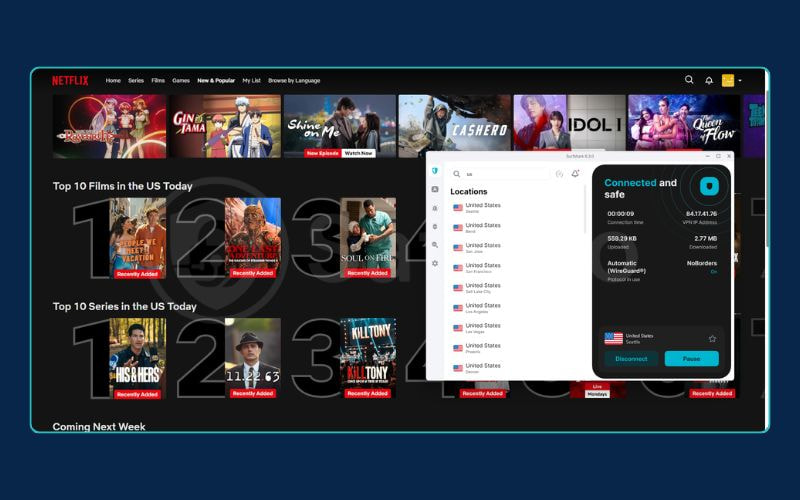
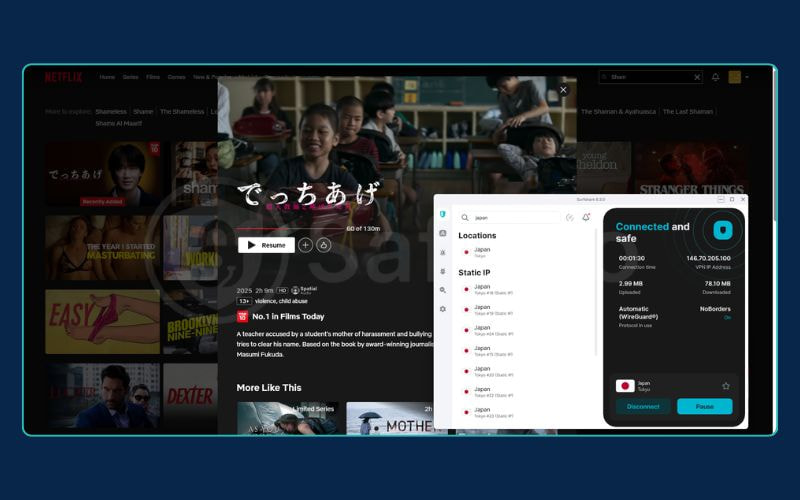
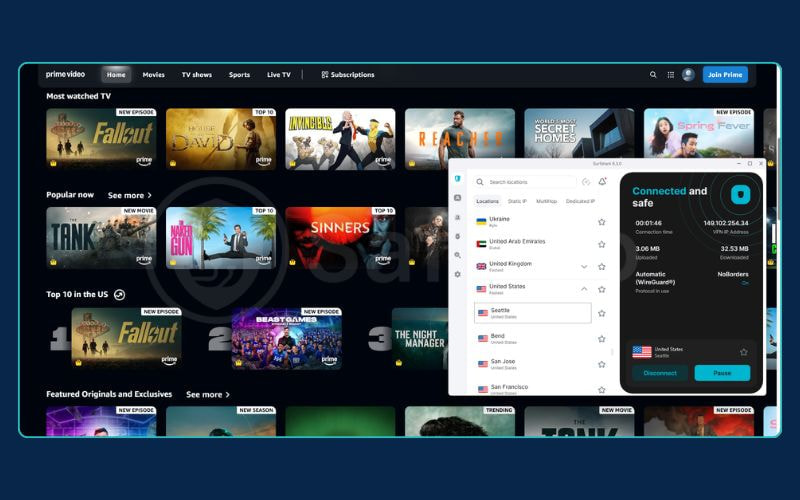
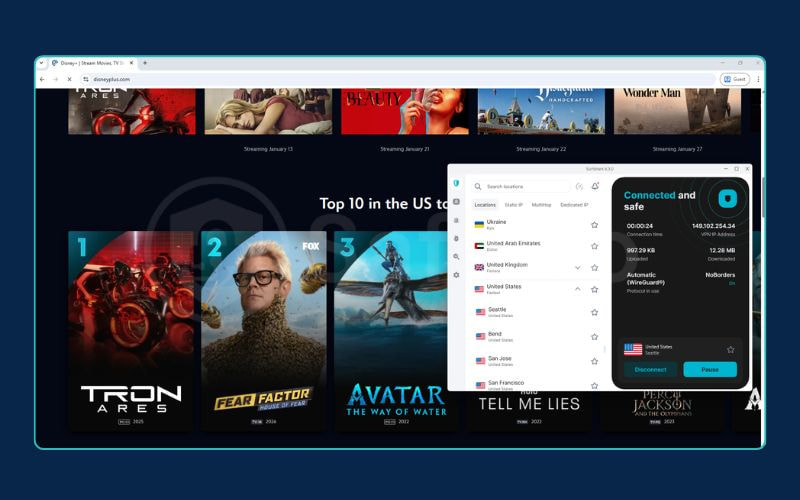
Surfshark is a reliable VPN for streaming, unblocking regional libraries across Netflix, BBC iPlayer, Disney+, Hulu, Max, and Prime Video in our tests. It also maintains smooth, private video playback during live sports without local broadcast blocks.
| Streaming service | Status | Note |
|---|---|---|
| Netflix (US) | Works | 4K Ultra HD, no buffering on WireGuard |
| Netflix (UK) | Works | 4K Ultra HD, no buffering on WireGuard |
| Hulu (US) | Works | Opened on the first attempt |
| Disney+ (US) | Works | Loaded on the first try, no retry needed |
| Prime Video (US) | Works | Worked immediately on the first attempt |
| Max (US) | Works | No proxy errors, first connection succeeded |
| BBC iPlayer (UK) | Works | Unlocked on the first attempt |
| ITVX (UK) | Works | Unlocked on the first attempt |
| Channel 4 (UK) | Works | Unlocked on the first attempt |
Netflix libraries outside the US and UK vary by region, so here are ten representative libraries from our 40-library test:
| Netflix library | Status |
|---|---|
| Canada | Works |
| Japan | Works |
| Germany | Works |
| Australia | Works |
| France | Works |
| South Korea | Works |
| India | Works |
| Brazil | Works |
| Colombia | Blocked |
| UAE | Blocked |
The 12 blocked libraries were Ukraine and Ireland in Europe; Pakistan and Indonesia in Asia-Pacific; Colombia, Peru, Ecuador, and Venezuela in Latin America; and the UAE, Egypt, Lebanon, and Kazakhstan in the Middle East and Central Asia.
In our tests, connecting to servers in non-restricted cities also removed local broadcast restrictions on MLB.tv and NBA League Pass.
To compare these results with other VPNs, see our guide to the best streaming VPN options, where Surfshark ranks #3.
6. Surfshark for torrenting
Score: 8.5 / 10
Surfshark is a safe VPN for torrenting, allowing P2P connections on all 4,500+ servers. However, it does not support port forwarding.
In our test, downloading a 1.08 GB Ubuntu torrent file took 2 minutes 12 seconds on Surfshark, compared to 1 minute 38 seconds on our unprotected connection.
- Torrent IP Leak Test: Pass. Only the virtual VPN IP was visible to other peers.
- Kill Switch Protection: Pass. Shuts down torrent traffic immediately if the VPN drops.
- Port Forwarding: No. You cannot open inbound ports, which slows down seeding on private torrent sites.
- SOCKS5 Proxy: No. Dedicated proxy credentials are not available.
For safe torrenting, turn on the Kill Switch in settings before downloading. You can also use Bypasser to route only your torrent client through the VPN while keeping other apps on your normal network.
7. Surfshark for gaming
Score: 6.9 / 10
Surfshark works well for casual gaming on nearby servers, but high ping makes it a poor choice for competitive shooters.
- Local Ping (Singapore): 63 ms (up from our 3 ms baseline). Turn-based and casual games like Hearthstone and Among Us played smoothly without lag.
- Long-Distance Ping (US Seattle): 264 ms. Fast-paced games like Counter-Strike 2, Valorant, and cloud gaming on GeForce NOW suffered from noticeable input lag and delayed hits.
- Packet Loss: Below 1%. Connections stayed stable with zero mid-match disconnects.
Connecting to a nearby server is also useful for hiding your home IP address from DDoS attacks. However, if you play competitive multiplayer games where every millisecond counts, you should play without a VPN.
8. Surfshark server network
Score: 9.4 / 10
Surfshark’s server network is large and well-built, with coverage in 100 countries and RAM-only servers in every location. It operates over 4,500 servers on 6 continents, all with 10 Gbps ports.
| Network Specification | Infrastructure Details |
|---|---|
| Total Server Count | 4,500+ servers |
| Country Coverage | 100 countries worldwide |
| Hardware Security | 100% diskless (RAM-only) |
| Port Capacity | 10 Gbps minimum per server node |
| Server Options | Standard, Static IP, Dedicated IP (Add-on), MultiHop |
| Virtual Locations | Used in regions where physical server deployments are impractical |
For restrictive or difficult locations like India, Argentina, and Egypt, Surfshark uses virtual locations. For example, connecting to India gives you an Indian IP address, but routes your data through physical servers in Singapore.
9. Surfshark apps and ease of use
Score: 9.5 / 10
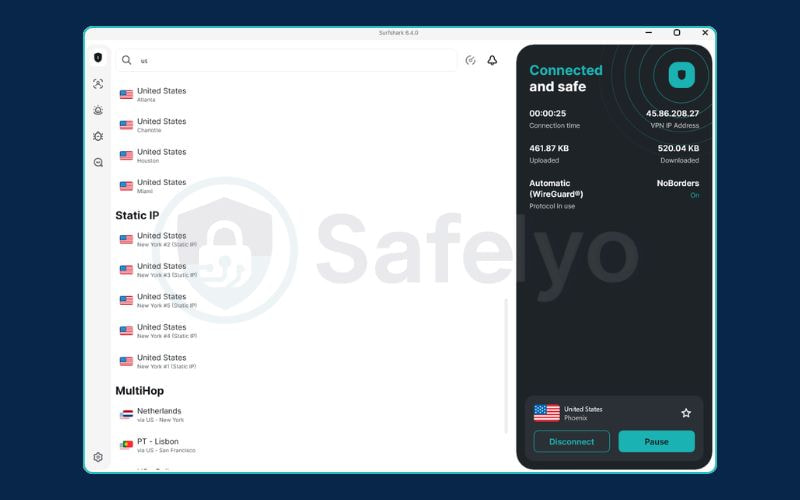
Surfshark provides clean, easy-to-use apps for desktop, mobile, and smart TVs. Its simple layout connects to servers in 2 to 4 seconds with a single click.
In our multi-device stress test, we ran five devices simultaneously (Windows PC, MacBook, iPhone, Android phone, and Fire TV) on a single account with zero connection drops or forced logouts.
9.1. Desktop and mobile app features
All core clients (Windows, macOS, Android, iOS, Linux) share a unified two-panel layout with 1-click server connections. Specialized application tools include:
| Feature | Windows | macOS | Android | iOS | Linux |
|---|---|---|---|---|---|
| Bypasser (Split Tunneling) | Yes | Yes | Yes | Yes | No |
| GPS Location Spoofing | No | No | Yes | No | No |
Key usability utilities:
- Bypasser (Split Tunneling): Routes selected local banking or payment apps outside the VPN tunnel to use your real IP, preventing security account blocks caused by foreign IP detection.
- GPS Location Spoofing (Android): Overrides device hardware GPS coordinates to match the connected VPN server location, resolving IP-versus-GPS mismatches that trigger strict location checks.
- EverLink (Auto-Reconnect): Automatically re-establishes the VPN tunnel when switching between Wi-Fi networks and mobile data without exposing unencrypted traffic.
- FastTrack: Optimizes handshake speeds to reduce connection queue times on high-load servers like Seattle and Sydney.
- Dynamic MultiHop: Chains connections through two separate VPN servers for double encryption, though this extra routing distance inherently reduces download speeds by 15% to 25%.
Note: On iOS, Bypasser is restricted to website URLs only and cannot exclude standalone mobile apps due to iOS platform sandboxing.
9.2. Smart TVs, routers, consoles, and browser extensions
Surfshark also supports streaming devices, gaming hardware, and web browsers, though features vary depending on what you connect:
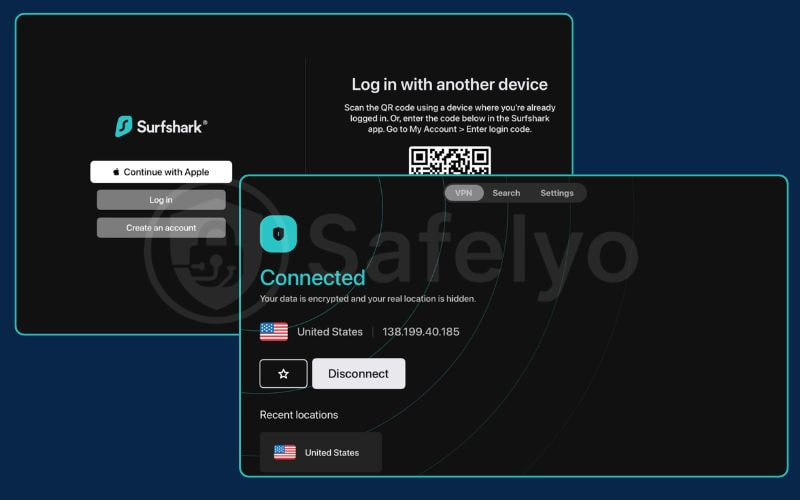
- Android TV & Fire TV: Native remote-friendly apps. Note: The 2026 redesign removed MultiHop and Static IP options on TV interfaces.
- Apple TV: Native tvOS 17+ app. Authenticates via on-screen QR code in under 30 seconds without manual password entry.
- Gaming Consoles (PS5, Xbox): Consoles cannot run VPN apps directly. To protect console traffic or change gaming regions, set up Surfshark on your router using our router VPN setup guide.
- Browser Extensions (Chrome, Firefox, Edge): Encrypt browser traffic only, acting as a lightweight proxy without affecting other apps on your computer.
10. Surfshark customer support
Score: 9.0 / 10
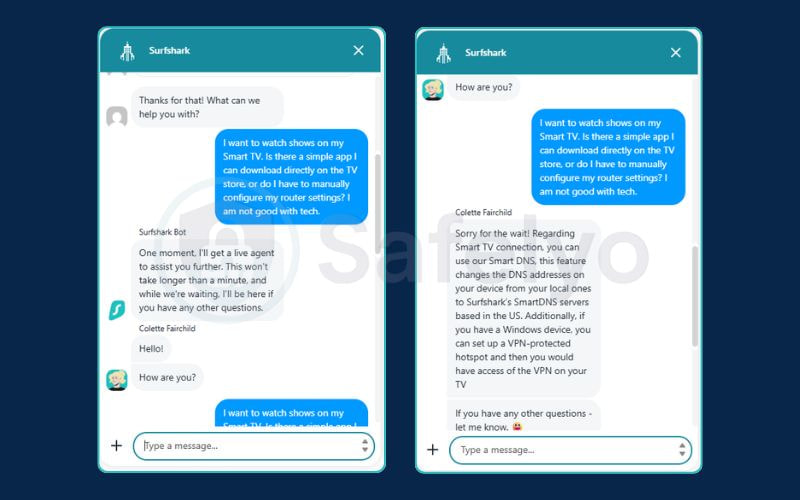
Surfshark provides fast 24/7 live chat support, with human agents connecting in under one minute.
In our test, we asked about setting up the VPN on a Smart TV. The automated bot identified our topic and transferred the chat to a human agent in less than 60 seconds. Instead of sending a generic link, the agent provided clear solutions to get our TV connected.
Support channels include:
- 24/7 Live Chat: Fastest way to reach a human agent (no phone support is available).
- Email Tickets: Best for complicated technical issues, with replies usually sent within 24 hours.
- Online Help Center: Searchable setup guides with clear step-by-step screenshots.
11. What users say about Surfshark: Trustpilot, App stores, and Reddit
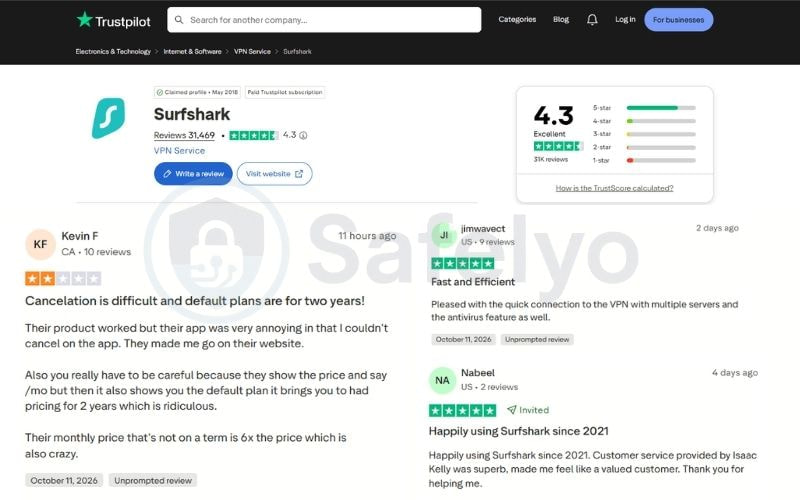
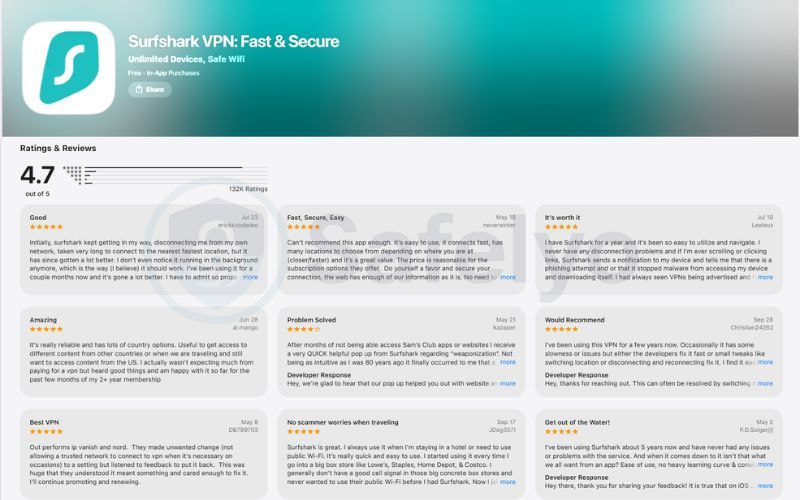
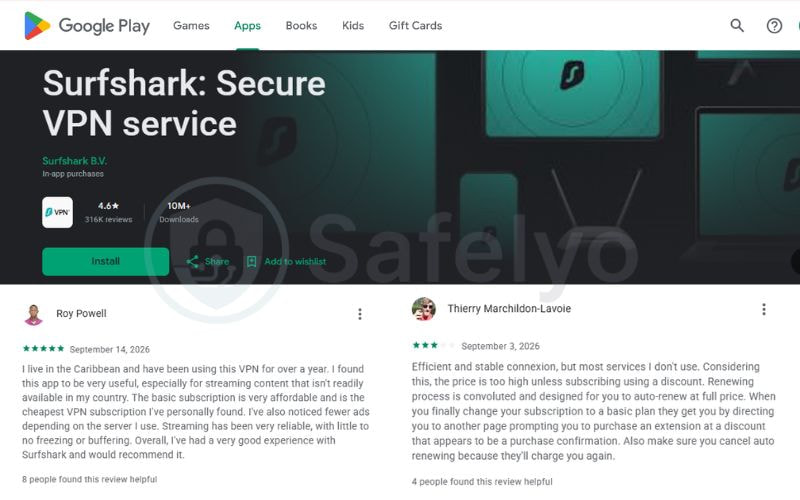
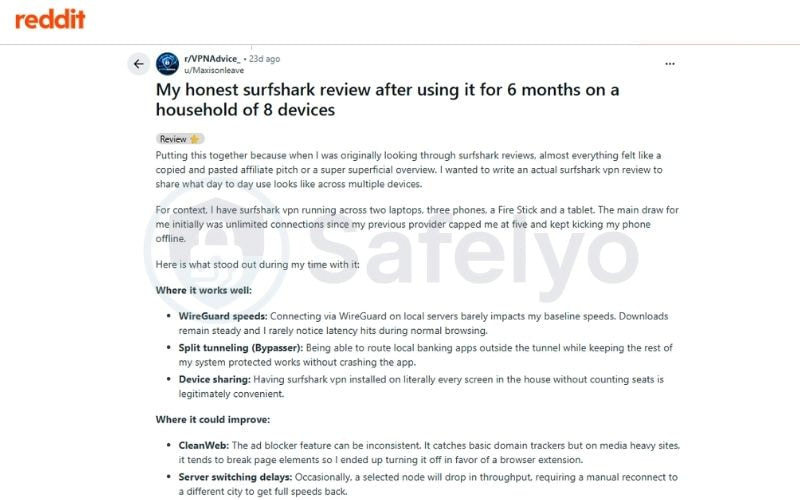
User feedback from Trustpilot, app stores and Reddit highlights Surfshark as a budget-friendly VPN praised for its unlimited device connections and minimalist interface. However, reviews consistently note higher auto-renewal pricing alongside occasional Google CAPTCHAs and public Wi-Fi login conflicts.
| Platform | Rating | Number of Reviews |
|---|---|---|
| Trustpilot | 4.3 / 5 | 31,400+ |
| Google Play Store | 4.6 / 5 | 316,000+ |
| Apple App Store | 4.7 / 5 | 132,000+ |
(Ratings recorded in October 2026)
What users like:
- Connecting many devices: Families and people with lots of devices like that they can use one account on all their laptops, phones, and streaming sticks at the same time without getting logged out.
- Easy split-tunneling (Bypasser): Users find it convenient to exclude banking apps and local sites from the VPN so their accounts do not trigger fraud alerts.
- Helpful live chat: Many reviews on Trustpilot mention that customer support agents reply quickly and help resolve router or TV setup problems.
What users dislike (and how to fix it):
- Higher price at renewal: The subscription price increases significantly after the first 2-year term ends.
How to avoid: Log into your Surfshark account in a web browser right after you sign up and turn off the auto-renewal toggle under the Subscription tab. - Google CAPTCHAs and blocked websites: Shared VPN IP addresses can trigger Google bot checks or cause some banking sites and streaming apps to block access.
Workaround: Whitelist the blocked website using the Bypasser feature, change your protocol to WireGuard, or connect to a Dedicated IP if you have one. - Wi-Fi login issues on mobile: Hotel, airport, or café Wi-Fi login pages (captive portals) often will not load when the VPN is running.
Workaround: Turn the VPN off, log in to the public Wi-Fi network in your browser first, and then turn Surfshark back on.
12. Surfshark vs NordVPN and other alternatives
While Surfshark provides unmatched multi-device value for households, alternative VPNs better serve users requiring native port forwarding, zero-email anonymity, or file-level malware scanning.
| Competitor VPN | Starting Price | Best Use Case | Key Technical Difference vs Surfshark |
|---|---|---|---|
| Surfshark | $2.49/mo (2Y + 3M) | Budget households & multi-device use | Unlimited simultaneous connections on all plans |
| NordVPN | $3.49/mo (2Y + 3M) | Speed consistency & threat protection | Specialized NordLynx stability; built-in file-scanning antivirus; 10-device connection limit; shared parent company |
| ExpressVPN | $2.99/mo (2Y + 4M) | Minimalist ease of use | Proprietary Lightway protocol; higher annual renewal price |
| Proton VPN | $3.49/mo (2-Year Plus) | Private torrent seeding & free tier | Based in Switzerland; includes native port forwarding support |
| Mullvad | ≈ €5/mo (Flat rate) | Maximum anonymity & no account trail | Generates random numerical account IDs; requires no email address |
NordVPN and Surfshark share the same parent group, Cyberspace, but run separate infrastructure. See how they compare on speed and price in our NordVPN vs Surfshark review.
13. Who should use Surfshark, and who should avoid it?
Surfshark works best for budget-conscious families and streaming users, but competitive gamers and privacy-focused users may want to consider other options.
Who should choose Surfshark:
- Large Households: Protects unlimited devices at the same time under a single subscription.
- Global Streaming Viewers: Unblocks 28 regional Netflix libraries alongside BBC iPlayer, Disney+, and Hulu.
- Budget-Minded Users: Offers an affordable starting rate of $2.49 per month on two-year plans.
- Linux Desktop Users: Includes a full graphical app (GUI) for Linux operating systems.
Who should avoid Surfshark:
- Users in Censored Countries: Struggles to bypass the Great Firewall of China consistently.
- Competitive Gamers: High ping increases (+60 ms to +336 ms) cause noticeable lag in fast-paced games.
- Torrent Seeders: Lacks port forwarding support, which reduces upload speeds on private trackers.
- Strict Privacy Users: Stores temporary connection data for up to 15 minutes and operates in the Netherlands (Nine Eyes alliance).
14. FAQs
Is Surfshark safe and private?
Yes. Surfshark uses AES-256-GCM and ChaCha20 encryption on RAM-only servers, and Deloitte has verified its no-logs policy. It keeps connection metadata for up to 15 minutes (see section 3.2).
What are the downsides of Surfshark?
The most significant downside is the speed inconsistency on long-distance servers, as our tests in Japan and New York showed substantial drops. Additionally, Surfshark is based in the Netherlands, which is part of the 9-Eyes intelligence alliance (a concern for extreme privacy purists, though mitigated by their no-logs policy).
Who owns Surfshark, and is it a legitimate company?
Surfshark is owned by Surfshark B.V., an Amsterdam-based company that sits under the Cyberspace holding group alongside Nord Security. It is a legitimate company, and it runs its own servers, apps, and no-logs policy independently.
Is Surfshark worth it after the renewal price hike?
It is good value during the first two-year term at $2.49 per month. Starter renews at $79.00 per year, so budget for it or turn off auto-renewal (see section 2.1).
How does the 7-day free trial work?
It is free for 7 days on the Surfshark website, Android, and iOS. A payment method is required, and it converts to a paid plan unless you cancel before day 7
How do I cancel auto-renewal or claim a refund?
Turn off auto-renewal under Subscription in your web account. For a refund within 30 days, contact 24/7 live chat (see section 2.2).
Does Surfshark work in China?
No. NoBorders and Camouflage do not reliably get past the Great Firewall.
15. Conclusion
Surfshark is a great choice if you want a reliable budget VPN for the whole family. For $2.49 a month, it gives you unlimited device connections, strong privacy protection, and easy access to streaming sites worldwide.
You should skip Surfshark if:
- You need port forwarding for torrent seeding.
- You need very low ping for competitive gaming.
- You need a VPN that works reliably in mainland China.
For most users, the 2-year Starter plan offers the best balance of price and features.
Want to explore more options? Check our comprehensive roundup of the best VPN services or read our latest in-depth VPN reviews.