Proton VPN is the best VPN for torrenting overall because it is open-source, audited four times (most recently by Securitum in September 2025), supports port forwarding on paid plans, and operates from Switzerland outside major surveillance alliances. Alternatively, depending on your specific needs, you can explore other highly reputable options such as NordVPN, Mullvad, or ExpressVPN.
However, even with fast speeds and audited privacy, torrenting inherently exposes your IP address to everyone in the swarm, making you vulnerable to tracking and ISP throttling if your connection suddenly drops. To help you bridge this gap between performance and safety, we evaluated providers based on verified no-logs policies and reliable kill switches, which are the two most critical factors for staying protected.
Top VPNs for torrenting:
- Proton VPN (Best overall): Stands out as a fully open-source provider operating from a secure Swiss jurisdiction. It has been audited four times (most recently in 2025) and offers highly sought-after app-level port forwarding on its paid plans.
- NordVPN (Best for speed): Consistently delivered the fastest download speeds in our group, hitting over 480 Mbps on Singapore servers and 420 Mbps in the US. Beyond this raw performance, it also maintains strict privacy standards, evidenced by six independent no-logs audits.
- Mullvad (Best for anonymous torrenting): Prioritizes absolute privacy by requiring zero personal data to register, and even accepts physical cash by post. It famously proved its no-logs claim when a 2023 police raid on its office yielded absolutely no user data.
- Surfshark (Best value): Offers an excellent cost-to-performance ratio at just $2.49 per month on its longest plan. It allows unlimited simultaneous connections and includes native P2P support across its entire network of over 4,500 servers.
- ExpressVPN (Best for torrent seeding): Reached an impressive 248.36 Mbps upload speed in our tests, giving users a massive advantage for maintaining positive private tracker ratios. It also boasts an unmatched eight-year continuous audit record.
- CyberGhost (Best for beginners): Takes the guesswork out of torrenting with servers specifically optimized and labeled for P2P traffic. It also provides peace of mind with a generous 45-day money-back guarantee.
- Windscribe (Best free upgrade path): Delivers excellent utility for power users with robust port forwarding capabilities. It also features a reliable free tier that provides 10GB of data per month with full P2P access included.
Quick Comparison Table
| VPN | Starting Price | Port Forwarding | Kill Switch | No-Logs Audit | Jurisdiction | Devices |
|---|---|---|---|---|---|---|
| Proton VPN | $2.99/mo | Yes (paid plans) | Yes | Securitum, 2022 to 2025 | Switzerland | 10 |
| NordVPN | $3.49/mo | No | Yes | PwC / Deloitte (2018 to 2025) | Panama | 10 |
| Mullvad | ~$5.81 / mo (€5/mo) | No | Yes | Cure53, Assured AB | Sweden | 5 |
| Surfshark | $2.49/mo | No | Yes | Deloitte / Cure53 / SecuRing | Netherlands | Unlimited |
| ExpressVPN | $2.49/mo | Router only | Yes | KPMG / PwC / Cure53 (2018 to 2026) | BVI | Up to 14 |
| CyberGhost | $1.59/mo | No | Yes | Deloitte (2022, 2024, 2025) | Romania | 7 |
| Windscribe | Free (10GB/mo) / $3.00/mo (Paid) | Yes | Yes | Packetlabs / Leviathan | Canada | Unlimited |
Disclaimer: This guide is for informational purposes only. Information regarding speeds (based on our tests conducted in 2026), unblocking capabilities, pricing, and promotional offers may change over time depending on your geographic location or new platform updates. Verify current details on each provider’s official website before purchasing.
1. How we tested and selected the best VPNs for torrenting
We established a clear testing methodology to evaluate these VPN providers, focusing entirely on peer-to-peer server support, kill switch reliability, and verified no-logs policies. To maintain baseline accuracy, all network tests were conducted using a uniform high-speed setup.
All speed and latency measurements in this article were recorded from Vietnam on a 1 Gbps wired connection. Because we test from Southeast Asia, you will notice high ping times when connecting to distant servers, such as those in the United States. This is a normal result of physical distance. If you are located closer to those regions, your latency will be significantly lower, so there is no need to worry about the high ping figures presented in the individual reviews.
We applied the following seven criteria to rank each provider:
- P2P server support: Confirmed in-app whether dedicated P2P servers or all-server P2P access is available.
- Kill switch reliability: Verified by forcing a VPN disconnection while network traffic was monitored to confirm all traffic was blocked on drop.
- No-logs audit verification: Cross-referenced each provider’s publicly available audit reports.
- Leak testing (DNS, WebRTC, IPv6): Run via ipleak.net with the VPN connected on each service to ensure zero data spillage.
- Speed tests: Measured download (Mbps), upload (Mbps), and ping (ms) using a consistent 1 Gbps wired baseline connection from Vietnam across diverse server locations, ranging from the US and UK to the Asia-Pacific regions.
- Port forwarding and SOCKS5 proxy: Confirmed availability, the specific plan tier required, and the implementation type (app-level versus router-level).
- Pricing and value: Verified starting price, simultaneous connection limits, money-back guarantee terms, and renewal pricing.
2. Do VPNs actually work for torrenting?
Yes. A VPN encrypts your internet traffic and replaces your real IP address with the VPN server’s IP. As a result, peers in the torrent swarm see the server’s address instead of yours, and your ISP cannot monitor which files you download.
A torrent swarm is a distributed group of peers sharing pieces of the same file using the BitTorrent protocol. Every peer in the swarm can see every other peer’s IP address in real time. Without a secure connection, that IP address is your physical home address, leaving you exposed to copyright monitors and ISP throttling.
However, a VPN protects you only if two conditions are met. First, the kill switch must function correctly to block traffic instantly when the connection drops. Second, the no-logs policy must be independently verified to ensure no historical data is stored. These requirements form the baseline for secure, anonymous torrenting.
3. Best VPN for torrenting: 7 top picks tested in 2026
The following seven providers were selected based on confirmed P2P support, independently audited no-logs policies, and kill switch verification.
Let’s explore the detailed profiles of our top picks to help you find the best VPN for torrenting that matches your workflow.
3.1. Proton VPN: Best overall for private torrenting
Proton VPN is developed by Proton AG, a company governed by strong Swiss privacy laws.
Proton VPN is fully open-source, meaning both desktop and mobile clients are publicly auditable. Combined with four independent audits (most recently by Securitum in September 2025), app-level port forwarding on paid plans, and Secure Core routing, Proton VPN provides a highly verifiable privacy proposition. Rather than asking users to simply trust a no-logs claim, Proton VPN allows independent researchers to verify the actual code that processes each connection.
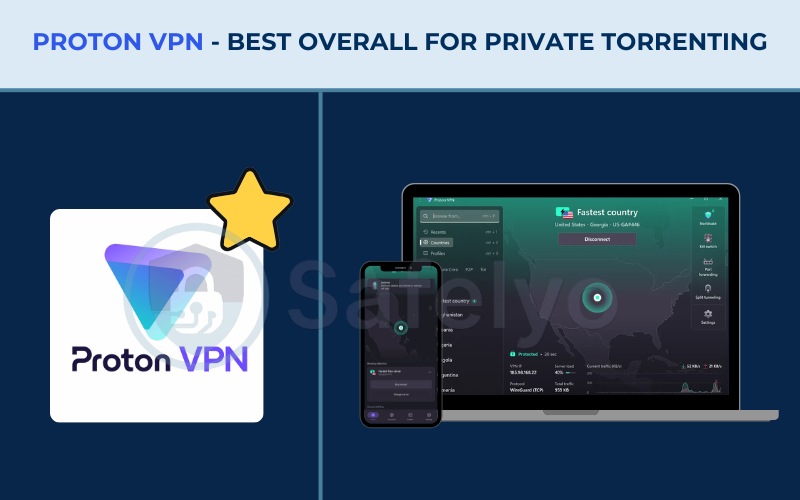
Here is a detailed breakdown of the core features and provider details for Proton VPN:
| Features | Information |
|---|---|
| Best For | Torrent users who require verifiable, open-source privacy with app-level port forwarding |
| Starting Price | $2.99/mo (24-month plan) |
| Company | Proton AG |
| Jurisdiction | Switzerland (outside 5/9/14 Eyes) |
| Independent Audit | Yes (4 audits, most recently Securitum in 2025) |
| No-Logs Policy | Yes (independently verified) |
| RAM-Only Servers | No (full-disk encryption used instead) |
| Servers | 20,000+ |
| Countries | 145+ |
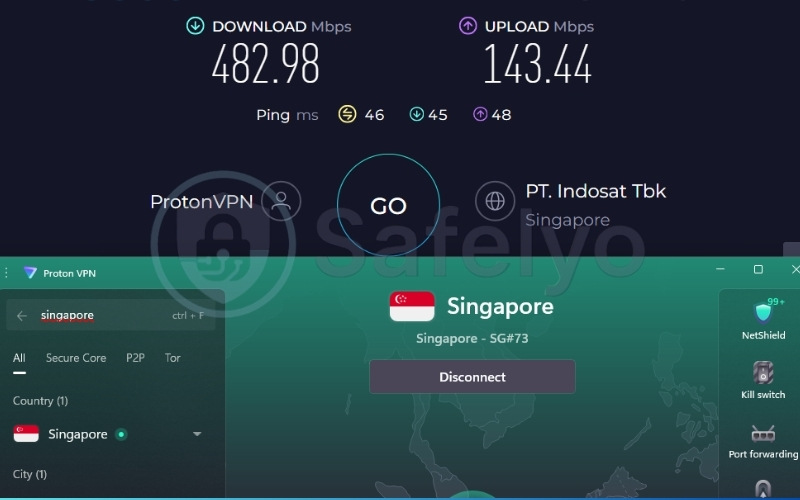
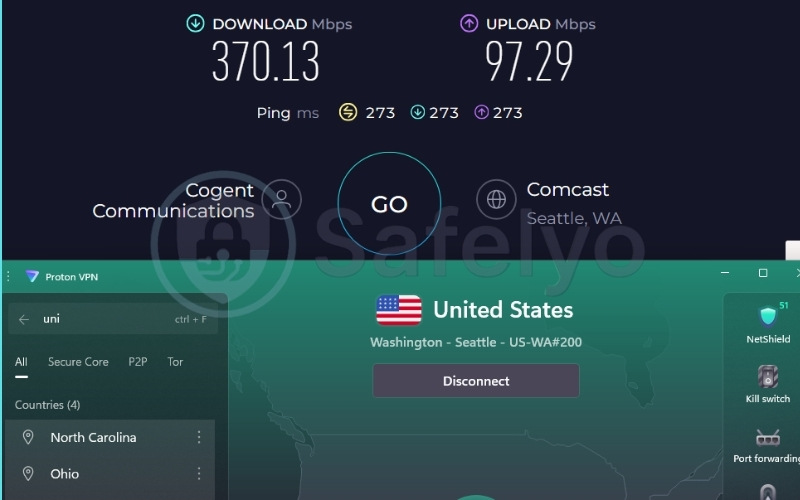
| Avg. Download Speed | 370.13 Mbps (US) / 482.98 Mbps (Singapore) |
| Avg. Upload Speed | 97.29 Mbps (US) / 143.44 Mbps (Singapore) |
| Avg. Latency | 273 ms (US) / 46 ms (Singapore) |
| Protocols | WireGuard, IKEv2, Stealth |
| Kill Switch | Yes (Standard and Advanced modes) |
| Obfuscation | Yes (Stealth protocol) |
| Port Forwarding | Yes (paid plans) |
| Dedicated IP | Yes (Business plans only) |
| Simultaneous Connections | 10 (paid), 1 (free) |
| Netflix Regions | 25+ (including US, UK) |
| Disney+ | Yes |
| BBC iPlayer | Yes (tested successfully) |
| Torrent / P2P | Yes (dedicated P2P servers, paid plans) |
| Win/Mac/iOS/Android | Yes (all platforms) |
| Linux | Yes (GUI app and CLI) |
| Browser Extension | Yes (Chrome and Firefox) |
| Router Support | Yes |
| Live Chat 24/7 | No (9AM to 12AM CET, paid plan users only) |
| Refund Policy | 30-day money-back guarantee |
| Free Trial | Yes (permanent free plan, no credit card required) |
| Overall Positioning | Privacy-focused VPN built on open-source, repeatedly audited infrastructure |
| Official Website | protonvpn.com |
Consider these primary advantages and disadvantages before choosing Proton VPN:
Pros
Open-source codebase allows for deep code verification
Four independent audits, most recently by Securitum in 2025
App-level port forwarding on paid plans improves speeds for low-seed torrents
Swiss jurisdiction operates outside 5/9/14 Eyes alliances
Secure Core multi-hop routes traffic through privacy-friendly nations
Cons
Live chat support is limited to European business hours
No SOCKS5 proxy
3.1.1. Speed and performance
Proton VPN delivered strong results across both tested regions. The Singapore server recorded 482.98 Mbps for download, 143.44 Mbps for upload, and a ping of 46 ms. The US server reached 370.13 Mbps for download, 97.29 Mbps for upload, and a ping of 273 ms.
| Server Location | Download (Mbps) | Upload (Mbps) | Ping (ms) |
|---|---|---|---|
| Singapore | 482.98 | 143.44 | 46 |
| United States | 370.13 | 97.29 | 273 |
Both servers comfortably exceed the 100 Mbps threshold necessary for fast downloading, making the service well suited for large torrent transfers. Additionally, the free tier’s speed is equally impressive, with some servers exceeding 400 Mbps during testing. If you want to explore more about non-paid options, check out our best free VPN guide for further details.
3.1.2. Privacy and security
Proton VPN stands out due to its open-source nature across desktop, Android, and iOS apps. This transparency is backed by four independent audits conducted by Securitum between 2022 and 2025, demonstrating ongoing verification of its security claims.
Proton VPN operates under Swiss jurisdiction. The provider is subject to Swiss privacy law, which requires a mutual legal assistance treaty for foreign intelligence requests. At the device level, the kill switch features both Standard and Advanced modes. Advanced mode blocks all internet traffic even before the VPN establishes a connection, adding security for users who launch torrent clients early during startup.
3.1.3. Torrenting and P2P
Peer-to-peer traffic on Proton VPN requires a paid Plus or Business plan. The free tier blocks P2P protocols entirely.
The primary benefit for paid users is app-level port forwarding. This feature allows torrent clients like qBittorrent to use an open port directly. Opening a port improves download speeds for torrents with fewer seeders by allowing incoming connections to reach your client without restriction.
Review the specific P2P capabilities below:
| P2P Servers | Port Forwarding | SOCKS5 Proxy | Kill Switch | Logging Policy | DMCA Policy |
|---|---|---|---|---|---|
| Yes (Dedicated) | Yes (Paid plans) | No | Yes | Verified no-logs | Not subject to DMCA |
Best for: Torrent users who demand the highest level of verifiable privacy through an open-source infrastructure, alongside advanced routing controls like app-level port forwarding to maximize their setup.
3.2. NordVPN: Best for fast torrent downloads
Nord Security operates from Panama, a jurisdiction safely located outside major surveillance alliances. NordVPN maintains an extensive network of over 9,500 servers across 149 countries. It consistently delivers rapid download and upload rates across its global infrastructure.
NordVPN maintains strong privacy credentials with six independent no-logs audits completed between 2018 and 2025 by industry leaders PwC and Deloitte. Its feature set includes Threat Protection Pro and specialized server categories, providing a balanced experience between security and raw network power.
Here is a detailed breakdown of the core features and provider details for NordVPN:
| Features | Information |
|---|---|
| Best For | Speed-focused torrent users requiring fast downloads across a global network |
| Starting Price | $3.49/mo (2-year + 3 months plan) |
| Company | Nord Security |
| Jurisdiction | Panama (outside 5/9/14 Eyes) |
| Independent Audit | Yes (PwC: 2018, 2020; Deloitte: 2022, 2023, 2024, 2025) |
| No-Logs Policy | Yes |
| RAM-Only Servers | Yes |
| Servers | 9,500+ |
| Countries | 149 |
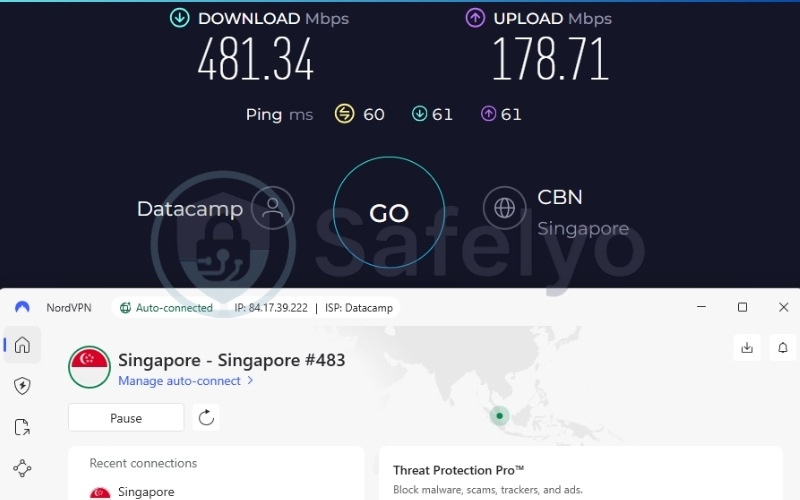
| Avg. Download Speed | 421.96 Mbps (US) / 481.34 Mbps (Singapore) |
| Avg. Upload Speed | 105.68 Mbps (US) / 178.71 Mbps (Singapore) |
| Avg. Latency | 182 ms (US) / 60 ms (Singapore) |
| Protocols | NordLynx, OpenVPN (UDP/TCP), IKEv2/IPSec, NordWhisper |
| Kill Switch | Yes |
| Obfuscation | Yes (obfuscated servers, NordWhisper) |
| Port Forwarding | No |
| Dedicated IP | Yes |
| Simultaneous Connections | 10 |
| Netflix Regions | 26+ (US, UK, JP, and more) |
| Disney+ | Yes |
| BBC iPlayer | No |
| Torrent / P2P | Yes |
| Win/Mac/iOS/Android | Yes |
| Linux | Yes |
| Browser Extension | Yes (Chrome, Firefox, Edge) |
| Router Support | Yes |
| Live Chat 24/7 | Yes |
| Refund Policy | 30-day money-back guarantee |
| Free Trial | Yes (3-day free trial on Android) |
| Overall Positioning | High-speed, audited VPN with a large P2P server network |
| Official Website | nordvpn.com |
Consider these primary advantages and disadvantages before choosing NordVPN:
Pros
Fast download speeds for efficient file transfers
Six independent no-logs audits
9,500+ servers, with dedicated P2P servers clearly identified
RAM-only servers ensure no data persists after a restart
Double VPN (multi-hop) and NordWhisper obfuscation protocol
Cons
Renewal pricing increases after the introductory rate
No port forwarding
No SOCKS5 proxy
3.2.1. Speed and performance
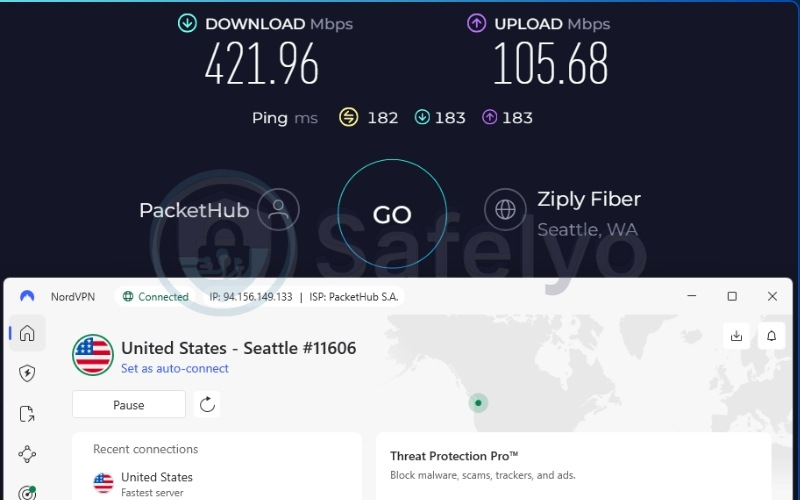
NordVPN delivered outstanding performance metrics using the NordLynx protocol. The Singapore server reached 481.34 Mbps for download, 178.71 Mbps for upload, and a ping of 60 ms. The US server recorded 421.96 Mbps for download, 105.68 Mbps for upload, and a ping of 182 ms.
| Server Location | Download (Mbps) | Upload (Mbps) | Ping (ms) |
|---|---|---|---|
| Singapore | 481.34 | 178.71 | 60 |
| United States | 421.96 | 105.68 | 182 |
Both servers perform in the upper tier of tested speeds, making this service highly suitable for users prioritizing rapid downloads of large P2P files. The proprietary NordLynx protocol, which is based on WireGuard, ensures minimal overhead and fast connection times.
3.2.2. Privacy and security
NordVPN protects user data through its Panama jurisdiction and a series of Deloitte audits verifying its no-logs claims. The infrastructure relies entirely on RAM-only servers, ensuring that any temporary connection data is wiped the moment a server is restarted.
In addition to standard encryption, NordVPN includes Threat Protection Pro, a tool designed to block malicious websites and trackers before they can load on your device. This adds an extra layer of safety when navigating less secure P2P indexing websites.
3.2.3. Torrenting and P2P
NordVPN simplifies the process by offering dedicated P2P servers. These servers route torrent traffic automatically, which helps beginners avoid manual configuration errors. Users can also utilize Onion Over VPN servers as a secondary privacy option for specialized browsing.
NordVPN does not support port forwarding. While this limits your ability to connect to other seeders proactively, the client still performs exceptionally well for highly seeded content across its vast network.
Best for: Speed-focused torrent users requiring fast download speeds across a global network.
3.3. Mullvad: Best for anonymous torrenting
Mullvad VPN AB sets the standard for privacy by requiring absolutely no email address, username, or payment data linked to your identity. Registration simply generates a random 16-digit account number. To further sever financial ties, Mullvad accepts physical cash by post and cryptocurrency.
This robust data avoidance was proven effective in April 2023 when Swedish police executed a search warrant at Mullvad’s office to seize customer data. They found absolutely nothing. Mullvad also includes DAITA (Defense Against AI Traffic Analysis) to counter advanced network tracking methods, making it a highly specialized privacy tool.
Here is a detailed breakdown of the core features and provider details for Mullvad:
| Features | Information |
|---|---|
| Best For | Advanced privacy users wanting proven anonymity with zero personal data required |
| Starting Price | ~$5.81/mo (€5, Flat rate) |
| Company | Mullvad VPN AB |
| Jurisdiction | Sweden |
| Independent Audit | Yes (Cure53, Assured AB routine external audits) |
| No-Logs Policy | Yes |
| RAM-Only Servers | Yes (All servers run from RAM with no persistent storage) |
| Servers | 579 |
| Countries | 50 |
| Avg. Download Speed | ~200+ Mbps |
| Avg. Upload Speed | ~100+ Mbps |
| Avg. Latency | ~15 to 60 ms (local) / ~100 to 200+ ms (international) |
| Protocols | WireGuard only |
| Kill Switch | Yes (Integrated with system firewalls) |
| Obfuscation | Yes (LWO, QUIC, Shadowsocks, UDP-over-TCP, DAITA) |
| Port Forwarding | No (disabled May 2023) |
| Dedicated IP | No |
| Simultaneous Connections | 5 |
| Netflix | Unreliable |
| Disney+ | Unreliable |
| BBC iPlayer | Unreliable |
| Torrent / P2P | Yes (all 579 servers) |
| Win/Mac/iOS/Android | Yes |
| Linux | Yes |
| Browser Extension | Yes (Mullvad Browser Extension) |
| Router Support | Yes |
| Live Chat 24/7 | No |
| Refund Policy | 14-day money-back guarantee (cash and crypto payments excluded) |
| Free Trial | No |
| Overall Positioning | Privacy-focused VPN with account-number registration and DAITA |
| Official Website | mullvad.net |
Consider these primary advantages and disadvantages before choosing Mullvad:
Pros
No personal data required for registration
P2P allowed on all 579 servers without restrictions
DAITA (Defense Against AI Traffic Analysis) included
2023 police raid demonstrated firm no-logs reality
Physical cash accepted by post for anonymous payment
SOCKS5 proxy included
Cons
Port forwarding is disabled
Streaming services are generally blocked or unreliable
Smaller server network compared to peers (579 servers)
No 24/7 live chat support
3.3.1. Speed and performance
Mullvad relies exclusively on WireGuard, having completely decommissioned its OpenVPN servers. Mullvad typically delivers average download speeds of over 200 Mbps and latency between 15 to 60 ms on local servers.
These speeds provide adequate bandwidth for standard torrent transfers without notable bottlenecks, ensuring your downloads finish reliably.
3.3.2. Privacy and security
Mullvad enforces anonymity from the very first step. The account number system and physical cash acceptance mean users can operate without a digital footprint. In April 2023, police officers executed a search warrant at the headquarters but left empty-handed because no user data was stored.
This event is crucial because Sweden is a 14 Eyes jurisdiction. The police raid demonstrated that court orders yield no data when a clear RAM-only infrastructure is in place. Furthermore, Mullvad employs DAITA, which introduces noise into traffic patterns to complicate AI fingerprinting of the encrypted tunnel.
3.3.3. Torrenting and P2P
Peer-to-peer traffic is allowed natively on all 579 servers. Additionally, a SOCKS5 proxy is included, which is highly useful for configuring clients like qBittorrent to run efficiently.
However, Mullvad disabled port forwarding in May 2023 to prevent network abuse. The lack of port forwarding may result in slower connection initiation for torrents with very few seeders compared to services that still offer the feature.
Best for: Privacy-conscious users who want anonymous torrenting with zero personal data required and accept the lack of streaming or port forwarding features.
3.4. Surfshark: Best value for torrenting
Surfshark B.V. operates from the Netherlands, providing broad network utility coupled with unlimited simultaneous connections. At $2.49 per month on the two-year plan, it covers unlimited devices with P2P support across all 4,500+ servers, presenting an exceptional value case.
Beyond affordability, Surfshark features Dynamic MultiHop and an IP Rotator, which changes the IP address without dropping the connection. Transparency is maintained through audits by three independent firms (Deloitte, Cure53, and SecuRing), with the most recent assessments completed in 2025.
Here is a detailed breakdown of the core features and provider details for Surfshark:
| Features | Information |
|---|---|
| Best For | Budget-conscious torrent users who want unlimited device coverage and full P2P access |
| Starting Price | $2.49/mo (2-year Starter plan) |
| Company | Surfshark B.V. |
| Jurisdiction | Netherlands (9-Eyes and 14-Eyes member) |
| Independent Audit | Yes (Deloitte: 2023, 2025; Cure53: 2021; SecuRing: 2025) |
| No-Logs Policy | Yes |
| RAM-Only Servers | Yes (100% RAM-only server network) |
| Servers | 4,500+ |
| Countries | 100 |
| Avg. Download Speed | 372.46 Mbps (US) / 471.63 Mbps (Singapore) |
| Avg. Upload Speed | 88.88 Mbps (US) / 189.00 Mbps (Singapore) |
| Avg. Latency | 264 ms (US) / 63 ms (Singapore) |
| Protocols | WireGuard, OpenVPN, IKEv2, Dausos |
| Kill Switch | Yes |
| Obfuscation | Yes (obfuscated servers, NoBorders mode) |
| Port Forwarding | No |
| Dedicated IP | Yes |
| Simultaneous Connections | Unlimited |
| Netflix Regions | 28+ |
| Disney+ | Yes |
| BBC iPlayer | Yes |
| Torrent / P2P | Yes (all servers) |
| Win/Mac/iOS/Android | Yes |
| Linux | Yes |
| Browser Extension | Yes |
| Router Support | Yes |
| Live Chat 24/7 | Yes |
| Refund Policy | 30-day money-back guarantee |
| Free Trial | Yes (7-day) |
| Overall Positioning | Affordable, unlimited-device VPN with full P2P support across all servers |
| Official Website | surfshark.com |
Consider these primary advantages and disadvantages before choosing Surfshark:
Pros
Low starting price for long-term plans with unlimited simultaneous connections
All 4,500+ servers support P2P natively
Audited by three independent firms (most recently 2025)
Dynamic MultiHop allows manual entry/exit server pairing
Cons
Netherlands is a 9-Eyes and 14-Eyes member
No port forwarding
No SOCKS5 proxy
Renewal rate increases after the initial 2-year term
3.4.1. Speed and performance
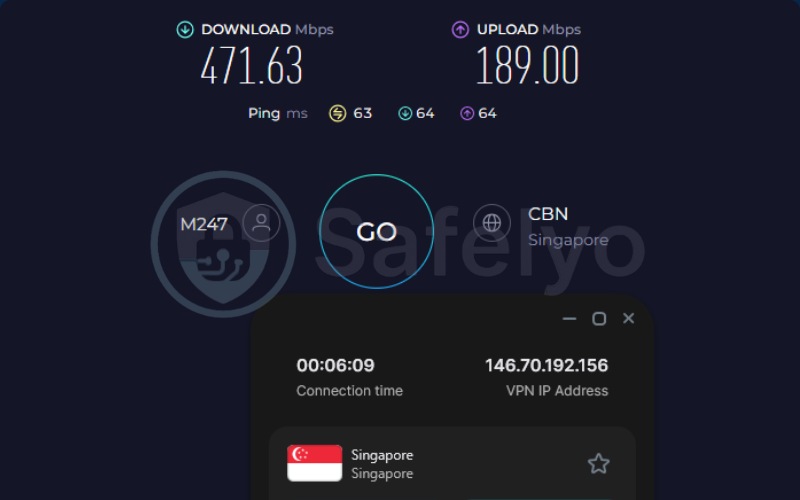
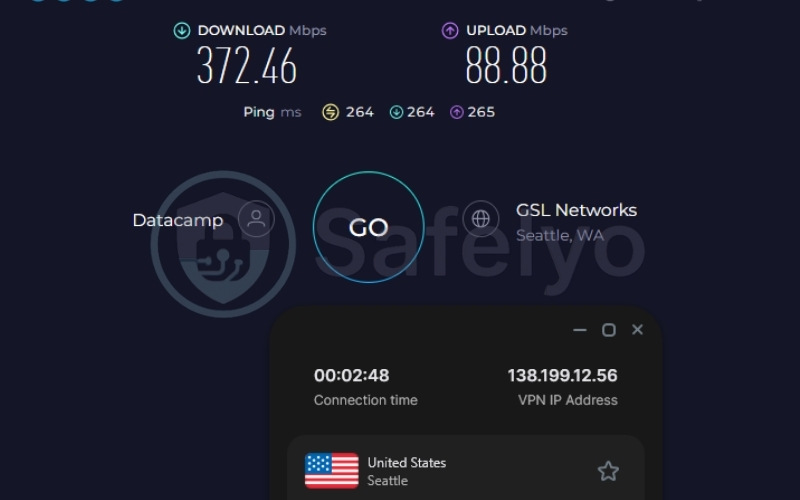
Surfshark maintained high bandwidth metrics during testing. The Singapore server recorded 471.63 Mbps for download, 189.00 Mbps for upload, and a ping of 63 ms. The US server delivered 372.46 Mbps for download, 88.88 Mbps for upload, and a ping of 264 ms.
| Server Location | Download (Mbps) | Upload (Mbps) | Ping (ms) |
|---|---|---|---|
| Singapore | 471.63 | 189.00 | 63 |
| United States | 372.46 | 88.88 | 264 |
The speeds recorded are well within the high-speed tier, making Surfshark highly suitable for concurrent downloading and streaming across multiple household devices. Because Surfshark allows unlimited simultaneous connections, the cost per device approaches zero for multi-device users.
3.4.2. Privacy and security
Surfshark’s three-firm audit approach provides ongoing transparency regarding its infrastructure. The 100% RAM-only network ensures no local data retention occurs. Furthermore, Dynamic MultiHop allows users to pair their own entry and exit servers for customized traffic routing.
The Netherlands jurisdiction is a factor to consider, as the country is a 9-Eyes and 14-Eyes member. Users with firm privacy requirements should weigh this jurisdiction factor, though the RAM-only infrastructure mitigates the risk of data seizures.
3.4.3. Torrenting and P2P
All 4,500+ Surfshark servers support P2P natively. This broad support removes the need to switch servers when moving from general browsing to torrenting. Additionally, the IP Rotator changes the IP address every five to ten minutes without dropping the connection, slightly complicating swarm monitoring during long sessions.
It is important to note the lack of port forwarding and a SOCKS5 proxy. These omissions make Surfshark less ideal for power users needing granular client controls.
Best for: Torrent users seeking cost-effective coverage across unlimited devices without sacrificing server performance or P2P accessibility.
3.5. ExpressVPN: Best for torrent seeding
ExpressVPN operates from the British Virgin Islands, a jurisdiction with no mandatory data retention laws. Its TrustedServer technology utilizes a RAM-only infrastructure across its entire network.
ExpressVPN holds the longest audit record in this comparison, utilizing five independent firms between 2018 and 2026. Beyond its transparency, ExpressVPN focuses on ease of use. Automatic obfuscation is active on every server, removing the need for manual configuration to bypass standard network blocks in restrictive regions.
Here is a detailed breakdown of the core features and provider details for ExpressVPN:
| Features | Information |
|---|---|
| Best For | Torrent users who want automatic obfuscation and an extensive continuous audit record |
| Starting Price | $2.49/mo (Basic tier, 2-year + 4 months plan) |
| Company | ExpressVPN |
| Jurisdiction | British Virgin Islands (outside 5/9/14 Eyes) |
| Independent Audit | Yes (KPMG, PwC, Cure53, Praetorian, F-Secure: 2018 to 2026) |
| No-Logs Policy | Yes |
| RAM-Only Servers | Yes (TrustedServer technology) |
| Servers | Thousands (exact count not disclosed) |
| Countries | 105 (170+ locations) |
| Avg. Download Speed | 417.96 Mbps (US) / 472.41 Mbps (Singapore) |
| Avg. Upload Speed | 134.43 Mbps (US) / 248.36 Mbps (Singapore) |
| Avg. Latency | 196 ms (US) / 45 ms (Singapore) |
| Protocols | Lightway, OpenVPN, WireGuard, IKEv2 |
| Kill Switch | Yes (Network Lock) |
| Obfuscation | Yes (automatic on every server) |
| Port Forwarding | Yes (router only) |
| Dedicated IP | Yes |
| Simultaneous Connections | Up to 14 (depending on tier) |
| Netflix Regions | 25+ |
| Disney+ | Yes |
| BBC iPlayer | Yes |
| Torrent / P2P | Yes |
| Win/Mac/iOS/Android | Yes |
| Linux | Yes |
| Browser Extension | Yes |
| Router Support | Yes |
| Live Chat 24/7 | Yes |
| Refund Policy | 30-day money-back guarantee |
| Free Trial | Yes (3-day on mobile) |
| Overall Positioning | Premium global VPN with automatic obfuscation and an eight-year audit record |
| Official Website | expressvpn.com |
Consider these primary advantages and disadvantages before choosing ExpressVPN:
Pros
Long continuous audit record (eight years, five firms)
Automatic obfuscation on every server
TrustedServer (RAM-only) infrastructure
High upload speed in tests (SG 248.36 Mbps) benefits seeding
Cons
Port forwarding at router level only (not app-level)
No multi-hop (Double VPN)
No SOCKS5 proxy
High renewal pricing after introductory term
3.5.1. Speed and performance
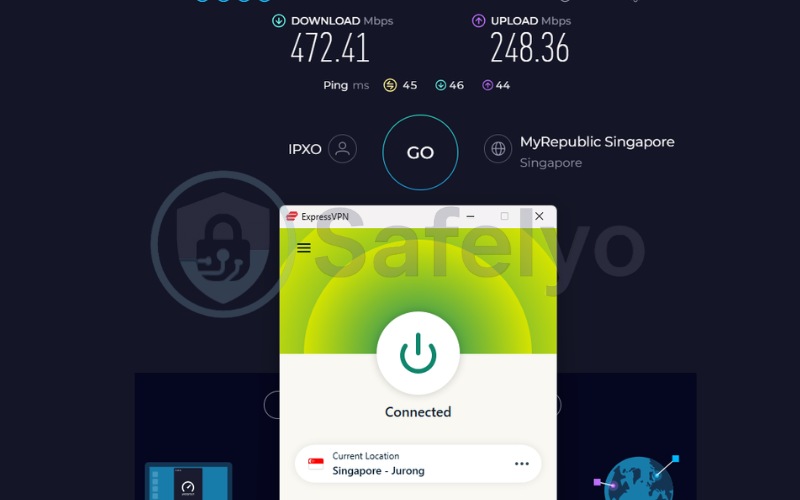
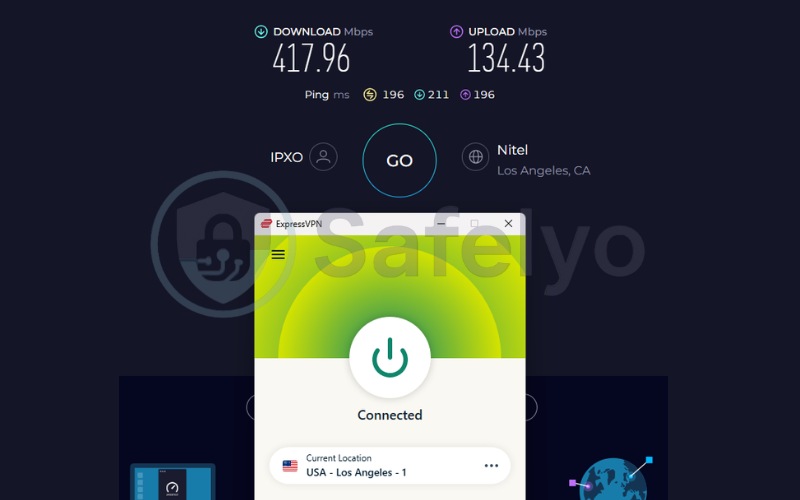
ExpressVPN utilizes the proprietary Lightway protocol, designed for rapid connections and low overhead. The Singapore server recorded 472.41 Mbps for download, 248.36 Mbps for upload, and a ping of 45 ms. The US server achieved 417.96 Mbps for download, 134.43 Mbps for upload, and a ping of 196 ms.
| Server Location | Download (Mbps) | Upload (Mbps) | Ping (ms) |
|---|---|---|---|
| Singapore | 472.41 | 248.36 | 45 |
| United States | 417.96 | 134.43 | 196 |
The upload speed on the Singapore server is a significant standout. Hitting 248.36 Mbps provides a massive advantage for users who actively seed torrents, as high upload bandwidth directly improves tracker ratios.
3.5.2. Privacy and security
ExpressVPN provides immense transparency through its eight-year audit track record spanning multiple cybersecurity firms. Operating out of the British Virgin Islands is highly favorable for users wanting to minimize DMCA exposure.
The Network Lock mechanism acts as a reliable kill switch on forced drops. Furthermore, automatic obfuscation natively masks OpenVPN packet headers, preventing local network administrators from identifying the traffic type without requiring the user to change settings manually.
3.5.3. Torrenting and P2P
Peer-to-peer traffic is supported across the entire ExpressVPN network. However, port forwarding exists only at the router level. Desktop torrent clients cannot use it without proper router configuration, which limits usability for standard app users. Furthermore, the absence of a SOCKS5 proxy restricts specific application-level routing for advanced users.
Best for: Torrent users who want a long independent audit track record, automatic obfuscation with no configuration, and exceptional upload speeds for seeding, without needing app-level port forwarding.
3.6. CyberGhost: Best for torrent beginners
CyberGhost is incorporated in Romania, a country positioned outside major surveillance alliances. Its edge for torrenting is sheer usability. Dedicated P2P servers are categorized directly in the app, removing guesswork.
CyberGhost also offers a 45-day money-back guarantee, allowing a longer testing period for beginners. The primary limitation is its lack of an obfuscation protocol. Without obfuscation, CyberGhost cannot consistently bypass deep packet inspection (DPI) in heavily restricted networks.
Here is a detailed breakdown of the core features and provider details for CyberGhost:
| Features | Information |
|---|---|
| Best For | First-time VPN users who want pre-configured, labeled P2P servers |
| Starting Price | $1.59/mo (2-year + 2 months plan) |
| Company | CyberGhost |
| Jurisdiction | Romania (outside 5/9/14 Eyes) |
| Independent Audit | Yes (Deloitte: 2022, 2024, 2025) |
| No-Logs Policy | Yes |
| RAM-Only Servers | Yes (all servers) |
| Servers | 11,500+ (These are estimated figures; CyberGhost has not released official data.) |
| Countries | 100 |
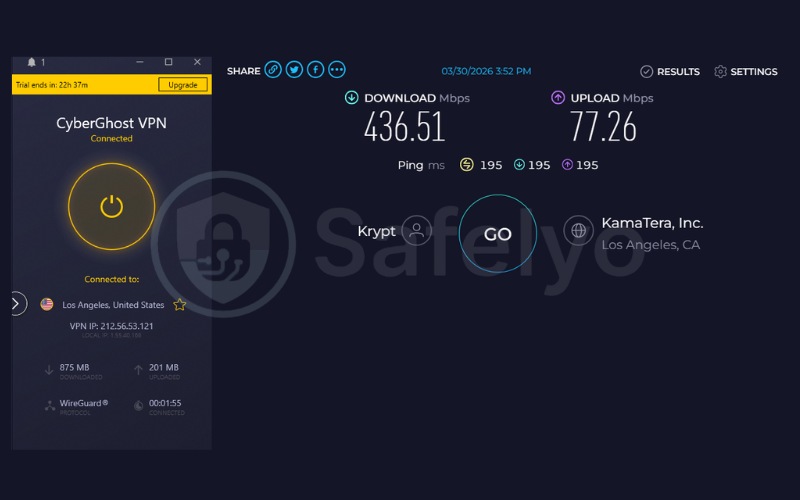
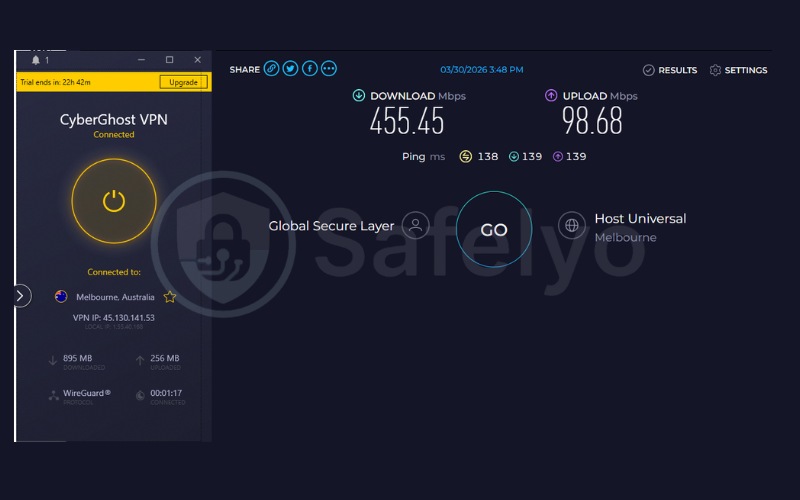
| Avg. Download Speed | 436.51 Mbps (US) / 455.45 Mbps (Australia) |
| Avg. Upload Speed | 77.26 Mbps (US) / 98.68 Mbps (Australia) |
| Avg. Latency | 195 ms (US) / 138 ms (Australia) |
| Protocols | WireGuard, OpenVPN, IKEv2 |
| Kill Switch | Yes (Automatic) |
| Obfuscation | No |
| Port Forwarding | No |
| Dedicated IP | Yes (token-based) |
| Simultaneous Connections | 7 |
| Netflix Regions | 15+ |
| Disney+ | Yes |
| BBC iPlayer | Yes |
| Torrent / P2P | Yes (dedicated P2P-optimized servers) |
| Win/Mac/iOS/Android | Yes |
| Linux | Yes |
| Browser Extension | Yes |
| Router Support | Yes |
| Live Chat 24/7 | Yes |
| Refund Policy | 45-day money-back guarantee |
| Free Trial | Yes |
| Overall Positioning | User-friendly VPN with dedicated P2P servers and an extended refund window |
| Official Website | cyberghostvpn.com |
Consider these primary advantages and disadvantages before choosing CyberGhost:
Pros
45-day money-back guarantee
Dedicated P2P-optimized servers clearly labeled in-app
RAM-only infrastructure across all servers
Token-based dedicated IP for anonymity
Cons
Lacks a stealth protocol to bypass DPI in restricted regions
No port forwarding
No SOCKS5 proxy
3.6.1. Speed and performance
CyberGhost demonstrated stable and capable speeds during evaluation. The US server reached 436.51 Mbps for download, 77.26 Mbps for upload, and a ping of 195 ms. The Australia server recorded 455.45 Mbps for download, 98.68 Mbps for upload, and a ping of 138 ms.
| Server Location | Download (Mbps) | Upload (Mbps) | Ping (ms) |
|---|---|---|---|
| United States | 436.51 | 77.26 | 195 |
| Australia | 455.45 | 98.68 | 138 |
Both servers maintain strong download speeds suitable for consistent file transfers, enabling users to grab large files securely.
3.6.2. Privacy and security
CyberGhost ensures data protection through its Romanian jurisdiction, which offers strong protections without mandatory logging requirements. Multiple Deloitte audits completed in 2022, 2024, and 2025 have verified its strict no-logs policy and internal infrastructure.
The automatic kill switch works consistently to cut traffic if the server connection drops. However, users on heavily restricted networks cannot rely on CyberGhost to bypass standard firewalls natively because it lacks an obfuscation protocol.
3.6.3. Torrenting and P2P
The user interface excels by featuring a dedicated “For Torrenting” tab in the app. A user simply clicks the tab, selects a server, and starts downloading without any manual configuration. CyberGhost also includes a built-in Content Blocker that shields against malicious torrent tracker links natively.
While advanced features are missing, the 45-day refund window is highly practical for users trying a P2P VPN setup for the very first time.
Best for: First-time users seeking a pre-configured setup experience with dedicated torrent servers and an extended refund window.
3.7. Windscribe: Best free upgrade path for torrenting
Windscribe is a Canadian company. Canada is a Five Eyes member, which is a jurisdiction detail privacy-focused users should note. However, this is countered by a verified no-logs policy (Packetlabs 2024, Leviathan 2022) and an openly published transparency report showing zero DMCA requests complied with because they hold no data.
Windscribe stands out for its robust port forwarding capabilities. Additionally, it provides a structured 10GB per month free plan with full P2P access included.
Here is a detailed breakdown of the core features and provider details for Windscribe:
| Features | Information |
|---|---|
| Best For | Users needing a free VPN with P2P access, or power users wanting port forwarding and SOCKS5 |
| Starting Price | $3.00/mo (Build a plan) |
| Company | Windscribe Limited |
| Jurisdiction | Canada (Five Eyes member) |
| Independent Audit | Yes (Leviathan: 2022; Packetlabs: 2024) |
| No-Logs Policy | Yes |
| RAM-Only Servers | Yes (RAM disk infrastructure) |
| Servers | Not disclosed |
| Countries | 69+ |
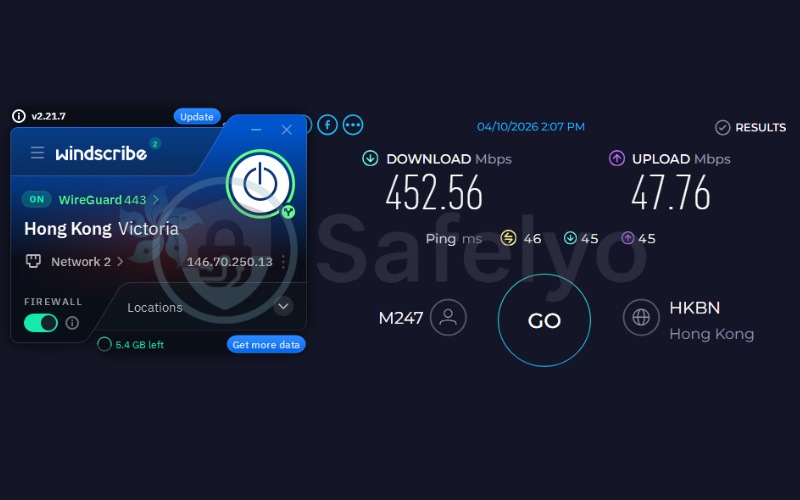
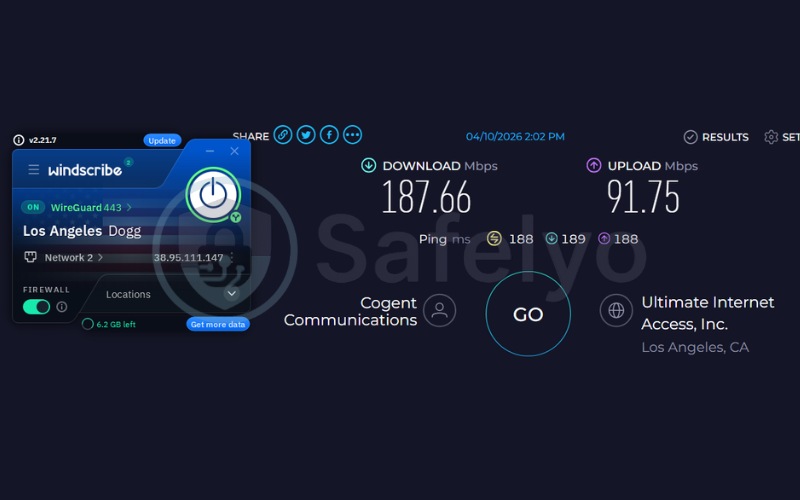
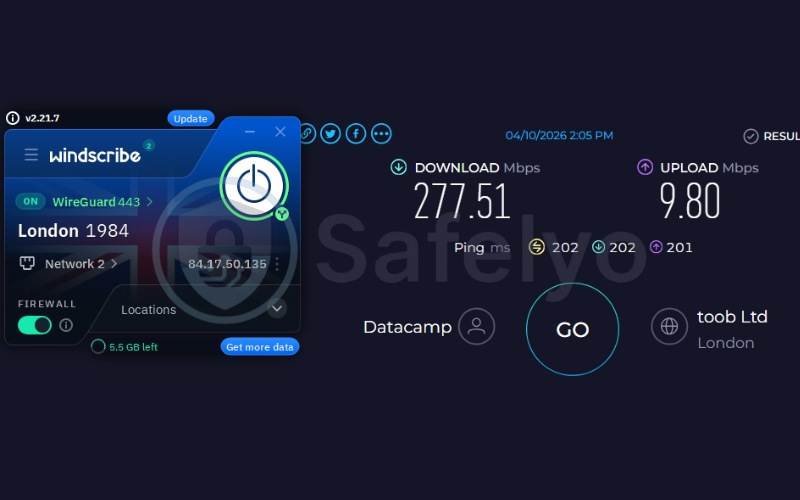
| Avg. Download Speed | 187.66 Mbps (US) / 452.56 Mbps (Hong Kong) / 277.51 Mbps (UK) |
| Avg. Upload Speed | 91.75 Mbps (US) / 47.76 Mbps (Hong Kong) / 9.80 Mbps (UK) |
| Avg. Latency | 188 ms (US) / 46 ms (Hong Kong) / 202 ms (UK) |
| Protocols | WireGuard, OpenVPN, IKEv2, Stealth, Wstunnel, AmneziaWG |
| Kill Switch | Yes (Always-On Firewall) |
| Obfuscation | Yes (Stealth, Wstunnel, AmneziaWG) |
| Port Forwarding | Yes (paid plan; permanent via Static IP) |
| Dedicated IP | No (Static IP available) |
| Simultaneous Connections | Unlimited |
| Netflix Regions | US, UK, JP, and more |
| Disney+ | Yes |
| BBC iPlayer | Yes |
| Torrent / P2P | Yes (most server locations) |
| Win/Mac/iOS/Android | Yes |
| Linux | Yes |
| Browser Extension | Yes |
| Router Support | Yes |
| Live Chat 24/7 | No (automated chatbot only) |
| Refund Policy | 7-day money-back guarantee (if under 10GB used) |
| Free Trial | No (permanent free plan instead) |
| Overall Positioning | Flexible VPN with a free P2P tier and port forwarding |
| Official Website | windscribe.com |
Consider these primary advantages and disadvantages before choosing Windscribe:
Pros
Includes BOTH port forwarding and SOCKS5 proxy
Free plan offers 10GB/month with P2P access
AmneziaWG protocol designed for censorship resistance
Unlimited simultaneous connections
Always-On Firewall blocks traffic outside the tunnel proactively
Cons
Canada is a Five Eyes member
Server count not publicly disclosed
Shorter money-back guarantee (7 days)
No live chat support (chatbot only)
3.7.1. Speed and performance
Testing the free plan yielded impressive results. The Hong Kong server recorded 452.56 Mbps for download and a ping of 46 ms. The US server reached 187.66 Mbps for download with a ping of 188 ms. The UK server hit 277.51 Mbps for download but dropped to 9.80 Mbps for upload.
| Server Location | Download (Mbps) | Upload (Mbps) | Ping (ms) |
|---|---|---|---|
| Hong Kong | 452.56 | 47.76 | 46 |
| United States | 187.66 | 91.75 | 188 |
| United Kingdom | 277.51 | 9.80 | 202 |
The speeds are highly competitive, especially for a free tier. However, the UK upload speed is notably low, which may slightly restrict seeding efficiency if you choose that specific location.
3.7.2. Privacy and security
Canada’s Five Eyes status means authorities can cooperate with US copyright enforcement. However, this jurisdiction risk is mitigated by the verified no-logs audit and the Always-On Firewall. This firewall acts as a clear kill switch that stops traffic before the tunnel even connects.
Windscribe also features AmneziaWG. This protocol is an advanced WireGuard modification resistant to deep packet inspection, providing excellent censorship resistance.
3.7.3. Torrenting and P2P
The 10GB per month limit on the free plan includes full P2P access. However, exceeding this cap while a torrent is running will instantly expose the real IP to the swarm.
For advanced users, ephemeral port forwarding is available directly in the app. This feature makes Windscribe highly effective for technical users who need granular control over their connections.
Best for: Users who want a free VPN tier with P2P access (10GB per month), or power users who require port forwarding control.
4. What actually happens when your VPN drops mid-torrent
When a VPN drops mid-torrent, the torrent client will reconnect instantly using your standard internet connection, broadcasting your real IP address to every peer in the swarm. Without a VPN, your IP address is visible to both standard users and copyright monitoring organizations scanning swarm activity.
The kill switch is designed to cut all internet traffic before data reaches the unprotected connection. If it works, the torrent client pauses immediately. If it fails, the connection leaks.
This is why understanding kill switch types is crucial. App-level kill switches only close specific programs, whereas system-level kill switches (like an Advanced Kill Switch or Network Lock) block all outbound internet traffic at the system level.
How to verify your kill switch reliability manually:
- Connect the VPN.
- Open a legal torrent and confirm it is actively transferring.
- Force-close the VPN process in Task Manager instead of using the app’s Disconnect button.
- Open ipleak.net immediately. Check whether your real IP is visible.
- Check whether the torrent client is paused.
5. How to bind your torrent client to your VPN adapter
Even with a functioning kill switch, binding the torrent client directly to the VPN’s network adapter adds a redundant layer of protection. If the VPN fails and the kill switch does not trigger, the torrent client itself cannot connect because it is configured to route exclusively through the VPN adapter.
5.1. Binding qBittorrent to your VPN network interface
Follow these exact steps to secure qBittorrent:
- Open qBittorrent. Go to Tools > Options > Advanced.
- Find the “Network Interface” dropdown.
- Select the VPN adapter from the list.
- Click Apply and close Options.
- Restart qBittorrent.
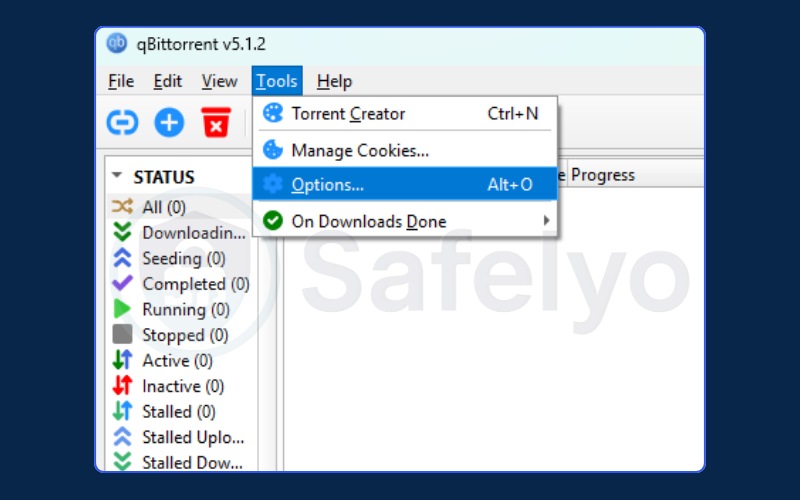
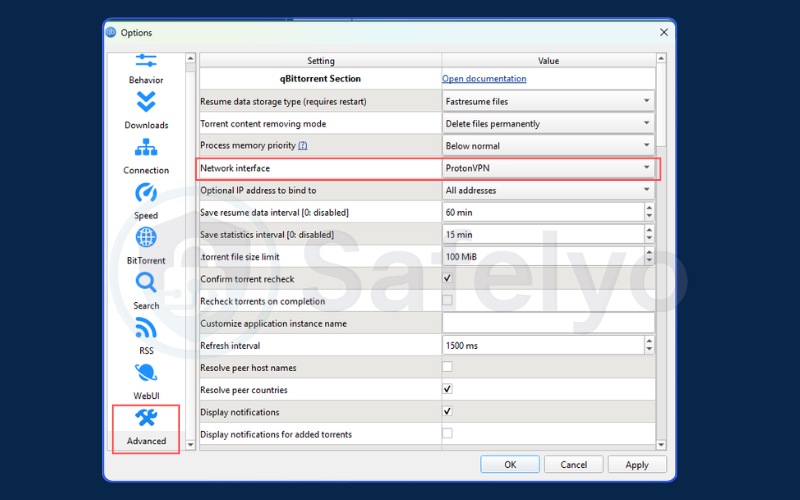
To verify the setup, disconnect the VPN after restarting qBittorrent and confirm it shows zero active connections. Check your active network connections (use ipconfig /all on Windows or ifconfig on macOS) to identify the VPN adapter’s exact name.
5.2. Binding Deluge to your VPN network interface
Follow these steps to lock Deluge to your secure connection:
- Open Deluge. Go to Edit > Preferences > Network (or Deluge > Preferences > Network on macOS).
- Locate the incoming connections settings and configure Deluge to use the VPN/TUN interface IP or listen address. Enter the specific IP assigned to your VPN adapter.
- Click Apply and close the Preferences window.
- Restart Deluge for the network changes to take effect.
To verify this configuration, force a VPN disconnection while a torrent is running and confirm that Deluge no longer transfers data or reaches peers.
5.3. Binding uTorrent to your VPN network interface
Unlike modern clients that let you select an interface name, uTorrent requires you to manually enter the exact IP address of your VPN connection. Follow these exact steps to configure it:
- Connect your VPN and locate its assigned IP address. Open your command line and type ipconfig (Windows) or ifconfig (macOS/Linux) to find the VPN adapter’s IP.
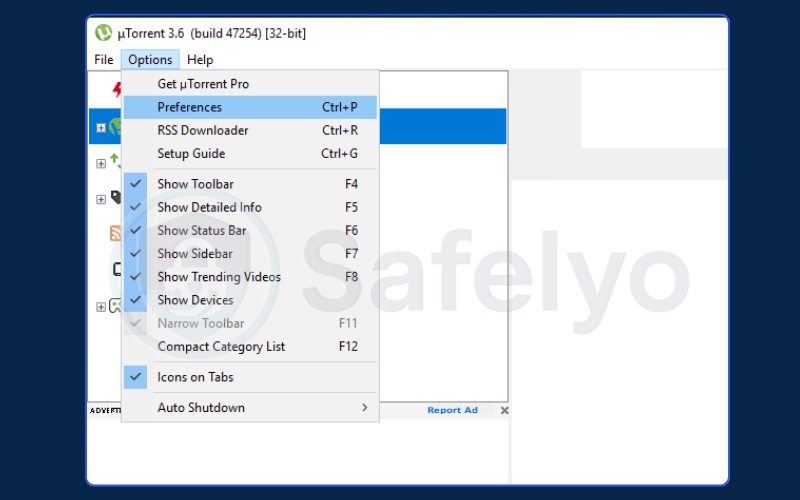
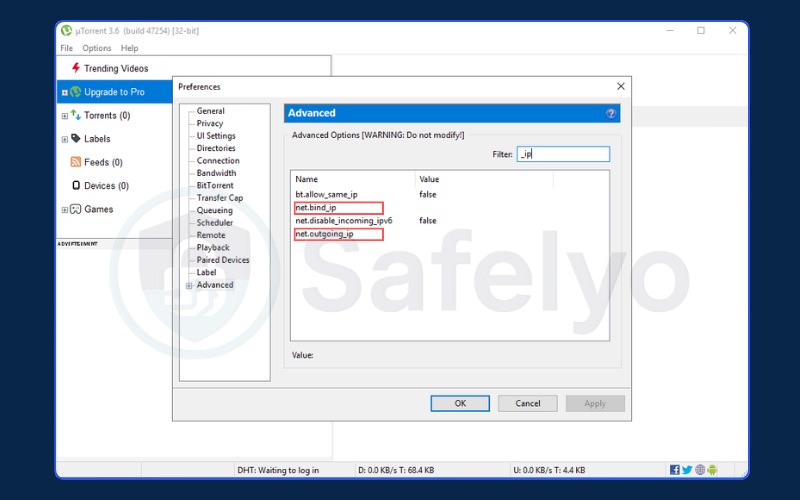
- Open uTorrent. Go to Options > Preferences > Advanced.
- In the filter box at the top right, type “_ip”.
- Locate net.bind_ip, click it, and enter your VPN’s IP address (e.g., 10.x.x.x).
- Locate net.outgoing_ip, click it, and enter the exact same VPN IP address.
- Click OK and restart uTorrent.
To verify this configuration, disconnect the VPN and confirm all active peers drop to zero.
A crucial warning: Because uTorrent relies on manual IP entry, if your VPN assigns a new IP address the next time you connect, this binding setup will fail and expose your real IP. Due to this severe security limitation and community reports of adware, we recommend switching to qBittorrent. Their interface-level binding provides much more reliable protection.
6. Your pre-torrent security checklist: 5 steps before every download
Run through these five steps before opening any torrent client. Taking a moment here helps prevent common failure modes like IP exposure and DNS leaks.
- Connect the VPN before opening the torrent client. If the VPN is still connecting, initial tracker announcements use the real IP.
- Verify your IP at ipleak.net. Open in a browser and confirm the IP shown matches your VPN server’s location to ensure anonymous torrenting.
- Check for DNS leaks. On ipleak.net, scroll to the DNS servers section. The servers listed should belong to the VPN provider, not your ISP.
- Confirm the kill switch is active. Verify the kill switch is enabled in the settings menu.
- Bind the torrent client to the VPN adapter. Apply the Network Interface binding as described above.
7. Free VPNs for torrenting: What you need to know
A free VPN with a data cap that runs out mid-torrent acts identically to having no VPN at all, exposing the real IP to the entire swarm the moment the cap is exceeded. Furthermore, many unverified free providers monetize by collecting browsing habits, connection logs, and personal data to sell to third-party data brokers or inject targeted ads.
7.1. Free VPNs worth using
Finding a safe free tier is difficult, but a few reliable options exist that do not compromise your core privacy.
- Windscribe: Offers 10GB per month with email confirmation. Peer-to-peer access is permitted on free servers, and speeds remain consistently fast. It also includes advanced features like a SOCKS5 proxy.
- PrivadoVPN: Provides 10GB per month with access to 13 server locations. Peer-to-peer traffic is explicitly supported on the free tier, delivering fast download speeds without requiring a credit card to sign up.
7.2. Free VPNs to avoid
Operating a VPN infrastructure is expensive. If the user isn’t paying, they are the product. Many free providers lack a reliable kill switch, which is a fatal flaw for torrenting. Additionally, they often use outdated or weak encryption protocols like PPTP that fail to secure traffic properly.
Hola! VPN must be explicitly avoided. It utilizes a peer-to-peer network model that routes other users’ internet traffic through your device in exchange for using theirs, turning your device into an exit node for malicious traffic.
8. Port forwarding with a VPN: What it does and who needs it
Port forwarding tells the VPN server to accept incoming connection requests on a specific port and relay them directly to your device. In a torrent swarm, this means other seeders can connect directly to you rather than waiting for you to initiate the connection. This mechanism drastically improves download speeds for low-seed torrents.
For rare content with fewer than 10 seeders, port forwarding expands the pool of peers that can actively initiate connections. However, finding a secure provider that still safely supports port forwarding is difficult. Major providers like Mullvad have actively removed port forwarding features recently. Network abuse is the primary reason, as malicious actors frequently exploit open ports to host illicit content or bypass firewalls, attracting law enforcement scrutiny.
Among the providers in this comparison, Proton VPN offers app-level port forwarding on paid plans, and Windscribe offers app-level support. ExpressVPN supports it only at the router level. CyberGhost, NordVPN, Mullvad, and Surfshark do not offer port forwarding natively.
9. Which VPN fits your torrenting risk profile?
Not every torrent user has the same priorities. Match your priority below to find the correct fit.
9.1. Privacy first: Best VPN for anonymous torrenting
Mullvad is the direct recommendation for users whose core concern is that activity cannot be traced back under any circumstances. Registration requires no email, payments can be made in cash, and the infrastructure includes DAITA. A police raid proved the no-logs policy works. The trade-offs include unreliable streaming and no port forwarding.
9.2. Speed first: Best VPN for fast downloads
NordVPN is the direct recommendation for users downloading large files frequently. It delivers some of the highest bandwidth capabilities across its vast global network. The inclusion of dedicated P2P servers means your traffic is automatically routed for optimal performance.
9.3. Budget first: Best VPN for affordable torrenting
Surfshark is the direct recommendation for cost-conscious users or managing multiple devices, costing just $2.49 per month with unlimited simultaneous connections and audited infrastructure. Alternatively, Windscribe and PrivadoVPN serve as the best free options with a 10GB per month limit.
10. Can authorities track you if you use a VPN?
In theory, yes. In practice, not if the VPN holds no data. When authorities subpoena a VPN provider, they can only produce data that exists. If no connection logs, IP records, or user data are retained, and that policy has been independently audited, there is nothing to hand over.
Jurisdiction plays a major role in subpoena scenarios. US-based providers face different legal demands than those in the British Virgin Islands, Panama, or Switzerland, where mutual legal assistance treaties are required to force cooperation.
The Mullvad police raid serves as empirical evidence that zero-logs structures work in real-world legal encounters. Officers executed a search warrant but left with absolutely nothing because the data did not exist.
11. Is torrenting legal?
Torrenting is legal. The BitTorrent protocol is used for distributing open-source software, Linux distributions, Creative Commons content, and other publicly licensed material. What is not legal in most jurisdictions is downloading or distributing copyrighted content without authorization.
A VPN simply masks the IP address. It does not change the legality of the download itself. If the IP address is visible in a swarm downloading copyrighted material, ISPs are often forced to forward DMCA notices to the user linked to that address.
12. FAQs about best VPN for torrenting
Do VPNs really work for torrenting?
Yes. A VPN encrypts the connection and replaces the real IP address with the VPN server’s IP. Every peer in the torrent swarm sees the server’s address, not the user’s home address. The single failure point is a provider with an unreliable kill switch or an unverified no-logs policy.
Can the FBI (or police) track me if I use a VPN?
In practice, not if the provider holds no identifying data and its no-logs policy has been independently audited. Authorities can subpoena a company, but if no records exist, there is nothing to produce. Swiss-jurisdiction providers like Proton VPN also require a mutual legal assistance treaty before responding to foreign requests.
Is NordVPN good or bad for torrenting?
Yes, NordVPN is an excellent choice for torrenting. It offers dedicated P2P servers, fast download speeds through its NordLynx protocol, and a proven no-logs policy audited by Deloitte. Its robust infrastructure easily handles large file transfers securely.
Is torrenting with a VPN legal in the US?
Using a VPN for torrenting is legal in the US. Downloading copyrighted content without authorization is not, regardless of whether a VPN is in use. A VPN prevents the user’s ISP from identifying P2P activity, but it does not change the legal status of what is downloaded.
Will a VPN slow down my torrent download speeds?
A VPN adds encryption overhead, but top-tier providers maintain speeds well above practical requirements. Speeds comfortably surpass 100 Mbps on quality networks, which is sufficient for large file downloads. Furthermore, encrypting traffic prevents ISP throttling of P2P activity.
What is the best free VPN for torrenting?
Windscribe and PrivadoVPN are highly credible free options for torrenting. Their free plans provide 10GB per month with P2P access and audited no-logs policies. Users must monitor data usage and stop all torrent sessions before the 10GB cap is reached, because exceeding it while active exposes the real IP to the swarm.
Does Proton VPN free work for torrenting?
No. Proton VPN’s free plan does not support P2P or torrenting. The free tier is restricted to 10 server locations and excludes both streaming and P2P features. Torrenting on Proton VPN requires a paid subscription.
13. Conclusion
Torrenting without a verified no-logs policy and a system-level kill switch is a direct risk to your privacy. Based on our 2026 performance tests, the choice ultimately depends on your workflow:
- For absolute security and verifiable code: Choose Proton VPN to utilize its open-source framework and app-level port forwarding.
- For maximum swarm speeds: Choose NordVPN to leverage its 9,500+ server network and proprietary NordLynx protocol.
- For budget-friendly multi-device coverage: Choose Surfshark to secure every device in your household for just $2.49/month.
Prices, plans, and features change over time, so check each provider’s current pricing before purchasing.
If you want to explore more options or other use cases, visit the Safelyo homepage. You can also check out our general best VPN category hub to find alternative solutions, or review our top picks to find the best VPN for torrenting that fits your specific needs.