The best free VPN in 2026 is Proton VPN, the only free option that combines unlimited data, a verified no-logs policy, and Swiss privacy protections. If you need to stream US Netflix, PrivadoVPN is the better pick. For protecting multiple devices with built-in ad blocking, Windscribe stands out.
We tested five options from Vietnam on a 1 Gbps connection, checking speed, privacy, DNS leak resistance, and streaming capability to give you a clear, use-case-specific recommendation you can act on immediately.
Top free VPN services 2026:
- Proton VPN (Best for unlimited data): Truly unlimited data with no speed cap, Swiss jurisdiction, and a Securitum-audited no-logs policy. The most verifiably private free VPN available.
- PrivadoVPN (Best for streaming): Consistently unblocks US Netflix with speeds exceeding 450 Mbps. Manual server selection across 13 locations and P2P support within a 10 GB monthly cap.
- Windscribe (Best for features): 10 GB/month with email, unlimited device connections, and a built-in ad and malware blocker. No-logs policy independently audited by Packetlabs (2024).
- Hide.me (Best for anonymous browsing): Unlimited data, zero registration required, and an audited no-logs policy. AES-256 encryption with a Malaysia jurisdiction outside major surveillance alliances.
- TunnelBear (Best for beginners): The simplest VPN interface available, covering 47 server countries. Annual public security audits and a 2 GB monthly cap for light use.
Quick comparison:
| VPN | Data limit | Server selection | Streaming | Torrenting | No-logs audit | Jurisdiction | Devices | Registration |
|---|---|---|---|---|---|---|---|---|
| Proton VPN | Unlimited | Auto | No | No | Yes (Securitum 2025) | Switzerland | 1 | Yes |
| PrivadoVPN | 10 GB/mo | Manual | Yes (Netflix US) | Yes | No | Switzerland | Unlimited | Yes |
| Windscribe | 10 GB/mo | Manual | Yes (5 regions) | Yes | Yes (Packetlabs 2024) | Canada | Unlimited | Optional |
| Hide.me | Unlimited | Auto | No | No | Yes | Malaysia | 1 | No |
| TunnelBear | 2 GB/mo | Auto | Limited | No | Yes (annual) | Canada | Unlimited | Yes |
Performance & Pricing Disclaimer: Speed test results reflect our specific testing conditions in April 2026. Your actual speeds will vary by location, device, and network. VPN providers also frequently update their pricing and trial terms. Always verify the latest details directly on the provider’s website before purchasing.
1. How we test and rank the best free VPNs at Safelyo
Every VPN in this article was installed, connected, and stress-tested on real devices. All tests were performed from Vietnam using a baseline 1 Gbps connection to ensure accurate speed drop measurements. This detail matters because server routing from Southeast Asia produces genuinely different results than tests run from the US or Europe.
The tools we used include Ookla Speedtest (for download, upload, and ping measurements), IPLeak.net (to verify real IP address concealment), and dedicated DNS leak testing tools to check whether a VPN quietly leaks your browsing queries to your internet service provider even while connected.
Our strict ranking criteria cover eight key areas:
- Privacy architecture: No-logs policy verified by an independent third-party audit, not just a company promise on a privacy page.
- DNS/WebRTC/IPv6 leak test results: Tested from a real-world environment. A DNS leak means your VPN appears connected, but your DNS queries (the requests that reveal which websites you visit) are still being sent outside the VPN tunnel directly to your ISP, exposing your browsing activity despite the active connection.
- Speed performance: Measured against multiple local and international servers, noting real download speeds and latency (ping).
- Streaming unblocking: Tested against Netflix US, BBC iPlayer, and Disney+, with notes on whether unblocking is consistent or hit-and-miss.
- Data allowance: We distinguish between genuinely unlimited plans and capped plans that throttle you to unusable speeds after you hit a threshold.
- Device compatibility: Android, iPhone, and PC tested individually, because a VPN that works well on Windows can behave differently on iOS.
- Jurisdiction: We checked whether the VPN’s home country is part of the 5 Eyes, 9 Eyes, or 14 Eyes intelligence alliances, which legally compel companies to share user data with governments upon request.
- Presence of ads, data selling, or malware signals: We scanned each app’s network traffic and checked independent security research for red flags.
2. Best free VPN: Top 5 services that are actually safe
The free VPN market is crowded with apps that look legitimate but quietly harvest your browsing data or inject ads into your traffic. The five picks below survived our testing process and offer genuine, verifiable privacy protections. Each one has a different strength, so read through to find the one that fits your actual situation.
2.1. Proton VPN: Best for unlimited data & strict privacy
Proton VPN is the safest free VPN on the market. It is built by the same team behind Proton Mail, a company with a long-standing commitment to privacy. Based in Switzerland and backed by a verified no-logs audit, it is the only free VPN that offers genuinely unlimited data with zero restrictions on how much you browse.
If your core concern is staying private without ever worrying about running out of data, Proton VPN is the default answer.
| Feature | Details |
|---|---|
| Starting price | Free forever |
| Data limit | Unlimited, no speed limits |
| Trustpilot score | 2.1/5 (864 reviews) |
| Server selection | Auto-select only |
| Server locations | 10 countries |
| Jurisdiction | Switzerland, outside 5/9/14 Eyes |
| No-logs policy | Yes, audited by Securitum (2025) |
| Streaming | Paid only |
| Torrenting / P2P | Paid only |
| Dedicated IP | Paid only |
| Security features | AES-256, Kill Switch, Stealth VPN |
| VPN protocols | WireGuard, OpenVPN, Stealth |
| Simultaneous connections | 1 device |
| Platforms & devices | Windows, macOS, Linux, Android, iOS |
| Browser extension | Chrome, Firefox |
| Customer support | Ticket only, no live chat |
| Ads on free tier | None |
| Registration required | Yes, email only, no credit card |
Pros
Truly unlimited data without speed limits
Strict Swiss jurisdiction and recent Securitum audit
Open-source and transparent code
No ads or tracking scripts on the free tier
Cons
Cannot manually choose your server (auto-selected)
Fails to unblock streaming platforms on the free tier
No P2P or torrenting on the free plan
Low Trustpilot score, primarily due to support and free tier restrictions
Privacy and safety
Proton VPN is built around the principle that privacy is a right, not a feature you pay extra for. Its servers sit in Switzerland, a country that sits outside the 5, 9, and 14 Eyes intelligence alliances and has historically strong data protection laws. This means no foreign government can quietly issue a legal demand for user records without going through Swiss courts.
Proton VPN’s no-logs policy was independently audited by Securitum in 2025, meaning a professional security firm reviewed the actual server infrastructure and code, not just the company’s self-published claims. The apps are fully open-source, so researchers around the world can independently inspect the code for hidden trackers or backdoors.
For users who feel anxious about which free VPN is safe to use, this combination of location, audit, and transparency is the most verifiable safety record available.
Using unverified networks at cafes or airports leaves your passwords vulnerable to local network interception. Get Proton VPN free to encrypt your personal data (completely free, no registration fee needed).
Speed and performance
While data is unlimited, the significant trade-off on Proton VPN’s free tier is that you cannot choose which country to connect to. The app’s algorithm assigns you a server automatically. In practice, this means your experience is inconsistent depending on which server the algorithm selects.
Our April 2026 speed tests showed that certain auto-assigned servers delivered genuinely fast connections. Singapore and Netherlands produced download speeds above 400 Mbps, which is impressive for a free plan. The Singapore result also came with the lowest ping at 45ms, making it a particularly solid connection for users in Southeast Asia.
However, being locked into a distant server like Mexico produces high latency (322ms), making anything requiring real-time responsiveness feel sluggish.
Speed test results (tested April 10, 2026):
| Server location | Download (Mbps) | Upload (Mbps) | Ping (ms) |
|---|---|---|---|
| Japan | 27.38 | 96.28 | 70 |
| Netherlands | 405.55 | 99.42 | 203 |
| Singapore | 454.30 | 170.23 | 45 |
| US | 371.90 | 62.23 | 269 |
| Mexico | 222.29 | 52.48 | 322 |
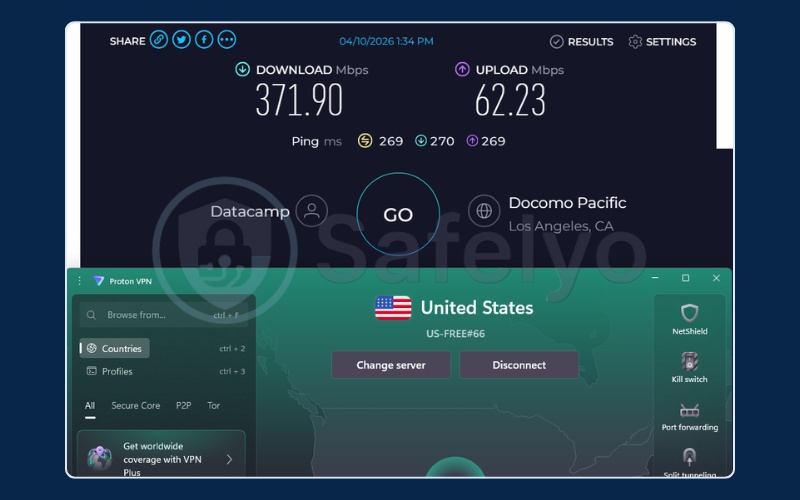
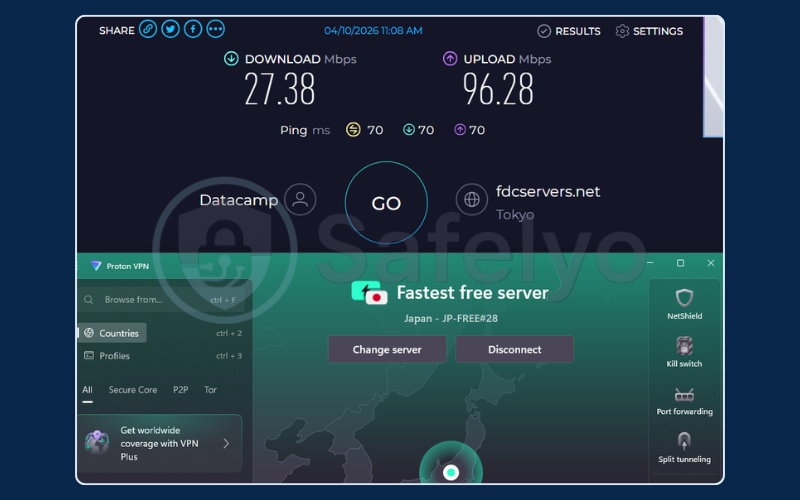
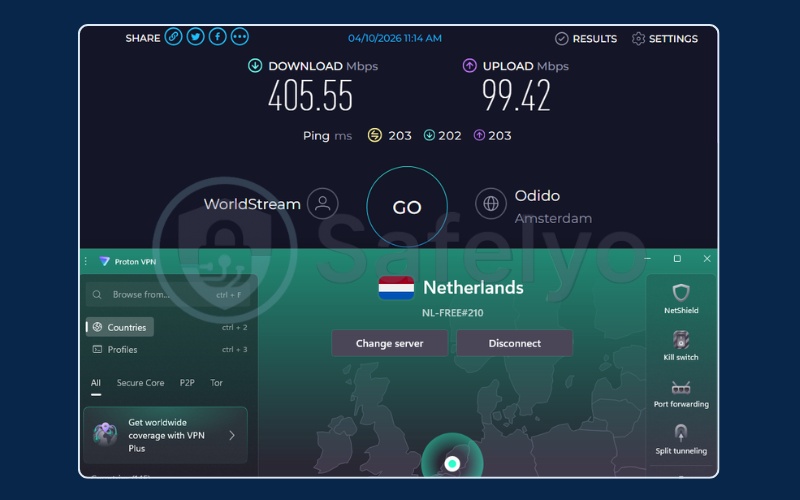
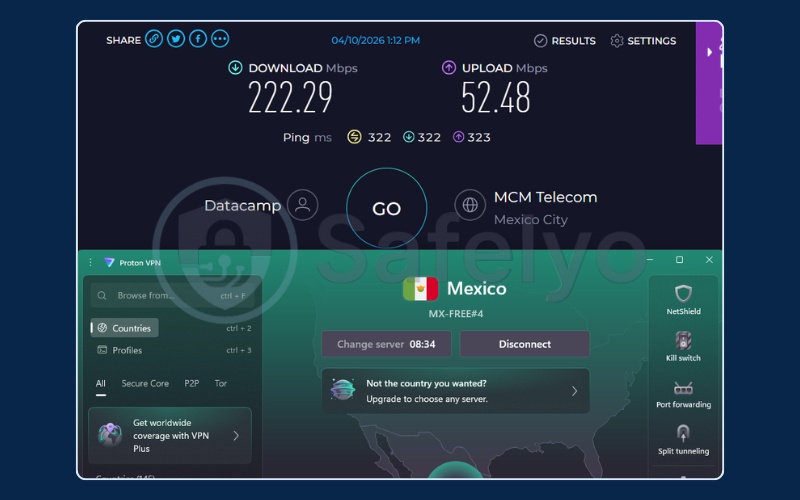
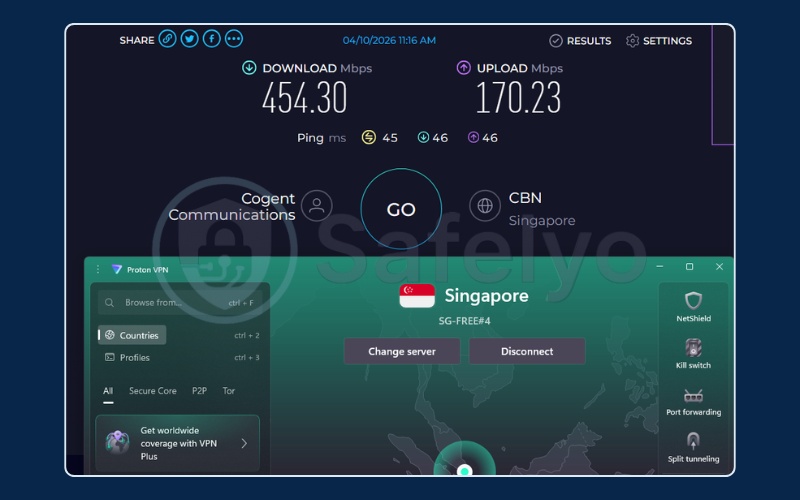
Your real-world performance depends entirely on which server the algorithm assigns. There is no way to influence that assignment on the free tier, which makes Proton VPN less predictable than VPNs with manual server selection. This is the core trade-off to accept before choosing it.
Why we picked it: ProtonVPN remains the only genuinely safe option that does not restrict how much you browse.
Best for: Privacy-conscious users who want unlimited secure browsing and do not care about streaming.
2.2. PrivadoVPN: Best for streaming US Netflix on a free plan
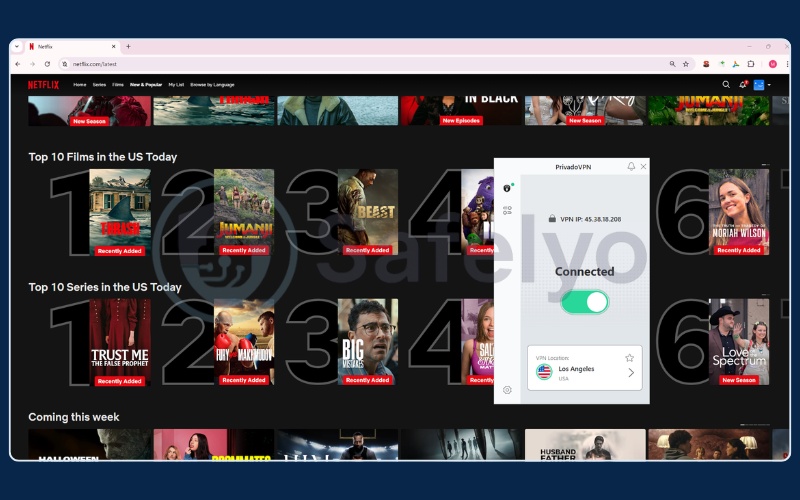
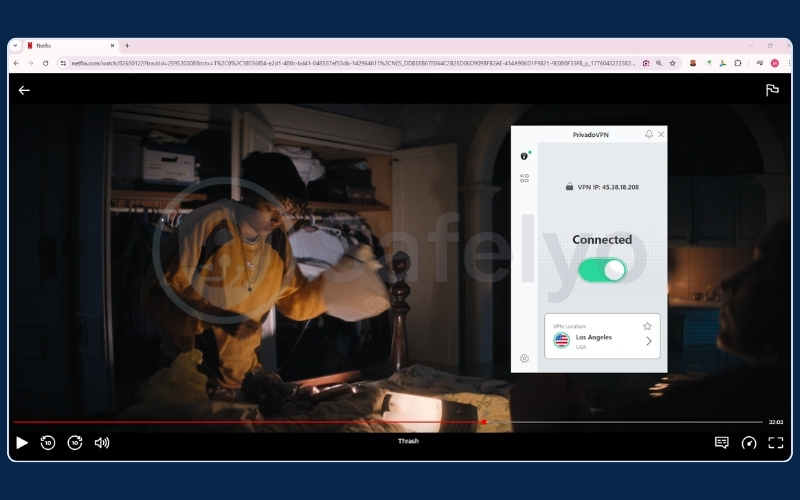
PrivadoVPN is the best free VPN for streaming. While most free VPNs either block Netflix access entirely or get flagged within days, PrivadoVPN consistently bypasses US Netflix’s geo-block on its free servers. It also supports P2P and offers manual server selection across 13 locations, making it the most entertainment-focused free option available in 2026.
| Feature | Details |
|---|---|
| Starting price | Free, no credit card |
| Data limit | 10 GB/month; Lite Mode (reduced speed) after limit |
| Trustpilot score | 3.4/5 (2K reviews) |
| Server selection | Manual selection |
| Server locations | 13 locations across 10 countries |
| Jurisdiction | Switzerland, Swiss privacy laws |
| No-logs policy | Yes, no public audit found |
| Streaming | Supported |
| Torrenting / P2P | Supported |
| Dedicated IP | Not available |
| Security features | AES-256, Kill Switch, Split Tunneling |
| VPN protocols | OpenVPN, WireGuard, IKEv2 |
| Simultaneous connections | 10 |
| Platforms & devices | Windows, macOS, Android, iOS, Android TV, Fire TV Stick, tvOS |
| Browser extension | Chrome, Edge, Brave, Firefox |
| Customer support | 24/7 via email/ticket |
| Ads on free tier | None |
| Registration required | Yes, email required |
Pros
Successfully unblocks streaming platforms like US Netflix
Allows P2P and torrenting on free servers
Offers 13 manual server locations
Unlimited simultaneous connections
Cons
10 GB hard data cap for high-speed access
No published independent privacy audit
Streaming and torrenting
PrivadoVPN fills the exact gap that Proton VPN’s free tier leaves open. It consistently bypasses US Netflix’s geo-block on its free servers, which is a genuinely rare capability among free plans. Beyond streaming, it also permits P2P downloads, making it one of the very few free VPNs that supports both entertainment and file-sharing in a single package.
The manual server selection across 13 locations is a significant practical advantage. If one US server is congested or gets blocked, you can simply switch to another without upgrading to a paid plan. The combination of Swiss jurisdiction, a no-logs policy, and support for OpenVPN and WireGuard protocols means your connection is encrypted to a solid standard on the free tier.
One important caveat: no independent audit of PrivadoVPN’s no-logs policy has been publicly published. This places it below Proton VPN and Windscribe on pure privacy credibility, even though the Swiss jurisdiction provides a solid legal baseline.
Speed and performance
The 10 GB monthly cap is the honest limitation you need to plan around. At average HD streaming quality (around 3-4 GB per hour), 10 GB translates to roughly 2-3 hours of Netflix before you hit the ceiling. After that, PrivadoVPN drops you into “Lite Mode”, which significantly throttles your speed.
For burst usage (checking a specific show, watching a sports clip, or downloading a specific file), 10 GB is workable. For sustained daily streaming, it is not. Our speed tests showed strong performance across European and US servers when manual selection is used wisely.
Speed test results (tested April 10, 2026):
| Server location | Download (Mbps) | Upload (Mbps) | Ping (ms) |
|---|---|---|---|
| Germany | 461.43 | 55.37 | 233 |
| Netherlands | 29.13 | 27.71 | 273 |
| France | 363.98 | 81.85 | 236 |
| UK | 398.17 | 71.18 | 233 |
| US | 456.63 | 105.08 | 186 |
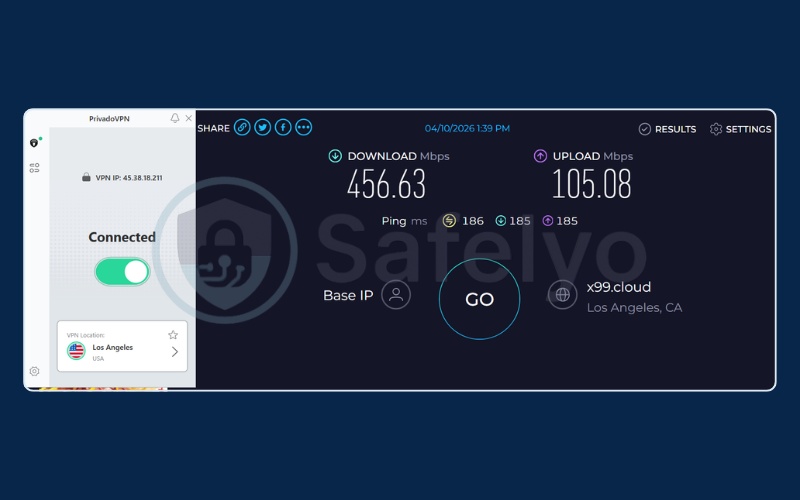
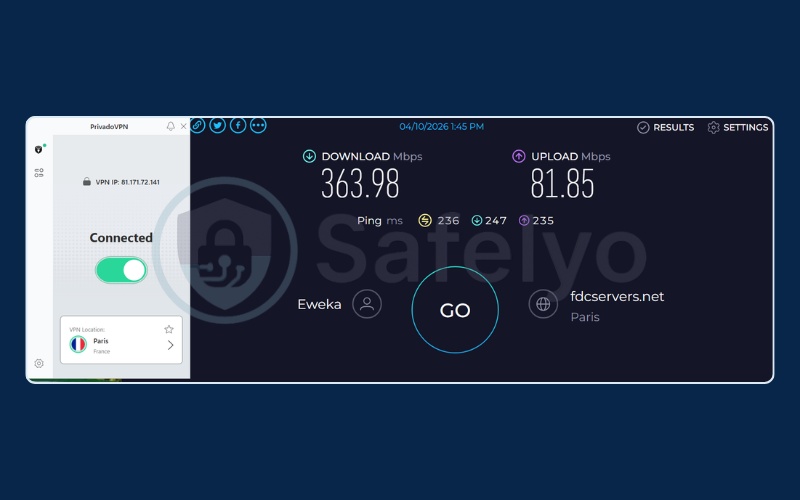
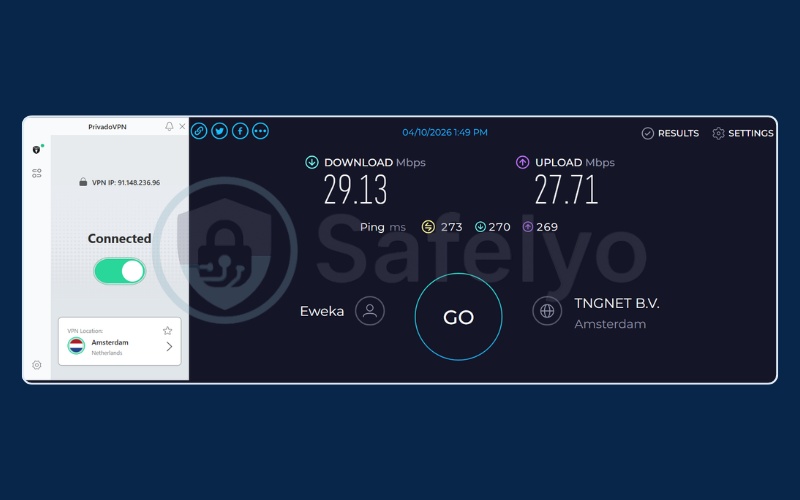
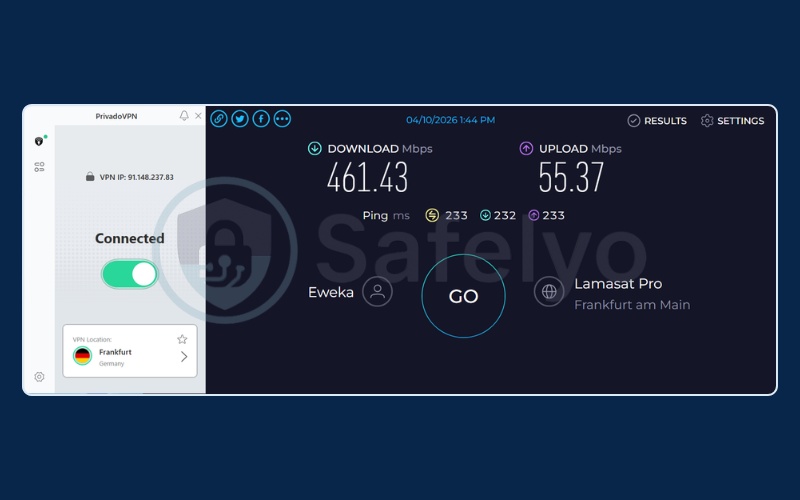
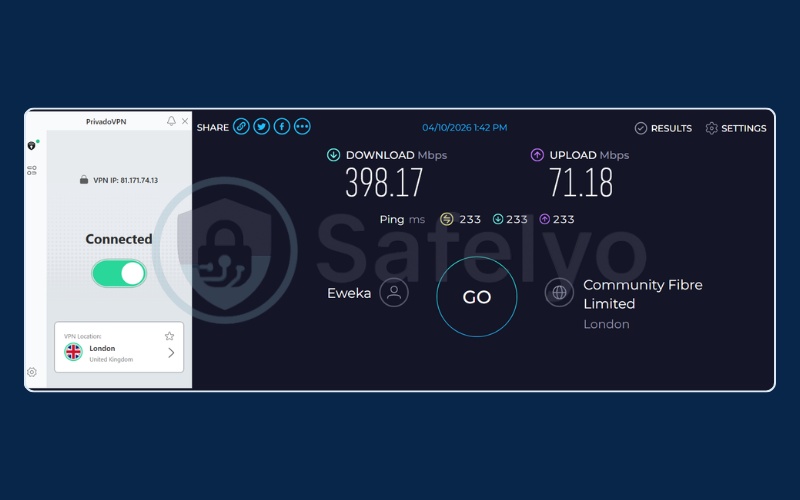
Germany and the US both exceeded 450 Mbps download speeds, fast enough for buffer-free 4K streaming. Notably, the Netherlands server dropped to just 29.13 Mbps in the same test session. This illustrates that manual server selection matters: choosing the wrong server can significantly degrade your experience. When you do pick a well-performing server, the speeds are genuinely competitive.
Why we picked it: Privado VPN fills the exact gap Proton VPN leaves by allowing streaming, torrenting, and manual server selection.
Best for: Users who need to quickly bypass geo-blocks to watch an episode on US Netflix or download a small torrent.
2.3. Windscribe: Best for multiple devices & ad-blocking
Windscribe is the most feature-rich free VPN available in 2026. It ships with a built-in ad and malware blocker, runs RAM-only servers, supports P2P, and allows unlimited simultaneous connections. All of this comes at no cost, making it the go-to option for users who want to protect multiple devices without paying a subscription fee.
| Feature | Details |
|---|---|
| Starting price | Free |
| Data limit | 10 GB/month with email; 2 GB without |
| Trustpilot score | 4.7/5 (13K reviews) |
| Server selection | Manual selection |
| Server locations | 10 countries |
| Jurisdiction | Canada |
| No-logs policy | Yes, audited by Packetlabs (2024) |
| Streaming | Unblocks 5 Netflix regions |
| Torrenting / P2P | Supported |
| Dedicated IP | Paid only |
| Security features | AES-256, RAM-only servers |
| VPN protocols | WireGuard, OpenVPN, IKEv2, Stealth |
| Simultaneous connections | Unlimited |
| Platforms & devices | Windows, macOS, Linux, Android, iOS |
| Browser extension | Chrome, Firefox |
| Ads on free tier | None |
| Registration required | Optional |
Pros
Unlimited simultaneous connections
Built-in malware and ad blocking
10 GB monthly data if you provide an email
Verified no-logs audit by Packetlabs (2024)
Excellent 4.7 Trustpilot score
Cons
Based in Canada (Five Eyes intelligence alliance)
Data drops to a restrictive 2 GB if you skip email registration
Features and ecosystem
Windscribe ships with R.O.B.E.R.T., a built-in ad and malware blocker that filters intrusive advertising and known malicious domains at the DNS level before they reach your browser. This feature is normally a paid add-on in most VPN suites.
Windscribe also runs RAM-only servers, meaning no data is ever physically written to a hard drive and everything is wiped on reboot. Its 4.7 Trustpilot score from over 13,000 reviews reflects genuine community satisfaction that is rare in this category. The 2024 Packetlabs audit adds a layer of verifiable trust to its no-logs claims.
The unlimited simultaneous connections policy is particularly valuable: you can protect your phone, laptop, and a family member’s tablet all at once without extra cost or separate logins.
One notable trade-off: Windscribe is based in Canada, which is a 5 Eyes member country. While the audited no-logs policy mitigates this risk (a verified no-logs policy means there is nothing to hand over even under a legal order), users with the highest privacy requirements may prefer the Swiss jurisdiction of Proton VPN.
Speed and performance
The 10 GB monthly cap (which requires registering with an email address) is the primary constraint. If you skip registration, you are limited to 2 GB. The ability to manually choose from 10 countries gives you significant control, but our tests showed considerable variation between server locations.
Speed test results (tested April 10, 2026):
| Server location | Download (Mbps) | Upload (Mbps) | Ping (ms) |
|---|---|---|---|
| Hong Kong | 452.56 | 47.76 | 46 |
| Netherlands | 18.99 | 38.81 | 241 |
| UK | 277.51 | 9.80 | 202 |
| US | 187.66 | 91.75 | 188 |
Hong Kong delivered an outstanding 452.56 Mbps with a low 46ms ping, making it particularly strong for users in the Asia-Pacific region. The Netherlands result at just 18.99 Mbps was a significant contrast in the same test session.
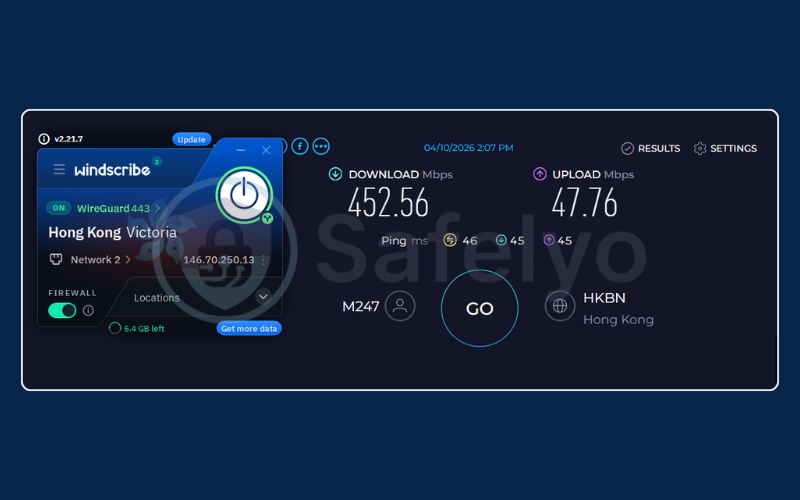
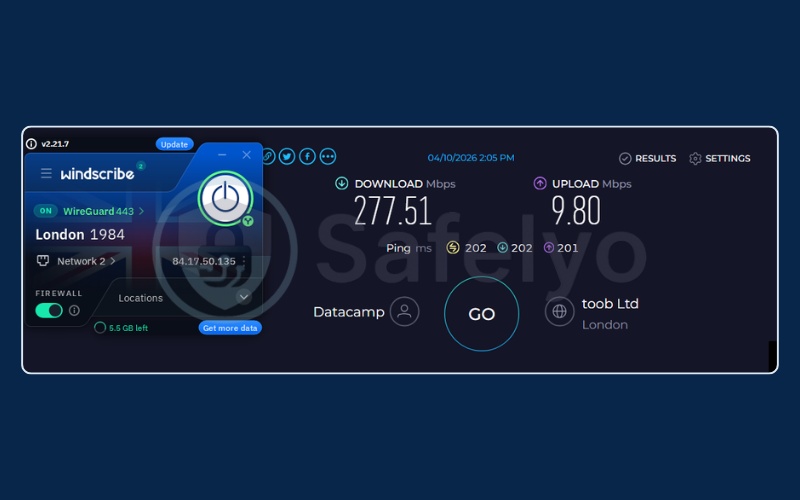
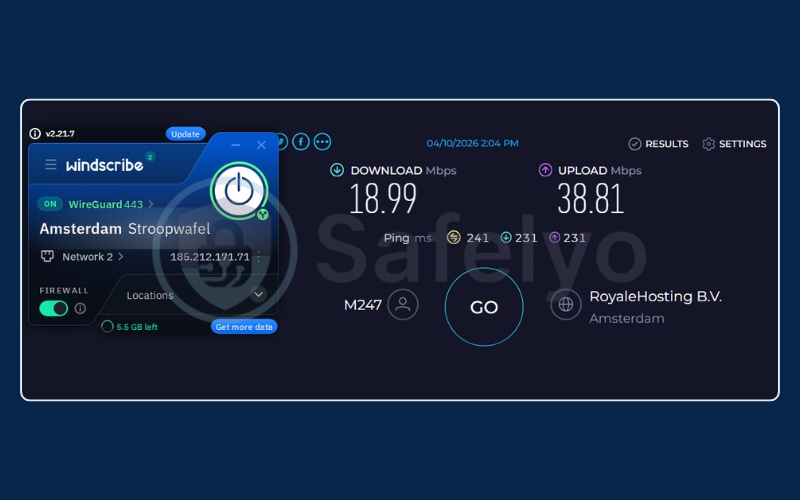
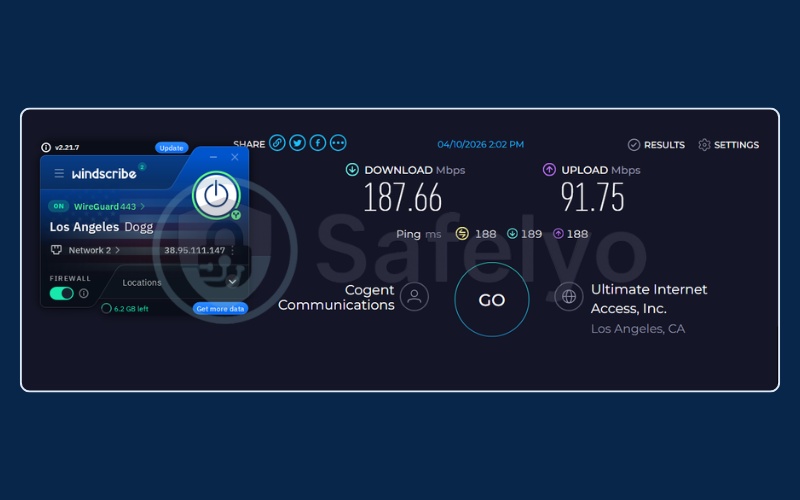
Manual server selection on Windscribe is both a strength and a responsibility: the best servers are excellent, but you need to test a few options to find them. Starting with the Hong Kong or US servers is a reliable strategy for users in Asia.
Why we picked it: The built-in ad-blocker combined with unlimited device connections, makes Windscribe an effective choice for securing multiple devices on the go.
Best for: Users with multiple devices (phones, laptops) who want a feature-rich app with built-in ad blocking.
2.4. Hide.me: Best for unlimited data & anonymous browsing
Hide.me is the best free VPN for users who need unlimited data with zero registration required. It offers a strong privacy foundation, AES-256 encryption, an audited no-logs policy, and Malaysia-based jurisdiction outside major intelligence alliances. All without asking for an email address.
Note that P2P and torrenting are restricted to paid plans only; the free tier does not permit it. If your priority is anonymous, unlimited browsing rather than file sharing, Hide.me is the most privacy-friendly no-registration option available.
| Feature | Details |
|---|---|
| Starting price | Free forever, not a trial |
| Data limit | Unlimited |
| Trustpilot score | 4.4/5 (1K reviews) |
| Server selection | Auto-select only |
| Server locations | 8 locations (free) |
| Jurisdiction | Malaysia, privacy-friendly |
| No-logs policy | Yes, audited by independent security analysts |
| Streaming | Paid only |
| Torrenting / P2P | Paid only |
| Dedicated IP | Paid only |
| Security features | AES-256, StealthGuard, Perfect Forward Secrecy |
| VPN protocols | WireGuard, IKEv2/IPSec, OpenVPN |
| Simultaneous connections | 1 device (free) |
| Platforms & devices | Windows, macOS, Linux, Android, iOS |
| Browser extension | Chrome |
| Customer support | 24/7, same as paid users |
| Ads on free tier | None |
| Registration required | No, anonymous use supported |
Pros
Truly unlimited data
No registration or email required
Excellent 24/7 customer support, same as paid users
Audited no-logs policy
Cons
Only 8 server locations available on the free plan
Fails to unblock major streaming platforms
Server selection is fully automated
Speeds were consistently slow in our testing
Privacy and data
Hide.me’s most distinctive advantage on the free tier is the combination of unlimited data and zero registration requirement. Most free VPNs require at least an email address to create an account. Hide.me allows completely anonymous use from the first connection, with no account tied to your browsing activity.
Its Malaysia-based jurisdiction sits outside the major intelligence-sharing alliances, and the audited no-logs policy provides a verified baseline of trust. The AES-256 encryption paired with Perfect Forward Secrecy (a mechanism that generates a unique encryption key for each individual session, so that even if a future key is exposed, previously recorded sessions cannot be decrypted) gives it a solid technical privacy foundation.
Speed and performance
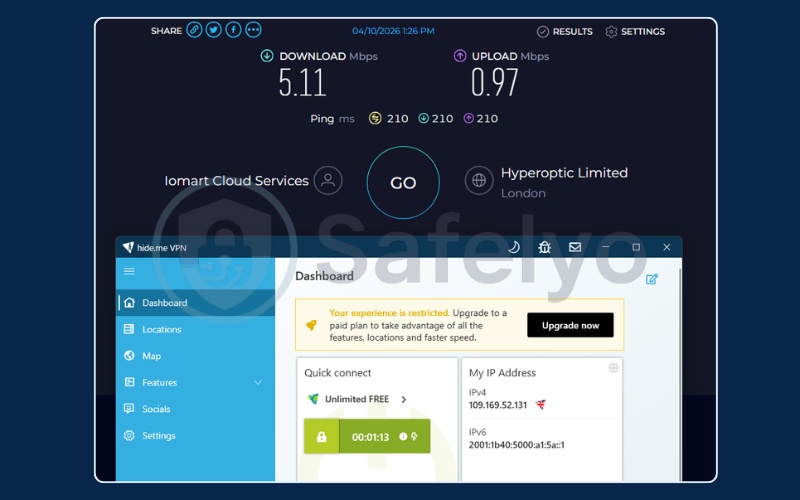
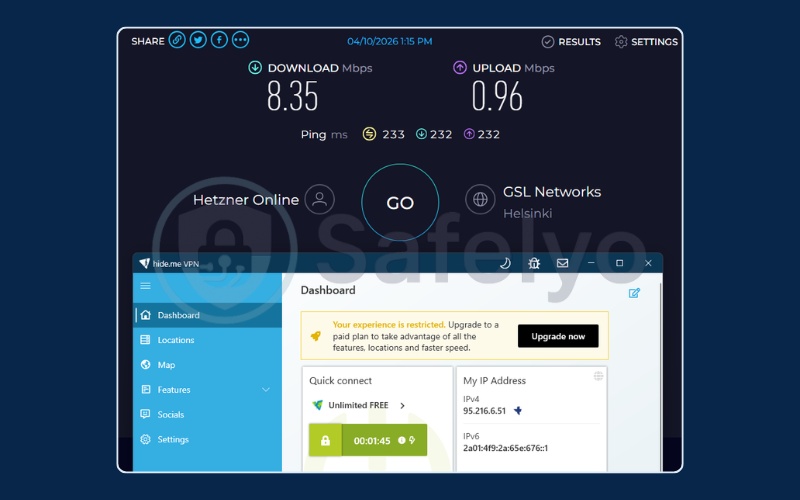
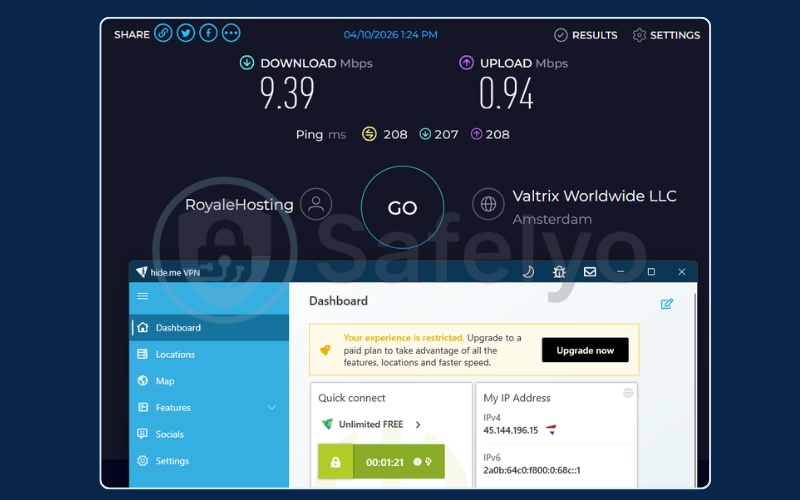
The auto-assignment of servers is Hide.me’s most significant real-world limitation, and the speed test results reflect this clearly. All three server locations tested came in below 10 Mbps download speeds.
While the unlimited data is genuinely appealing, these speeds make heavy downloading impractical on the free tier. For standard anonymous browsing and light daily use, speeds are acceptable.
Speed test results (tested April 10, 2026):
| Server location | Download (Mbps) | Upload (Mbps) | Ping (ms) |
|---|---|---|---|
| Finland | 8.35 | 0.96 | 233 |
| Netherlands | 9.39 | 0.94 | 208 |
| UK | 5.11 | 0.97 | 210 |
Speeds were universally low across all auto-assigned servers in our testing. Upload speeds are particularly limited, dropping below 1 Mbps consistently.
Hide.me is the right tool for users who value unlimited data and completely anonymous use, and who do not need P2P support or fast speeds.
Why we picked it: Hide.me is the best choice for users who need unlimited anonymous browsing without providing any registration details.
Best for: Privacy-conscious users who want unlimited data with zero registration, and do not require torrenting or streaming.
2.5. TunnelBear: Best for casual browsing & beginners
TunnelBear is the friendliest free VPN for people who have never used one before. Its bear-themed interface removes all the technical complexity that makes most VPN apps intimidating, and it publishes annual independent security audits that give it a credible trust baseline. For occasional, light use on public Wi-Fi, it does the job without requiring any technical knowledge.
| Feature | Details |
|---|---|
| Starting price | Free |
| Data limit | 2 GB/month |
| Trustpilot score | 1.8/5 (115 reviews) |
| Server selection | Auto-select closest |
| Server locations | 47 countries |
| Jurisdiction | Canada (owned by McAfee) |
| No-logs policy | Yes, annual independent audit published publicly |
| Streaming | Supported |
| Torrenting / P2P | Not stated |
| Dedicated IP | Not available |
| Security features | AES-256-bit encryption |
| VPN protocols | Not stated |
| Simultaneous connections | Unlimited |
| Platforms & devices | Windows, macOS, Android, iOS |
| Browser extension | Chrome |
| Registration required | Yes, no credit card needed |
Pros
Incredibly simple and visually engaging app interface
Regular public security audits published annually
Unlimited simultaneous connections
Cons
Very restrictive 2 GB monthly data cap
Random server assignment with no override option
Owned by a large corporate entity (McAfee)
Very poor Trustpilot rating
Usability and server assignment
TunnelBear’s bear-themed UI is genuinely the most beginner-friendly interface in this category. The app uses animated bears, a simple toggle, and no confusing settings menus. For someone who has never used a VPN before and simply wants to protect their connection on public Wi-Fi, the setup takes under two minutes.
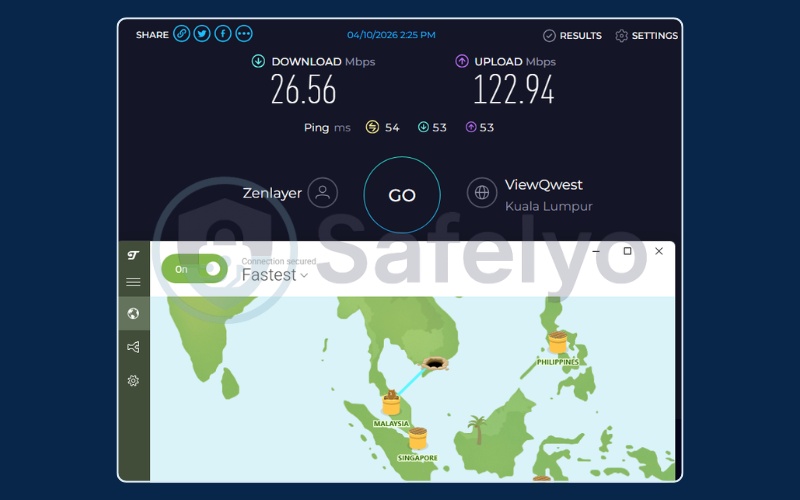
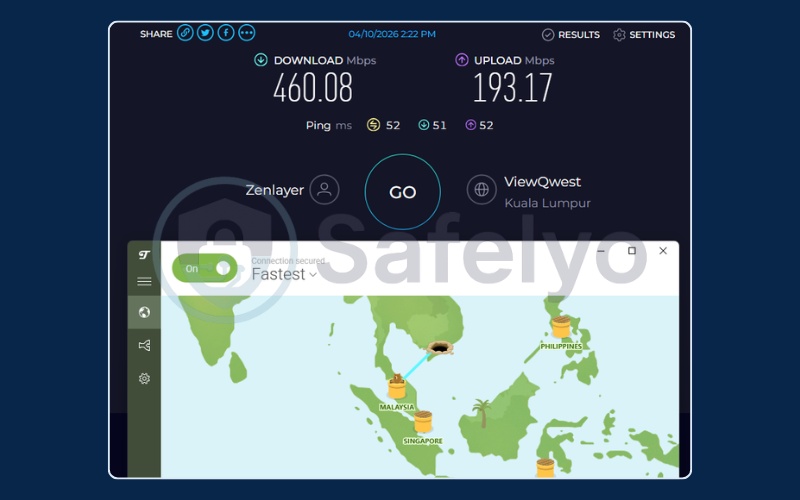
TunnelBear assigns you a server automatically based on the closest location. In our tests, we reconnected multiple times but it consistently connected to the same nearest server, which in our case was Malaysia. There is no manual override available. This inflexibility limits TunnelBear’s usefulness if you need a specific country’s server, and it is a primary reason behind the frustration reflected in its 1.8 Trustpilot score.
The annual public security audits remain a genuine trust signal. TunnelBear publishes independent security assessments every year, which very few VPN companies do on a consistent schedule.
Data limits and speed
2 GB per month is the hardest constraint to work around. At average web browsing consumption, 2 GB covers roughly 20 hours of standard text and image browsing, or about 40 minutes of standard-definition video. It is not enough for regular streaming, downloading, or even a full day of active mobile browsing.
The honest use case for TunnelBear’s free plan is occasional protection: checking emails, doing online banking, or reading articles on public Wi-Fi a few times a month.
Speed test results (tested April 10, 2026):
| Server location | Download (Mbps) | Upload (Mbps) | Ping (ms) |
|---|---|---|---|
| Malaysia 1 | 460.08 | 193.17 | 52 |
| Malaysia 2 | 26.56 | 122.94 | 54 |
The extreme variance between two connections to the same region illustrates the unpredictability of automatic server assignment. One connection delivered 460 Mbps, while the very next dropped to 26.56 Mbps. Since you cannot manually override the assigned server, the speed you receive varies significantly between sessions.
For occasional, light use, this inconsistency is manageable. For anything time-sensitive, it is a significant risk.
Why we picked it: Despite the data cap and speed volatility, its annual public audits and frictionless beginner interface make it a safe option for very light users.
Best for: Non-technical users who just need to safely check their email on public Wi-Fi a few times a month.
3. What is the safest free VPN right now?
Proton VPN is currently the safest free option on the market, and the reasons come down to verifiable facts rather than marketing claims. Feeling confident about a free VPN requires more than trusting a company’s privacy page. It requires independently confirmed evidence, and Proton VPN provides more of it than any other free provider.
Here is specifically what makes it stand apart:
- Based in Switzerland, which sits outside the 5 Eyes, 9 Eyes, and 14 Eyes international surveillance alliances. Swiss law does not compel companies to secretly share user data with foreign governments.
- Independently audited by Securitum in 2025. This audit reviewed Proton VPN’s actual server infrastructure and application code, not just its published policies.
- Fully open-source apps. Every line of application code is publicly available on GitHub. Any security researcher can inspect it for hidden trackers, data collection, or backdoors.
- No ads or tracking scripts embedded in the free tier. Proton VPN generates revenue from paid subscriptions, not from harvesting free-tier user data.
4. Best free VPN for different devices
The best VPN for your device depends on the platform you are trying to protect. An app that performs well on Windows may have a stripped-down iOS version, and a free plan that works for desktop browsing may not suit the always-on nature of mobile use. Below are our platform-specific recommendations based on testing across Android, iPhone, Windows, and Mac.
4.1. Best free VPN for Android
If you are looking for the best VPN for Android, these are the two picks that hold up in daily mobile use:
- Proton VPN (Best overall): The Android app is well-maintained and includes the same AES-256 encryption and audited no-logs policy as the desktop version. The unlimited data is the decisive factor here. Android devices are always-on, constantly syncing apps and running background processes. A capped free plan runs out quickly on mobile, which makes Proton VPN’s no-cap policy genuinely valuable for securing everyday mobile traffic without counting gigabytes.
- Hide.me (Best alternative): A strong choice for Android users who want to stay completely anonymous. It requires no registration or email address, and its unlimited data combined with full AES-256 encryption offers solid protection for users hesitant to link any account to their VPN usage. The slower speeds are a trade-off, but for standard mobile browsing they remain acceptable.
For Android users, the decision comes down to one question: Is daily unlimited browsing your priority, or is anonymous, registration-free use more important to you? Proton VPN answers the first. Hide.me answers the second.
4.2. Best free VPN for iPhone
For iOS users, here are the two most reliable free picks when looking for the best VPN for iPhone:
- Proton VPN (Best for iOS): The iOS app is reliable and receives regular updates, which matters because some VPN apps have historically struggled to maintain consistent functionality across iOS updates. The unlimited data and audited privacy standards translate cleanly to the iPhone experience, and the absence of ads within the app keeps the interface uncluttered for daily use.
- Windscribe (Strong runner-up): A solid alternative for iPhone users who want more control over their connection. The iOS app supports manual server selection across 10 countries, includes the R.O.B.E.R.T. ad and malware blocker, and allows unlimited simultaneous connections, meaning one account covers every device you own. The 10 GB monthly data cap (with email registration) is the primary constraint to plan around.
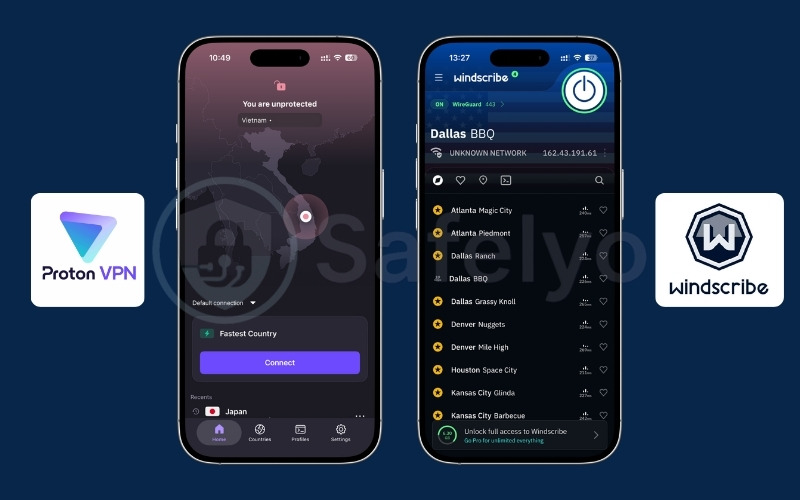
Both options work reliably on iOS. The right choice comes down to whether you prioritize unlimited data with a verified audit trail (Proton VPN) or manual server control with built-in ad blocking across multiple devices (Windscribe).
4.3. Best free VPN for Windows
When it comes to the best VPN for Windows, two options stand out for different reasons:
- Windscribe (Best for Windows): The Windows application is open-source and includes the R.O.B.E.R.T. ad and malware blocking feature that works system-wide. The no-logs policy was audited by Packetlabs in 2024, and the unlimited simultaneous connections policy means a single account can cover every device in a household. For Windows users who also game or torrent, Windscribe’s support for both use cases on the free tier adds meaningful flexibility.
- Proton VPN (Best for unlimited data): A solid alternative for users whose primary concern is unlimited data. The Windows app auto-selects the fastest available server, which is practical for users who prefer a no-configuration setup. It also works well with router-level configurations, which can extend VPN protection to a whole home network.
For most Windows users, Windscribe’s combination of features, audit credibility, and unlimited device support makes it the stronger daily driver. Proton VPN remains the safer default if you want a simpler, no-configuration setup with no data worries.
4.4. Best free VPN for Mac
For macOS users searching for the best VPN for Mac, these two options work cleanly without conflicting with Apple’s built-in security features:
- Proton VPN (Best for Mac): The only reliably trustworthy free VPN with unlimited bandwidth on macOS that does not conflict with macOS security features. Some free VPNs trigger macOS Firewall warnings or require disabling system integrity protections to install. Proton VPN installs cleanly, works alongside the built-in macOS Firewall, and maintains consistent performance without background conflicts.
- Windscribe (Best for geo-unblocking): A useful alternative on Mac specifically for accessing streaming libraries or bypassing regional restrictions. Windscribe’s ability to unblock five Netflix regions and manually select your country makes it a more practical choice than Proton VPN’s free tier for that specific task.
For macOS users, both options are clean and reliable installs. Proton VPN covers unlimited daily browsing securely, while Windscribe adds geo-unblocking capability if occasional streaming access is needed.
5. Best free VPN for streaming
If you need the best VPN for streaming on a free plan, these options are worth trying. Keep in mind that free VPN servers are not purpose-built for streaming: they can work well during one session and fail the next. Results are not always consistent, and Netflix or other platforms may periodically update their detection systems to block VPN traffic.
Use the table below as a starting guide rather than a guaranteed outcome.
| Streaming service | Best pick | Notes |
|---|---|---|
| Netflix (US) | PrivadoVPN | One of the only free VPNs that unblocks US Netflix, though results may vary over time |
| Netflix (UK) | Windscribe | Unblocks some Netflix regional libraries including UK |
| BBC iPlayer (UK) | Windscribe | The most reliable free option for BBC iPlayer in our tests |
| Disney+ (UK) | PrivadoVPN | Supports Disney+ on free plan |
| Hulu (US) | Windscribe | Bypasses Hulu geo-blocks on free tier |
| HBO Max (US) | Windscribe | Unblocks HBO Max on free plan |
| Prime Video (US) | PrivadoVPN | Reliable free option for Prime Video |
| DAZN / ITVX / Sky Go | Windscribe | Only free VPN tested to bypass all three platforms |
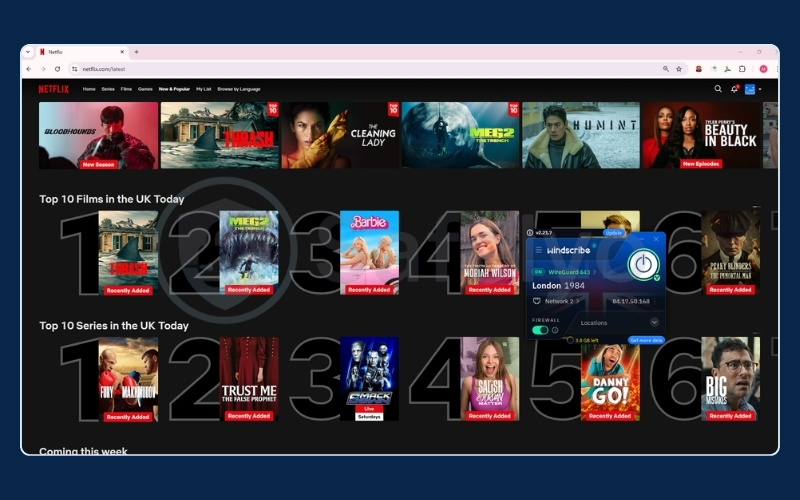

Important note: Proton VPN and Hide.me do not support streaming-optimized servers on their free tiers. Attempting to access geo-restricted content on either of these free plans will typically return a “proxy detected” error.
TunnelBear technically supports streaming, but the 2 GB per month data cap makes sustained streaming completely impractical. A single episode of a standard Netflix series in HD will consume approximately 1 GB of your monthly allowance.
6. Best free VPN extension
A browser extension is the right choice for users who do not need system-wide VPN protection and simply want to secure their browsing without installing a full application. Extensions are lighter, faster to activate, and easier to manage, though they only protect browser traffic rather than your entire device.
If you are looking for the best VPN extension for Chrome or VPN extension for Firefox without paying, these are the strongest options:
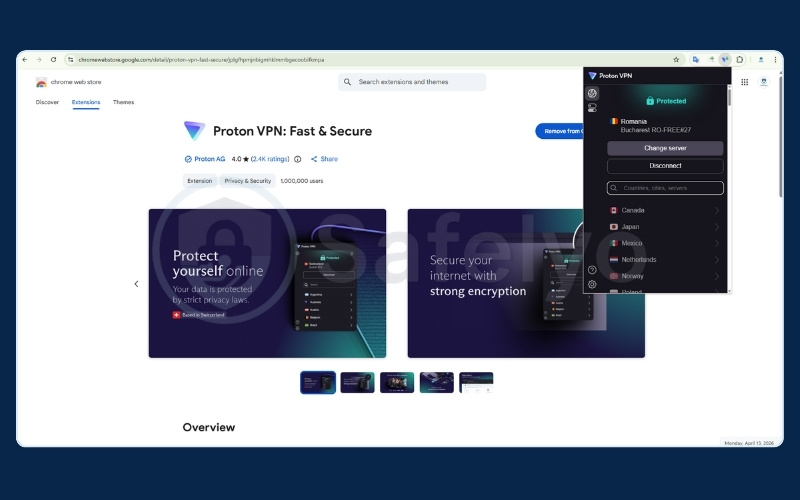
- Proton VPN (Best free Chrome extension): The extension carries the same unlimited data allowance and audited no-logs policy as the full application, making it the most reliable free browser VPN extension for daily use. For users who spend most of their online time in a browser, it covers the most sensitive activity (banking, email, form submissions) without any data cap.
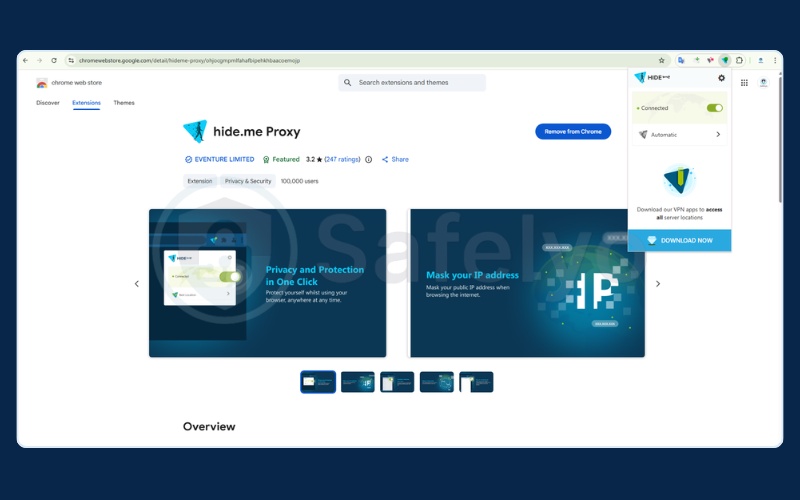
- Hide.me (Best alternative): Effectively masks your IP address and unblocks restricted websites, and it works without requiring an account. Keep in mind that advanced features like the Kill Switch are only available in the desktop application, not the browser extension.
7. Best free VPN for gaming
Gaming demands the lowest possible latency and the most stable connection available. A VPN adds a routing layer to your traffic that typically increases ping, which is why most free VPNs are impractical for competitive play.
When it comes to the best VPN for gaming without paying, the options narrow significantly:
- Proton VPN (Best for gaming): No data cap means you can play for six-plus hour sessions without the VPN cutting your connection mid-game. The Kill Switch prevents your real IP address from being exposed if the VPN connection momentarily drops, a genuine benefit for gamers who face DDoS threats. If the auto-select algorithm assigns you to a nearby regional server (as it did when assigning Singapore at 45ms in our tests), Proton VPN delivers entirely playable latency.
- Windscribe & Privado (Best alternative): Supports manual server selection, which directly solves Proton VPN’s primary gaming weakness. By manually choosing a server close to the game’s hosting region, you can consistently control your ping.
Not recommended for gaming: TunnelBear and Hide.me. TunnelBear’s 2 GB monthly cap will be consumed by a single evening of gaming with voice chat. Hide.me is disqualified by its consistently slow free-tier speeds, with all tested servers coming in below 10 Mbps download and upload speeds dropping below 1 Mbps. At those speeds, online gaming is not viable regardless of ping.
8. Best free VPN for torrenting
P2P file sharing requires a VPN that allows torrenting on its free servers, maintains a verified no-logs policy, and provides enough data to make the activity practical. Very few free VPNs pass all three criteria.
Here are the strongest options if you are looking for the best VPN for torrenting on a free plan:
- Windscribe (Top pick): The most reliable free option for torrenting. Its RAM-only servers, 10 GB monthly data, and Packetlabs-audited no-logs policy make it a trustworthy choice.
- PrivadoVPN (Strong alternative): Supports P2P on the free plan, operates under Swiss jurisdiction, and uses OpenVPN and WireGuard protocols for encrypted transfers. The 10 GB monthly limit is the binding constraint for regular use, but it is a reliable option for smaller downloads.
Important note on Hide.me: Despite offering unlimited data, Hide.me does not support P2P or torrenting on the free tier. This feature is restricted to paid plans. Do not rely on it for torrent downloads.
If you want to torrent seriously with high speeds and absolute confidence in your privacy, a paid VPN removes every limitation described above. Read our full Best VPN for torrenting guide for a detailed breakdown of paid options.
9. Free VPNs to avoid in 2026
The most important decision you will make is not which free VPN to use. It is which free VPNs to actively avoid. The following apps have documented histories of either compromising user privacy, containing malware, or engaging in practices that directly contradict the purpose of using a VPN.
Warning: Hola VPN
Hola VPN does not operate traditional VPN servers. Instead, it routes traffic through a peer-to-peer network that uses other users’ devices as relay nodes, including yours. This means other people on the network can route their internet activity through your connection and IP address. This infrastructure has been documented to have been exploited to conduct DDoS attacks. Using Hola VPN means your internet connection can be used for activities you have no knowledge of or control over.
Warning: Betternet
Betternet has a documented history of DNS leaks, meaning the VPN was connecting your tunnel while quietly sending your DNS queries (the records of every website you visit) outside that tunnel directly to your ISP. Independent security researchers confirmed this behavior in published analyses. A VPN with DNS leaks provides the appearance of privacy without the actual protection.
Warning: VPN Proxy Master
VPN Proxy Master has been flagged for aggressive tracking behavior embedded in its application, including telemetry that collects device identifiers and usage patterns. Independent privacy analyses found data collection practices that are inconsistent with the privacy claims in its marketing.
Warning: Turbo VPN, SuperVPN, and Thunder VPN
These three heavily downloaded mobile apps share a pattern of deeply concerning behavior. Security researchers have documented malware detections within their application packages, invasive data harvesting that collects device information, location data, and browsing behavior, and opaque ownership structures with ties to Chinese-based parent companies.
Under Chinese law, technology companies are legally required to cooperate with state intelligence agencies upon request. For users where internet privacy is a genuine concern, these apps represent a direct contradiction of the privacy they appear to offer.
10. The hidden costs of “free” VPN
Running a global VPN network costs millions of dollars every month. Physical servers in data centers around the world require constant maintenance, bandwidth payments, staff, and security infrastructure. When a company offers all of that for free with no clear revenue model, the honest question to ask is: how are they paying for it?
The most common answer, for the bad actors in this market, is your data. Your browsing history is valuable. Advertising data brokers pay significant sums for detailed records of which websites you visit, what you search for, and what you purchase. A free VPN sits in the perfect position to collect this data, because every website request you make passes through their servers before reaching its destination.
If the VPN logs those requests and sells the aggregated records to third-party advertisers, the company generates revenue without you ever seeing an invoice. Some free VPNs go further by selling your bandwidth, turning your idle internet connection into a relay point for other network activity.
Others embed aggressive advertising SDKs (pre-built advertising packages integrated directly into apps) into their applications. These SDKs do not just display ads. They track your behavior across apps, drain your device’s battery, and in some documented cases, persist in the background even after you close the VPN application.
The pattern becomes clear when you understand the economics. A reputable free VPN like Proton VPN sustains its free tier as a marketing channel to convert users to paid plans. Revenue comes from paid subscriptions. When a free VPN has no paid tier, no clear corporate backing, and no published audits, the absence of a visible business model is itself the red flag. Your data, your bandwidth, or both are the product.
11. Which free VPN is right for you? (Decision framework)
You do not need to read the entire article to find your answer. Use this table to match your specific situation to the right tool:
| Your use case / need | Our top recommendation | Why |
|---|---|---|
| Need US Netflix access | PrivadoVPN | Reliably bypasses US Netflix blocks on free servers |
| Ultimate privacy and security | Proton VPN | Swiss jurisdiction, open-source code, and strict audits |
| Traveling / public Wi-Fi | Windscribe | Generous 10 GB limit and built-in malware/ad blocker |
| Torrenting and P2P | Windscribe | Supports P2P on free tier with an audited no-logs policy |
| Anonymous browsing, no registration | Hide.me | Unlimited data with zero registration required |
| Non-technical beginner | TunnelBear | Simplest interface, install-and-forget operation |
| Unlimited data (no cap) | Proton VPN | The only truly safe option with absolutely no data limit |
| Covering multiple family devices | Windscribe | Allows unlimited simultaneous connections |
12. 2026 threat landscape: Why free VPNs are riskier than ever
The risks associated with unsafe free VPNs have grown in 2026, driven by three specific developments.
Typosquatting via malicious ads
Fake VPN applications are appearing at the top of search results through paid advertising. These attacks work by purchasing ad space for search terms like “free ProtonVPN download” and directing users to near-identical websites that distribute malware-infected installers. The fake sites are visually indistinguishable from the real thing.
Always download VPN software directly from the official website or a verified app store listing. Be specifically cautious about clicking on sponsored search results for VPN products, as these are the primary placement method for typosquatting campaigns.
Post-quantum encryption
Quantum computing poses a theoretical future threat to current encryption standards. A sufficiently powerful quantum computer could potentially decrypt traffic that was recorded today, using computing power that does not yet exist at scale. This is referred to as a “harvest now, decrypt later” approach, where adversaries collect encrypted traffic now and store it for future decryption.
Top-tier free VPNs, including Proton VPN, are actively testing post-quantum encryption protocols to address this threat. For most users, this is not an immediate concern, but it signals which companies are investing in long-term security versus those coasting on outdated infrastructure.
Age verification laws and server overcrowding
New age verification laws in the UK and US are driving a surge in VPN adoption among users seeking to bypass mandatory identity checks for accessing certain online platforms. This demand spike is causing significant overcrowding on the free servers of low-quality VPN providers, resulting in degraded speeds and less reliable connections.
The reputable providers reviewed in this article have more robust infrastructure, but the overall market trend means free servers are under more strain in 2026 than in previous years. If you notice a previously reliable free VPN becoming slower or more inconsistent, server overcrowding is likely a contributing factor.
13. Free VPN vs. paid VPN: Key limitations
Before committing to a free plan long-term, it helps to understand where the genuine gaps are:
| Feature | Free VPN | Paid VPN |
|---|---|---|
| Data limits | Typically 2-10 GB/month (Proton VPN and Hide.me are exceptions with unlimited data) | Unlimited across all providers |
| Speeds | Inconsistent; free servers are often shared and congested | Consistently fast; dedicated infrastructure with less congestion |
| Server availability | 1-11 locations depending on the provider; no manual selection on some free tiers | Typically 50-100+ countries with manual selection always available |
| Streaming unblocking | Only PrivadoVPN and Windscribe reliably unblock major platforms on free tiers | Most paid VPNs unblock Netflix, Disney+, BBC iPlayer, and others consistently |
| Customer support | Ticket-only or limited support for free users; lower priority response times | 24/7 live chat with real agents for paid subscribers |
If your needs are basic (protecting your connection on public Wi-Fi, occasional private browsing, or light daily use), the free options reviewed in this article are sufficient. You do not need to spend anything to get a meaningful level of privacy.
However, if your needs go beyond those basics (consistent streaming across multiple platforms, high-speed torrenting, stable low-latency gaming, or protecting every device in your household without data constraints), a paid VPN is the practical next step. Every limitation in the table above disappears with a paid plan, and the monthly cost is typically lower than a single streaming subscription.
For a clearer breakdown of monthly pricing, long-term deals, and hidden renewal fees, see our VPN cost guide.
If you want to read more in detail about the differences, check out our full paid vs free VPN comparison article.
14. FAQs about best free VPN
Below are the five most commonly asked questions from readers evaluating free VPN options.
Is there any 100% free VPN?
Yes. Proton VPN offers a permanently free tier with unlimited data and no credit card required. It is not a trial, and it does not expire. The free tier has limitations (one device, auto-assigned servers, no streaming support), but the core privacy protection is completely free and indefinite.
Are free VPNs actually safe to use?
The reputable ones are safe and independently audited. Proton VPN, Windscribe, and Hide.me all have verified no-logs policies and have passed third-party security audits.
The dangerous ones log your data, serve malware, or sell your bandwidth.
The safety of a free VPN depends entirely on which one you choose. Sticking to verified picks is the key distinction.
Can the FBI track a VPN?
A VPN conceals your browsing activity from your internet service provider and casual monitoring. However, if a VPN company maintains logs of user activity and receives a valid legal warrant, those logs can be handed over to law enforcement.
This is why jurisdiction and a verified no-logs policy matter. Proton VPN’s Swiss location and audited no-logs policy make it significantly harder for any government to compel a data handover compared to a VPN based in a 5 Eyes country with unverified logging practices.
Will using a free VPN slow down my internet?
Quality free VPNs show minimal speed impact on close servers, but free server networks are more prone to congestion than paid ones.
Our speed tests showed high speeds on certain auto-assigned or manually selected servers (Singapore at 454 Mbps, Germany at 461 Mbps), but the same tests showed significant drops on other servers in the same session. The auto-assignment bottleneck and occasional server congestion are the most common sources of slowdown.
What’s the catch with free VPNs?
Reputable free VPNs restrict your data allowance, limit server choices, or block features like streaming and P2P to encourage upgrades to paid plans. This is a straightforward business model.
The dangerous catch is with unreliable free VPNs, where the trade-off is your browsing data being logged and sold to advertising brokers, your bandwidth being resold as a proxy relay, or malware being bundled into the application installer.
15. Conclusion
The best free VPN in 2026 for the vast majority of users remains Proton VPN. It is the only free option that combines unlimited data, a verified no-logs policy, Swiss privacy jurisdiction, and fully open-source apps into a single package with zero cost. If you need to stream US Netflix or run torrents, PrivadoVPN and Windscribe are the more practical choices within those specific use cases.
Here are the key facts to carry forward:
- No truly safe free VPN allows unlimited data, streaming, and torrenting simultaneously. Each pick has a specific strength.
- Always verify a no-logs policy through an independent audit, not just the company’s privacy page.
- Avoid any free VPN with no clear business model, no published audits, and no identifiable corporate ownership.
- Your device, your use case, and your location all affect which free VPN performs best for you specifically.
- Free VPNs are a practical starting point, but if your needs grow, a paid option removes every limitation described in this article.
For deeper reading on how to protect yourself online, explore our full Best VPN category and the wider resources available at Safelyo.