NordVPN is the best VPN for Mac in 2026, pairing impressive download speeds with an independently audited no-logs policy and a native Apple Silicon build. Alongside NordVPN, options like ExpressVPN, Surfshark, Proton VPN and Mullvad also proved to be highly capable VPNs for Mac, with each excelling in specific areas to suit different user needs.
Most VPN advice online focuses on Windows, leaving Mac owners guessing whether an app is a genuine macOS build or just a relabeled client that might drain a MacBook’s battery. This distinction is especially important because macOS Sequoia has tightened the Network Extension permissions that VPN apps rely on.
At the same time, the transition to Apple Silicon, spanning the M1 through the M4 generations, means a provider’s claim of native support now directly affects speed, heat management, and battery efficiency. We tested VPNs directly on Apple Silicon hardware to settle which ones hold up to that standard.
Top VPNs for Mac:
- NordVPN (Best overall for Mac): Posted outstanding download speeds in our testing, and backs that performance with an independently audited no-logs policy (PwC, Deloitte) plus RAM-only server infrastructure.
- ExpressVPN (Best for Apple Silicon and battery efficiency): Ships a fully native Apple Silicon build that runs on the Lightway protocol, a lightweight design built specifically to cut CPU overhead and preserve battery life during long sessions on a MacBook.
- Surfshark (Best for unlimited devices): Allows unlimited simultaneous connections starting at $2.49 a month, making it highly cost-effective for multi-device households.
- Proton VPN (Best free VPN for Mac): Combines a permanent, no-credit-card free tier with unlimited data across 10 countries and a paid network of more than 20,000 servers, all under Swiss jurisdiction, outside the 14 Eyes surveillance alliance.
- Mullvad (Best for privacy purists): Held zero retrievable user data when Swedish police raided its Gothenburg office in April 2023, and pairs that real-world proof with an anonymous account system and a flat rate of 5 euros a month.
The table below lines up the VPNs side by side on the factors that matter most for a Mac: starting price, Apple Silicon support, split tunneling, audit status, and device limits.
| VPN | Starting price | Native Apple Silicon build | Split tunneling on macOS | Audited no-logs policy | Simultaneous connections |
|---|---|---|---|---|---|
| NordVPN | $3.49/mo | Yes | No | Yes (PwC, Deloitte) | 10 |
| ExpressVPN | $2.49/mo | Yes (M1 and up) | Yes | Yes (KPMG, PwC, Cure53, Praetorian, F-Secure) | Up to 14 |
| Surfshark | $2.49/mo | Yes | Yes (Bypasser) | Yes (Deloitte, Cure53, SecuRing) | Unlimited |
| Proton VPN | $2.99/mo (24-mo) | Yes | No (Windows and Android only) | Yes (Securitum) | 10 (1 on the free plan) |
| Mullvad | 5 EUR/mo (~$5.81) flat | Yes | Yes (macOS 13 and later) | Yes (Cure53) | 5 |
Disclaimer: Prices, server counts, and streaming-unblocking results reflect our 2026 testing data and can change at any time. Confirm current details on each provider’s official website before subscribing. This article is for informational purposes only and does not constitute legal advice. Please use VPNs responsibly and legally.
1. How we tested and selected the best VPNs for Mac
We rated each VPN in this guide based on five core criteria:
- Speed tests: Evaluated against US and Singapore servers to measure download speeds, upload speeds, and overall latency. To prevent external bottlenecks, all testing ran on a hardwired 1 Gbps baseline network connection. During the testing phase, we recorded speeds using each provider’s most efficient protocol on macOS: NordLynx for NordVPN, Lightway for ExpressVPN, and WireGuard for Surfshark, Proton VPN, and Mullvad.
- Protocol evaluation: We evaluated the primary tunneling protocols each provider offers on macOS, such as WireGuard, Lightway, and OpenVPN, to ensure they operate efficiently on Apple’s architecture.
- Leak tests: Covering DNS, WebRTC, and IPv6 to ensure user data remains completely inside the encrypted tunnel.
- Streaming-unblocking checks: Tested against Netflix, Disney+, and BBC iPlayer to verify regional access and bypass capabilities.
- Audit verification: Checked whether the providers have commissioned independent third-party firms to verify their no-logs policies and server infrastructure, ensuring user data privacy.
- Pricing analysis: Compared across the available plan lengths to determine actual value, renewal conditions, and device limits.
All speed figures in this guide were recorded directly from our test location in Vietnam, connecting outward to a US server and a Singapore server. Testing ran on an Apple Silicon MacBook running the current version of macOS, with Activity Monitor open to confirm each app launched as a native build rather than running through Rosetta 2 translation.
2. Best VPN for Mac: Top picks tested on Apple Silicon
The VPNs below all run native Apple Silicon builds. We selected them based on the methodology above, starting with the fastest overall pick and moving through the strongest options for battery efficiency, device limits, free access, and privacy.
2.1. NordVPN: Best overall for Mac
NordVPN is built by Nord Security and operates out of Panama, a jurisdiction outside the 5, 9, and 14 Eyes intelligence-sharing alliances. It is the most recognized name in the VPN category, and on a Mac that recognition is backed by strong performance metrics and a strict audit trail stretching across multiple firms.
The combination that sets it apart on macOS is NordLynx (NordVPN’s own implementation of the WireGuard protocol) running alongside Threat Protection for ad and malware blocking and Meshnet for direct device-to-device networking.
| Feature | Details |
|---|---|
| Best for | Mac owners who want the fastest tested speeds and the broadest audit history |
| Starting price | $3.49/mo (2yr + 3mo) |
| Company | Nord Security |
| Jurisdiction | Panama |
| Independent audit | Yes (PwC Switzerland 2018, 2020; Deloitte 2022 to 2024) |
| No-logs policy | Yes |
| RAM-only servers | Yes |
| Servers | 9,500+ |
| Countries | 149 |
| Avg. download speed | 451.65 Mbps |
| Avg. upload speed | 142.19 Mbps |
| Avg. latency | 121 ms |
| Protocols | NordLynx, OpenVPN, IKEv2/IPSec, NordWhisper |
| Kill switch | Yes |
| Obfuscation | Yes |
| Port forwarding | No |
| Dedicated IP | Yes |
| Simultaneous connections | 10 |
| Netflix support | 26+ regions |
| Disney+ | Yes |
| BBC iPlayer | No |
| Torrent/P2P | Yes |
| Win/Mac/iOS/Android | Yes |
| Linux | Yes |
| Browser extension | Chrome, Firefox, Edge (no Safari extension) |
| Router support | Yes |
| Live chat 24/7 | Yes |
| Refund policy | 30-day money-back guarantee |
| Free trial | Yes (3-day, Android only) |
| Split tunneling on macOS | No |
| Official website | nordvpn.com |
Pros
Independently audited no-logs record (PwC, Deloitte)
9,500+ servers across 149 countries
Fast tested download speeds
Cons
No split tunneling on macOS
No port forwarding
2.1.1. Speed and performance
NordVPN’s strongest case for a Mac comes down to raw performance. During our 1 Gbps baseline tests, the provider delivered consistently high throughput across both nearby and distant connections.
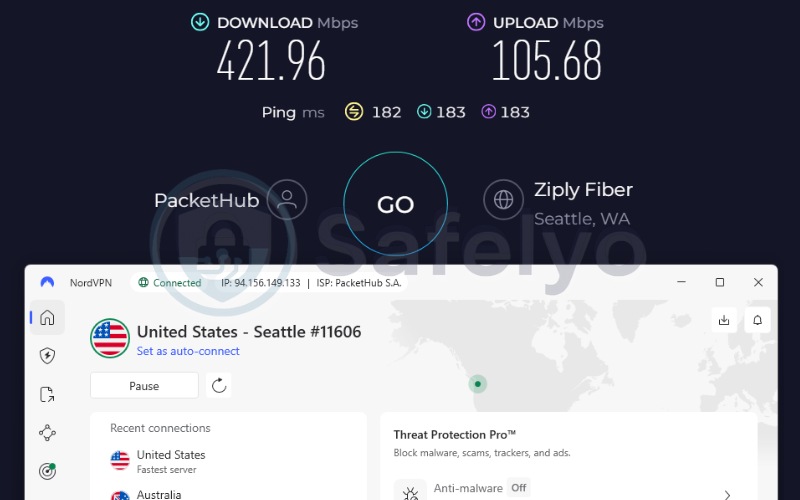
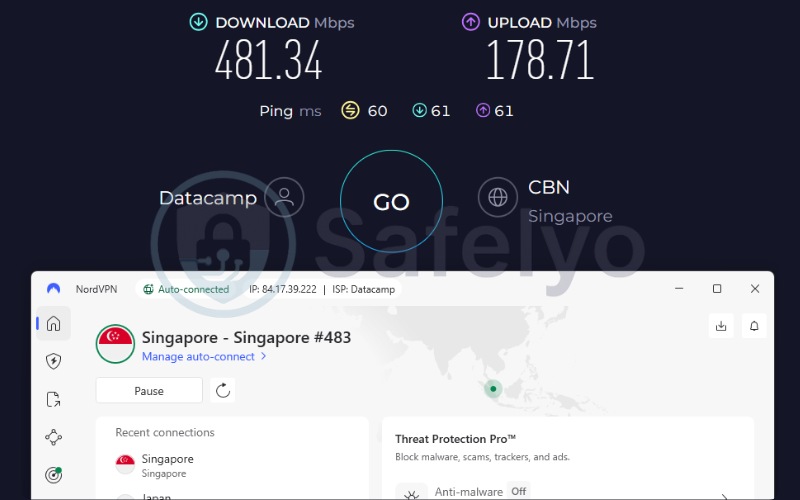
| Server | Download (Mbps) | Upload (Mbps) | Ping (ms) |
|---|---|---|---|
| US | 421.96 | 105.68 | 182 |
| Singapore | 481.34 | 178.71 | 60 |
| Average | 451.65 | 142.19 | 121 |
The data shows that NordVPN handles distant routing extremely well. The US server maintained an impressive 421.96 Mbps download speed, ensuring that high-bandwidth tasks remain stable even over long distances. Moving closer to the test origin, the Singapore server peaked at 481.34 Mbps with a highly responsive 60 ms ping.
This performance level ensures that 4K streaming, large file transfers, and video calls run without practical slowdowns. That margin matters on a Mac specifically, since a MacBook’s webcam, screen sharing, and cloud backup tools all compete for the same connection, and a VPN that adds noticeable lag will surface during exactly those tasks.
2.1.2. Mac compatibility and features
NordVPN does not support split tunneling on macOS, a real limitation if a Mac user wants to keep specific apps running outside the encrypted tunnel. Windows users get that option, but Mac users currently do not.
The trade-off is that NordVPN’s native Apple Silicon build is highly efficient. The gap between an Intel Mac and an M-series MacBook running the NordVPN app is negligible, meaning users will rarely notice a difference in system responsiveness.
2.1.3. Privacy and security
Moving from software capabilities to infrastructure, the company maintains strict data retention rules. NordVPN’s no-logs claim has been checked by Deloitte across 2022, 2023, and 2024, alongside earlier independent audits from PricewaterhouseCoopers in 2018 and 2020.
The network runs entirely on RAM-only servers, meaning data is wiped on every reboot rather than written to a hard disk. Traffic is encrypted with a combination of AES-256, ChaCha20, and an added layer of post-quantum protection designed to resist future decryption attempts. For a Mac owner deciding whether to trust a provider, that repeated third-party verification is a vital detail.
Best for: Mac owners who demand blazing-fast speeds for streaming and heavy downloads, backed by top-tier security, and don’t require app-specific split tunneling.
2.2. ExpressVPN: Best for Apple Silicon and battery efficiency
ExpressVPN is owned by Kape Technologies and operates out of the British Virgin Islands, a jurisdiction with no mandatory data retention laws. ExpressVPN’s own audit history and infrastructure stand independently of its parent company.
Its core pitch for Mac owners centers on the proprietary Lightway protocol, which ExpressVPN built from the ground up to run lighter than older protocols like OpenVPN, positioning it as both a speed and a battery-efficiency advantage on a laptop.
| Feature | Details |
|---|---|
| Best for | Mac owners running Apple Silicon who want a native build |
| Starting price | $2.49/mo (2yr + 4mo) |
| Company | ExpressVPN (part of Kape Technologies) |
| Jurisdiction | British Virgin Islands |
| Independent audit | Yes (KPMG, PwC, Cure53, Praetorian, F-Secure, 2018 to 2026) |
| No-logs policy | Yes |
| RAM-only servers | Yes (TrustedServer) |
| Servers | Thousands |
| Countries | 105 (170+ locations) |
| Avg. download speed | 445.19 Mbps |
| Avg. upload speed | 191.4 Mbps |
| Avg. latency | 120.5 ms |
| Protocols | Lightway, OpenVPN, WireGuard, IKEv2 |
| Kill switch | Yes |
| Obfuscation | Yes (automatic on every server) |
| Port forwarding | Yes (router level) |
| Dedicated IP | Yes (20+ countries) |
| Simultaneous connections | Up to 14 |
| Netflix support | 25+ regions |
| Disney+ | Yes |
| BBC iPlayer | Yes |
| Torrent/P2P | Yes |
| Win/Mac/iOS/Android | Yes |
| Linux | Yes |
| Browser extension | Chrome, Firefox, Edge, Brave (no Safari extension) |
| Router support | Yes |
| Live chat 24/7 | Yes |
| Refund policy | 30-day money-back guarantee |
| Free trial | Yes (3-day, iOS and Android) |
| Split tunneling on macOS | Yes |
| Official website | expressvpn.com |
Pros
Native Apple Silicon build (M1 and up)
Broadest audit history of the group (six separate audit years)
Cons
No multi-hop or double VPN
2.2.1. Speed and performance
ExpressVPN delivers highly stable speeds across international routes, posting an average of 445.19 Mbps across our test servers.
| Server | Download (Mbps) | Upload (Mbps) | Ping (ms) |
|---|---|---|---|
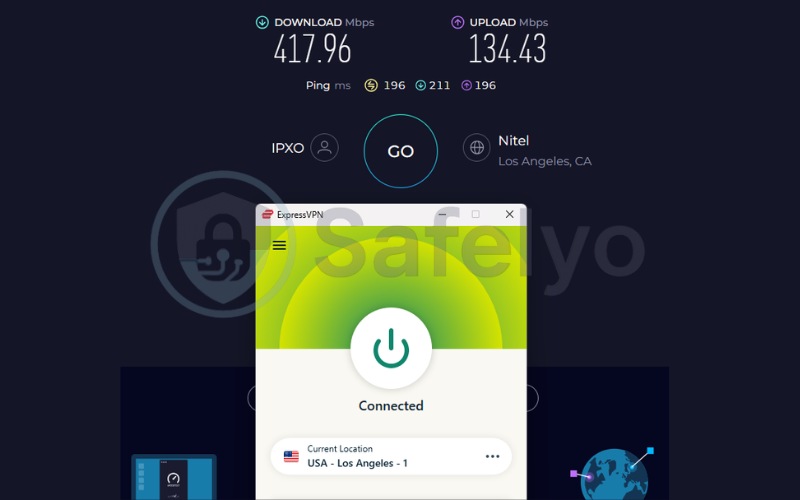
| US | 417.96 | 134.43 | 196 |
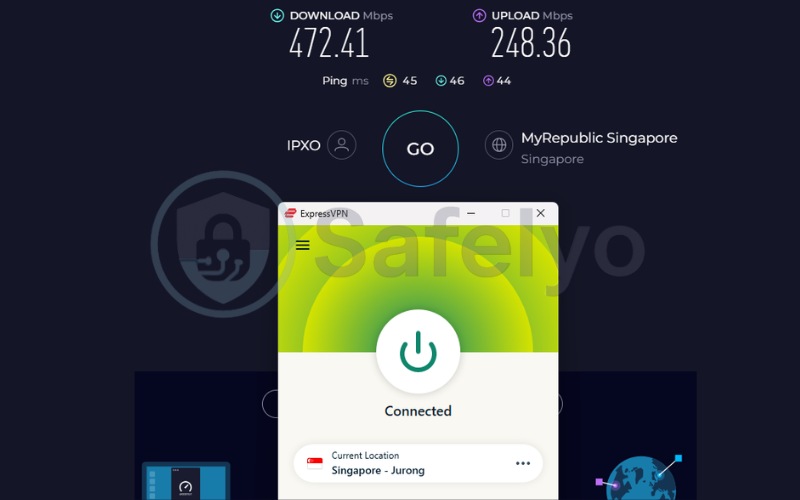
| Singapore | 472.41 | 248.36 | 45 |
| Average | 445.19 | 191.40 | 120.5 |
On the distant US connection, it delivered a reliable 417.96 Mbps, proving its routing handles long distances efficiently. Switching to the closer Singapore server, speeds jumped to an impressive 472.41 Mbps with a low latency of 45 ms.
The Lightway protocol plays a major role in keeping these speeds consistent while minimizing CPU tax. This makes the service highly reliable for data-heavy tasks like downloading large macOS updates or maintaining a clear connection during high-definition streaming.
2.2.2. Mac compatibility and features
ExpressVPN’s headline advantage on a Mac is straightforward. The app runs as a fully native Apple Silicon build from the M1 chip through the current M4 generation.
This native compilation ties directly into battery efficiency, as it avoids the CPU overhead of running through Rosetta 2 translation. ExpressVPN also supports split tunneling across its macOS desktop app, letting users route specific programs outside the encrypted tunnel while everything else stays protected.
2.2.3. Privacy and security
On the security side, ExpressVPN holds a rigorous compliance record. Its no-logs policy has been reviewed by KPMG, PwC Switzerland, Cure53, Praetorian, and F-Secure, spanning audit years from 2018 through 2026.
This gives ExpressVPN the deepest repeat audit history among the evaluated services. Its servers run on TrustedServer technology, an infrastructure design that completely wipes all data on every reboot. Furthermore, traffic is secured with 256-bit AES encryption plus post-quantum protection through the ML-KEM standard.
Best for: MacBook users running on M-series chips (M1-M4) who prioritize battery efficiency, a lightweight native app, and highly stable international connections.
2.3. Surfshark: Best for unlimited devices
Surfshark B.V. is based in the Netherlands and shares a holding company with Nord Security, though the two brands operate independently and run separate infrastructure.
Its core value proposition for a Mac owner is unlimited simultaneous connections at a budget price, which matters for anyone juggling a Mac, an iPhone, an iPad, and an Apple TV under a single household plan.
| Feature | Details |
|---|---|
| Best for | Households or power users who need unlimited device coverage |
| Starting price | $2.49/mo (2yr) |
| Company | Surfshark B.V. |
| Jurisdiction | The Netherlands |
| Independent audit | Yes (Cure53 2021, Deloitte 2023 and 2025, SecuRing 2025) |
| No-logs policy | Yes |
| RAM-only servers | Yes |
| Servers | 4,500+ |
| Countries | 100 |
| Avg. download speed | 422.05 Mbps |
| Avg. upload speed | 138.9 Mbps |
| Avg. latency | 163.5 ms |
| Protocols | WireGuard, OpenVPN, IKEv2, Dausos |
| Kill switch | Yes |
| Obfuscation | Yes |
| Port forwarding | No |
| Dedicated IP | Yes (20 locations) |
| Simultaneous connections | Unlimited |
| Netflix support | 28+ regions |
| Disney+ | Yes |
| BBC iPlayer | Yes |
| Torrent/P2P | Yes |
| Win/Mac/iOS/Android | Yes |
| Linux | Yes |
| Browser extension | Chrome, Firefox, Edge (no Safari extension) |
| Router support | Yes |
| Live chat 24/7 | Yes |
| Refund policy | 30-day money-back guarantee |
| Free trial | Yes (7-day) |
| Split tunneling on macOS | Yes (Bypasser) |
| Official website | surfshark.com |
Pros
Unlimited simultaneous connections
Built-in CleanWeb ad and tracker blocking
Bypasser split tunneling on macOS
Cons
Netherlands jurisdiction (Nine Eyes member)
Does not support port forwarding
2.3.1. Speed and performance
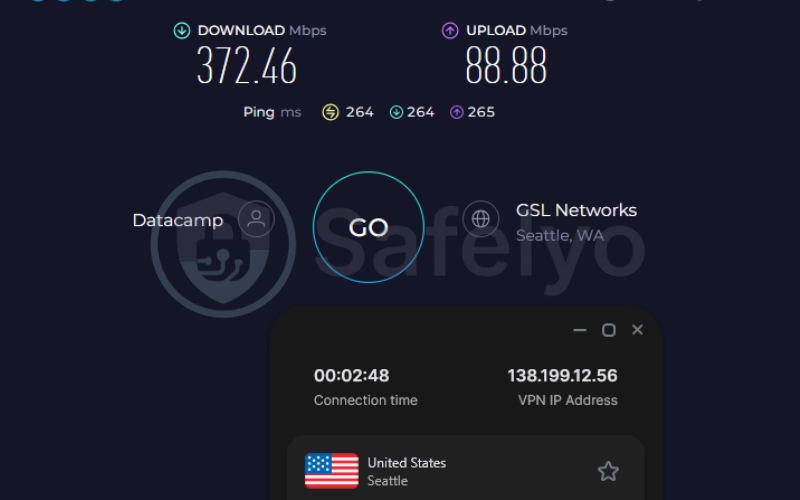
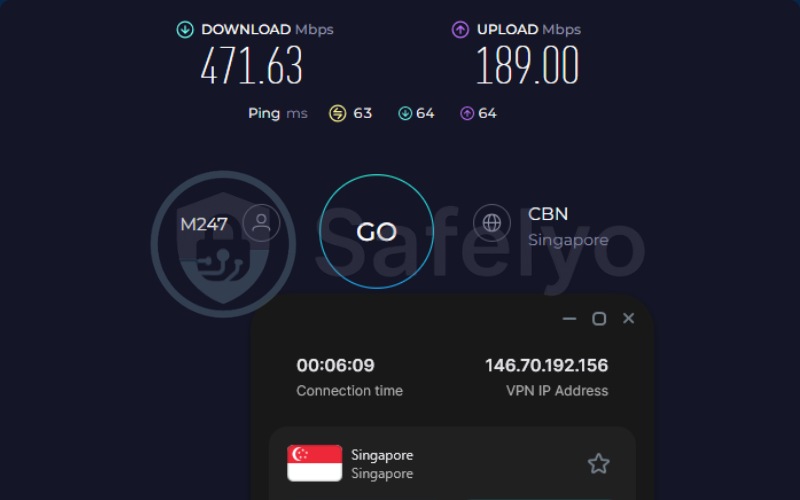
Surfshark maintains competitive speeds, recording an overall average download speed of 422.05 Mbps during tests.
| Server | Download (Mbps) | Upload (Mbps) | Ping (ms) |
|---|---|---|---|
| US | 372.46 | 88.88 | 264 |
| Singapore | 471.63 | 189.00 | 63 |
| Average | 422.05 | 138.94 | 163.5 |
When connecting to the distant US server, Surfshark managed 372.46 Mbps, which is slightly lower than NordVPN but still more than sufficient for heavy daily use. Moving to the closer Singapore server, performance peaked at an excellent 471.63 Mbps. Surfshark also recently introduced Dausos, a newly developed proprietary protocol available on macOS to provide post-quantum encryption techniques for enhanced network security.
2.3.2. Mac compatibility and features
For a household running several Apple devices, Surfshark’s unlimited device policy removes the need to track connection limits.
Surfshark’s Bypasser feature brings split tunneling to macOS, letting users selectively route applications outside the VPN tunnel. For websites, a browser extension whitelist offers a second workaround. That dual approach is useful on a Mac, where a user might need a local network printer or a banking portal to bypass the VPN entirely while other background downloads remain encrypted.
2.3.3. Privacy and security
Regarding jurisdiction, Surfshark is headquartered in the Netherlands. The Netherlands sits inside the Nine Eyes intelligence-sharing alliance, a meaningfully different position from Panama or Switzerland.
However, the repeated third-party audits give Mac users concrete evidence of the provider’s privacy standards. Surfshark’s no-logs policy has been reviewed by Cure53 in 2021 and again by Deloitte in 2023 and 2025, with a separate SecuRing audit completed in 2025. The entire server network runs on RAM only, while the built-in CleanWeb feature blocks ads and trackers at the network level.
Best for: Multi-device Apple households on a budget, needing a single subscription to cover every Mac, iPhone, iPad, and Apple TV simultaneously.
2.4. Proton VPN: Best free VPN for Mac
Proton AG is based in Switzerland and builds its apps on an open-source codebase that independent researchers can inspect directly.
Its standout feature for Mac owners is a genuine permanent free tier that requires no credit card and carries no expiration date. This option appeals to users who simply want secure access without an upfront financial commitment.
| Feature | Details |
|---|---|
| Best for | Mac owners who want a free, fully audited VPN before paying |
| Starting price | $2.99/mo (2yr) |
| Company | Proton AG |
| Jurisdiction | Switzerland |
| Independent audit | Yes (Securitum, 4 audits, 2022 to 2025) |
| No-logs policy | Yes |
| RAM-only servers | No (full-disk encryption) |
| Servers | 20,000+ |
| Countries | 145+ (148+ in server-data table) |
| Avg. download speed | 426.56 Mbps Plus, 413.10 Mbps free |
| Avg. upload speed | 120.4 Mbps Plus, 116.2 Mbps free |
| Avg. latency | 159.5 ms Plus, 157 ms free |
| Protocols | WireGuard, IKEv2 (phasing out on Mac), Stealth |
| Kill switch | Standard and Advanced |
| Obfuscation | Yes (Stealth) |
| Port forwarding | Yes (paid plans) |
| Dedicated IP | Yes (Business plans only) |
| Simultaneous connections | 10 paid, 1 free |
| Netflix support | 25+ regions |
| Disney+ | Yes |
| BBC iPlayer | Yes (tested successfully) |
| Torrent/P2P | Yes (paid plans, dedicated servers) |
| Win/Mac/iOS/Android | Yes |
| Linux | Yes |
| Browser extension | Chrome, Firefox only |
| Router support | Yes |
| Live chat 24/7 | No (9 AM to 12 AM CET, paid plans only) |
| Refund policy | 30-day money-back guarantee |
| Free trial | Permanent free plan, no credit card required |
| Split tunneling on macOS | No (Windows and Android only) |
| Official website | protonvpn.com |
Pros
Permanent free tier
20,000+ servers globally
Switzerland jurisdiction
Cons
No split tunneling on macOS
Live chat not available 24/7
2.4.1. Speed and performance
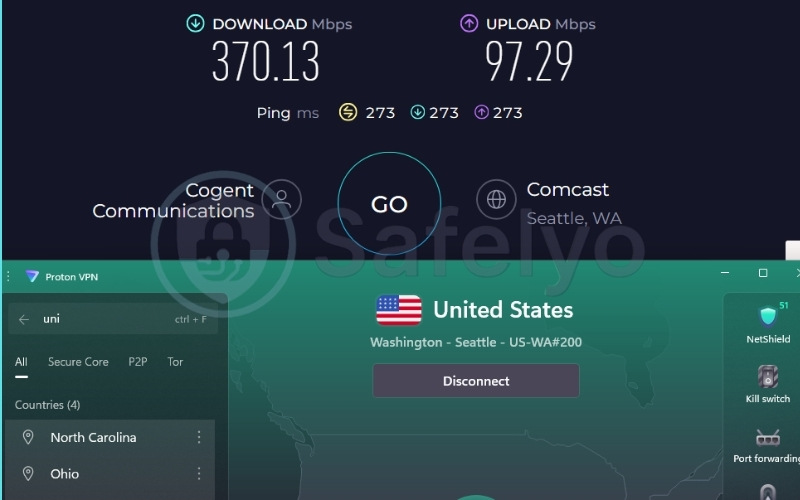
The paid Plus plan delivered a fast 426.56 Mbps average during network benchmarks.
| Server | Download (Mbps) | Upload (Mbps) | Ping (ms) |
|---|---|---|---|
| US | 370.13 | 97.29 | 273 |
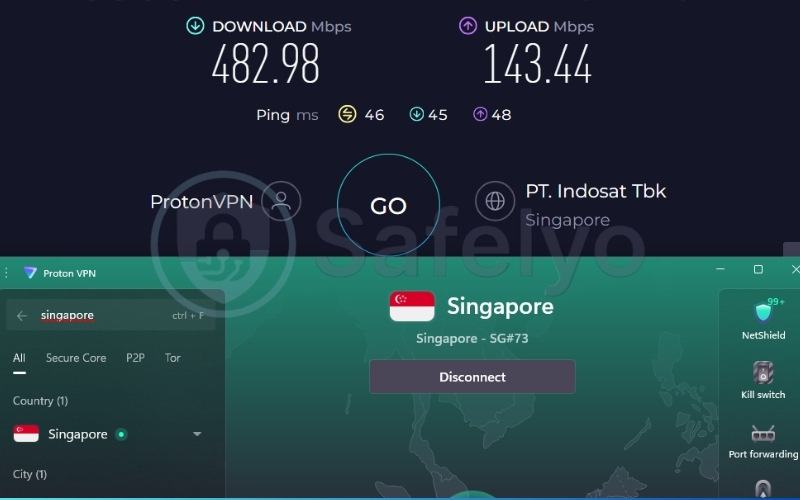
| Singapore | 482.98 | 143.44 | 46 |
| Average | 426.56 | 120.37 | 159.5 |
On the US server, the Plus tier achieved 370.13 Mbps, showing good sustained throughput over a long physical distance. The Singapore server yielded a massive 482.98 Mbps, making it one of the fastest individual server results in this review.
Even users who opt for the permanent free tier still experience solid performance, averaging around 413.10 Mbps without artificial throttling, though they are restricted to a smaller server pool. The integration of the WireGuard protocol ensures that speeds remain stable regardless of which tier a user operates on.
2.4.2. Mac compatibility and features
On the software side, Proton VPN builds a remarkably clean and stable application for macOS. The provider includes native Apple Silicon support, ensuring that the app runs efficiently without draining the MacBook’s battery.
Proton VPN also integrates a strict Advanced Kill Switch, which reliably severs network connections if the tunnel drops, preventing IP leaks during system sleep cycles. While the app does not currently support split tunneling on macOS, and lacks a Safari extension due to Apple’s API restrictions, it functions flawlessly as a system-wide security tool.
2.4.3. Privacy and security
Proton VPN operates under Swiss jurisdiction, outside the 14 Eyes surveillance alliance, and its no-logs policy has been verified across four separate Securitum audits between 2022 and 2025.
On the infrastructure side, Proton VPN uses full-disk encryption rather than RAM-only servers. Beyond basic server infrastructure, Proton VPN offers an advanced routing feature called Secure Core, which functions similarly to a double VPN. It routes traffic through a hardened server in a privacy-friendly country before it reaches the exit server, adding a strict layer of protection against network interception.
Best for: Users who want a safe, unlimited permanent free plan without ads, or those prioritizing strict Swiss privacy laws for their paid daily driver.
2.5. Mullvad: Best for privacy purists
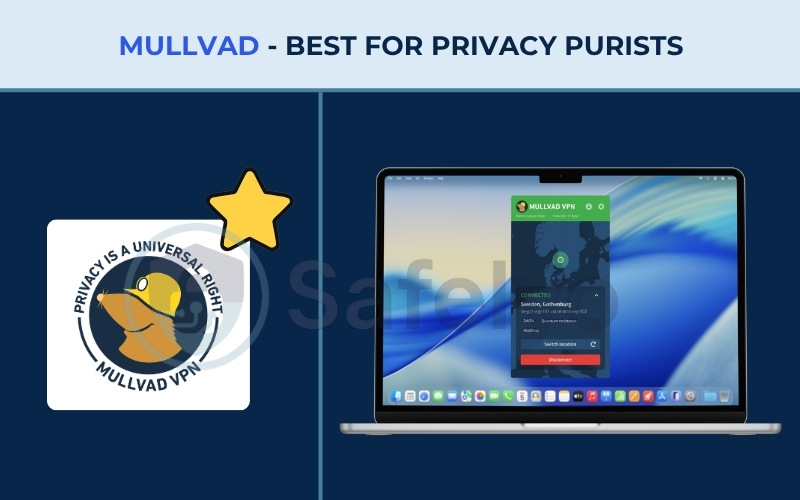
Mullvad VPN AB is based in Sweden and built its entire account system to be anonymous from sign-up. A new account is just a randomly generated number, with no email address or personal information required. The service is aimed squarely at privacy-first users rather than people chasing streaming libraries or gaming servers.
| Feature | Details |
|---|---|
| Best for | Privacy-first Mac users who do not need streaming support |
| Starting price | 5 EUR/mo (~$5.81) |
| Company | Mullvad VPN AB |
| Jurisdiction | Sweden |
| Independent audit | Yes (Cure53 2020, ongoing audits from Assured AB) |
| No-logs policy | Yes |
| RAM-only servers | Yes (STBoot, no persistent storage) |
| Servers | 579 |
| Countries | 50 (90 cities) |
| Avg. download speed | Over 100 Mbps |
| Avg. upload speed | Over 100 Mbps |
| Avg. latency | Low locally (15 to 60 ms), higher internationally (100 to 200+ ms) |
| Protocols | WireGuard only (OpenVPN retired) |
| Kill switch | Yes (built into macOS’s native PF firewall) |
| Obfuscation | Yes (DAITA, Shadowsocks, UDP-over-TCP) |
| Port forwarding | No (disabled since May 2023) |
| Dedicated IP | No |
| Simultaneous connections | 5 |
| Netflix support | Limited capability |
| Disney+ | Limited capability |
| BBC iPlayer | Limited capability |
| Torrent/P2P | Yes |
| Win/Mac/iOS/Android | Yes |
| Linux | Yes |
| Browser extension | Mullvad Browser Extension (no Chrome, Firefox, or Edge listing) |
| Router support | Yes |
| Live chat 24/7 | No |
| Refund policy | 14-day money-back guarantee (excludes cash and crypto) |
| Free trial | No |
| Split tunneling on macOS | Yes (macOS 13 and later) |
| Official website | mullvad.net |
Pros
April 2023 Swedish police raid yielded no usable customer data
Flat 5 EUR/mo rate applies to all plan lengths
MacOS 13+ split tunneling support
Cons
Limited capability for bypassing streaming geo-blocks
Smaller server count compared to major competitors
2.5.1. Speed and performance
Mullvad prioritizes encryption standards and network obfuscation over sheer speed, but it still performs reliably.
Download speeds generally range well over 100 Mbps across different routes, which is more than enough for secure browsing, large downloads, and high-definition media consumption. The provider now runs WireGuard exclusively, having fully retired OpenVPN from its server network. This keeps connections lightweight and responsive for daily tasks while eliminating the bloat associated with legacy protocols.
2.5.2. Mac compatibility and features
Its core proposition is a flat 5 EUR (~$5.81) per month rate that has remained unchanged for years. This straightforward pricing structure contains no hidden fees or renewal hikes, and applies equally across all plan lengths.
Beyond pricing, the software itself integrates deeply with the macOS system. Mullvad’s split tunneling feature is fully supported starting with macOS 13. Its kill switch integrates directly with macOS’s native PF firewall instead of relying on a custom app-level implementation, which means the protection sits securely at the operating-system level rather than relying on the app staying open.
2.5.3. Privacy and security
In April 2023, Swedish police raided Mullvad’s Gothenburg office with a search warrant seeking customer data, and left with nothing usable, because Mullvad’s systems simply do not retain identifying logs. That outcome is the strongest real-world proof available.
Furthermore, the network is entirely RAM-only with obfuscation technologies like DAITA and Shadowsocks built in. While Mullvad has limited capability to bypass streaming geo-blocks, it excels at providing absolute network anonymity.
Best for: Hardcore privacy advocates who want anonymous account creation and a transparent flat rate, prioritizing security over streaming capabilities.
3. Why Mac users need a VPN
Apple Silicon’s on-device security, including Gatekeeper and System Integrity Protection, blocks malicious software from running on a Mac, but none of that protects the data leaving the Mac over a network connection.
Working from a cafe or an airport on open Wi-Fi is the clearest example. Anyone else on that same network can potentially intercept unencrypted traffic, and Apple’s built-in protections do nothing to stop it because the risk sits on the network, not on the device itself. A VPN closes that specific gap by encrypting traffic before it leaves the Mac, regardless of how trustworthy the Wi-Fi network looks.
Traveling brings a second, more common frustration. A Mac owner who pays for a Netflix or streaming subscription at home often finds that the same login stops working correctly once they cross a border, because the service detects a foreign IP address and serves a different, more limited regional library. Connecting through a VPN server back in the home country resolves that mismatch directly.
The third concern is less visible but constant: an internet service provider can see every site a Mac connects to by default, and a VPN removes that visibility by routing traffic through an encrypted tunnel instead.
4. What to look for in a Mac VPN
Selecting a VPN for macOS requires checking technical details that go beyond generic server counts or marketing claims. Here are the core criteria to evaluate before installing software on your Apple hardware.
4.1. Native macOS app quality
You should actively look for a true native Apple Silicon build. This means the VPN app is compiled directly for ARM64 architecture, the instruction set Apple’s M-series chips use, rather than running as an older Intel app translated in real time through Rosetta 2.
That distinction is the single biggest factor behind both speed and battery impact on an M-series Mac. A translated app asks the chip to do extra work on every operation, which shows up as higher CPU usage, more heat, and faster battery drain during a long session. ExpressVPN and NordVPN provide excellent native optimizations in this regard.
4.2. Kill switch reliability on macOS
A kill switch blocks all internet traffic if the VPN connection drops, but macOS changes how third-party apps integrate with the system on every major release. You need a VPN with a kill switch that keeps pace with these updates. Look for VPNs that test their features rigorously against the latest macOS versions.
Mullvad takes a different, highly secure approach by building its kill switch directly into macOS’s native PF firewall rather than relying on an app-level implementation, which ties the protection to the operating system itself.
4.3. Protocol efficiency on macOS: Speed and stability
The tunneling protocol your VPN uses dictates how fast your connection will be and how much battery it consumes. For Mac users, older protocols like OpenVPN are generally too heavy and cause unnecessary CPU load. You should look for providers that implement modern, streamlined protocols.
For example, NordVPN runs NordLynx, ExpressVPN uses its proprietary Lightway protocol, and Surfshark offers Dausos alongside WireGuard. These modern protocols run lighter on the CPU, ensuring that your MacBook maintains snappy performance even during heavy encryption tasks.
4.4. Simultaneous device connections
You should check the provider’s device connection limit, as this varies sharply across the market. A Mac, an iPhone, an iPad, and an Apple TV each need their own separate VPN session running at the same time to stay protected.
A single-digit device limit can fill up faster than expected for anyone managing a full Apple ecosystem. If you have many devices, look toward Surfshark, which allows unlimited connections, or ExpressVPN, which allows up to 14.
4.5. Speed and performance
When evaluating speed, focus on the provider’s ability to maintain high throughput over long distances. High baseline speeds are required to prevent your VPN from bottlenecking standard tasks like 4K streaming or large cloud backups.
All VPNs in this review demonstrated strong download capabilities during testing, but providers like NordVPN and Proton VPN specifically excel at keeping latency low and data transfer rates high.
4.6. Privacy and no-logs policy
Always verify a provider’s jurisdiction and audit history before trusting them with your data. Jurisdiction sets the legal backdrop for a no-logs claim. Panama (NordVPN), the British Virgin Islands (ExpressVPN), and Switzerland (Proton VPN) all sit outside the major intelligence-sharing alliances.
However, third-party audits matter just as much as jurisdiction. Look for providers that regularly hire firms like Deloitte or PwC to prove they do not store user data.
5. Mac-specific feature scorecard: Split tunneling, Safari support, and Apple Silicon builds
Three features separate a genuinely Mac-built VPN from one that simply runs on a Mac: split tunneling, Safari support, and a native Apple Silicon build.
5.1. Split tunneling availability on macOS
Split tunneling support splits cleanly down the middle of this list: NordVPN does not support it on macOS at all, Surfshark supports it through its Bypasser feature, Proton VPN limits it to Windows and Android only, Mullvad supports it starting with macOS 13, and ExpressVPN supports it across all of its desktop apps, including macOS.
| VPN | Split tunneling on macOS | Notes |
|---|---|---|
| NordVPN | No | Not available on macOS at all |
| ExpressVPN | Yes | Available across all desktop apps |
| Surfshark | Yes | Via the Bypasser feature |
| Proton VPN | No | Limited to Windows and Android |
| Mullvad | Yes | Supported from macOS 13 onward |
5.2. Safari extension and browser support
None of the VPNs in this comparison ship a true Safari extension, and the reason is technical rather than a gap in development effort. Safari’s extension API does not expose the low-level network access a VPN tunnel needs to function inside the browser. All five instead build extensions for Chrome, Firefox, or Edge, which use a different extension architecture that does support that level of access.
| VPN | Chrome | Firefox | Edge | Brave |
|---|---|---|---|---|
| NordVPN | Yes | Yes | Yes | No |
| ExpressVPN | Yes | Yes | Yes | Yes |
| Surfshark | Yes | Yes | Yes | No |
| Proton VPN | Yes | Yes | No | No |
| Mullvad | No | No | No | No (separate Mullvad Browser instead) |
5.3. Native Apple Silicon builds versus Rosetta
All VPNs evaluated here offer native Apple Silicon support, covering the M1 chip through the current M-series lineup, which avoids the need to run the app through Rosetta 2 translation.
A Mac owner can verify this directly rather than taking a provider’s word for it. Open Activity Monitor, find the VPN’s process in the list, and check the value in the Kind column. A native Apple Silicon app shows “Apple” in that column; an app still running on Intel-only code shows “Intel” instead, which is the quickest sign that translation is adding extra overhead in the background.
Quick check: open Activity Monitor, search for the VPN app’s process name, and look at the Kind column. It should read “Apple”, not “Intel”, to confirm the app is running natively rather than through Rosetta 2.
6. Battery life impact: How much battery does a VPN drain on Mac?
A VPN’s battery impact on a Mac depends heavily on what the laptop is doing at the time, ranging from a barely noticeable drain during idle browsing to a substantial hit during sustained video streaming.
6.1. MacBook Pro battery drain test results
According to a battery benchmark published by ExpressVPN, streaming high-definition video over a VPN represents close to the worst-case scenario for battery drain on a laptop. In a 60-minute Netflix streaming test on a MacBook Pro, the battery dropped by 37% with the VPN turned on, compared to an 18% drop with the VPN turned off, an extra drain of 19 percentage points attributable to the VPN connection itself.
That gap is large mainly because of what else the laptop is doing at the same time. The screen is running at high brightness, the dedicated graphics hardware is rendering video continuously, and the VPN’s encryption process is layered on top of both of those already-intensive tasks.
For basic idle use or web browsing over a stable Wi-Fi connection, the extra drain attributable to the VPN drops sharply, typically landing somewhere between 0% and 4%. A simpler fix often saves more battery than disabling the VPN entirely: lowering screen brightness by even 10% tends to reduce drain by more than turning the VPN off.
Before disabling a VPN to save battery, try lowering screen brightness first. On most MacBooks, a 10% brightness reduction saves more power than removing the VPN connection altogether.
6.2. Why native ARM64 compilation matters for battery efficiency
A VPN client compiled natively for Apple Silicon runs directly on the chip’s own instruction set rather than relying on Rosetta 2 to translate Intel-style code on the fly.
That difference shows up as lower CPU load, less heat generation, and meaningfully less battery drawn down during a long VPN session, compared with an older Intel-based app working through emulation. For a Mac owner who keeps a VPN connected for hours at a time, that compilation choice has a bigger cumulative effect on battery life than almost any other single setting in the app.
For more details on how encryption impacts hardware usage, read our complete analysis: Does VPN drain battery? Real test data + 9 tips.
7. VPN behavior during macOS sleep, wake, and network switches
A VPN’s kill switch needs to protect your data not just during active use, but during system state changes. macOS handles network connections uniquely during sleep and network transitions, creating potential vulnerabilities that a high-quality VPN must secure.
7.1. Kill switch reliability after wake from sleep
When putting a connected MacBook to sleep and waking it again, the system handles network reconnections in milliseconds. If the VPN’s kill switch is poorly optimized, there is a split-second gap where the Mac’s Wi-Fi reconnects to the local network before the encrypted tunnel is re-established.
A reliable Mac VPN anticipates this system state change and holds all internet traffic strictly blocked until the secure connection is fully restored, ensuring your real IP address is never exposed during the wake process.
7.2. Auto-reconnect behavior on flaky or switching networks
MacBooks frequently move between networks, such as transitioning from a home Wi-Fi to a mobile hotspot or a public cafe network. During these transitions, the VPN must detect the network change instantly and reroute the secure tunnel without user intervention.
VPNs that take several seconds to notice a switched network leave a small but real exposure window. The best VPNs for macOS handle these handoffs smoothly, ensuring continuous encryption without dropping active background tasks or requiring manual reconnection.
8. iCloud Private Relay vs. VPN: Which does your Mac actually need?
iCloud Private Relay, an iCloud+ feature, masks a Mac’s IP address and encrypts Safari traffic between the device and Apple’s relay servers, but it only covers Safari and does nothing for traffic from any other app.
8.1. What iCloud Private Relay does, and why it is not a full VPN
Private Relay routes Safari browsing through two separate relays so that neither Apple nor the website being visited can see both the user’s identity and their browsing activity at the same time.
That design is genuinely strong for the narrow job it does, but the coverage stops at Safari: traffic from Mail, Slack, a torrent client, or any other app on the Mac is unaffected. Private Relay also does not let a user change their apparent location the way a VPN server selection does, so it cannot help with the streaming-unblocking use case covered earlier in this guide.
8.2. When to use each, and when to use both
Some VPN configurations cause macOS to pause Private Relay automatically while the VPN is active, and that is expected behavior rather than a malfunction, since a properly configured VPN already covers everything Private Relay does and more.
The simple rule: use a VPN alone for full-device coverage, location changes for streaming, and protection on public Wi-Fi; Private Relay alone is fine for casual Safari browsing without those specific needs. Running both at the same time is not necessary, and macOS may pause Private Relay anyway once it detects an active VPN connection.
| Coverage | iCloud Private Relay | VPN |
|---|---|---|
| Apps covered | Safari only | All apps and system traffic |
| Hides IP address | Yes (within Safari) | Yes (device-wide) |
| Changes apparent location | No | Yes |
| Works for streaming unblocking | No | Yes |
| Requires subscription | iCloud+ | VPN subscription |
For a deeper dive into how these two services compare, read our guide on iCloud Private Relay vs VPN: Key differences explained.
9. What a VPN cannot do on a Mac
A VPN does not replace antivirus software, and it cannot stop malware that is already running on a Mac, since its job is to protect data in transit, not to scan files already on the device. You need to know these three limitations before downloading any VPN:
- A VPN does not replace antivirus software and will not stop malware that is already running on the Mac.
- A VPN cannot prevent damage from a phishing attack where the user voluntarily hands over a password on a fake login page.
- A VPN does not stop a DDoS attack if the attacker already obtained the Mac’s IP address from another source before the VPN connection started.
To understand exactly what data remains visible, read our comprehensive breakdown: What does a VPN hide? And what it doesn’t.
10. Best free VPN for Mac
Proton VPN is the only VPN evaluated here with a genuine permanent free plan, and it remains the most reliable starting point for a Mac owner who wants to try a VPN before paying for one.
10.1. Proton VPN’s permanent free plan: What you get and what you give up
Signing up requires only an email address, no credit card, and the plan never expires or downgrades automatically.
In exchange, free-tier users get one device connection, access to a 10-country server list on auto-select only, and no streaming or P2P support, though the data allowance itself is unlimited with no artificial throttling applied. That combination makes the free plan well-suited to general browsing and privacy on public Wi-Fi, but not to anyone who wants to unblock Netflix or torrent from a Mac without upgrading.
Find more tested options in our guide to the best free VPN.
10.2. Free trials vs. free plans among the other VPNs
Unlike Proton VPN, premium providers like NordVPN and ExpressVPN do not offer a permanent free tier, nor do they provide direct free trials on the macOS desktop app. However, Mac users can easily bypass this limitation: simply activate the 3-day free trial via their iOS or Android mobile apps, then use those credentials to log into the macOS client.
Remember that a short trial is merely a brief window to test performance, not a long-term free solution.
| VPN | Free offering | Key limitation |
|---|---|---|
| Proton VPN | Permanent free plan | 1 device, 10 countries, no streaming or P2P |
| NordVPN | 3-day free trial (Android only) | Trial, not available directly on Mac |
| ExpressVPN | 3-day free trial (iOS and Android) | Trial, not available directly on Mac |
| Surfshark | 7-day free trial | Trial, not a standing free plan |
| Mullvad | None | No free trial or free plan offered |
Learn more about testing premium services in our guide to the best VPN free trials.
11. How to install and set up a VPN on macOS
Setting up a VPN on a Mac follows the same basic sequence across the evaluated providers, though the exact navigation differs slightly between macOS Sequoia, Sonoma, and Ventura.
- Choose a provider and a plan length based on the comparisons above.
- Create an account directly on the provider’s website.
- Download the macOS app from the provider’s own site rather than a third-party mirror or search result, to avoid a tampered installer.
- Open System Settings (System Preferences on Ventura and earlier) only if the provider requires a manual configuration profile; most apps handle this automatically.
- Install and open the downloaded app.
- Sign in with the account created in step 2.
- Choose a server and connect.
On macOS Sequoia, Apple’s tightened Network Extension permissions mean some VPN apps require an explicit one-time authorization step the first time they are opened, a prompt that did not exist on older versions of macOS. Approving it is a normal part of setup, not a sign that something is wrong.
12. FAQs about best VPN for Mac
Does Mac have a built-in VPN?
No. macOS includes a VPN configuration framework that can connect to a third-party VPN’s protocol, but Apple does not provide its own VPN service. A user still needs to subscribe to a provider and either install that provider’s app or manually configure the connection through System Settings.
Will a VPN slow down my Mac?
Yes, to some degree, since encrypting and rerouting traffic always adds a small amount of overhead. In practice, the top VPNs handle data efficiently enough that the slowdown is unlikely to be noticeable during normal tasks like streaming or browsing.
What is the difference between iCloud Private Relay and a VPN?
Private Relay only protects Safari traffic and cannot change a user’s apparent location, while a VPN protects every app on the Mac and can connect to a server in a different country. See the dedicated section above for the full comparison.
Can a VPN hide my MAC address?
No. A VPN encrypts and reroutes internet traffic and hides a device’s IP address, but a MAC address is a separate hardware identifier used only on the local network, such as a home Wi-Fi router, and a VPN has no effect on it. The two terms sound similar but refer to entirely different things.
Is there a good free VPN for Mac in 2026?
Yes, with a caveat. Proton VPN’s permanent free plan is the one genuine standing option among the VPNs reviewed here, though it comes with a single-device limit and no streaming support.
Does a VPN drain my MacBook’s battery?
Yes, but the amount depends heavily on what the Mac is doing. Heavy video streaming can add roughly 19 percentage points of extra battery drain over an hour, while idle browsing on a native Apple Silicon build typically adds very little.
Can I use a VPN and iCloud Private Relay at the same time
Technically yes, though macOS may pause Private Relay automatically while certain VPN profiles are active. That is expected behavior rather than a malfunction, since a properly configured VPN already covers everything Private Relay does.
Is split tunneling available on Mac VPN apps?
It depends on the provider. Among the VPNs in this guide, Surfshark, ExpressVPN, and Mullvad support split tunneling on macOS, while NordVPN and Proton VPN currently do not.
Which VPN works best with Apple Silicon (M1, M2, M3) Macs?
NordVPN and ExpressVPN stand out with explicitly verified native Apple Silicon builds that keep the system running efficiently without relying on Rosetta 2 emulation, though all evaluated VPNs in this guide offer native support.
Do I still need a VPN if I already use Apple’s built-in security features?
Yes. Gatekeeper and System Integrity Protection guard against malicious software running on the Mac itself, but neither one encrypts network traffic or hides a user’s IP address, which is the specific job a VPN does.
13. Conclusion
Across the VPNs tested for this guide, the right pick comes down to what a Mac owner actually prioritizes:
- NordVPN is the ideal all-rounder for Mac users who demand the fastest streaming speeds, comprehensive malware protection, and a heavily audited no-logs policy.
- ExpressVPN fits the mobile MacBook user who prioritizes battery efficiency, seamless Apple Silicon performance, and a lightweight app.
- Surfshark is the clear winner for budget-conscious households needing to protect an unlimited number of Apple devices under one subscription.
- Proton VPN offers the safest, unlimited free tier for casual users, while its paid tier delivers strict Swiss privacy for daily protection.
- Mullvad remains the ultimate choice for privacy purists seeking total anonymity and a flat rate, rather than bypassing streaming geo-blocks.
Pricing, server counts, and promotional terms change often in this category, so before subscribing to any provider, it is worth confirming current rates and the length of each money-back guarantee directly on the provider’s official website. That final check takes a few minutes and avoids any surprise at renewal.
Whichever option fits best, the goal of finding the best VPN for Mac stays the same regardless of provider: a connection that protects a MacBook’s traffic without getting in the way of how it is actually used. For more detailed comparisons and additional picks across other devices, visit the Best VPN category on Safelyo.