ExpressVPN is the best all-around VPN for streaming in 2026, combining native access to the broadest range of media services (including Netflix, Hulu, HBO Max, and BBC iPlayer) with blazing-fast speeds. Alongside ExpressVPN, options like Proton VPN, Surfshark, and NordVPN also proved to be highly capable VPNs for streaming, with each excelling in specific areas to suit different household needs.
When looking for the best VPN for streaming, you need hard data to ensure you do not experience constant buffering or blocked proxy errors. We conducted rigorous physical testing to gather exact speed metrics and unblocking capabilities, while also flagging any hidden renewal pricing traps upfront.
Top VPNs for streaming:
- ExpressVPN (Best overall VPN for streaming): Unblocks the broadest range of streaming services natively (Netflix, Disney+, Hulu, HBO Max, Prime Video, BBC iPlayer) and delivers blazing-fast speeds on long-haul connections, backed by audits from five independent firms across 2018 to 2026.
- Proton VPN (Best privacy-first VPN with a massive server network): Offers a massive network of 20,000+ servers across 145+ countries on paid plans, delivering extremely fast speeds and a permanent free tier to test the interface before committing.
- Surfshark (Best value VPN for streaming on multiple devices): Starts at just $2.49 per month on a 2-year plan and is the only one of our top picks offering unlimited simultaneous connections, paired with fast speeds and Dynamic MultiHop.
- NordVPN (Best for widest global reach): Posts the largest country spread of the four VPNs tested (9,500+ servers in 149 countries) and super fast speeds, though NordVPN ranks slightly lower due to inconsistent performance with BBC iPlayer.
Quick comparison table:
| VPN | Starting Price | Netflix Regions | Disney+ | Hulu | HBO Max | BBC iPlayer | Simultaneous Connections | Download Speed (our test) |
|---|---|---|---|---|---|---|---|---|
| ExpressVPN | $2.49/mo (2yr + 4mo) | 25+ | Yes | Yes | Yes | Yes | Up to 14 | Blazing fast |
| Proton VPN | $2.99/mo (2yr) | 25+ | Yes | Yes | Yes | Yes | 10 (paid) / 1 (free) | Super fast |
| Surfshark | $2.49/mo (2yr + 3mo) | 28+ | Yes | Yes | Yes | Inconsistent | Unlimited | Fast |
| NordVPN | $3.49/mo (2yr + 3mo) | 26+ | Yes | Yes | Yes | Inconsistent | 10 | Super fast |
Disclaimer: Prices and information are subject to change. Readers should check current pricing and availability on each official website before purchasing. Speed and unblocking results reflect our 2026 tests and may vary by location, server load, and ISP. This article is for informational purposes only and does not constitute legal advice. Please use VPNs responsibly and legally.
1. How we tested and selected the best VPNs for streaming
To provide accurate recommendations, our review team established a clear, data-driven testing environment. We utilized a Windows 11 PC connected to a high-speed fiber-optic network on a 1 Gbps wired connection to establish a reliable baseline before running traffic through any secure tunnels. This ensures our metrics reflect real-world usage rather than theoretical maximums.
We evaluated ExpressVPN, Proton VPN, Surfshark, and NordVPN against the following core criteria:
- Speed and performance: We used Speedtest.net by Ookla to measure raw download speed, upload speed, and ping (latency). To ensure optimal performance, each provider was tested using its fastest proprietary or default protocol: Lightway for ExpressVPN, NordLynx for NordVPN, and WireGuard for both Proton VPN and Surfshark. Testing included both regional servers in Singapore and long-haul servers in the United States to confirm every VPN comfortably exceeds the 15 Mbps minimum threshold required for 4K UHD video playback.
- Streaming unblocking verification: Our team manually tested major platforms, including Netflix US, Netflix UK, Disney+, BBC iPlayer, Hulu, and HBO Max. We verified that video playback initiated smoothly without triggering proxy detection errors. During this process, we noted whether the access was native or required Smart DNS workarounds.
- Privacy and security checks: We utilized diagnostic tools like ipleak.net to ensure absolute protection. We checked for DNS leaks, WebRTC leaks, and IPv6 leaks to confirm the software successfully hid the user’s true physical location from rigid media platforms.
- Pricing and value analysis: We scrutinized pricing structures well beyond the promotional introductory offers. This step involved calculating total billed amounts, exposing hidden renewal price hikes, assessing device connection limits, and verifying the reliability of 30-day money-back guarantees.
2. Best VPN for streaming: Top 4 picks for Netflix, Disney+, and more
Choosing the right VPN requires balancing raw speed, budget, and specific platform access. We have categorized our four top picks into best overall, best privacy-first option, best value, and best for the widest global reach to help you find the best VPN for streaming based on your specific household needs. These recommendations stem from real speed data, streaming library access, transparent pricing structures, and independent security audits.
2.1. #1. ExpressVPN: Best overall VPN for streaming and library access
ExpressVPN operates under Kape Technologies and is based in the British Virgin Islands. ExpressVPN has built a massive brand identity around its TrustedServer RAM-only architecture and its proprietary Lightway protocol, which is engineered for rapid data transfer.
For entertainment purposes, ExpressVPN offers the broadest list of natively supported media platforms. This includes seamless access to Netflix, Hulu, BBC iPlayer, Disney+, HBO Max, Prime Video, Apple TV+, and Crunchyroll. To support this access globally, ExpressVPN operates thousands of servers across 105 countries and holds an unbroken run of independent security audits from 2018 through 2026.
| Features | Details |
|---|---|
| Best For | Best overall VPN for streaming and library access |
| Starting Price | $2.49/mo (Basic, 2 years + 4 months plan) |
| Company | ExpressVPN (part of Kape Technologies) |
| Jurisdiction | British Virgin Islands |
| Independent Audit | Yes (KPMG, PwC Switzerland, Cure53, Praetorian, and F-Secure) |
| No-Logs Policy | Yes, verified no-logs policy |
| RAM-Only Servers | Yes (TrustedServer technology) |
| Servers | Thousands |
| Countries | 105 (170+ locations) |
| Avg. Download Speed | 445.18 Mbps (Calculated average of US & Singapore tests) |
| Avg. Upload Speed | 191.39 Mbps (Calculated average of US & Singapore tests) |
| Avg. Latency | 120.5 ms (Calculated average of US & Singapore tests) |
| Protocols | Lightway (UDP/TCP), OpenVPN (UDP/TCP), WireGuard, IKEv2 |
| Kill Switch | Yes (Network Lock) |
| Obfuscation | Yes (Automatic obfuscation on every server) |
| Port Forwarding | Yes (router only) |
| Dedicated IP | Yes (20+ countries) |
| Simultaneous Connections | Up to 14 (10 Basic, 12 Advanced, 14 Pro) |
| Netflix Regions | 25+ |
| Disney+ | Yes |
| BBC iPlayer | Yes |
| Torrent / P2P | Yes |
| Win/Mac/iOS/Android | Yes |
| Linux | Yes |
| Browser Extension | Yes (Chrome, Firefox, Edge, Brave) |
| Router Support | Yes (Aircove, Asus, D-Link, DD-WRT, Linksys, Netduma, Tomato, TP-LINK) |
| Live Chat 24/7 | Yes |
| Refund Policy | 30-day money-back guarantee |
| Free Trial | Yes (3-day free trial on iOS and Android) |
| Overall Positioning | Broadest streaming-platform support and longest continuous independent audit history |
| Official Website | expressvpn.com |
Pros
MediaStreamer Smart DNS lets devices like smart TVs and consoles easily change their streaming location
Native apps for Apple TV, Android TV, and Fire TV Stick
Support for Netflix, Hulu, BBC iPlayer, Disney+, HBO Max, Prime Video, Apple TV+, and Crunchyroll
Cons
Higher annual renewal price
Simultaneous connections are capped at 10-14 devices depending on the tier
2.1.1. Streaming library access
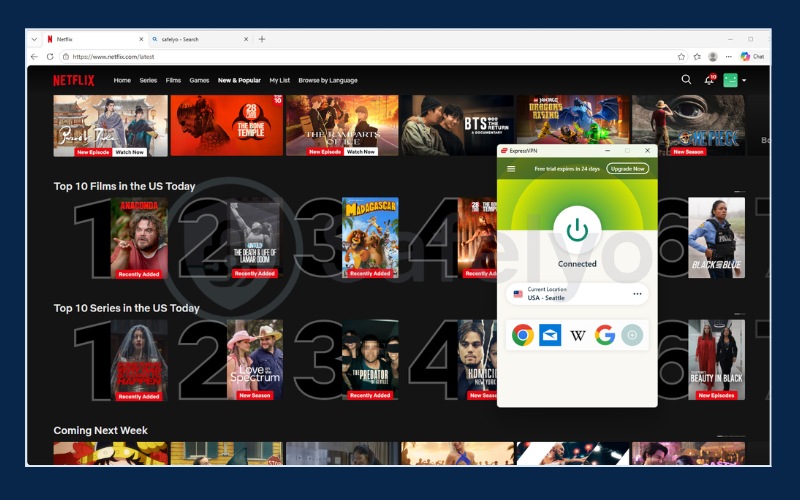
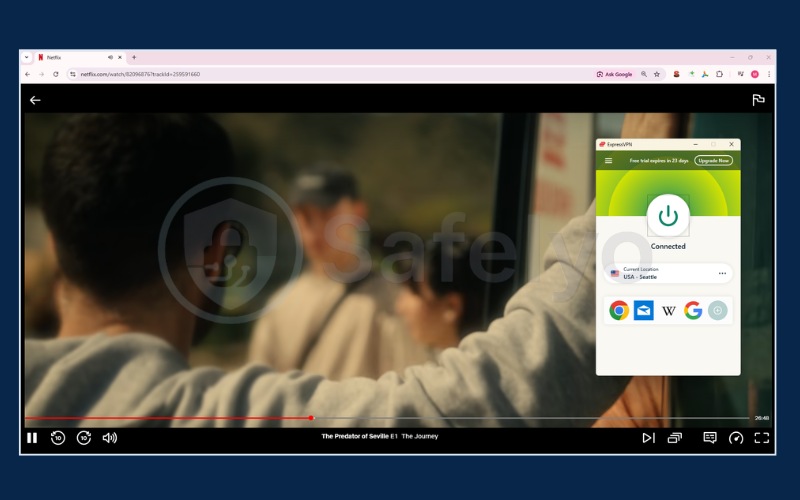
ExpressVPN earns the number one spot primarily because it provides the most reliable access to global media libraries. During our evaluation, ExpressVPN effortlessly bypassed geographic restrictions for 25 Netflix regions. Most notably, it instantly unlocked the highly coveted Netflix US, UK, Japan, and Canada libraries on the first try.
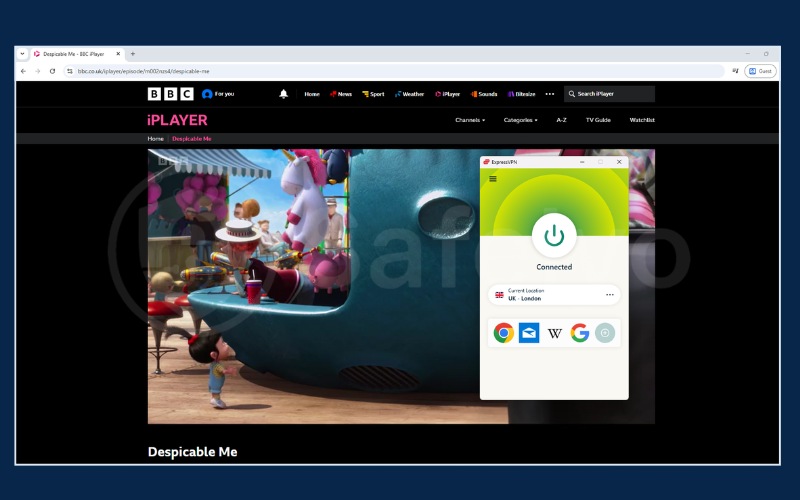
Beyond Netflix, its UK servers provide flawless, native access to BBC iPlayer, while its US servers effortlessly handle Hulu, HBO Max, and Disney+. Whether you are trying to watch regional anime releases on Crunchyroll Japan or catch up on British television, ExpressVPN handles the connection without requiring manual server hunting.
2.1.2. Speed and performance
To prevent 4K buffering, a VPN needs excellent infrastructure to process high volumes of data quickly. In our tests, ExpressVPN proved it can handle this demand, delivering a blazing-fast calculated average download speed of 445.18 Mbps and an upload speed of 191.39 Mbps.
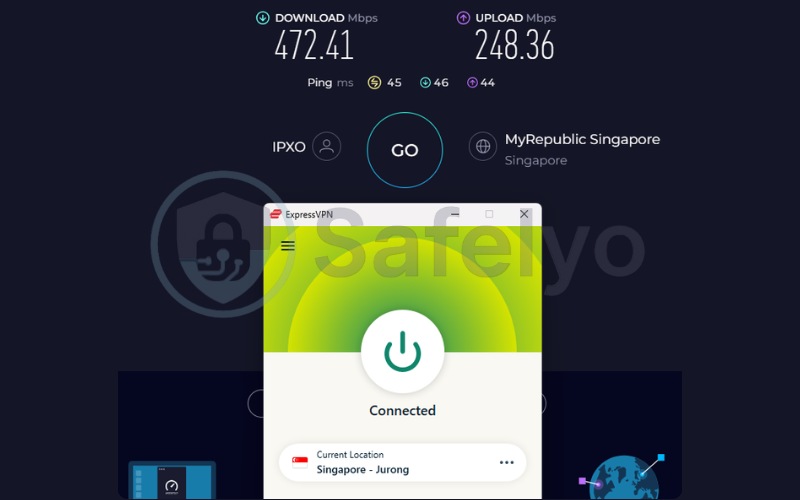
On the Singapore server, it delivered a blazing 472.41 Mbps download and a highly responsive 45 ms ping. This makes it perfect for low-latency gaming and streaming Asian regional content.
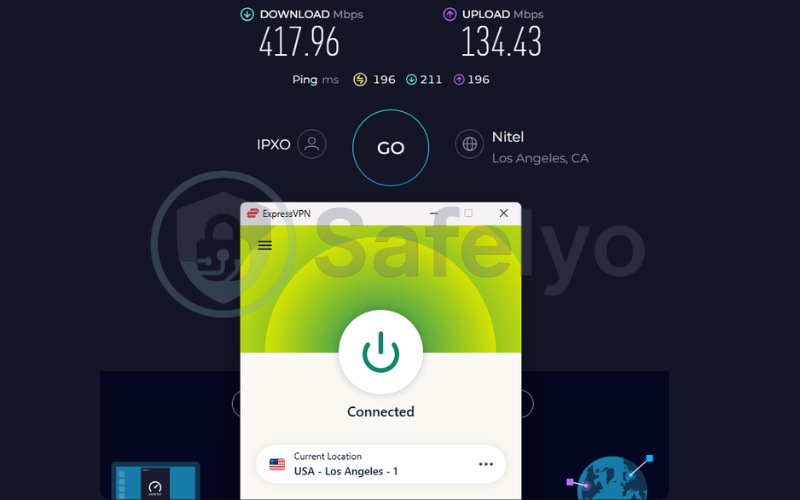
More impressively, when routing traffic halfway across the globe to the US server, ExpressVPN maintained a massive 417.96 Mbps download speed. Crucially, the ping was kept tightly under 200 ms (196 ms). This responsiveness ensures that when you click play on a 4K movie on HBO Max, the video starts almost instantly without that annoying initial loading circle.
Sustaining such high throughput and low latency requires highly efficient software. To achieve this, ExpressVPN relies on its proprietary Lightway protocol as its technical backbone. This protocol is engineered to encrypt data without causing network congestion, ensuring your connection rarely drops quality even during peak hours.
| Server Location | Download Speed (Mbps) | Upload Speed (Mbps) | Ping (ms) |
|---|---|---|---|
| US | 417.96 | 134.43 | 196 |
| Singapore | 472.41 | 248.36 | 45 |
2.1.3. Privacy and security
ExpressVPN provides an unbroken timeline of security audits spanning from 2018 to 2026, conducted by five separate independent firms. ExpressVPN utilizes a TrustedServer architecture, meaning all servers run entirely on volatile RAM and completely wipe any residual data upon reboot.
By securing data at the hardware level, ExpressVPN also ensures your traffic remains hidden from outside observers. Additionally, automatic obfuscation is deployed on every server. This means you do not have to manually toggle stealth settings to bypass sophisticated proxy detection systems used by major streaming networks.
2.1.4. Pricing and value
The ExpressVPN Basic plan offers an introductory rate of $2.49 per month on a 2-year plus 4-month term. Users must note that the renewal price rises to $99.95 per year.
When evaluating this long-term cost, the return on investment is justified by the generous allowance of up to 14 simultaneous connections on the Pro tier, alongside the sheer reliability of the service. Ultimately, ExpressVPN provides a premium experience that simply works when you press play.
Best for: Streamers who want the most reliable access to global platforms like BBC iPlayer, Netflix, Hulu, and HBO Max alongside consistent speeds and zero-hassle apps.
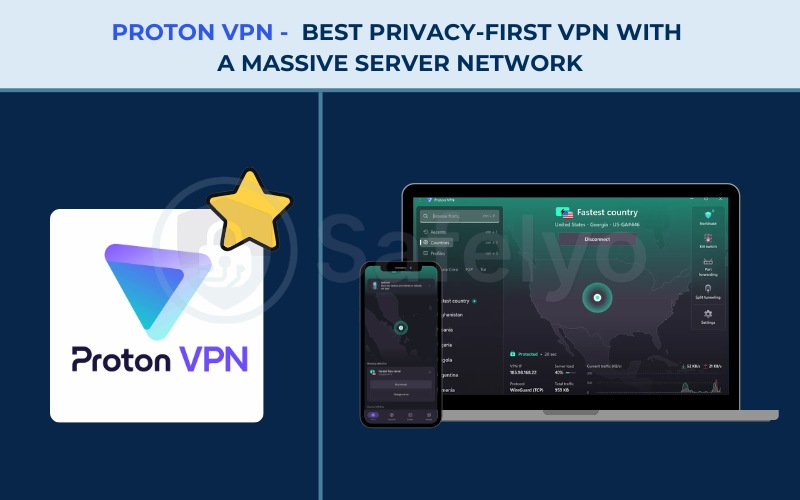
2.2. #2. Proton VPN: Best privacy-first VPN with a massive server network
Proton AG is based in Switzerland and is renowned for its privacy-first suite of products. Proton VPN is the only VPN on this list offering a truly permanent free plan, operating safely outside the 5, 9, and 14 Eyes intelligence alliances.
When users upgrade to paid plans, Proton VPN provides the largest server count of the four options, delivering over 20,000 servers across 145+ countries. This massive infrastructure allows the paid Plus tier to guarantee access to Netflix, BBC iPlayer, Hulu, and HBO Max while maintaining top-tier security.
| Features | Details |
|---|---|
| Best For | Best privacy-first VPN with a massive server network |
| Starting Price | $2.99/mo (24-month plan) for Plus; permanent free plan available |
| Company | Proton AG |
| Jurisdiction | Switzerland (outside 5/9/14 Eyes alliances) |
| Independent Audit | Yes, 4 audits by Securitum (latest in Sep 2025) |
| No-Logs Policy | Yes, verified no-logs policy |
| RAM-Only Servers | No (full-disk encryption used instead) |
| Servers | 20,000+ |
| Countries | 145+ |
| Avg. Download Speed | 426.55 Mbps (Calculated average of Plus plan tests) |
| Avg. Upload Speed | 120.36 Mbps (Calculated average of Plus plan tests) |
| Avg. Latency | 159.5 ms (Calculated average of Plus plan tests) |
| Protocols | WireGuard, IKEv2, Stealth |
| Kill Switch | Standard and Advanced (Win/Linux; Apple service limits apply) |
| Obfuscation | Yes (Stealth protocol) |
| Port Forwarding | Yes (paid plans only) |
| Dedicated IP | Yes (Business plans only) |
| Simultaneous Connections | 10 (paid) / 1 (free) |
| Netflix Regions | 25+ |
| Disney+ | Yes |
| BBC iPlayer | Yes (tested successfully) |
| Torrent / P2P | Yes (dedicated servers, paid plans only) |
| Win/Mac/iOS/Android | Yes |
| Linux | Yes (GUI app and CLI) |
| Browser Extension | Chrome and Firefox |
| Router Support | Yes |
| Live Chat 24/7 | No (9 AM-12 AM CET, paid plans only) |
| Refund Policy | 30-day money-back guarantee |
| Free Trial | Permanent free plan, no credit card required |
| Overall Positioning | Only permanent free plan of the four, massive 20,000+ server count, Swiss jurisdiction |
| Official Website | protonvpn.com |
Pros
Permanent free plan with no credit card required to sign up
Massive server count on paid plans (20,000+ servers, 145+ countries)
Swiss jurisdiction, outside the 5/9/14 Eyes alliances, with Secure Core multi-hop
4 independent no-logs audits by Securitum (2022-2025)
Cons
The free plan explicitly does not support streaming or P2P
Dedicated IP is restricted to Business plans
Live chat is unavailable outside 9 AM-12 AM CET
2.2.1. Streaming library access
To fully utilize Proton VPN for entertainment, users must understand the distinction between the free and paid tiers. The Proton VPN free plan does not support streaming, primarily because it restricts users to a limited number of servers and utilizes an auto-select function.
This prevents you from manually choosing the specific regional server needed to reliably unblock geo-restricted video content. However, upgrading to the Plus plan for $2.99 per month completely removes these restrictions.
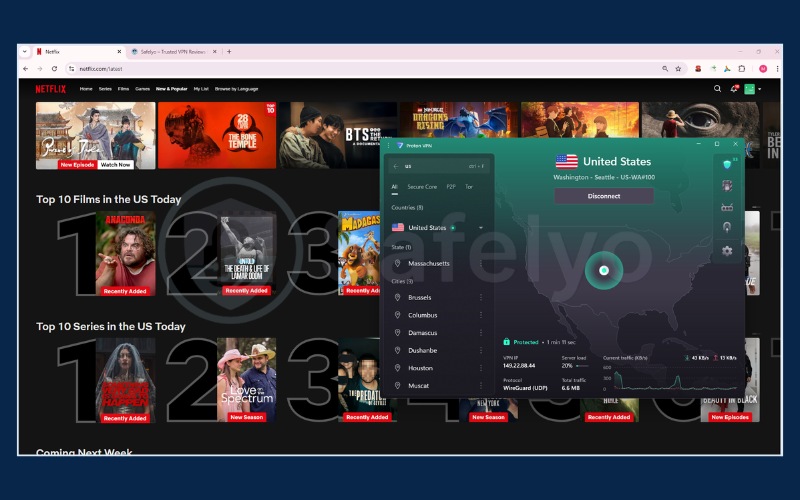
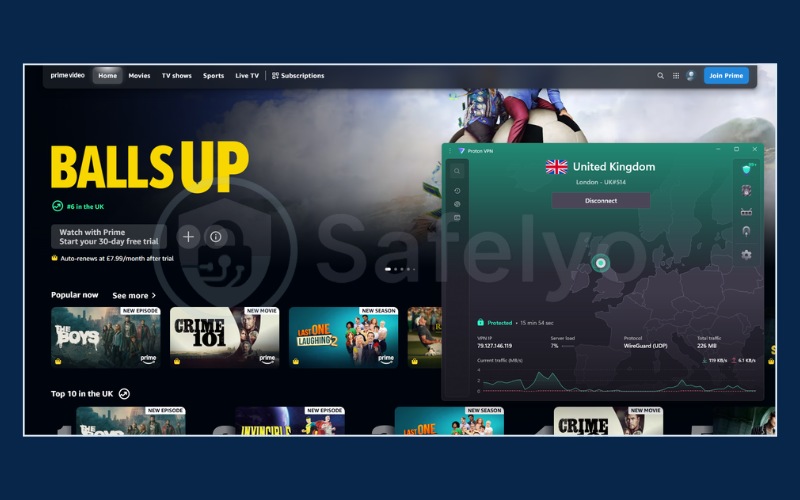
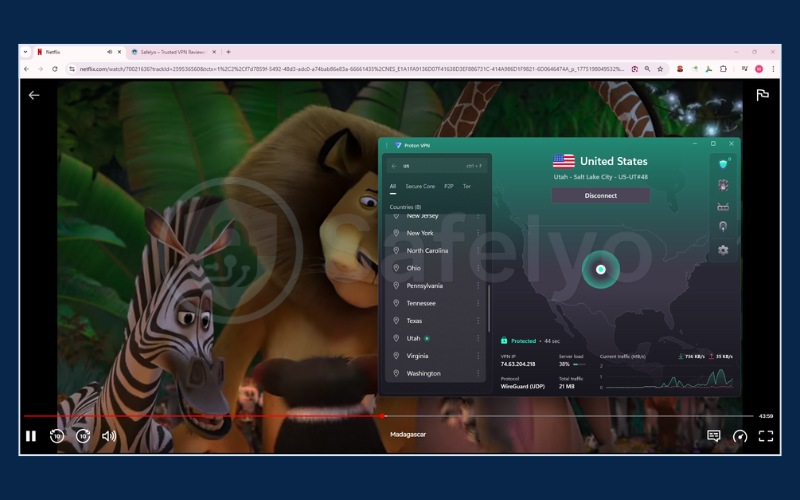
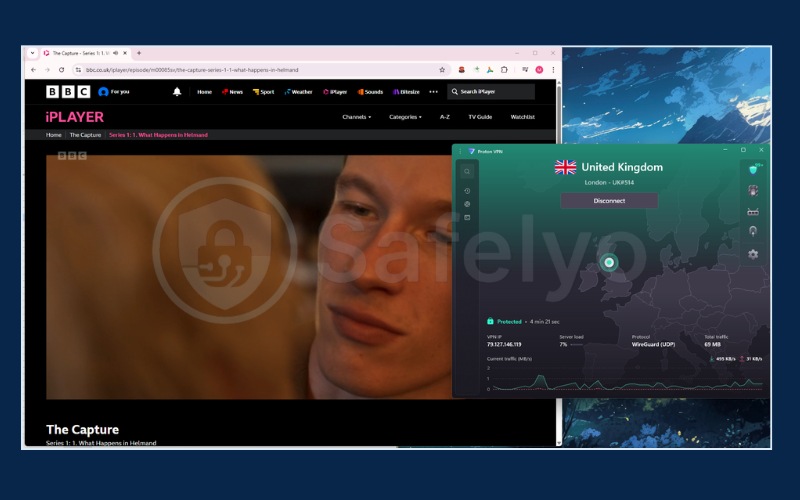
On the paid Plus tier, Proton VPN confirms excellent unblocking capabilities. It successfully grants access to 25 Netflix regions, proving highly reliable for jumping between Netflix US, UK, Australia, and European libraries. Additionally, its UK servers reliably bypass the strict geo-blocks of BBC iPlayer, while US connections seamlessly handle Hulu, HBO Max, and Disney+.
You can still use the free tier to comfortably test the app’s interface and privacy features before committing to a purchase.
2.2.2. Speed and performance
Proton VPN’s network of 20,000+ servers shows its muscle in raw throughput, but our tests reveal varying performance depending on the distance.
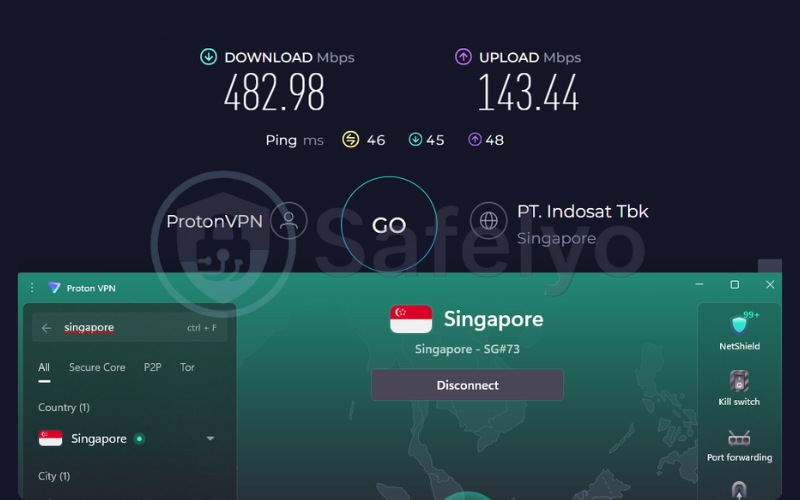
On the Singapore server, Proton VPN was the absolute fastest in our lineup, hitting an incredible 482.98 Mbps download with just 46 ms ping.
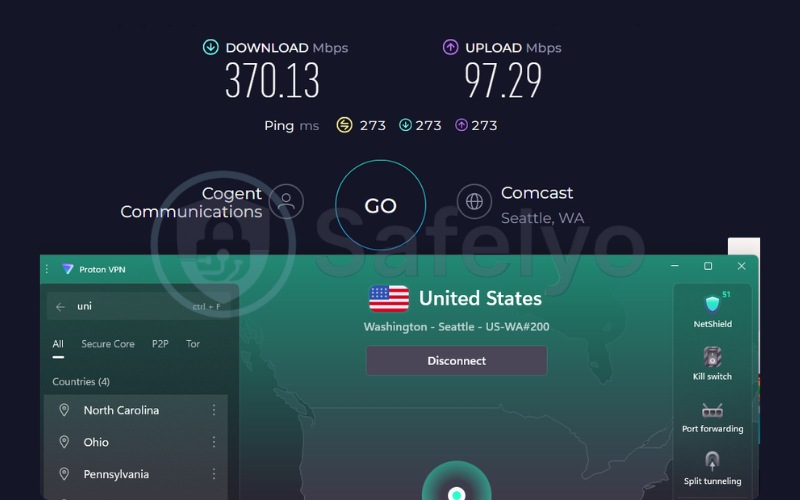
However, on the long-haul US server, speeds dropped to 370.13 Mbps and latency spiked to 273 ms. While 370 Mbps is still massive overkill for 4K streaming (which only requires 15 Mbps), the higher 273 ms ping means you might experience a split-second delay when navigating the Netflix menu or loading website thumbnails compared to ExpressVPN. Once the video actually starts buffering, though, playback remains flawless.
| Server Location | Download Speed (Mbps) | Upload Speed (Mbps) | Ping (ms) |
|---|---|---|---|
| US | 370.13 | 97.29 | 273 |
| Singapore | 482.98 | 143.44 | 46 |
2.2.3. Privacy and security
Proton VPN operates from a highly secure Swiss jurisdiction and utilizes a Secure Core multi-hop routing system to protect user identities. On the backend, Proton VPN relies on full-disk encryption to secure its hardware. Furthermore, Proton VPN has published four independent no-logs audits by Securitum, with the latest completed in September 2025. These public audits prove their transparent data handling policies.
2.2.4. Pricing and value
To access video content, users must upgrade to the 24-month Plus plan at $2.99 per month. This upgrade grants 10 simultaneous connections, a significant step up from the single connection allowed on the free tier.
The subscription renews at approximately $83.88 per year. Considering the scale of the server network and the privacy protections included, this rate offers a highly stable and reasonable long-term value for a privacy-grade service.
Best for: Privacy-first users who want a massive server network with the option to test the interface via a permanent free tier first.
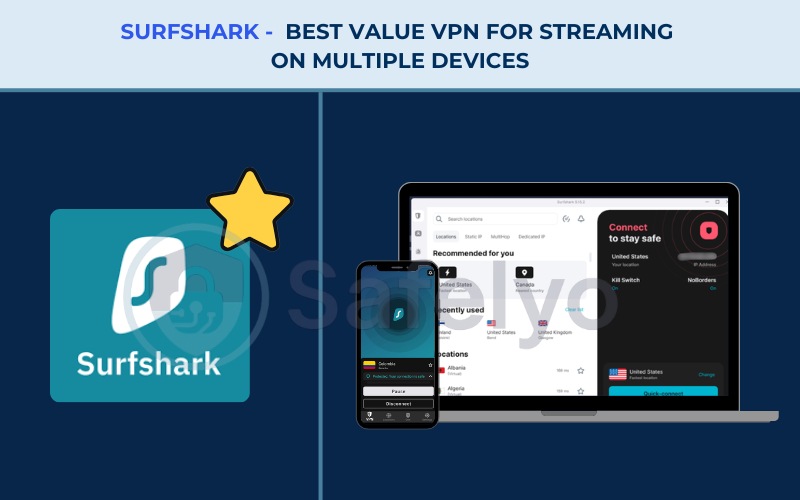
2.3. #3. Surfshark: Best value VPN for streaming on multiple devices
Surfshark B.V. operates out of the Netherlands and has built a dominant market position around affordability and unlimited device coverage. Surfshark starts at just $2.49 per month on its 2-year Starter plan, offering a highly competitive monthly rate and a budget-friendly total upfront bill.
Surfshark differentiates itself by offering unlimited simultaneous connections, meaning you never hit a device cap. In addition to covering endless devices, Surfshark incorporates Nexus-powered features like an IP Rotator and Dynamic MultiHop to actively evade IP bans.
| Features | Details |
|---|---|
| Best For | Best value VPN for streaming on multiple devices |
| Starting Price | $2.49/mo (Starter, 2-year plan) |
| Company | Surfshark B.V. |
| Jurisdiction | The Netherlands |
| Independent Audit | Yes (Deloitte, Cure53, SecuRing) |
| No-Logs Policy | Yes, verified no-logs policy |
| RAM-Only Servers | Yes (100% RAM-only network) |
| Servers | 4,500+ |
| Countries | 100 |
| Avg. Download Speed | 422.04 Mbps (Calculated average of US & Singapore tests) |
| Avg. Upload Speed | 138.94 Mbps (Calculated average of US & Singapore tests) |
| Avg. Latency | 163.5 ms (Calculated average of US & Singapore tests) |
| Protocols | WireGuard, OpenVPN, IKEv2, Dausos (macOS) |
| Kill Switch | Yes |
| Obfuscation | Yes (Obfuscated servers, NoBorders) |
| Port Forwarding | No |
| Dedicated IP | Yes (Available in 20 locations) |
| Simultaneous Connections | Unlimited |
| Netflix Regions | 28+ |
| Disney+ | Yes |
| BBC iPlayer | Inconsistent |
| Torrent / P2P | Yes |
| Win/Mac/iOS/Android | Yes |
| Linux | Yes |
| Browser Extension | Yes (Chrome, Firefox, Edge) |
| Router Support | Yes |
| Live Chat 24/7 | Yes |
| Refund Policy | 30-day money-back guarantee |
| Free Trial | Yes (7-day free VPN trial) |
| Overall Positioning | Low entry price and unlimited-device plan |
| Official Website | surfshark.com |
Pros
Unlimited simultaneous connections to cover every device in a household
Highest claimed Netflix region coverage (28+) and strong Hulu, and HBO Max support
IP Rotator changes your IP every 5-10 minutes without dropping the connection, evading blocks
Cons
BBC iPlayer access is currently inconsistent
Higher average latency to distant servers
2.3.1. Streaming library access
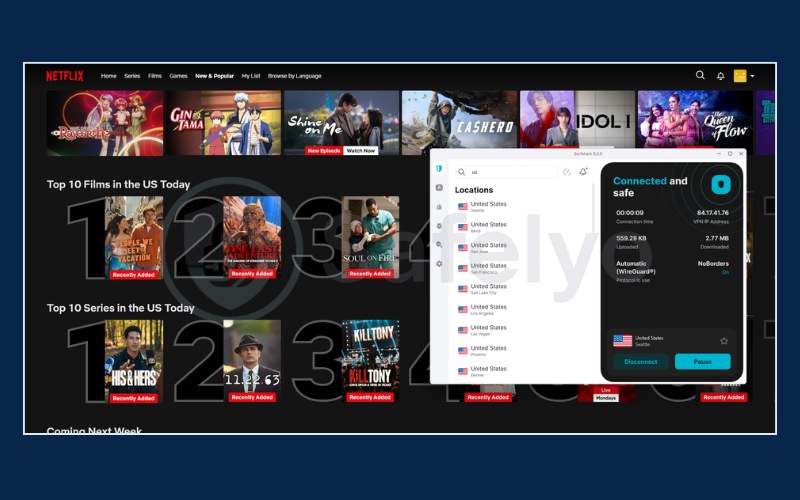
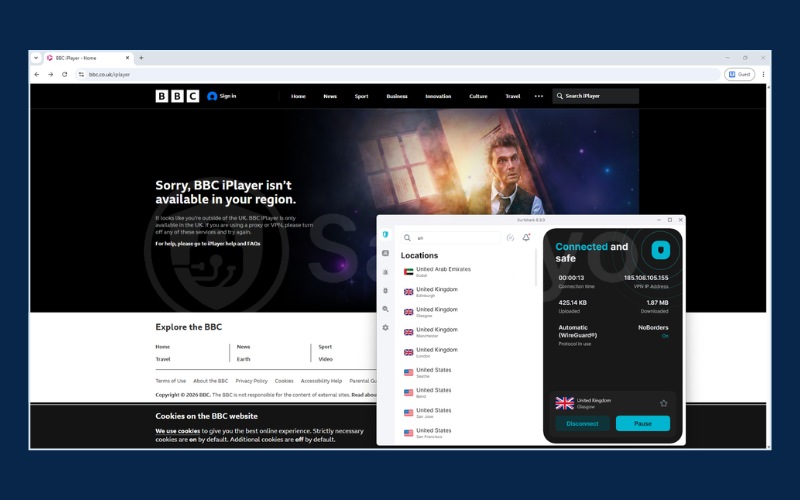
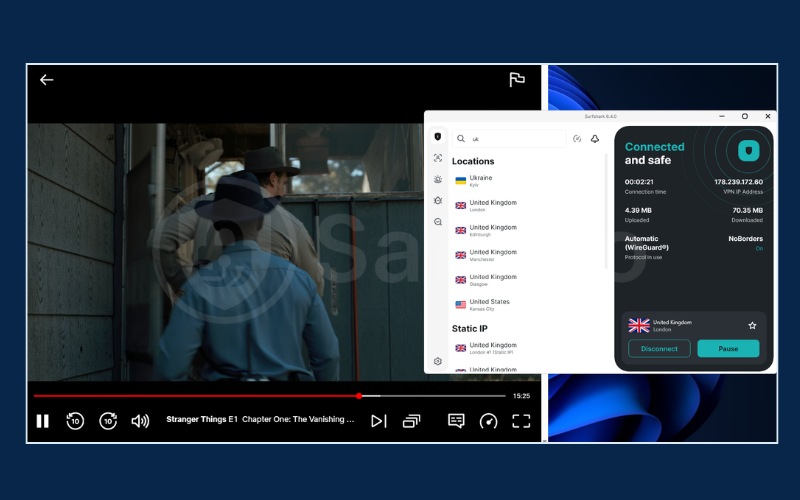
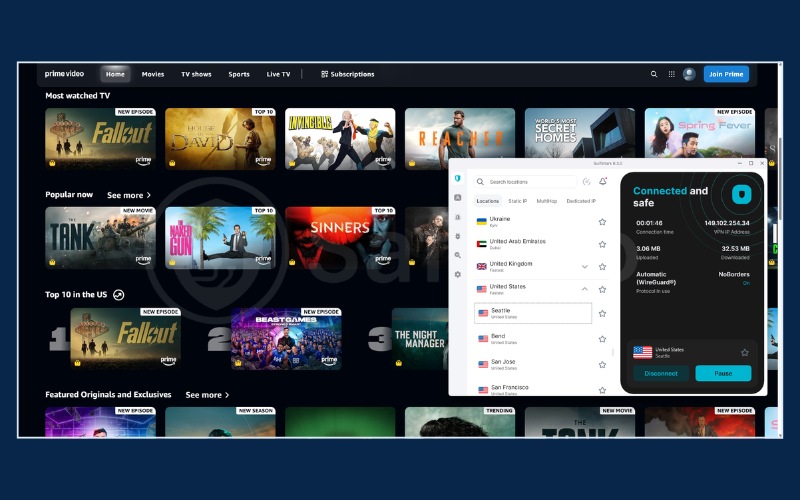
Surfshark stands out by offering access to an impressive 28+ Netflix regions, cementing its position as a top contender for the best VPN for Netflix. Surfshark also maintains strong unblocking capabilities for Disney+, Hulu, and HBO Max. However, users should be aware that the BBC iPlayer access is currently inconsistent.
For large households where multiple people are watching different platforms on separate televisions, laptops, and tablets simultaneously, Surfshark’s unlimited connections policy makes it the supreme value pick. Because there is no device cap, you will not have to log someone else out just to start your own movie.
2.3.2. Speed and performance
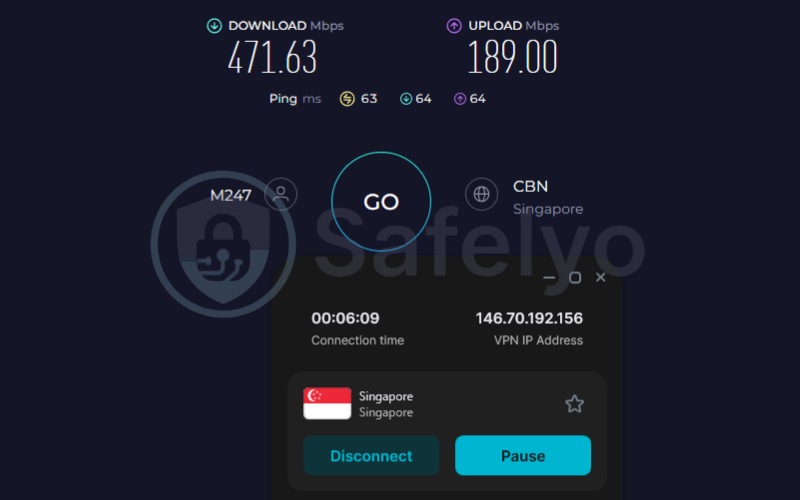
Surfshark’s highly optimized WireGuard protocol handles encryption with minimal overhead. On the Singapore server, it posted an excellent 471.63 Mbps download and 63 ms ping, perfectly capable of handling multiple devices in the same house.
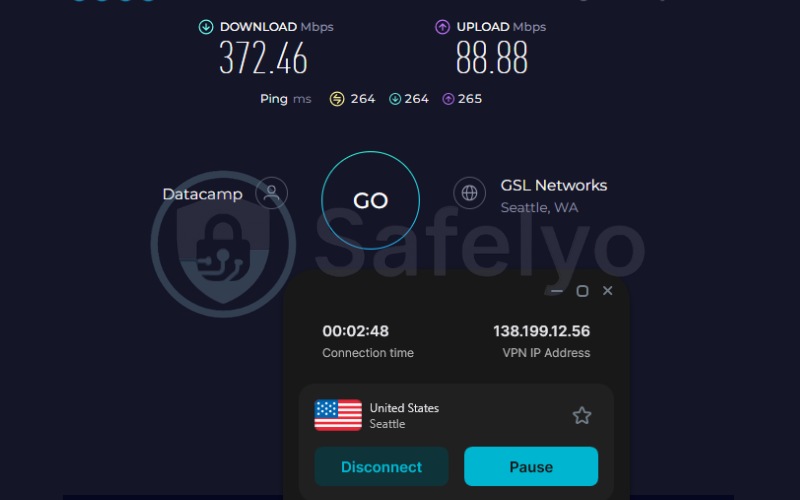
When routing to the US server, the download speed remained strong at 372.46 Mbps. However, the ping reached 264 ms. For standard on-demand Netflix viewing, this latency is negligible. But if you plan to use Surfshark’s unlimited connections to stream live US sports (like ESPN or NBA) from overseas, this higher latency might cause your live feed to be slightly behind real-time.
| Server Location | Download Speed (Mbps) | Upload Speed (Mbps) | Ping (ms) |
|---|---|---|---|
| US | 372.46 | 88.88 | 264 |
| Singapore | 471.63 | 189.00 | 63 |
2.3.3. Privacy and security
Surfshark operates a secure 100% RAM-only server network. To verify the safety of this network, Surfshark recently completed independent audits by Deloitte and SecuRing in 2025.
Beyond basic encryption, Surfshark also provides unique evasion tools like the IP Rotator, which automatically changes your IP address every 5 to 10 minutes without dropping your active connection. Together with Dynamic MultiHop, these features help users continuously bypass firm IP bans enforced by media companies.
2.3.4. Pricing and value
The core appeal of Surfshark lies heavily in its $2.49 per month price point on the 2-year Starter plan. This provides an incredibly low entry cost to secure every device you own.
However, users should be aware that the plan renews at $79.00 per year. Even with this renewal increase, Surfshark remains highly competitive compared to the steeper renewal costs charged by other premium VPNs.
Best for: Households or shared accounts that want to cover every device on one plan at the low entry price, with strong Netflix, Disney+, Hulu, and HBO Max coverage.
2.4. #4. NordVPN: Best for widest global reach and fast US-based streaming
NordVPN, a product of Nord Security, operates out of Panama and maintains a powerful market presence. NordVPN boasts a vast geographical footprint featuring 9,500+ servers spread across 149 countries. This extensive network ensures NordVPN consistently delivers high average speeds suitable for heavy data usage.
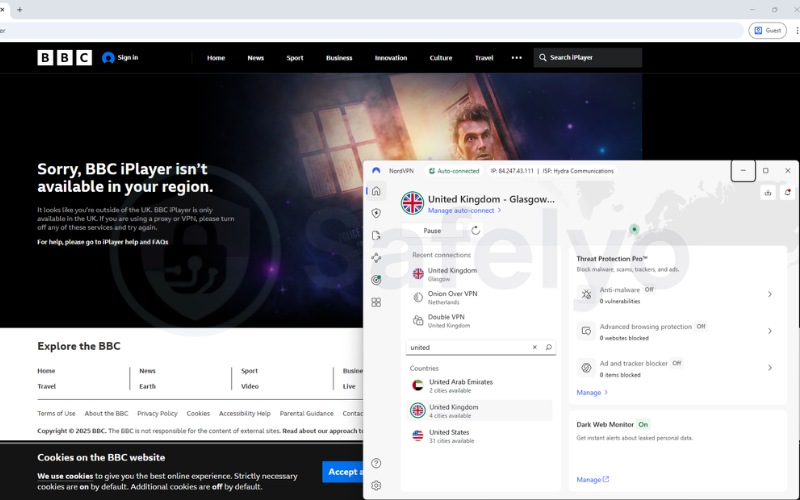
However, NordVPN ranks fourth on this specific streaming list due to a notable drawback. Based on current test data, NordVPN exhibits inconsistent and unstable unblocking performance for BBC iPlayer, which creates a notable drawback for viewers who regularly use this platform.
| Features | Details |
|---|---|
| Best For | Widest global reach and fast US-based streaming |
| Starting Price | $3.49/mo (2-year plan) |
| Company | Nord Security |
| Jurisdiction | Panama |
| Independent Audit | Yes, PwC Switzerland and Deloitte |
| No-Logs Policy | Yes, verified no-logs policy |
| RAM-Only Servers | Yes |
| Servers | 9,500+ |
| Countries | 149 |
| Avg. Download Speed | 451.65 Mbps (Calculated average of US & Singapore tests) |
| Avg. Upload Speed | 142.19 Mbps (Calculated average of US & Singapore tests) |
| Avg. Latency | 121 ms (Calculated average of US & Singapore tests) |
| Protocols | NordLynx, OpenVPN (UDP/TCP), IKEv2/IPSec, NordWhisper |
| Kill Switch | Yes |
| Obfuscation | Yes (obfuscated servers and the NordWhisper protocol) |
| Port Forwarding | No |
| Dedicated IP | Yes |
| Simultaneous Connections | 10 |
| Netflix Regions | 26+ |
| Disney+ | Yes |
| BBC iPlayer | Inconsistent |
| Torrent / P2P | Yes |
| Win/Mac/iOS/Android | Yes |
| Linux | Yes |
| Browser Extension | Yes (Chrome, Firefox, Edge) |
| Router Support | Yes |
| Live Chat 24/7 | Yes |
| Refund Policy | 30-day money-back guarantee |
| Free Trial | Yes (3-day free trial on Android) |
| Overall Positioning | Largest country footprint (149) and highest raw speed averages |
| Official Website | nordvpn.com |
Pros
Massive network of 9,500+ servers across 149 countries
NordWhisper protocol and SmartPlay feature are excellent for disguising streaming traffic
Independently audited no-logs policy (PwC, Deloitte) and robust RAM-only infrastructure
Cons
BBC iPlayer access is inconsistent/unstable, which is a drawback for fans of the platform
Renewal pricing jumps significantly after the intro term ($139.08/year)
2.4.1. Streaming library access
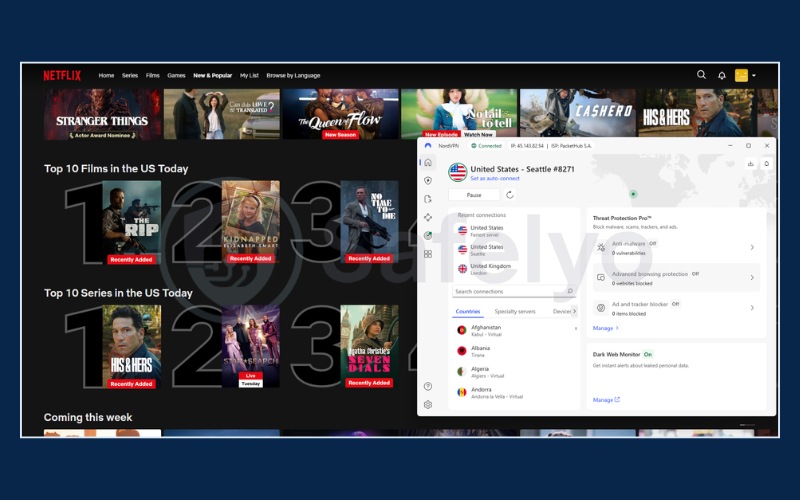
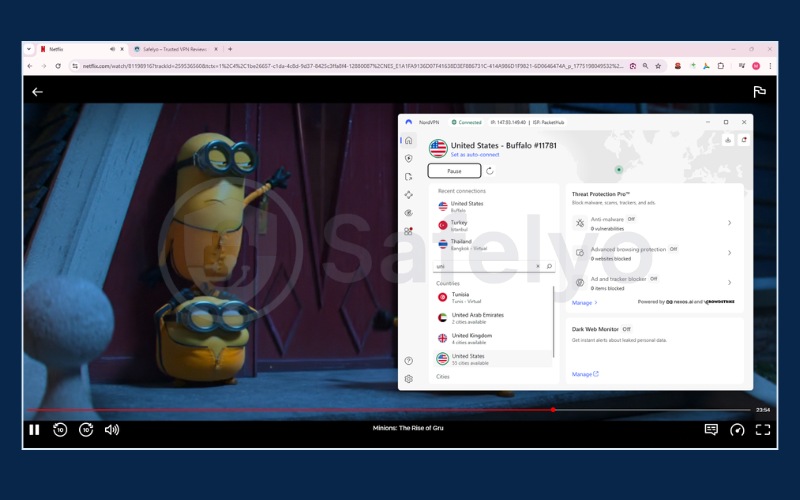
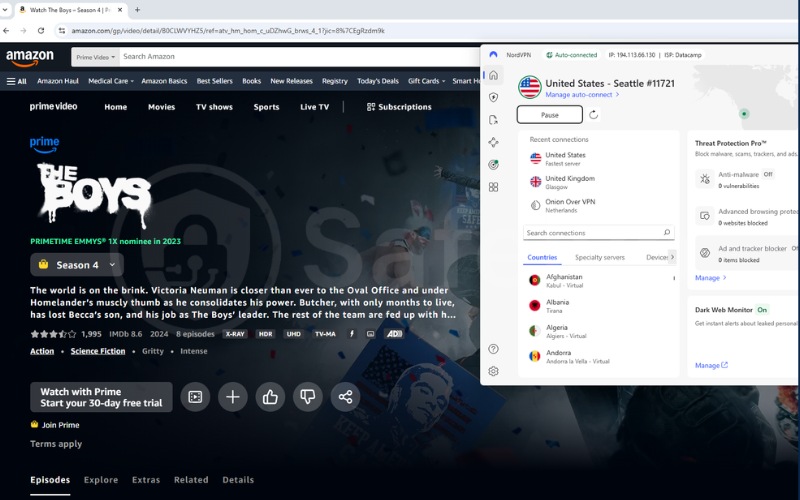
NordVPN is a powerhouse for accessing North American and Asian content. It provides solid, high-speed access to 26+ Netflix regions, specifically excelling at unblocking the US, UK, Canada, Japan, and Germany libraries. It also handles US-centric platforms like Hulu, Disney+, and HBO Max with zero proxy errors.
However, much like Surfshark, users must be aware that BBC iPlayer access is currently inconsistent. While NordVPN operates as a powerhouse for US content, viewers who rely heavily on BBC iPlayer should look to ExpressVPN or Proton VPN for a more reliable connection.
2.4.2. Speed and performance
NordVPN dominates in raw speed metrics. NordVPN achieved the highest calculated average download speed in our testing at 451.65 Mbps, alongside an upload speed of 142.19 Mbps.
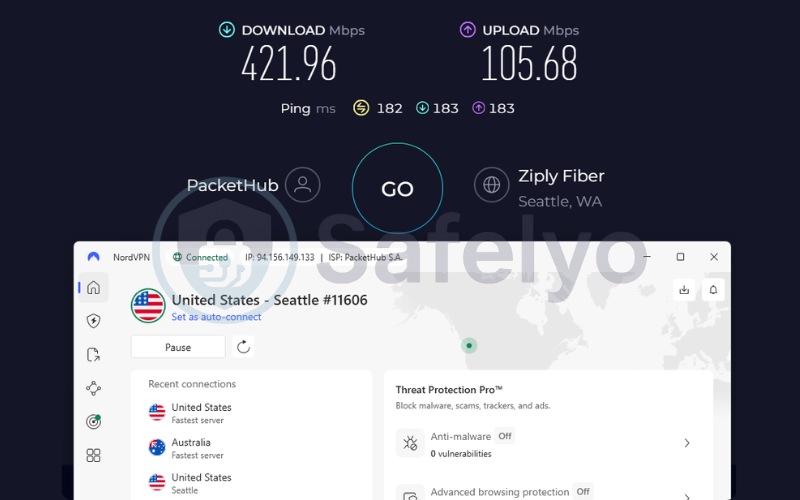
It achieved the highest US download speed in our testing at 421.96 Mbps, and remarkably kept the US ping down to just 182 ms. This exceptional long-haul performance means you can scrub through a 4K movie on US Netflix and the video will instantly resume without pixelation.
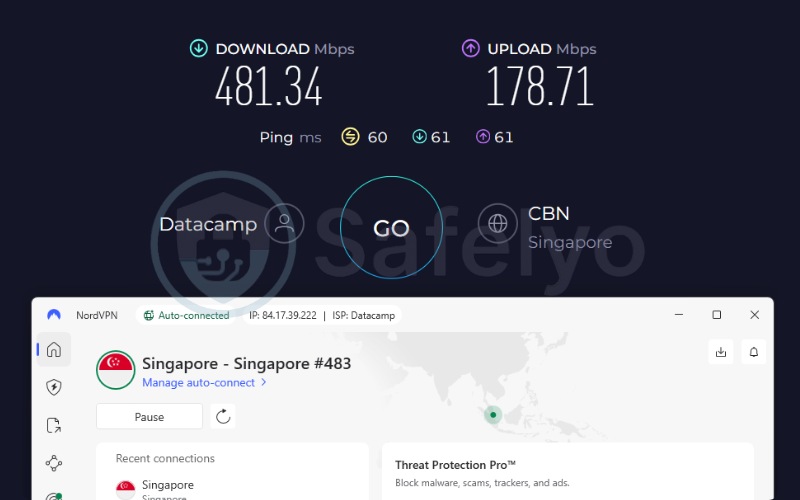
Its short-distance performance is equally stellar, hitting 481.34 Mbps when connecting from Vietnam to a Singapore server with a stable 60 ms ping. Simply put, NordVPN provides the best raw throughput for distant US servers among all budget-friendly options.
To process video data at these extreme speeds, NordVPN relies on its custom NordLynx protocol. This protocol combines the speed of WireGuard with advanced privacy measures to facilitate top-tier 4K streaming. Because of this highly efficient tunneling method, the results easily surpass optimal speed benchmarks, ensuring that you will rarely experience buffering even during heavy network congestion.
| Server Location | Download Speed (Mbps) | Upload Speed (Mbps) | Ping (ms) |
|---|---|---|---|
| US | 421.96 | 105.68 | 182 |
| Singapore | 481.34 | 178.71 | 60 |
2.4.3. Privacy and security
Operating from Panama, NordVPN benefits from an excellent privacy jurisdiction. To back up its claims, NordVPN maintains a robust history of independent audits by PwC and Deloitte. NordVPN utilizes a RAM-only server setup to prevent any data retention on its hardware.
Furthermore, its obfuscated servers and the NordWhisper protocol help users actively disguise their traffic. This makes it easy to break through restrictive networks to reach global media libraries safely.
2.4.4. Pricing and value
New users can secure the 2-year plan at a starting price of $3.49 per month. However, users need to be aware of the price increase upon renewal. After the initial term, the price spikes significantly to $139.08 per year.
This sharp percentage increase enforces the need for transparency, as users must calculate this long-term cost when comparing NordVPN to cheaper alternatives like Surfshark.
Best for: Streamers who prioritize massive server networks (149 countries) and raw download speeds for US content, but who do not rely on stable BBC iPlayer access.
3. VPN streaming speed: How much do you actually lose?
When choosing the best VPN for streaming, raw speed numbers matter more than marketing claims. All four VPNs in this review were tested from the same Vietnam-based connection using an identical methodology. The results presented below are actual measured figures, providing a realistic look at how much speed you actually lose when routing traffic through secure tunnels.
3.1. Speed requirements for Netflix, Disney+, and 4K UHD streaming
Understanding minimum bandwidth thresholds helps put these test results into perspective. According to official recommendations published by major streaming platforms, you need specific minimum speeds to maintain video quality without interruption:
| Resolution | Minimum Download Speed |
|---|---|
| Standard Definition (SD) | 3 Mbps |
| High Definition (HD / 720p) | 5 Mbps |
| Full High Definition (FHD / 1080p) | 5 Mbps |
| Ultra High Definition (4K UHD) | 15 Mbps |
At first glance, a 15 Mbps requirement for 4K UHD appears quite low. However, this figure represents a sustained minimum baseline without any network fluctuations. When you route traffic through a secure tunnel, the encryption process naturally consumes some bandwidth.
Fortunately, all four VPNs reviewed in this article (ExpressVPN, Proton VPN, Surfshark, and NordVPN) delivered calculated average download speeds well over 400 Mbps. These results completely shatter the 15 Mbps 4K threshold. This massive speed surplus is crucial because it acts as a network buffer. Even if your base internet connection experiences a temporary dip during peak hours, highly efficient protocols like ExpressVPN’s Lightway or NordVPN’s NordLynx ensure the encryption overhead will not drag your speed below that critical 15 Mbps line.
Therefore, for standard on-demand viewing, raw download speed is unlikely to be the limiting factor for any of these top-tier providers. You only need to scrutinize these Mbps differences if you manage a large household where multiple users are watching 4K streams simultaneously. In such heavy-load scenarios, combining a 400+ Mbps capacity with Surfshark’s unlimited connection policy or ExpressVPN’s generous 14-device limit ensures nobody experiences mid-movie buffering.
3.2. Speed test results: ExpressVPN vs. Proton VPN vs. Surfshark vs. NordVPN (2026)
In this article, we present speed test results from two specific locations: Singapore and the United States. The Singapore server represents a regional connection close to our testing environment, while the US server represents a distant, long-haul connection relevant for unlocking US Netflix, Disney+, and Max libraries.
If you want to see detailed speed metrics for other servers, you can read our comprehensive review articles for each individual VPN.
| VPN | Server | Download (Mbps) | Upload (Mbps) | Ping (ms) |
|---|---|---|---|---|
| ExpressVPN | US | 417.96 | 134.43 | 196 |
| ExpressVPN | Singapore | 472.41 | 248.36 | 45 |
| Proton VPN (Plus) | US | 370.13 | 97.29 | 273 |
| Proton VPN (Plus) | Singapore | 482.98 | 143.44 | 46 |
| Surfshark | US | 372.46 | 88.88 | 264 |
| Surfshark | Singapore | 471.63 | 189.00 | 63 |
| NordVPN | US | 421.96 | 105.68 | 182 |
| NordVPN | Singapore | 481.34 | 178.71 | 60 |
Download speeds across all VPNs on both the regional and long-haul servers fall comfortably into the 100+ Mbps tier. This tier supports multi-player gaming, 4K video playback, and large downloads without struggle. Notably, NordVPN posted the fastest US download at 421.96 Mbps. Meanwhile, Proton VPN Plus posted the fastest regional Singapore download at 482.98 Mbps.
Ping data tells a different story regarding responsiveness. On the regional Singapore server, ExpressVPN and Proton VPN Plus tied at a remarkably low 45 ms and 46 ms, respectively. A latency under 50 ms is the best fit for live or interactive regional content. NordVPN (60 ms) and Surfshark (63 ms) fall slightly higher, which remains perfectly acceptable for on-demand media viewing.
When routing traffic to the distant US server, every VPN experienced ping times exceeding 150 ms. This high latency is entirely expected due to the vast physical distance between the testing location and the US.
While this delay is generally associated with standard browsing rather than real-time interaction, it does not meaningfully affect pre-buffered, on-demand 4K content. However, sports fans planning to watch live US broadcasts should note this delay, as it could cause minor sync issues during a live game.
4. Streaming services compared: Netflix, Disney+, BBC iPlayer, and more
Matching a VPN to your specific entertainment habits requires knowing exactly which platforms it can reliably unblock. We manually tested each provider against major global media services to confirm native access and identify any platform-specific blind spots. The table below details the verified unblocking capabilities for each VPN across the most popular streaming libraries.
| VPN | Netflix | Disney+ | Hulu | HBO Max | BBC iPlayer | Prime Video | Crunchyroll |
|---|---|---|---|---|---|---|---|
| ExpressVPN | 25+ regions | Yes | Yes | Yes | Yes | Yes | Yes |
| Proton VPN | 25+ regions | Yes | Yes | Yes | Yes | Yes | Yes |
| Surfshark | 28+ regions | Yes | Yes | Yes | Inconsistent | Yes | Yes |
| NordVPN | 26+ regions | Yes | Yes | Yes | Inconsistent | Yes | Yes |
ExpressVPN stands out as the provider offering confirmed native support across every listed service. ExpressVPN guarantees access to Netflix, Prime Video, Disney+, Max, Hulu, BBC iPlayer, and Crunchyroll without requiring complex workarounds. Proton VPN also delivers exceptional performance across the board.
Conversely, both Surfshark and NordVPN demonstrate inconsistent BBC iPlayer access, which is a notable gap for international viewers wanting to stream BBC programming.
By comparing these platforms directly, you can easily identify which VPN aligns with your specific entertainment priorities.
5. Streaming on every device: Which VPNs have native apps?
Finding a VPN with broad device compatibility is essential for a seamless viewing experience. The ideal solution is a single application that works flawlessly across your television, smartphone, and laptop without requiring extensive technical configuration.
5.1. Apple TV and smart TV setup
ExpressVPN, Proton VPN, Surfshark, and NordVPN all provide dedicated native applications for Apple TV. This eliminates the need for complex router configurations just to secure your living room television. Additionally, Proton VPN and Surfshark explicitly list broad smart TV and Android TV compatibility in their feature data, ensuring seamless integration into modern home entertainment systems.
5.2. Fire TV Stick and Android TV setup
ExpressVPN, NordVPN, Surfshark, and Proton VPN all support native applications for Fire TV Stick and Android TV environments. This broad support is excellent news for consumers, as none of the reviewed VPNs force you to rely on complicated router workarounds just to use the most popular media sticks on the market.
5.3. Router and Smart DNS setup for devices without native apps
Older smart televisions and certain game consoles cannot run a native privacy application. In these cases, ExpressVPN offers the MediaStreamer Smart DNS tool, which changes the virtual location of the device without actually encrypting the traffic. This provides a fast but unencrypted workaround.
Alternatively, all four VPNs support router-level installation. Setting up a secure tunnel directly on your router protects every device connected to your home network simultaneously, bridging any compatibility gaps effortlessly.
6. How to choose the best VPN for streaming
If you are still undecided after reviewing the data, evaluating these core categories will help you establish a clear decision framework. Focus on practical outcomes rather than deep protocol comparisons to find the right fit for your daily routine.
6.1. Geo-unblocking capability and streaming compatibility
The ability to bypass regional blocks is the most crucial factor. You must match the VPN to the specific media libraries you care about most. If you primarily watch Netflix, Surfshark’s 28+ region coverage is highly appealing. If you follow British television, verify that the VPN supports BBC iPlayer natively. Make sure the VPN you choose actually lists your favorite platforms as supported before you pay.
6.2. Connection speed for 4K and HD streaming
Raw connection speed is vital, but you do not need to overpay for unnecessary capacity. Every VPN tested delivered download speeds well above the 15 Mbps Netflix recommends for 4K viewing.
Minor differences in latency primarily affect live broadcasts and interactive gaming rather than standard on-demand video. Therefore, raw speed should not be your only deciding factor unless your household consistently runs multiple 4K streams at the exact same time.
6.3. Privacy, no-logs policies, and obfuscation
Jurisdiction and privacy policies matter even for entertainment purposes. ExpressVPN operates from the British Virgin Islands, Proton VPN in Switzerland, Surfshark from the Netherlands, and NordVPN in Panama. All four VPNs maintain independently audited no-logs policies.
In addition to core privacy, they offer advanced obfuscation features. These obfuscation tools actively hide your VPN traffic, which successfully doubles as a mechanism to bypass firm proxy detection barriers erected by media companies.
6.4. Server network size and device coverage
A larger server count provides more options for bypassing congested pathways. Proton VPN offers over 20,000 servers in 145+ countries, NordVPN provides 9,500+ servers in 149 countries, Surfshark runs 4,500+ servers in 100 countries, and ExpressVPN hosts thousands of servers in 105 countries.
Furthermore, check the device limits. If you have a large household with multiple smart TVs, tablets, and phones, Surfshark’s unlimited connection policy provides much better value than standard industry plans that cap you at 10 simultaneous devices.
6.5. Price, free trials, and renewal costs
Hidden renewal costs and upfront total bills can quickly drain a budget if not analyzed together. The table below illustrates the introductory pricing, the actual total amount billed at checkout, and the subsequent annual renewal rate. Reviewing this full data prevents nasty billing surprises down the line.
| VPN | Intro Price (longest plan) | Total Bill | Renews At |
|---|---|---|---|
| ExpressVPN | $2.49/mo (Basic, 2yr + 4mo) | $69.72 | $99.95/year |
| Proton VPN | $2.99/mo (Plus, 2yr) | $71.76 | $83.88/year |
| Surfshark | $2.49/mo (Starter, 2yr + 3mo) | $67.23 | $79.00/year |
| NordVPN | $3.49/mo (2yr + 3mo) | $94.23 | $139.08/year |
Pricing tables heavily promote the monthly breakdown, but the total upfront bill is what actually impacts your wallet today. While ExpressVPN and Surfshark both advertise a $2.49 monthly rate, their varied bonus months result in different checkout totals. Surfshark requires the lowest immediate investment at $67.23 to secure over two years of access. In contrast, NordVPN demands a significantly higher $94.23 upfront payment, requiring a larger initial budget allocation before you even stream your first movie.
The true cost of a VPN only reveals itself after the promotional period ends. Providers frequently use steep initial discounts as a customer acquisition strategy, planning to recoup margins upon renewal. NordVPN exemplifies this tactic with a massive price spike, jumping to $139.08 annually. This sharp increase means your long-term budget needs careful planning. ExpressVPN also implements a notable hike to $99.95 per year, positioning itself firmly as a premium service where users pay a higher ongoing rate for consistent reliability.
When calculating long-term return on investment, Surfshark maintains the strongest value proposition. Its $79.00 annual renewal fee is the lowest of the group, and its unlimited device policy effectively reduces the cost per device to pennies for large households. Proton VPN closely follows with a stable $83.88 renewal, backed by the safety net of a permanent free trial.
To manage these costs effectively, consider disabling the auto-renewal feature immediately after your initial purchase. This simple step protects you from unexpected charges and often triggers retention discounts from the provider when your term nears expiration.
7. How does a VPN work for streaming?
A VPN routes your internet traffic through a secure server located in another country or city. When the connection is established, the provider assigns your device a new IP address originating from that specific server location. Streaming platforms rely almost entirely on your IP address to determine which regional content library to display.
Geo-blocking occurs when platforms restrict access based on these regional IP addresses to enforce rigid regional licensing agreements. By spoofing your location with a foreign IP address, you effectively bypass these geographical barriers, tricking the platform into granting you access to global media catalogs.
8. How to set up a VPN for streaming (3 steps)
Quick Step:
- Download App: Sign up and install the software on your preferred device.
- Connect to Server: Select a server in the target country to mask your location.
- Open Streaming Site: Launch the media application and begin watching.
Following this standard process ensures quick access to blocked content:
- First, sign up for a service and install the native application on your computer, smartphone, or media stick.
- Next, connect to a server in the specific country whose library you wish to access. For example, choose a United States server for the US Netflix catalog, or a United Kingdom server for BBC iPlayer.
- Finally, open the media application or website and start watching your show. If you encounter an error, consult the troubleshooting steps in the next section.
9. VPN not working with Netflix or Disney+? How to fix detection issues
Media platforms actively maintain comprehensive block-lists containing known proxy server IP addresses. This cat-and-mouse dynamic explains why a server that successfully bypassed restrictions yesterday might trigger an error today.
To combat this, ExpressVPN applies automatic obfuscation on every server natively. Meanwhile, Surfshark provides an IP Rotator that changes your IP every 5 to 10 minutes, alongside Dynamic MultiHop. For similar evasion, Proton VPN relies on its proprietary Stealth protocol, and NordVPN deploys both the NordWhisper protocol and dedicated obfuscated servers.
If you encounter a block despite these features, try these immediate fixes:
- Switch to a different server located in the same target country to acquire a fresh IP address.
- Change the connection protocol in your VPN application settings.
- Clear your web browser’s cache and cookies, or reinstall the media application entirely.
- Contact the VPN’s 24/7 live chat support to request a list of currently functioning servers.
10. Sports streaming and blackout bypass
Live sports blackouts on services like ESPN+ and NHL networks are enforced by detecting the viewer’s IP address. These blackouts are tied directly to rigid regional broadcast rights held by local Regional Sports Networks rather than the platform itself.
By connecting to a server in a different US state or a foreign country, your device presents a completely different IP address. This is the primary mechanism for watching an out-of-market game.
However, sports platforms actively attempt to block known proxy IP ranges. Therefore, utilizing a VPN with massive server network sizes and strong obfuscation features is highly recommended. Please note that while bypassing blackouts is legal, it often violates the individual platform’s terms of service.
11. How to save money on streaming subscriptions with a VPN
Regional price arbitrage is a method where users secure lower subscription rates based on global economic differences. This is possible because many popular media services charge different monthly fees depending on the country you connect from.
To take advantage of these regional discounts, you can connect your VPN to a server located in a lower-cost country before creating a new streaming account. Because exact pricing fluctuates frequently, you must check the media service’s own pricing page while connected to different foreign server locations to verify the current rates.
However, be aware that some platforms actively attempt to block this practice by requiring a payment method tied to a local billing address in that specific region.
If you navigate these payment hurdles and your household ends up managing multiple international accounts, you will need a flexible VPN to run them. In this scenario, Surfshark’s unlimited device policy provides an excellent foundation to run those separate accounts simultaneously across different televisions and tablets.
12. Can free VPNs work for streaming?
Proton VPN provides a highly secure permanent free plan, but it explicitly does not support streaming or peer-to-peer sharing. The free tier limits users to a single device and restricts server selection to just 10 countries via an auto-select function. On the positive side, it requires no credit card to register.
This highlights a broader industry pattern regarding free tiers. Free services from reputable providers tend to deprioritize the exact features necessary for high-definition video playback, such as manual server choice, high speed, and multiple simultaneous connections.
While the underlying privacy protections remain robust, attempting to watch 4K content on a free tier will likely result in severe buffering or degraded quality. To ensure a smooth, buffer-free viewing experience, a premium plan is realistically required.
Fortunately, you can test our recommended premium VPNs risk-free, as they all come with a standard 30-day money-back guarantee. Additionally, you can take advantage of Surfshark’s 7-day free trial to evaluate its unblocking capabilities firsthand. For more detailed options on testing premium services without upfront costs, we highly recommend checking out our comprehensive guide on the best VPN free trials.
13. FAQs about best VPN for streaming
Will Netflix ban me if I use a VPN?
No. Netflix generally does not ban user accounts for utilizing VPNs or smart DNS tools. Instead, their system simply blocks the detected server’s IP address, resulting in a standard ‘proxy error’ message on your screen. Switching to a different VPN server usually resolves this instantly.
Do VPNs actually work for streaming?
Yes. They work by routing your internet traffic through a secure server in another location, effectively assigning your device a new IP address. This process bypasses rigid regional licensing agreements and unlocks global media libraries.
Is Amazon Prime Video blocking VPN servers?
Amazon Prime Video actively tries to block proxy IP addresses to enforce regional content rules. However, premium VPNs like ExpressVPN and Proton VPN continually update their server networks to maintain confirmed access to the platform.
Is using a VPN for streaming legal?
Yes. Using a secure proxy network is entirely legal in the vast majority of countries, including the United States. None of the four VPNs reviewed in this article market themselves as tools for circumventing domestic laws. However, violating a media platform’s internal Terms of Service to bypass geographic restrictions is a separate, contractual matter that could result in temporary account restrictions.
Can I use a VPN to save money on streaming subscriptions?
Yes. Connecting to a server located in a country with a lower cost of living before signing up can sometimes yield a cheaper subscription rate, though you may encounter hurdles requiring localized payment methods.
Can you use a free VPN to watch Netflix?
Free services rarely work well for Netflix. For example, Proton VPN’s permanent free plan explicitly excludes media unblocking capabilities. Free tiers generally lack the speed and server variety required to sustain buffer-free video playback.
What is Smart DNS, and is it better than a VPN for streaming?
Smart DNS changes your device’s virtual location without encrypting the traffic, making it faster but devoid of privacy benefits. Tools like ExpressVPN’s MediaStreamer Smart DNS suit devices like older smart televisions that cannot run native privacy applications.
Which VPN works with BBC iPlayer?
ExpressVPN and Proton VPN successfully unblock BBC iPlayer natively. Conversely, Surfshark and NordVPN currently demonstrate inconsistent performance when attempting to access UK-based BBC content.
14. Conclusion
ExpressVPN remains the strongest overall pick due to its flawless native unblocking of BBC iPlayer and Netflix, paired with massive data speeds. Privacy-first users looking to test a massive network should begin with Proton VPN, while budget-conscious multi-device users will find immense value in Surfshark.
Users needing a massive 149-country footprint for US content will find NordVPN highly capable. Choosing the best VPN for streaming ultimately depends on matching your specific media preferences with the right VPN’s technical strengths.
For more top-rated recommendations, explore our best VPN category or return to the Safelyo homepage for the latest cybersecurity guides and reviews.