NordVPN is the best VPN for Windows in 2026 because it successfully survived our compatibility tests on the Windows 11 24H2 update and features a fully native ARM64 application for Copilot+ PCs.
Finding the right VPN requires looking beyond basic encryption and finding a VPN that will not crash your system or drain your battery. Windows environments present unique challenges, from handling background telemetry to ensuring seamless integration with Microsoft’s frequently updated network drivers. A reliable VPN must handle these intricacies without forcing users to troubleshoot connectivity drops or sacrifice their processing power.
In this guide, we will break down the top test-verified options, explore how to fix common Windows 11 connection issues, and clarify the transition to ARM64 architecture.
Top VPNs for Windows:
- NordVPN (Best overall for Windows): NordVPN operates a massive global network across 149 countries and holds a recent Deloitte audit. NordVPN ships a fully rebuilt native ARM64 build combined with Threat Protection Pro, delivering a highly effective Windows-specific malware scanning feature.
- ExpressVPN (Best for Windows beginners): ExpressVPN provides a 30-day money-back guarantee, allows generous simultaneous connections, and features an incredibly simple one-click interface. ExpressVPN’s Windows-on-ARM build utilizes a hybrid Prism-emulation approach alongside a highly stable x64 application.
- Surfshark (Best value for Windows): Surfshark offers unlimited simultaneous connections at a highly affordable starting price. Surfshark secures user data with a RAM-only network and ships a fully native ARM64 VPN.
- Proton VPN (Best for privacy on Windows / best free option): Proton VPN operates under Swiss jurisdiction and holds four independent Securitum audits. Proton VPN provides a genuinely unlimited-data free tier, which serves as a permanent solution rather than a limited trial.
- Private Internet Access (Best open-source option for Windows): Private Internet Access (PIA) includes unlimited connections, port forwarding, and fully open-source code. Users should note that PIA operates under United States jurisdiction, placing PIA inside a major intelligence-sharing alliance.
Quick Comparison Table:
| VPN | Starting Price | Best For | Native ARM64 App | Works on 24H2 | RAM-Only Servers | Kill Switch | Simultaneous Connections | Money-Back Guarantee |
|---|---|---|---|---|---|---|---|---|
| NordVPN | $3.49/mo | Best overall | Yes (full native) | Yes | Yes | Yes | 10 | 30 days |
| ExpressVPN | $2.49/mo | Best for beginners | Partial (hybrid/Prism) | Yes | Yes | Yes | 14 | 30 days |
| Surfshark | $2.49/mo | Best value | Yes (full native) | Yes | Yes | Yes | Unlimited | 30 days |
| Proton VPN | $2.99/mo | Best for privacy | Yes (full native) | Yes | No (full-disk encryption) | Yes | 10 (paid) / 1 (free) | 30 days |
| PIA | $1.33/mo | Best open-source option for Windows | Yes (full native) | Yes | Yes | Yes | Unlimited | 30 days |
Prices and information are subject to change. Readers should check before purchasing. This article is for informational purposes only and does not constitute legal advice. Please use VPNs responsibly and legally.
1. How we tested and selected the best VPN for Windows
Finding the right VPN requires strict evaluation parameters. We established a controlled testing environment to verify which VPNs truly deliver on their marketing promises.
We utilized the following testing framework:
- Test Device: Windows 11 PC.
- Testing Location: Vietnam.
- Baseline Internet Connection: Approximately 800 Mbps download speed, recorded prior to connecting any VPN.
- Testing Tools: Speedtest.net for throughput and ping latency metrics. We used ipleak.net and browserleaks.com for DNS, WebRTC, and IPv6 leak checks.
- Protocol Selection: To ensure peak performance and avoid encryption overhead, we tested using only the fastest modern protocols (NordLynx, Lightway, or WireGuard), strictly avoiding OpenVPN.
- Average Speed Calculation: The average download speed, average upload speed, and average latency metrics displayed in the overview tables represent the exact calculated average between the two server locations tested in this review (United States and Singapore).
We ranked the top VPNs using these specific criteria:
- Real-world speed retention against the baseline connection.
- Verified no-logs policies and recent independent audit history.
- Server infrastructure security, specifically analyzing RAM-only versus disk-based setups.
- Windows-specific compatibility features, such as 24H2 stability and native ARM64 support.
- Streaming and peer-to-peer support reliability.
- Price-to-device-limit ratio and overall value proposition.
2. Best VPN for Windows: Top 5 picks that passed our 2026 tests
We evaluated dozens of VPNs to identify which options deliver the most reliable performance on Windows operating systems. The five VPNs below demonstrated strong speed retention, seamless integration with Windows features, and consistent stability during our testing process.
2.1. NordVPN: Best overall for Windows
Operating from Panama, safely outside the 14-Eyes intelligence alliance, NordVPN centers its core value proposition on being a highly capable all-rounder. It stands out as our primary pick because the application is tailored specifically for the modern Windows environment.
Instead of relying on an emulation layer, Nord Security deployed a from-the-ground-up ARM64 rebuild. Beyond hardware compatibility, NordVPN includes Threat Protection Pro to actively scan Windows downloads for malware.
| Features | Details |
|---|---|
| Best For | Best overall for Windows |
| Starting Price | $3.49/mo |
| Company | Nord Security |
| Jurisdiction | Panama |
| Independent Audit | Yes (Deloitte, late 2025) |
| No-Logs Policy | Yes (strict) |
| RAM-Only Servers | Yes |
| Servers | 9,500+ |
| Countries | 149 |
| Avg. Download Speed | ~451.65 Mbps |
| Avg. Upload Speed | ~142.20 Mbps |
| Avg. Latency | ~121 ms |
| Protocols | NordLynx, OpenVPN (UDP/TCP), IKEv2/IPSec, NordWhisper |
| Kill Switch | Yes |
| Obfuscation | Yes (obfuscated servers, NordWhisper stealth) |
| Port Forwarding | No |
| Dedicated IP | Yes |
| Simultaneous Connections | 10 |
| Netflix Regions | 26+ (US, UK, JP+) |
| Disney+ | Yes |
| BBC iPlayer | Inconsistent |
| Torrent / P2P | Yes |
| Win/Mac/iOS/Android | Yes |
| Linux | Yes |
| Browser Extension | Yes (Chrome, Firefox, Edge) |
| Router Support | Yes |
| Live Chat 24/7 | Yes |
| Refund Policy | 30-day money-back guarantee |
| Free Trial | Yes (3-day on Android) |
| Overall Positioning | Best overall, most Windows-specific native feature |
| Official Website | https://nordvpn.com |
Pros
Massive global network: 9,500+ servers in 149 countries
Fully native, ground-up ARM64 app confirmed for Copilot+ PCs
Threat Protection Pro actively scans Windows downloads for malware
Cons
Renewal pricing increases significantly after the initial promotional subscription period expires
Port forwarding not supported
2.1.1. Windows-specific features and compatibility
NordVPN integrates deeply with Windows through auto-connect features on startup and a system-level kill switch that seamlessly hooks into Windows network settings. The ARM64-native application and Threat Protection Pro combination serve as the deciding factors for a Windows-specific recommendation.
Copilot+ device owners receive a VPN built natively for their hardware, preventing the battery drain associated with emulation software. Threat Protection Pro actively scans Windows downloads for malware before they execute on your machine. NordVPN also includes Meshnet, allowing users to link trusted devices for remote access or local area network gaming sessions.
2.1.2. Speed and performance on Windows
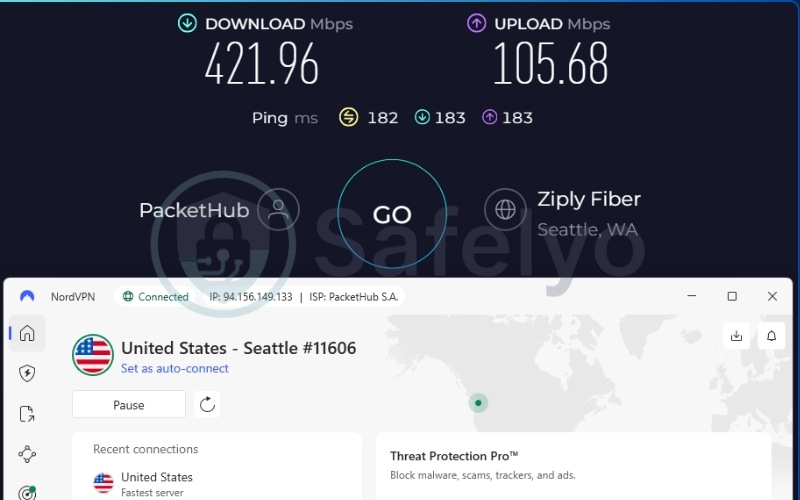
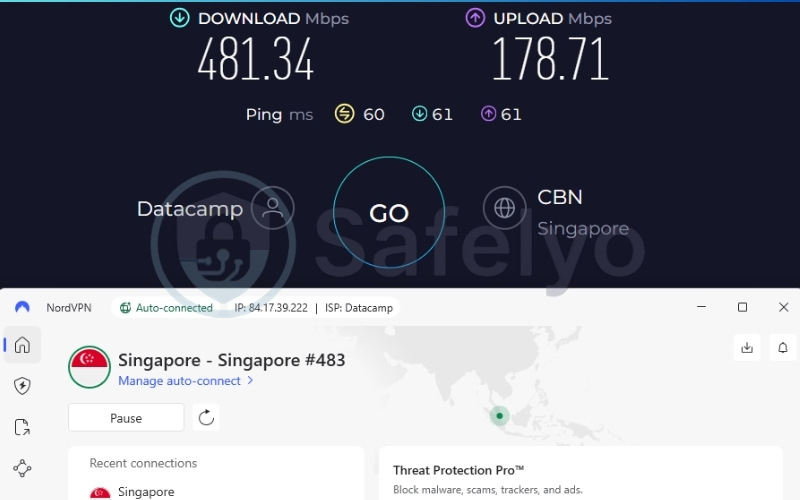
NordVPN delivered fast results across our testing infrastructure, keeping NordVPN well within the tier required for 4K streaming and competitive multiplayer gaming. The proprietary NordLynx protocol retains excellent speeds. The United States server reached 421.96 Mbps, while the Singapore server peaked at 481.34 Mbps. This performance consistency ensures that background Windows updates and heavy web browsing will not experience noticeable lag while the tunnel remains active.
2.1.3. Privacy, security, and overall value
NordVPN operates a massive network of over 9,500 servers across 149 countries, providing vast routing options. The late-2025 Deloitte audit confirms the strict no-logs policy remains intact. NordVPN includes obfuscated servers to bypass restrictive firewalls safely.
While NordVPN unblocks most major streaming platforms, access to specific regional libraries like BBC iPlayer can occasionally be inconsistent. For added security, NordVPN includes Double VPN servers that encrypt user traffic twice, though this feature decreases internet speeds more than a standard connection.
Best for: Everyday Windows users and Copilot+ PC owners seeking a premium all-rounder with top-tier speeds and built-in malware protection.
2.2. ExpressVPN: Best for Windows beginners
Based in the British Virgin Islands, ExpressVPN secures user data utilizing its TrustedServer RAM-only infrastructure. Among our tested group, ExpressVPN positions itself as the simplest and most beginner-friendly option available.
While engineers rebuilt the proprietary Lightway driver natively for ARM hardware, ExpressVPN currently routes the user interface through Microsoft’s Prism emulator. This creates a hybrid approach, though the application remains highly effective and stable for everyday users.
| Features | Details |
|---|---|
| Best For | Best for beginners |
| Starting Price | $2.49/mo |
| Company | ExpressVPN (Kape Technologies) |
| Jurisdiction | British Virgin Islands |
| Independent Audit | Yes (KPMG, PwC Switzerland, Cure53, Praetorian, F-Secure) |
| No-Logs Policy | Yes |
| RAM-Only Servers | Yes (TrustedServer) |
| Servers | Thousands |
| Countries | 105 |
| Avg. Download Speed | ~445.19 Mbps |
| Avg. Upload Speed | ~191.40 Mbps |
| Avg. Latency | ~120.5 ms |
| Protocols | Lightway, OpenVPN, WireGuard, IKEv2 |
| Kill Switch | Yes (Network Lock) |
| Obfuscation | Yes (automatic on every server) |
| Port Forwarding | Yes (router only) |
| Dedicated IP | Yes (20+ countries) |
| Simultaneous Connections | Up to 14 |
| Netflix Regions | 25+ |
| Disney+ | Yes |
| BBC iPlayer | Yes |
| Torrent / P2P | Yes |
| Win/Mac/iOS/Android | Yes |
| Linux | Yes |
| Browser Extension | Yes |
| Router Support | Yes |
| Live Chat 24/7 | Yes |
| Refund Policy | 30-day money-back guarantee |
| Free Trial | Yes (3-day on iOS/Android) |
| Overall Positioning | Best for beginners, simplest UI |
| Official Website | https://expressvpn.com |
Pros
High simultaneous-connection allowance (up to 14)
Broadest independent-audit history (five separate named firms)
Fast setup, minimal-decision-fatigue interface
Cons
Windows-on-ARM app utilizes Prism emulation
No native multi-hop / double-VPN option
2.2.1. Windows-specific features and compatibility
ExpressVPN offers a highly intuitive user interface that minimizes decision fatigue. The client features a large, central connect button that handles configuration automatically and supports convenient Windows desktop shortcuts for instant access.
While the Windows-on-ARM application currently relies on a hybrid emulation approach, ExpressVPN compensates with an incredibly stable x64 application packed with functionality. Users benefit from seamless startup integration, advanced split tunneling that accurately separates app traffic, and an auto-connect feature that instantly secures the connection on untrusted Wi-Fi networks.
2.2.2. Speed and performance on Windows
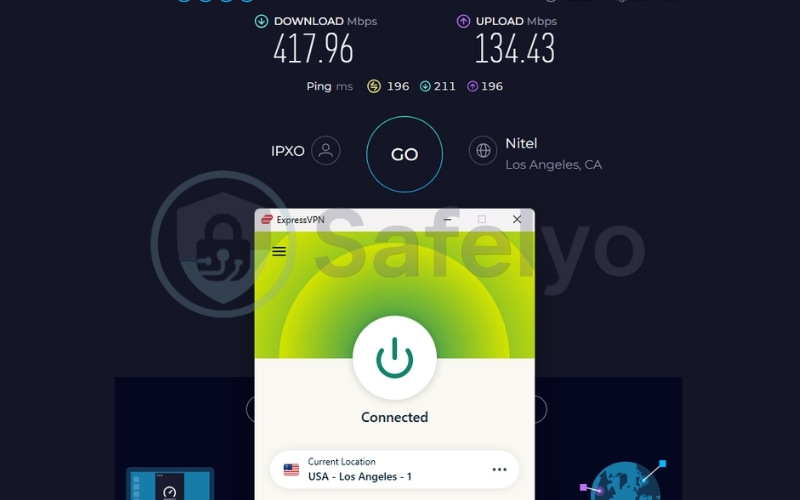
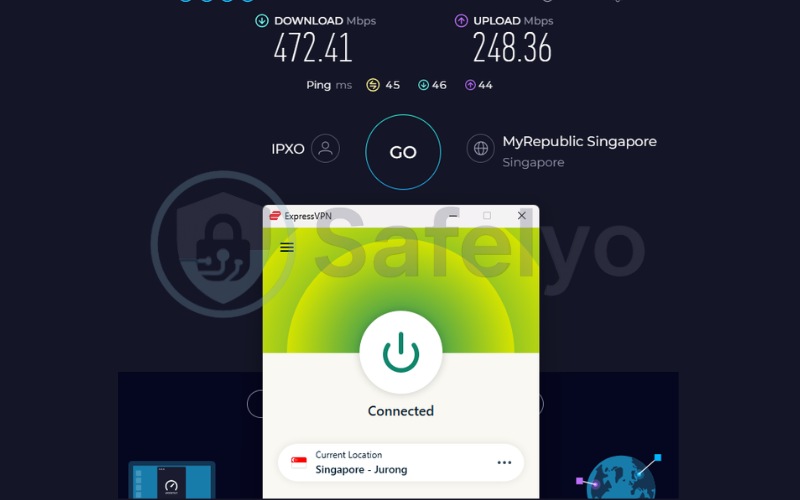
The Lightway protocol handles throughput efficiently. The United States server reached 417.96 Mbps, and the Singapore server peaked at 472.41 Mbps. These fast results place ExpressVPN securely in the top tier for performance. ExpressVPN maintains speeds perfectly suited for 4K streaming and large file transfers without noticeable degradation during extended sessions.
2.2.3. Privacy, security, and overall value
The generous 14-device connection limit and the five-firm audit history act as massive trust signals. ExpressVPN deploys TrustedServer RAM-only infrastructure, which guarantees data wipes upon every reboot. The Network Lock feature functions as an automatic kill switch to safeguard user traffic if the connection drops. ExpressVPN also includes automatic obfuscation on every server, removing the need for manual configuration when bypassing restricted networks.
Best for: Privacy-conscious users on standard x64 architecture who demand a heavily audited, RAM-only infrastructure backed by five independent security firms.
2.3. Surfshark: Best value for Windows
Operating out of the Netherlands, Surfshark functions independently within the broader Nord Security holding group. Surfshark delivers unlimited simultaneous connections at an affordable starting price, making it a budget-friendly option.
Furthermore, Surfshark stands out as one of the earliest major VPNs to ship a fully native Windows-on-ARM application. This unique combination of low cost, modern hardware support, and a lack of device caps secures its position as an exceptional choice.
| Features | Details |
|---|---|
| Best For | Best value |
| Starting Price | $2.49/mo |
| Company | Surfshark B.V. (Nord Security holding group) |
| Jurisdiction | Netherlands |
| Independent Audit | Yes (Cure53 2021, Deloitte 2023 & 2025, SecuRing 2025) |
| No-Logs Policy | Yes (strict) |
| RAM-Only Servers | Yes (100% RAM-only network) |
| Servers | 4,500+ |
| Countries | 100 |
| Avg. Download Speed | ~422.05 Mbps |
| Avg. Upload Speed | ~138.94 Mbps |
| Avg. Latency | ~163.5 ms |
| Protocols | WireGuard, OpenVPN, IKEv2, Dausos |
| Kill Switch | Yes |
| Obfuscation | Yes (obfuscated servers, NoBorders mode) |
| Port Forwarding | No |
| Dedicated IP | Yes (20 locations) |
| Simultaneous Connections | Unlimited |
| Netflix Regions | 28+ |
| Disney+ | Yes |
| BBC iPlayer | Yes |
| Torrent / P2P | Yes |
| Win/Mac/iOS/Android | Yes |
| Linux | Yes |
| Browser Extension | Yes |
| Router Support | Yes |
| Live Chat 24/7 | Yes |
| Refund Policy | 30-day money-back guarantee |
| Free Trial | Yes (7-day) |
| Overall Positioning | Best value, unlimited devices and a fully native ARM64 app at an entry-level price |
| Official Website | https://surfshark.com |
Pros
Unlimited simultaneous device connections
Fully native ARM64 app, highly optimized for Windows
100% RAM-only network with three separate audit firms
Cons
Netherlands sits inside the 9-Eyes intelligence alliance
No port forwarding
2.3.1. Windows-specific features and compatibility
Surfshark provides full ARM64 compatibility with a native VPN. This development proves highly advantageous for Copilot+ laptop buyers who require efficient, battery-friendly software. Beyond ARM support, Surfshark includes a dedicated Bypasser feature for reliable split tunneling directly within the Windows interface, alongside a rotating IP toggle that changes addresses automatically.
The unlimited simultaneous device connections policy offers massive value. A single Surfshark subscription covers an entire household of Windows desktops, laptops, and mobile devices without requiring users to actively manage active sessions.
2.3.2. Speed and performance on Windows
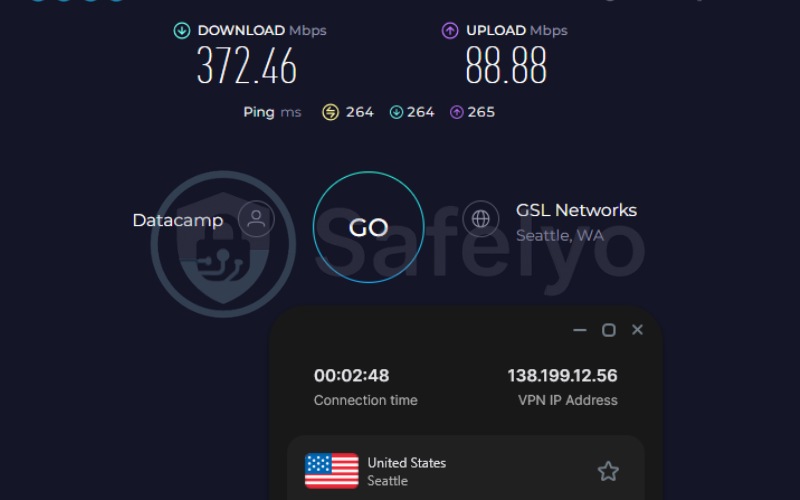
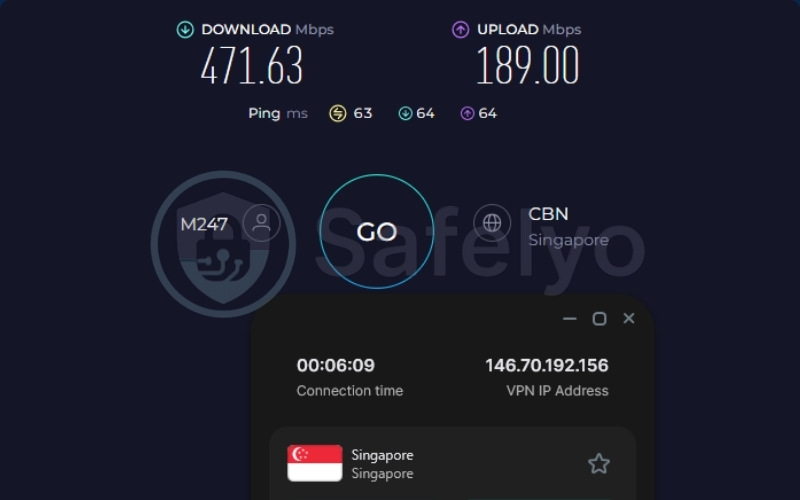
Surfshark demonstrated strong speed retention capabilities. The United States server reached 372.46 Mbps, while the Singapore server hit 471.63 Mbps. These download speeds easily support data-heavy tasks. However, Surfshark produced a slightly higher average latency in our testing compared to NordVPN or ExpressVPN. This elevated ping response remains acceptable for streaming but might require manual server selection for competitive gamers seeking optimal responsiveness.
2.3.3. Privacy, security, and overall value
Surfshark operates a 100 percent RAM-only network supported by a triple-audited infrastructure. We must note plainly that Surfshark sits in a 9-Eyes jurisdiction within the Netherlands. This location presents a real trade-off regarding governmental data sharing agreements.
Despite this geographical reality, Surfshark’s strict no-logs claim remains independently audited by Deloitte and SecuRing. These verified audits ensure that Surfshark holds no historical connection data to hand over, regardless of intelligence requests.
Best for: Households or multi-device users who want unlimited connections and full ARM64 compatibility.
2.4. Proton VPN: Best for privacy on Windows
Operating from Switzerland, Proton VPN sits safely outside the 5, 9, and 14-Eyes intelligence alliances. The service integrates closely with the wider privacy-first Proton Mail ecosystem and utilizes full-disk encryption as its primary architectural defense.
For users testing the waters without a financial commitment, Proton VPN flags a permanent free plan. This establishes a major differentiator in a market saturated with strictly time-limited trials.
| Features | Details |
|---|---|
| Best For | Best for privacy |
| Starting Price | $2.99/mo |
| Company | Proton AG |
| Jurisdiction | Switzerland |
| Independent Audit | Yes (Securitum 2022, 2023, 2024, 2025) |
| No-Logs Policy | Yes (independently verified) |
| RAM-Only Servers | No (full-disk encryption used instead) |
| Servers | 20,000+ |
| Countries | 145+ |
| Avg. Download Speed | ~426.56 Mbps |
| Avg. Upload Speed | ~120.37 Mbps |
| Avg. Latency | ~159.5 ms |
| Protocols | WireGuard, IKEv2, Stealth |
| Kill Switch | Yes (Standard and Advanced) |
| Obfuscation | Yes (Stealth protocol) |
| Port Forwarding | Yes (paid plans only) |
| Dedicated IP | Business plans only |
| Simultaneous Connections | 10 (paid) / 1 (free) |
| Netflix Regions | 25+ |
| Disney+ | Yes |
| BBC iPlayer | Yes |
| Torrent / P2P | Yes (dedicated servers, paid only) |
| Win/Mac/iOS/Android | Yes |
| Linux | Yes (GUI and CLI) |
| Browser Extension | Yes (Chrome, Firefox) |
| Router Support | Yes |
| Live Chat 24/7 | Paid only, limited hours |
| Refund Policy | 30-day money-back guarantee |
| Free Trial | Permanent free plan |
| Overall Positioning | Best for privacy, Swiss jurisdiction, most audits, and the only genuinely usable unlimited-data free tier |
| Official Website | https://protonvpn.com |
Pros
Swiss jurisdiction, outside 5/9/14-Eyes alliances
4 separate independent audits (2022–2025)
Massive raw server count exceeding 20,000 servers
Permanent, genuinely unlimited-data free plan
Cons
Not RAM-only (uses full-disk encryption instead)
Live chat restricted to paid users, limited hours
Free plan limited to 1 device and 10 countries
2.4.1. Windows-specific features and compatibility
Proton VPN highlights a fully native ARM64 Windows VPN, making Proton VPN highly suitable for modern Snapdragon-powered laptops. Proton VPN integrates smoothly with the operating system, providing a clean interface without emulator lag and featuring a dedicated Profiles tool to automate connection preferences on Windows startup.
The permanent free tier offers significant value for Windows users. This option allows individuals to trial an unrestricted-data VPN without entering credit card details, setting Proton VPN apart from temporary promotional trials.
2.4.2. Speed and performance on Windows
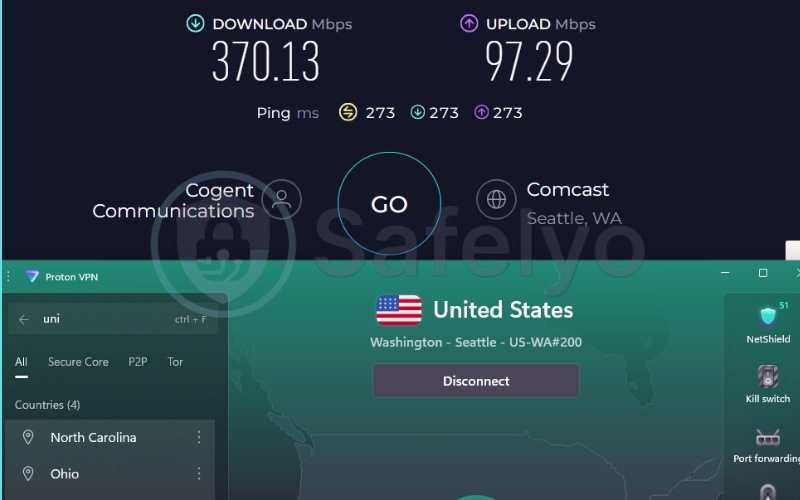
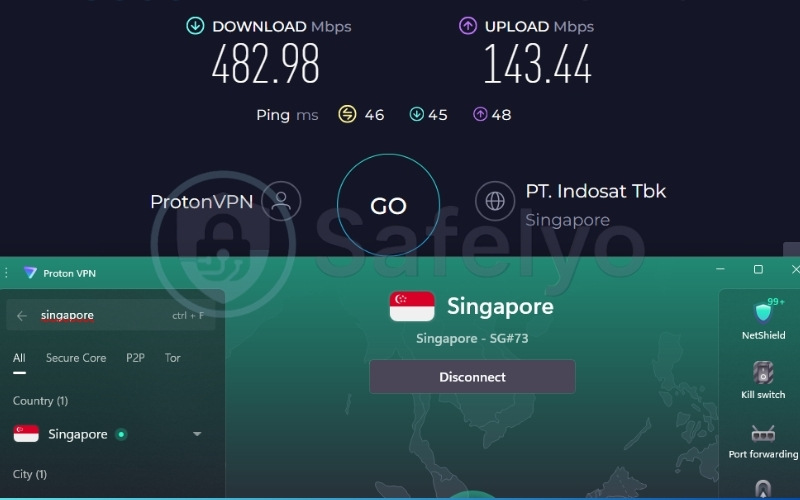
The test results frame Proton VPN as a fast performer. The United States server reached 370.13 Mbps, and the Singapore server hit an impressive 482.98 Mbps. The WireGuard protocol consistently achieves speeds well-suited for streaming and heavy browsing without significant degradation. Proton VPN maintains rapid throughput even when routing traffic through distant locations.
2.4.3. Privacy, security, and overall value
The Swiss jurisdiction and four consecutive Securitum audits form the core privacy argument for Proton VPN. Full-disk encryption represents Proton VPN’s stated alternative approach to securing physical hardware rather than utilizing RAM-only servers. A security-maximalist reader might still prefer NordVPN, Surfshark, or PIA due to their diskless infrastructure.
The Secure Core architecture routes traffic through privacy-friendly countries before reaching the final destination, adding robust defense against network surveillance.
Best for: Privacy-focused users who want a Swiss-based VPN with a genuinely usable free tier, not just a limited trial.
2.5. Private Internet Access (PIA): Best open-source option for Windows
Owned by Kape Technologies, Private Internet Access (PIA) operates out of the United States. Despite being headquartered inside a Five-Eyes country, PIA counters this geographical limitation by successfully proving its strict no-logs claim in real FBI court proceedings.
Beyond its legal track record, PIA distinguishes itself with a 100% open-source client codebase. This transparency caters specifically to advanced Windows users who prefer to audit their security tools directly.
| Features | Details |
|---|---|
| Best For | Best open-source option for Windows |
| Starting Price | $1.33/mo |
| Company | PIA, Inc. (Kape Technologies) |
| Jurisdiction | United States |
| Independent Audit | Yes (Deloitte Audit Romania) |
| No-Logs Policy | Yes (verified via real FBI court cases) |
| RAM-Only Servers | Yes |
| Servers | Undisclosed (35,000+ estimated) |
| Countries | 90 |
| Avg. Download Speed | ~189.12 Mbps |
| Avg. Upload Speed | ~201.22 Mbps |
| Avg. Latency | ~129 ms |
| Protocols | OpenVPN, WireGuard, IKEv2/IPSec |
| Kill Switch | Yes (advanced, firewall-based) |
| Obfuscation | Yes (Multi-Hop Obfuscation) |
| Port Forwarding | Yes |
| Dedicated IP | Yes (token-based, account-anonymous) |
| Simultaneous Connections | Unlimited |
| Netflix Regions | 21+ |
| Disney+ | Yes |
| BBC iPlayer | Yes |
| Torrent / P2P | Yes |
| Win/Mac/iOS/Android | Yes |
| Linux | Yes |
| Browser Extension | Yes |
| Router Support | Yes |
| Live Chat 24/7 | Yes |
| Refund Policy | 30-day money-back guarantee |
| Free Trial | Yes (7-day, iOS/Android) |
| Overall Positioning | Best open-source option for Windows, unlimited connections, port forwarding |
| Official Website | https://privateinternetaccess.com |
Pros
Extremely competitive starting price ($1.33/mo)
Unlimited connections and port forwarding included
100% open-source client, publicly auditable on GitHub
No-logs claim tested in real FBI court proceedings
Cons
US jurisdiction (Five-Eyes alliance member)
Server count is undisclosed by PIA
2.5.1. Windows-specific features and compatibility
PIA offers a 100 percent open-source VPN for Windows, permitting advanced users to publicly audit the code on GitHub. PIA pairs this transparency with a native ARM64 build. PIA includes robust Windows automation rules, allowing users to configure the VPN to connect automatically upon joining unsecured Wi-Fi networks.
PIA includes unlimited connections and native port forwarding capabilities directly within the interface. These built-in tools cater perfectly to users requiring advanced configuration for peer-to-peer file sharing operations.
2.5.2. Speed and performance on Windows
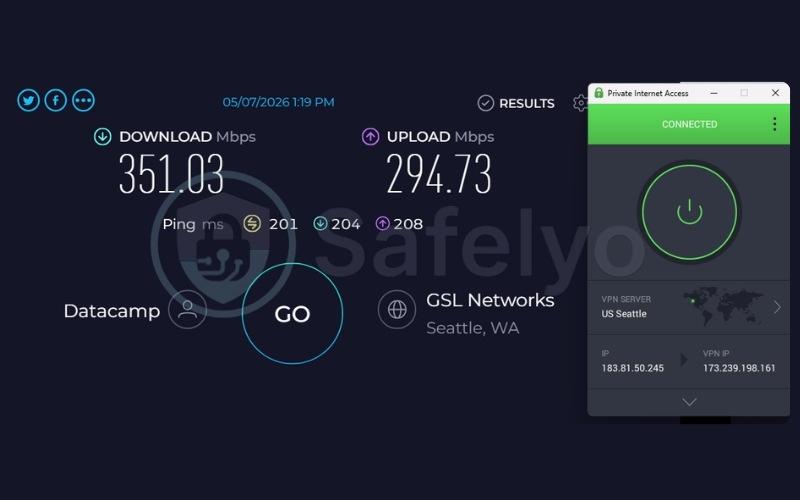
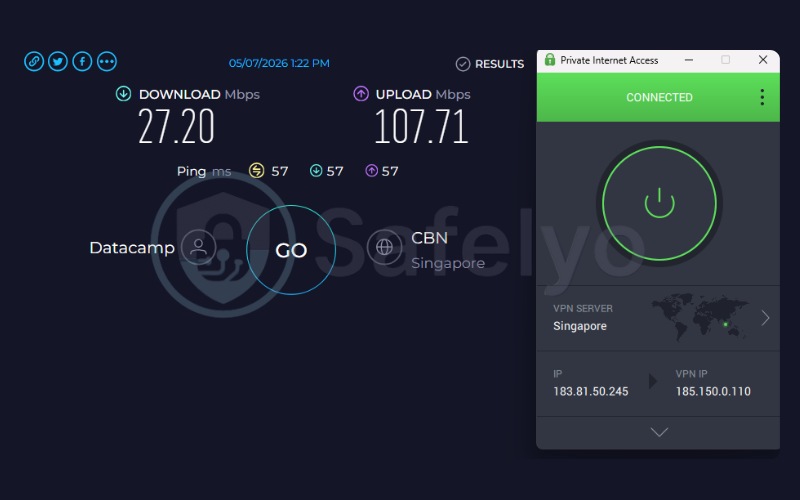
PIA demonstrated significant speed drops on specific routes. The United States server reached a capable 351.03 Mbps. However, the Singapore server recorded a sharply reduced 27.20 Mbps.
This result demonstrates that PIA struggles to maintain fast speeds on certain international connections, presenting substantial degradation compared to top-tier competitors. While routing traffic to the United States maintained fast speeds suitable for regular streaming, specific Asian routes like Singapore may occasionally present substantial drops.
2.5.3. Privacy, security, and overall value
The US jurisdiction acts as a real trade-off for privacy purists seeking total separation from Western intelligence agencies.
However, PIA’s strict no-logs claim has been tested and proven in real FBI court proceedings. When subpoenaed, legal records verified that the provider had zero connection data to hand over, effectively mitigating this geographical risk.
The incredibly low $1.33 per month starting price delivers high overall value for budget-conscious consumers looking for advanced configuration.
Best for: Windows users who want an open-source, highly customizable VPN with unlimited devices and port forwarding, and who aren’t deterred by a US-based jurisdiction.
3. Best free VPNs for Windows
Free VPNs consistently rank among the most frequently searched solutions for PC users. A reliable free tier must provide essential security without selling bandwidth or enforcing malicious tracking.
3.1. Proton VPN Free
Proton VPN Free offers a genuinely permanent free plan rather than a time-limited trial. It provides unlimited data with no artificial throttling, ensuring users can browse continuously.
Proton VPN Free restricts access to 10 countries through an auto-select mechanism and allows only one simultaneous device. Proton VPN strictly disables streaming and peer-to-peer support on this tier. Users can register using only an email address with no credit card required.
3.2. Windscribe Free
Windscribe serves as another commonly recommended free tier for Windows users. Windscribe enforces a strict 10GB monthly data limit upon account verification. Users gain access to 10 server locations, which include options capable of unblocking UK Netflix libraries. Windscribe delivers reliable speeds for basic browsing, but the data cap restricts extended high-definition streaming sessions.
If you need a deeper dive into more comprehensive free alternatives, explore our dedicated best free VPN guide.
4. Does your VPN still work after the Windows 11 24H2 update?
Multiple forum discussions throughout 2026 describe connections becoming unreliable specifically after the 24H2 upgrade. Users report failures to establish a tunnel or unexpected drops mid-session during video calls. A simple software reinstall does not always resolve the friction. One affected Proton VPN user reported needing to manually toggle their Wi-Fi adapter after every reconnect, with the issue persisting across multiple devices on the same account.
4.1. Why the update breaks some VPN connections
The 24H2 update changed how the operating system handles certain network adapter behaviors and driver-signing protocols. These underlying structural modifications can intermittently interrupt the virtual tunnel drivers required for secure routing. The conflict rarely stems from a malicious block, but rather a miscommunication between the updated network stack and the VPN’s existing background services.
4.2. How to fix it in under 5 minutes
Follow this sequence to restore stability without executing a full system wipe:
- Switch the connection protocol from TCP to UDP within the VPN settings.
- Toggle the Wi-Fi adapter off and on through the system tray rather than executing a full device restart.
- Restart the underlying Windows services via services.msc, specifically targeting the Remote Access Connection Manager and Secure Socket Tunneling Protocol Service.
- Reinstall the VPN as a last resort only if the preceding steps fail.
The protocol switch often stabilizes the tunnel immediately by altering how data packets handle packet loss over the updated network adapter.
5. Which VPNs have a true native app for Copilot+ and ARM laptops?
To understand compatibility, it helps to know the difference between standard Windows and ARM64. Standard Windows laptops use x86 or x64 processors, which have served as the industry standard for decades. Recently, Microsoft introduced Copilot+ PCs running on ARM64 processors, which are designed for superior battery life and advanced AI tasks.
Because the underlying hardware architecture is completely different, older software built for traditional x64 processors must run through an emulator on ARM machines, which can drain battery and cause performance lag. A native ARM64 application is coded specifically for these new chips, ensuring peak efficiency and seamless integration.
5.1. Full native ARM64 support
NordVPN, Surfshark, Proton VPN, and PIA all currently ship VPNs compiled specifically for ARM64 architecture. These native builds prevent battery drain and operate seamlessly on Copilot+ laptops.
Verifying native ARM64 execution requires checking the Architecture column within the Task Manager rather than accepting general marketing claims.
To do this:
- Open the Task Manager by pressing Ctrl+Shift+Esc
- Navigate to the Details tab
- Click on any of the column headers, and click ‘Select columns’.
- Check the box for ‘Architecture’ and click OK.
- Locate your VPN’s process in the list; the “ARM64” designation confirms a native build, whereas “x64” or “x86” indicates the software is running through emulation.
5.2. Beta or partial ARM support
ExpressVPN currently ships a hybrid build for modern laptops. ExpressVPN rebuilt its proprietary Lightway protocol driver natively for ARM hardware, but the user interface and backend still run through Microsoft’s Prism emulator. ExpressVPN openly describes this as a hybrid semi-native approach. This configuration represents a genuine, disclosed trade-off based on the rationale that Prism’s emulation overhead remains minimal on current-generation Snapdragon chips.
6. How to choose the best VPN for your Windows PC
Follow these core principles to identify the right VPN for your daily workflow:
- Verify strict logging policies: Demand a verified no-logs policy backed by recent, independent third-party audits to ensure your browsing history is never recorded.
- Evaluate real-world speed retention: Prioritize VPNs that utilize lightweight protocols like WireGuard or proprietary equivalents, such as NordLynx or Lightway, to ensure smooth 4K streaming without heavy buffering.
- Check architectural compatibility: Confirm native ARM64 support specifically if you plan to operate a newer Copilot+ laptop to prevent battery drain and emulation lag.
- Look for system-level security tools: Ensure the VPN includes a working kill switch that integrates directly with Windows network settings to prevent accidental IP leaks. Advanced users should also look for split tunneling to route specific applications outside the VPN.
- Test risk-free refund windows: Confirm the existence of a genuinely risk-free money-back guarantee, typically offering 30 days, before committing to a long-term subscription plan.
7. Windows version and device compatibility
Operating system support dictates which features remain active on your machine. Top VPNs increasingly focus development resources on modern frameworks to ensure maximum security.
7.1. Windows 10 and 11
Windows 10 and Windows 11 represent the current gold standard for VPN compatibility. Top VPNs focus their development resources almost entirely on these modern frameworks. Running these updated operating systems ensures full access to advanced features like WireGuard protocol integration, precise split tunneling, and dedicated malware scanning tools.
7.2. Windows 7 and 8 (legacy support)
Microsoft officially ended core support for Windows 7 and Windows 8 years ago, leaving these systems highly vulnerable to unpatched security flaws. While some VPNs may still provide older legacy installation files hidden in their support archives, running modern security software on an obsolete operating system creates a false sense of safety.
The outdated network drivers in Windows 7 and 8 often struggle to support modern encryption standards. Upgrading to a newer operating system remains the only reliable way to secure your daily computing.
8. Common Windows VPN problems and how to fix them
Network configurations occasionally fail despite using premium VPNs. Applying targeted troubleshooting steps resolves the majority of connectivity friction.
8.1. VPN won’t connect or times out
Follow these steps to restore a failed connection attempt:
- Switch the server location to bypass localized network congestion.
- Change the connection protocol from OpenVPN to a modern alternative like WireGuard.
- Restart the underlying Windows VPN services via the services.msc command.
- Check Windows Firewall exceptions to ensure the VPN holds the necessary permissions.
Often, an overzealous Windows Firewall or an outdated app version gets in the way of the initial connection, preventing your computer from securely shaking hands with the VPN server.
8.2. Kill switch won’t release after disconnecting
Execute these actions to regain local internet access:
- Disconnect properly from within the VPN interface rather than force-closing the background process.
- Restart the VPN completely to allow the network adapter to reset.
- Restart the PC as a final resort to clear lingering adapter locks.
This frustrating system lock usually happens because the application did not properly shut down its virtual network adapter, mistakenly leaving the protective block in place even though your session ended.
8.3. Slow speeds only on Windows, not other devices
Perform these adjustments to eliminate localized throttling:
- Switch the connection protocol to WireGuard, NordLynx, or Lightway.
- Check the Task Manager for background applications competing for bandwidth.
- Disable unnecessary split tunneling rules that might conflict with system routing.
When your connection slows down exclusively on your desktop but runs fine on your phone, the tunneling protocol is usually the culprit. Switching to a modern, lightweight protocol allows your computer to handle the heavy lifting of encryption much more smoothly.
9. FAQs about best VPN for Windows
Does Windows have a built-in VPN?
Windows includes a built-in client within the Network and Internet settings. This tool requires the user to manually input specific server addresses and credentials. It does not provide the advanced privacy features, automated server switching, or streaming unblocking capabilities found in dedicated commercial VPNs.
Is it legal to use a VPN on Windows?
Yes, using encrypted tunneling software is completely legal in the majority of global jurisdictions, including the United States, the United Kingdom, and the European Union. Users only face legal friction in specific countries that enforce strict internet censorship and explicitly ban unauthorized network routing.
Can I safely use a free VPN on Windows?
You can safely use a free tier if it comes from a verified, premium VPN like Proton VPN. Standalone free VPNs often sell user bandwidth, inject advertisements, or log browsing data to generate revenue, making them inherently unsafe for privacy.
Do VPNs still work on Windows 7 or 8?
Support for legacy operating systems has largely ended. Modern VPNs require updated system frameworks to run secure protocols like WireGuard. Users on older versions must rely on outdated client versions or manual configuration, which severely compromises overall network safety.
Will my VPN’s Windows app work on my new Copilot+/ARM laptop?
Most top VPNs, including NordVPN, Surfshark, and Proton VPN, offer fully native ARM64 VPNs that run perfectly on Copilot+ laptops. ExpressVPN currently operates via a hybrid emulator approach, which functions adequately but lacks the peak efficiency of a native build.
Should I leave my VPN on all the time on Windows?
Leaving the VPN active ensures constant encryption, especially when connected to public Wi-Fi networks. Users who rely on low-latency connections for competitive gaming or require local network access for wireless printers might prefer to toggle the connection off temporarily.
10. Conclusion
Finding the ideal security software for your desktop environment requires balancing advanced features with seamless system integration. Based on our comprehensive testing, here is the final verdict:
- NordVPN remains the definitive choice for Windows users due to its expansive network and hardware-specific development. NordVPN combines a fully native ARM64 build with Windows-specific malware scanning through Threat Protection Pro, directly addressing the unique vulnerabilities of the operating system.
- Surfshark delivers incredible value for multi-device households, allowing unlimited connections without sacrificing overall performance.
- Proton VPN offers a dominant privacy architecture with a generous permanent free tier, making Proton VPN an ideal starting point for security-conscious users.
- PIA provides unparalleled transparency with its open-source Windows code and advanced customization.
- ExpressVPN remains the most beginner-friendly VPN available, offering a highly stable experience for users who want immediate protection without navigating complex menus.
If you want to protect your network, bypass geographical restrictions, and maintain high speeds, investing in a premium VPN is the safest decision. Explore the Best VPN category on Safelyo to discover the exact best VPN for Windows tailored to your specific networking needs.