ExpressVPN is the best VPN extension for Chrome overall, because its browser extension works as a remote control for your entire device’s AES-256 encryption rather than securing only your open tabs. If your priority is raw browser speed instead, the NordVPN standalone Chrome proxy posted the fastest download and upload numbers in our 2026 tests.
Chrome tracks far more about your daily browsing than most people assume, and a growing list of streaming sites, news outlets, and shopping platforms restrict content based on your location. A VPN extension can address both issues at once, but the Chrome Web Store also hosts dozens of free tools that log traffic, inject ads, or skip encryption entirely.
We installed, connected, and tested over 20 extensions directly inside Chrome to measure their architecture, real speed numbers, leak protection, and pricing, narrowing the field down to the 5 best choices so you know exactly what each one secures before you click “Add to Chrome.”
Top VPN extensions for Chrome:
- ExpressVPN (best overall for device-wide security): The ExpressVPN Chrome extension controls a full desktop VPN client, encrypting your entire device’s traffic with AES-256 under a verified no-logs policy.
- NordVPN (Best for high-speed browser protection): The NordVPN extension posted the highest average download and upload speeds in our testing, making it a strong proxy choice for streaming in Chrome.
- Surfshark (best budget option): At under $2 a month, the Surfshark extension pairs unlimited device connections with CleanWeb, a built-in tool that blocks ads and trackers.
- Proton VPN (best free unlimited extension): The free Proton VPN Chrome extension carries no data cap and operates under robust Swiss privacy law, with an open-source codebase you can verify yourself.
- Windscribe (best free feature-rich extension): The Windscribe extension bundles a 10GB monthly free allowance with advanced browser tools like WebRTC blocking and location spoofing.
The table below lines up the five extensions side by side across the factors that matter most for a Chrome-specific decision:
| VPN | Starting price | Chrome Store rating | Chrome downloads | Extension type | Free tier | Unblocks Netflix |
|---|---|---|---|---|---|---|
| ExpressVPN | $2.49/mo | 4.5 | 1,000,000+ | Dual Mode (Proxy/Full VPN) | No | Yes (25+ regions) |
| NordVPN | $3.49/mo | 4.2 | 12,000,000+ | Proxy | No | Yes (26+ regions) |
| Surfshark | $1.99/mo | 4.0 | 1,000,000+ | Proxy | No (7-day trial) | Yes (28+ regions) |
| Proton VPN | Free – $2.99/mo | 4.2 | 2,000,000+ | Proxy | Yes (unlimited data) | Limited on free tier |
| Windscribe | Free – $3.00/mo | 4.6 | 2,000,000+ | Proxy | Yes (10GB/month) | Yes |
Disclaimer: This guide is for informational purposes only. Information regarding speeds (based on our tests conducted in 2026), unblocking capabilities, pricing, and promotional offers may change over time depending on your geographic location or new platform updates. Verify current details on each provider’s official website before purchasing. This article is for informational purposes only and does not constitute legal advice. Please use VPNs responsibly and legally.
1. How we tested and selected the best VPNs for Chrome
We narrowed this list down using a single round of hands-on testing performed from a physical location in Vietnam, running a Windows 11 PC connected to a 1 Gbps wired fiber-optic baseline connection. This setup let us measure each extension’s real-world performance instead of relying on marketing claims. Every figure cited in this guide reflects what we measured during that test window rather than numbers published by the providers themselves.
Three criteria carried the most weight in our final ranking:
- Architecture analysis: We analyzed the operational limits of each extension. Because Chrome extensions are inherently restricted by browser architecture and operating system permissions, they can only function as lightweight proxies on their own. We evaluated whether providers simply offer this proxy tool or integrate a remote control feature that pairs with a full desktop app to bypass these limitations and encrypt system-wide traffic.
- Speed and latency evaluation: We ran Speedtest.net across a selection of servers located in the US, the UK, or Singapore, depending on the specific VPN being tested. We then evaluated the download, upload, and ping results to produce a realistic performance baseline for each regional connection.
- Leak testing: We ran every extension through ipleak.net to confirm whether it blocks WebRTC leaks, IP leaks and DNS leaks. A leak at any of these points can expose your real location even while the extension shows you as “connected.”
2. Best VPN extensions for Chrome: Top 5 options ranked
The five extensions below passed our leak tests, and each earned its spot for a different reason. These reasons include device-wide security, raw proxy speed, price, a generous free tier, or granular privacy controls. ExpressVPN ranks first because it offers the unique ability to protect more than your browser, but the order also reflects which use case each extension fits best.
2.1. #1 ExpressVPN: Best overall for full-device security
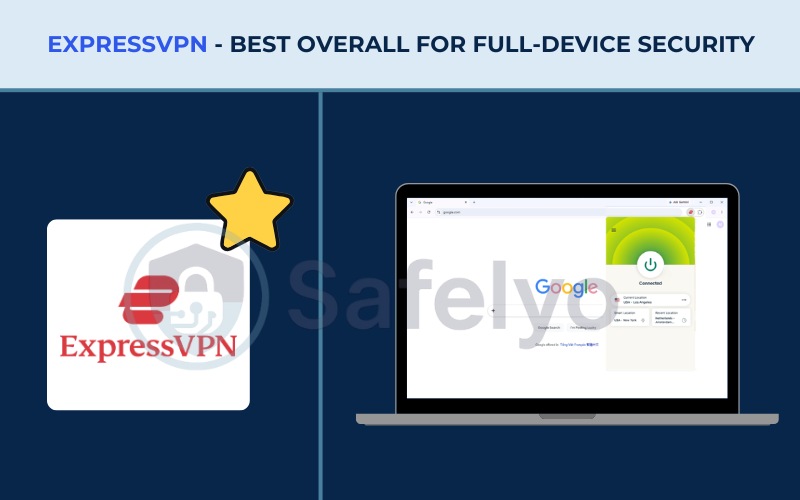
The ExpressVPN Chrome extension offers a unique dual-mode architecture. You can operate the tool in Proxy Mode for lightweight, browser-only encryption without needing the main desktop application. However, to unlock its true power, you should use Remote Control Mode.
Because Chrome extensions are limited by their operating environment and cannot encrypt traffic outside the browser natively, Remote Control Mode acts as a direct command center for the full ExpressVPN desktop application installed on your computer.
When you connect through the extension in this full mode, you switch servers and toggle settings for your entire device. This encrypts every program running in the background, from your email client to a torrent app, by routing everything through the same AES-256 encrypted tunnel.
The primary convenience of Remote Control Mode is workflow efficiency. It allows you to manage your system-wide security directly from the Chrome toolbar, completely eliminating the need to constantly minimize your browser to interact with the standalone desktop app.
The table below summarizes ExpressVPN’s core specifications, including the Chrome-specific numbers from our tests:
| Feature | Information |
|---|---|
| Chrome Store rating | 4.5 |
| Chrome downloads | 1,000,000+ |
| Best for | True device-wide encryption via dual-mode architecture |
| Starting price | $2.49/mo |
| Company | ExpressVPN (Kape Technologies) |
| Jurisdiction | British Virgin Islands |
| Independent audit | Yes (KPMG, PwC, Cure53, Praetorian) |
| No-logs policy | Yes |
| RAM-only servers | Yes |
| Servers | Thousands |
| Countries | 105 |
| Avg. download speed | 445.19 Mbps |
| Avg. upload speed | 191.40 Mbps |
| Avg. latency | 121 ms |
| Protocols | Lightway, OpenVPN, WireGuard, IKEv2 |
| Kill switch | Yes |
| Obfuscation | Yes |
| Port forwarding | Yes (router) |
| Dedicated IP | Yes |
| Simultaneous connections | Up to 14 |
| Netflix regions | 25+ |
| Disney+ | Yes |
| BBC iPlayer | Yes |
| Torrent / P2P | Yes |
| Win/Mac/iOS/Android | Yes |
| Linux | Yes |
| Browser extension | Yes |
| Router support | Yes |
| Live chat 24/7 | Yes |
| Refund policy | 30-day money-back guarantee |
| Free trial | Yes (3-day on mobile) |
| Overall positioning | A premium, high-security extension that prioritizes full-system encryption while offering a flexible standalone proxy option |
| Official website | expressvpn.com |
Pros
Offers both a standalone Proxy Mode and a full Remote Control Mode
Secures your entire device directly from the browser toolbar
RAM-only TrustedServer infrastructure is independently audited
Cons
Remote Control Mode requires the desktop app to be installed and running
2.1.1. Speed and performance
ExpressVPN delivered excellent speed test results across different regions. On the Singapore server, it reached a rapid 472.41 Mbps for downloads and 248.36 Mbps for uploads, paired with a low 45 ms ping. This makes it ideal for latency-sensitive tasks like gaming or real-time video calls in nearby regions.
When routing traffic further away to the US server, the download speed remained strong at 417.96 Mbps, though the ping naturally increased to 196 ms. Even with the higher latency, this distant connection is fast enough for standard HD or 4K streaming without buffering.
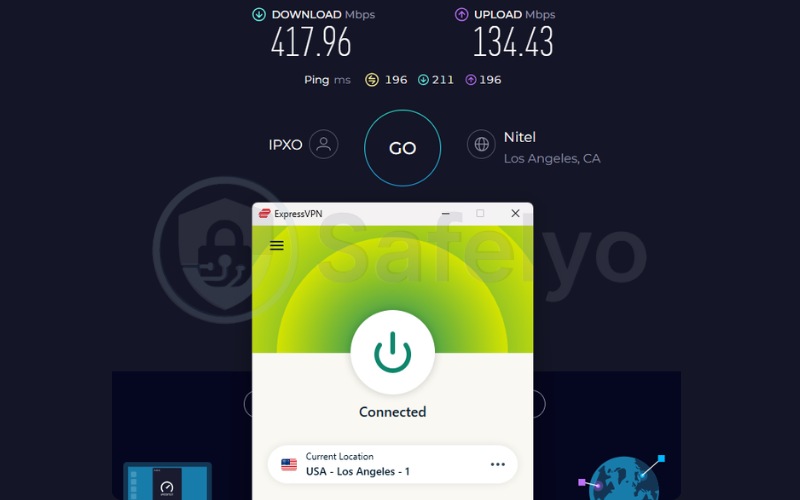
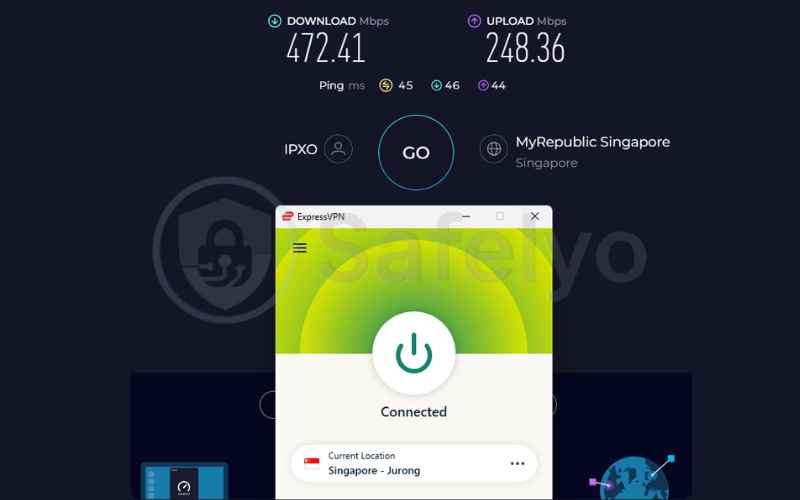
Here is the breakdown of ExpressVPN’s speed test results across two primary testing hubs:
| Server Location | Download (Mbps) | Upload (Mbps) | Ping (ms) |
|---|---|---|---|
| US Server | 417.96 | 134.43 | 196 |
| Singapore Server | 472.41 | 248.36 | 45 |
| Average | 445.19 | 191.40 | 121 |
2.1.2. Security and privacy features
The ExpressVPN Chrome extension runs on the Lightway protocol, a lightweight tunnel built to reduce connection times without weakening encryption strength. Because the extension controls the desktop app’s TrustedServer infrastructure, every server you connect to runs entirely from RAM and wipes itself on reboot. This effectively limits how much data could ever be stored even if a server were seized.
From the extension menu itself, you also get built-in WebRTC leak blocking and HTML5 geolocation spoofing. These two settings stop websites from detecting your real IP address or physical location through your browser’s own APIs.
2.1.3. Streaming and unblocking
ExpressVPN unblocked every major streaming platform we tested it against, including Netflix and BBC iPlayer, across its network of 105 countries. This reliable access relies on the provider’s frequent IP address refreshes, which help evade detection systems. Furthermore, because the extension provides high speeds and maintains connection stability across distant servers, video content loads smoothly without noticeable quality drops.
Best for: Users who prioritize complete device security and prefer managing their full VPN connection directly from the Chrome toolbar without constantly switching windows.
2.2. #2 NordVPN: Best for high-speed browser protection
Unlike ExpressVPN, the NordVPN Chrome extension operates purely as a standalone proxy. It opens its own encrypted connection for Chrome’s traffic only, without touching any other application on your computer.
This makes the extension lightweight to install and quick to switch on. It is well suited to anyone who wants to change their browser’s apparent location for a specific site or stream, without affecting torrent clients, games, or other apps running at the same time.
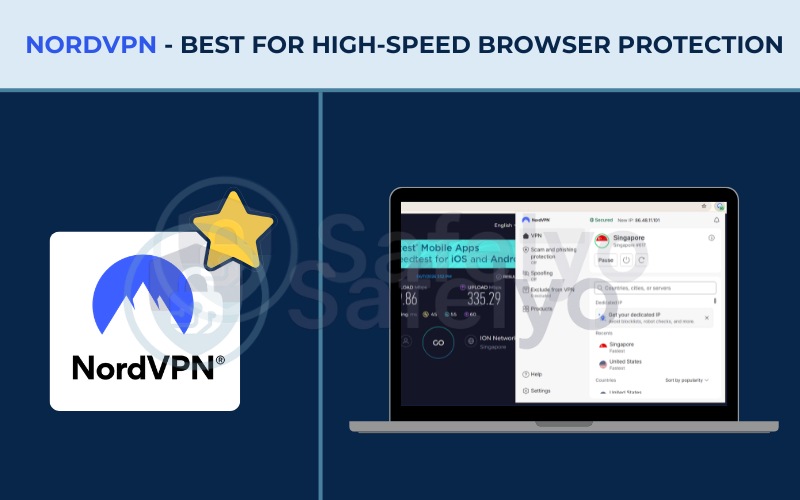
Here’s how NordVPN’s Chrome extension specifications and test results compare:
| Feature | Information |
|---|---|
| Chrome Store rating | 4.2 |
| Chrome downloads | 12,000,000+ |
| Best for | Fast standalone proxy performance |
| Starting price | $3.49/mo |
| Company | Nord Security |
| Jurisdiction | Panama |
| Independent audit | Yes (PwC, Deloitte) |
| No-logs policy | Yes |
| RAM-only servers | Yes |
| Servers | 9,500+ |
| Countries | 149 |
| Avg. download speed | 447.06 Mbps |
| Avg. upload speed | 243.99 Mbps |
| Avg. latency | 122 ms |
| Protocols | NordLynx, OpenVPN, IKEv2, NordWhisper |
| Kill switch | Yes |
| Obfuscation | Yes |
| Port forwarding | No |
| Dedicated IP | Yes |
| Simultaneous connections | 10 |
| Netflix regions | 26+ |
| Disney+ | Yes |
| BBC iPlayer | No |
| Torrent / P2P | Yes |
| Win/Mac/iOS/Android | Yes |
| Linux | Yes |
| Browser extension | Yes |
| Router support | Yes |
| Live chat 24/7 | Yes |
| Refund policy | 30-day money-back guarantee |
| Free trial | Yes (3-day on Android) |
| Overall positioning | The fastest standalone proxy extension tested, ideal for browser-specific tasks and streaming |
| Official website | nordvpn.com |
Pros
Highest download and upload speeds in our tests
No desktop app required to use the extension
Threat Protection blocks known malicious sites automatically
Cons
Encrypts browser traffic only, not your whole device
Unblocking BBC iPlayer is inconsistent
2.2.1. Speed and performance
NordVPN posted the highest average download and upload speeds in our tests when evaluating regional performance. Connecting to the Singapore server yielded an impressive 469.86 Mbps for downloads and 335.29 Mbps for uploads, alongside a low 45 ms ping. This is well beyond what most people need, comfortably supporting multiple simultaneous 4K streams.
On the distant US server, the speeds remained exceptionally high at 424.26 Mbps for downloads and 152.69 Mbps for uploads. These strong upload numbers on distant servers become highly valuable if you upload large files to cloud storage or run video calls while connected.
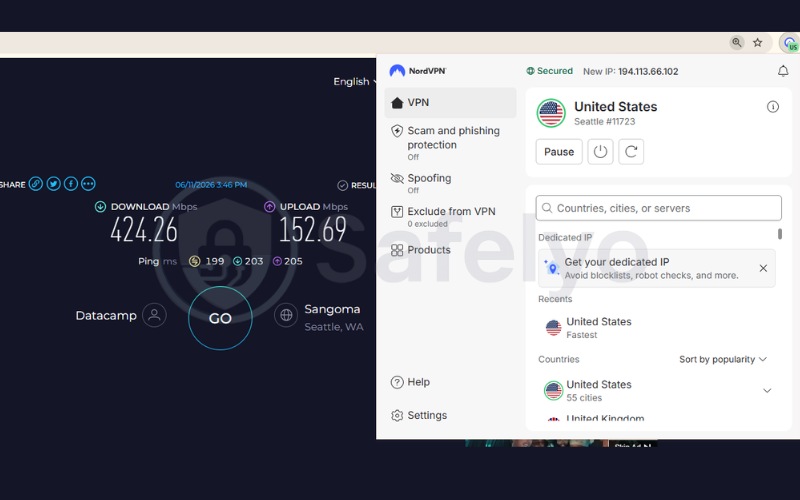
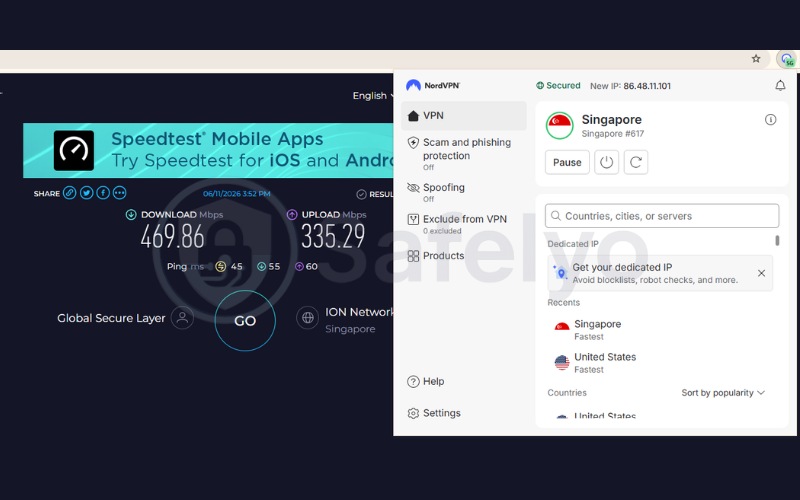
Here is the breakdown of NordVPN’s speed test results:
| Server Location | Download (Mbps) | Upload (Mbps) | Ping (ms) |
|---|---|---|---|
| US Server | 424.26 | 152.69 | 199 |
| Singapore Server | 469.86 | 335.29 | 45 |
| Average | 447.06 | 243.99 | 122 |
2.2.2. Security and privacy features
The NordVPN extension secures the connection between Chrome and its servers using TLS encryption, which is the same encryption standard that protects HTTPS websites.
Layered on top of that connection, the Threat Protection feature scans the URLs you visit against a list of known phishing and malware domains. This tool blocks the page before it loads rather than after. Threat Protection runs automatically in the background and does not require you to open the NordVPN app separately.
2.2.3. Streaming and unblocking
During testing, NordVPN successfully unblocked Netflix and Disney+ across the regions we checked, switching libraries cleanly each time we changed servers. BBC iPlayer was a notable exception. Unblocking BBC iPlayer proved inconsistent during our tests, as our connection attempts were often detected and blocked on UK servers. If BBC iPlayer access is a high priority for you, this extension on its own will not reliably fulfill that requirement.
Best for: Multitaskers who want to unblock content in Chrome at high speeds without encrypting their entire operating system.
2.3. #3 Surfshark: Best value extension with built-in ad blocking
The Surfshark Chrome extension targets a different priority entirely: cost. At $1.99 a month on its longest plan, it undercuts every other paid extension in this list while still offering unlimited simultaneous device connections. This lack of connection limits is a rarity even among premium VPNs.
Built directly into the extension is CleanWeb, a robust content-blocking tool that strips out ads, trackers, and the cookie consent pop-ups that interrupt nearly every page you visit in Chrome.
Surfshark’s full specification sheet and our test results are summarized below:
| Feature | Information |
|---|---|
| Chrome Store rating | 4.0 |
| Chrome downloads | 1,000,000+ |
| Best for | Budget users and ad blocking |
| Starting price | $1.99/mo |
| Company | Surfshark B.V. |
| Jurisdiction | The Netherlands |
| Independent audit | Yes (Deloitte, Cure53) |
| No-logs policy | Yes |
| RAM-only servers | Yes |
| Servers | 4,500+ |
| Countries | 100 |
| Avg. download speed | 422.05 Mbps |
| Avg. upload speed | 138.94 Mbps |
| Avg. latency | 164 ms |
| Protocols | WireGuard, OpenVPN, IKEv2 |
| Kill switch | Yes |
| Obfuscation | Yes |
| Port forwarding | No |
| Dedicated IP | Yes |
| Simultaneous connections | Unlimited |
| Netflix regions | 28+ |
| Disney+ | Yes |
| BBC iPlayer | Yes |
| Torrent / P2P | Yes |
| Win/Mac/iOS/Android | Yes |
| Linux | Yes |
| Browser extension | Yes |
| Router support | Yes |
| Live chat 24/7 | Yes |
| Refund policy | 30-day money-back guarantee |
| Free trial | Yes (7-day) |
| Overall positioning | A highly affordable proxy extension that excels in blocking web trackers and supporting unlimited devices |
| Official website | surfshark.com |
Pros
Lowest starting price of any extension in this list at $1.99/mo
Unlimited simultaneous device connections
CleanWeb blocks ads, trackers, and cookie pop-ups
Cons
High latency on distant servers
Lower upload speeds compared to premium rivals
2.3.1. Speed and performance
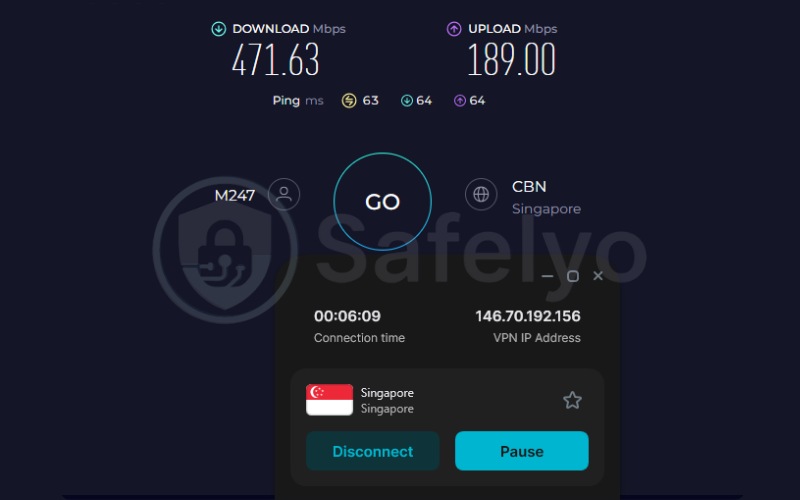
Surfshark provided reliable speeds, though its latency was noticeably higher depending on the region. On the nearby Singapore server, it delivered 471.63 Mbps for downloads and 189.00 Mbps for uploads, with a ping of 63 ms. This provides more than enough headroom for 4K streaming.
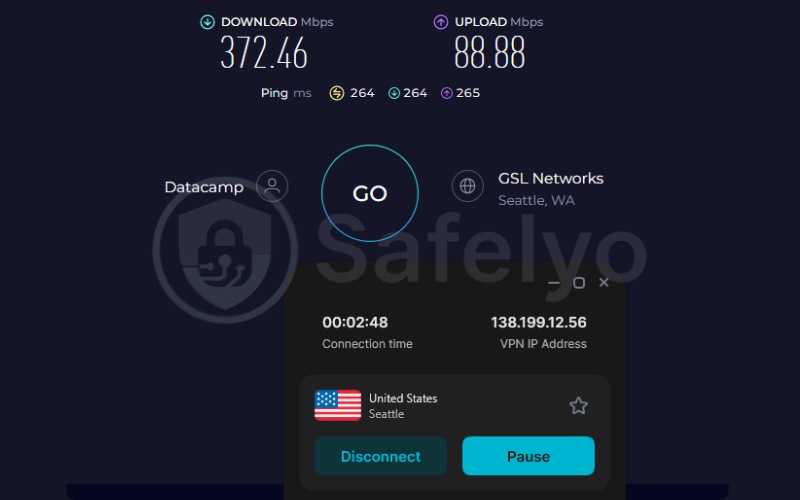
When connecting to the US server, the download speed dropped slightly to 372.46 Mbps, and the upload speed fell to 88.88 Mbps. The 264 ms ping on the US server is high enough to rule out fast-paced online gaming or smooth video calls, but it sits comfortably within range for everyday browsing and large downloads.
Here is the breakdown of Surfshark’s speed test results:
| Server Location | Download (Mbps) | Upload (Mbps) | Ping (ms) |
|---|---|---|---|
| US Server | 372.46 | 88.88 | 264 |
| Singapore Server | 471.63 | 189.00 | 63 |
| Average | 422.05 | 138.94 | 164 |
2.3.2. Security and privacy features
Surfshark’s Alternative ID feature generates a masked email address and a separate online persona, allowing you to sign up for newsletters or accounts without exposing your real identity.
Combined with CleanWeb, which blocks ad and tracking scripts before they actually load in Chrome, this setup gives the extension two separate layers of protection. You get one layer for your network traffic, and a secondary layer for the identifying details you would otherwise hand over to every site you visit.
2.3.3. Streaming and unblocking
Surfshark unblocked Netflix in 28 of the regions we tested, along with Disney+ and BBC iPlayer. This broad compatibility makes it one of the more reliable proxy extensions for switching between regional content libraries. It is particularly useful for households where multiple people are streaming from different devices at once, since the unlimited connection limit removes any need to disconnect one device just to use another.
Best for: Cost-conscious users and large households seeking to block ads and secure their browser activity.
2.4. #4 Proton VPN: Best free extension with unlimited data
Proton VPN takes a different approach to the free Chrome extension market. Rather than offering a limited trial, it provides a permanent free tier with no data cap at all. This free plan is backed by robust Swiss privacy law and an open-source codebase that security researchers can inspect line by line.
For anyone wary of the data-harvesting reputation that surrounds many free Chrome VPN extensions, this combination of transparency and a genuinely unlimited free plan makes Proton VPN a solid candidate for the best free VPN overall, serving as a much safer starting point.
Proton VPN’s specifications and our measured results appear below:
| Feature | Information |
|---|---|
| Chrome Store rating | 4.2 |
| Chrome downloads | 2,000,000+ |
| Best for | Free unlimited privacy |
| Starting price | $2.99/mo (free plan available) |
| Company | Proton AG |
| Jurisdiction | Switzerland |
| Independent audit | Yes (Securitum) |
| No-logs policy | Yes |
| RAM-only servers | No (full-disk encryption) |
| Servers | 20,000+ (Paid) |
| Countries | 145+ (Paid) |
| Avg. download speed | 426.56 Mbps (Free tier) |
| Avg. upload speed | 120.37 Mbps (Free tier) |
| Avg. latency | 160 ms (Free tier) |
| Protocols | WireGuard, IKEv2, Stealth |
| Kill switch | Yes |
| Obfuscation | Yes |
| Port forwarding | Yes (paid) |
| Dedicated IP | Yes (business) |
| Simultaneous connections | 10 (paid) / 1 (free) |
| Netflix regions | 25+ (Paid tier) |
| Disney+ | Yes (Paid tier) |
| BBC iPlayer | Yes (Paid tier) |
| Torrent / P2P | Yes (Paid tier) |
| Win/Mac/iOS/Android | Yes |
| Linux | Yes |
| Browser extension | Yes |
| Router support | Yes |
| Live chat 24/7 | No (paid only) |
| Refund policy | 30-day money-back guarantee |
| Free trial | Permanent free plan |
| Overall positioning | The most secure and generous free extension available, offering unlimited data without advertisements |
| Official website | protonvpn.com |
Pros
Free tier has no data cap and never expires
Open-source extension code, independently audited
Operates under Swiss privacy law
Cons
Free tier limits you to 10 server countries
Low upload speeds on distant connections
The free tier forces automatic random server assignment, acting as a major limitation for location selection
2.4.1. Speed and performance
To gauge performance accurately for budget users, we evaluated Proton VPN using its free tier across different regions. On the Singapore server, it reached a remarkably fast 482.98 Mbps for downloads and a 46 ms ping, providing more than enough bandwidth to handle heavy web browsing effortlessly.
However, when connected to the US server, performance dropped significantly. The download speed fell to 370.13 Mbps, and the upload speed struggled at just 97.29 Mbps, paired with a high 273 ms ping. This means real-time applications will experience noticeable lag on distant connections.
Furthermore, because Proton VPN routes free users through a smaller pool of servers that can become congested during peak hours, and forces an automatic location assignment, your day-to-day speeds will lack consistency.
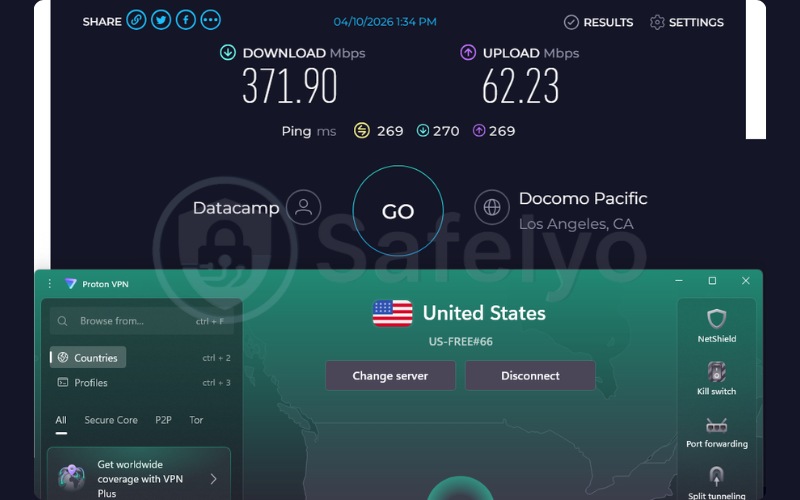
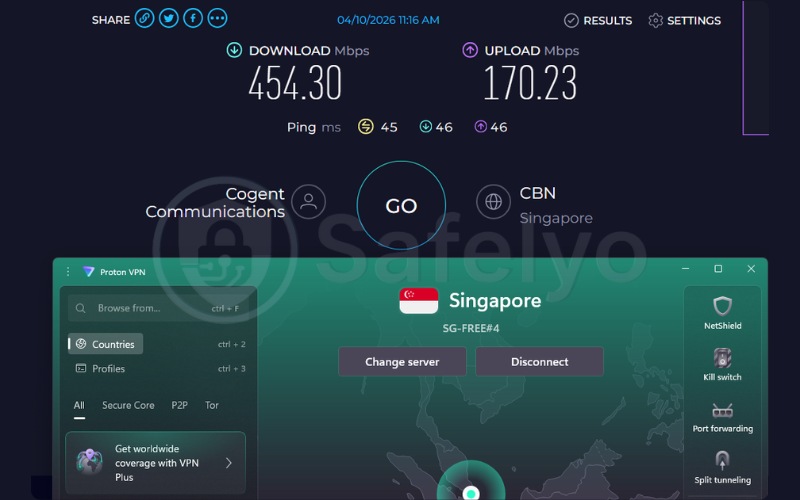
Here is the breakdown of Proton VPN’s speed test results on the free tier:
| Server Location | Download (Mbps) | Upload (Mbps) | Ping (ms) |
|---|---|---|---|
| US Server | 370.13 | 97.29 | 273 |
| Singapore Server | 482.98 | 143.44 | 46 |
| Average | 426.56 | 120.37 | 160 |
2.4.2. Security and privacy features
Proton VPN publishes the source code for its Chrome extension, which means independent researchers can verify that the software does what the company claims rather than taking that claim on blind faith.
The extension also includes Proton VPN’s Stealth protocol, which disguises VPN traffic to look like regular HTTPS traffic. This is designed specifically to get past firewalls that actively try to detect and block VPN connections, a feature that becomes highly relevant later in this guide when we cover restricted networks.
2.4.3. Streaming and unblocking
Proton VPN’s paid plans successfully unblocked major streaming platforms in our tests, including Netflix and BBC iPlayer. The free tier, however, is a completely different story. Proton VPN does not support streaming or P2P traffic on its free servers, and the automatic random server assignment makes unblocking specific regions impossible. If unblocking Netflix from Chrome is your primary goal, you will need to upgrade to a paid plan.
Best for: Users seeking a secure, log-free browsing experience without paying for a monthly subscription.
2.5. #5 Windscribe: Best free extension for advanced privacy features
The Windscribe Chrome extension is built for users who want to dig into deep settings rather than just click a single connect button. Its free tier caps you at a fixed 10GB of data per month, which is enough for regular browsing but inadequate for heavy streaming.
However, it pairs that allowance with browser-specific tools rarely found in other free extensions. Features like Location Warp and Time Warp let you manipulate the location and time zone data your browser reports to websites, making it substantially harder for tracking scripts to build an accurate profile of you.

Windscribe’s full Chrome extension specifications and our results are listed below:
| Feature | Information |
|---|---|
| Chrome Store rating | 4.6 |
| Chrome downloads | 2,000,000+ |
| Best for | Free advanced feature control |
| Starting price | $3.00/mo (Build-a-Plan) |
| Company | Windscribe Limited |
| Jurisdiction | Canada |
| Independent audit | Yes (Packetlabs, Leviathan) |
| No-logs policy | Yes |
| RAM-only servers | Yes |
| Servers | Not disclosed |
| Countries | 69+ |
| Avg. download speed | 389.15 Mbps |
| Avg. upload speed | 162.46 Mbps |
| Avg. latency | 220 ms |
| Protocols | WireGuard, OpenVPN, IKEv2, Stealth, WStunnel |
| Kill switch | Yes (Firewall) |
| Obfuscation | Yes |
| Port forwarding | Yes |
| Dedicated IP | No (static IP available) |
| Simultaneous connections | Unlimited |
| Netflix regions | Yes (unblocks) |
| Disney+ | Yes |
| BBC iPlayer | Yes |
| Torrent / P2P | Yes |
| Win/Mac/iOS/Android | Yes |
| Linux | Yes |
| Browser extension | Yes |
| Router support | Yes |
| Live chat 24/7 | No (bot Garry) |
| Refund policy | Partial refund for unused days |
| Free trial | Permanent 10GB free plan |
| Overall positioning | A feature-rich proxy extension offering deep technical controls over browser fingerprinting |
| Official website | windscribe.com |
Our testing surfaced the following strengths and limitations:
Pros
Advanced browser spoofing tools (Location Warp and Time Warp)
10GB free plan with no expiration date
Users can manually select server locations on the free plan
Cons
High latency on distant servers
No 24/7 human live chat support
2.5.1. Speed and performance
Windscribe provided consistent bandwidth across distant servers, though it predictably exhibited high latency due to the geographic distance from our testing hub. Unlike our previous tests that utilized a Singapore server, Windscribe’s free tier restricts access to certain Asian locations. Therefore, we evaluated its performance across its available UK and US servers.
On the UK server, it managed 385.37 Mbps for downloads and 193.51 Mbps for uploads, with a ping of 202 ms. Performance on the US server was relatively similar, with 392.92 Mbps for downloads, 131.41 Mbps for uploads, and a 237 ms ping.
While these download speeds are perfectly workable for everyday web browsing, large file transfers, and standard-definition video, the consistently high latency across distant servers limits its real-time capabilities. This elevated ping effectively rules out competitive online gaming and makes live video calls noticeably less smooth compared to connections routed closer to home.
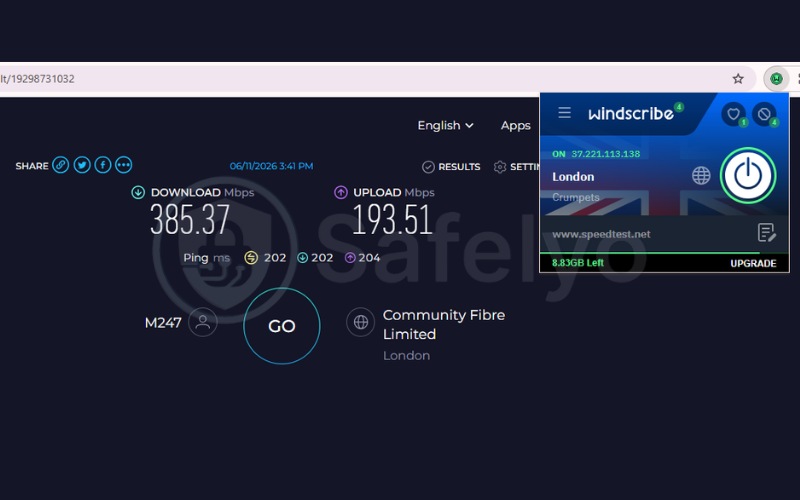
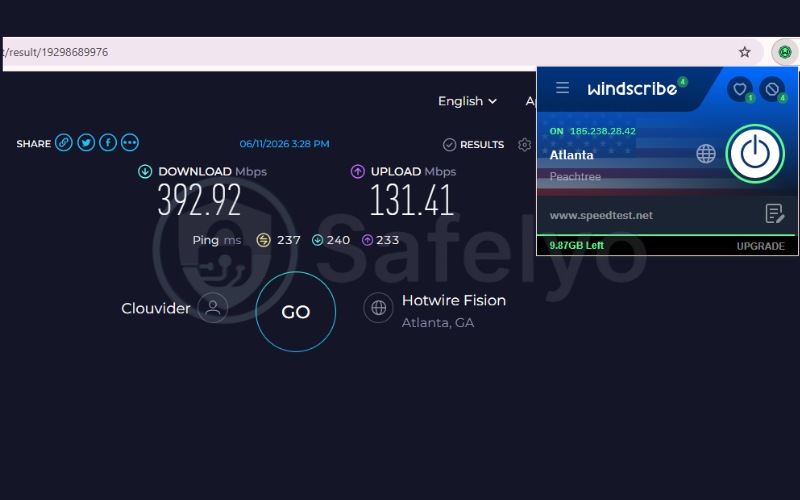
Here is the breakdown of Windscribe’s speed test results:
| Server Location | Download (Mbps) | Upload (Mbps) | Ping (ms) |
|---|---|---|---|
| UK Server | 385.37 | 193.51 | 202 |
| US Server | 392.92 | 131.41 | 237 |
| Average | 389.15 | 162.46 | 220 |
2.5.2. Security and privacy features
Windscribe’s Split Personality feature rotates your browser’s user agent string at set intervals. This means the operating system and browser version that visited sites can see keeps changing.
Paired with WebRTC Slayer, a setting that blocks the WebRTC leaks responsible for exposing your real IP address even when a VPN is active, this setup gives Windscribe one of the more thorough anti-fingerprinting toolkits available. It is particularly useful for anyone trying to limit exactly how much advertising networks can learn about their device.
2.5.3. Streaming and unblocking
Windscribe successfully unblocked Netflix and BBC iPlayer during our tests, putting it on par with the premium paid extensions for raw access to geo-restricted content.
While the 10GB limit restricts heavy binge-watching, Windscribe offers a major advantage over Proton VPN’s free tier: manual server selection. You can actively choose which country you want to connect to, rather than being forced into a randomly assigned location. This allows you to specifically target regional libraries, although the data cap means you will need to upgrade to finish a full season of a show.
Best for: Technical users who want precise control over how their browser interacts with tracking scripts and geolocation requests.
3. Most Chrome VPN extensions are just proxies
Most VPN extensions in the Chrome Web Store, including four of the five reviewed above, are proxies rather than full VPNs. The functional difference comes down to which traffic actually gets encrypted.
A proxy extension opens a TLS-encrypted connection between Chrome and the provider’s server, but only for traffic that passes through your browser. Anything running outside Chrome (such as your email app, a game launcher, or a file-sync tool) connects to the internet directly through your normal ISP connection, completely unaffected by the extension.
A true VPN extension works differently, a capability offered exclusively by ExpressVPN’s Remote Control mode in this list. While ExpressVPN can function as a standard proxy, switching to this full mode transforms the extension into a command center for the desktop app already running on your operating system. Turning the extension on encrypts your device’s entire internet connection with AES-256. This protocol covers every app and background process, not just the single browser tab you are currently looking at.
The practical difference matters most if you run anything sensitive outside the browser. A proxy extension will successfully hide your location from the websites you visit in Chrome. However, it will not protect a torrent client, a separate desktop email app, or background sync tools. All of these external processes remain visible to your ISP and exposed under your real IP address.
This proxy distinction also explains why WebRTC leaks are such a common complaint with extensions. WebRTC is a browser feature that lets Chrome make direct peer-to-peer connections for tasks like video calls, and it can reveal your real IP address through a side channel that bypasses the proxy entirely.
A true VPN extension blocks this at the operating system level, because all traffic gets forced through the encrypted tunnel. A proxy extension instead has to add a separate WebRTC-blocking setting. While all five extensions in this guide include one, it remains an extra safeguard rather than something built inherently into the architecture itself.
4. Free vs. paid Chrome VPN extensions
Paid Chrome VPN extensions and free ones differ in three consistent ways: bandwidth, server access, and how thoroughly their privacy claims have been verified.
Unrestricted bandwidth is the most immediate difference. Paid extensions like ExpressVPN, NordVPN, and Surfshark place no cap on how much data you can use, which matters heavily if you stream video or download large files regularly. Most free extensions, including Windscribe’s free plan, cap usage at a fixed monthly allowance. After that cap is reached, your connection either slows down severely or stops working completely until the next billing cycle resets it.
Server access also shrinks significantly on free plans. Paid subscriptions typically unlock every server location a provider operates, often spanning 100 or more countries. Free plans usually restrict you to a small subset, sometimes limiting you to as few as 10 countries. This limitation restricts your options for unblocking region-specific content and can leave you connecting to more crowded servers during peak hours.
Audited privacy policies are where the gap becomes most important for baseline trust. Paid providers in this guide have all undergone independent audits of their no-logs claims, covering both their apps and their server infrastructure. Many free Chrome extensions skip this expensive step entirely.
Some free tools even generate revenue by selling aggregated browsing data to advertisers, which fundamentally defeats the purpose of using a VPN in the first place. Proton VPN is the main exception here, since its free tier carries the exact same audited no-logs policy and open-source code as its paid plans.
For a deeper dive into how these restrictions compare to premium features, read our full free vs. paid VPN comparison to help you make an informed choice.
5. Free VPN extensions to approach with caution
Several free VPN extensions available on the Chrome Web Store have been found to leak user data, route connections through other users’ devices, or skip encryption altogether. They are worth avoiding regardless of how high their install counts climb.
Various external audits and security community tests using IP, DNS, and WebRTC leak checks alongside Wireshark traffic analysis found that several popular free Chrome VPN extensions either failed to encrypt browser traffic at all or leaked identifying information despite showing a “connected” status.
The extensions below were flagged for specific, documented issues:
- The Hola VPN extension: This extension’s free tier works by routing other users’ traffic through your connection in a peer-to-peer network. Your device’s bandwidth and IP address can actually be used to relay someone else’s browsing, a model that has drawn comparisons to a botnet-style setup. Chrome Web Store listings show it has been installed by more than 5 million users.
- The Urban VPN extension: Security testing found that this extension’s proxy connection failed to encrypt traffic in some configurations, leaving browsing activity completely visible to your internet provider despite the extension appearing active. It remains one of the more widely installed free options on the Chrome Web Store, with download counts firmly in the millions.
- The SetupVPN extension: Marketed as a lifetime free VPN, this extension has accumulated a poor recent security track record. External reviewers noted that connections were sometimes routed through servers marked as premium even on the free tier, undermining the reliable location-switching it is supposed to provide.
- The Betternet and RusVPN extensions: Leak testing successfully identified DNS leak issues in both of these extensions. This flaw means that even while connected, the domain names of the sites you visit can still be sent directly to your default DNS resolver instead of staying safely inside the encrypted tunnel.
- The Troywell extension: This extension consistently exposed the domains visited by users during testing, along with the full unencrypted content of any site loaded over plain HTTP rather than HTTPS. This exposure removes almost the entirety of the privacy benefit the extension claims to provide.
6. Best VPN extensions for Chromebooks and school networks
Chromebooks and school or office networks come with two specific problems that do not usually affect VPN extensions on a regular Windows or Mac browser: network-level VPN blocking, and the technical inability to install a full desktop application.
Two features from the extensions reviewed above directly solve these exact problems, and they are worth understanding before you pick an extension for a school-issued or work-managed Chromebook.
6.1. Bypassing network restrictions on school and office Wi-Fi
Many school and corporate networks actively detect and block VPN traffic. This is where obfuscation features become highly useful. Obfuscation works by disguising your VPN connection so it looks exactly like ordinary HTTPS traffic, the same kind of encrypted connection your browser already makes to any secure website.
Windscribe’s Stealth and WStunnel protocols, along with Proton VPN’s Stealth protocol, are both built specifically for this purpose. Rather than the network’s firewall seeing an obvious VPN handshake and blocking it outright, it sees what looks like a normal visit to a secure site, allowing the connection to go through.
6.2. Chrome OS compatibility without a desktop app
Chrome OS, the operating system that runs on Chromebooks, does not support installing traditional desktop applications the way Windows or macOS does. Because of this restriction, any feature that relies on a background desktop client cannot function. This means ExpressVPN’s full Remote Control mode is off the table if you are using a Chromebook.
This specific limitation is where standalone proxy architectures hold a major advantage. Extensions from NordVPN, Surfshark, and Proton VPN operate entirely within the browser and have zero dependencies on external software. They install and run on Chrome OS exactly as they would on a standard PC.
Fortunately, ExpressVPN remains a viable option in this scenario. By switching the extension into its standalone Proxy Mode, you can bypass the desktop application requirement and secure your browser traffic just like the other providers.
For Chromebook users, the proxy architecture discussed earlier in this guide is not a drawback. It is simply the only technical framework that allows a VPN extension to work on the device at all.
For a more comprehensive look at bypassing tight network filters in educational environments, explore our dedicated guide on the best VPN for school.
7. Can you use a VPN extension on Chrome mobile?
No, you cannot use a VPN extension on Chrome for Android or iOS, because Google Chrome’s mobile versions do not support browser extensions of any kind, VPN or otherwise. If you want VPN protection on your phone, the extensions covered in this guide will not help.
Instead, download the provider’s dedicated mobile app directly from the Google Play Store or Apple App Store. All five providers reviewed here offer standalone Android and iOS apps that encrypt your phone’s entire connection. This mobile app setup is actually a stronger protection method than any Chrome extension provides on a desktop.
8. How to install a VPN extension on Chrome
Installing a VPN extension on Chrome takes four steps and requires around two minutes from start to finish. Follow this sequence for any of the extensions covered in this guide:
- Subscribe to a verified VPN provider through its official website, or create a free account if you are using Proton VPN or Windscribe’s free tier.
- Navigate to the official Chrome Web Store using the link provided directly on the provider’s own website, rather than searching for the extension manually.
- Click “Add to Chrome” and confirm the specific permissions prompt that appears on your screen.
- Pin the extension to your toolbar by clicking the puzzle-piece icon next to Chrome’s address bar, then simply log in with your account and connect.
The step worth slowing down for is the second one. Search results, and even the Chrome Web Store’s own search function, can routinely surface imitation extensions that copy a provider’s name and logo but contain different, malicious code entirely.
Following the install link directly from the provider’s official website safely removes that risk, since it takes you straight to the verified listing rather than whatever random result a search engine or the store’s search bar happens to rank first.
9. FAQs about best VPN for Chrome
Does Google Chrome have a built-in VPN?
No, Google Chrome itself does not include a built-in VPN. Google offers a separate paid service called Google One VPN, bundled with certain Google One storage plans, but this is a distinct product from Chrome and is not built into the browser by default.
How do I stop WebRTC leaks in Chrome?
The most reliable way to stop WebRTC leaks in Chrome is to use a VPN extension that includes a dedicated WebRTC-blocking setting, such as ExpressVPN or Windscribe’s WebRTC Slayer feature. Enabling this setting prevents Chrome’s WebRTC API from revealing your real IP address through the side channel it normally uses for video calls and peer-to-peer connections, even while the rest of your traffic is routed through the VPN.
Can I use a VPN extension on Chrome mobile (Android/iPhone)?
No, mobile versions of Chrome on Android and iPhone do not support browser extensions, so none of the Chrome VPN extensions covered in this guide will install or run there. Use the provider’s dedicated mobile app instead, available through the Google Play Store or Apple App Store.
Is it safe to use free VPN extensions from the Chrome Web Store?
Generally, no. Many free VPN extensions on the Chrome Web Store have been found to leak data, skip encryption, or generate revenue by sharing browsing data with advertisers. Proton VPN is a notable exception, since its free tier runs on the same audited, open-source code as its paid plans, with no data cap and no advertising.
What is the difference between a VPN extension and a full VPN app?
A VPN extension typically encrypts only the traffic passing through your Chrome browser, leaving other apps on your device to connect normally through your regular internet connection. A full VPN app, whether on desktop or mobile, encrypts your device’s entire internet connection at the operating system level, covering every app and background process at once.
10. Conclusion
Choosing the best VPN extensions for Chrome comes down to actively matching the extension’s architecture to what you actually need protected. ExpressVPN remains the strongest pick if you want your entire device covered by AES-256 encryption directly from the Chrome toolbar.
Conversely, NordVPN and Surfshark deliver the fastest and most affordable proxy-based browsing respectively, both well suited to streaming and quick location switching without touching the rest of your system. Proton VPN stands out as the safest free option thanks to its audited, open-source extension and uncapped data allowance, and Windscribe rounds out the list for anyone who wants granular control over how their browser presents itself to tracking scripts.
Whichever extension you choose, the most important habit is installing it directly from the provider’s official site rather than searching the Chrome Web Store blind, since that single step gracefully avoids most of the risky extensions covered earlier in this guide.
If you are still comparing options beyond Chrome, our Best VPN category breaks down full VPN apps and other specific picks in more detail. You can find the rest of our testing and guides on the Safelyo homepage.