

When configuring a VPN server or client, choosing between OpenVPN TAP vs TUN determines how the operating system presents network traffic to the VPN tunnel. TUN and TAP are virtual network interface types that handle different kinds of traffic: TUN works with IP packets for Layer 3 routing, while TAP works with Ethernet frames for Layer 2 networking.
TUN operates at Layer 3 (Network layer), making it the standard choice for routed IP connections and general internet access. TAP operates at Layer 2 (Data Link layer) and can be used to bridge Ethernet networks across an OpenVPN connection.
The right interface depends on your network architecture and the type of traffic your VPN needs to carry, not simply on which interface is faster.
Key takeaways:
- Choose TUN for standard IP routing, internet access, remote client access, and routed site-to-site VPNs.
- Choose TAP when your setup requires Layer 2 Ethernet bridging or specific applications that depend on Layer 2 or broadcast behavior.
- TUN handles IP packets, while TAP handles Ethernet frames, including Ethernet-level information such as MAC addresses.
- TUN is not universally faster or more secure than TAP. Real-world performance depends on factors such as traffic patterns, network conditions, and system resources.
- The client and server must use the same device type for the same OpenVPN connection. A TUN client cannot connect to a TAP server configuration, and vice versa.
1. OpenVPN TAP vs TUN: A quick comparison
TUN and TAP provide different networking models within OpenVPN. TUN operates at Layer 3 and is designed for routed IP traffic, while TAP operates at Layer 2 and can carry Ethernet frames for bridged networking.
The table below summarizes the core differences between the two virtual interface types.
| Feature | TUN | TAP |
|---|---|---|
| Network layer | Layer 3 (Network) | Layer 2 (Data Link) |
| Data handled | IP packets (IPv4/IPv6) | Ethernet frames |
| Primary networking model | Routing | Bridging |
| MAC addresses | Not carried as Ethernet frame headers | Carried in Ethernet frame headers |
| Broadcast traffic | Not normally carried as Ethernet broadcast traffic | Can be carried |
| Typical use | Routed VPN, remote access | Bridged LAN, specialized Layer 2 setups |
| Setup complexity | Lower | Higher |
2. What are TUN and TAP in OpenVPN
TUN and TAP are virtual network interface types that OpenVPN uses to exchange network traffic with the operating system. The key difference is the type of traffic they handle: TUN handles Layer 3 IP packets, while TAP handles Layer 2 Ethernet frames.
This distinction affects how OpenVPN connects networks and handles traffic. TUN is designed primarily for routed IP connectivity, while TAP can support Layer 2 connectivity and bridging when Ethernet-level behavior is required.
2.1. What is a TUN interface
A TUN interface is a virtual Layer 3 network interface that handles IP packets, including IPv4 and IPv6 traffic. Unlike an Ethernet interface, it does not present complete Ethernet frames with MAC addresses to the VPN application.
You can think of TUN as a virtual point-to-point IP link between your device and a remote VPN network. This Layer 3 design allows OpenVPN to route traffic between IP subnets without extending the underlying Ethernet network.
TUN is therefore a natural fit for routed VPN configurations, including remote access, internet traffic through a VPN, and routed site-to-site connections.
2.2. What is a TAP interface
A TAP interface is a virtual Layer 2 Ethernet interface that handles complete Ethernet frames. These frames include Ethernet-level information such as MAC addresses, allowing TAP to represent Ethernet connectivity rather than only IP connectivity.
TAP can be connected to an Ethernet bridge, allowing a bridged OpenVPN configuration to extend Layer 2 connectivity between network segments. This differs from TUN, which routes traffic between IP networks without extending the same Ethernet segment.
Because TAP can carry Ethernet-level traffic, it can also transport traffic such as ARP and Ethernet broadcast frames. This makes TAP useful for specific applications and network designs that depend on Layer 2 behavior, including some legacy LAN applications and broadcast-based discovery.
2.3. Are TUN and TAP VPN protocols?
No, TUN and TAP are virtual network interface types, not standalone VPN protocols. They do not provide the encryption, authentication, or tunnel-establishment mechanisms required to create a VPN connection.
Instead, they determine the type of network traffic that OpenVPN receives from the operating system and transports through the VPN tunnel. TUN provides OpenVPN with Layer 3 IP packets, while TAP provides Layer 2 Ethernet frames.
The distinction is therefore between the network interface and the VPN tunnel itself. OpenVPN provides the VPN connection, while TUN or TAP determines how network traffic is presented to that connection.
3. How TUN and TAP handle network traffic
TUN and TAP differ mainly in the type of network traffic they present to OpenVPN. TUN works with Layer 3 IP packets, while TAP works with Layer 2 Ethernet frames. This difference affects how traffic is routed, bridged, and presented to applications across the VPN.
Understanding these packet flows makes it easier to see why TUN is normally used for routed VPN connections, while TAP is useful when a VPN needs Ethernet-level connectivity.
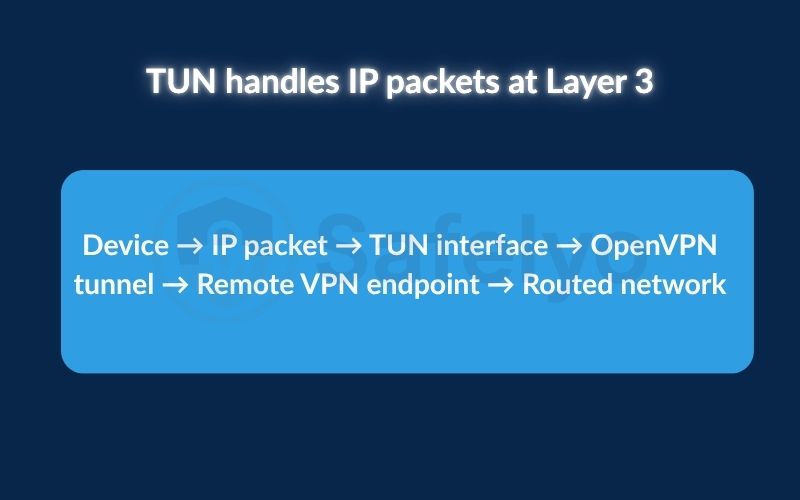
3.1. TUN handles IP packets at Layer 3
In a TUN-based configuration, the traffic path can be simplified as:
Device → IP packet → TUN interface → OpenVPN tunnel → Remote VPN endpoint → Routed network
The operating system sends traffic to the TUN interface according to its IP routing table. TUN operates at Layer 3, so the virtual interface presents IP packets to OpenVPN rather than complete Ethernet frames.
An IP packet contains information such as the source and destination IP addresses, which is enough for routers to determine where the traffic should go. Local Ethernet details, such as source and destination MAC addresses, are not part of the packet presented to the TUN interface.
OpenVPN then processes and encrypts the IP traffic before transporting it through the VPN tunnel. After the traffic reaches the remote VPN endpoint, normal routing rules can deliver the packet to the appropriate destination network.
Because TUN operates with IP packets rather than Ethernet frames, it is naturally suited to routed VPN architectures. It does not need to reproduce the Layer 2 characteristics of the original network for ordinary IP communication.
3.2. TAP handles Ethernet frames at Layer 2
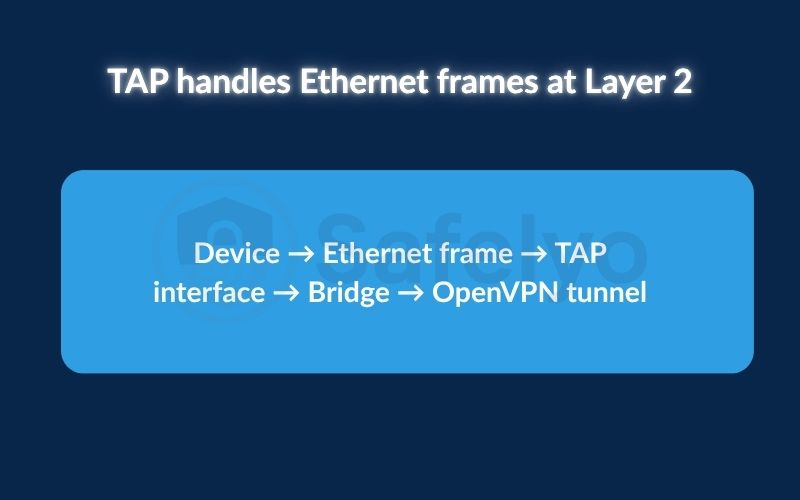
A TAP-based configuration works at a lower layer of the networking stack. Its conceptual traffic path is:
Device → Ethernet frame → TAP interface → Bridge → OpenVPN tunnel
TAP operates at Layer 2 and presents complete Ethernet frames to OpenVPN. These frames can contain Ethernet-level information such as source and destination MAC addresses in addition to the encapsulated network-layer payload.
In a bridged OpenVPN configuration, the TAP interface can connect to a network bridge on the remote side. The bridge can then forward Ethernet frames between the VPN and the connected network, allowing the VPN to provide behavior closer to that of a shared Ethernet segment.
This Layer 2 capability is useful when the network design depends on more than routable IP connectivity. For example, some applications or network services may rely on Ethernet-level behavior, broadcast traffic, or other mechanisms associated with a local Layer 2 network.
TAP therefore provides capabilities that a standard routed TUN configuration does not attempt to reproduce.
3.3. Routing versus bridging
Routing moves traffic between different IP networks. A router examines Layer 3 addressing information, such as destination IP addresses, and forwards packets toward the appropriate network.
A routed VPN therefore treats the remote network as a separate IP network. The VPN establishes connectivity between those networks without making them one shared Ethernet segment.
Bridging, by contrast, connects Layer 2 network segments into a common broadcast domain. A bridge forwards Ethernet frames based on Layer 2 information, including MAC addresses, allowing devices on connected segments to behave more like they are part of the same Ethernet network.
This distinction explains the typical relationship between the two OpenVPN interface types:
- TUN → Layer 3 → IP routing
- TAP → Layer 2 → Ethernet bridging
TUN naturally fits routed VPN architectures because it provides OpenVPN with IP packets. TAP is appropriate when the VPN design needs to extend Layer 2 Ethernet behavior between networks.
3.4. Why Layer 2 versus Layer 3 matters
For most internet access and remote-access scenarios, applications only need IP connectivity. Web browsing, SSH, RDP, and most other network services communicate through IP addresses and transport protocols. They generally do not need the VPN to reproduce the Ethernet segment where the remote device is located.
Layer 2 connectivity becomes relevant when an application or network service depends on behavior that exists below the IP layer. Examples can include certain broadcast-based discovery mechanisms, legacy LAN applications, or environments where devices need to participate in the same Layer 2 network.
That does not mean every application involving local discovery automatically requires TAP. Discovery can sometimes be handled through routing, DNS, configuration changes, or other network mechanisms. The important question is whether the application genuinely requires Ethernet-level connectivity that a routed IP VPN does not provide.
This is why neither interface is inherently better than the other. TUN is the natural choice when the requirement is IP routing, while TAP is useful when the VPN must extend Layer 2 Ethernet behavior. The appropriate choice depends on the networking behavior the VPN needs to support, not simply on which interface appears faster or more capable.
4. Which should you use: TUN or TAP?
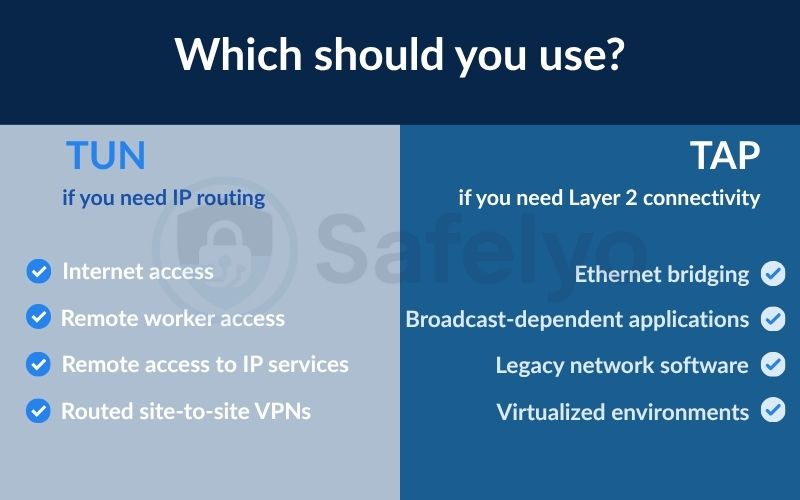
Choose TUN when you need normal IP routing, such as internet access, remote access to internal services, or routed site-to-site connectivity. Choose TAP when your network design genuinely requires Layer 2 Ethernet behavior, such as bridging Ethernet segments or supporting applications that depend on certain broadcast or Layer 2 mechanisms.
The key is to match the virtual interface to the networking model your application or network requires. TUN is usually the simpler choice for IP-based connectivity, while TAP is useful when routing alone cannot provide the Layer 2 behavior you need.
4.1. Choose TUN if you need IP routing
TUN is generally the appropriate choice when devices only need routable IP connectivity. This covers most internet access, remote-access, and routed site-to-site VPN scenarios because applications can communicate through normal IPv4 or IPv6 routing without extending the underlying Ethernet network.
Common scenarios for choosing TUN include:
- Internet access: Routing a device’s internet traffic through a VPN server, including when using public Wi-Fi.
- Remote worker access: Connecting employees to internal applications, servers, and subnets through routed IP networks.
- Remote access to IP services: Accessing web applications, databases, SSH servers, RDP hosts, and other services through their IP addresses.
- Routed site-to-site VPNs: Connecting separate office or branch networks that use different IP subnets.
If the application only needs to establish a TCP, UDP, or other IP-based connection to a reachable destination, TUN is normally the appropriate starting point.
4.2. Choose TAP if you need Layer 2 connectivity
TAP becomes relevant when the VPN needs to provide Ethernet-level connectivity, rather than simply route IP packets between separate networks. A common example is a bridged configuration where remote devices need to participate in the same Layer 2 network or broadcast domain.
Scenarios where TAP may be appropriate include:
- Ethernet bridging: Extending a Layer 2 network across the VPN when routing cannot provide the required behavior.
- Broadcast-dependent applications: Supporting specific applications that rely on Layer 2 or broadcast-based communication across the VPN.
- Legacy network software: Connecting older applications that genuinely depend on Ethernet-level behavior or non-standard network protocols.
- Virtualized environments: Connecting virtual machines or other systems to a bridged network when they need to participate directly in the remote Layer 2 segment.
TAP should not be selected simply because an application uses a MAC address or performs local-network discovery. The important question is whether the application actually requires Layer 2 connectivity that a routed TUN configuration cannot provide.
4.3. When TUN and TAP are not interchangeable
TUN and TAP operate at different network layers, so they are not interchangeable without changing how traffic is transported across the VPN.
A TUN configuration uses IP routing. The operating system and network routers determine where packets should go based on Layer 3 addressing. A TAP configuration can support Layer 2 bridging, allowing Ethernet frames and associated Layer 2 behavior to cross the VPN.
If an application depends on a Layer 2 or broadcast mechanism that cannot be routed normally, a TUN connection may not provide the required connectivity. In some network designs, an additional mechanism, such as a broadcast relay or a service-specific discovery configuration, can solve the problem without deploying a Layer 2 bridge.
Conversely, using TAP for ordinary IP traffic does not automatically make the connection faster or more capable. A bridged Layer 2 design can expose additional Ethernet and broadcast traffic to the VPN, which may increase traffic volume or configuration complexity depending on the network.
A practical decision rule is:
- Normal IP connectivity → TUN
- Layer 2 Ethernet behavior → TAP
- Uncertain whether Layer 2 is actually required → start by checking whether the application can work through normal IP routing
The goal is not to choose the more powerful interface. It is to choose the simplest interface that provides the networking behavior your VPN actually needs.
5. Is TUN faster than TAP?
TUN is not inherently faster than TAP. TUN handles IP packets at Layer 3, while TAP handles complete Ethernet frames at Layer 2. A TAP-based setup can therefore process additional Layer 2 information, but real-world performance depends on the traffic, network path, encryption workload, and configuration.
5.1. Does TAP introduce more network overhead?
TAP presents complete Ethernet frames to OpenVPN, including Layer 2 information such as MAC addresses. TUN presents IP packets instead, so it does not need to carry the original Ethernet framing through the virtual interface.
This means TAP can involve additional Layer 2 traffic and processing. However, there is no fixed bandwidth penalty or percentage difference that applies to every TAP connection. For normal internet traffic, the practical difference may be small compared with factors such as encryption, available bandwidth, latency, and network congestion.
5.2. How broadcast traffic affects TAP
In a bridged Layer 2 configuration, TAP can carry broadcast traffic such as ARP requests, NetBIOS traffic, and certain network discovery messages across the VPN. On a busy LAN, this additional traffic can consume bandwidth and processing resources. The impact is more likely to become noticeable on constrained or high-latency connections.
Broadcast traffic is not inherently unnecessary; it performs normal network functions. The issue is that a Layer 2 VPN may transport this traffic across the tunnel when a routed TUN configuration would not need to.
5.3. What actually determines OpenVPN performance
TUN or TAP is only one factor affecting OpenVPN performance. Important variables include:
- CPU and encryption workload: Encryption and decryption consume processing resources, while hardware acceleration can improve performance.
- Network path: Server distance, latency, packet loss, bandwidth, and congestion can limit throughput.
- Transport protocol: OpenVPN over UDP often performs better for VPN traffic than TCP because it avoids TCP-over-TCP behavior.
- MTU and packet size: Incorrect MTU settings can cause fragmentation and reduce efficiency.
- Traffic pattern: Large file transfers, streaming, interactive sessions, and small-packet workloads place different demands on the VPN.
These factors also explain why a VPN can slow down internet connections in some situations, although the impact varies depending on the VPN configuration and network conditions.
Therefore, TUN should not be described as universally faster than TAP. The performance difference depends on what traffic the VPN carries and how the surrounding network is configured.
6. TUN vs TAP for common use cases
The right choice depends on the type of network connectivity your application needs. Most everyday VPN traffic only requires Layer 3 IP routing, while applications that depend on Ethernet-level behavior may benefit from a Layer 2 TAP configuration.
6.1. Internet access and remote access
TUN is the appropriate choice in this case. TUN is therefore the natural choice for commercial VPN clients, remote workers, and other scenarios where the requirement is simply to route IP traffic through the VPN.
6.2. Remote desktop, printers, and NAS devices
TUN is normally enough for direct IP access. RDP, VNC, SMB file sharing, and similar services can work through a routed VPN when the remote device is reachable by IP address or an appropriately configured DNS name.
Printers and NAS devices can also be accessed through TUN when you connect directly to their IP addresses. However, some discovery mechanisms may depend on broadcast or multicast traffic. In those cases, a different discovery configuration or a Layer 2 TAP design may be appropriate.
6.3. LAN discovery and broadcast-dependent applications
TAP may be appropriate. Some legacy LAN applications, multiplayer games, and internal software rely on broadcast-based discovery or other Layer 2 behavior to locate devices on the local network.
A standard TUN connection provides routed IP connectivity rather than extending the Ethernet broadcast domain. If the application genuinely depends on Layer 2 discovery that cannot be handled through routing or another discovery mechanism, a bridged TAP configuration may provide the required behavior.
6.4. Site-to-site VPN connections
TUN is usually the standard choice. A routed site-to-site VPN can connect separate office networks while allowing each location to maintain its own IP subnet.
For example, one office might use 192.168.1.0/24 while another uses 192.168.2.0/24. Routing allows devices in both networks to communicate without extending the same Layer 2 broadcast domain across the WAN.
TAP may be appropriate when the two sites genuinely require Layer 2 bridging. However, extending a broadcast domain across a WAN can increase traffic and configuration complexity, so routing is generally preferred when IP connectivity is sufficient.
6.5. VLANs and specialized Layer 2 applications
TAP may be appropriate when an application or network design requires Ethernet-level connectivity rather than ordinary IP routing.
TAP can be useful for certain legacy protocols, specialized network testing, or environments that require Layer 2 behavior. However, do not assume that TAP automatically preserves or transports VLAN tags in every configuration. VLAN handling depends on the operating system, virtual interface, bridge, and overall network configuration.
The practical rule is simple: IP connectivity → TUN; genuine Layer 2 requirements → TAP may be appropriate.
7. OpenVPN TUN and TAP configuration basics
OpenVPN selects the virtual interface type through the dev directive in its configuration. Using dev tun selects a Layer 3 TUN interface, while dev tap selects a Layer 2 TAP interface.
Understanding these settings helps ensure that the VPN configuration matches the network model you need.
7.1. What dev tun does
The dev tun directive tells OpenVPN to use a TUN interface for the VPN connection. TUN operates at Layer 3 and passes IP packets between VPN endpoints, making it suitable for routed VPN configurations.
A typical TUN setup uses routing settings to provide clients with access to the VPN’s remote networks. The exact routing configuration depends on the network topology and the services that need to be reached.
7.2. What dev tap does
The dev tap directive tells OpenVPN to use a TAP interface. TAP operates at Layer 2 and handles complete Ethernet frames rather than only IP packets.
This makes TAP suitable for bridged VPN configurations where Ethernet-level connectivity is required. In such a setup, the TAP interface can connect to a network bridge so Layer 2 traffic can move between the VPN and the bridged network.
7.3. Why client and server configurations must match
The client and server must use the same virtual interface type for each OpenVPN connection. The configuration should therefore follow one of these combinations:
- dev tun ↔ dev tun: Both endpoints use a Layer 3 TUN interface.
- dev tap ↔ dev tap: Both endpoints use a Layer 2 TAP interface.
A client using dev tun cannot use the same VPN connection with a server configured for dev tap, because the two endpoints expect different types of virtual network traffic.
An OpenVPN server can still run separate configurations or instances using different interface types. The matching requirement applies to each individual VPN connection.
7.4. How server-bridge relates to TAP bridging
The server-bridge directive is associated with OpenVPN’s bridged configuration model. It is used with a TAP-based setup to support Layer 2 connectivity between remote VPN clients and the local bridged network.
This differs from a typical routed configuration, where TUN provides IP connectivity through a separate VPN subnet and routing determines where packets go.
In simple terms:
- TUN + routing: Connects IP networks through Layer 3 routing.
- TAP + bridging: Extends Layer 2 Ethernet connectivity between network segments.
The dev setting should therefore match the networking architecture required by the VPN rather than being treated as a performance setting.
8. TUN and TAP compatibility across operating systems
TUN and TAP availability depends on the operating system, VPN client, virtual network driver, and client version. TUN is widely supported across modern VPN implementations, while TAP support can be more limited, particularly on mobile platforms.
Before using a specific OpenVPN configuration, check whether both the client and operating system support the required virtual interface.
8.1. Why support depends on the VPN client and OS
TUN and TAP are not exposed in the same way across every operating system. The VPN client must use the networking framework and virtual interface mechanism supported by that platform.
Desktop systems generally provide broader support for virtual VPN interfaces, while TAP availability depends more heavily on the operating system’s and VPN client’s implementation. Mobile platforms also impose additional restrictions on low-level network interfaces.
This means a TAP configuration supported by a desktop OpenVPN client may not be available in the corresponding mobile client. Always check the specific VPN client and operating system combination rather than assuming that support is universal.
8.2. How to check for a TUN or TAP adapter
Checking the virtual network interface can help determine how a VPN client handles its tunnel. However, the interface may not always appear with a name that explicitly contains “TUN” or “TAP”, especially on modern Windows systems.
Linux: Open a terminal and inspect the available network interfaces. TUN or TAP interfaces may appear as tun0, tun1, tap0, or similar names.
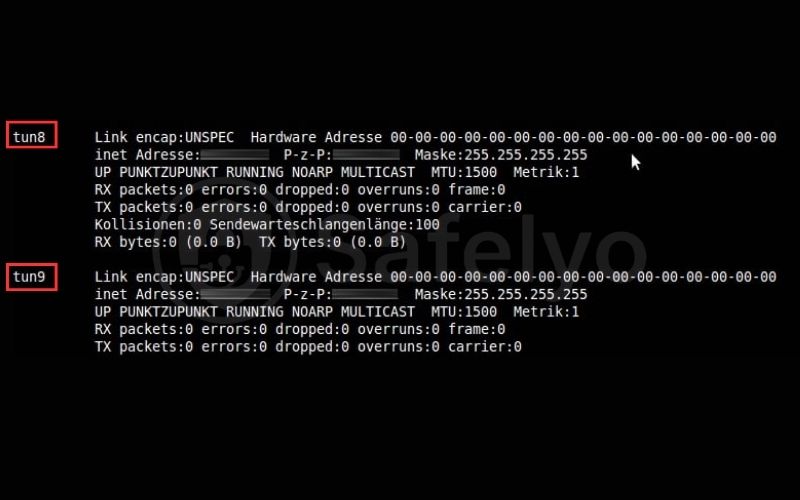
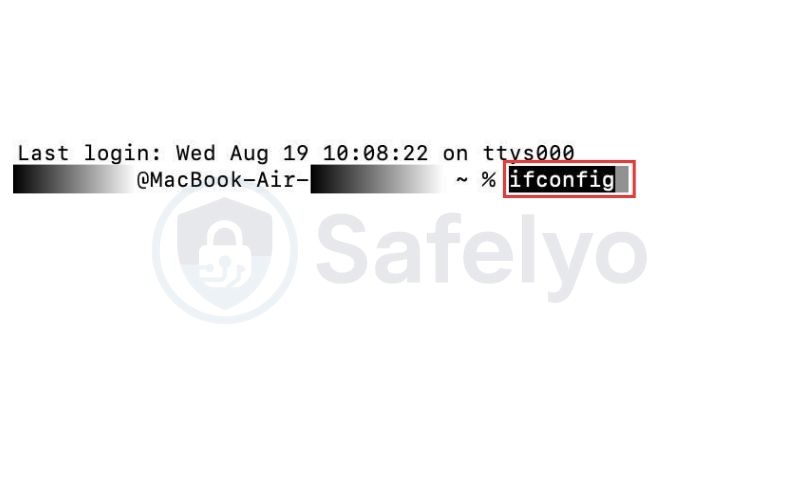
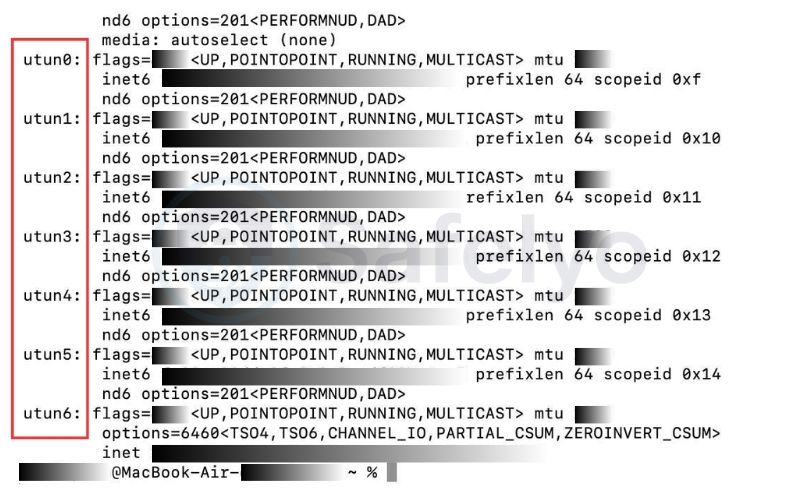
macOS: Open Terminal and use ifconfig to inspect virtual interfaces. Many VPN implementations use interfaces such as utun0 or similar names.
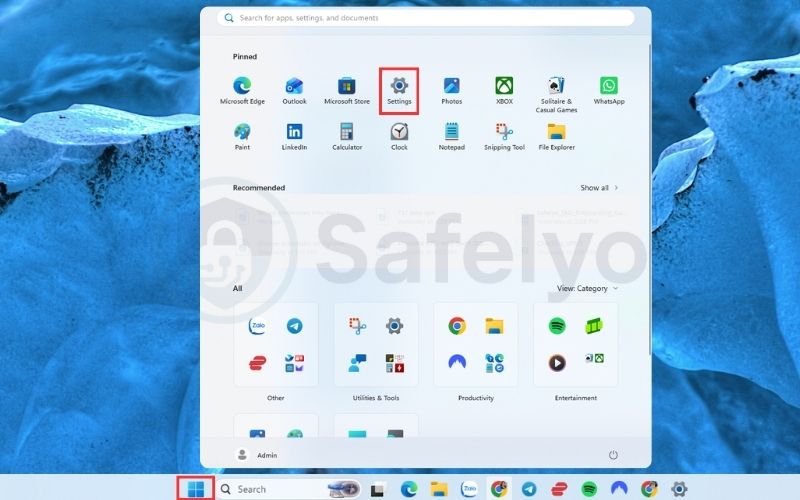
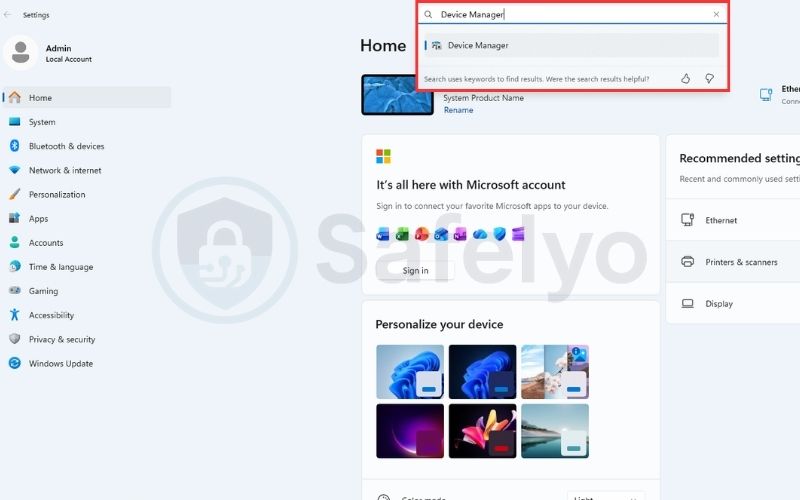
Windows: Open Device Manager → Network adapters and look for a virtual adapter associated with the VPN client. Modern OpenVPN installations may use OpenVPN Data Channel Offload for TUN mode, while a TAP-based configuration may appear as a TAP-Windows adapter.
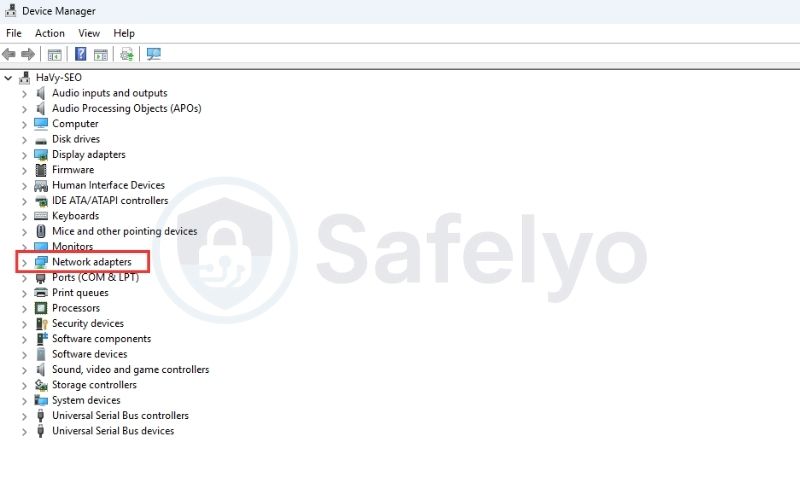
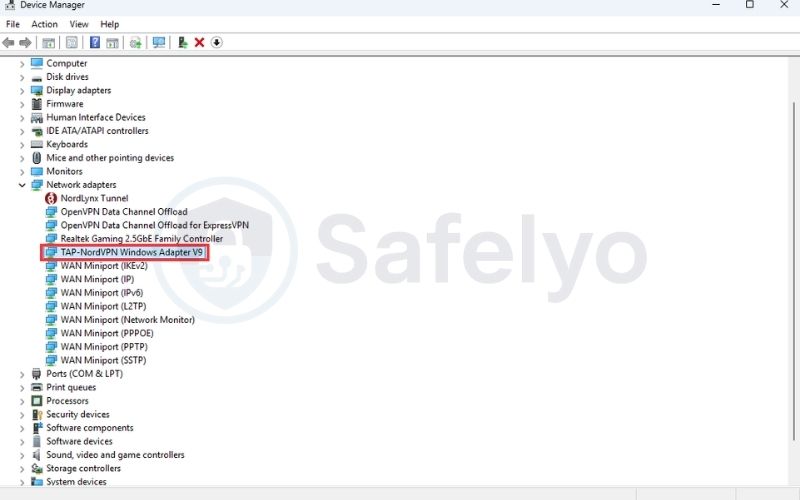
Seeing an adapter does not necessarily mean that the VPN is currently using it. VPN clients may install virtual interfaces or drivers that remain available even when a particular connection uses a different interface type.
8.3. What to check before using TAP
TAP requires more specific platform support because it provides Layer 2 Ethernet connectivity. Before deploying a bridged configuration, verify that the complete client and operating system combination supports it.
- Client support: Confirm that the VPN client supports TAP and the required bridged configuration.
- Driver availability: Check that the required virtual network driver is installed and working correctly.
- OS compatibility: Verify that the operating system supports the required virtual interface and networking configuration.
- Interface creation: Confirm that the expected TAP interface appears when the VPN client is installed or started.
- Configuration support: Make sure the client supports the OpenVPN directives and bridging features required by your setup.
If the platform does not support TAP, use a routed TUN configuration when the application only requires IP connectivity.
9. Common OpenVPN TUN and TAP problems
Configuration mismatches, missing virtual network drivers, and routing or bridging errors are common causes of OpenVPN TUN/TAP problems. A structured troubleshooting process can help identify whether the issue comes from the virtual interface, VPN configuration, or network routing.
9.1. TUN or TAP interface not found
When OpenVPN cannot access the virtual interface it needs, the connection may fail before normal VPN traffic can pass through the tunnel. The first step is to determine whether the required interface and its supporting driver are available.
- Error: The OpenVPN log reports an error such as “Cannot open TUN/TAP dev”, or the expected virtual interface does not appear on the system.
- Likely cause: The required virtual network driver or interface is missing, disabled, or unavailable to the VPN client.
- What to check: On Windows, check Device Manager → Network adapters. On Linux, check the available interfaces and whether /dev/net/tun they are present.
- Fix: Restart or repair the VPN client first. If the interface or driver is still missing, repair or reinstall the VPN client’s virtual network component. On Linux, verify that TUN support is available according to the distribution’s configuration.
9.2. Client and server use different device types
A TUN/TAP mismatch occurs when the two ends of the same OpenVPN connection are configured for different virtual interface types. Because TUN handles Layer 3 IP packets and TAP handles Layer 2 Ethernet frames, the device type must match across the connection.
- Error: The VPN connection fails, or the tunnel does not operate correctly.
- Likely cause: The client and server use different dev settings, such as dev tun on one side and dev tap on the other.
- What to check: Compare the dev directive in the client configuration with the corresponding server configuration.
- Fix: Use matching device types for the same connection: dev tun ↔ dev tun or dev tap ↔ dev tap. A server can run separate configurations using different interface types, but each connection must use a matching pair.
9.3. Routing or bridging configuration errors
If the VPN connects successfully but the client cannot reach the expected network or services, the virtual interface itself may be working correctly. The problem may instead be with IP routing in a TUN setup or Layer 2 bridging in a TAP setup.
- Error: The VPN connects and assigns an address, but the client cannot reach the expected remote network or services.
- Likely cause: TUN configurations can encounter incorrect or conflicting routes, while TAP configurations can fail when the Layer 2 bridge is incorrectly configured.
- What to check: For TUN, verify the client’s routing table, VPN subnet, and routes to the remote network. Check for overlapping local and remote subnets. For TAP, verify that the TAP interface is attached to the intended network bridge and that the bridge connects to the correct network interface.
- Fix: For TUN, resolve any conflicting subnets or routing rules, and verify the routes provided by the VPN server. For TAP, correct the bridge configuration and confirm that the TAP and physical or virtual network interfaces are connected to the intended bridge.
10. FAQs
Is TUN better than TAP?
No. TUN is better suited to routed IP traffic, while TAP is designed for Layer 2 Ethernet bridging. The right choice depends on your network requirements.
Is TUN faster than TAP?
Not always. TUN can have lower interface-level overhead, but actual OpenVPN performance depends on factors such as CPU, encryption, network conditions, MTU, and traffic patterns.
Does TAP use more bandwidth?
It can, especially when Ethernet-level and broadcast traffic is carried across the VPN. However, TAP does not inherently consume more bandwidth in every configuration.
Do I need TAP for RDP?
No. RDP normally works through a routed TUN VPN because it uses IP connectivity. You only need Layer 2 bridging for other network requirements.
Can I access a printer or NAS through TUN?
Yes, if the printer or NAS is reachable through a routable IP address. Device discovery may require additional DNS, routing, or discovery configuration.
Is TUN more secure than TAP?
No. Neither is inherently more secure. Security depends more on routing, segmentation, firewall rules, and overall VPN configuration.
Can TUN and TAP be mixed in the same VPN connection?
No. The client and server must use matching device types: dev tun with dev tun or dev tap with dev tap.
Does OpenVPN still support TAP?
Yes, but TAP availability depends on the operating system and VPN client. Support is more limited on some modern platforms, particularly mobile environments.
Which virtual interface does WireGuard use?
WireGuard uses a Layer 3 tunnel model, making it conceptually closer to TUN than TAP. It does not provide TAP-style Layer 2 Ethernet bridging.
11. Conclusion
Choosing between OpenVPN TAP vs TUN depends on the type of network connectivity you need. TUN is the standard choice for routed Layer 3 traffic, including internet access, remote work, remote services, and most site-to-site VPNs. TAP is better suited to specialized scenarios that require Layer 2 Ethernet behavior, such as network bridging or certain broadcast-dependent applications.
The key distinction is simple: TUN handles IP packets, while TAP handles Ethernet frames. Neither is universally faster or more secure, so choose the interface that matches your network architecture rather than treating one as an upgrade over the other.
For more VPN networking tutorials and practical guides, explore VPN Guides category on Safelyo.










