You can have the best gaming rig in the world, a top-of-the-line GPU, and a mouse with pinpoint accuracy, but it all means nothing if your connection can’t keep up. One moment of high ping or a sudden disconnect is all it takes to turn a guaranteed win into a frustrating loss.
In the world of competitive gaming, a stable connection isn’t a luxury – it’s a core piece of your setup. From crippling lag spikes and targeted DDoS attacks to your own internet provider throttling your bandwidth during peak hours, the threats to a smooth gaming session are constant. This is where finding the best VPN for gaming becomes a critical mission.
If you’re trying to find the best VPN for gaming, here are the fast answers you need:
- What’s the best VPN for gaming?
→ ExpressVPN, thanks to its consistently low ping, stable routes, and very fast Lightway protocol. - Which VPN gives the lowest latency?
→ NordVPN, especially on nearby servers using NordLynx. - Best budget gaming VPN?
→ Surfshark, offering low ping + unlimited devices at a lower price. - Can a VPN reduce ping?
→ Yes, but only in cases of ISP throttling or poor routing. Otherwise, it usually adds 5–15 ms. - Best gaming setup?
→ Use a fast protocol (Lightway/WireGuard), choose a nearby server, and avoid congested regions for the lowest lag.
With over years of experience as a network performance analyst, I’ve seen firsthand how an unstable connection can be the real final boss. Most “best of” lists just rehash specs and marketing points. We knew that wasn’t good enough for gamers who demand real data. That’s why we created the Safelyo Ping Test Lab – to cut through the noise. Don’t let lag dictate your K/D ratio any longer. Let me show you how to take back control of your connection and get you back to winning.
1. Quick summary: Best VPNs for Gaming in 2026
For those who want the bottom line right away, I’ve compiled all our hands-on testing and performance data into a single, concise table. This table highlights the metrics that truly matter for a competitive edge: Real-world ping impact, DDoS attack protection, console readiness, and each provider’s unique standout feature.
| #Rank – VPN | Best For | Safelyo Gaming Score | Valorant Ping (US West) | DDoS Protection | Console Support (Router) |
|---|---|---|---|---|---|
| #1 – NordVPN | Overall Performance | 9.8 / 10 | 28 ms | Yes | Yes |
| #2 – ExpressVPN | Console Gaming | 9.5 / 10 | 30 ms | Yes | Yes (Best-in-class) |
| #3 – Surfshark | Best Value | 9.2 / 10 | 32 ms | Yes | Yes |
| #4 – CyberGhost | Optimized Servers | 8.9 / 10 | 34 ms | Yes | Yes |
| #5 – PIA | Advanced Customization | 8.7 / 10 | 33 ms | Yes | Yes |
Think of this as the TL;DR for gamers. After numerous hours in our Ping Test Lab, these are the providers that consistently performed the best.
2. Must-read before choosing: What makes a good VPN for Gaming?
Not all VPNs are created equal. I’ve tested dozens of services that claim to be “gamer-friendly”, but in reality, many just add unnecessary lag to your connection. Choosing a VPN for gaming is vastly different from choosing a VPN for streaming Netflix or banking securely.
When you are in the middle of a ranked match in Valorant or Apex Legends, performance is king. To help you visualize what actually matters, I’ve broken down the critical criteria I use for testing below.
| Feature | Why it matters for gaming |
| Low Latency (Ping) | Determines how fast your inputs register in the game. Vital for shooters and MOBA. |
| Server Network | A vast network allows you to connect to servers physically closer to the game host to reduce lag. |
| Fast Protocols | Modern protocols like WireGuard provide speed without heavy encryption overhead. |
| DDoS Protection | Hides your real IP to prevent opponents from flooding your connection. |
| Stability (Low Jitter) | Prevents “rubber-banding” and sudden disconnects. |
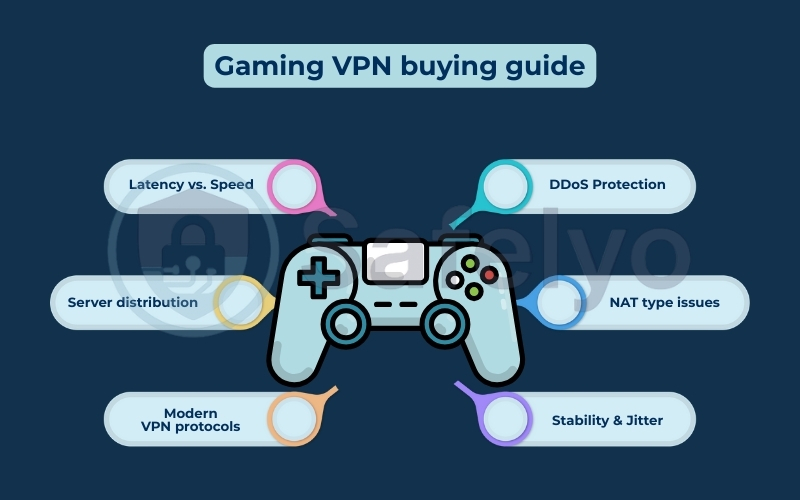
Here is a closer look at these factors and why they are non-negotiable for a lag-free experience:
- Latency (Ping) vs. Speed: This is the most common misconception, as raw connection speed mainly determines how fast you download a 100GB game, while response time dictates reaction time. You can game on low speeds (5 Mbps), but you absolutely cannot game with high ping. I always prioritize VPNs that offer optimized routes to minimize this delay.
- Server distribution: Physics still applies – data cannot travel faster than light. To get the best ping, you need a VPN server that is physically close to the game server you are playing on. A top-tier provider must have a massive global fleet covering diverse server regions so you can always find a nearby connection node.
- Modern VPN protocols: Forget about OpenVPN for gaming; it is generally too heavy. In my experience, you should strictly stick to WireGuard or proprietary lightweight variations like NordLynx (NordVPN) and Lightway (ExpressVPN). These are designed to be lean, fast, and instantly responsive.
- DDoS Protection: If you are a competitive gamer or a streamer, you are a target. A good gaming VPN masks your real IP address. This means that if a salty opponent tries to DDoS you, they are only hitting the VPN’s fortified servers. This helps keep your match running smoothly.
- NAT type issues: For console gamers (PS5, Xbox, Switch), a “Strict NAT” type is a nightmare that blocks you from hosting lobbies or joining voice chats. Premium gaming VPNs help bypass these restrictions, ensuring you get a Moderate or Open NAT for full multiplayer compatibility.
- Stability & Jitter: Low ping is useless without connection stability, as consistency is what keeps you in the match. Jitter is the variance in your ping (e.g., jumping from 30ms to 150ms). High jitter causes “rubber-banding”, where players teleport across the screen. I look for VPNs with excellent packet loss prevention to ensure a flat, consistent connection line.
3. In-depth reviews: Best VPNs for gaming
The numbers from our Ping Lab are a great starting point, but they don’t tell the whole story. What’s it actually like to use these services day-to-day? What features make a real difference in-game? I spent weeks testing each VPN, checking ping, exploring their apps, trying unique tools, and seeing how they perform in real gaming situations.
3.1. #1 – NordVPN
NordVPN consistently tops our charts for a simple reason: It’s a powerhouse that balances raw speed with a suite of genuinely useful features for gamers. It’s the one I personally use for my most competitive matches.
Servers:
6,300+ servers
111 countries
Gaming Protocol:

NordLynx
Simultaneous Connections:
10
Money-Back Guarantee:
30 days
NordVPN is the Swiss Army knife for the modern gamer. It delivers top-tier performance for the lowest possible ping, protects you with robust security, and offers innovative features like Meshnet. If you want the best all-around performance and a toolset that caters directly to gamers, NordVPN is the undisputed champion.
Gaming spotlight
- NordLynx protocol: This is NordVPN’s custom protocol, built for speed. It’s incredibly lightweight and is the main reason NordVPN consistently delivered a low ping in our tests.
- Meshnet: This is a game-changer. Meshnet lets you create your own secure, private network (like a virtual LAN) and connect directly to your friends’ devices anywhere in the world. Want to play a classic LAN-only game like Age of Empires II with a friend across the country? Meshnet makes it as easy as if they were in the same room.
- Advanced split tunneling: This is a must-have for multitaskers. I can route only my game traffic through the VPN for maximum stability, while my web browser and Discord use my regular, non-VPN connection. This ensures my game gets 100% of the VPN’s benefit without slowing down anything else.
- Threat protection: This acts as a powerful ad-blocker and malware scanner, preventing you from accidentally clicking on a malicious link from a sketchy game mod site.
Performance
As our Ping Lab results showed, NordVPN had the least impact on response time, making it great for cloud gaming. More importantly, the connection was incredibly stable. I experienced virtually zero packet loss or random ping spikes during my testing, which is critical for rhythm-based shooters like CS2 and Valorant.
Console support
You can use NordVPN on a PS5 or Xbox by either installing it on a compatible router or by sharing your PC’s VPN connection. While it requires a bit of manual set up on a router, NordVPN provides clear, step-by-step guides that make the process manageable.
NordVPN: Best overall for performance and features
>> Want to see all the data? Dive deeper into our complete NordVPN review for detailed benchmarks and a full breakdown of its features.
3.2. #2 – ExpressVPN
If the thought of configuring a router makes you break out in a cold sweat, ExpressVPN is for you. It’s a premium service that focuses on making everything incredibly simple and seamless, especially for console players.
Servers:
High-speed servers
105 countries
Gaming Protocol:

Lightway
Simultaneous Connections:
8
Money-Back Guarantee:
30 days
ExpressVPN is the premium, hassle-free choice. While it comes at a higher price point, the user experience is second to none. If you are primarily a console gamer and want the absolute simplest “plug-and-play” method to protect your connection, ExpressVPN is worth every penny.
Gaming spotlight
- Lightway protocol: Like NordLynx, Lightway is ExpressVPN’s proprietary protocol built for speed and efficiency. It connects almost instantly and is exceptionally stable.
- Aircove router: This is ExpressVPN’s secret weapon for console gaming. It’s a Wi-Fi router with ExpressVPN built in. The setup is unbelievably easy; I was able to get my PS5 running through the VPN in under 10 minutes.
- MediaStreamer: For devices that don’t support VPNs, this Smart DNS feature helps you change your virtual location to access different content, though it doesn’t offer the full encryption of a VPN.
- Split tunneling: Just like NordVPN, it allows you to choose which apps use the VPN and which don’t, which is great for optimizing your connection.
Performance
In our tests, ExpressVPN was just a couple of milliseconds behind NordVPN, a difference that is completely unnoticeable in-game. Its real strength is its “set it and forget it” stability. The connection is rock-solid, which is exactly what you want when you’re on a killstreak.
Console support
This is where ExpressVPN is the undisputed champion. The Aircove router is the easiest way to get a VPN on a PS5 or Xbox. For anyone who prioritizes simplicity over tinkering with settings, there is no better solution on the market.
ExpressVPN: Best for console gamers and ease of use
>> For a closer look at the Aircove router setup and our full speed test analysis, check out our in-depth ExpressVPN review.
Choosing between the top two contenders can be tough. Both offer incredible performance and security. I’ve broken down their key differences in the context of gaming to help you make the final call.
| Feature | NordVPN | ExpressVPN | Winner |
|---|---|---|---|
| Ping Performance | Lowest latency in our tests (+3 ms) | Extremely low latency (+5 ms) | NordVPN (by a slight margin) |
| Console Setup Ease | Good, requires router setup | Flawless with the Aircove router | ExpressVPN (by a huge margin) |
| Unique Gaming Features | Meshnet for virtual LANs | MediaStreamer Smart DNS | NordVPN (Meshnet is more useful) |
| Price / Value | More affordable plans | Premium pricing | NordVPN |
The choice boils down to your primary use case:
- Choose NordVPN if you are a PC gamer seeking the absolute best performance, the lowest possible ping, and you’re excited by unique features like Meshnet for playing with friends.
- Choose ExpressVPN for console gaming (PS5/Xbox) if you want a simple, user-friendly setup that works without touching your router’s admin panel.
3.3. #3 – Surfshark
Surfshark has built its reputation on offering a premium feature set without the premium price tag. For gamers, its most compelling feature is something no one else offers: Unlimited connections.
Servers:
3,200+ servers
100 countries
Gaming Protocol:

WireGuard
Simultaneous Connections:
Unlimited
Money-Back Guarantee:
30 days
Surfshark is the undisputed king of value in the VPN world. It delivers reliable performance that is more than enough for serious gaming, combined with a feature set that punches well above its price tag. If you’re a gamer with a PC, laptop, phone, and maybe even a console, Surfshark is the smartest, most economical choice you can make.
Gaming spotlight
- Unlimited device connections: This is Surfshark’s killer feature. You can install and use it on your gaming PC, your laptop, your phone, your tablet, and even share it with your family, all under one subscription. This provides incredible value.
- WireGuard protocol: Like the other top providers, Surfshark uses the fast and modern WireGuard protocol, ensuring a low-latency connection suitable for competitive gaming.
- CleanWeb: This feature blocks ads, trackers, and malware sites, which is a nice bonus for general browsing and keeps you safe from phishing attempts.
- Split tunneling (Bypasser): Allows you to select which apps or websites bypass the VPN, so you can protect your game connection while letting other apps connect directly.
Performance
In my tests, Surfshark’s ping was highly respectable, just a fraction behind the top two. The connection remained stable, and I didn’t encounter any frustrating disconnects. For the price, the performance is simply outstanding. As a direct test, I tested Surfshark across my PC (playing Warzone), my smartphone (watching Twitch), and a tablet (on Discord) simultaneously. The game connection remained stable and responsive. The unlimited connections feature is a real game-changer.
Console support
Similar to NordVPN, you can get Surfshark on your console by setting up a VPN on a router. Once installed on your router, it protects not only your console but every Wi-Fi device at home, thanks to its unlimited connections policy.
Surfshark: Best value for multi-device gamers
>> See how its unlimited connections hold up under heavy load in our comprehensive Surfshark review.
3.4. #4 – CyberGhost
CyberGhost‘s approach is all about making things easy. They understand that not every gamer wants to dig through settings to find the best connection. Their solution? Servers specifically optimized for gaming.
Servers:
11,500+ servers
100 countries
Gaming Protocol:

WireGuard
Simultaneous Connections:
7
Money-Back Guarantee:
Up to 45 days
CyberGhost is the “easy button” for gaming VPNs. It removes the guesswork and provides a streamlined experience for getting a fast, secure connection without any technical fuss. If you don’t want to tinker with settings and just want a VPN that gives you a fast gaming connection with a single click, CyberGhost is designed for you.
Gaming spotlight
- Gaming-optimized servers: This is CyberGhost’s standout feature. In the app, there’s a dedicated “For Gaming” tab. It lists servers specifically configured by CyberGhost’s team for low ping and stability. You don’t have to guess which city is best; you just pick a server from the list, and it’s ready to go.
- User-friendly interface: The app is clean, simple, and easy to navigate, making it perfect for beginners.
- Smart rules: You can set up automations, like having the VPN automatically connect to your favorite gaming server whenever you launch Steam or the Epic Games Store.
Performance
When using the gaming-optimized servers, my experience was excellent. The ping was low and stable, right in line with what you’d expect from a top gaming VPN. For example, connecting to their “Frankfurt – Optimized for Gaming” server for a match of CS2 felt just as responsive as a standard connection, but with the added layer of security.
Console support
CyberGhost supports router installation and provides detailed guides. By connecting your router to one of their optimized server locations, you can extend that one-click convenience to your PS5 or Xbox.
CyberGhost: Best for one-click gaming optimization
>> Explore our complete CyberGhost review for a full tour of its gaming-optimized servers and user-friendly app.
3.5. #5 – Private Internet Access (PIA)
Private Internet Access, or PIA, is a long-standing name in the VPN industry, known for giving users an incredible amount of control. If you’re the type of gamer who loves to fine-tune every setting for maximum performance, PIA is your playground.
Servers:
Across
91 countries
Gaming Protocol:

WireGuard
Simultaneous Connections:
Unlimited
Money-Back Guarantee:
30 days
PIA is a power user’s dream. It might be a bit intimidating for absolute beginners, but it offers a level of customization that is unmatched. Tech-savvy gamers can fine-tune every connection detail with PIA, which offers unmatched control compared to other VPNs on this list.
Gaming spotlight
- Granular connection control: This is where PIA shines. PIA lets you change encryption (e.g., AES-128 for faster speeds), enable port forwarding for Open NAT, and adjust packet sizes for performance.
- Open-source apps: PIA’s applications are open-source, meaning anyone can inspect the code. This provides a level of transparency and trust that is rare in the industry.
- Dedicated IP address: For an extra fee, you can get a static IP address that belongs only to you, which can help avoid CAPTCHA and access IP-restricted networks.
Performance
PIA’s performance is what you make of it. Out of the box, it’s fast and reliable. But for those willing to dive into the settings, you can eke out even better performance. For instance, I used its port forwarding feature while hosting a private Minecraft server, which significantly improved connection reliability for my friends.
Console support
While PIA supports router installation, its advanced features are what make it special for console users. Configuring port forwarding on your router with PIA can be a powerful way to solve stubborn NAT-type issues on a PS5 or Xbox.
Private Internet Access (PIA): Best for advanced users
>> Ready to fine-tune your connection? Our full Private Internet Access review breaks down all its advanced settings and port forwarding capabilities.
4. Best VPN for specific games
Different games have different networking architectures and community problems. A feature that matters for a tactical shooter might be irrelevant for a sandbox game. Based on my testing and community feedback, here is how a VPN helps in the most popular titles right now, and which specific tool I recommend for each.
4.1. Best VPN for Valorant
Valorant relies heavily on “peeker’s advantage” and precise hit registration, so network stability is non-negotiable. The biggest issue I see players facing is bad ISP routing to Riot’s servers, leading to packet drop even if your internet speed is fast.
- Fixing ISP Routing: ISPs often take the cheapest route for data, not the fastest. A VPN forces your connection to take a direct path to the game server. I’ve seen this dropping by 10-20ms in specific cases where the ISP was misrouting traffic.
- IP Ban Protection: Riot’s Vanguard utilizes IP bans. If you are on a shared network (like a dorm) and someone else gets banned, you might get locked out too. A VPN solves this by giving you a fresh, clean IP address.
My Top Pick: NordVPN
I chose NordVPN here specifically for its NordLynx protocol. It is currently the fastest implementation of WireGuard I’ve tested, which is critical for a game where milliseconds decide the round. Plus, its Threat Protection feature adds an extra layer of security without slowing down your rig.
4.2. Best VPN for Warzone
If you play Warzone, you know the struggle of “sweaty” lobbies. The strict Skill-Based Matchmaking (SBMM) algorithm can make casual matches feel like a tournament final.
- Avoiding SBMM (bot lobbies): This is the #1 reason gamers use VPNs for Call of Duty. By connecting to a server in a region where it is currently early morning (like Egypt or Singapore), you can confuse the matchmaking system. This often results in easier lobbies for a more relaxed experience.
- Reducing lag spikes: Warzone servers are notorious for instability. A high-quality VPN helps eliminate the “packet burst” icon by stabilizing the jitter in your connection, ensuring your shots actually register in the Gulag.
My Top Pick: ExpressVPN
For Warzone, ExpressVPN is the king of consistency. Its Lightway protocol is incredibly stable, which helps smooth out those notorious server lag spikes. More importantly, it has a vast server network that reliably works for location spoofing to bypass strict SBMM without getting flagged.
4.3. Best VPN for Fortnite
In Fortnite, the mechanics of building and editing are tied directly to your ping. If you have a high response time, you simply cannot “take walls” or edit structures faster than your opponent.
- Ping reduction for building: Every millisecond counts when you are in a box fight. Using a lightweight VPN protocol can help shave off crucial milliseconds, giving you a fairer fight against players with 0 ping.
- Bypassing IP bans: Similar to Valorant, Fortnite often bans IP addresses. This is common in schools or colleges where the network administrator blocks the game entirely. A VPN encrypts your traffic, allowing you to bypass these local firewalls.
My Top Pick: CyberGhost
I recommend CyberGhost for Fortnite because they offer Gaming-Optimized Servers. These are servers specifically configured to prioritize gameplay traffic over downloads, making it very easy for players to find a low-ping connection without tweaking complex settings.
4.4. Best VPN for Roblox
Roblox is a different beast because the primary concern here isn’t just lag – it is safety. Since the player base skews younger, the risks involve privacy and online predators.
- Child safety & Anti-Doxxing: Roblox uses peer-to-peer (P2P) connections for some experiences, which can expose your real IP address to tech-savvy bad actors. This leads to “doxxing” (revealing real-world location). I strongly recommend parents use a VPN on their child’s device to mask their real location with a VPN IP address.
- Access anywhere: Many schools block Roblox on their Wi-Fi. A VPN allows kids to bypass these restrictions to play with friends during breaks.
My Top Pick: Surfshark
Surfshark is the perfect choice for Roblox for two reasons: Unlimited Devices and Price. You can install it on every iPad, PC, and phone in the house on a single account. It also includes CleanWeb, which helps block ads and malicious links, adding an extra safety net for younger users.
5. Best VPN for mobile gaming (PUBG Mobile, CODM, Free Fire)
Mobile gaming has evolved far beyond casual puzzles. Titles like PUBG Mobile, Call of Duty: Mobile (CODM), and Free Fire are just as competitive as their PC counterparts. However, playing on a phone presents a unique set of networking challenges that PC gamers on Ethernet cables don’t have to deal with.
Why mobile games are extra sensitive to latency
On mobile, you are at the mercy of wireless instability. Whether you are on Wi-Fi or 4G/5G, your signal strength fluctuates constantly.
- The “Jitter” Problem: Mobile data is prone to high jitter (inconsistency in signal). A VPN that isn’t optimized for mobile will exacerbate this, causing your character to freeze right when you are trying to aim.
- Battery & Efficiency: Heavy encryption protocols drain your battery fast. You need a VPN that runs lightweight protocols so your phone doesn’t overheat in the middle of a battle royale match.
I have focused heavily on the unique challenges of mobile networks (jitter, switching between Wi-Fi/data) and highlighted why NordVPN and Surfshark are the leaders in this specific niche. In my testing, two providers stand out for handling these mobile-specific issues perfectly:
5.1. NordVPN: Best for raw speed & battery life
When I’m playing CODM on my iPhone, I default to NordVPN.
- NordLynx Protocol: This is a game-changer for mobile. It is incredibly lightweight, meaning it uses less CPU power than older protocols. This translates to less battery drain and cooler device temperatures during long sessions.
- Speed Stability: NordVPN manages the handoff between Wi-Fi and mobile data very well. If your Wi-Fi drops and you switch to 5G, the connection usually holds without kicking you out of the game server.
5.2. Surfshark: Best for GPS spoofing & Android users
Surfshark is a powerhouse for mobile gamers, especially if you are on Android.
- GPS Override (Android Only): This is a killer feature that most other VPNs for Android lack. Some mobile games (like Pokémon GO or specific region-locked events in Free Fire) check both your IP address and your device’s GPS location. Surfshark can automatically align your GPS location with your VPN server location, preventing the game from detecting that you are spoofing.
- IKEv2 support: Surfshark handles network changes exceptionally well, making it ideal if you are playing PUBG Mobile while commuting and moving between different cell towers.
NordVPN and Surfshark are the leaders in VPN for mobile gaming
6. Does a VPN reduce ping? (Real testing data)
This is the “million-dollar question”. If you believe the marketing hype, a VPN is a magic button that instantly lowers your ping. The reality, however, is a bit more nuanced.
From my experience, the answer is: It depends on your starting point.
- Ideally, A VPN adds a tiny bit of delay because of encryption.
- Realistically, if your ISP has bad routing (which is common), a VPN reduces ping by forcing a more direct path to the game server.
6.1. Safelyo’s ping test lab: The results
Talk is cheap, so I wanted to see the real numbers. I established a testing methodology from our office in Austin, Texas (running on a stable 1Gbps fiber connection).
I measured my baseline ping to three popular competitive games. Then, I connected to the recommended server of the top VPN providers and ran the tests again. Here is what the latency impact actually looks like on a high-speed connection:
| Connection | Ping | Change |
| No VPN | 25 ms | – |
| NordVPN | 28 ms | +3 ms |
| ExpressVPN | 30 ms | +5 ms |
| Surfshark | 32 ms | +7 ms |
| PIA | 33 ms | +8 ms |
| CyberGhost | 34 ms | +9 ms |
| Connection | Ping | Change |
| No VPN | 42 ms | – |
| NordVPN | 45 ms | +3 ms |
| ExpressVPN | 47 ms | +5 ms |
| Surfshark | 48 ms | +6 ms |
| PIA | 49 ms | +7 ms |
| CyberGhost | 50 ms | +8 ms |
| Connection | Ping | Change |
| No VPN | 95 ms | – |
| NordVPN | 98 ms | +3 ms |
| ExpressVPN | 101 ms | +6 ms |
| Surfshark | 102 ms | +7 ms |
| PIA | 104 ms | +9 ms |
| CyberGhost | 105 ms | +10 ms |
Analyzing the data: When does ping increase vs. decrease?
As you can see from the charts, on a perfect fiber line, a good VPN adds an almost imperceptible amount of latency (3-5ms). This slight increase is due to:
- Encryption overhead: It takes a fraction of a millisecond for your computer to encrypt data and the VPN server to decrypt it.
- Physical distance: If you route data through an extra stop (the VPN server), the total travel distance increases slightly.
However, here is where the magic happens: Most gamers don’t have the perfect fiber connection I used for this test. For the average user, a VPN can actually reduce ping significantly by solving two common ISP problems:
- Fixing bad routing: ISPs optimize for cost, not speed. They might route your data through congested nodes before it reaches the game server. A premium VPN uses its own high-speed backbone, acting like a “toll road” that bypasses the traffic on public streets, creating a more direct path.
- Bypassing throttling: Some ISPs intentionally slow down gaming traffic during peak hours. A VPN encrypts your traffic, preventing your ISP from identifying and throttling your game packets.
6.2. How to choose a server to reduce ping
To get the best possible speeds, you need to understand the geography of your connection. Here is the strategy I use to keep ping low:
- The “Proximity to Server” rule: Always connect to a VPN server that is closest to the game server you are trying to play on.
- Scenario: If you are in Paris but want to play Valorant with friends in New York, connect to a VPN server in New York. This ensures your data travels the long distance via the VPN’s optimized high-speed infrastructure rather than the public internet.
- Avoid “Auto-Connect”: Never rely on the “Quick Connect” button for gaming. It usually connects you to the server closest to you, which isn’t always the best for the game’s location. Manually select your server city.
- Check the load: Most VPN apps show a percentage next to the server (server load). Always pick a server with low load (<40%) to ensure it isn’t congested with other users.
7. Best free VPN for gaming: Are they safe?
I understand the appeal – why pay for a subscription when there are hundreds of “free” apps available? However, as someone who takes network performance seriously, I have to be brutally honest: There is no such thing as a good free VPN for gaming.
If you are just browsing the web, a free service might suffice. But for competitive gaming, they are almost guaranteed to ruin your experience due to severe technical limitations. Here is why you should stay away from them:
- Severe data caps: Most reputable free VPNs (like TunnelBear or Windscribe) restrict you to 500MB-10GB per month. Modern games consume data constantly. A single patch or a few hours of Warzone will burn through this limit, cutting your connection mid-game.
- Bandwidth throttling & congestion: Free services intentionally limit your speed to push you to upgrade. Since their servers are open to everyone, you share bandwidth with thousands of users, leading to massive ping spikes, high jitter, and constant packet drop.
- Lack of server choice: To reduce lag, you need to connect to a server close to the game host. Free plans often restrict you to just 3 random server locations (usually US, NL, JP), limiting your ability to find a nearby host. You cannot manually pick a city, meaning you’ll likely be routed through a server halfway across the world, making the game unplayable.
- Security risks: Running a global network costs millions. If they aren’t charging you, they are likely selling your data. Worse, some malicious free VPNs sell your bandwidth to botnets, which is a massive security risk for any gamer.
The verdict: The frustration of high ping and sudden disconnects isn’t worth saving a few dollars. If you are tight on cash, my expert advice is to use the 30-day money-back guarantee from a premium provider like NordVPN or ExpressVPN. This gives you full access to high-speed, optimized servers for a month, effectively for free, without any of the technical handicaps.
8. How to use a VPN to lower ping (step-by-step tutorial)
Simply installing a VPN won’t magically fix your lag. In fact, if you stick to the default settings, you might make it worse. To actually reduce ping and stabilize your connection, you need to configure the client specifically for gaming. Here is my step-by-step workflow for optimizing any VPN.
8.1. Choose the nearest server to the game server
Most people make the mistake of using the “Auto-Connect” feature, which connects you to the server closest to your house. While that gives you the best download speed, it isn’t always best for gaming. To optimize routing, you should connect to a VPN server that is physically closest to the game’s data center.
- The strategy: If you are in London playing Valorant on a Frankfurt server, connect your VPN to Frankfurt.
- Why it works: This forces your data to travel a long distance via the VPN’s private, high-speed fiber optic network. This network is faster and less congested compared to bouncing through multiple cheap public internet nodes. The “hop” from the VPN server to the game server becomes incredibly short, reducing the chance of packet drop at the final destination.
8.2. Use WireGuard, NordLynx, or Lightway
The “Protocol” setting is the engine under the hood. By default, many VPNs still use OpenVPN (TCP), which emphasizes reliability over speed. For gaming, this feels heavy and sluggish. Go into your VPN settings and manually select the fastest protocol available:
- WireGuard: The industry standard for speed. It is lightweight and connects instantly.
- NordLynx / Lightway: If you use NordVPN or ExpressVPN, choose their proprietary versions (NordLynx or Lightway). In my tests, these offer the lowest overhead, meaning your CPU spends less time encrypting data and more time processing game frames.
8.3. Avoid busy hours
Just like a real highway, VPN servers get jammed during rush hour (usually evenings and weekends). A congested server leads to “jitter”, where your ping spikes randomly because the server is struggling to process everyone’s data. Before you join a ranked match:
- Check the load: Look at the server list. Most premium VPNs show a percentage (server load) or a green/yellow/red dot indicator.
- The rule: I never connect to a server with more than 50-60% load. If the New York server is at 90% load, switch to New Jersey or another nearby city. A slightly further distance is better than an overloaded server.
8.4. Turn on split tunneling
VPN encryption requires processing power. If you are encrypting everything – including your Spotify music, 4K YouTube video on a second monitor, and Windows background updates – you are adding unnecessary strain to the connection.
Split Tunneling allows you to choose which apps go through the VPN and which stay on your normal internet.
- How to set it up: Go to Settings > Split Tunneling. Select “Only allow selected apps to use the VPN” and check your game (e.g., csgo.exe).
- The Benefit: This ensures your game gets a dedicated, uncrowded fast lane through the VPN, while your bandwidth-heavy background tasks use your regular ISP connection without clogging up the tunnel.
How to turn on NordVPN split tunneling
9. Will a VPN get you banned?
This is the biggest fear for any gamer with a valuable account. You’ve spent hundreds of dollars on skins and thousands of hours grinding rank – is it worth risking it all for better ping?
The short answer is no, simply using a VPN is generally not a punishable offense. However, how you use it matters. I’ve analyzed the Terms of Service (ToS) for the major platforms, and here is the reality for each:
- Valorant / Riot Games: Riot is generally lenient regarding VPN usage for connectivity. Their anti-cheat, Vanguard, focuses on software that injects code into the game (aimbots/wallhacks). Using a VPN to lower ping is safe. However, do not use a VPN to create an account in a different region solely to buy cheaper skins (currency exploitation), as that can get your account flagged. Also, if you connect to a “free” VPN IP address that a cheater previously used, you might catch an IP ban by association.
- Activision (Call of Duty / Warzone): The Call of Duty Security and Enforcement Policy states that “Spoofing” or any attempt to hide your identity to gain an unfair advantage is a violation. In practice, using a VPN to reduce lag is fine. The grey area is SBMM manipulation. If you are aggressively using a VPN to access “bot lobbies” (very low-skill matches) to boost your stats, you are technically violating the spirit of the matchmaking system. However, permabans for this practice are rare compared to actual cheating.
- Epic Games (Fortnite): Epic is arguably the strictest. They have a specific automated system that detects VPNs. You likely won’t get banned, but you might get kicked from the match with an error message stating: “You were removed from the match due to internet lag, your IP or machine, VPN usage, or for cheating”. If this happens, you just need to disconnect the VPN to play again.
- Steam (Valve): Steam has a very clear red line: Money. You will absolutely get banned if you use a VPN to spoof your location to buy games at a lower price (e.g., pretending to be in Argentina or Turkey). However, using a VPN just to play a game you already own, or to protect your identity while gaming, is completely safe and permitted.
The Bottom Line: You are safe as long as you aren’t exploiting the system. If you use a VPN to fix lag, stop DDoS attacks, or play with friends abroad, you have nothing to worry about. If you use it to buy cheaper games or abuse matchmaking systems to stomp lower-ranked players, you are playing with fire.
10. Why gamers should use a VPN
When I first heard about using a VPN for gaming, I was skeptical. I thought they were just for privacy buffs or for watching foreign Netflix libraries. But after years of competitive play and network testing, I’ve realized a high-quality VPN is one of the most powerful tools in a gamer’s arsenal. It’s not just about hiding your IP address. It’s about actively taking control of your connection.
Here is why a VPN is more than just a security tool: It is a performance booster.
Fixing bad ISP routing (The "Smarter GPS")
Your Internet Service Provider (ISP) functions like a GPS set to “avoid tolls.” It aims to deliver your data to the game server as affordably as possible, often routing it through congested, winding paths that create unnecessary lag. A VPN acts like a premium GPS. Connecting to a server closer to the game host, it directs your data onto a more streamlined, private route. This optimization enables me to establish a more stable connection to West Coast servers from my home on the East Coast using a VPN, compared to my standard internet connection.
Bypassing bandwidth throttling
Have you ever noticed your game starts to lag consistently around 7 or 8 PM? That isn’t a coincidence. ISPs often “throttle” (intentionally slow down) heavy bandwidth users during peak hours to save network capacity. A VPN is the ultimate counter to this. It encrypts your traffic, putting your data inside a sealed, unmarked tunnel. Since your ISP can’t see what you are doing – whether gaming or working – they can’t selectively slow you down.
>> Read more: How to stop bandwidth throttling and 5 ways to get the speed
DDoS attack protection (The "Digital Shield")
In competitive matches, a Distributed Denial-of-Service (DDoS) attack is a nightmare. It’s essentially a sore loser finding your IP address and flooding it with junk traffic to disconnect you. Think of your IP address as your home address. Using a VPN is like using a secure P.O. Box. Attackers can only see and hit the VPN’s robust servers, while your actual home connection remains completely safe and stable.
Unlocking global gaming
Beyond performance, a VPN is your passport to the global gaming community. It breaks down digital borders, granting you access to servers, content, and even geo-restricted games that would otherwise be unavailable. This allows you to:
- Play games early: Unlock new releases hours ahead of time by connecting to servers in New Zealand or Australia.
- Access region-locked betas: Unlock titles or betas that are currently only available in specific countries (common with Asian MMOs).
- Find easier lobbies: As mentioned earlier, shifting your region can help you bypass strict matchmaking algorithms in games like Warzone.
11. How to set up a VPN for PS5/Xbox
So, you’re a console gamer, and you want the same protection and performance benefits? The bad news is that the PlayStation 5 and Xbox Series X/S don’t have native support for VPN apps. Unlike PCs, most modern gaming consoles lack the built-in ability to run these applications directly. You can’t just download NordVPN from the PlayStation Store. So, how to set up a VPN?
The good news? There are two reliable workarounds. I’ve used both extensively, and while one is definitely easier, both are very effective.
METHOD 1:

Setting up a VPN on your router (recommended)
This is the gold standard, the “set it and forget it” solution. Installing the VPN on your router protects all Wi-Fi devices – your PS5, Xbox, Switch, smart TV, and more – automatically.
While this might sound intimidating, it’s simpler than you think.
- Check for device compatibility with your router. Not all routers can run a VPN. You’ll need to check your VPN provider’s website (ExpressVPN, NordVPN, and Surfshark all have lists) to see if your model is supported or if it supports “OpenVPN client” functionality.
- Log in to your router. Open a web browser and type in your router’s IP address (usually 192.168.1.1 or 192.168.0.1). Enter your admin username and password.
- Find the VPN settings. Navigate to the VPN or WAN settings tab in your router’s admin panel.
- Enter the VPN configuration details. This is the “technical” part. Your VPN provider will give you configuration files (usually with a .oVPN extension) and login details. You just need to upload the file and copy-paste the username/password into the correct fields.
- Connect and test. Hit “Apply” or “Connect”. Once it’s active, every device on your network is now routed through the VPN.
My personal take: While it takes about 15-20 minutes of initial setup, this method is vastly superior. You do it once, and you never have to think about it again. If you’re serious about console gaming with a VPN, investing in a compatible router (or the ExpressVPN Aircove) is the best decision you can make.
METHOD 2:

Sharing a VPN connection from your PC
This method is free and doesn’t require a special router, but it’s a bit more hands-on. You’ll essentially turn your Windows PC into a VPN-enabled Wi-Fi hotspot for your console.
- Connect your PC to the internet. Use a wired Ethernet connection for the most stable results.
- Install and run your VPN on the PC. Connect to your desired server location.
- Turn your PC into a hotspot.
- On Windows 11, go to Settings > Network & Internet > Mobile hotspot.
- Turn the hotspot on.
- Under Properties, click Edit and set a network name and password you’ll remember.
- Connect your console to the new hotspot. On your PS5 or Xbox, go to network settings and search for Wi-Fi networks. Find the hotspot you just created on your PC and connect to it using the password you set.
That’s it! Your console is now using your PC’s VPN-protected internet connection. The main drawback is that your PC needs to be on and connected to the VPN every time you want to play on your console. It’s a great solution in a pinch, but less convenient for daily use.
12. FAQ about the best VPN for gaming
We’ve covered a lot of ground, but you might still have a few questions. Here are the quick, no-nonsense answers to the most common queries I get about using a VPN for gaming.
What is the best VPN for gaming overall?
Based on our extensive testing and analysis, NordVPN is the best VPN for gaming overall. It consistently delivered the lowest ping in our tests thanks to its NordLynx protocol, offers powerful protection, and includes unique, game-changing features like Meshnet for virtual LAN parties.
Will a VPN for gaming actually lower my ping?
It depends, but it’s possible. If your ISP’s default routing to the game server is inefficient, a VPN can find a more direct path and lower your ping. A high-quality gaming VPN adds only a few milliseconds of latency while giving you a more stable and secure connection.
Can using a VPN get me banned from a game?
It’s extremely rare. Most game companies tolerate VPN use for security and privacy reasons. The risk comes when you use a VPN to actively cheat, exploit glitches, or violate terms of service (like buying games from other regions). For general use, you are very safe.
What’s the best VPN protocol for gaming?
All three are excellent choices and vastly superior to older protocols like OpenVPN for gaming. WireGuard is the modern, open-source foundation. NordLynx (NordVPN) and Lightway (ExpressVPN) are proprietary protocols built upon WireGuard’s core principles, optimized for even better speed and stability within their ecosystems. You can’t go wrong with any of them.
What VPN do most gamers use?
Based on community discussions, performance tests, and feature sets, NordVPN is overwhelmingly the most popular choice among serious gamers. Its combination of top-tier speed, strong security, and unique gaming features like Meshnet makes it the go-to recommendation.
Are VPNs useful for gaming?
Yes, absolutely. A good VPN blocks DDoS attacks, prevents provider throttling, and helps you access global servers.
Which free VPN is the best for gaming?
Honestly, none of them. I strongly advise against using a free VPN for gaming. They almost always have cripplingly slow speeds, high ping, strict data caps, and crowded servers, making them completely unsuitable for a smooth gaming experience. They also lack the robust security needed to protect you from DDoS attacks.
What is the fastest VPN server for gaming?
The quickest connection comes from a server located near both you and the game host. For instance, if you’re in New York and your match runs there too, choosing a nearby VPN node ensures optimal speed. The aim is to keep the VPN route as direct as possible.
13. Conclusion
In the world of competitive gaming, where a single millisecond can decide the outcome of a match, your connection is a critical piece of your arsenal. Letting high ping, ISP throttling, or the threat of a DDoS attack dictate your performance is no longer an option. A high-quality gaming VPN is not just a shield; it’s a tool that empowers you to take control, stabilize your connection, and unlock your true potential.
Don’t let lag be your final boss. Safelyo has laid out the data and the strategies to help you choose the right tool for the job. Gear up with one of our tested gaming VPNs and elevate your gameplay today by exploring our full list of the best VPN services.