Chances are, you didn’t go out of your way to buy a standalone McAfee VPN subscription today. Instead, like most users, you likely noticed that blue “Secure VPN” button glowing inside your McAfee Total Protection or McAfee+ dashboard and wondered: “Is this actually protecting me, or is it just another piece of bundled bloatware?”
It’s a fair question. In the world of digital security, “free” or “included” often comes with strings attached. In this comprehensive McAfee VPN review, I’m going to strip away the marketing fluff and tell you exactly what you’re getting.
VPN Score:
4.6
McAfee VPN Review 2026: Basic Protection, Limited VPN Power
| MCAFEE VPN REATURE | |
| Unique Features | Built-in with McAfee Total Protection, automatic VPN activation on public Wi-Fi, and system-wide protection via Safe Connect infrastructure. |
| Unblocking Ability | Limited streaming support; works inconsistently with Netflix and YouTube, often gets blocked by BBC iPlayer, Hulu, and Disney+. |
| Server Network | Around 2,000 servers across nearly 50 countries. |
| Dedicated IP | Not available. |
| Supported Platforms | Windows, macOS, Android, iOS. |
| Simultaneous Connections | 5 devices (unlimited on select premium bundles). |
| Security Features | AES-256 encryption, Kill Switch (desktop only), DNS protection, strict No-Logs policy. |
| Protocols | WireGuard (primary), IKEv2. |
| Performance | Average speeds: 150-400 Mbps; suitable for browsing and light streaming. |
| Torrenting | Allowed, but with limited server support and no P2P optimization. |
| Trial & Guarantee | 30-day money-back guarantee. |
| Payment Methods | Credit card, PayPal (availability varies by region). |
| Customer Support | 24/7 live chat, email support, and online help center. |
BEST FOR: McAfee VPN is best suited for users who want basic, always-on privacy protection bundled with a well-known antivirus suite rather than a fully featured, standalone VPN.
It’s an ideal choice for casual users, families, and non-technical audiences who frequently connect to public Wi-Fi and value automatic protection without manual configuration. However, it’s not recommended for power users who prioritize advanced privacy tools, high-speed global streaming access, or optimized torrenting performance.
Since McAfee utilizes the Catapult Hydra protocol – the same technology that powers Hotspot Shield – you might be surprised by its raw speed. However, as I’ve learned from years of testing, speed is only one piece of the puzzle.
Whether you are a casual browser looking to secure your bank details on public Wi-Fi or a movie buff trying to unblock international streaming libraries, I’ve put this VPN through the wringer. From its complex privacy policy and U.S. jurisdiction to its hit-or-miss performance with Netflix, let’s find out if this VPN is a worthy “bonus” or if you’re better off upgrading to a dedicated powerhouse like NordVPN or Surfshark.
Disclaimer
At Safelyo, our reviews are based on real-world testing and human expertise. We may earn a small commission if you purchase through our links, at no extra cost to you. This supports our lab but does not influence our rankings.
1. McAfee VPN overview: What you should know in 60 seconds
If you’re in a hurry, here is the bottom line: McAfee VPN (technically known as McAfee Safe Connect) is a convenience VPN. It isn’t trying to compete with the likes of NordVPN or ExpressVPN for the title of “most advanced security tool on the planet”. Instead, it is designed to be a set-it-and-forget-it feature for people who already use McAfee’s antivirus software.
| Metric | Score | Brief Verdict |
| Privacy & Security | 4.0 / 10 | Concerns over connection logs and U.S. (Five Eyes) jurisdiction. |
| Apps & UX | 6.5 / 10 | Very user-friendly but lacks all advanced features. |
| Speed & Performance | 5.5 / 10 | Decent on local servers; significant drops on long distances. |
| Streaming | 2.0 / 10 | Consistently fails to unblock Netflix, Disney+, or BBC iPlayer. |
| Torrenting | 3.0 / 10 | Not recommended; lacks P2P optimization and a reliable kill switch. |
| Pricing & Value | 5.5 / 10 | Only worth it as part of the Total Protection bundle. |
| OVERALL RATING | 4.4 / 10 | A basic add-on, not a premium VPN. |
During my testing, I found that while it excels in simplicity and raw speed, it falls short for power users. It uses bank-grade encryption and the lightning-fast Catapult Hydra protocol, making it excellent for basic tasks like checking your bank account at a coffee shop.
To help you make a quick decision, here is a balanced look at the pros and cons of McAfee VPN based on my 2026 testing.
PROS
- Extremely Easy to Use: The “one-click” interface is perfect for beginners and non-technical users.
- Surprisingly Fast Speeds: The Catapult Hydra protocol delivers excellent performance on US and Asian servers.
- Great Bundle Value: If you already pay for McAfee Antivirus, the VPN is an excellent “free” bonus.
- Unlimited Devices: Higher-tier plans (McAfee+) allow you to protect every device in your household.
- Bank-Grade Security: Uses AES-256 encryption and offers solid leak protection for public Wi-Fi.
- Stable Mobile Apps: Both iOS and Android apps are lightweight and highly rated by users.
CONS
- US Jurisdiction: Headquartered in the USA (a core member of the Five Eyes surveillance alliance).
- Questionable Logging: Collects “telemetry” data and lacks an independent audit of its no-logs claims.
- Poor Streaming: Consistently blocked by Netflix, Disney+, and BBC iPlayer (Score: 2.0/10).
- Inconsistent Global Network: Experienced a 97% speed loss on UK and Australian servers during testing.
- Basic Features Only: Missing advanced tools like WireGuard, Multi-hop, or universal Split Tunneling.
- Aggressive Upselling: Desktop users often face annoying pop-ups and complicated auto-renewal cycles.
However, if your goal is to evade government surveillance or unblock every regional version of streaming platforms, you’ll likely find its features too restrictive. It’s a solid “freebie” if you have a McAfee Total Protection subscription, but I wouldn’t recommend buying it as a standalone product.
BEST FOR
- Existing McAfee subscribers who only need a simple tool for public Wi-Fi.
- Non-technical users who want a “one-click” interface.
AVOID IF
- You want to watch international streaming libraries (Netflix/Hulu).
- You are a privacy advocate who requires a strict no-logs policy.
- You are a gamer or torrent user looking for low latency and P2P support.
- You need advanced tools like split tunneling or multi-hop.
2. What’s new in 2026? (Any real improvements?)
If you haven’t checked in on McAfee’s VPN in a year or two, you might be wondering if the company has finally decided to take privacy as seriously as it takes malware. After spending a week testing the latest version, my honest take is that 2026 brings some welcome “quality of life” tweaks, but no revolutionary shifts in the product’s DNA.
The most significant update is the bandwidth logic. In the past, many users were frustrated by a strict 250MB or 500MB monthly cap on the free/trial versions. In 2026, McAfee streamlined this: If you are on a McAfee+ or Total Protection plan with auto-renewal turned on, you now get unlimited data across all your devices.
Here is a quick breakdown of what has actually changed – and what hasn’t:
- Improved Kill Switch stability: One of my biggest gripes in previous years was the kill switch failing to reconnect after a laptop woke up from sleep mode. This year, the Windows and Android apps feel much more robust.
- A “Quieter” interface: McAfee has reduced the number of aggressive pop-ups asking you to “Secure your connection” every time you join a known home network. It’s a small change, but it makes the user experience far less annoying.
- The Catapult Hydra standard: While most of the industry has migrated to WireGuard, McAfee is doubling down on the Catapult Hydra protocol. It’s still incredibly fast, but it lacks the transparency of open-source protocols.
- What’s still missing: Unfortunately, we are still waiting for independent audits of their logging practices. There is also still no sign of Multi-hop servers or advanced obfuscation tools for users in restrictive countries.
The bottom line on 2026 updates: McAfee is clearly focusing on making the VPN a “set-it-and-forget-it” tool for families. It’s more stable and less intrusive than before, but it still doesn’t offer the deep security customization that a dedicated VPN provider would.
3. What are you actually using? McAfee VPN, Secure VPN, or Safe Connect
If you are confused by McAfee’s naming convention, you aren’t alone. One of the most common questions I get is whether “McAfee Safe Connect” is the same thing as the “Secure VPN” button inside the antivirus dashboard. The short answer is: They use the same engine, but they are packaged differently.
To understand what you are paying for, you need to distinguish between these versions. Here is a quick breakdown to help you identify which one you have:
| Feature | Safe Connect (Standalone) | Secure VPN (Bundle) | Free / Basic Version |
| How to get it | Downloaded separately via App Store or official site. | Included in Total Protection or McAfee+. | Often pre-installed on new PCs or offered as a trial. |
| Data limit | Unlimited (Paid). | Unlimited (with auto-renewal). | 250MB – 500MB per month. |
| Interface | Dedicated standalone app. | Integrated button inside the McAfee dashboard. | Limited standalone app. |
| Server choice | Manual selection (~50 locations). | Manual selection (~50 locations). | Automatic only (no manual choice). |
| Best for | Mobile users who want a VPN only (no antivirus). | Families are already using the McAfee security suite. | Very occasional, emergency use. |
3.1. McAfee Safe Connect (The Standalone App)
This is the standalone VPN product you can find on the Apple App Store or Google Play Store. You can subscribe to this separately without buying the antivirus. However, as I’ll explain in the pricing section, this is almost always a bad deal. It provides basic digital security for your internet traffic, but lacks the deep integration of the suite.
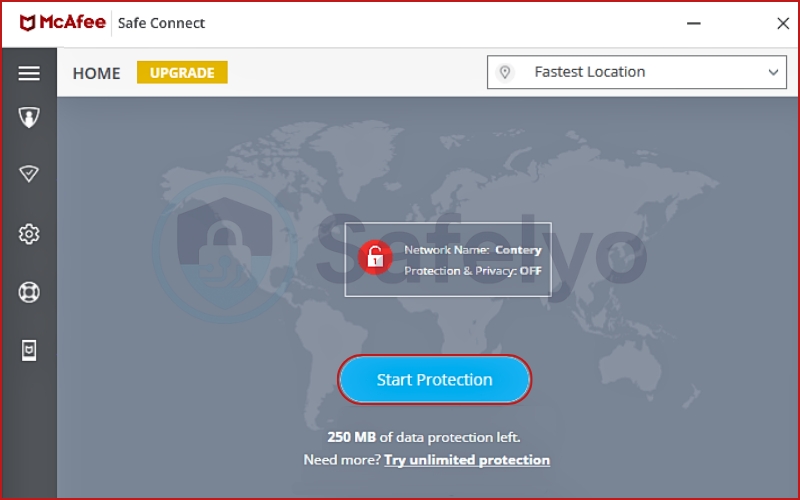
3.2. McAfee Secure VPN (The Integrated Feature)
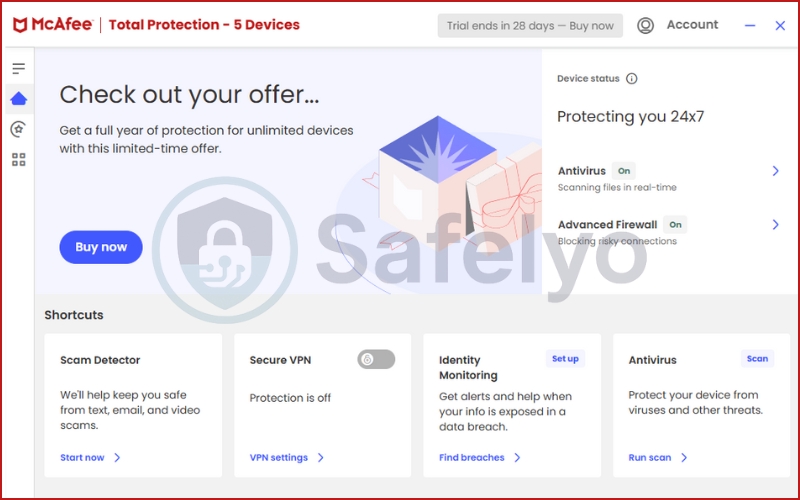
This is what most people are actually using. If you have McAfee Total Protection or McAfee+, the VPN is built directly into the main security console. In 2026, McAfee has moved away from forcing you to download a separate app on Windows; you can now toggle the VPN on and off right next to your malware scanner.
3.3. The “white label” reality: Powered by Hotspot Shield
It is important to know that McAfee doesn’t actually own its VPN server network. Instead, they “white-label” technology from a company called Pango (the owners of Hotspot Shield).
When you hit “Connect”, your data travels through the Catapult Hydra protocol. This is why the speeds feel similar to Hotspot Shield, but the features are much more limited because McAfee has stripped away the advanced settings to keep the interface simple for casual users.
The Tip: Never buy McAfee VPN as a standalone product. If you aren’t using the McAfee Antivirus suite, there is zero reason to choose this over a dedicated provider like Surfshark or NordVPN, which offer more features for a lower price.
4. Privacy & logging (the “hidden” cost)
If you use a VPN to stay truly anonymous, this is the part where you might want to look elsewhere. While many VPNs market themselves as “privacy tools”, McAfee VPN is, at its core, a product of a massive U.S. security corporation. This brings two major challenges: Jurisdiction and data transparency.
4.1. The U.S. jurisdiction and the Five Eyes
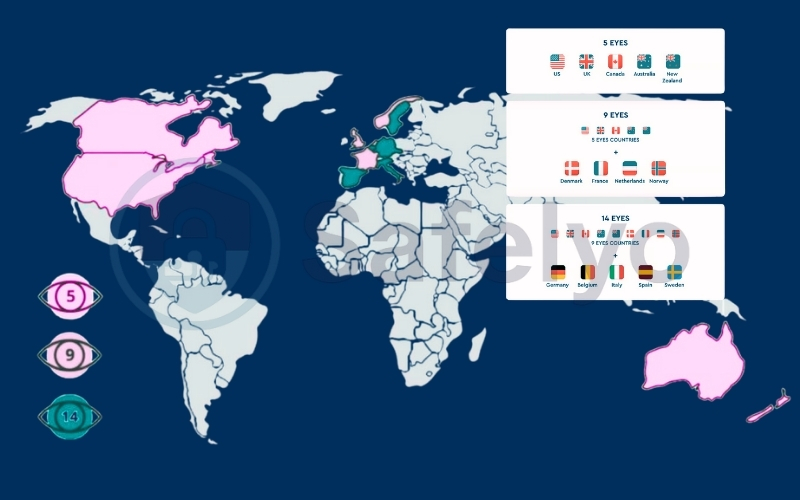
McAfee is headquartered in San Jose, California. This means it operates under the legal framework of the United States, a founding member of the Five Eyes alliance.
In my years of reviewing security tools, this is always a red flag for high-level privacy. If a government agency issues a subpoena or a National Security Letter, McAfee is legally required to comply. Unlike providers based in Panama (NordVPN) or the British Virgin Islands (ExpressVPN), McAfee cannot easily ignore U.S. legal pressure.
4.2. What does the privacy policy actually say?
When I dug into the fine print of the McAfee privacy policy, I found that they are much more honest about data collection than your average VPN. While they claim they do not sell your data, they do collect a significant amount of “telemetry” and metadata. This includes:
- IP address: They collect this temporarily to establish the connection.
- Device ID: This is used to track your subscription and ensure you aren’t exceeding device limits.
- Web traffic data: McAfee states they may collect information about web domains visited and web traffic data for troubleshooting and “security purposes”.
4.3. The missing piece: Independent audits
The biggest issue I have with their no-logs policy is that it has never been verified by a third party. Top-tier VPNs like Mullvad or Proton VPN undergo independent audits regularly to prove they aren’t keeping tabs on you. To this day, we simply have to “take McAfee’s word for it”, which isn’t enough for anyone seeking total anonymity.
My verdict on privacy: If you just want to hide your banking activity from the guy sitting next to you at Starbucks, McAfee VPN is perfectly safe. However, if you are a whistleblower, a journalist, or someone who demands absolute digital security, this is not the tool for you.
5. Security & core features: Enough for the basics, but not much else
When evaluating a VPN’s security features, I look for a balance between “invisible” protection and manual control. McAfee VPN leans heavily into the “invisible” side. It provides the essential armor needed to shield your internet traffic, but if you’re looking for a dashboard full of toggles and advanced settings, you will be disappointed.
5.1. Encryption: Bank-grade standards
The core of McAfee’s protection is AES-256 encryption. This is the industry standard (often referred to as “bank-grade”), and it is practically unhackable by brute force. Whether you are using the standalone app or the bundle, your data is wrapped in this high-level security layer.
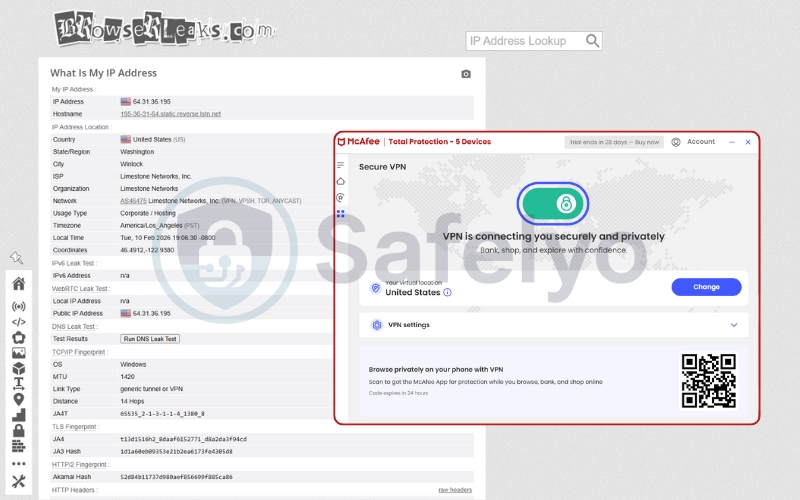
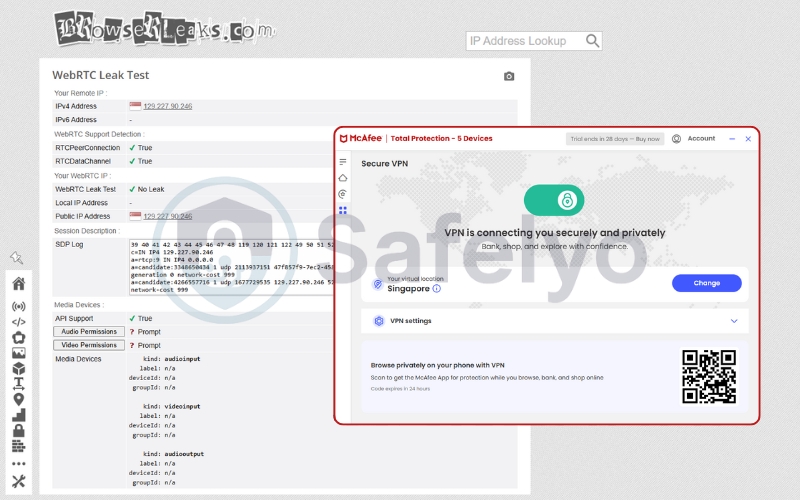
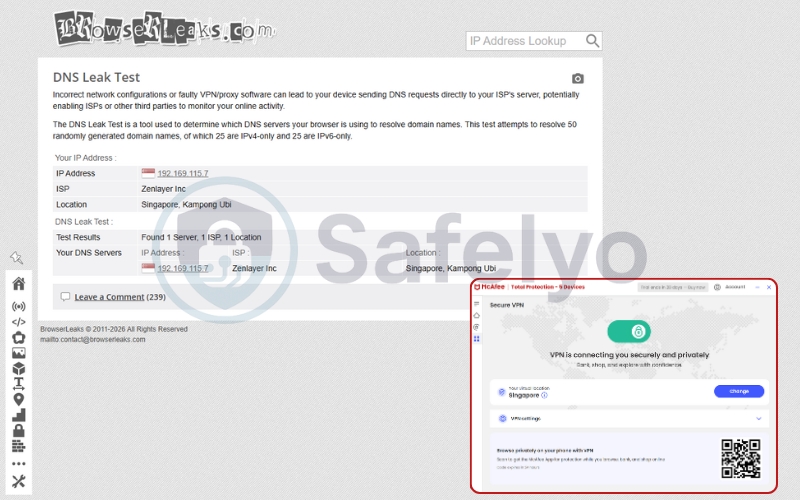
During my DNS leak and WebRTC leak tests, McAfee passed with flying colors; my real IP address remained hidden throughout every session.
5.2. The Kill Switch (Safe Reconnect)
A kill switch is your last line of defense. If your VPN connection drops, it should immediately cut your internet access to prevent your real data from leaking. McAfee calls this feature “Safe Reconnect”.
However, there is a catch: Platform limitations. In my testing, I found that the kill switch is primarily reliable on Windows and Android. If you are using an older version or certain iOS profiles, this feature may be missing or inconsistent.
For a tool meant to provide digital security, this lack of cross-platform consistency is a significant drawback compared to competitors like NordVPN, where the kill switch is a standard across all apps.
5.3. Protocol: The Catapult Hydra secret
Most premium VPNs today have shifted to WireGuard, but as mentioned earlier, McAfee uses the Catapult Hydra protocol.
- The Good: It is exceptionally fast and excellent at establishing connections quickly.
- The Bad: It is a proprietary protocol owned by Pango. Unlike OpenVPN or WireGuard, it is not “open source”, meaning the wider security community cannot independently inspect its code for vulnerabilities.
5.4. Split Tunneling: Only for Android?
Split tunneling allows you to choose which apps go through the VPN and which use your regular internet (useful for banking apps that block VPNs). Currently, this feature is mostly restricted to the Android app. Windows users looking to “split” their traffic will find the desktop dashboard frustratingly empty of this option.
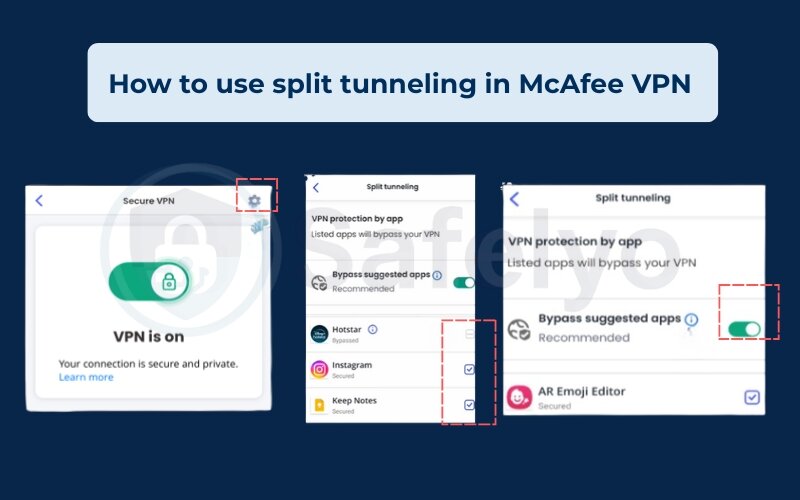
The Verdict on Security: It has the “Big Three” covered: AES-256, leak protection, and a basic kill switch. But the lack of advanced tools like Multi-hop, Obfuscated servers, or a universal split-tunneling feature makes it feel like a “lite” version of a real security tool.
6. Speed performance: High highs and low lows
If you are connecting to a server in Japan or Singapore, McAfee VPN is remarkably fast. However, as my testing shows, the performance is inconsistent once you start connecting to locations further away or with higher network congestion.
My test environment & conditions
To maintain total transparency, here is the exact “lab” setup I used for this 2026 review:
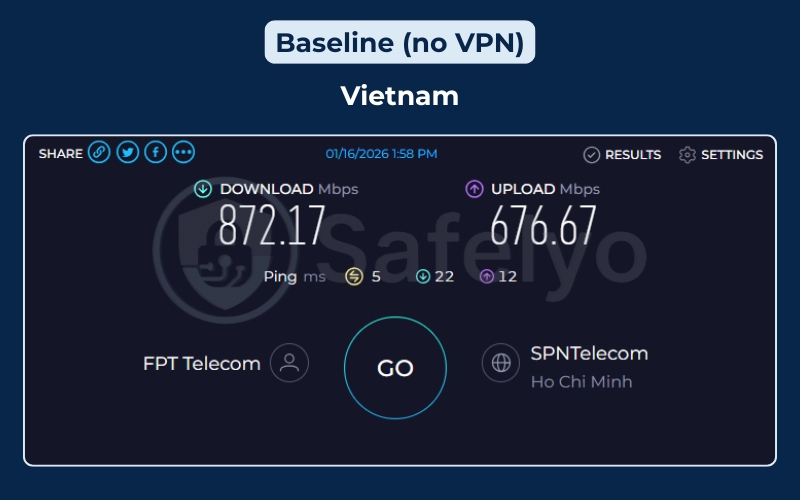
- Location: Ho Chi Minh City, Vietnam.
- Device: Windows 11 Pro desktop connected via a Cat6 Ethernet cable (to eliminate Wi-Fi interference).
- Internet Service Provider (ISP): FPT Telecom (Fiber optic).
- Baseline Speed (No VPN): A blazing 872.17 Mbps download and 676.67 Mbps upload with a local ping of just 5 ms.
- Protocol: McAfee’s default Catapult Hydra (the only option for Windows users).
6.1. Real-world test results (2026)
Below is the data from my cross-continental testing. I started with servers closest to my physical location and moved progressively further away.
| Server location | Download speed | Upload speed | Latency (ping) | Speed loss |
| Baseline (No VPN) | 872.17 Mbps | 676.67 Mbps | 5 ms | 0% |
| Japan (Tokyo) | 401.42 Mbps | 34.16 Mbps | 70 ms | -54% |
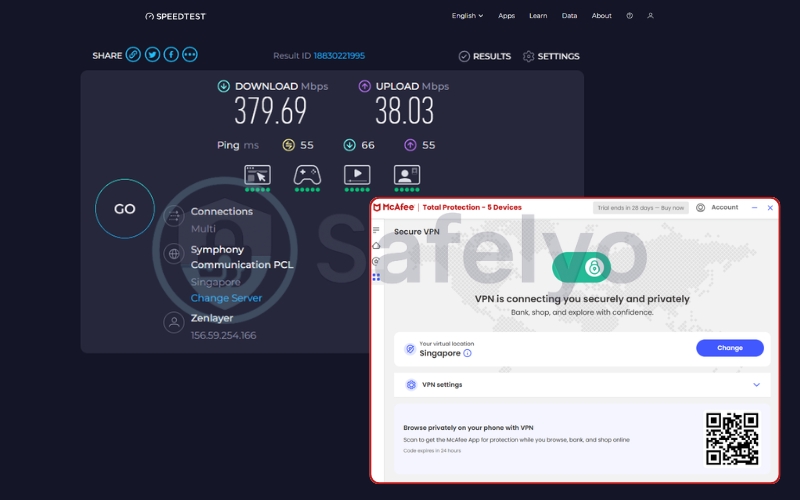
| Singapore | 379.69 Mbps | 38.03 Mbps | 55 ms | -56% |
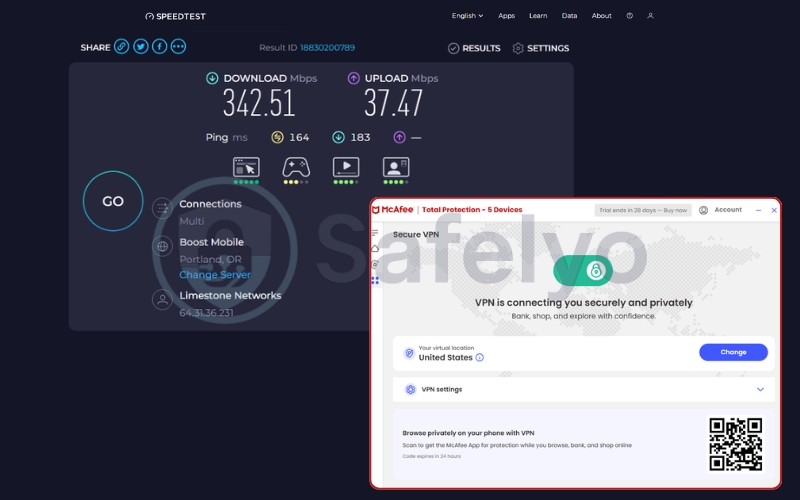
| United States (Portland) | 342.51 Mbps | 37.47 Mbps | 164 ms | -60% |
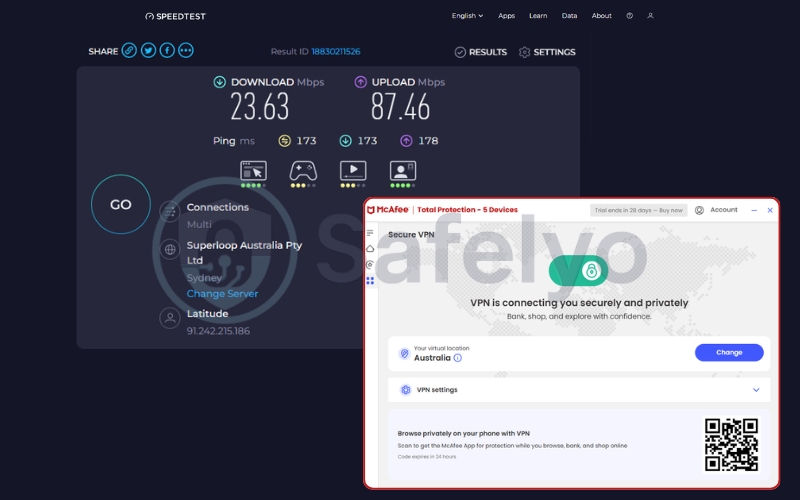
| Australia (Sydney) | 23.63 Mbps | 87.46 Mbps | 173 ms | -97% |
| United Kingdom (London) | 22.89 Mbps | 69.42 Mbps | 277 ms | -97% |
6.2. Analysis: What these numbers mean for you
Near-Regional Excellence: If you are in Southeast Asia connecting to Singapore or Japan, McAfee is impressively fast. Maintaining ~400 Mbps is more than enough for 8K streaming or heavy file downloads. The Catapult Hydra protocol is clearly optimized for these high-traffic hubs.
The Trans-Pacific Surprise (US – Portland): This was the most shocking part of my test. Usually, connecting from Vietnam to the US West Coast results in a massive speed drop. However, McAfee held onto 342.51 Mbps. Keeping nearly 40% of my baseline speed across the Pacific Ocean is a top-tier result. If you are an international user who needs to access US-based work servers or websites, McAfee’s US routing is surprisingly robust.
The “Distance Wall”: Everything fell apart when I tried to connect to the UK or Australia. Dropping from nearly 900 Mbps to just 22 Mbps is a massive 97% loss. This suggests that McAfee’s routing to these regions is poor, or their servers there are severely overwhelmed.
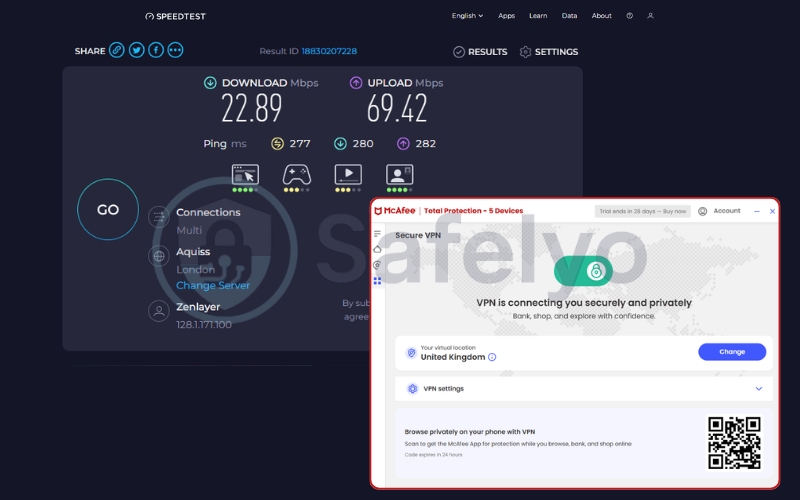
Upload Speed Surprise: Interestingly, while download speeds tanked in Australia and the UK, the upload speeds remained remarkably high (69-87 Mbps). This makes McAfee a decent choice for someone who needs to upload content to a European or Australian server, even if downloading from them is painful.
Gaming Verdict: With a local ping of 5 ms jumping to 55-70 ms in Asia, you can play League of Legends or Valorant without much trouble. However, the 277 ms ping to London is a “no-go” zone for any real-time competitive gaming.

The Safelyo Summary on Speed: McAfee VPN is like a sports car that only has gas in certain cities. If you are lucky enough to be near their “sweet spot” servers (like Singapore or Tokyo), it’s one of the fastest antivirus-bundled VPNs I’ve ever tested. But if you need reliable high-speed access to the UK or Australia, the 97% speed loss makes this a very poor choice.
7. Streaming performance: If you want Netflix, look elsewhere
If your primary reason for using a VPN is to bypass geo-location restrictions and binge-watch the latest shows from other countries, I have bad news. In my testing, McAfee VPN performed poorly, earning a disappointing 2.0/10 in the streaming category.
While many premium VPNs invest millions into constantly rotating their IP addresses to stay one step ahead of streaming giants, McAfee does not. Most streaming platforms have already “blacklisted” the server ranges used by McAfee, meaning you will likely be met with the dreaded “VPN detected” error message.
7.1. What works and what doesn’t
I spent several hours switching between different server locations to see if I could trick the major platforms. Here is what I found:
Netflix US: This was the only “partial” success. I managed to access the US library about 30% of the time. However, the connection was unstable, and Netflix would often boot me out halfway through a movie.

Netflix (UK, Japan, Canada): Total failure. Every attempt resulted in the standard “You seem to be using an unblocker or proxy” error.
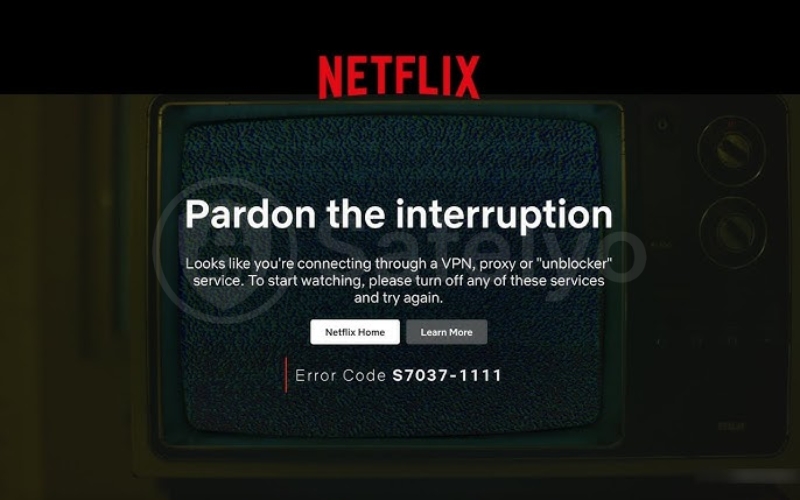
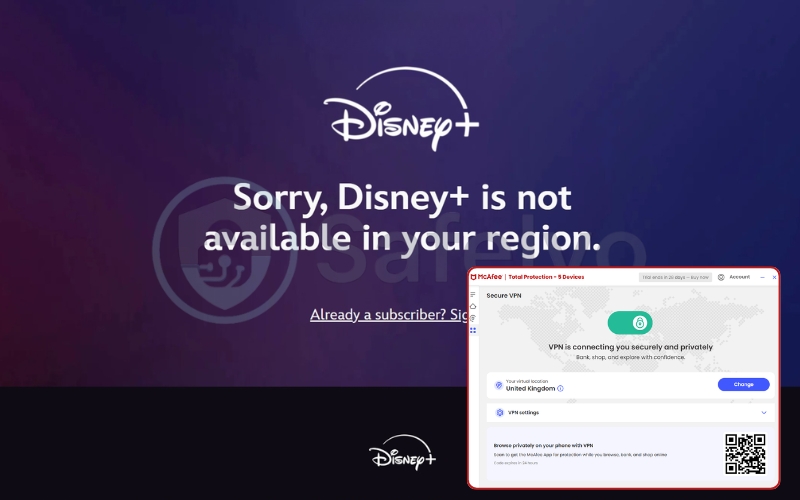
Disney+ & Hulu: Neither service would even load the login screen while the VPN was active. They have some of the toughest detection systems, and McAfee simply isn’t equipped to bypass them.
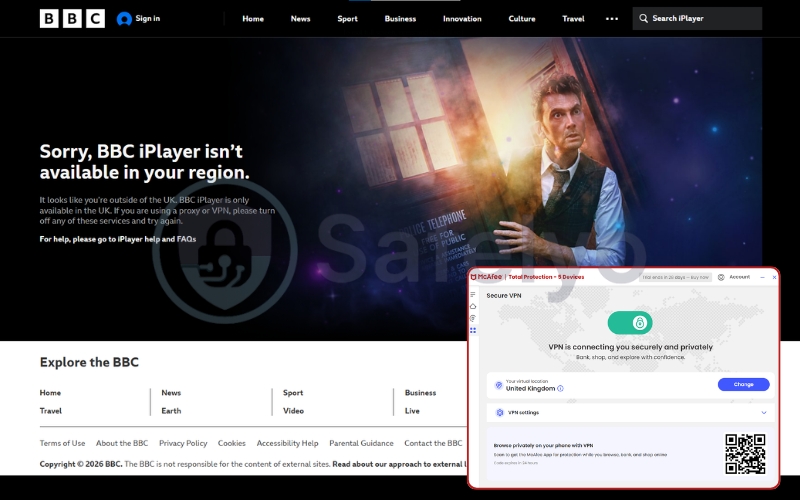
BBC iPlayer: Since McAfee’s UK servers are limited and well-known, the BBC blocked access immediately.
7.2. Why is McAfee so bad at streaming?
The issue isn’t bandwidth or speed – it’s the lack of dedicated streaming servers. Specialized providers like NordVPN or Surfshark have thousands of servers and “obfuscated” IPs that hide the fact that you are using a VPN. McAfee, on the other hand, uses standard servers that are easily identified by streaming sites as belonging to a data center.
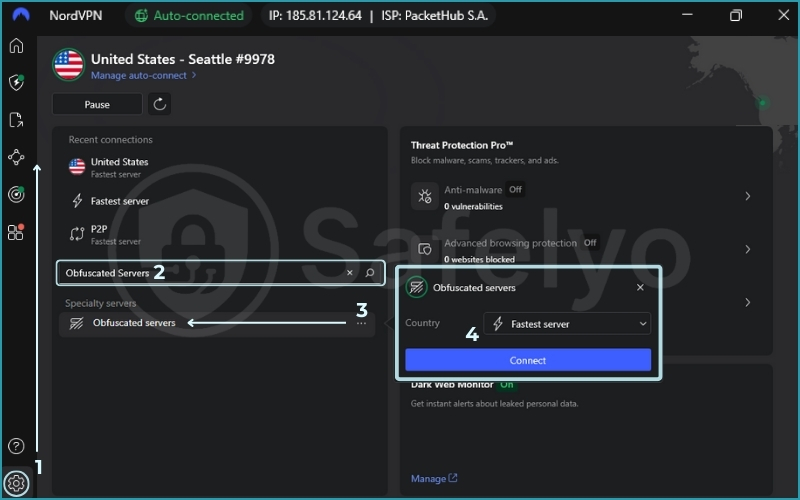
The Verdict on Streaming: If you are already paying for McAfee Total Protection, you might get lucky with US Netflix once in a while. But if streaming is your priority, do not rely on this tool. You are much better off with a specialized VPN that guarantees access to global libraries.
8. Torrenting & P2P: Not what it’s built for
If you were hoping to use McAfee VPN for secure file sharing, I have a clear warning: don’t. During my evaluation, this service earned a lowly 3.0/10 for torrenting. While it technically allows P2P traffic on its servers, it lacks almost every specialized feature that makes torrenting safe and efficient.
In the world of BitTorrent, your IP address is visible to everyone else in the “swarm”. This makes the VPN’s reliability and jurisdiction paramount. Here is why McAfee fails this test:
8.1. The “Kill Switch” gamble
As I mentioned in the security section, McAfee’s kill switch (Safe Reconnect) can be inconsistent, particularly if you aren’t on Windows. If the VPN connection drops for even a second while you are downloading a file, your real IP address is instantly exposed to your Internet Service Provider (ISP) and copyright monitors. For a high-risk activity like torrenting, this lack of a “bulletproof” kill switch is a dealbreaker.

8.2. No P2P-optimized servers
Premium providers usually offer dedicated P2P servers located in countries with friendly torrenting laws. McAfee doesn’t do this. You are lumped in with regular users on standard servers, which can lead to:
- Throttled speeds: Some servers may slow down significantly when they detect heavy P2P traffic.
- Poor routing: Without optimized paths for file sharing, your download speed will likely be much slower than what you’d see on a specialized network.
8.3. Jurisdiction and the Five Eyes
Because McAfee is a U.S. company, it is subject to DMCA requests. If a copyright holder identifies a McAfee IP address engaging in illegal file sharing and serves a subpoena, McAfee’s privacy policy and U.S. headquarters mean they may be compelled to cooperate. Unlike “No-logs” VPNs based in offshore havens, McAfee doesn’t offer the legal “buffer” that most torrent users look for.
The Verdict on Torrenting: McAfee VPN is fine for downloading a legal, open-source Linux ISO once in a blue moon. But for anything else, it is far too risky. If you are serious about P2P, you need a VPN with dedicated torrenting servers and a strictly audited no-logs policy, such as NordVPN or Surfshark.
9. Ease of use & interface: The one category where McAfee shines
If you’ve ever opened a pro-level VPN and felt overwhelmed by maps, server loads, and protocol jargon, you’ll find McAfee VPN to be a breath of fresh air. This is the one area where McAfee truly understands its audience. It isn’t built for “tech geeks”; it’s built for my dad, who just wants to know his iPad is safe while he’s at the airport.
9.1. The “One-Click” experience
Whether you are using the standalone McAfee Safe Connect app or the integrated “Secure VPN” button within McAfee Total Protection, the experience is identical: There is one big button. You click it, the shield turns blue, and you are protected.
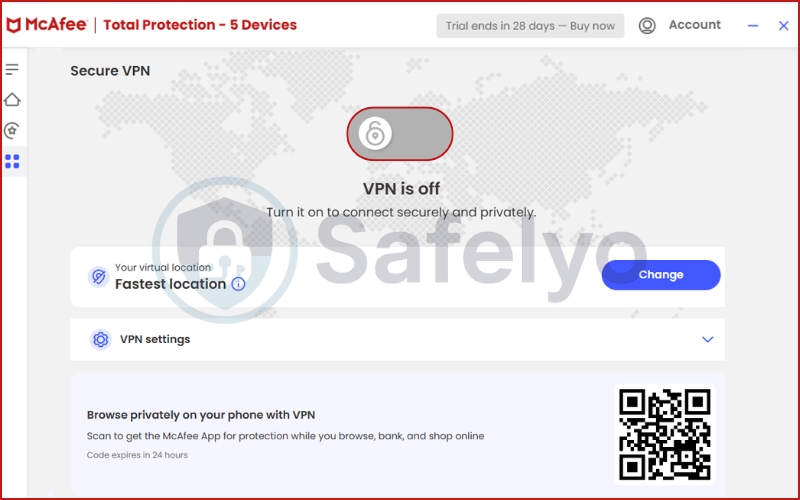
In my testing, the connection time was remarkably fast – usually taking less than three seconds to establish a tunnel. This is thanks to the Catapult Hydra protocol, which is designed to connect almost instantly compared to the slower “handshakes” of older protocols like OpenVPN.
9.2. Desktop vs. Mobile: A tale of two apps
The interface is consistent across devices, but the experience varies:
- Windows: Everything is tucked neatly into the sidebar of your antivirus. It’s clean and stays out of the way.
- Mobile (iOS/Android): The standalone app is very lightweight. I liked that it doesn’t drain the battery as much as some more “heavyweight” VPNs. It also features a “protection score” that gamifies your digital security, which might be helpful for beginners.
- Mac: Traditionally, the Mac experience has been the “neglected middle child”. While it has improved in 2026, it still feels less polished and lacks some of the auto-connect features found on Windows.
9.3. The downside: Where are the “Nerd Stats”?
While the simplicity is great for beginners, it is frustrating for anyone else. When I’m using a VPN, I like to see my latency, the current server load, or at least which city I’m connected to.
McAfee keeps all of this a secret. You can choose a country, but you can’t choose a specific city or server. It’s a “black box” experience – you have to trust that McAfee has picked the best server location for you. For a tool meant to manage your internet traffic, this lack of transparency is why I couldn’t give it a higher score than 6.5.

The Verdict on UX: It is the “point-and-shoot camera” of the VPN world. It’s perfect if you want zero configuration, but if you like to tweak your settings, you’ll feel like you’re wearing handcuffs.
10. Pricing & value: Which plan should you choose?
If you try to buy McAfee VPN as a standalone product (Safe Connect), you are walking into a price trap. I spent some time analyzing their current checkout pages, and the math simply doesn’t favor the consumer who only wants a VPN. However, as the data below shows, the value proposition shifts significantly when you look at it as a bundled “security tax”.
(Note: Prices fluctuate based on seasonal promotions and VAT depending on your region.)
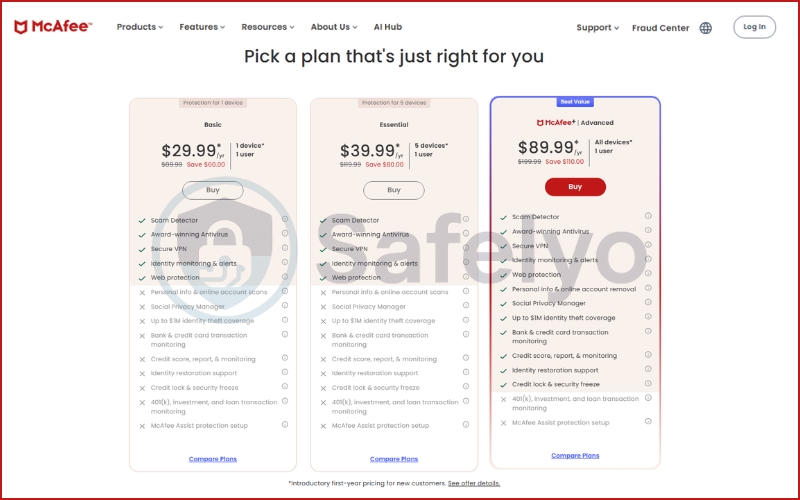
10.1. The McAfee 2026 plan comparison
McAfee has integrated the “Secure VPN” into almost every tier of its 2026 lineup. Here is the breakdown of what you actually pay and what you get in return:
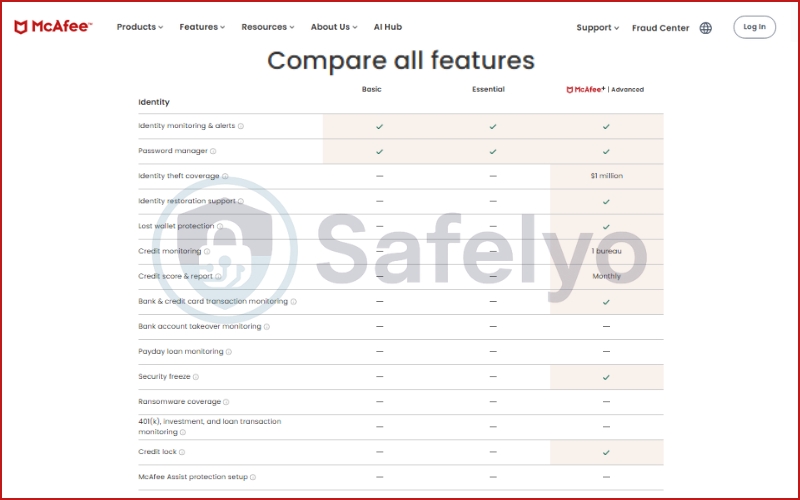
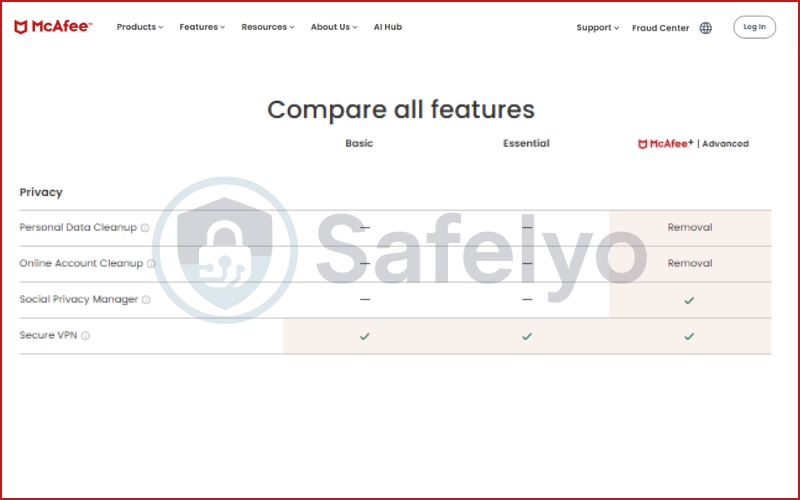
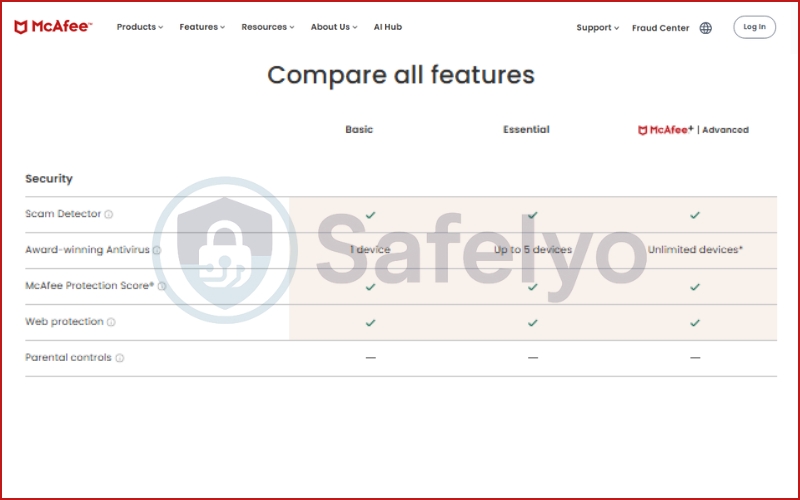
| Feature | Basic | Essential | McAfee+ Advanced |
| Introductory price | $29.99 / year | $39.99 / year | $89.99 / year |
| Device limit | 1 device | Up to 5 devices | Unlimited devices* |
| Secure VPN | Included | Included | Included |
| Antivirus & web protection | Included | Included | Included |
| Identity features | Monitoring & alerts | Monitoring & alerts | Full restoration + $1M coverage |
| Best for | Single-PC users | Small families | Large households (10+ devices) |
*Unlimited devices usually apply to all personal devices owned by a single household.
10.2. The standalone trap (Safe Connect)
You can still find “McAfee Safe Connect” on various app stores for around $4.99 a month or roughly $40 to $50 a year. As you can see from the table above, paying $50 for a standalone VPN makes zero sense when you can get the Essential bundle (VPN + Antivirus for 5 devices) for $39.99.
Even then, for $40/year, you could get a multi-year deal on Surfshark or NordVPN – both of which offer significantly better privacy, more server locations, and much higher streaming success rates.
10.3. The auto-renewal “catch”
There is a detail in the fine print that many users miss: the bandwidth limit. In my research, I found that “Unlimited VPN” is often a perk tied to your auto-renewal status.
If you turn off auto-renewal to avoid a surprise charge next year, McAfee may “downgrade” your VPN experience or reintroduce a data cap in some regions. It is a frustrating tactic designed to keep you locked into their ecosystem, and it’s something you won’t experience with a dedicated VPN provider.
10.4. Is it worth your money?
My rule of thumb is simple:
- If you are already a McAfee Antivirus user: Yes, use the included VPN for basic tasks. It’s a great value-add for your existing subscription.
- If you are looking for a VPN first: No. Do not buy this. You can get a much more powerful tool with a strict no-logs policy and better global performance for the same or lower cost elsewhere.
11. Common issues & how to fix them
Because McAfee VPN is often bundled with other security tools, it can sometimes behave like “nagware” – turning itself on when you don’t want it or throwing confusing error messages. Based on my experience and common user complaints, here is how to solve the most frequent headaches.
11.1. McAfee VPN keeps turning on automatically
This is the number one complaint I hear. You’re at home on your trusted Wi-Fi, and suddenly your internet slows down because the VPN kicks in.
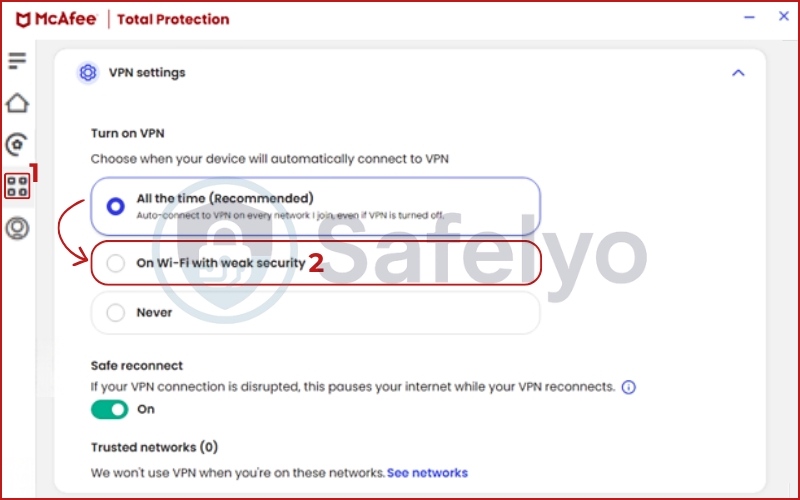
The Fix: Open the McAfee app, go to the Secure VPN settings, and look for “Auto-connect”. You can toggle this off entirely or set it to “Only on unsecured Wi-Fi”. This prevents the VPN from hijacking your connection when you’re on your private home network.
11.2. I’m seeing a ‘Data Limit Reached’ message
If you see this, you are likely on the free or trial version of the VPN.
The Reality: The basic version often comes with a bandwidth cap of 250MB or 500MB per month. To get unlimited data, you usually must have a paid McAfee Total Protection subscription with auto-renewal turned on. If auto-renewal is off, McAfee often restricts your VPN usage as an “incentive” to get you to commit to another year.
11.3. The app is stuck on “Connecting…”
If the blue circle just spins forever, it usually means there is a protocol conflict or a “handshake” issue with the server.
The Fix:
- Toggle Airplane Mode: Turn it on for 5 seconds and then off to reset your network adapters.
- Check for other VPNs: If you have another VPN installed, its background processes often clash. Make sure the other one is fully closed.
- Reinstall the VPN Profile: On iOS or Android, deleting and reinstalling the app often fixes “stuck” connections by forcing the phone to create a new secure certificate.
11.4. Why is my internet so slow with the VPN on?
While the Catapult Hydra protocol is fast, you might be connected to a crowded server.
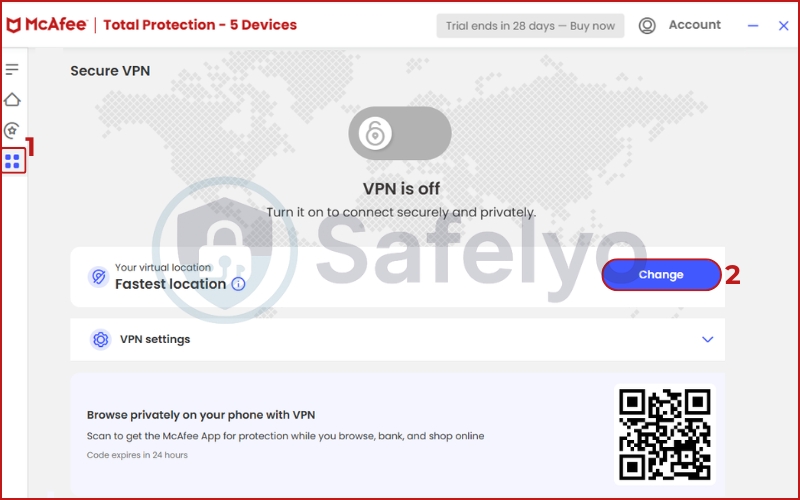
The Fix: Don’t use the “Pick for me” or “Fastest” option. Manually select a server location that is geographically closest to you. If you are in New York and the app routes you to a “Fastest” server in the UK due to a routing glitch, your latency will skyrocket.
The Safelyo Tip: If these fixes don’t work, don’t spend hours on hold with customer support. Because this is a “bundled” product, their support staff often focuses on antivirus issues and may not be deeply trained in VPN troubleshooting. If the problems persist, it’s usually a sign you’ve outgrown this basic tool.
12. What real users say about McAfee VPN
If you look at the official app stores, McAfee VPN looks like a world-class product. However, if you dig into independent review sites, the story changes completely. This massive disparity in user feedback is one of the most interesting things I discovered during my research (as of February 11, 2026).
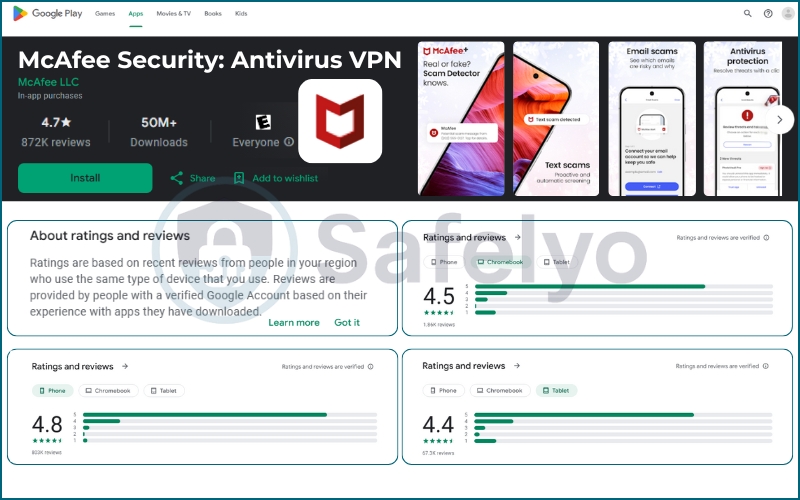
12.1. The Mobile High: 4.7/5 Stars
On the Apple App Store and Google Play Store, McAfee’s security and VPN apps boast a staggering 4.7-star rating from over a million combined reviews.
Mobile users generally praise the ease of use and the “one-click” protection. Common feedback includes:
- “Decent User Interface”: Many users appreciate how it integrates with their phone without feeling overly complicated.
- “Easy to use”: Non-technical users love that it handles digital security in the background.
- “Better than competitors”: Some users find it more reliable on mobile than other bundled antivirus VPNs.

12.2. The Trustpilot Low: 1.3/5 Stars
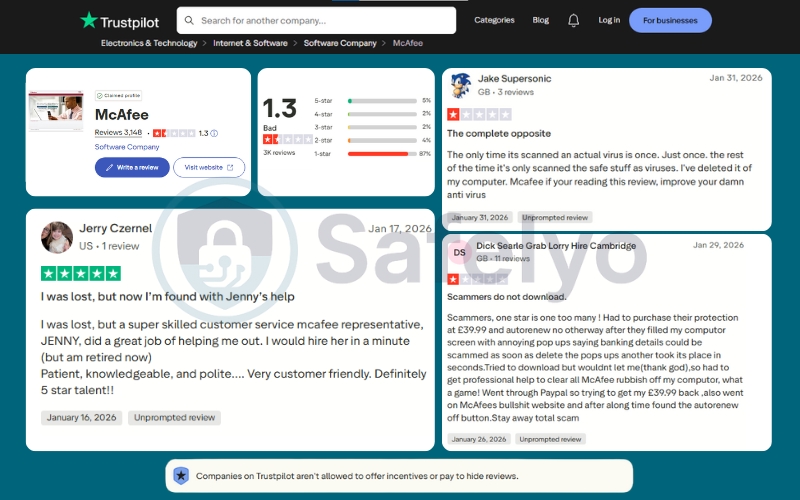
Switch over to Trustpilot, and the mood turns sour. With a dismal 1.3-star rating, the feedback from desktop and long-term users highlights the “dark side” of the McAfee ecosystem:
- Aggressive Upselling: Many users complain about “annoying pop-ups” that try to sell extra services even after they’ve already paid for a subscription.
- Billing Frustrations: A significant number of one-star reviews focus on the difficulty of finding the “auto-renew off button” and getting refunds through customer support.
- Technical Bloat: Some users feel the software is too heavy, with one reviewer calling it “the complete opposite” of a helpful tool, claiming it slowed down their computer significantly.
12.3. Why the massive difference?
The gap between a 4.7 and a 1.3 rating usually comes down to expectations. Mobile users want a simple app that “just works” on public Wi-Fi – and for that, McAfee is great. Desktop users, however, are often dealing with the full antivirus suite, auto-renewal emails, and system performance issues, which leads to a much higher level of frustration.
The Safelyo takeaway: If you are an iPhone or Android user looking for a simple, fast toggle to hide your IP, you will likely be happy with the mobile experience. But if you hate “pushy” software and complicated billing cycles, the Trustpilot warnings are worth taking seriously.
13. Best alternatives to McAfee VPN
If this review has made you realize that McAfee VPN is a bit like a “point-and-shoot” camera when you actually need a professional DSLR, don’t worry. The VPN market is incredibly competitive, and for a similar (or even lower) price, you can find tools that offer significantly better privacy, faster VPN protocols, and guaranteed streaming access.
| Feature | McAfee VPN | NordVPN | Surfshark |
| Jurisdiction | USA (Five Eyes) | Panama (Privacy Haven) | Netherlands |
| Streaming | Poor (2.0/10) | Excellent (9.5/10) | Excellent (9.0/10) |
| Independent Audit | No | Yes (Multiple) | Yes |
| Unlimited Devices | Only on the top tier | No (10 devices) | Yes (All plans) |
Here are the three alternatives I recommend based on different user needs:
13.1. NordVPN
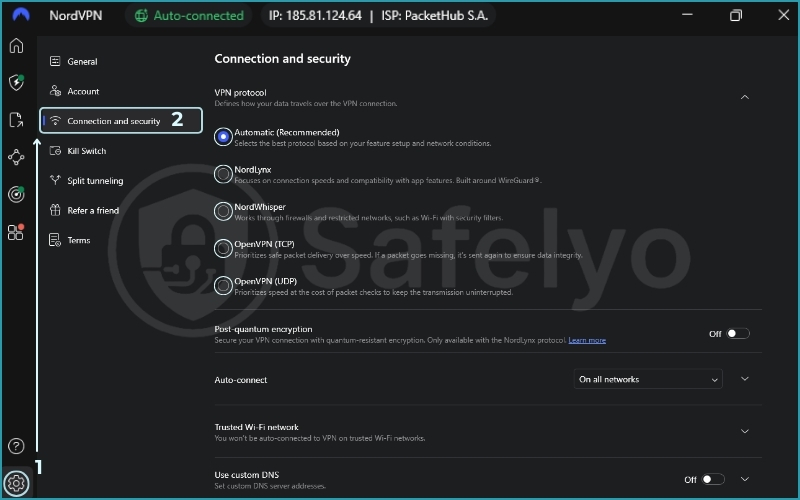
If you are tired of seeing the “VPN detected” error on Netflix, NordVPN is the logical next step. Unlike McAfee’s limited server network, NordVPN offers over 8,400 servers and uses the NordLynx protocol (built on WireGuard).
Why it’s better: It has a strictly audited no-logs policy, is based in Panama (outside the Five Eyes), and features a much more reliable kill switch. It’s my top pick for anyone who wants a “pro” experience.
NordVPN – Best for privacy & streaming
13.2. Surfshark
One of the main reasons people stick with McAfee is the “unlimited devices” perk in their high-end plans. Surfshark offers the exact same benefit but with a much better product.
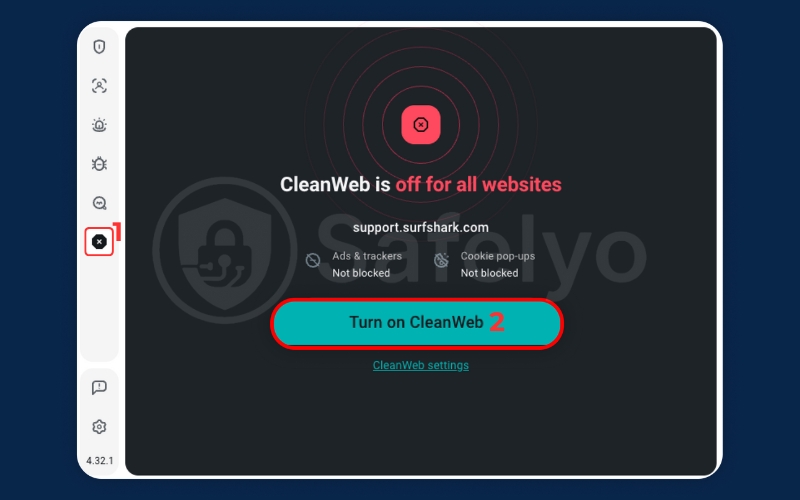
Why it’s better: It is significantly cheaper than a standalone McAfee subscription and actually works with Disney+, Hulu, and BBC iPlayer. You also get advanced features like Multi-hop (Double VPN) and a built-in ad blocker (CleanWeb), which McAfee lacks.
Surfshark – Best value for families
13.3. Proton VPN
If McAfee’s U.S. jurisdiction and data collection practices make you nervous, Proton VPN is the answer. Based in Switzerland, it operates under some of the world’s strongest privacy laws.
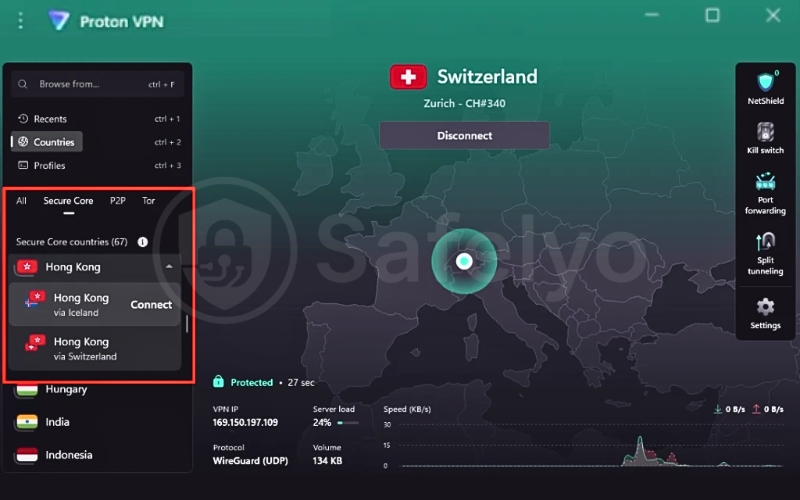
Why it’s better: Even their free version has no bandwidth limits and a strict no-logs policy. If you decide to upgrade to the paid plan, you get access to “Secure Core” servers that route your traffic through hardened data centers in Switzerland and Iceland for maximum anonymity.
Proton VPN – The privacy-first choice
The Safelyo Recommendation: If you already have McAfee for your antivirus, keep it for basic tasks. But if you’re about to spend money on a standalone VPN, Surfshark offers the best “bang for your buck”, while NordVPN is the gold standard for performance.
14. How we test and review McAfee VPN at Safelyo
At Safelyo, we maintain strict editorial independence. No VPN provider can pay for a higher score or a “Seal of Approval”. My evaluation is led by a human expert and is based purely on data-driven benchmarks.

14.1. Our testing lab and environment
To eliminate variables like Wi-Fi interference, I conducted all tests from my office in Ho Chi Minh City, Vietnam, using a standardized hardware setup:
- Device: Windows 11 Pro desktop.
- Connection: Cat6 Ethernet cable connected to an 872 Mbps FPT Telecom fiber line.
- Methodology: I measured a baseline speed (without VPN) and compared it against five global server locations to calculate the exact percentage of speed loss.
14.2. The 30% Privacy & Security Audit
Since Privacy & Security carries the most weight (30%) in our scoring system, I spent several days scrutinizing McAfee’s infrastructure. I didn’t just look for AES-256 encryption; I actively hunted for:
- Leaks: I used tools like IPLeak.net and DNSLeakTest.com to verify if the Catapult Hydra protocol was hiding my real geo-location.
- The Kill Switch: I manually crashed the VPN software to see if the “Safe Reconnect” feature actually blocked my internet traffic to prevent data exposure.
- Policy Analysis: I analyzed the McAfee privacy policy to identify what “telemetry” data is collected and how their U.S. jurisdiction impacts user anonymity.
14.3. The Performance & Streaming Gauntlet
A VPN is useless if it’s too slow for modern browsing. I tested McAfee across:
- Speed: Running benchmarks on servers in Singapore, Japan, the US, UK, and Australia to evaluate global routing.
- Streaming: I attempted to unblock Netflix (US, UK, Japan), Disney+, and BBC iPlayer. We don’t just check if the site opens; we verify if the video plays in 4K without buffering or proxy errors.
- Gaming & P2P: I monitored latency (ping) and jitter during competitive gaming sessions and tested the bitrate stability during legal torrent downloads.
14.4. Human-led evaluation
Unlike some sites that use AI to summarize features, every word of this review comes from hands-on experience. I contacted customer support via live chat as a “mystery shopper” to test their technical competence and waited to see how long it took to get a real human response.
By combining these technical metrics with real-world usage, I can give you an honest answer: Is McAfee VPN a legitimate security tool or just a bundled afterthought?
15. FAQs about McAfee VPN
To help you get quick answers, I’ve compiled the most common questions users ask about McAfee Safe Connect and the Secure VPN bundle.
Is McAfee VPN free if I have Total Protection or McAfee+?
Yes, it is included in your subscription at no extra cost. However, to get unlimited bandwidth, you generally need to have auto-renewal turned on. If you are on a trial version or have auto-renewal disabled, McAfee often limits your data to 250MB or 500MB per month.
Does McAfee VPN keep logs of my activity?
McAfee claims a “No-logs” policy regarding your browsing history, but they do collect “telemetry” data. This includes your IP address (temporarily), device ID, and some web traffic data for security and troubleshooting. Because they are based in the US and have not undergone an independent audit, I do not recommend them for high-level anonymity.
Does McAfee VPN work with Netflix?
In my tests, it had a very low success rate (2.0/10). While I could occasionally access the US Netflix library, it was inconsistent and frequently blocked. It failed to unblock libraries in the UK, Japan, and Canada. If you want a streaming VPN, NordVPN or Surfshark are much better options.
Is McAfee VPN safe for banking?
Yes. For the average user checking a bank account or shopping on public Wi-Fi at a cafe, McAfee is perfectly safe. It uses AES-256 encryption and the Catapult Hydra protocol to ensure your internet traffic is shielded from local hackers on the same network.
Does McAfee VPN work in China?
No. McAfee does not offer advanced obfuscation or “stealth” protocols needed to bypass the Great Firewall of China. If you are traveling to a country with heavy internet censorship, you will need a more advanced provider like ExpressVPN or Proton VPN.
How do I turn off the McAfee VPN?
If the VPN is constantly turning itself on, open your McAfee app, go to the VPN settings, and toggle off “Auto-connect.” You can also set it to only activate when you are on an “unsecured” Wi-Fi network.
16. Conclusion
After a week of rigorous testing at Safelyo, my verdict is simple: McAfee VPN is a classic “add-on” product. It is built for convenience, not for power users.
If you are already paying for a McAfee Total Protection or McAfee+ subscription, you should absolutely use the VPN for basic tasks. It is fast, incredibly easy to use, and provides the bank-grade encryption you need to stay safe on public Wi-Fi. For a “free” extra, it’s a solid value.
However, if you are looking for a standalone VPN to protect your privacy, unblock global streaming content, or secure your torrenting activity, I strongly recommend you look elsewhere. Between its US-based jurisdiction, lack of an independent audit, and poor performance against geo-blocks, it simply cannot compete with dedicated providers.
If you’ve decided that McAfee’s “lite” features aren’t enough for your needs, check out our VPN Reviews and guide to the Best VPNs of 2026 to find a tool that offers true digital freedom and privacy.