Anyone who has had a VPN connection fail on a school, office, or restricted network has probably run into the question of what is obfuscated VPN and whether it can fix the problem. In short, an obfuscated VPN disguises encrypted traffic so it looks like regular HTTPS browsing, which keeps ISPs, firewalls, and network administrators from identifying it as VPN activity in the first place.
Key Takeaways:
- Definition: An obfuscated VPN hides the fact that a VPN is in use, not just the contents of the traffic. It disguises data packets to look like normal HTTPS browsing on port 443.
- Encryption vs. obfuscation: Encryption protects what’s inside your data. Obfuscation hides that a VPN tunnel exists at all.
- Main use case: Bypassing VPN-specific blocking, DPI filtering, port blocking, and VPN-aware firewalls, not general privacy.
- What it can’t do: Obfuscation doesn’t bypass IP blacklists, so it won’t help with most streaming restrictions, and it doesn’t guarantee anonymity on its own.
- Trade-off: Obfuscation adds processing overhead, so connections typically run slower than a standard VPN server.
- When to use it: Government censorship, blocked school/office networks, VPN-targeted ISP throttling, and situations where hiding VPN usage itself matters.
1. What Is an Obfuscated VPN (and Obfuscated Server)?
An obfuscated VPN is a VPN connection built to hide the fact that VPN traffic is passing through it, and an obfuscated server is simply the server configured to do that job. Instead of exposing a recognizable VPN signature, the traffic is wrapped to resemble standard web browsing on port 443.
Some providers call this feature a stealth VPN, camouflage mode, or scrambled servers. The name changes, but the function stays the same: hide the presence of the VPN tunnel, not just its contents.
- Encryption protects what is inside your data, so outside parties can’t read it.
- Obfuscation hides that a VPN tunnel exists at all, so outside parties can’t tell you’re using one.

2. How does VPN obfuscation work?
VPN obfuscation works by changing the structure of data packets so automated detection systems no longer recognize them as VPN traffic. A few methods handle most of this work.
- SSL/TLS wrapping (Stunnel): wraps the VPN connection inside an extra layer of SSL/TLS encryption, the same type used by regular HTTPS sites, so the traffic blends in with normal secure browsing.
- Shadowsocks: an encrypted proxy protocol originally built to get around China’s national filtering system; it behaves more like a lightweight proxy than a full VPN protocol.
- Obfsproxy: built by the Tor Project, this tool changes how data packets look structurally, which helps bypass filtering systems that scan for known patterns.
- XOR scramble: a simpler method that applies a bitwise operation to OpenVPN packet headers, scrambling the signature enough to slip past basic filtering.
3. How does VPN detection work?
Network filters use several separate techniques to spot VPN traffic, and obfuscation has to defeat all of them at once to stay hidden.
3.1. Deep Packet Inspection (DPI)
DPI scans the structure of a data packet, not just its destination, looking for patterns that match known VPN protocols. It’s the primary method national firewalls and enterprise networks use to flag VPN traffic automatically.
3.2. IP Address Reputation
Firewalls and streaming platforms keep lists of IP ranges known to belong to VPN servers and block them regardless of what the traffic looks like. This method targets the server itself rather than the traffic pattern, which is why obfuscation alone can’t get past it.
3.3. Port Analysis
Standard VPN protocols use recognizable ports, such as UDP 1194 for OpenVPN. Blocking those ports is a simple, low-effort way for a network to stop unobfuscated VPN traffic without deploying full DPI.
3.4. Active Probing
Some firewalls send test connections back to a suspected VPN server to see how it responds, a technique used heavily in countries with strict internet controls. Active probing can unmask a VPN server even when the outgoing traffic itself looks disguised.
3.5. TLS Fingerprinting
Even encrypted connections have a distinct handshake pattern. Advanced filtering systems can sometimes distinguish VPN traffic from regular HTTPS by analyzing the handshake rather than the packet contents.
3.6. DNS Leaks and Mismatches
If DNS requests don’t route through the same tunnel as the rest of the traffic, that mismatch can expose VPN use even when the main connection is obfuscated. This is one of the more common gaps in poorly configured VPN apps.
4. What VPN obfuscation can and cannot do
Obfuscation hides that a VPN is in use. It does not make the underlying IP address, service, or account anonymous.
What it can do:
- Get past DPI-based VPN blocking
- Disguise VPN traffic as regular HTTPS browsing
- Get around port-based blocking on school, office, or public networks
What it cannot do:
- Bypass IP blacklists, which is why streaming platforms often still detect and block obfuscated connections
- Guarantee anonymity on its own; that depends on the provider’s no-logs policy and jurisdiction
- Defeat manual, human-reviewed traffic inspection
- Fully stop advanced traffic-timing analysis used by some national firewalls
5. How to check if your VPN is actually obfuscating traffic
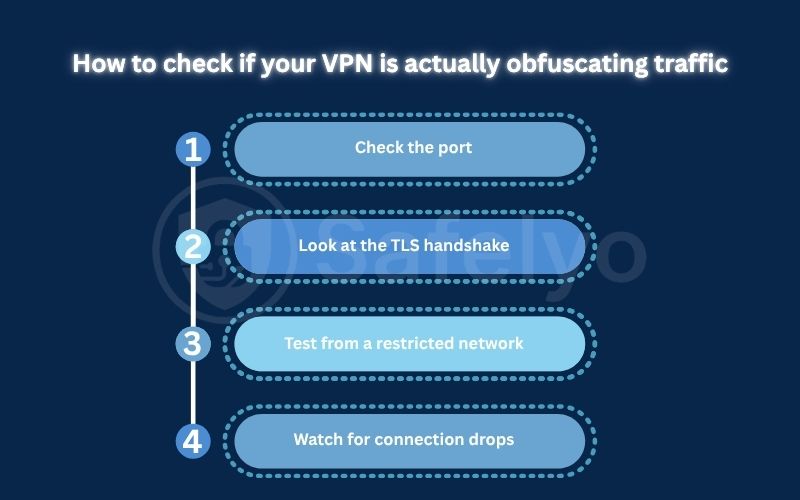
Turning on an obfuscation toggle doesn’t always confirm the feature is active. A few checks can verify it.
- Check the port: open a packet capture tool such as Wireshark while connected, and confirm the traffic is running over port 443, the same port used by regular HTTPS sites.
- Look at the TLS handshake: tools like Wireshark or online TLS fingerprint checkers can show whether your VPN’s handshake resembles a normal browser connection or exposes a distinct VPN pattern.
- Test from a restricted network: if a network is known to block standard VPN protocols, connecting successfully with obfuscation on and failing with it off is a practical sign the feature works.
- Watch for connection drops: if a VPN keeps disconnecting only on filtered networks, the obfuscation method may be outdated or already flagged by that network’s filtering system.
Signs obfuscation isn’t working:
- The VPN connects on open networks but fails immediately on filtered ones
- Packet captures show traffic on non-standard, VPN-typical ports instead of 443
- The connection is unusually slow even by the standards of obfuscated traffic, which can point to repeated reconnection attempts
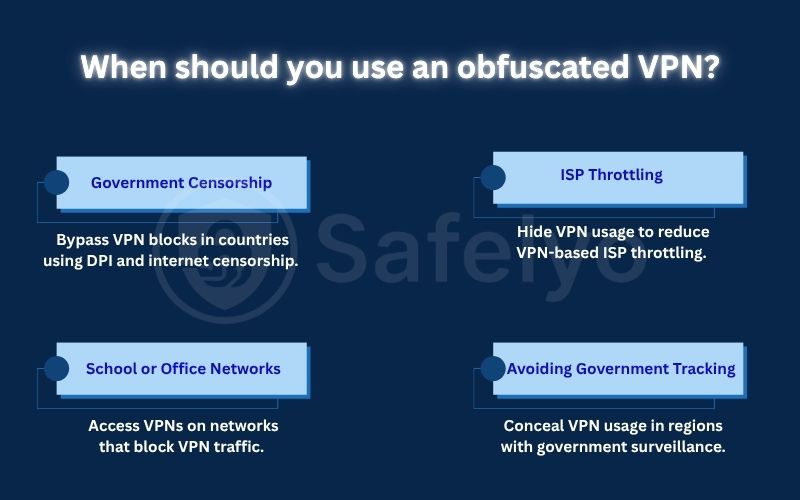
6. When should you use an obfuscated VPN?
Obfuscation is worth turning on in a small number of specific situations, not as a default setting. It matters most when the network itself is actively trying to detect and block VPN traffic, rather than in everyday browsing where a regular VPN connection already goes unnoticed. The four scenarios below cover most of the cases where switching it on makes a real difference.
6.1. Government Censorship
Countries that run large-scale filtering systems, including deep packet inspection at a national level, often block standard VPN protocols outright. Obfuscation gives users in these regions a way to keep a working connection when a regular VPN would be blocked on the first attempt. For users in China, choosing the best VPN for China often means looking for providers with reliable obfuscation and anti-censorship features.
6.2. School or Office Networks
Administrators frequently block VPN ports to enforce content policies, and obfuscated traffic on port 443 is harder to filter without breaking general internet access for everyone else on the network. This makes obfuscation one of the few practical ways to keep a VPN connection alive on a locked-down network.
6.3. ISP Throttling
Some ISPs slow down connections once they detect VPN usage, typically as part of broader traffic management rather than a targeted block. Hiding that usage can prevent throttling tied specifically to VPN traffic, though it won’t help with throttling based on total data usage.
6.4. Avoiding Government Tracking
In regions where using a VPN at all draws attention, obfuscation hides not just that a privacy tool is in use, but also what it’s being used for. This distinction matters most for journalists, activists, or travelers operating under active surveillance rather than casual users.
7. When you don’t need obfuscation
Obfuscation is a targeted tool for networks that actively filter VPN traffic, and running it outside those situations mostly adds overhead without a real benefit. Knowing when to leave it off matters as much as knowing when to turn it on.
- Streaming: platforms like Netflix and similar services rely on IP blacklists built from known VPN server ranges, not on inspecting the traffic itself. Obfuscation changes how traffic looks, not which IP address it comes from, so it does nothing to get past that kind of block. A clean, less recognized server IP matters far more here than any obfuscation setting.
- Home browsing: most residential ISPs don’t block VPN ports or run DPI-level filtering on everyday traffic, so a standard encrypted connection already covers the privacy need. Turning on obfuscation at home mainly trades away speed for protection the network isn’t threatening in the first place.
- Public Wi-Fi: cafes, airports, and hotel networks are built for general access, not content filtering, so they rarely deploy the kind of deep inspection obfuscation is meant to defeat. A regular VPN connection is enough to protect login credentials and browsing activity on these networks.
- Work-from-home setups on personal ISPs: connecting to a company VPN or a personal VPN from a home office typically doesn’t trigger port blocking or throttling, so obfuscation adds latency without addressing an actual restriction.
8. Obfuscated VPN vs. double VPN vs. regular VPN
These three setups solve different problems, and mixing them up leads to the wrong choice for a given situation. The table below outlines the core differences, followed by a closer look at what each option actually does.
| Feature | Regular VPN | Obfuscated VPN | Double VPN |
|---|---|---|---|
| Hides that a VPN is in use | No | Yes | No |
| Adds a second encryption layer | No | No | Yes |
| Main use case | General privacy | Bypassing VPN blocks | Extra anonymity layer |
| Speed impact | Low | Moderate | High |
- Regular VPN
A standard VPN connection encrypts traffic between the device and the VPN server, protecting the content of the data from anyone monitoring the network. It doesn’t disguise the fact that a VPN is in use; an ISP or firewall can typically see that the connection is going to a VPN server, even without knowing what’s inside it. This setup is enough for everyday privacy on open networks that don’t actively block VPN traffic.
- Obfuscated VPN
This builds on a regular VPN by wrapping the traffic so it resembles normal HTTPS browsing, hiding the VPN signature itself. It’s built specifically to get past DPI, port blocking, and other detection methods, at the cost of some connection speed due to the added processing. It doesn’t add a second layer of encryption; the goal is disguise, not additional security depth.
- Double VPN
Also called multi-hop, this setup routes traffic through two separate VPN servers, encrypting it twice along the way. It doesn’t hide that a VPN is in use, but it makes traffic harder to trace back to its origin. The extra hop brings a heavier speed cost than obfuscation alone, and some providers, like Surfshark, let you combine both features for stronger anonymity.
9. Is it legal to use an obfuscated VPN?
In most countries, using an obfuscated VPN is legal wherever VPNs themselves are legal, since obfuscation is simply a technical feature of the VPN.
A small number of countries, including China, North Korea, Belarus, Turkmenistan, and Iraq, restrict or ban VPN use outright, which puts obfuscated connections in the same legal position as any other VPN there. Separately, using a VPN to bypass a platform’s terms of service, such as region restrictions on streaming, can lead to an account suspension even where the VPN itself is legal.
10. Advantages and drawbacks
Obfuscation is a trade-off rather than a straightforward upgrade: it buys access on networks that would otherwise block a VPN outright, but that access comes with a real cost in speed and setup complexity. Weighing both sides helps decide whether the feature is worth leaving on for a given situation.
Advantages:
- Works on networks that block standard VPN protocols, including school, office, and government-filtered connections
- Reduces the chance of VPN-specific ISP throttling, since the ISP can no longer identify the traffic as VPN usage
- Adds a layer of protection against automated traffic filtering, on top of the encryption a regular VPN already provides
Drawbacks:
- Adds processing overhead, which typically lowers connection speed compared to a standard VPN server; providers commonly report a moderate speed reduction depending on server distance and load
- Usually requires the OpenVPN protocol, which tends to run slower than newer options like WireGuard, since fewer obfuscation methods have been built for lighter protocols
- Does not help against IP-based blocking, including most streaming restrictions, so it solves a narrower problem than users sometimes expect
- Can require manual protocol switching on some apps, which adds a setup step compared to leaving a VPN on its default settings
11. How to enable obfuscated servers
Enabling obfuscation usually means changing the VPN protocol first, since most providers tie the feature to OpenVPN rather than offering it as a fully independent switch. The steps below cover the three most common providers.
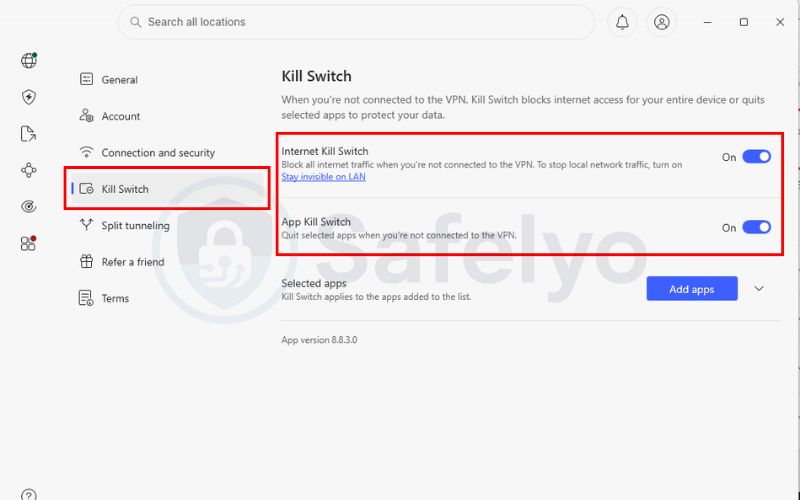
11.1. NordVPN
NordVPN keeps its obfuscated servers in a separate category that only becomes visible once the right protocol is selected, so the setup takes a couple of extra taps compared to connecting normally.
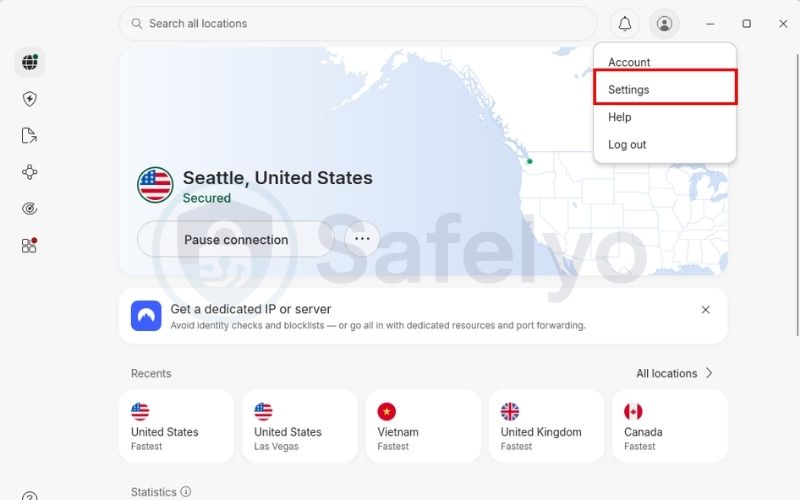
- Step 1: Open the NordVPN app and go to Settings.
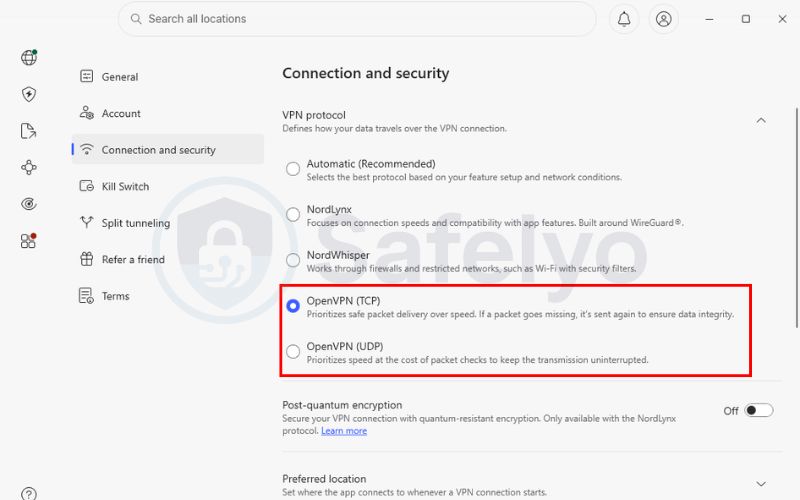
- Step 2: Go to the Connection and security section, select Protocol and switch it to OpenVPN (TCP) or OpenVPN (UDP), obfuscation only appears once this protocol is active.
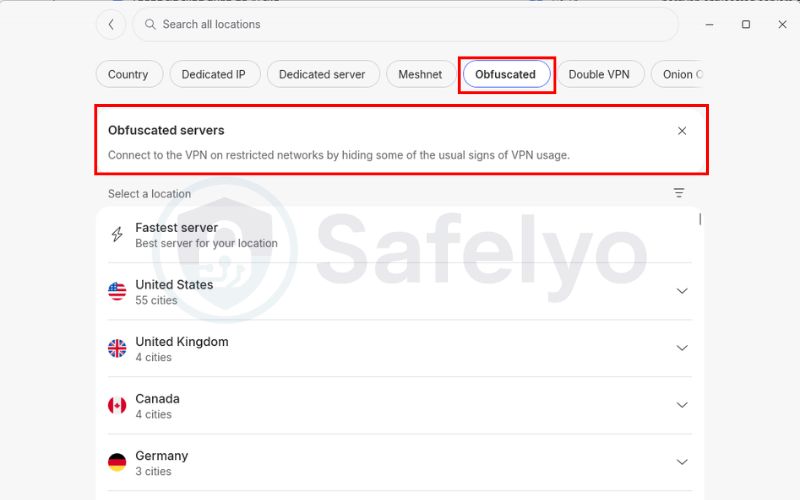
- Step 3: Return to the main server screen and open the All locations list.
- Step 4: Look for the Obfuscated Servers category and connect to one of the listed locations.
- Step 5: Turn on the Kill Switch in Settings so regular traffic is blocked automatically if the obfuscated connection drops.
11.2. ExpressVPN
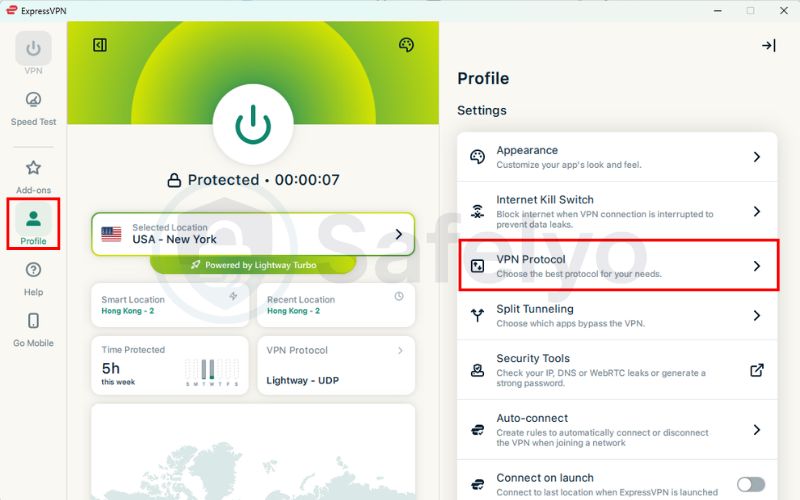
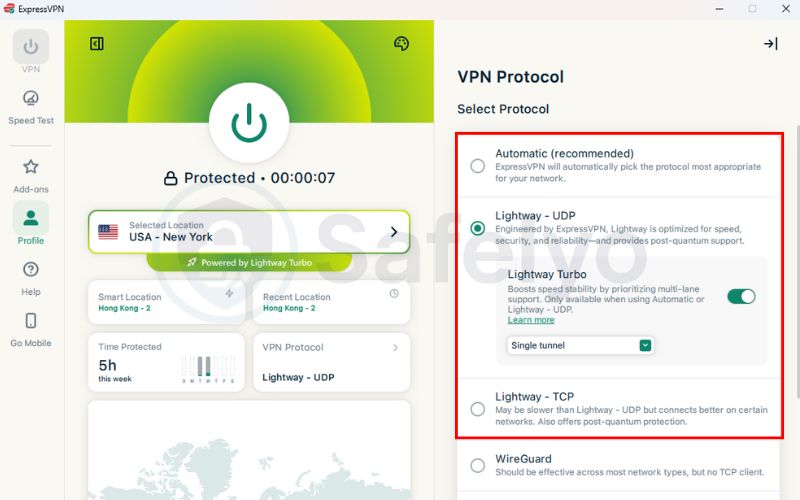
ExpressVPN builds obfuscation into its Lightway protocol by default, which means most users won’t need to change anything beyond leaving the app on its default settings.
- Step 1: Open the ExpressVPN app and check the protocol setting on the Profile tab.
- Step 2: Leave it on Automatic, or select Lightway directly. ExpressVPN applies obfuscation in the background on networks it detects as restrictive.
- Step 3: Connect to any server location as normal.
- Step 4: If the connection still fails on a filtered network, switch the protocol manually to OpenVPN, since ExpressVPN also supports obfuscation on select OpenVPN servers.
- Step 5: Check that Network Lock (ExpressVPN’s kill switch) is enabled so no unencrypted traffic leaks out if the obfuscated tunnel disconnects.
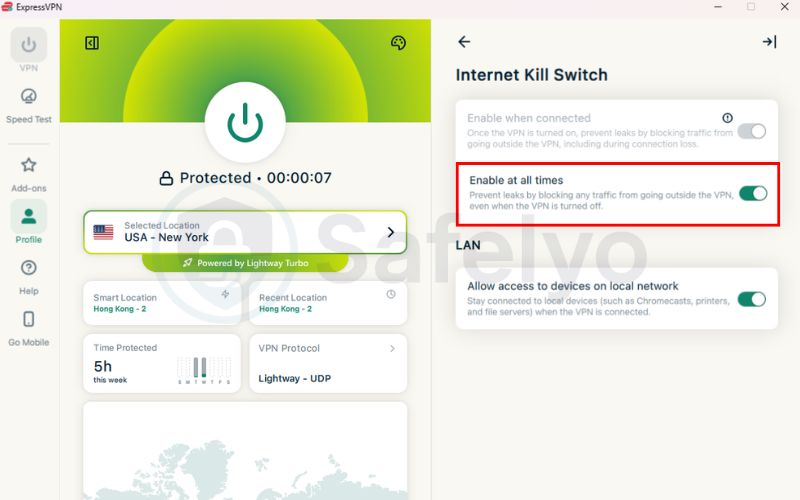
Across all three, the pattern is the same: set the protocol to one that supports obfuscation, confirm the feature is active either automatically or through a labeled server list, and pair it with a kill switch. Safelyo’s VPN setup guides walk through the mobile versions of these steps in more detail, including platform-specific quirks on iOS and Android.
12. Troubleshooting
Obfuscated connections tend to fail in a handful of predictable ways, and most issues trace back to protocol settings, server load, or an outdated app rather than a fault with obfuscation itself.
- The server won’t connect at all.
This is almost always a protocol mismatch. Obfuscation is built around OpenVPN on most apps, so if the protocol is set to WireGuard or IKEv2, the obfuscated server list either won’t appear or won’t connect. Switching the protocol back to OpenVPN (TCP or UDP) resolves this in most cases.
- The connection keeps dropping.
A specific obfuscated server may be overloaded or may have already been identified and partially blocked by the local network’s filtering system. Disconnecting and picking a server in a different country, rather than retrying the same one, usually restores a stable connection.
- The app connects, but the feature doesn’t seem to be working.
This points to an outdated client rather than a configuration issue, since obfuscation methods are updated regularly to stay ahead of new detection techniques. Updating the app to its latest version typically resolves connections that silently stopped working after a network-side change.
- The local network updates its filtering and blocks the app entirely
In this case, neither a protocol switch nor an app update will help right away. Contacting the provider’s support team for updated server addresses, or switching to a Shadowsocks-based option where available, is the more reliable fix.
- The kill switch blocks all traffic, including regular browsing.
This happens when the obfuscated tunnel disconnects while the kill switch is active, which is expected behavior rather than a bug. Turning the kill switch off temporarily, reconnecting to the VPN, and switching it back on once the tunnel is stable clears this without leaving the connection exposed.
13. FAQs about obfuscated VPN
What does a VPN blocker do?
A VPN blocker is a firewall or filtering system that detects and blocks VPN traffic, typically through DPI, IP blacklists, or port blocking.
Are obfuscated servers safe?
Yes. They use the same encryption as standard VPN servers; obfuscation changes how the traffic looks to outside observers, not how securely it’s encrypted.
Can obfuscated servers bypass the Great Firewall of China?
Sometimes, though not reliably. National filtering systems, including China’s, increasingly use traffic-timing analysis in addition to DPI, so results vary by provider and change over time.
Do all VPN providers support obfuscation?
No. Obfuscation requires extra server infrastructure, so it’s mainly offered by larger, established providers rather than smaller or free VPN services.
How do I know if a server is obfuscated?
Most VPN apps label obfuscated servers directly in the location list, often under a section called “Obfuscated” or “Stealth,” once the OpenVPN protocol is selected.
Is there a free obfuscated VPN?
Reliable free options are rare, since running dedicated stealth servers costs more than standard infrastructure. A handful of providers include limited obfuscation in a free tier, but paid plans generally offer more consistent access.
Does using an obfuscated VPN affect internet speed?
Yes, typically. The added processing needed to disguise traffic creates a moderate speed reduction compared to a standard VPN connection.
14. Conclusion
An obfuscated VPN disguises your traffic as ordinary HTTPS browsing so it can get past filtering that a regular VPN can’t. It’s strong against DPI, port blocking, and VPN-aware firewalls but not a substitute for a clean IP against streaming blacklists or the anonymity of a Double VPN. That’s what is obfuscated VPN in practice: a fix for a specific access problem, not an everyday setting.
For step-by-step setup instructions and more privacy tutorials, visit the VPN Guides section on Safelyo.