
ZoogVPN is a budget-friendly VPN suited for basic streaming and torrenting, but it falls short for users prioritizing high-level privacy. With a premium plan costing $2.49/month and a highly searched free tier offering 10 GB of data, it attracts cost-conscious users.
However, despite operating from Greece and claiming a strict no-logs policy, the service lacks independent security audits. This ZoogVPN review breaks down speed test results, streaming unblocking capabilities, and the critical trade-offs between its free and premium plans.
Disclaimer: This guide is for informational purposes only. Information regarding speeds (based on our tests conducted in 2026), unblocking capabilities, pricing, and promotional offers may change over time depending on your geographic location or new platform updates. Verify current details on each provider’s official website before purchasing.
1. ZoogVPN Review: At a glance
Founded in May 2013, ZoogVPN is operated by Zoog Services IKE, a single-member private company legally registered in Patras, Greece. This jurisdiction offers a strict privacy advantage, as the country operates entirely outside the 14-Eyes intelligence-sharing alliance. However, while officially headquartered in Greece, the software platform Softoria lists ZoogVPN as an active project, with independent third-party reports indicating its operational staff is primarily based in Ukraine.
VPN Score: 6.8/10 Generous Free Plan, Critical Security Flaws Best for: Affordable streaming and basic free VPN access.
Attribute
ZoogVPN
Safelyo rating
6.8 / 10
Starting price
$2.49/month (billed $59.99 for 27 months)
Money-back guarantee
7 days (initial purchase only)
Free trial / Free plan
Permanent free plan: 10 GB/month, 5 locations, 1 device
Servers and countries
100+ locations (Thousands of IPs)
Simultaneous connections
10 devices (Premium) / 1 device (Free)
Jurisdiction and owner
Greece (Outside 14-Eyes); Zoog Services IKE
No-logs policy
Claims strict no-logs, but lacks independent public audit
Protocols and encryption
IKEv2, OpenVPN, WireGuard (AmneziaWG), Shadow; AES-256 (Premium) / 128-bit (Free)
Streaming
Unblocks 20 Netflix regions, BBC iPlayer, Disney+, Hulu, Amazon Prime (Tested successfully on Free plan, but limited by 10GB cap).
Torrenting / P2P
P2P-dedicated servers, SOCKS5 proxy (Limited on Free plan)
Speed
Inconsistent: Fast in NL (379 Mbps) and US (307 Mbps), but drops in Germany (37 Mbps)
Apps & Extensions
Windows, macOS, Android, iOS, Linux, FireTV, AndroidTV; Chrome proxy extension
Customer support
24/7 Live Chat, email, and ticketing
To see how each category is weighted and evaluated, read our full methodology on how we test and review VPNs.
Pros
- Affordable Premium Plans: Costs just $2.49/mo (2-year plan), offering 256-bit encryption and 10 simultaneous connections.
- Functional Free Tier: Includes a permanent free plan with 10 GB of monthly bandwidth across 5 server locations.
- Strong Streaming Support: The Premium plan successfully unblocks up to 20 Netflix regions, Hulu, Disney+, and BBC iPlayer.
- Privacy-Friendly Jurisdiction: Legally headquartered in Greece, operating completely outside the 14-Eyes intelligence alliance.
Cons
- No Independent Audits: The provider’s strict no-logs policy remains unverified by any public third-party security audit.
- Free Plan Limitations: The free version is heavily restricted, using basic 128-bit encryption and allowing only 1 device.
- Inconsistent Speeds: Connection speeds drop significantly on certain global servers, impacting heavy bandwidth tasks.
- Strict Refund Policy: The 7-day money-back guarantee strictly applies to initial purchases, excluding auto-renewals.
2. ZoogVPN Pricing: Free vs Premium
Score: 7.5/10
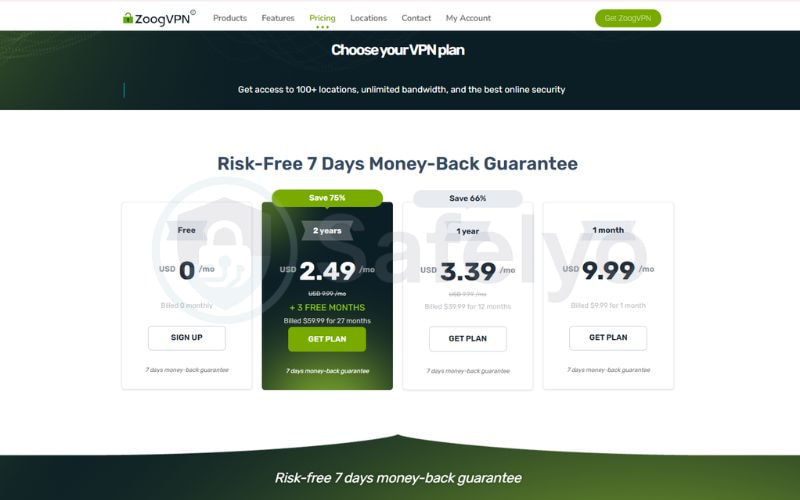
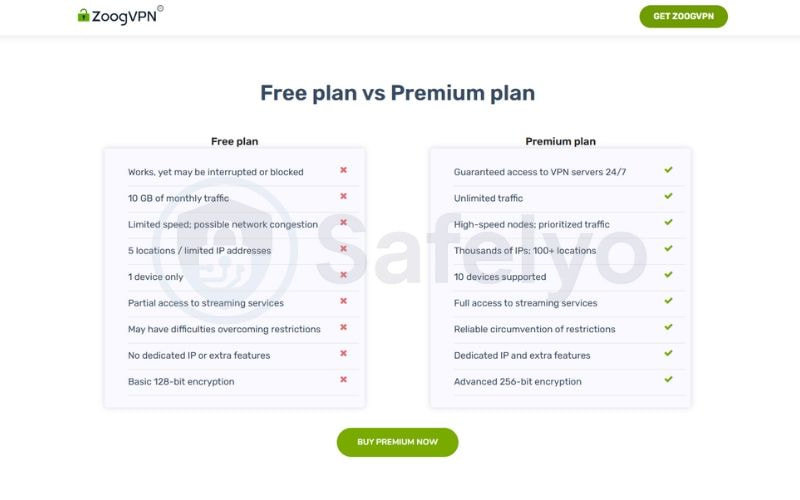
ZoogVPN treats its Free and Premium tiers as two fundamentally different products. As of October 2026, the lowest-priced Premium plan costs $2.49/month on a 2-year subscription (billed $59.99 for 27 months) and upgrades users to 256-bit encryption, 10 device connections, and full streaming access. The permanent Free plan restricts users to 10 GB of monthly bandwidth, a single device connection, and basic 128-bit encryption.
| Feature | Free Plan | Premium Plans (1-Month, 1-Year, 2-Year) |
|---|---|---|
| Pricing | $0/month | $9.99/mo (1-mo), $3.39/mo (1-yr), $2.49/mo (2-yr) |
| Data Limit | 10 GB bandwidth | Unlimited |
| Simultaneous Connections | 1 Device | 10 Devices |
| Server Network | 5 locations | 120+ locations (Thousands of IPs) |
| Encryption | 128-bit encryption | 256-bit encryption |
| Streaming Access | Access to core libraries (restricted by 10GB cap) | Full access (20 Netflix regions, Hulu, Disney+, iPlayer) |
| P2P / Torrenting | Limited P2P | P2P included |
| Logging Policy | Zero logs | Zero logs |
ZoogVPN offers a 7-day money-back guarantee, but it comes with strict conditions. To qualify, it must be your initial purchase made directly on zoogvpn.com (third-party and app store purchases are excluded), and your data usage must remain under 10GB. The company strictly denies refund requests for automatic subscription renewals.
3. Is ZoogVPN safe?
Score: 7.0/10
ZoogVPN provides a secure connection, but your actual safety level depends on your subscription tier. The Premium plan delivers bank-grade network protection, while the Free plan restricts users to basic encryption standards.
3.1. Privacy Policy and Data Protection
ZoogVPN effectively protects user identities during active sessions, though the lack of third-party verification remains a notable drawback for privacy purists.
- Zero-logs policy: The company operates from Greece, safely outside the 14-Eyes intelligence alliance. It does not record originating IP addresses, DNS queries, or browsing history.
- No independent audits: The provider has never published a third-party security audit to verify its server infrastructure or codebase. Users must rely entirely on internal privacy promises.
- No bandwidth hijacking: Unlike malicious free VPNs, ZoogVPN explicitly prohibits selling user bandwidth. Independent monitoring confirms the idle application does not transmit suspicious background data.
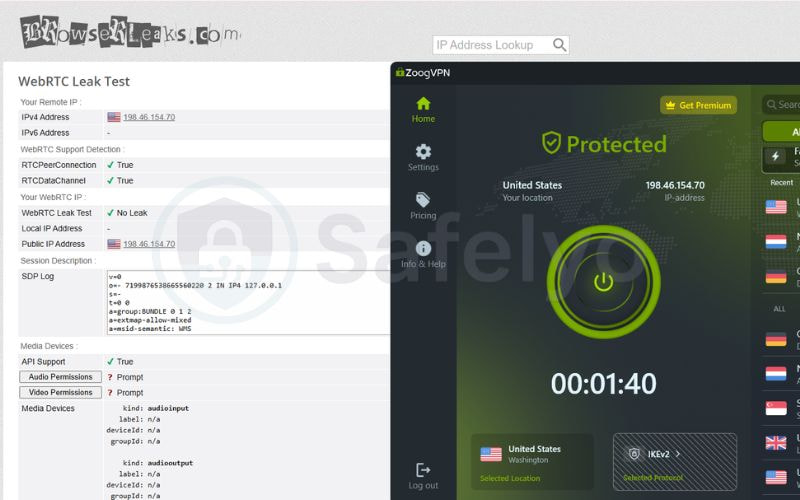
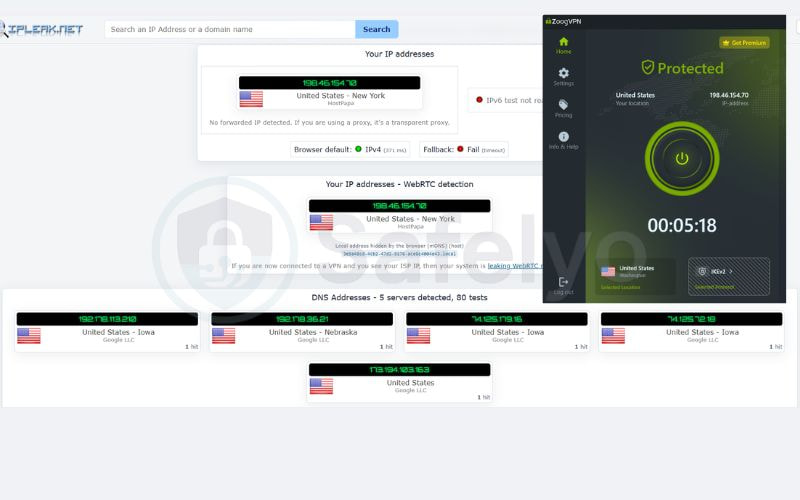
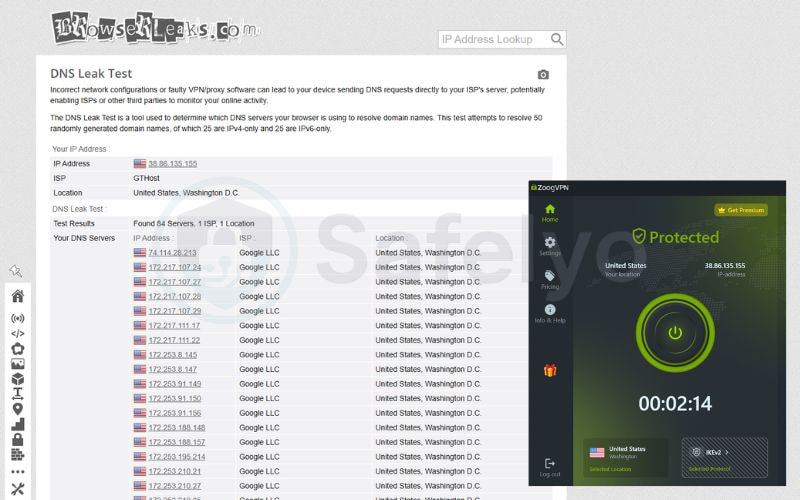
- Leak protection: Manual testing confirms the VPN successfully hides network data. Active connections passed all security checks without exposing true locations or DNS requests.
| Test Type | Testing Platform | Result Details | Status |
|---|---|---|---|
| WebRTC Leak | BrowserLeaks | No local or public IP exposed | Passed |
| IP Leak (IPv4/IPv6) | IPLeak.net | Only the assigned VPN IP detected (US) | Passed |
| DNS Leak | IPLeak.net | Queries routed safely via Google LLC servers | Passed |
3.2. Encryption, Protocols, and the Kill Switch
The provider heavily segments its security features based on your chosen plan. The Free tier limits users to basic 128-bit encryption. The Premium tier upgrades connections to AES-256 encryption paired with a 2048-bit hash key, utilizing 14 cryptographic hashes to neutralize dictionary attacks.
The application offers multiple core protocols, including IKEv2, OpenVPN (TCP/UDP), the proprietary ZoogTLS, and the Shadow Protocol for bypassing strict national firewalls. The WireGuard protocol equipped with AmneziaWG obfuscation is exclusively locked behind the Premium subscription.
Kill Switch Vulnerability: The desktop application features an automated kill switch to prevent data leaks if the VPN connection drops. However, enabling the Split Tunneling feature automatically and permanently disables this kill switch. You cannot use selective app routing and absolute leak protection simultaneously.
4. ZoogVPN Streaming Performance: Netflix, BBC iPlayer and Disney+
Score: 7.0/10
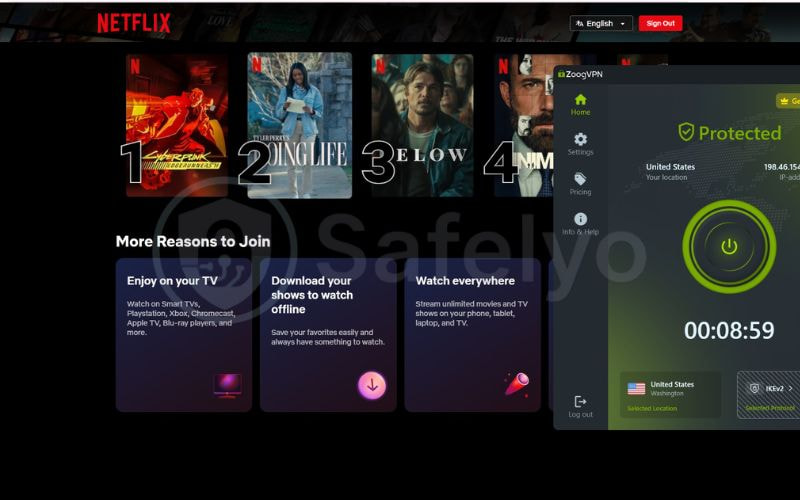
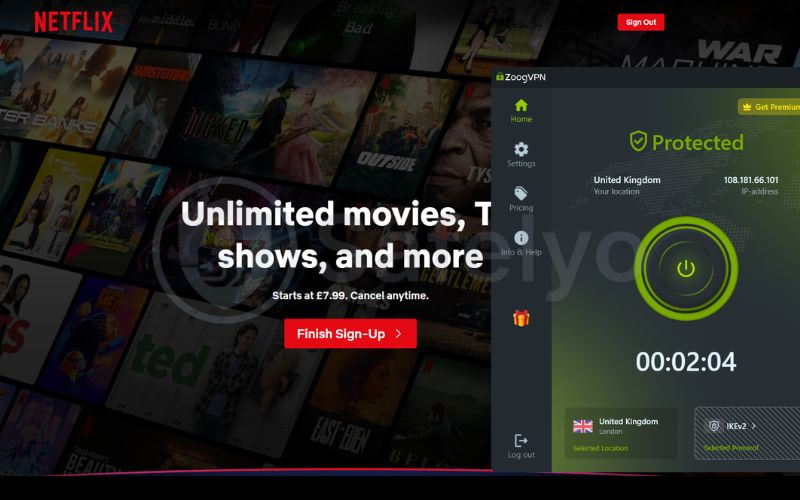
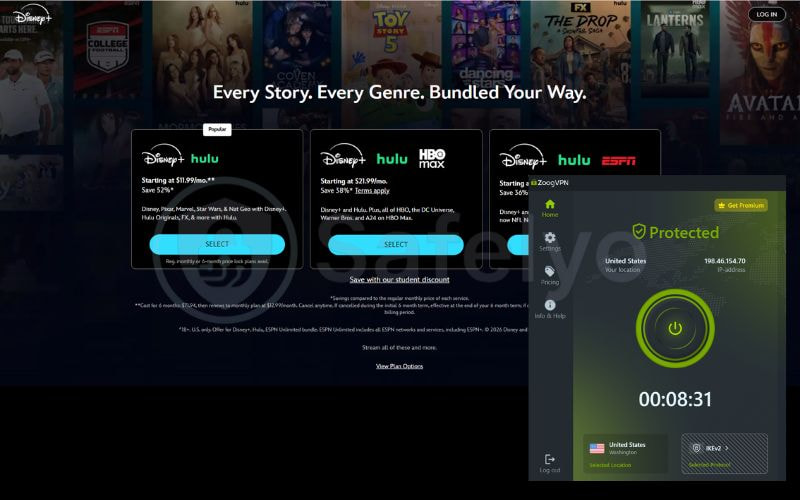
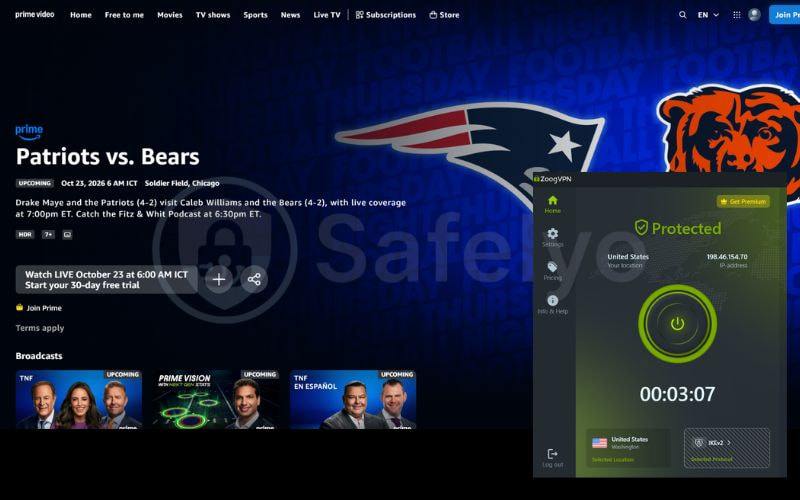
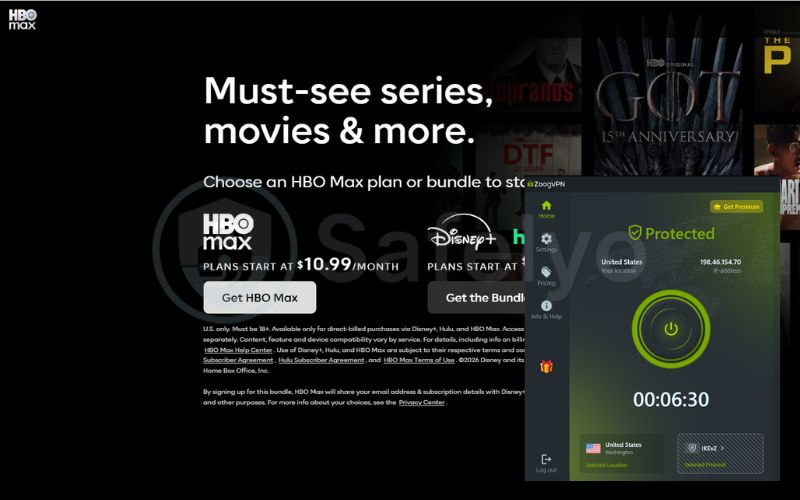
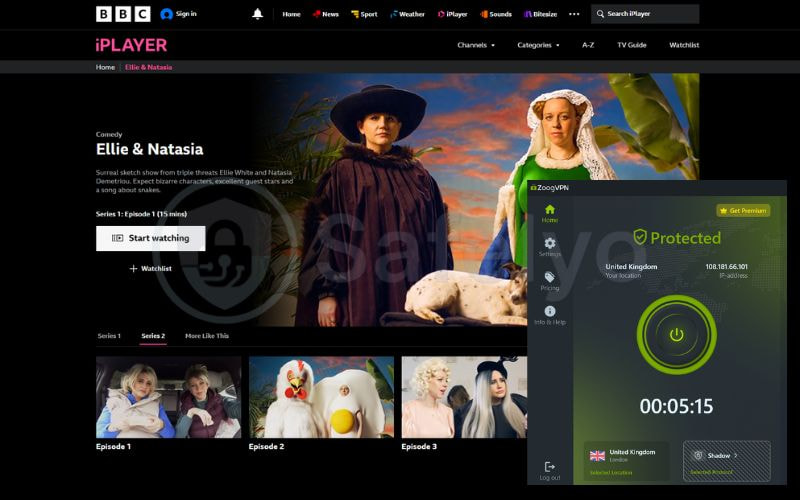
ZoogVPN unblocks major streaming platforms, including Netflix US, BBC iPlayer, Prime and Disney+, even on its Free plan. Recent tests confirm the free tier bypasses geo-blocks using the Washington (US) server via the IKEv2 protocol for Netflix and Hulu, and the London (UK) server via the Shadow protocol for BBC iPlayer. This makes ZoogVPN a rare free option for streaming, though the 10 GB monthly data limit restricts prolonged viewing.
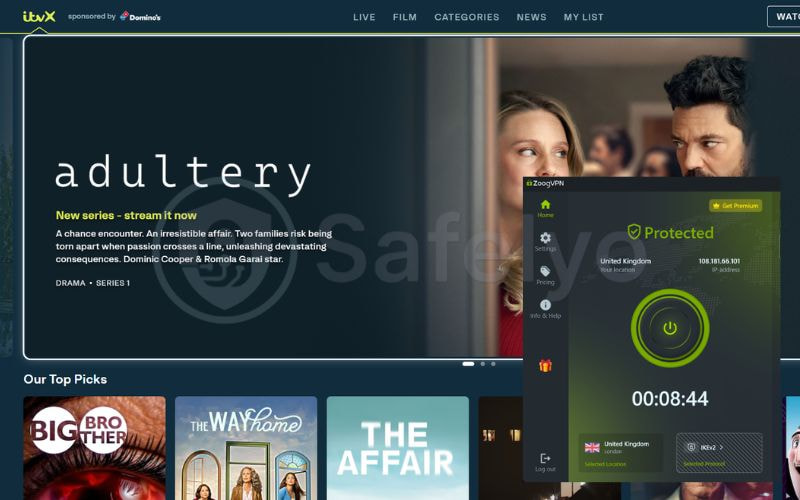
The table below details ZoogVPN’s streaming performance based on our latest tests.
| Streaming service | Status |
|---|---|
| Netflix (US) | Works |
| Netflix (UK) | Works |
| Hulu (US) | Works |
| Disney+ (US) | Works |
| Prime Video (US) | Works |
| Max (US) | Works |
| BBC iPlayer (UK) | Works |
| ITVX (UK) | Works |
While the Free plan grants access to these core libraries, upgrading to the Premium plan removes the data cap and officially expands access to 20 Netflix regions globally.
5. ZoogVPN speed test: Real-world benchmarks
Score: 6.5/10
ZoogVPN delivers fast download speeds on specific free servers, but it heavily throttles upload bandwidth and suffers from high latency over long distances. To evaluate its real-world performance, we conducted speed tests in October 2026 using a high-speed fiber-optic baseline connection.
Testing methodology
- Test location: Vietnam
- Protocol: IKEv2, Shadow
- Servers tested: Netherlands, United States, Singapore, United Kingdom, Germany (Free plan)
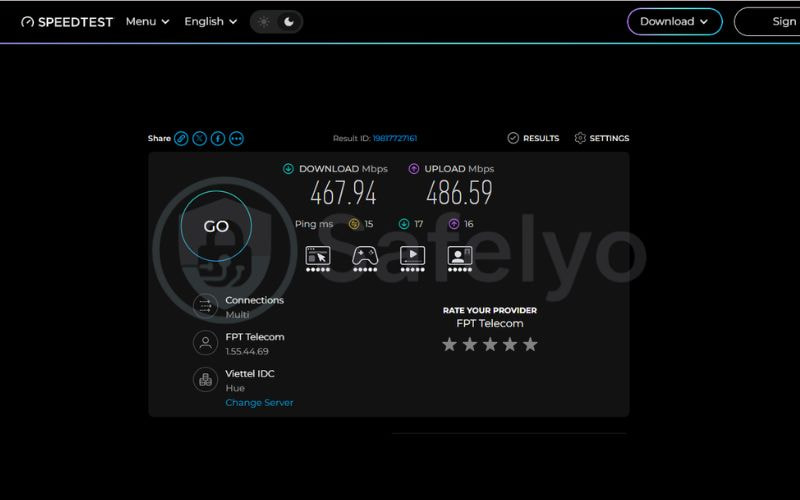
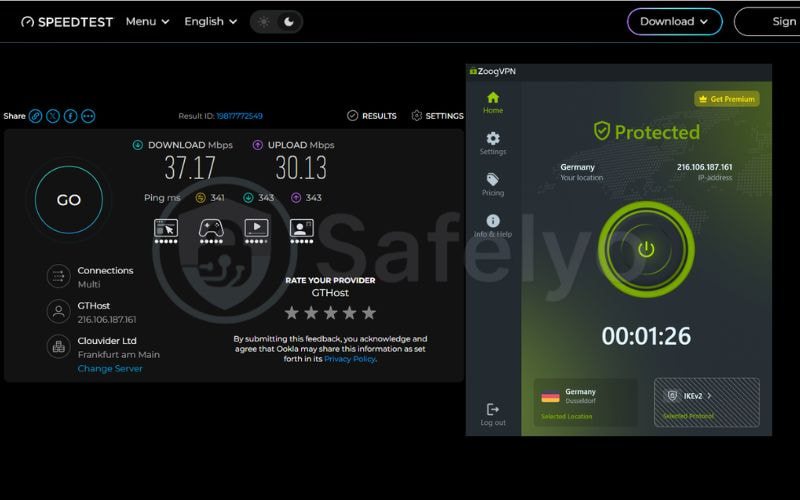
- Baseline: a no-VPN speed test, shown below
- Metrics: download speed, upload speed and ping (latency)
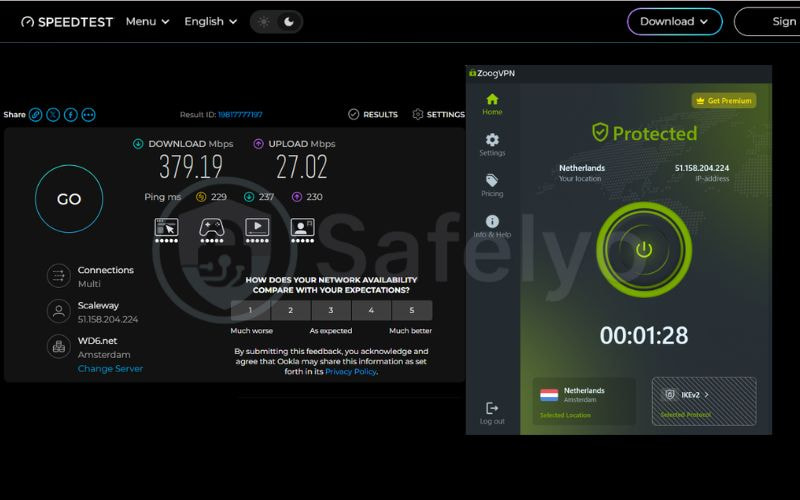
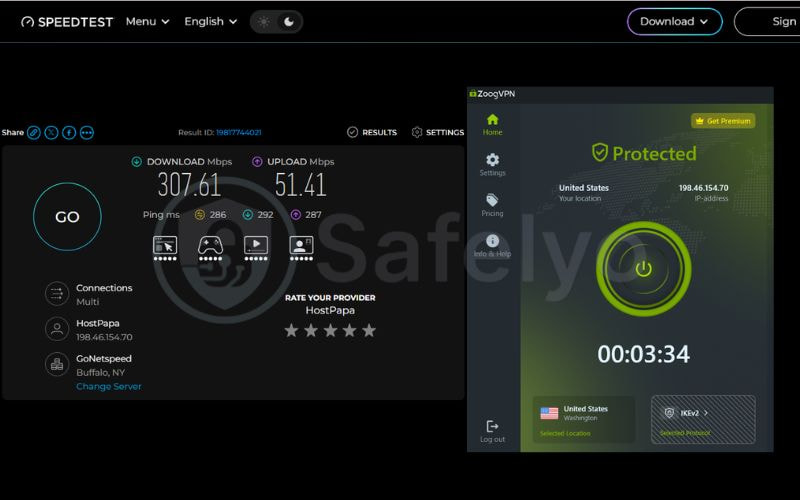
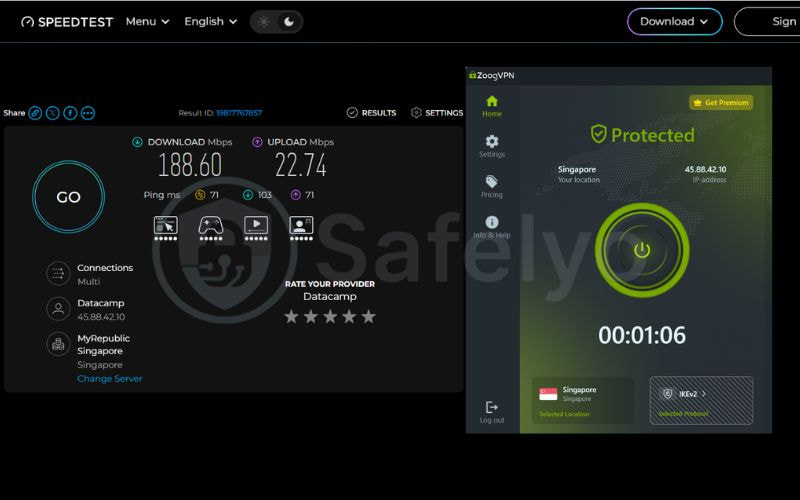
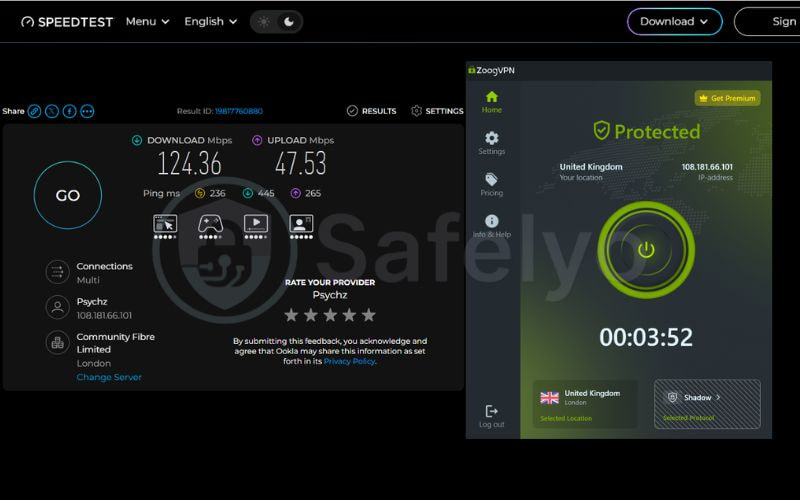
| Server Location | Download (Mbps) | Upload (Mbps) | Ping (ms) | Speed retention (%) |
|---|---|---|---|---|
| Baseline (No VPN) | 467.94 | 486.59 | 15 | 100% |
| Netherlands | 379.19 | 27.02 | 229 | 81% |
| United States | 307.61 | 51.41 | 286 | 66% |
| Singapore | 188.60 | 22.74 | 71 | 40% |
| United Kingdom | 124.36 | 47.53 | 236 | 27% |
| Germany | 37.17 | 30.13 | 341 | 8% |
| Average (5 locations) | 207.39 | 35.77 | 233 | 44% |
Performance and Distance Analysis
Netherlands (81%) and the US (66%) retained the highest download speeds across long distances. Conversely, the Germany connection dropped severely to just 8% speed retention. Singapore, despite being physically closest to the testing location, only retained 40% of the baseline speed, though it provided the lowest latency (71 ms).
The provider heavily throttles upload speeds across all locations, peaking at 51.41 Mbps in the US (an 89% reduction). The free plan supports downstream consumption but lacks upload bandwidth for large file transfers.
6. ZoogVPN for Torrenting
Score: 7.0/10
ZoogVPN provides excellent tools for secure P2P file sharing, granting Premium users unrestricted torrenting access with AES-256 encryption. The provider explicitly offers dedicated P2P servers to prevent ISP bandwidth throttling and DMCA notices. It also includes a SOCKS5 proxy to maximize download speeds by transmitting smaller data packets.
However, the free plan’s strict 10 GB monthly data cap makes it impractical for heavy P2P workloads. More importantly, safe torrenting requires absolute IP protection, but enabling ZoogVPN’s Split Tunneling permanently disables the kill switch. If your connection drops during a transfer while using this feature, your real IP address will be exposed.
7. ZoogVPN for Gaming
Score: 5.5/10
Severe latency issues restrict ZoogVPN to casual, local gaming, and the free plan’s data cap makes downloading heavy game files impractical. While the provider promises 99.9% network uptime, our tests reveal high long-distance latency. The closest server in Singapore yielded a playable 71 ms ping, but US, UK, and Germany connections consistently exceeded 200 ms (up to 341 ms).
This high latency inevitably causes noticeable lag and input delay during fast-paced matches, forcing players to strictly rely on nearby servers. Console gamers on PlayStation and Xbox face additional setup friction because ZoogVPN lacks a Smart DNS tool, users must manually configure the VPN on a compatible home router rather than simply changing their console’s DNS settings.
8. ZoogVPN Server Network: Bare-Metal Hardware
Score: 6.0/10
ZoogVPN operates a highly secure network built entirely on dedicated bare-metal servers. The provider prioritizes physical hardware security and stable routing over simply inflating its server count with virtualized locations.
8.1. Global Coverage and IP Count
The official marketing materials claim a premium network featuring “thousands of IPs” across “120+ locations.” These available servers effectively cover major high-traffic regions across North America, Europe, and Asia to support global streaming and secure browsing.
8.2. Physical Infrastructure and Specialized Nodes
Unlike many budget VPNs that cut costs by renting virtual servers, ZoogVPN uses 100% physical bare-metal hardware. This approach eliminates the security risks associated with shared virtualized environments and guarantees a stable 99.9% network uptime.
The provider logically organizes this hardware by visually labeling specific servers for P2P file sharing and streaming directly inside the app interface. Additionally, Premium users can purchase a Dedicated IP address to bypass shared IP blocklists, avoid repetitive CAPTCHA prompts, and securely access restricted networks.
9. ZoogVPN Apps and User Experience
Score: 8.0/10
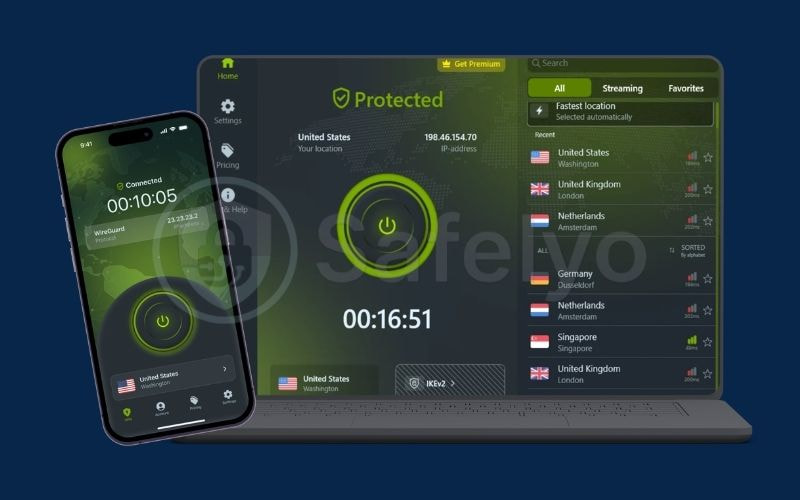
ZoogVPN provides native, one-click applications for major operating systems, but the absence of a Smart DNS feature complicates setups for living room devices.
9.1. Device Compatibility and Enterprise Solutions
The provider covers standard desktop and mobile platforms effectively. It supports up to 10 simultaneous device connections on the Premium plan, while the Free plan restricts you to a single device. Beyond individual consumers, the company expands its services to corporate clients by offering dedicated VPN for Business and White Label VPN solutions.
| Platform Category | Supported Devices |
|---|---|
| Native Apps (One-Click) | Windows, macOS, iOS, Android, Linux, FireTV, AndroidTV |
| Browser Extensions | Google Chrome, Firefox |
| Manual Configuration | Routers, Apple TV (via router), Chromebook, Kindle Fire, Blackberry, Windows Phone |
9.2. The Linux App and Chrome Extension
Unlike many competitors that force Linux users to rely on complex command-line interfaces, ZoogVPN offers a dedicated, one-click install application for Linux systems. Additionally, for users who only want to mask their web browsing traffic without encrypting the entire device, the provider offers a lightweight proxy extension for Google Chrome.
9.3. Apple TV and Gaming Consoles
ZoogVPN completely lacks a Smart DNS tool. You cannot configure the VPN directly on an Apple TV, PlayStation, Xbox, or older Smart TVs that lack native app stores. To secure these specific devices or bypass geo-blocks for living room streaming, you must manually install and configure the VPN directly on a compatible home router.
10. How to Download ZoogVPN Safely
Always download ZoogVPN directly from the official website or verified app stores to prevent device compromises. Downloading third-party APKs or unofficial installation files exposes your device to significant security risks.
Verified Download Sources:
- Windows, macOS, and Linux: Download the desktop installation files exclusively from the official ZoogVPN website.
- Android and Android TV: Install the application directly through the Google Play Store.
- iOS and iPadOS: Download the app exclusively from the Apple App Store.
- Fire TV: Download the native application via the Amazon Appstore.
- Google Chrome Extension: Add the proxy extension directly from the official Chrome Web Store.
11. ZoogVPN Customer Support and User Reviews
Score: 5.5/10
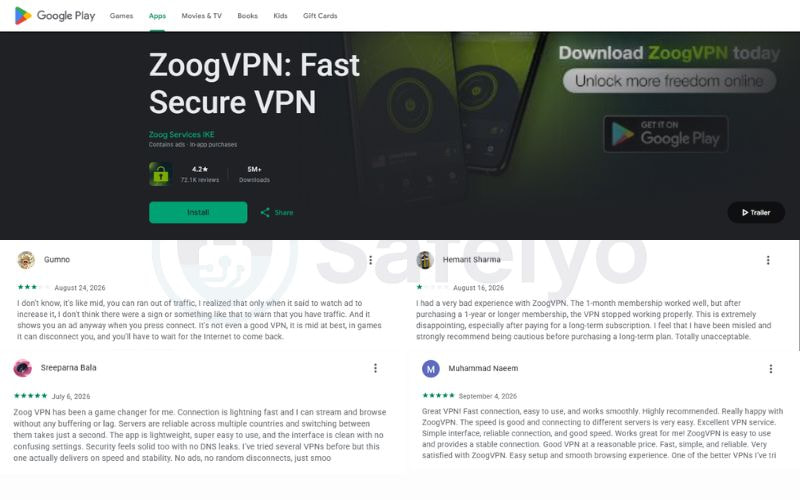
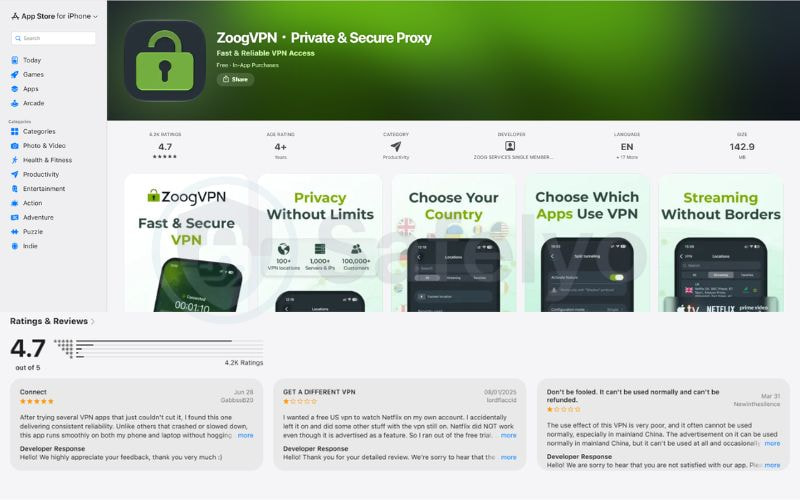
ZoogVPN earns high ratings on mobile app stores for its smooth performance, but users frequently complain about strict refund policies and unreliable connections in censored regions. Users can contact the 24/7 customer support team through three primary channels: instant live chat on the official website, direct email, and an internal support ticket system.
Ratings and Real User Feedback
The application secures excellent scores across official mobile storefronts, though independent review platforms reveal persistent billing issues.
| Review Platform | Score (October, 2026) | Total Reviews | Feedback Summary |
|---|---|---|---|
| Apple App Store | 4.7 / 5.0 | 4.2K | Pros: Smooth app, excellent “Connect on Demand”. Cons: Missing iOS features, refund denials. |
| Google Play Store | 4.2 / 5.0 | 72.1K | Pros: Fast connections. Cons: Long-term subscription bugs, sudden disconnects. |
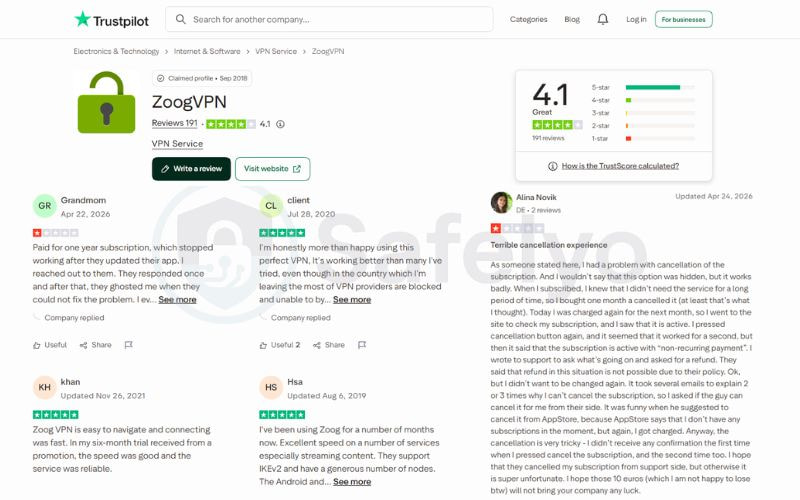
| Trustpilot | 4.1 / 5.0 | 190+ | Pros: Easy installation. Cons: Terrible cancellation process, unresponsive refund requests. |
Detailed User Feedback Analysis:
- App Performance: Mobile users praise the application’s overall stability. iOS users specifically highlight the “Connect on Demand” feature for maintaining uninterrupted protection. However, some Lifetime subscribers report that the provider abruptly removed the Shadow protocol from the iOS application without warning.
- Refund and Cancellation Issues: Across Trustpilot and the App Store, the most consistent complaint involves billing. Users report extreme difficulty when attempting to cancel automatic renewals or claim refunds, noting that customer support often refuses to honor the advertised money-back guarantee.
- Great Firewall Evasion: Performance in censored countries remains highly inconsistent. While a few users report successful connections in China, multiple reviews on Reddit and the App Store confirm the service struggles heavily. Users state the Shadow protocol suffers from severe speed throttling (under 1 Mbps), and WireGuard completely fails to connect in major cities like Beijing and Shanghai.
12. Who Should Use ZoogVPN?
ZoogVPN provides basic online protection for budget-conscious users, but it lacks the performance required for competitive gaming or circumventing strict censorship. Based on Safelyo’s manual testing, here is our final verdict on who will actually benefit from this service.
Recommended For:
- Budget-conscious users: The 10 GB Free plan and affordable Premium tiers effectively cover everyday web browsing.
- VPN beginners: The native, one-click applications require no technical configuration to operate.
- Casual torrent users: Premium users gain access to dedicated P2P servers secured by AES-256 encryption.
Not Recommended For:
- Competitive gamers: High latency on global servers causes noticeable input delay during fast-paced matches.
- Users in censored regions: The service fails to consistently bypass the Great Firewall in mainland China.
- Privacy purists: The absolute lack of independent security audits forces users to blindly trust the provider’s internal policies.
- Living room streamers: The absence of a Smart DNS feature heavily complicates setups for Apple TVs, gaming consoles, and older Smart TVs.
13. ZoogVPN Alternatives
If ZoogVPN does not meet your specific networking needs, several competitors offer superior performance, verified security audits, or better free tiers. Based on Safelyo’s extensive testing, we recommend considering these alternative providers.
- Proton VPN: If you are exploring the best free VPNs to avoid monthly data caps, Proton VPN is a superior choice. Unlike ZoogVPN’s strict 10 GB limit, it provides completely unlimited bandwidth at no cost.
- Windscribe: Users looking for highly flexible and cheap VPNs should consider Windscribe. It reliably bypasses strict network censorship in regions like China and offers customizable “build-a-plan” subscription options.
- Surfshark and Private Internet Access (PIA): For power users and competitive gamers needing the absolute best VPNs on the market, Surfshark and PIA deliver massive global networks, native Smart DNS tools for living room streaming, and publicly verified security audits.
Alternatives Comparison Table
| VPN Provider | Best Alternative For | Key Advantage Over ZoogVPN | Security Audit Status |
|---|---|---|---|
| ZoogVPN | Basic browsing on a budget | Very cheap long-term premium plans | Not audited |
| Proton VPN | Zero-cost unlimited data | Uncapped bandwidth on the free tier | Independently audited |
| Windscribe | Bypassing strict censorship | Works reliably in mainland China | Independently audited |
| Surfshark | Streaming & Smart Homes | Includes Smart DNS & unlimited devices | Independently audited |
| PIA | Gaming & Power users | Massive low-latency server network | Independently audited |
14. ZoogVPN FAQ
Is ZoogVPN safe?
Yes, but security levels depend on your plan. Premium users get bank-grade AES-256 encryption, while Free users rely on basic 128-bit encryption. The company maintains a strict no-logs policy but lacks an independent security audit.
Is ZoogVPN free?
Yes. ZoogVPN offers a permanent free plan, but it is heavily restricted. Free users face a strict 10 GB monthly data cap and basic 128-bit encryption. Unlimited bandwidth and advanced security require a Premium subscription.
Does it work with Netflix?
Yes, but reliably only on the Premium plan. The provider explicitly labels dedicated streaming servers within the app that successfully bypass geo-blocks. Free servers can successfully bypass blocks on specific nodes, but the 10 GB limit makes prolonged viewing impractical.
Who owns ZoogVPN?
ZoogVPN is owned by Zoog Services IKE, a company headquartered in Greece. This location places the provider safely outside the jurisdiction of the 14-Eyes intelligence-sharing alliance.
Does ZoogVPN have a Chrome extension?
Yes. ZoogVPN offers a free proxy extension for Google Chrome. It successfully masks your IP address for browser-based traffic but does not encrypt your entire device connection like the native desktop applications.
Is a free VPN risky?
Many free VPNs are dangerous because they secretly sell user bandwidth. However, network tests confirm ZoogVPN’s free plan is safe. It explicitly prohibits data selling and does not hijack your bandwidth or inject advertisements.
15. Conclusion
ZoogVPN is an affordable entry-level service that provides reliable basic encryption, but it falls short for power users and competitive gamers. While the generous free tier and dedicated P2P servers offer great value for casual web browsing, the high long-distance latency and lack of independent security audits limit its overall capability. For more in-depth technical analyses, verified test results, and top-tier alternatives, explore our complete library of VPN reviews at Safelyo.