Everyone wants to protect their online privacy, but nobody wants to be tricked into an expensive subscription just to test an application. Finding the best VPN free trial 2026 can be challenging when you are not sure what happens after the testing window ends.
We extensively analyzed and tested the top providers on the market to find the best free trial options available today. This guide directly explains which services offer completely safe no-card plans, which require a card upfront, and which rely on money-back guarantees. Trial availability may vary by App Store or Google Play region.
Read our summary of the top picks in the winner list below:
| Rank | VPN Name | Best For | Trial Type |
|---|---|---|---|
| #1 | NordVPN | Best Overall / Zero-Risk Cancellation | Add-Card |
| #2 | Surfshark | Best Value / All-Platform Trial | Add-Card |
| #3 | ExpressVPN | Best for Streaming | Add-Card |
| #4 | IPVanish | Best Trial on Both iOS & Android | Add-Card |
| #5 | PIA | Best Budget Post-Trial Renewal | Add-Card |
| #6 | CyberGhost | Best for Desktop | No-Card |
| #7 | ProtonVPN | Best Forever-Free Plan | No-Card |
Affiliate Disclosure: Safelyo is reader-supported. We may earn a commission when you purchase through links on our site. This does not influence our objective testing methodology or rankings.
Performance & Pricing Disclaimer: Speed test results reflect our specific conditions. Your actual speeds will vary by location, device, and network. VPN providers also frequently update their pricing and trial terms. Always verify the latest details directly on the provider’s website before purchasing.
1. How to choose a VPN trial and our testing methodology
Before you download an application, you must understand the different testing methods available. We categorize VPN trials into three main types to help you choose the right path:
- No-card trials: Completely eliminate financial risk by asking for zero payment details.
- Add-card trials: Provide full premium access for a few days but require strict cancellation timing.
- Money-back guarantees: Require an upfront payment but offer the longest testing window.
Your device also determines your options. Mobile users have the easiest access to standard free trials through official application stores. Desktop users generally must rely on upfront money-back guarantees for thorough testing.
To find the best options in each category, we evaluated every service by physically testing the exact cancellation and refund steps. We want you to feel confident that you are choosing a secure tool without risking your money.
We focused heavily on identifying dark patterns and difficult refund policies that companies use to retain customers. We based our final recommendations on four essential selection criteria:
- Cancellation ease: We prioritized providers with straightforward cancellation methods and clear refund policies to ensure you can easily end the trial.
- Performance data: We selected services that offer fast connection speeds and full access to premium servers during the testing window.
- Hidden costs: We identified exactly which long-term plan the trial automatically transitions into to help you avoid unexpected charges.
- Trial category classification: We categorized each option strictly as a no-card trial, an add-card trial, or a money-back guarantee so you know exactly what is required upfront.
2. Best VPN free trials with no credit card
These options represent zero financial risk because the provider does not require any payment information. You pay nothing upfront and you do not need to enter your credit card details to create an account.
2.1. CyberGhost: Best for desktop (24-hour trial)
This section covers the 24-hour desktop trial only, which requires no credit card. The Android (3-day) and iOS (7-day) trials require App Store or Google Play billing and are not covered here.
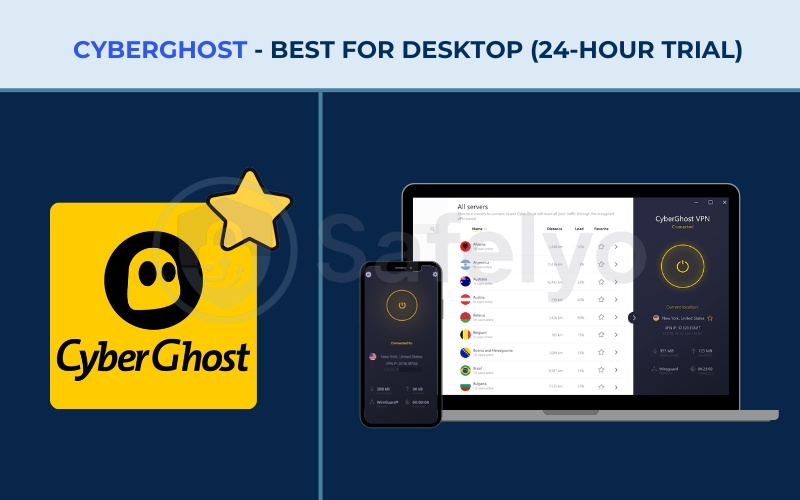
Here are the detailed specifications for the CyberGhost trial:
| Feature | Details |
|---|---|
| Starting Price | From $2.03/mo (2-year plan) |
| Servers & Countries | 11,700+ in 100 countries |
| Jurisdiction | Romania |
| Trial Duration | 24hr (desktop) |
| Trial Type | No-Card Trial (No payment details needed for desktop) |
| Auto-Renews To | N/A |
| Cancel via App | N/A (Just uninstall) |
| Simultaneous Connections | 7 |
| Streaming Support | Yes (Dedicated streaming servers) |
| Torrenting/P2P | Yes |
| Verified No-Logs | Yes (Audited by Deloitte) |
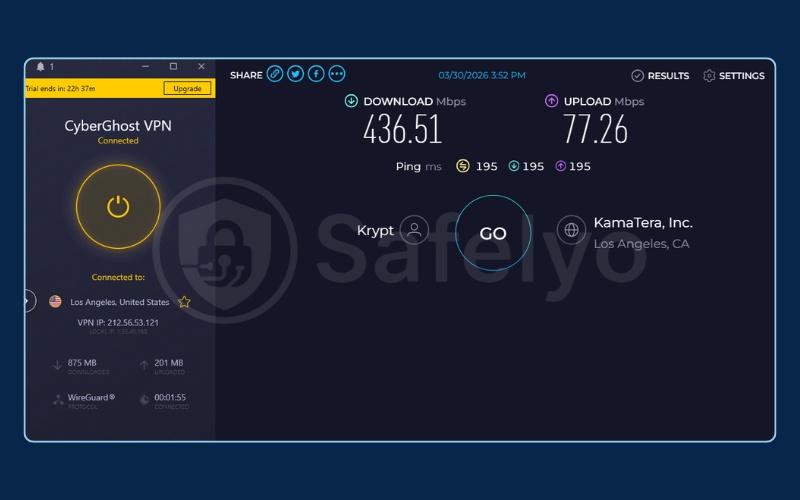
| Avg Download Speed | ~436 Mbps (US Server) |
| Website | www.cyberghostvpn.com |
Getting started without a card
The 24-hour desktop trial from CyberGhost is the most accessible way to test a premium service on a PC without providing any payment data. You simply download the application, create an account with your email address, and activate the trial.
We appreciated that the application immediately unlocks the full premium server network. You are not restricted to a small handful of slow free servers during this period.
Streaming performance on desktop
During our testing, we found the dedicated streaming servers particularly helpful for evaluating the service quickly. The application clearly labels which servers are optimized for specific platforms like Netflix or Hulu.
This direct labeling removes the guesswork from unblocking content. During our tests, the Los Angeles server reached speeds of 436.51 Mbps with a 195ms ping. This speed is ideal for multi-player gaming, 4K streaming, and downloading large files without noticeable buffering.
The 24-hour limitation
The main limitation is the strict 24-hour window. You must conduct all your testing quickly within a single day.
Because you do not enter a credit card, the service simply stops working when the 24 hours end. You do not have to worry about canceling a subscription or talking to customer support to avoid a charge. This hands-off expiration process is exactly what risk-averse users need.
Review the advantages and disadvantages below:
| Pros | Cons |
|---|---|
| Requires absolutely no payment details | Trial only lasts 24 hours |
| Gives full access to premium servers | Mobile trials require a credit card |
| Includes dedicated streaming options | Short window makes deep testing difficult |
| Zero risk of auto-renewal charges | App interface can feel slightly cluttered |
Best for: PC users who need a quick, true free trial without a credit card for a single day.
2.2. Proton VPN: Best forever-free plan
Proton VPN offers a permanent free tier with no data caps instead of a time-limited trial. This makes it the safest option for users who refuse to provide any payment details and need ongoing protection.
Here are the detailed specifications for the Proton VPN free plan:
| Feature | Details |
|---|---|
| Starting Price | Free (Plus plan from ~$2.99/mo) |
| Servers & Countries | 18,000+ servers in 129 countries (Free plan limited to 10 countries) |
| Jurisdiction | Switzerland |
| Trial Duration | Free plan forever |
| Trial Type | No-Card Trial (No credit card required at all) |
| Auto-Renews To | N/A |
| Cancel via App | N/A (Just uninstall) |
| Simultaneous Connections | 1 (on free plan) |
| Streaming Support | No (on free plan) |
| Torrenting/P2P | No (on free plan) |
| Verified No-Logs | Yes (Open-source and audited) |
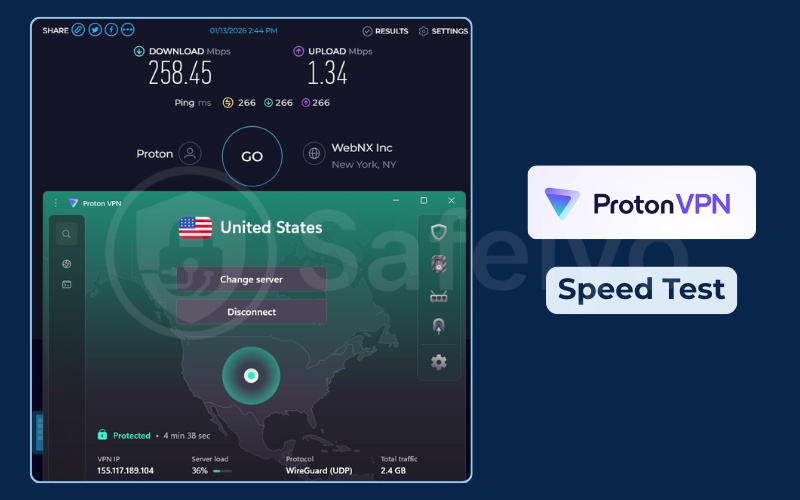
| Avg Download Speed | ~258 Mbps (US Server) |
| Website | protonvpn.com |
Privacy without payment
Proton VPN takes a different approach by providing a completely free plan that lasts forever. You do not need a credit card to sign up, as you only need a valid email address.
We value this model because it removes all financial anxiety from the experience. You can use the application to secure your connection on public Wi-Fi without ever worrying about a trial expiration date sneaking up on you.
Understanding the free limitations
However, the free plan has strict limitations that you must understand before downloading. You only get access to servers in 10 countries. Furthermore, the application randomly assigns you to a server within those locations to manage network load. You cannot manually select a specific city.
Most importantly, Proton VPN strictly blocks streaming and torrenting on the free tier. If you try to open a streaming application, the connection will likely fail or the video simply will not load.
Performance expectations
During our tests directly on the free tier, a US server delivered surprisingly fast speeds of 258.45 Mbps with a 266ms ping. This amount of bandwidth easily supports smooth 4K video playback and rapid file transfers. Keep in mind that free servers can sometimes experience congestion during peak hours, which might drop speeds down to levels only suitable for basic web browsing and checking emails.
Review the advantages and disadvantages below:
| Pros | Cons |
|---|---|
| Completely free forever with no data limits | Restricts access to only 10 countries |
| Requires zero payment information | Does not support streaming or torrenting |
| Open-source applications | Speeds can drop due to server congestion |
| Based in privacy-friendly Switzerland | Limits you to one device connection |
Best for: Users who need basic privacy indefinitely without ever entering a credit card.
2.3. Windscribe: Best free plan with server variety
Windscribe offers a generous free tier that prioritizes location variety over unlimited data. It provides a practical alternative if you need to connect to specific countries without paying.
Here are the detailed specifications for the Windscribe free plan:
| Feature | Details |
|---|---|
| Starting Price | Free (Pro plan from $5.75/mo Yearly) |
| Servers & Countries | Servers in 69 countries & 112 cities (Free plan limited to 10 countries) |
| Jurisdiction | Canada |
| Trial Duration | Free plan forever (Up to 15GB/month data cap) |
| Trial Type | No-Card Trial (No payment details required at all) |
| Auto-Renews To | N/A |
| Cancel via App | N/A |
| Simultaneous Connections | Unlimited |
| Streaming Support | Yes |
| Torrenting/P2P | Yes |
| Verified No-Logs | Yes |
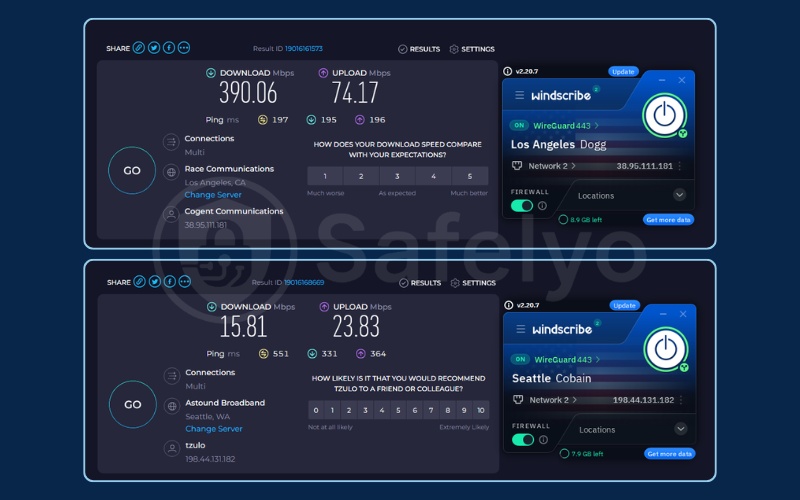
| Avg Download Speed | Up to 390 Mbps (US Server) |
| Website | windscribe.com |
Manual server selection
Windscribe differentiates itself from Proton VPN by allowing you to manually choose your server location. The free plan grants access to servers in 10 different countries.
This geographic variety is incredibly useful if you need to bypass regional restrictions on specific websites. Just like the other options in this category, you do not need a credit card to register.
Managing the data cap
The major drawback of this service is the strict monthly data cap. You start with 2GB of data per month upon basic registration. If you confirm your email address, Windscribe increases this cap to 10GB.
You can earn an additional 5GB by posting about the company on social media, bringing the total to a maximum of 15GB. Once you use that data, the VPN stops working until the next month begins. We found this cap sufficient for light browsing, but it depletes rapidly if you stream video.
Speed and streaming
Unlike many free plans, Windscribe actually supports streaming and torrenting activities. The connection speeds can vary significantly based on the server location you choose.
For instance, our tests showed speeds of 390.06 Mbps with a 197ms ping in Los Angeles. This provides more than enough power for watching 4K content seamlessly and handling intensive downloads. However, the Seattle server dropped to 15.81 Mbps with a 551ms ping. This lower output is primarily meant for standard-definition video streaming, checking social media, and reading emails. It remains acceptable for light users who want geographic variety on a free plan.
Review the advantages and disadvantages below:
| Pros | Cons |
|---|---|
| Allows manual selection of server locations | Imposes a strict 15GB monthly data limit |
| Requires no credit card for the free tier | Based in Canada (Five Eyes jurisdiction) |
| Supports streaming and torrenting | Speeds can fluctuate heavily between servers |
| Allows unlimited simultaneous connections | Requires email confirmation for the 10GB cap |
Best for: Users who want more server location variety on a free plan and can work within a 15GB monthly data limit.
Compare the top no-card options in the summary table below:
| VPN | Trial Type | Duration | Data Cap | Card Required |
|---|---|---|---|---|
| CyberGhost | No-Card Trial | 24hr (desktop) | None | No |
| ProtonVPN | Forever Free | Unlimited | None | No |
| Windscribe | Forever Free | Unlimited | Up to 15GB/month | No |
If you want to explore more permanent no-cost options, read our complete guide to the best free VPN services available today.
3. Best VPN free trials requiring a card (zero upfront charge)
These VPNs require payment details via the App Store or Google Play to activate the trial. The provider will not charge your card if you cancel the subscription before the trial period officially ends. You must set a cancellation alarm to protect yourself from unwanted charges.
3.1. NordVPN: Best overall performance & risk-free cancellation
NordVPN allows you to cancel immediately after sign-up via Google Play and still keep the full trial period. Trial availability may vary by Google Play region.
Here are the detailed specifications for the NordVPN trial:
| Feature | Details |
|---|---|
| Starting Price | From $2.99/mo (2yr) |
| Servers & Countries | 8,400+ in 167+ countries |
| Jurisdiction | Panama |
| Trial Duration | 3 days (Android only) |
| Trial Type | Add-Card Trial (Credit card required but not charged during trial) |
| Auto-Renews To | 2-year plan |
| Cancel via App | Yes (Google Play) |
| Simultaneous Connections | 10 |
| Streaming Support | Yes (Netflix, Hulu, BBC, etc. in 17 regions) |
| Torrenting/P2P | Yes (Specialty P2P servers) |
| Verified No-Logs | Yes (Audited by Deloitte) |
| Avg Download Speed | ~422 Mbps (US Server) |
| Website | nordvpn.com |
The 3-day Android advantage
We consider NordVPN a top choice because the performance is exceptionally consistent. You get a full 3-day window to test the application extensively.
We noted that NordVPN restricts this true free trial exclusively to Android devices. If you use an iPhone or a Windows computer, you must rely on the 30-day money-back guarantee instead, which requires an upfront payment.
Speed and stability
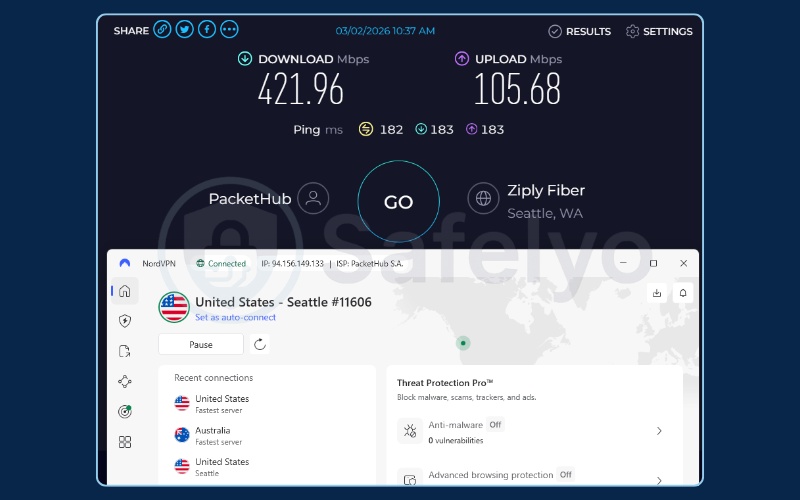
During our evaluations, the 421.96 Mbps download speed (tested on a Seattle server with a 182ms ping) remained highly stable throughout our testing period. This level of performance provides enough bandwidth for simultaneous large file downloads and demanding multiplayer gaming sessions.
Additionally, the application connects quickly and is intuitive to navigate on a touch screen.
Risk-free cancellation method
The best aspect of this Android trial is the risk-free cancellation method. You must provide payment details through Google Play to start the 3-day trial.
However, you can open the Google Play subscription menu one minute later and cancel the auto-renewal immediately. NordVPN will still let you use the premium features for the full three days. This removes the anxiety of forgetting to cancel on the final day.
Review the advantages and disadvantages below:
| Pros | Cons |
|---|---|
| Fast and stable connection speeds | No trial available for iOS devices |
| Allows immediate cancellation via Google Play | The trial is limited to only 3 days |
| Unblocks multiple streaming libraries easily | Auto-renews to a costly 2-year plan |
| Includes specialized P2P servers |
Best for: Android users who want top-tier performance but fear forgetting to cancel before the 3-day trial ends.
3.2. Surfshark: Best 7-day trial (all platforms)
Surfshark provides a longer 7-day trial period, making it an excellent budget-friendly alternative for users who need more time to evaluate the application.
Here are the detailed specifications for the Surfshark trial:
| Feature | Details |
|---|---|
| Starting Price | From $1.99/mo (2yr) |
| Servers & Countries | 4,500+ servers in 100 countries |
| Jurisdiction | Netherlands |
| Trial Duration | 7 days (iOS, Android, macOS & Windows) |
| Trial Type | Add-Card Trial (Credit card required but not charged during trial) |
| Auto-Renews To | 2-year plan |
| Cancel via App | Chatbot / App Store / Google Play |
| Simultaneous Connections | Unlimited |
| Streaming Support | Yes (Netflix, Disney+, etc.) |
| Torrenting/P2P | Yes |
| Verified No-Logs | Yes (Audited by Deloitte) |
| Avg Download Speed | ~372 Mbps (US Server) |
| Website | surfshark.com |
Mobile-first activation
Surfshark offers a full 7-day trial, which is significantly longer than NordVPN or ExpressVPN. Unlike most other add-card trials on this list, Surfshark’s 7-day trial is available on iOS, Android, macOS, and Windows.
Mobile users can activate via the App Store or Google Play. Desktop users on Windows or macOS can sign up directly through the Surfshark app or website. This flexibility allows you to test the service thoroughly across your entire household.
Testing across multiple devices
The application allows unlimited simultaneous connections, which is a major advantage for families. We tested this by connecting a phone, a tablet, and a laptop to the same server simultaneously.
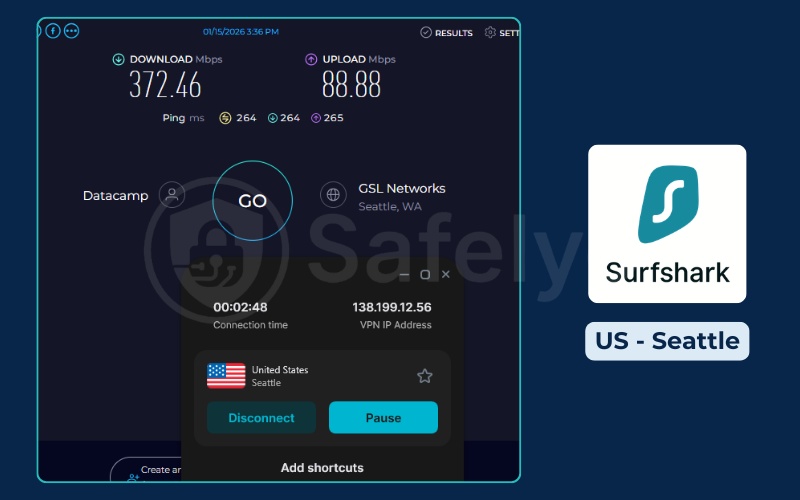
Our tests on a Seattle server recorded speeds of 372.46 Mbps with a 264ms ping. This robust connection easily accommodates buffer-free 4K streaming and heavy torrenting. We were able to stream video on a tablet while browsing on a laptop without experiencing noticeable lag. The interface remains clean and straightforward across all platforms.
Navigating the cancellation
The cancellation process can be slightly annoying if you do not use the mobile application stores. If you manage your subscription directly through the Surfshark website, you must navigate past an automated chatbot to request a cancellation.
It is much easier and safer to simply cancel directly through the Google Play or Apple App Store subscription menus before the seventh day.
Review the advantages and disadvantages below:
| Pros | Cons |
|---|---|
| Generous 7-day testing window | Chatbot cancellation hurdle if managing via the website |
| Allows unlimited simultaneous device connections | Auto-renews into a long 2-year subscription |
| Very fast download speeds | Trial must be initiated on a mobile device |
| Works well for unblocking streaming platforms | Based in the Netherlands (Nine Eyes jurisdiction) |
Best for: Budget-conscious users connecting multiple devices.
3.3. ExpressVPN: Best 3-day mobile trial for streaming
ExpressVPN focuses on premium streaming capabilities and offers a short mobile trial to test its global network quality.
Here are the detailed specifications for the ExpressVPN trial:
| Feature | Details |
|---|---|
| Starting Price | From $2.79/mo (1yr) |
| Servers & Countries | 105 countries across 170+ locations |
| Jurisdiction | British Virgin Islands |
| Trial Duration | 3 days (mobile) |
| Trial Type | Add-Card Trial (Credit card required but not charged during trial) |
| Auto-Renews To | 1-year plan |
| Cancel via App | Google Play / App Store |
| Simultaneous Connections | Up to 14 |
| Streaming Support | Yes (Excellent for global streaming) |
| Torrenting/P2P | Yes |
| Verified No-Logs | Yes (Audited by KPMG) |
| Avg Download Speed | ~418 Mbps (US Server) |
| Website | www.expressvpn.com |
Instant streaming access
ExpressVPN reliably unblocks international streaming platforms with minimal effort. During our evaluation, the application provided instant access to various global content libraries without triggering proxy errors.
The 3-day trial is strictly mobile-only. You must download the application from the Google Play Store or the Apple App Store and agree to the subscription terms to begin testing.
Connection reliability
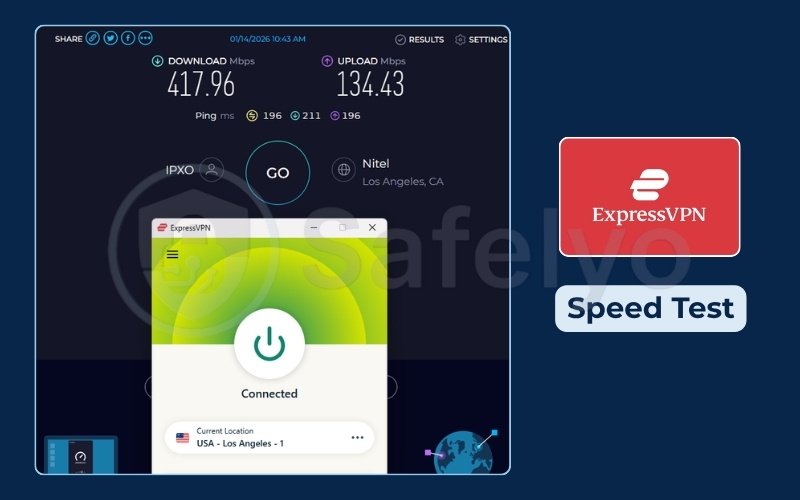
The connection speeds reached 417.96 Mbps (134.43ms ping) on a Seattle server according to our latest tests. This tier of speed guarantees flawless ultra-HD streaming and rapid data transfers across your devices.
The system will not charge your card if you cancel within the 72-hour window. This makes it an efficient, albeit short, way to test high-end performance.
Strict Apple refund warnings
You must be incredibly careful if you use an iPhone to start this trial. If a user signs up via the App Store and misses the 3-day trial window, Apple will charge the card for a 1-year subscription.
At that point, you must claim the refund from Apple, not ExpressVPN. Apple controls the billing environment completely and may deny the refund request.
Review the advantages and disadvantages below:
| Pros | Cons |
|---|---|
| Excellent reliability for streaming video | Trial only lasts for 3 days |
| Very fast and stable global servers | Apple controls all iOS refund requests completely |
| Simple, beginner-friendly interface | Auto-renews to a relatively expensive 1-year plan |
| Strong privacy jurisdiction | Trial must be started on a mobile device |
Best for: Users who prioritize streaming servers and want a quick 3-day add-card trial on mobile.
3.4. IPVanish: Best 7-day trial for iOS and Android
IPVanish stands out by explicitly offering a full week to test the service natively on both major mobile operating systems.
Here are the detailed specifications for the IPVanish trial:
| Feature | Details |
|---|---|
| Starting Price | From $1.97/mo (2yr) |
| Servers & Countries | 3,200+ servers in 150 locations |
| Jurisdiction | United States |
| Trial Duration | 7 days (iOS and Android) |
| Trial Type | Add-Card Trial (Credit card required but not charged during trial) |
| Auto-Renews To | Yearly plan |
| Cancel via App | App Store / Google Play |
| Simultaneous Connections | Unlimited |
| Streaming Support | Yes |
| Torrenting/P2P | Yes (SOCKS5 proxy included) |
| Verified No-Logs | Yes (Audited by Leviathan Security) |
| Avg Download Speed | ~433 Mbps (US Server) |
| Website | www.ipvanish.com |
Cross-platform mobile testing
We appreciate that the 7-day trial is available on BOTH iOS and Android directly through their respective application stores. This is one of the few VPNs that does not restrict its best trial to a single platform.
You get a full week to test the connection stability on your daily commute and home network without feeling rushed.
Network monitoring tools
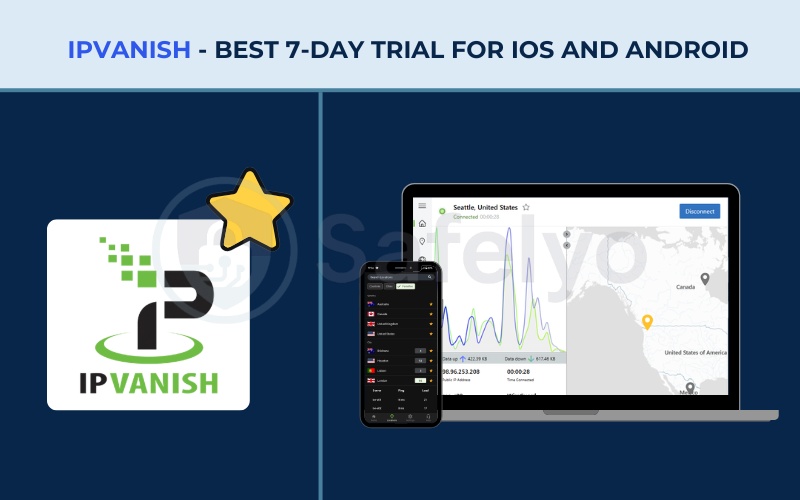
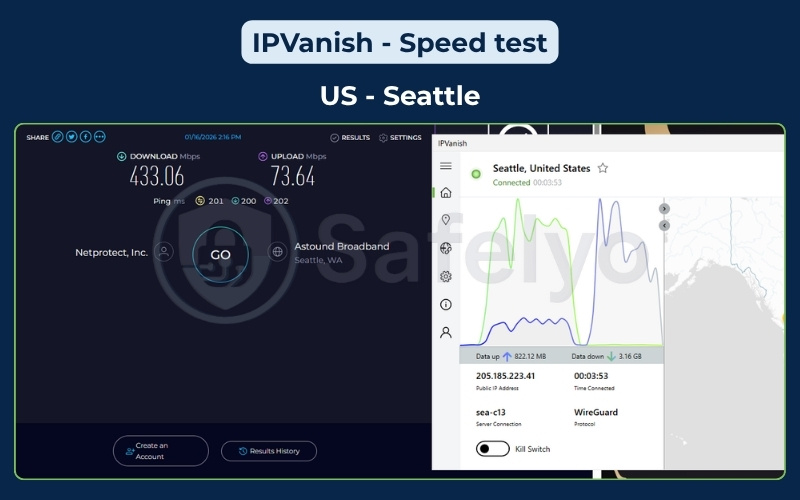
The application provides detailed technical graphs showing your upload and download data in real-time. This is a nice visual touch for users who like monitoring their network health during testing.
The speeds hold up incredibly well, hitting 433.06 Mbps with a 201ms ping on a Seattle server during our tests. This fast connection effortlessly powers data-heavy tasks like multiplayer gaming matches and downloading large multimedia files. This ensures your regular browsing and demanding internet activities are never hindered while evaluating the software.
Important policy limitations
It is crucial to understand the refund policies if you forget to cancel the trial. The trial auto-renews to a yearly plan. If purchased via the App Store or Google Play, IPVanish’s own 30-day money-back guarantee does NOT apply.
The 30-day MBG only applies to yearly or 2-year plans purchased directly via the website. Furthermore, monthly plans do NOT qualify for a refund at all.
Review the advantages and disadvantages below:
| Pros | Cons |
|---|---|
| Full 7-day trial on both iOS and Android | MBG is not valid for app store purchases |
| Unlimited simultaneous device connections | Based in the United States (Five Eyes jurisdiction) |
| Detailed network monitoring interface | Auto-renews to a full yearly plan |
| Fast speeds averaging around 433 Mbps | Monthly plans do not qualify for any refund |
Best for: Android and iOS users who want a 7-day trial on mobile without being restricted to a single platform.
3.5. PIA (Private Internet Access): Best for budget post-trial renewal
Private Internet Access (PIA) offers a trial with the distinct advantage of transitioning into one of the cheapest long-term plans on the market.
Here are the detailed specifications for the PIA trial:
| Feature | Details |
|---|---|
| Starting Price | From $2.03/mo (3yr) |
| Servers & Countries | 35,000+ servers in 90 countries |
| Jurisdiction | United States |
| Trial Duration | 7 days (iOS and Android) |
| Trial Type | Add-Card Trial (Credit card required but not charged during trial) |
| Auto-Renews To | 3-year plan |
| Cancel via App | App Store / Google Play |
| Simultaneous Connections | Unlimited |
| Streaming Support | Yes (US libraries mainly) |
| Torrenting/P2P | Yes (Port Forwarding included) |
| Verified No-Logs | Yes (Proven in court & audited) |
| Avg Download Speed | ~227 Mbps (US Server) |
| Website | privateinternetaccess.com |
Long-term budget appeal
PIA is highly appealing if you actually intend to purchase a service after testing it. If you decide to keep the application, it auto-renews into a 3-year plan at a very low monthly equivalent cost.
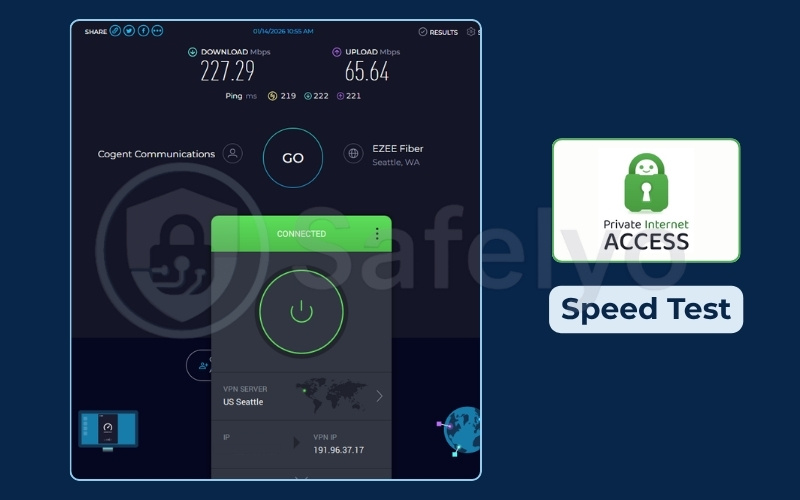
The 227.29 Mbps speed test result (on a Seattle server with 219ms ping) demonstrates that PIA provides highly reliable performance. This solid output is more than capable of handling 4K streaming without interruptions and stable online gaming despite the budget-friendly price point.
Cross-platform mobile access
This 7-day free trial is available on both iOS and Android through their respective app stores. You must provide payment details to the App Store or Google Play to start the trial.
If you cancel before the week is over, neither Apple nor Google will charge your card. After activating the trial on mobile, you can log in and use the same account on your desktop computer.
Customization options
The application offers extensive customization options, allowing you to tweak encryption levels and network settings directly. We must note the jurisdiction.
PIA operates out of the United States, which is a core member of the Five Eyes intelligence alliance. However, their strict no-logs policy has been repeatedly proven in US courts, providing strong reassurance regarding data privacy.
Review the advantages and disadvantages below:
| Pros | Cons |
|---|---|
| Extremely cheap 3-year renewal price | Trial must be activated via a mobile app store (iOS or Android) |
| Unlimited simultaneous device connections | Based in the United States (Five Eyes jurisdiction) |
| Massive server network globally | Customization options can overwhelm beginners |
| Proven no-logs policy in court | Auto-renews to a 3-year commitment |
Best for: iOS users who might want to commit to a long-term, low-cost plan later.
Compare the top add-card options in the summary table below:
| VPN | Trial Duration | Platform | Auto-Renews To | Cancel Via |
|---|---|---|---|---|
| NordVPN | 3 days | Android only | 2-year plan | Google Play |
| Surfshark | 7 days | iOS, Android, macOS & Windows | 2-year plan | App Store / Google Play / Chatbot |
| ExpressVPN | 3 days | iOS & Android | 1-year plan | App Store / Google Play |
| IPVanish | 7 days | iOS & Android | Yearly plan | App Store / Google Play |
| PIA | 7 days | iOS & Android | 3-year plan | App Store / Google Play |
4. Best VPN money-back guarantees
A Money-Back Guarantee requires an upfront payment and a proactive refund request. Please keep in mind that this is NOT a traditional free trial. You pay the full subscription price on day one.
For desktop users who need more than 24 hours to test an application, leveraging the money-back guarantee is the only reliable option available today. Be aware that providers can deny your refund if you violate their terms of service, such as using the software for illegal activities.
Warning: Always set a calendar alert for day 28 (for 30-day MBGs) or day 43 (for CyberGhost’s 45-day MBG) so you do not miss the refund deadline.
4.1. CyberGhost: Longest MBG available (45 days)
If you have already tested the no-card 24-hour desktop trial covered above and need more time, the 45-day MBG is the logical next step.
Here are the detailed specifications for the CyberGhost MBG:
| Feature | Details |
|---|---|
| Starting Price | From $2.03/mo (2-year plan) |
| Jurisdiction | Romania |
| Trial Type | Money-Back Guarantee (upfront payment required) |
| MBG Duration | 45 days (6-month and 2-year plans only) |
| Refund Via | Live chat / Email support |
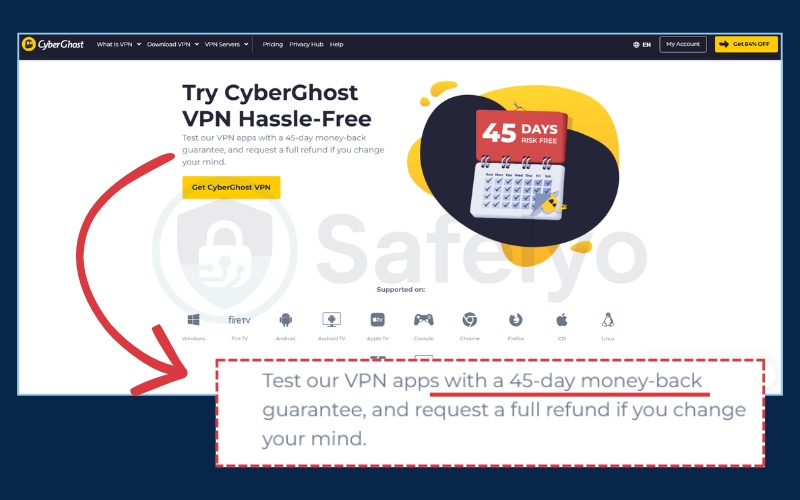
CyberGhost provides the longest testing window in the industry at 45 days. This gives you ample time to evaluate the service thoroughly across a full billing cycle of your internet service provider.
You must purchase a 6-month or 2-year plan to get the 45-day guarantee. Monthly plans only receive a standard 14-day MBG. You can easily claim the refund via live chat without needing to provide a specific reason for leaving. We covered the performance details of this provider extensively in Section 2.1.
Review the advantages and disadvantages below:
| Pros | Cons |
|---|---|
| Generous 45-day refund window | Monthly plans only get a 14-day refund window |
| Easy refund process via live chat | Requires full upfront payment |
Best for: Desktop users who need the longest possible window to evaluate a VPN before committing.
4.2. NordVPN: Best 30-day MBG for desktop users
Desktop users who need more than 24 hours and cannot use the Android trial should utilize the NordVPN money-back guarantee.
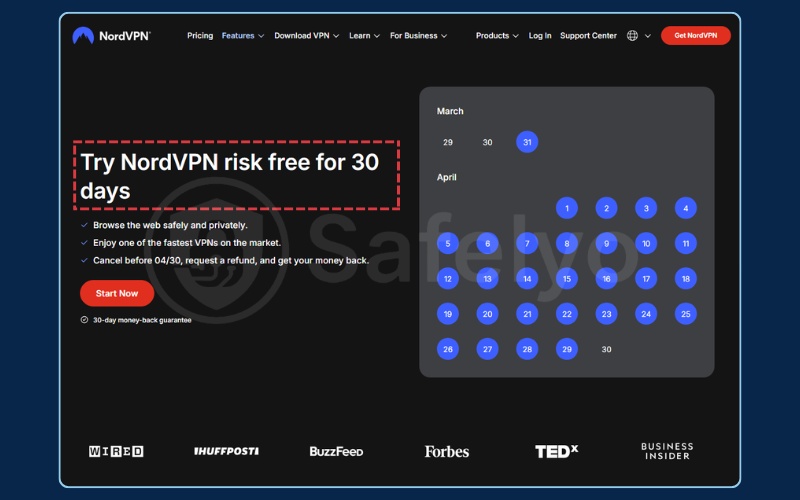
Here are the detailed specifications for the NordVPN MBG:
| Feature | Details |
|---|---|
| Starting Price | From $2.99/mo (2yr) |
| Jurisdiction | Panama |
| Trial Type | Money-Back Guarantee (upfront payment required) |
| MBG Duration | 30 days (all plans) |
| Refund Via | Live chat |
NordVPN honors its 30-day guarantee without hassle. You pay for the subscription upfront via the website to unlock the desktop applications.
After you finish testing the software on your PC or Mac, you open the live chat on their website. You tell the support agent you want to cancel and request a refund under the guarantee. They process the request quickly, and the money usually returns to your bank account within a few business days.
We covered NordVPN’s excellent speed test results in Section 3.1. Since the support team reliably honors this refund policy, you can try NordVPN risk-free for 30 days to evaluate that premium performance on your own computer.
Review the advantages and disadvantages below:
| Pros | Cons |
|---|---|
| Applies to all subscription lengths | Requires full upfront payment |
| Fast and reliable refund processing | Live chat agents may ask you to stay |
Best for: Desktop and iOS users who need a full-featured 30-day test and are comfortable paying upfront.
4.3. Surfshark: Best 30-day MBG for budget desktop users
Desktop users who want to test Surfshark longer than the mobile trial allows can use the standard website guarantee.
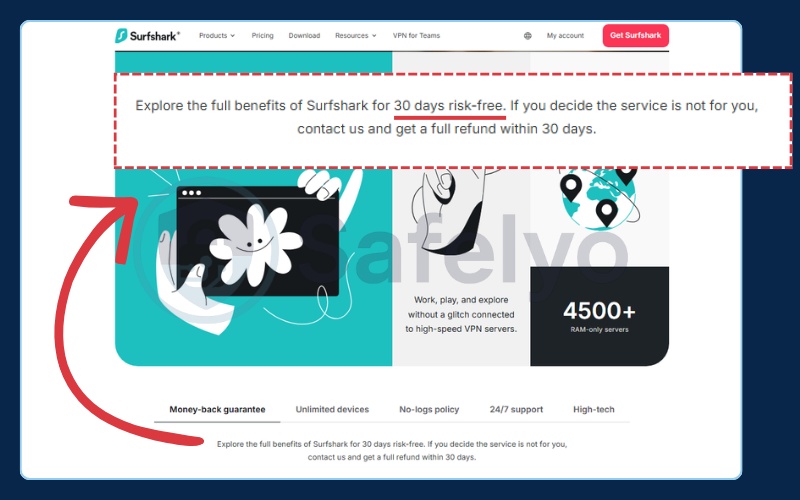
Here are the detailed specifications for the Surfshark MBG:
| Feature | Details |
|---|---|
| Starting Price | From $1.99/mo (2yr) |
| Jurisdiction | Netherlands |
| Trial Type | Money-Back Guarantee (upfront payment required) |
| MBG Duration | 30 days |
| Refund Via | Live chat |
You can secure the cheap 2-year pricing upfront and test Surfshark on your desktop computer for a full month. While navigating the chatbot is a hurdle during the mobile trial, claiming the MBG via live chat is generally faster.
We must warn you that Surfshark allows one refund per customer, which applies strictly to your first purchase. The MBG does not apply to App Store or Google Play purchases. Review Section 3.2 for a detailed look at Surfshark’s capabilities.
Review the advantages and disadvantages below:
| Pros | Cons |
|---|---|
| Allows a full month of desktop testing | One refund per customer only |
| Live chat refunds are processed quickly | Not valid for app store purchases |
Best for: Budget-focused desktop users who want to test Surfshark for a full month before committing.
4.4. ExpressVPN: Best 30-day MBG for streaming
ExpressVPN offers a reliable refund policy for users who want to test global streaming performance on their computers.
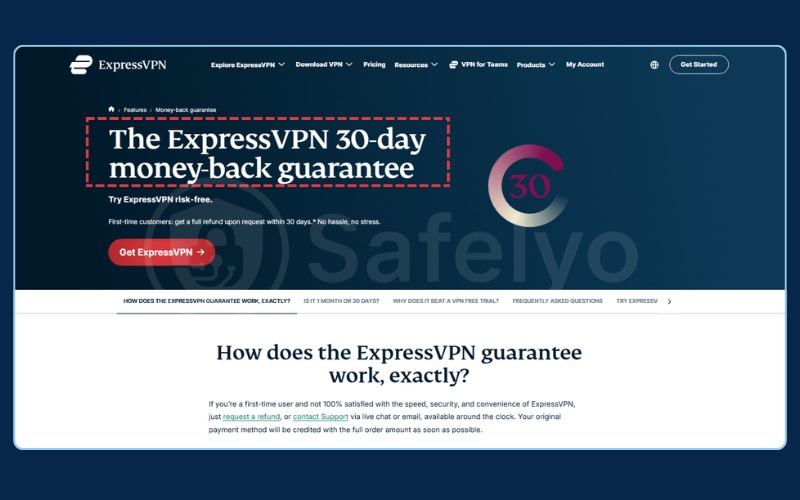
Here are the detailed specifications for the ExpressVPN MBG:
| Feature | Details |
|---|---|
| Starting Price | From $2.79/mo (1yr) |
| Jurisdiction | British Virgin Islands |
| Trial Type | Money-Back Guarantee (upfront payment required) |
| MBG Duration | 30 days |
| Refund Via | Live chat |
Purchasing a plan directly from the ExpressVPN website allows you to test their robust streaming servers for 30 days. If the service fails to unblock your desired platforms, the live chat team processes refunds efficiently.
ExpressVPN does NOT honor the MBG for iOS purchases. Apple controls all iOS refunds directly, and ExpressVPN cannot bypass Apple’s billing system to return your money. We detailed ExpressVPN’s streaming performance in Section 3.3.
If you want to verify these unblocking capabilities on your desktop, you can securely try ExpressVPN risk-free for 30 days.
Review the advantages and disadvantages below:
| Pros | Cons |
|---|---|
| Excellent for thorough streaming tests | Apple controls all iOS refunds |
| No-questions-asked refund policy | High upfront cost |
Best for: Users who prioritize streaming and are purchasing on Android or desktop.
In addition to the top choices above, you can consider these other VPNs that also offer reliable money-back guarantees:
- IPVanish: 30-day MBG, yearly/2-year plans via website only. Monthly plans do not qualify. The refund is processed automatically via the Control Panel.
- PIA: 30-day MBG on all plans via website only. It does not apply to App Store or Google Play purchases.
- ProtonVPN: 30-day MBG on paid Plus/Unlimited plans via website only. The free plan has no MBG.
5. Best VPN free trial by device
Trial terms change drastically depending on the hardware you use. Mobile users generally have easier access to short add-card trials through official application stores.
PC and Mac users, on the other hand, usually need to rely on upfront money-back guarantees for thorough testing. You must verify the specific eligibility rules for your operating system before downloading any software to ensure you follow the correct cancellation procedures.
5.1. Best VPN free trial for iPhone and iPad (iOS)
iOS users get the best access to trials via the Apple App Store. We must warn you about Apple’s strict refund policy, as they dictate the final terms regardless of what the provider promises. CyberGhost’s iOS trial is an add-card trial, not the no-card desktop trial covered in the main review section.
Here are the most reliable trial options for your iPhone or iPad:
- Surfshark: 7-day Add-Card Trial.
- IPVanish: 7-day Add-Card Trial.
- CyberGhost: 7-day Add-Card Trial.
- ExpressVPN: 3-day Add-Card Trial.
- PIA: 7-day Add-Card Trial.
If you need a permanent security solution for your Apple device after testing, check out our guide to the best VPN for iPhone.
5.2. Best VPN free trial for Android
Android users get easy trial access via the Google Play Store. These are Add-Card Trials that require payment details but will not charge you if canceled early.
PIA’s free trial is available on both iOS and Android via their respective app stores. Android users should consider NordVPN (3-day), Surfshark (7-day), ExpressVPN (3-day), or IPVanish (7-day) for an add-card trial via Google Play.
Consider these highly-rated add-card trials if you use an Android device:
- NordVPN: 3-day Add-Card Trial.
- Surfshark: 7-day Add-Card Trial.
- ExpressVPN: 3-day Add-Card Trial.
- IPVanish: 7-day Add-Card Trial.
- PIA: 7-day Add-Card Trial.
To explore long-term protection options for your smartphone, read our complete guide to the best VPN for Android.
5.3. Best VPN free trial for PC or Mac (Desktop)
True no credit card trials are extremely rare on desktop computers. CyberGhost offers a 24-hour No-Card Trial. For longer testing, a Money-Back Guarantee is required.
These are the most practical testing methods available for desktop computers:
- CyberGhost: 24-hour No-Card Trial.
- Surfshark: 7-day Add-Card Trial (Windows & macOS).
- NordVPN: 30-day Money-Back Guarantee.
- Surfshark: 30-day Money-Back Guarantee.
- ExpressVPN: 30-day Money-Back Guarantee.
If you plan to purchase a full subscription for your computer, read our detailed reviews covering the best VPN for Windows and the best VPN for Mac to find the top performers.
6. Free trial vs. money-back guarantee: What’s the difference?
You must clear up the industry confusion before wrapping up your core considerations. Knowing exactly what you are signing up for prevents unexpected bank charges.
Review the comparison table to show the three trial types side-by-side:
| Criteria | No-Card Trial | Add-Card Trial | Money-Back Guarantee |
|---|---|---|---|
| Upfront Cost | None | None | Full subscription price |
| Credit Card Required | No | Yes | Yes |
| Risk of Being Charged | Zero | High (if you forget to cancel) | Low (if you request a refund in time) |
| Trial Duration | Usually 24 hours or limited by data | Usually 3 to 7 days | Usually 30 to 45 days |
| Who It’s Best For | Users who refuse to share payment details | Mobile users who can remember to cancel | Desktop users needing a long testing period |
7. Dark patterns in VPN trials (What to watch out for)
Companies use aggressive marketing tactics to lock you into expensive subscriptions. We want to arm you with knowledge to prevent you from getting scammed.
7.1. Category confusion: When “free trial” actually means “money-back guarantee”
Many marketing pages explicitly label Money-Back Guarantee offers as “free trials.” This practice is highly misleading because a true free trial allows you to test the service without making a purchase. A money-back guarantee forces you to buy the product first.
Warning: Always read the fine print on the checkout page. If the form requires you to pay today, it is not a free trial.
7.2. The “longest plan auto-renewal” trap
App store trials automatically lock you into the longest, most expensive upfront plan if you forget to cancel. They usually lock you into 2 or 3 years rather than a simple monthly cycle.
Review the specific auto-renewal plans below:
| VPN | Trial Duration | Auto-Renews To |
|---|---|---|
| NordVPN | 3 days | 2-year plan |
| Surfshark | 7 days | 2-year plan |
| CyberGhost | 7 days (iOS only) | Yearly plan |
(Note: CyberGhost’s auto-renewal applies only to its mobile add-card trials, not its 24-hour desktop no-card trial).
7.3. App store purchases vs. direct website refunds
You must understand the critical difference in refund policies regarding where you make your purchase. If you purchase the service via the Apple App Store, the provider cannot issue a refund directly.
Apple controls it entirely. You have to submit a request to Apple support, which operates by its own strict internal rules.
7.4. Live chat retention tactics
When you request a refund via live chat, support agents will often offer special discounts instead of immediately processing the refund.
Callout: “Please process my cancellation immediately. I am not interested in any alternative offers or troubleshooting.”
8. Your 7-day VPN trial checklist (How to test like an expert)
Provide a structured action plan so you actively test the software instead of just turning it on and forgetting about it.
If you are testing CyberGhost on desktop, you only have 24 hours. Prioritize the speed test and the IP/DNS leak test within your first hour. ExpressVPN and NordVPN offer a 3-day trial. The full 7-day schedule below applies to Surfshark, IPVanish, and PIA.
8.1. Day 1 and 2: Run speed tests on nearby and distant servers
Follow these numbered steps to evaluate baseline speeds:
- Turn off the software and visit fast.com to measure your normal internet speed.
- Connect to a local server in your city and run the test again.
- Connect to a distant server on another continent and record the speed.
- Calculate the speed loss percentage to determine if the connection remains fast enough for daily use.
8.2. Day 3 and 4: Test streaming with global libraries
Follow these numbered steps to test unblocking capabilities:
- Clear your web browser cache completely.
- Connect the application to a server in the United States or the United Kingdom.
- Open Netflix, Disney+, or BBC iPlayer and attempt to play a geo-blocked video.
- Monitor the video carefully for buffering or proxy error messages.
8.3. Day 5: Run an IP leak test and DNS leak check
Follow these numbered steps to verify data safety:
- Connect to a server located in a different country.
- Visit ipleak.net in your web browser.
- Look at the IP address and DNS results displayed on the screen.
- If you see your real internet service provider name listed, the software is leaking your data and is unsafe.
8.4. Day 6 and 7: Stress-test customer support and cancel early
Follow these numbered steps to safely conclude your testing:
- Open the live chat feature on the provider’s official website.
- Ask a basic technical question to test the response time of the support agents.
- Initiate the cancellation process at least 24 hours before the deadline to ensure you avoid auto-renewal charges.
9. How to cancel your VPN free trial
Provide universal steps for the three main cancellation methods to ensure you securely terminate the service.
9.1. Pro tip: How to cancel immediately and keep your trial
You can sign up on iOS or Android and cancel the subscription in your phone settings one minute later. You will still retain access for the full trial period.
Execute this loophole using the exact quick steps below:
- Download the application and activate the trial through the application store.
- Wait exactly one minute.
- Open your phone’s main settings menu.
- Navigate to your active subscriptions and cancel the auto-renewal immediately.
- Enjoy the full duration of the testing window without financial anxiety.
9.2. Standard cancellation steps
Follow the instructions below depending on the platform you used to sign up.
Quick Step:
- Open Google Play Store or Apple App Store.
- Tap your Profile icon.
- Select Payments & subscriptions.
- Choose the VPN app and tap Cancel.
Apple App Store cancellation:
- Open the Settings app on your iPhone or iPad.
- Tap your name at the very top of the screen.
- Tap Subscriptions.
- Find the application in the list and tap it.
- Tap Cancel Subscription and confirm your choice.
Google Play Store cancellation:
- Open the Google Play Store app on your Android device.
- Tap your profile icon in the top right corner.
- Tap Payments & subscriptions, then tap Subscriptions.
- Select the application from your list.
- Tap Cancel subscription and follow the prompts.
Live Chat cancellation (Website purchases):
- Log into your account on the provider’s official website.
- Locate the Live Chat icon, usually in the bottom right corner.
- Tell the agent you wish to cancel your auto-renewal and request a refund.
- Confirm the cancellation and ask for an email receipt as proof.
10. FAQs about best VPN free trial
Which VPN has a free trial with no credit card?
CyberGhost offers a 24-hour desktop trial with no credit card required. ProtonVPN and Windscribe offer permanent free tiers that require no payment information.
What is the longest VPN free trial available in 2026?
If you look strictly at free trials, Surfshark, IPVanish, and PIA offer 7-day trials on mobile devices. If you are willing to pay upfront for a money-back guarantee, CyberGhost provides a 45-day refund window.
Can I use a VPN free trial more than once?
No. Providers track your device ID, IP address, and application store account. If you try to activate a trial a second time, the system will block you or charge your card immediately.
Can I use a mobile trial account on my desktop computer?
This depends on the provider. In most cases, you can. Once you activate an add-card trial via the Apple App Store or Google Play Store on your phone, many providers allow you to download their desktop application on your PC or Mac. You simply log in with the same account credentials you created on your mobile device.
However, some services restrict their free trials exclusively to mobile usage. You must verify the cross-platform testing terms for your specific provider before starting the trial.
What happens when my VPN free trial expires?
If you signed up for an add-card trial, the provider will automatically charge your credit card for a long-term subscription. If you used a no-card trial, the service will simply stop working until you choose to purchase a plan.
Does ProtonVPN offer a completely free plan forever?
Yes. ProtonVPN provides a free plan with unlimited data. However, it restricts you to servers in only 10 countries and completely blocks streaming and torrenting activities.
What is the difference between a no-card free trial, an add-card free trial, and a money-back guarantee?
A no-card trial requires zero payment information and carries zero financial risk. An add-card trial requires billing details upfront but charges you nothing if you cancel early. A money-back guarantee forces you to pay the full subscription price on day one and request a refund later.
Can I use a VPN free trial with PayPal instead of a credit card?
Yes. You can usually use PayPal by opting for a money-back guarantee via the provider’s direct website rather than relying on application store trials.
11. Conclusion
Choosing the best VPN free trial to safely test a service depends entirely on your comfort level with providing payment details. NordVPN remains a great option for Android users due to the Day-1 cancellation loophole, allowing you to test premium speeds risk-free. We recommend Surfshark for a full 7-day trial on iOS, Android, macOS, and Windows.
If you are not comfortable entering any payment information, start with CyberGhost or ProtonVPN. If you want a longer test and are comfortable with application store billing, an add-card mobile trial is the safest paid option.
If you want to read more about finding the Best VPN options on the market, check out our other detailed guides on Safelyo.