Connecting to an open wireless network at a busy airport or local cafe instantly exposes your unencrypted passwords to malicious interceptors. After spending weeks evaluating automated security tools across dozens of crowded public hotspots, our engineers identified the best VPN for public Wi-Fi to keep your data safe in 2026.
Top 5 VPNs for public Wi-Fi in 2026:
- NordVPN: Best overall for public network security and advanced threat blocking capabilities.
- Surfshark: Best budget option to protect all your mobile devices at the same time.
- CyberGhost: Best for smart connection rules that automate your security on new networks.
- ExpressVPN: Best for high-speed connections and stability in busy airport terminals.
- Private Internet Access (PIA): Best for a customizable kill switch that prevents sudden data leaks.
Quick picks: Best VPNs for open networks
| VPN Provider | Best Feature for Open Wi-Fi | Auto-Connect | Kill Switch Type | Malware Blocker | Starting Price |
|---|---|---|---|---|---|
| NordVPN | Threat Protection against local malware | Yes | Advanced App level | Yes (Threat Protection) | ~$3.49/mo |
| Surfshark | Unlimited simultaneous connections | Yes | Strict System level | Yes (CleanWeb) | ~$2.49/mo |
| CyberGhost | Smart network automation rules | Yes | Automatic | Yes (Block Content) | ~$1.59/mo |
| ExpressVPN | Lightway protocol for stability | Yes | Network Lock | Yes (Lite Protection) | ~$2.49/mo |
| PIA | Advanced customizable security | Yes | Advanced | Yes (MACE) | ~$1.33/mo |
Disclaimer: This article is based on information available at the time of publication. VPN features, connection speeds, unblocking capabilities, subscription costs, and promotional deals may change as providers update their services. Results can also vary depending on your geographic location and network conditions. Last verified: June 2026.
1. Best VPN for public Wi-Fi in 2026: Top 5 tested and ranked
Securing your data on open networks requires a provider that reacts instantly to new environments before your applications sync in the background. We evaluated these services at busy transit hubs and local coffee shops to determine which applications offer the strongest technical protection against local packet sniffing.
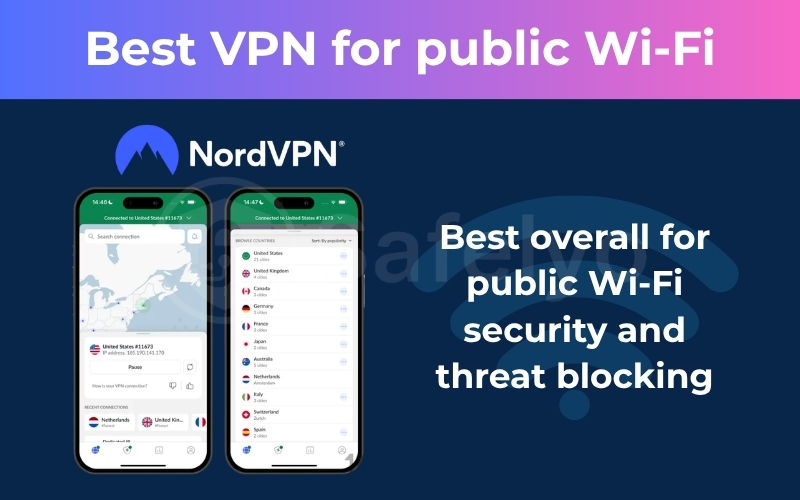
1.1. NordVPN: Best overall for public Wi-Fi security and threat blocking
NordVPN is our top recommendation for securing your devices on open wireless networks because it proactively blocks threats. It combines incredibly fast speeds with advanced malware scanning to keep your data safe from local interceptors on shared connections.
Best for: Remote workers and digital nomads who need powerful threat blocking and automatic connections on unfamiliar open networks.
| Security Feature or Metric | NordVPN Specifications |
|---|---|
| Starting Price | Around $3.49/month (basic plan) |
| Auto Connect Feature | Yes, triggers on unsecured networks |
| Malware Blocker | Threat Protection Pro included |
| Encryption Standard | AES-256 GCM and ChaCha20 |
| Leak Protection | DNS, IPv6, and WebRTC secured |
| Speed Protocol | NordLynx protocol |
| Simultaneous Connections | 10 individual devices |
| Refund Policy | 30-day money-back guarantee |
1.1.1. Key features for public Wi-Fi security
Protecting your private information on shared access points requires much more than just basic network encryption. This provider equips your devices with specialized tools designed specifically to counter the unique threats lurking on unsecured local routers.
- Automatic network detection: The app features an intelligent auto-connect system that instantly recognizes when your device joins an unsecured open network at a cafe or airport. It immediately launches an encrypted tunnel before your email client or background applications can leak sensitive passwords to potential local eavesdroppers.
- Threat Protection Pro: Open public networks are notorious breeding grounds for malware that spreads across locally connected devices. This feature serves as a robust shield, actively scanning your downloads for malicious payloads and blocking invisible web trackers as you browse unfamiliar sites.
- Advanced kill switch: Public internet connections are often highly unstable and prone to sudden signal drops. If the local router resets, the advanced kill switch instantly severs your device’s internet access to guarantee your unencrypted data never accidentally spills out onto the public web.
- Obfuscated servers: Network administrators at schools or libraries frequently use strict firewalls to block privacy applications entirely. Obfuscated servers scramble your encrypted packets to look like standard internet traffic, allowing you to bypass these local restrictions and browse freely.
1.1.2. Speed test performance
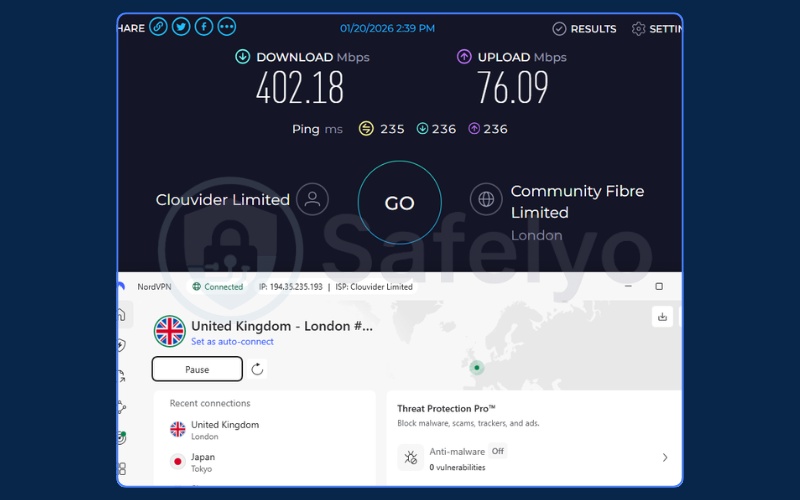
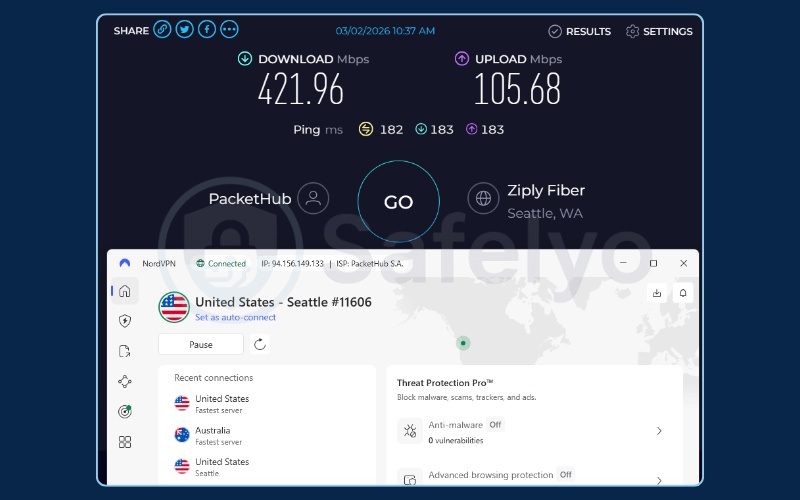
To evaluate real-world performance, we conducted speed tests connecting NordVPN to servers in different geographical locations, and the results were highly impressive. When connected to a server in London, UK, the download speed reached an outstanding 402.18 Mbps, alongside an upload speed of 76.09 Mbps. Testing further with a US server, the performance was even better, delivering a blazing download speed of 421.96 Mbps and an upload speed of 105.68 Mbps.
This exceptional bandwidth retention proves that applying heavy, military-grade encryption does not have to ruin your browsing experience. With download speeds consistently exceeding 400 Mbps even over long distances, our team was able to conduct flawless video calls, stream high-quality content, and download large work files without any lag or interruptions.
1.1.3. Usability and pricing
NordVPN is incredibly intuitive, allowing you to whitelist trusted home networks so the security tunnel only activates when you leave your house. You can secure up to ten devices simultaneously, making it perfect for traveling professionals with multiple gadgets.
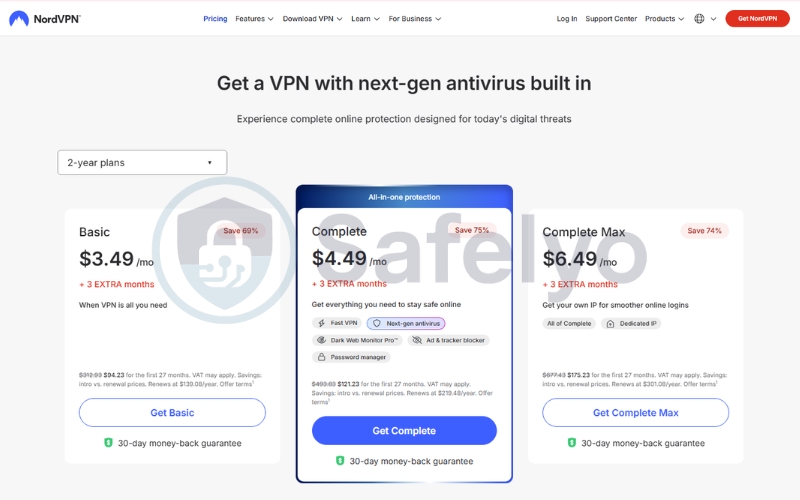
Pricing starts at roughly $3.49/month on their 2-year basic plan. They also offer a 30-day money-back guarantee, allowing you to test their automated security features during your next business trip without any financial risk. If you want the best value, NordVPN is available with a 75% discount, giving you access to its full security suite at a significantly reduced price.
Pros
Instantly encrypts traffic the moment you join an open hotel network
Threat Protection stops malware infections from other users on the local router
NordLynx protocol easily cuts through heavy congestion at busy airports
Cons
Strict threat blocking can occasionally interfere with captive portal login pages at hotels
Running advanced background security features may drain the mobile battery faster
1.2. Surfshark: Best budget option to protect all your mobile devices
Surfshark delivers elite privacy tools at a highly competitive price point. It allows you to secure every single mobile device you travel with without needing to purchase multiple expensive subscriptions.
Best for: Large families and budget-conscious travelers who want to secure their phones, tablets, and laptops simultaneously.
| Security Feature or Metric | Surfshark Specifications |
|---|---|
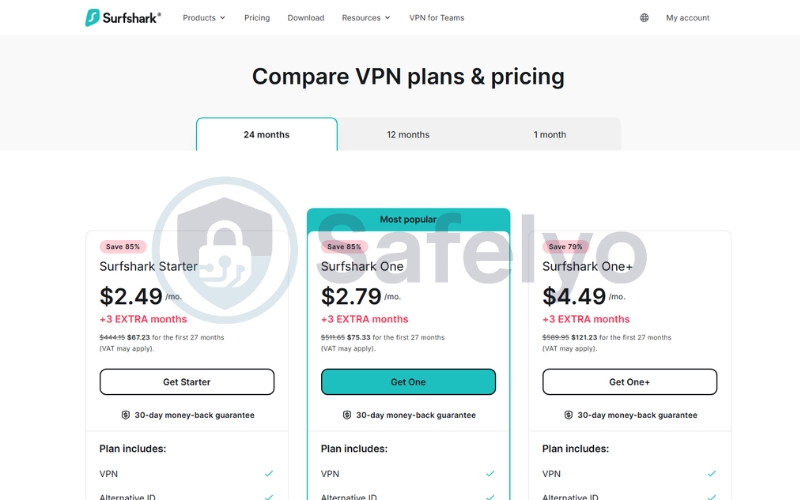
| Starting Price | Around $2.49/month (Starter plan) |
| Auto Connect Feature | Yes, highly customizable |
| Malware Blocker | CleanWeb ad blocker included |
| Encryption Standard | AES-256 GCM |
| Leak Protection | Private DNS on every server |
| Speed Protocol | WireGuard, OpenVPN |
| Simultaneous Connections | Unlimited devices |
| Refund Policy | 30-day money-back guarantee |
1.2.1. Key features for public Wi-Fi security
Protecting multiple mobile devices simultaneously requires a secure service that can handle high bandwidth loads without charging extra fees. Surfshark stands out by providing a robust suite of advanced features specifically designed to keep your portable electronics safe on unpredictable open networks.
- Unlimited device connections: You can connect your smartphone, laptop, tablet, and smart wearables to a hotel network all at once. This generous policy ensures you never have to manually choose which device to leave vulnerable to local hackers simply because you reached an arbitrary connection limit.
- CleanWeb ad blocking: Unsecured public networks often inject intrusive advertisements and trackers into your browsing sessions. CleanWeb blocks these malicious scripts and pop-ups at the DNS level before they load, which actively protects your privacy while saving bandwidth on slow, congested hotspots.
- Bypasser split tunneling: Some local banking applications or online ticket booking systems block active VPN connections. This tool allows you to exclude specific, trusted apps from the encrypted tunnel so you can bypass these local blocks, while the rest of your internet traffic remains fully protected.
- Camouflage Mode obfuscation: If a public hotspot utilizes deep packet inspection (DPI) to monitor and block security applications, this feature scrambles your traffic headers. It makes your encrypted data appear to be standard web activity, allowing you to bypass restrictive local firewalls seamlessly.
1.2.2. Speed test performance
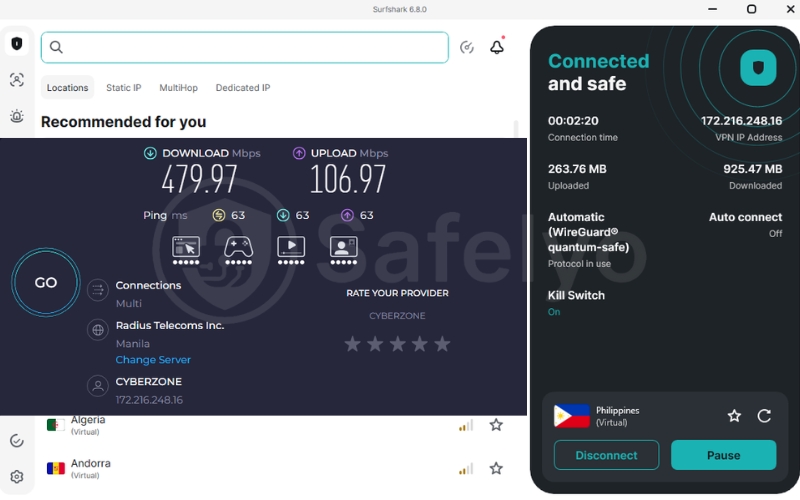
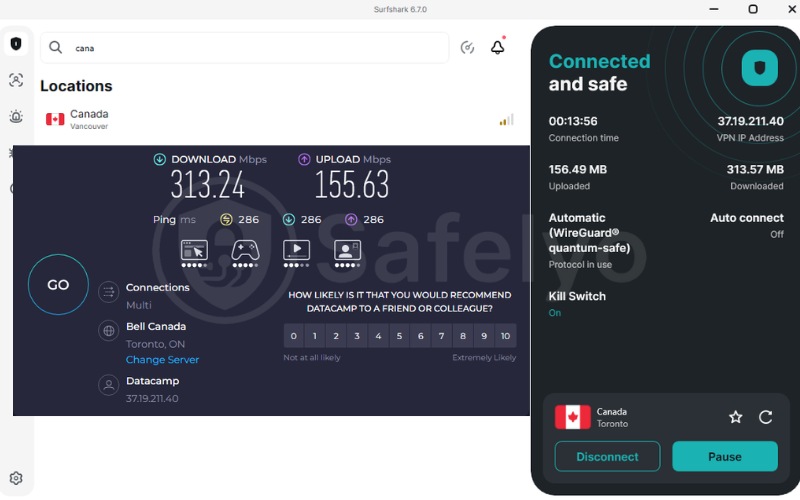
When connected to a server in the Philippines, it delivered a remarkable download speed of 479.97 Mbps and an upload speed of 106.97 Mbps. A subsequent test on a Canadian server (Vancouver) also demonstrated outstanding throughput, maintaining a highly stable download speed of 313.24 Mbps alongside an upload speed of 155.63 Mbps.
This blistering throughput allowed our team to stream high-definition video and browse heavy, media-rich sites simultaneously without any resolution drops or buffering. It proves that this lightweight, modern protocol can deliver phenomenal speeds for data-intensive tasks effortlessly, all without exhausting your system’s resources.
1.2.3. Usability and pricing
The mobile application is incredibly lightweight and easy to navigate on both Android and iOS devices. You can configure the application to launch automatically the moment your phone detects an unsecured wireless network.
Pricing starts at roughly 2.49 USD per month on their 24-month starter plan. They also back their service with a 30-day money-back guarantee, allowing you to test its performance completely risk-free. Check out the latest Surfshark deal and start protecting your devices today.
Pros
Protects every mobile device you carry under a single affordable plan
CleanWeb stops malicious ad injections on free public hotspots
Fast WireGuard speeds ensure smooth browsing on weak connections
Cons
Initial connection times can take several seconds to establish on some servers
Some advanced security features require an upgrade to the higher One tier
1.3. CyberGhost: Best for smart Wi-Fi protection features
CyberGhost simplifies your digital safety with highly intelligent automation rules. It is an excellent choice for users who want custom security profiles for the different public hotspots they connect to throughout the day.
Best for: Beginners who want to set specific automation rules for different coffee shops and hotels they visit frequently.
| Security Feature or Metric | CyberGhost Specifications |
|---|---|
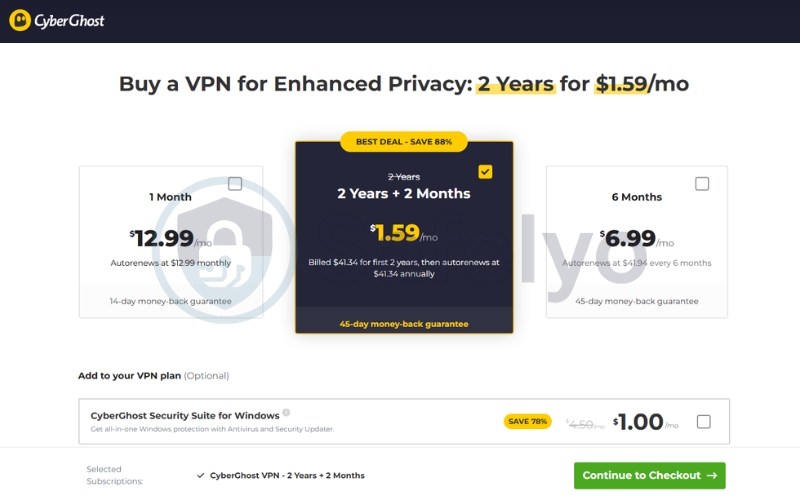
| Starting Price | Around $1.59/per month (2-year plan) |
| Auto Connect Feature | Yes, Smart Rules automation |
| Malware Blocker | Block Content feature included |
| Encryption Standard | AES-256 encryption |
| Leak Protection | IP and DNS leak prevention |
| Speed Protocol | WireGuard |
| Simultaneous Connections | 7 devices |
| Refund Policy | 45-day money-back guarantee |
1.3.1. Key features for public Wi-Fi security
Managing security settings manually every time you switch from a local cafe to an airport terminal can become tedious. CyberGhost resolves this hassle by offering highly customizable automation rules that seamlessly manage how your device reacts to different public networks.
- Smart Wi-Fi protection rules: You can program the app to instantly initiate a secure VPN tunnel the moment you join an unrecognized or open Wi-Fi hotspot. Crucially, it remembers your preferences, allowing it to remain inactive on trusted networks like your home connection while automatically shielding you elsewhere.
- Always-on kill switch: Unlike other providers that let users accidentally toggle this protection off, CyberGhost integrates a permanent, system-level kill switch. If your connection to the local hotspot drops, all internet traffic is instantly blocked to prevent your unencrypted data from leaking to local packet sniffers.
- NoSpy servers for physical security: To prevent third-party server tampering, you can route your data through CyberGhost’s proprietary NoSpy servers. Located inside their secure Romanian headquarters, these servers are built, managed, and maintained strictly by their own staff to guarantee end-to-end physical and digital isolation.
- Block Content Ad Filter: Free public hotel portals and airport Wi-Fi login pages are frequently filled with annoying ads and hidden tracking scripts. This integrated filter scans domains at the DNS level, blocking malicious scripts, web trackers, and phishing attempts before they ever reach your browser.
1.3.2. Speed test performance
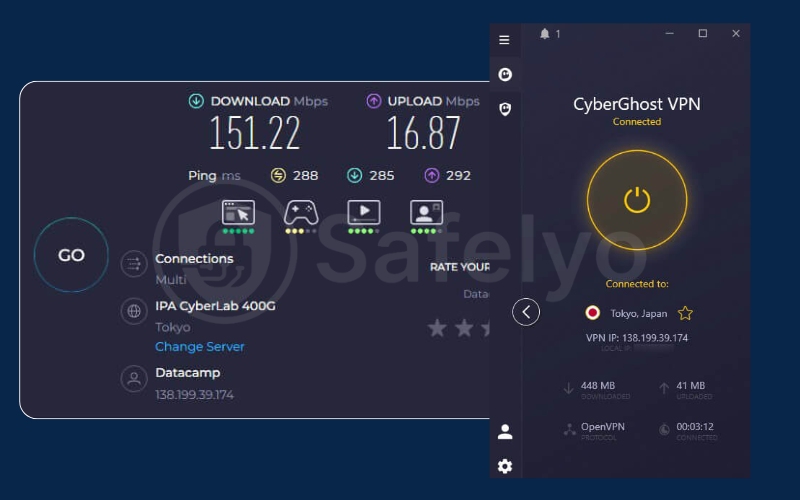
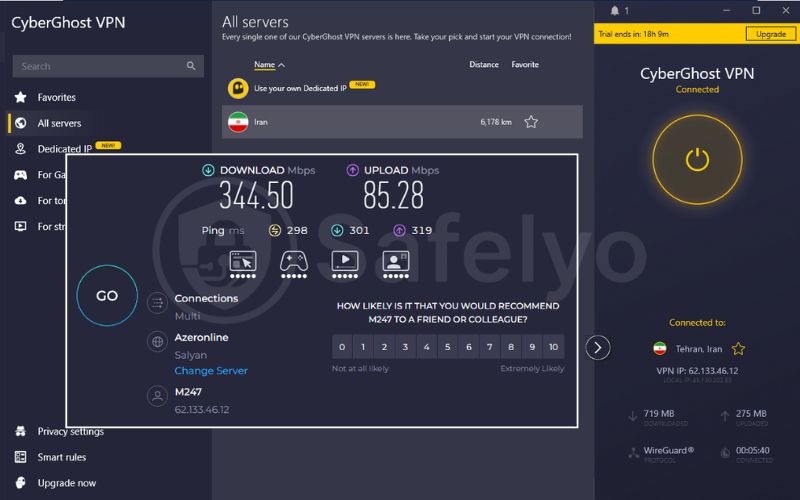
Testing CyberGhost’s cross-continental routing yielded highly reliable performance over extreme distances. Connecting to a Tokyo, Japan, server via OpenVPN secured a solid download speed of 151.22 Mbps and an upload of 16.87 Mbps. Pushing the limits further with a server in Tehran, Iran, throughput spiked to an impressive 344.50 Mbps for downloads and 85.28 Mbps for uploads.
Despite the naturally high latency (around 300ms ping) expected from long-distance server hops, CyberGhost maintained a remarkably wide and stable data pipeline. This sustained bandwidth makes the provider exceptionally well-suited for heavy data transfers and international streaming without frustrating drops.
1.3.3. Usability and pricing
The user interface is exceptionally clean, making it one of the easiest applications to navigate for beginners. You can set up your entire Wi Fi protection profile in just a few taps within the settings menu.
Pricing starts at roughly 1.59 USD per month on their 26-month basic plan. They also offer a generous 45-day money-back guarantee, which is the longest refund window in the industry.
Pros
Smart automation rules customize your network security automatically
A permanent kill switch prevents accidental data leaks during drops
The generous 45-day refund window provides complete peace of mind
Cons
The 7 device limit is lower than some top-tier competitors’.
Lacks advanced obfuscation features for heavily censored countries
1.4. ExpressVPN: Best for high-speed connections in airports
ExpressVPN is the industry benchmark for connection reliability and high-speed data transfer. It provides a polished, premium experience with an upgraded device limit that makes it perfect for heavy-usage households seeking a secure and seamless public Wi Fi solution.
Best for: Business travelers and frequent flyers who need a highly stable connection and automatic obfuscation in busy airport terminals with spotty internet coverage.
| Security Feature or Metric | ExpressVPN Specifications |
|---|---|
| Starting Price | Around $2.49/month (Basic plan) |
| Auto Connect Feature | Yes, remember the last state |
| Malware Blocker | Threat Manager included |
| Encryption Standard | AES-256 GCM |
| Leak Protection | Full IPv6 and DNS blocking |
| Speed Protocol | Lightway protocol |
| Simultaneous Connections | Up to 14 devices |
| Refund Policy | 30-day money-back guarantee |
1.4.1. Key features for public Wi-Fi security
Airport networks frequently drop your signal as you walk between different terminals. This provider utilizes automated security protocols designed to prevent data exposure during these sudden network handovers.
- Lightway protocol stability: This custom protocol features near-instant reconnection times when switching from Wi-Fi to cellular networks. This ensures your secure tunnel reestablishes itself in milliseconds without leaking your real IP address during the transition.
- Network Lock kill switch: If the local public Wi Fi connection completely drops, the built-in Network Lock feature acts as a fail-safe. It instantly blocks all outbound internet traffic on your device to guarantee your unencrypted passwords or banking credentials are never exposed.
- Automatic obfuscation: To bypass strict blocks at hotels or airports, ExpressVPN utilizes obfuscated servers. This technology automatically scrambles your traffic headers to look like standard web activity, allowing you to browse freely without alerting local network administrators.
- TrustedServer RAM-only infrastructure: Your privacy is guaranteed by their secure TrustedServer setup, which runs entirely on volatile memory. Because no data is written to physical hard drives, all connection history is instantly wiped clean every single time the server reboots.
1.4.2. Speed test performance
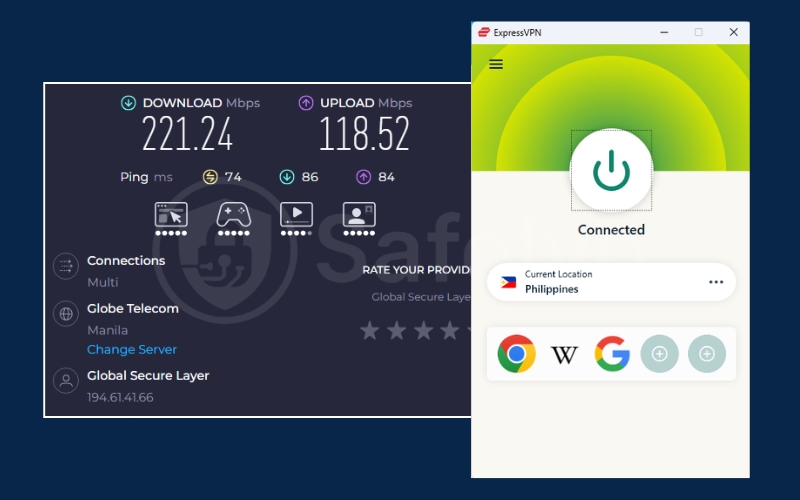
ExpressVPN delivered outstanding performance in our dual-location benchmarks, proving its network is highly optimized for speed. Connecting to a server in the Philippines locked in a swift download rate of 221.24 Mbps and an upload of 118.52 Mbps, with a solid 74ms ping.
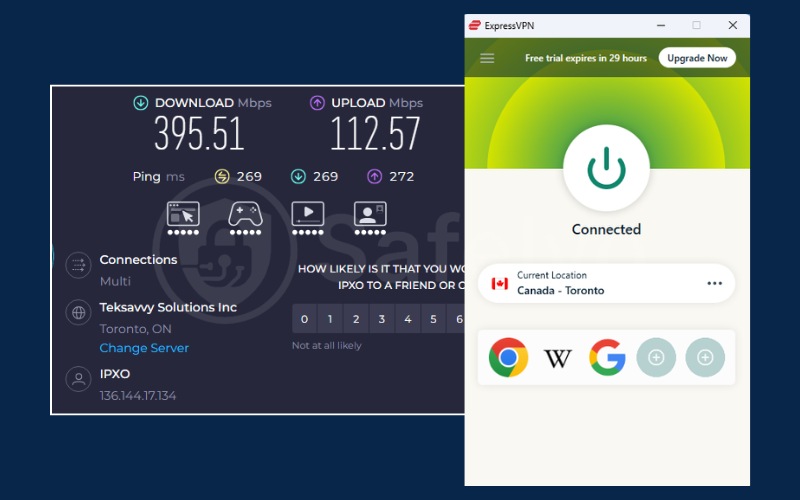
Surprisingly, switching to a long-distance server in Toronto, Canada, caused throughput to surge even higher. Despite the expected jump in latency (269ms), download speeds skyrocketed to a massive 395.51 Mbps, while uploads remained rock-solid at 112.57 Mbps. These exceptional metrics highlight ExpressVPN’s ability to handle bandwidth-heavy global data transfers with absolute stability and zero packet loss.
1.4.3. Usability and pricing
The desktop and mobile applications are exceptionally clean and simple to operate, making them perfect for non-technical users. You can easily set up the application to run quietly in the background without needing manual adjustments.
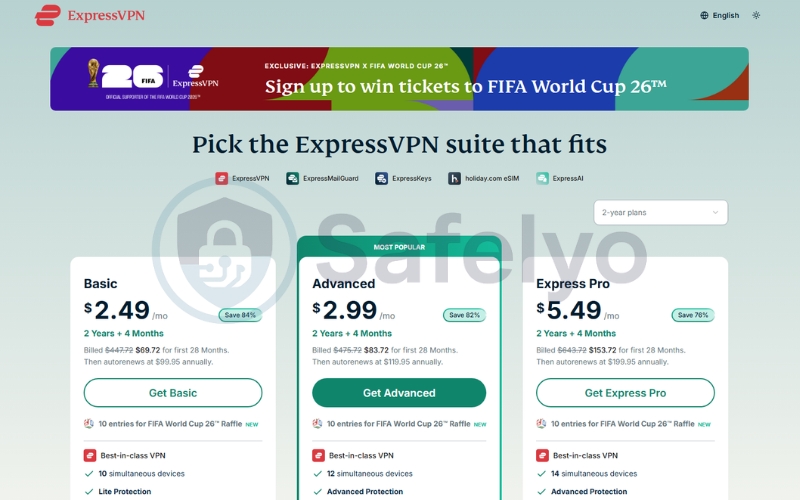
Pricing starts at roughly 2.49 USD per month on their 28-month basic plan. Mobile users can also take advantage of a 3-day free trial on the Google Play Store or rely on their 30-day money-back guarantee to test the service risk-free. For those looking to maximize value, ExpressVPN is currently running a special promotion with savings of up to 80%, along with a chance to win tickets to the FIFA World Cup 26™.
Pros
Lightway protocol offers unmatched connection stability on the move
TrustedServer technology guarantees zero log storage on public networks
Automatic obfuscation instantly unblocks restricted public Wi-Fi.
Cons
The basic plan lacks the advanced identity monitoring features
Renewal prices are higher after the initial subscription period
1.5. Private Internet Access: Best for customizable kill switch security
Private Internet Access is a highly customizable security client favored by technical users. It stands out by offering the largest server network on our list to ensure you can always find an uncrowded connection.
Best for: Tech-savvy users who want a strictly customizable kill switch and unlimited device coverage on a budget.
| Security Feature or Metric | PIA Specifications |
|---|---|
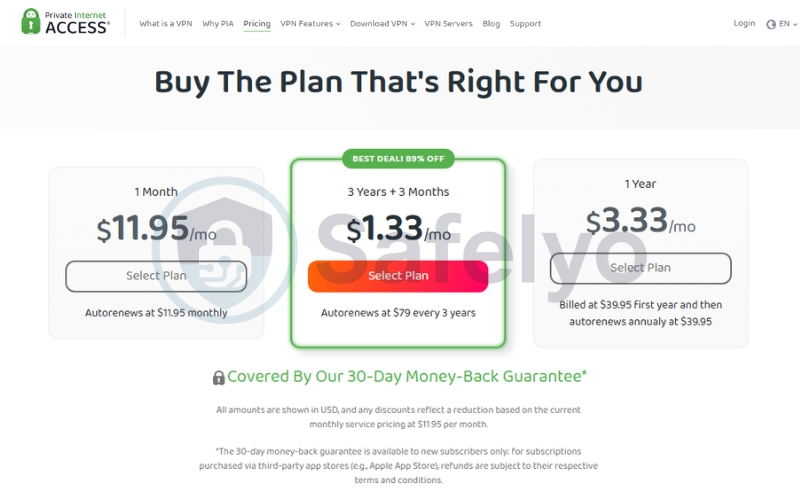
| Starting Price | Around $1.33/month (3-year plan) |
| Auto Connect Feature | Yes, network automation |
| Malware Blocker | MACE ad blocker included |
| Encryption Standard | Adjustable AES-128 or 256 |
| Leak Protection | Advanced DNS leak blocking |
| Speed Protocol | WireGuard, OpenVPN |
| Simultaneous Connections | Unlimited devices |
| Refund Policy | 30-day money-back guarantee |
1.5.1. Key features for public Wi-Fi security
Managing security on unstable public networks requires robust technical failsafes to prevent accidental identity leaks. Private Internet Access (PIA) utilizes highly customizable encryption levels and advanced network rules to keep your sensitive personal data completely secure on any open, untrusted hotspot.
- Massive server network density: Operating an industry-leading network across 90 countries ensures you virtually never experience bandwidth congestion. This massive fleet allows you to find a nearby, uncrowded server node instantly for optimized speeds while traveling abroad.
- Advanced customizable kill switch: The application features an advanced, highly customizable kill switch that can be configured to block all outbound internet traffic even when the VPN app is closed. This provides a crucial, leak-proof safety net on unstable public routers that drop connections.
- Unlimited device connections: You can secure your smartphone, laptop, tablet, and travel router simultaneously under a single budget-friendly account. This policy ensures your entire tech setup remains fully encrypted, eliminating the hassle of managing device limits while on the move.
- MACE ad and tracker blocker: Unsecured local networks often serve intrusive ads and tracking cookies. PIA’s integrated MACE feature blocks these malicious domains at the DNS level before they load, protecting your browser from background tracking scripts and significantly saving mobile data.
1.5.2. Speed test performance
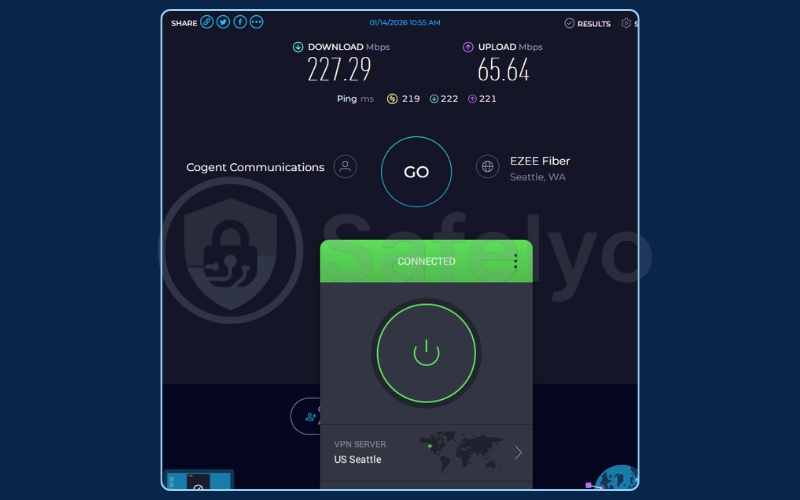
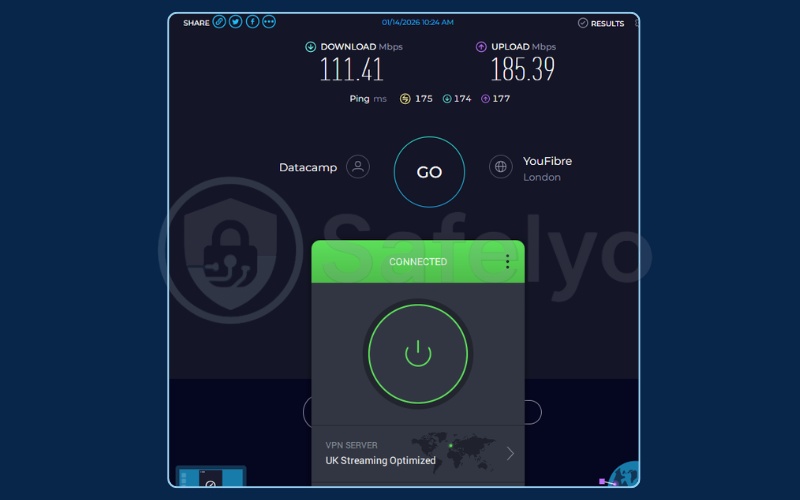
Private Internet Access (PIA) demonstrated highly consistent and capable performance for everyday use. Connecting to a US server in Seattle registered a very healthy download speed of 227.29 Mbps alongside a 65.64 Mbps upload. Interestingly, testing a London, UK server revealed a unique performance curve: a steady 111.41 Mbps for downloads paired with an exceptionally fast 185.39 Mbps for uploads.
While its absolute peak download rates may sit slightly below some top-tier competitors, PIA’s throughput remains robust. This balanced bandwidth is more than sufficient for seamless streaming, rapid file sharing, and uninterrupted browsing, proving it can effectively manage the expected latency of distant connections.
1.5.3. Usability and pricing
The application is highly customizable, but the technical interface can feel slightly overwhelming for complete beginners. However, it is entirely open source, allowing users to verify the code integrity independently.
Pricing starts at roughly 1.33 USD per month on their 39-month plan. They also back their service with a 30-day money-back guarantee, allowing you to test its features risk-free.
Pros
An advanced, customizable kill switch is highly reliable for public networks
A massive server network easily bypasses local network congestion
Unlimited simultaneous device connections under one cheap account
Cons
The desktop and mobile applications can feel cluttered for beginners
Connection speeds are slightly slower than NordVPN or ExpressVPN
Does not work reliably in countries with extreme censorship, like China
2. How we selected and tested these VPNs
We refuse to evaluate network security products based on theoretical marketing claims. Our team spent weeks conducting hands-on tests at local airports and crowded cafes using unsecured Wi-Fi hotspots to evaluate how these VPN clients respond under real-world pressure.
We focused our benchmarks on three vital safety criteria. If a provider failed to secure our data during sudden drops or required too many manual configuration steps, we excluded them from our recommendations.
2.1. Auto-connect capabilities on untrusted networks
Our primary criterion is immediate protection. A truly secure VPN must automatically launch an encrypted tunnel the exact millisecond your mobile device connects to an unrecognized network without requiring you to open the application manually.
2.2. Reliable kill switch and leak protection
We simulated sudden connection dropouts by abruptly disconnecting from local Wi-Fi routers. Our technical team analyzed the network traffic logs to verify that the system-wide kill switch successfully blocked any unencrypted data packets from leaking your true IP address.
2.3. Encryption standards and protocols
Bypassing sophisticated packet sniffing tools requires robust data protection. We verify that each service utilizes military-grade AES-256 or ChaCha20 encryption alongside modern, lightweight tunneling protocols to completely scramble your data before it leaves your device.
3. Why you absolutely need a VPN on public Wi-Fi hotspots
While open networks are highly convenient, they are inherently insecure by design. Understanding how hackers exploit these public connections highlights why a standard browser session is not enough to keep your data safe.
3.1. The danger of man-in-the-middle and evil twin attacks
Cybercriminals often set up rogue hotspots known as “evil twin” networks near popular locations. They might name their network “Starbucks_Free” to trick your phone or laptop into connecting automatically.
Once connected, they can execute a man-in-the-middle attack. This allows them to intercept everything you type, including secure login credentials and financial details, before your traffic ever reaches the legitimate web.
3.2. The limitations of HTTPS on public Wi-Fi
Most modern websites utilize HTTPS (the padlock icon) to encrypt your data. While this protects the specific content of your messages, it does not hide the metadata of your connection.
A hacker on the same local network can still monitor which domains you visit and which apps you run. A VPN is the only tool that encrypts this structural data entirely, completely blinding local network sniffers.
3.3. Session hijacking and cookie theft
Hackers on open networks do not always need to steal your password to compromise your accounts. By using packet sniffers, they can capture active session cookies traveling unencrypted over the air.
Once they intercept these cookies, cybercriminals can clone your active login state. This allows them to hijack your personal accounts (like email or social media) immediately without ever triggering a password request or two-factor authentication prompt.
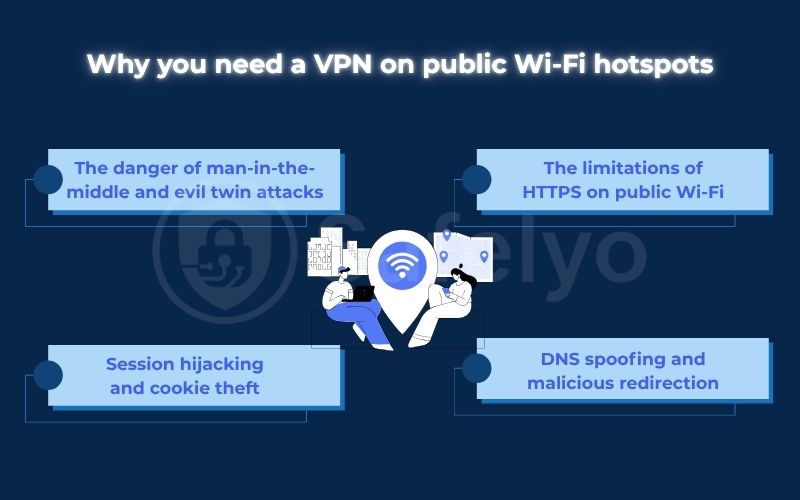
3.4. DNS spoofing and malicious redirection
Unsecured routers at local cafes or hotels are highly vulnerable to admin panel exploits. Hackers can compromise the router’s settings to execute a technique known as DNS spoofing.
When you type a legitimate address (like your bank’s website), the compromised router redirects you to a replica site controlled by the hacker. A VPN prevents this redirection by routing your DNS queries through its own private, secure lookup servers instead.
4. Free VPN vs Paid VPN for public Wi-Fi
The temptation of a “free” security tool is strong, but when it comes to your privacy, there’s a saying to live by: If you aren’t paying for the product, you are the product. While paid VPNs operate on a clear subscription model, free VPNs have to make money somehow, and it’s often at the expense of your safety and privacy.
4.1. Why most free VPNs are dangerous on public Wi-Fi
Using a questionable free VPN on an already insecure public network can be even more dangerous than using no VPN at all. You’re not just exposing your data to hackers in the coffee shop. You’re actively funneling it through a service that may have malicious intent.
Here’s the business model for most free VPNs:
- They log and sell your data: Many free providers log your browsing history, connection times, and device information, then sell this data to advertisers and data brokers. Your data becomes their revenue stream.
- They have weak security: Maintaining secure servers and modern encryption protocols is expensive. Free services often cut corners, using outdated protocols that can be easily breached.
- They are riddled with ads and trackers: To generate income, free VPN apps often inject their own ads and tracking software into your browsing, defeating the entire purpose of using a VPN for privacy.
- They offer slow speeds and data caps: Free services typically have a small number of overcrowded servers, resulting in painfully slow speeds. Most also impose strict daily or monthly data limits, making them useless for anything beyond checking a single email.
- Some are just malware in disguise: The most sinister free VPNs are nothing more than vehicles to infect your device with malware or spyware.
4.2. When are free VPNs acceptable?
There is a small exception: “Freemium” VPNs offered by reputable, privacy-focused companies. Proton VPN is the best example of this.
Proton’s business model is to provide a limited but secure free version to encourage users to upgrade to their paid plans. Their free service is funded by their paying customers, not by selling your data. It offers:
- Strong, verified no-logs privacy.
- Good security and encryption.
- No data caps.
However, the limitations are significant. The free version offers access to servers in only a few countries, speeds are much slower than those in their paid plans, and advanced features are locked.
4.3. Should you ever use a free VPN in airports or hotels?
Here is my direct advice:
- For the vast majority of free VPNs found in the app store, the answer is an emphatic no. You are better off relying on HTTPS and practicing safe browsing than channeling your data through a provider that is likely selling it.
- If your only option is a trusted freemium service like ProtonVPN’s free tier, then yes, it is better than nothing for quick, essential tasks. It will encrypt your connection and hide your activity from local snoopers on the Wi-Fi network.
However, for anyone who regularly uses public Wi-Fi, the limitations in speed and server choice will quickly become frustrating. For the price of a cup of coffee per month, a premium service like NordVPN or Surfshark offers a vastly superior experience. This includes automated protection, lightning-fast speeds, and complete peace of mind. It’s a small investment for an essential digital security tool.
5. Best VPN settings and tips for airports, hotels, and cafes
Getting a VPN is only half the battle; you must configure your settings correctly to handle the unique challenges of public networks. These practical tips will help you secure your devices in busy transit hubs, hotels, and local coffee shops.
5.1. Airport Wi-Fi: high-risk environments
Airport terminals are highly dangerous because thousands of unknown users are connected to the same open network. To protect your data, always enable the auto-connect feature in your VPN settings so that the encrypted tunnel launches the second your device joins the airport network.
5.2. Hotel Wi-Fi and device-to-device risks
Hotel networks often allow connected devices to communicate with each other, creating a major security loophole. To prevent guests in the next room from accessing your PC, always disable network discovery and file sharing in your system settings before connecting.
For Apple users, you should also change your AirDrop settings to “Receiving Off” or “Contacts Only.” This simple step prevents malicious actors on the shared hotel Wi-Fi from sending spam or scanning your device for system vulnerabilities.
5.3. How to connect a VPN to Wi-Fi with a login page
Many public networks use a captive portal (a login page) that requires you to accept terms before granting internet access. This setup often blocks VPN connections entirely, leaving you unable to access the login screen or load any web pages.
To resolve this, temporarily disable your VPN and connect to the Wi-Fi to complete the login process. The moment the portal redirects you to a successful connection page, immediately re-enable your VPN to secure your browsing session.
6. Public Wi-Fi safety checklist
Using a great VPN is the most important step, but it works best as part of a smart security routine. Think of your VPN as a high-tech lock on your door, but it still helps to close your windows.
| Action Step | Why It Is Important | How to Do It |
|---|---|---|
| Activate VPN first | Protects your session from the very first moment | Connect before opening your browser or apps. |
| Verify the network name | Prevents connecting to a fake “Evil Twin” network | Ask an employee for the official Wi-Fi name. |
| Turn off sharing | Makes your device invisible to other local users | Disable file sharing in your network settings. |
| Stick to HTTPS sites | Adds an extra layer of browser encryption | Look for the padlock icon in your address bar. |
| Log out when done | Terminates your active session safely | Click the logout button instead of closing tabs. |
7. Frequently asked questions
Do I really need a VPN for public Wi-Fi?
Yes, protection is important. Public networks lack built-in encryption, meaning any hacker sharing the connection can easily intercept your unencrypted data, passwords, and banking details.
Is it safe to do banking on public Wi-Fi with a VPN?
Yes, provided you use a secure connection. A premium VPN encrypts your traffic before it leaves your device, making your bank logins completely unreadable to anyone monitoring the local router.
Will a VPN make a slow public Wi-Fi connection even slower?
Yes, but the impact is usually minor. Encryption always adds a small amount of data overhead, but using fast protocols like WireGuard or Lightway keeps this speed drop under ten percent.
Can a public Wi-Fi provider see my browsing history?
Not if your secure tunnel is active. The router administrator can only see that you are connected to a VPN server, while your specific web destinations and searched terms remain hidden.
Which VPN feature is most important for public Wi-Fi?
The most important features are auto-connect and a kill switch. Auto-connect ensures your VPN activates automatically on untrusted networks, while a kill switch prevents accidental data leaks if the VPN connection suddenly drops.
Do I need a VPN if the public Wi-Fi requires a password?
Yes. A password-protected Wi-Fi network is generally safer than an open hotspot, but other users on the same network may still pose security risks. A VPN adds an extra layer of encryption that keeps your online activity private from both network administrators and potential attackers.
8. Conclusion
Using public Wi-Fi without protection is like having a private conversation in a crowded room. Finding the best VPN for public Wi-Fi is the only reliable way to secure your personal information automatically. By setting your application to auto-connect, you establish an impenetrable digital shield, allowing you to browse, stream, and work safely on any untrusted hotspot.
Do not leave your mobile security to chance. To explore more in-depth reviews and compare the top-rated security tools for your specific devices, visit our comprehensive Best VPN category at Safelyo to protect your digital life with absolute confidence today.