
Erome age verification not working? The problem may be caused by outdated browser data, blocked cookies or scripts, DNS filtering, network restrictions, or an age-assurance requirement in your region. These issues require different solutions, so identifying the cause is the first step.
This guide explains how to troubleshoot common Erome loading and verification errors, understand when a VPN can help diagnose connection problems, and protect your personal information when dealing with age-verification requests.
Important: This guide is intended for adults. It does not provide instructions for minors to access age-restricted content or bypass applicable age-assurance requirements.
1. How to fix Erome age verification not working
If Erome’s confirmation button freezes or the verification page keeps reloading, start with browser-level troubleshooting. These steps may help resolve outdated session data, cached scripts, or extension conflicts without changing your network connection.
Clear Erome cookies and site data: Remove stored website data for erome.com, then close and reopen your browser.
| Browser | How to Clear Erome Site Data |
|---|---|
| Google Chrome | Open Settings → Privacy and security → Third-party cookies → See all site data and permissions. Search for erome.com and delete its stored data. |
| Microsoft Edge | Open Settings → Cookies and site permissions → Manage and delete cookies and site data → See all cookies and site data. Search for erome.com and remove the matching entry. |
| Mozilla Firefox | Open Settings → Privacy & Security → Cookies and Site Data → Manage Data. Search for erome.com and remove it. |
| Safari on Mac | Open Safari → Settings → Privacy → Manage Website Data. Search for Erome and remove its stored website data. |
| Safari on iPhone or iPad | Open Settings → Apps → Safari → Advanced → Website Data. Search for erome and remove its stored website data. Menu names may differ on older iOS versions. |
| Chrome on Android | Open Chrome → Settings → Site settings → All sites. Search for erome.com and clear its stored data. |
Menu names may vary slightly by browser version. Removing site data will sign you out and may reset saved preferences for the website.
- Open a private or incognito window: Visit the official domain in a fresh browser session. Private browsing can help determine whether existing cookies or extensions are contributing to the problem.
- Check your browser’s desktop mode: If you are using a mobile browser, switch to desktop mode and reload the page. This can help identify whether the issue is related to the mobile browsing experience.
- Try another updated browser: Test Chrome, Firefox, or Edge to determine whether the problem is limited to one browser profile or configuration.
- Check browser privacy settings and extensions: Temporarily disable ad blockers, script blockers, and extensions that may interfere with page scripts. Check whether your browser blocks cookies required for the site’s session. On Safari, review its cross-site tracking and cookie settings because Intelligent Tracking Prevention can affect how some websites handle stored data. Retest the page after changing one setting at a time, then restore your preferred privacy protections.
- Compare Wi-Fi with mobile data: Switch between your home Wi-Fi and cellular connection. If Erome works on one but not the other, investigate the affected network’s DNS settings or other connection restrictions.
If Erome still does not load after these checks, confirm that you are using the legitimate domain and retry later. A problem affecting multiple browsers and networks may indicate a wider service interruption, but these checks alone cannot confirm a platform-wide outage. If the issue persists, contact the platform through a verified support channel. Provide your browser and version, device, exact error message, and when the problem occurred. Do not send identity documents through unverified email or chat channels.
2. Why Does Erome Age Verification Stop Working?
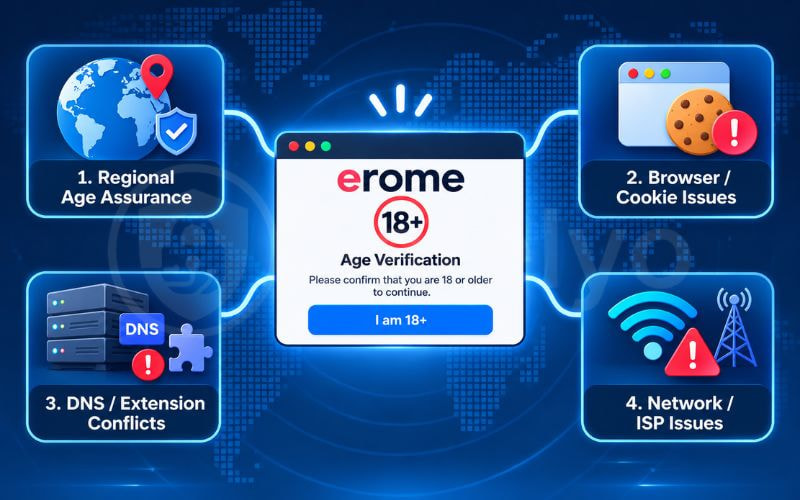
Erome age-verification problems can have different causes depending on the message displayed and the connection you use. A prompt requesting age confirmation may reflect a process applied by the website or a requirement relevant to your location. Browser or network issues may also cause buttons to freeze, pages to reload, or verification screens to fail to load.
Start by distinguishing an age-assurance requirement from a technical error. The table below outlines possible causes and basic checks. These are possible explanations, not confirmed causes of every issue.
| Possible Cause | Common Signs | How to Check |
|---|---|---|
| Regional age-assurance requirement | Erome displays an age-check prompt or restricts access based on applicable requirements. | Review the verification message and the relevant local requirements. |
| Browser script or cookie issue | Confirmation buttons freeze, pages reload repeatedly, or verification does not register. | Test a fresh private window and another updated browser. |
| DNS filter or browser extension conflict | Parts of the page fail to load or interactive elements stop responding. | Temporarily test without custom DNS filtering or browser extensions. |
| Network or ISP issue | Erome behaves differently on home Wi-Fi and mobile data. | Compare connections to identify whether the problem is network-specific. |
3. Can you bypass Erome age verification with a VPN?
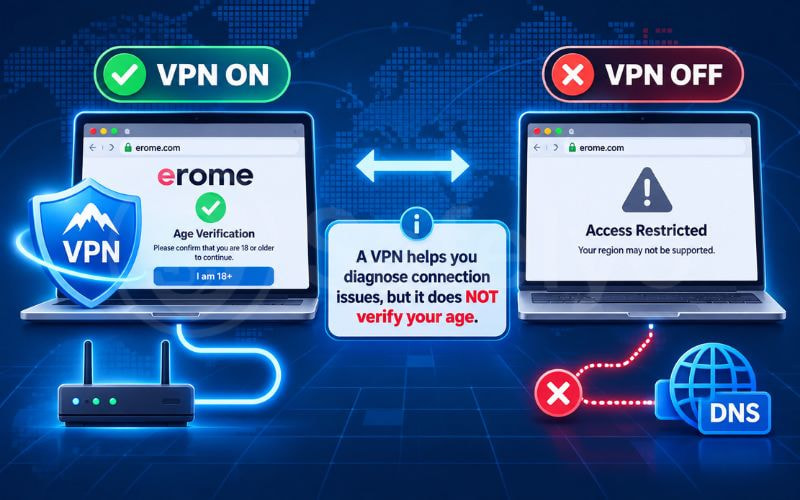
No. A VPN cannot bypass Erome’s age-verification requirements or confirm that you meet the required age threshold. Although a VPN changes your apparent IP address and network route, it does not remove age-assurance obligations or guarantee access to age-restricted content. Many platforms also limit VPN traffic, much like the reasons behind why streaming services block VPNs.
Understanding what a VPN can and cannot do helps distinguish connection problems from verification requirements:
- Network connection issues: A VPN may help identify whether network routing or DNS configuration contributes to a loading problem.
- Frozen verification buttons: A VPN does not fix browser cookies, blocked scripts, or outdated session data. Follow the browser troubleshooting steps in Section 1.
- Regional age restrictions: A VPN does not remove applicable age-assurance requirements. Follow the legitimate verification process that applies to your location.
If your primary reason for using a VPN is online privacy, consider providers with transparent privacy policies, reliable connections, and DNS leak protection. See our Best VPN for Privacy guide to compare privacy-focused options.
Important: Do not use a VPN to circumvent age-verification requirements or regional safeguards that apply to you.
4. Is Erome safe to use?
Erome is not inherently malware, but no user-generated adult platform should be treated as risk-free. Safety depends on the domain you visit, the links and files you open, the information you disclose, and how the platform or its verification provider handles personal data.
4.1. The main risks for adult visitors
| Risk | What It Means | Safer Response |
|---|---|---|
| Lookalike domains | A similarly named website may imitate Erome or attempt to collect credentials. | Use erome.com and inspect the full domain before signing in. |
| External profile links | Uploaders or commenters may direct visitors to unrelated websites. | Avoid opening suspicious video, download, payment, or messaging links. |
| Unknown downloads | Executable files, browser updates, extensions, or media players may be malicious. | Do not install software promoted by a video page or pop-up. |
| Account exposure | Reused passwords can connect an adult-content account to other services. | Use a unique password and a separate email address. |
| Verification privacy | An age-check provider may process a selfie, ID data, banking confirmation, or other attributes. | Review the provider’s identity, privacy notice, and data-retention policy. |
| Upload privacy | Photos and videos may contain faces, voices, reflections, landmarks, or embedded metadata. | Remove unnecessary metadata and inspect the entire background before uploading. |
4.2. How to avoid fake erome mirrors and ID-Theft scams
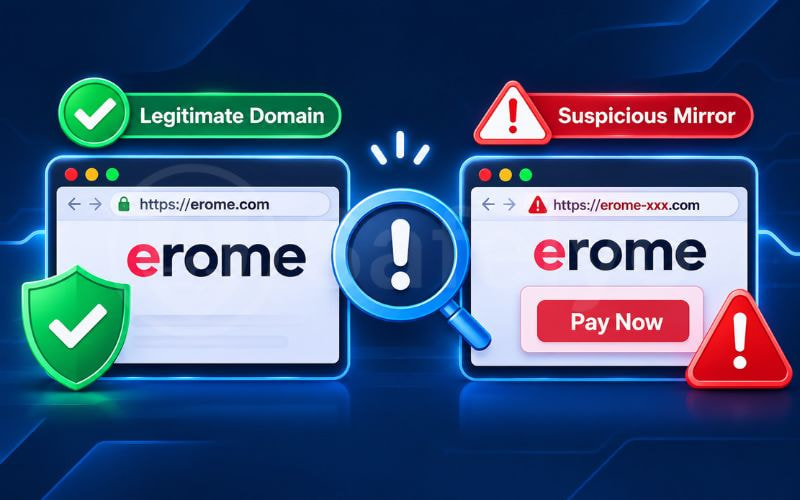
Before entering login details, payment information, or identity documents, confirm that you are visiting the legitimate website. Lookalike domains and unsolicited verification links may lead to phishing pages designed to collect sensitive information.
Watch for these warning signs:
- Lookalike domains: URLs with extra hyphens, misspelled brand names, or unfamiliar domain extensions.
- Unexpected payment requests: Verification pages asking for payment details without clearly explaining the charge or provider’s role.
- Suspicious user-posted links: Links in comments or profiles that redirect to unfamiliar verification websites.
- Unclear identity-document requests: Pages requesting passports, identity documents, or selfies without identifying the verification provider.
4.3. Before uploading an ID or selfie for age verification
If Erome or a page claiming to represent Erome requests a government-issued ID, selfie, or payment information, assess the privacy implications before proceeding.
Check these points first:
- Verify the website: Confirm that the page belongs to the legitimate service rather than an unfamiliar link from a comment, message, or pop-up.
- Identify the verification provider: Find out which organization receives and processes your information.
- Read the privacy notice: Check what data is collected, why it is needed, how long it is retained, and whether it is shared.
- Check deletion options: Look for information about data deletion and how to contact the provider.
- Understand the verification method: Determine whether the process uses an identity document, selfie, facial age estimation, or another method. These methods do not offer identical privacy protections.
Do not submit sensitive documents if the page does not identify who is collecting the information or explain how it will be handled.
A website scan or security-rating result can offer an additional signal, but it cannot prove that every page, advertisement, or user-posted link is safe.
5. How do age verification laws affect Erome access in the UK, US, and Australia?
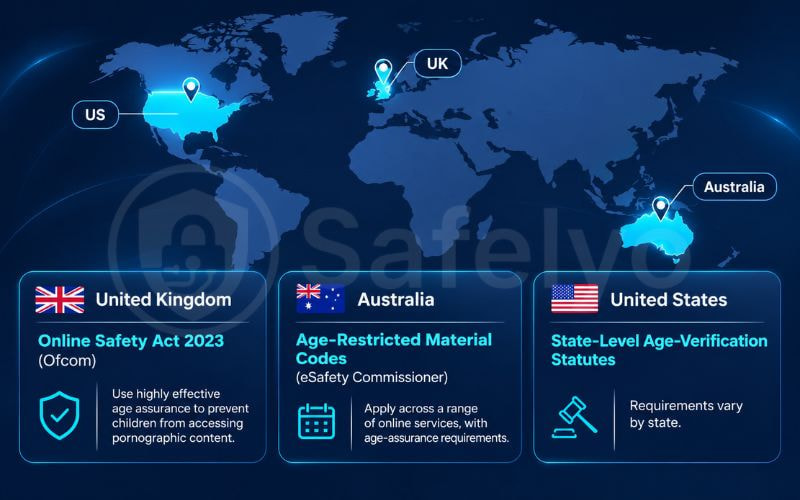
If Erome displays an age-verification prompt or restricts access, your location may be relevant. However, an age-assurance requirement is not the same as geo-blocking, which limits content based only on a user’s location. The UK, Australia, and several US states have introduced different age-assurance requirements for services providing access to adult content. These rules can affect how covered platforms manage access, but they do not establish that Erome uses the same verification process in every jurisdiction.
5.1. United Kingdom: Online safety act 2023
The UK’s Online Safety Act requires in-scope services that publish or provide access to pornographic content to use highly effective age assurance to protect children. Ofcom oversees compliance and expects regulated services to address easily accessible methods that children may use to circumvent age checks.
What this means for Erome users: If an applicable age-assurance process or regional restriction appears, it should not automatically be treated as a browser error. VPN use itself is legal in the UK, but changing an apparent IP address does not remove a covered service’s legal obligations or guarantee access. VPN laws differ by country, and some, such as China, restrict VPN use far more strictly.
5.2. Australia: Age-restricted material codes
Australia’s Age-Restricted Material Codes introduce age-assurance and access-control obligations for covered online services, including pornography websites. The requirements depend on the type of service and the applicable code. The eSafety Commissioner oversees the regulatory framework.
What this means for Erome users: An age-check prompt may reflect requirements applicable to an in-scope service. The codes allow different appropriate age-assurance methods and do not require every service to collect government-issued ID as the only verification option. A VPN does not exempt a covered service from its obligations. At home, parents can add their own safeguards, for example by setting screen time limits with Bark.
5.3. United States: State-level age verification laws
The US does not have one uniform age-verification rule covering all adult websites. Requirements and legal challenges vary by state.
Utah provides a relevant example. Senate Bill 73 requires covered commercial adult websites to implement reasonable age-verification methods. A federal court’s September 2026 preliminary injunction blocked a separate provision concerning location verification and VPN-related liability, but the core age-verification requirement remained enforceable, according to the Utah Department of Commerce’s October 30, 2026 update.
What this means for Erome users: The applicable rules depend on the state and the scope of the law. A VPN does not automatically remove age-verification requirements, and the Utah court order should not be interpreted as a general exemption from age checks across the United States.
5.4. Does using a VPN remove these age-verification requirements?
No. VPNs can change an apparent IP address and network route, but they do not establish a user’s age or cancel legal obligations that apply to a covered service. Whether Erome displays a verification prompt or restricts access also depends on its own implementation and applicable requirements.
For a technical loading issue, compare browser behavior and network connections before concluding that a regional age-assurance requirement is responsible. If a VPN is part of the setup, our Netflix VPN not working guide shows a similar way to separate VPN problems from site restrictions.
6. FAQ
Why does the Erome age-verification button do nothing?
A frozen button can result from outdated site data, blocked cookies, script-blocking extensions, or a page-loading issue. Clear Erome’s stored data, open a fresh private window, and test another updated browser. If the problem continues, compare your Wi-Fi and mobile data connections.
Why does Erome work on mobile data but not Wi-Fi?
This difference can point to DNS filtering, router-level blocking, ISP restrictions, or another network configuration issue. Test both connections on the same device and browser. If Erome only fails on Wi-Fi, review your custom DNS settings and router filtering logs.
Can a VPN help fix Erome access issues?
Sometimes. Comparing Erome with a VPN connected and disconnected may help identify network-routing or DNS-related problems. However, a VPN cannot fix browser-related verification errors, verify your age, or remove age-assurance requirements that apply to your location.
Can I log in if the age check appears before the login page?
Not necessarily. If an age-verification prompt appears before the login page, signing in may not resolve it. Read the prompt carefully and follow the legitimate process that applies to your situation. Contact the platform through its verified support channel if an existing account remains inaccessible.
Why does Erome ask for age verification in my country or state?
Age-assurance requirements vary by jurisdiction. Some laws require covered services to take steps to prevent children from accessing age-restricted content. A service may apply an age check or restrict access where relevant requirements apply. This is different from a browser error and will not necessarily be resolved by clearing cookies. Read the prompt carefully and follow the applicable process. Before sharing an ID or selfie, use the privacy checklist in Section 5 to understand who will receive your information and how it will be handled.
Can NextDNS cause Erome loading problems?
DNS filtering can block domains or requests that a website needs to load. Review your NextDNS query log for blocked requests around the time the issue occurs. You can temporarily test with your default DNS configuration to identify whether filtering is involved, then restore your preferred settings.
7. Conclusion
If Erome age verification is not working, begin with the browser and network checks: clear the site’s stored data, test a private window, review extensions and DNS filters, and compare Wi-Fi with mobile data.
If the prompt continues to appear, determine whether you are facing a technical problem or an age-assurance requirement that applies in your region. Confirm that you are on the legitimate website and review the verification provider’s privacy practices before sharing sensitive information.
If basic troubleshooting does not resolve the issue, contact the platform through a verified support channel. Include the browser, device, exact error message, and time of the issue to help narrow down the cause.
Disclaimers
- Editorial Independence & FTC: Safelyo may earn commissions when readers purchase products through affiliate links on other pages of this website. This article does not contain affiliate links. Our editorial content is developed independently of commercial partnerships.
- Legal: This article provides general information, not legal advice. Age-assurance requirements and VPN regulations vary by jurisdiction and may change. Check the relevant official sources or seek qualified legal advice when necessary.