A Netflix VPN ban almost always means the VPN server’s IP range has been blocked, not your personal account. Netflix’s systems flag IP addresses associated with VPN or proxy traffic and restrict what you can stream from them, while your account itself keeps working normally the moment you disconnect.
Key Takeaways
- Your account isn’t at risk. Netflix blocks suspicious IP addresses, not personal accounts. There’s no indication in Netflix’s public guidance that VPN use alone leads to account suspension.
- The error code has changed. Netflix’s Help Center currently documents its VPN/proxy warning as Error E106; older troubleshooting guides may reference the previous code, M7111-5059.
- “Soft-block” isn’t official terminology. If you can only play titles with the Netflix “N” logo, you’re likely limited to titles Netflix holds worldwide licensing for. This pattern is often called a soft-block by the VPN community, though Netflix doesn’t use that term itself.
- You can get flagged without a VPN. Carrier-grade NAT (CGNAT) sharing one IP across many households, or features like Apple’s iCloud Private Relay, can sometimes trigger the same detection as an actual VPN.
- Ad-supported plans block VPN use entirely. Netflix’s Standard with Ads experience doesn’t support VPN connections by default.
1. Does Netflix ban your personal account?
No. A Netflix VPN ban targets the IP address you’re connecting from, not your account. Netflix’s Terms of Use let it use technology to verify your location and restrict content accordingly, but its own Help Center frames VPN detection as a playback and access issue, not something that leads to suspension.
The realistic consequence is a proxy error, or a catalog limited to titles Netflix holds worldwide rights to. Turning off the VPN restores normal access right away, since the restriction lives with the IP address, not your account.
2. How does Netflix detect and block VPN traffic?
Netflix doesn’t publish the technical details behind its VPN detection, but its approach fits a broader pattern common across streaming platforms. For the general principles behind why services do this at all, see why do streaming services block VPNs.
Two mechanisms are worth a closer look for Netflix specifically: traffic clustering and protocol fingerprinting.
2.1. Traffic clustering on shared IPs
A typical home connection generates a handful of simultaneous streams at most. A shared VPN server, by contrast, can route traffic for hundreds of unrelated Netflix accounts through the same public IP address at once.
This kind of concentrated activity is a commonly cited signal for detecting shared or proxy infrastructure, since it doesn’t resemble normal household usage. Netflix hasn’t published a specific threshold that triggers a block, but a heavily shared IP is generally considered more exposed to detection than one used by fewer people.
2.2. DPI and protocol fingerprinting
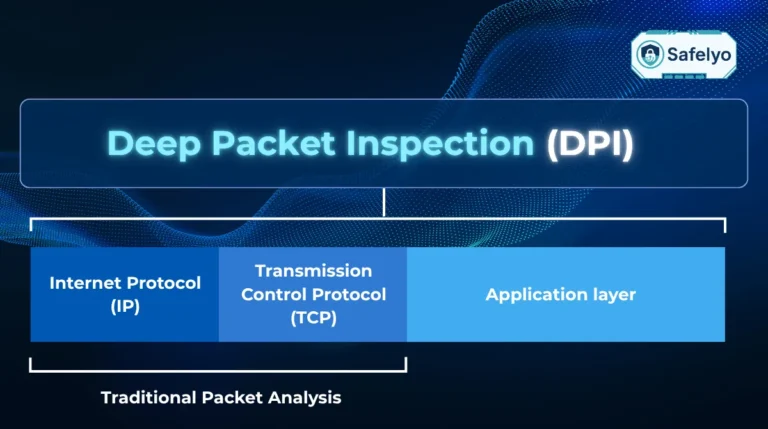
Deep Packet Inspection (DPI) refers to analyzing the structure of network traffic rather than just its destination, which can reveal handshake patterns specific to protocols like OpenVPN or WireGuard when they aren’t obfuscated. Independent security researchers have reported this as a plausible detection method for VPN traffic in general.
This is worth flagging clearly: Netflix has not confirmed that it uses DPI, and this section should be read as informed technical speculation rather than confirmed Netflix policy.
3. The two faces of the ban: Error E106 vs. soft-block
A Netflix VPN ban doesn’t always look the same. Sometimes Netflix stops playback outright with a clear error message. Other times, the video plays fine, but the catalog quietly shrinks down to a fraction of what you’d normally see. These are two different symptoms, and knowing which one you’re dealing with changes how you fix it.
- Hard-block: Error E106
This is the version most people recognize. You’ll see a message like “You seem to be using a VPN or proxy,” and nothing plays until you resolve it. Netflix’s Help Center currently documents this as Error E106. Older troubleshooting guides sometimes reference a previous code, M7111-5059, for what appears to be the same underlying issue.
- Soft-block: Originals-only playback
This version is easy to miss. The VPN connects, no error appears, but the catalog is limited to titles with the Netflix “N” logo while third-party licensed titles disappear. Netflix confirms that VPN detection can limit you to titles it holds worldwide licensing for, since those aren’t subject to the same regional restrictions. The term “soft-block” itself comes from the VPN community and troubleshooting forums, not from Netflix.
| Error E106 (hard-block) | Soft-block | |
|---|---|---|
| What you see | Explicit “VPN or proxy” warning; nothing plays | No error; only Originals and worldwide-licensed titles play |
| Likely cause | The IP is clearly flagged on Netflix’s blocklist | Netflix suspects the connection but isn’t certain enough to block it outright |
| Confirmation level | Documented directly by Netflix | Widely reported by users and VPN providers; not an official Netflix term |
| How to tell | Obvious immediately, on any title | Only noticeable when you search for a region-specific title and can’t find it |
If you’re only seeing Originals, that’s not a successful connection; it’s a sign the VPN has already been flagged, just not strictly enough to trigger the hard error.
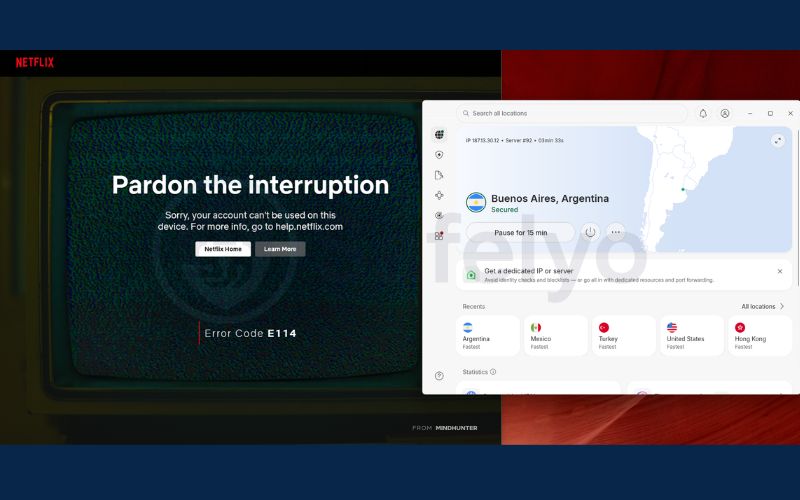
Don't confuse this with Error E114
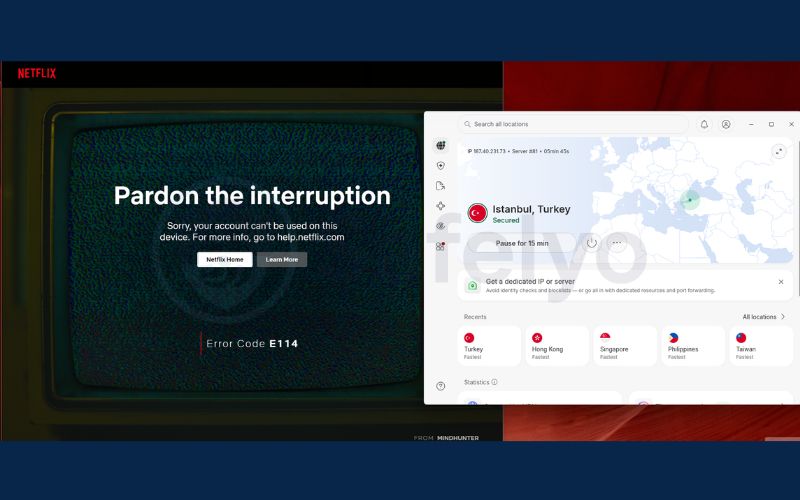
Error E114, “Your account can’t be used in this location,” looks similar but works differently. E106 blocks based on your IP address, regardless of which account is connecting. E114 flags the account itself, typically when Netflix’s location-verification system, tied to its household and account-sharing policies, sees the account being accessed from a country that doesn’t match where it’s registered.
A VPN can contribute to E114 if it routes you to a country far from your account’s home location, but the fix is different from E106: reconnecting your VPN to a server in your account’s registered country, rather than switching to a random different server, is what typically resolves it.
4. Netflix says I’m using a VPN, but I’m not: fixing false positives
Sometimes Netflix flags a connection as a VPN or proxy even when you’ve never installed one. This happens because Netflix’s detection systems respond to network patterns, not just the presence of VPN software, and a few common configurations can mimic those patterns by accident.
4.1. Carrier-grade NAT and shared ISP addresses
Many internet providers use Carrier-Grade NAT (CGNAT), a technology that routes traffic from hundreds of households through a single shared public IPv4 address to conserve limited address space. From Netflix’s side, this can look identical to a VPN server serving many unrelated users at once.
If you’re getting flagged without running a VPN, this is one of the more likely explanations, especially on mobile carriers or budget ISPs that rely heavily on CGNAT. Restarting your router or modem sometimes assigns a different shared IP and resolves the issue. If it persists, contact your ISP and ask whether they can provide a static IP or disable CGNAT for your connection.
4.2. Hidden proxy services and network settings
Several everyday features can route your traffic through a proxy without you realizing it, triggering the same detection as an actual VPN.
Apple’s iCloud Private Relay sends your Safari traffic through two separate relays operated by Apple and a third party, which can trigger Netflix’s proxy warning on Apple devices. Turning off Private Relay for your home Wi-Fi network is usually enough to fix it.
Antivirus suites with built-in VPN features are another common cause. McAfee’s Secure VPN, for example, can auto-connect on networks it considers untrusted, and other suites like Avast or Norton may prompt you to enable a VPN component during setup without making it obvious it’s still active afterward.
DNS over HTTPS (DoH) can also contribute to this. If your browser is configured to use a third-party DNS resolver, like Cloudflare’s 1.1.1.1 or Google’s 8.8.8.8, instead of your ISP’s own DNS, that mismatch between your IP and your DNS provider can look similar to the leak patterns Netflix associates with VPN use.
5. Common reasons Netflix may keep detecting your VPN
If you’re actually using a VPN and still getting flagged, the cause is often a small setup mistake rather than the VPN itself failing. A few habits show up repeatedly in troubleshooting reports.
- Turning on the VPN after Netflix is already open. If the app is running in the background when you connect, it can hold onto location data from before the VPN was active. Close Netflix completely first, then reconnect the VPN, then relaunch the app.
- Leave IPv6 enabled on your device. Many VPN apps only encrypt IPv4 traffic by default, which means IPv6 requests can travel outside the tunnel and reveal your real location. Disable IPv6 in your network adapter settings, or turn on IPv6 leak protection if your VPN offers it.
- Not clearing cookies and site data. Your browser or app can store location markers from previous sessions. Even after connecting to a US server, leftover cookies can still tell Netflix you’re somewhere else. Clear cookies and cache, or fully log out and back in.
- A mismatched system timezone. If your VPN connects to a server in Tokyo but your device’s clock is still set to a different timezone, that inconsistency is another signal that can factor into location checks. Match your system timezone to your VPN’s server location.
6. How to bypass the Netflix VPN block step by step
Diagnose before you fix. Jumping straight to advanced steps like obfuscation or a dedicated IP often skips over a simpler cause, like cached data or a leaking DNS request. Work through these in order.
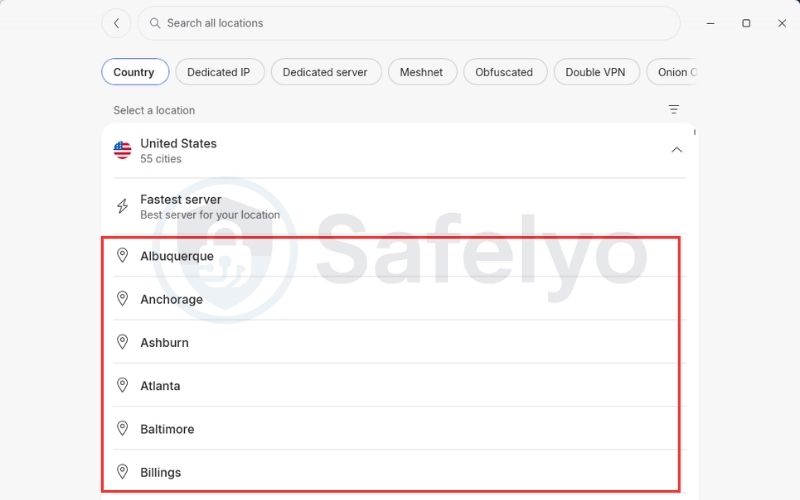
Step 1: Switch to a different server in the same country.
- Gives you a fresh exit IP, which resolves the issue if the current one is already blacklisted.
- Prioritize a server with fewer users or a dedicated IP option if your provider offers one.
Step 2: Clear cookies and app cache.
- On a browser, go to netflix.com/clearcookies.
- On Android TV or Firestick, force-stop the Netflix app and clear its stored data through your device settings.
Step 3: Disable IPv6 and check for DNS leaks.
- Turn off IPv6 in your network adapter settings.
- Enable DNS leak protection and a WebRTC blocker in your browser or VPN app.
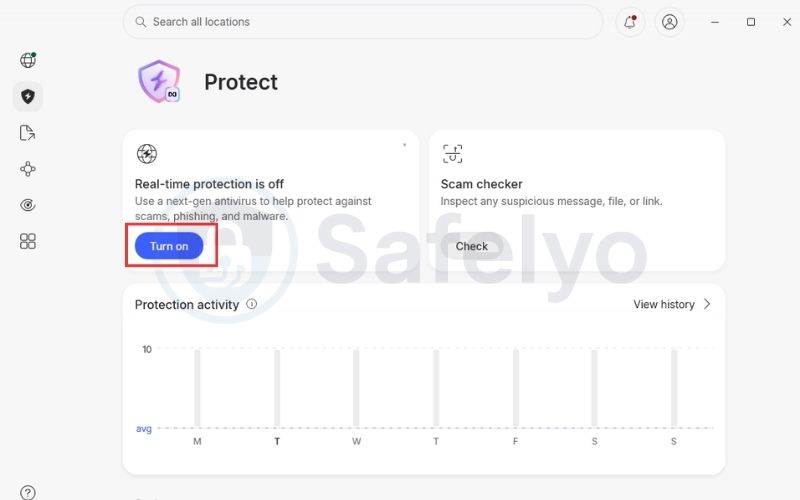
Step 4: Turn on obfuscated servers if your VPN offers them.
- Obfuscation, sometimes called stealth mode, strips out the metadata that reveals you’re using a VPN protocol at all.
- Helps against detection based on packet inspection rather than IP reputation.
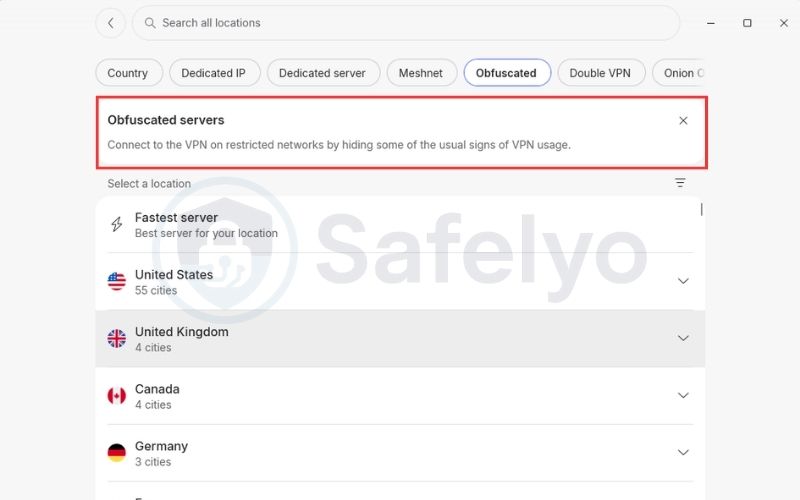
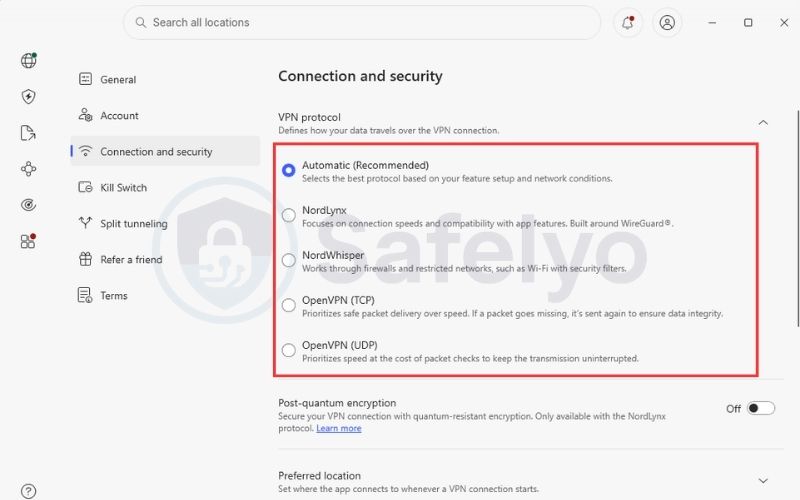
Step 5: Try switching protocols.
- Toggle between WireGuard (or a provider’s optimized version, like NordLynx) and OpenVPN over TCP port 443.
- OpenVPN over port 443 disguises VPN traffic as regular HTTPS traffic.
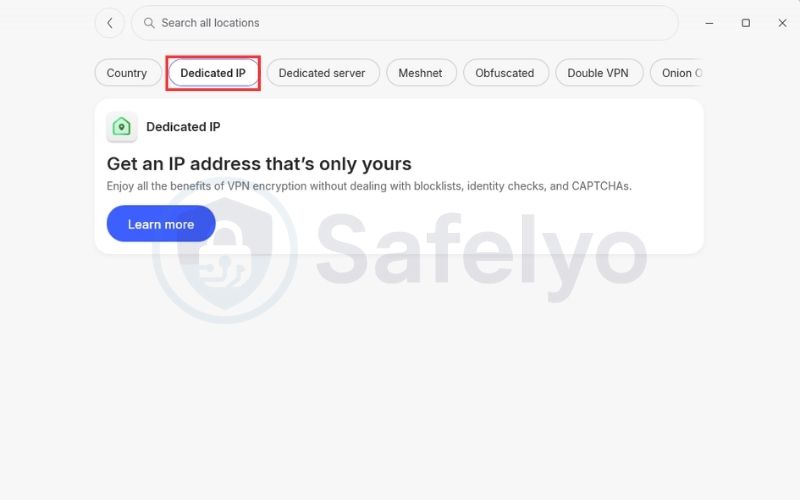
Step 6: Use a dedicated or residential IP if the problem persists.
- A static IP that isn’t shared with other users removes the shared-IP pattern that traffic clustering detection relies on.
- Best reserved as a last step, since dedicated IPs typically cost more than standard servers.
If you’ve gone through these steps and still aren’t sure which one applies to your situation, use this table to match your symptoms to the likely cause:
| Symptom | Likely cause | What to try |
|---|---|---|
| E106 immediately on connecting, happens to everyone on that server | IP is already on a known blacklist | Switch to a different server, ideally one with fewer users or a dedicated IP |
| Netflix shows your real country instead of the VPN’s | The DNS request is leaking outside the VPN tunnel | Turn on Smart DNS or your VPN’s own DNS, then test with a DNS leak checker |
| Netflix detects your real location through a parallel connection | IPv6 traffic isn’t routed through the VPN | Disable IPv6 on your device, or use a VPN with full IPv6 support |
| The connection is stable but still blocked, and the IP isn’t blacklisted | Traffic patterns may be flagged by packet inspection | Enable obfuscation or stealth mode if available, or switch protocols |
7. Which VPNs still unblock Netflix?
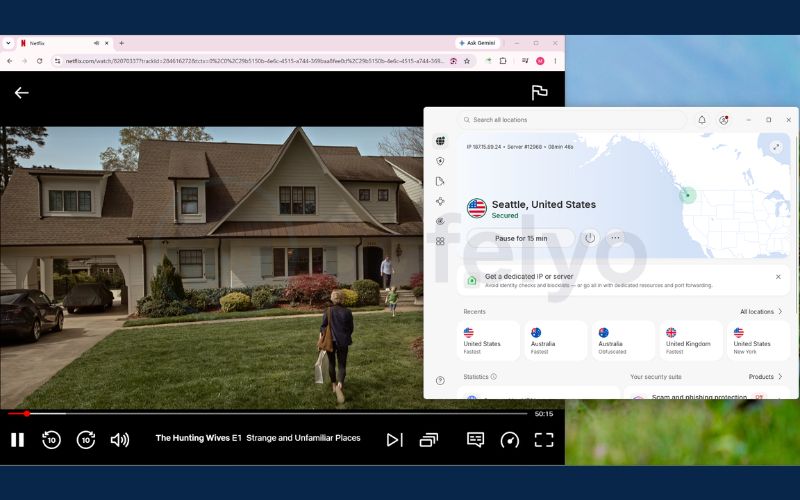
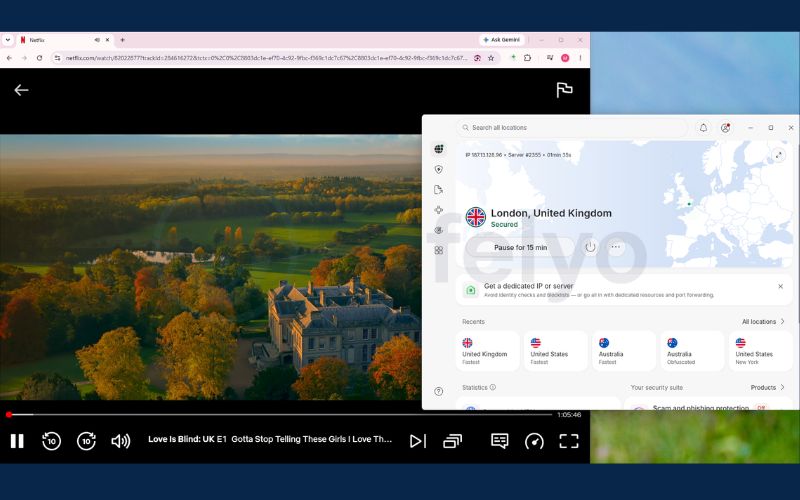
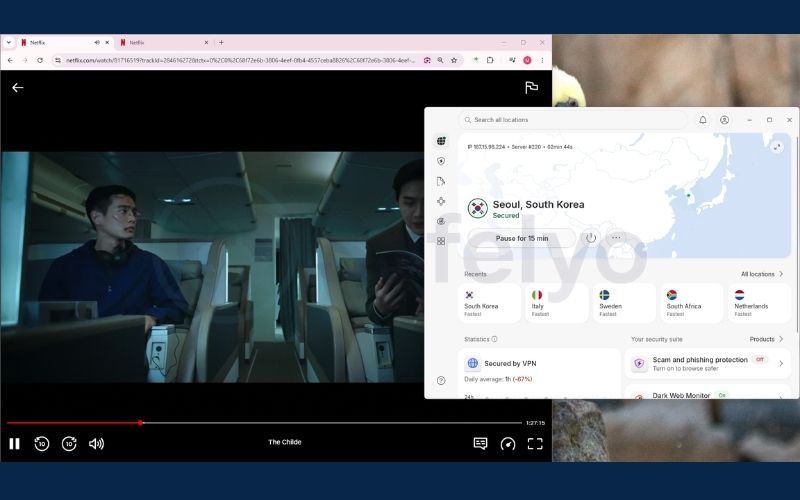
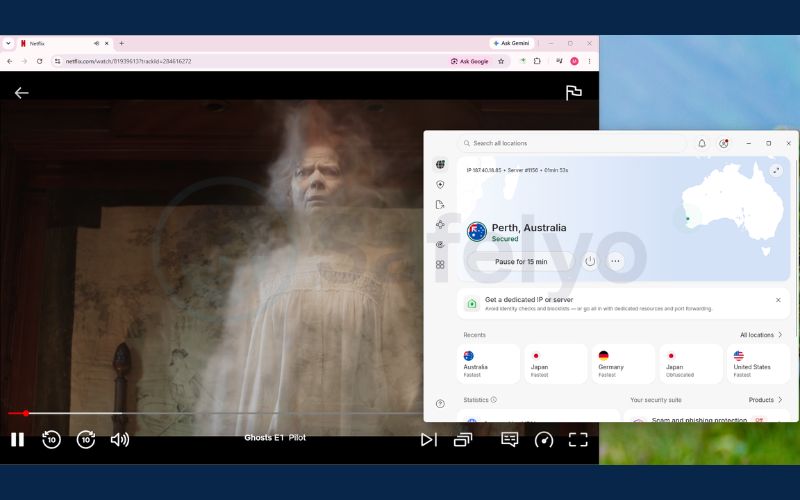
We tested NordVPN’s ability to unblock regional Netflix libraries across 40 countries. For each country, success meant connecting to a local server, reaching the correct regional catalog, and playing a title exclusive to that region.
NordVPN successfully unblocked Netflix in 23 of the 40 countries we tested, a success rate of about 58%. Coverage was strongest across Europe, North America, Oceania, and parts of East and Southeast Asia. Results were noticeably weaker across Latin America and the Middle East, where most of the countries we tested failed to unblock.
| Region | Representative countries | Result |
|---|---|---|
| North America | US, Canada | Success |
| Europe | UK, Germany, France, Czech Republic, Switzerland | Success (Czech Republic, Switzerland needed a 2nd attempt). Iceland and Ireland failed. |
| Oceania | Australia, New Zealand | Success |
| East & Southeast Asia | Japan, South Korea, Singapore | Success (Japan needed a 2nd attempt) |
| Southeast Asia (partial) | Thailand, Indonesia | Failed |
| Latin America | Mexico, Brazil, Argentina | Failed |
| Middle East | UAE, Turkey, Egypt | Failed |
Three countries needed a second connection attempt after an initial “Proxy Detected” error before the region change worked: Czech Republic, Japan, and Switzerland. This kind of trial and error is normal with any VPN. Netflix continuously updates its blocklists, so a server that fails today may work again once a provider refreshes its IP pool, and one that works today can get flagged again later. Treat this table as a snapshot of our test results, not a permanent guarantee.
What made the difference
A few technical details likely explain why NordVPN unblocked most of Europe, North America, and parts of Asia in our test, while struggling more in Latin America and the Middle East.
- SmartPlay can handle DNS routing automatically, which reduces the kind of DNS mismatch errors covered earlier in this guide.
- Active IP pool refreshes make a provider less likely to stay stuck on a blacklisted server for long, though refresh coverage isn’t necessarily even across every region.
- Dedicated IP or obfuscated servers give you a less-shared address or a disguised traffic pattern for regions where standard servers get flagged more often.
Netflix recommends a minimum connection speed of 15 Mbps for 4K streaming, so bandwidth matters just as much as a server’s ability to unblock a region in the first place.
The reality of free VPNs
Free VPNs come with real trade-offs for a task like this. Limited server capacity and smaller IP pools mean the same few addresses serve a large user base, making them easier to flag and less consistent for Netflix over time. Independent testing shows some free VPNs can unblock Netflix, but results vary considerably by provider and shift as both sides adjust their approach.
8. FAQ: Netflix VPN ban
Will Netflix ban my account if I get caught using a VPN?
No. Netflix blocks the VPN server’s IP address and shows a proxy error until you disconnect or switch servers. Your account itself isn’t penalized, and normal access returns as soon as the VPN is off.
Why is error code M7111-5059 no longer showing on Netflix?
Netflix’s Help Center currently documents its VPN and proxy warning as Error E106. Older troubleshooting guides and some app versions may still reference M7111-5059 for what appears to be the same underlying issue.
How do I fix the Netflix VPN ban on a Samsung or LG Smart TV?
Samsung’s Tizen and LG’s webOS don’t support installing a VPN app directly. Set up Smart DNS through your VPN provider and enter the DNS addresses manually into your TV’s network settings, or configure the VPN on your router instead.
Can I use a VPN with the Netflix Standard with Ads plan?
No. Netflix doesn’t support VPN connections on its ad-supported experience. You’ll need an ad-free plan to use a VPN with Netflix.
Why do I only see Netflix Originals when I use a VPN?
This is the soft-block pattern covered in Section 3. Netflix may limit you to titles it holds worldwide licensing for, like Stranger Things or Squid Game, when it suspects a VPN but hasn’t blocked the connection outright. Switching servers and clearing cached data can help restore the full regional catalog.
Can Netflix flag me as using a VPN even if I’m not?
Yes. Carrier-grade NAT, which routes many households through one shared IP, and features like Apple’s iCloud Private Relay can both trigger the same detection as an actual VPN. Section 4 covers how to identify and fix these false positives.
How long does a Netflix VPN IP block last?
Netflix doesn’t publish a fixed timeline, and it varies by server. Some blocks clear once a VPN provider rotates its IP pool, which can take anywhere from hours to weeks, while a heavily used or long-flagged IP may stay blocked indefinitely.
9. Conclusion
A Netflix VPN ban isn’t a life sentence for your account. It’s an ongoing back-and-forth between Netflix’s IP classification systems and how quickly VPN providers refresh their infrastructure to stay ahead.
Most cases come down to a handful of fixable causes: a flagged IP, a DNS or IPv6 leak, cached location data, or a network issue like CGNAT that has nothing to do with a VPN at all. Work through those in order, using dedicated IPs or obfuscated servers as a later step rather than a first move, and you’ll resolve most blocks without guessing.
For more on choosing and setting up a VPN for streaming or everyday privacy, see Safelyo‘s VPN guides.