How to buy cheap TikTok coins comes down to choosing the right purchase method. The most effective way is buying coins directly from TikTok’s desktop website, which can save users between 24% and 31% compared to in-app purchases. This price difference exists because desktop purchases bypass the 30% commission charged by the Apple App Store and Google Play Store. By avoiding in-app fees, you get more coins for the same budget – without using a VPN or risking payment issues.
If you are looking to maximize your TikTok Coin savings in 2026, here are the critical facts based on live market data:
- What is the #1 rule for savings?
→ Always buy on the desktop website (tiktok.com/coin). You save ~30% instantly by bypassing Apple/Google fees. - Which country is actually the cheapest?
→ Surprisingly, the USA is currently the cheapest option ($7.25 for 700 coins). - Does the “Brazil VPN” trick still work?
→ Not for Americans. Brazil, the Philippines, and Malaysia are currently more expensive than the US store due to exchange rate shifts. - Who should use a VPN, then?
→ Users in the UK and Europe. By connecting to a US VPN server, you can avoid high Euro/GBP pricing and save an additional ~20%. - Are “Free Coin Generators” real?
→ No. They are dangerous scams designed to steal your account. Avoid them at all costs.
Quick answer: The cheapest legit way
- Best way: Buy directly on tiktok.com/coin using a desktop or mobile browser. This bypasses the app store commission, helping you save ~30% instantly on any coin bundle.
- Risky way: Use a VPN to change your region to other countries (potentially cheaper rates, but comes with a high payment failure rate).
- Avoid: Any “Free TikTok Coins Generator” or tool asking for your password. These are 100% scams.
I’m here to guide you through four ways to bypass this “Apple Tax”. Let’s start saving money now.
1. How to buy cheap TikTok coins (4 methods)
Method 1 is an incredibly easy, legal trick to save 30% instantly. Method 2 is an advanced strategy using a VPN, though it comes with payment risks most other guides won’t tell you about.
Method 1 (Recommended): Buy on the website to save 30%
I always tell my readers: never buy digital items directly through the mobile app store if you can avoid it. When you purchase TikTok coins inside the TikTok app on your iPhone or Android, you are paying a hidden premium.
Apple and Google charge a commission fee of up to 30% on all in-app purchases, and TikTok passes that cost directly to you. This markup significantly reduces the number of gifts you can send, which directly affects the amount of Diamonds your favorite creators earn from your support. The simplest way to avoid Apple tax TikTok charges is to bypass the app entirely.
This is especially relevant for users in regions like Canada and Sweden, where high fees on in-app purchases make buying coins excessively expensive. By purchasing directly from TikTok’s official website, you cut out the middleman (the app store) and pay the base price. This method works perfectly for desktop purchasing or even using a web browser on your phone.
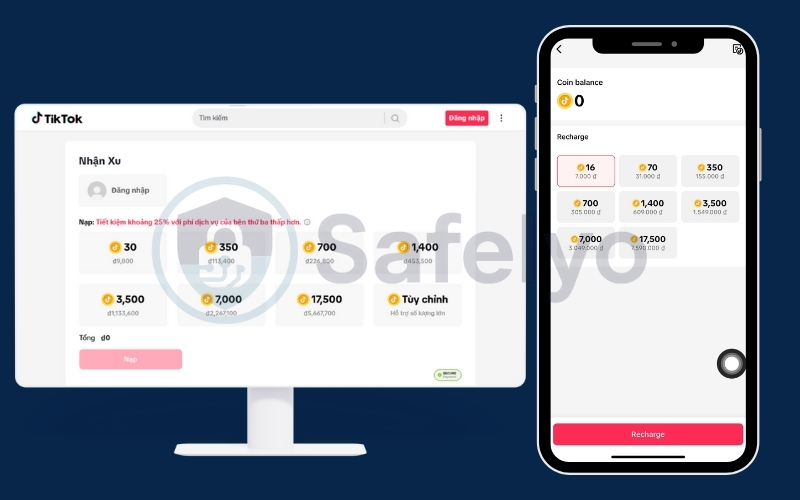
Step-by-step guide:
- Open any web browser (Chrome, Safari, Edge) on your computer or smartphone.
- Navigate to tiktok.com/coin.
- Log in to your TikTok account.
- Select your desired coin package and check out using your standard credit card or PayPal.
You will see the price difference immediately. Here is a quick TikTok web coin price vs app comparison (Last updated on Jan 20, 2026) to show you exactly how much you save:
| Coin Bundle | App Price | Web Price | Amount Saved | Savings % |
| 350 Coins | $5.90 | $4.32 | $1.58 | ~26.8% |
| 700 Coins | $11.61 | $8.63 | $2.98 | ~25.6% |
| 1,400 Coins | $23.18 | $17.26 | $5.92 | ~25.5% |
| 3,500 Coins | $58.96 | $43.15 | $15.81 | ~26.8% |
| 7,000 Coins | $116.06 | $86.30 | $29.76 | ~25.6% |
| 17,500 Coins | $288.92 | $215.75 | $73.17 | ~25.3% |
Note: Prices may vary by region and are subject to TikTok’s pricing policy. Prices are originally observed in VND and converted for this illustration using the exchange rate: $1 USD = 26,270 VND (Last updated on Jan 20, 2026).
Method 2: How to “Recharge” TikTok coins at the lowest price
You might see terms like “TikTok Top Up” or “Coin Recharge” used on various third-party marketplaces. Don’t be confused – whether you call it buying, recharging, or topping up, the action is exactly the same. The only difference is where you perform the transaction.
To ensure you are getting the absolute best deal, it is crucial to distinguish between the two main recharge paths:
App Recharge (The "Convenience Trap")
- Processed via Apple App Store or Google Play.
- Includes ~30% platform fee.
→ Result: You pay significantly more for fewer coins.
Web Recharge (The "Smart Saver")
- Processed directly by TikTok.
- Zero middleman fees.
→ Result: You pay the “real” factory price.
The Bottom Line: You don’t need a third-party “top-up service” to get a discount. Simply visiting tiktok.com/coin acts as your own personal discount recharge station. For 90% of users, this official Web Recharge method is the most stable, secure, and cost-effective way to load up your account without needing a VPN.
Method 3 (Advanced): Using a VPN for global rates
If saving 30% via the standard desktop site isn’t enough for you, there is a more advanced strategy: Geo-arbitrage. This method exploits regional pricing, where the cost of TikTok coins and digital items varies significantly depending on the purchasing power of a specific country.
Essentially, TikTok lowers the price of coins in developing economies to make TikTok coins affordable for locals. By using a VPN for TikTok, you can digitally transport yourself to these regions to access those lower rates.
Global price check: Is the "cheapest country" myth still true?
While older guides and forums often claim that Brazil (BRL), the Philippines (PHP), or Malaysia (MYR) are the cheapest countries for TikTok coins in 2026, the situation has changed. The economic reality has shifted dramatically. Today, a TikTok coin recharge in these “cheap” regions might actually cost you more than the standard US price due to TikTok adjusting its regional pricing to combat inflation.
Observation: Based on these specific screenshots and the January 2026 exchange rate, the Brazil Web Store is actually slightly more expensive than the US Web Store. This highlights the importance of checking live exchange rates, as “cheaper regions” can change due to currency strengthening.
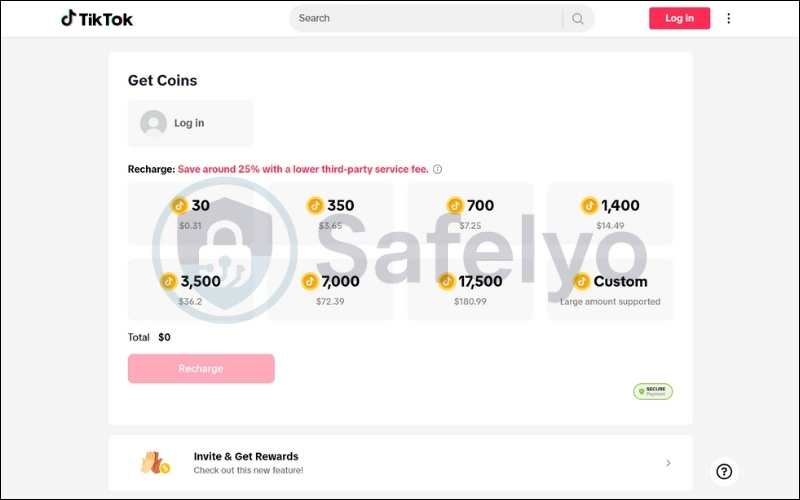
Price is not static; it depends entirely on the strength of the currency exchange rate against the US Dollar. Although counterintuitive, U.S. pricing is often lower due to standardized USD bundles, the absence of local digital taxes, and more stable payment processing compared to emerging markets.
To prove this, we conducted a real-time price analysis of the standard 700 Coin Bundle across major regions using today’s exchange rates (Updated: Jan 20, 2026).
- $1 = 5.37 BRL (Real Brazil)
- $1 = 59.47 PHP (Peso Philippines)
- $1 = 4.05 MYR (Ringgit Malaysia)
- $1 = 0.74 £ (Pound)
- $1 = 0.86 € (Euro)
| Region | Local Price (700 Coins) | Exchange Rate (to $1 USD) | Cost in USD | Status |
| 🇺🇸 United States | $7.25 | 1.00 | $7.25 | Cheapest |
| 🇧🇷 Brazil | R$ 41.75 | 5.37 BRL | ~$7.77 | +7.1% |
| 🇵🇭 Philippines | ₱ 485.00 | 59.47 PHP | ~$8.15 | +12.4% |
| 🇲🇾 Malaysia | RM 33.49 | 4.05 MYR | ~$8.27 | +14.0% |
| 🇬🇧 United Kingdom | £ 6.65 | 0.74 GBP | ~$8.99 | +24.0% |
| 🇪🇺 Europe (Euro) | € 7.75 | 0.86 EUR | ~$9.01 | +24.2% |
Note: Prices may vary due to exchange rates and TikTok’s dynamic regional pricing.
The data reveals a surprising twist for 2026:
- The “VPN Myth” is currently busted for US users: If you live in the US, do not use a VPN to switch to Brazil, the Philippines, or Malaysia. You will end up paying more for the same amount of coins.
- The Real VPN Trick is for Europeans: If you live in the UK or Europe, you are paying the highest prices in the world (approx. $9.00 for a bundle that costs Americans $7.25).
→ The Smart Move: Users in the UK/EU should use a VPN to connect to the USA. By accessing the US Web Store, you can lower your cost from ~$9.00 down to $7.25 – saving nearly 20% instantly on top of the web savings.
Here is how to recharge TikTok coins with VPN access effectively:
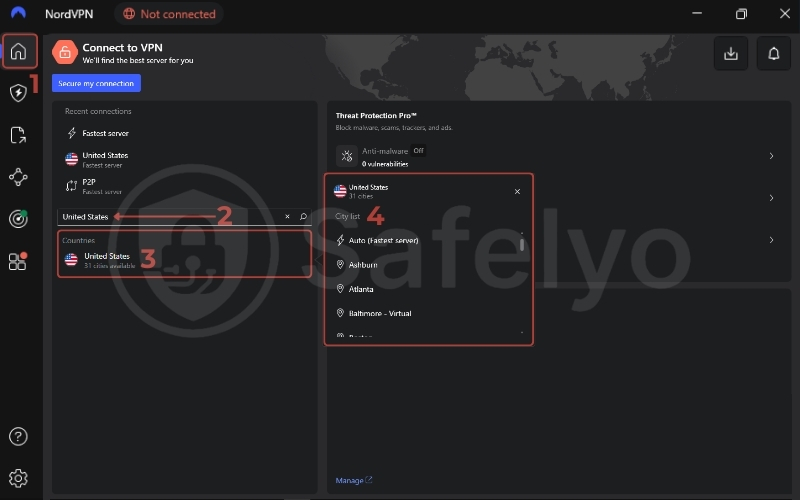
- Connect your VPN: Open your VPN app and connect to a server in a target country (e.g., the United States). Ensure the connection is stable.
- Go Incognito (Crucial): Open a “Private” or “Incognito” window in your browser. This prevents your existing cookies or browser cache from leaking your real location to TikTok.
- Access the Coin Store: Navigate to tiktok.com/coin.
- Verify the currency: Look at the pricing. If you are connected to the US from France, the prices should display in dollars ($) instead of euros (€). If it still shows euros, clear your cache or try a different server.
Important warning: While this method offers high rewards, it is volatile. Exchange rates fluctuate daily.
VPN-based pricing is not always reliable. A country that is the cheapest today might be more expensive next week. I recommend checking the rates manually before committing to a purchase.
Furthermore, getting the price to show up is the easy part; actually paying for it is where things get tricky, which leads us to the next section. In some regions (e.g., Brazil), TikTok may require local tax IDs or domestic cards, making VPN-based purchases impractical for most users. Even with a VPN, payments can still be declined due to regional compliance checks or card restrictions.
Method 4: Buy discounted gift cards (safe & legal alternative)
If the technical hassle of a VPN isn’t for you, and you prefer staying within the mobile app ecosystem, there is a completely “white-hat” workaround often overlooked: Discounted Gift Cards.
Major retailers like Costco, Sam’s Club, or Amazon frequently sell App Store (iOS) and Google Play gift cards at a discount, typically ranging from 5% to 15% off.
How it works:
- You purchase a 100 Gift Card for only $90 (saving $10 instantly).
- Redeem the code on your iPhone or Android device to top up your store balance.
- Use that balance to purchase coins directly inside the TikTok app.
While you are still paying the “App Store” price, the initial discount on the gift card helps offset the platform fees.
PROS
- 100% Safe & Legal: No terms of service violations.
- No VPN Required: You don’t need to spoof your location.
- Zero Payment Blocks: Since you are using official store credit, the transaction success rate is 100%.
CONS
- Lower Savings: You typically save 5-15%, which is less than the ~30% saved via the Web Method.
- Location Dependent: These deals are most common in the US and parts of Europe; they may not exist in every region.
Safelyo Verdict: This is a solid backup plan. It won’t beat the savings of Method 1 (Web Store), but it is the safest option for users who want to save a little money without leaving the app.
2. The payment hurdle: Why the VPN method often fails
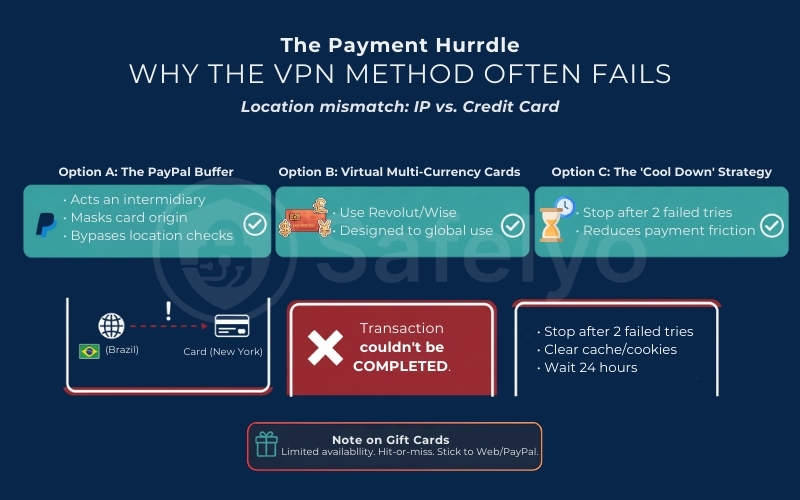
This is the moment of truth where most users get stuck. You have successfully used a VPN to see the lower price, but when you click “Recharge”, you get a dreaded error message: “Transaction couldn’t be completed”.
Why does this happen? It isn’t necessarily a glitch. TikTok has sophisticated anti-fraud systems designed to protect payment methods. If the system sees an IP address located in New York but a credit card issued in Rio de Janeiro, it flags the transaction as suspicious activity. This “location mismatch” is the single biggest barrier to using the VPN method.
However, based on my testing, it is not impossible. Here is my personal Payment Playbook to improve your odds:
Option A: The PayPal Buffer (Best Bet)
If available in the target region, try paying via PayPal rather than entering your credit card details directly into TikTok. PayPal acts as an intermediary layer. In many cases, it masks the origin of the funding source enough to bypass the strict location checks that trigger a decline.
Option B: Virtual multi-currency cards
Traditional banks often block international transactions that look unusual. I have found better success using digital banking apps. These services are designed for global travel and allow you to hold multiple currencies. Paying with a card designed for international use can sometimes reduce the friction with TikTok’s payment processor.
Wise or Revolut may help with multi-currency payments, but they are not guaranteed to work in all regions. If your payment is declined due to currency mismatch or fraud checks, you may consider using multi-currency tools like Wise or Revolut to simplify payments and reduce foreign-exchange fees:
- Use Wise to handle multi-currency payments and reduce conversion fees: https://wise.com/
- Create a Revolut account for multi-currency cards and smoother global payments: https://www.revolut.com/
Option C: The "cool down" strategy
If your payment fails twice, stop immediately. Spamming the buy button will only trigger a harder security lock on your account. Instead, clear your browser cookies and cache, switch to a completely different browser (e.g., Firefox instead of Chrome), or wait for a full 24 hours before trying again.
A note on Gift Cards
Some users ask about using digital gift cards. While you can sometimes find regional TikTok Gift Cards on third-party sites, availability is very limited and often restricted to specific countries. This path is hit-or-miss, so I recommend sticking to the web method or the PayPal route first. To further maximize your savings on TikTok coins, consider using a payment method that offers cashback or belongs to a generous rewards program.
4. Scam alert: “Free Coins Generators” are traps
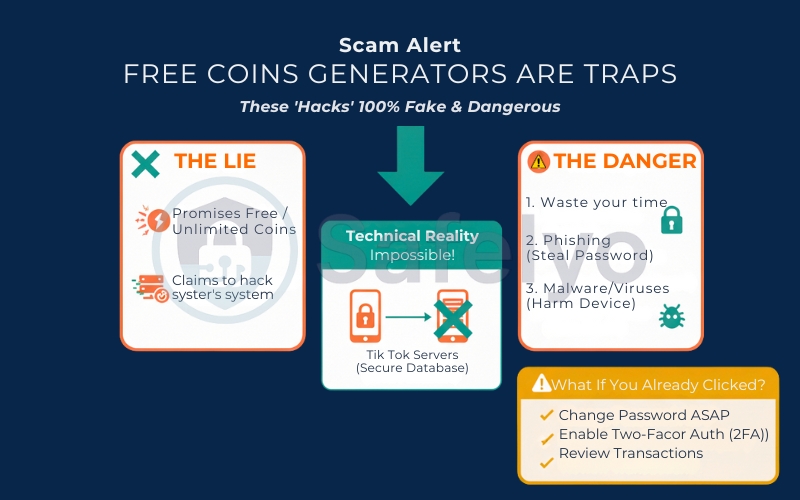
If you search for terms like “free TikTok coins” or “9999 coins hack”, you will be bombarded with flashy websites promising infinite wealth for zero dollars. Let me be brutally honest: These are 100% scams. You should also be wary of third-party sellers advertising fake promotional discounts on TikTok coins, as these are rarely legitimate.
Here is the technical reality: TikTok Coins are a virtual currency managed on secure, server-side databases. This means the data regarding how many coins you own is stored on TikTok’s highly protected servers, not on your phone. No “generator tool”, “injector app”, or “modded APK” can alter that data. It is the digital equivalent of trying to change your bank account balance by typing a new number into your calculator; it just doesn’t work.
So, what happens when you use these tools? At best, they waste your time with endless “human verification” surveys that generate ad revenue for the scammers. At worst, they are dangerous phishing traps. They may ask you to log in to “claim” your prize, effectively handing your username and password directly to hackers. Others may trick you into downloading software that installs malware or spyware on your device.
What if you already clicked?
If you have recently interacted with a coin generator and provided any account details, you are at risk.
- Change your password immediately.
- Enable Two-Factor Authentication (2FA) in your TikTok settings.
- Review your transaction history to ensure no unauthorized purchases were made.
There is no shortcut to free money. If it sounds too good to be true, it is a trap.
If you’re looking for legitimate ways to earn small amounts of coins, options like TikTok LIVE bonuses or platform reward programs exist – but these are slow, inconsistent, and not practical if you need coins instantly.
5. Is buying cheap coins legal?
One of the most common questions I get from readers is: “Will I get banned for doing this?” The answer depends entirely on which method you choose to use.
The Web Method
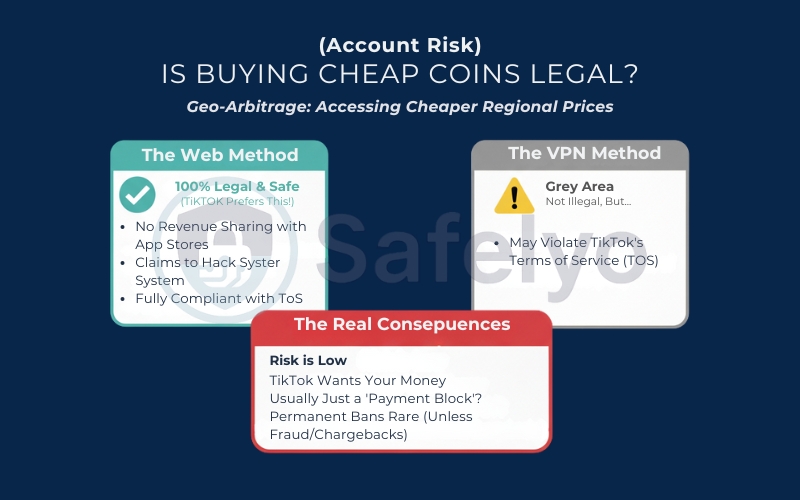
Using Method 1 (buying via tiktok.com/coin on a browser) is 100% legal and completely safe. In fact, TikTok prefers you to do this.
When you buy on the web, they don’t have to split their revenue with Apple or Google, so they are happy to pass those savings on to you. You are fully compliant with their Community Guidelines.
The VPN Method
To be clear, is buying cheap TikTok coins legal? Yes, you are not breaking any laws by using a VPN to change your virtual location.
However, misrepresenting your location to access prices by region may technically violate TikTok’s Terms of Service (ToS) and can result in payment blocks, purchase restrictions, or account limitations in some cases.
Note: Always review the Terms of Service and virtual items policy, noting that the refund policy for TikTok coins is generally non-negotiable.
The real consequences:
From a practical standpoint, the risk is usually low. TikTok is a business; they generally want your money. In my experience, if TikTok detects a location mismatch, they simply block the transaction (a “Payment Block”) rather than banning your user account. Permanent bans are rare and typically reserved for serious offenses like credit card fraud or repeated chargebacks, not just for trying to pay in a different currency.
>> Learn more: How to get unbanned from TikTok & avoid bans again (4 ways)
6. Best VPNs for TikTok coins
If you decide to brave the VPN route, do not rely on free proxies. TikTok aggressively blacklists IP addresses from free services, meaning the coin purchase page often won’t even load. To succeed, you need a premium service with “obfuscated servers” capable of bypassing these strict digital blockades.
Here are the top tools that consistently work for accessing the cheapest country for TikTok coins in 2026:
#1. ExpressVPN
If you want the smoothest experience without technical hiccups, ExpressVPN delivers. While slightly pricier, its Lightway protocol ensures you won’t face timeouts or lag when the payment gateway is loading. It offers highly reliable connections in the countries that are frequently top contenders for the lowest coin rates.
ExpressVPN – Fastest Speeds
>> Is the premium price worth it? Discover the answer in our comprehensive ExpressVPN Review.
#2. NordVPN
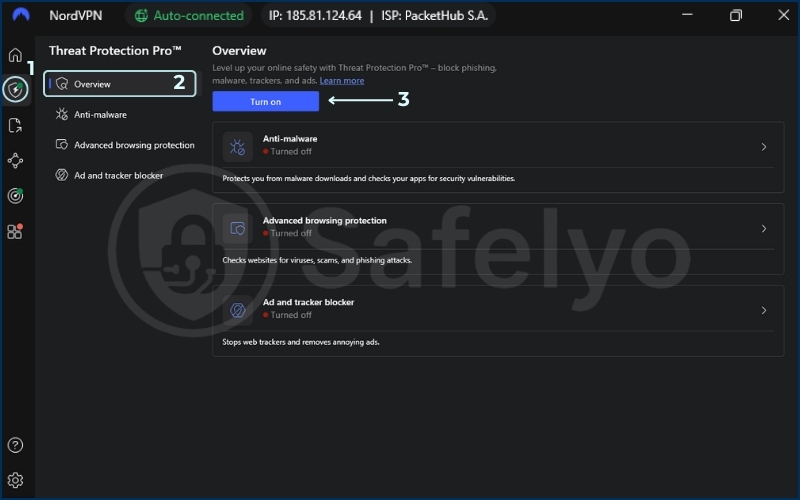
NordVPN is a powerhouse for accessing region-locked content. It boasts a massive network with reliable, high-speed servers in the USA and other South American nations. A standout feature is its Threat Protection, which proactively blocks malicious ads and known phishing sites – adding an extra layer of safety.
NordVPN – Best Overall
>> Curious why this is our top recommendation? Read our full NordVPN Review to see how it performs in real-world tests.
#3. Surfshark
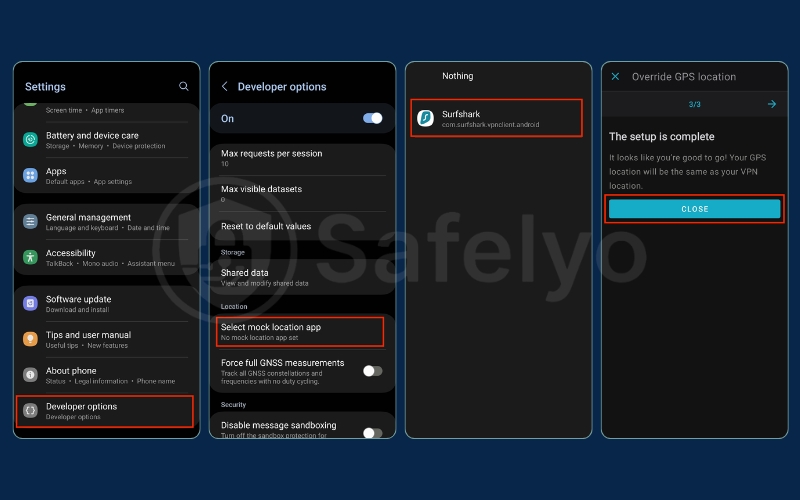
For bargain hunters, Surfshark is the logical choice. It is affordable and allows unlimited device connections. Its secret weapon for Android users is the built-in GPS Spoofing feature. This allows you to match your phone’s physical GPS location to the VPN server, significantly reducing the chance of TikTok flagging a “location mismatch”.
Surfshark – Best Value & mobile features
>> Want to know more about its unique features? Check out our in-depth Surfshark VPN Review for a breakdown of its pros and cons.
7. FAQs about buying cheap TikTok coins
Which country has the cheapest TikTok Coins in 2026?
Contrary to popular belief, recent data shows that the United States (Web Store) is currently the cheapest option at approx $0.01 per coin. Historically cheap regions like Brazil and the Philippines are currently more expensive due to exchange rate adjustments. For users in the UK or Europe, connecting to a US VPN server offers the biggest savings (up to 20% cheaper than local Euro/GBP prices).
Can I use a VPN to buy TikTok Coins from the US if I live in Europe?
Yes. Since US pricing is significantly lower than in the UK or Eurozone, European users can use a VPN (like NordVPN) to access the US version of the TikTok Web Store. However, you may need to use PayPal to process the payment if your local bank card is rejected.
Can I use a free VPN to buy TikTok coins?
I strongly advise against it. Free VPNs typically have limited server pools that are already blacklisted by TikTok’s security systems, meaning the coin purchase page likely won’t even load. Furthermore, free VPNs often lack the encryption standards needed to protect your financial data during a transaction.
Why are TikTok Coins cheaper on the website than on the app?
It is all about the “App Store Tax.” Apple and Google charge a 30% commission fee on all in-app digital purchases. When you buy directly from tiktok.com/coin, TikTok does not have to pay this fee, so they pass the ~30% savings directly to you.
Can I transfer TikTok coins to another account?
No, you cannot transfer TikTok coins directly, as the Terms of Service strictly bind coins to your account. However, you can use your coins to send gifts, which convert to Diamonds, to creators. This is possible even if your account is based in Canada or governed by a specific virtual items policy.
How do I fix the “Transaction Couldn’t Be Completed” error?
This error usually happens when TikTok detects a mismatch between your VPN location (IP address) and your payment method. To fix it:
- Turn off the VPN and try buying from the US Web Store (Method 1) if you are in the US.
- If using a VPN, switch to PayPal instead of a credit card.
- Clear your browser cache/cookies and wait 24 hours before retrying.
Is it illegal to use a VPN to buy cheaper coins?
No, it is not illegal. However, it may technically violate TikTok’s Terms of Service regarding regional pricing. In practice, the most common consequence is a temporary “Payment Declined” error, not a permanent account ban.
Are “Free TikTok Coin Generators” real?
No. All websites or apps claiming to generate free coins are scams. TikTok Coins are stored on secure servers and cannot be hacked. These sites are phishing attempts designed to steal your password or credit card information.
8. Conclusion
To wrap up, remember the “Golden Rule” of the TikTok economy: Always bypass the app store. Buying directly from tiktok.com/coin on your browser is the safest, guaranteed way to save roughly 30% instantly without any technical headaches. This simple habit ensures you always get the maximum value for your money when stocking up on coins for future gifts.
While the VPN method can technically unlock even lower prices in regions like Brazil, it is a high-friction path. This method is suitable only if you have international payment options and patience for troubleshooting transaction blocks.
Ready to master digital freedom with Safelyo? Start saving with the web trick today, or explore our VPN Guides to learn more about accessing global content and pricing safely.