
Geo-blocking restricts access to online content and services based on location. A VPN can help bypass IP-based restrictions, while Smart DNS, proxies, Tor and encrypted DNS address narrower types of blocks. This guide explains how to check for IP and DNS leaks, troubleshoot VPN detection, and understand the payment, identity and legal restrictions that routing tools cannot overcome.
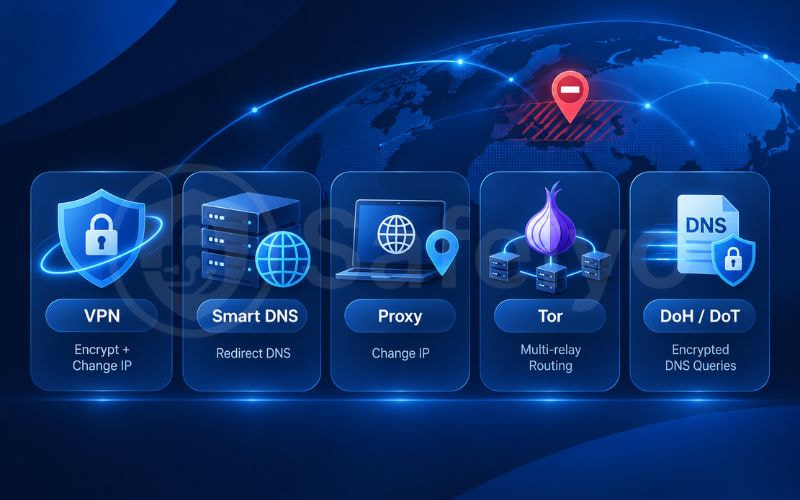
Quick Verdict Table
| Method | Blocks It Beats | Encrypts Traffic? | Changes IP? | Main Risk |
|---|---|---|---|---|
| VPN | IP / DNS (when VPN handles DNS) | Yes | Yes | VPN/proxy detection and flagged IPs (including E106); provider trust; free-tier caps |
| Smart DNS | DNS / specific services | No | No (does not change your general public IP) | No traffic encryption; may trigger proxy errors |
| HTTP / SOCKS5 Proxy | IP | Usually no | Yes | Proxy operator can read unencrypted HTTP content; HTTPS remains protected by TLS |
| Tor Browser | IP | Yes (between relays; HTTPS still needed for end-to-end encryption) | Yes | Slow; streaming sites often block exit nodes |
| Change DNS Resolver (DoH/DoT) | DNS / ISP | DNS queries only | No | Does not bypass IP-based blocks |
1. 5 Ways to Bypass Geo-Blocking: Step-by-Step Methods and Comparison
Geo-blocking can be enforced through IP addresses, DNS requests, and account-level restrictions. The five methods below address different types of blocks, but none guarantees access to every restricted service.
1.1. Method 1: Use a VPN to Bypass IP-Based Geo-Blocking
A VPN is the most versatile option when a website restricts access based on your public IP address. It routes your traffic through a server in another country, replacing the IP address visible to the destination website while encrypting traffic between your device and the VPN server.
How to bypass geo-blocking with a VPN:
- Choose a server in your target country. Select a location where the content or service is available. Free plans with automatic server selection may not let you choose a specific country.
- Enable the kill switch. Turn it on before connecting to prevent traffic from reverting to your regular connection if the VPN tunnel drops.
- Connect and verify your public IP. Check ipleak.net and another IP lookup tool to confirm that your visible IP is associated with the selected country.
- Test for DNS and WebRTC leaks. Use dnsleaktest.com and browserleaks.com to check whether your real IP or DNS requests are exposed. DNS resolver locations do not always match the VPN server’s country.
- Review browser location signals. Check location permissions, timezone settings, and outdated site data if the service continues displaying the wrong region.
- Open the service or switch servers. If a VPN or proxy error appears, try another server in the same country. Access is not guaranteed because platforms may block known VPN IP addresses.
What a VPN can and cannot bypass
| Capability | Result |
|---|---|
| IP-based geo-blocking | Can bypass if the VPN IP is not blocked |
| ISP-level DNS restrictions | Can help when the VPN handles DNS |
| Payment and identity verification | Cannot bypass |
| Device GPS permissions | Does not change physical location |
| VPN traffic detection | May still be detected or blocked |
1.2. Method 2: Use Smart DNS
Redirecting only the domain lookups for supported services lets devices without VPN app support stream geo-restricted catalogs, though it leaves traffic unencrypted. Smart DNS suits Smart TVs, Apple TV, and consoles, while general non-DNS traffic typically continues using your regular connection.
| Criteria | Details |
|---|---|
| How it works | Reroutes DNS requests for specific domains through proxy DNS servers without encryption. |
| Beats | DNS-level blocks and supported streaming restrictions on devices without VPN apps. |
| Fails at | Broad IP blocks outside supported services, payment checks, and privacy protection. |
| What it can see | Your ISP can monitor connection metadata and may see DNS queries, while the Smart DNS provider can see the domains it processes. HTTPS still encrypts website content, but Smart DNS does not protect traffic with a VPN-style encrypted tunnel. |
1.3. Method 3: Use an HTTP / SOCKS5 Proxy
Forwarding requests from a single browser or app through an intermediary server changes the IP address websites see without providing VPN-style traffic encryption. HTTPS connections can still use TLS to protect website content, while other apps typically continue using your regular connection.
| Criteria | Details |
|---|---|
| How it works | Routes requests for one browser or app through a middleman server under the proxy’s IP. |
| Beats | Basic IP geo-blocks inside the configured browser or app. |
| Fails at | System-wide traffic, strict streaming filters, WebRTC or GPS leaks, and payment or ID checks. |
| What it can see | The proxy operator can see your real IP and destination metadata. It can read unencrypted HTTP content, but HTTPS content remains protected by TLS. Your ISP can observe the connection to the proxy and associated metadata. |
1.4. Method 4: Use Tor Browser
Sending web traffic through three volunteer relays via onion routing hides your IP address, but Tor performs poorly for streaming because the multi-relay path slows speeds and exit-node IPs sit on a public list that platforms can block.
| Criteria | Details |
|---|---|
| How it works | Wraps traffic in layered encryption and bounces it across volunteer relays to an exit node. |
| Beats | Basic IP-based location checks and hides destination websites from your ISP, although the ISP may still detect Tor usage. |
| Fails at | Streaming (community and competitor sources report slow speeds and blocked exit nodes) and payment checks. |
| What it can see | Your ISP sees encrypted traffic to a Tor guard node; the exit node sees unencrypted HTTP traffic without HTTPS. |
1.5. Method 5: Change Your DNS Resolver (DoH / DoT)
Switching from your internet provider’s default resolver to DNS over HTTPS (DoH) or DNS over TLS (DoT) bypasses ISP-level domain blocks without altering the IP address websites see. Reddit users note that changing DNS takes seconds and encrypts lookup queries, yet it never unlocks IP-restricted catalogs.
| Criteria | Details |
|---|---|
| How it works | Replaces your ISP’s DNS server with a third-party resolver using encrypted DoH or DoT queries. |
| Beats | Blocks enforced solely by your ISP’s DNS resolver. |
| Fails at | Any site checking your public IP address, payment region, or device signals. |
| What it can see | Your ISP still sees destination IP addresses; your chosen DNS provider sees your domain queries. |
2. How Geo-Blocking Works: 4 Layers That Affect Regional Access
Geo-blocking systems can rely on several location signals rather than IP addresses alone. Understanding these four layers helps explain why changing your IP address does not always restore access.
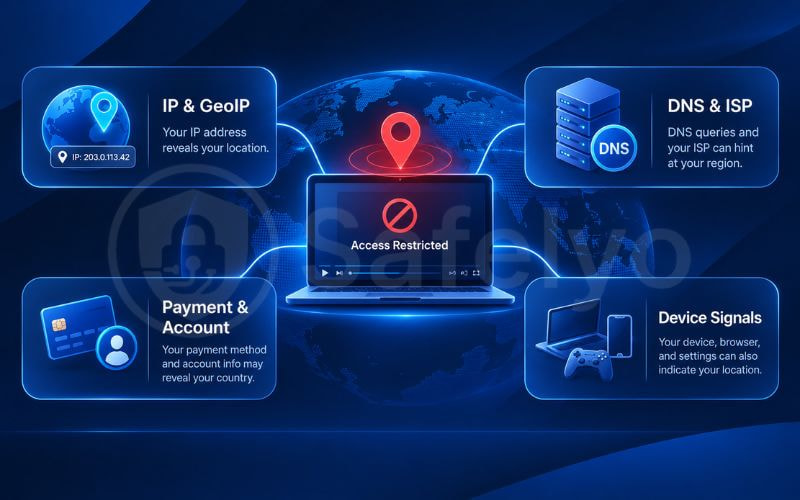
| Layer | How Detection Works & Limits | Example | Beaten By |
|---|---|---|---|
| 1. IP & GeoIP | GeoIP identifies the VPN server’s location, not the user’s. Providers may flag datacenter IPs using ASN and IP databases. | A site flags datacenter IP ranges via GeoIP databases (such as MaxMind GeoIP2, IP2Location, or IPinfo). | VPN, Proxy, or Tor (if exit IP is unflagged) |
| 2. DNS & ISP | ISPs can block domains through DNS resolvers. DoH/DoT bypass resolver-level blocks, while Smart DNS redirects selected lookups without encrypting traffic. | An ISP blocks a news domain via its default DNS. | DNS change (DoH/DoT), Smart DNS, or VPN |
| 3. Account & Payment | Platforms may verify card country, billing address, phone number, or ID. Payment restrictions still apply even when IP location matches. | Reddit users report cards being declined despite using a matching VPN. | None |
| 4. Device Signals | GPS, timezone, and language may contribute to location checks. WebRTC or IPv6 leaks can also expose an IP outside the VPN tunnel. | A location-enabled app reports your physical coordinates, or a WebRTC leak exposes your home IP while connected to a London VPN. | Partial: a VPN can mask network-based location signals, but device permissions and browser leaks require separate checks. |
3. Can Free VPNs Bypass Geo-Blocking? Proton VPN vs. Windscribe Free
Free VPNs can help users access geo-restricted content, but their effectiveness depends on more than server availability. The ability to select a specific country, avoid blocked VPN IP addresses, and maintain sufficient data and connection speeds all affect access. This section compares Proton VPN Free and Windscribe Free to show how these limitations influence real-world geo-blocking attempts.
3.1. What matters when choosing a free VPN for geo-blocking?
- Country selection: A free VPN with automatic server assignment may not let you choose the specific country required to access your target content.
- Streaming compatibility: Even if a VPN offers servers in the right country, streaming platforms may recognize and block its IP addresses.
- Data allowance: Monthly data limits can interrupt extended streaming sessions or other bandwidth-intensive activities.
- Connection speed: Slower connections may affect video quality and loading times, particularly when connecting to distant servers.
3.2. Proton VPN Free vs. Windscribe Free
| Feature (As of Nov 17, 2026) | Proton VPN Free | Windscribe Free |
|---|---|---|
| Data cap | Unlimited data; Free-plan speeds are advertised as “Medium” | 10 GB per month with an email (about 3 hours of HD video at ~3 GB per hour); 2 GB without one (about 40 minutes) |
| Server countries | 10 countries (randomly selected; no manual country choice) | 10 selectable countries (US, Canada, UK, Hong Kong, France, Germany, Netherlands, Switzerland, Norway, Romania) |
| Measured speed (Safelyo 2026 WireGuard tests, Vietnam baseline) | No directly comparable Free-plan average available; the provider advertises “Medium” speeds. | Free plan averaged 234.18 Mbps across four locations, from an 878.41 Mbps baseline (Hong Kong: 452.56 Mbps; US: 187.66 Mbps; Netherlands: 18.99 Mbps; UK: 277.51 Mbps). |
| Streaming & P2P | P2P excluded on Free; Netflix US, Hulu US, Prime Video US, and HBO Max US were all blocked in Safelyo’s Free-plan tests (Paid Plus unlocked 8/8 tested services) | P2P disabled on Free; unblocked 6/6 tested HD services on Free (Netflix US/UK, Hulu, Disney+, Prime Video, BBC iPlayer), limited by the 10 GB monthly cap |
A free VPN’s price does not tell you how it handles user data. Before choosing a provider, review its privacy policy, ownership, logging practices, and publicly available independent audit reports. Also check whether the free plan supports your intended activity, as both Proton VPN Free and Windscribe Free restrict P2P traffic.
3.3. Which free VPN is better for accessing restricted content?
Windscribe Free is more suitable when you need to target a specific country because it allows manual selection from its 10 free locations. Proton VPN Free offers unlimited data but automatically assigns available servers, making it less predictable when you need a particular regional IP address.
However, neither option guarantees access to every geo-restricted platform. Streaming services can block VPN IP addresses regardless of the provider or subscription tier. Windscribe’s 10 GB monthly allowance may also limit extended streaming, while Proton’s automatic server selection can make regional targeting more difficult.
If you need reliable access to a specific streaming library, compare the provider’s current server availability and streaming compatibility before choosing a plan.
4. Why Your VPN Stops Working (Netflix Error E106 & Fixes)
Netflix error E106 or the message “You seem to be using a VPN or proxy” appears when Netflix identifies a connection as potentially using a VPN or proxy. The error can also occur when no VPN app is visibly active, so identifying the underlying network configuration matters before changing servers.
The appropriate fix depends on whether the issue comes from a flagged IP address, DNS configuration, or a network-level VPN filter:
| Possible Issue | What to Check or Do | Evidence |
|---|---|---|
| Possible flagged VPN IP | Switch to another server in the same country. | Community reports |
| DNS configuration | Check DNS settings and restore your ISP’s default DNS if needed. | Netflix Help Center |
| Background VPN or network settings | Check active VPN services and reset device or router network settings. | Netflix Help Center |
| Plan compatibility | VPNs are not supported for ad-supported plans or Live events. | Netflix Help Center |
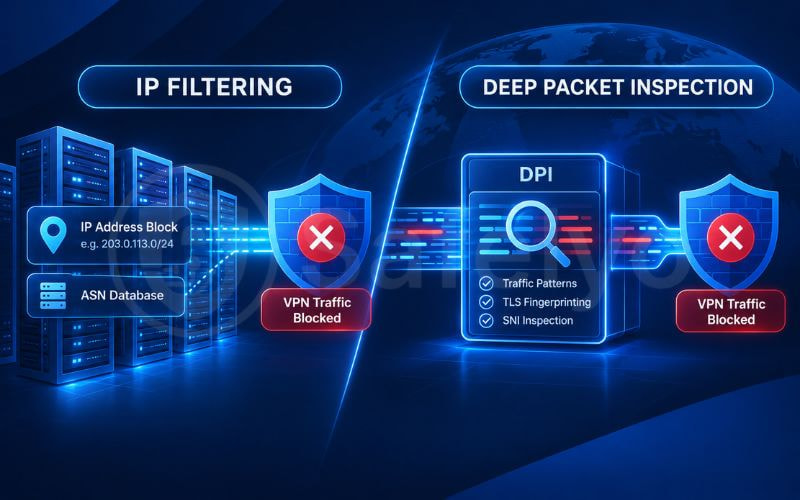
4.1. Two Kinds of Blocks: Datacenter IP vs. DPI
Services and networks commonly block VPNs by flagging datacenter IP ranges or detecting VPN traffic through deep packet inspection (DPI). Each method requires a different workaround, and other detection techniques may also apply.
| Block Type | How Detection Works | Conceptual Fix & Key Limit |
|---|---|---|
| Datacenter IP filtering | Sites inspect IP ranges and ASNs to identify commercial hosting and VPN server addresses | An authorized residential exit IP may avoid some datacenter-based filters, but it does not guarantee access. For work systems, use only connection routes approved by the organization’s IT or security team. Obfuscation alone does not change the exit IP. |
| Deep Packet Inspection (DPI) | Network firewalls inspect traffic patterns and protocol characteristics to identify and restrict VPN connections | VPN obfuscation features or traffic-masking techniques may make VPN traffic harder to identify, but they do not change a datacenter IP address or bypass an IP blacklist |
4.2. Why Netflix Says “VPN or Proxy” When You Are Not Using One
Netflix recommends checking for active VPN services, resetting device and router network settings, and confirming that the connection uses the ISP’s DNS server. These steps help troubleshoot the warning when no VPN is visibly active.
- Non-ISP DNS or Smart DNS settings: Netflix recommends checking the ISP’s default DNS as part of its troubleshooting process. This makes DNS configuration worth investigating, but does not establish third-party DNS or Smart DNS as a confirmed cause of E106.
- Potentially flagged residential IP: Restarting your modem or router may prompt your ISP to assign a different public IP address, depending on its network configuration. This is not guaranteed, so contact your ISP if the address remains flagged after other troubleshooting steps.
- Ad-supported tier sensitivity: Netflix explicitly notes VPNs are not supported on ad-supported plans.
5. What Bypassing Cannot Fix
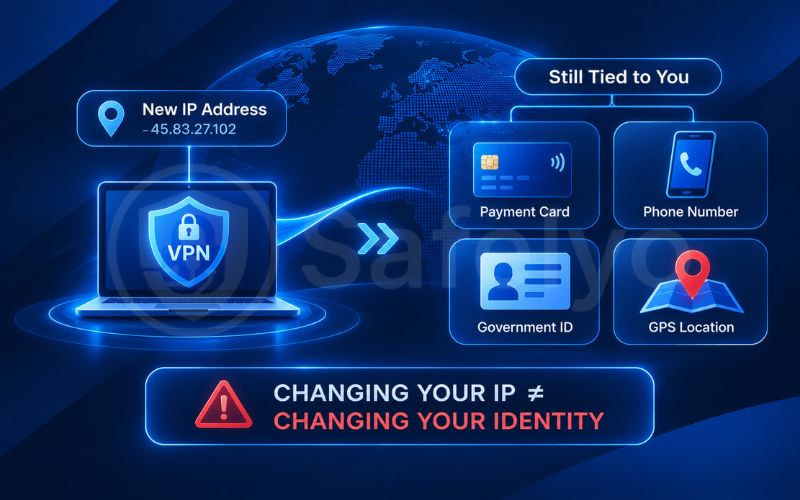
Network routing tools can change how websites see your IP address and DNS requests, but they do not alter your payment credentials, phone number, government ID, or account eligibility. The table below summarizes four common verification checks that remain in place even when your apparent IP location changes:
| Verification Check | Bypassed by VPN / DNS? | Why Routing Does Not Change It |
|---|---|---|
| Card issuing country & billing | No | Verified against bank issuer records and account billing profile |
| SMS / local phone number | No | Tied to telecom carrier registration rather than IP routing |
| Government ID / KYC | No | Requires identity verification and, where applicable, separate proof of residency or eligibility |
| Device GPS / GNSS coordinates | No | Location-enabled apps may obtain coordinates through device location services, independently of the public IP address |
5.1. What a “Restricted Geographic Region” Message Means
A “Restricted Geographic Region” message means the platform considers your location outside its supported regions, even without a VPN. Unlike Netflix error E106, which indicates suspected VPN or proxy use, this message concerns regional availability. Under EU Regulation (EU) 2018/302 Article 3(3), covered traders must explain access restrictions imposed to comply with legal requirements.
- Check your visible country: Test your current IP address on two independent GeoIP lookup tools to see which region sites detect.
- Verify active routing tools: Confirm whether a VPN, proxy, or corporate tunnel is running in the background and placing your connection elsewhere.
- Confirm regional availability: Check whether the service actually holds licensing or operates in the country you are trying to access from.
5.2. Work Systems That Block Access From Abroad
Company and client portals may restrict access by country, IP address, or corporate VPN. Datacenter IPs may be blocked, and residential connections are not guaranteed to work. Always get IT approval before changing your connection route.
| Block Type | How It Affects Travel Access | Conceptual Tradeoff (Community Reports) |
|---|---|---|
| Country or datacenter IP filter | Rejects foreign IPs and commercial cloud or VPN ranges | Cloud VPS endpoints stay fast but carry datacenter ASNs; home residential endpoints move slower |
| Tunnel detection (DPI) | Inspects packets to drop standard VPN protocols | Obfuscation disguises the tunnel signature but does not turn a datacenter IP into a residential IP |
6. Is It Legal to Bypass Geo-Blocking?
Using a VPN, proxy, or DNS service to access restricted content may involve legal, contractual, and privacy considerations. Before choosing a workaround, review these four potential risks.
Legal and service-related risks
- Terms of Service violations: Some platforms restrict VPN or proxy use to enforce regional licensing agreements. Violating their terms may result in access restrictions or account suspension, depending on the service’s policies.
- Copyright and licensing restrictions: Accessing content outside its licensed region may conflict with distribution agreements or local copyright rules. The legal implications depend on the jurisdiction and the specific content involved.
Security and privacy risks
- Untrusted free services: Free proxies and DNS providers may offer limited security protections or unclear data-handling practices. Check the provider’s ownership, privacy policy, and security practices before routing your traffic through its servers.
- Data collection: Some providers may collect connection data, browsing-related information, or other usage details. A free service does not automatically provide strong privacy protection.
Regional legal differences
VPN regulations vary by country. Some jurisdictions restrict VPN providers, permitted uses, or unauthorized VPN services. For example, China, Russia, Iran, Belarus, and Turkmenistan impose various VPN-related restrictions. These rules do not necessarily constitute a blanket prohibition on every form of consumer VPN use.
Important: EU Regulation (EU) 2018/302 primarily governs geo-blocking practices by traders in covered situations, rather than providing general permission for visitors to bypass platform restrictions. Check local laws and the service’s current Terms of Service before proceeding.
7. How to Bypass Geo-Blocking on Smart TVs, Consoles, and Routers
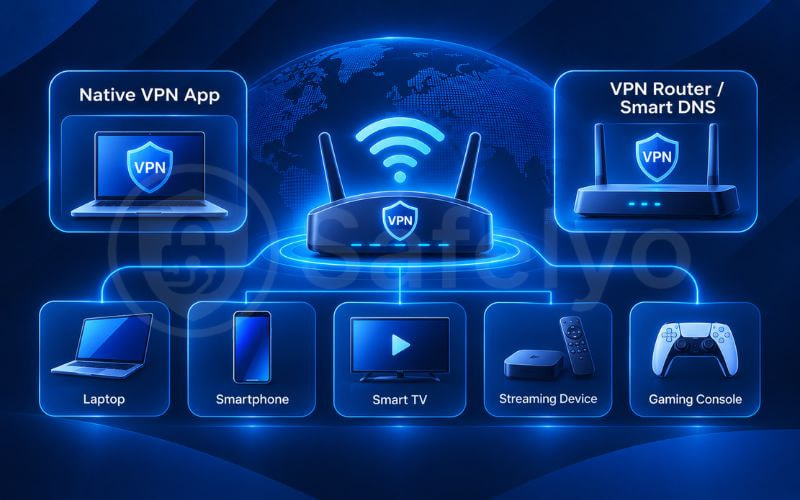
Not all streaming devices support native VPN apps. If your Smart TV or gaming console cannot run a VPN directly, a VPN-enabled router or Smart DNS may offer an alternative, depending on the device and streaming service.
| Device Category | Supported Bypass Method | Key Setup & Privacy Notes |
|---|---|---|
| Windows 11, macOS, Android, iOS | Native VPN app | Encrypts traffic; kill switch support varies by provider and OS. |
| Apple TV, Android TV / Google TV, Fire TV | Native VPN app (where supported) or Smart DNS | Check OS compatibility and plan requirements. Smart DNS does not encrypt traffic. |
| Smart TVs (Samsung Tizen, LG webOS) | VPN router or Smart DNS | No native Proton VPN app; router setup encrypts traffic, while Smart DNS does not. |
| Game consoles (PlayStation, Xbox) | VPN router or Smart DNS | No native Proton or Windscribe app; regional account and payment restrictions may still apply. |
If you download titles for offline viewing before traveling, note that Netflix’s Terms of Use (Section 1.7) warn that downloaded titles may not play if you go online in a country without licensing for those titles. Before putting a VPN on your router or computer, review how to stop DNS leaks and how a kill switch works so your real IP address stays hidden if the connection drops.
8. FAQs
Can you turn off geo-blocking?
Only the website, app, or content distributor enforcing the restriction can remove geo-blocking. Visitors cannot disable these restrictions directly, but they may use tools such as VPNs, Smart DNS, or proxies to address certain IP-based or DNS-based blocks. These methods do not override account verification, payment restrictions, or licensing requirements.
What is the difference between geo-blocking, geofencing, censorship, and dynamic pricing?
Geo-blocking restricts access to websites, services, or content based on a user’s apparent region, often using IP addresses or account information. Geofencing uses physical location data, such as GPS coordinates, to enforce a virtual geographic boundary. Government censorship restricts access to information or online services under national regulations, while dynamic pricing changes displayed prices based on factors such as location or market conditions without necessarily blocking access.
Does a VPN change your account country?
No. A VPN changes the public IP address websites see, but it does not automatically change your account’s registered country, billing address, payment method, or residency information. Some services require users to update their account details through an official country-change process rather than simply connecting through a VPN server.
Why can I access a website but not its content?
A website may be accessible globally while specific videos, articles, or services remain restricted by regional licensing agreements, subscription requirements, or account eligibility rules. Changing your IP address may help with location-based restrictions, but it does not guarantee access to content that is unavailable under your account or subscription terms.
9. Conclusion
Before choosing a VPN for bypassing geo-blocking, compare its privacy practices and long-term costs across five factors:
- Ownership and jurisdiction: Check the provider’s legal entity, jurisdiction, and privacy track record.
- Independent audits: Review published audit reports, their scope, and how recently they were conducted.
- Server storage: Compare RAM-only infrastructure with encrypted disk storage; both offer different security approaches.
- Renewal pricing: Check the full renewal price, not just the introductory offer.
- Refund policy: Review eligibility limits, including refund windows, data usage caps, and payment exclusions.
To compare vetted providers side by side, browse our best VPN guide or check our shortlist of the best VPN for streaming.