Reddit is one of the largest online forums, connecting millions of users through communities on virtually every topic. However, not everyone chooses to stay indefinitely. Some users may feel overwhelmed by notifications, want to protect their privacy, or simply prefer to step away from social media.
For those seeking a quick answer, the process typically involves logging into your account, navigating to User Settings (or Account Settings on mobile, which redirects to a browser), and then selecting the “Delete Account” option. This action is permanent and irreversible, so it’s essential to understand the consequences before proceeding.
For others, taking a break is important for their mental health, especially if online activity feels overwhelming. Knowing how to delete Reddit account helps you regain control of your online presence while ensuring a clean exit from the platform.
-
Log in
Go to the Reddit website and log in to your account.
-
Click on your Avatar
Click on your Avatar in the top right corner
-
Go to Settings
Choose Settings
-
Click Delete Account
Choose Delete Account
-
Confirm
Enter the reason and login credentials, then tick the box to delete account
-
Open Reddit app
Open Reddit app, tap your Avatar icon
-
Tap three-line menu
Choose three-line menu in the top right corner
-
Go to Settings
Tap the Settings
-
Choose Delete Account
Navigate to the bottom and tap the Delete Account option.
-
Confirm
A pop-up will appear requesting verification. Tap Yes, Delete to permanently delete the Reddit account.
Before you get started, watch this quick step-by-step video guide. In just under two minutes, you’ll see exactly how to delete your Reddit account on both desktop and mobile, with no confusing menus or wasted time.
1. Why delete a Reddit account?
People delete their Reddit accounts for different reasons, but most concerns fall into privacy, mental health, and digital footprint control.
- Privacy concerns: Reddit collects activity data, IP addresses, and interaction history, which some users no longer want tied to their identity.
- Permanent public content: Posts and comments can stay searchable for years, even after losing relevance.
- Harassment or unwanted attention: Anonymous discussions can sometimes lead to toxic interactions.
- Reducing screen time: Many users delete Reddit to improve focus, productivity, or mental well-being.
- Starting fresh: Deleting an old account allows users to rejoin Reddit later without past activity following them.
2. How to delete Reddit account on a desktop
Deleting your Reddit account from a desktop browser is straightforward but requires careful attention to each step. You will need to sign in and access User Settings to locate the deletion option. Following this section ensures you can safely delete your Reddit account permanently while maintaining control over your login credentials.
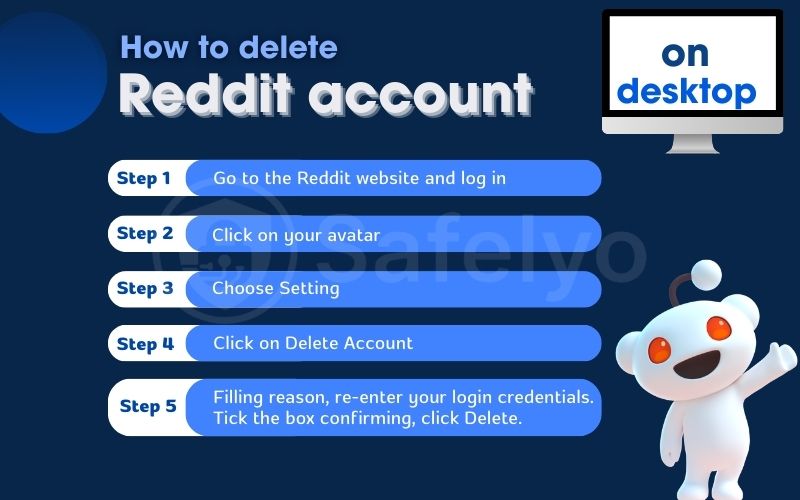
Steps to delete on desktop:
Step 1: Go to the Reddit website and log in to your account.
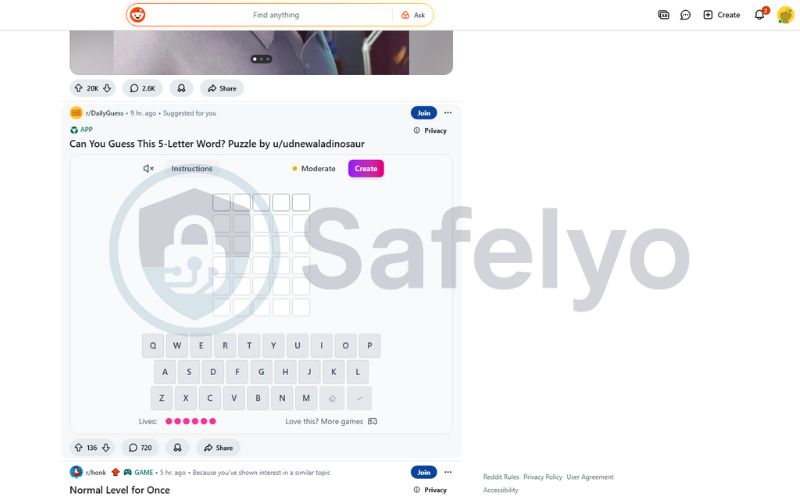
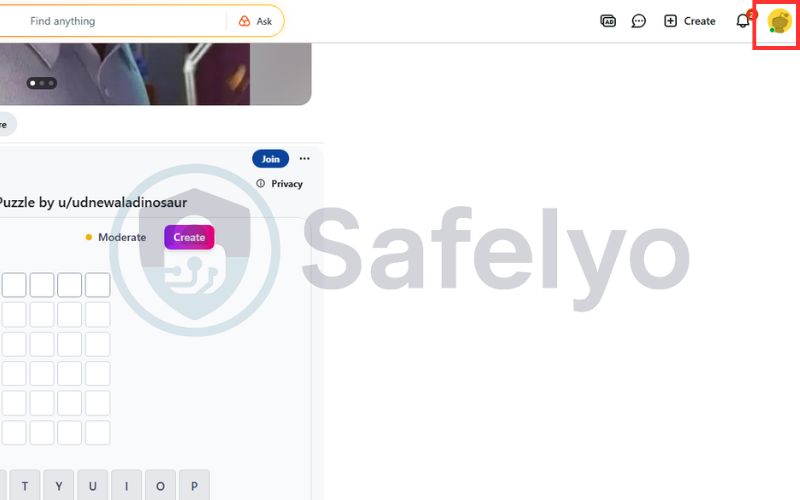
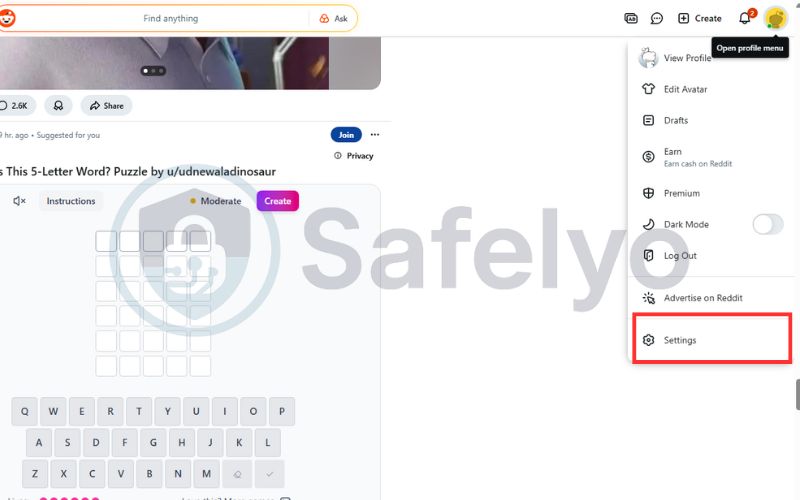
Step 2: Click on your Avatar in the top right corner.
Step 3: Navigate to the Settings tab.
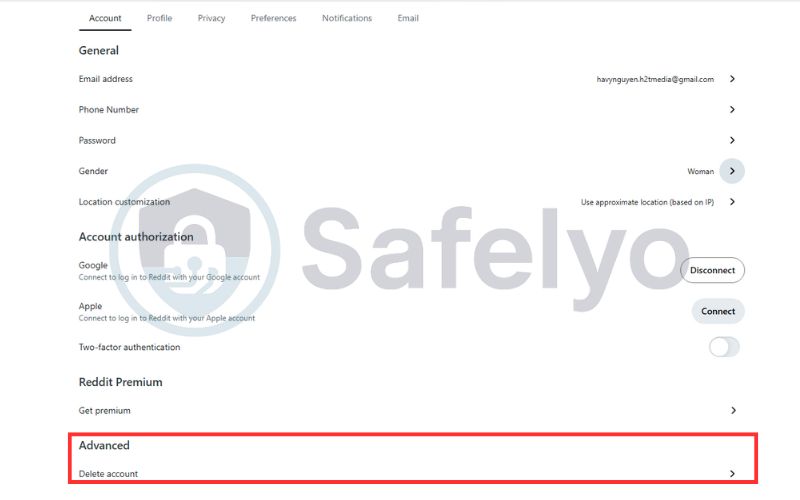
Step 4: Click on the Delete Account.
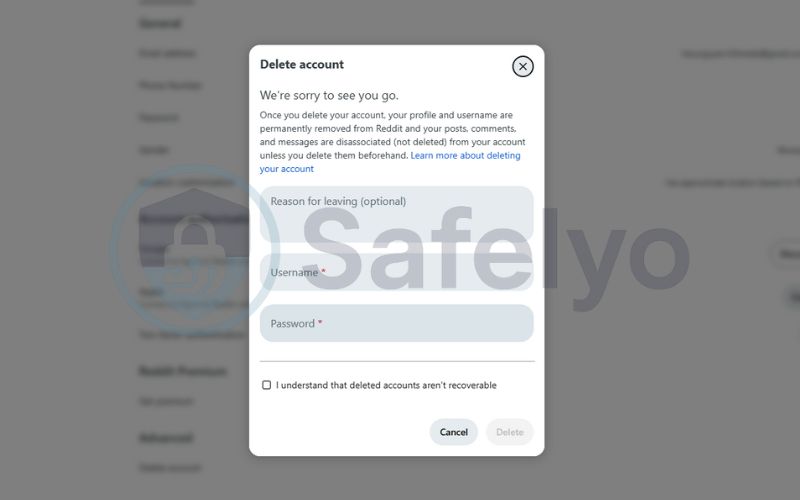
Step 5: Enter the reason you want to delete your Reddit account, and re-enter your login credentials. Tick the box to confirm and then click Delete.
3. How to delete a Reddit account on mobile (iOS & Android)
Deleting a Reddit account on mobile is simple, but the steps differ slightly depending on whether you’re using iOS or Android. Below, you’ll find clear, step-by-step instructions for both platforms so you can permanently remove your Reddit account directly from the app.
3.1. How to delete a Reddit account on iOS
If you’re using an iPhone, Reddit requires you to delete your account through the app’s settings rather than directly on the website. The steps below show you how to navigate the iOS interface and permanently delete your Reddit account in just a few taps.
Steps for iOS:
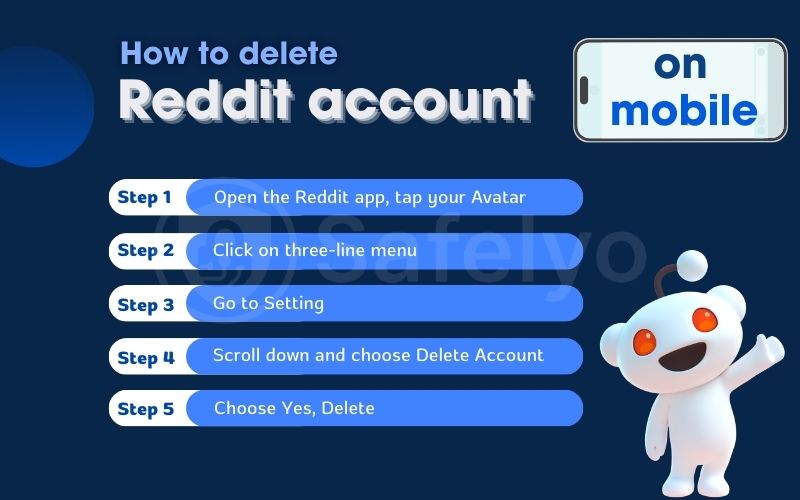
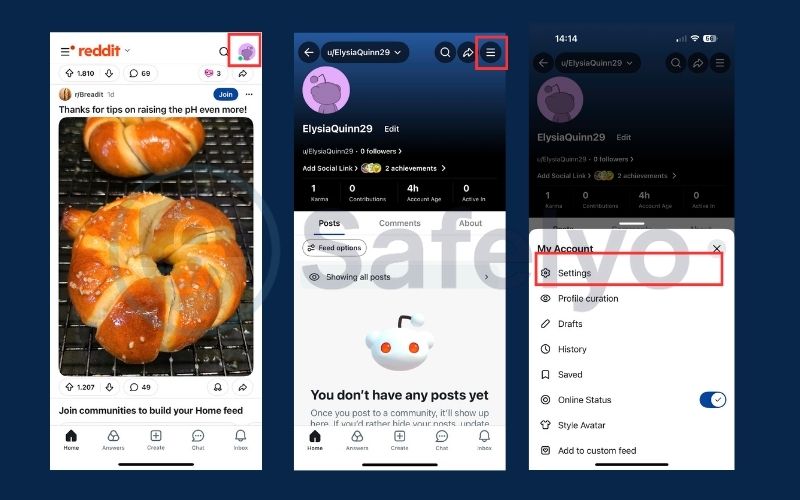
Step 1: Open the Reddit app on your iPhone and tap your Avatar in the top right corner.
Step 2: Choose the three-line menu
Step 3: In the My account tab, tap Settings.
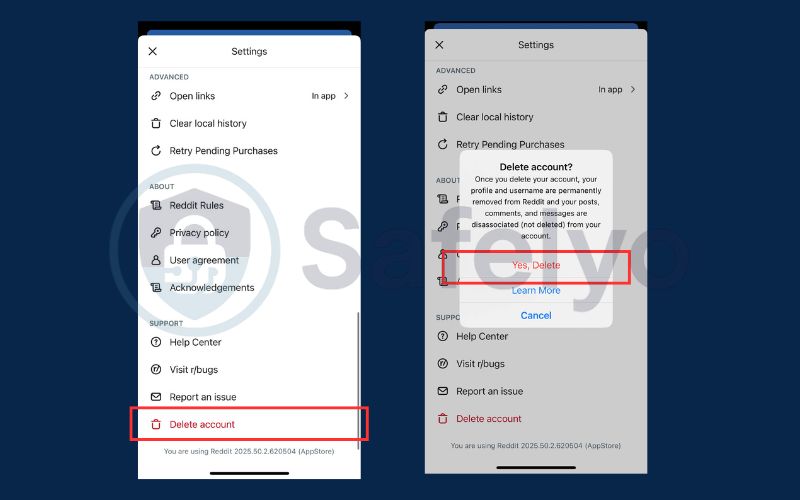
Step 4: Navigate to the bottom and tap the Delete Account option.
Step 5: A pop-up will appear requesting verification. Tap Yes, Delete to permanently delete the Reddit account.
3.2. How to delete a Reddit account on Android
Deleting a Reddit account on Android is quick and straightforward. The steps below guide you through the process, allowing you to remove your account in just a few moments without unnecessary complications.
Steps for Android:
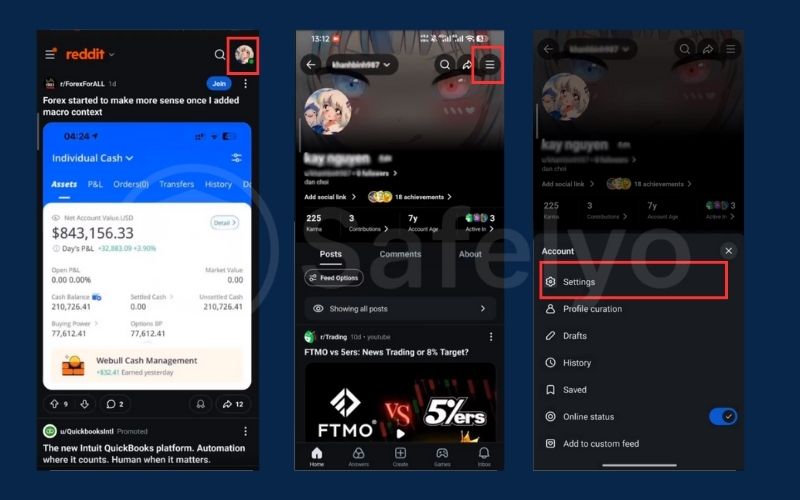
Step 1: Launch the Reddit app on your Android phone and tap your profile icon in the top-right corner.
Step 2: Tap the three-line menu, then select Settings.
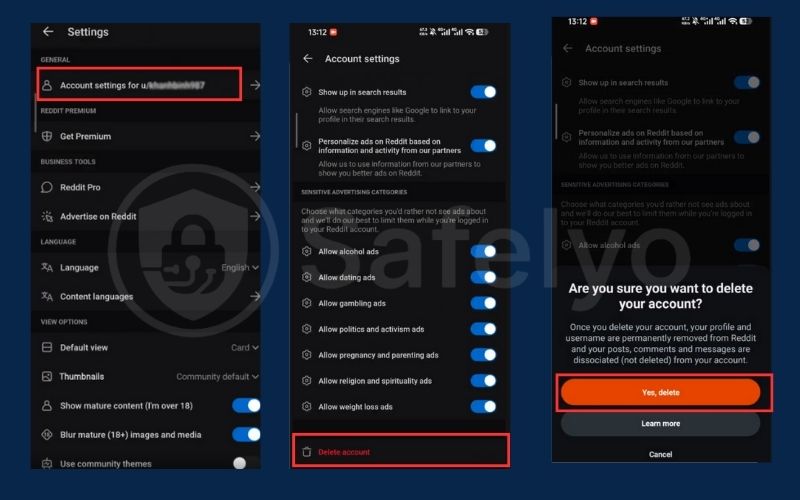
Step 3: Open Account settings for your username.
Step 4: Scroll down to the bottom of the page and tap the red Delete account option.
Step 5: When the confirmation prompt appears, tap Yes, Delete
4. How to delete Reddit posts, comments, and messages
Deleting your Reddit account does not remove your existing content. Your posts, comments, and chat messages remain visible but become anonymous. If you want to fully clean up your Reddit footprint, you should delete this content manually before closing your account.
4.1. How to delete Reddit posts
Reddit posts often receive the most visibility and can continue appearing in search results long after they’re published. If you’ve shared personal opinions or sensitive information, deleting your posts before closing your account helps prevent future exposure. Follow the steps below based on the device you’re using.
Step 1: Log in to Reddit.
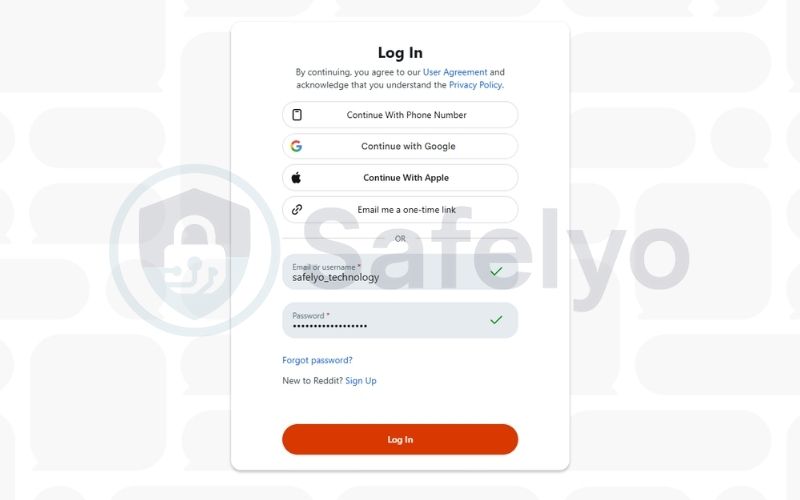
Step 2: Click on your avatar and choose View Profile
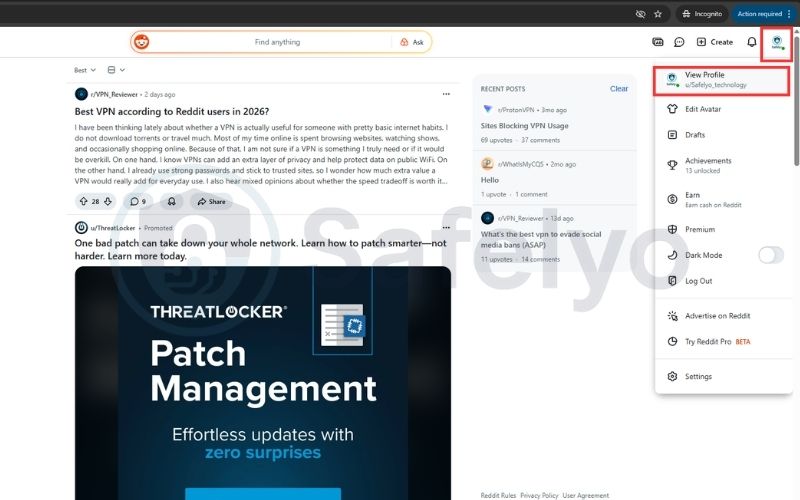
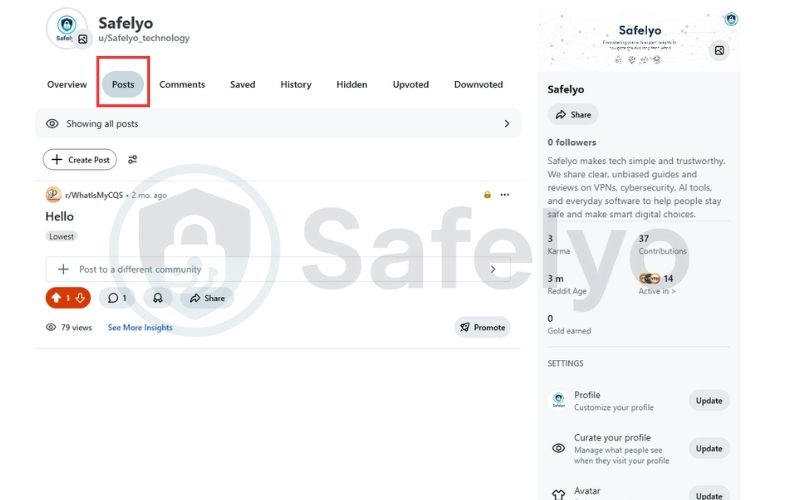
Step 3: Go to Posts tab
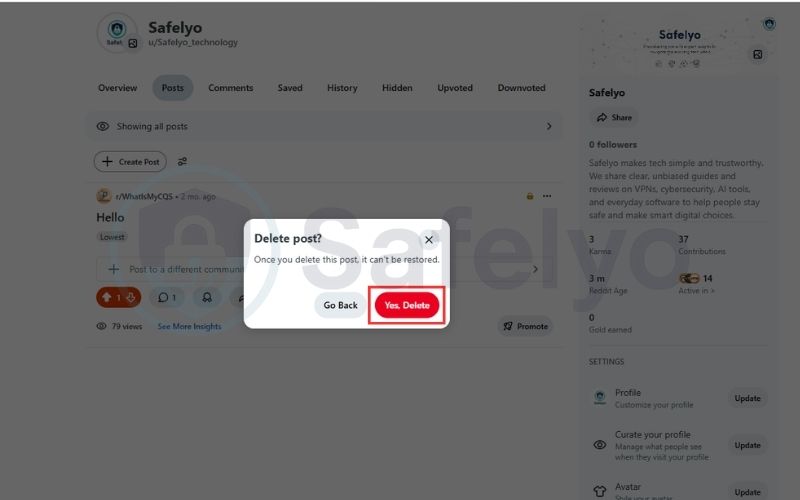
Step 4: Click More (⋯) → Delete the post you want.
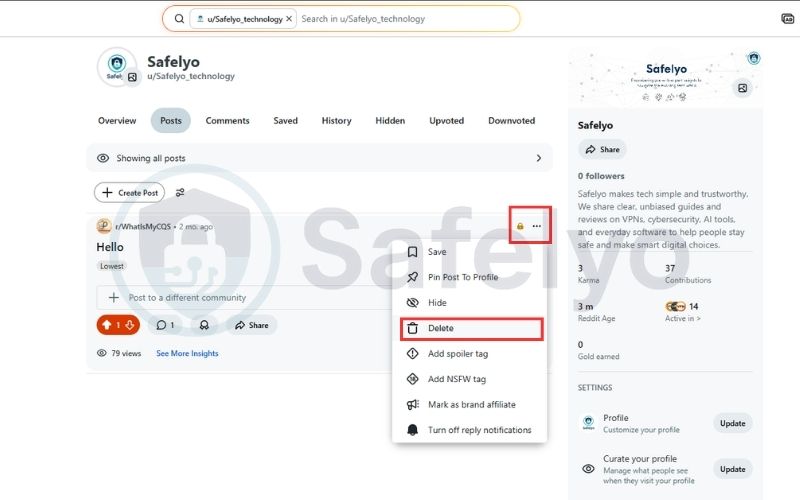
Step 5: Confirm the deletion.
4.2. How to delete Reddit comments
Comments can be just as permanent as posts and are often indexed by search engines. Even after deleting your account, old comments may still appear under an anonymous label. Removing them in advance gives you more control over what remains online.
Step 1: Go to Profile → Comments.
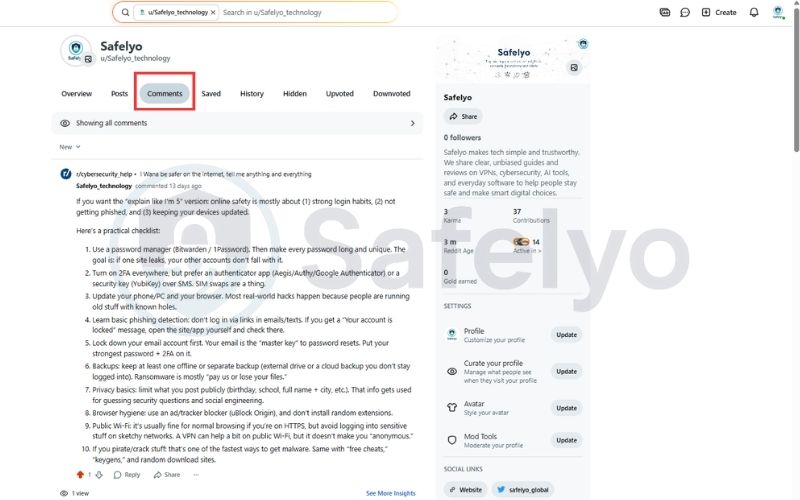
Step 2: Find the comment you want to delete, then click More (⋯) → Delete.
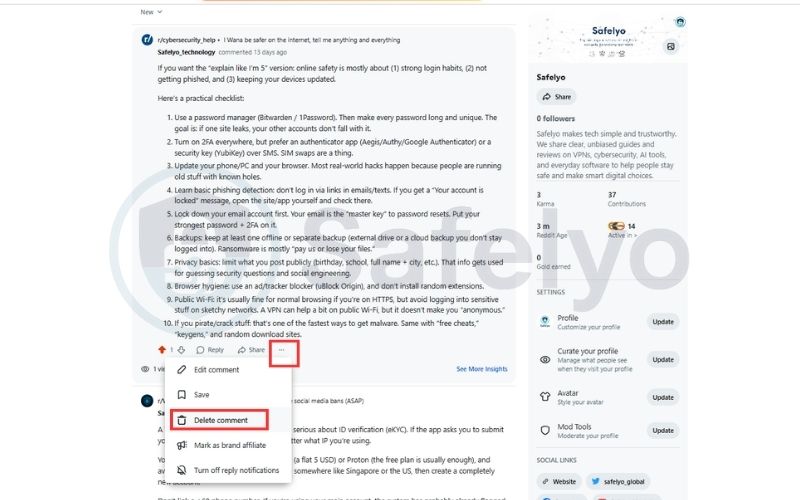
Step 3: Click More (⋯) → Delete.
Step 4: Confirm.
4.3. How to delete Reddit chat messages
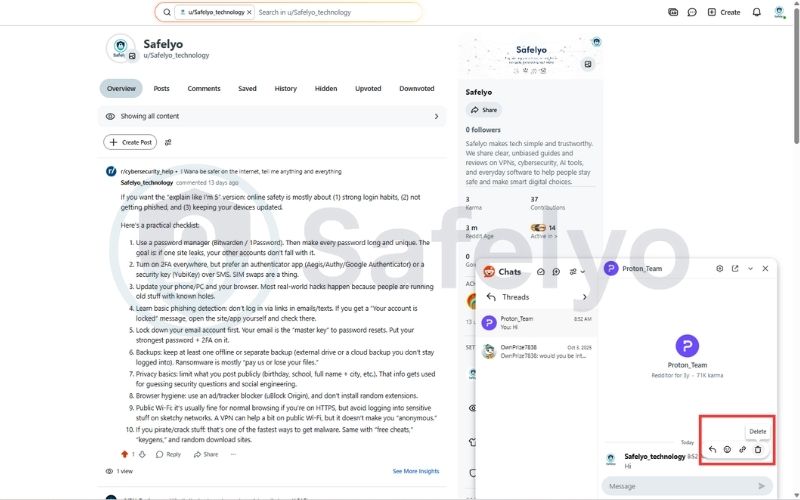
Reddit does not allow full chat history deletion for both sides. You can only remove messages from your own view.
Step 1: Open Chat.
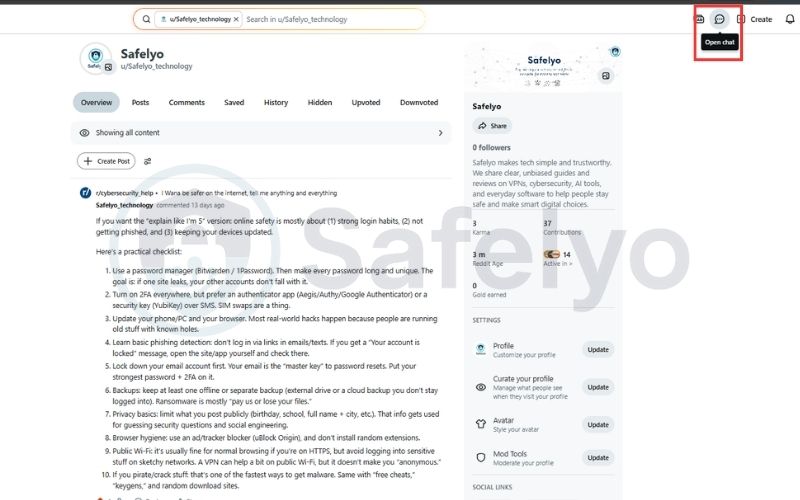
Step 2: Select the conversation.
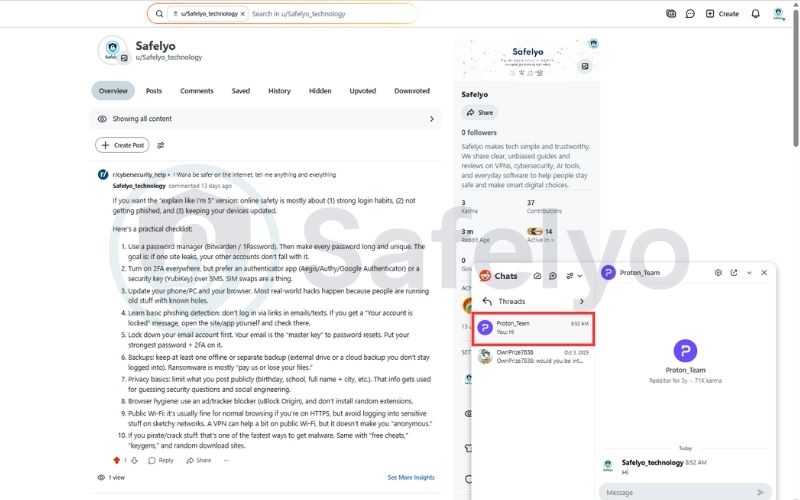
Step 3: Click Delete the message.
5. Troubleshooting: Why can’t I delete my Reddit account?
Even when following the correct steps, many users find that Reddit does not allow them to delete their account. This usually happens due to login method restrictions, missing credentials, or temporary interface issues rather than an actual account problem. Below are the most common reasons and proven solutions.
5.1. Your account is linked to Google or Apple
If you signed up using a Google or Apple ID, Reddit will not let you delete your account until a password is set.
How to fix it:
Step 1: Log in to your Reddit account
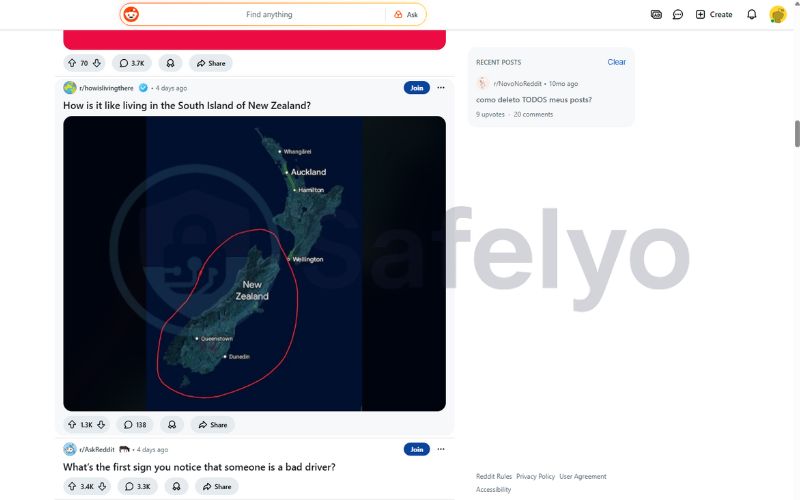
Step 2: Click your profile icon
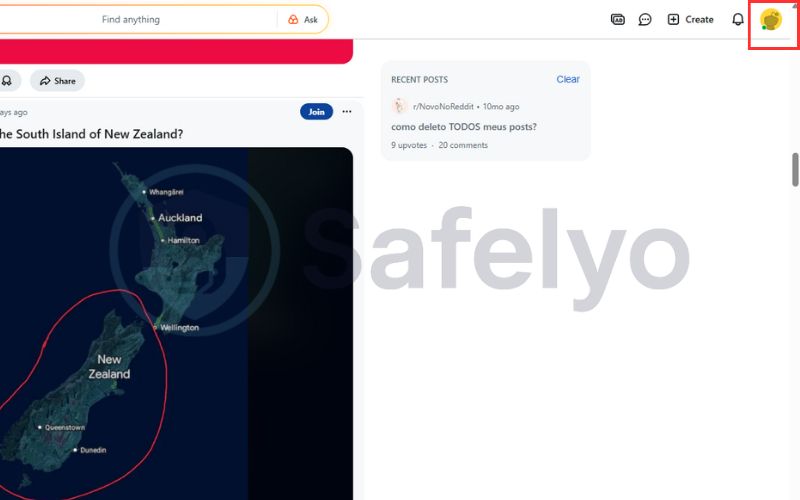
Step 3: Choose Settings
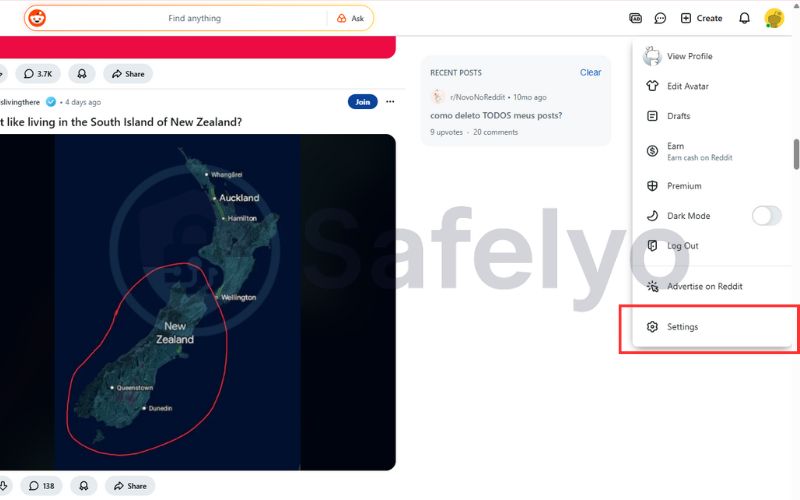
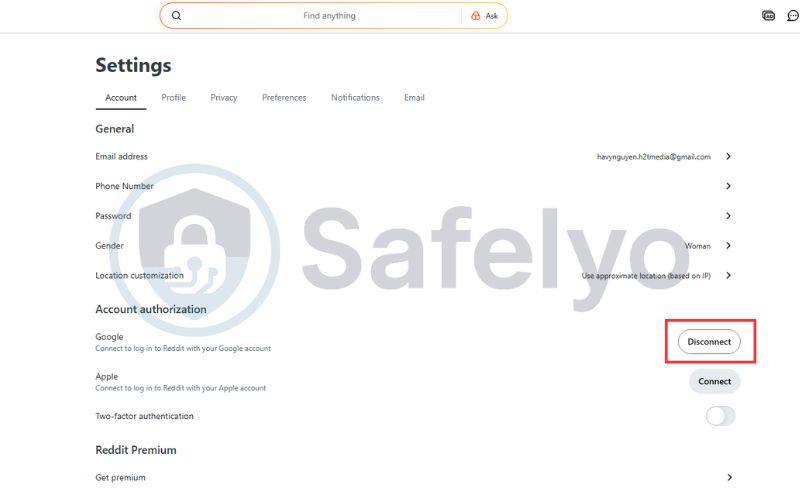
Step 4: Click Disconnect to unlink your Google account or Apple ID from Reddit.
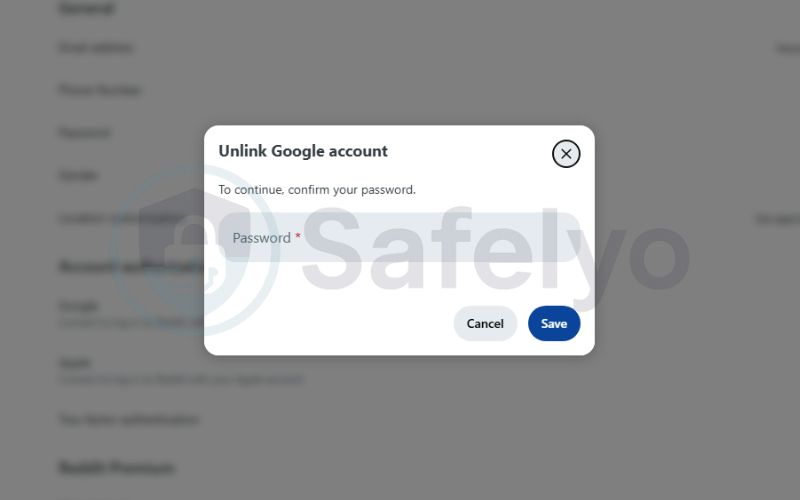
Step 5: Fill in your password to confirm
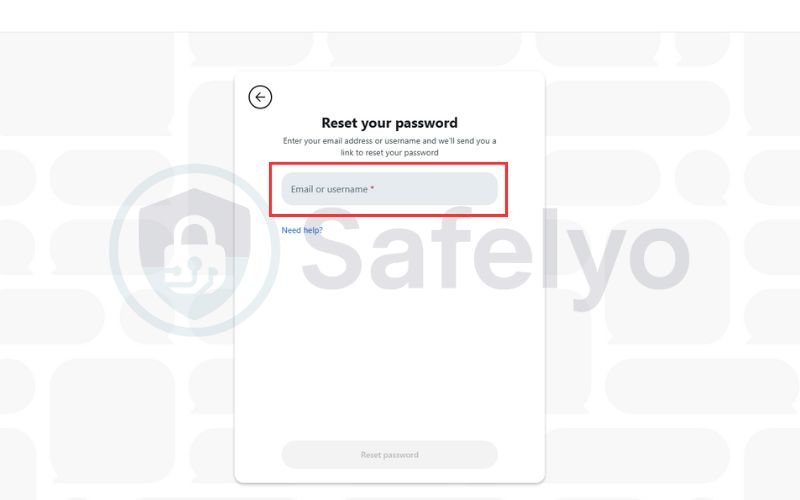
5.2. You don’t have a Reddit password
Without a password, Reddit cannot confirm account ownership for deletion. Creating or resetting your password is required before you can proceed.
Solution:
- Use the Forgot password option to create a password.
- Log in again using your email and password.
- Proceed with account deletion from a browser.
5.3. You’re trying to delete the account from the app
The Reddit mobile app does not always support full account deletion. Using a web browser provides more reliable access to the deletion settings.
Recommended fix:
- Open a desktop or mobile browser.
- Log in directly at reddit.com.
- Go to User Settings → Account → Delete account.
5.4. Browser issues or extensions are blocking the process
Certain browser extensions or cached data can interfere with Reddit’s account deletion form. Switching browsers or disabling blockers often resolves the issue.
Try the following:
- Disable AdBlock or privacy extensions temporarily.
- Clear browser cache and cookies.
- Use a different browser (Chrome, Firefox, Edge).
- Try Incognito or Private mode.
5.5. Expert tip: Use old.reddit.com if the new interface fails
Reddit’s legacy interface still includes a direct and stable account deletion option. Accessing old.reddit.com can bypass issues caused by the newer layout.
Alternative method:
Step 1: Visit old.reddit.com and log in to your account.
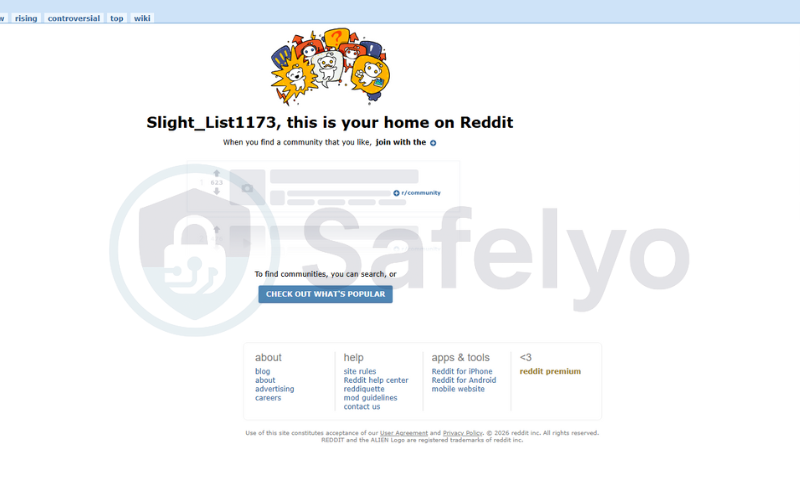
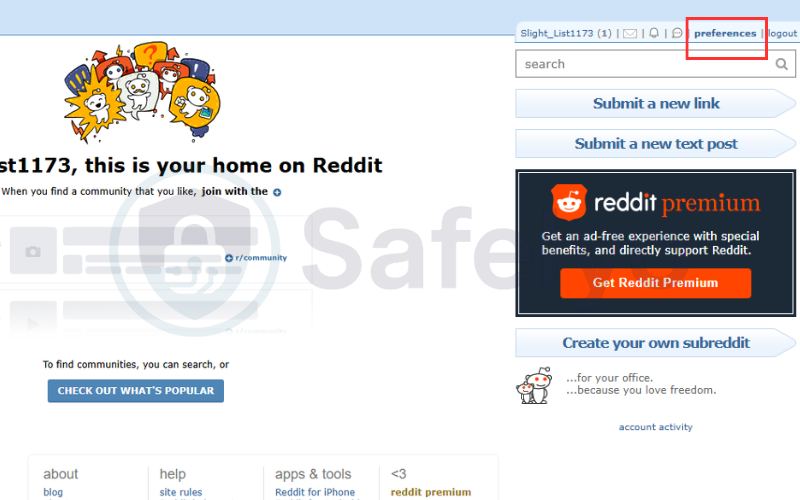
Step 2: Go to Preferences
Step 3: Choose Delete and complete the deletion process from the legacy interface.
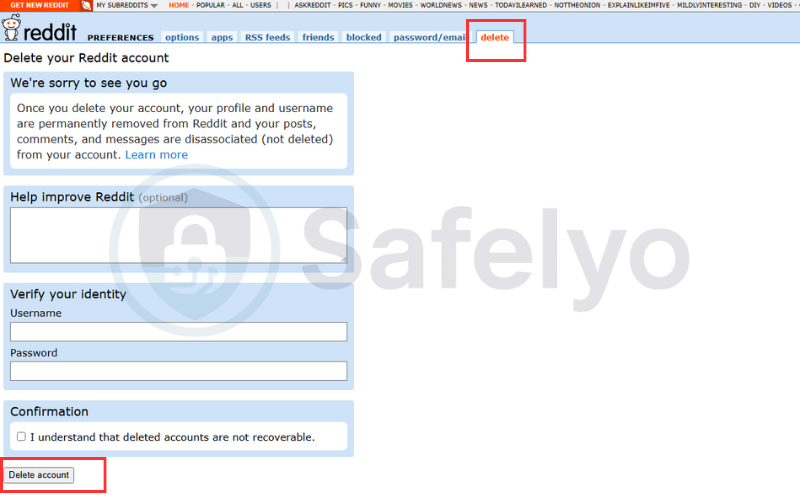
This method often works when the modern UI is buggy or unresponsive.
Still can’t delete your Reddit account?
If none of the solutions above work:
- Verify your email address.
- Check Reddit’s system status.
- Wait a few hours and try again, as temporary server issues can occur.
6. What happens when you delete your Reddit account
Before deleting your Reddit account, it’s essential to know what to expect. Deletion is permanent and irreversible, and there are a few key points every user should understand:
- Permanent deletion: Once you delete your account, it cannot be recovered.
- Username removal: Your username disappears from the platform, but old articles and responses remain visible.
- Posts marked as deleted: All previous content will show as “deleted,” not removed automatically.
- No temporary deactivation: Reddit only supports full deletion, so Reddit delete vs deactivate matters. There is no option to deactivate your account temporarily.
7. Things to consider before deleting a Reddit account
Deleting a Reddit account is permanent, so it’s crucial to plan ahead. This section outlines important preparatory steps to protect your seclusion and data.
- Download your data: Submit a data request via Reddit to keep a copy of your information. Details are available in Reddit’s official seclusion policy.
- Delete articles and responses manually: To remove all traces of your activity, delete individual articles if needed.
- Confirm permanent deletion: Once you delete, you cannot recover your account. This ensures your online identity is no longer linked to Reddit.
8. Download or back up your Reddit data before deletion
Before deleting your Reddit account, you may want to save a copy of your personal data. Reddit allows users to request an official data export.
8.1. How to request your Reddit data
Before deleting your Reddit account, you may want to download a copy of the information Reddit has collected about you. This helps you review your activity history and keep personal records before your account is permanently removed. Follow the steps below to request your Reddit data.
Step 1: Go to the website: https://www.reddit.com/settings/data-request and fill the form
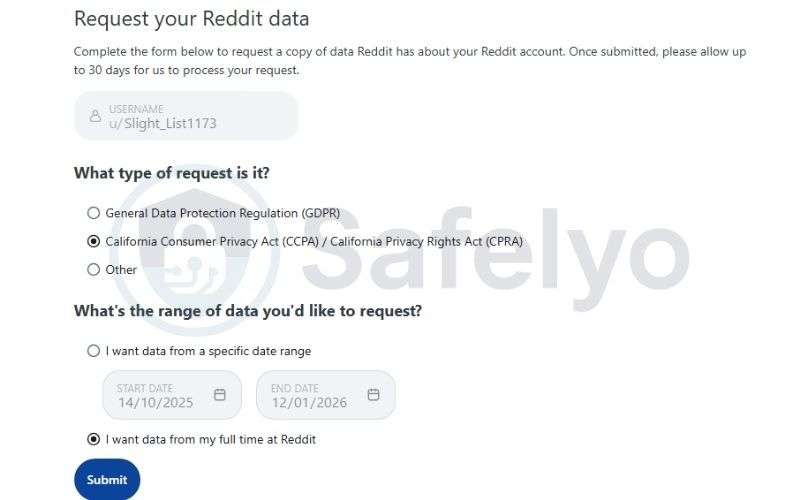
- Based on your location, select GDPR, CCPA/CPRA, or Other.
- Choose the time period for the data you want to export, or select “I want data from my full time at Reddit” to include your entire account history. Then, click Submit.
Step 2: Reddit will email you a download link once the request is processed.
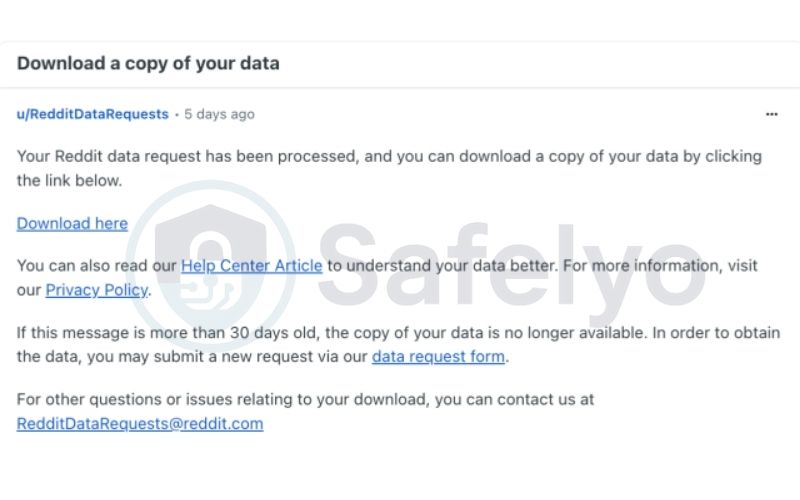
8.2. What data Reddit provides
After submitting a data request, Reddit will include several categories of information related to your account. Knowing exactly what data is provided helps you understand how your activity and personal details have been stored and used.
- Account details
- Posts and comments
- Chat metadata
- IP and login history
- Advertising and personalization data
Processing usually takes several days.
9. How to deactivate a Reddit account
It’s crucial to understand a key difference between Reddit and many other social media platforms: Reddit does not offer a temporary “deactivate” option for user accounts. Unlike platforms where you can temporarily hide your profile and content with the ability to reactivate it later, Reddit only provides a permanent account deletion process.
This means if you’re looking to take a break or reduce your online presence without completely removing your account forever, “deactivation” as a temporary measure is not available. My personal experience, and that of many users I’ve seen discuss this, is that this can be a bit frustrating if you’re not ready for a permanent goodbye. However, knowing this upfront helps manage expectations.
If your goal is to step back from the platform without an irreversible decision, consider the alternatives discussed in the “Alternatives to deleting your account” section, such as managing notifications or logging out. These methods allow you to control your engagement without losing your account history or content.
To reiterate, any action labeled “deactivate” on Reddit will ultimately lead to permanent deletion after confirming the steps. There is no middle ground for a temporary break that preserves your account for future return.
10. Comparison: Delete vs deactivate Reddit account
Understanding the difference between deleting and deactivating an account is crucial, especially since Reddit only offers one of these options.
| Feature | Deactivate Account (Not available on Reddit) | Delete Account (Available on Reddit) |
|---|---|---|
| Availability | Not offered by Reddit | Offered by Reddit |
| Reversibility | Generally reversible; full data can be restored | Irreversible; account and username cannot be recovered |
| Data retention | Posts and data are preserved but hidden | Posts remain visible under “[deleted]” |
| Access | Account inaccessible but recoverable | Account permanently removed |
| Purpose | Temporary break or reduced presence | Permanent removal from the platform |
Given that Reddit only allows permanent deletion, if you’re feeling overwhelmed, my advice is to think carefully. I once impulsively deleted an account on another platform, only to regret losing access to some niche communities I valued. Consider whether a permanent exit is truly what you need, or if managing notifications and content might be a better first step.
>> Read more:
By using these alternatives, you can manage your activity on Reddit more strategically, protect your privacy, and avoid the irreversible step of permanent deletion.
11. Alternatives to deleting your account
If you’re not ready to permanently delete your Reddit account, there are several practical alternatives that let you reduce your digital footprint while keeping your account intact. These options are useful if you want more privacy, less engagement, or a temporary break without losing access to your history or subscriptions.
- Log out or take a temporary break: Logging out of Reddit or uninstalling the app can help you step away from the platform without making irreversible changes. You can still log back in at any time, which is ideal if you’re unsure whether you want to delete your account permanently.
- Use Incognito or Private browsing: Browsing Reddit in Incognito or Private mode prevents your local browser history from being saved. While this doesn’t hide your activity from Reddit itself, it can help reduce traces on shared or public devices.
- Delete specific posts or comments: Instead of deleting your entire account, you can manually remove posts or comments that contain personal information or content you no longer want publicly visible. This approach allows you to clean up your profile while keeping the account active.
- Remove personal information from your profile: Update your profile bio, avatar, and linked accounts to remove identifying details. This reduces the chance of your Reddit activity being linked back to your real identity.
- Adjust privacy and personalization settings: You can limit data collection by disabling ad personalization, turning off content recommendations, and reviewing privacy settings. These changes help reduce tracking without deleting your account.
- Deactivate notifications and subscriptions: Muting notifications, leaving subreddits, or canceling Reddit Premium can significantly reduce engagement while keeping your account accessible if you decide to return later.
By using these alternatives, you can manage your activity on Reddit more strategically, protect your privacy, and avoid the irreversible step of permanent deletion.
>> Read more:
12. FAQs about deleting a Reddit account
Even with step-by-step instructions, many users have questions about how to delete their Reddit account and related settings. Here are the most common questions users have about account deletion
Can I reactivate my Reddit account after deleting it?
Once you permanently delete your Reddit account, it cannot be restored. Reddit only permits full deletion, not account deactivation. There is no option for reactivation or temporary deactivation. If you want to return to the platform, you must create a new account from scratch. None of your previous posts will be linked to this new account. Your responses will also not be associated with it.
Do my articles and responses get deleted when I delete my Reddit account?
No, your articles and comments remain visible on Reddit even after you delete Reddit account permanently, but they will be shown as posted by “deleted.” To remove all traces of your activity, you should manually delete Reddit posts and comments before deleting the account. This ensures your content is fully removed from the platform.
How do I delete my Reddit account without a passcode?
You cannot delete an account without a password. To delete Reddit account without password, you must first recover or reset your login credentials through Reddit’s password recovery process. Once you have access, you can proceed with the account deletion steps safely.
Can I delete my Reddit account on the app?
Yes, but Reddit requires a browser to complete the process. From the app, go to Profile > Settings > Account settings, which redirects you to a browser page. Then you can remove Reddit account mobile on both iOS and Android. This ensures that the deletion is secure and fully confirmed.
How long does it take for Reddit to delete my account?
Deletion is immediate once you confirm the process. However, cached content or third-party search engine listings may still display your username or posts temporarily. If you want to ensure complete removal, manually delete Reddit posts and comments before deleting your account.
Do I lose my Reddit Premium subscription if I delete my account?
Yes. Once deleted, all active subscriptions are terminated and non-refundable.
Why can’t I delete my Reddit account?
You may not be able to delete your Reddit account if you signed up using Google or Apple and haven’t set a password. In this case, you need to create a password first and then complete the deletion process from a browser.
Can I delete my Reddit account and reuse the same email address?
Yes. After your Reddit account is deleted, the associated email address is released and can be used to create a new Reddit account.
What happens to my username after I delete my Reddit account?
Your username becomes unavailable and cannot be reused by you or anyone else. Reddit does not recycle deleted usernames.
Does Reddit keep my personal data after account deletion?
Reddit may retain certain data for legal, security, or compliance purposes, even after account deletion. However, this data is no longer publicly visible or associated with your deleted profile.
13. Conclusion
Knowing how to delete a Reddit account helps you take control of your privacy and online presence. Whether on desktop, iOS, or Android, the steps are straightforward when completed through User Settings or Account settings.
Deleting a Reddit account is permanent, so make sure the decision aligns with your privacy goals and that any important data has been reviewed or backed up. Before you confirm deletion, double-check that you’ve removed any posts, comments, or messages you don’t want to remain online, as Reddit does not automatically erase your content when your account is deleted.
For more practical guides on managing online accounts, visit the Tech How-To Simplified category on Safelyo for clear, step-by-step tutorials.