Opening the Hinge app only to see a “Your account has been banned” screen is a major blow to your dating life. You might feel frustrated and confused, especially if you believe you followed every community guideline. Learning how to get unbanned from Hinge is the first step toward reclaiming your profile and getting back into the dating pool.
Safelyo team has analyzed thousands of ban cases and tested various recovery strategies to bring you this 2026 guide. Whether you were flagged by mistake or need a completely fresh start, we provide a clear roadmap for recovery. We cover everything from writing a professional appeal to using technical workarounds for permanent blocks.
-
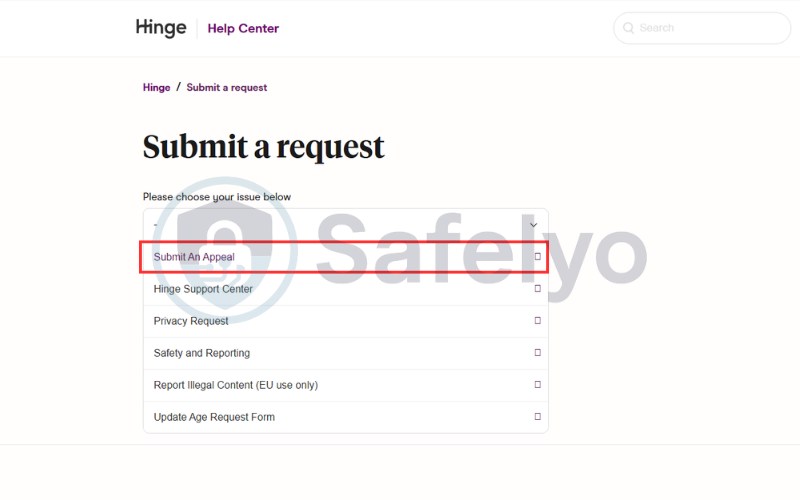
Access the ban appeal form
-
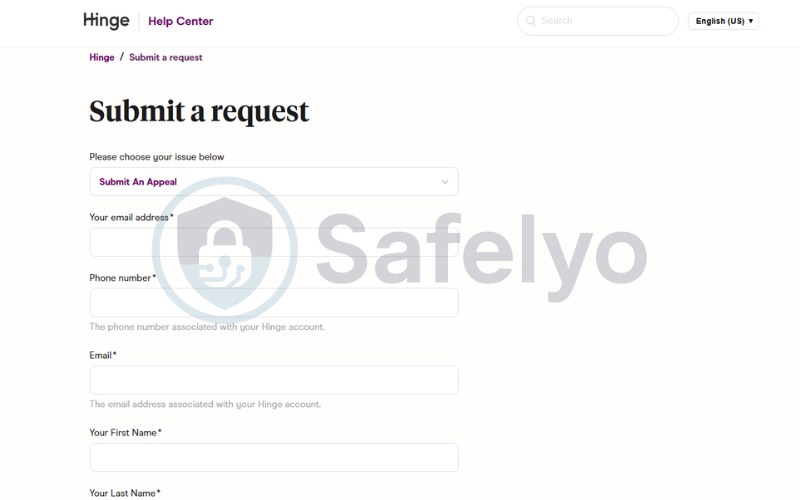
Fill in your exact account details.
-
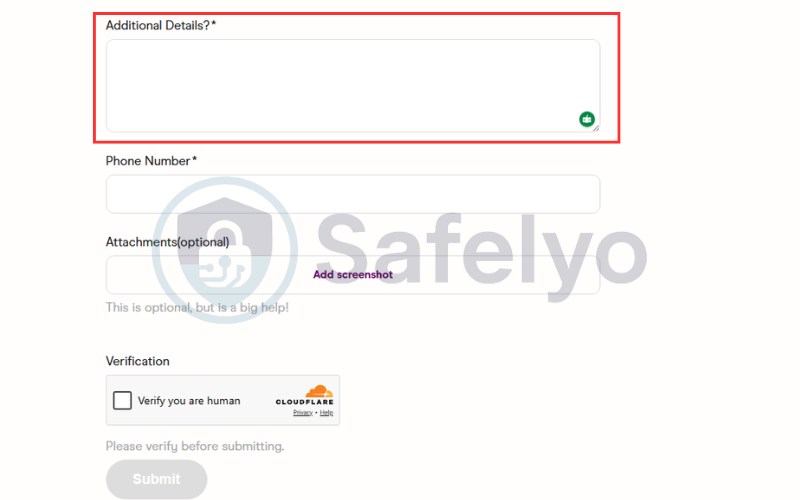
Write a successful appeal message.
-
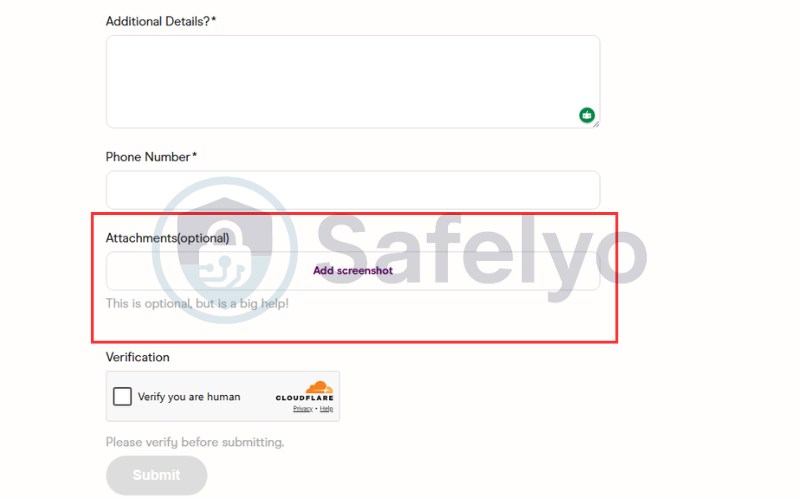
Attach supporting evidence.
-
Wait for the official timeline.
-
Get a new device ID
Use a different smartphone or tablet to bypass hardware bans, as a factory reset will not change your original device ID.
-
Use a fresh IP address or a premium VPN
Connect to a new network or premium VPN to mask your IP, and keep it active during signup and every session.
-
Get a new phone number.
Use a fresh, real SIM card to verify your account and avoid VoIP services, as Hinge blacklists old numbers and detects virtual lines.
-
Create a brand new email address.
Use a fresh Gmail or Outlook account and avoid linking it to your old Apple ID or Google Play to bypass association checks.
-
Upload new, unhashed photos.
Take fresh photos and avoid reusing any images from your banned profile to bypass Hinge’s image recognition and metadata tracking.
-
Rewrite your profile prompts.
Create unique bios and responses instead of copying old ones to bypass text-matching scans and appear as a brand-new user.
1. What to do immediately after getting banned on Hinge
The moment you realize your account is locked, your first instinct might be to panic or act impulsively. However, taking the wrong steps right now can make it permanently impossible to return to the platform. Follow these immediate actions to preserve your chances of a successful recovery.
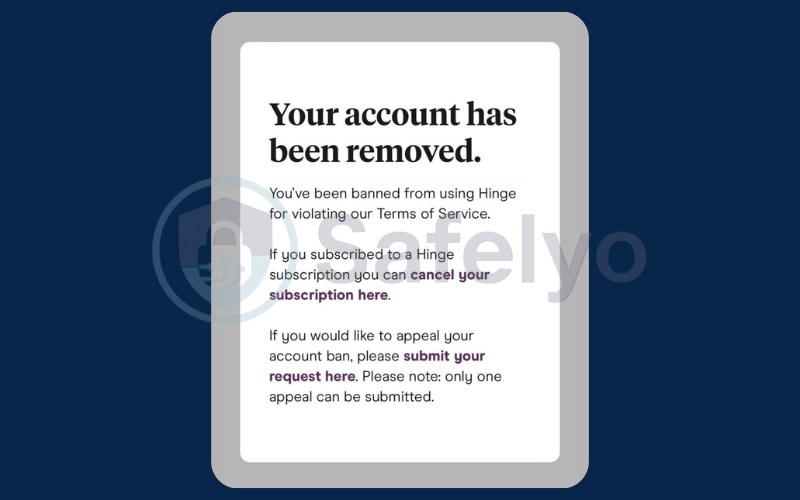
Step 1: Confirm your exact ban status
When you open the app, look closely at the specific message displayed on the screen. A permanent ban usually mentions a violation of Terms of Service, while a temporary suspension might show a countdown. Knowing the difference determines whether you should attempt an appeal or prepare for a full account reset.
Step 2: Check your email for official Hinge notices
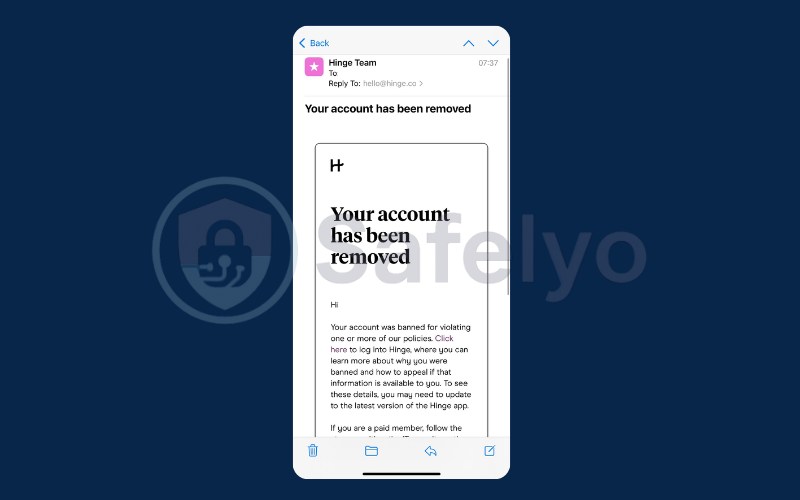
Hinge usually sends an automated email notification when a ban is officially issued. Search your inbox and spam folder for messages from “Hinge Support” or “Match Group.” This email may contain a reference number or a vague reason for the ban, which serves as vital evidence if you choose to appeal.
Step 3: Do NOT attempt to create a new account yet
This is the most common mistake banned users make. If you try to sign up again immediately on the same device, Hinge’s security system will instantly flag and block the new account. This links your identity to the original ban even more strongly, making future workarounds much harder to execute.
Step 4: Cancel your Hinge+ or HingeX subscription
Getting banned does not always automatically stop the billing cycle for your premium features. Go to your Apple ID or Google Play Store subscription settings and manually cancel Hinge+ or HingeX. Hinge will not automatically refund your money, so preventing future charges is an essential financial step.
2. How to get unbanned from Hinge (2 proven methods)
The moment you see the ban screen, you must make a critical choice. You have exactly two viable paths to return to the app, and selecting the wrong one will permanently burn your bridges.
If you believe the ban was a mistake or the result of a false report, Method 1 (The Appeal) is your only legitimate option. If your appeal is rejected, or if you knowingly violated the terms of service and received a permanent ban, you must use Method 2 (The Workaround) to start completely fresh.
2.1. Submit an official ban appeal
Hinge allows users to contest a ban if they believe the system made an error. This process is handled by a human review team, so your approach must be professional and factual.
- Step 1: Access the ban appeal form.
You cannot appeal through the app itself once you are locked out. You must visit the Hinge Help Center website and navigate to the “Submit a Request” page, then select “Appeal a Ban” from the dropdown menu.
- Step 2: Fill in your exact account details.
Enter the specific email address and phone number associated with your banned profile. Providing mismatched contact information will cause the system to reject your ticket instantly before a human even reads it.
- Step 3: Write a successful appeal message.
Do not send an angry or demanding message. Instead, be polite, concise and provide context. State clearly that you have reviewed the Terms of Service and respectfully explain why you believe a mistake occurred.
- Step 4: Attach supporting evidence.
If you were banned after a specific interaction or a misunderstanding, upload screenshots that prove your innocence. Solid visual proof significantly increases your chances of overturning the moderation decision.
- Step 5: Wait for the official timeline.
Hinge support typically takes anywhere from 48 hours to a full week to process an appeal request. During this waiting period, do not submit multiple tickets, as this pushes your case to the back of the queue.
2.2. Safely create a new Hinge account (The workaround)
If your appeal is denied, Hinge’s decision is final. The only way back is to create a completely new identity that the app’s aggressive tracking algorithms cannot link to your banned profile. This requires a strict, multi-step process.
- Step 1: Get a new device ID.
Hinge bans the specific hardware ID of your phone. You must use a completely different smartphone or tablet to create and use the new account, as a simple factory reset will not change your device ID.
- Step 2: Use a fresh IP address or a premium VPN.
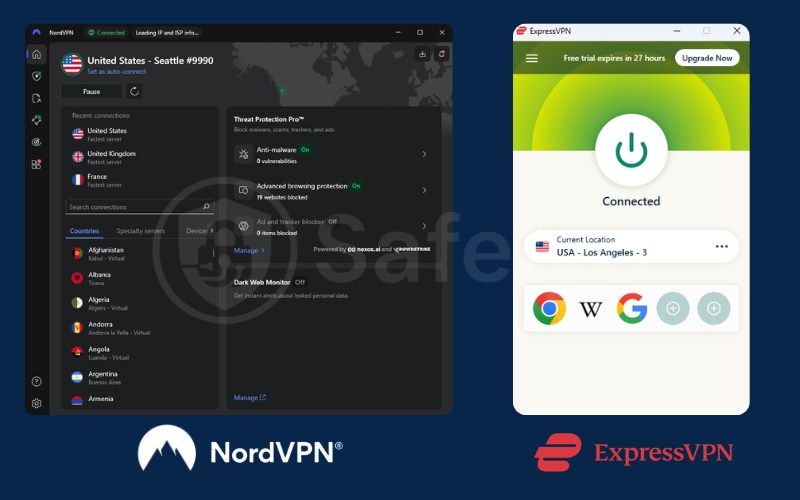
Hinge tracks your home Wi-Fi network. You must connect to a different network or use a high-quality premium VPN such as NordVPN, ExpressVPN, Surfshark,…to mask your IP address during the signup process and every time you use the app.
- Step 3: Get a new phone number.
Your old number is permanently blacklisted. You need a completely new, real SIM card to verify the account. Do not use free VoIP numbers (like Google Voice), as Hinge instantly detects and blocks them.
- Step 4: Create a brand new email address.
Set up a fresh Gmail or Outlook account specifically for this purpose. Do not link it to your old Apple ID or Google Play account, as Hinge checks these associations during registration.
- Step 5: Upload new, unhashed photos.
Hinge uses advanced image recognition to detect previously uploaded pictures. You must take entirely new photos. Do not reuse any image from your banned profile, as the hidden metadata will still match.
- Step 6: Rewrite your profile prompts.
The algorithm also scans for exact text matches. Do not copy and paste your old bio or prompt answers. Write completely new responses to ensure the system sees you as a genuinely new user.
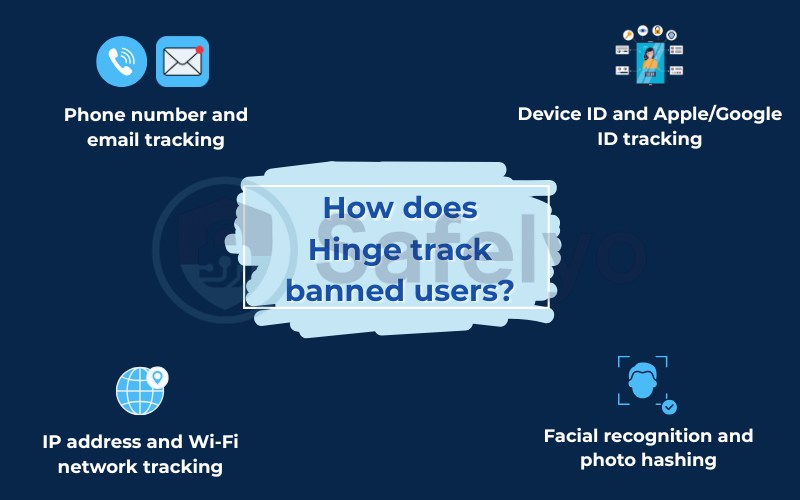
3. How does Hinge track banned users?
Many users attempt to create a new profile by using a different email address, only to be instantly banned again. Hinge is part of Match Group (which also owns Tinder and OkCupid), and it employs military-grade tracking technology to enforce permanent bans across its entire ecosystem.
Understanding these tracking methods is crucial. If you miss even one of these data points when creating your new profile, the system will link you back to your banned account and shut you down immediately.
3.1. Phone number and email tracking
This is the most basic level of security. When an account is banned, Hinge permanently blacklists the associated phone number and email address in their master database. Attempting to verify a new account with either of these will trigger an instant, automatic block before you even finish setting up your profile.
3.2. Device ID and Apple/Google ID tracking
Every smartphone has a unique hardware identifier (Device ID) that apps can read. Hinge logs this ID upon banning you, meaning the physical phone itself is blacklisted. Furthermore, they check the Apple ID or Google Play account actively signed into your device’s app store, linking your new download attempt to your old banned history.
3.3. IP address and Wi-Fi network tracking
Hinge records the IP addresses of the Wi-Fi networks and cellular towers you use most frequently. If you create a new account using a fresh device but connect it to the same home Wi-Fi network as your banned profile, the system will flag the matching IP address and likely suspend the new account for suspicious activity.
3.4. Facial recognition and photo hashing
This is the most sophisticated tracking method. Hinge runs your profile pictures through advanced facial recognition and assigns a unique digital signature, or “hash,” to each image file. If you upload the same photo to a new account, the algorithm instantly recognizes the matching hash and bans the new profile, even if you crop or filter the image.
4. Types of Hinge bans: Which one do you have?
Not every restriction on Hinge is a permanent death sentence for your account. Before you dive into complex recovery methods, you need to identify exactly what type of ban the platform has placed on your profile.
Understanding the difference between a temporary suspension and a permanent block is critical because it dictates whether you should wait out the penalty or prepare a new device. If you misdiagnose your ban, you might accidentally trigger a worse consequence by trying to force a new account creation.
4.1. Temporary bans (Warnings or suspensions)
If you violate a minor guideline, such as aggressive messaging or using inappropriate photos, Hinge may issue a temporary suspension. You will see a notification indicating your account is “under review” or locked for a specific number of days, giving you a chance to return once the penalty expires.
4.2. Permanent bans
This is the most severe punishment, typically reserved for major offenses like harassment, scamming, or repeated violations. When you receive a permanent ban, you will see a black screen explicitly stating that your account has been disabled and that the decision is final.
4.3. The Hinge shadowban (Zero likes or matches)
A shadowban is a hidden restriction where your account appears normal to you, but the algorithm stops showing your profile to other users entirely. If you suddenly stop receiving likes and your matches go completely silent, the system may have quietly restricted your visibility without an official notification.
Read more:
5. What does NOT work to get unbanned from Hinge
Desperation often leads users to try quick fixes they find on outdated forums or social media. However, Hinge’s 2026 security systems are incredibly sophisticated, and attempting lazy workarounds will permanently blacklist your new profile before you even get to swipe.
- Reusing your old phone number or Apple ID
You cannot simply delete the app and sign up again with your previous credentials. Hinge keeps your original phone number, email, and connected Apple or Google ID on a permanent blacklist. The moment you input any of these details, the system instantly links you to the banned account and locks you out.
- Uploading the exact same photos
Many users think that taking a screenshot of their old profile pictures or stripping the metadata will trick the system. This no longer works because Hinge uses advanced facial recognition and photo hashing. If the AI detects the same visual signature, your new account will be deleted immediately.
- Spamming the Hinge support team
If your initial appeal is taking too long, sending multiple follow-up emails will not speed up the process. In fact, spamming the customer service desk resets your position in the ticket queue, pushing you to the very back. Submit one well-written appeal and patiently wait for their official response.
6. Why does Hinge ban accounts in the first place?
The Hinge algorithm is designed to create a safe dating environment, not to ruin your experience maliciously. In 2026, the platform’s zero-tolerance policy means you can lose your account for behavior you might consider a harmless joke or a minor mistake.
Understanding the specific triggers that cause the system to flag your profile is crucial. If you don’t know the exact rules you broke, you cannot write an effective appeal or prevent the same mistake from happening on a new account.
6.1. Violating community guidelines (Hate speech, harassment)
This is the most common reason for a swift, permanent ban. The platform aggressively targets and removes users engaging in hate speech, bullying, or sexual harassment. Even a single inappropriate comment reported by a match can result in immediate termination, as Hinge prioritizes user safety above all else.
6.2. Being repeatedly reported by other users
Even if you believe you haven’t broken any explicit rules, multiple user reports will trigger an automatic review. If the system notices a pattern of complaints, such as users reporting you for “inappropriate behavior” or “fake profile”, the algorithm will likely suspend your account while a human moderator investigates.
6.3. Using third-party automation tools or fake profiles
Using bots to auto-swipe or third-party apps to change your GPS location violates Hinge’s core terms. The system’s security software detects unnatural swiping speeds and location spoofing. Furthermore, if the system suspects you are impersonating someone else or running a fake profile (catfishing), you will be banned immediately.
7. Tips to avoid getting banned on Hinge again
Once you successfully regain access to the platform, you must treat your account with extreme care. Hinge’s algorithms are often more suspicious of new accounts created in the wake of a previous ban, so maintaining a clean record is vital for long-term success.
- Follow the rules and act naturally
Avoid performing too many actions in a short period, such as swiping through hundreds of profiles in minutes. This “bot-like” behavior triggers security flags, so it is better to take your time and engage with the app like a genuine user seeking a real connection.
- Use genuine, high-quality photos
Ensure every picture you upload is a clear, recent representation of yourself. Avoid using AI-generated images or stock photos, as the Match Group’s advanced detection system is highly sensitive to non-original content, which can lead to immediate account verification requests or bans.
- Communicate respectfully with your matches
The fastest way to get banned is by being reported for inappropriate conduct in the chat. Always keep your conversations polite and respectful; if a match stops responding or the vibe isn’t right, simply move on rather than sending aggressive follow-up messages that could lead to a report.
8. Frequently asked questions
Can I reuse my phone number on a new Hinge account?
No, you cannot reuse your old phone number. Hinge places all banned phone numbers on a permanent blacklist. If you attempt to verify a new account with a previously banned number, the system will trigger an immediate automatic ban before you even finish your profile setup.
Does Hinge tell you exactly why you were banned?
Generally, Hinge does not provide specific details about the exact conversation or incident that led to your ban. They typically cite a vague violation of community guidelines to protect the privacy and safety of the users who may have reported your account.
Can I get a refund for my Hinge subscription if I get banned?
Hinge’s policy states that subscriptions are non-refundable if the account is terminated for violating its terms. While the app will not refund you directly, you can try requesting a refund through Apple or Google, though these requests are frequently denied in most cases.
How long does a permanent Hinge ban last?
A permanent Hinge ban lasts indefinitely. Unlike a temporary suspension, there is no countdown timer or expiration date. Unless you successfully overturn the moderation decision through the official appeal process, your identity and device will remain blocked from the platform forever.
9. Conclusion
Learning how to get unbanned from Hinge requires a strategic choice between filing a professional appeal or executing a complete technical reset. If the official appeal process fails, your success depends entirely on meticulously masking your digital identity through a fresh device, new credentials, and an unlinked IP address to ensure you bypass the platform’s aggressive tracking algorithms.
Consistency and privacy are your best tools for returning to the dating scene safely and permanently. To find the most reliable tools for masking your location and securing your mobile data, explore our comprehensive Tech How-To Simplified section at Safelyo. We provide the expert insights you need to navigate the digital world and reclaim your online freedom with absolute confidence.