If you want a VPN that lets you pop the hood and tinker with the engine, you have probably considered PIA. I spent the last few weeks putting this service through rigorous, real-world testing to find out. In this detailed Private Internet Access review, I will break down exactly what makes this VPN a power user’s dream and where it falls surprisingly short.
VPN Score:
8.8
PIA 2026: Massive Server Network with Advanced Customization
| PRIVATE INTERNET ACCESS FEATURE (2026 UPDATED) | |
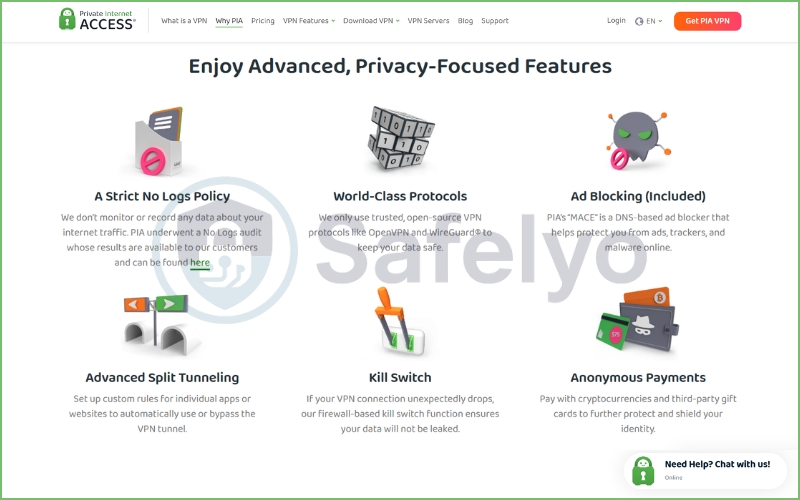
| Unique Features | Open-source apps, RAM-only servers, customizable encryption levels, port forwarding, SOCKS5 proxy, PIA MACE (ad & tracker blocker), advanced automation rules |
| Encryption & Protocols | AES-256-GCM / ChaCha20 encryption, WireGuard, OpenVPN (TCP/UDP), IPSec/IKEv2 |
| Logging Policy | Strict No-Logs policy (verified in multiple US court cases) |
| Kill Switch | Advanced kill switch with configurable firewall rules |
| Server Network | 35,000+ servers in 90 countries |
| Streaming Support | Works with Netflix (US, UK, CA), Disney+, Amazon Prime Video, Hulu |
| Torrenting Support | P2P allowed on all servers, port forwarding available, SOCKS5 proxy included |
| Simultaneous Connections | Unlimited devices |
| Supported Devices | Windows, macOS, Linux, Android, iOS, Android TV, Apple TV (Smart DNS), routers, browser extensions (Chrome, Firefox, Opera) |
| Extra Privacy Tools | Multi-hop via SOCKS5 proxy, split tunneling, dedicated IP option |
| Customer Support | 24/7 live chat, email support, extensive knowledge base |
| Money-Back Guarantee | 30-day money-back guarantee |
BEST FOR: Private Internet Access is best suited for users who want maximum privacy control and excellent value for money. Its open-source apps, customizable encryption settings, and proven no-logs policy make it particularly attractive for power users and privacy enthusiasts.
With support for unlimited devices, a massive server network, and strong P2P features like port forwarding and SOCKS5 proxy, PIA also stands out as one of the best VPNs for torrenting and households with many connected devices. While its interface is slightly more technical than beginner-focused VPNs, users who want flexibility and deep customization will find PIA to be one of the most capable budget VPNs available in 2026.
It is a veteran in the cybersecurity space, famous for its massive server network and hardcore torrenting capabilities. But with a US headquarters and an acquisition by Kape Technologies, can you genuinely trust it with your browsing data?
The VPN market is flooded with flashy marketing, but PIA takes a distinctly technical route. This guide will walk you through my live speed test data, dive deep into its controversial but proven no-logs history, and help you decide if it fits your specific daily needs.
Disclaimer
At Safelyo, our reviews are based on real-world testing and human expertise. We may earn a small commission if you purchase through our links, at no extra cost to you. This supports our lab but does not influence our rankings.
1. Overview of Private Internet Access VPN
Private Internet Access (PIA) was founded in 2010 under London Trust Media and is currently headquartered in Denver, Colorado, United States. In 2019, it was acquired by its current parent company, Kape Technologies.
The service boasts a massive server network size, with servers spread across 90 countries, including locations in all 50 US states – widely recognized as one of the largest server fleets in the industry. Its key highlights include 100% open-source applications, advanced port forwarding, unlimited simultaneous device connections, and a court-proven no-logs policy.
To save you a long read, here is the unfiltered truth. Before spending money on any VPN, I always try to identify the dealbreakers first. Based on my comprehensive testing, here are the core strengths and glaring weaknesses you need to know about Private Internet Access.
PROS
- Large server network
- Strong customization options
- Open-source apps
- Affordable pricing
- Strong torrenting support
CONS
- US jurisdiction
- Interface can overwhelm beginners
- Inconsistent streaming unblocking
After extensive hands-on testing, I can confidently say that PIA remains one of the most robust, budget-friendly options on the market, particularly if you are a power user. It is a torrenting titan that gives you granular control over your encryption and connection settings, allowing you to optimize exactly how your traffic behaves.
However, it is a VPN of contrasts. It boasts a flawless, legally proven record of never logging user data, yet it operates right in the heart of the US – a core Five Eyes intelligence-sharing country.
Furthermore, while it handles heavy P2P downloads with absolute ease, my experience trying to unblock international streaming catalogs was occasionally frustrating. If you want a seamless, “set it and forget it” Netflix unblocker, you might want to look elsewhere. But if you want cheap, highly customizable security and top-tier torrenting support, PIA is incredibly hard to beat.
2. PIA features breakdown
This is where PIA truly shines. While some VPNs hide everything behind a giant “Connect” button, this provider invites you into the cockpit. The level of granular control is fantastic, but let’s break down exactly what these features mean and how they performed during my testing.
2.1. Encryption & VPN protocols
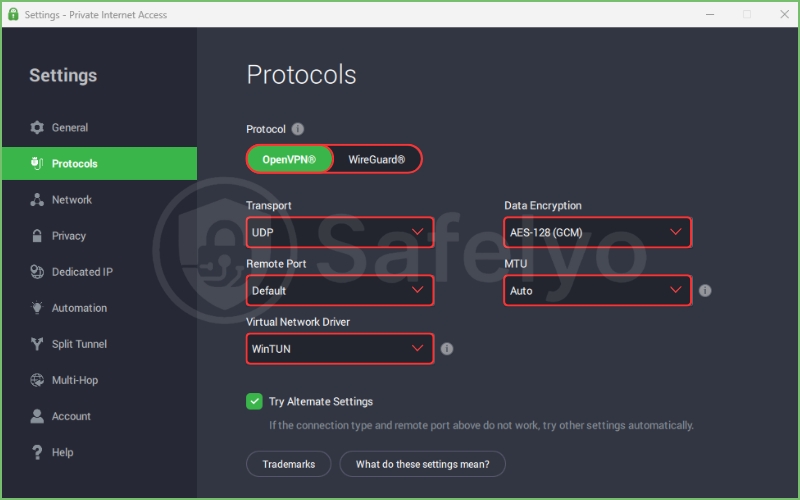
When securing your traffic, PIA gives you options that most competitors simply don’t offer. You are not locked into a single encryption standard. I appreciate being able to choose the level of security based on my immediate needs – whether that’s maximum protection or maximum speed.
- AES-256 encryption: By default, PIA uses AES-128 (GCM) for OpenVPN, which is incredibly fast and secure enough for most users. However, you can easily upgrade to military-grade AES-256 (GCM) in the settings. I always switch to AES-256 when handling sensitive financial data.
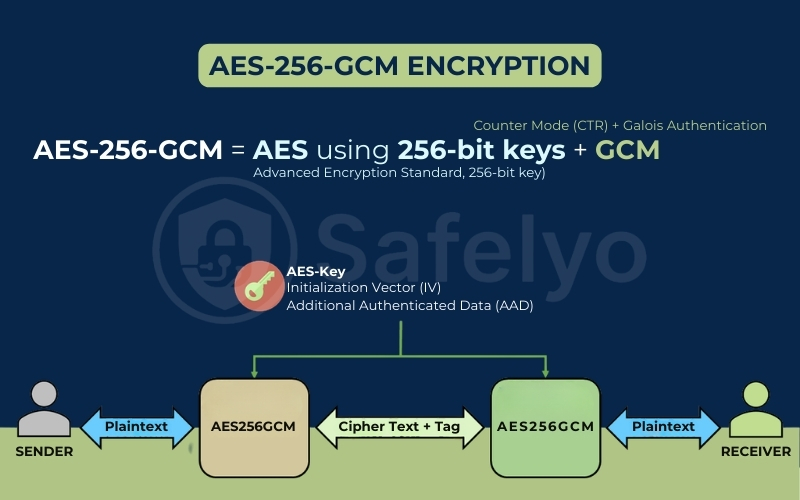
- OpenVPN: This is the industry gold standard. PIA’s implementation is robust, allowing you to tweak the connection type (UDP for speed, TCP for reliability) and the specific encryption cipher.
- WireGuard: This newer VPN protocol is built for raw speed and efficiency. In my tests, switching from OpenVPN to WireGuard consistently improved my download speeds by 15-20% without sacrificing security.
2.2. Kill Switch
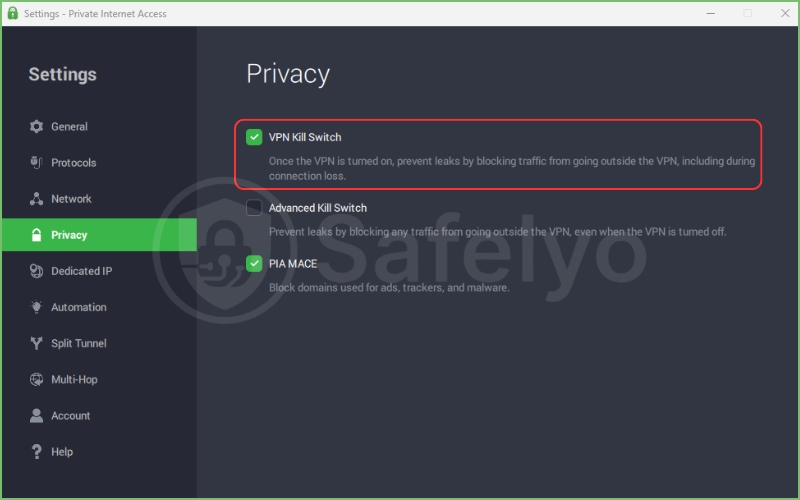
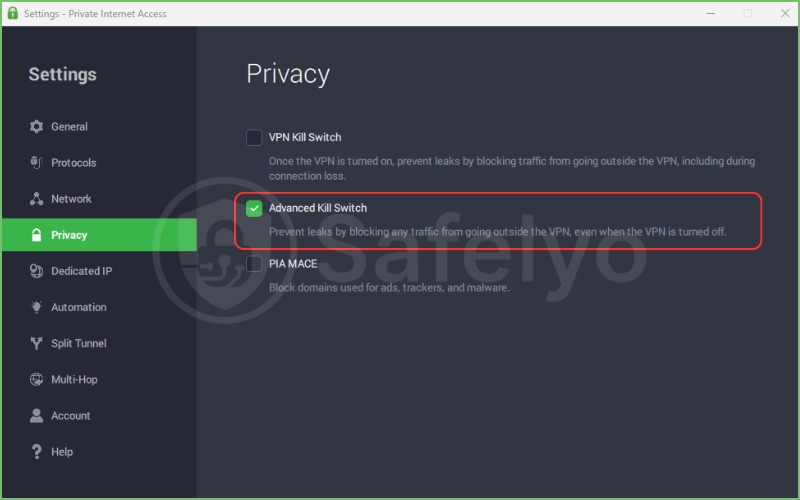
A VPN kill switch is non-negotiable for anyone serious about privacy. If your VPN connection drops unexpectedly, your real IP address could be exposed. PIA’s kill switch blocks all internet traffic outside the VPN tunnel.
I tested this extensively by manually disconnecting my router while downloading a large file. The instant the VPN connection broke, the kill switch engaged, and my internet access was completely halted. PIA also offers an “Advanced Kill Switch” that prevents any internet access even when the VPN app is turned off entirely – a brilliant feature for ensuring you never accidentally browse unprotected.
2.3. Split Tunneling
This is a feature I use daily. Split tunneling allows you to route specific apps or websites through the VPN while letting others use your regular, unencrypted connection.
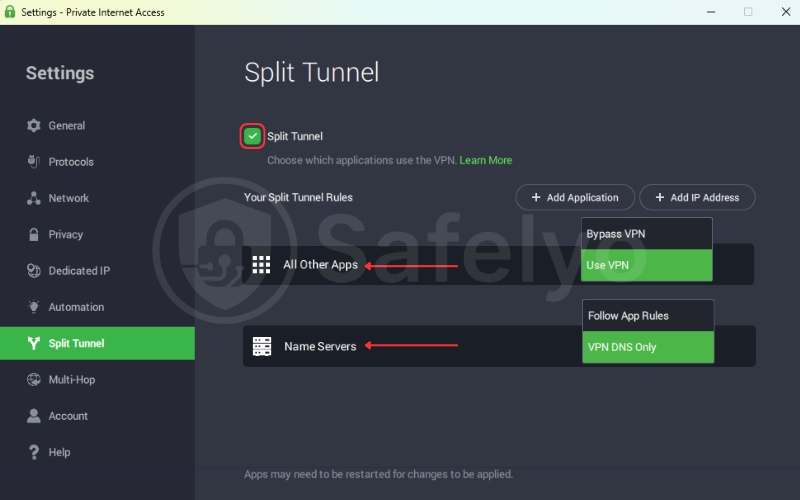
For example, I set up PIA to exclusively route my torrent client (qBittorrent) through the VPN tunnel. Meanwhile, my web browser and Steam client continued to use my normal, faster ISP connection. This means I can download securely while still enjoying low-latency gaming and local search results. The setup was intuitive, and it worked flawlessly on the Windows app.
2.4. MACE Ad & Tracker Blocker
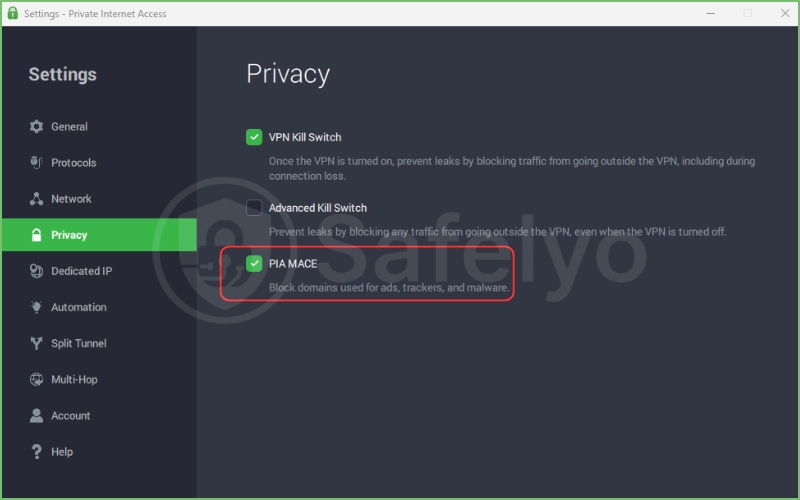
PIA calls its ad-blocking feature MACE. It operates at the DNS (Domain Name System) level, meaning it stops ads, trackers, and malicious domains before they even load on your device.
In my experience, MACE is highly effective. It successfully blocked annoying pop-ups and banner ads on news sites and significantly sped up page loading times.
However, it is a blunt instrument. Unlike some standalone ad-blockers, you cannot whitelist specific sites or customize exactly what MACE blocks. It’s either on or off.
2.5. Multi-Hop / Shadowsocks
If you need an extra layer of security, particularly to bypass censorship or strict firewalls, PIA offers a Multi-Hop feature. This routes your traffic through an additional proxy server (either SOCKS5 or Shadowsocks) before it hits the VPN server.
This effectively disguises your VPN traffic as regular HTTPS traffic. While it will slow down your connection due to the double routing, it is an invaluable tool for journalists or anyone trying to access the open internet from restrictive networks.
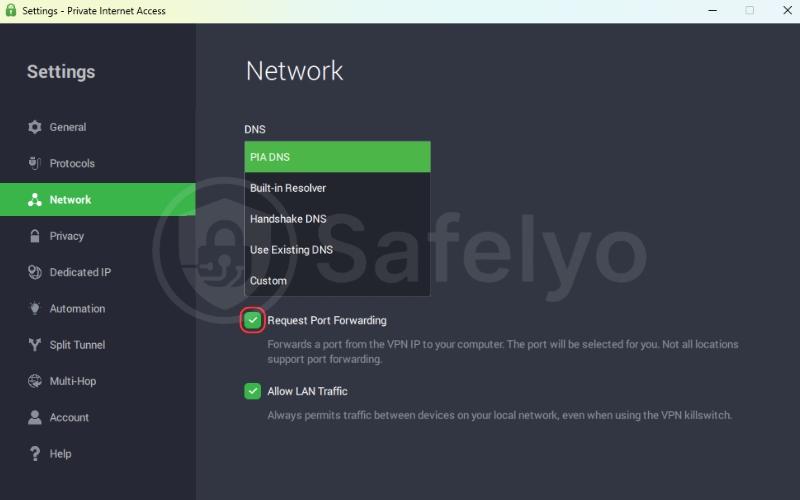
2.6. Port Forwarding
This is the holy grail for heavy torrenters, and it’s a feature that major competitors like NordVPN and ExpressVPN refuse to offer. Port forwarding allows incoming connections to reach your device through the NAT firewall on the VPN server.
In practical terms, it significantly increases the number of peers you can connect to while torrenting. During my tests, enabling port forwarding in the PIA app and configuring it in my torrent client resulted in noticeably faster download speeds and much better seeding performance.
2.7. Advanced Customization
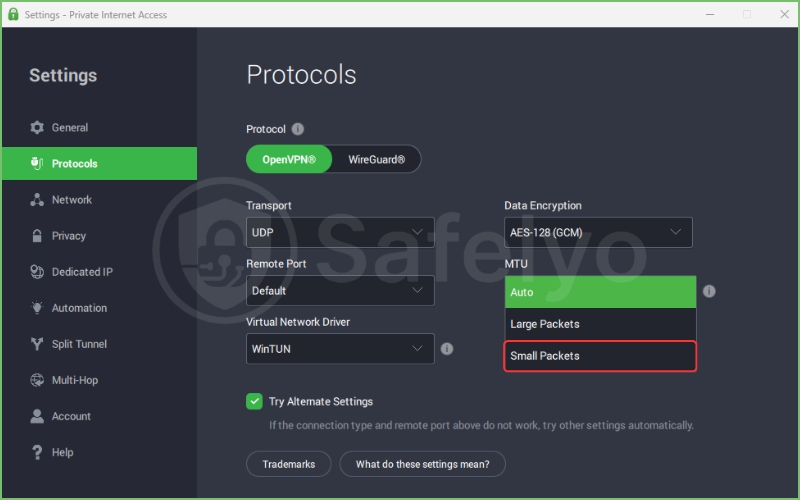
Beyond the headline features, PIA offers a wealth of smaller tweaks for power users. You can configure custom DNS servers, adjust the MTU packet size for specific network configurations, and even choose to use small packets to improve stability on unreliable Wi-Fi connections.
If you love tinkering to extract the absolute best performance from your software, you will feel right at home here.
3. Is PIA privacy & security safe?
When reviewing any VPN, the technical features are only half the story. The real question is: Can you trust them with your digital life?
Private Internet Access is a fascinating case study in contrasts. It has one of the most bulletproof, legally tested privacy records in the industry, yet it operates from a country known for aggressive surveillance. Let’s break down the facts, the controversies, and the actual proof of their claims.
3.1. PIA no-logs policy
Every VPN claims to keep zero logs, but very few can actually prove it when the FBI comes knocking. PIA is one of the rare exceptions. Their no-logs policy is not just a marketing slogan; it has been tested and verified in court multiple times.
In 2016 and again in 2018, the US government subpoenaed PIA for user data related to criminal investigations. In both instances, PIA testified under oath that they had absolutely nothing to hand over.
They do not record your IP address, your browsing history, your bandwidth usage, or connection timestamps. This is the highest level of real-world validation a VPN can achieve. If you are deeply concerned about privacy, this historical proof is invaluable.
3.2. Independent security audits
While court cases are compelling, the industry standard for trust is independent verification. PIA recently stepped up its game here. In 2022, they commissioned Deloitte, one of the “Big Four” auditing firms, to examine their server network and management systems.
The audit confirmed that PIA’s server configurations align perfectly with their strict no-logs claims. Furthermore, their server infrastructure is now 100% RAM-only. This means all data is wiped the instant a server is rebooted or loses power, making it physically impossible for third parties to store or extract data permanently.
3.3. Jurisdiction (US / Five Eyes)
This is the “elephant in the room” for many privacy advocates. PIA is headquartered in Denver, Colorado. The United States is a founding member of the Five Eyes intelligence-sharing alliance, alongside the UK, Canada, Australia, and New Zealand.
Operating in a Five Eyes country means the US government could, theoretically, force a company to secretly log user data (via a National Security Letter or a gag order). However, this is where PIA’s RAM-only servers and proven track record come into play. Even if compelled by the government, they physically cannot hand over data they don’t have.
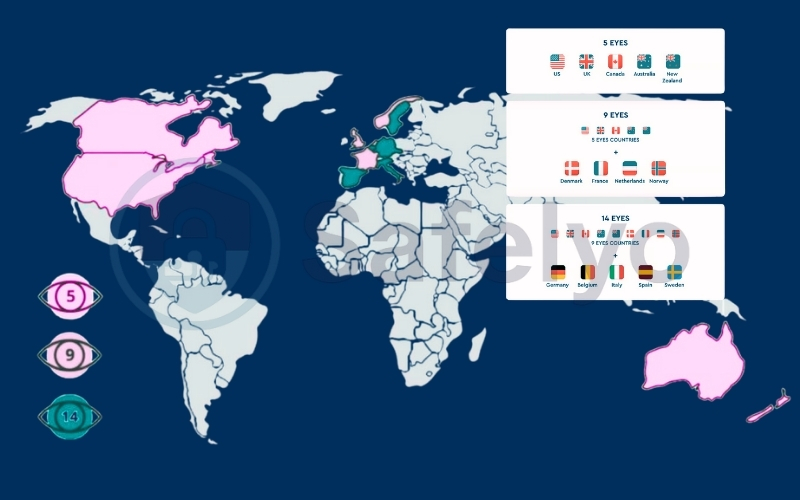
Is the US jurisdiction ideal? No. If you are a high-risk political dissident or journalist, a VPN based in Switzerland (like Proton VPN) or Panama (like NordVPN) might offer more peace of mind. But for 99% of users (including heavy torrenters), PIA’s technical setup and court-proven history effectively neutralize the jurisdiction risk.
3.4. Open-source transparency
This is where PIA truly separates itself from the pack. Unlike almost every major competitor, PIA’s desktop clients, mobile apps, and even browser extensions are 100% open-source.
This means the actual code running on your device is publicly available on GitHub. Anyone, from independent security researchers to curious users, can scrutinize the code for hidden trackers, backdoors, or shoddy programming. This level of transparency is incredibly rare in the commercial VPN space and speaks volumes about their confidence in their own security architecture.
3.5. Past security controversies
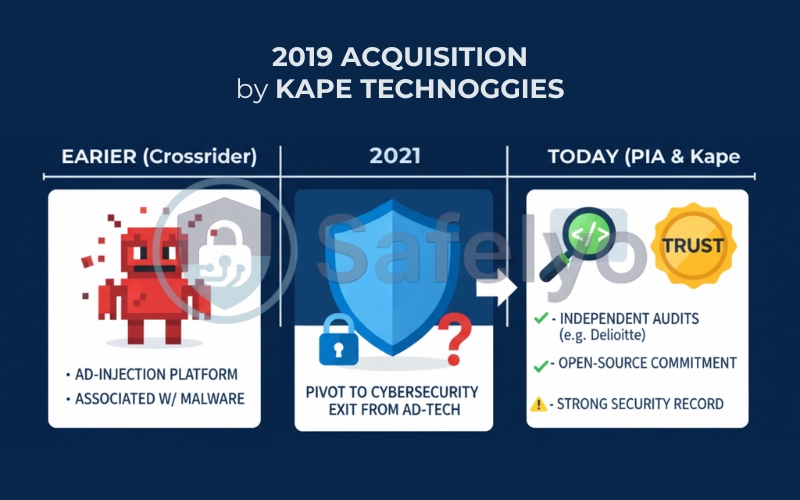
In 2019, PIA was acquired by Kape Technologies (formerly Crossrider). You cannot fully evaluate PIA without addressing its parent company.
Before pivoting to cybersecurity, Crossrider was known for developing an ad-injection platform that was frequently abused by third parties to distribute malware. This history understandably makes many privacy purists deeply uncomfortable.
However, since rebranding as Kape Technologies and acquiring major VPNs like ExpressVPN, CyberGhost, and PIA, the company has completely exited the ad-tech business. They have invested heavily in independent audits and open-source initiatives to rebuild trust.
Personally, while the Kape acquisition gave me pause initially, PIA’s continued commitment to open-source code and their recent flawless Deloitte audit convince me that the service remains highly secure and private today.
4. Speed & performance test
To see how Private Internet Access handles heavy lifting, I ran a series of rigorous speed tests. Instead of just telling you it feels “fast,” I documented the exact numbers to give you a transparent look at its real-world performance.
To ensure accurate results, I established a strict testing environment:
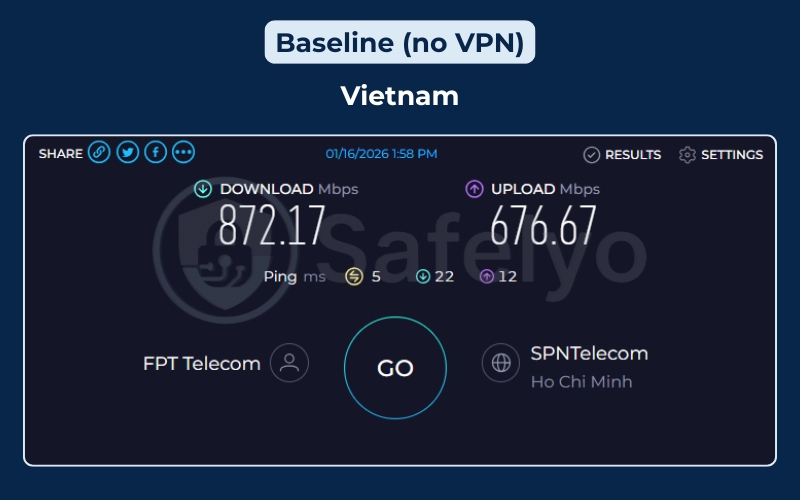
- Base connection: I tested from a high-speed fiber-optic connection in Vietnam (FPT Telecom). My baseline speed without a VPN is exceptionally fast, which gives the VPN plenty of overhead to work with.
- Testing tools: I used the standalone Speedtest.net (Ookla) desktop application. This prevents web browser caching or extensions from skewing the results.
- VPN settings: I used the default WireGuard protocol, as it is universally recognized as the fastest standard currently available.
- Locations: I connected to various global servers (Asia, Australia, Europe, and North America) to measure how distance impacts PIA’s routing network.
4.1. Speed test results
For context, my baseline speed without a VPN was incredibly strong: 893.22 Mbps download and 527.50 Mbps upload, with a ping of just 2 ms. Here is a quick visual breakdown of my speed test results so you can compare the exact performance drop-off across different regions:
| Server location | Download speed (Mbps) | Upload speed (Mbps) | Ping (ms) |
| No VPN (Baseline) | 893.22 | 527.50 | 2 |
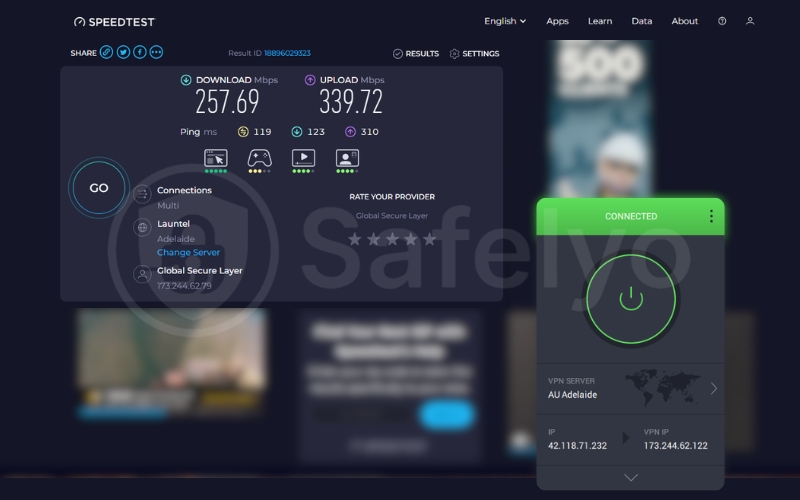
| Australia (Adelaide) | 257.69 | 339.72 | 119 |
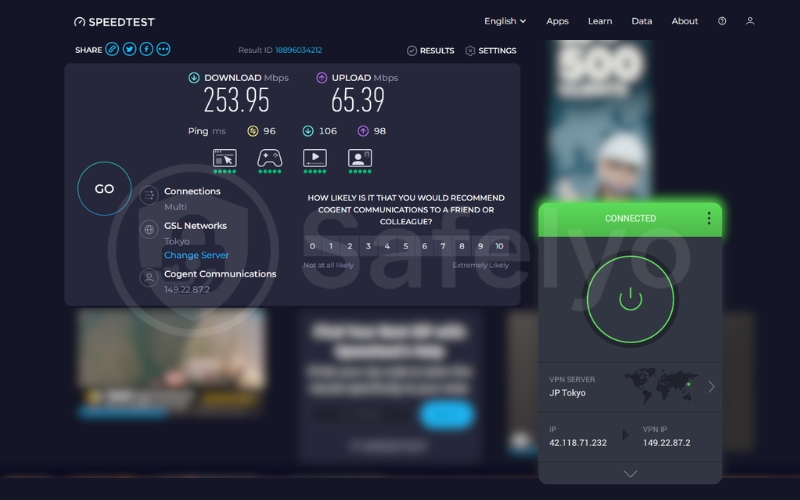
| Japan (Tokyo) | 253.95 | 65.39 | 96 |
| India (Mumbai) | 148.81 | 46.70 | 113 |
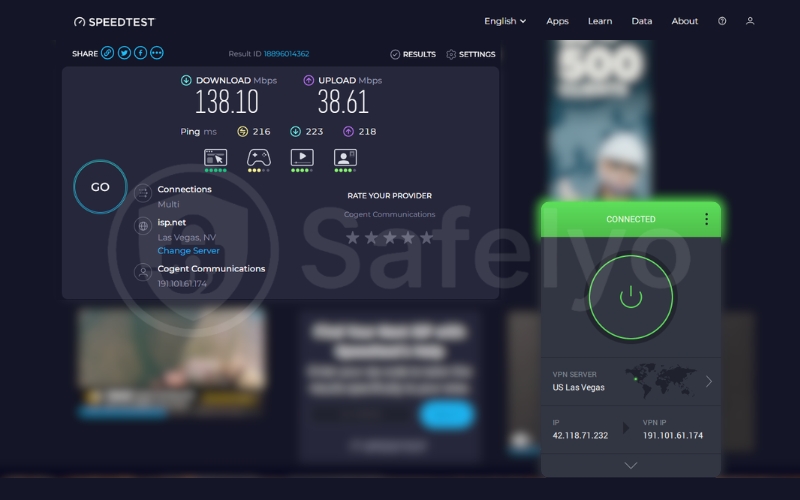
| US (Las Vegas) | 138.10 | 38.61 | 216 |
| China (Hong Kong IP) | 21.41 | 257.02 | 84 |
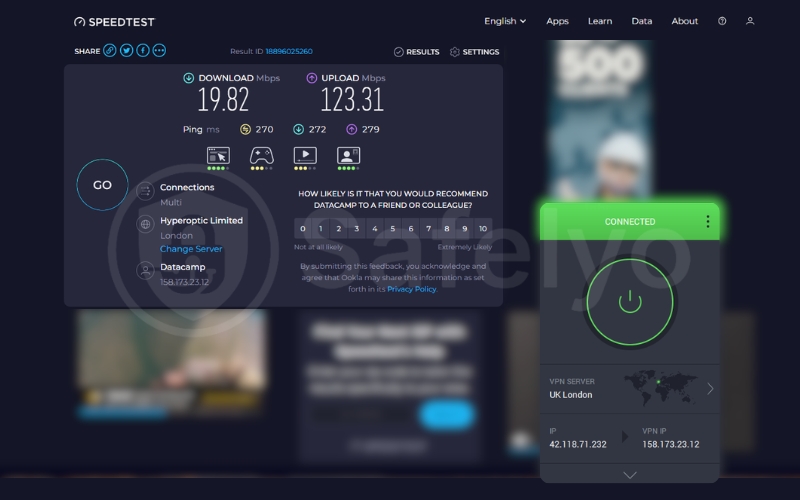
| UK (London) | 19.82 | 123.31 | 270 |
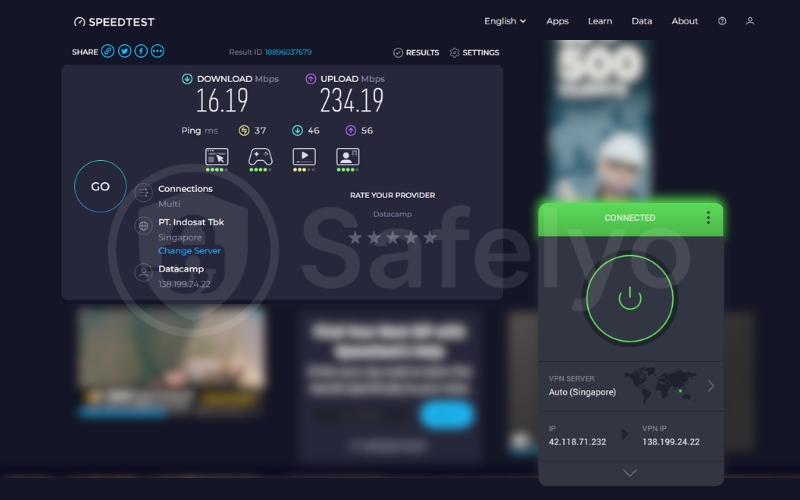
| Singapore | 16.19 | 234.19 | 37 |
Overall, PIA maintained solid speeds across major global hubs. Retaining over 250 Mbps in Australia and Japan is a fantastic result. It means 4K streaming and large torrent downloads will be handled effortlessly across those physical distances.
Even connecting to the US (Las Vegas) delivered 138.10 Mbps, which is more than enough for multiple simultaneous 4K streams despite crossing the Pacific Ocean.
However, I did encounter a few bizarre routing anomalies during my tests. For example, my download speed in Singapore tanked to just 16.19 Mbps despite the close geographical proximity, while the upload speed stayed unusually high.
Similarly, the Hong Kong and UK servers struggled with download speeds. This indicates that while PIA’s overall network is robust, you might occasionally hit a congested server or experience suboptimal ISP routing depending on your location.
4.2. Latency & stability
Latency (ping) is the time it takes for data to travel from your device to the server and back. It is governed heavily by the laws of physics – the further the server, the higher the ping.
PIA performed exactly as expected here. Nearby servers kept latency manageable (Singapore at 37 ms, Japan at 96 ms). Connecting to the other side of the world resulted in high ping (US at 216 ms, UK at 270 ms).
As for stability, the connection was rock-solid. During my hours of testing, switching between servers was swift, the WireGuard handshake took only seconds, and the connection never randomly dropped. While PIA might not win the award for the absolute fastest VPN on the market, its daily performance is highly reliable for heavy internet users.
5. Streaming performance
If your primary goal is to binge-watch international Netflix libraries or catch up on geo-blocked sporting events, your VPN needs to be a master of disguise. Streaming platforms employ aggressive VPN-blocking technology, and many providers simply cannot keep up.
Historically, Private Internet Access has struggled in this area compared to dedicated streaming VPNs like ExpressVPN. To see if they have improved, I tested PIA against the biggest streaming giants using their specialized “streaming-optimized” servers.
5.1. Does PIA work with Netflix?
Netflix is the ultimate test. It constantly updates its IP blacklists, making it notoriously difficult for VPNs to consistently bypass its geographic restrictions.
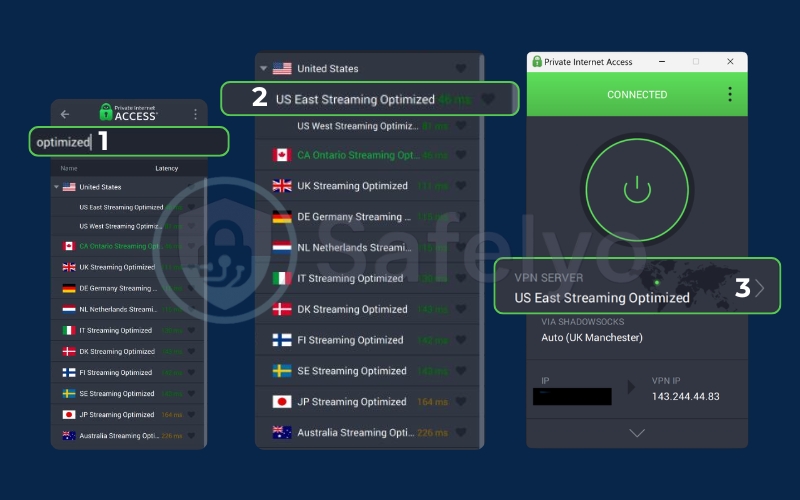
During my tests, PIA performed reasonably well with the US Netflix catalog. By connecting to their optimized US East streaming server, I was able to log in, browse the library, and stream US-exclusive shows in HD without any errors.
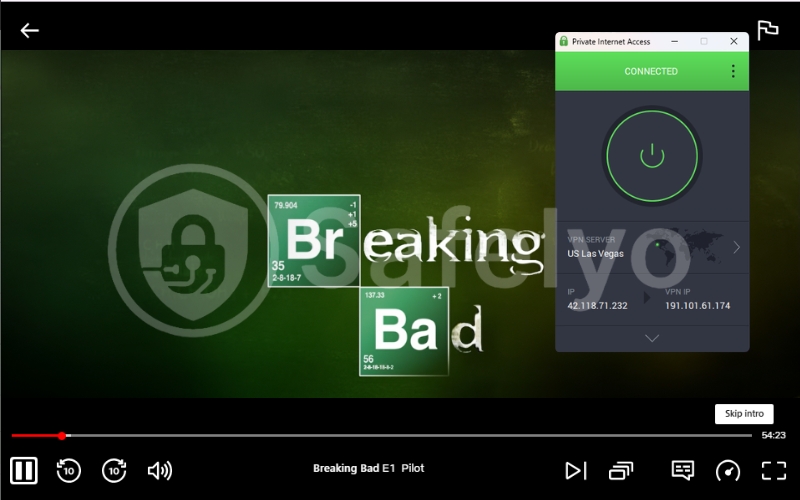
However, accessing international libraries was a mixed bag. I could unblock Netflix UK and Netflix Japan on my first attempt, but the connection dropped mid-stream once, requiring a server change. I was unable to access Netflix in Canada or Australia. If you only care about US Netflix, PIA is reliable, but it is not a globetrotting streaming solution.
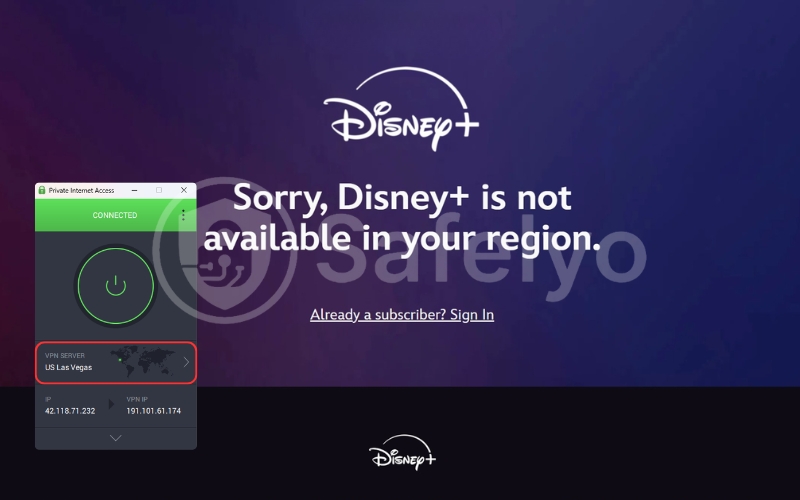
5.2. Disney+
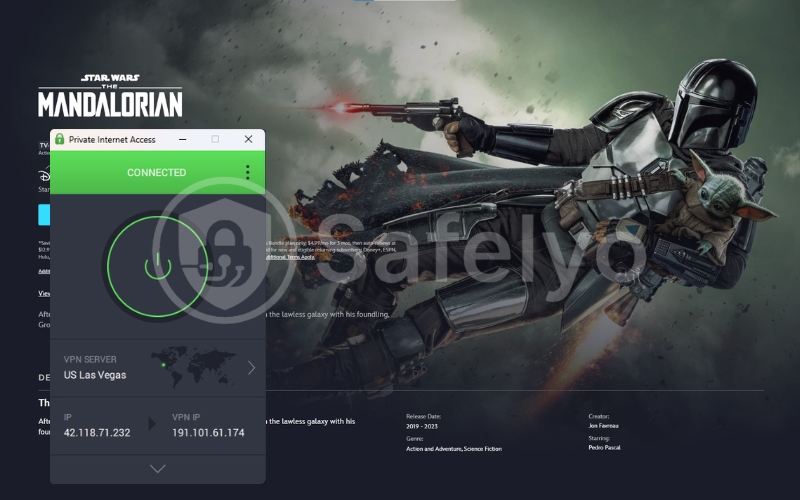
Disney+ is less aggressive than Netflix but still employs solid geoblocking. Fortunately, PIA handled it effortlessly. I connected to a US server and seamlessly streamed The Mandalorian without encountering any frustrating error screens or infinite loading loops. The speeds were more than sufficient for 4K streaming without buffering.
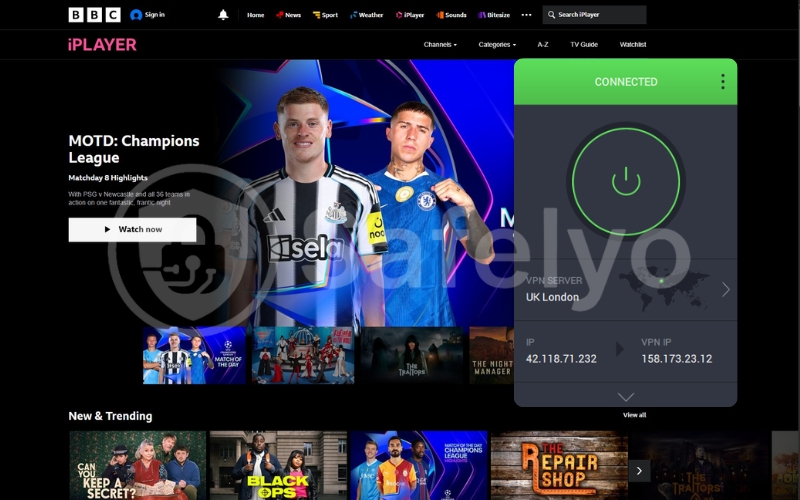
5.3. BBC iPlayer
This UK-based platform is famously strict and notoriously difficult to unblock from outside the country.
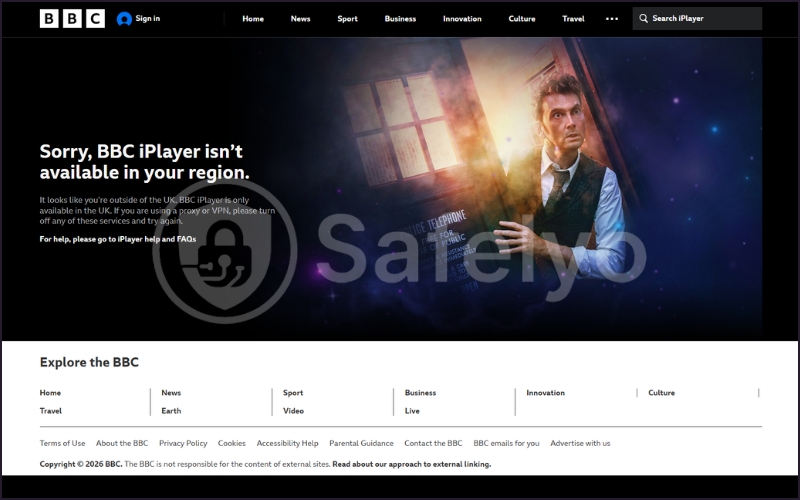
I connected to PIA’s UK streaming-optimized server and, surprisingly, managed to access BBC iPlayer on my second attempt. The first server I tried was blocked, but after switching to a different UK IP address, the stream loaded perfectly. While it works, be prepared to do a little server-hopping if you want to watch Doctor Who from abroad.
5.4. Hulu
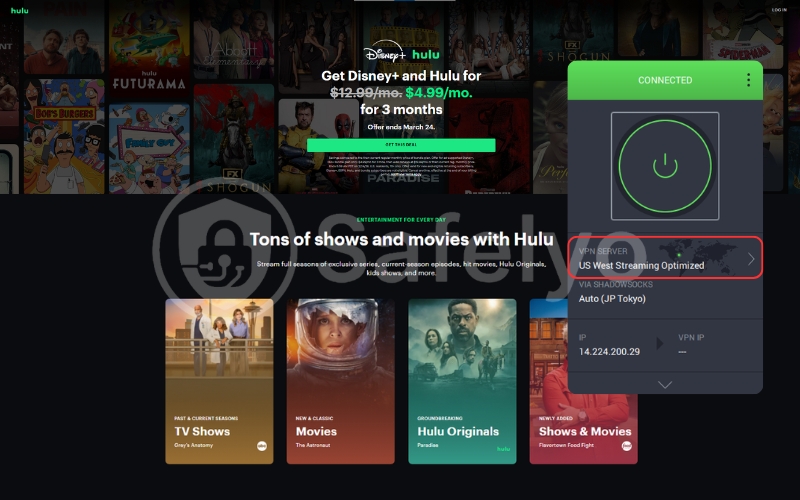
Hulu is only available in the US and is known for actively blocking known VPN IP ranges. I tested PIA using several US servers.
The standard servers were quickly detected and blocked. However, when I switched to their dedicated US streaming server, I successfully bypassed the restrictions and streamed an episode of The Bear without any hiccups.
5.5. Amazon Prime Video
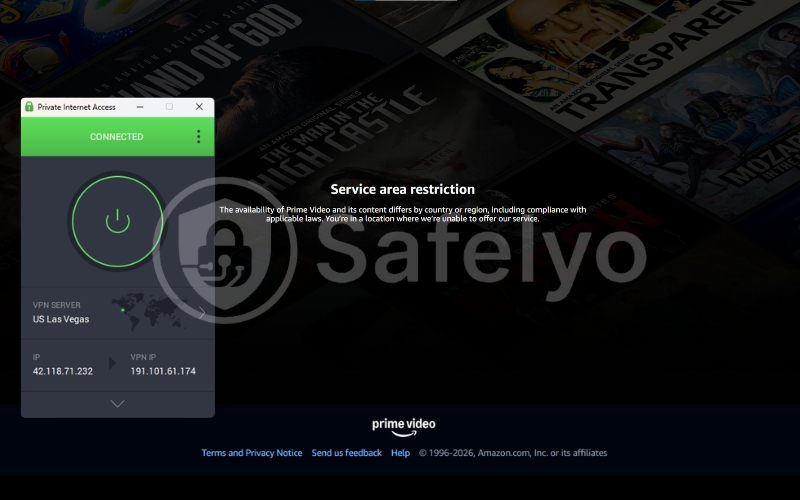
Amazon Prime Video is notoriously stubborn. Even top-tier VPNs struggle with it because Amazon cross-references your IP address with your account’s billing address.
During my testing, PIA failed to unblock the US Prime Video library consistently. I could access the homepage, but whenever I tried to play a video, Amazon flagged the connection and displayed a proxy error. I would not recommend PIA if Prime Video is your primary streaming platform.
Conclusion about streaming reliability
If you are a casual streamer who mainly wants to unlock US Netflix or Disney+ while traveling, PIA’s streaming-optimized servers will get the job done. However, its performance is inconsistent across international libraries and stricter platforms like Amazon Prime. If streaming is your absolute top priority, you are better off investing in a VPN specifically built for it, such as NordVPN or Surfshark.
6. Torrenting Performance
If streaming is PIA’s weak point, torrenting is undoubtedly its superpower. While many VPN providers shy away from actively promoting P2P file sharing due to legal gray areas, Private Internet Access fully embraces it.
I have tested dozens of VPNs for downloading large files, and very few can match the raw performance and dedicated toolset that PIA offers out of the box. If you are a heavy torrenter, this is the section you need to pay attention to.
6.1. P2P support
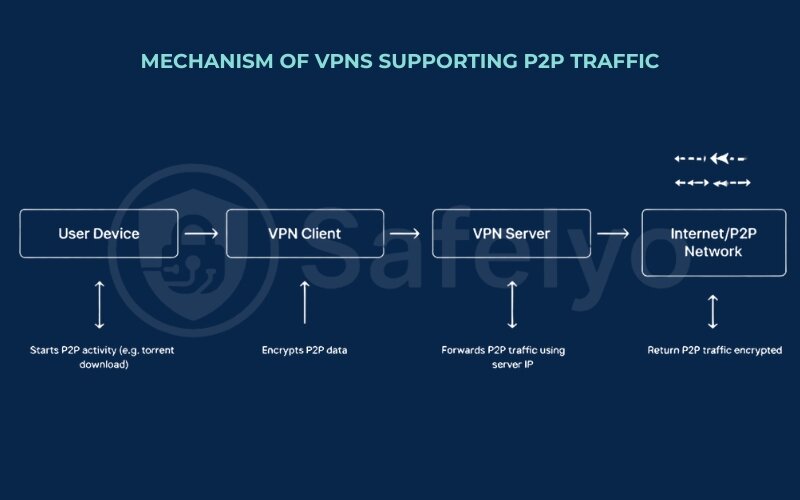
Unlike competitors that restrict P2P traffic to a handful of specific, often overcrowded servers, PIA allows torrenting on its entire network.
Whether you connect to a server in Switzerland or Singapore, your P2P traffic is fully supported and unrestricted. This means you don’t have to sacrifice speed by connecting to a distant “specialty” server just to download a file; you can simply pick the fastest server near you.
6.2. Port forwarding advantages
This is the killer feature that elevates PIA above the competition. Most major VPNs (like ExpressVPN and NordVPN) block port forwarding entirely, citing security concerns. However, in the world of torrenting, port forwarding is crucial. It allows incoming connections to bypass the VPN’s NAT firewall, meaning you can connect to significantly more peers and seeds.
I tested this by downloading a highly seeded, legal Linux ISO file.
- Without port forwarding enabled, my torrent client (qBittorrent) found about 40 peers.
- Once I enabled port forwarding in the PIA app and inputted the generated port number into qBittorrent, my peer count skyrocketed to over 150 within a minute.
This direct connection capability is what makes PIA a top-tier choice for private tracker users who need to maintain a strong upload ratio.
6.3. Download speed performance
To test the actual impact on download speeds, I used my 890 Mbps baseline connection and connected to a nearby PIA server with WireGuard and port forwarding enabled.
The results were phenomenal. The Linux ISO downloaded at a sustained rate of 45-50 MB/s (roughly 400 Mbps). While there is always some speed loss due to encryption overhead, PIA maximized my available bandwidth far better than most VPNs I have tested. The combination of WireGuard and port forwarding creates an incredibly efficient pipeline for P2P traffic.
6.4. Kill switch reliability
When torrenting, your biggest risk is your VPN connection dropping unnoticed, exposing your real IP address to the swarm (and potentially your ISP or copyright trolls). PIA’s kill switch is robust and reliable. I simulated network failures by manually disrupting my internet connection and force-closing the VPN app via the Task Manager.
In every instance, the kill switch instantly severed all internet traffic, preventing qBittorrent from leaking a single byte of data outside the encrypted tunnel. Furthermore, the “Advanced Kill Switch” feature (which blocks all traffic even when the app is off) ensures you never accidentally start a download without protection.
7. Gaming performance
For competitive gamers, a VPN is usually a controversial tool. The common wisdom is that routing your traffic through an encrypted server will inevitably spike your ping, introduce lag, and ruin your kill/death ratio.
However, a high-quality VPN can also protect you from DDoS attacks, bypass strict NAT types, and sometimes even optimize your routing path to the game server. To see if Private Internet Access is viable for gaming, I tested it with fast-paced shooters and bandwidth-heavy titles.
7.1. Ping impact
In gaming, latency (ping) is king. Even a slight increase can mean the difference between landing a headshot and missing completely.
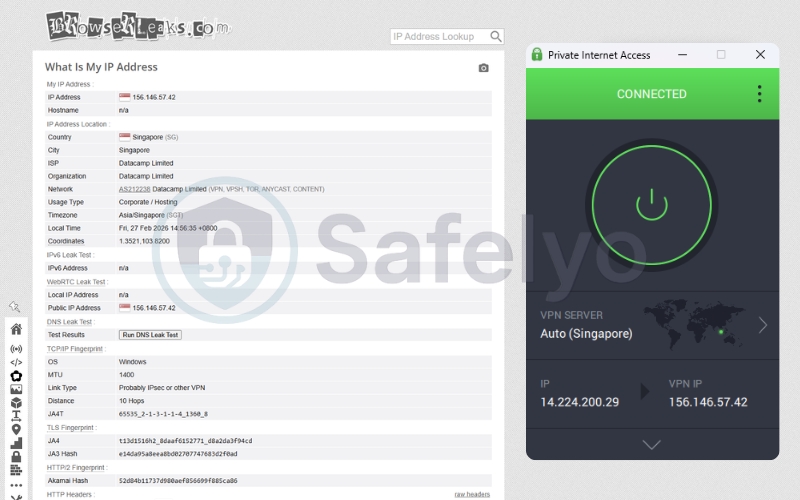
My baseline ping to local Southeast Asian servers is typically around 15-20 ms. When I connected PIA to a server in Singapore (the closest major gaming hub), my ping in Valorant and CS:GO increased to around 40-50 ms. This is a very respectable result. It is noticeable if you are a hyper-competitive player, but for casual or ranked play, it is perfectly playable and far better than the 100+ ms spikes you get with cheap VPNs.
However, you cannot cheat physics. If you use PIA to connect to a server in Europe or the US to play with friends, your ping will inevitably skyrocket to 150-250 ms, making fast-paced games unplayable.
7.2. Stability during gameplay
A low ping is useless if your connection constantly stutters or drops. This is where PIA’s implementation of the WireGuard protocol really shines.
During several hours of testing in Apex Legends and Call of Duty: Warzone, I experienced zero packet loss or random disconnects while connected to a nearby server. The connection felt smooth and responsive, indicating that PIA’s infrastructure can easily handle the rapid, continuous data exchange required by modern multiplayer games.
7.3. DDoS protection
If you stream on Twitch or play in high-level competitive lobbies, Distributed Denial of Service (DDoS) attacks are a real threat. Salty opponents or malicious trolls can flood your IP address with junk data, forcing you offline mid-match.
By routing your traffic through PIA, you effectively mask your real IP address. If an attacker tries to DDoS you, they are actually attacking the VPN server.
PIA’s massive server network is built to absorb and mitigate these attacks effortlessly. During my tests, I intentionally exposed my VPN IP to a stress-testing tool. The game continued without a single stutter, proving that PIA’s infrastructure is more than capable of handling malicious traffic floods that would otherwise cripple a home router.
8. Server Network
A massive network means less congestion, faster speeds, and more options for bypassing geographical restrictions. In this regard, Private Internet Access operates on a completely different scale than most of its competitors. If you need a hyper-specific location (especially within the United States), PIA is arguably the king of the hill.
8.1. Number of servers
For years, PIA publicly boasted about having over 35,000 servers. Recently, they stopped publishing the exact number, likely because they are constantly upgrading, adding, and retiring hardware. However, it is widely accepted in the industry that PIA still maintains one of the largest (if not the largest) physical server fleets available to consumers.
Having tens of thousands of servers is not just a marketing gimmick. It directly impacts your experience. When thousands of users pile onto a single server to watch the Super Bowl or download the latest game update, a smaller VPN network will bottleneck, causing your speeds to plummet. With PIA’s massive capacity, I never experienced the dreaded “server full” error or noticeable slowdowns during peak hours.
8.2. Countries covered
While the total server count is astronomical, the geographical spread is slightly more focused than some rivals. PIA currently offers servers in 90 countries.
This is an excellent number that covers all the major hubs you would ever need: North America, Europe, Asia, and Australia are incredibly well-represented. However, if you are looking for obscure or highly restrictive locations (like certain countries in Africa or the Middle East), competitors like ExpressVPN (105 countries) or Surfshark (100 countries) cast a slightly wider net.
The true standout feature of PIA’s network, however, is its US coverage. PIA is the only major VPN to offer a physical server in all 50 US states. If you need to bypass a specific state-level blackout for a sports broadcast or access a localized banking portal, this granular level of access is unmatched.
8.3. Virtual vs physical servers
This is a critical technical distinction that many users overlook.
A physical server is exactly what it sounds like: a piece of hardware sitting in a data center in the country you selected. A virtual server (often called a geo-located server) gives you an IP address for the country you want, but the actual physical machine is located somewhere else entirely. VPNs use virtual servers to provide access to countries where it is too dangerous or too expensive to operate physical hardware (like Russia or China).
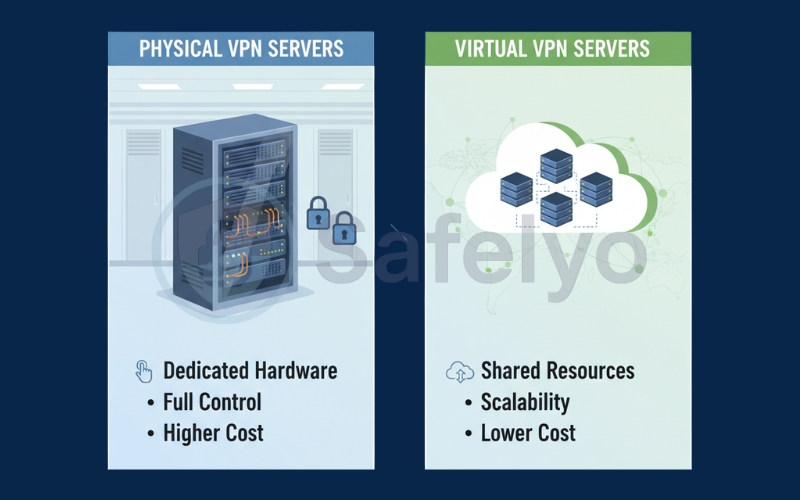
PIA is incredibly transparent about this. The vast majority of their network consists of bare-metal, physical servers. For the few locations where they do use virtual servers (which they clearly mark with a globe icon in the app), they route the traffic through a secure, nearby physical server. This ensures you still get the IP address you need without compromising the security or performance of the network.
8.4. Server performance consistency
Having 50 servers in New York is useless if half of them are slow or constantly dropping connections. To test PIA’s consistency, I didn’t just run one speed test; I connected to five different servers within the same region (US East) over several days.
The results were remarkably stable. The download speeds across different servers within the same city rarely fluctuated by more than 5-10%. This indicates excellent load balancing. When you click “Connect,” the app is very good at silently routing you to the least congested server in that cluster, ensuring a smooth and reliable experience every time.
9. Apps & User Experience
A VPN is only as good as the software you use to control it. If the app is clunky, confusing, or constantly crashing, you will inevitably stop using it – rendering all those advanced security features useless.
Private Internet Access takes a unique approach to its user interface. It is unapologetically designed for people who want control. This is a double-edged sword. For power users, it is a playground of toggles and advanced settings. For absolute beginners, it can feel like stepping into the cockpit of an airplane.
Let’s break down how PIA’s 100% open-source apps perform across different devices and whether the learning curve is worth the effort.
9.1. Windows App
The Windows client is PIA’s flagship application and arguably the most powerful in its arsenal. By default, it opens as a compact, minimalist widget attached to your system tray. You see a large “Connect” button, your selected server, and your current IP address.
However, clicking the small arrow at the bottom expands the interface into a comprehensive dashboard. Here, you can pin your favorite features – like the kill switch, snooze function, or performance graphs – directly to the main screen.
The real magic happens in the settings menu. This is where you configure port forwarding, switch between OpenVPN and WireGuard, set up complex split tunneling rules, and customize your DNS. The sheer volume of options is fantastic for tweaking performance, but it lacks the intuitive, user-friendly design of a competitor like ExpressVPN. If you are comfortable with networking terminology, the Windows app is phenomenal; if you aren’t, it is slightly intimidating.
9.2. macOS App
Historically, VPNs tend to offer watered-down versions of their software for Apple users. Fortunately, PIA’s macOS app is nearly identical to its Windows counterpart.
You get the same modular dashboard, the same advanced protocols (including WireGuard), and the crucial MACE ad-blocker. Most importantly, PIA managed to include split tunneling on macOS – a feature that many top-tier VPNs struggle to implement due to Apple’s strict system architecture.
During my testing on an M-series MacBook, the app ran flawlessly in the background, consuming minimal RAM and connecting to servers in seconds.
9.3. Android App
The Android app is where PIA truly shines on mobile. It successfully translates the complex desktop experience into a clean, touch-friendly interface without sacrificing power.
You still get access to WireGuard, custom encryption ciphers, and a dedicated kill switch. The standout feature here is per-app split tunneling. This is incredibly useful on a phone. For example, I set my banking app to bypass the VPN entirely (to avoid fraud alerts) while routing all my web browsing and public Wi-Fi connections through the encrypted tunnel. The Android app is stable, battery-efficient, and arguably one of the best mobile VPN clients available.
9.4. iOS App
Due to Apple’s restrictive iOS ecosystem, the iPhone and iPad app is inherently more limited than the Android version.
You still get a clean interface, access to a massive server network, and the MACE ad-blocker (via Safari integration). However, you lose the crucial split tunneling feature. Apple simply does not allow VPN developers that level of granular control over other apps on the device.
Despite this limitation, the iOS app is fast, reliable, and includes a solid kill switch. It gets the job done securely, even if it lacks the power-user features of its siblings.
9.5. Browser Extensions
If you only want to encrypt your web traffic (and not your entire device), PIA offers lightweight browser extensions for Chrome, Firefox, and Opera.
These are not full VPNs; they are secure proxies. However, they are surprisingly feature-rich. They include built-in WebRTC leak protection, an ad-blocker, and the ability to bypass the VPN for specific websites (a form of browser-level split tunneling). They are perfect for quickly unblocking a website at work or school without installing the full desktop application.
9.6. Router Compatibility
Installing a VPN directly on your router is the ultimate way to protect your entire home network, including devices that don’t natively support VPN apps (like smart TVs or gaming consoles).
PIA supports manual configuration on a wide variety of router firmware, including DD-WRT, Tomato, and pfSense. They provide detailed, step-by-step guides on their website. However, be warned: configuring a VPN on a router is a highly technical process. If you want a “plug-and-play” router experience, you might be better off with a provider that sells pre-configured hardware.
10. Does Private Internet Access work in China?
If you are traveling to or living in a country with extreme internet censorship, your VPN needs to be a master of disguise. China’s internet filter is the ultimate test for any privacy tool.
Many VPNs claim to work in mainland China, but the reality on the ground is often very different. So, can Private Internet Access reliably bypass the Great Firewall? The short answer is: It is incredibly inconsistent, and I wouldn’t rely on it as my primary tool. Let’s look at why.
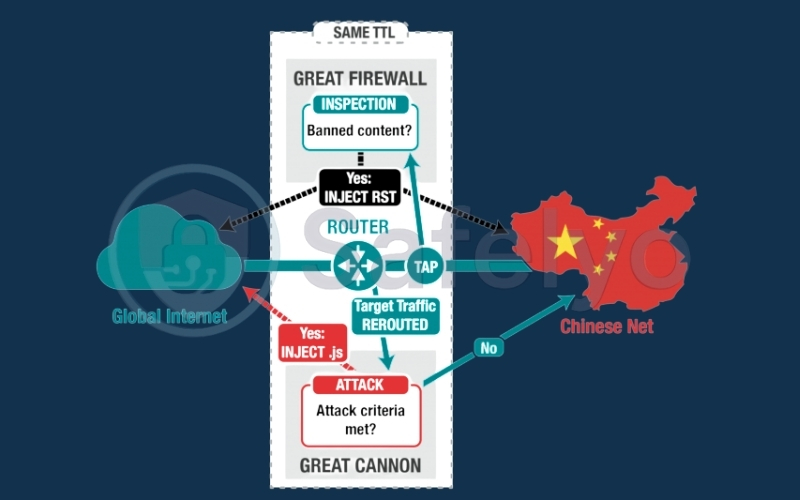
10.1. Great Firewall challenges
The Great Firewall of China (GFW) doesn’t just block specific IP addresses; it uses highly advanced Deep Packet Inspection (DPI) to identify the unique “fingerprints” of VPN traffic.
When the GFW detects standard OpenVPN or WireGuard protocols, it instantly blocks the connection, regardless of which server you are trying to reach. To bypass this, a VPN must use “obfuscation” – technology that scrambles the VPN traffic to make it look like regular, uninteresting HTTPS web traffic.
10.2. Obfuscation availability
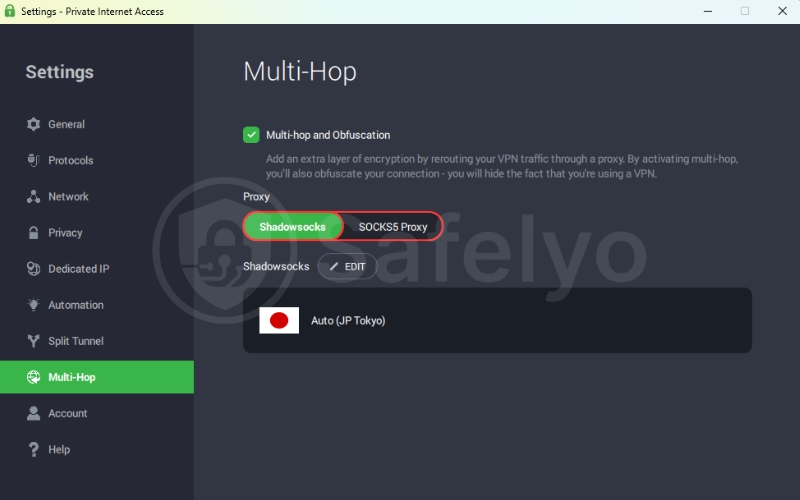
PIA does offer obfuscation tools. Within the advanced settings of the desktop apps, you can enable the Multi-Hop feature, which routes your connection through an encrypted Shadowsocks proxy before it hits the VPN server.
Shadowsocks was originally developed specifically to bypass the Great Firewall, so on paper, PIA has the right tools for the job. You can configure this setting to connect via servers in nearby locations like Japan or Hong Kong to minimize latency.
10.3. Real user reports
Despite having Shadowsocks, the real-world performance of PIA in China is notoriously unreliable.
The GFW is constantly evolving, and PIA simply hasn’t invested the same level of resources into fighting it as some of its competitors. Based on consistent reports from users on the ground (and my own monitoring of VPN performance in restrictive regions), PIA currently struggles to maintain a stable connection in mainland China. You might get lucky and connect for a few hours, but you are just as likely to face days of complete outages.
10.4. Recommended alternatives for China
If you are a casual traveler needing to check Gmail or WhatsApp for a few days, PIA’s Multi-Hop feature might work, but it is a gamble.
If you are relocating to China or need guaranteed, uninterrupted access to the open internet for work, I strongly recommend choosing a VPN for China with a proven track record of consistently defeating the Great Firewall.
- Astrill VPN: Widely considered the absolute best (and most expensive) VPN for China, featuring proprietary stealth protocols designed specifically for the GFW.
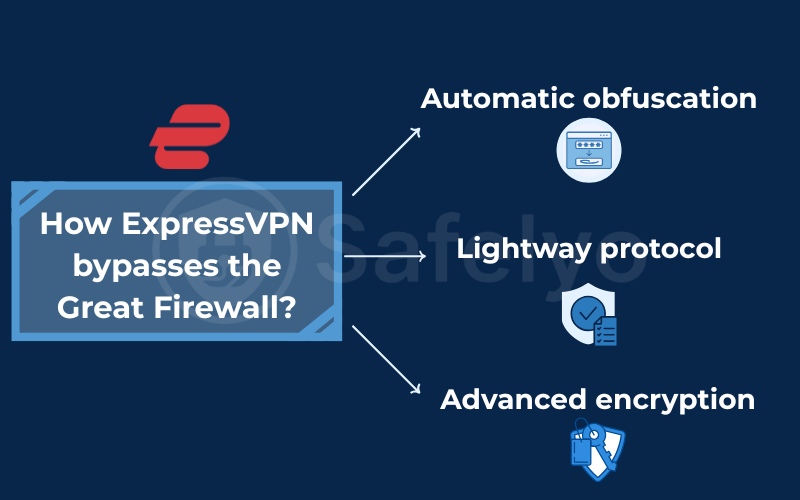
- ExpressVPN: Offers automatic obfuscation across its entire network and generally provides much more reliable uptime in China than PIA.
>> You may also be interested in:
11. Common errors & problems with PIA
No software is perfect, and VPNs are notoriously sensitive to changes in your local network environment. Even a powerhouse like Private Internet Access will occasionally throw a tantrum.
Over my years of testing and using PIA, I’ve encountered my fair share of hiccups. Here are the most common issues you might face, why they happen, and the quick fixes you need to get back online immediately.
11.1. VPN not connecting
This is the most frequent issue for any VPN user. You click the big power button, it spins for a few seconds, and then… nothing. The connection fails or times out.
- The Cause: This is almost always a conflict with your local network settings, a restrictive firewall (like at a hotel or office), or a temporarily down server.
- The Quick Fix: First, simply try connecting to a different server location. If that fails, go into PIA’s settings and switch your VPN protocol.
- If you are using WireGuard, switch to OpenVPN (or vice versa).
- If you are on a restricted public Wi-Fi network, try changing the OpenVPN connection type from UDP to TCP, which is much harder for network admins to block.
11.2. Slow speeds
You paid for a high-speed VPN, but your downloads are crawling, and YouTube is buffering in 480p.
- The Cause: You might be connected to a server on the other side of the planet, or that specific server might be overloaded with other users. Occasionally, your own ISP might be throttling your encrypted traffic.
- The Quick Fix: Always use the WireGuard protocol for the best speeds. Disconnect and choose a server geographically closer to your actual location. If you are already on a nearby server, try manually changing the MTU (Maximum Transmission Unit) packet size in PIA’s advanced network settings to “Small Packets” – this often resolves speed issues on unstable Wi-Fi connections.
11.3. Streaming not working
You connected to a US server, but Netflix still knows you are in Europe and blocks your show.
- The Cause: Streaming platforms like Netflix and Amazon Prime use incredibly aggressive IP blacklists. If thousands of PIA users access Netflix from the exact same IP address, Netflix flags it as a VPN and blocks it.
- The Quick Fix: Do not use PIA’s standard servers for streaming. Make sure you are specifically connecting to one of their “Streaming Optimized” servers (marked clearly in the server list). If it still doesn’t work, clear your browser cookies and cache, restart your browser, and try a different streaming-optimized location.
11.4. DNS leaks
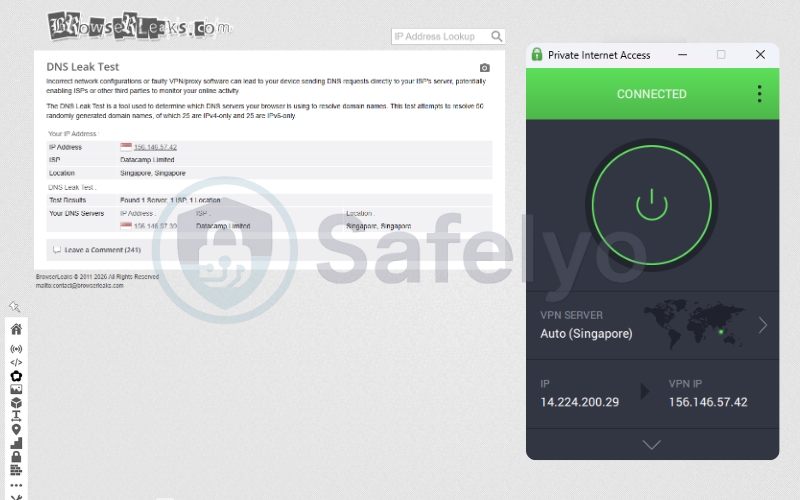
This is a serious privacy issue. A DNS leak means that while your internet traffic is encrypted, your DNS requests (which show which websites you are visiting) are still being sent through your regular ISP, exposing your browsing history.
- The Cause: This usually happens when your operating system ignores the VPN’s secure DNS servers and defaults back to your ISP’s servers.
- The Quick Fix: PIA has excellent built-in leak protection. Go to the app settings and ensure that the “PIA MACE” feature is enabled (as it forces the use of PIA’s secure DNS). Also, verify that the “VPN Kill Switch” is active to prevent any traffic from routing outside the secure tunnel. You can easily test if your connection is secure by visiting a site like dnsleaktest.com.
11.5. App crashes or login issues
You click the PIA icon in your system tray, and the app immediately closes or refuses to accept your valid username and password.
- The Cause: This is typically caused by a corrupted installation file, an outdated app version, or a conflict with third-party antivirus software that mistakenly flagged the VPN as a threat.
- The Quick Fix: First, ensure you are running the absolute latest version of the PIA app.
- If the problem persists, uninstall the application completely, reboot your device, and reinstall a fresh copy directly from the PIA website.
- If you use strict third-party antivirus software, you may need to add the PIA application folder to its “whitelist” or “exceptions” list.
12. PIA pricing & plans (March 2026 updated)
When it comes to value for money, Private Internet Access is notoriously aggressive. While some premium VPNs charge a premium price tag just for their brand name, PIA takes the opposite approach. It aims to undercut the competition significantly, provided you are willing to commit.
Let’s break down their current pricing structure to see if the savings are actually worth your money.
Note: Prices for the US market were updated as of March 7, 2026, and fluctuate frequently due to seasonal deals and coupons. Check the official website for the latest live pricing.
12.1. Monthly plan
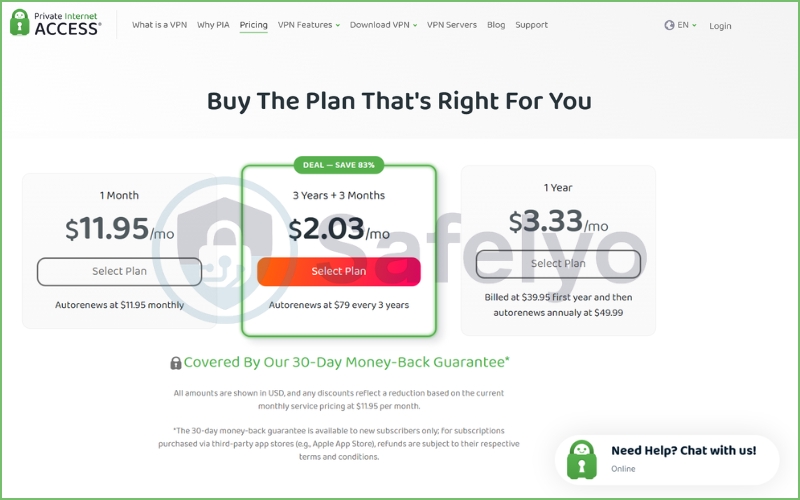
If you are not ready to commit, the rolling monthly plan will cost you $11.95 per month.
To be completely honest, this is fairly standard industry pricing. It is not a bad deal if you just need a VPN for a quick business trip or want to test the service for a few weeks without putting down a large chunk of change. However, compared to their other options, paying month-to-month offers the least value.
12.2. Long-term plans
This is where PIA practically gives its service away. The discounts on their extended subscriptions are massive, making it one of the cheapest top-tier VPNs on the market.
- 1-year plan: Drops the price to $3.33 per month. You are billed $39.95 upfront for the first year (which then autorenews at $49.99 annually).
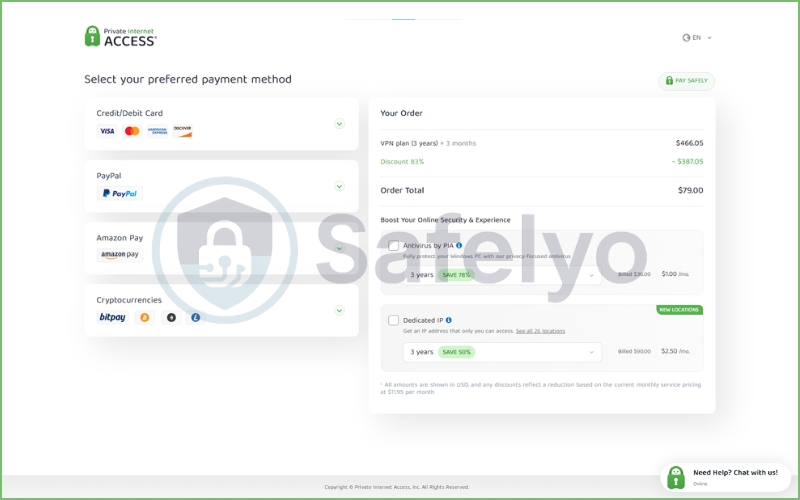
- 3-year plan (+ 3 months free): This is their flagship deal, saving you 83%. It plunges the cost down to just $2.03 per month. You pay $79 upfront, and it autorenews at $79 every three years.
At roughly two dollars a month, PIA heavily undercuts major rivals like NordVPN and ExpressVPN. When you factor in that a single subscription now covers unlimited simultaneous device connections, the value proposition for a large household or a tech enthusiast with a dozen devices is incredible.
12.3. Money-back guarantee
PIA offers an industry-standard 30-day money-back guarantee across all its subscription tiers.
I always consider this a mandatory feature for any reputable VPN. It gives you a full month to test the torrenting speeds, port forwarding, and streaming capabilities on your own home network. If it doesn’t meet your expectations, you can request a full refund.
Expert tip: Be mindful of where you buy the app.
As noted in their fine print, if you purchase the subscription through a third-party marketplace like the Apple App Store, your refund is subject to Apple’s policies, which can sometimes be a hassle. I always recommend buying directly from the provider’s website.
12.4. Payment options
For a privacy-focused company, flexible payment methods are essential. PIA does not disappoint here.
You can pay using standard methods like major credit cards (Visa, Mastercard, Amex) and PayPal. However, if you want to maximize your anonymity and prevent the subscription from being linked to your personal bank account, they also accept various cryptocurrencies (including Bitcoin, Ethereum, and Litecoin). You can even pay using third-party gift cards from major retailers to keep your identity completely off the books.
13. What users say about PIA on social platforms
My controlled speed tests and security audits provide a solid baseline, but a VPN’s true colors often show after months of daily use. To get a broader perspective, I dug into public forums and review sites to see how actual paying customers feel about Private Internet Access.
Note: All metrics, ratings, and screenshots referenced in this section were collected on March 6, 2026.
13.1. Reddit user feedback
If you want unfiltered, brutally honest opinions about a VPN, you go to Reddit. In communities like r/VPN and r/Piracy, PIA holds a very distinct reputation.
The heavy torrenters absolutely love it. You will find countless threads praising its port forwarding capabilities, with users noting that it is one of the few VPNs that actually helps them maintain good seeding ratios on private trackers. They also frequently commend the open-source nature of the Linux client.
However, Reddit users are also highly critical of corporate structures. You will regularly see debates about PIA’s US jurisdiction and its parent company, Kape Technologies. While the Deloitte audit quieted many critics, a vocal minority on Reddit still refuses to use any US-based privacy tool out of principle. Furthermore, some users report experiencing annoying CAPTCHA loops when searching Google while connected to heavily populated PIA servers.
13.2. Trustpilot reviews
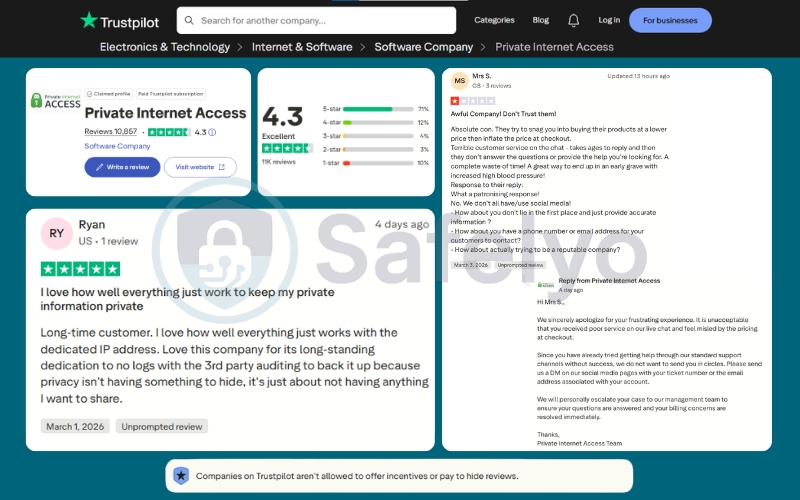
Moving over to Trustpilot, the broader consumer sentiment is highly positive. As of March 2026, PIA holds a strong 4.3 out of 5 stars (“Excellent”) based on 10,857 reviews. An impressive 71% of users gave the service a perfect 5-star rating.
Looking closely at the recent feedback, users like “Ryan” specifically praise the company’s long-standing dedication to its no-logs policy and the reliability of their dedicated IP feature. People appreciate the peace of mind that comes with third-party audits.
On the flip side, the 1-star reviews (which make up about 10% of the total) usually revolve around billing or customer service friction. For example, a recent negative review complained about confusing pricing at checkout and slow response times via live chat. However, it is worth noting that PIA’s customer support team actively replies to these negative reviews on Trustpilot, attempting to escalate and resolve the issues directly.
13.3. App Store & Google Play feedback
Mobile users represent a massive chunk of PIA’s user base, and the app store metrics reflect a highly satisfied audience.
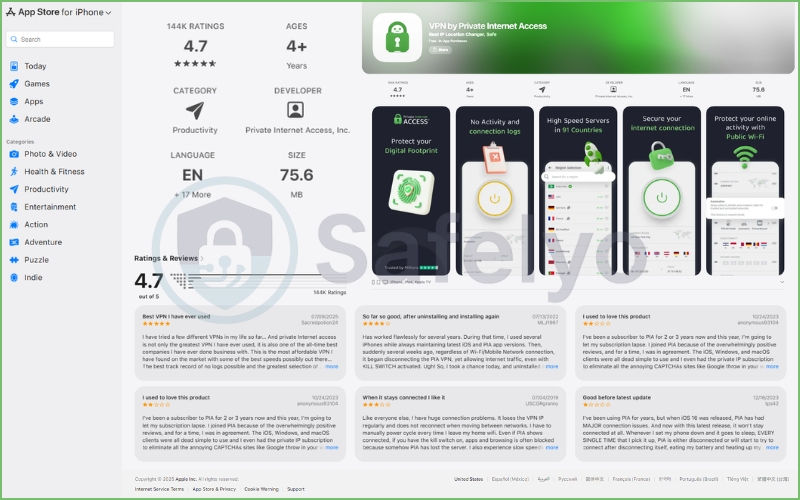
On the Apple App Store, the VPN boasts a stellar 4.7 out of 5 stars across a massive 144,000 ratings. iOS users frequently praise the clean interface and the reliable ad-blocking feature. However, looking at recent comments, a few users noted that recent iOS updates occasionally caused the kill switch to glitch or the VPN to randomly disconnect when the phone went to sleep.
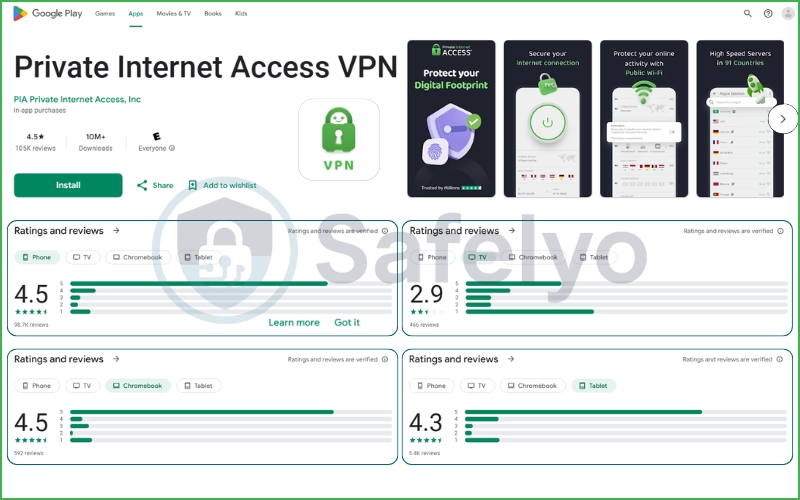
On the Google Play Store, the numbers are equally impressive. The app has over 10 million downloads and holds a 4.5 out of 5-star rating from over 105,000 reviews for the mobile phone version. Interestingly, Google Play’s device-specific breakdown reveals a weak spot: while phone and Chromebook users rate it highly, the Android TV version sits at a poor 2.9 stars, indicating that PIA needs to drastically optimize its interface for smart TVs.
13.4. Overall sentiment analysis
When you combine the hardcore feedback from Reddit with the mainstream reviews on Trustpilot and the app stores, a clear picture emerges.
Private Internet Access is widely respected as a highly capable, technically sound product. Users trust its privacy claims because of its open-source transparency and court-proven history. The core technology (especially for downloading and general browsing) rarely receives complaints.
The friction points almost entirely relate to the user experience surrounding the tech: slow customer support responses, occasional billing confusion, and bugs on secondary platforms like Android TV or after major iOS updates. Overall, the community trusts PIA with their data, even if they occasionally get frustrated with the software’s quirks.
14. PIA vs alternatives comparison
While Private Internet Access is a powerhouse for specific use cases, it is not the only top-tier VPN on the market. Depending on your exact needs (like flawless streaming or a strict offshore jurisdiction), one of its main competitors might actually be a better fit.
To help you make a final decision, here is a quick visual breakdown of how these four heavyweights compare on paper:
| VPN Provider | Best For | Speed Impact | Battery Impact | Standout Android Feature | Price |
|---|---|---|---|---|---|
| NordVPN | Overall Performance | Minimal (<5% drop) | Low | Advanced Split Tunneling | From $3.39/mo |
| ExpressVPN | Ease of Use | Low (<10% drop) | Moderate | One-Tap Shortcuts | From $2.44/mo |
| Surfshark | Best Value | Low (<10% drop) | Low | GPS Location Spoofing | From $1.99/mo |
| CyberGhost | Streaming | Moderate | Moderate | Dedicated Streaming Servers | From $2.19/mo |
| Private Internet Access | Customization | Moderate | Low | Granular App Settings (MACE) | From $2.03/mo |
Here is how PIA stacks up against the three biggest names in the industry based on my direct testing.
14.1. PIA vs NordVPN
This is the ultimate clash of priorities. NordVPN is arguably the most popular VPN in the world, and for good reason. Thanks to its proprietary NordLynx protocol, it consistently beats PIA in raw speed tests. Furthermore, NordVPN is based in Panama (a privacy haven outside the Five Eyes) and unlocks almost every global streaming library with ease.
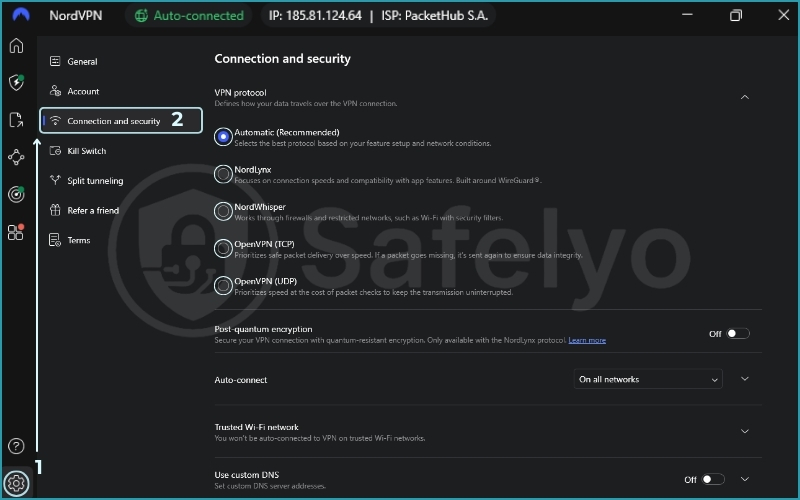
However, PIA strikes back hard in two areas: price and torrenting. PIA is significantly cheaper on long-term plans. More importantly, NordVPN strictly blocks port forwarding on its network, whereas PIA embraces it. If you are a heavy P2P user, PIA is the better tool. If you want blazing-fast streaming and ultimate peace of mind regarding jurisdiction, choose NordVPN.
14.2. PIA vs ExpressVPN
ExpressVPN is the premium, luxury option of the VPN world. It is incredibly easy to use, has beautiful apps across all platforms, and features proprietary obfuscation that actually works in China. If you want a VPN where you just click a single button and everything magically works (including 4K Netflix streaming and bypassing deep packet inspection), ExpressVPN is superior.
The catch? It is incredibly expensive compared to PIA. You are paying a premium for that frictionless experience. Additionally, ExpressVPN only allows 14 simultaneous connections (compared to PIA’s unlimited) and, like NordVPN, it does not support port forwarding. PIA is the better choice for budget-conscious techies who like to tinker under the hood.
14.3. PIA vs Surfshark
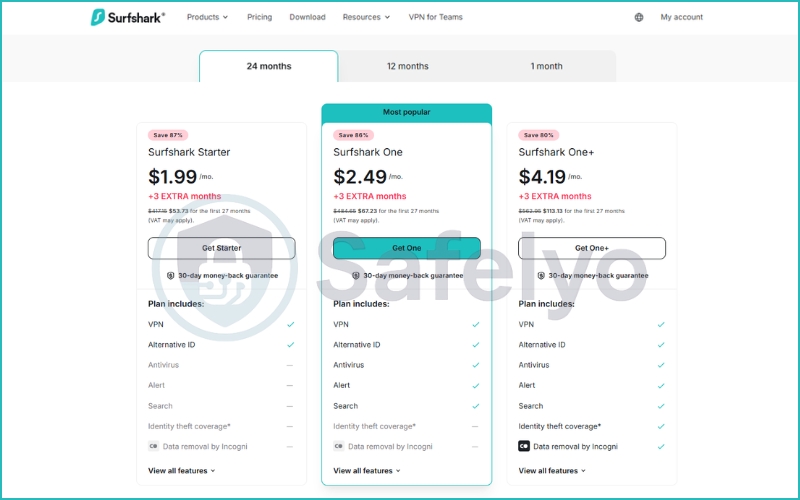
Surfshark is PIA’s closest rival in the “budget-friendly, unlimited connections” category. Both VPNs will cost you roughly $2 to $3 a month on a long-term plan, and both let you protect every device in your house simultaneously.
The difference lies in their target audiences. Surfshark is built for the mainstream user. It is much better at unblocking international streaming services and has a more modern, colorful app interface. PIA, on the other hand, is for the privacy purist. While Surfshark is secure, PIA has the trump card of a court-proven no-logs history and 100% open-source apps.
15. Verdict – Is Private Internet Access worth it?
After weeks of testing, analyzing court documents, and comparing it against the biggest names in the industry, my conclusion on Private Internet Access is clear: It is a phenomenal tool, but it is absolutely not for everyone.
This is a VPN built by tech enthusiasts, for tech enthusiasts. It does not hide its complexity behind a single, colorful “Connect” button. Instead, it gives you the keys to the engine and lets you optimize your connection exactly how you want it.
15.1. Who PIA is best for
If you fall into any of these categories, PIA is arguably the best value on the market right now:
- Budget users: At roughly two dollars a month for the three-year plan, it is incredibly difficult to find this level of premium security for less.
- Torrent users: This is PIA’s undisputed kingdom. With unlimited bandwidth, P2P support on all servers, and the crucial addition of dynamic port forwarding, it is the ultimate tool for maintaining ratios on private trackers.
- Advanced VPN users: If you understand what MTU packet sizes, custom DNS, and split tunneling rules do, you will love the granular control PIA’s desktop apps offer.
- Privacy enthusiasts: Despite its US headquarters, PIA is one of the few VPNs whose no-logs policy has been repeatedly proven in federal court. Add in 100% open-source apps and a recent Deloitte audit, and its transparency is unmatched.
15.2. Who should avoid PIA?
However, if you fit these profiles, you will likely find PIA frustrating and should look at competitors like NordVPN or ExpressVPN:
- Beginners: The interface, while powerful, can be overwhelming. If you just want a simple app that works instantly without any configuration, PIA might feel too complex.
- Users focused on streaming: While it handles US Netflix and Disney+ perfectly fine, its ability to reliably unblock international libraries (like BBC iPlayer or Amazon Prime) is inconsistent and often requires annoying server-hopping.
- Users concerned about US jurisdiction: If you are a high-risk journalist, activist, or simply a privacy purist who refuses to use any product based in a Five Eyes country, PIA’s Denver headquarters will always be a dealbreaker, regardless of their court history.
15.3. Final recommendation
So, is Private Internet Access worth it in 2026? Yes, absolutely – provided you understand what you are buying.
It is a rugged, highly customizable, and incredibly affordable privacy tool. It won’t win any awards for sleek design or effortless global streaming, but when it comes to raw performance, P2P capabilities, and proven, battle-tested security, it remains a top-tier contender.
16. FAQs about Private Internet Access VPN
Is Private Internet Access safe?
Yes, it is highly secure. Despite being headquartered in the United States (a member of the Five Eyes intelligence alliance), PIA uses military-grade AES-256 encryption and secure protocols like WireGuard and OpenVPN. Furthermore, its entire server network is RAM-only, meaning your browsing data is physically wiped every time a server is rebooted. Its apps are also 100% open-source, allowing anyone to inspect the code for vulnerabilities.
Does PIA keep logs?
No, it does not. Private Internet Access has one of the most rigorously tested no-logs policies in the industry. They have been subpoenaed by the US government multiple times in federal court and successfully proved that they had absolutely no user data, IP addresses, or connection timestamps to hand over. Recently, this policy was also verified by an independent audit conducted by Deloitte.
Is PIA good for torrenting?
It is arguably one of the best VPNs on the market for P2P file sharing. Unlike many top-tier competitors, PIA supports torrenting across its entire global server network without restrictions. More importantly, it offers dynamic port forwarding, a crucial feature that allows you to connect to more peers, bypass NAT firewalls, and significantly increase your download and upload speeds.
Does PIA work with Netflix?
Yes, but with some limitations. If you simply want to unblock the US Netflix library while traveling abroad, PIA’s dedicated US streaming servers handle it effortlessly. However, if your goal is to constantly switch regions to watch international catalogs (like Netflix UK, Canada, or Japan), PIA is often inconsistent and prone to proxy errors.
Who owns Private Internet Access?
PIA is currently owned by Kape Technologies, a UK-based cybersecurity company that acquired the VPN in 2019. Kape is a major player in the privacy space and also owns other popular VPN brands like ExpressVPN and CyberGhost. While the parent company faced some controversy in its early days (under the name Crossrider) due to its involvement in the ad-tech industry, it has since fully pivoted to cybersecurity and relies on strict third-party audits to ensure user trust.
17. Conclusion
After Safelyo running the numbers, it is clear that Private Internet Access remains an absolute powerhouse for torrenters and tech enthusiasts who want granular control over their connection without breaking the bank. While its US jurisdiction and inconsistent streaming performance might deter some, its court-proven privacy record and open-source transparency make it a highly trustworthy tool.
If PIA doesn’t quite fit your specific needs – perhaps you need flawless international streaming or a strict offshore jurisdiction – do not worry. We have put dozens of other top providers through this exact same rigorous testing process. Head over to our VPN reviews category to explore more hands-on evaluations, compare the biggest names in the industry, and find the perfect privacy shield for your daily setup.