VPN server vs VPN client: Understanding the distinction between these two is the first step to mastering your digital privacy. While many users mistakenly think a VPN is just a simple “app” on their phone, it is actually a complex, two-part system. Especially if you are currently staring at your router’s configuration page, unsure which option to pick, you have come to the right place. This is true whether you’re choosing between “VPN Client Mode” and “VPN Server Mode”.
If you are confused about which mode you need to configure, here is the quick breakdown:
- What is the core difference?
→ VPN Client initiates the connection (The Shield). VPN Server receives it (The Gateway). - Which do I need for privacy?
→ You need a VPN Client connecting to a commercial provider to mask your IP and hide from your ISP. - When to use Router Client Mode?
→ Use this to protect devices that can’t run apps (like Smart TVs or Consoles). - When to use Router Server Mode?
→ Use this only when you need to configure a remote access VPN to securely reach your home network (NAS/Cameras) while traveling. - Does a home server hide my internet history?
→ No. Your traffic still uses your home IP. For true anonymity, use a commercial VPN.
I will break down the core differences and help you choose the exact setup you need. Let’s clear up the confusion right in this article.
1. VPN Server vs VPN Client: Side-by-side comparison
If you are in a rush and just want the cheat sheet without the technical jargon, here is the TL;DR version.
Think of the relationship between a VPN server and a VPN client like a secure courier service.
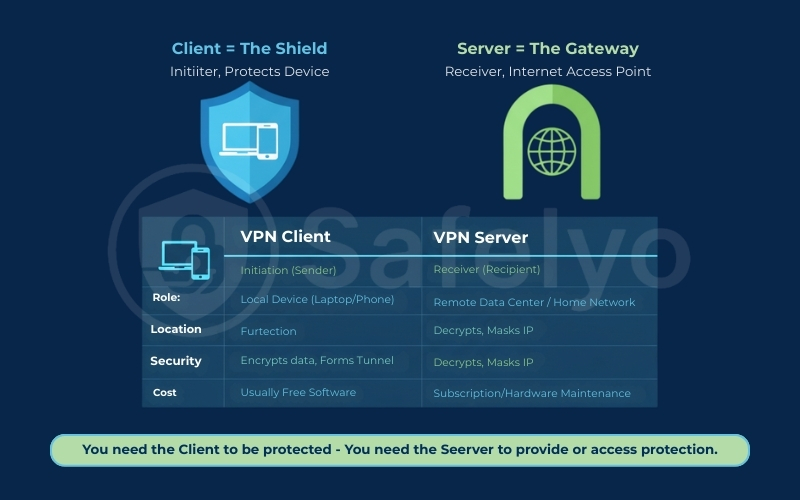
- The VPN client acts as The Shield. It lives on your device (laptop, phone, or tablet), initiating the connection and packing your data into a secure, locked box.
- On the other end, the VPN server acts as the VPN gateway. It receives that locked box, unlocks it, and sends your requests out to the open internet on your behalf.
Here is a breakdown of how they compare side-by-side:
| Feature | VPN Client | VPN Server |
| Primary Role | Initiator: Starts the connection request. | Receiver: Waits for and accepts connections. |
| Location | Local: Installed on your personal device (PC, Mobile, Router). | Remote: Located in a data center or your home network to facilitate remote access. |
| Security Function | Encrypts: Scrambles your data before it leaves your device. | Decrypts & routes traffic (always true) Masks your IP with the server’s IP (commercial VPN = shared IP; home VPN = your home IP) |
| Cost | Software: Usually a free app to download. | Service/Hardware: Requires a subscription or maintenance. |
You can’t have one without the other. They are two halves of the same secure tunnel. Most of the time, when you buy a VPN subscription, such as NordVPN or ExpressVPN, you are paying for access to their high-speed servers. You use their free client app to connect.
Which one do you actually need? (The quick answer)
Before we dig into the technical mechanics, let’s simplify this based on your actual goal. 99% of users fall into one of these three categories. Find yours to stop guessing:
“I want to watch Netflix US, hide my browsing from my ISP, or stay safe on public Wi-Fi”.
→ You need a VPN Client. Specifically, you need to download a VPN App (Client) from a commercial provider like NordVPN or ExpressVPN.
“I want to access my files, printer, or security cameras at home while I am traveling”.
→ You need a VPN Server. Specifically, you need to set up a “Home Server” on your router or computer, and then use a Client on your phone to connect back to it.
“I am looking at my Router settings and don’t know which tab to click”.
→ Check the “Router Dilemma” section below. Most users want Client Mode (to protect the house), but check our detailed Decision Checklist below to be sure.
The Bottom Line: If you are still asking, “Do I need a VPN client?”, the answer is almost certainly yes for personal privacy.
- You need a Client when you want to be protected (e.g., browsing on public Wi-Fi).
- You need a Server to provide that protection or to act as a secure destination for your traffic (e.g., accessing your home network from abroad).
2. What is a VPN Client?
Technically speaking, a VPN client is the software or hardware that initiates the “handshake” to establish a protected connection. I like to think of it as the Encryption Initiator. When you tap that big “Connect” button, the client goes to work immediately.
It performs two critical tasks: Tunneling and Encryption.
- First, it utilizes advanced encryption standards to build a secure connection through the public internet to the server.
- Second, it scrambles every single packet of data, leaving your device using complex protocols (like WireGuard or OpenVPN).
This ensures privacy protection even if someone intercepts your data to exploit network vulnerabilities or launch cyber threats. Additionally, most apps include a kill switch to cut the internet if the connection drops, preventing accidental leaks. Without the client doing this heavy lifting on the front end, the server would have nothing secure to receive.
2.1. Is a VPN Client always an app?
This is a common misconception: Hardware vs. Software. While most of us are familiar with the user-friendly apps we install on Windows, macOS, or Android, a VPN client isn’t restricted to just being “software”.
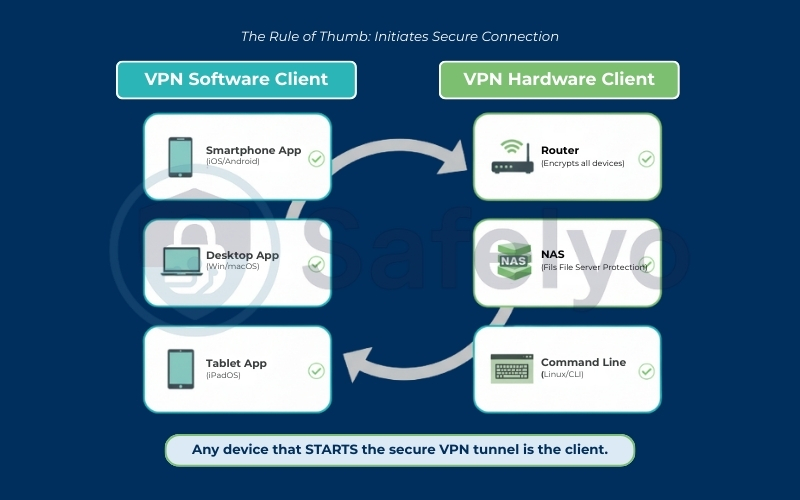
- Software Clients: These are the apps you download (e.g., the NordVPN or ExpressVPN app). They are easy to use and come packed with essential security features optimized for protecting individual devices.
- Hardware Clients: This is where things get interesting for smart home enthusiasts. A Router can act as a VPN client. When configured in “Client Mode”, your router encrypts traffic for every device connected to it – from your smart fridge to your PlayStation 5. Similarly, a NAS (Network Attached Storage) or even a command-line interface (CLI) on a Linux machine can function as a client.
→ The rule of thumb: If a device starts the protected connection, it is acting as the client, regardless of whether it has a screen or an app interface.
2.2. VPN Client vs. Proxy vs. Browser Extension
I often see users mixing these up, but the difference is night and day in terms of security.
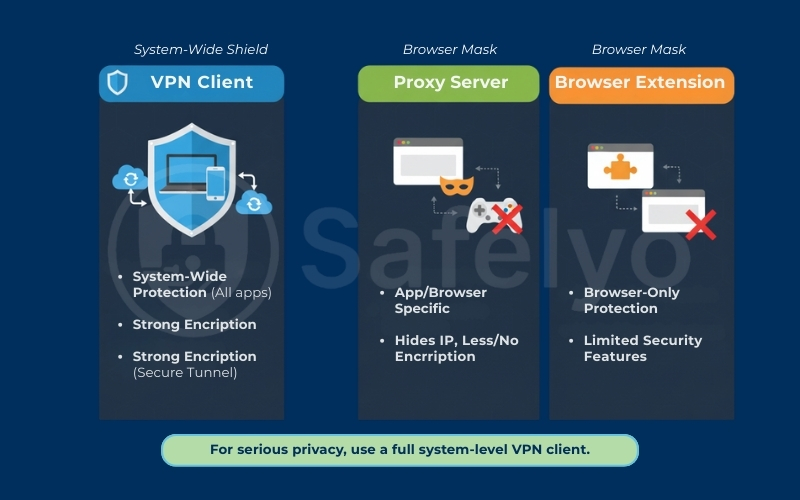
- VPN Client: This provides system-wide protection. Once connected, everything that connects to the internet – your browser, your email app, your Spotify updates, and your background system processes – goes through the encrypted tunnel.
- Proxy / Browser Extension: These usually only work within the specific browser (like Chrome or Firefox). They act more like a mask than a shield. They might hide your Internet Protocol address for that specific web page, but they rarely offer the robust encryption of a full VPN client. If you open a separate app (like a game or torrent client), a proxy won’t protect it.
Safelyo Tip: If you are serious about privacy, don’t rely solely on a free browser extension. Always opt for a full system-level VPN client to ensure no data leaks out unprotected.
3. What is a VPN Server?
If the client is the sender, the VPN server is the destination hub that makes the core mechanics happen. Technically, it is a robust computer (physical or virtual) that stays online 24/7, configured to accept inbound connections from authorized clients.
It runs specialized software supporting modern protocols like WireGuard or OpenVPN, as well as legacy options like L2TP, to manage the heavy traffic flow. While older VPN protocols like PPTP and L2TP are less common today due to security concerns, modern servers prioritize faster and safer options.
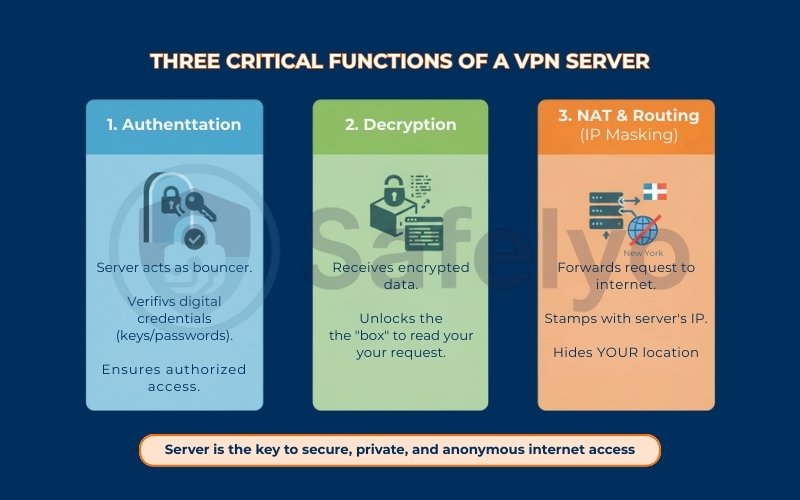
The server performs three critical functions that define the VPN experience:
- Authentication: Before letting anyone in, the server acts as a bouncer. It verifies your digital credentials – often requiring keys, passwords, or multi-factor authentication – to ensure only authorized users can establish a tunnel.
- Decryption: Once the handshake is successful, the server receives the encrypted data packets from your client and decrypts them. It “unlocks” the box so it can read your request (e.g., “Load Netflix.com”).
- NAT & Routing (The Masking Act): This is the privacy feature most people care about. The server takes your decrypted request and forwards it to the internet. Crucially, it stamps the request with its own Internet Protocol address, not yours. To the website you visit, you look like you are browsing from the server’s location (say, New York), even if you are actually sitting in Hanoi.
It is also important to distinguish between the two main types of servers.
- Commercial Servers (like those from NordVPN or Surfshark) are “shared”, meaning thousands of users use the same IP, providing excellent anonymity through the crowd effect.
- In contrast, a Private Server, which you host yourself on a router or VPS, usually has a “dedicated IP“. This setup is less about anonymity and more about secure remote access to your own files.
4. How the VPN server and the VPN client work together
A VPN operates as a symbiotic system – each component relies on the other. You can have the most expensive VPN client software installed, but without a server to connect to, it remains a silent application. On the other hand, a server without clients is merely an idle computer waiting for a request.
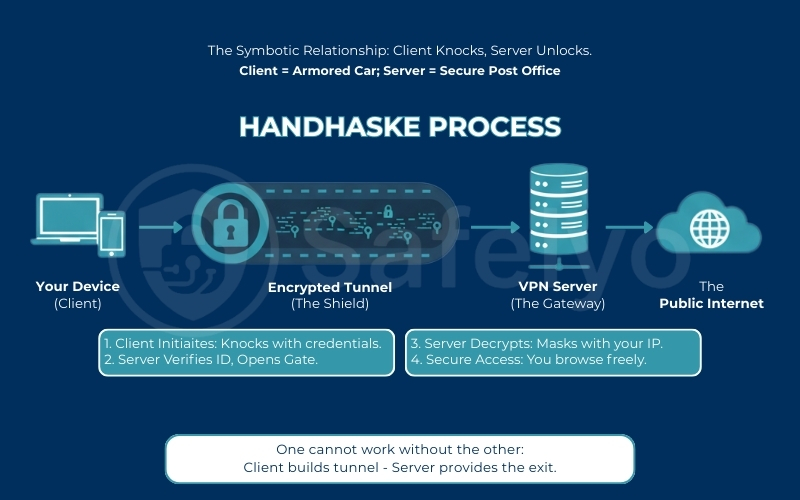
To truly understand how VPN work, we must look at the data transmission process that ensures data integrity from point A to point B. The magic happens during a process technically called the Handshake. Let’s break it down simply:
- The Knock: The Client sends a request to the Server’s public IP address, saying, “I want to connect”.
- ID Check: The Server asks for credentials (username/password or digital certificates). This is the verification phase.
- The Tunnel: Once verified, they agree on a secret code (encryption keys). An encrypted tunnel is instantly built between them.
In a properly configured VPN, DNS queries should also go through the tunnel. If not, DNS leaks can expose the sites you visit.
Think of it this way: Imagine your data is a letter. The Client is an armored truck that picks up your letter, locks it in a titanium safe, and drives it through a dangerous city (the internet). It arrives at a secure fortress – the Server. The fortress guards verify the truck driver, unlock the safe, take your letter, and mail it out to the world with a different return address.
5. Real-world scenarios: When do you use which?
Understanding the technical definitions is useful, but let’s translate that into practical, everyday situations. The decision usually comes down to the direction of your data and what you are trying to achieve.
Scenario A: You Need a Client
THE CONTENT CONSUMER
This is the most common use case for 90% of users.
- The Goal: You want to watch the US library of Netflix while traveling, or you simply want to browse the web without your Internet Service Provider (ISP) tracking your history.
- The Solution: You act as the VPN Client. You download an app from a commercial provider (like NordVPN or Surfshark). You connect to their powerful VPN Servers located around the world.
→ In this scenario, you are “renting” the server to hide your identity and change your virtual location.
Scenario B: You Need a Server
THE REMOTE TRAVELER
This is for the tech-savvy users, remote workers, or smart home owners.
- The Goal: You are sitting in a hotel room in Tokyo, but you need to access important files stored on your NAS back home. You also want to check your home security cameras securely without exposing them to the open web.
- The Solution: You must set up a VPN Server at your house (often on your router or a Raspberry Pi). Then, using your laptop in the hotel as the Client, you “dial in” back home. While large companies might use complex SASE architectures for this, a simple home server is sufficient for personal use.
This setup effectively acts as a personal remote access VPN, operating similarly to a corporate network that allows employees to securely reach internal resources from anywhere. For maximum security, businesses often combine this with multi-factor verification and SASE frameworks, but for home users, a simple server setup is usually sufficient.
→ Here, you own the server. The goal isn’t anonymity from the web, but a secure, encrypted tunnel back to your own private network.
6. The VPN client vs server router dilemma: Which mode do you need?
This is the exact point where most users get stuck. You log into your high-end router (like an Asus RT-AX88U or a TP-Link Archer), navigate to the VPN tab, and are greeted with two confusing tabs: VPN Client and VPN Server. Which one do you turn on?
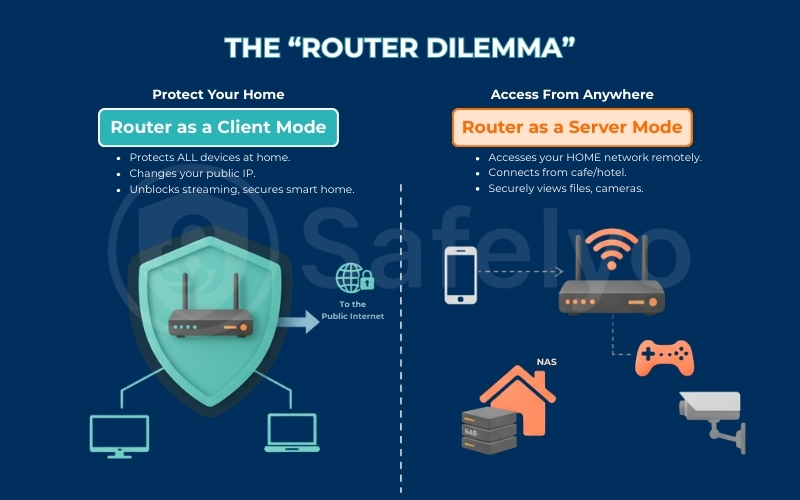
The confusion stems from the fact that modern routers are powerful enough to do both – sometimes even simultaneously. Understanding the direction of traffic is the key to unlocking their potential.
6.1. Router as a Client
When you configure your router in VPN Client Mode, you are essentially teaching it to log in to a commercial VPN service on your behalf.
Think of this as an “Umbrella of Protection”. Instead of installing a VPN app on every single phone, laptop, and tablet, the router creates a secure tunnel for the entire house.
- The Big Benefit: This is the only way to protect devices that cannot run VPN apps natively, such as Smart TVs, PlayStation/Xbox consoles, and IoT devices like smart bulbs.
- The Result: Every device connected to your Wi-Fi automatically gets a masked Internet Protocol address. If you set the router to a UK server, your Apple TV in the living room thinks it is in London.
Safelyo pro tip: Don’t slow down your whole house (Policy Routing)
Running a VPN on your router doesn’t have to kill your speed. Look for a feature called Policy Routing (or “VPN Director” on Asus routers). In the industry, this feature is often referred to as split tunneling, allowing you to separate traffic streams.
This allows you to be selective. You can force only your Smart TV through the VPN tunnel to unblock content. Meanwhile, your Gaming PC or work laptop can bypass it entirely to maintain maximum speed and low ping. This gives you the best of both worlds without compromising performance.
6.2. Router as a Server
Switching to VPN Server Mode flips the script entirely. Now, your router isn’t trying to go anywhere. It is waiting for you to call home.
By turning your router into a server, often using WireGuard or OpenVPN protocols, you establish a remote access VPN. This creates a secure, private doorway back into your home network from the outside world.
- The Big Benefit: This allows you to safely access your home devices, such as a NAS drive, a local printer, or security cameras. You can do this while sitting in a coffee shop halfway across the world.
- The Result: You connect your phone (acting as the client) to your home router. Your phone now acts as if it is on your home Wi-Fi, and your internet traffic is routed through your home internet connection (great for secure banking while traveling).
6.3. Safelyo’s quick decision checklist
If you are still weighing the options, use this decision matrix. Find your primary goal in the left column to instantly see which switch you need to flip on your router.
| I want to… | You need | Why? |
| Watch US Netflix/Hulu on my Smart TV | VPN Client Mode | The router spoofs the location for devices that can’t run VPN apps themselves. |
| Access my home NAS drive from a hotel | VPN Server Mode | You need an encrypted tunnel inbound to your home network for direct remote access to your files. |
| Protect my entire family from ISP tracking | VPN Client Mode | Encrypts all traffic leaving your house, ensuring total privacy for every device. |
| Check my home security cameras securely | VPN Server Mode | Allows you to view local camera streams without exposing them to the public internet. |
| Hide my IP address while gaming on Xbox/PS5 | VPN Client Mode | Consoles don’t support native VPN apps; the router handles the encryption for them. |
| Use public Wi-Fi safely on my phone | Option A (simple): VPN Client (commercial VPN) Option B (advanced): VPN Server Mode at home + phone as client | Connect your phone back to your home router to use your secure home internet connection instead of the risky hotel Wi-Fi. For most people, a commercial VPN app is the easiest and safer choice. |
Important Hardware Note
Running VPN Client Mode is mathematically intensive. If you enable this feature on a budget router, typically under $100, or on an older model with a weak CPU, your internet speed might drop significantly. For example, it could drop from 300 Mbps down to 20 Mbps. VPN Server Mode, on the other hand, is much lighter on resources and works fine on most modern routers.
7. Commercial VPN vs. Self-Hosted VPN: Security Trade-offs
Finally, the debate often shifts to: “Should I pay for a service or build my own?” This isn’t just about money; it’s about liability.
Commercial VPNs (The "Managed" Route)
When you subscribe to a service like NordVPN or ExpressVPN, you are essentially renting access to their massive infrastructure.
- The Pros: It is incredibly easy – just download and click. Providers focus heavily on user experience, handling the backend management and infrastructure scalability, so you don’t have to worry about server capacity. Crucially, you get “Crowd Anonymity”. Since thousands of users share the same server Internet Protocol address, your specific activity is buried in the noise, adding anonymity through shared IP, reducing simple IP-based tracking.
- The Trade-off: You have to trust the provider not to log your data (which is why reading audit reports is vital).
This is why independent security audits matter. In recent years, several major VPN providers have undergone third-party audits by firms such as PwC and Cure53 to verify their no-logs claims and infrastructure security.
Self-Hosted VPNs (The "DIY" Route)
This involves turning your home router or a rented Virtual Private Server into a VPN Server.
- The Pros: It is free (if using your own hardware) and you have total control. No third-party company ever sees your traffic.
- The Security Trap (Read Carefully): This is where many DIY enthusiasts stumble. When you host a server, you are the security administrator.
- If you forget to update your server software, you are vulnerable.
- If you misconfigure your firewall or leave the wrong port open, you are inviting hackers directly into your home network.
The Safelyo Verdict: Unless you are comfortable managing Linux firewalls and monitoring security patches, Commercial VPNs are significantly safer for the average user. They have teams of engineers working 24/7 to secure the server; you likely do not.
8. FAQs about the VPN server and the VPN client
Here are the direct answers to the most common questions users ask when distinguishing between these two critical components of network security.
What is the main difference between a client and a server?
The primary difference is in their roles: the VPN client acts as the initiator, while the VPN server serves as the receiver. The client initiates the connection and encrypts the data (functioning as a shield), whereas the server accepts the connection and decrypts the data (acting as a gateway to the internet).
What does a VPN client mean?
A VPN client refers to the software or hardware that you use to connect to a VPN service. It is responsible for authenticating your identity and encrypting your internet traffic before it leaves your device. Examples include the app on your iPhone, the software on your Windows PC, or a router configured in “Client Mode”.
What are VPN servers?
A VPN server is a remote computer or system configured to accept encrypted connections from VPN clients. It decodes the encrypted traffic, assigns it a temporary Internet Protocol address, and forwards your request to the website or service you are trying to access.
What is the connection between a VPN client and a VPN server called?
This protected connection is technically called a VPN Tunnel (or Encrypted Tunnel). It acts like a protected pipe within the public internet, ensuring that data traveling between the client and the server remains invisible and inaccessible to outsiders.
Can a device be both a VPN Client and a VPN Server?
Yes. High-end routers (like those from Asus or Synology) can run both modes simultaneously. For example, your router can act as a Client by routing home traffic to a NordVPN server for privacy. It can also function as a Server, allowing you to connect back to your home network from a hotel.
Do I need a VPN Server at home for privacy?
No. Configuring a VPN server at home allows you to securely access your files remotely, but it does not hide your identity from the internet. Your traffic still exists through your home ISP. To mask your Internet Protocol address and browse anonymously, you need to connect to a Commercial VPN Server (hosted by a provider).
Is setting up a VPN Server difficult?
It depends on the method. On modern consumer routers, it is very easy – often just a few clicks in the settings menu. However, setting up a dedicated VPN server manually on a VPS or Linux machine requires advanced technical knowledge of command lines and firewalls.
Does a VPN client hide my browsing history from my employer or school?
It depends on the device. If you are using your personal phone on the company or school Wi-Fi, then yes, the VPN client encrypts your traffic. This means the network administrator cannot see which websites you are visiting; they only see that you are connected to a VPN.
However, if you are using a work-issued laptop, the answer is likely No. Companies often install local monitoring software or root certificates on their devices that can record your screen or log activity before it even reaches the VPN encryption.
Can my ISP see that I’m using a VPN?
Yes, they can see that you’ve established an encrypted tunnel to a VPN server. Your Internet Service Provider (ISP) knows you are using a VPN because the data appears different (scrambled). However, they cannot view the contents of that traffic – they don’t know which websites you access, what files you download, or what videos you watch. They see the armored truck, but they cannot see the cargo inside.
9. Conclusion
To sum it up, the distinction is simple: Use a VPN client when you want to safely “go out” into the digital world, and a VPN server when you need to securely “come home” to your private network. While tech enthusiasts might enjoy the challenge of building their own servers, most users need a robust, reliable Client to stay protected. Don’t overcomplicate it – let the software do the heavy lifting for you.
Ready to secure your connection with our VPN Guides category? Check out the review of the best VPN services offering the most user-friendly clients for all your devices on Safelyo.